battery SKODA OCTAVIA 2006 Owner´s Manual
[x] Cancel search | Manufacturer: SKODA, Model Year: 2006, Model line: OCTAVIA, Model: SKODA OCTAVIA 2006Pages: 218, PDF Size: 5.48 MB
Page 93 of 218
Starting-off and Driving
Starting and stopping the engine
ä
Introduction
This chapter contains information on the following subjects:
Adjusting the steering wheel position 92
Electromechanical power steering 92
Electronic immobiliser 92
Ignition lock 93
Starting engine 93
Switching the engine off 93
WARNING
■ Never adjust the steering wheel when the vehicle is moving only when the
vehicle is stationary!
■ Maintain a distance of 25 cm 1
to the steering wheel
» Fig. 93 on page 92
- . Not maintaining this minimum distance will mean that the airbag system
will not be able to properly protect you - hazard!
■ The lever for adjusting the steering wheel must be locked whilst driving so
that the position of the steering wheel cannot accidently change during the
journey - risk of accident!
■ If the steering wheel is adjusted further towards the head, the protection
provided by the driver airbag in the event of an accident is reduced. Check
that the steering wheel is aligned to the chest. ■ When driving, hold the steering wheel with both hands firmly on the outer
edge in the 9 o'clock and 3 o'clock position. Never hold the steering wheel in
the 12 o'clock position or in any other way (e.g. in the middle or inner edge of
the steering wheel). In such cases, you could injure the arms, hands and head
when the driver airbag is deployed.
■ When driving, the ignition key must always be in the position 2
» Fig. 94 on
page 93 (ignition switched on) without the engine running. This position is
indicated by the warning lights coming on. If this is not the case, it could result
in unexpected locking of the steering wheel - risk of accident! WARNING (Continued)
■ Only pull the ignition key from the ignition lock when the vehicle has come
to a complete stop (by applying the handbrake). Otherwise the steering wheel
could block - risk of accident!
■ When leaving the vehicle, the ignition must always be removed. This is par-
ticularly important if children are left in the vehicle. Otherwise the children
could, for example, start the engine - risk of accident or injury!
■ Never leave the engine running in unventilated or closed rooms. The ex-
haust gases of the engine contain besides the odorless and colourless carbon
monoxide a poisonous gas - hazard! Carbon monoxide can cause unconscious-
ness and death. ■ Never leave the vehicle unattended with the engine running.
■ Never switch off the engine before the vehicle is stationary - risk of acci-
dent! CAUTION
■ The starter may only be operated (ignition key position 3
» Fig. 94 on
page 93), if the engine is not running. The starter or engine can be damaged if
the starter is activated when the engine is running. ■ Let go of the ignition key as soon as the engine starts otherwise the starter
could be damaged. ■ Avoid high engine revolutions, full throttle and high engine loads as long as the
engine has not yet reached its operating temperature - risk of damaging the en-
gine!
■ Do not tow start the engine - danger of damaging the engine! On vehicles with
a catalytic converter, unburnt fuel may get into the catalytic converter where it
may ignite. This in turn may damage the catalytic converter. The battery from an-
other vehicle can be used as a jump-start aid » page 185, Jump-starting.
■ Do not switch the engine off immediately at the end of your journey after the
engine has been operated over a prolonged period at high loads but leave it to
run at an idling speed for about 1
minute. This prevents any possible accumulation
of heat when the engine is switched off. For the sake of the environment
Do not warm up the engine while the vehicle is stationary. If possible, start your
journey as soon as the engine has started. Through this the engine reaches its
operating temperature more rapidly and the pollutant emissions are lower. £
91
Starting-off and Driving
Page 95 of 218
Ignition lock
Fig. 94
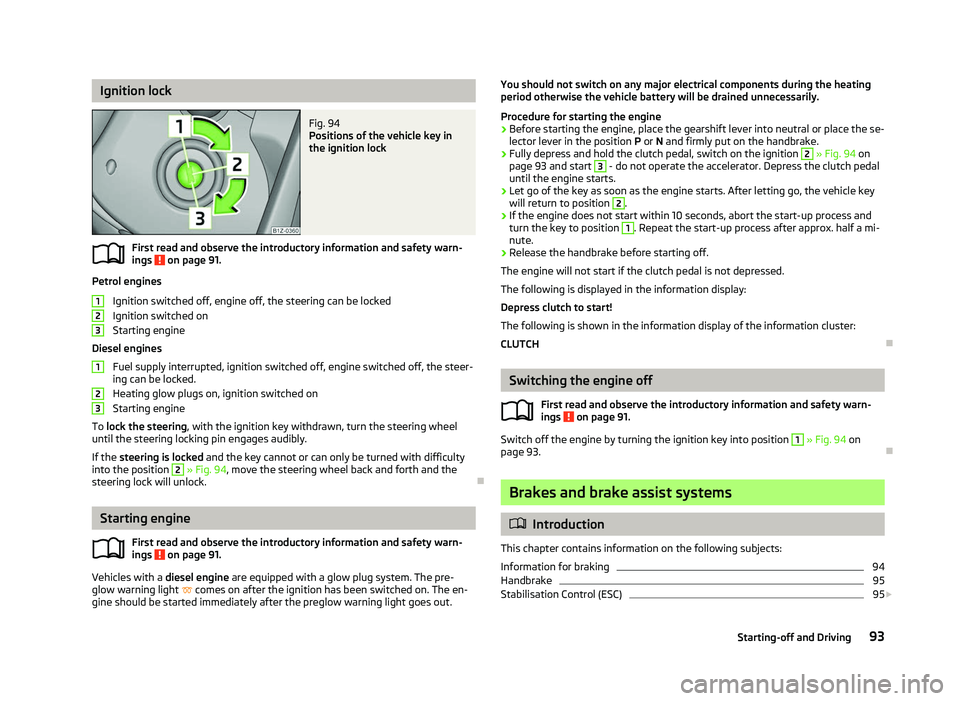
Positions of the vehicle key in
the ignition lock
First read and observe the introductory information and safety warn-
ings on page 91.
Petrol engines
Ignition switched off, engine off, the steering can be locked
Ignition switched on
Starting engine
Diesel engines Fuel supply interrupted, ignition switched off, engine switched off, the steer-
ing can be locked.
Heating glow plugs on, ignition switched on
Starting engine
To lock the steering , with the ignition key withdrawn, turn the steering wheel
until the steering locking pin engages audibly.
If the steering is locked and the key cannot or can only be turned with difficulty
into the position 2
» Fig. 94, move the steering wheel back and forth and the
steering lock will unlock. ÐStarting engine
First read and observe the introductory information and safety warn-
ings on page 91.
Vehicles with a diesel engine are equipped with a glow plug system. The pre-
glow warning light comes on after the ignition has been switched on. The en-
gine should be started immediately after the preglow warning light goes out.
ä 1
2
3
1
2
3
ä You should not switch on any major electrical components during the heating
period otherwise the vehicle battery will be drained unnecessarily.
Procedure for starting the engine
› Before starting the engine, place the gearshift lever into neutral or place the se-
lector lever in the position P or N and firmly put on the handbrake.
› Fully depress and hold the clutch pedal, switch on the ignition 2
» Fig. 94 on
page 93 and start 3
- do not operate the accelerator. Depress the clutch pedal
until the engine starts.
› Let go of the key as soon as the engine starts. After letting go, the vehicle key
will return to position 2
.
› If the engine does not start within 10
seconds, abort the start-up process and
turn the key to position 1
. Repeat the start-up process after approx. half a mi-
nute.
› Release the handbrake before starting off.
The engine will not start if the clutch pedal is not depressed.
The following is displayed in the information display:
Depress clutch to start!
The following is shown in the information display of the information cluster:
CLUTCH Ð Switching the engine off
First read and observe the introductory information and safety warn-
ings on page 91.
Switch off the engine by turning the ignition key into position 1
» Fig. 94
on
page 93. Ð Brakes and brake assist systems
ä
Introduction
This chapter contains information on the following subjects:
Information for braking 94
Handbrake 95
Stabilisation Control (ESC) 95
£
ä
93
Starting-off and Driving
Page 103 of 218
Conditions for the automatic engine shut down (stop phase):
›
The gearshift lever is in Neutral.
› The clutch pedal is not depressed.
› The driver has fastened the seat belt.
› The driver's door is closed.
› The bonnet is closed.
› The vehicle is at a standstill.
› The factory-fitted towing device is not electrically connected to a trailer.
› The engine is at operating temperature.
› The charge state of the vehicle battery is sufficient.
› The stationary vehicle is not on a steep slope or a steep downhill section.
› The engine speed is less than 1
200 rpm.
› The temperature inside the vehicle battery is not too low or too high.
› There is sufficient pressure in the braking system.
› The difference between the outdoor- and the set temperature in the interior is
not too great.
› The vehicle speed since the last time the engine was switched off was greater
than 3 km/h.
› No cleaning of the diesel particle filter takes place
» page 23.
› The front wheels are not turned excessively (the steering angle is less than 3/4
of a steering wheel revolution).
Conditions for an automatic restart (start phase):
› The clutch pedal is depressed.
› The max./min. temperature is set.
› The defrost function for the windscreen is switched on.
› A high blower stage has been selected.
› The START STOP button is pressed.
Conditions for an automatic restart without driver intervention: › The vehicle moves at a speed of more than 3 km/h.
› The difference between the outdoor- and the set temperature in the interior is
too great.
› The charge state of the vehicle battery is not sufficient.
› There is insufficient pressure in the braking system.
If the driver's seat belt is removed for more than 30 seconds or the driver's door is
opened during stop mode, the engine must be started manually with the key. The
following messages in the instrument cluster display must be observed. Messages in the instrument cluster display (valid for vehicles without
Information display)
ERROR START STOP Error in the START-STOP system
START STOP NOT POSSIBLE Automatic engine shut down is not
possible.
START STOP ACTIVE Automatic engine shut down (stop
phase)
SWITCH OFF IGNITION Switch off the ignition.
START MANUALLY Start the engine manually. WARNING
■ The brake servo unit and power steering only operate if the engine is run-
ning.
■ Never let the vehicle roll with the engine switched off. CAUTION
Deactivate the START-STOP system before driving through water on the
street » page 144. Note
■ Changes to the outdoor temperature can have an effect on the internal temper-
ature of the vehicle battery even after several hours. If the vehicle remains out-
doors for a long time in minus temperatures or in direct sunlight, it can take sev-
eral hours until the internal temperature of the vehicle battery reaches a suitable
temperature for proper operation of the
START STOP system.
■ If the Climatronic is running in automatic mode, under certain conditions, the
engine may not switch off automatically. Ð 101
Starting-off and Driving
Page 105 of 218
When parking on a level road surface, it suffices to engage selector lever position
P. When parking on a slope, the handbrake should be applied firmly before the
park position is selected. This ensures that there is no excessive pressure on the
lock mechanism and that it is subsequently easier to move the selector lever out
of position P.
If the selector lever position N is accidentally selected while driving, it is first nec-
essary to release pressure on the accelerator pedal and wait for the idling speed
of the engine to be reached before the selector lever can be engaged in the drive
position. ÐStarting-off and driving
First read and observe the introductory information and safety warn-
ings on page 102.
Starting off
›
Firmly depress and hold the brake pedal.
› Press the Shiftlock button (button in the selector lever handle), move the selec-
tor lever into the desired position » page 103 and then release the Shiftlock
button.
› Wait a moment until the gearbox has shifted (a slight engagement nudge can
be felt) 1)
.
› Release the brake pedal and accelerate.
Stop
› The selector lever position
N does not have to be selected when stopping for a
short time, such as at a cross roads. It is sufficient to hold the vehicle stationary
using the foot brake. The engine can, however, be allowed just to idle.
Parking
› Depress the brake pedal.
› Firmly apply the handbrake.
› Press and Shiftlock button in the selector lever, move the selector lever to
P
and then release the Shiftlock button. Ð
ä Selector lever positions
Fig. 102
Selector lever/information display: Selector lever positions
First read and observe the introductory information and safety warn-
ings on page 102.
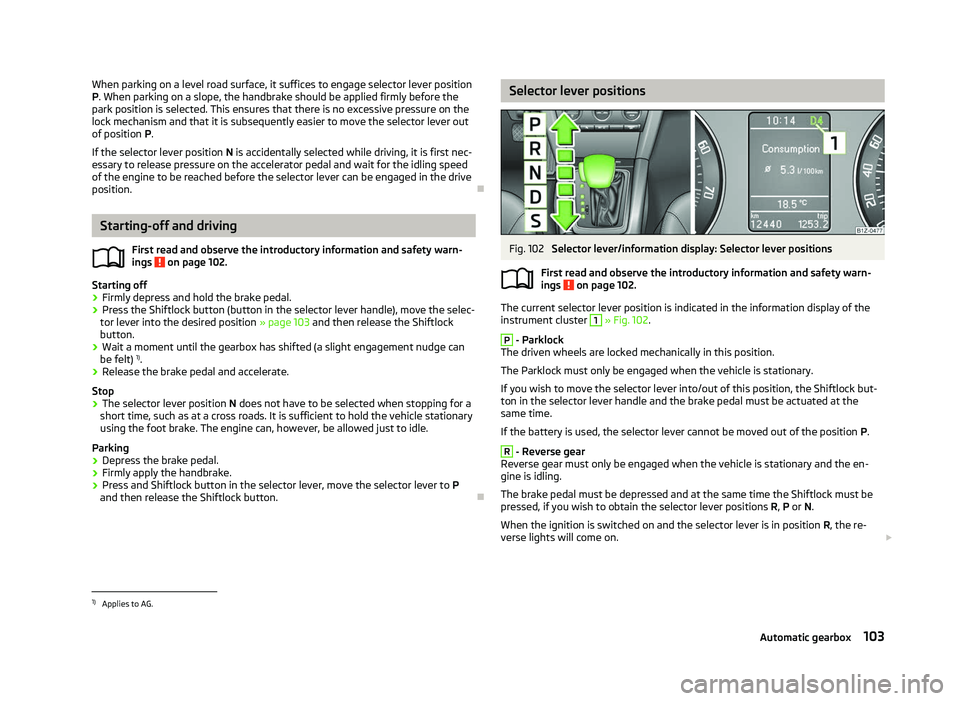
The current selector lever position is indicated in the information display of the
instrument cluster
1
» Fig. 102.
P
- Parklock
The driven wheels are locked mechanically in this position.
The Parklock must only be engaged when the vehicle is stationary.
If you wish to move the selector lever into/out of this position, the Shiftlock but-
ton in the selector lever handle and the brake pedal must be actuated at the
same time.
If the battery is used, the selector lever cannot be moved out of the position P. R
- Reverse gear
Reverse gear must only be engaged when the vehicle is stationary and the en-
gine is idling.
The brake pedal must be depressed and at the same time the Shiftlock must be
pressed, if you wish to obtain the selector lever positions R, P or N.
When the ignition is switched on and the selector lever is in position R, the re-
verse lights will come on. £
ä
1)
Applies to AG.
103
Automatic gearbox
Page 108 of 218
Emergency programme
First read and observe the introductory information and safety warn-
ings on page 102.
An emergency programme exists in the event of a fault in the system.
The gearbox operates in a corresponding emergency programme if there are
functional faults in the gearbox electronics. All of the display elements illuminate
or go out.
A functional fault can have the following effect:
› The gearbox only shifts into certain gears;
› The reverse gear
R cannot be used,
› The manual shift programme is switched off in emergency mode. Note
If the gearbox has switched to emergency mode, drive to a ŠKODA specialist ga-
rage to have the fault rectified. ÐSelector lever-emergency unlocking
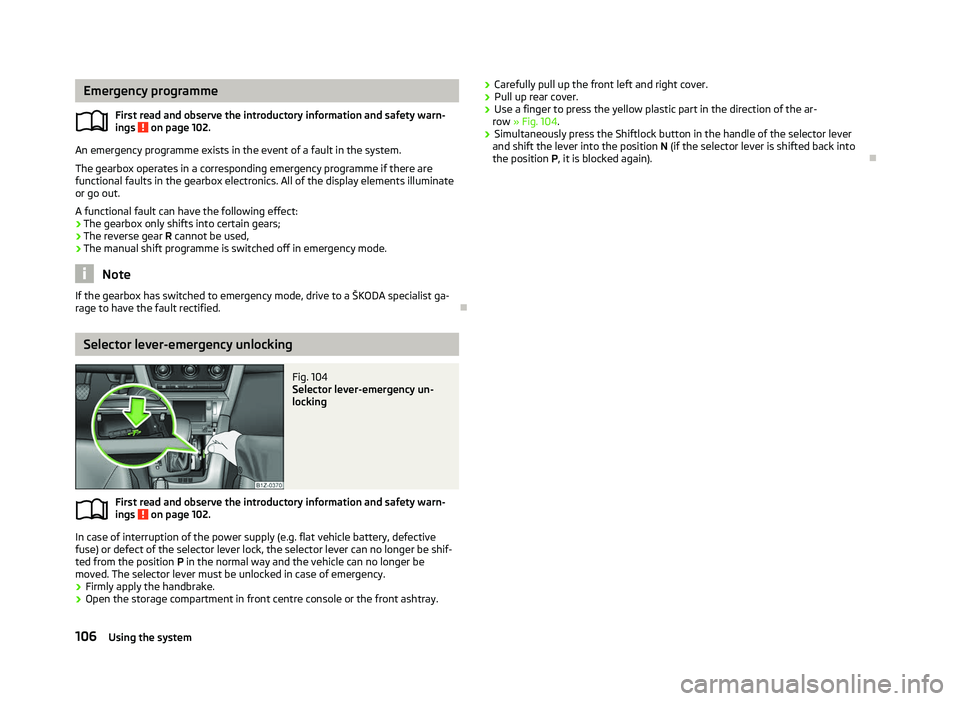
Fig. 104
Selector lever-emergency un-
locking
First read and observe the introductory information and safety warn-
ings on page 102.
In case of interruption of the power supply (e.g. flat vehicle battery, defective
fuse) or defect of the selector lever lock, the selector lever can no longer be shif-
ted from the position
P in the normal way and the vehicle can no longer be
moved. The selector lever must be unlocked in case of emergency.
› Firmly apply the handbrake.
› Open the storage compartment in front centre console or the front ashtray.
ä
ä
›
Carefully pull up the front left and right cover.
› Pull up rear cover.
› Use a finger to press the yellow plastic part in the direction of the ar-
row » Fig. 104.
› Simultaneously press the Shiftlock button in the handle of the selector lever
and shift the lever into the position N (if the selector lever is shifted back into
the position P , it is blocked again). Ð106
Using the system
Page 111 of 218

Symbols in the information display
Symbol Importance Valid for
Charge status of the phone battery a)
GSM II, GSM III
Signal strength a)
GSM II, GSM III
a phone is connected to the hands-free system. GSM II, GSM III when connected via the HFP profile
The hands-free system is visible to other devices. GSM II, GSM III when connected via the HFP profile
a phone is connected to the hands-free system. GSM III when connected via the rSAP profile
The hands-free system is visible to other devices. GSM III when connected via the rSAP profile
A multimedia unit is connected to the hands-free system. GSM II, GSM III
A UMTS network is available. GSM III
Internet connection via the hands-free system GSM III when connected via the rSAP profilea)
This function is only supported by some mobile phones. ÐPhone Phonebook
A phone phonebook is part of the hands-free system. This phone phonebook can
be used depending on the type of mobile phone.
After the first connection of the telephone, the system begins to load the phone
book from the phone and the SIM card into the memory of the control unit.
Each time the telephone has established a new connection with the hands-free
system, an update of the relevant phone book is performed. The updating can
take a few minutes. During this time the phone book, which was stored after the
last update was completed, is available. Newly stored telephone numbers are on-
ly shown after the updating has ended.
The update is interrupted if a telephone event (e.g. incoming or outgoing call,
voice control dialogue) occurs during the updating procedure. After the telephone
event has ended, the updating starts anew.
GSM II
The internal phonebook provides 2
500 free memory locations. Each contact can
contain up to 4 numbers.
On vehicles fitted with the Columbus navigation system, a maximum of 1 200 tel-
ephone contacts are shown on the display of this appliance.
If the number of contacts loaded exceeds 2 500, the phone book is not complete. GSM III
The internal phonebook provides 2
000 free memory locations. Each contact can
contain up to 5 numbers.
On vehicles fitted with the Columbus navigation system, a maximum of 1 000 tel-
ephone contacts are shown on the display of this appliance.
If the mobile phone's telephone book has more than 2 000 contacts, the follow-
ing message will appear in the information display:
Phone book not fully loaded Ð Universal telephone preinstallation GSM II
Introductory information
The universal telephone preinstallation GSM
II (“hands-free system”) includes a
convenience mode for the mobile phone via voice control, the multifunction
steering wheel, the adapter, radio or the navigation system.
The universal telephone preinstallation GSM II comprises the following functions.
› Phone Phonebook » page 109.
› Convenience operation of the telephone via the multifunction steering
wheel » page 108. £
109
Communication
Page 113 of 218

Note
■ If a suitable adapter is available for your mobile phone, only use your mobile
phone in the adapter inserted in the telephone mount so that the radiation in the
vehicle drops to a minimum. ■ Placing the mobile phone in the adapter inserted in the telephone mount en-
sures optimum sending and receiving power. ÐInserting the mobile phone and adapter
Fig. 106
Universal telephone preinstalla-
tion
Only one telephone mount is factory-fitted. An adapter for the mobile phone can
be purchased from ŠKODA Original Accessories.
Inserting the adapter and mobile phone › First of all push the adapter A
in the direction of the arrow
» Fig. 106 up to the
stop into the mount. Then press the adapter slightly downwards, until it locks
securely into position.
› Insert the mobile phone into the adapter A
(as specified in the instructions
from the manufacturer of the adapter).
Removing the adapter and mobile phone
› Simultaneously press the locks on the mount
» Fig. 106 and remove the adapter
with the mobile phone. CAUTION
Taking the mobile phone out of the adapter during the call can lead to interrup-
tion of the connection. When removing the mobile phone, the connection to the
factory-fitted antenna is interrupted, which reduces the quality of the transmit-
ting and receiving signal. The charging of the mobile phone battery is also inter-
rupted. Ð Managing telephone calls with the help of the adapter
Fig. 107
Principle sketch: single-button adapter/two-button adapter
Function overview of the »
Fig. 107 (PTT - “push to talk”) button on the adapt-
er:
› Switch on/off voice control;
› Accept/end a call.
On some adapters include the button SOS » Fig. 107
A
in addition to the button
. After pressing this button for 2 seconds, the number 112 (Emergency call) is
dialled. Note
On vehicles fitted with the Columbus navigation system , the buttons and
SOS do not work.
Ð
111
Communication
Page 161 of 218
WARNING (Continued)
■ If you notice that the lock is not properly engaged while driving, stop the ve-
hicle immediately and close the bonnet - risk of an accident!
■ Keep children clear of the engine compartment.
■ Do not touch any hot engine parts - risk of burns!
■ Never spill fluids on the hot engine. Such fluids (e.g. the antifreeze con-
tained in the coolant) may ignite!
■ Avoid short circuits in the electrical system - particularly on the vehicle's
battery.
■ Never touch the radiator fan while the engine is still warm. The fan might
suddenly start running! ■ Never open the end cover of the coolant expansion reservoir while the en-
gine is still warm. The cooling system is pressurized!
■ When opening the end cover of the coolant expansion reservoir, cover it
with a cloth to protect your face, hands and arms from hot steam or hot cool-
ant.
■ Do not leave any items such as cloths or tools in the engine compartment.
■ If you wish to work under the vehicle, you must secure the vehicle from roll-
ing away and support it with suitable supporting blocks: the car jack is not
sufficient for this - risk of injury!
■ If any inspection work has to be carried out when the engine is running,
there is an additional risk from rotating parts (e.g. V-belt, alternator, radiator
fan) and the high-voltage ignition system. The following must also be ob-
served: ■Never touch the electric wiring on the ignition system.
■ Always make sure that no jewellery, loose clothing or long hair can get
caught in rotating engine parts - hazard! Always remove any jewellery, tie
back long hair and wear tight fitting clothing before completing any work.
■ Additionally, the following warning instructions must be observed if work
has to be carried out on the fuel or electrical system. ■Always disconnect the vehicle battery from the electrical system.
■ Do not smoke.
■ Never work near open flames.
■ Always have a functioning fire extinguisher nearby. CAUTION
■ Always top up using the correct specification of fluids. This may result in major
operating problems and also vehicle damage!
■ Never open the bonnet using the locking lever - danger of causing damage. For the sake of the environment
In view of the environmentally friendly disposal of fluids, the specials tools and
knowledge required for such work, we recommend that fluids are changed by a
Škoda
Service Partner as part of the inspection service. Note
■ If you have any questions regarding the fluids, visit a
ŠKODA Service Partner.
■ Fluids with the correct specifications can be purchased from ŠKODA Original Ac-
cessories. Ð
159
Inspecting and replenishing
Page 162 of 218
Opening and closing the bonnet
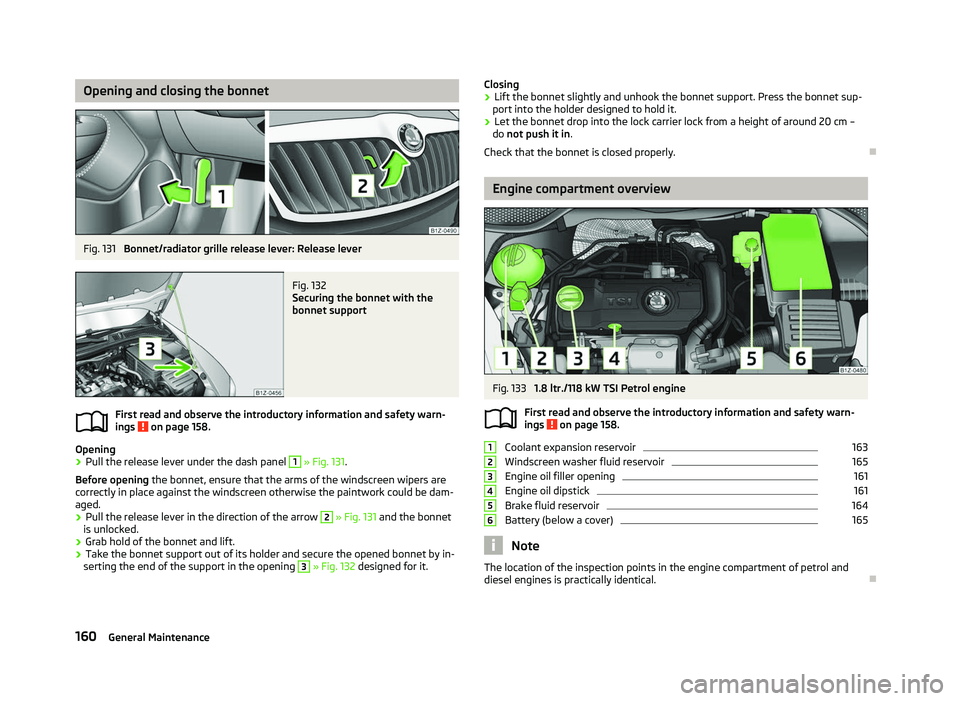
Fig. 131
Bonnet/radiator grille release lever: Release lever Fig. 132
Securing the bonnet with the
bonnet support
First read and observe the introductory information and safety warn-
ings on page 158.
Opening
›
Pull the release lever under the dash panel 1
» Fig. 131.
Before opening the bonnet, ensure that the arms of the windscreen wipers are
correctly in place against the windscreen otherwise the paintwork could be dam-
aged.
› Pull the release lever in the direction of the arrow 2
» Fig. 131 and the bonnet
is unlocked.
› Grab hold of the bonnet and lift.
› Take the bonnet support out of its holder and secure the opened bonnet by in-
serting the end of the support in the opening 3
» Fig. 132
designed for it.
ä Closing
› Lift the bonnet slightly and unhook the bonnet support. Press the bonnet sup-
port into the holder designed to hold it.
› Let the bonnet drop into the lock carrier lock from a height of around 20 cm –
do not push it in .
Check that the bonnet is closed properly. Ð Engine compartment overview
Fig. 133
1.8 ltr./118 kW TSI Petrol engine
First read and observe the introductory information and safety warn-
ings on page 158.
Coolant expansion reservoir 163
Windscreen washer fluid reservoir 165
Engine oil filler opening 161
Engine oil dipstick 161
Brake fluid reservoir 164
Battery (below a cover) 165
Note
The location of the inspection points in the engine compartment of petrol and
diesel engines is practically identical. Ð
ä 1
2
3
4
5
6
160
General Maintenance
Page 167 of 218
Windscreen washer system
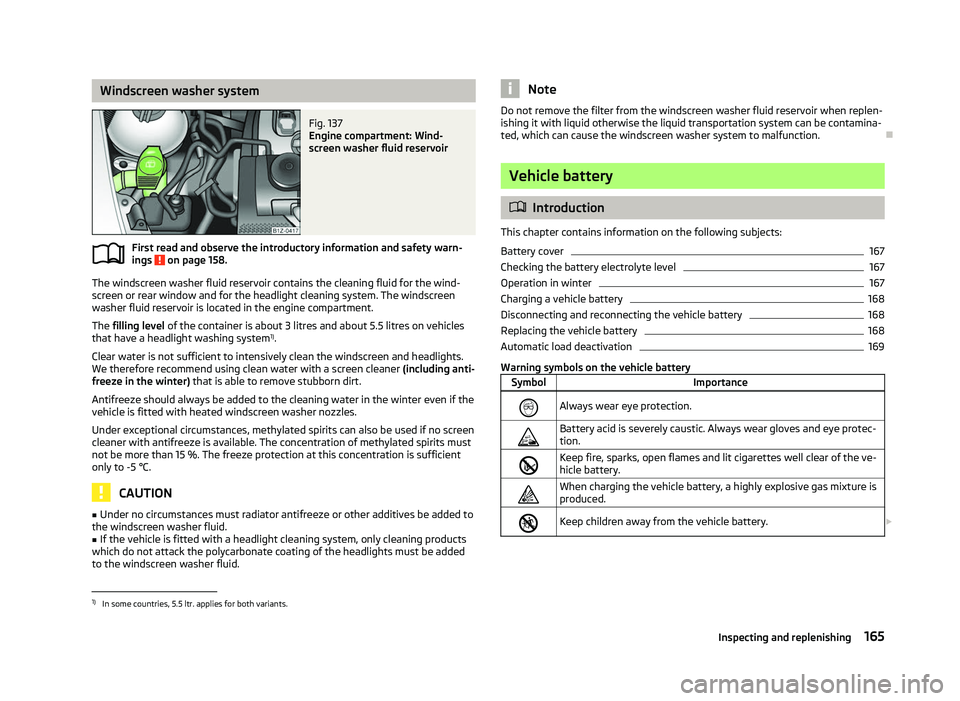
Fig. 137
Engine compartment: Wind-
screen washer fluid reservoir
First read and observe the introductory information and safety warn-
ings on page 158.
The windscreen washer fluid reservoir contains the cleaning fluid for the wind-
screen or rear window and for the headlight cleaning system. The windscreen
washer fluid reservoir is located in the engine compartment.
The filling level of the container is about 3
litres and about 5.5 litres on vehicles
that have a headlight washing system 1)
.
Clear water is not sufficient to intensively clean the windscreen and headlights.
We therefore recommend using clean water with a screen cleaner (including anti-
freeze in the winter) that is able to remove stubborn dirt.
Antifreeze should always be added to the cleaning water in the winter even if the
vehicle is fitted with heated windscreen washer nozzles.
Under exceptional circumstances, methylated spirits can also be used if no screen
cleaner with antifreeze is available. The concentration of methylated spirits must
not be more than 15 %. The freeze protection at this concentration is sufficient
only to -5 °C. CAUTION
■ Under no circumstances must radiator antifreeze or other additives be added to
the windscreen washer fluid.
■ If the vehicle is fitted with a headlight cleaning system, only cleaning products
which do not attack the polycarbonate coating of the headlights must be added
to the windscreen washer fluid.
ä Note
Do not remove the filter from the windscreen washer fluid reservoir when replen-
ishing it with liquid otherwise the liquid transportation system can be contamina-
ted, which can cause the windscreen washer system to malfunction. Ð Vehicle battery
ä
Introduction
This chapter contains information on the following subjects:
Battery cover 167
Checking the battery electrolyte level 167
Operation in winter 167
Charging a vehicle battery 168
Disconnecting and reconnecting the vehicle battery 168
Replacing the vehicle battery 168
Automatic load deactivation 169
Warning symbols on the vehicle battery Symbol Importance
Always wear eye protection.
Battery acid is severely caustic. Always wear gloves and eye protec-
tion.
Keep fire, sparks, open flames and lit cigarettes well clear of the ve-
hicle battery.
When charging the vehicle battery, a highly explosive gas mixture is
produced.
Keep children away from the vehicle battery.
£1)
In some countries, 5.5 ltr. applies for both variants.
165
Inspecting and replenishing