ECO mode SKODA OCTAVIA 2006 Owner´s Manual
[x] Cancel search | Manufacturer: SKODA, Model Year: 2006, Model line: OCTAVIA, Model: SKODA OCTAVIA 2006Pages: 218, PDF Size: 5.48 MB
Page 86 of 218
Setting the air conditioning system
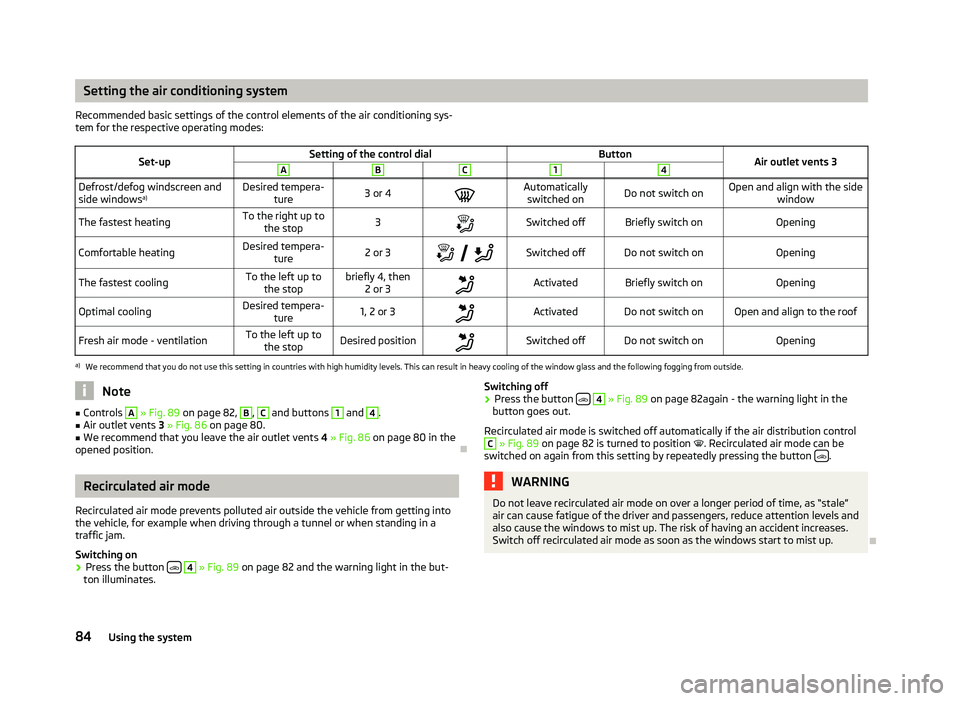
Recommended basic settings of the control elements of the air conditioning sys-
tem for the respective operating modes:
Set-up Setting of the control dial
Button
Air outlet vents 3 A B C 1 4
Defrost/defog windscreen and
side windows
a) Desired tempera-
ture 3 or 4
Automatically
switched on Do not switch on Open and align with the side
window
The fastest heating To the right up to
the stop 3
Switched off Briefly switch on
Opening
Comfortable heating Desired tempera-
ture 2 or 3
Switched off Do not switch on
Opening
The fastest cooling To the left up to
the stop briefly 4, then
2 or 3 Activated Briefly switch on
Opening
Optimal cooling Desired tempera-
ture 1, 2 or 3
Activated Do not switch on Open and align to the roof
Fresh air mode - ventilation To the left up to
the stop Desired position
Switched off Do not switch on
Openinga)
We recommend that you do not use this setting in countries with high humidity levels. This can result in heavy cooling of the window glass and the following fogging from outside. Note
■ Controls A
» Fig. 89
on page 82, B
, C
and buttons 1
and 4
.
■ Air outlet vents 3 » Fig. 86 on page 80.
■ We recommend that you leave the air outlet vents 4 » Fig. 86 on page 80 in the
opened position. ÐRecirculated air mode
Recirculated air mode prevents polluted air outside the vehicle from getting into
the vehicle, for example when driving through a tunnel or when standing in a
traffic jam.
Switching on
› Press the button
4
» Fig. 89
on page 82 and the warning light in the but-
ton illuminates. Switching off
› Press the button
4
» Fig. 89
on page 82again - the warning light in the
button goes out.
Recirculated air mode is switched off automatically if the air distribution control C
» Fig. 89
on page 82 is turned to position . Recirculated air mode can be
switched on again from this setting by repeatedly pressing the button .
WARNING
Do not leave recirculated air mode on over a longer period of time, as “stale”
air can cause fatigue of the driver and passengers, reduce attention levels and
also cause the windows to mist up. The risk of having an accident increases.
Switch off recirculated air mode as soon as the windows start to mist up. Ð
84 Using the system
Page 87 of 218
Climatronic (automatic air conditioning system)
Introductory information
The Climatronic maintains fully automatically a convenience temperature. This is
achieved by automatically varying the temperature of the air flow, the blower
stages and air distribution. The system also takes sunlight into account, which
eliminates the need to alter the settings manually. The automatic
mode » page 86
ensures maximum well-being of the occupants at all times of
the year.
Description of Climatronic system
The cooling system only operates if the following conditions are met:
› engine running;
› outside temperature above approx. +2 °C;
› AC 13
» Fig. 90 on page 85
switched on.
The AC compressor is switched off at a high coolant temperature in order to pro-
vide cooling at a high load of the engine.
Recommended setting for all periods of the year.
› Set the desired temperature, we recommend 22 °C.
› Press the button
AUTO 8
» Fig. 90
on page 85.
› Move the air outlet vents
3 » Fig. 86 on page 80 and 4 so that the air flow is
directed slightly upwards. Note
■ We recommend that you have the Climatronic system cleaned by a
ŠKODA spe-
cialist garage once every year. ■ On vehicles equipped with a factory-fitted radio or radio navigation system, the
Climatronic information is also shown on their displays. This function can be
switched off, see operating instructions for the radio or navigation system. Ð Overview of the control elements
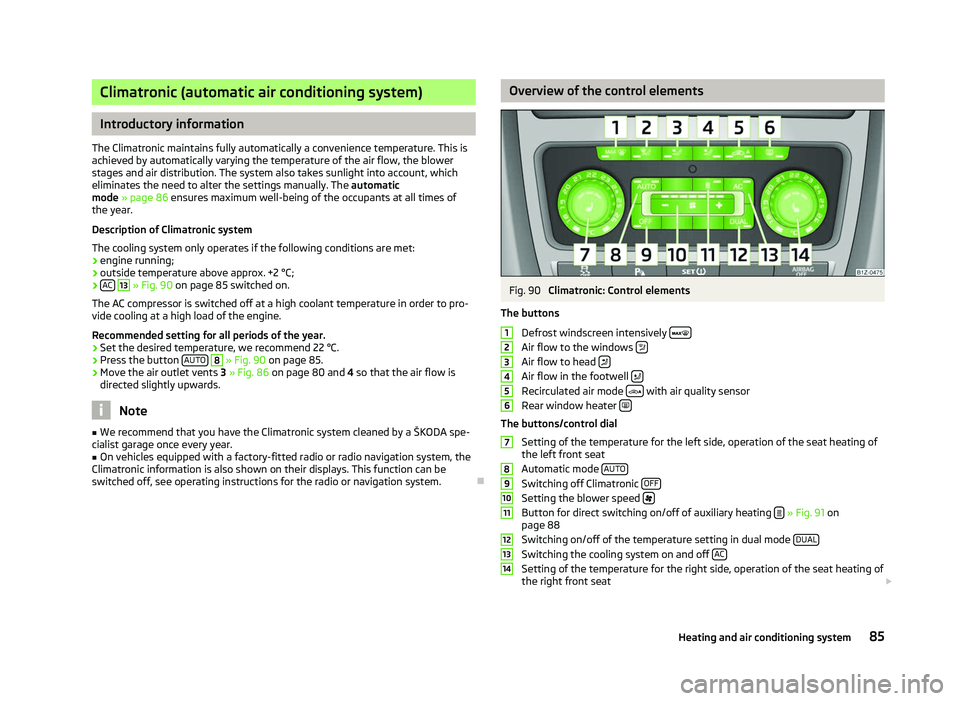
Fig. 90
Climatronic: Control elements
The buttons Defrost windscreen intensively Air flow to the windows
Air flow to head
Air flow in the footwell
Recirculated air mode
with air quality sensor
Rear window heater The buttons/control dial
Setting of the temperature for the left side, operation of the seat heating of
the left front seat
Automatic mode AUTO Switching off Climatronic
OFF Setting the blower speed
Button for direct switching on/off of auxiliary heating
» Fig. 91 on
page 88
Switching on/off of the temperature setting in dual mode DUAL Switching the cooling system on and off
AC Setting of the temperature for the right side, operation of the seat heating of
the right front seat £ 1
2
3
4
5
6
7
8
9
10
11
12
13
14
85
Heating and air conditioning system
Page 91 of 218
System settings
First read and observe the introductory information and safety warn-
ings on page 87.
The following menu items can be selected in the menu
Aux. heating in the infor-
mation display (depending on the equipment fitted in the vehicle):
■ Day of the wk. - Set the current weekday.
■ Time- Set the desired running time in 5
minute increments. The running time
can be 10 to 60 minutes.
■ Mode - Set the desired heating/ventilation mode.
■ Starting time 1-3 - In each pre-set time, the day and the time (hour and minute)
can be set for switching on the auxiliary heating and/or ventilation. An empty
position can be found between Sunday and Monday when selecting the day. If
this empty position is selected, the activation is performed without taking into
account the day.
■ Activate - Enable pre-set mode.
■ Dectivate - Disable pre-set mode.
■ Factory setting - Restore factory setting.
■ Back - Return to main menu.
Only one programmed pre-set time can be active.
The last programmed pre-set time remains active.
After the auxiliary heating activates at the set time, it is necessary to pre-set a
time again.
If the pre-set menu is closed by selecting the menu item Back or if no changes
are made on the display for more than 10 seconds, the set values are stored, but
the pre-set time is not activated.
An warning light on the button »
Fig. 91
on page 88 is illuminated when the
system is running.
The running system deactivates after expiration of the operating period or can be
deactivated earlier by pressing the button to directly switch on/off the auxiliary
heating » Fig. 91 on page 88
or by using the radio remote control. Ð
ä Radio remote control
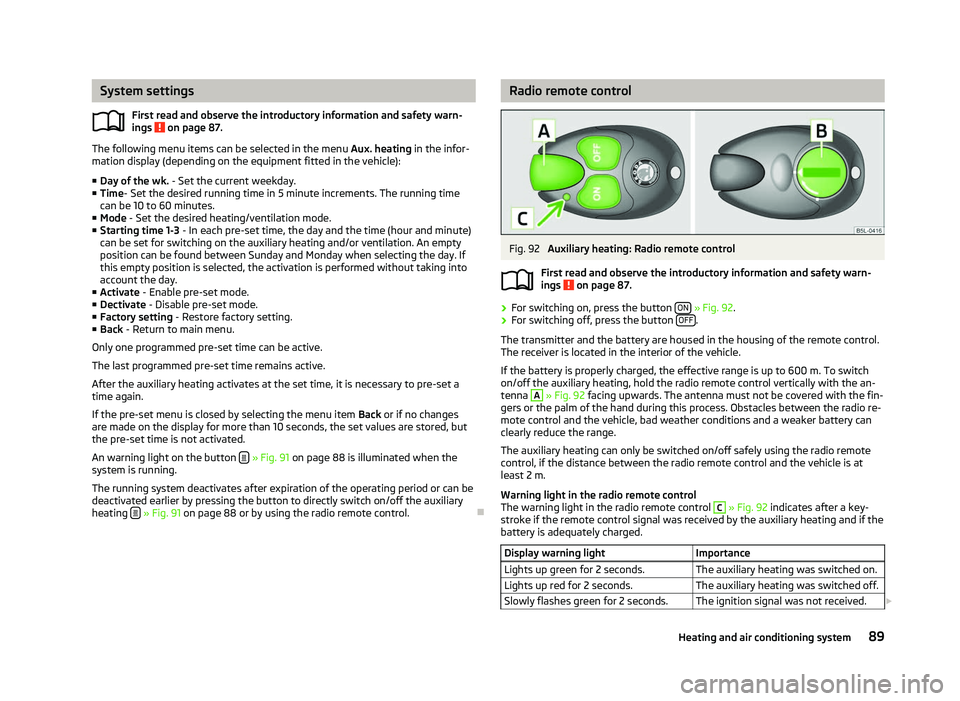
Fig. 92
Auxiliary heating: Radio remote control
First read and observe the introductory information and safety warn-
ings on page 87.
›
For switching on, press the button
ON » Fig. 92.
› For switching off, press the button
OFF .
The transmitter and the battery are housed in the housing of the remote control.
The receiver is located in the interior of the vehicle.
If the battery is properly charged, the effective range is up to 600
m. To switch
on/off the auxiliary heating, hold the radio remote control vertically with the an-
tenna A
» Fig. 92 facing upwards. The antenna must not be covered with the fin-
gers or the palm of the hand during this process. Obstacles between the radio re-
mote control and the vehicle, bad weather conditions and a weaker battery can
clearly reduce the range.
The auxiliary heating can only be switched on/off safely using the radio remote
control, if the distance between the radio remote control and the vehicle is at
least 2
m.
Warning light in the radio remote control
The warning light in the radio remote control C
» Fig. 92 indicates after a key-
stroke if the remote control signal was received by the auxiliary heating and if the
battery is adequately charged.
Display warning light Importance
Lights up green for 2 seconds. The auxiliary heating was switched on.
Lights up red for 2 seconds. The auxiliary heating was switched off.
Slowly flashes green for 2 seconds. The ignition signal was not received. £ ä
89
Heating and air conditioning system
Page 103 of 218
Conditions for the automatic engine shut down (stop phase):
›
The gearshift lever is in Neutral.
› The clutch pedal is not depressed.
› The driver has fastened the seat belt.
› The driver's door is closed.
› The bonnet is closed.
› The vehicle is at a standstill.
› The factory-fitted towing device is not electrically connected to a trailer.
› The engine is at operating temperature.
› The charge state of the vehicle battery is sufficient.
› The stationary vehicle is not on a steep slope or a steep downhill section.
› The engine speed is less than 1
200 rpm.
› The temperature inside the vehicle battery is not too low or too high.
› There is sufficient pressure in the braking system.
› The difference between the outdoor- and the set temperature in the interior is
not too great.
› The vehicle speed since the last time the engine was switched off was greater
than 3 km/h.
› No cleaning of the diesel particle filter takes place
» page 23.
› The front wheels are not turned excessively (the steering angle is less than 3/4
of a steering wheel revolution).
Conditions for an automatic restart (start phase):
› The clutch pedal is depressed.
› The max./min. temperature is set.
› The defrost function for the windscreen is switched on.
› A high blower stage has been selected.
› The START STOP button is pressed.
Conditions for an automatic restart without driver intervention: › The vehicle moves at a speed of more than 3 km/h.
› The difference between the outdoor- and the set temperature in the interior is
too great.
› The charge state of the vehicle battery is not sufficient.
› There is insufficient pressure in the braking system.
If the driver's seat belt is removed for more than 30 seconds or the driver's door is
opened during stop mode, the engine must be started manually with the key. The
following messages in the instrument cluster display must be observed. Messages in the instrument cluster display (valid for vehicles without
Information display)
ERROR START STOP Error in the START-STOP system
START STOP NOT POSSIBLE Automatic engine shut down is not
possible.
START STOP ACTIVE Automatic engine shut down (stop
phase)
SWITCH OFF IGNITION Switch off the ignition.
START MANUALLY Start the engine manually. WARNING
■ The brake servo unit and power steering only operate if the engine is run-
ning.
■ Never let the vehicle roll with the engine switched off. CAUTION
Deactivate the START-STOP system before driving through water on the
street » page 144. Note
■ Changes to the outdoor temperature can have an effect on the internal temper-
ature of the vehicle battery even after several hours. If the vehicle remains out-
doors for a long time in minus temperatures or in direct sunlight, it can take sev-
eral hours until the internal temperature of the vehicle battery reaches a suitable
temperature for proper operation of the
START STOP system.
■ If the Climatronic is running in automatic mode, under certain conditions, the
engine may not switch off automatically. Ð 101
Starting-off and Driving
Page 106 of 218
N
- Neutral
The transmission is in Neutral in this position.
The brake pedal must be depressed to move the selector lever out of the position
N (if the lever is in this position for longer than 2
seconds) into the position D or R
when the vehicle is travelling at less than 5 km/h or the vehicle is stationary and
the ignition is switched on. D
- Position for driving forward (normal programme)
When the selector lever is in this position, the forward gears are automatically
shifted up and down in line with the engine load, vehicle speed and dynamic shift
programme.
The brake pedal must be depressed to move the selector lever into position D
from Nwhen the vehicle is travelling at less than 5
km/h or is stationary.
Under certain circumstances (e.g. when driving in mountainous regions or when
towing a trailer) it may be beneficial to select the manual shift pro-
gramme » page 104 for a short time in order to adapt the gearbox ratios manual-
ly to the driving situations. S
- Position for driving forward (sports programme)
Shifting up later into a higher gear makes it possible to fully exploit the power po-
tential of the engine. The gearbox also then shifts down at higher engine speeds
as in the position D .
The Shiftlock on the selector lever grip must be pressed when moving the selec-
tor lever out of the position D into the position S. ÐManual shifting of gears (Tiptronic)
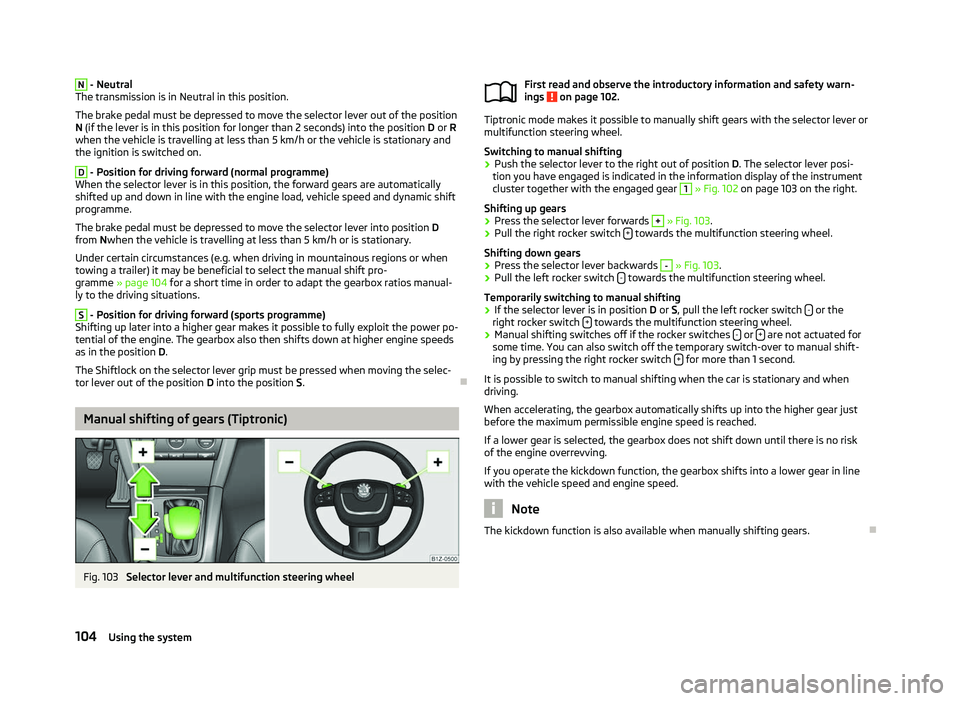
Fig. 103
Selector lever and multifunction steering wheel First read and observe the introductory information and safety warn-
ings on page 102.
Tiptronic mode makes it possible to manually shift gears with the selector lever or
multifunction steering wheel.
Switching to manual shifting
›
Push the selector lever to the right out of position
D. The selector lever posi-
tion you have engaged is indicated in the information display of the instrument
cluster together with the engaged gear 1
» Fig. 102 on page
103 on the right.
Shifting up gears
› Press the selector lever forwards +
» Fig. 103.
› Pull the right rocker switch
+ towards the multifunction steering wheel.
Shifting down gears › Press the selector lever backwards -
» Fig. 103.
› Pull the left rocker switch
- towards the multifunction steering wheel.
Temporarily switching to manual shifting
› If the selector lever is in position
D or S, pull the left rocker switch - or the
right rocker switch + towards the multifunction steering wheel.
› Manual shifting switches off if the rocker switches
- or
+ are not actuated for
some time. You can also switch off the temporary switch-over to manual shift-
ing by pressing the right rocker switch + for more than 1 second.
It is possible to switch to manual shifting when the car is stationary and when
driving.
When accelerating, the gearbox automatically shifts up into the higher gear just
before the maximum permissible engine speed is reached.
If a lower gear is selected, the gearbox does not shift down until there is no risk
of the engine overrevving.
If you operate the kickdown function, the gearbox shifts into a lower gear in line
with the vehicle speed and engine speed. Note
The kickdown function is also available when manually shifting gears. Ð
ä
104 Using the system
Page 107 of 218
Selector lever lock
First read and observe the introductory information and safety warn-
ings on page 102.
Automatic selector lever lock
With the ignition on, the selector lever is locked when it is in the positions P and
N. The brake pedal must be depressed to move the selector lever out of this posi-
tion. The warning light » page 25, Selector lever lock illuminates in the in-
strument cluster as a reminder for the driver when the selector lever is in the po-
sitions P and N.
The selector lever is not locked when quickly moving across the position
N (e.g.
from R to D). This, for example, helps to rock out a vehicle that is stuck. The selec-
tor lever lock will click into place if the lever is in the N position for more than 2
seconds without the brake pedal being pressed.
The selector lever lock is only active if the vehicle is stationary or moving at speed
of less than 5 km/hour. The lock is switched off automatically into position N
when the car is travelling at a higher speed.
Shiftlock button
The Shiftlock button in the handle of selector lever prevents certain selector lever
positions being engaged inadvertently. The selector lever lock is cancelled when
the Shiftlock button is pressed.
Ignition key withdrawal lock
After the ignition is switched off, the ignition key can only be withdrawn if the se-
lector lever is in the position P. If the ignition key is withdrawn, the selector lever
is blocked in position P . ÐKickdown function
First read and observe the introductory information and safety warn-
ings on page 102.
The kickdown function provides you with maximum acceleration power.
When the accelerator pedal is fully depressed, the kickdown function is activated
in the desired driving program. This function has precedence over the driving pro-
gramme and serves for maximum acceleration of the vehicle when exploiting the
maximum power potential of the engine without taking into account the current
selector lever position ( D, S or Tiptronic ). The gearbox shifts down to one or sev-
ä
ä
eral gears in line with the driving state and the vehicle accelerates. The gearbox
does not shift up into the highest gear until the engine has reached its maximum
revolutions for this gear range. Ð Dynamic shift programme
First read and observe the introductory information and safety warn-
ings on page 102.
The automatic gearbox of your vehicle is controlled electronically. Shifting up and
down through the gears is performed automatically on the basis of pre-defined
driving programmes.
Adopting a moderate style of driving
will cause the gearbox to select the most
economical driving programme. Shifting up into a higher gear as soon as possible
and shifting down as late as possible will have a favourable effect on your fuel
consumption.
When adopting a sporty style of driving with rapid movements of the accelerator
pedal combined with sharp acceleration, frequent changes in speed and exploit-
ing the top speed of the car, the gearbox will adjust to this style of driving once
the accelerator pedal (kickdown function) is depressed and will shift down earlier,
frequently by several gears in comparison to a moderate style of driving.
Selecting the most appropriate driving programme for the particular style of driv-
ing is a continuous process. Irrespective of this it is, however, possible to switch
or shift down into a dynamic shift programme by depressing the accelerator rap-
idly. The gearbox shifts down into a lower gear in accordance with the speed,
therefore enabling rapid acceleration (e.g. when overtaking) without the accelera-
tor pedal having to be depressed into the kickdown range. The original pro-
gramme will be reactivated to match your particular style of driving once the
gearbox has shifted up again.
When driving in hilly regions, the gears are selected to match uphill and downhill
sections. This avoids the gearbox frequently shifting up and down when negoti-
ating an uphill stretch. When driving downhill, it is possible to shift down into the
Tiptronic position, in order to exploit the engine brake torque. Ð
ä
105
Automatic gearbox
Page 212 of 218
Environmentally friendly driving 140
ESC Operating principle 95
Warning light 22
Ethanol E85 see fuel 157
F
Fire extinguisher 178
First-aid kit 178
Floor mats 97
Front airbag 130
Front seats 54
Fuel 155
Diesel 158
Ethanol E85 157
Fuel gauge 9
gauge 9
refer to Fuel 155
Refuelling 155
Unleaded petrol 156
Fuel consumption 140
Fuses Assignment 189
Replacing 189
G
Gear Recommended gear 11
General view Cockpit 7
Glow plug system Warning light 23
GSM 109, 112
H
Handbrake 95
Head airbag 132Headlight cleaning system
Headlight cleaning system 50
Headlights Driving abroad 143
Headlight cleaning system 50
Head restraint 58
Heating 80
Defrosting windows 81
Exterior mirror 52
Rear window 47
Recirculated air mode 82
Seats 57
Heating rear window 47
Horn 7
I
Ignition 93
Ignition lock 93
Immobiliser 92
Information display see MAXI DOT 15
Instrument cluster 8
Instrument lighting 43
Interior monitor 32
Internet connection 115
ISOFIX 137
J
Jacking points Raise vehicle 181
Jump-starting 185
L
Lever Main beam 45
Turn signal 45Light
Automatic driving lamp control 40
Cockpit 45
COMING HOME/LEAVING HOME function 41
Daylight driving light 40
Fog lights 42
Fog lights with the function CORNER 42
Hazard warning light system 44
Headlight beam adjustment 44
Headlight flasher 45
Low beam 40
Main beam 45
Parking light 40, 41
Rear fog light 43
Replacing bulbs 191
Tourist light 42
Turn signal 45
Lights Cornering lights 41
switching on and off 40
Warning lights 18
Loads 197
Lock Central locking system 29
Locking Emergency locking 32
Remote control 30
Locking and unlocking from the inside 29
Luggage compartment Folding double hooks 62
Folding hooks 62
M
MAXI DOT 15
Main menu 15
Settings 16
Mirror Automatic dimming interior mirror 52
Exterior mirror 52
210 Index
Page 213 of 218
Manual dimming interior mirror 51
Vanity 47
Mobile phone 107, 109, 112
Connecting to the hands-free system 110, 113
Multifunction display Functions 12
Memory 12
Operation 13
Multimedia 118
AUX-IN 119
MDI 119
N
Net partition 65
O
Oil refer to Engine oil 161
Onboard computer see Multifunction display 12
Operation in winter De-icing windows 151
Diesel fuel 158
Vehicle battery 167
Outside temperature 13
Overview Engine compartment 160
Warning lights 18
P
Paint see Paint damage 150
Paint damage 150
Parking Parking aid 98
Parking ticket holder 77
Passive Safety 121
Periodic wiping 49Petrol
refer to Fuel 156
Polishing the paintwork refer to Taking care of your vehicle 150
Power steering 92
Power windows Button in the driver's door 35
Button in the front passenger door 36
Button in the rear doors 36
Operational faults 37
Preservation refer to Taking care of your vehicle 150
R
Radiator fan 164
Radio reception Aerial 151
Functional fault 151
Raise vehicle 181
Rear mirror Automatic dimming interior mirror 52
Exterior mirror 52
Manual dimming interior mirror 51
Recirculated air mode Climatronic 86
Manual air conditioning system 84
Recommended gear 11
Refuelling 155
Fuel 155
Regulation Headlight beam 44
Remote control 30
Synchronisation process 31
Remote control key Replacing the battery 26
Removable through-loading bag 76
Removing the seats 59
Replacement of parts 177Replacing
Bulbs 191
Fuses 189
Vehicle battery 168
Windscreen wiper blade 51
Replenishing Coolant 163
Engine oil 161
Windscreen washer fluid 165
Roof luggage rack Attachment points 67
Roof rack system Roof load 67
Running in Brake pads 139
Engine 139
The first 1
500 km 139
Tyres 139
S
Safe securing system 28
Safety 121
Child safety 135
Child safety seats 135
Head restraints 58
ISOFIX 137
TOP TETHER 137
Save electrical energy 140
Seat Adjusting 55
Seat belt Warning light 19
Seat belt height adjuster 128
Seat belts Belt tensioners 128
Cleaning 154
fastening and unfastening 127
Height adjustment 128
211
Index