display SKODA OCTAVIA 2006 Owner´s Manual
[x] Cancel search | Manufacturer: SKODA, Model Year: 2006, Model line: OCTAVIA, Model: SKODA OCTAVIA 2006Pages: 218, PDF Size: 5.48 MB
Page 30 of 218
WARNING
Locked doors prevent unwanted entry into the vehicle from outside, for exam-
ple at road crossings. Locked doors do, however, make it more difficult for res-
cuers to get into the vehicle in an emergency - danger to life! Note
■ You can have the individual settings activated by a ŠKODA Service Partner or
you can activate them yourself with the help of the information display » page 16,
Settings. ■ In the event of an accident in which the airbags are deployed, the locked doors
are automatically unlocked in order to enable rescuers to gain access to the vehi-
cle. ■ Only the driver's door can be unlocked or locked using the key if the central
locking system fails » page 28. The other doors and the boot lid can be manually
locked or unlocked. ■ Emergency locking of the door » page 32.
■ Emergency unlocking of the boot lid » page 34. ÐSafe securing system
The central locking system is equipped with a safe securing system. The door
locks are blocked automatically if the vehicle is locked from the outside. The
warning light flashes for around 2 seconds in quick succession, afterwards it be-
gins to flash evenly at longer intervals. It is not possible to open the doors with
the door handle either from the inside or from the outside. This acts as an effec-
tive deterrent for attempts to break into your vehicle.
The safe securing system can be deactivated within 2
seconds by double locking
the vehicle.
If the safe securing system is not operating, the warning light in the driver door
flashes for about 2 seconds fast, goes out and starts to flash evenly at longer in-
tervals after about 30 seconds.
The safe securing system is activated again the next time the vehicle is unlocked
and locked.
If the vehicle is locked and the safe securing system is deactivated, the door can
be unlocked and opened from the inside by pulling on the opening lever of the
respective door. By the first pull on the opening lever, the door is unlocked. By
the second pull on the opening lever, the door is opened. WARNING
If the vehicle is locked from the outside and the safe securing system is acti-
vated, there must not be any person in the vehicle as it is then no longer pos-
sible to open either a door or a window from the inside. The locked doors
make it more difficult for rescuers to get into the vehicle in an emergency -
hazard! Note
■ The anti-theft alarm system is activated when the vehicle is locked even if the
safe securing system is deactivated. The interior monitor is however not activa-
ted. ■ After locking the vehicle, you will be informed that the safe securing system is
activated by means of the message CHECK DEADLOCK on the instrument cluster
display. On vehicles that are equipped with an information display, the following
message will appear Check deadlock! Owner's manual! appears.Ð Unlocking the vehicle using the key
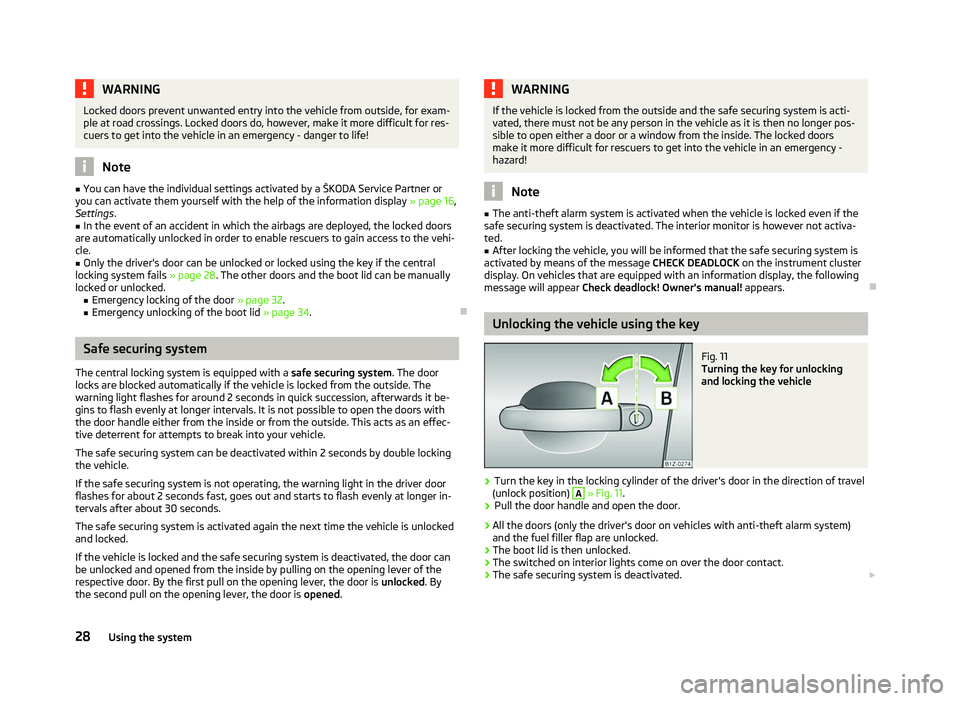
Fig. 11
Turning the key for unlocking
and locking the vehicle
› Turn the key in the locking cylinder of the driver's door in the direction of travel
(unlock position) A
» Fig. 11.
› Pull the door handle and open the door.
› All the doors (only the driver's door on vehicles with anti-theft alarm system)
and the fuel filler flap are unlocked.
› The boot lid is then unlocked.
› The switched on interior lights come on over the door contact.
› The safe securing system is deactivated.
£
28 Using the system
Page 42 of 218
Switching lights on and off
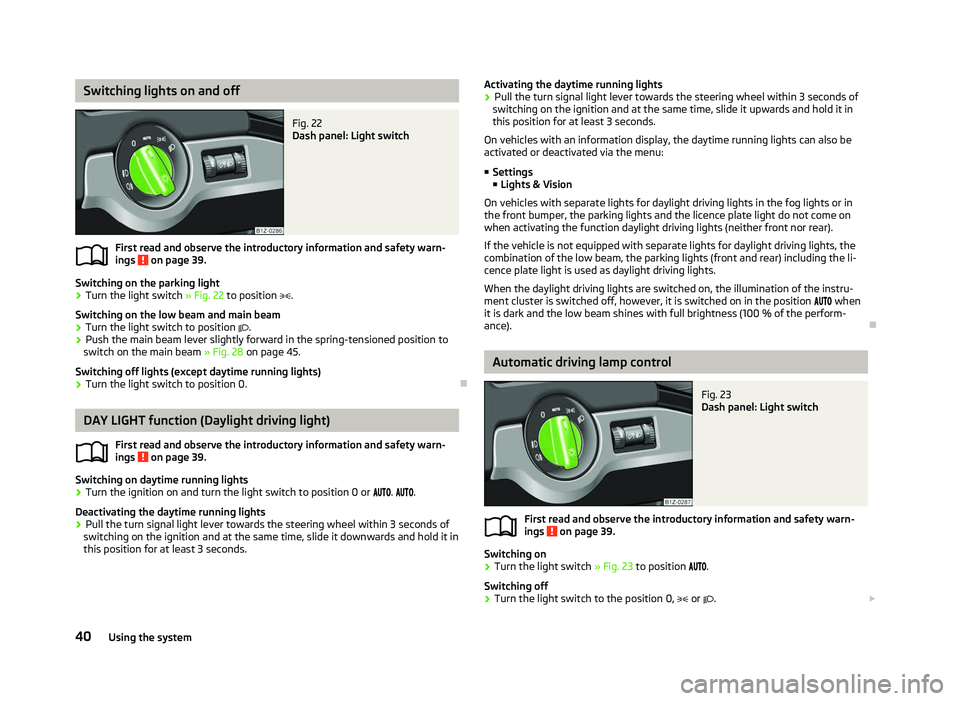
Fig. 22
Dash panel: Light switch
First read and observe the introductory information and safety warn-
ings on page 39.
Switching on the parking light
› Turn the light switch
» Fig. 22 to position .
Switching on the low beam and main beam
› Turn the light switch to position
.
› Push the main beam lever slightly forward in the spring-tensioned position to
switch on the main beam » Fig. 28 on page 45.
Switching off lights (except daytime running lights)
› Turn the light switch to position 0. ÐDAY LIGHT function (Daylight driving light)
First read and observe the introductory information and safety warn-
ings on page 39.
Switching on daytime running lights
› Turn the ignition on and turn the light switch to position 0 or
. .
Deactivating the daytime running lights
› Pull the turn signal light lever towards the steering wheel within 3
seconds of
switching on the ignition and at the same time, slide it downwards and hold it in
this position for at least 3
seconds.
ä
ä Activating the daytime running lights
› Pull the turn signal light lever towards the steering wheel within 3
seconds of
switching on the ignition and at the same time, slide it upwards and hold it in
this position for at least 3
seconds.
On vehicles with an information display, the daytime running lights can also be
activated or deactivated via the menu:
■ Settings
■ Lights & Vision
On vehicles with separate lights for daylight driving lights in the fog lights or in
the front bumper, the parking lights and the licence plate light do not come on
when activating the function daylight driving lights (neither front nor rear).
If the vehicle is not equipped with separate lights for daylight driving lights, the
combination of the low beam, the parking lights (front and rear) including the li-
cence plate light is used as daylight driving lights.
When the daylight driving lights are switched on, the illumination of the instru-
ment cluster is switched off, however, it is switched on in the position when
it is dark and the low beam shines with full brightness (100 % of the perform-
ance). Ð Automatic driving lamp control
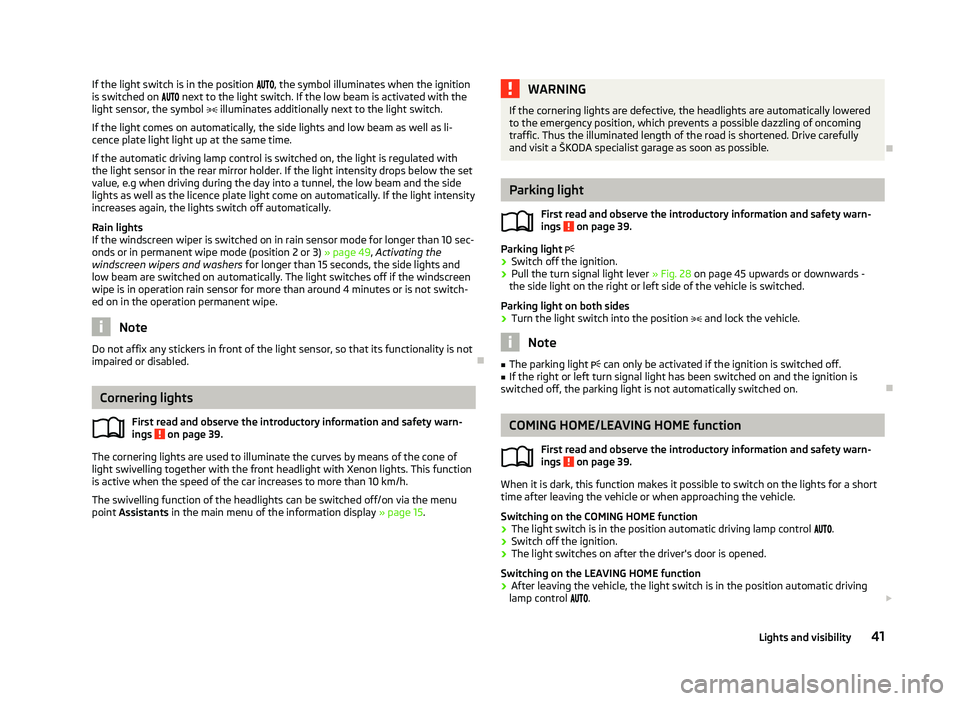
Fig. 23
Dash panel: Light switch
First read and observe the introductory information and safety warn-
ings on page 39.
Switching on
› Turn the light switch
» Fig. 23 to position .
Switching off
› Turn the light switch to the position 0,
or . £
ä
40 Using the system
Page 43 of 218
If the light switch is in the position
, the symbol illuminates when the ignition
is switched on next to the light switch. If the low beam is activated with the
light sensor, the symbol illuminates additionally next to the light switch.
If the light comes on automatically, the side lights and low beam as well as li-
cence plate light light up at the same time.
If the automatic driving lamp control is switched on, the light is regulated with
the light sensor in the rear mirror holder. If the light intensity drops below the set
value, e.g when driving during the day into a tunnel, the low beam and the side
lights as well as the licence plate light come on automatically. If the light intensity
increases again, the lights switch off automatically.
Rain lights
If the windscreen wiper is switched on in rain sensor mode for longer than 10
sec-
onds or in permanent wipe mode (position 2 or 3) » page 49, Activating the
windscreen wipers and washers for longer than 15 seconds, the side lights and
low beam are switched on automatically. The light switches off if the windscreen
wipe is in operation rain sensor for more than around 4 minutes or is not switch-
ed on in the operation permanent wipe. Note
Do not affix any stickers in front of the light sensor, so that its functionality is not
impaired or disabled. ÐCornering lights
First read and observe the introductory information and safety warn-
ings on page 39.
The cornering lights are used to illuminate the curves by means of the cone of
light swivelling together with the front headlight with Xenon lights. This function
is active when the speed of the car increases to more than 10
km/h.
The swivelling function of the headlights can be switched off/on via the menu
point Assistants in the main menu of the information display » page 15.
ä WARNING
If the cornering lights are defective, the headlights are automatically lowered
to the emergency position, which prevents a possible dazzling of oncoming
traffic. Thus the illuminated length of the road is shortened. Drive carefully
and visit a
ŠKODA specialist garage as soon as possible. Ð Parking light
First read and observe the introductory information and safety warn-
ings on page 39.
Parking light
› Switch off the ignition.
› Pull the turn signal light lever
» Fig. 28 on page 45 upwards or downwards -
the side light on the right or left side of the vehicle is switched.
Parking light on both sides
› Turn the light switch into the position
and lock the vehicle. Note
■ The parking light can only be activated if the ignition is switched off.
■ If the right or left turn signal light has been switched on and the ignition is
switched off, the parking light is not automatically switched on. Ð COMING HOME/LEAVING HOME function
First read and observe the introductory information and safety warn-
ings on page 39.
When it is dark, this function makes it possible to switch on the lights for a short
time after leaving the vehicle or when approaching the vehicle.
Switching on the
COMING HOME function
› The light switch is in the position automatic driving lamp control
.
› Switch off the ignition.
› The light switches on after the driver's door is opened.
Switching on the
LEAVING HOME function
› After leaving the vehicle, the light switch is in the position automatic driving
lamp control . £
ä
ä
41
Lights and visibility
Page 44 of 218
›
Unlock the vehicle with the radio remote control and the light is switched on.
Depending on the equipment fitted the COMING HOME/LEAVING HOME function
switches on the following lights:
› Parking lights;
› Low beam;
› Entry lighting in the exterior mirrors;
› Licence plate light.
The COMING HOME/LEAVING HOME function is controlled with the light sensor in
the mount of the interior rear mirror. If the light intensity is higher than the set
value of the light sensor, the light is not switched on after opening the driver's
door or unlocking the vehicle with the radio remote control.
Switching off the COMING HOME function
The light goes out 10 seconds after closing all of the doors and the boot lid.
If a door or the boot lid remains open, the light goes out after 60 seconds.
Switching off the LEAVING HOME function
The light goes out 10 seconds after unlocking the vehicle with the radio remote
control, switching on the ignition or locking the vehicle.
If no door is opened, the vehicle is locked automatically after 30 seconds.Note
■ If the
COMING HOME/LEAVING HOME function is switched on constantly, the
battery will be heavily discharged particularly over short distances. ■ The illumination period for the COMING HOME/LEAVING HOME function can be
changed by means of the information display. ÐTourist light
First read and observe the introductory information and safety warn-
ings on page 39.
This mode makes it possible to drive in countries with opposing traffic system,
driving on the left/right, without dazzling the oncoming vehicles. When the mode
tourist light is active, the side to side swivel of the headlights is deactivated. ä The mode tourist light is activated/deactivated via the information display in the
menu:
■ Settings
■ Lights & Vision
■ Travel mode
■ Off
■ Switched on Ð Fog lights
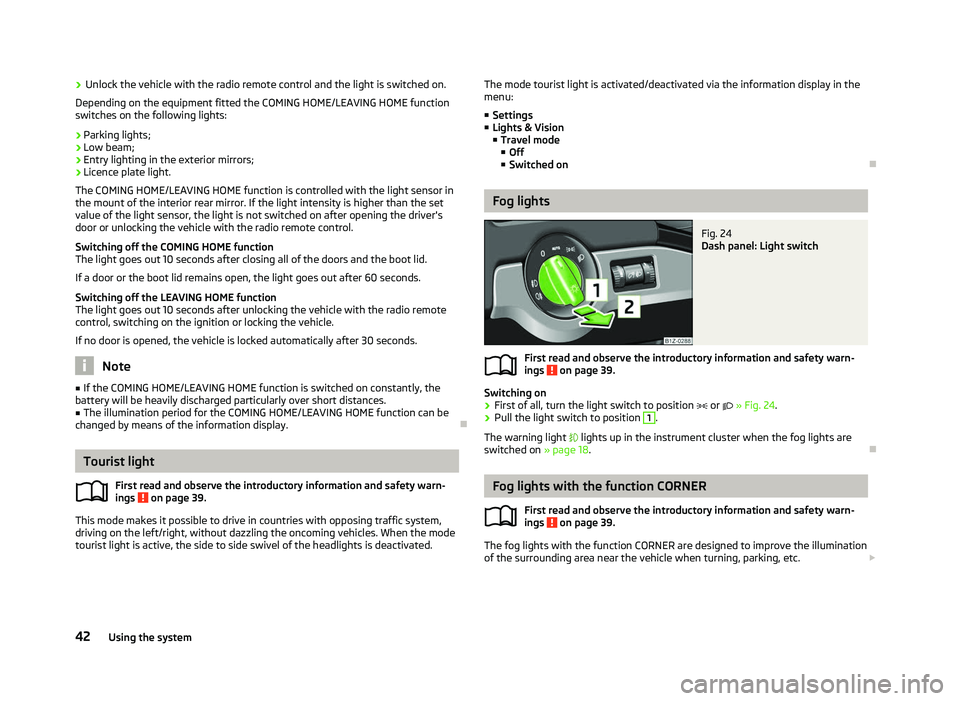
Fig. 24
Dash panel: Light switch
First read and observe the introductory information and safety warn-
ings on page 39.
Switching on
› First of all, turn the light switch to position
or » Fig. 24.
› Pull the light switch to position 1
.
The warning light lights up in the instrument cluster when the fog lights are
switched on » page 18. Ð Fog lights with the function CORNER
First read and observe the introductory information and safety warn-
ings on page 39.
The fog lights with the function CORNER are designed to improve the illumination
of the surrounding area near the vehicle when turning, parking, etc. £
ä
ä
42 Using the system
Page 45 of 218
The fog lights with the function CORNER are adjusted according to the steering
angle or after switching on the turn signal light
1)
in the following circumstances:
› the vehicle is stationary and the engine is running or it moves with a speed of
maximum 40 km/h;
› the daytime running lights are not switched on;
› the low beam is switched on or the light switch is in the position
and the
intensity of the ambient light causes the low beam to be switched on;
› the fog lights are not switched on;
› no reverse gear is engaged. Note
If the reverse gear is engaged during the active function CORNER, both fog lights
illuminate. ÐRear fog light
First read and observe the introductory information and safety warn-
ings on page 39.
Switching on
› First of all, turn the light switch to position
or » Fig. 24 on page 42.
› Pull the light switch to position 2
.
If the vehicle is not fitted with fog lights » page 42, the rear fog light is switched
on by turning the light switch to the position or and is pulled out directly to
the position 2
. This switch does not have two positions, but only one position.
The warning light
lights up in the instrument cluster when the rear fog light is
switched on » page 18.
Only the rear fog light on the trailer lights up if the vehicle has a factory-fitted
towing device or a towing device from ŠKODA original accessories and it is driven
with a trailer and the rear fog light switched on.
The rear fog light is located in the rear light array on the driver's side. Ð
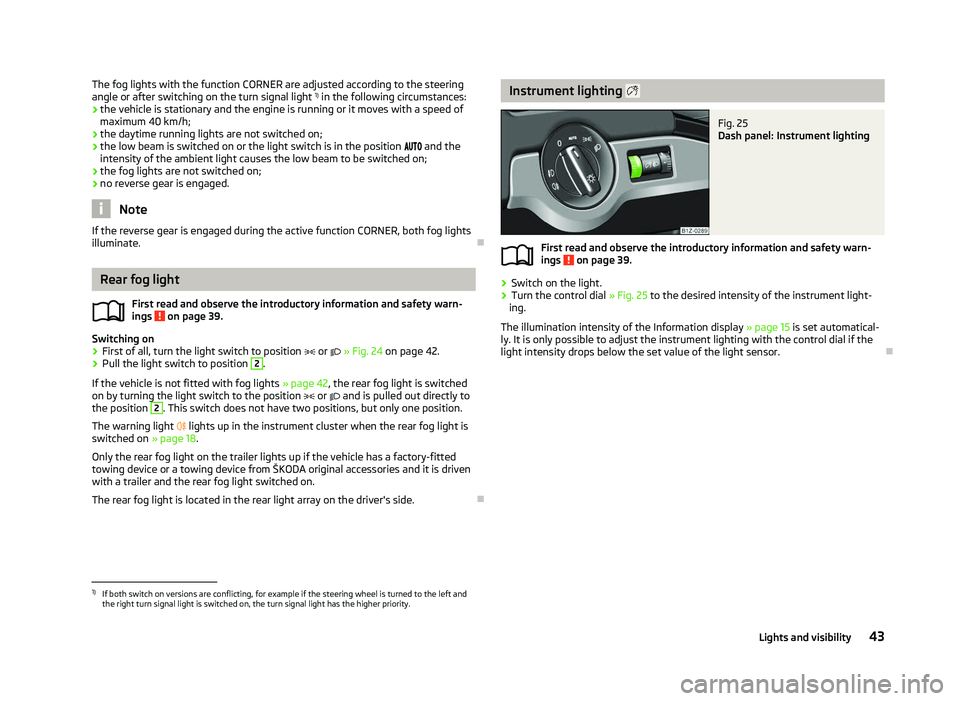
ä Instrument lighting
Fig. 25
Dash panel: Instrument lighting
First read and observe the introductory information and safety warn-
ings on page 39.
›
Switch on the light.
› Turn the control dial
» Fig. 25 to the desired intensity of the instrument light-
ing.
The illumination intensity of the Information display »
page 15 is set automatical-
ly. It is only possible to adjust the instrument lighting with the control dial if the
light intensity drops below the set value of the light sensor. Ð
ä
1)
If both switch on versions are conflicting, for example if the steering wheel is turned to the left and
the right turn signal light is switched on, the turn signal light has the higher priority.
43
Lights and visibility
Page 47 of 218
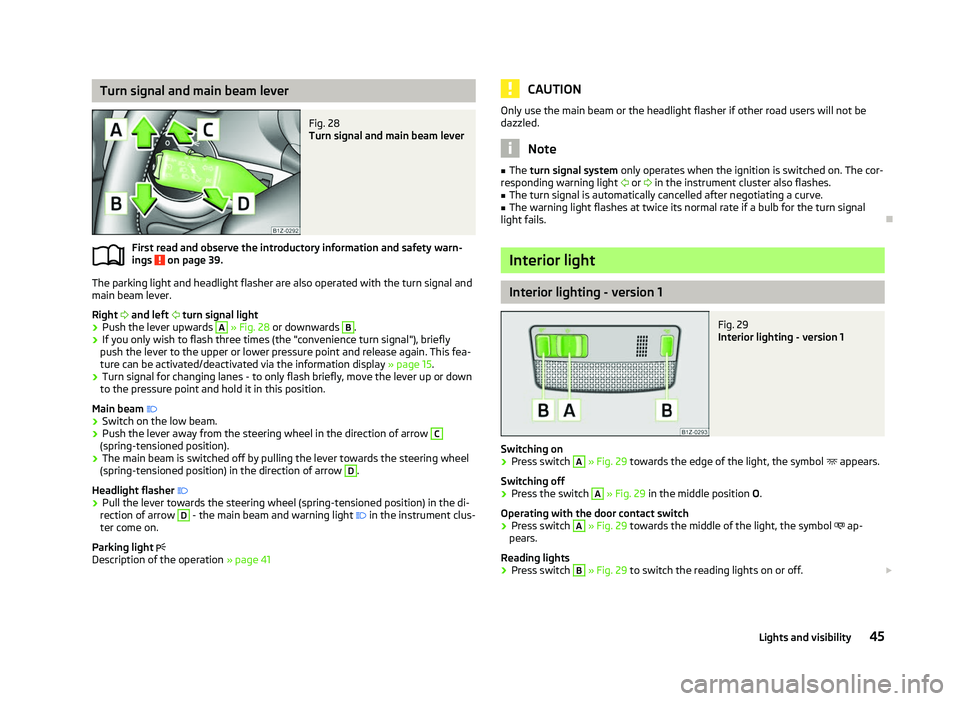
Turn signal and main beam lever
Fig. 28
Turn signal and main beam lever
First read and observe the introductory information and safety warn-
ings on page 39.
The parking light and headlight flasher are also operated with the turn signal and
main beam lever.
Right and left turn signal light
› Push the lever upwards A
» Fig. 28
or downwards B
.
› If you only wish to flash three times (the "convenience turn signal"), briefly
push the lever to the upper or lower pressure point and release again. This fea-
ture can be activated/deactivated via the information display » page 15.
› Turn signal for changing lanes - to only flash briefly, move the lever up or down
to the pressure point and hold it in this position.
Main beam
› Switch on the low beam.
› Push the lever away from the steering wheel in the direction of arrow C
(spring-tensioned position).
› The main beam is switched off by pulling the lever towards the steering wheel
(spring-tensioned position) in the direction of arrow D
.
Headlight flasher
› Pull the lever towards the steering wheel (spring-tensioned position) in the di-
rection of arrow D
- the main beam and warning light
in the instrument clus-
ter come on.
Parking light
Description of the operation » page 41
ä CAUTION
Only use the main beam or the headlight flasher if other road users will not be
dazzled. Note
■ The turn signal system only operates when the ignition is switched on. The cor-
responding warning light or in the instrument cluster also flashes.
■ The turn signal is automatically cancelled after negotiating a curve.
■ The warning light flashes at twice its normal rate if a bulb for the turn signal
light fails. Ð Interior light
Interior lighting - version 1
Fig. 29
Interior lighting - version 1
Switching on › Press switch A
» Fig. 29 towards the edge of the light, the symbol
appears.
Switching off
› Press the switch A
»
Fig. 29
in the middle position O.
Operating with the door contact switch
› Press switch A
» Fig. 29 towards the middle of the light, the symbol
ap-
pears.
Reading lights
› Press switch B
» Fig. 29 to switch the reading lights on or off.
£
45
Lights and visibility
Page 52 of 218
›
The sensitivity of the sensor can be set individually with the switch A
.
Wiping the rear window pane
› Push the lever away from the steering wheel into position 6
» Fig. 35 and the
windscreen wiper will operate every 6
seconds.
Automatic wipe/wash for the rear window
› Press the lever completely away from the steering wheel into the spring-ten-
sioned position 7
» Fig. 35, the washer system is activated immediately, while
the windscreen wiper starts wiping a little later. The wiper and washer system
will operate as long as the lever is held in this position.
› Release the lever. The washer system stops and the wiper continues for anoth-
er 2 to 3
wiper strokes (depending on the duration of the spraying process). The
lever will stay in position after releasing it 6
.
Switching windscreen wipers off
› Move the lever back into the home position 0
» Fig. 35.
Winter position
If the windscreen wipers are in rest position, they cannot be folded out from the
windscreen. For this reason we recommend adjusting the windscreen wipers in
winter so that they can be folded out from the windscreen easily.
This rest position is set as follows:
› Switch on the windscreen wipers.
› Switch off the ignition. The windscreen wipers remain in the position in which
they were when switching off the ignition.
The service position can also be used as a winter position » page 51.ÐAutomatic rear window wiper (Combi)
First read and observe the introductory information and safety warn-
ings on page 48.
If the windscreen wiper is in position 2
» Fig. 35 on page 49 or 3
the rear win-
dow is wiped every 30 or 10 seconds if the vehicle's speed exceeds 5
km/h.
When the rain sensor is active (the lever is in the position 1
) the function is only
active if the windscreen wipers operate in continuous mode (no break between
each wiping process). ä Activation/deactivation
The function of the automatic rear window wiper is activated/deactivated in the
information display in the menu:
■ Settings
■ Lights & Vision
■ Rear wiper Ð Headlight cleaning system
First read and observe the introductory information and safety warn-
ings on page 48.
The headlights are being cleaned after the windscreen has been sprayed for the
first time and fifth time, the low beam or main beam are switched on and the
windscreen wiper lever was held in the position 5
» Fig. 35 on page 49 for about
1 second.
The headlight washer nozzles are moved forward out of the bumper by the water
pressure for cleaning the headlights.
You should remove stubborn dirt (such as insect residues) from the headlight len-
ses at regular intervals, for example when refuelling. The following guidelines
must be observed » page 151, Headlight lenses.
To ensure the proper operation of the cleaning system during the winter, any
snow should be removed from the washer nozzle fixtures and ice should be
cleared with a de-icing spray. CAUTION
Never remove the nozzles from the headlight cleaning system by hand - risk of
damage! Ð
ä
50 Using the system
Page 54 of 218
Dimming mirror
›
Push the lever on the bottom edge of the mirror backwards. ÐAutomatic dimming interior mirror
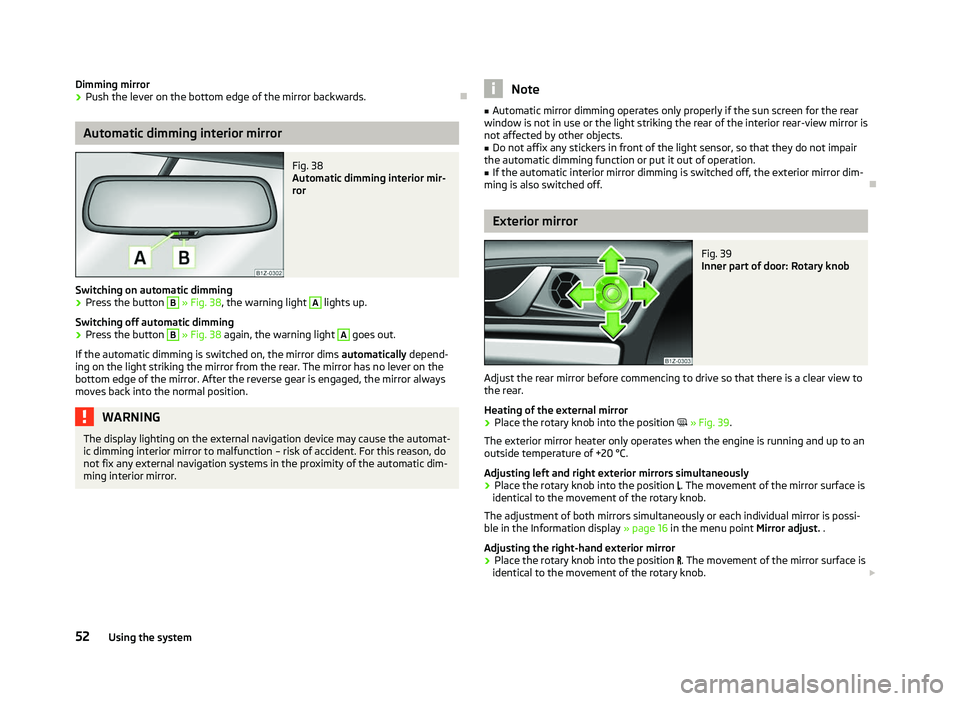
Fig. 38
Automatic dimming interior mir-
ror
Switching on automatic dimming › Press the button B
» Fig. 38, the warning light A
lights up.
Switching off automatic dimming
› Press the button B
» Fig. 38 again, the warning light A
goes out.
If the automatic dimming is switched on, the mirror dims automatically depend-
ing on the light striking the mirror from the rear. The mirror has no lever on the
bottom edge of the mirror. After the reverse gear is engaged, the mirror always
moves back into the normal position. WARNING
The display lighting on the external navigation device may cause the automat-
ic dimming interior mirror to malfunction – risk of accident. For this reason, do
not fix any external navigation systems in the proximity of the automatic dim-
ming interior mirror. Note
■ Automatic mirror dimming operates only properly if the sun screen for the rear
window is not in use or the light striking the rear of the interior rear-view mirror is
not affected by other objects. ■ Do not affix any stickers in front of the light sensor, so that they do not impair
the automatic dimming function or put it out of operation. ■ If the automatic interior mirror dimming is switched off, the exterior mirror dim-
ming is also switched off. Ð Exterior mirror
Fig. 39
Inner part of door: Rotary knob
Adjust the rear mirror before commencing to drive so that there is a clear view to
the rear.
Heating of the external mirror
› Place the rotary knob into the position
» Fig. 39.
The exterior mirror heater only operates when the engine is running and up to an
outside temperature of +20 °C.
Adjusting left and right exterior mirrors simultaneously
› Place the rotary knob into the position
. The movement of the mirror surface is
identical to the movement of the rotary knob.
The adjustment of both mirrors simultaneously or each individual mirror is possi-
ble in the Information display » page 16 in the menu point Mirror adjust. .
Adjusting the right-hand exterior mirror
› Place the rotary knob into the position
. The movement of the mirror surface is
identical to the movement of the rotary knob. £
52 Using the system
Page 87 of 218
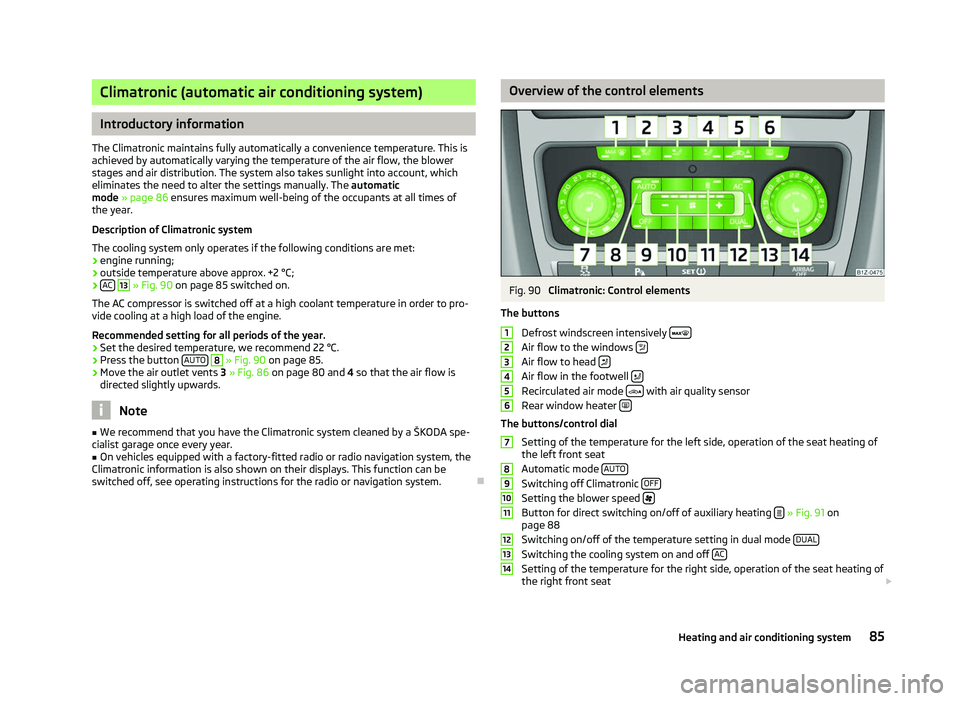
Climatronic (automatic air conditioning system)
Introductory information
The Climatronic maintains fully automatically a convenience temperature. This is
achieved by automatically varying the temperature of the air flow, the blower
stages and air distribution. The system also takes sunlight into account, which
eliminates the need to alter the settings manually. The automatic
mode » page 86
ensures maximum well-being of the occupants at all times of
the year.
Description of Climatronic system
The cooling system only operates if the following conditions are met:
› engine running;
› outside temperature above approx. +2 °C;
› AC 13
» Fig. 90 on page 85
switched on.
The AC compressor is switched off at a high coolant temperature in order to pro-
vide cooling at a high load of the engine.
Recommended setting for all periods of the year.
› Set the desired temperature, we recommend 22 °C.
› Press the button
AUTO 8
» Fig. 90
on page 85.
› Move the air outlet vents
3 » Fig. 86 on page 80 and 4 so that the air flow is
directed slightly upwards. Note
■ We recommend that you have the Climatronic system cleaned by a
ŠKODA spe-
cialist garage once every year. ■ On vehicles equipped with a factory-fitted radio or radio navigation system, the
Climatronic information is also shown on their displays. This function can be
switched off, see operating instructions for the radio or navigation system. Ð Overview of the control elements
Fig. 90
Climatronic: Control elements
The buttons Defrost windscreen intensively Air flow to the windows
Air flow to head
Air flow in the footwell
Recirculated air mode
with air quality sensor
Rear window heater The buttons/control dial
Setting of the temperature for the left side, operation of the seat heating of
the left front seat
Automatic mode AUTO Switching off Climatronic
OFF Setting the blower speed
Button for direct switching on/off of auxiliary heating
» Fig. 91 on
page 88
Switching on/off of the temperature setting in dual mode DUAL Switching the cooling system on and off
AC Setting of the temperature for the right side, operation of the seat heating of
the right front seat £ 1
2
3
4
5
6
7
8
9
10
11
12
13
14
85
Heating and air conditioning system
Page 89 of 218

Switching recirculated air mode on
›
Repeatedly press the button
5
» Fig. 90
on page 85 until the warning
light on the left side of the button is illuminated.
Switch on automatic air distribution control
› Repeatedly press the button
5
» Fig. 90
on page 85 until the warning
light on the right side of the button is illuminated.
Switch off automatic air distribution control temporarily
› If the air quality sensor does not automatically switch on the air distribution
control in the event of an unpleasant odour, you can switch it on yourself by
pressing the button 5
» Fig. 90
on page 85. The warning light lights up in
the button on the left side.
Switching recirculated air mode off
› Press the button
AUTO 8
» Fig. 90
on page
85 or repeatedly press the button
5
» Fig. 90 on page 85
until the warning lights in the button go out.WARNING
Do not leave recirculated air mode on over a longer period of time, as “stale”
air can cause fatigue of the driver and passengers, reduce attention levels and
also cause the windows to mist up. The risk of having an accident increases.
Switch off recirculated air mode as soon as the windows start to mist up. Note
■ If the windscreen mists up, press the button 1
» Fig. 90 on page 85
. Press
the button AUTO 8
» Fig. 90
on page 85 when the windshield is demisted.
■ The automatic air distribution control operates only if the outside temperature
is higher than approx. 2 °C. ÐControlling blower
The Climatronic system controls the blower stages automatically in line with the
interior temperature. However, the blower stages can be manually adapted to
suit your particular needs.
› Repeatedly press the button
10
» Fig. 90
on page 85 on the left side (reduce
blower speed) or on the right side (increase blower speed).
If the blower is switched off, the Climatronic system is switched off.
The set blower speed is displayed above the button 10
» Fig. 90 on page 85
when the respective number of warning lights come on. WARNING
■ “
Stale air” may result in fatigue in the driver and occupants, reduce attention
levels and also cause the windows to mist up. The risk of having an accident
increases.
■ Do not switch off the Climatronic system for longer than necessary.
■ Switch on the Climatronic system as soon as the windows mist up. Ð Defrosting windscreen
Switching on › Press the button
1
» Fig. 90
on page 85.
Switching off
› Once again press the button
1
» Fig. 90 on page 85
or the button AUTO .
The temperature control is controlled automatically. More air flows out of the air
outlet vents 1 » Fig. 86 on page 80
. Ð Auxiliary heating (auxiliary heating and ventilation)
ä
Introduction
This chapter contains information on the following subjects:
Direct switching on/off 88
System settings 89
Radio remote control 89
Changing the battery of the radio remote control 90
Auxiliary heating (parking heating)
The auxiliary heater (parking heater) functions in connection with the air-condi-
tioning system or Climatronic.
It can be used when stationary, when the engine is switched off to preheat the
vehicle and while driving (e.g. during the heating phase of the engine).
The engine is also preheated, if the auxiliary heating is switched on when the ve-
hicle is stationary and the engine is switched off. £
87
Heating and air conditioning system