engine SKODA OCTAVIA 2012 3.G / (5E) User Guide
[x] Cancel search | Manufacturer: SKODA, Model Year: 2012, Model line: OCTAVIA, Model: SKODA OCTAVIA 2012 3.G / (5E)Pages: 222, PDF Size: 13.52 MB
Page 18 of 222
orCHECK OIL LEVEL
Stop the vehicle, switch off the engine, and check the level of the engine
oil » page 172 .
The warning light will go out if the bonnet is left open for more than 30 seconds.
If no engine oil has been replenished, the warning light will come on again after
driving about 100 km.
The indicator light flashes (engine oil level sensor faulty)
The following message is shown in the information cluster display:
Oil sensor: workshop!
or
OIL SENSOR WORKSHOP
If the engine oil level sensor is faulty, the warning light flashes
several times
and an audible signal sounds when the ignition is turned on.
Seek help from a ŠKODA specialist garage.WARNING■ If you have to stop for technical reasons, then park the vehicle at a safe dis-
tance from the traffic, switch off the engine and activate the hazard warning
light system » page 49.■
Do not continue your journey if for some reason it is not possible to top
up the engine oil under the prevailing conditions! Switch off the engine and
seek assistance from a ŠKODA specialist garage.
Power steering
If the warning light
lights up, this indicates a partial failure of the power steer-
ing and the steering forces can be greater. Seek help from a ŠKODA specialist ga-
rage.
If the warning light
lights up, this indicates a complete failure of the power
steering and the steering assist has failed (significantly higher steering forces).
Seek help from a ŠKODA specialist garage.
Further information » page 93.
WARNINGIf you have to stop for technical reasons, then park the vehicle at a safe dis-
tance from the traffic, switch off the engine and activate the hazard warning
light system » page 49.
Note
If the vehicle's battery has been disconnected and reconnected, the warning light
comes on after switching on the ignition. The warning light should go out after
driving a short distance. If the yellow warning light does not go out after start-
ing the engine again and a short drive, it is necessary to visit a ŠKODA specialist
garage.
Traction control system (TCS)
If your vehicle is fitted with the ESC system, the ASR is integrated into the ESC
system » page 112 .
The warning light flashes
to show that the ASR is currently operating.
If the warning light
lights up, there is a fault in the ASR.
If the warning light
comes on immediately after starting the engine, the ASR
can be switched off for technical reasons. Switch the ignition off and on again. If
the warning light does not light up after you switch the engine back on, the ASR
is fully functional again.
The following message is shown in the information cluster display: Error: traction control
or
ASR ERROR
Seek help from a ŠKODA specialist garage.
Further information » page 112 and » page 113 , Traction control system (TCS) .
Note
If the vehicle's battery has been disconnected and reconnected, the warning light
comes on after switching on the ignition. The warning light should go out after
driving a short distance.
16Using the system
Page 19 of 222
Traction control (TCS) switched off
When the warning light is lit, this means the ASR is switched off.
The following message is shown in the information cluster display: Traction control (TCS) deactivated.
or ASR OFF
Further information » page 113, Traction control system (TCS) .
Electronic Stability Control (ESC)
A flashing warning light
shows that the ESC system is currently operating.
If the warning light
lights up, there is a fault in the ESC system.
If the warning light
comes on immediately after starting the engine, the ESC
system can be switched off for technical reasons. Switch the ignition off and on
again. If the warning light does not light up after you switch the engine back on,
the ESC system is fully functional again.
The following message is shown in the information cluster display:
Error: stabilisation control (ESC)
or
ESC ERROR
Seek help from a ŠKODA specialist garage.
Further information » page 112, Stabilisation Control (ESC) .
Note
If the vehicle's battery has been disconnected and reconnected, the warning light
comes on after switching on the ignition. If the warning light does not go out
after moving a short distance, this means there is an error in the ESC system.
Antilock brake system (ABS)
If the warning light
lights up, there is a fault in the ABS.
The following message is shown in the information cluster display:
Error: ABS
or
ABS ERROR
The vehicle will only be braked by the normal brake system without the ABS.
Seek help from a ŠKODA specialist garage. Further information » page 113, Antilock brake system (ABS) .WARNING■
If you have to stop for technical reasons, then park the vehicle at a safe dis-
tance from the traffic, switch off the engine and activate the hazard warning
light system » page 49.■
If the warning light is displayed simultaneously with warning light ,
do not continue your journey! Seek help from a ŠKODA specialist garage.
■
A fault to the ABS system or the braking system can increase the vehicle's
braking distance – risk of accident!
The rear fog light
The warning light
comes on when the rear fog lights are operating » page 48.
Bulb failure
The warning light
comes on if a bulb is faulty:
› within 2 seconds of the ignition being switched on;
› when switching on the defective light bulb.
The following message is shown in the information cluster display: Check right dipped headlight beam!
or DIPPED HEADLIGHT CHECK RIGHT
Exhaust inspection system
If the warning light
lights up, there is a fault in the exhaust inspection system.
The engine control unit allows the vehicle to run in emergency mode.
17Instruments and warning lights
Page 20 of 222
Seek help from a ŠKODA specialist garage.
Glow plug system (diesel engine)
The warning light comes on after the ignition has been switched on. Once the
light has gone out, the engine can be started immediately.
There is a fault in the glow plug system if the warning light does not come on
at all or lights up continuously .
If the warning light begins to flash while driving, a fault exists in the engine
control. The engine control unit allows the vehicle to run in emergency mode.
Seek help from a ŠKODA specialist garage.
EPC fault light (petrol engine)
If the warning light
lights up, there is a fault in the engine control. The engine
control unit allows the vehicle to run in emergency mode.
Seek help from a ŠKODA specialist garage.
Diesel particulate filter (diesel engine)
The diesel particulate filter separates the soot particles from the exhaust. The soot particles collect in the diesel particulate filter where they are burnt on a reg-
ular basis.
If the warning light
lights up, soot has accumulated in the diesel particulate
filter.
In order to clean the diesel particulate filter, and where traffic conditions per-
mit »
, the vehicle should be driven at an even speed of at least 60 km/h at en-
gine speeds of 1 800 - 2 500 rpm for at least 15 minutes or until the warning light
goes out with the 4th or 5th gear engaged (automatic gearbox: position S).
The warning light
goes out after the diesel particulate filter has been success-
fully cleaned.
If the filter is not properly cleaned, the warning light
does not go out and the
warning light
begins to flash.
The following message is shown in the information cluster display: Diesel particulate filter: owner's manual!
orDIESEL PM FILTER OWNER MANUAL
Seek help from a ŠKODA specialist garage.WARNING■ The diesel particle filter achieves very high temperatures. Therefore do not
park in areas where the hot filter can come into direct contact with dry grass
or other combustible materials – there is the risk of fire!■
Always adjust your speed to suit weather, road, region and traffic condi-
tions. The recommendations indicated by the warning light must not tempt
you to disregard the national regulations for road traffic.
CAUTION
As long as the warning light lights up, one must take into account an in-
creased fuel consumption and in certain circumstances a power reduction of the
engine.
Note
■ To assist the combustion process of the soot particles, we recommend that reg-
ularly driving over short distances should be avoided.■
Using diesel fuel with an increased sulphur content can considerably reduce the
life of the diesel particle filter. A ŠKODA specialist garage will be able to tell you
which countries use only diesel fuel with high sulphur content.
Fuel reserve
When the warning light is lit, this means there is a fuel reserve of under around
7 litres left.
An audible signal sounds as a warning signal.
The following message is shown in the information cluster display:
Please refuel. Range: ... km
or PLEASE REFUEL
18Using the system
Page 25 of 222
›Average speed
› Driving time
Since start
The memory collates the driving information from the moment the ignition is
switched on until it is switched off. New data will also flow into the calculation of
the current driving information if the trip is continued within 2 hours after
switching off the ignition. If the trip is interrupted for more than 2 hours, the
memory is automatically erased.
Long-term
The memory gathers driving information from any number of individual journeys
up to a total of 99 hours and 59 minutes driving or 9 999 kilometres driven. The
memory is deleted when either of these limits is reached and the calculation
starts all over again.
Since refuel
The memory gathers driving information since the last refuelling. The memory is erased automatically the next time you fill up.
Note
Disconnecting the vehicle battery will delete all memory data.
Multifunction display details
First read and observe the introductory information and safety warn-
ings
on page 22.
Range
The range indicates the distance you can still drive with your vehicle based on the
level of fuel in the tank and the same style of driving as before.
The display is shown in steps of 10 km. After lighting up of the indicator light
the display is shown in steps of 5 km.
The fuel consumption over the last 50 km is used to calculate the range. Therange can increase if you drive in a more fuel-efficient manner.
Average fuel consumption
The average fuel consumption 1)
is calculated since the last time the memory was
erased » page 22 .
If you wish to determine the average fuel consumption over a certain period of
time, you must set the memory at the start of the new measurement to zero » Fig. 3 on page 22. After erasing the memory, no fuel consumption data will
appear for the first 100 m driven.
The fuel consumption data is updated regularly while you are driving.
Current fuel consumption
You can use this information to adapt your driving style to the desired fuel con-
sumption 1)
.
The display appears in litres/hour if the vehicle is stationary or driving at a low
speed 2)
.
Oil temperature
If the engine oil temperature is in the range 80-110 °C, the engine operating tem-
perature is reached.
If the temperature lies below 80 °C or above 110 °C, avoid high engine revs, full
throttle and high engine loads.
If the oil temperature is lower than 50 °C or if a fault in the system for checking
the oil temperature is present,
are displayed instead of the oil temperature.
Warning against excessive speeds
Setting the speed limit, e.g. for the intra-urban top speed » page 24.
Traffic sign recognition
In the display, up to three detected traffic signs can be displayed, which provide
information about the following:
› Maximum speed (including additional sign);
› Overtaking prohibited.
Further information » page 25, Traffic sign recognition .
Current driving speed
The current speed is identical to the display on the speedometer 3
» Fig. 2 on
page 9.
1)
To set the units for the fuel consumption display
» Bedienungsanleitung Infotainment, chapter Unit
setup .
2)
On some models in certain countries, the display appears in --,- kilometres/litres if the vehicle is sta-
tionary.
23Information system
Page 30 of 222
Unlocking and locking
Vehicle key
Introductory information
Fig. 8
Key: without/with remote control
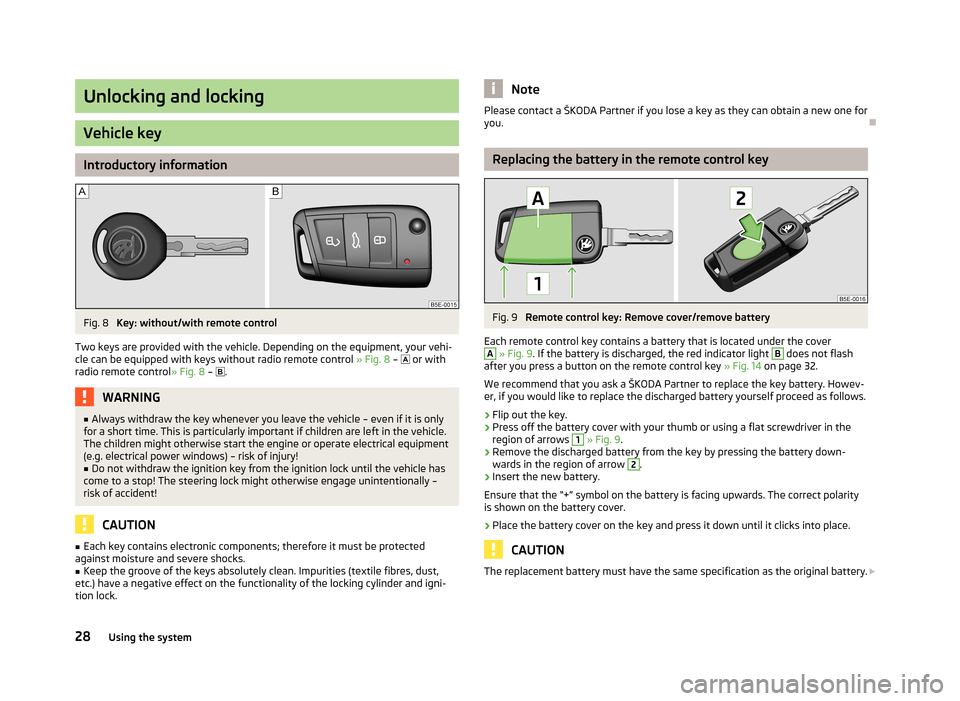
Two keys are provided with the vehicle. Depending on the equipment, your vehi- cle can be equipped with keys without radio remote control » Fig. 8 –
or with
radio remote control » Fig. 8 –
.
WARNING■
Always withdraw the key whenever you leave the vehicle – even if it is only
for a short time. This is particularly important if children are left in the vehicle.
The children might otherwise start the engine or operate electrical equipment
(e.g. electrical power windows) – risk of injury!■
Do not withdraw the ignition key from the ignition lock until the vehicle has
come to a stop! The steering lock might otherwise engage unintentionally – risk of accident!
CAUTION
■ Each key contains electronic components; therefore it must be protected
against moisture and severe shocks.■
Keep the groove of the keys absolutely clean. Impurities (textile fibres, dust,
etc.) have a negative effect on the functionality of the locking cylinder and igni-
tion lock.
NotePlease contact a ŠKODA Partner if you lose a key as they can obtain a new one for you.
Replacing the battery in the remote control key
Fig. 9
Remote control key: Remove cover/remove battery
Each remote control key contains a battery that is located under the cover
A
» Fig. 9 . If the battery is discharged, the red indicator light
B
does not flash
after you press a button on the remote control key » Fig. 14 on page 32.
We recommend that you ask a ŠKODA Partner to replace the key battery. Howev- er, if you would like to replace the discharged battery yourself proceed as follows.
›
Flip out the key.
›
Press off the battery cover with your thumb or using a flat screwdriver in theregion of arrows
1
» Fig. 9 .
›
Remove the discharged battery from the key by pressing the battery down-
wards in the region of arrow
2
.
›
Insert the new battery.
Ensure that the “+” symbol on the battery is facing upwards. The correct polarity
is shown on the battery cover.
›
Place the battery cover on the key and press it down until it clicks into place.
CAUTION
The replacement battery must have the same specification as the original battery. 28Using the system
Page 34 of 222
Vehicle locking/unlocking from the insideFig. 13
Central locking button
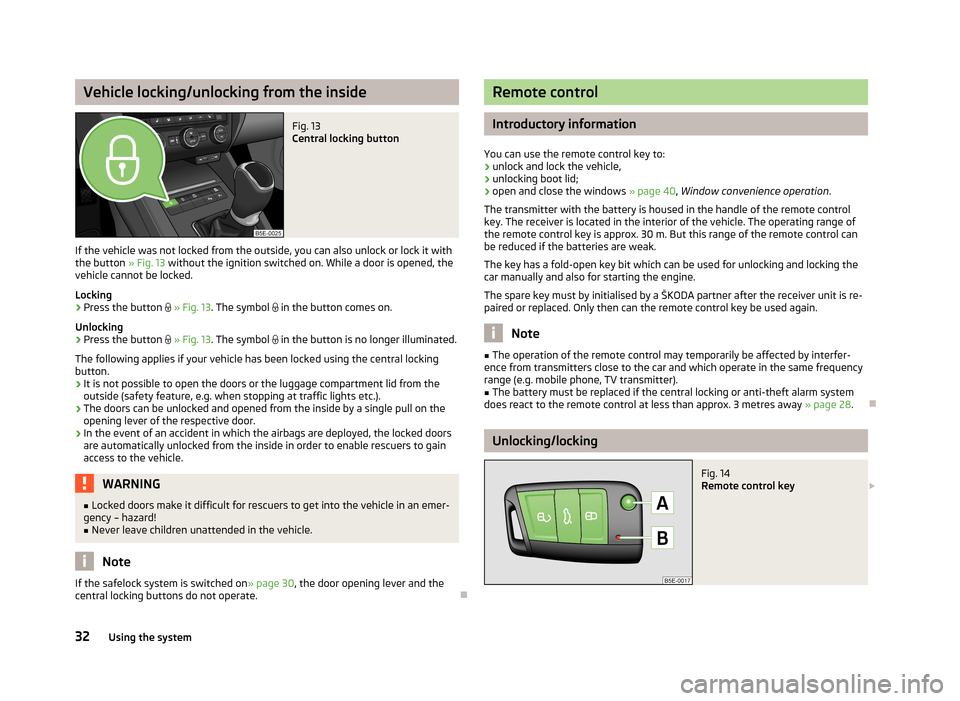
If the vehicle was not locked from the outside, you can also unlock or lock it with
the button » Fig. 13 without the ignition switched on. While a door is opened, the
vehicle cannot be locked.
Locking
›
Press the button
» Fig. 13 . The symbol
in the button comes on.
Unlocking
›
Press the button
» Fig. 13 . The symbol
in the button is no longer illuminated.
The following applies if your vehicle has been locked using the central locking button.
› It is not possible to open the doors or the luggage compartment lid from the
outside (safety feature, e.g. when stopping at traffic lights etc.).
› The doors can be unlocked and opened from the inside by a single pull on the
opening lever of the respective door.
› In the event of an accident in which the airbags are deployed, the locked doors
are automatically unlocked from the inside in order to enable rescuers to gain access to the vehicle.
WARNING■ Locked doors make it difficult for rescuers to get into the vehicle in an emer-
gency – hazard!■
Never leave children unattended in the vehicle.
Note
If the safelock system is switched on » page 30
, the door opening lever and the
central locking buttons do not operate.
Remote control
Introductory information
You can use the remote control key to:
› unlock and lock the vehicle,
› unlocking boot lid;
› open and close the windows
» page 40, Window convenience operation .
The transmitter with the battery is housed in the handle of the remote control
key. The receiver is located in the interior of the vehicle. The operating range of
the remote control key is approx. 30 m. But this range of the remote control can
be reduced if the batteries are weak.
The key has a fold-open key bit which can be used for unlocking and locking the
car manually and also for starting the engine.
The spare key must by initialised by a ŠKODA partner after the receiver unit is re-
paired or replaced. Only then can the remote control key be used again.
Note
■ The operation of the remote control may temporarily be affected by interfer-
ence from transmitters close to the car and which operate in the same frequency
range (e.g. mobile phone, TV transmitter).■
The battery must be replaced if the central locking or anti-theft alarm system
does react to the remote control at less than approx. 3 metres away » page 28.
Unlocking/locking
Fig. 14
Remote control key
32Using the system
Page 35 of 222
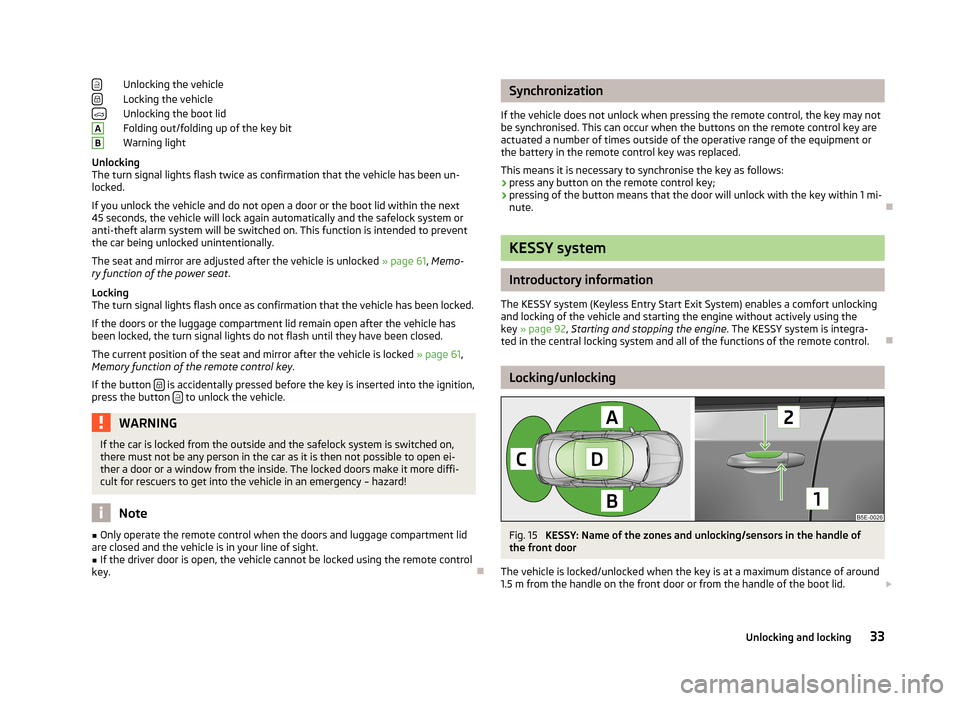
Unlocking the vehicle
Locking the vehicle
Unlocking the boot lid
Folding out/folding up of the key bit
Warning light
Unlocking
The turn signal lights flash twice as confirmation that the vehicle has been un-
locked.
If you unlock the vehicle and do not open a door or the boot lid within the next
45 seconds, the vehicle will lock again automatically and the safelock system or
anti-theft alarm system will be switched on. This function is intended to prevent
the car being unlocked unintentionally.
The seat and mirror are adjusted after the vehicle is unlocked » page 61, Memo-
ry function of the power seat .
Locking
The turn signal lights flash once as confirmation that the vehicle has been locked.
If the doors or the luggage compartment lid remain open after the vehicle has
been locked, the turn signal lights do not flash until they have been closed.
The current position of the seat and mirror after the vehicle is locked » page 61,
Memory function of the remote control key .
If the button
is accidentally pressed before the key is inserted into the ignition,
press the button to unlock the vehicle.
WARNINGIf the car is locked from the outside and the safelock system is switched on,
there must not be any person in the car as it is then not possible to open ei-
ther a door or a window from the inside. The locked doors make it more diffi-
cult for rescuers to get into the vehicle in an emergency – hazard!
Note
■ Only operate the remote control when the doors and luggage compartment lid
are closed and the vehicle is in your line of sight.■
If the driver door is open, the vehicle cannot be locked using the remote control
key.
ABSynchronization
If the vehicle does not unlock when pressing the remote control, the key may not be synchronised. This can occur when the buttons on the remote control key areactuated a number of times outside of the operative range of the equipment or
the battery in the remote control key was replaced.
This means it is necessary to synchronise the key as follows:
› press any button on the remote control key;
› pressing of the button means that the door will unlock with the key within 1 mi-
nute.
KESSY system
Introductory information
The KESSY system (Keyless Entry Start Exit System) enables a comfort unlocking
and locking of the vehicle and starting the engine without actively using the
key » page 92 , Starting and stopping the engine . The KESSY system is integra-
ted in the central locking system and all of the functions of the remote control.
Locking/unlocking
Fig. 15
KESSY: Name of the zones and unlocking/sensors in the handle of
the front door
The vehicle is locked/unlocked when the key is at a maximum distance of around
1.5 m from the handle on the front door or from the handle of the boot lid.
33Unlocking and locking
Page 36 of 222
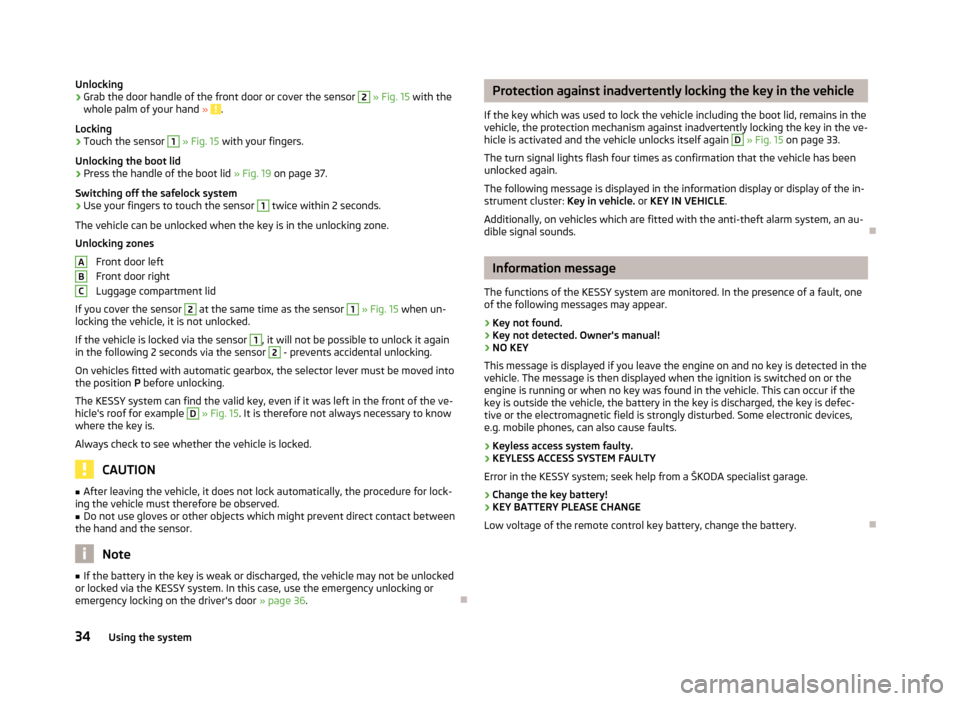
Unlocking›Grab the door handle of the front door or cover the sensor 2 » Fig. 15 with the
whole palm of your hand » .
Locking
›
Touch the sensor
1
» Fig. 15 with your fingers.
Unlocking the boot lid
›
Press the handle of the boot lid » Fig. 19 on page 37.
Switching off the safelock system
›
Use your fingers to touch the sensor
1
twice within 2 seconds.
The vehicle can be unlocked when the key is in the unlocking zone.
Unlocking zones
Front door left
Front door right
Luggage compartment lid
If you cover the sensor
2
at the same time as the sensor
1
» Fig. 15 when un-
locking the vehicle, it is not unlocked.
If the vehicle is locked via the sensor
1
, it will not be possible to unlock it again
in the following 2 seconds via the sensor
2
- prevents accidental unlocking.
On vehicles fitted with automatic gearbox, the selector lever must be moved into the position P before unlocking.
The KESSY system can find the valid key, even if it was left in the front of the ve-
hicle's roof for example
D
» Fig. 15 . It is therefore not always necessary to know
where the key is.
Always check to see whether the vehicle is locked.
CAUTION
■ After leaving the vehicle, it does not lock automatically, the procedure for lock-
ing the vehicle must therefore be observed.■
Do not use gloves or other objects which might prevent direct contact between
the hand and the sensor.
Note
■ If the battery in the key is weak or discharged, the vehicle may not be unlocked
or locked via the KESSY system. In this case, use the emergency unlocking or emergency locking on the driver's door » page 36.ABCProtection against inadvertently locking the key in the vehicle
If the key which was used to lock the vehicle including the boot lid, remains in the
vehicle, the protection mechanism against inadvertently locking the key in the ve-
hicle is activated and the vehicle unlocks itself again D
» Fig. 15 on page 33.
The turn signal lights flash four times as confirmation that the vehicle has been
unlocked again.
The following message is displayed in the information display or display of the in-
strument cluster: Key in vehicle. or KEY IN VEHICLE .
Additionally, on vehicles which are fitted with the anti-theft alarm system, an au- dible signal sounds.
Information message
The functions of the KESSY system are monitored. In the presence of a fault, one of the following messages may appear.
› Key not found.
› Key not detected. Owner's manual!
› NO KEY
This message is displayed if you leave the engine on and no key is detected in the vehicle. The message is then displayed when the ignition is switched on or the
engine is running or when no key was found in the vehicle. This can occur if the
key is outside the vehicle, the battery in the key is discharged, the key is defec-
tive or the electromagnetic field is strongly disturbed. Some electronic devices,
e.g. mobile phones, can also cause faults.
› Keyless access system faulty.
› KEYLESS ACCESS SYSTEM FAULTY
Error in the KESSY system; seek help from a ŠKODA specialist garage.
› Change the key battery!
› KEY BATTERY PLEASE CHANGE
Low voltage of the remote control key battery, change the battery.
34Using the system
Page 50 of 222
WARNINGHeadlight assist only functions as a support and does not relieve the driver of
his responsibility to check the headlights and light beam and, if necessary, to
switch on the lights depending on the light conditions. Manual operation may be required in the following situations:■
in poor visibility conditions, e.g. fog, heavy rain, thick snowfall;
■
on A roads or motorways when oncoming traffic is partially obscured;
■
when passing poorly lit traffic, e.g. cyclists;
■
around sharp curves;
■
on sharp slopes up/down;
■
while driving through poorly-lit villages;
■
while driving over highly reflective surfaces;
■
when the windscreen around the camera is dirty, iced up, misted up, or cov-
ered up by stickers;
■
when an external navigation system is attached to the windscreen.
CAUTION
■ Do not attach any stickers or similar objects to the windscreen to avoid impair-
ing the functions of the Assist system.
Fog lights
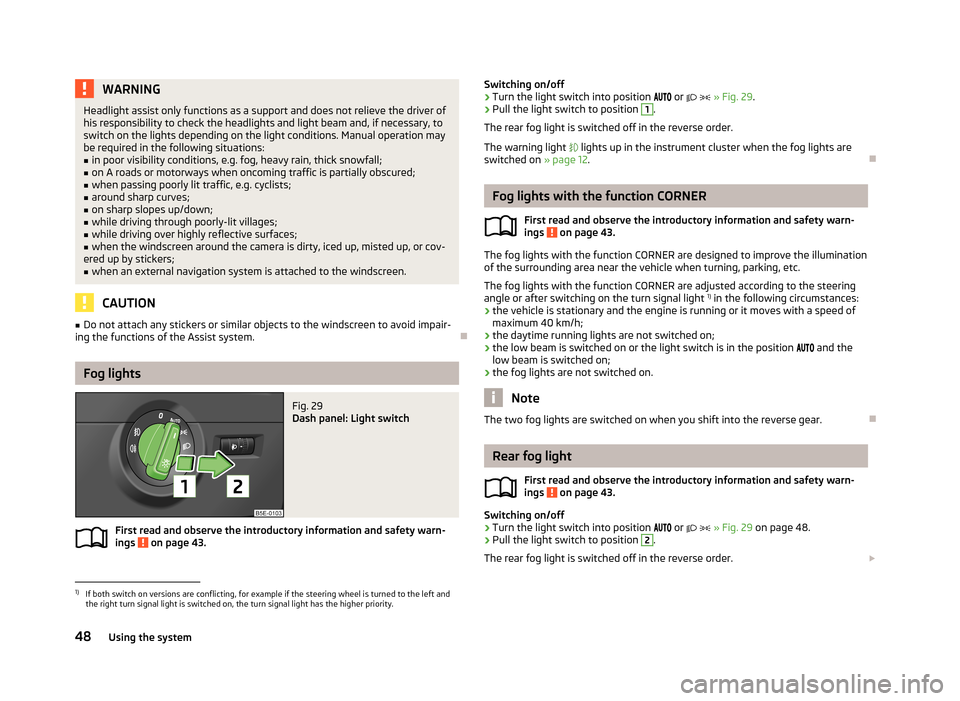
Fig. 29
Dash panel: Light switch
First read and observe the introductory information and safety warn- ings on page 43.
Switching on/off›Turn the light switch into position or » Fig. 29 .›
Pull the light switch to position
1
.
The rear fog light is switched off in the reverse order.
The warning light lights up in the instrument cluster when the fog lights are
switched on » page 12.
Fog lights with the function CORNER
First read and observe the introductory information and safety warn-
ings
on page 43.
The fog lights with the function CORNER are designed to improve the illumination
of the surrounding area near the vehicle when turning, parking, etc.
The fog lights with the function CORNER are adjusted according to the steeringangle or after switching on the turn signal light 1)
in the following circumstances:
› the vehicle is stationary and the engine is running or it moves with a speed of
maximum 40 km/h;
› the daytime running lights are not switched on;
› the low beam is switched on or the light switch is in the position
and the
low beam is switched on;
› the fog lights are not switched on.
Note
The two fog lights are switched on when you shift into the reverse gear.
Rear fog light
First read and observe the introductory information and safety warn-
ings
on page 43.
Switching on/off
›
Turn the light switch into position
or
» Fig. 29 on page 48.
›
Pull the light switch to position
2
.
The rear fog light is switched off in the reverse order.
1)
If both switch on versions are conflicting, for example if the steering wheel is turned to the left and
the right turn signal light is switched on, the turn signal light has the higher priority.
48Using the system
Page 54 of 222

Switching the light on/off›Press the button » Fig. 33 - .
Switching the reading light on/off›
Press the button or
» Fig. 33 - .
Front door warning light
Fig. 34
Front door: Warning light
The warning light is located in the lower door trim panel » Fig. 34.
The light switches on/off when the front door is opened or closed.
Note
If the door is open and the ignition switched off, the light will extinguish auto-
matically after around 10 minutes.
Entry lighting
The lighting is positioned on the bottom edge of the exterior mirror and illumi- nates the entry area of the front door.
The light comes on after the vehicle has been unlocked or on opening the front
door. The lighting goes out within around 30 seconds after the front door is
closed or the ignition is switched on.
WARNINGIf the entry light is on, do not touch its cover - risk of burns!NoteIf the door is open and the ignition switched off, the light will extinguish auto-
matically after around 10 minutes.
Visibility
Windscreen and rear window heater
Fig. 35
Buttons for the front and rear window heater/manual air-condition-
ing system, heating
Switching the windscreen heater on/off
›
Press the button
» Fig. 35 .
The indicator light in or underneath the button lights up/goes out.
Switching the rear window heater on/off
›
Press the button
» Fig. 35 .
The indicator light in or underneath the button lights up/goes out.
The windscreen and rear window heater only operates when the engine is run- ning.
The windscreen and rear window heater automatically switches off after approxi-
mately 10 minutes.
52Using the system