ECU SKODA OCTAVIA 2013 3.G / (5E) User Guide
[x] Cancel search | Manufacturer: SKODA, Model Year: 2013, Model line: OCTAVIA, Model: SKODA OCTAVIA 2013 3.G / (5E)Pages: 287, PDF Size: 18.55 MB
Page 81 of 287
The locking mechanism must audibly snap into place.
Folding backwards›
Place the lever in position
1
» Fig. 54 .
›
Fold the seat backrest in the opposite direction of the arrow
2
.
The locking mechanism must audibly snap into place.
WARNING■ The front passenger airbag should be switched off when transporting ob-
jects on the seat which was folded forwards » page 191.■
Adjust the seat backrest only when the vehicle is stationary.
■
When moving the seat backrest, make sure the seat backrest has been
properly secured – check by pulling on the seat backrest.
■
If the seat backrest is folded, passengers may only be transported on the
outer seat behind the driver.
■
When moving the seat backrest, keep limbs away from between the seat
cushion and seat backrest – risk of injury!
■
Never transport objects on the seat backrest which was folded forwards,
which: ■ impair driver visibility;
■ make it impossible for the driver to control the vehicle, e.g. if they are
placed under the pedals, or could protrude into the driver's zone;
■ could lead to injury to passengers due to a change of direction or braking
manouvre when accelerating sharply.
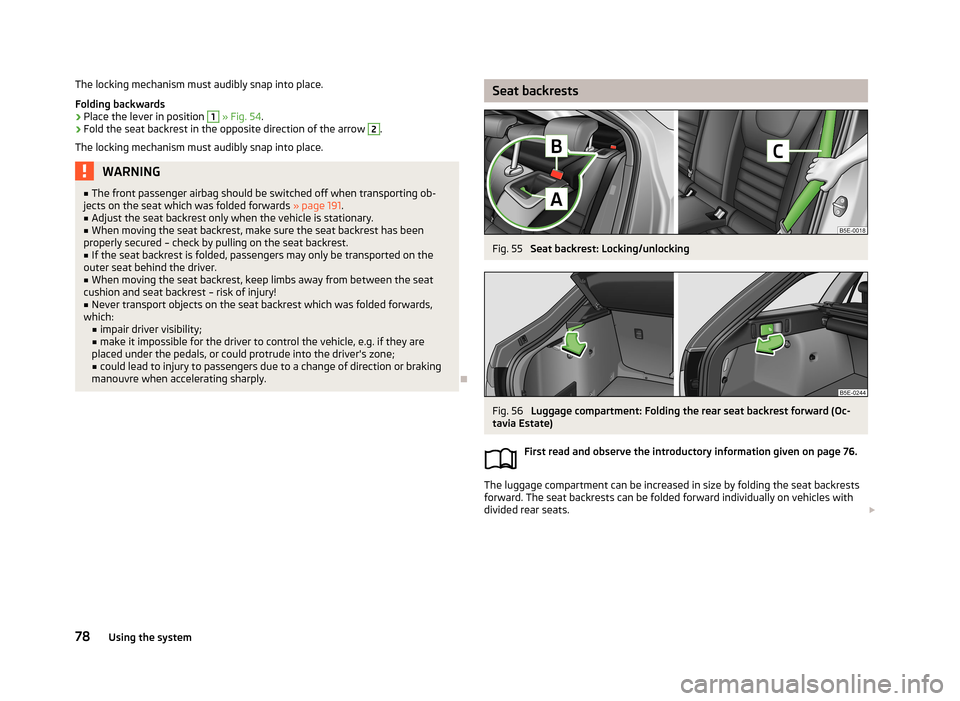
Seat backrestsFig. 55
Seat backrest: Locking/unlocking
Fig. 56
Luggage compartment: Folding the rear seat backrest forward (Oc-
tavia Estate)
First read and observe the introductory information given on page 76.
The luggage compartment can be increased in size by folding the seat backrests
forward. The seat backrests can be folded forward individually on vehicles with
divided rear seats.
78Using the system
Page 82 of 287
Folding forward
Before folding the seat backrests forwards, adapt the position of the front seats
in such a way that they are not damaged by the folded seat backrests 1)
.›
Push the lever
A
» Fig. 55 and fold the seat backrest completely forwards.
Fold forward from the luggage compartment
The rear seat backrests can also be unlocked and folded forward from the lug-
gage compartment.
There is a lever on the right side of the luggage compartment for unlocking the
right and the middle rear seat backrests.
There is a lever on the left side of the luggage compartment for unlocking the left
rear seat backrest.
›
Pull the corresponding lever in the direction of the arrow » Fig. 56.
The corresponding rear seat backrest is unlocked and can be folded forward.
Folding backwards
›
Hold the rear outer seat belt
C
» Fig. 55 against the side trim panel.
›
Then push the seat backrest back into the upright position until the securing
knob
A
clicks into place – check by pulling on the seat backrest » .
›
Make sure that the red pin
B
is hidden.
WARNING■
The belts and the belt locks must be in their original position after folding
back the seat backrests – they must be ready to use.■
The seat backrests must be securely locked in position so that no objects in
the luggage compartment can slide into the passenger compartment on sud- den braking – risk of injury.
■
Ensure that the rear seat backrests are properly engaged. Only then can the
seat belt for the middle seat reliably fulfil its function.
CAUTION■ Before folding the seat backrest forward from the luggage compartment, check
that there are no objects on the rear seat. When folding the seat backrest for-
ward, they could be damaged or cause damage to the seat backrest and the seat.■
Ensure that the seat belts are not damaged when operating the seat backrests.
Under no circumstances must the rear seat belts be jammed by the folded back
seat backrests.
■
On vehicles with a net partition first the left and then the right and middle rear
seat backrest must be unlocked 2)
.
Practical equipment
Introduction
This chapter contains information on the following subjects:
Car park ticket holder
80
Storage compartment on the driver's side
80
Storage compartments in the doors
81
Holder for reflective vest
81
storage compartment in the front center console - not lockable
82
Storage compartment in the front centre console
82
Cup holders
82
Cigarette lighter
83
Ashtray
83
12-volt power outlet
84
Waste container
85
Multimedia holder
85
Storage compartment under the front armrest
86
Glasses storage box
86
Storage compartment on the passenger side
87
Storage compartment under the passenger seat
87
Clothes hook
88
1)
If the front seats are too far back, we recommend that you have the rear head restraints removed
before the seat backrests are folded forward. Store the removed head restraints in such a way that
they are not be damaged or soiled.
2)
Applies to the Octavia Estate.
79Seats and useful equipment
Page 93 of 287
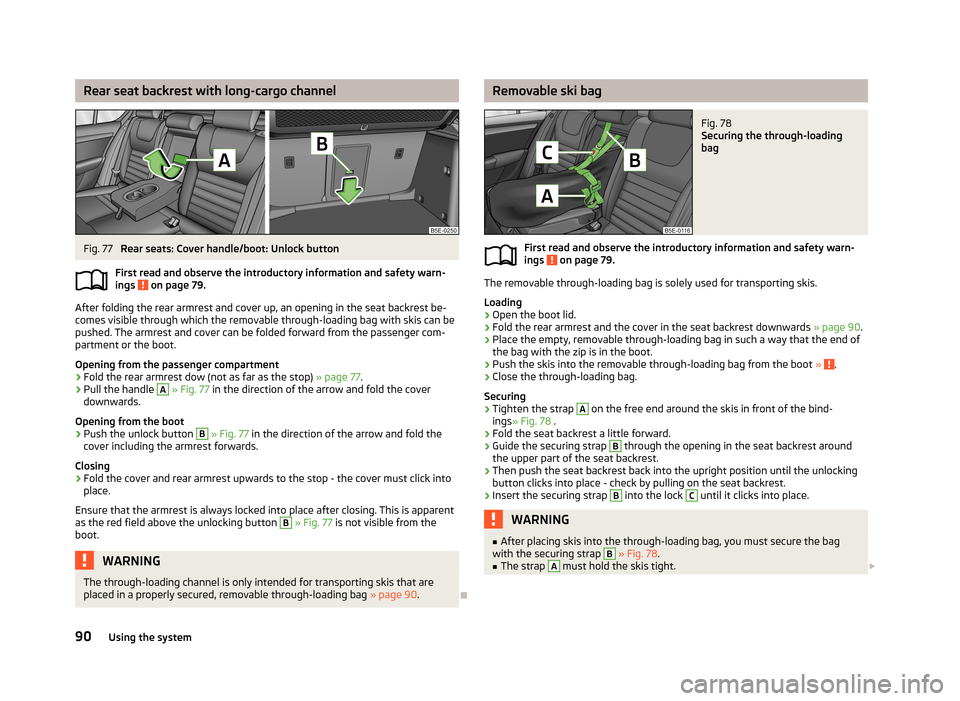
Rear seat backrest with long-cargo channelFig. 77
Rear seats: Cover handle/boot: Unlock button
First read and observe the introductory information and safety warn-
ings
on page 79.
After folding the rear armrest and cover up, an opening in the seat backrest be-
comes visible through which the removable through-loading bag with skis can be
pushed. The armrest and cover can be folded forward from the passenger com-
partment or the boot.
Opening from the passenger compartment
›
Fold the rear armrest dow (not as far as the stop) » page 77.
›
Pull the handle
A
» Fig. 77 in the direction of the arrow and fold the cover
downwards.
Opening from the boot
›
Push the unlock button
B
» Fig. 77 in the direction of the arrow and fold the
cover including the armrest forwards.
Closing
›
Fold the cover and rear armrest upwards to the stop - the cover must click into place.
Ensure that the armrest is always locked into place after closing. This is apparent
as the red field above the unlocking button
B
» Fig. 77 is not visible from the
boot.
WARNINGThe through-loading channel is only intended for transporting skis that are
placed in a properly secured, removable through-loading bag » page 90.
Removable ski bagFig. 78
Securing the through-loading
bag
First read and observe the introductory information and safety warn-
ings on page 79.
The removable through-loading bag is solely used for transporting skis.
Loading
›
Open the boot lid.
›
Fold the rear armrest and the cover in the seat backrest downwards » page 90.
›
Place the empty, removable through-loading bag in such a way that the end of
the bag with the zip is in the boot.
›
Push the skis into the removable through-loading bag from the boot » .
›
Close the through-loading bag.
Securing
›
Tighten the strap
A
on the free end around the skis in front of the bind-
ings » Fig. 78 .
›
Fold the seat backrest a little forward.
›
Guide the securing strap
B
through the opening in the seat backrest around
the upper part of the seat backrest.
›
Then push the seat backrest back into the upright position until the unlocking button clicks into place - check by pulling on the seat backrest.
›
Insert the securing strap
B
into the lock
C
until it clicks into place.
WARNING■ After placing skis into the through-loading bag, you must secure the bag
with the securing strap B » Fig. 78 .■
The strap
A
must hold the skis tight. 90Using the system
Page 96 of 287
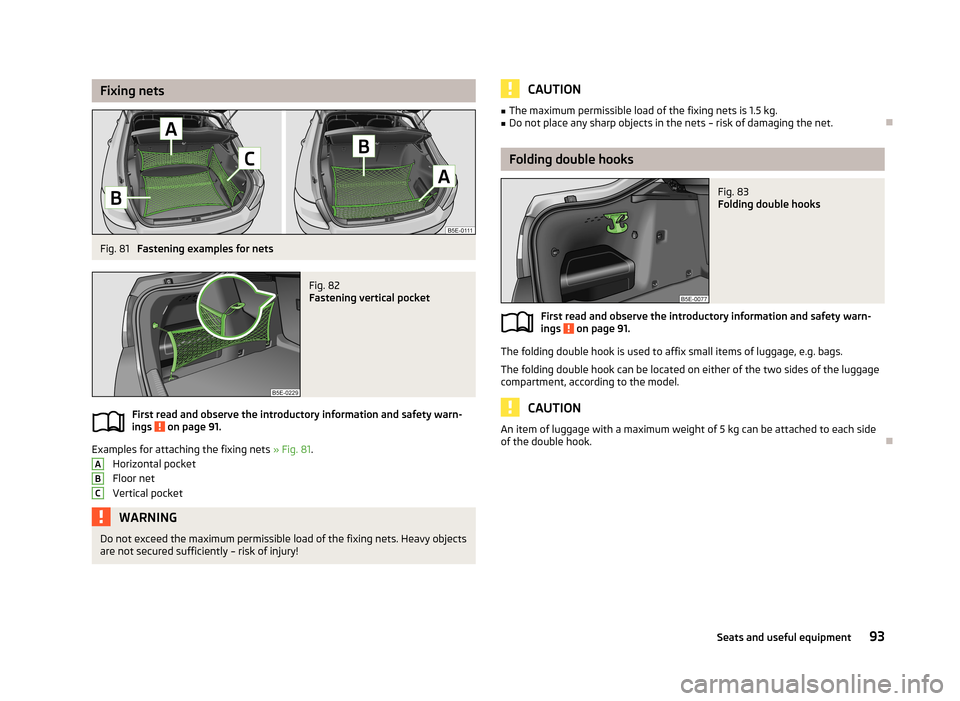
Fixing netsFig. 81
Fastening examples for nets
Fig. 82
Fastening vertical pocket
First read and observe the introductory information and safety warn-
ings on page 91.
Examples for attaching the fixing nets » Fig. 81.
Horizontal pocket
Floor net
Vertical pocket
WARNINGDo not exceed the maximum permissible load of the fixing nets. Heavy objects are not secured sufficiently – risk of injury!ABCCAUTION■ The maximum permissible load of the fixing nets is 1.5 kg.■Do not place any sharp objects in the nets – risk of damaging the net.
Folding double hooks
Fig. 83
Folding double hooks
First read and observe the introductory information and safety warn-
ings on page 91.
The folding double hook is used to affix small items of luggage, e.g. bags.
The folding double hook can be located on either of the two sides of the luggage
compartment, according to the model.
CAUTION
An item of luggage with a maximum weight of 5 kg can be attached to each side
of the double hook.
93Seats and useful equipment
Page 98 of 287
CAUTIONThe double sided floor covering can only be used in vehicles without the variable
loading floor » page 99 - There is a risk of damage to the variable loading floor.
Note
For easier turning of the covering, use the loop attached.
Luggage net
Fig. 86
Luggage net
First read and observe the introductory information and safety warn-
ings on page 91.
The luggage net is located on the underside of the luggage compartment cover.
The net is designed for transporting lighter objects.
WARNINGOnly store soft objects with a total weight of 1.5 kg in the net. Heavy objects are not secured sufficiently – risk of injury!
CAUTION
Do not place any sharp objects into the net – risk of net damage.
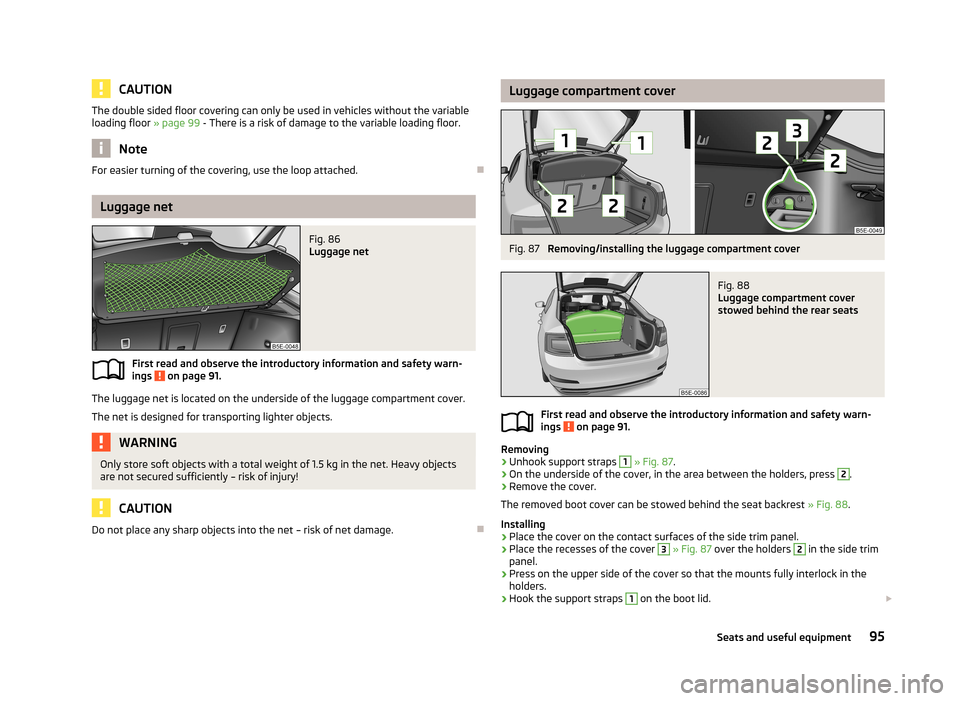
Luggage compartment coverFig. 87
Removing/installing the luggage compartment cover
Fig. 88
Luggage compartment cover
stowed behind the rear seats
First read and observe the introductory information and safety warn-
ings on page 91.
Removing
›
Unhook support straps
1
» Fig. 87 .
›
On the underside of the cover, in the area between the holders, press
2
.
›
Remove the cover.
The removed boot cover can be stowed behind the seat backrest » Fig. 88.
Installing
›
Place the cover on the contact surfaces of the side trim panel.
›
Place the recesses of the cover
3
» Fig. 87 over the holders
2
in the side trim
panel.
›
Press on the upper side of the cover so that the mounts fully interlock in the holders.
›
Hook the support straps
1
on the boot lid.
95Seats and useful equipment
Page 101 of 287
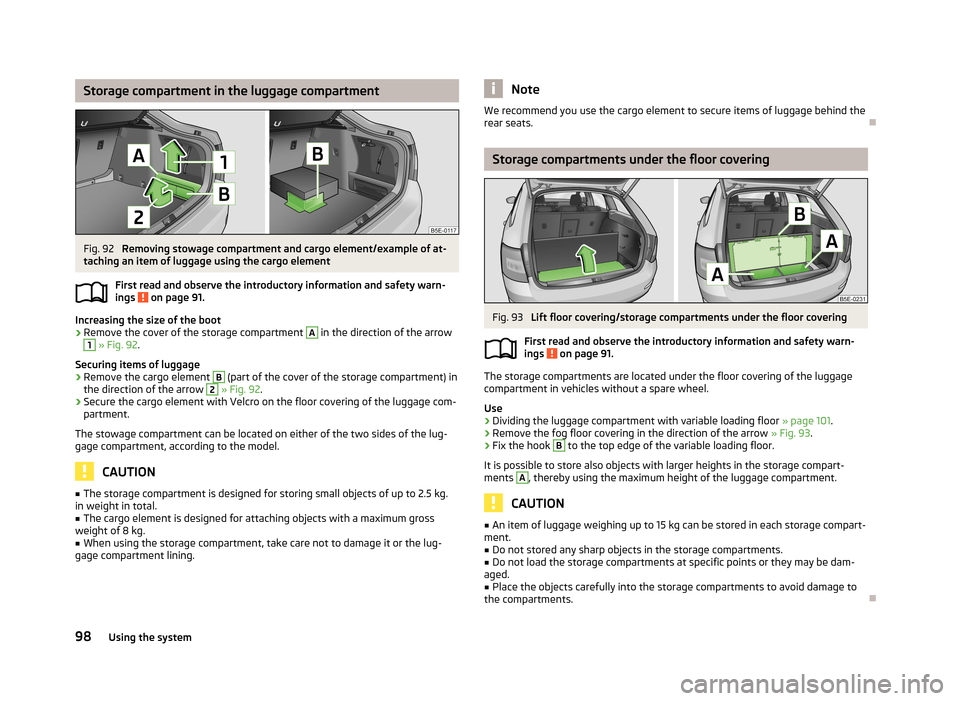
Storage compartment in the luggage compartmentFig. 92
Removing stowage compartment and cargo element/example of at-
taching an item of luggage using the cargo element
First read and observe the introductory information and safety warn-ings
on page 91.
Increasing the size of the boot
›
Remove the cover of the storage compartment
A
in the direction of the arrow
1
» Fig. 92 .
Securing items of luggage
›
Remove the cargo element
B
(part of the cover of the storage compartment) in
the direction of the arrow
2
» Fig. 92 .
›
Secure the cargo element with Velcro on the floor covering of the luggage com-
partment.
The stowage compartment can be located on either of the two sides of the lug-
gage compartment, according to the model.
CAUTION
■ The storage compartment is designed for storing small objects of up to 2.5 kg.
in weight in total.■
The cargo element is designed for attaching objects with a maximum gross
weight of 8 kg.
■
When using the storage compartment, take care not to damage it or the lug-
gage compartment lining.
NoteWe recommend you use the cargo element to secure items of luggage behind the
rear seats.
Storage compartments under the floor covering
Fig. 93
Lift floor covering/storage compartments under the floor covering
First read and observe the introductory information and safety warn-
ings
on page 91.
The storage compartments are located under the floor covering of the luggage compartment in vehicles without a spare wheel.
Use
›
Dividing the luggage compartment with variable loading floor » page 101.
›
Remove the fog floor covering in the direction of the arrow » Fig. 93.
›
Fix the hook
B
to the top edge of the variable loading floor.
It is possible to store also objects with larger heights in the storage compart- ments
A
, thereby using the maximum height of the luggage compartment.
CAUTION
■ An item of luggage weighing up to 15 kg can be stored in each storage compart-
ment.■
Do not stored any sharp objects in the storage compartments.
■
Do not load the storage compartments at specific points or they may be dam-
aged.
■
Place the objects carefully into the storage compartments to avoid damage to
the compartments.
98Using the system
Page 104 of 287
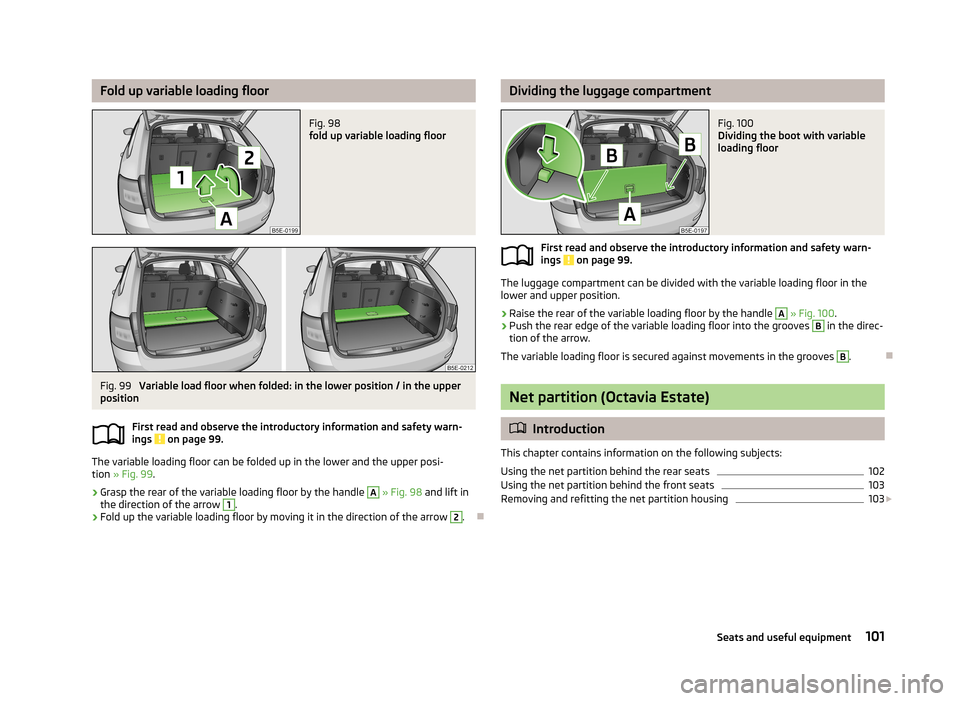
Fold up variable loading floorFig. 98
fold up variable loading floor
Fig. 99
Variable load floor when folded: in the lower position / in the upper
position
First read and observe the introductory information and safety warn-
ings
on page 99.
The variable loading floor can be folded up in the lower and the upper posi-
tion » Fig. 99 .
›
Grasp the rear of the variable loading floor by the handle
A
» Fig. 98 and lift in
the direction of the arrow
1
.
›
Fold up the variable loading floor by moving it in the direction of the arrow
2
.
Dividing the luggage compartmentFig. 100
Dividing the boot with variable
loading floor
First read and observe the introductory information and safety warn-
ings on page 99.
The luggage compartment can be divided with the variable loading floor in the
lower and upper position.
›
Raise the rear of the variable loading floor by the handle
A
» Fig. 100 .
›
Push the rear edge of the variable loading floor into the grooves
B
in the direc-
tion of the arrow.
The variable loading floor is secured against movements in the grooves
B
.
Net partition (Octavia Estate)
Introduction
This chapter contains information on the following subjects: Using the net partition behind the rear seats
102
Using the net partition behind the front seats
103
Removing and refitting the net partition housing
103
101Seats and useful equipment
Page 105 of 287
WARNING■Check that the crossbar of the net partition is hung firmly into the recepta-
cles D » Fig. 101 on page 102 and C » Fig. 103 on page 103.■
The belts and the belt locks must be in their original position after folding
back the seat backrests – they must be ready to use.
■
The seat backrests must be securely locked in position so that no objects in
the luggage compartment can slide into the passenger compartment on sud-
den braking – risk of injury.
■
Ensure that the rear seat backrests are properly engaged. Only then can the
seat belt for the middle seat reliably fulfil its function.
Using the net partition behind the rear seats
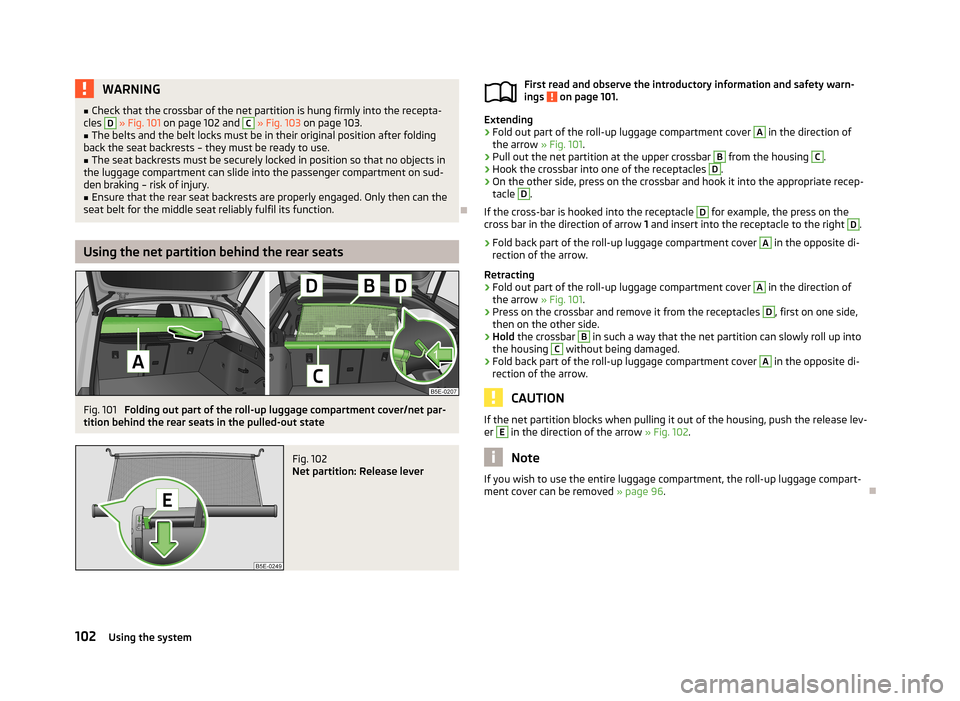
Fig. 101
Folding out part of the roll-up luggage compartment cover/net par-
tition behind the rear seats in the pulled-out state
Fig. 102
Net partition: Release lever
First read and observe the introductory information and safety warn-
ings on page 101.
Extending
›
Fold out part of the roll-up luggage compartment cover
A
in the direction of
the arrow » Fig. 101.
›
Pull out the net partition at the upper crossbar
B
from the housing
C
.
›
Hook the crossbar into one of the receptacles
D
.
›
On the other side, press on the crossbar and hook it into the appropriate recep-
tacle
D
.
If the cross-bar is hooked into the receptacle
D
for example, the press on the
cross bar in the direction of arrow 1 and insert into the receptacle to the right
D
.
›
Fold back part of the roll-up luggage compartment cover
A
in the opposite di-
rection of the arrow.
Retracting
›
Fold out part of the roll-up luggage compartment cover
A
in the direction of
the arrow » Fig. 101.
›
Press on the crossbar and remove it from the receptacles
D
, first on one side,
then on the other side.
›
Hold the crossbar
B
in such a way that the net partition can slowly roll up into
the housing
C
without being damaged.
›
Fold back part of the roll-up luggage compartment cover
A
in the opposite di-
rection of the arrow.
CAUTION
If the net partition blocks when pulling it out of the housing, push the release lev- er E in the direction of the arrow » Fig. 102.
Note
If you wish to use the entire luggage compartment, the roll-up luggage compart-
ment cover can be removed » page 96.
102Using the system
Page 107 of 287
WARNING■The items which you transport on the roof rack must be reliably attached –
risk of accident!■
Always secure the load with appropriate and undamaged lashing straps or
tensioning straps.
■
Distribute the load evenly over the roof rack system.
■
When transporting heavy objects or objects which take up a large area on
the roof rack system, the handling of the car may change as a result of the displacement of the centre of gravity. The style of driving and speed musttherefore be adapted to the current circumstances.
■
Avoid abrupt and sudden driving/braking manoeuvres.
■
Adjust the speed and driving style to the visibility, weather, road and traffic
conditions.
■
The permissible roof load, permissible axle loads and gross permissible
weight of the vehicle must not be exceeded under any circumstances – risk of
accident!
CAUTION
■ Only use roof rack systems approved by ŠKODA AUTO a.s.■When dealing with roof rack systems, the installation instructions supplied with
the roof luggage rack system must be observed.■
On models fitted with a sliding/tilting roof, ensure that the sliding/tilting roof
does not strike any items of luggage transported on the roof.
■
Ensure that the luggage compartment lid does not hit the roof load when
opened.
■
The height of the vehicle changes after mounting a roof luggage rack system
and the load that is secured to it. Compare the vehicle height with available clear-
ances, such as underpasses and garage doors.
■
Always remove the roof luggage rack system before entering an automated car
wash.
■
Ensure the roof aerial is not impaired by the secured load.
For the sake of the environment
The increased aerodynamic drag results in a higher fuel consumption.NoteThe removed roof rack for the Octavia Estate can be stowed in the stowage com-
partment under the variable loading floor » page 97, Stowing roll-up luggage
compartment cover and roof racks .
Attachment points
Does not apply to the Octavia Estate.
Fig. 105
Attachment points for roof bars
First read and observe the introductory information and safety warn- ings
on page 103.
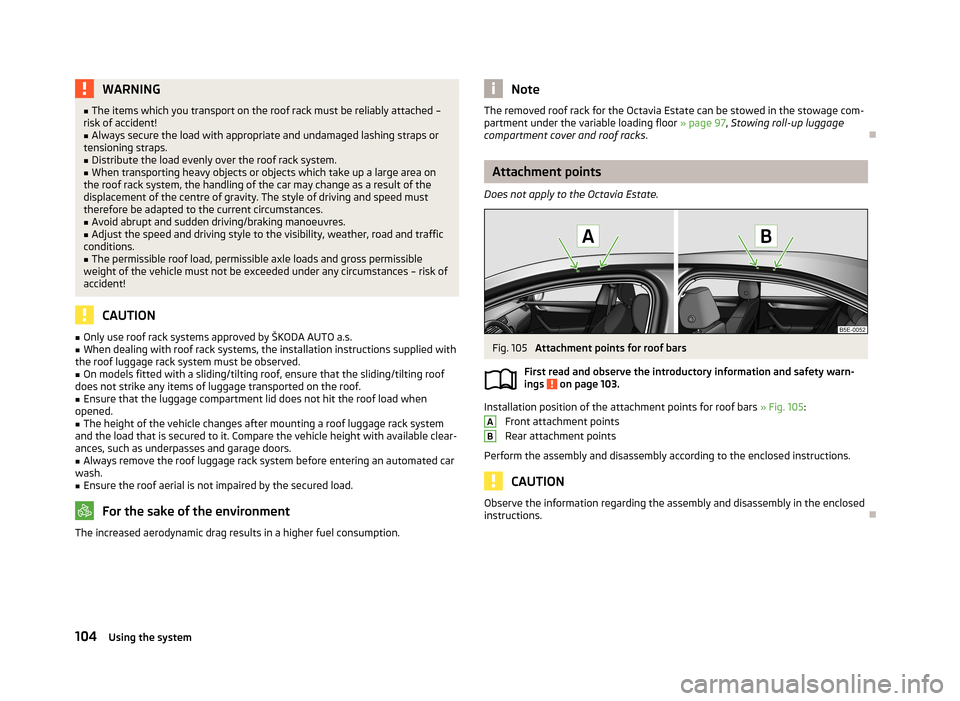
Installation position of the attachment points for roof bars » Fig. 105:
Front attachment points
Rear attachment points
Perform the assembly and disassembly according to the enclosed instructions.
CAUTION
Observe the information regarding the assembly and disassembly in the enclosed
instructions.
AB104Using the system
Page 146 of 287
WARNING■The system does not exempt the driver from his/her responsibility for park-
ing in and manoeuvring out of the parking space.■
External sound sources can have a detrimental effect on parking in and ma-
noeuvring out of the parking space. Under adverse conditions, this can cause
objects or people to not be recognized by the system.
■
When parking in, and manoeuvring out of parking spaces, the system auto-
matically executes quick steering movements. While it is doing so, do not place your hands between the steering wheel – risk of injury!
■
When parking or leaving a parking space on loose or slippery surfaces (grav-
el, snow, ice, etc.) you may stray from the calculated road because of the sur-
face conditions. Therefore we suggest that you do not use the system in such
situations.
CAUTION
■ If other vehicles are parked behind the kerb or on it, the system can also guide
your vehicle beyond the kerb or onto it. Ensure that the wheels or the wheel rims
of your vehicle are not damaged and if necessary intervene in time.■
Under certain circumstances, surfaces or structures of certain objects such as
wire mesh fences or powder snow cannot be recognised by the system.
■
The system function may be limited under adverse weather conditions (heavy
rain, water vapour, very low or high temperatures etc.).
■
The evaluation of the parking space and the parking procedure depends on the
circumference of the wheels on the vehicle. The system only works correctly if
the vehicle is fitted with the wheel size approved by the manufacturer.
■
If wheels other than those approved by the manufacturer are mounted, the re-
sulting position of the vehicle in the parking space can differ slightly. This can be avoided by readjusting the system at a specialist garage.
■
Under certain circumstances, the system may not function correctly, for exam-
ple, if the vehicle is fitted with snow chains or a temporary spare wheel.
Finding a parking spaceFig. 131
System button / display
First read and observe the introductory information and safety warn-
ings
on page 142.
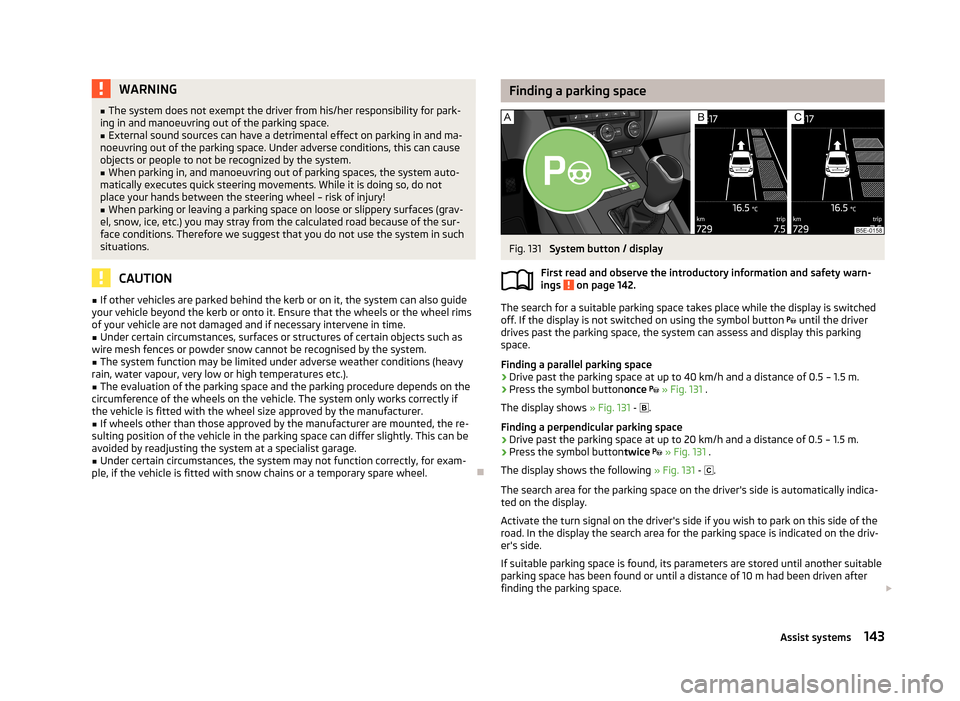
The search for a suitable parking space takes place while the display is switched
off. If the display is not switched on using the symbol button until the driver
drives past the parking space, the system can assess and display this parking
space.
Finding a parallel parking space
›
Drive past the parking space at up to 40 km/h and a distance of 0.5 – 1.5 m.
›
Press the symbol button once
» Fig. 131 .
The display shows » Fig. 131 -
.
Finding a perpendicular parking space
›
Drive past the parking space at up to 20 km/h and a distance of 0.5 – 1.5 m.
›
Press the symbol button twice
» Fig. 131 .
The display shows the following » Fig. 131 -
.
The search area for the parking space on the driver's side is automatically indica- ted on the display.
Activate the turn signal on the driver's side if you wish to park on this side of the
road. In the display the search area for the parking space is indicated on the driv-
er's side.
If suitable parking space is found, its parameters are stored until another suitable
parking space has been found or until a distance of 10 m had been driven after
finding the parking space.
143Assist systems