engine SKODA OCTAVIA 2013 3.G / (5E) Owner's Guide
[x] Cancel search | Manufacturer: SKODA, Model Year: 2013, Model line: OCTAVIA, Model: SKODA OCTAVIA 2013 3.G / (5E)Pages: 287, PDF Size: 18.55 MB
Page 67 of 287
WARNINGIf the entry light is on, do not touch its cover – risk of burns!
Note
If the door is open and the ignition switched off, the light will extinguish auto-
matically after around 10 minutes.
Visibility
Introduction
This chapter contains information on the following subjects:
Windscreen and rear window heater
64
Sun visors
65
Sun screen
65
Windscreen and rear window heater
Fig. 39
Buttons for the front and rear window heater/manual air-condition-
ing system, heating
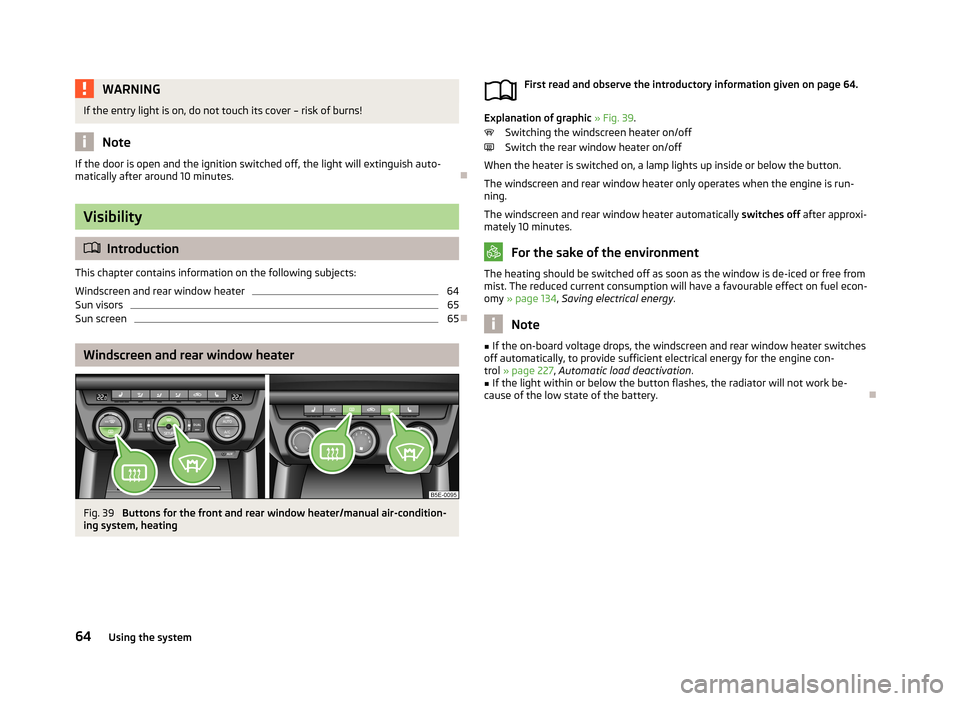
First read and observe the introductory information given on page 64.
Explanation of graphic » Fig. 39 .
Switching the windscreen heater on/off
Switch the rear window heater on/off
When the heater is switched on, a lamp lights up inside or below the button.
The windscreen and rear window heater only operates when the engine is run-
ning.
The windscreen and rear window heater automatically switches off after approxi-
mately 10 minutes.
For the sake of the environment
The heating should be switched off as soon as the window is de-iced or free from
mist. The reduced current consumption will have a favourable effect on fuel econ-
omy » page 134 , Saving electrical energy .
Note
■
If the on-board voltage drops, the windscreen and rear window heater switches
off automatically, to provide sufficient electrical energy for the engine con- trol » page 227 , Automatic load deactivation .■
If the light within or below the button flashes, the radiator will not work be-
cause of the low state of the battery.
64Using the system
Page 71 of 287
Rear mirror
Introduction
This chapter contains information on the following subjects:
Interior mirror
69
Exterior mirrors
69WARNING■ Make sure that the mirror is not covered by ice, snow, mist or other objects.■Convex (curved outward) or aspheric exterior mirrors increase the field of vi-
sion. They do, however, make objects appear smaller in the mirror. These mir-
rors are therefore only of limited use for estimating distances to the following
vehicles.■
Whenever possible use the interior mirror for estimating the distances to
the following vehicles.
■
The illuminated display of an external navigation unit can lead to operation-
al faults to the automatic dimming interior mirror – risk of accident.
WARNINGAutomatic dimming mirrors contain an electrolytic fluid which may leak should
the mirror glass break.■
The leaking electrolytic fluid can irritate the skin, eyes and breath apparatus.
Immediately seek out fresh air and leave the vehicle. If this is not possible,
open all windows and doors.
■
If you swallow electrolytic fluid, seek medical assistance immediately.
■
If your eyes or skin come into contact with the electrolytic fluid, immediately
wash the affected area for a few minutes long with a lot of water. Then con-
sult a doctor immediately.
CAUTION
Never mechanically fold in or fold back the exterior mirrors with the fold-in func-
tion by hand as this will damage the electric drive.Note■
Automatic mirror dimming operates only properly if the sun screen for the rear
window in the housing on the boot cover is not in use or the light striking the in- terior rear-view mirror is not affected by other objects.■
If the automatic interior mirror dimming is switched off, the exterior mirror dim-
ming is also switched off.
■
The mirror heater only operates when the engine is running and up to an out-
side temperature of +35 ℃.
■
Do not touch the surface of the exterior mirrors if the exterior mirror heater is
switched on.
■
If the electrical exterior mirror setting fails at any time, the mirrors can be adjus-
ted by hand by pressing on the edge of the mirror surface.
■
Contact a specialist garage if there is a fault with the power setting function for
the exterior mirrors.
68Using the system
Page 79 of 287
Seat features
Introduction
This chapter contains information on the following subjects:
Seat heaters
76
Front armrest
77
Rear armrest
77
Folding front passenger seat
77
Seat backrests
78
Seat heaters
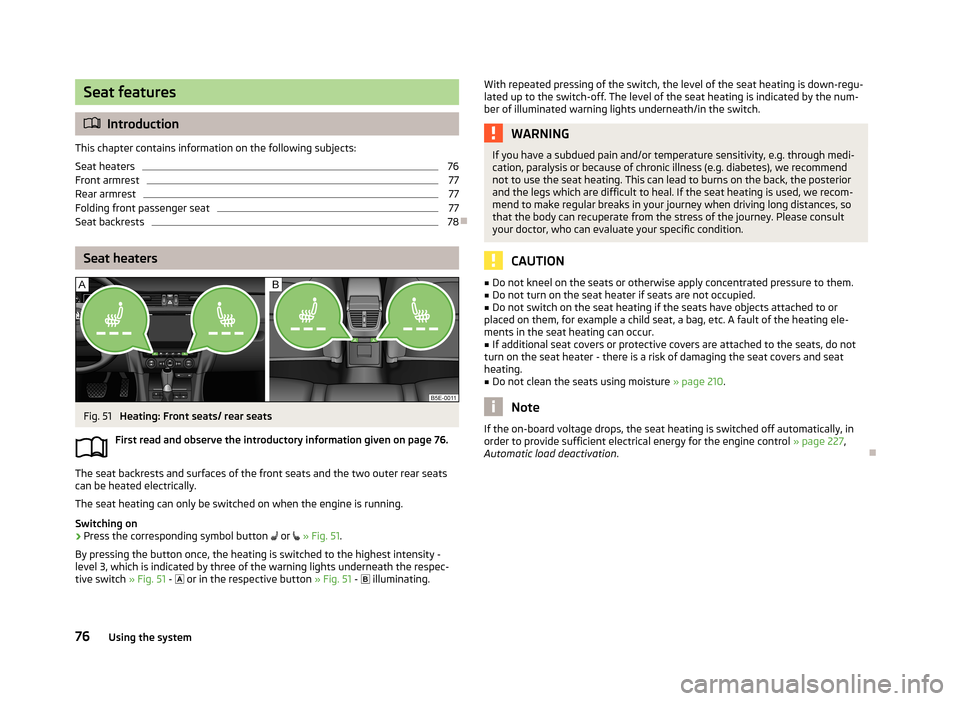
Fig. 51
Heating: Front seats/ rear seats
First read and observe the introductory information given on page 76.
The seat backrests and surfaces of the front seats and the two outer rear seats
can be heated electrically.
The seat heating can only be switched on when the engine is running.
Switching on
›
Press the corresponding symbol button
or
» Fig. 51 .
By pressing the button once, the heating is switched to the highest intensity - level 3, which is indicated by three of the warning lights underneath the respec-
tive switch » Fig. 51 -
or in the respective button » Fig. 51 -
illuminating.
With repeated pressing of the switch, the level of the seat heating is down-regu-
lated up to the switch-off. The level of the seat heating is indicated by the num- ber of illuminated warning lights underneath/in the switch.WARNINGIf you have a subdued pain and/or temperature sensitivity, e.g. through medi-
cation, paralysis or because of chronic illness (e.g. diabetes), we recommend
not to use the seat heating. This can lead to burns on the back, the posterior
and the legs which are difficult to heal. If the seat heating is used, we recom-
mend to make regular breaks in your journey when driving long distances, so
that the body can recuperate from the stress of the journey. Please consult
your doctor, who can evaluate your specific condition.
CAUTION
■ Do not kneel on the seats or otherwise apply concentrated pressure to them.■Do not turn on the seat heater if seats are not occupied.■
Do not switch on the seat heating if the seats have objects attached to or
placed on them, for example a child seat, a bag, etc. A fault of the heating ele-
ments in the seat heating can occur.
■
If additional seat covers or protective covers are attached to the seats, do not
turn on the seat heater - there is a risk of damaging the seat covers and seat
heating.
■
Do not clean the seats using moisture » page 210.
Note
If the on-board voltage drops, the seat heating is switched off automatically, in
order to provide sufficient electrical energy for the engine control » page 227,
Automatic load deactivation .
76Using the system
Page 87 of 287
CAUTIONWhen removing do not hold the ashtray at the cover on the front – risk of break-
age.
12-volt power outlet
Fig. 66
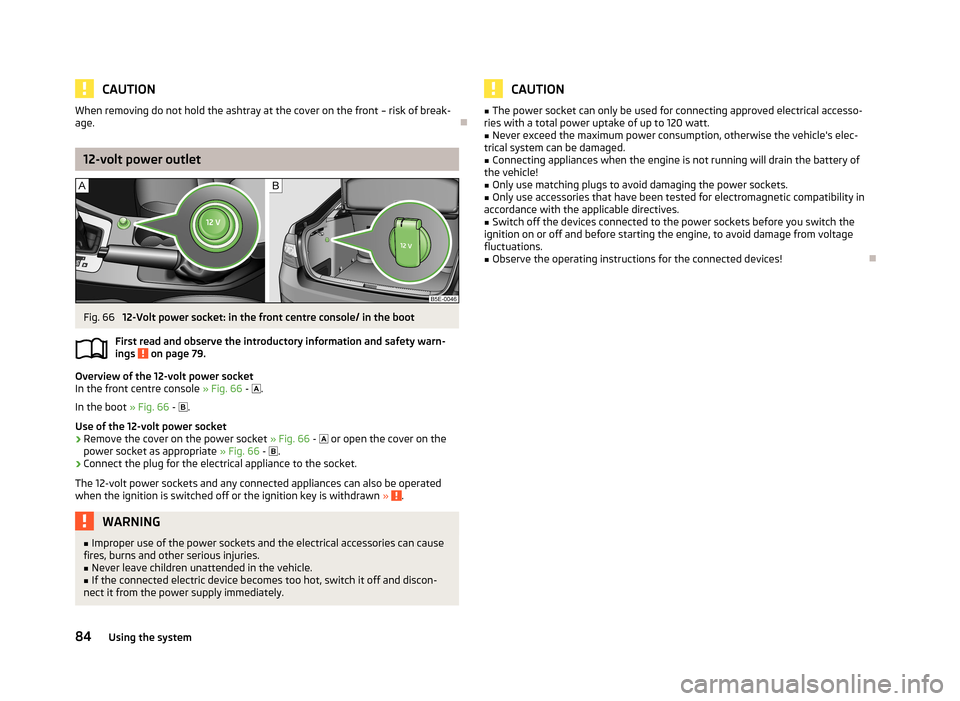
12-Volt power socket: in the front centre console/ in the boot
First read and observe the introductory information and safety warn- ings
on page 79.
Overview of the 12-volt power socket
In the front centre console » Fig. 66 -
.
In the boot » Fig. 66 -
.
Use of the 12-volt power socket
›
Remove the cover on the power socket » Fig. 66 -
or open the cover on the
power socket as appropriate » Fig. 66 -
.
›
Connect the plug for the electrical appliance to the socket.
The 12-volt power sockets and any connected appliances can also be operated when the ignition is switched off or the ignition key is withdrawn »
.
WARNING■
Improper use of the power sockets and the electrical accessories can cause
fires, burns and other serious injuries.■
Never leave children unattended in the vehicle.
■
If the connected electric device becomes too hot, switch it off and discon-
nect it from the power supply immediately.
CAUTION■ The power socket can only be used for connecting approved electrical accesso-
ries with a total power uptake of up to 120 watt.■
Never exceed the maximum power consumption, otherwise the vehicle's elec-
trical system can be damaged.
■
Connecting appliances when the engine is not running will drain the battery of
the vehicle!
■
Only use matching plugs to avoid damaging the power sockets.
■
Only use accessories that have been tested for electromagnetic compatibility in
accordance with the applicable directives.
■
Switch off the devices connected to the power sockets before you switch the
ignition on or off and before starting the engine, to avoid damage from voltage
fluctuations.
■
Observe the operating instructions for the connected devices!
84Using the system
Page 92 of 287
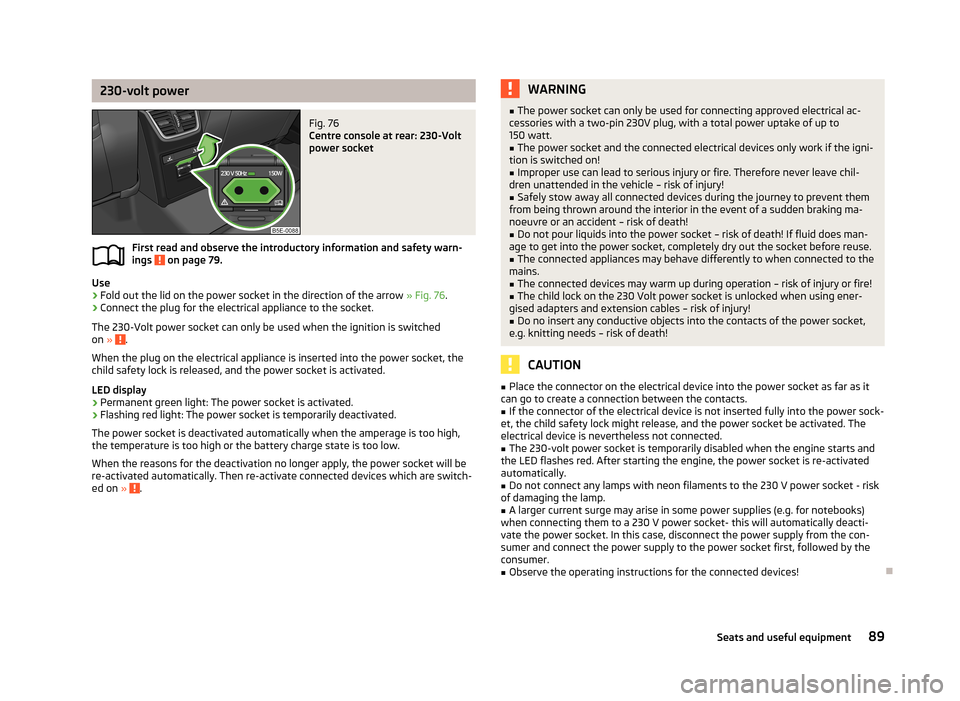
230-volt powerFig. 76
Centre console at rear: 230-Volt
power socket
First read and observe the introductory information and safety warn-
ings on page 79.
Use
›
Fold out the lid on the power socket in the direction of the arrow » Fig. 76.
›
Connect the plug for the electrical appliance to the socket.
The 230-Volt power socket can only be used when the ignition is switched on »
.
When the plug on the electrical appliance is inserted into the power socket, the
child safety lock is released, and the power socket is activated.
LED display › Permanent green light: The power socket is activated.
› Flashing red light: The power socket is temporarily deactivated.
The power socket is deactivated automatically when the amperage is too high, the temperature is too high or the battery charge state is too low.
When the reasons for the deactivation no longer apply, the power socket will be
re-activated automatically. Then re-activate connected devices which are switch-
ed on »
.
WARNING■
The power socket can only be used for connecting approved electrical ac-
cessories with a two-pin 230V plug, with a total power uptake of up to 150 watt.■
The power socket and the connected electrical devices only work if the igni-
tion is switched on!
■
Improper use can lead to serious injury or fire. Therefore never leave chil-
dren unattended in the vehicle – risk of injury!
■
Safely stow away all connected devices during the journey to prevent them
from being thrown around the interior in the event of a sudden braking ma- noeuvre or an accident – risk of death!
■
Do not pour liquids into the power socket – risk of death! If fluid does man-
age to get into the power socket, completely dry out the socket before reuse.
■
The connected appliances may behave differently to when connected to the
mains.
■
The connected devices may warm up during operation – risk of injury or fire!
■
The child lock on the 230 Volt power socket is unlocked when using ener-
gised adapters and extension cables – risk of injury!
■
Do no insert any conductive objects into the contacts of the power socket,
e.g. knitting needs – risk of death!
CAUTION
■ Place the connector on the electrical device into the power socket as far as it
can go to create a connection between the contacts.■
If the connector of the electrical device is not inserted fully into the power sock-
et, the child safety lock might release, and the power socket be activated. The
electrical device is nevertheless not connected.
■
The 230-volt power socket is temporarily disabled when the engine starts and
the LED flashes red. After starting the engine, the power socket is re-activated
automatically.
■
Do not connect any lamps with neon filaments to the 230 V power socket - risk
of damaging the lamp.
■
A larger current surge may arise in some power supplies (e.g. for notebooks)
when connecting them to a 230 V power socket- this will automatically deacti-
vate the power socket. In this case, disconnect the power supply from the con-
sumer and connect the power supply to the power socket first, followed by the
consumer.
■
Observe the operating instructions for the connected devices!
89Seats and useful equipment
Page 109 of 287
Heating and air-conditioning
Heating, ventilation, cooling
Introduction
This chapter contains information on the following subjects:
Air outlets
107
Using the cooling system economically
107
Operational problems
108
The heating effect is dependent upon the coolant temperature, thus full heat
output only occurs when the engine has reached its operating temperature.
If the cooling system is switched on, the temperature and air humidity drops in
the vehicle. The cooling system prevents the windows from misting up during the
cold season of the year.
It is possible to briefly activate recirculated air mode to enhance the cooling ef-
fect.
Please refer to the information regarding recirculated air mode for the air-condi-
tioning system » page 111 or for Climatronic » page 114.
WARNINGFor your own safety and that of other road users, ensure that all the windows
are free of ice, snow and misting. Please familiarize yourself about how to cor-
rectly operate the heating and ventilation systems, how to demist and defrost
the windows, as well as with the cooling mode.
CAUTION
■ The air inlet in front of the windscreen must be free of e.g. ice, snow or leaves
to ensure that the heating and cooling system operates properly.■
After switching on the cooling Condensation from the evaporator of the air con-
ditioning may drip down and form a puddle below the vehicle. This is not a leak!
Note■ The used air streams out through the vents in the luggage compartment.■We recommend that you do not smoke in the vehicle when the recirculating air
mode is operating since the smoke which is drawn at the evaporator from the in-
terior of the vehicle forms deposits in the evaporator of the air conditioning sys- tem. This produces a permanent odour when the air conditioning system is oper-ating which can only be eliminated through considerable effort and expense (re-
placement of compressor).
106Using the system
Page 110 of 287
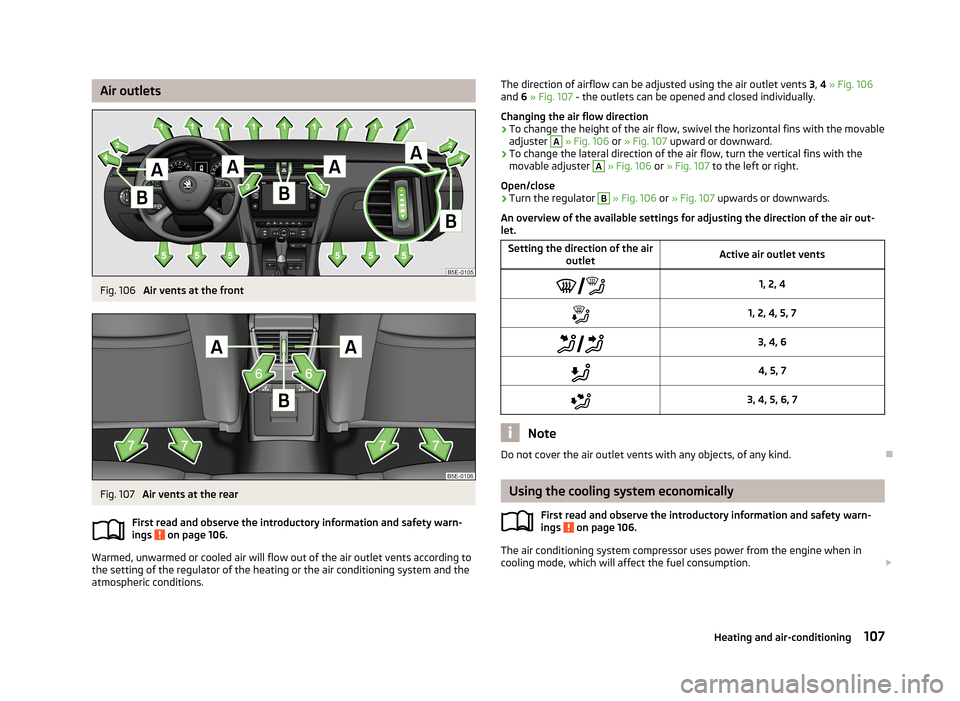
Air outletsFig. 106
Air vents at the front
Fig. 107
Air vents at the rear
First read and observe the introductory information and safety warn-
ings
on page 106.
Warmed, unwarmed or cooled air will flow out of the air outlet vents according to
the setting of the regulator of the heating or the air conditioning system and the atmospheric conditions.
The direction of airflow can be adjusted using the air outlet vents 3, 4 » Fig. 106
and 6 » Fig. 107 - the outlets can be opened and closed individually.
Changing the air flow direction›
To change the height of the air flow, swivel the horizontal fins with the movable
adjuster
A
» Fig. 106 or » Fig. 107 upward or downward.
›
To change the lateral direction of the air flow, turn the vertical fins with the
movable adjuster
A
» Fig. 106 or » Fig. 107 to the left or right.
Open/close
›
Turn the regulator
B
» Fig. 106 or » Fig. 107 upwards or downwards.
An overview of the available settings for adjusting the direction of the air out- let.
Setting the direction of the air
outletActive air outlet vents1, 2, 41, 2, 4, 5, 7 3, 4, 64, 5, 73, 4, 5, 6, 7
Note
Do not cover the air outlet vents with any objects, of any kind.
Using the cooling system economically
First read and observe the introductory information and safety warn-
ings
on page 106.
The air conditioning system compressor uses power from the engine when in
cooling mode, which will affect the fuel consumption.
107Heating and air-conditioning
Page 111 of 287
It recommended to open the windows or the doors of a vehicle for which the inte-rior has been strongly heated through the effect of direct sunlight in order to al-low the heated air to escape.
The cooling system should not be on if the windows are open.
For the sake of the environment
Pollutant emissions are also reduced when fuel is saved » page 131, Economical
driving and environmental sustainability .
Operational problems
First read and observe the introductory information and safety warn-
ings
on page 106.
If the cooling system does not operate at outside temperatures higher than +5 °C,
there is a problem in the system. The reasons for this may be.
› One of the fuses has blown. Check the fuse and replace if necessa-
ry » page 253 .
› The cooling system has switched off automatically for a short time because the
coolant temperature of the engine is too hot » page 13.
If you are not able to resolve the operational problem yourself, or if the cooler output has reduced, switch off the cooling system and seek assistance from a
specialist garage.
Heating
Introduction
This chapter contains information on the following subjects:
Control elements
108
Adjusting
109
Recirculated air mode
109
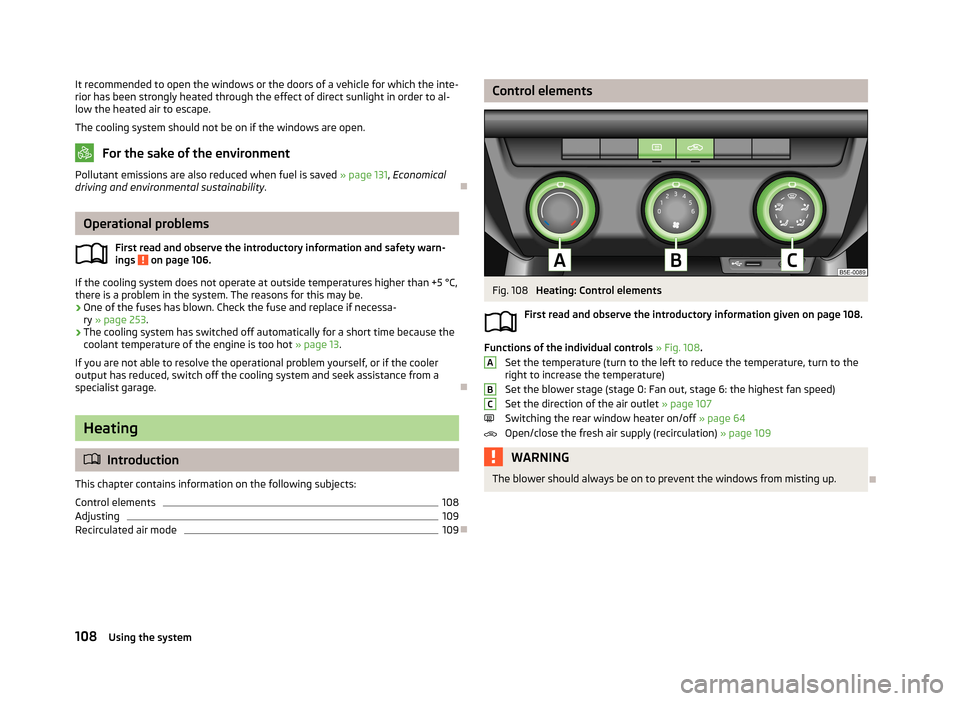
Control elementsFig. 108
Heating: Control elements
First read and observe the introductory information given on page 108.
Functions of the individual controls » Fig. 108 .
Set the temperature (turn to the left to reduce the temperature, turn to the
right to increase the temperature)
Set the blower stage (stage 0: Fan out, stage 6: the highest fan speed)
Set the direction of the air outlet » page 107
Switching the rear window heater on/off » page 64
Open/close the fresh air supply (recirculation) » page 109
WARNINGThe blower should always be on to prevent the windows from misting up.
ABC108Using the system
Page 113 of 287
Air conditioning system (manual air conditioningsystem)
Introduction
This chapter contains information on the following subjects: Control elements
110
adjusting
111
Recirculated air mode
111
The cooling system only operates if the following conditions are met. The cooling system is switched on » page 110, Control elements .
The engine is running.
The outside temperature above approx. +2 °C.
The blower switch is switched on (positions 1-6).
If the desired interior temperature can also be achieved without activating the cooling system, fresh air mode should be selected.
The cooling system is switched off at a high coolant temperature in order to pro-
vide cooling at a high load of the engine.
CAUTION
■ Under certain circumstances, air at a temperature of about 5 °C can flow out of
the vents when the cooling system is switched on.■
Lengthy and uneven distribution of the air flow out of the vents (especially
around the feet) and large differences in temperature, for example, when getting
out of the vehicle, can cause susceptible individuals to catch a cold.
Note
We recommend that you have the air conditioning system cleaned by a specialist
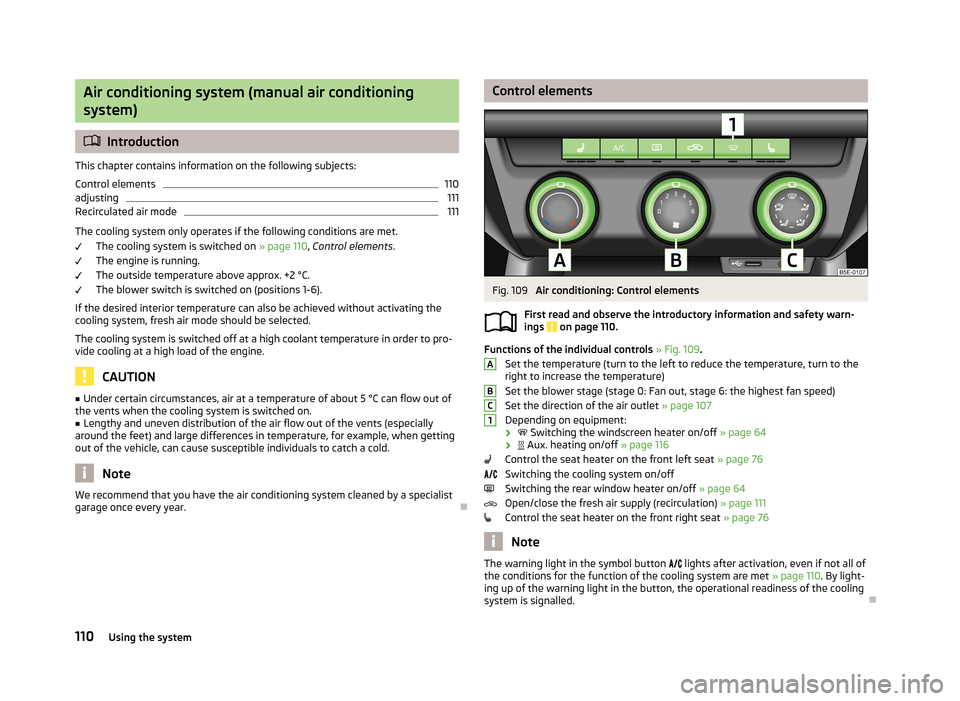
garage once every year.Control elementsFig. 109
Air conditioning: Control elements
First read and observe the introductory information and safety warn- ings
on page 110.
Functions of the individual controls » Fig. 109 .
Set the temperature (turn to the left to reduce the temperature, turn to the
right to increase the temperature)
Set the blower stage (stage 0: Fan out, stage 6: the highest fan speed)
Set the direction of the air outlet » page 107
Depending on equipment:
›
Switching the windscreen heater on/off » page 64
›
Aux. heating on/off » page 116
Control the seat heater on the front left seat » page 76
Switching the cooling system on/off
Switching the rear window heater on/off » page 64
Open/close the fresh air supply (recirculation) » page 111
Control the seat heater on the front right seat » page 76
Note
The warning light in the symbol button
lights after activation, even if not all of
the conditions for the function of the cooling system are met » page 110. By light-
ing up of the warning light in the button, the operational readiness of the cooling system is signalled.
ABC1110Using the system
Page 115 of 287
WARNINGNever leave recirculated air mode switched on over a longer period of time, as
“stale air” can cause driver and passenger fatigue, reduce attention levels and
also cause the windows to mist up. The risk of having an accident increases.
Switch off recirculated air mode as soon as the windows start to mist up.
Climatronic (automatic air conditioning system)
Introduction
This chapter contains information on the following subjects:
Control elements
112
Automatic mode
113
Switching the cooling system on/off
113
Setting temperature
113
Automatic recirculation mode
114
Controlling blower
114
Defrosting windscreen
115
The Climatronic in automatic mode ensures the best-possible setting of the tem-
perature of the outflowing air, the blower stage and air distribution.
The system also takes sunlight into account, which eliminates the need to alterthe settings manually.
The cooling system only operates if the following conditions are met. The cooling system is switched on » page 112, Control elements .
The engine is running.
The outside temperature above approx. +2 °C.
The cooling system is switched off at a high coolant temperature in order to pro-
vide cooling at a high load of the engine.
Note
We recommend that you have Climatronic cleaned by a specialist garage once ev-
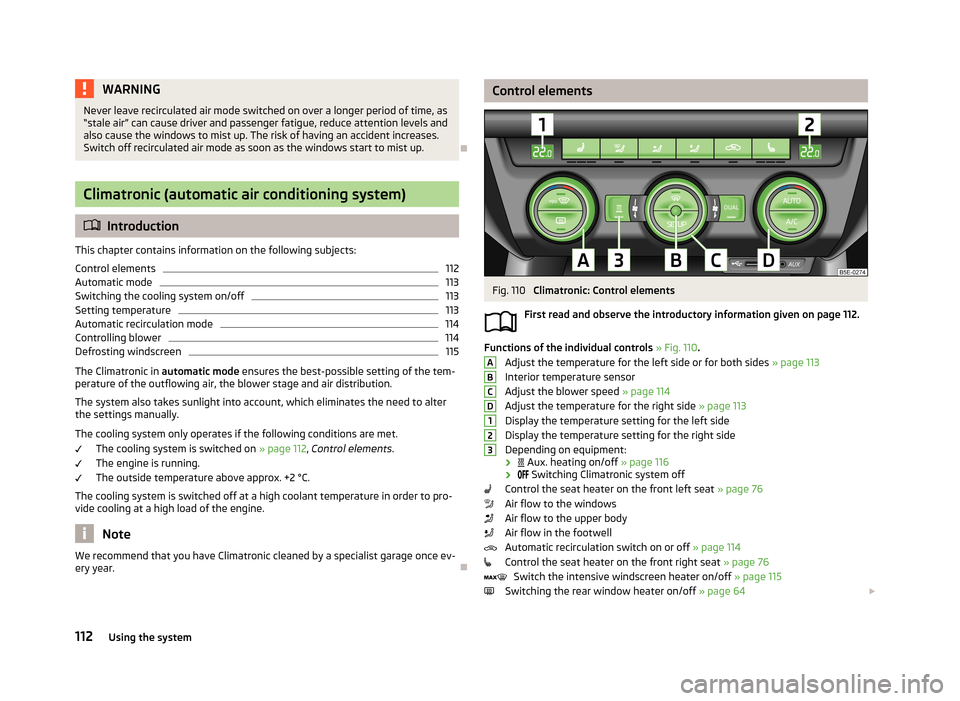
ery year.Control elementsFig. 110
Climatronic: Control elements
First read and observe the introductory information given on page 112.
Functions of the individual controls » Fig. 110 .
Adjust the temperature for the left side or for both sides » page 113
Interior temperature sensor
Adjust the blower speed » page 114
Adjust the temperature for the right side » page 113
Display the temperature setting for the left side
Display the temperature setting for the right side
Depending on equipment:
›
Aux. heating on/off » page 116
›
Switching Climatronic system off
Control the seat heater on the front left seat » page 76
Air flow to the windows
Air flow to the upper body
Air flow in the footwell
Automatic recirculation switch on or off » page 114
Control the seat heater on the front right seat » page 76
Switch the intensive windscreen heater on/off » page 115
Switching the rear window heater on/off » page 64
ABCD123112Using the system