clutch SKODA OCTAVIA 2014 3.G / (5E) Owner's Manual
[x] Cancel search | Manufacturer: SKODA, Model Year: 2014, Model line: OCTAVIA, Model: SKODA OCTAVIA 2014 3.G / (5E)Pages: 280, PDF Size: 35.53 MB
Page 10 of 280
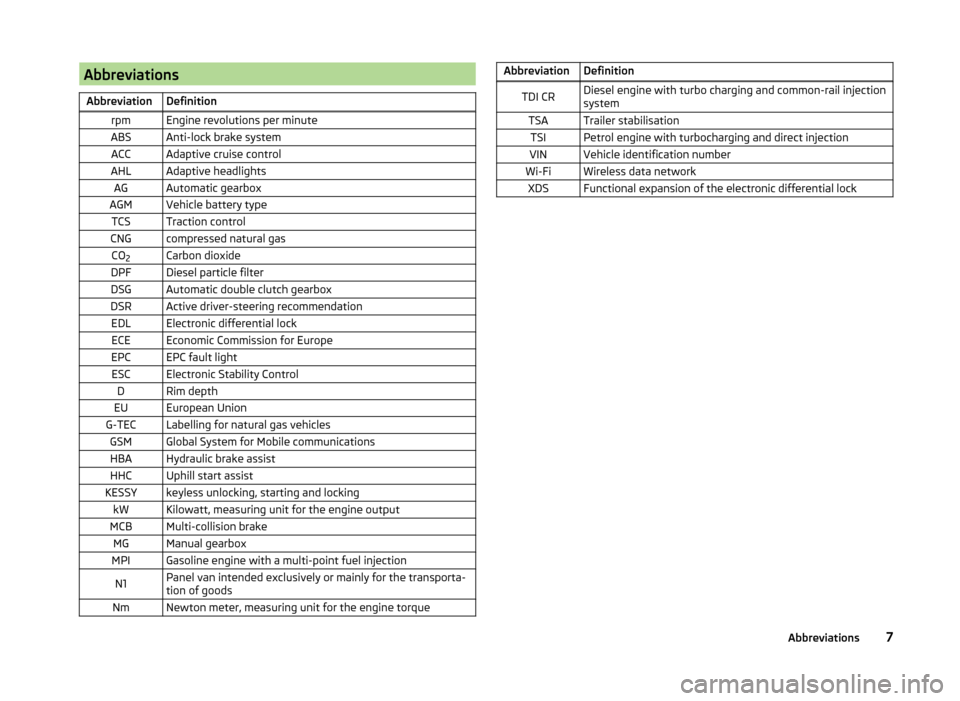
AbbreviationsAbbreviationDefinitionrpmEngine revolutions per minuteABSAnti-lock brake systemACCAdaptive cruise controlAHLAdaptive headlightsAGAutomatic gearboxAGMVehicle battery typeTCSTraction controlCNGcompressed natural gasCO2Carbon dioxideDPFDiesel particle filterDSGAutomatic double clutch gearboxDSRActive driver-steering recommendationEDLElectronic differential lockECEEconomic Commission for EuropeEPCEPC fault lightESCElectronic Stability ControlDRim depthEUEuropean UnionG-TECLabelling for natural gas vehiclesGSMGlobal System for Mobile communicationsHBAHydraulic brake assistHHCUphill start assistKESSYkeyless unlocking, starting and lockingkWKilowatt, measuring unit for the engine outputMCBMulti-collision brakeMGManual gearboxMPIGasoline engine with a multi-point fuel injectionN1Panel van intended exclusively or mainly for the transporta-
tion of goodsNmNewton meter, measuring unit for the engine torqueAbbreviationDefinitionTDI CRDiesel engine with turbo charging and common-rail injection
systemTSATrailer stabilisationTSIPetrol engine with turbocharging and direct injectionVINVehicle identification numberWi-FiWireless data networkXDSFunctional expansion of the electronic differential lock7Abbreviations
Page 13 of 280
WARNING■Always assume the correct seated position before setting off and do not
change this position while driving. Also advise your passengers to adopt
the correct seated position and not to change this position while the car is
moving.■
Maintain a distance of at least 25 cm from the steering wheel, and a dis-
tance of at least 10 cm between the legs and the dash panel at the height
of the knee airbag. Not maintaining this minimum distance will mean that
the airbag system will not be able to properly protect you – hazard!
■
When driving, hold the steering wheel with both hands firmly on the out-
er edge in the “9 o'clock” and “3 o'clock” position. Never hold the steering
wheel in the “12 o'clock” position or in any other way (e.g. in the middle or
inner edge of the steering wheel). In such cases, you could severely injure
the arms, hands and head when the driver airbag is deployed.
■
Ensure that there are no objects in the driver's footwell as they may get
caught behind the pedals when driving or applying the braking. You would
then no longer be able to operate the clutch, brake or acceleration pedals.
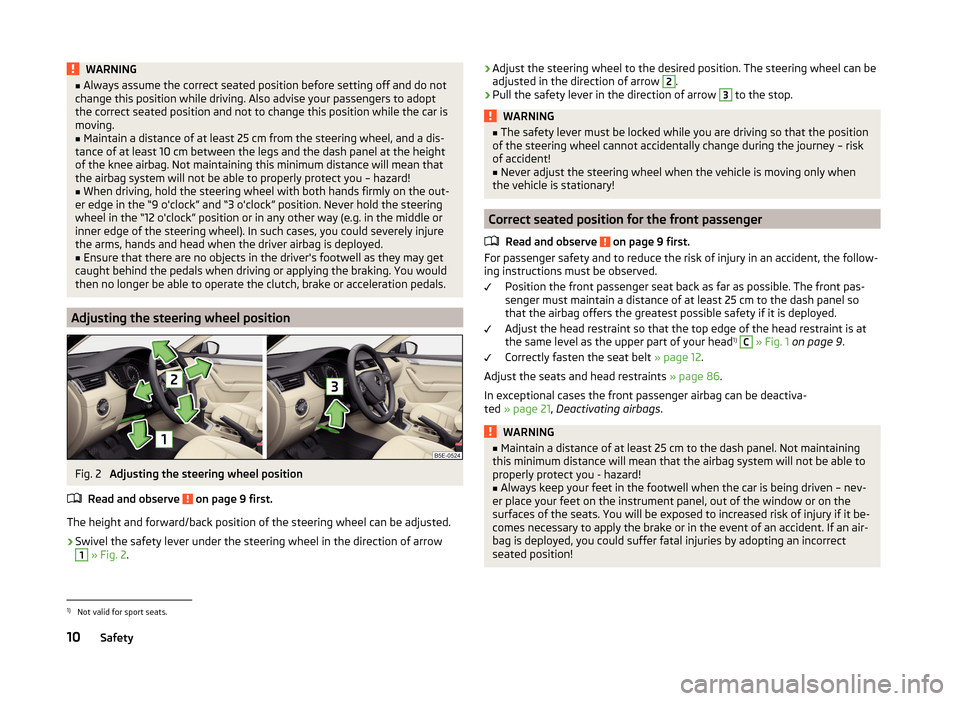
Adjusting the steering wheel position
Fig. 2
Adjusting the steering wheel position
Read and observe
on page 9 first.
The height and forward/back position of the steering wheel can be adjusted.
›
Swivel the safety lever under the steering wheel in the direction of arrow
1
» Fig. 2 .
›Adjust the steering wheel to the desired position. The steering wheel can be
adjusted in the direction of arrow 2.›
Pull the safety lever in the direction of arrow
3
to the stop.
WARNING■ The safety lever must be locked while you are driving so that the position
of the steering wheel cannot accidentally change during the journey – risk
of accident!■
Never adjust the steering wheel when the vehicle is moving only when
the vehicle is stationary!
Correct seated position for the front passenger
Read and observe
on page 9 first.
For passenger safety and to reduce the risk of injury in an accident, the follow-ing instructions must be observed.
Position the front passenger seat back as far as possible. The front pas-
senger must maintain a distance of at least 25 cm to the dash panel so
that the airbag offers the greatest possible safety if it is deployed.
Adjust the head restraint so that the top edge of the head restraint is at
the same level as the upper part of your head 1)
C
» Fig. 1 on page 9 .
Correctly fasten the seat belt » page 12.
Adjust the seats and head restraints » page 86.
In exceptional cases the front passenger airbag can be deactiva-
ted » page 21 , Deactivating airbags .
WARNING■
Maintain a distance of at least 25 cm to the dash panel. Not maintaining
this minimum distance will mean that the airbag system will not be able to
properly protect you - hazard!■
Always keep your feet in the footwell when the car is being driven – nev-
er place your feet on the instrument panel, out of the window or on the
surfaces of the seats. You will be exposed to increased risk of injury if it be-
comes necessary to apply the brake or in the event of an accident. If an air-
bag is deployed, you could suffer fatal injuries by adopting an incorrect
seated position!
1)
Not valid for sport seats.
10Safety
Page 38 of 280
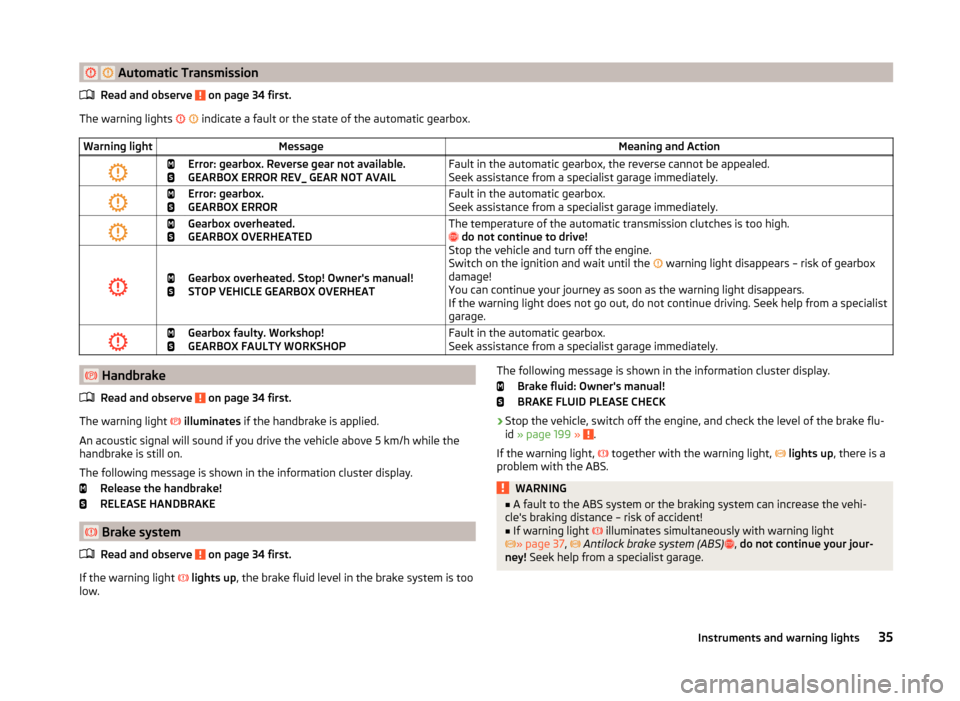
Automatic TransmissionRead and observe on page 34 first.
The warning lights
indicate a fault or the state of the automatic gearbox.
Warning lightMessageMeaning and Action
Error: gearbox. Reverse gear not available.
GEARBOX ERROR REV_ GEAR NOT AVAILFault in the automatic gearbox, the reverse cannot be appealed.
Seek assistance from a specialist garage immediately.
Error: gearbox.
GEARBOX ERRORFault in the automatic gearbox.
Seek assistance from a specialist garage immediately.
Gearbox overheated.
GEARBOX OVERHEATEDThe temperature of the automatic transmission clutches is too high.
do not continue to drive!
Stop the vehicle and turn off the engine.
Switch on the ignition and wait until the
warning light disappears – risk of gearbox
damage!
You can continue your journey as soon as the warning light disappears.
If the warning light does not go out, do not continue driving. Seek help from a specialist
garage.
Gearbox overheated. Stop! Owner's manual!
STOP VEHICLE GEARBOX OVERHEAT
Gearbox faulty. Workshop!
GEARBOX FAULTY WORKSHOPFault in the automatic gearbox.
Seek assistance from a specialist garage immediately. Handbrake
Read and observe
on page 34 first.
The warning light
illuminates if the handbrake is applied.
An acoustic signal will sound if you drive the vehicle above 5 km/h while the
handbrake is still on.
The following message is shown in the information cluster display. Release the handbrake!
RELEASE HANDBRAKE
Brake system
Read and observe
on page 34 first.
If the warning light
lights up , the brake fluid level in the brake system is too
low.
The following message is shown in the information cluster display.
Brake fluid: Owner's manual!
BRAKE FLUID PLEASE CHECK›
Stop the vehicle, switch off the engine, and check the level of the brake flu-
id » page 199 » .
If the warning light,
together with the warning light,
lights up , there is a
problem with the ABS.
WARNING■ A fault to the ABS system or the braking system can increase the vehi-
cle's braking distance – risk of accident!■
If warning light
illuminates simultaneously with warning light
» page 37 ,
Antilock brake system (ABS)
, do not continue your jour-
ney! Seek help from a specialist garage.
35Instruments and warning lights
Page 97 of 280
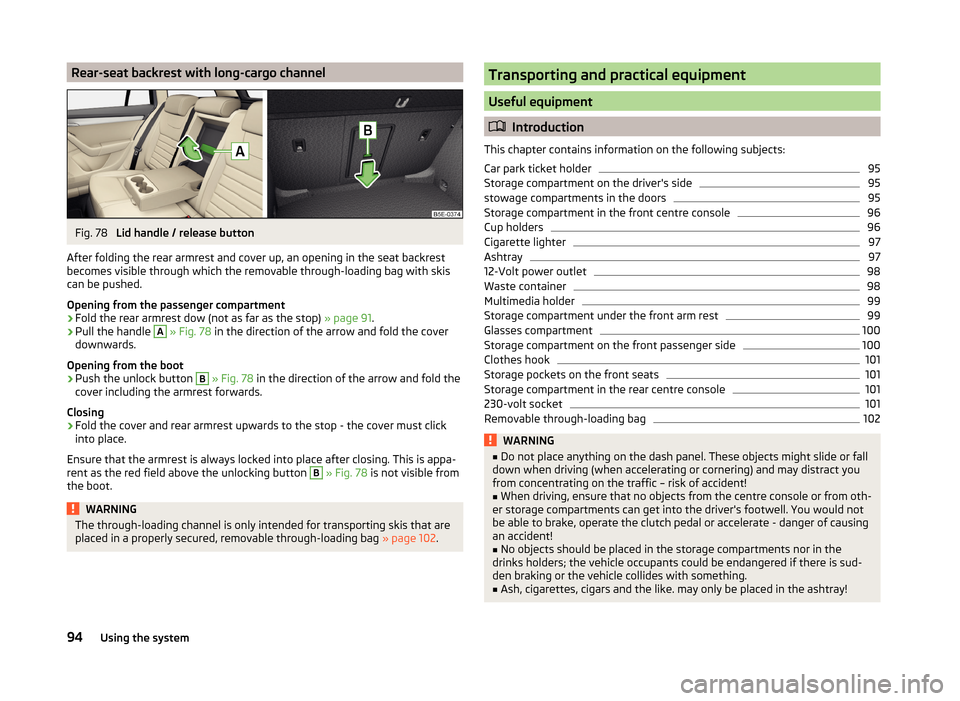
Rear-seat backrest with long-cargo channelFig. 78
Lid handle / release button
After folding the rear armrest and cover up, an opening in the seat backrest
becomes visible through which the removable through-loading bag with skis
can be pushed.
Opening from the passenger compartment
›
Fold the rear armrest dow (not as far as the stop) » page 91.
›
Pull the handle
A
» Fig. 78 in the direction of the arrow and fold the cover
downwards.
Opening from the boot
›
Push the unlock button
B
» Fig. 78 in the direction of the arrow and fold the
cover including the armrest forwards.
Closing
›
Fold the cover and rear armrest upwards to the stop - the cover must click
into place.
Ensure that the armrest is always locked into place after closing. This is appa- rent as the red field above the unlocking button
B
» Fig. 78 is not visible from
the boot.
WARNINGThe through-loading channel is only intended for transporting skis that are
placed in a properly secured, removable through-loading bag » page 102.Transporting and practical equipment
Useful equipment
Introduction
This chapter contains information on the following subjects:
Car park ticket holder
95
Storage compartment on the driver's side
95
stowage compartments in the doors
95
Storage compartment in the front centre console
96
Cup holders
96
Cigarette lighter
97
Ashtray
97
12-Volt power outlet
98
Waste container
98
Multimedia holder
99
Storage compartment under the front arm rest
99
Glasses compartment
100
Storage compartment on the front passenger side
100
Clothes hook
101
Storage pockets on the front seats
101
Storage compartment in the rear centre console
101
230-volt socket
101
Removable through-loading bag
102WARNING■ Do not place anything on the dash panel. These objects might slide or fall
down when driving (when accelerating or cornering) and may distract you
from concentrating on the traffic – risk of accident!■
When driving, ensure that no objects from the centre console or from oth-
er storage compartments can get into the driver's footwell. You would not
be able to brake, operate the clutch pedal or accelerate - danger of causing
an accident!
■
No objects should be placed in the storage compartments nor in the
drinks holders; the vehicle occupants could be endangered if there is sud-
den braking or the vehicle collides with something.
■
Ash, cigarettes, cigars and the like. may only be placed in the ashtray!
94Using the system
Page 130 of 280
The vehicle is unlocked.
If the ignition switch can not be turned on, then turn the steering wheel back
and forth slightly and thereby unlock the steering lock.
Turning ignition on/off and starting the engine
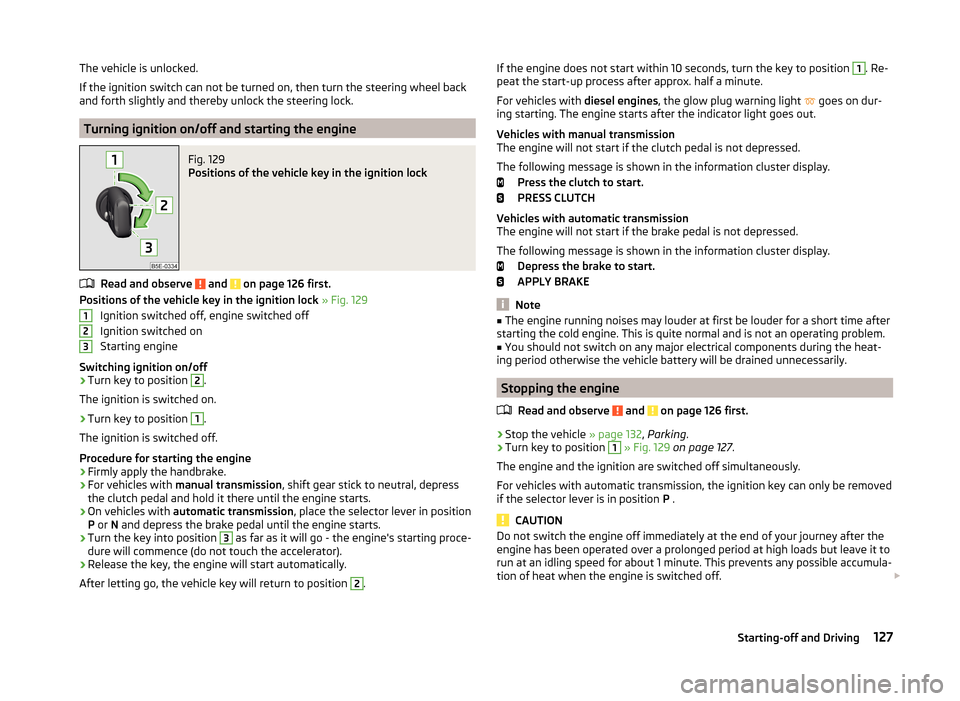
Fig. 129
Positions of the vehicle key in the ignition lock
Read and observe and on page 126 first.
Positions of the vehicle key in the ignition lock » Fig. 129
Ignition switched off, engine switched off
Ignition switched on
Starting engine
Switching ignition on/off
›
Turn key to position
2
.
The ignition is switched on.
›
Turn key to position
1
.
The ignition is switched off.
Procedure for starting the engine
›
Firmly apply the handbrake.
›
For vehicles with manual transmission , shift gear stick to neutral, depress
the clutch pedal and hold it there until the engine starts.
›
On vehicles with automatic transmission , place the selector lever in position
P or N and depress the brake pedal until the engine starts.
›
Turn the key into position
3
as far as it will go - the engine's starting proce-
dure will commence (do not touch the accelerator).
›
Release the key, the engine will start automatically.
After letting go, the vehicle key will return to position
2
.
123If the engine does not start within 10 seconds, turn the key to position 1. Re-
peat the start-up process after approx. half a minute.
For vehicles with diesel engines, the glow plug warning light
goes on dur-
ing starting. The engine starts after the indicator light goes out.
Vehicles with manual transmission
The engine will not start if the clutch pedal is not depressed.
The following message is shown in the information cluster display. Press the clutch to start.
PRESS CLUTCH
Vehicles with automatic transmission
The engine will not start if the brake pedal is not depressed.
The following message is shown in the information cluster display. Depress the brake to start.
APPLY BRAKE
Note
■ The engine running noises may louder at first be louder for a short time after
starting the cold engine. This is quite normal and is not an operating problem.■
You should not switch on any major electrical components during the heat-
ing period otherwise the vehicle battery will be drained unnecessarily.
Stopping the engine
Read and observe
and on page 126 first.
›
Stop the vehicle » page 132, Parking .
›
Turn key to position
1
» Fig. 129 on page 127 .
The engine and the ignition are switched off simultaneously.
For vehicles with automatic transmission, the ignition key can only be removed if the selector lever is in position P .
CAUTION
Do not switch the engine off immediately at the end of your journey after the
engine has been operated over a prolonged period at high loads but leave it to
run at an idling speed for about 1 minute. This prevents any possible accumula-
tion of heat when the engine is switched off. 127Starting-off and Driving
Page 132 of 280
Under certain circumstances (e.g. after switching off the ignition and opening
the driver's door), the steering is enabled only when the ignition is switched on
or the engine is started.WARNINGNever let the vehicle roll with locked steering lock - there is a risk of acci-
dent!
Switching ignition on / off
Read and observe
and on page 128 first.
›
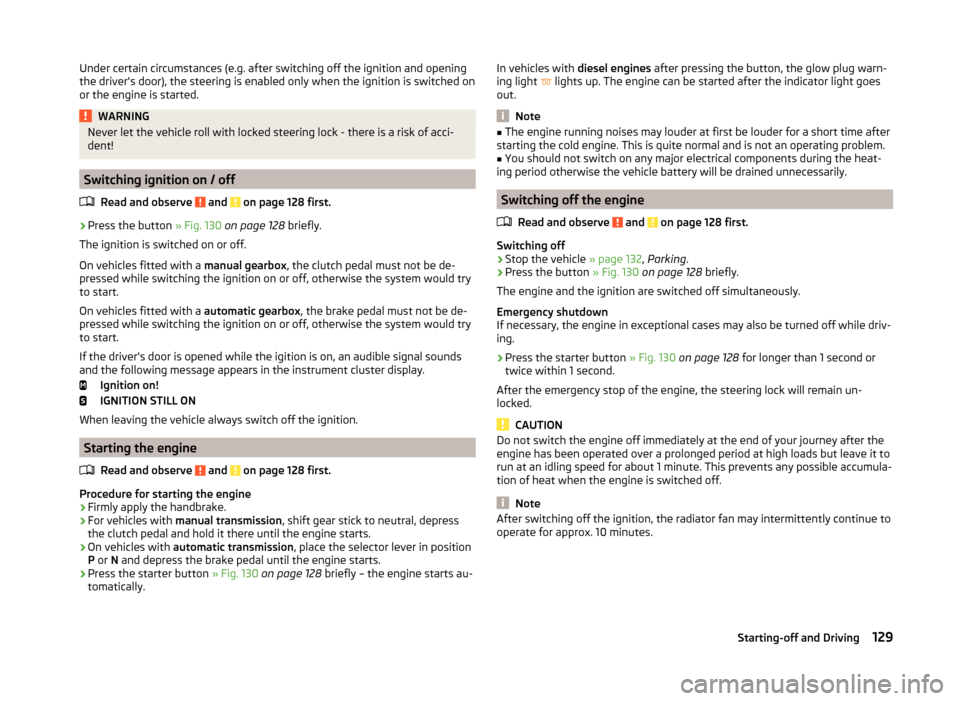
Press the button » Fig. 130 on page 128 briefly.
The ignition is switched on or off.
On vehicles fitted with a manual gearbox, the clutch pedal must not be de-
pressed while switching the ignition on or off, otherwise the system would try
to start.
On vehicles fitted with a automatic gearbox, the brake pedal must not be de-
pressed while switching the ignition on or off, otherwise the system would try
to start.
If the driver's door is opened while the igition is on, an audible signal sounds
and the following message appears in the instrument cluster display.
Ignition on!
IGNITION STILL ON
When leaving the vehicle always switch off the ignition.
Starting the engine
Read and observe
and on page 128 first.
Procedure for starting the engine
›
Firmly apply the handbrake.
›
For vehicles with manual transmission , shift gear stick to neutral, depress
the clutch pedal and hold it there until the engine starts.
›
On vehicles with automatic transmission , place the selector lever in position
P or N and depress the brake pedal until the engine starts.
›
Press the starter button » Fig. 130 on page 128 briefly – the engine starts au-
tomatically.
In vehicles with diesel engines after pressing the button, the glow plug warn-
ing light lights up. The engine can be started after the indicator light goes
out.
Note
■ The engine running noises may louder at first be louder for a short time after
starting the cold engine. This is quite normal and is not an operating problem.■
You should not switch on any major electrical components during the heat-
ing period otherwise the vehicle battery will be drained unnecessarily.
Switching off the engine
Read and observe
and on page 128 first.
Switching off
›
Stop the vehicle » page 132, Parking .
›
Press the button » Fig. 130 on page 128 briefly.
The engine and the ignition are switched off simultaneously.
Emergency shutdown
If necessary, the engine in exceptional cases may also be turned off while driv-
ing.
›
Press the starter button » Fig. 130 on page 128 for longer than 1 second or
twice within 1 second.
After the emergency stop of the engine, the steering lock will remain un-
locked.
CAUTION
Do not switch the engine off immediately at the end of your journey after the
engine has been operated over a prolonged period at high loads but leave it to
run at an idling speed for about 1 minute. This prevents any possible accumula-
tion of heat when the engine is switched off.
Note
After switching off the ignition, the radiator fan may intermittently continue to
operate for approx. 10 minutes.129Starting-off and Driving
Page 133 of 280
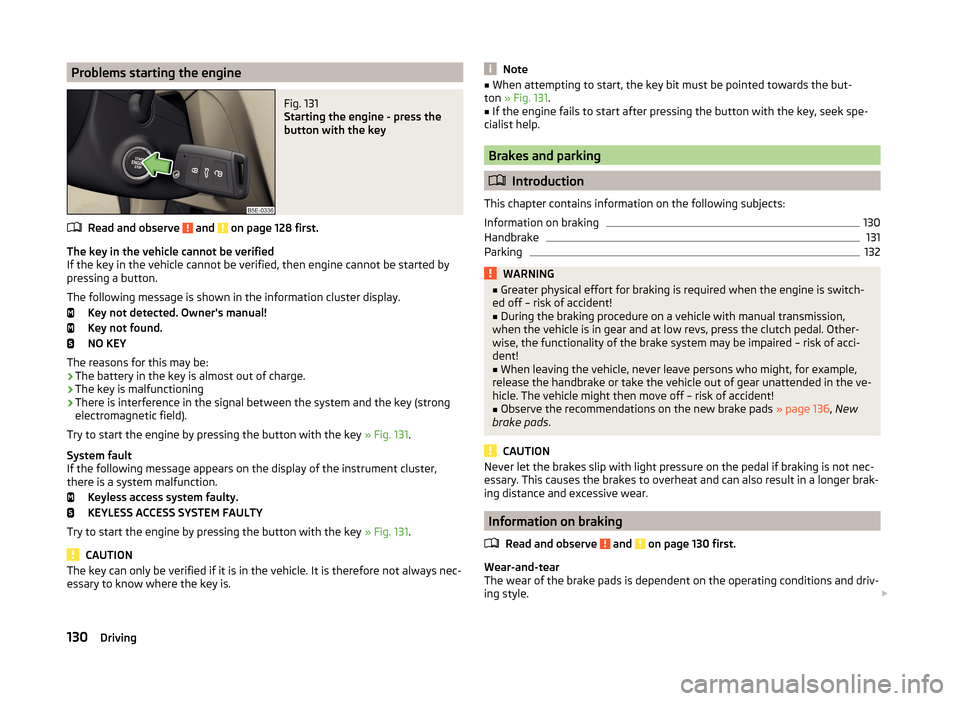
Problems starting the engineFig. 131
Starting the engine - press the
button with the key
Read and observe and on page 128 first.
The key in the vehicle cannot be verified
If the key in the vehicle cannot be verified, then engine cannot be started by pressing a button.
The following message is shown in the information cluster display. Key not detected. Owner's manual!
Key not found.
NO KEY
The reasons for this may be:
› The battery in the key is almost out of charge.
› The key is malfunctioning
› There is interference in the signal between the system and the key (strong
electromagnetic field).
Try to start the engine by pressing the button with the key » Fig. 131.
System fault
If the following message appears on the display of the instrument cluster,
there is a system malfunction.
Keyless access system faulty.
KEYLESS ACCESS SYSTEM FAULTY
Try to start the engine by pressing the button with the key » Fig. 131.
CAUTION
The key can only be verified if it is in the vehicle. It is therefore not always nec-
essary to know where the key is.Note■ When attempting to start, the key bit must be pointed towards the but-
ton » Fig. 131 .■
If the engine fails to start after pressing the button with the key, seek spe-
cialist help.
Brakes and parking
Introduction
This chapter contains information on the following subjects:
Information on braking
130
Handbrake
131
Parking
132WARNING■ Greater physical effort for braking is required when the engine is switch-
ed off – risk of accident!■
During the braking procedure on a vehicle with manual transmission,
when the vehicle is in gear and at low revs, press the clutch pedal. Other-
wise, the functionality of the brake system may be impaired – risk of acci-
dent!
■
When leaving the vehicle, never leave persons who might, for example,
release the handbrake or take the vehicle out of gear unattended in the ve-
hicle. The vehicle might then move off – risk of accident!
■
Observe the recommendations on the new brake pads » page 136, New
brake pads .
CAUTION
Never let the brakes slip with light pressure on the pedal if braking is not nec-
essary. This causes the brakes to overheat and can also result in a longer brak-
ing distance and excessive wear.
Information on braking
Read and observe
and on page 130 first.
Wear-and-tear
The wear of the brake pads is dependent on the operating conditions and driv-
ing style.
130Driving
Page 135 of 280
The handbrake warning is activated if the vehicle is driven at a speed of more
than around 5 km/h for more than 3 seconds.WARNINGPlease note that the handbrake must be fully released. A handbrake which
is only partially released can result in the rear brakes overheating. This can
have a negative effect on the operation of the brake system – risk of acci-
dent!
Parking
Read and observe
and on page 130 first.
When stopping and parking, look for a place with a suitable surface » .
Only carry out the activities while parking in the specified order.
›
Bring the vehicle to a stop and depress the brake pedal.
›
Firmly apply the handbrake.
›
On vehicles with automatic transmission place the selector lever in the P po-
sition.
›
Switch off the engine.
›
For vehicles with manual transmission , select 1st gear or reverse gear
›
Release the brake pedal.
WARNINGThe parts of the exhaust system can become very hot. Therefore, never
stop the vehicle at places where the underside of your vehicle can come in-
to contact with flammable materials such as dry grass, undergrowth,
leaves, spilled fuel or such like. - Risk of fire and serious injury can occur!
Manual shifting of gears and pedals
Introduction
This chapter contains information on the following subjects:
Manual gear changing
132
Pedals
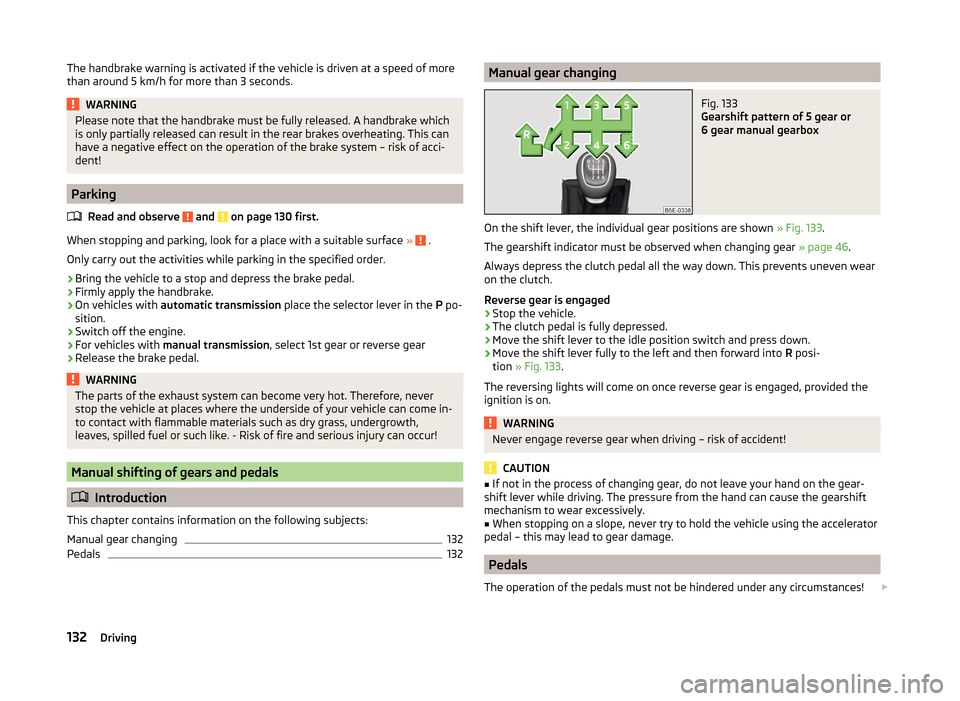
132Manual gear changingFig. 133
Gearshift pattern of 5 gear or
6 gear manual gearbox
On the shift lever, the individual gear positions are shown » Fig. 133.
The gearshift indicator must be observed when changing gear » page 46.
Always depress the clutch pedal all the way down. This prevents uneven wear
on the clutch.
Reverse gear is engaged
›
Stop the vehicle.
›
The clutch pedal is fully depressed.
›
Move the shift lever to the idle position switch and press down.
›
Move the shift lever fully to the left and then forward into R posi-
tion » Fig. 133 .
The reversing lights will come on once reverse gear is engaged, provided the ignition is on.
WARNINGNever engage reverse gear when driving – risk of accident!
CAUTION
■ If not in the process of changing gear, do not leave your hand on the gear-
shift lever while driving. The pressure from the hand can cause the gearshift
mechanism to wear excessively.■
When stopping on a slope, never try to hold the vehicle using the accelerator
pedal – this may lead to gear damage.
Pedals
The operation of the pedals must not be hindered under any circumstances!
132Driving
Page 151 of 280
The parking procedure was ended because the time limit of 6 minutes was
passed.
Park Assist currently not available.
The system cannot be activated because a fault exists on the vehicle. Seek
help from a specialist garage.
Park Assist stopped. Not available.
The parking procedure was ended because a fault exists on the vehicle. Seek
help from a specialist garage.
Park Assist faulty. Workshop!
The parking procedure is not possible because a fault exists in the system.
Seek help from a specialist garage.
ASR intervention. Take over steering!
The parking procedure is terminated by a TCS intervention. Park Assist: indicate and engage reverse
The prerequisites for manoeuvring out of a parking space using the system
have been met. Switch on the turn signals and shift into reverse.
Aut. parking space exit not possible. Space too small.
The manoeuvring procedure using the system is not possible. The parking gap
is too small.
Braking intervention. Speed too high.
The speed was too high during the parking and was automatically reduced.
Cruise Control System
Introduction
This chapter contains information on the following subjects:
Functioning
148
Operating Description
149
The Cruise Control System (CCS) maintains a set speed without you having to
actuate the accelerator pedal.
The state where the GRA maintains the speed is referred to hereinafter as the
control .
WARNING■
The GRA only serves to support and does not relieve the driver of the re-
sponsibility for the vehicle operation.■
Always adjust the speed and driving style to the current visibility, weath-
er, road and traffic conditions.
■
After pressing the clutch pedal, no interrupted control occurs! For exam-
ple, if a different gear is engaged and the clutch pedal is released, control is
continued.
Functioning
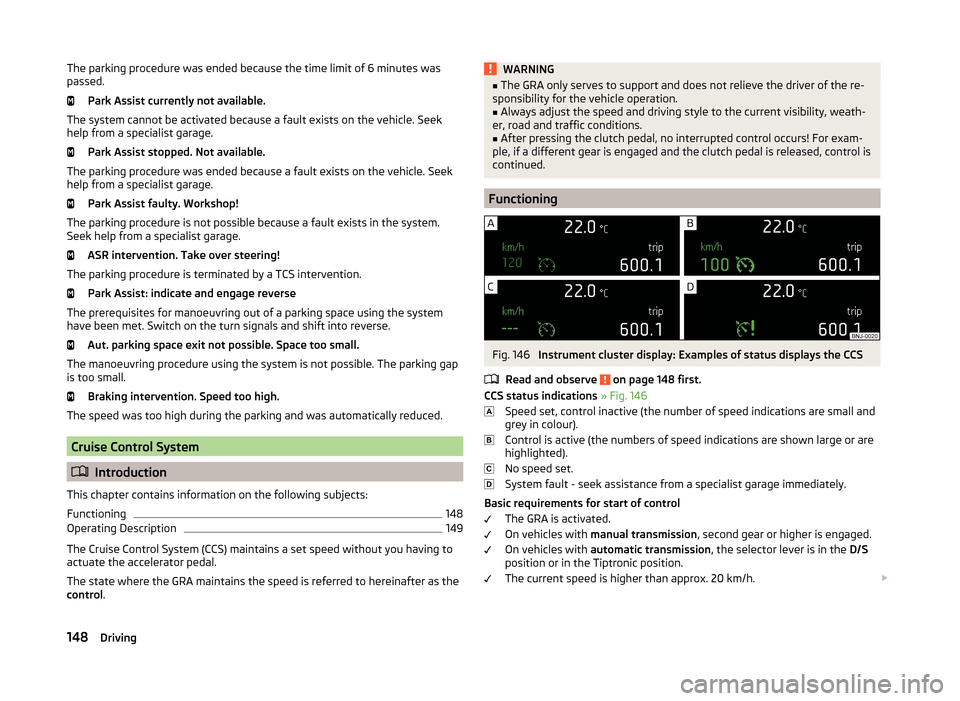
Fig. 146
Instrument cluster display: Examples of status displays the CCS
Read and observe
on page 148 first.
CCS status indications » Fig. 146
Speed set, control inactive (the number of speed indications are small and
grey in colour).
Control is active (the numbers of speed indications are shown large or are
highlighted).
No speed set.
System fault - seek assistance from a specialist garage immediately.
Basic requirements for start of control The GRA is activated.
On vehicles with manual transmission , second gear or higher is engaged.
On vehicles with automatic transmission , the selector lever is in the D/S
position or in the Tiptronic position.
The current speed is higher than approx. 20 km/h.
148Driving
Page 156 of 280

Note■If control is started at a speed of less than 30 km/h on vehicles with an auto-
matic transmission, the speed of 30 km/h is stored. The speed increases auto-
matically to 30 km/h or is regulated with respect to the speed of the vehicle
ahead.■
When TCS is disabled, it will be activated automatically upon starting control.
■
If the TCS is deactivated during control, control is stopped automatically.
Stop/resume control
Read and observe
and on page 150 first.
Stop control
›
Set the lever into the sprung position
» Fig. 151 on page 152 .
or
›
Apply the brake.
Control stops, the speed remains stored.
Resume control
›
Start control » page 152.
WARNINGControl may only be resumed if the stored speed is not too high for the cur-
rent traffic conditions.
Note
Control is also stopped when the clutch is held down for longer than 30 s.
Set/change the desired speed
Read and observe
and on page 150 first.
The desired speed can be set or changed using the control lever » page 152.
The set speed is stored upon releasing the lever or the button on the button
on the lever.
Setting/changing the speed by 10 km/h at a time ( ) - requirements
ACC is enabled.
Increasing the speed by 1 km/h at a time ( ) - requirements
ACC is enabled.
Vehicle control taking place.
Decreasing the speed by 1 km/h at a time (
) - requirements
ACC is enabled.
Vehicle control taking place.
Changing the speed by adopting the current speed (
) - requirements
ACC is enabled.
The vehicle is moving at a speed other than that which is stored.
Note
■
If during control the speed is increased by pressing the accelerator, control is
temporarily stopped. Upon releasing the accelerator, control is automatically
resumed.■
If during control the speed is reduced by applying the brake, control is stop-
ped. Control needs to be restarted in order to resume » page 152.
■
If the vehicle is controlled by a lower speed than the stored speed, then
the current speed is stored the first time the button is pressed. Press the but-
ton again
and the speed is reduced in increments of 1 km/h.
Set time interval level
Read and observe
and on page 150 first.
The proximity to the vehicle ahead can be set with the lever » Fig. 151 on
page 152 or in Infotainment » infotainment manual , chapter Vehicle settings
(CAR button) .
Setting by means of the lever
›
Set the switch into the sprung position or - » Fig. 151
on page 152 .
The display of the instrument cluster shows line
2
» Fig. 149 on page 151 ,
which indicates the proximity.
›
Using the switch on the lever, adjust line
2
to the desired distance
level.
153Assist systems