CD player SKODA OCTAVIA 2014 3.G / (5E) Swing Infotinment Car Radio Manual
[x] Cancel search | Manufacturer: SKODA, Model Year: 2014, Model line: OCTAVIA, Model: SKODA OCTAVIA 2014 3.G / (5E)Pages: 50, PDF Size: 4.34 MB
Page 5 of 50
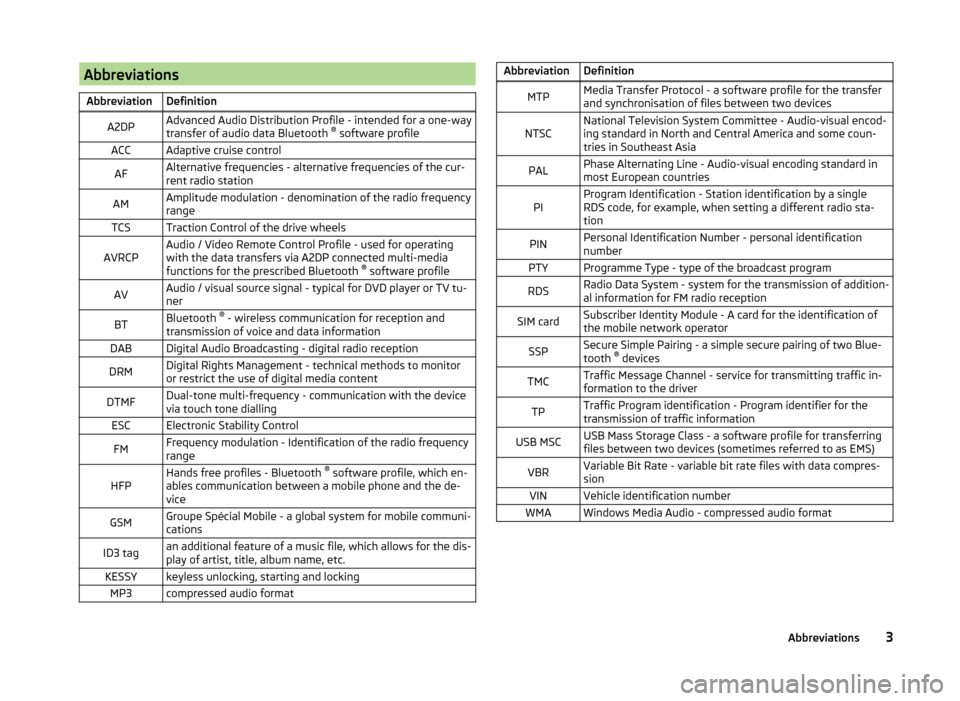
AbbreviationsAbbreviationDefinitionA2DPAdvanced Audio Distribution Profile - intended for a one-way
transfer of audio data Bluetooth ®
software profileACCAdaptive cruise controlAFAlternative frequencies - alternative frequencies of the cur-
rent radio stationAMAmplitude modulation - denomination of the radio frequency
rangeTCSTraction Control of the drive wheelsAVRCPAudio / Video Remote Control Profile - used for operating
with the data transfers via A2DP connected multi-media
functions for the prescribed Bluetooth ®
software profileAVAudio / visual source signal - typical for DVD player or TV tu-
nerBTBluetooth ®
- wireless communication for reception and
transmission of voice and data informationDABDigital Audio Broadcasting - digital radio receptionDRMDigital Rights Management - technical methods to monitor
or restrict the use of digital media contentDTMFDual-tone multi-frequency - communication with the device
via touch tone diallingESCElectronic Stability ControlFMFrequency modulation - Identification of the radio frequency
rangeHFPHands free profiles - Bluetooth ®
software profile, which en-
ables communication between a mobile phone and the de-
viceGSMGroupe Spécial Mobile - a global system for mobile communi-
cationsID3 tagan additional feature of a music file, which allows for the dis-
play of artist, title, album name, etc.KESSYkeyless unlocking, starting and lockingMP3compressed audio formatAbbreviationDefinitionMTPMedia Transfer Protocol - a software profile for the transfer
and synchronisation of files between two devicesNTSCNational Television System Committee - Audio-visual encod-
ing standard in North and Central America and some coun-
tries in Southeast AsiaPALPhase Alternating Line - Audio-visual encoding standard in
most European countriesPIProgram Identification - Station identification by a single
RDS code, for example, when setting a different radio sta-
tionPINPersonal Identification Number - personal identification
numberPTYProgramme Type - type of the broadcast programRDSRadio Data System - system for the transmission of addition-
al information for FM radio receptionSIM cardSubscriber Identity Module - A card for the identification of
the mobile network operatorSSPSecure Simple Pairing - a simple secure pairing of two Blue-
tooth ®
devicesTMCTraffic Message Channel - service for transmitting traffic in-
formation to the driverTPTraffic Program identification - Program identifier for the
transmission of traffic informationUSB MSCUSB Mass Storage Class - a software profile for transferring
files between two devices (sometimes referred to as EMS)VBRVariable Bit Rate - variable bit rate files with data compres-
sionVINVehicle identification numberWMAWindows Media Audio - compressed audio format3Abbreviations
Page 23 of 50
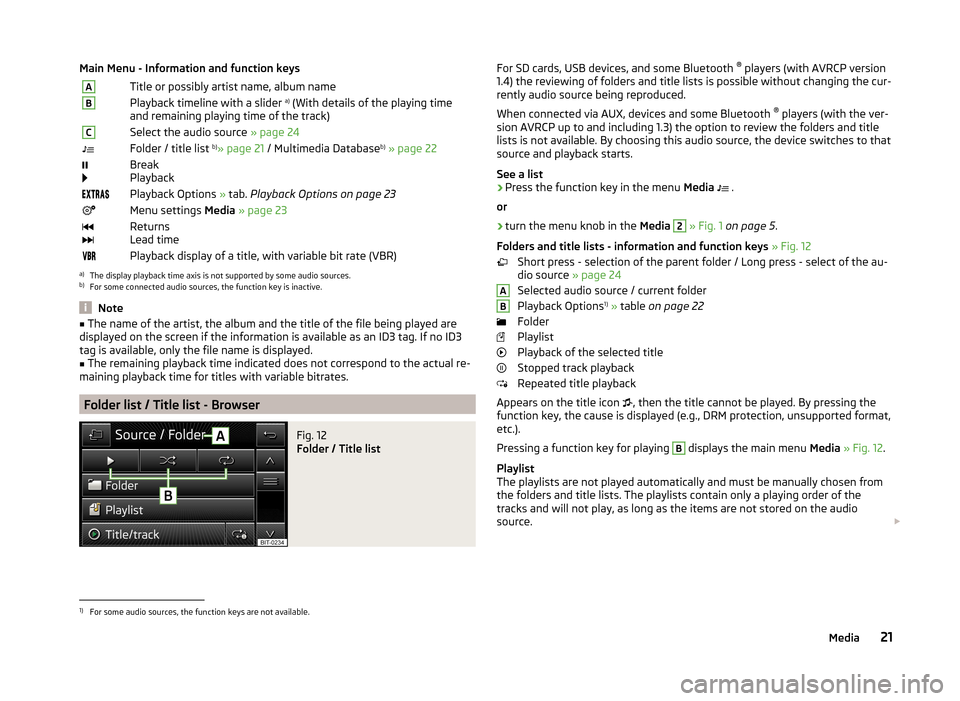
Main Menu - Information and function keysATitle or possibly artist name, album nameBPlayback timeline with a slider a)
(With details of the playing time
and remaining playing time of the track)CSelect the audio source » page 24Folder / title list b)
» page 21 / Multimedia Database b)
» page 22
Break
PlaybackPlayback Options » tab. Playback Options on page 23Menu settings Media » page 23
Returns
Lead timePlayback display of a title, with variable bit rate (VBR)a)
The display playback time axis is not supported by some audio sources.
b)
For some connected audio sources, the function key is inactive.
Note
■ The name of the artist, the album and the title of the file being played are
displayed on the screen if the information is available as an ID3 tag. If no ID3
tag is available, only the file name is displayed.■
The remaining playback time indicated does not correspond to the actual re-
maining playback time for titles with variable bitrates.
Folder list / Title list - Browser
Fig. 12
Folder / Title list
For SD cards, USB devices, and some Bluetooth ®
players (with AVRCP version
1.4) the reviewing of folders and title lists is possible without changing the cur-
rently audio source being reproduced.
When connected via AUX, devices and some Bluetooth ®
players (with the ver-
sion AVRCP up to and including 1.3) the option to review the folders and title lists is not available. By choosing this audio source, the device switches to that
source and playback starts.
See a list›
Press the function key in the menu Media
.
or
›
turn the menu knob in the Media
2
» Fig. 1 on page 5 .
Folders and title lists - information and function keys » Fig. 12
Short press - selection of the parent folder / Long press - select of the au-
dio source » page 24
Selected audio source / current folder
Playback Options 1)
» table on page 22
Folder
Playlist
Playback of the selected title
Stopped track playback
Repeated title playback
Appears on the title icon , then the title cannot be played. By pressing the
function key, the cause is displayed (e.g., DRM protection, unsupported format,
etc.).
Pressing a function key for playing
B
displays the main menu Media » Fig. 12 .
Playlist
The playlists are not played automatically and must be manually chosen from
the folders and title lists. The playlists contain only a playing order of the
tracks and will not play, as long as the items are not stored on the audio
source.
AB1)
For some audio sources, the function keys are not available.
21Media
Page 25 of 50
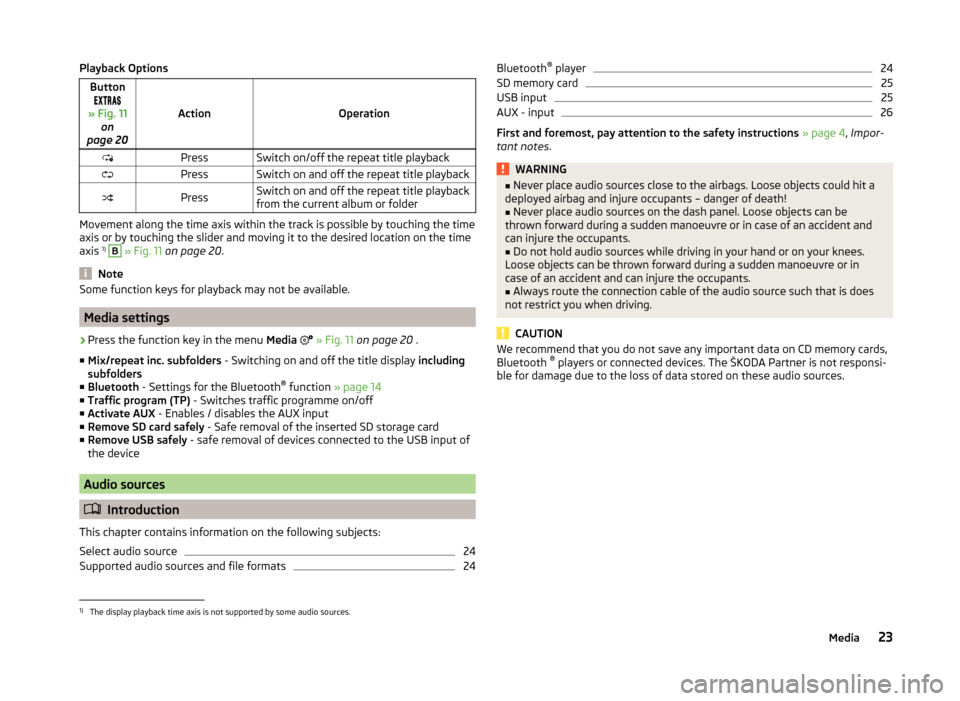
Playback OptionsButton
» Fig. 11 on
page 20
ActionOperation
PressSwitch on/off the repeat title playbackPressSwitch on and off the repeat title playbackPressSwitch on and off the repeat title playback
from the current album or folder
Movement along the time axis within the track is possible by touching the time
axis or by touching the slider and moving it to the desired location on the time
axis 1)
B
» Fig. 11 on page 20 .
Note
Some function keys for playback may not be available.
Media settings
›
Press the function key in the menu Media
» Fig. 11 on page 20 .
■ Mix/repeat inc. subfolders - Switching on and off the title display including
subfolders
■ Bluetooth - Settings for the Bluetooth ®
function » page 14
■ Traffic program (TP) - Switches traffic programme on/off
■ Activate AUX - Enables / disables the AUX input
■ Remove SD card safely - Safe removal of the inserted SD storage card
■ Remove USB safely - safe removal of devices connected to the USB input of
the device
Audio sources
Introduction
This chapter contains information on the following subjects:
Select audio source
24
Supported audio sources and file formats
24Bluetooth ®
player24SD memory card25
USB input
25
AUX - input
26
First and foremost, pay attention to the safety instructions » page 4 , Impor-
tant notes .
WARNING■
Never place audio sources close to the airbags. Loose objects could hit a
deployed airbag and injure occupants – danger of death!■
Never place audio sources on the dash panel. Loose objects can be
thrown forward during a sudden manoeuvre or in case of an accident and
can injure the occupants.
■
Do not hold audio sources while driving in your hand or on your knees.
Loose objects can be thrown forward during a sudden manoeuvre or in
case of an accident and can injure the occupants.
■
Always route the connection cable of the audio source such that is does
not restrict you when driving.
CAUTION
We recommend that you do not save any important data on CD memory cards,
Bluetooth ®
players or connected devices. The ŠKODA Partner is not responsi-
ble for damage due to the loss of data stored on these audio sources.1)
The display playback time axis is not supported by some audio sources.
23Media
Page 26 of 50
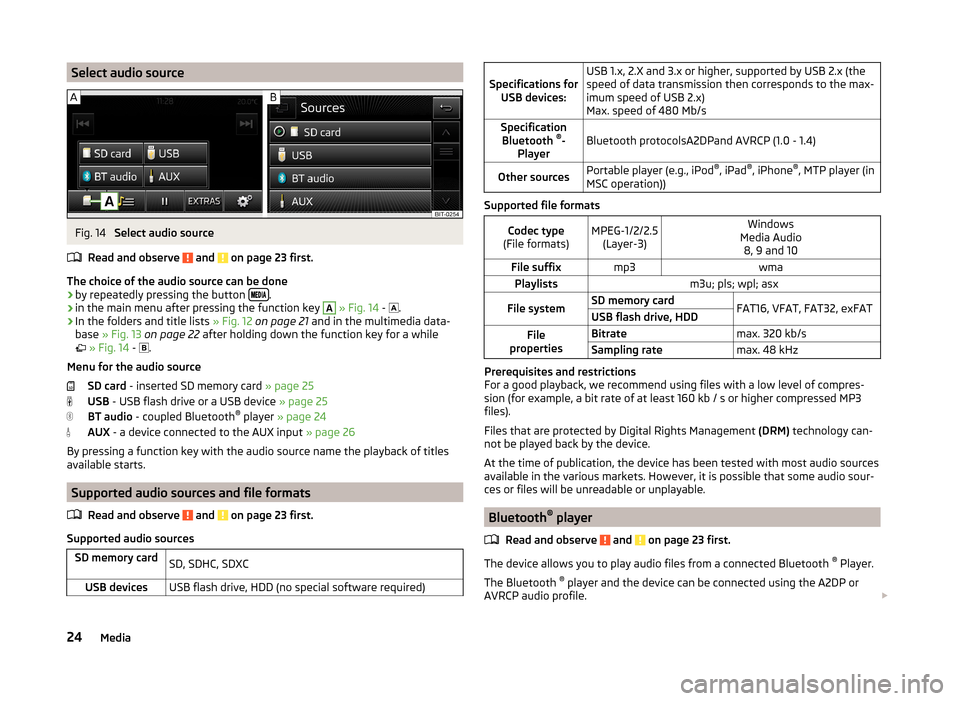
Select audio sourceFig. 14
Select audio source
Read and observe
and on page 23 first.
The choice of the audio source can be done
› by repeatedly pressing the button
.
› in the main menu after pressing the function key
A
» Fig. 14 -
.
› In the folders and title lists
» Fig. 12 on page 21 and in the multimedia data-
base » Fig. 13 on page 22 after holding down the function key for a while
» Fig. 14 -
.
Menu for the audio source SD card - inserted SD memory card » page 25
USB - USB flash drive or a USB device » page 25
BT audio - coupled Bluetooth ®
player » page 24
AUX - a device connected to the AUX input » page 26
By pressing a function key with the audio source name the playback of titles available starts.
Supported audio sources and file formats
Read and observe
and on page 23 first.
Supported audio sources
SD memory cardSD, SDHC, SDXCUSB devicesUSB flash drive, HDD (no special software required)
Specifications forUSB devices:USB 1.x, 2.X and 3.x or higher, supported by USB 2.x (the
speed of data transmission then corresponds to the max-
imum speed of USB 2.x)
Max. speed of 480 Mb/sSpecification Bluetooth ®
-
PlayerBluetooth protocolsA2DPand AVRCP (1.0 - 1.4)Other sourcesPortable player (e.g., iPod ®
, iPad ®
, iPhone ®
, MTP player (in
MSC operation))
Supported file formats
Codec type
(File formats)MPEG-1/2/2.5 (Layer-3)Windows
Media Audio 8, 9 and 10File suffixmp3wmaPlaylistsm3u; pls; wpl; asxFile systemSD memory cardFAT16, VFAT, FAT32, exFATUSB flash drive, HDDFile
propertiesBitratemax. 320 kb/sSampling ratemax. 48 kHz
Prerequisites and restrictions
For a good playback, we recommend using files with a low level of compres-
sion (for example, a bit rate of at least 160 kb / s or higher compressed MP3
files).
Files that are protected by Digital Rights Management (DRM) technology can-
not be played back by the device.
At the time of publication, the device has been tested with most audio sources
available in the various markets. However, it is possible that some audio sour-
ces or files will be unreadable or unplayable.
Bluetooth ®
player
Read and observe
and on page 23 first.
The device allows you to play audio files from a connected Bluetooth ®
Player.
The Bluetooth ®
player and the device can be connected using the A2DP or
AVRCP audio profile.
24Media
Page 27 of 50
›For connecting follow the same instructions as for pairing the device with a
telephone » page 29.
If an Apple device is connected as a Bluetooth ®
player at the same time as a
USB device the Bluetooth ®
- player will then be separated » page 24.
The following message text appears in the device screen The device is con-
nected using Bluetooth and a USB connection. This is not supported. Blue-
tooth audio is switching off.
Note
■ We recommend setting the maximum output level of the Bluetooth ®
Player.■The volume can be adjusted by setting the input sensitivity of the unit for
Bluetooth ®
player » page 13 , Sound settings .■
Some operator options of the Bluetooth ®
player via the device may not be
supported and are dependent on the Bluetooth ®
player being used.
SD memory card
Read and observe
and on page 23 first.
The device makes it possible to play audio files from the SD memory card.
The SD memory card slot
9
is located below the screen » Fig. 1 on page 5 .
Inserting an SD memory card
›
Push the SD memory card into the available slot with the cut edge to the
front right until it “locks into place”.
The play function starts automatically after inserting the SD card.
Removing an SD memory card
›
Press the button
→ Remove SD card safely .
›
Press the inserted SD memory card. The SD memory card “jumps” into the
eject position.
After popping out the SD memory card, playback will start from the last played
audio source. If this source is not available, the device switches to the Radio
menu.
Unreadable SD memory card
If there are no readable files on the SD memory card nothing will play.
Due to differing quality requirements from different card manufacturers, it is
not always possible to guarantee the playback from SD memory cards.
It may not be possible to play some or all files on the SD memory card, or their
playback may be limited.
CAUTION
■ Use only SD memory cards with a standard size. When using smaller SD cards
with the adapter the SD memory card can fall out of the adapter while driving
due to vehicle vibrations.■
We recommend that you use class 4 SD memory cards and higher. This guar-
antees the fastest possible access to the audio files.
■
Always store the SD cards in suitable cases to protect them from dirt, dust
and other forms of damage.
USB input
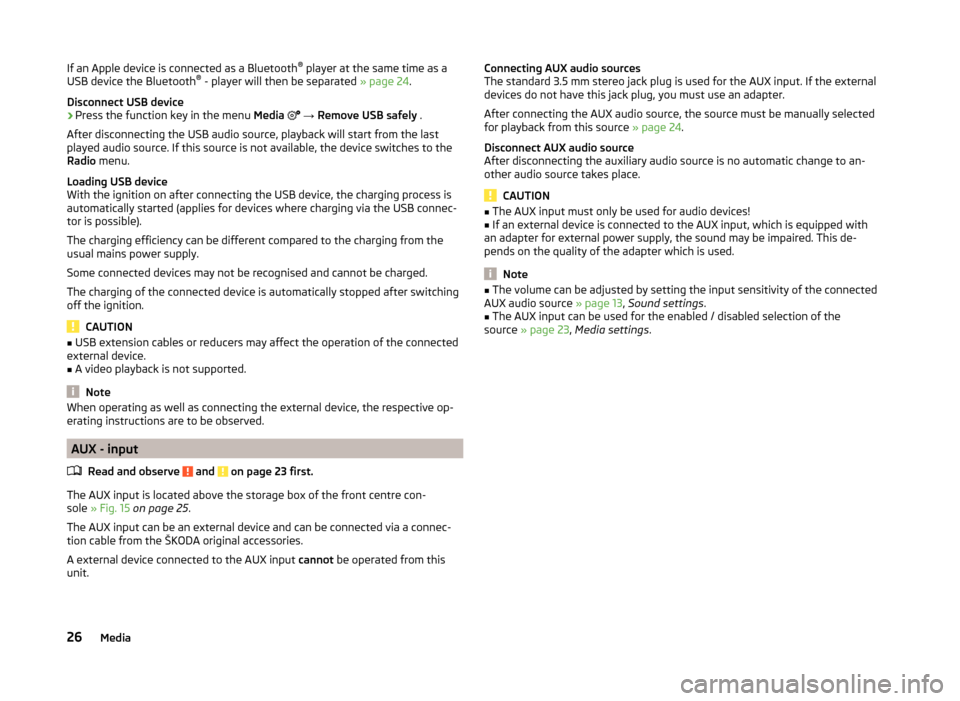
Fig. 15
USB and AUX inputs
Read and observe and on page 23 first.
The USB input is located above the storage box of the front centre con-
sole » Fig. 15 .
The USB input can be an external device and can be connected directly or via a
connection cable from the ŠKODA original accessories.
Some external devices connected to the USB input can be operated from this
device 1)
.
Connect the USB device
The play function starts automatically after connecting the USB audio source.
1)
Some operating options from an external device may not be supported.
25Media
Page 28 of 50
If an Apple device is connected as a Bluetooth®
player at the same time as a
USB device the Bluetooth ®
- player will then be separated » page 24.
Disconnect USB device›
Press the function key in the menu Media
→ Remove USB safely .
After disconnecting the USB audio source, playback will start from the last
played audio source. If this source is not available, the device switches to the
Radio menu.
Loading USB device
With the ignition on after connecting the USB device, the charging process is
automatically started (applies for devices where charging via the USB connec-
tor is possible).
The charging efficiency can be different compared to the charging from the
usual mains power supply.
Some connected devices may not be recognised and cannot be charged.
The charging of the connected device is automatically stopped after switching
off the ignition.
CAUTION
■ USB extension cables or reducers may affect the operation of the connected
external device.■
A video playback is not supported.
Note
When operating as well as connecting the external device, the respective op-
erating instructions are to be observed.
AUX - input
Read and observe
and on page 23 first.
The AUX input is located above the storage box of the front centre con-
sole » Fig. 15 on page 25 .
The AUX input can be an external device and can be connected via a connec- tion cable from the ŠKODA original accessories.
A external device connected to the AUX input cannot be operated from this
unit.
Connecting AUX audio sources
The standard 3.5 mm stereo jack plug is used for the AUX input. If the external
devices do not have this jack plug, you must use an adapter.
After connecting the AUX audio source, the source must be manually selected
for playback from this source » page 24.
Disconnect AUX audio source
After disconnecting the auxiliary audio source is no automatic change to an-
other audio source takes place.
CAUTION
■ The AUX input must only be used for audio devices!■If an external device is connected to the AUX input, which is equipped with
an adapter for external power supply, the sound may be impaired. This de-
pends on the quality of the adapter which is used.
Note
■ The volume can be adjusted by setting the input sensitivity of the connected
AUX audio source » page 13, Sound settings .■
The AUX input can be used for the enabled / disabled selection of the
source » page 23 , Media settings .
26Media
Page 32 of 50

›Connect
- pairing confirmation
› Cancel
- stops the coupling process
If the connection cannot be established, the device will then attempt to con- nect to other previously paired telephones one by one.
If there is also no connection, then a telephone search is to be started.
If the telephone to be connected has an active connection to another device,
then coupling occurs, but no connection is made.
No telephone is paired with the device
After switching on the ignition, on the device screen the message Please con-
nect a mobile telephone. appears and a menu with the following function
keys.
› Find telephone
- search for available telephones with activated Bluetooth ®
function and visibility
› Paired devices
- Opens a list of paired phones when a phone was already
paired with the device
›
- Opening of the settings menu
» page 28, Settings
After pressing the function key Find telephone the list is incrementally upda-
ted and displayed until the search for Bluetooth ®
devices is completed (after
about 1 min.).
Select the telephone you want from the list BT devices.
If the search fails, check that the conditions for successful pairing are
met » page 29 , conditions for coupling and repeat the whole process. Press
the function key Find.
Pairing confirmation
Depending on the telephone's Bluetooth ®
, conformation is in one of the fol-
lowing ways.
› Confirm the 6-digit PIN code 1)
displayed on the device screen and the tele-
phone display within 30 seconds on both the device and the telephone.
or› Confirm the connection request in the telephone.
› Enter the 4 digit PIN code shown on the unit display into the telephone with-
in 30 seconds 2)
.
Connection
After successful connection, the main menu Telephone appears » Fig. 16 on
page 27 .
In some phones, a confirmation regarding the downloading of the contacts in
the device memory is necessary. If no confirmation takes place on the phone
regarding the downloading of the contacts, then is no downloading of con-
tacts takes place.
Note
■ During the pairing process the option in the phone to remember the pass-
word for the next automatic connection can be selected 3)
.■
If the telephone supports the Bluetooth ®
profile A2DP or AVRCP 4)
, your tele-
phone display may prompt you to pair the telephone as a Bluetooth ®
player.
Connect the mobile telephone with the device
Read and observe
on page 29 first.
When pairing from the telephone, follow the instructions in the owner's man-
ual of the telephone.
›
Have the telephone search for available Bluetooth ®
devices.
›
Select the device in the list of Bluetooth ®
devices 5)
.
The following message is shown in the device screen during pairing ... Would
you like to connect? , and the following function keys are displayed.
› Connect
- confirmation of the coupling process
› Cancel
- stops the coupling process
Depending on the telephone's Bluetooth ®
, conformation is in one of the fol-
lowing ways.
1)
For devices with Bluetooth ®
v2.1 and later the telephone quick pairing procedure (SSP Secure Simple
Pairing) is used for pairing. This pairing method does not require the user to enter a PIN.
2)
The input and confirmation of the PIN code is not possible while driving.
3)
This function is only supported by some telephones.
4)
A2DP and AVRCP are Bluetooth ®
profiles that support multimedia functions.
5)
For the name of the device refer to the Bluetooth ®
settings » page 14 .
30Telephone
Page 33 of 50
›Confirm the 6-digit PIN code 1)
displayed on the device screen and the tele-
phone display within 30 seconds on both the device and the telephone.
If required select the option in the telephone for automatically connecting the
telephone to the device.
or
› Enter the 4 - 16 digit PIN code into the device.
› Enter the PIN code shown on the device display into the telephone within 30
seconds 2)
.
› If required acknowledge the confirmation request with the telephone.
After successful connection, the main menu Telephone appears » Fig. 16 on
page 27 .
If the device is connected to another phone via the HPP-profile, then only the
coupling of the new phone takes place. The original phone remains connected.
With free connection via the A2DP and AVRCP 3)
profile the phone with the de-
vice connects automatically with this profile as a Bluetooth ®
player » page 24 .
Connection with another paired mobile telephone
Read and observe
on page 29 first.
If you want to connect the device to another paired telephone, the current
connection does not have to be terminated. The connection to the existing tel-
ephone is automatically terminated by connecting to another telephone.
›
In the menu press the Telephone function key
B
» Fig. 16 on page 27 .
It displays a list of previously paired telephones.
›
Select the paired telephone to be connected with the device.
If the coupling conditions » page 29 for the selected phone are met, the mes-
sage in the device screen … Replace this connection with …? appears along
with the following function keys.
› Cancel
- stops the menu for telephone change
› Replace
- connection to the selected telephone
After successful connection, the main menu Telephone appears » Fig. 16 on
page 27 .
If the desired telephone is not in the list of previously paired telephones then
the telephone is to be paired with the device » page 29, Connect the device to
the telephone .
Bluetooth®
- connection profile
Read and observe
on page 29 first.
Profile types
The device can be paired with several telephones (or Bluetooth ®
devices), but
only one can be actively connected on the HFP 4)
profile and one on the A2DP
audio profile or AVRCP 5)
.
› Hands-free phone (HFP)
- Devices that support the connection via the
HFP profile
› Bluetooth audio (A2DP)
- Devices that support the connection via the au-
dio profile
Connection switch on / replace
Press in the menu the Telephone function key
→ Bluetooth → Paired devi-
ces .
A list of paired devices is displayed.
By pressing the function key with the name of the connected device a menu
opens with the supported profiles.
By pressing the white profile icon in the menu with supported profiles, the
message … - connection with … connecting… appears on the device screen
and the device connects using the selected profile.
If the device is already connected to another device, the message in device
screen ... Replace this connection with ...? appears along with the following
function keys.
1)
For devices with Bluetooth ®
v2.1 and later the device quick pairing procedure (SSP Secure Simple Pair-
ing) is used for pairing. This connection method does not require the user to enter a PIN.
2)
The input and confirmation of the PIN code is not possible while driving.
3)
A2DP and AVRCP are Bluetooth ®
profiles that support multimedia functions.
4)
HFP is a Bluetooth ®
profile that supports the functionality of the hands-free system.
5)
A2DP and AVRCP are Bluetooth ®
audio profiles that support multimedia functions.
31Telephone
Page 46 of 50
Index
A
ACC
39
Additional keyboard languages14
Adjusting Volume
6
Adjust vehicle systems ESC system
39
AM16
Anti-theft device4
ASR39
Audio Media
20
Radio16
Audio source23
Automatic device switch off4
Automatic distance control39
Automatic front window wiping in rain41
Automatic headlight in rain40
Automatic locking41
Automatic rear window wiping41
AUX26
Auxiliary heater and ventilation Settings
39
B
Bluetooth Connect telephone to the device
29
Settings14
Switch on/off14
Visibility14
Bluetooth - profile31
Bluetooth audio24
Bluetooth player24
C
Call lists
35
Climatronic automatic air recirculation
42
Automatic operation42
mode42
COMING HOME40
Communication27
Component protection4
Conditions for coupling29
Connect the device to the telephone29
Connect the telephone with the device30
Control lever9
Convenience consumer38
D
DAB
16
Settings20
Data Convenience consumer
38
Travel38
Vehicle status38
Date14
Daytime running lights40
Declaration of Conformity4
Delete the telephone from the list of paired de- vices
32
Description of the device5
Device operation Control lever
9
MAXI DOT display8
Multifunction steering wheel9, 11
device screen keyboard
8
numerical keyboard8
Device screen13
Important notice6
Maintenance6
Operation7
Device Settings12
Digital radio reception Settings
20
Display6, 7
Door release41
Driving mode37
Driving Mode Selection37
DTMF35
E
Eco tips
41
ESC sport39
F
Factory settings
14 , 42
Fatigue detection39
File formats24
Prerequisites and restrictions24
FM16
Settings19
Folding down the exterior mirrors - folding in while parking
41
Frequency range See main menu
16
Front Assist39
Function keys7
H
Head Light Assist
40
I
Important notes
4
Important notice Touch screen
6
44Index