Screen SKODA OCTAVIA 2015 3.G / (5E) User Guide
[x] Cancel search | Manufacturer: SKODA, Model Year: 2015, Model line: OCTAVIA, Model: SKODA OCTAVIA 2015 3.G / (5E)Pages: 268, PDF Size: 37.54 MB
Page 74 of 268
The warning light goes out. The high beam turns off.›
If the headlight is not currently switched on automatically, move the lever in-
to position
A
(spring-tensioned position) .
The warning light
goes out. The high beam turns on.
Information message
The messages and information are indicated in the instrument cluster display.
Fault: Light AssistLIGHT ASSIST FAULT
Seek help from a specialist garage.
Light Assist: clean the windscreen!WINDSCREEN PLEASE CLEAN
Check for any obstacles on the windscreen in the viewing area of the sensors
of camera.
WARNINGThe system only serves as a support and does not relieve the driver of his
or her responsibility to check the headlights and low beam and, if necessa-
ry, to switch on the lights depending on the light conditions. The manual
operation may be required for example, in the following situations.■
When visibility is poor, e.g. fog, heavy rain, thick snowfall.
■
Passing poorly lit road users, e.g. cyclists or pedestrians.
■
When driving around “sharp” bends.
■
Driving through poorly-lit locations.
■
The camera or sensor viewing range is obstructed by an obstacle.
CAUTION
Do not attach any stickers or similar objects to the windscreen in front of the
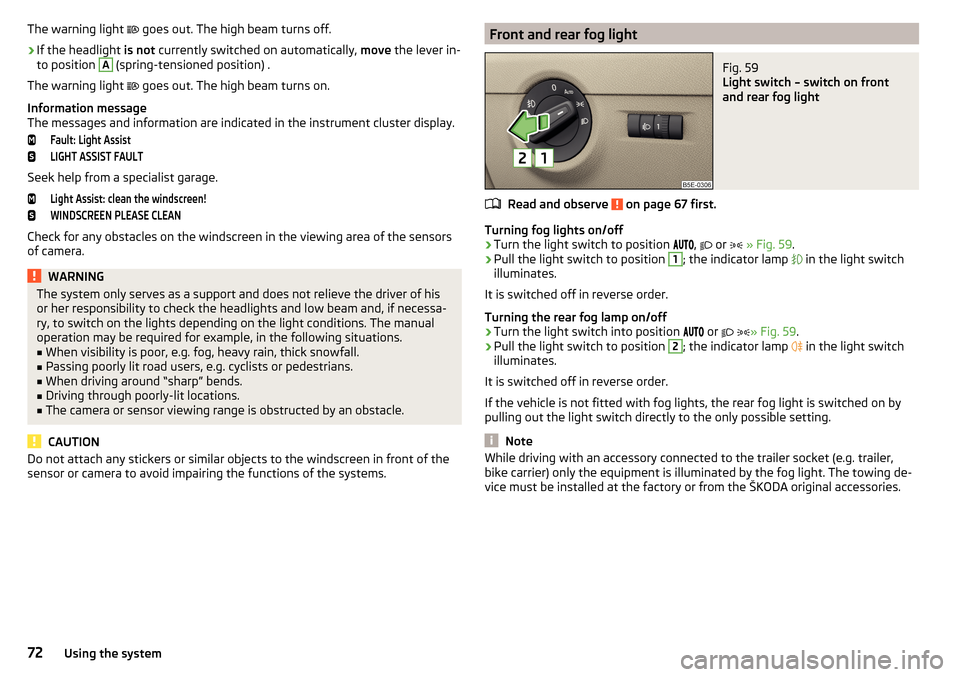
sensor or camera to avoid impairing the functions of the systems.Front and rear fog lightFig. 59
Light switch – switch on front
and rear fog light
Read and observe on page 67 first.
Turning fog lights on/off
›
Turn the light switch to position ,
or
» Fig. 59 .
›
Pull the light switch to position
1
; the indicator lamp
in the light switch
illuminates.
It is switched off in reverse order.
Turning the rear fog lamp on/off
›
Turn the light switch into position or
» Fig. 59
.
›
Pull the light switch to position
2
; the indicator lamp
in the light switch
illuminates.
It is switched off in reverse order.
If the vehicle is not fitted with fog lights, the rear fog light is switched on by pulling out the light switch directly to the only possible setting.
Note
While driving with an accessory connected to the trailer socket (e.g. trailer,
bike carrier) only the equipment is illuminated by the fog light. The towing de-
vice must be installed at the factory or from the ŠKODA original accessories.72Using the system
Page 75 of 268
Fog lights with the CORNER functionRead and observe
on page 67 first.
The function CORNER provides better illumination of the nearby environment
when turning, manoeuvring or anything similar.
The function automatically switches on the fog lights on each side of the ve- hicle, if the following conditions are met.
The turn signal is switched on or the front wheels are turned sharply 1)
.
The vehicle speed is below 40 km/h.
The low beam is switched on.
The fog lights are not switched on.
Note
The two fog lights are switched on when you shift into the reverse gear.
COMING HOME / LEAVING HOME
Read and observe
on page 67 first.
The function COMING HOME ensures that the vehicle's environment is illumi-
nated after switching off the ignition and opening the driver's door.
The function LEAVING HOME ensures that the vehicle's environment is illumi-
nated after unlocking the vehicle with the radio remote control unit.
The function switches the light on only if there is poorer visibility and the light
switch is in the position .
Enabling / disabling and setting functions
The functions and setting of the lighting duration can be activated or deactiva-
ted in the Infotainment system » Owner´s Manual Infotainment , chapter CAR -
vehicle settings .
CAUTION■
Poorer visibility is evaluated by a motor mounted below the windscreen in
the holder of the interior mirror sensor. Do not attach any stickers or similar
objects in front of the light sensor on the windscreen in order to avoid impair-
ing the function or its reliability.■
If this option is always enabled, then the battery is heavily loaded.
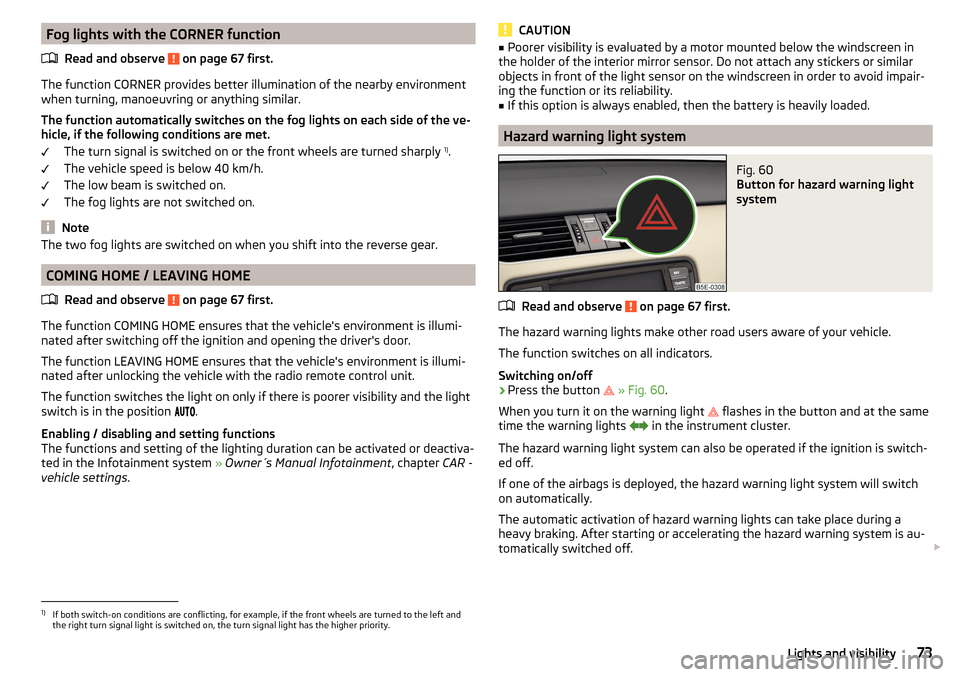
Hazard warning light system
Fig. 60
Button for hazard warning light
system
Read and observe on page 67 first.
The hazard warning lights make other road users aware of your vehicle.
The function switches on all indicators.
Switching on/off
›
Press the button
» Fig. 60 .
When you turn it on the warning light
flashes in the button and at the same
time the warning lights
in the instrument cluster.
The hazard warning light system can also be operated if the ignition is switch-
ed off.
If one of the airbags is deployed, the hazard warning light system will switch
on automatically.
The automatic activation of hazard warning lights can take place during a
heavy braking. After starting or accelerating the hazard warning system is au-
tomatically switched off.
1)
If both switch-on conditions are conflicting, for example, if the front wheels are turned to the left and
the right turn signal light is switched on, the turn signal light has the higher priority.
73Lights and visibility
Page 78 of 268
The lighting switches off around 30 seconds after the front door is closed or
the ignition is switched on.WARNINGIf the entry light is on, do not touch its cover – risk of burns!
Visibility
Introduction
This chapter contains information on the following subjects:
Windscreen and rear window heater
76
Sun visors in the front
76
Sun screen
77WARNINGMake sure that the view outside is not covered by ice, snow, mist or other
objects.
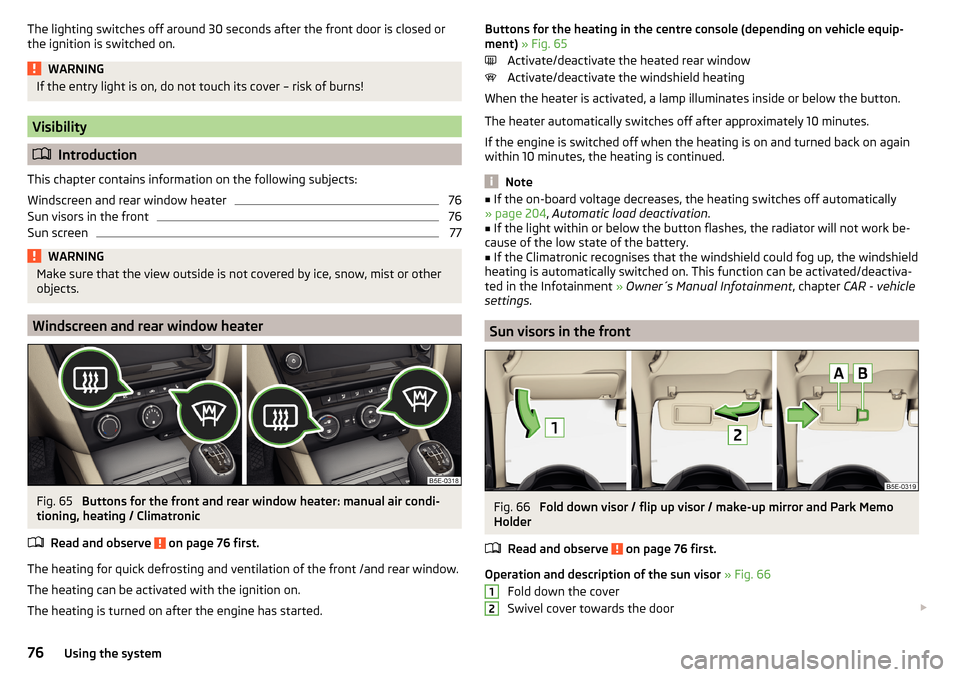
Windscreen and rear window heater
Fig. 65
Buttons for the front and rear window heater: manual air condi-
tioning, heating / Climatronic
Read and observe
on page 76 first.
The heating for quick defrosting and ventilation of the front /and rear window.
The heating can be activated with the ignition on.
The heating is turned on after the engine has started.
Buttons for the heating in the centre console (depending on vehicle equip-
ment) » Fig. 65
Activate/deactivate the heated rear window
Activate/deactivate the windshield heating
When the heater is activated, a lamp illuminates inside or below the button.
The heater automatically switches off after approximately 10 minutes.
If the engine is switched off when the heating is on and turned back on again
within 10 minutes, the heating is continued.
Note
■ If the on-board voltage decreases, the heating switches off automatically
» page 204 , Automatic load deactivation .■
If the light within or below the button flashes, the radiator will not work be-
cause of the low state of the battery.
■
If the Climatronic recognises that the windshield could fog up, the windshield
heating is automatically switched on. This function can be activated/deactiva-
ted in the Infotainment » Owner´s Manual Infotainment , chapter CAR - vehicle
settings .
Sun visors in the front
Fig. 66
Fold down visor / flip up visor / make-up mirror and Park Memo
Holder
Read and observe
on page 76 first.
Operation and description of the sun visor » Fig. 66
Fold down the cover
Swivel cover towards the door
1276Using the system
Page 79 of 268
Make-up mirror with cover (the cover can be pushed in the direction of the
arrow)
Parking ticket holderWARNINGWhen objects are attached to the sun visor, the visor can not be pivoted to
the side windows. This might result in injuries to the occupants if the head
airbag is deployed.
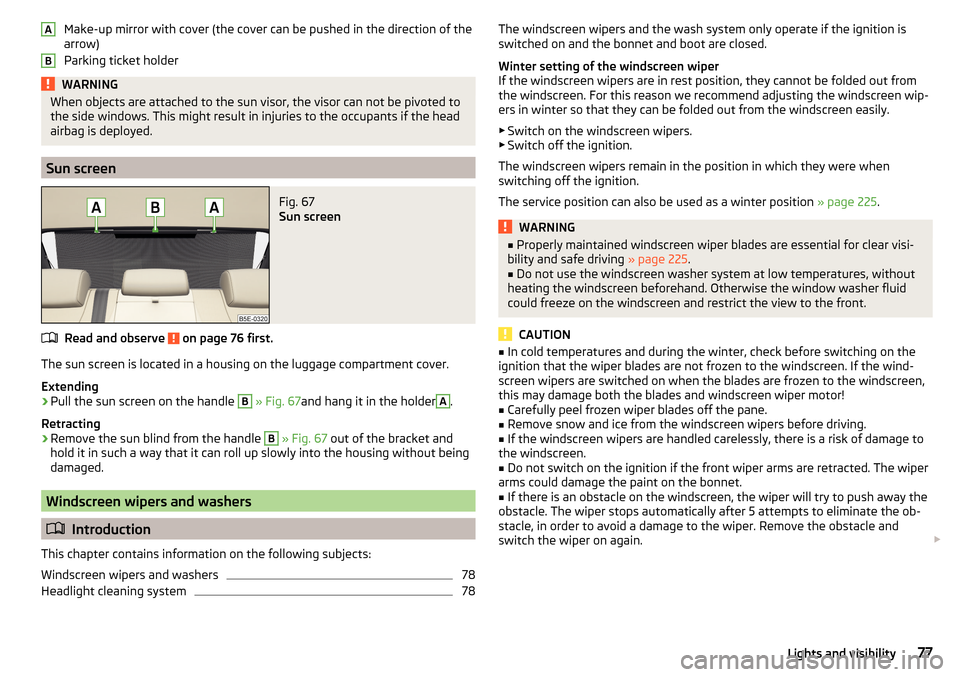
Sun screen
Fig. 67
Sun screen
Read and observe on page 76 first.
The sun screen is located in a housing on the luggage compartment cover.
Extending
›
Pull the sun screen on the handle
B
» Fig. 67 and hang it in the holder
A
.
Retracting
›
Remove the sun blind from the handle
B
» Fig. 67 out of the bracket and
hold it in such a way that it can roll up slowly into the housing without being
damaged.
Windscreen wipers and washers
Introduction
This chapter contains information on the following subjects:
Windscreen wipers and washers
78
Headlight cleaning system
78ABThe windscreen wipers and the wash system only operate if the ignition is
switched on and the bonnet and boot are closed.
Winter setting of the windscreen wiper
If the windscreen wipers are in rest position, they cannot be folded out from
the windscreen. For this reason we recommend adjusting the windscreen wip-
ers in winter so that they can be folded out from the windscreen easily.
▶ Switch on the windscreen wipers.
▶ Switch off the ignition.
The windscreen wipers remain in the position in which they were when
switching off the ignition.
The service position can also be used as a winter position » page 225.WARNING■
Properly maintained windscreen wiper blades are essential for clear visi-
bility and safe driving » page 225.■
Do not use the windscreen washer system at low temperatures, without
heating the windscreen beforehand. Otherwise the window washer fluid
could freeze on the windscreen and restrict the view to the front.
CAUTION
■ In cold temperatures and during the winter, check before switching on the
ignition that the wiper blades are not frozen to the windscreen. If the wind-
screen wipers are switched on when the blades are frozen to the windscreen,
this may damage both the blades and windscreen wiper motor!■
Carefully peel frozen wiper blades off the pane.
■
Remove snow and ice from the windscreen wipers before driving.
■
If the windscreen wipers are handled carelessly, there is a risk of damage to
the windscreen.
■
Do not switch on the ignition if the front wiper arms are retracted. The wiper
arms could damage the paint on the bonnet.
■
If there is an obstacle on the windscreen, the wiper will try to push away the
obstacle. The wiper stops automatically after 5 attempts to eliminate the ob-
stacle, in order to avoid a damage to the wiper. Remove the obstacle and
switch the wiper on again.
77Lights and visibility
Page 80 of 268
Note■Each time the ignition switches off for the third time, the position of the
windscreen wipers changes. This counteracts an early fatigue of the wiper rub-
bers.■
The windscreen washer nozzles for the windscreen are heated when the en-
gine is running and the outside temperature is less than approx. +10 °C.
Windscreen wipers and washers
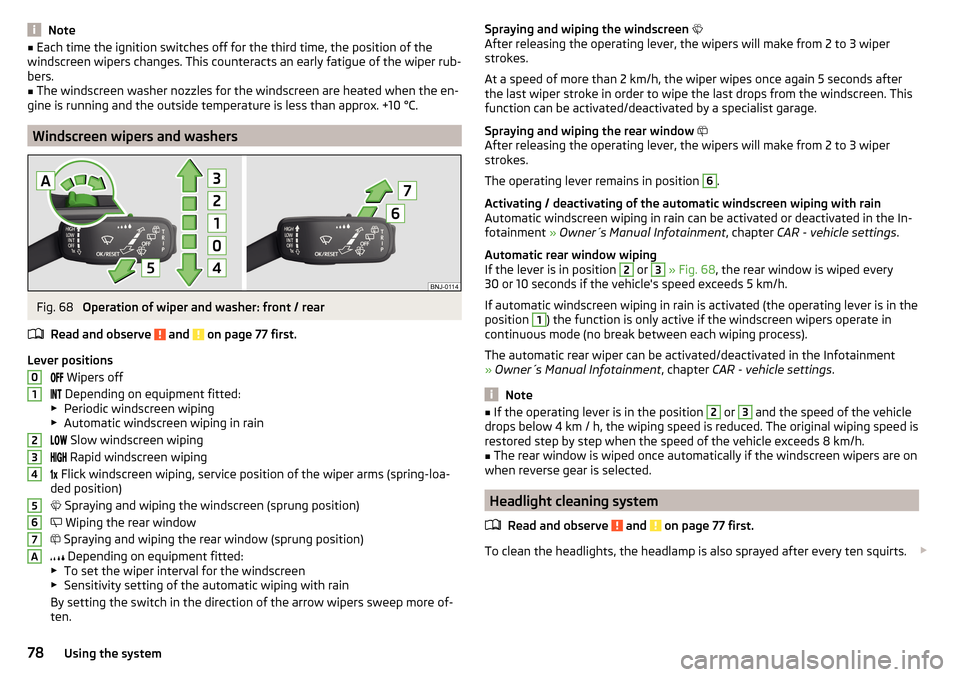
Fig. 68
Operation of wiper and washer: front / rear
Read and observe
and on page 77 first.
Lever positions Wipers off
Depending on equipment fitted:
▶ Periodic windscreen wiping
▶ Automatic windscreen wiping in rain
Slow windscreen wiping
Rapid windscreen wiping
Flick windscreen wiping, service position of the wiper arms (spring-loa-
ded position)
Spraying and wiping the windscreen (sprung position)
Wiping the rear window
Spraying and wiping the rear window (sprung position)
Depending on equipment fitted:
▶ To set the wiper interval for the windscreen
▶ Sensitivity setting of the automatic wiping with rain
By setting the switch in the direction of the arrow wipers sweep more of-
ten.
01234567ASpraying and wiping the windscreen
After releasing the operating lever, the wipers will make from 2 to 3 wiper
strokes.
At a speed of more than 2 km/h, the wiper wipes once again 5 seconds after
the last wiper stroke in order to wipe the last drops from the windscreen. This
function can be activated/deactivated by a specialist garage.
Spraying and wiping the rear window
After releasing the operating lever, the wipers will make from 2 to 3 wiper
strokes.
The operating lever remains in position 6
.
Activating / deactivating of the automatic windscreen wiping with rain
Automatic windscreen wiping in rain can be activated or deactivated in the In-
fotainment » Owner´s Manual Infotainment , chapter CAR - vehicle settings .
Automatic rear window wiping
If the lever is in position
2
or
3
» Fig. 68 , the rear window is wiped every
30 or 10 seconds if the vehicle's speed exceeds 5 km/h.
If automatic windscreen wiping in rain is activated (the operating lever is in the
position
1
) the function is only active if the windscreen wipers operate in
continuous mode (no break between each wiping process).
The automatic rear wiper can be activated/deactivated in the Infotainment
» Owner´s Manual Infotainment , chapter CAR - vehicle settings .
Note
■
If the operating lever is in the position 2 or 3 and the speed of the vehicle
drops below 4 km / h, the wiping speed is reduced. The original wiping speed is
restored step by step when the speed of the vehicle exceeds 8 km/h.■
The rear window is wiped once automatically if the windscreen wipers are on
when reverse gear is selected.
Headlight cleaning system
Read and observe
and on page 77 first.
To clean the headlights, the headlamp is also sprayed after every ten squirts.
78Using the system
Page 81 of 268
The headlight washer system works under the following conditions.The ignition is switched on.
The low beam is switched on.
The outside temperature is about -12° C to +39° C.
To ensure the correct functioning of the system, even in winter, this needs to be regularly cleared of snow and ice, e.g. free with a de-icing spray.
Rear mirror
Introduction
This chapter contains information on the following subjects:
Interior mirror dimming
79
Exterior mirrors
80WARNING■ Convex (curved outward) or aspheric exterior mirrors increase the field of
vision. They do, however, make objects appear smaller in the mirror. These
mirrors are therefore only of limited use for estimating distances to the fol-
lowing vehicles.■
Whenever possible use the interior mirror for estimating the distances to
the following vehicles.
WARNINGThe mirrors with automatic dimming contain an electrolyte liquid which can
escape if mirror glass is broken.■
The leaking electrolytic fluid can irritate the skin, eyes and breath appara-
tus.
■
If your eyes or skin come into contact with the electrolytic fluid, immedi-
ately wash the affected area for a few minutes long with a lot of water. If
necessary get medical assistance.
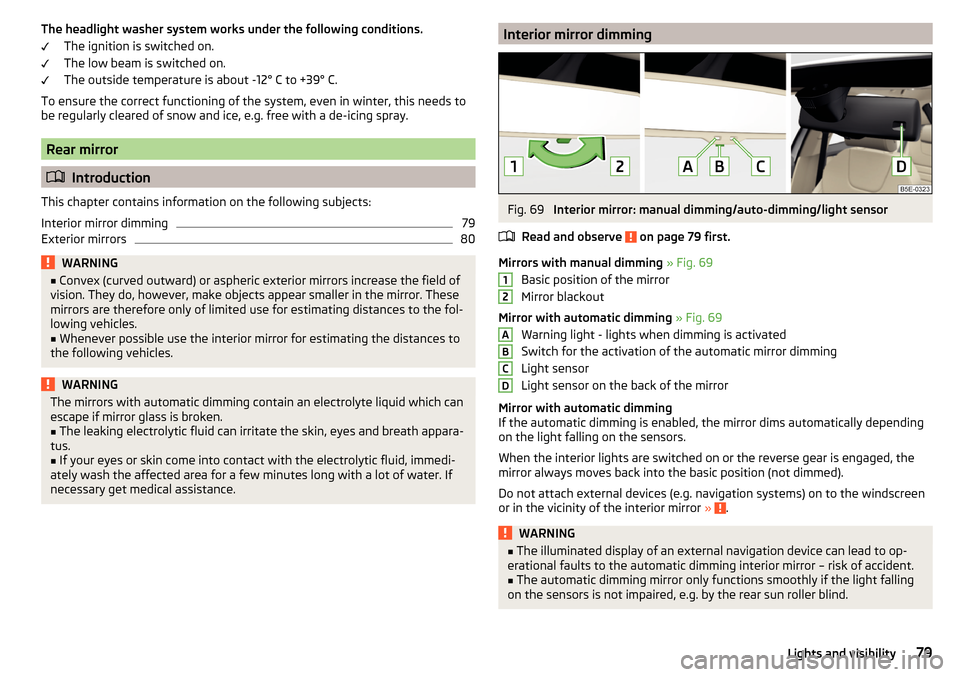
Interior mirror dimmingFig. 69
Interior mirror: manual dimming/auto-dimming/light sensor
Read and observe
on page 79 first.
Mirrors with manual dimming » Fig. 69
Basic position of the mirror
Mirror blackout
Mirror with automatic dimming » Fig. 69
Warning light - lights when dimming is activated
Switch for the activation of the automatic mirror dimming
Light sensor
Light sensor on the back of the mirror
Mirror with automatic dimming
If the automatic dimming is enabled, the mirror dims automatically depending
on the light falling on the sensors.
When the interior lights are switched on or the reverse gear is engaged, the
mirror always moves back into the basic position (not dimmed).
Do not attach external devices (e.g. navigation systems) on to the windscreen
or in the vicinity of the interior mirror »
.
WARNING■
The illuminated display of an external navigation device can lead to op-
erational faults to the automatic dimming interior mirror – risk of accident.■
The automatic dimming mirror only functions smoothly if the light falling
on the sensors is not impaired, e.g. by the rear sun roller blind.
12ABCD79Lights and visibility
Page 115 of 268
WARNING■For your own safety and that of other road users, ensure that all the win-
dows are free of ice, snow and misting. The blower should always be on to
prevent the windows from misting up.■
Under certain circumstances, air at a temperature of about 5 °C can flow
out of the vents when the cooling system is switched on.
CAUTION
■ The air inlet in front of the windscreen must be free of e.g. ice, snow or
leaves to ensure that the heating and cooling system operates properly.■
After switching on the cooling Condensation from the evaporator of the air
conditioning may drip down and form a puddle below the vehicle. This is not a
leak!
■
If the coolant temperature is too high, the cooling system is switched off to
ensure that the engine cools down.
Heating and manual air conditioning
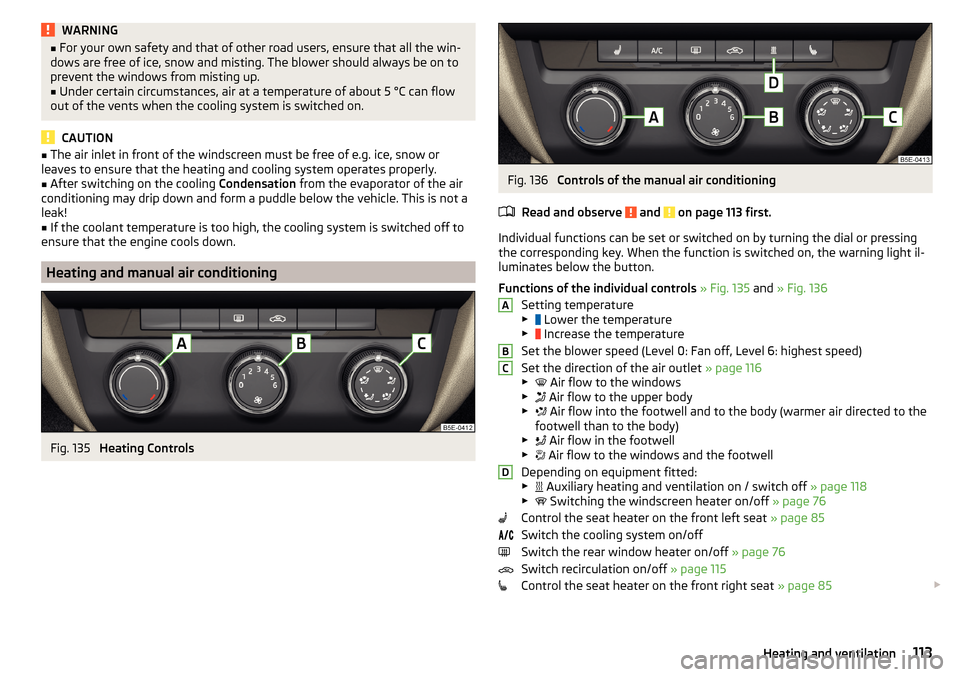
Fig. 135
Heating Controls
Fig. 136
Controls of the manual air conditioning
Read and observe
and on page 113 first.
Individual functions can be set or switched on by turning the dial or pressing
the corresponding key. When the function is switched on, the warning light il-
luminates below the button.
Functions of the individual controls » Fig. 135 and » Fig. 136
Setting temperature
▶ Lower the temperature
▶ Increase the temperature
Set the blower speed (Level 0: Fan off, Level 6: highest speed)
Set the direction of the air outlet » page 116
▶ Air flow to the windows
▶ Air flow to the upper body
▶ Air flow into the footwell and to the body (warmer air directed to the
footwell than to the body)
▶ Air flow in the footwell
▶ Air flow to the windows and the footwell
Depending on equipment fitted:
▶ Auxiliary heating and ventilation on / switch off
» page 118
▶ Switching the windscreen heater on/off
» page 76
Control the seat heater on the front left seat » page 85
Switch the cooling system on/off
Switch the rear window heater on/off » page 76
Switch recirculation on/off » page 115
Control the seat heater on the front right seat » page 85
ABCD113Heating and ventilation
Page 116 of 268
Information on the cooling system
The cooling system operates only if the following conditions are met
» page 112 .
The warning light below the button
» Fig. 136 illuminates after activation,
even if not all of the conditions for the function of the cooling system have
been met. The lighting up of the indicator light in the button signals the opera-
tional readiness of the cooling system.
When the air distribution control is turned to position
the cooling system is
activated.
Note
During operation of the manual air conditioning, an increase in engine idle
speed may occur under certain circumstances in order to ensure sufficient
heating comfort.
Climatronic (automatic air conditioning)
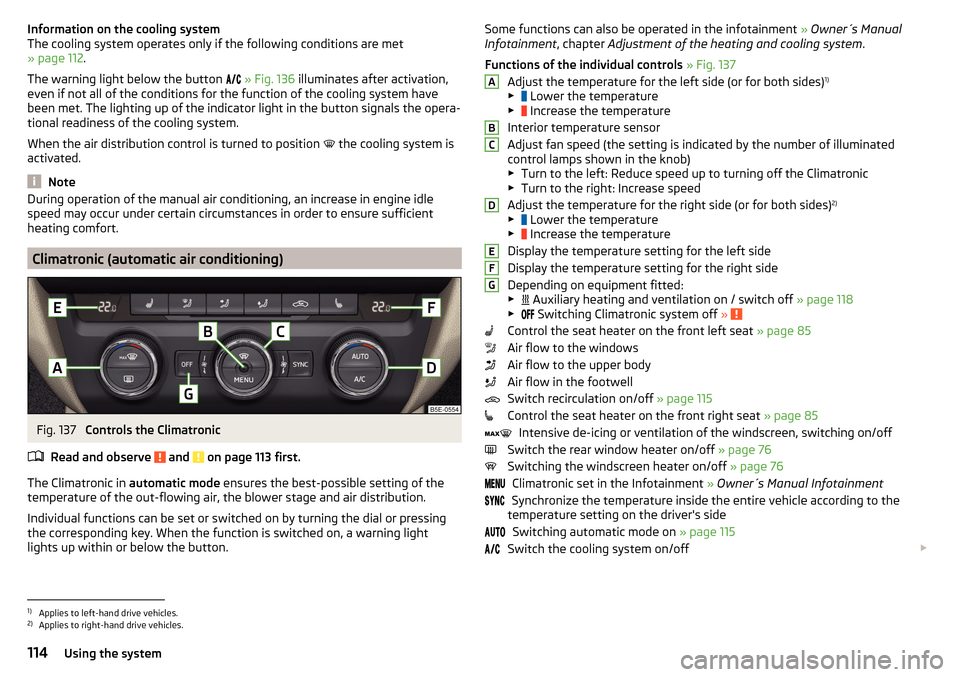
Fig. 137
Controls the Climatronic
Read and observe
and on page 113 first.
The Climatronic in automatic mode ensures the best-possible setting of the
temperature of the out-flowing air, the blower stage and air distribution.
Individual functions can be set or switched on by turning the dial or pressing
the corresponding key. When the function is switched on, a warning light
lights up within or below the button.
Some functions can also be operated in the infotainment » Owner´s Manual
Infotainment , chapter Adjustment of the heating and cooling system .
Functions of the individual controls » Fig. 137
Adjust the temperature for the left side (or for both sides) 1)
▶ Lower the temperature
▶ Increase the temperature
Interior temperature sensor
Adjust fan speed (the setting is indicated by the number of illuminated
control lamps shown in the knob) ▶ Turn to the left: Reduce speed up to turning off the Climatronic
▶ Turn to the right: Increase speed
Adjust the temperature for the right side (or for both sides) 2)
▶ Lower the temperature
▶ Increase the temperature
Display the temperature setting for the left side
Display the temperature setting for the right side
Depending on equipment fitted:
▶ Auxiliary heating and ventilation on / switch off
» page 118
▶ Switching Climatronic system off
»
Control the seat heater on the front left seat » page 85
Air flow to the windows
Air flow to the upper body
Air flow in the footwell
Switch recirculation on/off » page 115
Control the seat heater on the front right seat » page 85
Intensive de-icing or ventilation of the windscreen, switching on/off
Switch the rear window heater on/off » page 76
Switching the windscreen heater on/off » page 76
Climatronic set in the Infotainment » Owner´s Manual Infotainment
Synchronize the temperature inside the entire vehicle according to the
temperature setting on the driver's side
Switching automatic mode on » page 115
Switch the cooling system on/off
ABCDEFG1)
Applies to left-hand drive vehicles.
2)
Applies to right-hand drive vehicles.
114Using the system
Page 119 of 268
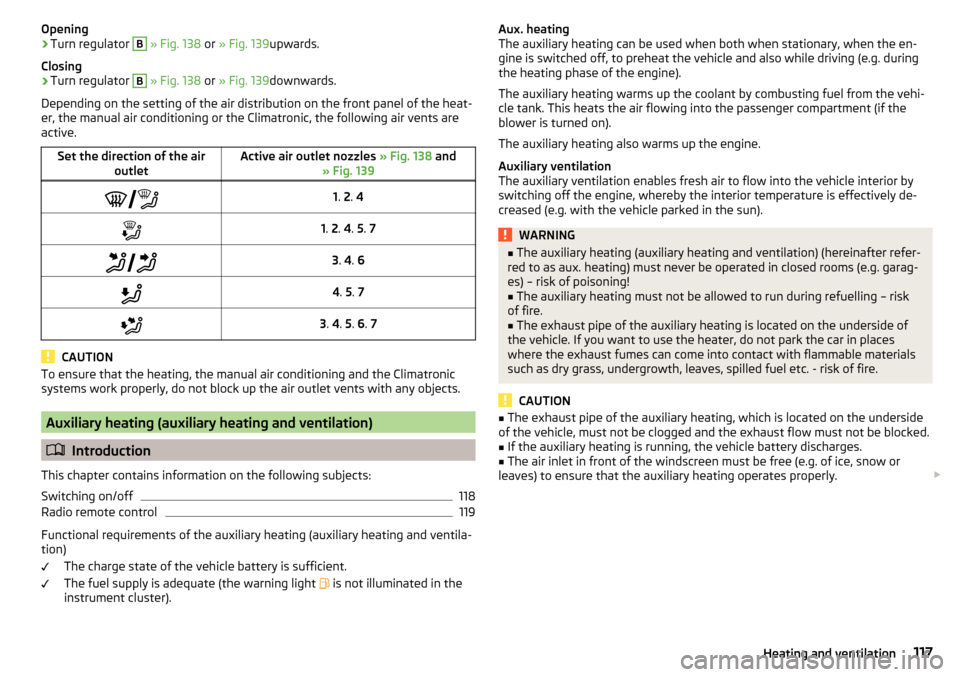
Opening›Turn regulator B » Fig. 138 or » Fig. 139 upwards.
Closing›
Turn regulator
B
» Fig. 138 or » Fig. 139 downwards.
Depending on the setting of the air distribution on the front panel of the heat-
er, the manual air conditioning or the Climatronic, the following air vents are
active.
Set the direction of the air outletActive air outlet nozzles » Fig. 138 and
» Fig. 139 1. 2 . 41. 2 . 4 . 5 . 7 3. 4 . 64 . 5 . 73 . 4 . 5 . 6 . 7
CAUTION
To ensure that the heating, the manual air conditioning and the Climatronic
systems work properly, do not block up the air outlet vents with any objects.
Auxiliary heating (auxiliary heating and ventilation)
Introduction
This chapter contains information on the following subjects:
Switching on/off
118
Radio remote control
119
Functional requirements of the auxiliary heating (auxiliary heating and ventila-
tion)
The charge state of the vehicle battery is sufficient.
The fuel supply is adequate (the warning light is not illuminated in the
instrument cluster).
Aux. heating
The auxiliary heating can be used when both when stationary, when the en-
gine is switched off, to preheat the vehicle and also while driving (e.g. during
the heating phase of the engine).
The auxiliary heating warms up the coolant by combusting fuel from the vehi-
cle tank. This heats the air flowing into the passenger compartment (if the
blower is turned on).
The auxiliary heating also warms up the engine.
Auxiliary ventilation
The auxiliary ventilation enables fresh air to flow into the vehicle interior by
switching off the engine, whereby the interior temperature is effectively de-
creased (e.g. with the vehicle parked in the sun).WARNING■ The auxiliary heating (auxiliary heating and ventilation) (hereinafter refer-
red to as aux. heating) must never be operated in closed rooms (e.g. garag-
es) – risk of poisoning!■
The auxiliary heating must not be allowed to run during refuelling – risk
of fire.
■
The exhaust pipe of the auxiliary heating is located on the underside of
the vehicle. If you want to use the heater, do not park the car in places
where the exhaust fumes can come into contact with flammable materials
such as dry grass, undergrowth, leaves, spilled fuel etc. - risk of fire.
CAUTION
■ The exhaust pipe of the auxiliary heating, which is located on the underside
of the vehicle, must not be clogged and the exhaust flow must not be blocked.■
If the auxiliary heating is running, the vehicle battery discharges.
■
The air inlet in front of the windscreen must be free (e.g. of ice, snow or
leaves) to ensure that the auxiliary heating operates properly.
117Heating and ventilation
Page 163 of 268
When the vehicle approaches a detected line between lanes, the system
makes a light movement of the steering wheel in the opposite direction to the
boundary line. This corrective steering intervention can be manually overrid-
den at any time.WARNING■ The general information relating to the use of assistance systems must
be observed » page 135, in section Introduction .■
Lane Assist can help you keep the vehicle within the lane. However, it
does not steer the vehicle for you. The driver retains full responsibility for
steering at all times.
■
Some objects on the road may be incorrectly detected as lines. As a re-
sult, an incorrect steering intervention may take place.
WARNINGThe detection capability of the camera may be limited by various external
influences. In such cases, the assistant may not detect the line between
two lanes at all or not properly. The detection capability of the camera may
be restricted in the following situations, for example.■
When visibility is poor, (e.g. fog, heavy rain, thick snowfall).
■
When driving around “sharp” bends.
■
The camera is blinded by the sun.
■
The camera is blinded by the oncoming traffic.
■
The viewing range of the camera is impeded by a vehicle travelling ahead.
■
The camera viewing range is obstructed by an obstacle.
CAUTION
Do not attach any stickers or similar objects to the windscreen to avoid impair-
ing the functions of the systems.
Note
■ The system is designed for driving on motorways and roads with adequate
longitudinal markings.■
The system can detect both continuous and broken lines.
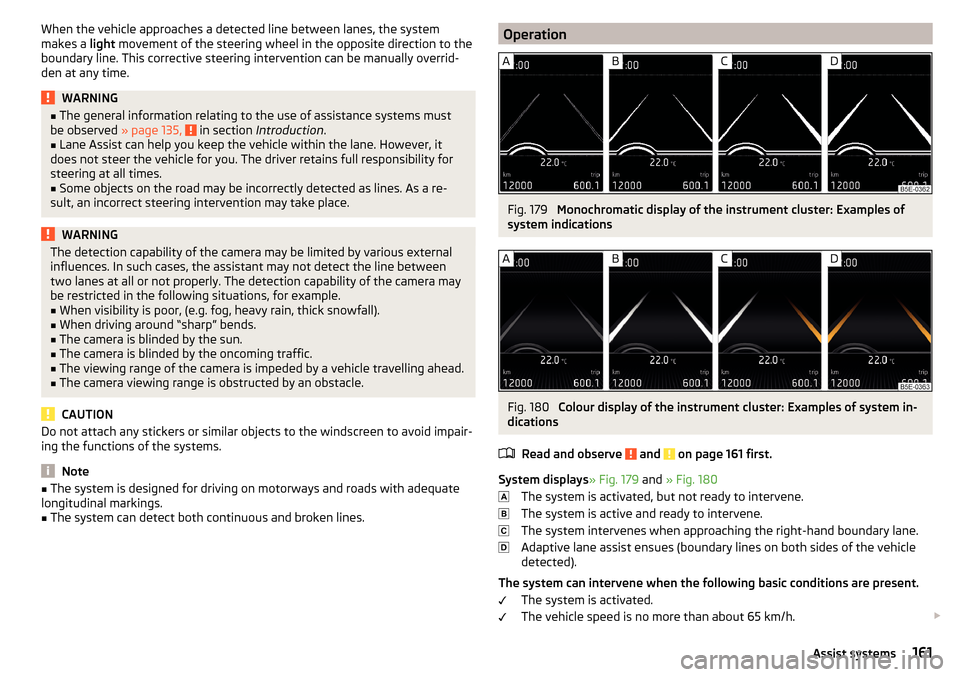
OperationFig. 179
Monochromatic display of the instrument cluster: Examples of
system indications
Fig. 180
Colour display of the instrument cluster: Examples of system in-
dications
Read and observe
and on page 161 first.
System displays » Fig. 179 and » Fig. 180
The system is activated, but not ready to intervene.
The system is active and ready to intervene.
The system intervenes when approaching the right-hand boundary lane.
Adaptive lane assist ensues (boundary lines on both sides of the vehicle
detected).
The system can intervene when the following basic conditions are present. The system is activated.
The vehicle speed is no more than about 65 km/h.
161Assist systems