ESP SKODA OCTAVIA 2016 3.G / (5E) Owner's Guide
[x] Cancel search | Manufacturer: SKODA, Model Year: 2016, Model line: OCTAVIA, Model: SKODA OCTAVIA 2016 3.G / (5E)Pages: 324, PDF Size: 48.85 MB
Page 82 of 324
Folding forward from the luggage compartment
On vehicles with a net partition, the left and then the right and middle rear
seat backrest must first be unlocked. The net partition must be rolled up in the
housing.›
Pull the corresponding lever in the direction of the arrow » Fig. 69. The re-
spective seat backrest is unlocked or folded forward.
Folding backwards
›
Pull the seat belt
C
for the side panel in the direction of arrow
3
» Fig. 68 .
›
Raise the seat backrest against the direction of arrow
2
until the release
handle
A
audibly locks. Check this by pulling on the seat backrest.
›
Make sure that the red pin
B
is hidden.
In the undivided seat back, pull the two outer belts to the side panel. After
folding back the backrest, the release handles
A
should audibly click into
place on both sides of the backrest and the red mark
B
should not be visible
on either side of the backrest.
WARNING■ The seat backs in occupied rear seats must be properly engaged.■When transporting objects in the luggage compartment that has been en-
larged by folding the backrest forward, ensure the safety of the passengers
transported on the other rear seats.■
The seat backrests must be securely locked in position so that no objects
in the luggage compartment can slide into the passenger compartment on
sudden braking – risk of injury.
CAUTION
When moving the seat backrest the seat belts should not be trapped - there is
a risk of damage to the seat belts.Fold down armrestFig. 70
Fold down armrest
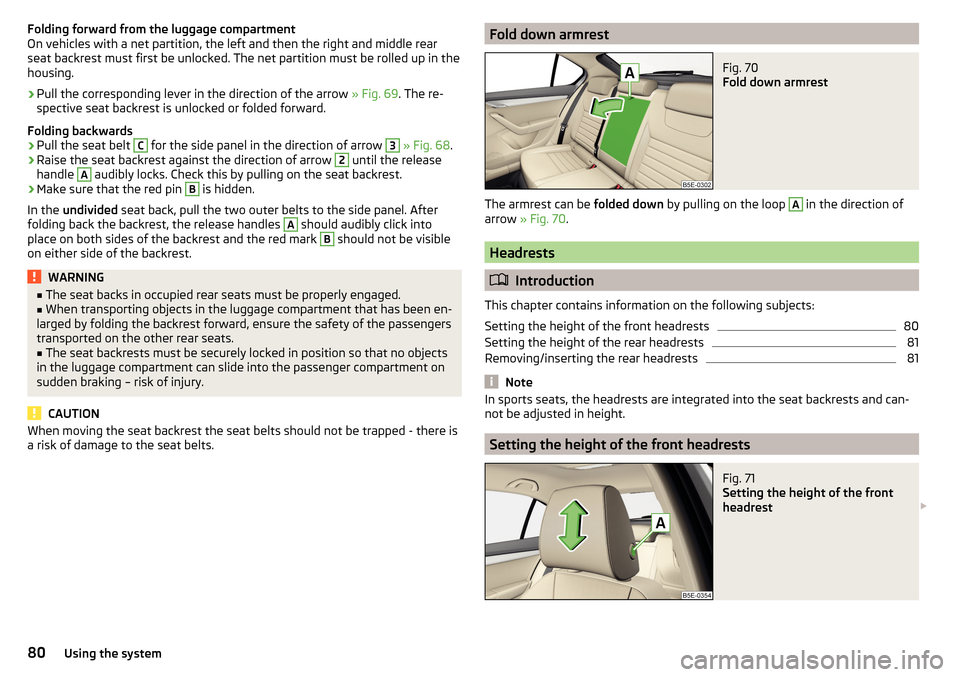
The armrest can be folded down by pulling on the loop
A
in the direction of
arrow » Fig. 70 .
Headrests
Introduction
This chapter contains information on the following subjects:
Setting the height of the front headrests
80
Setting the height of the rear headrests
81
Removing/inserting the rear headrests
81
Note
In sports seats, the headrests are integrated into the seat backrests and can-
not be adjusted in height.
Setting the height of the front headrests
Fig. 71
Setting the height of the front
headrest
80Using the system
Page 83 of 324

›To
adjust the height , hold the locking button A and move the rest in the de-
sired direction » Fig. 71.
Setting the height of the rear headrests
Fig. 72
Setting the height of the back headrest
›
Grasp the headrest and move upwards in the direction of arrow
1
» Fig. 72 .
›
To move the headrest down, press the securing button
A
in the direction of
arrow
2
and hold it down while pressing the headrest in the direction of ar-
row
3
.
Removing/inserting the rear headrests
Fig. 73
Removing/inserting the rear headrests
Before removing/inserting the headrests, fold the corresponding seat backrest
slightly forward » page 79.
›
To remove the headrest, pull it out of the seat backrest up to the stop.
›Hold the locking button A in the direction of arrow 1, at the same time us-
ing a flat screwdriver with a max. width of 5 mm to press the locking button
in the opening B
in the direction of arrow
2
and pull out the rest in the di-
rection of arrow
3
» Fig. 73 .
›
To insert the headrest, push the headrest into the seat backrest in the direc-
tion of arrow
4
until the locking button clicks into place.
Seat heaters
Fig. 74
Buttons for heating the front seats/rear seats
The seat backrests and surfaces of the front seats and the outer rear seats
can be heated electrically.
Seat heating buttons » Fig. 74
Left seat heating
Right seat heating
›
To turn on the heating to max, press the key
or
button.
By repeatedly pressing the button, the heat is turned down until it is com-
pletely switched off . The level of the seat heating is indicated by the number
of illuminated warning lights underneath / in the button.
The seat heating only operates when the engine is running.
When the ignition is switched off, the seat heating / ventilation is also switch-
ed off. if the engine is started again within 10 minutes, then the driver's seat
heating / ventilation is switched on again automatically according to the set-
ting before switching off the ignition.
81Seats and head restraints
Page 96 of 324
If the boot lid is open and the ignition switched off, the light will go out auto-
matically after 10 minutes.WARNING■ Never exceed the maximum permissible load of the respective fasteners,
nets, hooks etc. Heavy objects were not secured sufficiently – There is a
risk of injury!■
Do not exceed the permissible axle loads and permissible gross weight of
the vehicle – There is a risk of an accident!
■
An unsecured dirt or improperly attached load could slip during a sudden
manoeuvre or in an accident in the vehicle - There is a risk of injury!
■
Loose cargo could hit a deployed airbag and injure occupants – danger of
death!
■
When transporting loads in the luggage compartment that has been en-
larged by folding the rear seats forward, ensure the safety of the passen-
gers transported on the other rear seats .
CAUTION
■ Never exceed the maximum permissible load of the respective fasteners,
nets, hooks etc. - these could be damaged.■
Make sure that the heating elements of the rear window heater, the ele-
ments of the integrated aerial in the rear window or in the rear side windows
are not damaged by abrasive items.
■
Do not place sharp objects in the nets and storage compartments in the lug-
gage compartment - there is a risk of damage to the net as well as the com-
partments.
■
Put the items in the storage compartments carefully and not load these
punctiform - there is a risk of damage to the compartments.
Fastening elementsFig. 102
Fastening elements: Variant 1/variant 2 (G-TEC)
Fig. 103
Fastening elements: Variant 3/variant 4
Read and observe
and on page 94 first.
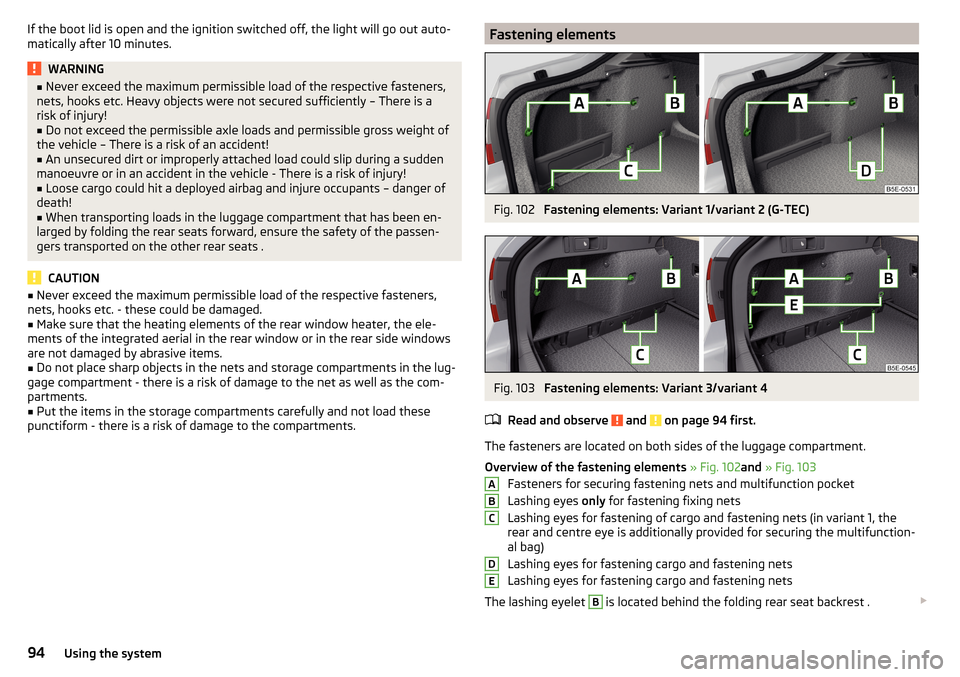
The fasteners are located on both sides of the luggage compartment.
Overview of the fastening elements » Fig. 102 and » Fig. 103
Fasteners for securing fastening nets and multifunction pocket
Lashing eyes only for fastening fixing nets
Lashing eyes for fastening of cargo and fastening nets (in variant 1, the
rear and centre eye is additionally provided for securing the multifunction-
al bag)
Lashing eyes for fastening cargo and fastening nets
Lashing eyes for fastening cargo and fastening nets
The lashing eyelet
B
is located behind the folding rear seat backrest .
ABCDE94Using the system
Page 107 of 324
WARNING■The blower should always be on to prevent the windows from misting.
Otherwise there is a risk of an accident.■
Under certain circumstances, air at a temperature of about 5 °C can flow
out of the vents when the cooling system is switched on.
Note
■ The air inlet in front of the windscreen must be free of e.g. ice, snow or
leaves to ensure that the heating and cooling system operates properly.■
After switching on the cooling Condensation from the evaporator of the air
conditioning may drip down and form a puddle below the vehicle. This is not a
leak!
■
If the coolant temperature is too high, the cooling system is switched off to
ensure that the engine cools down.
Heating and manual air conditioning
Fig. 128
Controls of the heating / air conditioning
Read and observe
on page 105 first.
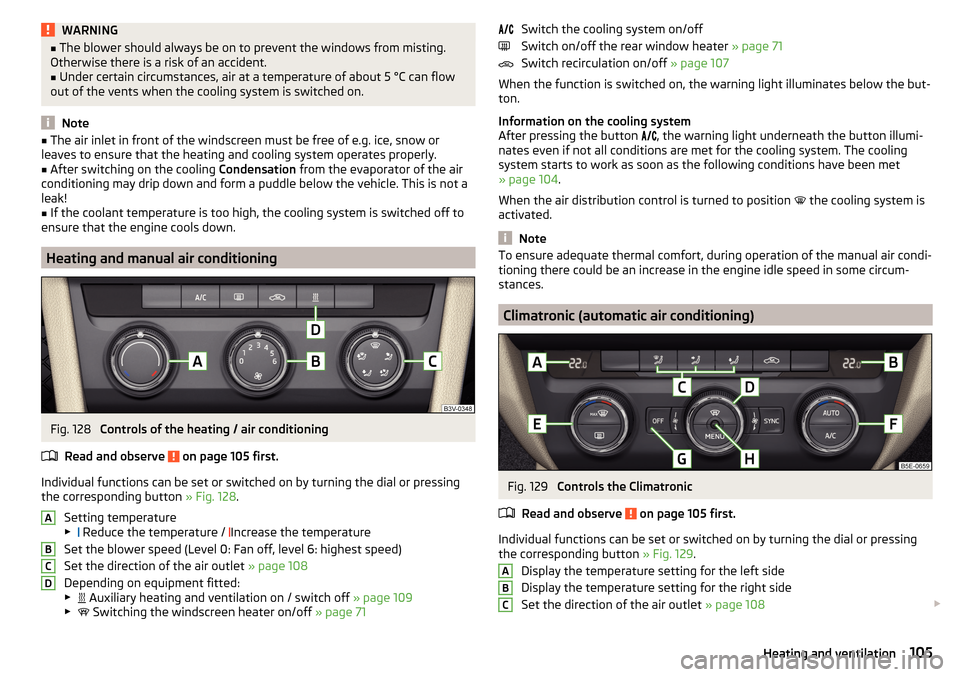
Individual functions can be set or switched on by turning the dial or pressing the corresponding button » Fig. 128.
Setting temperature
▶ Reduce the temperature /
Increase the temperature
Set the blower speed (Level 0: Fan off, level 6: highest speed)
Set the direction of the air outlet » page 108
Depending on equipment fitted:
▶ Auxiliary heating and ventilation on / switch off
» page 109
▶ Switching the windscreen heater on/off
» page 71
ABCDSwitch the cooling system on/off
Switch on/off the rear window heater » page 71
Switch recirculation on/off » page 107
When the function is switched on, the warning light illuminates below the but-
ton.
Information on the cooling system
After pressing the button
, the warning light underneath the button illumi-
nates even if not all conditions are met for the cooling system. The cooling
system starts to work as soon as the following conditions have been met
» page 104 .
When the air distribution control is turned to position the cooling system is
activated.
Note
To ensure adequate thermal comfort, during operation of the manual air condi-
tioning there could be an increase in the engine idle speed in some circum-
stances.
Climatronic (automatic air conditioning)
Fig. 129
Controls the Climatronic
Read and observe
on page 105 first.
Individual functions can be set or switched on by turning the dial or pressing the corresponding button » Fig. 129.
Display the temperature setting for the left side
Display the temperature setting for the right side
Set the direction of the air outlet » page 108
ABC105Heating and ventilation
Page 114 of 324
Infotainment
Introductory information
Important information
Introduction to the subject
WARNING■Only use Infotainment in such a way that you have control of the vehicle
in every traffic situation (e.g. Do not write text messages while driving, do
not link or connect the telephone, do not work with the contact list, do not
enter any destinations, do not connect WLAN or SmartLink etc.)- Otherwise
there is a risk of an accident!■
Always route the connection cable of the external device such that is
does not restrict you when driving.
WARNING■ Adjust the volume to ensure that acoustic signals from outside the vehi-
cle, e.g. sirens from emergency vehicles, can be heard at all times.■
High volumes can cause hearing damage!
CAUTION
In some countries, some Infotainment functions can no longer be selected
when the vehicle is running faster than a certain speed. This is not a malfunc-
tion, but complies with the national legal regulations.
Mobile phones and applications
Fig. 137
QR code with reference to web
pages for checking the compati-
bility of devices
The availability of some of the functions described in this Owner's Manual
depends on the type of device to be connected and the applications installed
in it.
Mobile phones
On the ŠKODA pages, check to see if Infotainment is compatible with the se-
lected mobile phones. This verification is carried out by reading the QR code
» Fig. 137 or after typing the following address into the web browser.
http://go.skoda.eu/compatibility
Due to the multitude of mobile phones as well as the ongoing development of
these devices, ŠKODA AUTO cannot always ensure compatibility with Infotain-
ment unconditionally. It is always recommended to physically check the func-
tion on the associated vehicle, including the ŠKODA Partners, beforehand.
Only those versions of the selected phones will be tested and supported which
originate from the official distribution network. The same also applies to their
firmware and software.
The functions of the mobile phone to be tested may differ from the same type
of mobile phone depending on the specification for the respective country or
the specific service.
Mobile phones with the operating system and in the version available at the
time of these tests will be tested. In this regard, it could be the case that the
functions of a mobile phone may differ with a different operating system ver-
sion compared to the one used with the tested phone.
ŠKODA AUTO can accept no responsibility for the continuous changes made by
the mobile phone manufacturers and application vendors.
ŠKODA AUTO does not accept any liability for any damage to Infotainment or
vehicle due to the use of incorrect or illegal applications or the improper or un-
authorised use of mobile phones.
Applications
Applications can be installed in external devices (e.g. Mobile, tablet) making it possible to display additional information on the Infotainment screen or to op-
erate Infotainment.
Due to the variety of applications as well as their ongoing development, the
available applications may not work in all external devices. ŠKODA AUTO can
accept no liability for their proper function.
Applications, their use and the required data connection may be chargeable. 112Infotainment
Page 118 of 324

Infotainment operation
Infotainment operation
Operation principles and screen areas
Fig. 144
Infotainment Columbus, Amundsen, Bolero: Screen areas/ screen
display
Fig. 145
Infotainment Swing: Screen areas / screen display
Screen display description » Fig. 144 and » Fig. 145 .
Status line with time and outdoor temperature data and other information
Information and the operation of the current menu
Function surfaces of the current menu
Identification of the current menu
Return to the higher-level menu
Sliding regulator
ABCDEFMenu item with “Checkbox”
▶ - Function is switched on
▶ - Function is switched off
/
Open a sub menu of the menu item with the “pop-up window”
Function surfaces
The screen areas which confirm a function or a menu are called “ function sur-
faces ”.
▶ White text - the surface is active and thus selectable
▶ Grey text - the surface is inactive and therefore not selectable
▶ Green frame - currently selected surface
Selecting menu/menu item/function ▶ By moving your finger across the screen in the desired direction (applies to
Infotainment Columbus, Amundsen, Bolero).
▶ By tapping on the function surface or
» Fig. 145 (Applies to Infotainment
Swing).
▶ By turning the knob .
Confirm menu/menu item/function
▶ By tapping on the function surface.
▶ By pressing the knob .
Returning to higher-level menu ▶ By tapping on the function surface .
▶ By tapping on the screen outside of the “pop-up window”.
▶ By pressing the corresponding button next to the screen (e.g. in the menu
Media , by pressing the
button).
Select the menu item / function value ▶ - Selected menu item / function value
▶ - Deselected menu item / function value
Set value ▶ By pressing the function surface with one of the following symbols
.
▶ By touching or moving your finger over the scale.
▶ Turning the knob .
Note
Depending on the equipment fitted, Infotainment can be operated using the
buttons on the multifunction steering wheel. Further information » page 43.GH116Infotainment
Page 119 of 324

Operating the menusFig. 146
Operating the menus
Operating the menus » Fig. 146
Reduction / enlargement of the menu window Browse the menu- List entries Open / close the menu window
Close the menu window
Alphanumeric keyboard
Fig. 147
Example of the keyboard display
The alphanumeric keypad is used to enter for letters, numbers and characters.
Description of the alphanumeric keyboard » Fig. 147
Input line
Context-dependent: ▶ - Switch to capital letters
▶ - Switch to special characters
▶ - Switch to numbers
ABContext-dependent:
▶ - Switch to numbers
▶ - Switch to Latin letters
▶
- Switch to Cyrillic letters
- Display of visited entries (the number of visited entries is displayed in the
function surface)
Erase the entered characters
By holding the variants of each type are displayed.
Switching between keyboards with specific characters of the selected lan-
guages » page 123 or. » page 130
Enters a blank
Move the cursor within the input line to the left
Move the cursor within the input line to the right
Confirmation of the entered number
Search
While entering characters, a search is made for corresponding entries.
The entry such as a telephone contact to be searched for must be entered
along with the special characters (diacritics).
By tapping on the function surface A list of matching entries opens.
Switching Infotainment on / off
›
To
switch on/off Infotainment, press .
Automatic switch-on of Infotainment
If Infotainment was not turned off with the control switch
before the igni-
tion was turned off, it will automatically switch on after the ignition is switch-
ed on.
Automatic switch-off of Infotainment
If the vehicle key is pulled out of the ignition lock while Infotainment is switch-
ed on, Infotainment will switch off automatically.
If the vehicle is fitted with the starter button, Infotainment will switch off au-
tomatically after the engine is switched off and the door is opened.
With the ignition off, Infotainment will automatically turn off after about 30
minutes.
Infotainment turns off automatically under certain circumstances. Infotain-
ment informs of this via a text message on the Infotainment display.
C117Infotainment operation
Page 120 of 324
Restart of Infotainment
If Infotainment does not respond (if it “freezes”) This can be restarted by hold-
ing
for longer than 10 s.
Adjusting the volume
Every change in volume is displayed on the screen.
›
To increase the volume , turn the controller clockwise.
›
To
reduce volume , turn the controller anticlockwise.
›
To
mute , turn the controller to the left to 0.
›
or:
press the button (applies to Infotainment Swing).
The following symbol appears on the screen when the sound is muted .
If, at the time of muting, sound is played from the source in the Media menu,
then the playback is interrupted (pause) 1)
.
CAUTION
■ High volumes can cause sound resonance in the vehicle.■When changing or connecting an audio source, this may cause sudden
changes in volume. Reduce the volume before changing or connecting an au-
dio source.
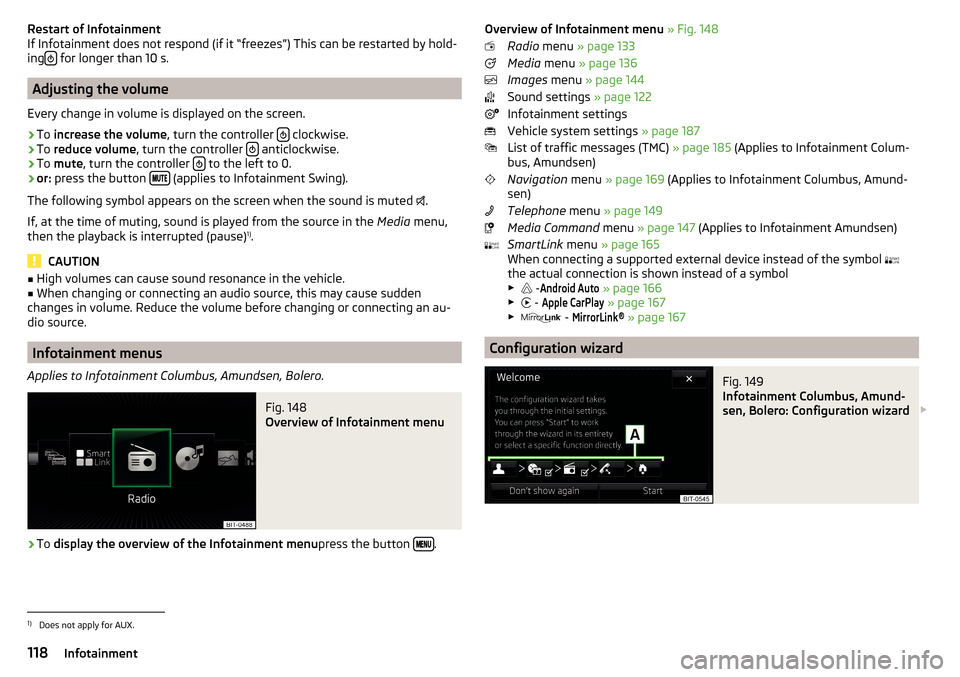
Infotainment menus
Applies to Infotainment Columbus, Amundsen, Bolero.
Fig. 148
Overview of Infotainment menu
›
To display the overview of the Infotainment menu press the button .
Overview of Infotainment menu
» Fig. 148
Radio menu » page 133
Media menu » page 136
Images menu » page 144
Sound settings » page 122
Infotainment settings
Vehicle system settings » page 187
List of traffic messages (TMC) » page 185 (Applies to Infotainment Colum-
bus, Amundsen)
Navigation menu » page 169 (Applies to Infotainment Columbus, Amund-
sen)
Telephone menu » page 149
Media Command menu » page 147 (Applies to Infotainment Amundsen)
SmartLink menu » page 165
When connecting a supported external device instead of the symbol
the actual connection is shown instead of a symbol ▶ -Android Auto
» page 166
▶ -
Apple CarPlay
» page 167
▶ -
MirrorLink®
» page 167
Configuration wizard
Fig. 149
Infotainment Columbus, Amund-
sen, Bolero: Configuration wizard
1)
Does not apply for AUX.
118Infotainment
Page 121 of 324
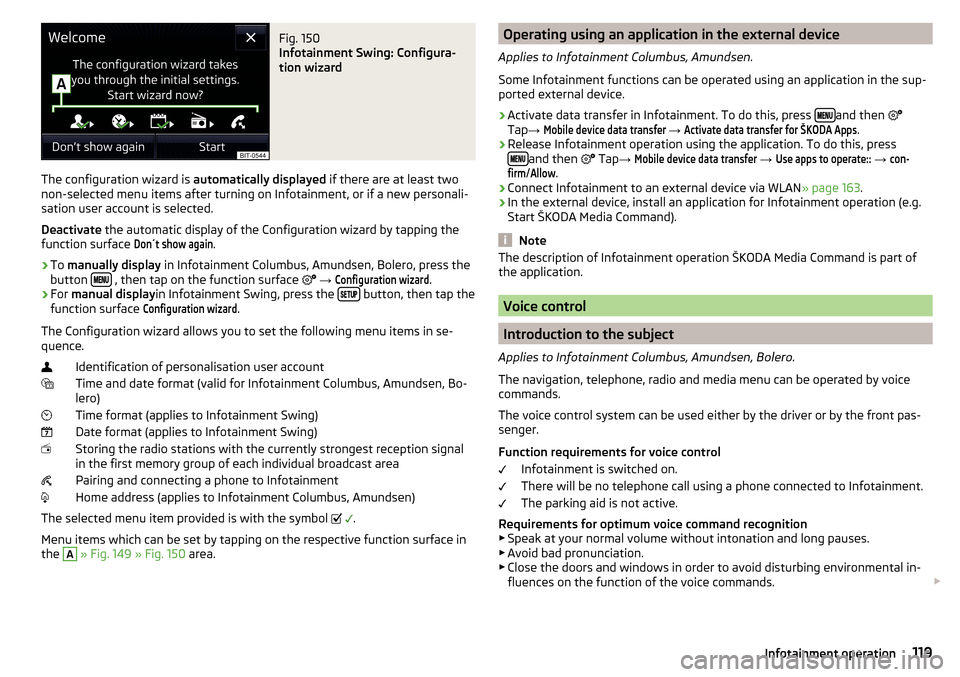
Fig. 150
Infotainment Swing: Configura-
tion wizard
The configuration wizard is automatically displayed if there are at least two
non-selected menu items after turning on Infotainment, or if a new personali-
sation user account is selected.
Deactivate the automatic display of the Configuration wizard by tapping the
function surface
Don´t show again
.
›
To manually display in Infotainment Columbus, Amundsen, Bolero, press the
button , then tap on the function surface
→
Configuration wizard
.
›
For manual display in Infotainment Swing, press the button, then tap the
function surface
Configuration wizard
.
The Configuration wizard allows you to set the following menu items in se-
quence.
Identification of personalisation user account
Time and date format (valid for Infotainment Columbus, Amundsen, Bo-
lero)
Time format (applies to Infotainment Swing)
Date format (applies to Infotainment Swing)
Storing the radio stations with the currently strongest reception signal
in the first memory group of each individual broadcast area
Pairing and connecting a phone to Infotainment
Home address (applies to Infotainment Columbus, Amundsen)
The selected menu item provided is with the symbol
.
Menu items which can be set by tapping on the respective function surface in
the
A
» Fig. 149 » Fig. 150 area.
Operating using an application in the external device
Applies to Infotainment Columbus, Amundsen.
Some Infotainment functions can be operated using an application in the sup-
ported external device.›
Activate data transfer in Infotainment. To do this, press and then
Tap →
Mobile device data transfer
→
Activate data transfer for ŠKODA Apps
.
›
Release Infotainment operation using the application. To do this, press
and then
Tap →
Mobile device data transfer
→
Use apps to operate::
→
con-firm
/
Allow
.
›
Connect Infotainment to an external device via WLAN » page 163.
›
In the external device, install an application for Infotainment operation (e.g.
Start ŠKODA Media Command).
Note
The description of Infotainment operation ŠKODA Media Command is part of
the application.
Voice control
Introduction to the subject
Applies to Infotainment Columbus, Amundsen, Bolero.
The navigation, telephone, radio and media menu can be operated by voice
commands.
The voice control system can be used either by the driver or by the front pas-
senger.
Function requirements for voice control Infotainment is switched on.
There will be no telephone call using a phone connected to Infotainment.
The parking aid is not active.
Requirements for optimum voice command recognition
▶ Speak at your normal volume without intonation and long pauses.
▶ Avoid bad pronunciation.
▶ Close the doors and windows in order to avoid disturbing environmental in-
fluences on the function of the voice commands.
119Infotainment operation
Page 122 of 324
▶You are recommended to speak louder at higher speeds, so that the sound of
your voice is not drowned out by the increased ambient noise.
▶ During voice control, limit additional noise in the vehicle, e.g. passengers
talking at the same time.WARNINGThe emergency number should be dialled manually. Your voice commands
may not be recognised in such situations. The telephone connection may
not be established or the connection may take too much time to complete.
CAUTION
■ The messages are generated by Infotainment. Flawless clarity (e.g. road or
city name) cannot always be guaranteed.■
For some Infotainment languages, there is no voice control available. Info-
tainment indicates this fact through a text message that is displayed on the
screen after setting the Infotainment language.
Note
During voice control, no nav. announcements and traffic announcements are
played.
Voice control on / off
Fig. 151
Voice control: Main menu
Activating
›
Press the button on infotainment
or press the button
on the multi-
function steering wheel.
the main menu is displayed » Fig. 151.
Switching off
›
Press the button on infotainment twice
or press the button twice
on
the multifunction steering wheel.
› or
Issue the voice command “ End voice control”.
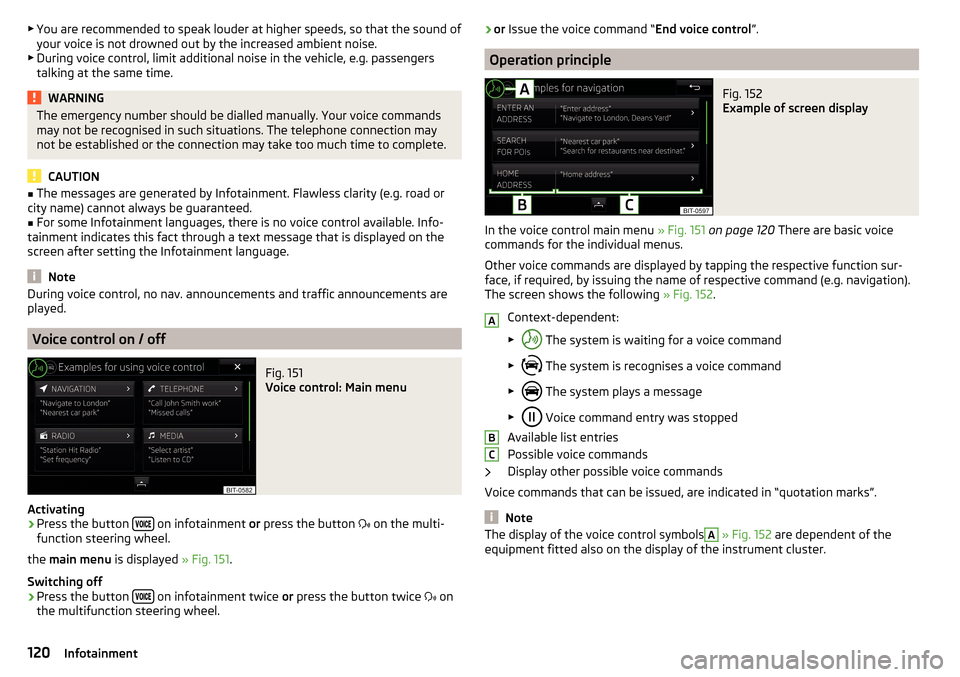
Operation principle
Fig. 152
Example of screen display
In the voice control main menu » Fig. 151 on page 120 There are basic voice
commands for the individual menus.
Other voice commands are displayed by tapping the respective function sur-
face, if required, by issuing the name of respective command (e.g. navigation).
The screen shows the following » Fig. 152.
Context-dependent:
▶ The system is waiting for a voice command
▶ The system is recognises a voice command
▶ The system plays a message
▶ Voice command entry was stopped
Available list entries
Possible voice commands
Display other possible voice commands
Voice commands that can be issued, are indicated in “quotation marks”.
Note
The display of the voice control symbolsA » Fig. 152 are dependent of the
equipment fitted also on the display of the instrument cluster.ABC120Infotainment