ESP SKODA OCTAVIA 2016 3.G / (5E) User Guide
[x] Cancel search | Manufacturer: SKODA, Model Year: 2016, Model line: OCTAVIA, Model: SKODA OCTAVIA 2016 3.G / (5E)Pages: 324, PDF Size: 48.85 MB
Page 55 of 324
If the boot lid is closed after locking the vehicle and the key with which the
vehicle was locked remains in the luggage compartment, the lid is automatical-
ly unlatched (partially opened). After automatically unlocking, the turn signal
lights will flash four times. The boot lid remains unlatched (partially opened);
the other doors remain locked.
CAUTION
Some types of gloves can affect the unlocking or locking device via the sen-
sors in the door handle.
Vehicle locking / unlocking with the central locking button
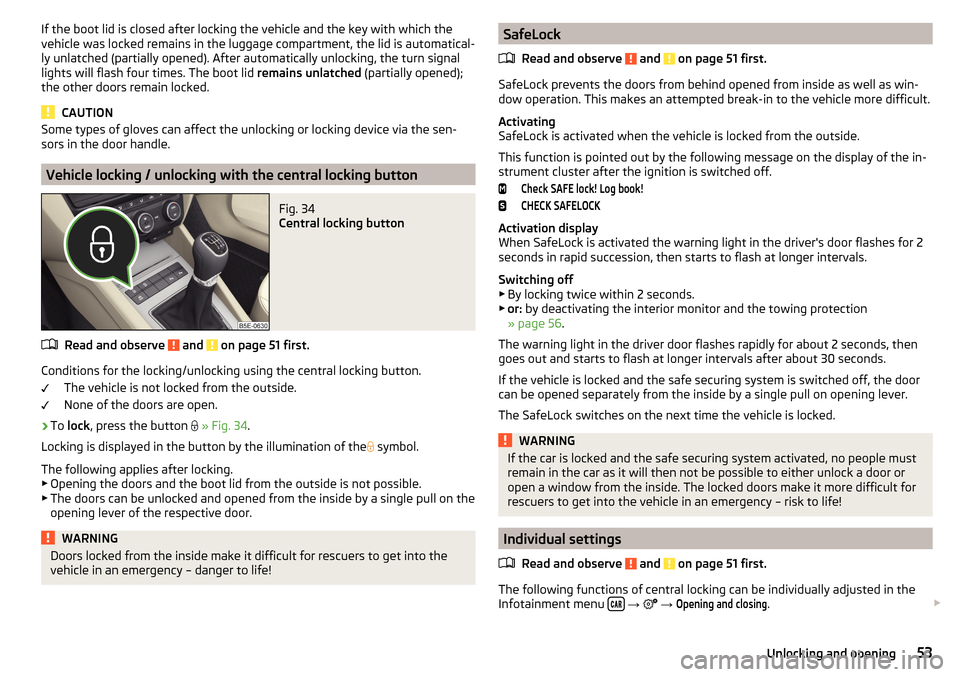
Fig. 34
Central locking button
Read and observe and on page 51 first.
Conditions for the locking/unlocking using the central locking button.
The vehicle is not locked from the outside.
None of the doors are open.
›
To lock , press the button
» Fig. 34 .
Locking is displayed in the button by the illumination of the
symbol.
The following applies after locking. ▶ Opening the doors and the boot lid from the outside is not possible.
▶ The doors can be unlocked and opened from the inside by a single pull on the
opening lever of the respective door.
WARNINGDoors locked from the inside make it difficult for rescuers to get into the
vehicle in an emergency – danger to life!SafeLock
Read and observe
and on page 51 first.
SafeLock prevents the doors from behind opened from inside as well as win-dow operation. This makes an attempted break-in to the vehicle more difficult.
Activating
SafeLock is activated when the vehicle is locked from the outside.
This function is pointed out by the following message on the display of the in-
strument cluster after the ignition is switched off.
Check SAFE lock! Log book!CHECK SAFELOCK
Activation display
When SafeLock is activated the warning light in the driver's door flashes for 2
seconds in rapid succession, then starts to flash at longer intervals.
Switching off ▶ By locking twice within 2 seconds.
▶ or: by deactivating the interior monitor and the towing protection
» page 56 .
The warning light in the driver door flashes rapidly for about 2 seconds, then
goes out and starts to flash at longer intervals after about 30 seconds.
If the vehicle is locked and the safe securing system is switched off, the door
can be opened separately from the inside by a single pull on opening lever.
The SafeLock switches on the next time the vehicle is locked.
WARNINGIf the car is locked and the safe securing system activated, no people must
remain in the car as it will then not be possible to either unlock a door or
open a window from the inside. The locked doors make it more difficult for
rescuers to get into the vehicle in an emergency – risk to life!
Individual settings
Read and observe
and on page 51 first.
The following functions of central locking can be individually adjusted in theInfotainment menu
→
→
Opening and closing
.
53Unlocking and opening
Page 61 of 324
Description of the malfunc-
tionPossible solutionsThe lid remains in the top
position
Manual closing of the lid
The lid is open and the bat-
tery was disconnected
Close manually
Close the door slowly, push down the lid, push in the lock on the centre of the
edge, above the ŠKODA logo.
Window operation
Introduction
This chapter contains information on the following subjects:
Mechanical windows
59
Electric Windows
60
Opening/closing the windows in the front passenger door and in the rear
doors
60
Force limiter
60
Window convenience operation
61
Malfunctions
61
The windows can be operated mechanically by means of the handle attached
to the respective door panel.
The windows can be operated electrically from the following locations; all win-
dows from the driver's seat and also via the buttons for the windows in the
passenger door or the rear doors.
WARNING■ Always close the window carefully and in a controlled manner. Otherwise,
you may cause considerable crushing injuries to yourself or fellow passen-
gers.■
The system is fitted with a force limiter » page 60. If there is an obstacle
(e.g. If a body part gets trapped), the closing process is stopped and the
window goes down by several centimetres. The windows should neverthe-
less be closed carefully – risk of injury!
CAUTION■ Keep the windows clean (free of ice and similar) to ensure the correct func-
tionality of the electric windows.■
Always close the electric windows before disconnecting the battery.
Note
If the windows are opened, dust as well as other dirt can get into the vehicle
and in addition the wind noise is more at certain speeds.
Mechanical windows
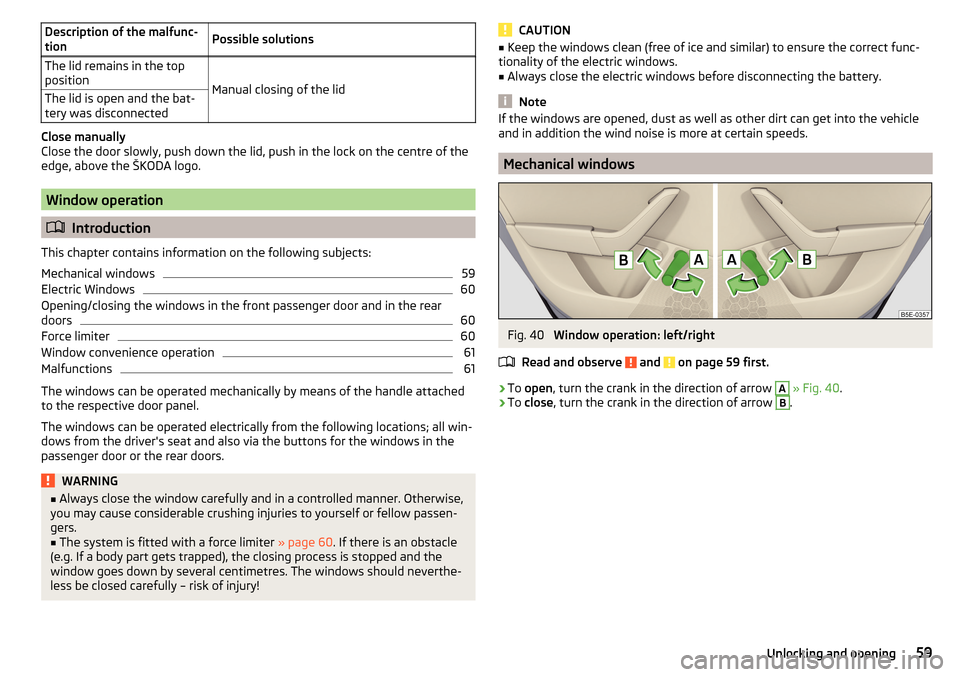
Fig. 40
Window operation: left/right
Read and observe
and on page 59 first.
›
To open , turn the crank in the direction of arrow
A
» Fig. 40 .
›
To close , turn the crank in the direction of arrow
B
.
59Unlocking and opening
Page 62 of 324
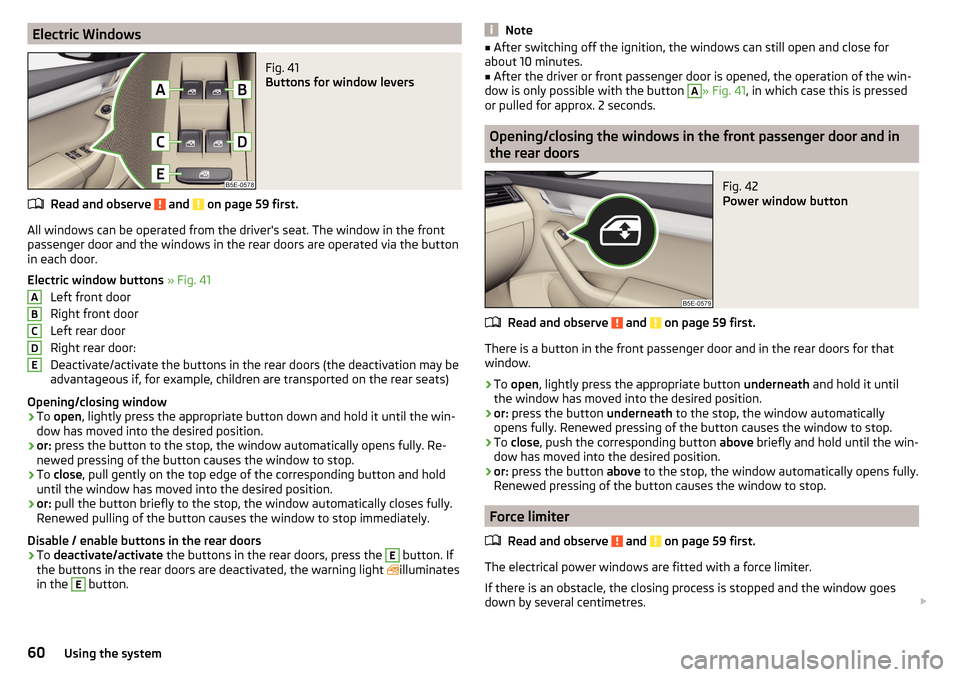
Electric WindowsFig. 41
Buttons for window levers
Read and observe and on page 59 first.
All windows can be operated from the driver's seat. The window in the front
passenger door and the windows in the rear doors are operated via the button
in each door.
Electric window buttons » Fig. 41
Left front door
Right front door
Left rear door
Right rear door:
Deactivate/activate the buttons in the rear doors (the deactivation may be
advantageous if, for example, children are transported on the rear seats)
Opening/closing window
›
To open , lightly press the appropriate button down and hold it until the win-
dow has moved into the desired position.
›
or: press the button to the stop, the window automatically opens fully. Re-
newed pressing of the button causes the window to stop.
›
To close , pull gently on the top edge of the corresponding button and hold
until the window has moved into the desired position.
›
or: pull the button briefly to the stop, the window automatically closes fully.
Renewed pulling of the button causes the window to stop immediately.
Disable / enable buttons in the rear doors
›
To deactivate/activate the buttons in the rear doors, press the
E
button. If
the buttons in the rear doors are deactivated, the warning light illuminates
in the
E
button.
ABCDENote■ After switching off the ignition, the windows can still open and close for
about 10 minutes.■
After the driver or front passenger door is opened, the operation of the win-
dow is only possible with the button
A
» Fig. 41 , in which case this is pressed
or pulled for approx. 2 seconds.
Opening/closing the windows in the front passenger door and in
the rear doors
Fig. 42
Power window button
Read and observe and on page 59 first.
There is a button in the front passenger door and in the rear doors for that
window.
›
To open , lightly press the appropriate button underneath and hold it until
the window has moved into the desired position.
›
or: press the button underneath to the stop, the window automatically
opens fully. Renewed pressing of the button causes the window to stop.
›
To close , push the corresponding button above briefly and hold until the win-
dow has moved into the desired position.
›
or: press the button above to the stop, the window automatically opens fully.
Renewed pressing of the button causes the window to stop.
Force limiter
Read and observe
and on page 59 first.
The electrical power windows are fitted with a force limiter.
If there is an obstacle, the closing process is stopped and the window goes
down by several centimetres.
60Using the system
Page 63 of 324

If the obstacle prevents the window from being closed during the next 10 sec-
onds, the closing process is interrupted once again and the window goes down
by several centimetres.
If you attempt to close the window again within 10 seconds of the window be-
ing moved down for the second time, even though the obstacle was not yet
been removed, the closing process is only stopped. During this time it is not
possible to automatically close the window. The force limiter is still switched
on.
The force limiter is only not operational if you attempt to close the window
again within the next 10 seconds – the window will now close with full force!
If you wait longer than 10 seconds, the force limiter is switched on again.
Window convenience operation
Read and observe
and on page 59 first.
The convenience operation for the window offers the option to open/close all
the windows at once (or only the window in the driver's door). The function of
convenience operation can be individually adjusted in the Infotainment menu
→
→
Opening and closing
.
Opening
›
Press and hold the button on the key.
›
Or
Switch off the ignition, open the driver's door and hold the key
A
until it
stops in the open position » Fig. 41 on page 60 .
›
orKeep the key in the locking cylinder of the driver's door in the unlock posi-
tion until all electrically operated windows are open.
Closing
›
Press and hold the button on the key.
›
Or
Switch off the ignition, open the driver's door and hold the key
A
until it
stops in the closed position » Fig. 41 on page 60 .
›
orKeep the key in the locking cylinder of the driver's door in the lock position
until all the electrically operated windows are closed.
›
In the KESSY system, hold your finger on the sensor on the outside of the
door handle of the front door » Fig. 33 on page 52 .
The convenience operation will only function correctly if all the windows auto- matically open/close properly.
Convenience opening or closing the window using the key in the driver's door
locking cylinder is only possible within 45 seconds of locking the vehicle.
The movement of the window is stopped immediately when the respective
button is released.
Malfunctions
Read and observe
and on page 59 first.
Repeatedly opening and closing the window can cause the window mecha-
nism to overheat and become temporarily blocked. You will be able to operate
the window again as soon as the operating mechanism has cooled down.
After disconnecting the vehicle battery, automatic opening / closing of the
window can be deactivated. In this case, the system must be activated as fol-
lows.
Window in the driver door
›
Switch on the ignition.
›
Pull the top edge of the button and close the window.
›
Release the button.
›
Pull up the respective button and hold for 1 second.
Windows in the other doors
›
Switch on the ignition.
›
Press the respective key above and close the window.
›
Release the button.
›
Pull up the respective button above and hold for 1 second.
Panoramic tilt / slide sunroof
Introduction
This chapter contains information on the following subjects:
Operation
62
Force limiter
62
Convenience operation of the sliding / tilting roof
62
Activate operation of the tilt / slide sunroof
62
Manually operated sunblind
63
Electrically operated sunblind
63
Activating operation of the sunshade
63
The panoramic tilt / slide sunroof (hereinafter referred to as tilt / slide sunroof)
can only be operated when the ignition is turned on and when the outdoor
temperature is above -20 °C.
61Unlocking and opening
Page 66 of 324
Lights and visibility
Light
Introduction
This chapter contains information on the following subjects:
Operating the lights
64
Daytime running lights(DAY LIGHT)
65
Turn signal and main beam
65
Automatic driving light control
66
Xenon headlight
66
High-beam assistant (Light Assist)
67
Fog lights/rear fog light
67
Fog lights with CORNER function
68
COMING HOME / LEAVING HOME
68
Hazard warning light system
68
Parking light
68
Entry space lighting
69
Driving abroad
69
The lights work only with the ignition on, unless otherwise stated.
The layout of the controls on right-hand drive vehicles differs partially from
that shown in this layout » Fig. 46 on page 64 .
WARNINGThe automatic driving lamp control only operates as a support and
does not release the driver from his responsibility to check the light and, if
necessary, to switch on the light depending on the light conditions.
Note
The headlights may mist up temporarily. When the light is on, the light-emit-
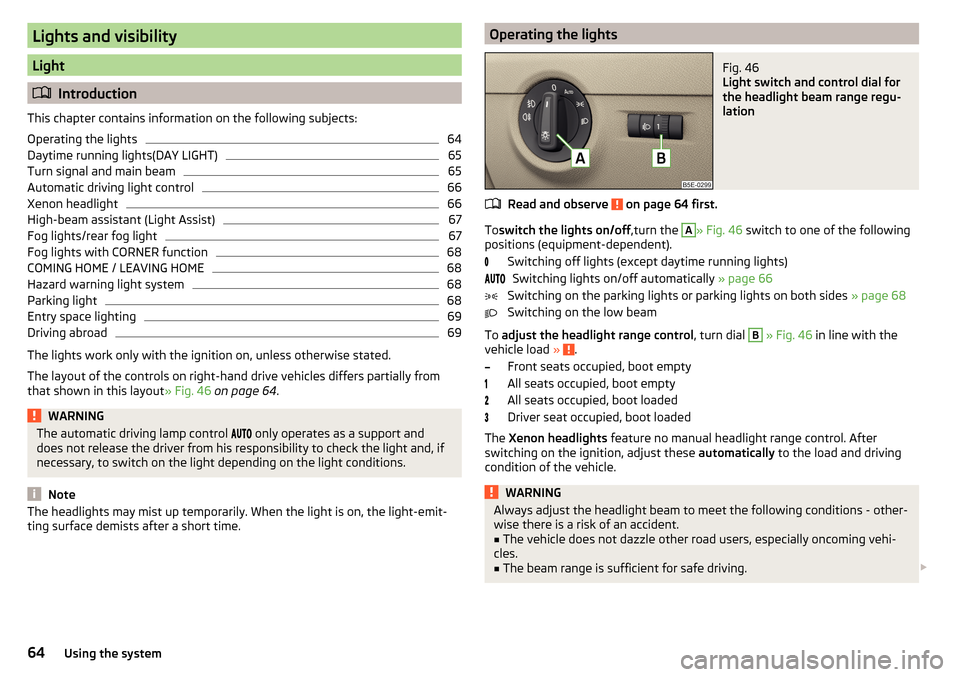
ting surface demists after a short time.Operating the lightsFig. 46
Light switch and control dial for
the headlight beam range regu-
lation
Read and observe on page 64 first.
To switch the lights on/off ,turn the
A
» Fig. 46 switch to one of the following
positions (equipment-dependent).
Switching off lights (except daytime running lights)Switching lights on/off automatically » page 66
Switching on the parking lights or parking lights on both sides » page 68
Switching on the low beam
To adjust the headlight range control , turn dial
B
» Fig. 46 in line with the
vehicle load » .
Front seats occupied, boot empty
All seats occupied, boot empty
All seats occupied, boot loaded
Driver seat occupied, boot loaded
The Xenon headlights feature no manual headlight range control. After
switching on the ignition, adjust these automatically to the load and driving
condition of the vehicle.
WARNINGAlways adjust the headlight beam to meet the following conditions - other-
wise there is a risk of an accident.■
The vehicle does not dazzle other road users, especially oncoming vehi-
cles.
■
The beam range is sufficient for safe driving.
64Using the system
Page 68 of 324
WARNINGOnly turn on the main beam or the headlight flasher if other road users will
not be dazzled.
Automatic driving light control
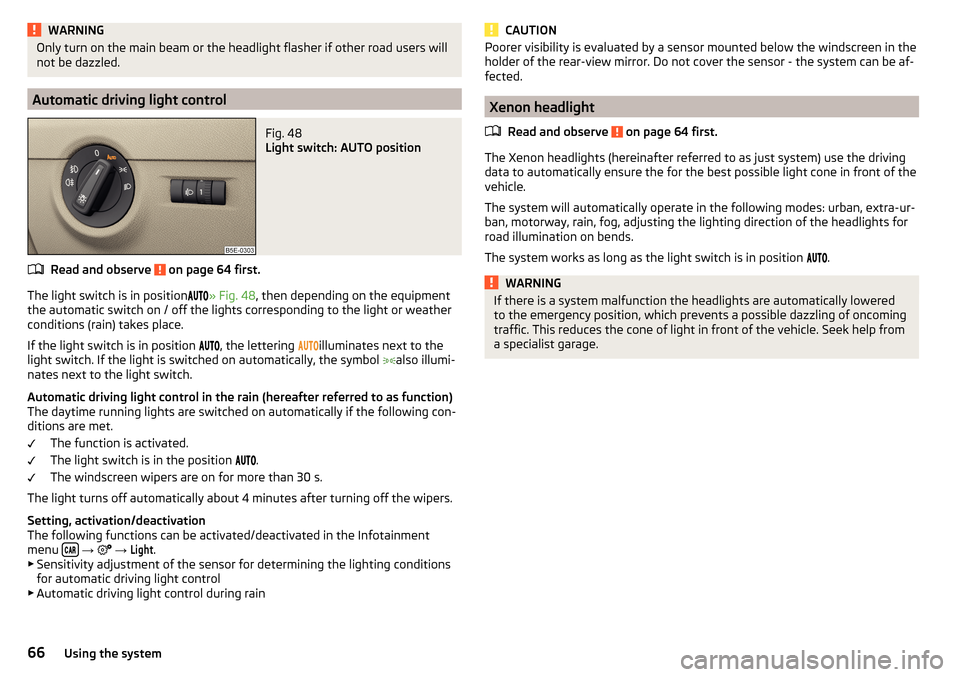
Fig. 48
Light switch: AUTO position
Read and observe on page 64 first.
The light switch is in position
» Fig. 48 , then depending on the equipment
the automatic switch on / off the lights corresponding to the light or weather
conditions (rain) takes place.
If the light switch is in position
, the lettering
illuminates next to the
light switch. If the light is switched on automatically, the symbol
also illumi-
nates next to the light switch.
Automatic driving light control in the rain (hereafter referred to as function)
The daytime running lights are switched on automatically if the following con-
ditions are met.
The function is activated.
The light switch is in the position
.
The windscreen wipers are on for more than 30 s.
The light turns off automatically about 4 minutes after turning off the wipers.
Setting, activation/deactivation
The following functions can be activated/deactivated in the Infotainment
menu
→
→
Light
.
▶ Sensitivity adjustment of the sensor for determining the lighting conditions
for automatic driving light control
▶ Automatic driving light control during rain
CAUTIONPoorer visibility is evaluated by a sensor mounted below the windscreen in the
holder of the rear-view mirror. Do not cover the sensor - the system can be af-
fected.
Xenon headlight
Read and observe
on page 64 first.
The Xenon headlights (hereinafter referred to as just system) use the drivingdata to automatically ensure the for the best possible light cone in front of the
vehicle.
The system will automatically operate in the following modes: urban, extra-ur-
ban, motorway, rain, fog, adjusting the lighting direction of the headlights for
road illumination on bends.
The system works as long as the light switch is in position .
WARNINGIf there is a system malfunction the headlights are automatically lowered
to the emergency position, which prevents a possible dazzling of oncoming
traffic. This reduces the cone of light in front of the vehicle. Seek help from
a specialist garage.66Using the system
Page 70 of 324
NoteWhile driving with an accessory connected to the trailer socket (e.g. trailer,
bike carrier) only the equipment is illuminated by the fog light. The towing de-
vice must be installed at the factory or from the ŠKODA original accessories.
Fog lights with CORNER function
Read and observe
on page 64 first.
The CORNER function automatically switches on the fog lights on the respec-tive side of the vehicle (e.g. when cornering), if the following conditions are
met.
The turn signal is switched on or the front wheels are turned sharply 1)
.
The vehicle speed is below 40 km/h.
The low beam is switched on.
The fog lights are not switched on.
The two fog lights are switched on when you shift into the reverse gear.
COMING HOME / LEAVING HOME
Read and observe
on page 64 first.
The function COMING HOME ensures that the vehicle's environment is illumi-
nated after switching off the ignition and opening the driver's door.
The function LEAVING HOME ensures that the vehicle's environment is illumi-
nated after unlocking the vehicle with the radio remote control unit.
The function switches the light on only if there is poorer visibility and the light
switch is in the position .
The two functions can be activated/deactivated and set in the Infotainment
menu
→
→
Light
.
CAUTION
■
Poorer visibility is evaluated by a sensor mounted below the windscreen in
the holder of the rear-view mirror. Do not cover the sensor - the system can be
affected.■
If this option is always enabled, then the battery is heavily loaded.
Hazard warning light systemFig. 51
Button for hazard warning light
system
Read and observe on page 64 first.
›
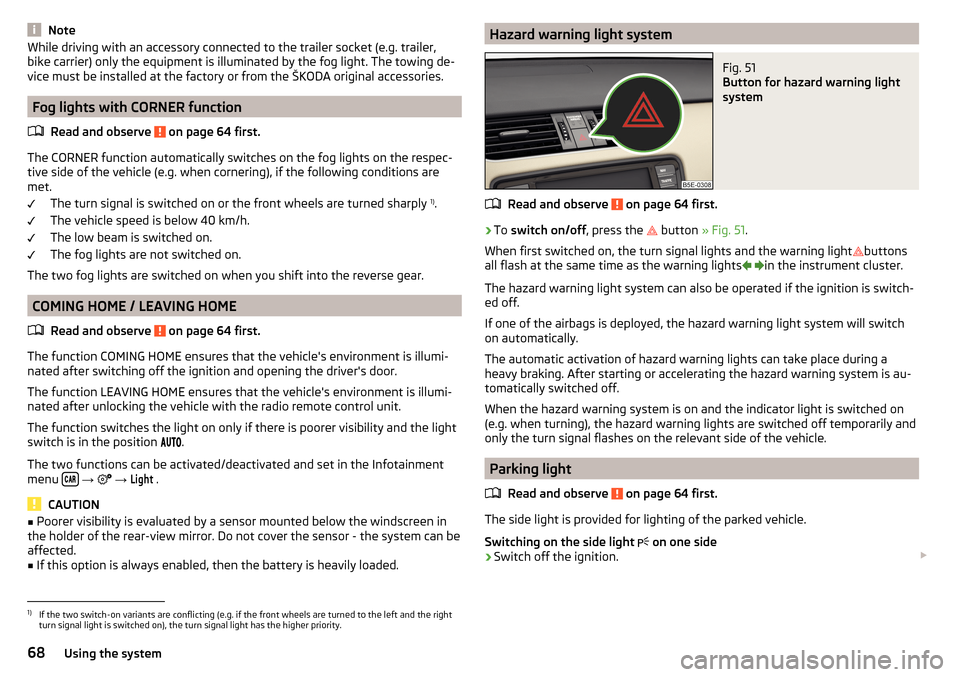
To switch on/off , press the
button
» Fig. 51 .
When first switched on, the turn signal lights and the warning light buttons
all flash at the same time as the warning lights
in the instrument cluster.
The hazard warning light system can also be operated if the ignition is switch-
ed off.
If one of the airbags is deployed, the hazard warning light system will switch
on automatically.
The automatic activation of hazard warning lights can take place during a
heavy braking. After starting or accelerating the hazard warning system is au-
tomatically switched off.
When the hazard warning system is on and the indicator light is switched on
(e.g. when turning), the hazard warning lights are switched off temporarily and
only the turn signal flashes on the relevant side of the vehicle.
Parking light
Read and observe
on page 64 first.
The side light is provided for lighting of the parked vehicle.
Switching on the side light on one side
›
Switch off the ignition.
1)
If the two switch-on variants are conflicting (e.g. if the front wheels are turned to the left and the right
turn signal light is switched on), the turn signal light has the higher priority.
68Using the system
Page 75 of 324
Automatic windscreen wiping during rain can be in the Infotainment menu
→ →
Mirrors and wipers
activated/ deactivated .WARNINGAutomatic wiping during rain is only a support. The driver is still responsible
for setting the function of the windscreen wipers manually depending on
the visibility conditions.
Note
If the wiping is carried out without interruption, the wiping speed varies de-
pending on the vehicle speed.
Rear wipers and washers / reversing camera cleaning system
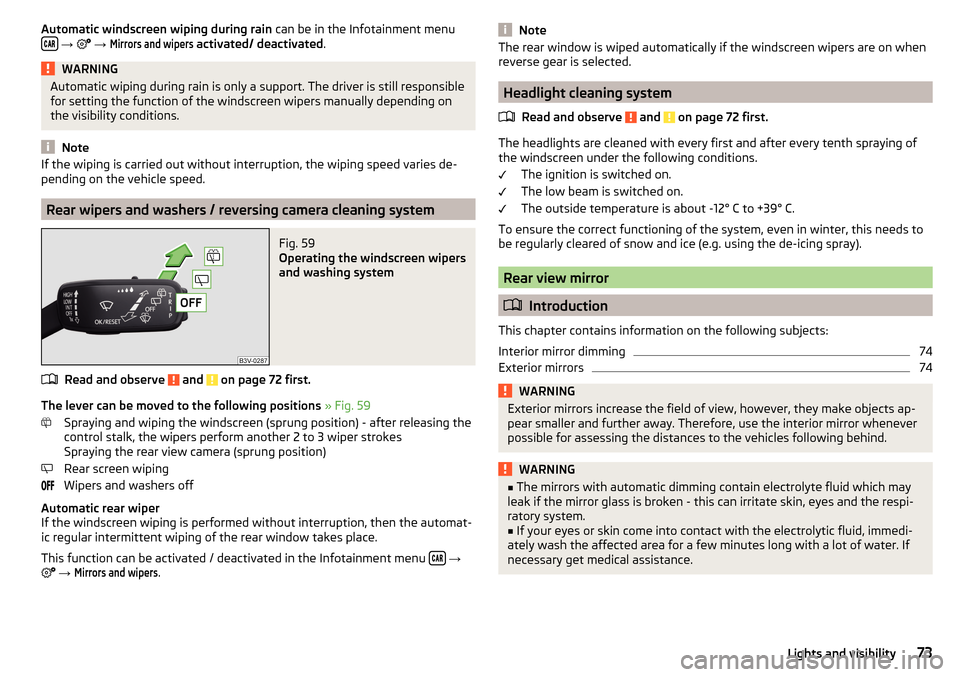
Fig. 59
Operating the windscreen wipers
and washing system
Read and observe and on page 72 first.
The lever can be moved to the following positions » Fig. 59
Spraying and wiping the windscreen (sprung position) - after releasing the
control stalk, the wipers perform another 2 to 3 wiper strokes
Spraying the rear view camera (sprung position)
Rear screen wiping
Wipers and washers off
Automatic rear wiper
If the windscreen wiping is performed without interruption, then the automat-
ic regular intermittent wiping of the rear window takes place.
This function can be activated / deactivated in the Infotainment menu
→
→
Mirrors and wipers
.
NoteThe rear window is wiped automatically if the windscreen wipers are on when
reverse gear is selected.
Headlight cleaning system
Read and observe
and on page 72 first.
The headlights are cleaned with every first and after every tenth spraying of
the windscreen under the following conditions.
The ignition is switched on.
The low beam is switched on.
The outside temperature is about -12° C to +39° C.
To ensure the correct functioning of the system, even in winter, this needs to
be regularly cleared of snow and ice (e.g. using the de-icing spray).
Rear view mirror
Introduction
This chapter contains information on the following subjects:
Interior mirror dimming
74
Exterior mirrors
74WARNINGExterior mirrors increase the field of view, however, they make objects ap-
pear smaller and further away. Therefore, use the interior mirror whenever
possible for assessing the distances to the vehicles following behind.WARNING■ The mirrors with automatic dimming contain electrolyte fluid which may
leak if the mirror glass is broken - this can irritate skin, eyes and the respi-
ratory system.■
If your eyes or skin come into contact with the electrolytic fluid, immedi-
ately wash the affected area for a few minutes long with a lot of water. If
necessary get medical assistance.
73Lights and visibility
Page 78 of 324
Seats and head restraints
Front seats
Introduction
This chapter contains information on the following subjects:
Manual adjustment
76
Electrical adjustment
77
Memory Function of the electrically adjustable seat
77
Memory function of the remote control key
78
Folding front passenger seat
78
Armrest setting
79WARNING■ Only adjust the driver's seat when the vehicle is stationary – otherwise
there is a risk of an accident!■
Caution when adjusting the seat! You may suffer injuries or bruises as a
result of adjusting the seat without paying proper attention.
Manual adjustment
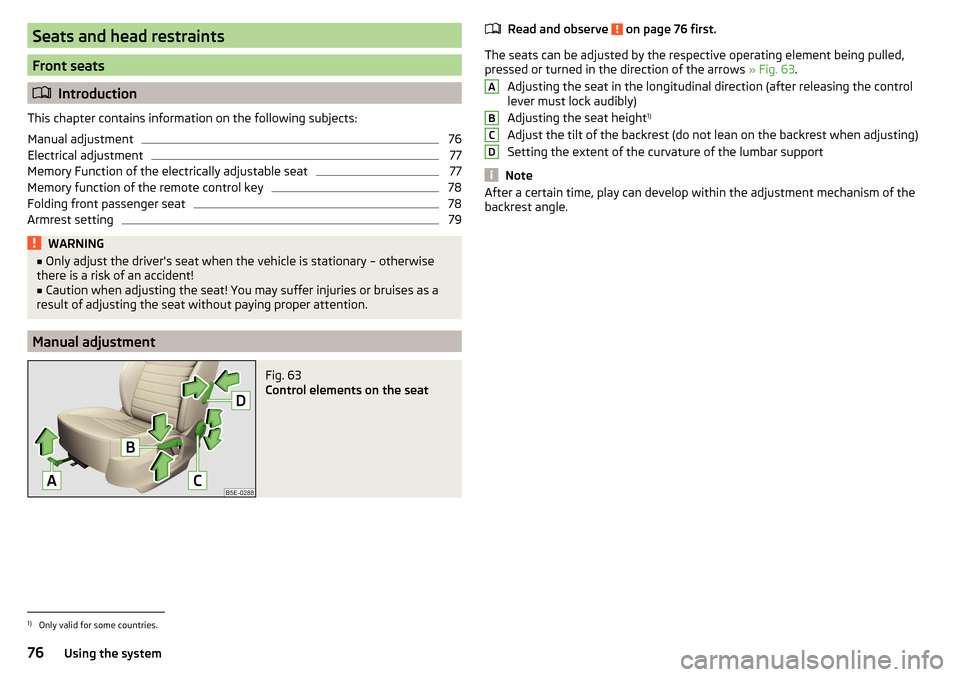
Fig. 63
Control elements on the seat
Read and observe on page 76 first.
The seats can be adjusted by the respective operating element being pulled,
pressed or turned in the direction of the arrows » Fig. 63.
Adjusting the seat in the longitudinal direction (after releasing the control
lever must lock audibly)
Adjusting the seat height 1)
Adjust the tilt of the backrest (do not lean on the backrest when adjusting)
Setting the extent of the curvature of the lumbar support
Note
After a certain time, play can develop within the adjustment mechanism of the
backrest angle.ABCD1)
Only valid for some countries.
76Using the system
Page 79 of 324
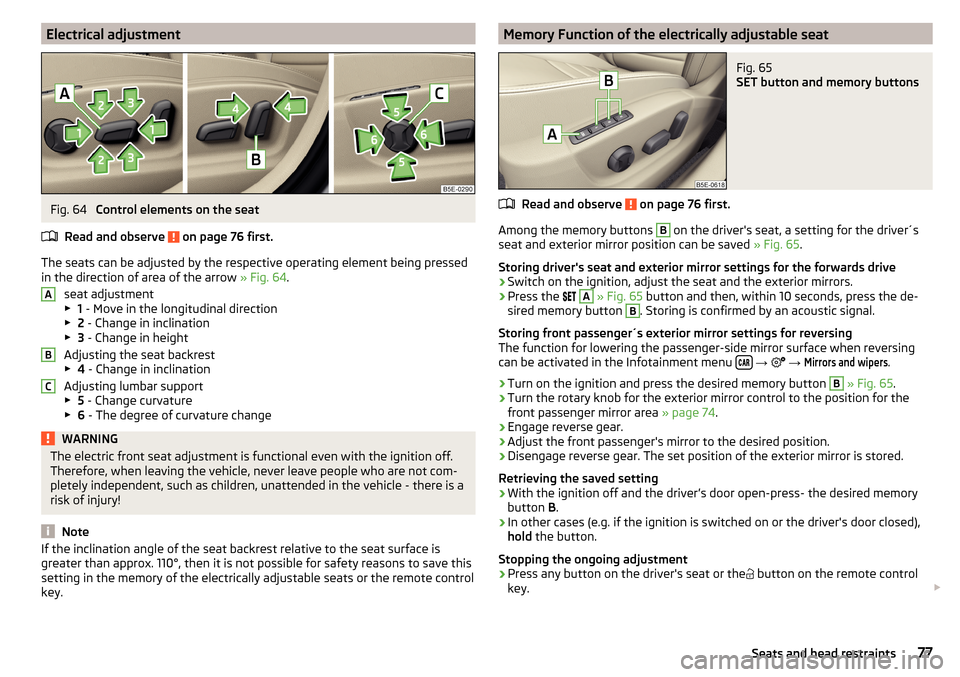
Electrical adjustmentFig. 64
Control elements on the seat
Read and observe
on page 76 first.
The seats can be adjusted by the respective operating element being pressed
in the direction of area of the arrow » Fig. 64.
seat adjustment
▶ 1 - Move in the longitudinal direction
▶ 2 - Change in inclination
▶ 3 - Change in height
Adjusting the seat backrest
▶ 4 - Change in inclination
Adjusting lumbar support
▶ 5 - Change curvature
▶ 6 - The degree of curvature change
WARNINGThe electric front seat adjustment is functional even with the ignition off.
Therefore, when leaving the vehicle, never leave people who are not com-
pletely independent, such as children, unattended in the vehicle - there is a
risk of injury!
Note
If the inclination angle of the seat backrest relative to the seat surface is
greater than approx. 110°, then it is not possible for safety reasons to save this
setting in the memory of the electrically adjustable seats or the remote control
key.ABCMemory Function of the electrically adjustable seatFig. 65
SET button and memory buttons
Read and observe on page 76 first.
Among the memory buttons
B
on the driver's seat, a setting for the driver´s
seat and exterior mirror position can be saved » Fig. 65.
Storing driver's seat and exterior mirror settings for the forwards drive
›
Switch on the ignition, adjust the seat and the exterior mirrors.
›
Press the
A
» Fig. 65 button and then, within 10 seconds, press the de-
sired memory button
B
. Storing is confirmed by an acoustic signal.
Storing front passenger´s exterior mirror settings for reversing
The function for lowering the passenger-side mirror surface when reversing can be activated in the Infotainment menu
→
→
Mirrors and wipers
.
›
Turn on the ignition and press the desired memory button
B
» Fig. 65 .
›
Turn the rotary knob for the exterior mirror control to the position for the
front passenger mirror area » page 74.
›
Engage reverse gear.
›
Adjust the front passenger's mirror to the desired position.
›
Disengage reverse gear. The set position of the exterior mirror is stored.
Retrieving the saved setting
›
With the ignition off and the driver’s door open
-press-
the desired memory
button B.
›
In other cases (e.g. if the ignition is switched on or the driver's door closed),
hold the button.
Stopping the ongoing adjustment
›
Press any button on the driver's seat or the button on the remote control
key.
77Seats and head restraints