navigation SKODA OCTAVIA 2016 3.G / (5E) Owner's Guide
[x] Cancel search | Manufacturer: SKODA, Model Year: 2016, Model line: OCTAVIA, Model: SKODA OCTAVIA 2016 3.G / (5E)Pages: 324, PDF Size: 48.85 MB
Page 175 of 324
If several places were visited, then the list can be scrolled through by turning
the controller or sliding the slider.
Note
■
While entering a street name there is an option to enter the centre of a given
place as a destination instead of a street name by tapping the function surfaceCentre
.
■
After entering the street name, the house number or intersection can be en-
tered using the name / number of the intersecting road.
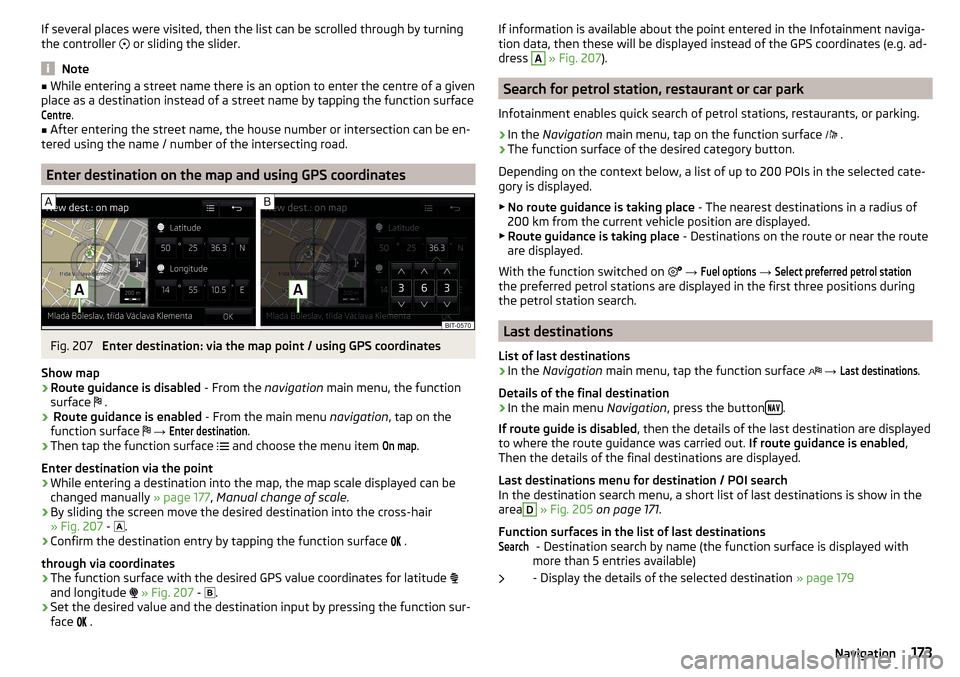
Enter destination on the map and using GPS coordinates
Fig. 207
Enter destination: via the map point / using GPS coordinates
Show map
›
Route guidance is disabled - From the navigation main menu, the function
surface .
›
Route guidance is enabled
- From the main menu navigation, tap on the
function surface
→
Enter destination
.
›
Then tap the function surface
and choose the menu item
On map
.
Enter destination via the point
›
While entering a destination into the map, the map scale displayed can be
changed manually » page 177, Manual change of scale .
›
By sliding the screen move the desired destination into the cross-hair
» Fig. 207 -
.
›
Confirm the destination entry by tapping the function surface
.
through via coordinates
›
The function surface with the desired GPS value coordinates for latitude
and longitude
» Fig. 207 -
.
›
Set the desired value and the destination input by pressing the function sur-
face
.
If information is available about the point entered in the Infotainment naviga-
tion data, then these will be displayed instead of the GPS coordinates (e.g. ad-
dress A
» Fig. 207 ).
Search for petrol station, restaurant or car park
Infotainment enables quick search of petrol stations, restaurants, or parking.
›
In the Navigation main menu, tap on the function surface
.
›
The function surface of the desired category button.
Depending on the context below, a list of up to 200 POIs in the selected cate-
gory is displayed.
▶ No route guidance is taking place - The nearest destinations in a radius of
200 km from the current vehicle position are displayed.
▶ Route guidance is taking place - Destinations on the route or near the route
are displayed.
With the function switched on
→
Fuel options
→
Select preferred petrol station
the preferred petrol stations are displayed in the first three positions during
the petrol station search.
Last destinations
List of last destinations
›
In the Navigation main menu, tap the function surface
→
Last destinations
.
Details of the final destination
›
In the main menu Navigation, press the button .
If route guide is disabled , then the details of the last destination are displayed
to where the route guidance was carried out. If route guidance is enabled,
Then the details of the final destinations are displayed.
Last destinations menu for destination / POI search In the destination search menu, a short list of last destinations is show in the
area
D
» Fig. 205 on page 171 .
Function surfaces in the list of last destinations - Destination search by name (the function surface is displayed with
more than 5 entries available)
- Display the details of the selected destination » page 179
Search173Navigation
Page 176 of 324
Destination memoryFig. 208
Select list of stored destinations / categories of saved destina-
tions
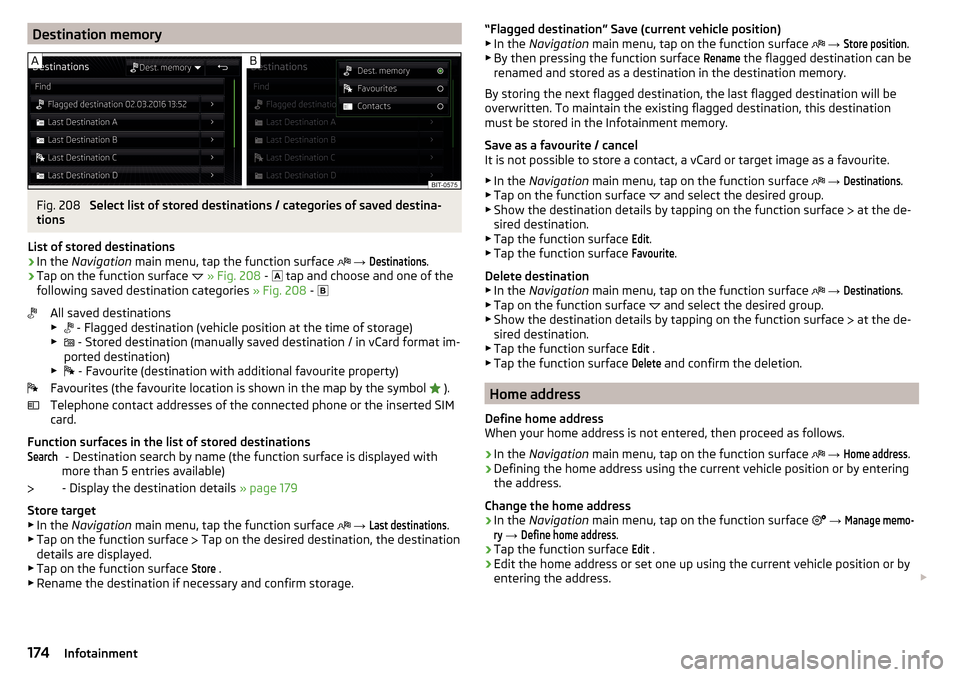
List of stored destinations
›
In the Navigation main menu, tap the function surface
→
Destinations
.
›
Tap on the function surface
» Fig. 208 -
tap and choose and one of the
following saved destination categories » Fig. 208 -
All saved destinations
▶ - Flagged destination (vehicle position at the time of storage)
▶ - Stored destination (manually saved destination / in vCard format im-
ported destination)
▶ - Favourite (destination with additional favourite property)
Favourites (the favourite location is shown in the map by the symbol ).
Telephone contact addresses of the connected phone or the inserted SIM
card.
Function surfaces in the list of stored destinations - Destination search by name (the function surface is displayed with
more than 5 entries available)
- Display the destination details » page 179
Store target
▶ In the Navigation main menu, tap the function surface
→
Last destinations
.
▶ Tap on the function surface Tap on the desired destination, the destination
details are displayed.
▶ Tap on the function surface
Store
.
▶ Rename the destination if necessary and confirm storage.
Search“Flagged destination” Save (current vehicle position)
▶ In the Navigation main menu, tap on the function surface → Store position
.
▶ By then pressing the function surface
Rename
the flagged destination can be
renamed and stored as a destination in the destination memory.
By storing the next flagged destination, the last flagged destination will be
overwritten. To maintain the existing flagged destination, this destination
must be stored in the Infotainment memory.
Save as a favourite / cancel
It is not possible to store a contact, a vCard or target image as a favourite.
▶ In the Navigation main menu, tap on the function surface
→
Destinations
.
▶ Tap on the function surface and select the desired group.
▶ Show the destination details by tapping on the function surface at the de-
sired destination.
▶ Tap the function surface
Edit
.
▶ Tap the function surface
Favourite
.
Delete destination ▶ In the Navigation main menu, tap on the function surface
→
Destinations
.
▶ Tap on the function surface and select the desired group.
▶ Show the destination details by tapping on the function surface at the de-
sired destination.
▶ Tap the function surface
Edit
.
▶ Tap the function surface
Delete
and confirm the deletion.
Home address
Define home address
When your home address is not entered, then proceed as follows.
›
In the Navigation main menu, tap on the function surface
→
Home address
.
›
Defining the home address using the current vehicle position or by entering
the address.
Change the home address
›
In the Navigation main menu, tap on the function surface
→
Manage memo-ry
→
Define home address
.
›
Tap the function surface
Edit
.
›
Edit the home address or set one up using the current vehicle position or by
entering the address.
174Infotainment
Page 177 of 324
Delete home address›In the Navigation main menu, tap on the function surface →
Manage memo-ry
→
Delete user data
→
Home address
.
›
Tap the function surface
Delete
and confirm the deletion.
Import my destinations
Introduction to the subject
Fig. 209
MyDestination application on the
ŠKODA websites
In this chapter, destinations are described which can be imported into the Info-
tainment memory.
Custom destinations can be created using the ŠKODA application
“MyDestination”.
By reading the QR code » Fig. 209 or after typing the following address in the
web browser, more information on the “MyDestination”application is displayed.
http://go.skoda.eu/my-destination
Custom destination in vCard-format
In the Infotainment memory, a custom destination can be imported in the
vCard format (*.vcf) from an SD card or a USB source.
Import
›
Insert the SD card into the exernal module or connect a USB source with the
file of the custom destination.
›
In the Navigation main menu, tap on the function surface
→
Manage memo-ry
→
Import destinations (SD/USB)
.
›
Select the source and confirm the import.
Route guidance›In the Navigation main menu, tap on the function surface →
Destinations
→
→
.›
Search for and select the desired imported destination.
Delete own destination
›
In the Navigation main menu, tap on the function surface
→
Destinations
→
→
.
›
Tap on the function surface
Tap on the desired own destination.
›
In the destination details, tap the function surface
Edit
→
Delete
and confirm
the deletion.
Own POI categories (My POIs)
Import / update
›
Insert the SD card into the external module or connect a USB source with the
POI categories.
›
In the Navigation main menu, tap on the function surface
→
Manage memo-ry
→
Update My POIs (SD / USB)
→
Update
.
›
Select the source and confirm the import.
If there is already the same POI category name in the Infotainment memory,
then it will be overwritten during the import.
Show own category destinations in the map
›
In the Navigation main menu, tap on the function surface
→
Map
→
Selectcategories for POIs
→
My points of interest (Personal POI)
.
Clear all own POI categories
›
In the Navigation main menu, tap on the function surface
Tap on
→
Managememory
→
Delete my POIs
→ Delete.
›
Tap the function surface
Delete
and confirm the deletion.
175Navigation
Page 178 of 324
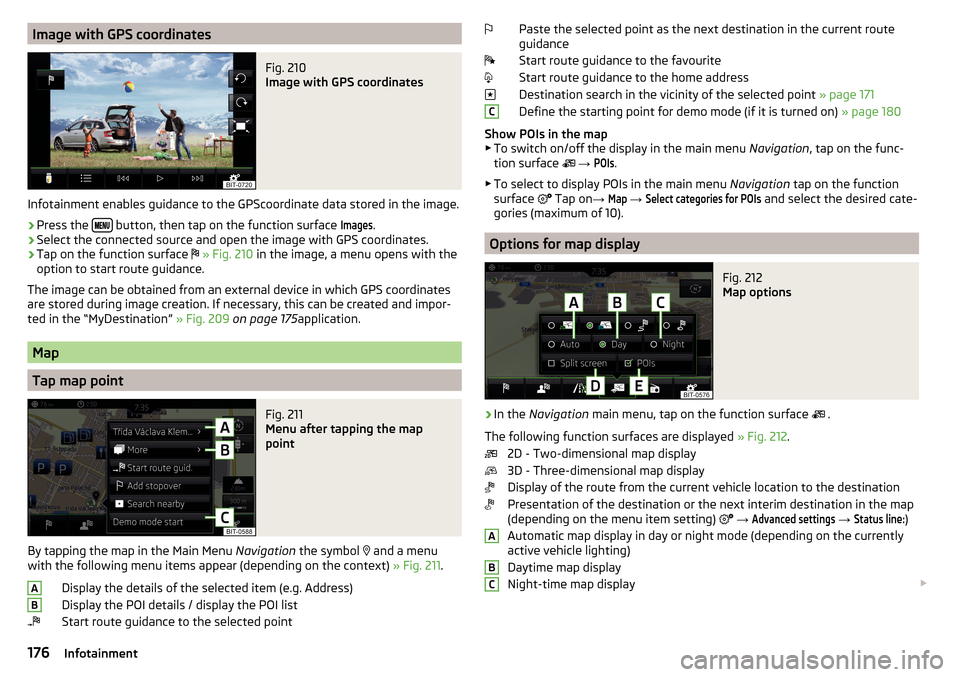
Image with GPS coordinatesFig. 210
Image with GPS coordinates
Infotainment enables guidance to the GPScoordinate data stored in the image.
›
Press the button, then tap on the function surface
Images
.
›
Select the connected source and open the image with GPS coordinates.
›
Tap on the function surface
» Fig. 210 in the image, a menu opens with the
option to start route guidance.
The image can be obtained from an external device in which GPS coordinates are stored during image creation. If necessary, this can be created and impor-
ted in the “MyDestination” » Fig. 209 on page 175 application.
Map
Tap map point
Fig. 211
Menu after tapping the map
point
By tapping the map in the Main Menu Navigation the symbol
and a menu
with the following menu items appear (depending on the context) » Fig. 211.
Display the details of the selected item (e.g. Address)
Display the POI details / display the POI list
Start route guidance to the selected point
ABPaste the selected point as the next destination in the current route
guidance
Start route guidance to the favourite
Start route guidance to the home address
Destination search in the vicinity of the selected point » page 171
Define the starting point for demo mode (if it is turned on) » page 180
Show POIs in the map ▶ To switch on/off the display in the main menu Navigation, tap on the func-
tion surface
→ POIs
.
▶ To select to display POIs in the main menu Navigation tap on the function
surface Tap on
→
Map
→
Select categories for POIs
and select the desired cate-
gories (maximum of 10).
Options for map display
Fig. 212
Map options
›
In the Navigation main menu, tap on the function surface
.
The following function surfaces are displayed » Fig. 212.
2D - Two-dimensional map display
3D - Three-dimensional map display
Display of the route from the current vehicle location to the destination
Presentation of the destination or the next interim destination in the map
(depending on the menu item setting)
→
Advanced settings
→
Status line:
)
Automatic map display in day or night mode (depending on the currently
active vehicle lighting)
Daytime map display
Night-time map display
CABC176Infotainment
Page 179 of 324
Switching on / off of the split screen display » page 171
Switching on/ off of the selected POI categories display » page 176, Tap
map point
If the map scale of the 2D Map or 3D Map is greater than 10 km (5 miles), then
the map is automatically displayed as 2D and aligned in the direction of north.
If the scale is increased beyond this value, then the map is switched back to
the original representation.
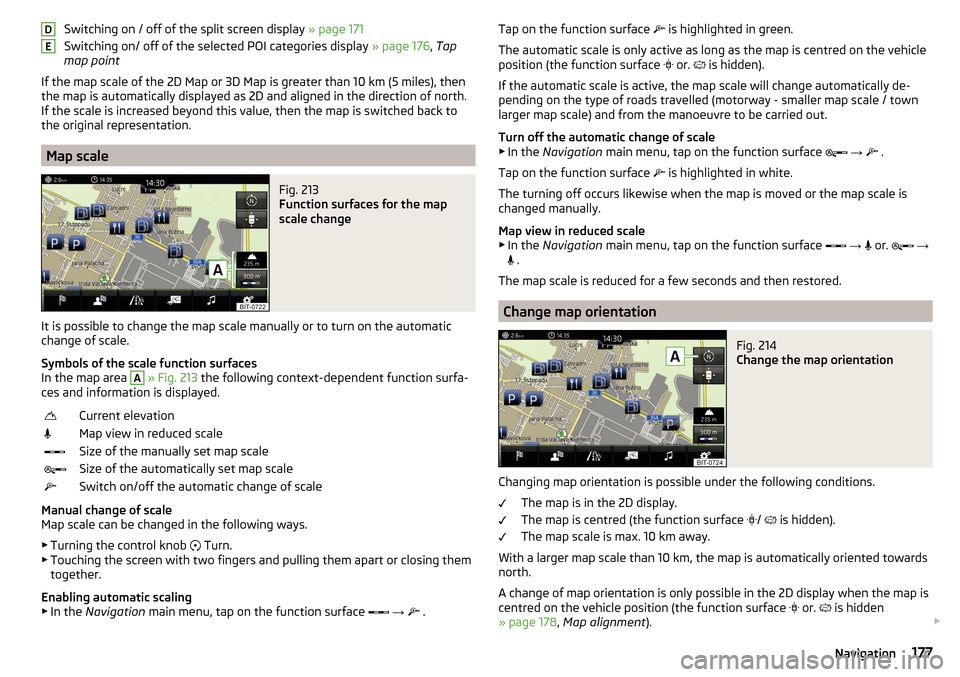
Map scale
Fig. 213
Function surfaces for the map
scale change
It is possible to change the map scale manually or to turn on the automatic
change of scale.
Symbols of the scale function surfaces
In the map area
A
» Fig. 213 the following context-dependent function surfa-
ces and information is displayed.
Current elevationMap view in reduced scaleSize of the manually set map scaleSize of the automatically set map scaleSwitch on/off the automatic change of scale
Manual change of scale
Map scale can be changed in the following ways.
▶ Turning the control knob Turn.
▶ Touching the screen with two fingers and pulling them apart or closing them
together.
Enabling automatic scaling
▶ In the Navigation main menu, tap on the function surface
→
.
DETap on the function surface
is highlighted in green.
The automatic scale is only active as long as the map is centred on the vehicle position (the function surface
or. is hidden).
If the automatic scale is active, the map scale will change automatically de-
pending on the type of roads travelled (motorway - smaller map scale / town larger map scale) and from the manoeuvre to be carried out.
Turn off the automatic change of scale
▶ In the Navigation main menu, tap on the function surface
→
.
Tap on the function surface
is highlighted in white.
The turning off occurs likewise when the map is moved or the map scale is
changed manually.
Map view in reduced scale ▶ In the Navigation main menu, tap on the function surface
→
or.
→
.
The map scale is reduced for a few seconds and then restored.
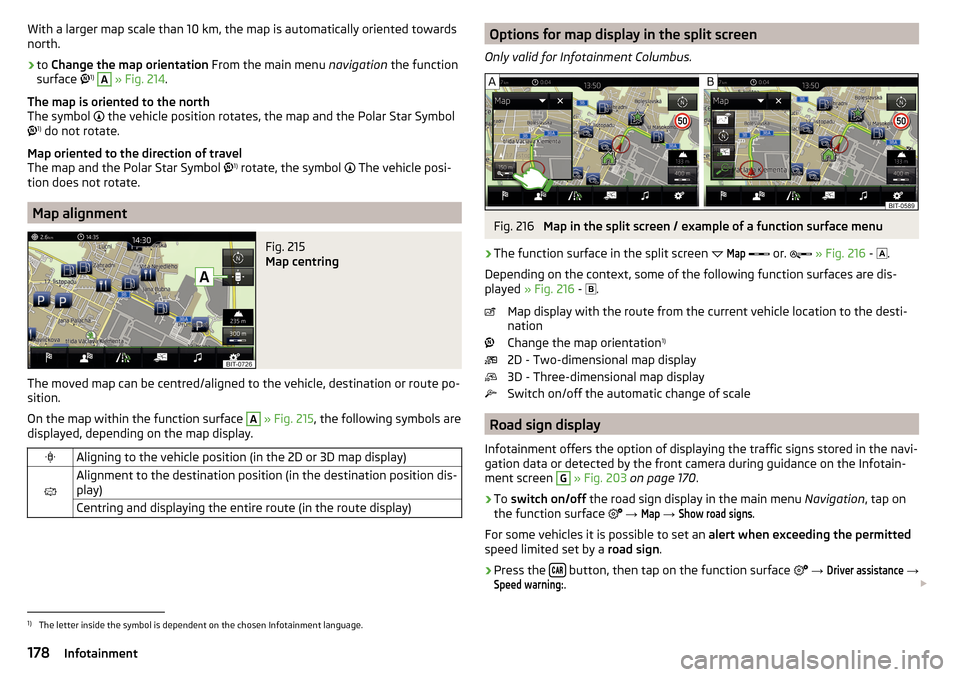
Change map orientation
Fig. 214
Change the map orientation
Changing map orientation is possible under the following conditions. The map is in the 2D display.
The map is centred (the function surface /
is hidden).
The map scale is max. 10 km away.
With a larger map scale than 10 km, the map is automatically oriented towards
north.
A change of map orientation is only possible in the 2D display when the map is
centred on the vehicle position (the function surface or.
is hidden
» page 178 , Map alignment ).
177Navigation
Page 180 of 324
With a larger map scale than 10 km, the map is automatically oriented towards
north.›
to Change the map orientation From the main menu navigation the function
surface 1)
A
» Fig. 214 .
The map is oriented to the north
The symbol
the vehicle position rotates, the map and the Polar Star Symbol
1)
do not rotate.
Map oriented to the direction of travel
The map and the Polar Star Symbol 1)
rotate, the symbol
The vehicle posi-
tion does not rotate.
Map alignment
Fig. 215
Map centring
The moved map can be centred/aligned to the vehicle, destination or route po-
sition.
On the map within the function surface
A
» Fig. 215 , the following symbols are
displayed, depending on the map display.
Aligning to the vehicle position (in the 2D or 3D map display)
Alignment to the destination position (in the destination position dis-
play)Centring and displaying the entire route (in the route display)Options for map display in the split screen
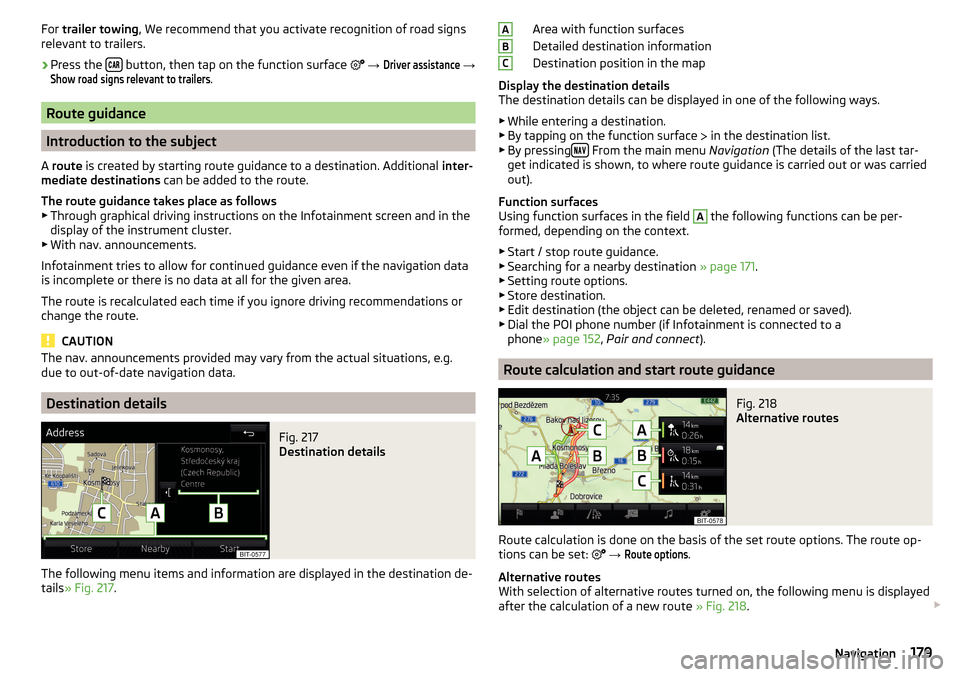
Only valid for Infotainment Columbus.Fig. 216
Map in the split screen / example of a function surface menu
›
The function surface in the split screen
Map
or.
» Fig. 216 -
.
Depending on the context, some of the following function surfaces are dis-
played » Fig. 216 -
.
Map display with the route from the current vehicle location to the desti-
nation
Change the map orientation 1)
2D - Two-dimensional map display
3D - Three-dimensional map display
Switch on/off the automatic change of scale
Road sign display
Infotainment offers the option of displaying the traffic signs stored in the navi-
gation data or detected by the front camera during guidance on the Infotain-
ment screen
G
» Fig. 203 on page 170 .
›
To switch on/off the road sign display in the main menu Navigation, tap on
the function surface
→
Map
→
Show road signs
.
For some vehicles it is possible to set an alert when exceeding the permitted
speed limited set by a road sign.
›
Press the button, then tap on the function surface
→
Driver assistance
→
Speed warning:
.
1)
The letter inside the symbol is dependent on the chosen Infotainment language.
178Infotainment
Page 181 of 324
For trailer towing , We recommend that you activate recognition of road signs
relevant to trailers.›
Press the button, then tap on the function surface
→
Driver assistance
→
Show road signs relevant to trailers
.
Route guidance
Introduction to the subject
A route is created by starting route guidance to a destination. Additional inter-
mediate destinations can be added to the route.
The route guidance takes place as follows
▶ Through graphical driving instructions on the Infotainment screen and in the
display of the instrument cluster.
▶ With nav. announcements.
Infotainment tries to allow for continued guidance even if the navigation data
is incomplete or there is no data at all for the given area.
The route is recalculated each time if you ignore driving recommendations or change the route.
CAUTION
The nav. announcements provided may vary from the actual situations, e.g.
due to out-of-date navigation data.
Destination details
Fig. 217
Destination details
The following menu items and information are displayed in the destination de-
tails » Fig. 217 .
Area with function surfaces
Detailed destination information
Destination position in the map
Display the destination details
The destination details can be displayed in one of the following ways.
▶ While entering a destination.
▶ By tapping on the function surface
in the destination list.
▶ By pressing
From the main menu
Navigation (The details of the last tar-
get indicated is shown, to where route guidance is carried out or was carried
out).
Function surfaces
Using function surfaces in the field
A
the following functions can be per-
formed, depending on the context.
▶ Start / stop route guidance.
▶ Searching for a nearby destination » page 171.
▶ Setting route options.
▶ Store destination.
▶ Edit destination (the object can be deleted, renamed or saved).
▶ Dial the POI phone number (if Infotainment is connected to a
phone » page 152 , Pair and connect ).
Route calculation and start route guidance
Fig. 218
Alternative routes
Route calculation is done on the basis of the set route options. The route op-
tions can be set:
→
Route options
.
Alternative routes
With selection of alternative routes turned on, the following menu is displayed
after the calculation of a new route » Fig. 218.
ABC179Navigation
Page 182 of 324
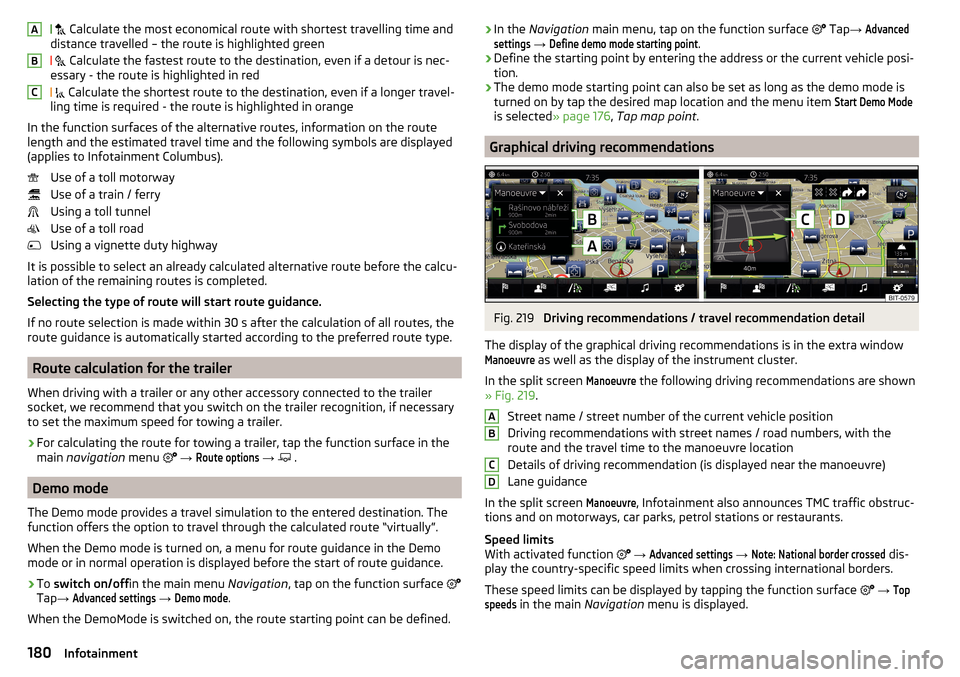
Calculate the most economical route with shortest travelling time and
distance travelled – the route is highlighted green
Calculate the fastest route to the destination, even if a detour is nec-
essary - the route is highlighted in red
Calculate the shortest route to the destination, even if a longer travel-
ling time is required - the route is highlighted in orange
In the function surfaces of the alternative routes, information on the route
length and the estimated travel time and the following symbols are displayed
(applies to Infotainment Columbus).
Use of a toll motorway
Use of a train / ferry
Using a toll tunnel
Use of a toll road
Using a vignette duty highway
It is possible to select an already calculated alternative route before the calcu- lation of the remaining routes is completed.
Selecting the type of route will start route guidance.
If no route selection is made within 30 s after the calculation of all routes, the
route guidance is automatically started according to the preferred route type.
Route calculation for the trailer
When driving with a trailer or any other accessory connected to the trailer
socket, we recommend that you switch on the trailer recognition, if necessary
to set the maximum speed for towing a trailer.
›
For calculating the route for towing a trailer, tap the function surface in the
main navigation menu
→
Route options
→
.
Demo mode
The Demo mode provides a travel simulation to the entered destination. The
function offers the option to travel through the calculated route “virtually”.
When the Demo mode is turned on, a menu for route guidance in the Demo
mode or in normal operation is displayed before the start of route guidance.
›
To switch on/off in the main menu Navigation, tap on the function surface
Tap →
Advanced settings
→
Demo mode
.
When the DemoMode is switched on, the route starting point can be defined.
ABC› In the
Navigation main menu, tap on the function surface Tap → Advancedsettings
→
Define demo mode starting point
.›
Define the starting point by entering the address or the current vehicle posi-
tion.
›
The demo mode starting point can also be set as long as the demo mode is
turned on by tap the desired map location and the menu item
Start Demo Mode
is selected » page 176, Tap map point .
Graphical driving recommendations
Fig. 219
Driving recommendations / travel recommendation detail
The display of the graphical driving recommendations is in the extra window
Manoeuvre
as well as the display of the instrument cluster.
In the split screen
Manoeuvre
the following driving recommendations are shown
» Fig. 219 .
Street name / street number of the current vehicle position
Driving recommendations with street names / road numbers, with the
route and the travel time to the manoeuvre location
Details of driving recommendation (is displayed near the manoeuvre)
Lane guidance
In the split screen
Manoeuvre
, Infotainment also announces TMC traffic obstruc-
tions and on motorways, car parks, petrol stations or restaurants.
Speed limits
With activated function
→
Advanced settings
→
Note: National border crossed
dis-
play the country-specific speed limits when crossing international borders.
These speed limits can be displayed by tapping the function surface
→
Topspeeds
in the main Navigation menu is displayed.
ABCD180Infotainment
Page 183 of 324
Nav. announcements
Infotainment issues nav. announcements during route guidance.
The nav. announcements are generated by the instrument system. Flawless
clarity of the message (e.g., road or city name) cannot always be guaranteed.
The last nav. announcement is repeated by pressing the control switch
Are
repeated.
The timing of the nav. announcement is dependent on the type of road and on
the driving speed.
The type of nav. announcements can be set:
→ Nav. announcements
.
Note
Guidance on the most frequently travelled route takes place without nav. an-
nouncements.
Most common routes
The most frequently travelled routes are automatically saved by Infotainment.
Of these, up to 3 routes can be offered, which best match the current time, day
of the week as well as the vehicle position.
A route guidance to one of the routes used most frequently can be started as
long as no route guidance takes place.
›
To display the menus with the most frequently travelled routes, in the split
screen, tap on the function surface
Freq.
Tap
Routes
→
show on map
.
›
Select the desired route.
Then a selected route is calculated and the route guidance starts.
The menu display in the split screen can be turned on/off in the main menu
navigation by tapping the function surface
→
Route options
→
Freq. Routes
switched on/off .
The stored most frequent routes can be deleted in the main menu navigation
by tapping the function surface
→
Manage memory
→
Delete User Data
→
Mostfrequent routes
.
Note
Guidance on the most frequently travelled route takes place without nav. an-
nouncements.Finish route guidance
The route guidance can be finished in one of the following ways.›
The final destination is reached.
›
In the main menu Navigation by tapping the function surface
→
Stop routeguidance
.
›
By turning off the ignition for longer than 120 minutes.
Abort route guidance
If the ignition is switched off and on again, then the route guidance is contin-
ued depending on the stop time in one of the following ways.
▶ Within 15 min. - route guidance continues to take the calculated route into
account.
▶ Between 15 min and 120 min - the screen displays the message
Continue routeguidance?
, after you confirm the message, the route guidance continues using
the calculated route.
▶ After 120 min - the route guidance is cancelled.
Route
Route details
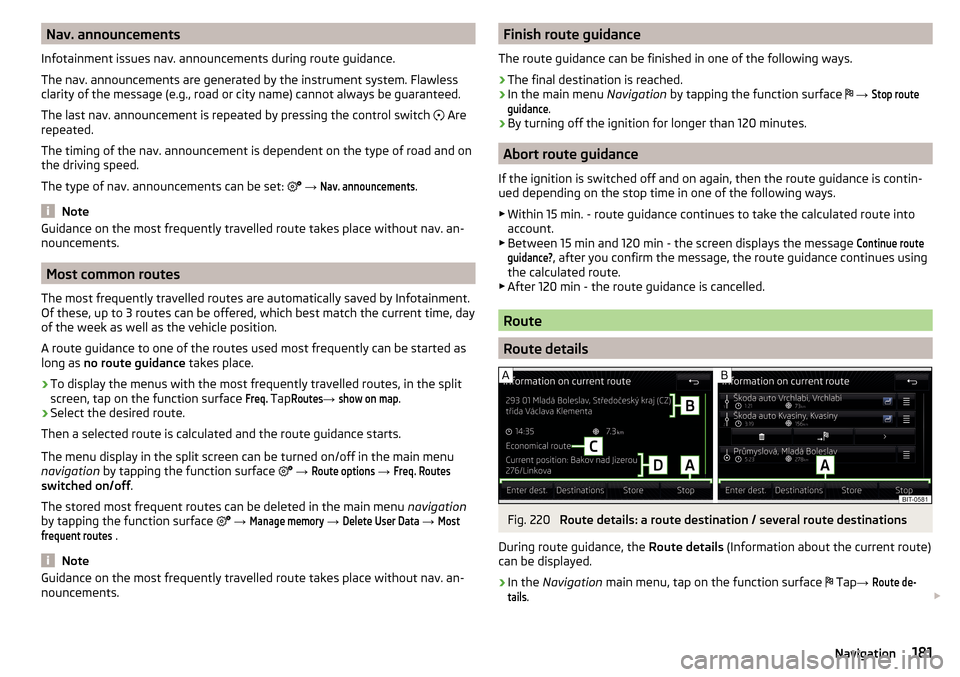
Fig. 220
Route details: a route destination / several route destinations
During route guidance, the Route details (Information about the current route)
can be displayed.
›
In the Navigation main menu, tap on the function surface
Tap
→
Route de-tails
.
181Navigation
Page 184 of 324
A route destination
In the route details, the following information is displayed at the destina-
tion » Fig. 220 -
.
Area with function surfaces
Destination information Estimated time of arrival at destination / remaining driving time to desti-
nation 1)
Remaining distance to the destination
Chosen route type (economic, fastest, shortest)
Current vehicle position (address / GPS coordinates)
The display of the arrival time or the remaining driving time can be adjusted as
follows.
▶ In the Navigation main menu, tap on the function surface
→ Advanced set-tings
→
Time display:
.
Several route destinations
In the route plan, the following information is displayed at the respective des- tinations » Fig. 220 -
.
Area with function surfaces
Stopover (with sequential number)
Final destination
Estimated time of arrival at destination / stopover
Driving distance to destination / stopover
Change destinations with each other
Delete the destination
Continuation of the route guidance from the selected target (previous
waypoints are skipped)
Display the destination details » page 179
Insert destination into the route ▶ In the area
A
Enter destination
Tap the function surface and enter a new desti-
nation.
▶ or Tap on the area
A
the functional surface
destinations
and select a destina-
tion in the list of stored destinations.
AB CDAEach additional destination is added to the list as the first subsequent destina-
tion route.
Change positions of destinations with each other
▶ The relevant function surface
and move the destination to the desired po-
sition.
With destinations on the route already reached the note Dest. reached
is dis-
played below the destination name. It is not possible to change the position of
these destinations with each other.
Store route ▶ In the area
A
, tap the function surface
Save
.
▶ Save the edited route as a new route or replace the existing saved route.
The route is stored in the route list » page 183.
Stop route guidance
▶ In the area
A
, tap the function surface
stop
.
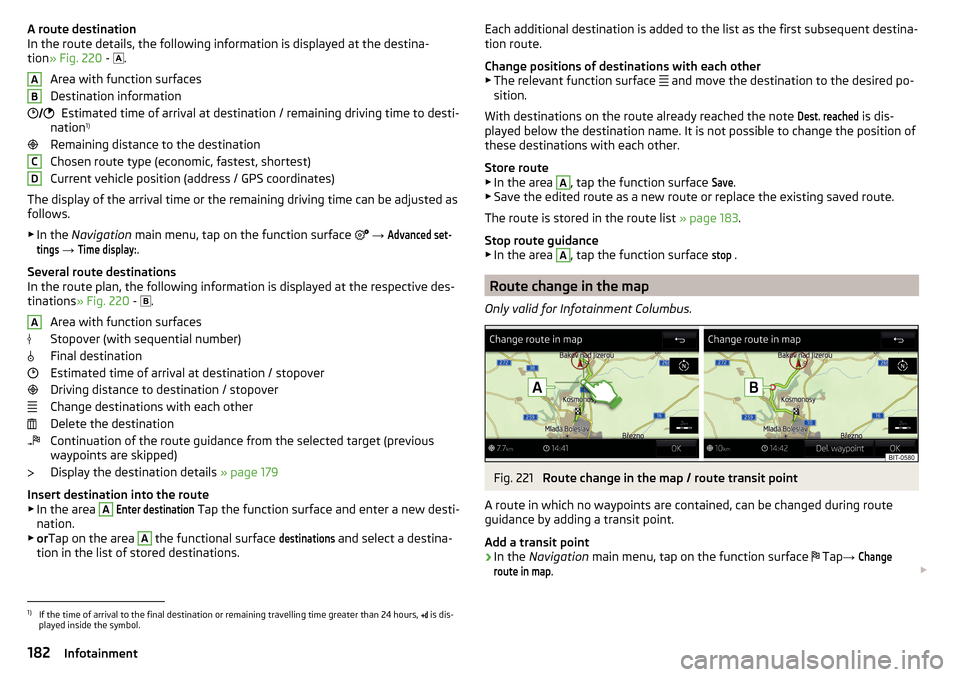
Route change in the map
Only valid for Infotainment Columbus.
Fig. 221
Route change in the map / route transit point
A route in which no waypoints are contained, can be changed during route
guidance by adding a transit point.
Add a transit point
›
In the Navigation main menu, tap on the function surface
Tap
→
Changeroute in map
.
1)
If the time of arrival to the final destination or remaining travelling time greater than 24 hours,
is dis-
played inside the symbol.
182Infotainment