warning SKODA OCTAVIA 2016 3.G / (5E) Manual Online
[x] Cancel search | Manufacturer: SKODA, Model Year: 2016, Model line: OCTAVIA, Model: SKODA OCTAVIA 2016 3.G / (5E)Pages: 324, PDF Size: 48.85 MB
Page 113 of 324

Display warning light AMeaning
Quickly flashes green for 2 seconds.
The auxiliary heating is blocked, e.g.
because the tank is nearly empty or
there is a fault in the auxiliary heat-
ing.Flashes red for 2 seconds.The switch off signal was not re-
ceived.Lights up orange for 2 seconds, then
green or red.The battery is weak, however the
switching on or off signal was re-
ceived.Lights up orange for 2 seconds, then
flashes green or red.The battery is weak, however the
switching on or off signal was not re-
ceived.Flashes orange for 5 seconds.The battery is discharged, however
the switching on or off signal was not
received.
Replace the battery » page 275.
CAUTION
■
The remote control must be protected against moisture, severe shocks and
direct sunlight - Otherwise, there is a risk of damage to the remote control.■
The range of the remote control with a charged battery is a few hundred me-
tres (depending on obstructions between the remote control and the vehicle,
weather conditions, the battery condition etc.).
111Heating and ventilation
Page 114 of 324
Infotainment
Introductory information
Important information
Introduction to the subject
WARNING■Only use Infotainment in such a way that you have control of the vehicle
in every traffic situation (e.g. Do not write text messages while driving, do
not link or connect the telephone, do not work with the contact list, do not
enter any destinations, do not connect WLAN or SmartLink etc.)- Otherwise
there is a risk of an accident!■
Always route the connection cable of the external device such that is
does not restrict you when driving.
WARNING■ Adjust the volume to ensure that acoustic signals from outside the vehi-
cle, e.g. sirens from emergency vehicles, can be heard at all times.■
High volumes can cause hearing damage!
CAUTION
In some countries, some Infotainment functions can no longer be selected
when the vehicle is running faster than a certain speed. This is not a malfunc-
tion, but complies with the national legal regulations.
Mobile phones and applications
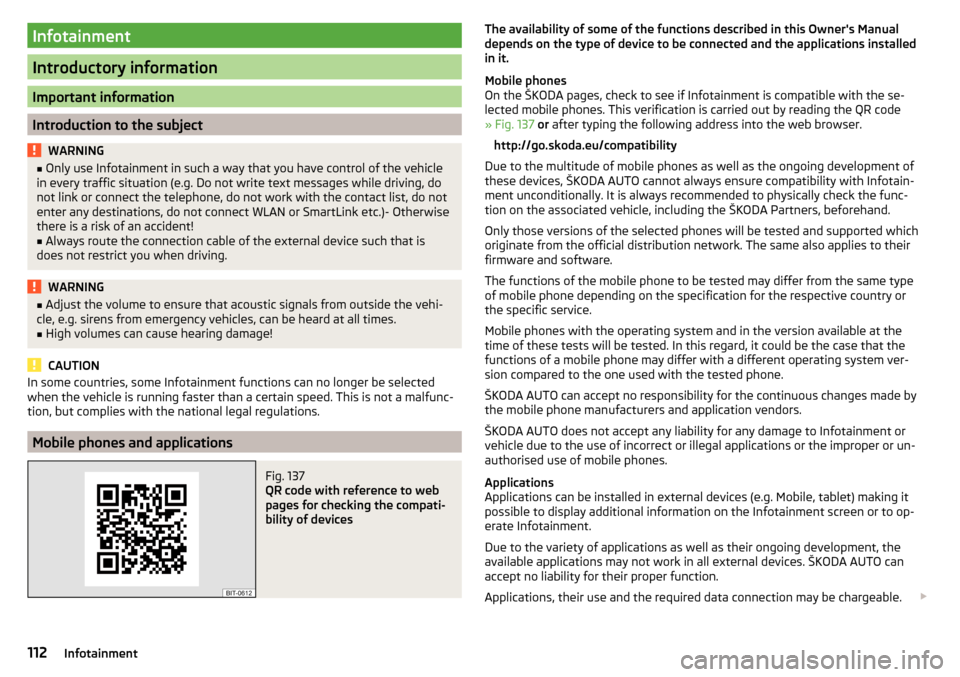
Fig. 137
QR code with reference to web
pages for checking the compati-
bility of devices
The availability of some of the functions described in this Owner's Manual
depends on the type of device to be connected and the applications installed
in it.
Mobile phones
On the ŠKODA pages, check to see if Infotainment is compatible with the se-
lected mobile phones. This verification is carried out by reading the QR code
» Fig. 137 or after typing the following address into the web browser.
http://go.skoda.eu/compatibility
Due to the multitude of mobile phones as well as the ongoing development of
these devices, ŠKODA AUTO cannot always ensure compatibility with Infotain-
ment unconditionally. It is always recommended to physically check the func-
tion on the associated vehicle, including the ŠKODA Partners, beforehand.
Only those versions of the selected phones will be tested and supported which
originate from the official distribution network. The same also applies to their
firmware and software.
The functions of the mobile phone to be tested may differ from the same type
of mobile phone depending on the specification for the respective country or
the specific service.
Mobile phones with the operating system and in the version available at the
time of these tests will be tested. In this regard, it could be the case that the
functions of a mobile phone may differ with a different operating system ver-
sion compared to the one used with the tested phone.
ŠKODA AUTO can accept no responsibility for the continuous changes made by
the mobile phone manufacturers and application vendors.
ŠKODA AUTO does not accept any liability for any damage to Infotainment or
vehicle due to the use of incorrect or illegal applications or the improper or un-
authorised use of mobile phones.
Applications
Applications can be installed in external devices (e.g. Mobile, tablet) making it possible to display additional information on the Infotainment screen or to op-
erate Infotainment.
Due to the variety of applications as well as their ongoing development, the
available applications may not work in all external devices. ŠKODA AUTO can
accept no liability for their proper function.
Applications, their use and the required data connection may be chargeable. 112Infotainment
Page 122 of 324
▶You are recommended to speak louder at higher speeds, so that the sound of
your voice is not drowned out by the increased ambient noise.
▶ During voice control, limit additional noise in the vehicle, e.g. passengers
talking at the same time.WARNINGThe emergency number should be dialled manually. Your voice commands
may not be recognised in such situations. The telephone connection may
not be established or the connection may take too much time to complete.
CAUTION
■ The messages are generated by Infotainment. Flawless clarity (e.g. road or
city name) cannot always be guaranteed.■
For some Infotainment languages, there is no voice control available. Info-
tainment indicates this fact through a text message that is displayed on the
screen after setting the Infotainment language.
Note
During voice control, no nav. announcements and traffic announcements are
played.
Voice control on / off
Fig. 151
Voice control: Main menu
Activating
›
Press the button on infotainment
or press the button
on the multi-
function steering wheel.
the main menu is displayed » Fig. 151.
Switching off
›
Press the button on infotainment twice
or press the button twice
on
the multifunction steering wheel.
› or
Issue the voice command “ End voice control”.
Operation principle
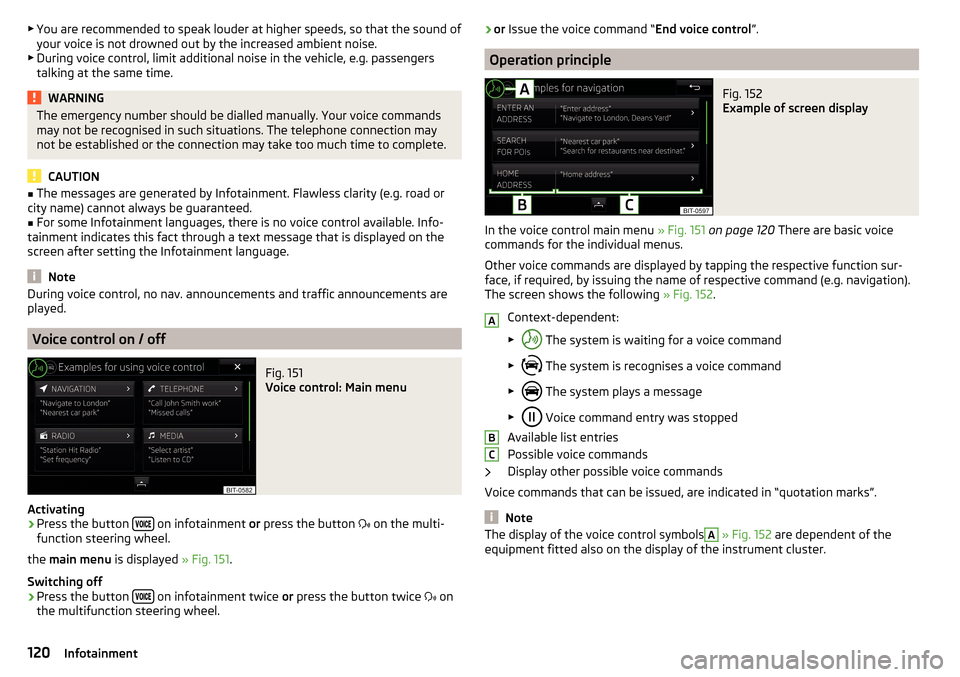
Fig. 152
Example of screen display
In the voice control main menu » Fig. 151 on page 120 There are basic voice
commands for the individual menus.
Other voice commands are displayed by tapping the respective function sur-
face, if required, by issuing the name of respective command (e.g. navigation).
The screen shows the following » Fig. 152.
Context-dependent:
▶ The system is waiting for a voice command
▶ The system is recognises a voice command
▶ The system plays a message
▶ Voice command entry was stopped
Available list entries
Possible voice commands
Display other possible voice commands
Voice commands that can be issued, are indicated in “quotation marks”.
Note
The display of the voice control symbolsA » Fig. 152 are dependent of the
equipment fitted also on the display of the instrument cluster.ABC120Infotainment
Page 128 of 324

■Auto-save station logos- Automatic storage of the station logos
■DAB traffic announcements
- Switch on/off DAB traffic announcements
■
Other DAB messages
- Switch on/off other announcements (e.g., warnings, re-
gional weather, sports reports, financial news)
■
DAB - DAB station tracking
- Switch on/off automatic DAB station tracking on an-
other frequency or in other station groups
■
Automatic DAB - FM switching
- Switch on/off auto-switching from DAB to the FM
broadcasting range if the DAB signal is lost
■
Switch to a similar station
- Activate/deactivate automatic switching to another
station with similar content in the event of signal loss (applies to Infotain-
ment Columbus)
■
L-band
- Activate/deactivate the availability of the L-band
Automatic change from DAB to FM
In the event of bad DAB reception, the device tries to find an FM station.
The station name is followed by ( ) while the station is being received on the
FM band. When the corresponding DAB station is received again, the system
automatically switches from FM to DAB.
If a DAB station is also not available in the FM band due to poor reception, In-
fotainment will be switched to mute.
L-band
For the DAB radio reception in different countries, different broadcasting rang-
es are used. In some countries the DAB radio reception is only possible in the
what is known as the L-band.
If no L-band DAB radio reception is possible in the country then we recom-
mend turning off the L-band. The channel scan is therefore faster.
Media menu settings
›
Tap the function surface in the Media main menu
.
■
Sound
- Sound settings
■
Manage jukebox
- Managing (record / delete) supported files (audio / video) in
the internal Infotainment memory (applies to Infotainment Columbus)
■
Mix/repeat including subfolders
- Switching the title display including subfolders
■
Bluetooth
- Settings for the Bluetooth ®
function
■
WLAN
- Wi-Fi settings (applies to Infotainment Columbus)
■
Video (DVD) settings
- Setting the parameters of the DVD video (applies to Info-
tainment Columbus)
■
Remove safely:
- Safe removal of the external device
■
Traffic program (TP)
- Switches traffic programme on/off
Image menu settings›
In the Images main menu, tap on the function surface
.
■
Image view:
- Setting the image display
■
Full
- Display the maximum image size while retaining the aspect ratio
■
Automatic
- Full screen display
■
Display time:
- Set the display time for the slideshow
■
Repeat slideshow
- Switching on/off the slideshow repeat
Video DVD menu settings
Only valid for Infotainment Columbus.
›
In the Video DVD main menu, tap on the function surface
.
Depending on the DVD, some of the following menu items are displayed.
■
Format
- Set the screen width/height ratio
■
Audio channel:
- Audio channel selection
■
Subtitles:
- Selecting subtitles
■
Enter/change PIN for parental settings
- Management of the PIN code for parental
control
■
Parental settings:
- Parental settings selection
Telephone menu settings
›
In the Telephone main menu, tap on the function surface
.
■
Hands-free
- Switching a call to the phone / back to Infotainment (the menu
item is displayed during a call)
■
Select telephone
- Search for available telephones/list of paired telephones/se-
lect telephone
■
Bluetooth
- Bluetooth ®
settings
■
User profile
- User profile settings
■
Manage favourites
- Set the function surfaces for your favourite contacts
■
Mailbox number:
- Enter the phone number of the mailbox
■
Network selection:
- Select the service provider of the SIM card inserted in the
external module (applies to Infotainment Columbus with the SIM card slot
in the external module)
126Infotainment
Page 129 of 324

■Priority: - Select the phone service priority of the SIM card inserted in the ex-
ternal module (applies to Infotainment Columbus with the SIM card slot in
the external module)
■Automatic
- Depending on the telephone service provider
■
Telephone call
- Telephone calls are preferred
■
Data transfer
- A data connection is preferred
■
Sort by:
- Arrangement of the phone contact list
■
Surname
- Sort by contact name
■
1st name
- Sort by contact's first name
■
Profile Name:
- Rename the profile of the SIM card inserted in the external
module (applies to Infotainment Columbus with the SIM card slot in the ex- ternal module)
■
Import contacts:
- Import phone contacts
■
Select device contacts
- Open the paired phones menu (applies to Infotainment
Columbus with the SIM card slot in the external module - if the SIM card is
inserted in the external module)
■
Select ring tone
- Selecting the ring tone
■
Reminder: remember your mobile phone
-Turn on/off the warning mode before
forgetting the phone in the vehicle (if the phone was connected to the de-
vice)
■
Show pictures for contacts
- Switch on/off the display of the image assigned to
the contact
■
Conference call
- Activates/deactivates conference calls
■
Call settings:
- Setting the phone functions of the SIM card inserted in the ex-
ternal module during a call (applies to Infotainment Columbus with the SIM
card slot in the external module)
■
Hold call:
- Switch on/off the display of the option for answering an incoming
call during a call, determining the current divert setting
■
On
- Turn on the display
■
Off
- Turn off the display
■
Request status
- Checking the settings of the SIM card function
■
Send own number:
- Setting the phone number display for the call recipient
■
On
- Turn on the display
■
Off
- Turn off the display
■
Network dependent
- Display depending the telephone service provider
■
Request status
- Check the settings of the SIM card function
■
Delete calls:
- Delete the chosen call type that took place using the SIM card
inserted in the external module during a call (applies to Infotainment Colum-
bus with the SIM card slot in the external module) ■
All
- Delete all calls
■
Missed calls
- Delete list of missed calls
■Dialled numbers - Delete outgoing calls
■Received calls
- Delete list of received calls
■
Text message settings:
- Setting the text messages of the SIM card inserted in
the external module (applies to Infotainment Columbus with the SIM card
slot in the external module) ■
Standard account
- Setting for the use of text messages on the SIM card or the
connected telephone
■
No standard account
- Without priority (selection of the SIM card or the con-
nected telephone required)
■
SIM
- A list of text messages on the SIM card
■
MAP
- A list of text messages of the connected telephone
■
Service centre number:
- Setting the number of SMS services of the telephone
service provider
■
Store sent text messages
- Enable / disable the storage of the text message on
the SIM card
■
Period of validity:
- Adjustment of the period in which the telephone service
provider will try to send the text message (for example, when Infotainment
is off)
■
Delete text messages
- Delete the data stored on the SIM card text messages
■
All
- Delete all text messages
■
Inbox
- Delete the text messages received
■
Outbox
- Delete draft text messages
■
Sent
- Delete sent text messages
■
Telephone interface “Business”
- Turn on / off the phone function of the external
module (applies to Infotainment Columbus with the SIM card slot in the ex-
ternal module)
■
Use SIM card only for data connection
- Switch on - Activating only the data serv-
ices / Switch off - Activating the data and telephone services of the SIM card
inserted in the external module (applies to Infotainment Columbus with the
SIM card slot in the external module)
■
Network:
- Setting the phone network provider of the SIM card inserted in the
external module (applies to Infotainment Columbus with the SIM card slot in
the external module) » page 124
■
PIN settings:
- Setting the PIN code of the SIM card inserted in the external
module (applies to Infotainment Columbus with the SIM card slot in the ex-
ternal module)
■
Automatic PIN entry
- Activate/deactivate storage of the SIM card PIN code
■
Change PIN
- Change the PIN code of the SIM card
■
Add PIN 2
- Enter the second PIN code of the SIM card (when the function
Automatic PIN entry
is on or when the SIM card supports another telephone
service provider)
127Infotainment settings - Columbus, Amundsen, Bolero
Page 131 of 324
■Waypoint tour - Delete item in the Waypoint mode menu (applies to Infotain-
ment Columbus)
■Most frequent routes
- Delete the most travelled routes
nav. announcements
›
In the Navigation main menu, tap on the function surface
→
Nav. announce-ments
.
■
Volume
- Volume control of the nav. announcements
■
Entertainment fading (nav. announce.)
- Setting the fading of the audio volume (e.g.
radio volume.) with nav. announcements
■
Nav. announcements:
- Setting the playback method of nav. announcements
■
Comprehensive
- All nav. announcements
■
Brief
- Short nav. announcements
■
Only in the event of issues
- Only nav. announcements when a route is changed
■
No navigation sound during call
- Activate/ deactivate non-playback of nav. an-
nouncements during a telephone call
■
Note: “My POIs”
- Turn on/off an audible indication when approaching a custom
POI (if supported by the imported custom POI) (applies to Infotainment Co-
lumbus)
Top speeds
›
In the Navigation main menu, tap on the function surface
→
Top speeds
.
The maximum speed limits for the current country are displayed.
With the function switched on
Note: national border crossed
» page 129 , Advanced
settings display the country-specific speed limits when crossing international
borders.
Fuel options
›
In the Navigation main menu, tap on the function surface
→
Fuel options
.
■
Select preferred fuel station
- Select your preferred fuel station brand (the selec-
ted station brand will be displayed in the first three positions of the list)
■
Fuel warning
-Turn on- / Off the display of a warning message with the option
to visit the nearest petrol station when the fuel level reaches the reserve
area
Version information›
In the Navigation main menu, tap on the function surface
→
Version infor-mation
.
A list of countries is displayed that exist for the navigation data, together with
the date of the last update.
An update of the navigation data can be carried out by tapping the functional
surface
Update (SD / USB)
.
The information on updating the navigation data is to be obtained from a
ŠKODA partner or on the following ŠKODA Internet pages.
http://go.skoda.eu/updateportal
Advanced settings
›
In the Navigation main menu, tap on the function surface
→
Advanced set-tings
.
■
Time display:
- Select the time display in the status line
■ - Estimated arrival time at destination
■ - Estimated travelling time to the destination
■
Status line:
- Selection of the target type, for which the status line, the route
and travel time are displayed (Here it is also determined which destination
type after selecting
→
is displayed on the map)
■ - Route destination
■ - Next waypoint
■
Note: national border crossed
- Switching on/off the display for information on na-
tional speed limits when crossing the national border
■
Demo mode
- Switch on/off guidance in demo mode
■
Define demo mode starting point
- Specifying the start point of the route guidance
in the demo mode by entering the address or the current vehicle position
129Infotainment settings - Columbus, Amundsen, Bolero
Page 134 of 324
Advanced Settings (DAB)›
In the Radio main menu, select the DAB range and tap on the function sur-
face
→
Advanced settings
.
■
DAB traffic announcements
- Switch on/off DAB announcements
■
Other DAB messages
- Switch on/off other announcements (e.g., warnings, re-
gional weather, sports reports, financial news)
■
DAB station tracking
- Switch on/off automatic DAB station tracking on another
frequency or in other station groups
■
Aut. DAB - FM switching
- switches on/off auto-switching from DAB to the FM
frequency band if the DAB signal is lost
Automatic change from DAB to FM
In the event of bad DAB reception, the device tries to find an FM station.
The station name is followed by ( ) while the station is being received on the
FM band. When the corresponding DAB station is received again, the system
automatically switches from FM to DAB.
If a DAB station is also not available in the FM band due to poor reception, In-
fotainment will be switched to mute.
Media menu settings
›
Tap the function surface in the Media main menu
.
■
Sound
- sound settings
■
Mix/repeat inc. subfolders
- Switch on/off the title display including subfolders
■
Bluetooth
- Settings for the Bluetooth ®
function
■
Traffic program (TP)
- Switches traffic programme on/off
■
Activate AUX
- Enables / disables the AUX input
■
Remove SD card safely
- Safe removal of the inserted SD storage card
■
Remove USB safely
- safe removal of the external device connected to the USB
input
Telephone menu settings
›
In the Telephone main menu, tap on the function surface,
.
■
Hands-free
- Switching a call to the phone / back to Infotainment (the menu
item is displayed during a call)
■
Select telephone
- Search for available telephones/list of paired telephones/se-
lect telephone
■
Find
- search for available phones
■Bluetooth - Bluetooth ®
settings
■User profile
- user profile settings
■
Manage favourites
- set the function surfaces for your favourite contacts
■
Sort by:
- Arrangement of the phone contact list
■
Surname
- Sort by contact name
■
1st name
- Sort by contact's first name
■
Imp. contacts
- Import telephone contacts
■
Select ring tone
- Selecting the ring tone
■
Remember your mobile
- Turn on/off the warning mode before forgetting the
phone in the vehicle (if the phone was connected to Infotainment)
■
Simultaneous calls
- enable/disable the option to hold two concurrent calls
132Infotainment
Page 142 of 324
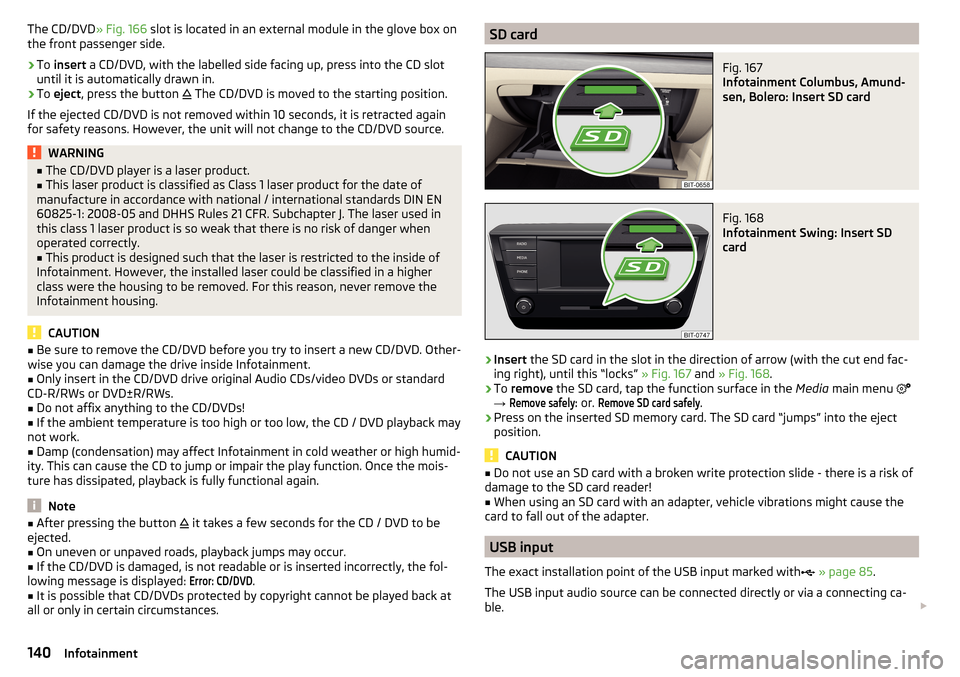
The CD/DVD» Fig. 166 slot is located in an external module in the glove box on
the front passenger side.›
To insert a CD/DVD, with the labelled side facing up, press into the CD slot
until it is automatically drawn in.
›
To eject , press the button
The CD/DVD is moved to the starting position.
If the ejected CD/DVD is not removed within 10 seconds, it is retracted again
for safety reasons. However, the unit will not change to the CD/DVD source.
WARNING■ The CD/DVD player is a laser product.■This laser product is classified as Class 1 laser product for the date of
manufacture in accordance with national / international standards DIN EN 60825-1: 2008-05 and DHHS Rules 21 CFR. Subchapter J. The laser used in
this class 1 laser product is so weak that there is no risk of danger when
operated correctly.■
This product is designed such that the laser is restricted to the inside of
Infotainment. However, the installed laser could be classified in a higher
class were the housing to be removed. For this reason, never remove the
Infotainment housing.
CAUTION
■ Be sure to remove the CD/DVD before you try to insert a new CD/DVD. Other-
wise you can damage the drive inside Infotainment.■
Only insert in the CD/DVD drive original Audio CDs/video DVDs or standard
CD-R/RWs or DVD±R/RWs.
■
Do not affix anything to the CD/DVDs!
■
If the ambient temperature is too high or too low, the CD / DVD playback may
not work.
■
Damp (condensation) may affect Infotainment in cold weather or high humid-
ity. This can cause the CD to jump or impair the play function. Once the mois-
ture has dissipated, playback is fully functional again.
Note
■ After pressing the button it takes a few seconds for the CD / DVD to be
ejected.■
On uneven or unpaved roads, playback jumps may occur.
■
If the CD/DVD is damaged, is not readable or is inserted incorrectly, the fol-
lowing message is displayed:
Error: CD/DVD
.
■
It is possible that CD/DVDs protected by copyright cannot be played back at
all or only in certain circumstances.
SD cardFig. 167
Infotainment Columbus, Amund-
sen, Bolero: Insert SD card
Fig. 168
Infotainment Swing: Insert SD
card
›
Insert the SD card in the slot in the direction of arrow (with the cut end fac-
ing right), until this “locks” » Fig. 167 and » Fig. 168 .
›
To remove the SD card, tap the function surface in the Media main menu
→
Remove safely:
or.
Remove SD card safely
.
›
Press on the inserted SD memory card. The SD card “jumps” into the eject
position.
CAUTION
■ Do not use an SD card with a broken write protection slide - there is a risk of
damage to the SD card reader!■
When using an SD card with an adapter, vehicle vibrations might cause the
card to fall out of the adapter.
USB input
The exact installation point of the USB input marked with
» page 85 .
The USB input audio source can be connected directly or via a connecting ca-
ble.
140Infotainment
Page 151 of 324
Telephone
Introductory information
Introduction to the subject
Applies to Infotainment Columbus, Amundsen, Bolero
This chapter deals with the operation of Infotainment with the telephone con-
nected via Bluetooth ®
as well as the use of the SIM-card in the external mod-
ule.
Depending on the Bluetooth ®
-profile used it is possible to connect to a tele-
phone or two phones simultaneously to Infotainment.
The SIM card in the external module can be used for data and telephone serv-
ices (Columbus).
If telephones are connected to Infotainment with multiple SIM cards, then calls
can be accepted by all SIM cards of the connected telephones.
For outgoing calls, it depends on the type of connected telephone, either only
the primary SIM card or one of the other SIM cards can be selected.
The Infotainment allows you to choose if you want to text messages of the
main phone (if this is supported by the phone), or work with text messages
from the SIM card inserted in the external module.
If Infotainment is connected to an external device via Apple CarPlay then the
use of the Bluetooth ®
connection is not possible and the Telephone menu is
not available. A possible data connection via the SIM card remains operational
» page 164 .
Applies to Infotainment Swing
This chapter covers the operation of a Bluetooth ®
device connected to Info-
tainment.
If a telephone is connected to Infotainment with multiple SIM cards, then calls
can be accepted by all SIM cards of the connected phone.
For outgoing calls, it depends on the type of connected telephone, either only
the primary SIM card or one of the other SIM cards can be selected.WARNINGThe general binding country-specific regulations for operating mobile
phones in the vehicle must be observed.
Possible connection typesDepending on the number of connected Bluetooth ®
devices, connection type, as well as the use of the SIM card in the external module, the following functions
are available. 149Telephone
Page 154 of 324
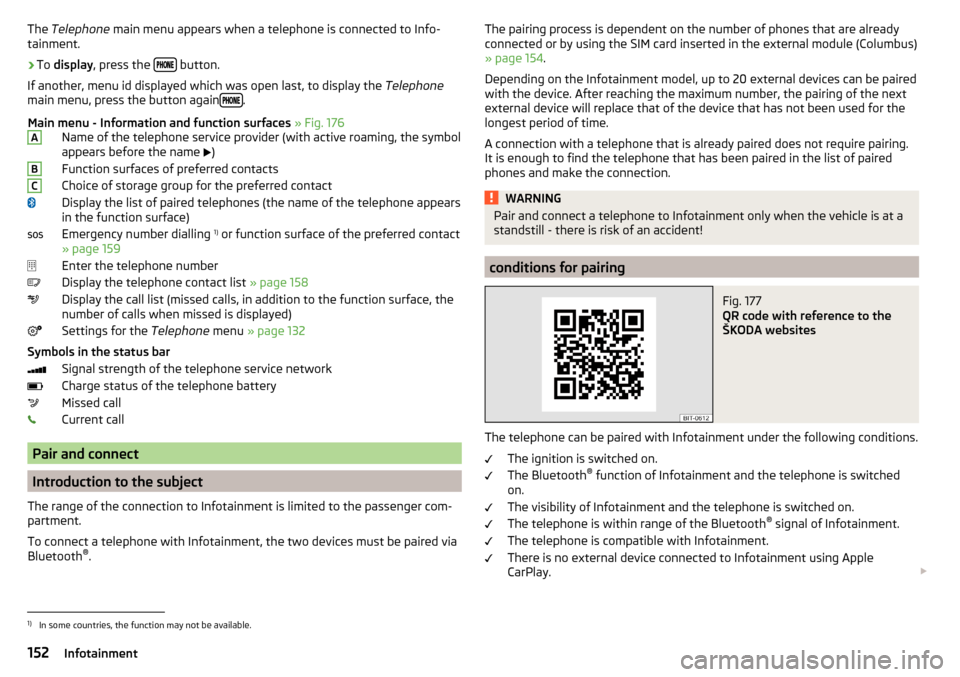
The Telephone main menu appears when a telephone is connected to Info-
tainment.›
To display , press the button.
If another, menu id displayed which was open last, to display the Telephone
main menu, press the button again
.
Main menu - Information and function surfaces » Fig. 176
Name of the telephone service provider (with active roaming, the symbol
appears before the name
)
Function surfaces of preferred contacts
Choice of storage group for the preferred contact
Display the list of paired telephones (the name of the telephone appears
in the function surface)
Emergency number dialling 1)
or function surface of the preferred contact
» page 159
Enter the telephone number
Display the telephone contact list » page 158
Display the call list (missed calls, in addition to the function surface, the
number of calls when missed is displayed)
Settings for the Telephone menu » page 132
Symbols in the status bar Signal strength of the telephone service network
Charge status of the telephone battery
Missed call
Current call
Pair and connect
Introduction to the subject
The range of the connection to Infotainment is limited to the passenger com-
partment.
To connect a telephone with Infotainment, the two devices must be paired via
Bluetooth ®
.
ABCThe pairing process is dependent on the number of phones that are already
connected or by using the SIM card inserted in the external module (Columbus)
» page 154 .
Depending on the Infotainment model, up to 20 external devices can be paired
with the device. After reaching the maximum number, the pairing of the next
external device will replace that of the device that has not been used for the
longest period of time.
A connection with a telephone that is already paired does not require pairing.
It is enough to find the telephone that has been paired in the list of paired
phones and make the connection.WARNINGPair and connect a telephone to Infotainment only when the vehicle is at a
standstill - there is risk of an accident!
conditions for pairing
Fig. 177
QR code with reference to the
ŠKODA websites
The telephone can be paired with Infotainment under the following conditions.
The ignition is switched on.
The Bluetooth ®
function of Infotainment and the telephone is switched
on.
The visibility of Infotainment and the telephone is switched on.
The telephone is within range of the Bluetooth ®
signal of Infotainment.
The telephone is compatible with Infotainment.
There is no external device connected to Infotainment using Apple
CarPlay.
1)
In some countries, the function may not be available.
152Infotainment