Plate SKODA OCTAVIA 2016 3.G / (5E) Owner's Manual
[x] Cancel search | Manufacturer: SKODA, Model Year: 2016, Model line: OCTAVIA, Model: SKODA OCTAVIA 2016 3.G / (5E)Pages: 324, PDF Size: 48.85 MB
Page 163 of 324
Display details of participant
Talk to a participant separately from the conference call
End the call to a conference participant
Text messages (SMS)
Main menu
Applies to Infotainment Columbus, Amundsen, Bolero.
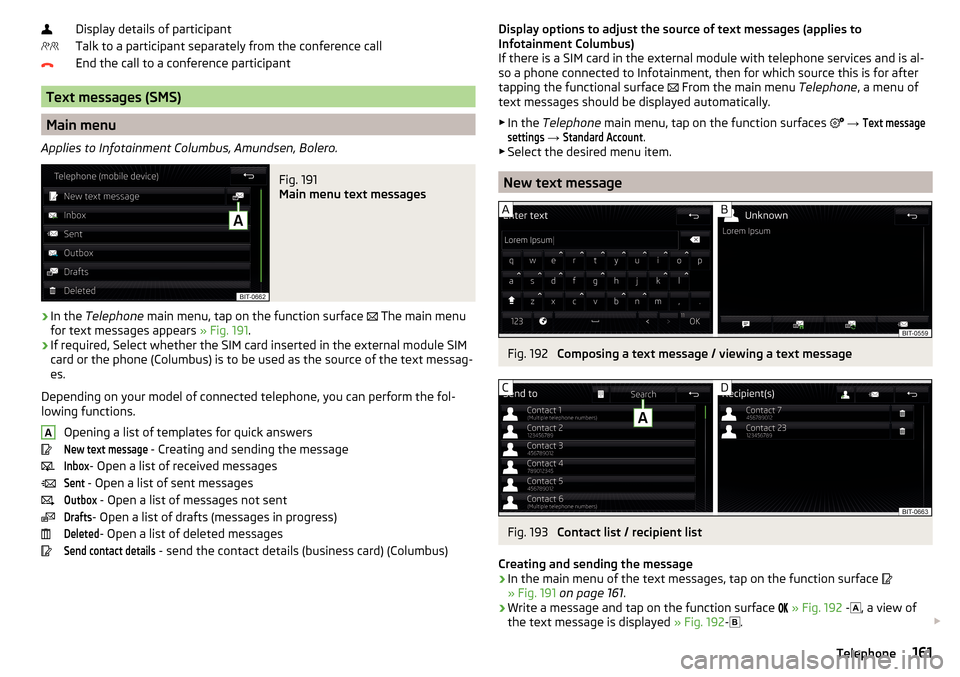
Fig. 191
Main menu text messages
›
In the Telephone main menu, tap on the function surface
The main menu
for text messages appears » Fig. 191.
›
If required, Select whether the SIM card inserted in the external module SIM
card or the phone (Columbus) is to be used as the source of the text messag-
es.
Depending on your model of connected telephone, you can perform the fol-
lowing functions.
Opening a list of templates for quick answers
New text message
- Creating and sending the message
Inbox
- Open a list of received messages
Sent
- Open a list of sent messages
Outbox
- Open a list of messages not sent
Drafts
- Open a list of drafts (messages in progress)
Deleted
- Open a list of deleted messages
Send contact details
- send the contact details (business card) (Columbus)
ADisplay options to adjust the source of text messages (applies to
Infotainment Columbus)
If there is a SIM card in the external module with telephone services and is al-
so a phone connected to Infotainment, then for which source this is for after
tapping the functional surface
From the main menu Telephone, a menu of
text messages should be displayed automatically.
▶ In the Telephone main menu, tap on the function surfaces
→ Text messagesettings
→
Standard Account
.
▶ Select the desired menu item.
New text message
Fig. 192
Composing a text message / viewing a text message
Fig. 193
Contact list / recipient list
Creating and sending the message
›
In the main menu of the text messages, tap on the function surface
» Fig. 191 on page 161 .
›
Write a message and tap on the function surface
» Fig. 192 -
, a view of
the text message is displayed » Fig. 192-
.
161Telephone
Page 164 of 324
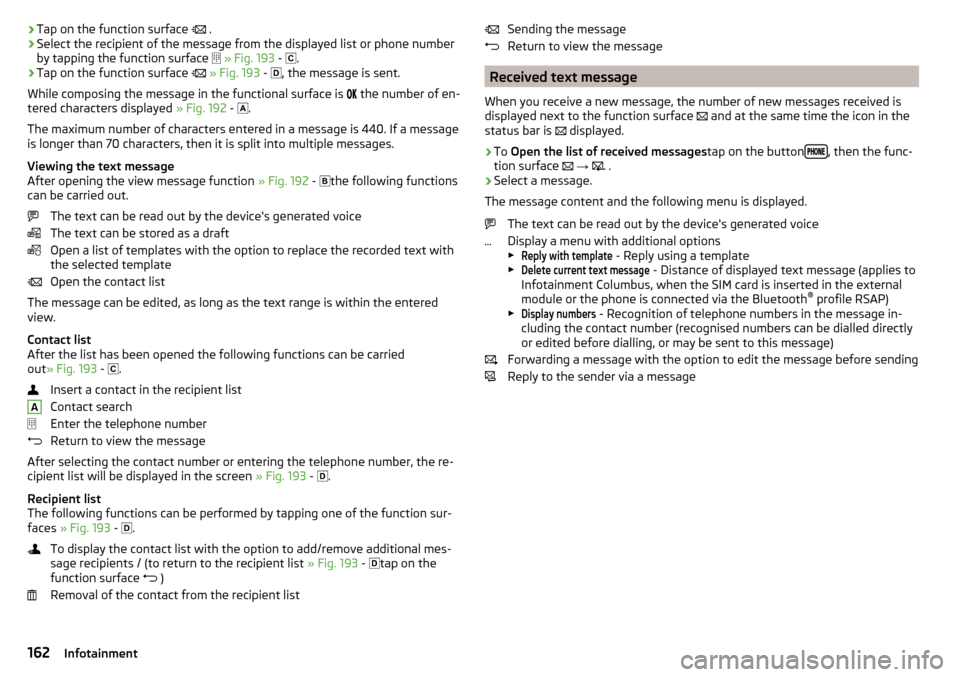
›Tap on the function surface
.›Select the recipient of the message from the displayed list or phone number
by tapping the function surface
» Fig. 193 -
.›
Tap on the function surface
» Fig. 193 -
, the message is sent.
While composing the message in the functional surface is
the number of en-
tered characters displayed » Fig. 192 -
.
The maximum number of characters entered in a message is 440. If a message
is longer than 70 characters, then it is split into multiple messages.
Viewing the text message
After opening the view message function » Fig. 192 -
the following functions
can be carried out.
The text can be read out by the device's generated voice
The text can be stored as a draft
Open a list of templates with the option to replace the recorded text with
the selected template
Open the contact list
The message can be edited, as long as the text range is within the entered
view.
Contact list
After the list has been opened the following functions can be carried
out » Fig. 193 -
.
Insert a contact in the recipient list
Contact search
Enter the telephone number
Return to view the message
After selecting the contact number or entering the telephone number, the re-
cipient list will be displayed in the screen » Fig. 193 -
.
Recipient list
The following functions can be performed by tapping one of the function sur-
faces » Fig. 193 -
.
To display the contact list with the option to add/remove additional mes-
sage recipients / (to return to the recipient list » Fig. 193 -
tap on the
function surface )
Removal of the contact from the recipient list
ASending the message
Return to view the message
Received text message
When you receive a new message, the number of new messages received is
displayed next to the function surface
and at the same time the icon in the
status bar is
displayed.
›
To Open the list of received messages tap on the button, then the func-
tion surface
→
.
›
Select a message.
The message content and the following menu is displayed.
The text can be read out by the device's generated voice
Display a menu with additional options
▶
Reply with template
- Reply using a template
▶
Delete current text message
- Distance of displayed text message (applies to
Infotainment Columbus, when the SIM card is inserted in the external
module or the phone is connected via the Bluetooth ®
profile RSAP)
▶
Display numbers
- Recognition of telephone numbers in the message in-
cluding the contact number (recognised numbers can be dialled directly
or edited before dialling, or may be sent to this message)
Forwarding a message with the option to edit the message before sending
Reply to the sender via a message
162Infotainment
Page 232 of 324
A message on the screen informs about the storage of the tyre pressure val-
ues.
Note
When a warning light in the instrument cluster appears, the affected tyre
can be displayed on the infotainment » Fig. 269.Towing device and trailer
Hitch
Introduction
This chapter contains information on the following subjects:
Description
231
Adjusting the ready position
231
Check the setting of the standby position
232
Assembling the bar ball – Step 1
232
Assembling the bar ball – Step 2
233
Check proper fitting
233
Removing the bar ball – Step 1
233
Removing the bar ball – Step 2
234
Vertical load with mounted accessories
235
The maximum trailer nose weight when towing a trailer is 75 kg, Vehicles with
four-wheel drive 80 kg and G-TEC vehicles 56 kg. Other data (e.g. shown on
the nameplate of the hitch) on provides information about the test values of
the device .
WARNING■ Before each time you make a journey when using the ball rod, check that
it is seated correctly and is secured in the mounting recess.■
When the knee-joint bar is not used and properly secured in the receiving
shaft, it is damaged or incomplete, this must not be used - there is a risk of
an accident.
■
Do not perform any modifications or changes to the towing device.
■
Keep the mounting recess of the towing device clean at all times. Such
dirt prevents the ball rod from being attached securely!
Note
If the towing device is removed completely, it must be replaced with the origi-
nal reinforcement of the rear bumper which is part of the mount for the towing
eye.230Driving
Page 271 of 324
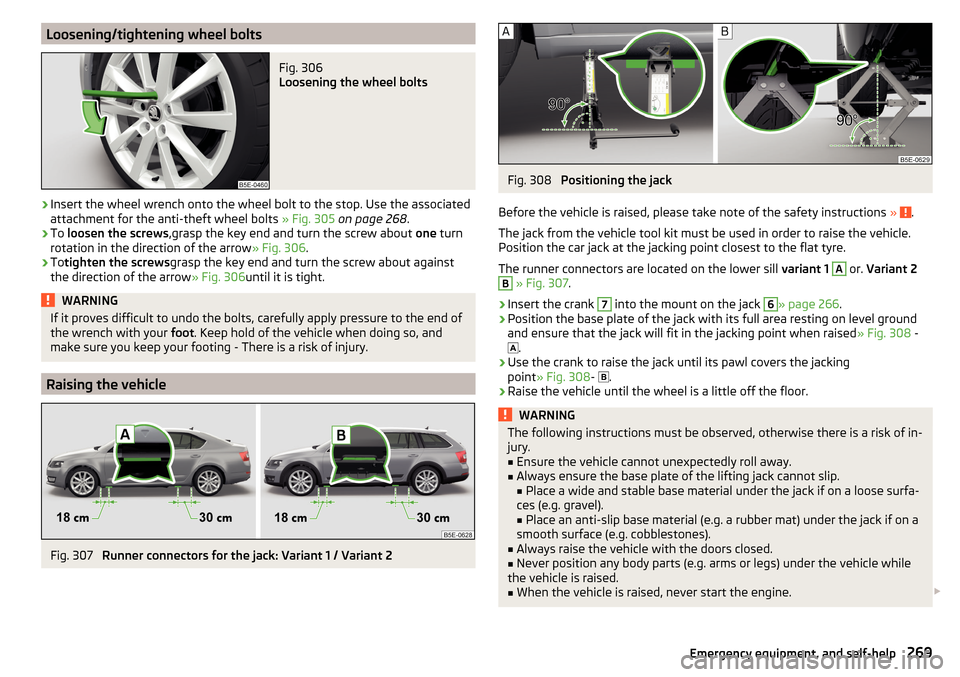
Loosening/tightening wheel boltsFig. 306
Loosening the wheel bolts
›
Insert the wheel wrench onto the wheel bolt to the stop. Use the associated
attachment for the anti-theft wheel bolts » Fig. 305 on page 268 .
›
To loosen the screws ,grasp the key end and turn the screw about one turn
rotation in the direction of the arrow » Fig. 306.
›
Totighten the screws grasp the key end and turn the screw about against
the direction of the arrow » Fig. 306until it is tight.
WARNINGIf it proves difficult to undo the bolts, carefully apply pressure to the end of
the wrench with your foot. Keep hold of the vehicle when doing so, and
make sure you keep your footing - There is a risk of injury.
Raising the vehicle
Fig. 307
Runner connectors for the jack: Variant 1 / Variant 2
Fig. 308
Positioning the jack
Before the vehicle is raised, please take note of the safety instructions »
.
The jack from the vehicle tool kit must be used in order to raise the vehicle.
Position the car jack at the jacking point closest to the flat tyre.
The runner connectors are located on the lower sill variant 1
A
or. Variant 2
B
» Fig. 307 .
›
Insert the crank
7
into the mount on the jack
6
» page 266 .
›
Position the base plate of the jack with its full area resting on level ground
and ensure that the jack will fit in the jacking point when raised » Fig. 308 -
.
›
Use the crank to raise the jack until its pawl covers the jacking
point » Fig. 308 -
.
›
Raise the vehicle until the wheel is a little off the floor.
WARNINGThe following instructions must be observed, otherwise there is a risk of in-
jury.■
Ensure the vehicle cannot unexpectedly roll away.
■
Always ensure the base plate of the lifting jack cannot slip.
■ Place a wide and stable base material under the jack if on a loose surfa-
ces (e.g. gravel).
■ Place an anti-slip base material (e.g. a rubber mat) under the jack if on a
smooth surface (e.g. cobblestones).
■
Always raise the vehicle with the doors closed.
■
Never position any body parts (e.g. arms or legs) under the vehicle while
the vehicle is raised.
■
When the vehicle is raised, never start the engine.
269Emergency equipment, and self-help
Page 284 of 324
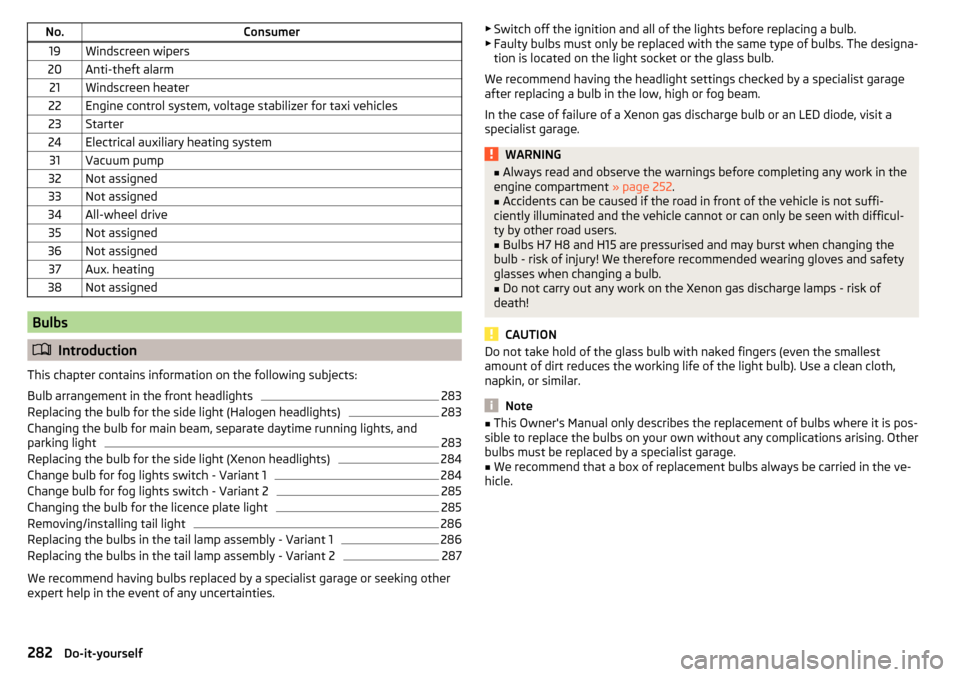
No.Consumer19Windscreen wipers20Anti-theft alarm21Windscreen heater22Engine control system, voltage stabilizer for taxi vehicles23Starter24Electrical auxiliary heating system31Vacuum pump32Not assigned33Not assigned34All-wheel drive35Not assigned36Not assigned37Aux. heating38Not assigned
Bulbs
Introduction
This chapter contains information on the following subjects:
Bulb arrangement in the front headlights
283
Replacing the bulb for the side light (Halogen headlights)
283
Changing the bulb for main beam, separate daytime running lights, and
parking light
283
Replacing the bulb for the side light (Xenon headlights)
284
Change bulb for fog lights switch - Variant 1
284
Change bulb for fog lights switch - Variant 2
285
Changing the bulb for the licence plate light
285
Removing/installing tail light
286
Replacing the bulbs in the tail lamp assembly - Variant 1
286
Replacing the bulbs in the tail lamp assembly - Variant 2
287
We recommend having bulbs replaced by a specialist garage or seeking other
expert help in the event of any uncertainties.
▶ Switch off the ignition and all of the lights before replacing a bulb.
▶ Faulty bulbs must only be replaced with the same type of bulbs. The designa-
tion is located on the light socket or the glass bulb.
We recommend having the headlight settings checked by a specialist garage after replacing a bulb in the low, high or fog beam.
In the case of failure of a Xenon gas discharge bulb or an LED diode, visit a
specialist garage.WARNING■ Always read and observe the warnings before completing any work in the
engine compartment » page 252.■
Accidents can be caused if the road in front of the vehicle is not suffi-
ciently illuminated and the vehicle cannot or can only be seen with difficul-
ty by other road users.
■
Bulbs H7 H8 and H15 are pressurised and may burst when changing the
bulb - risk of injury! We therefore recommended wearing gloves and safety
glasses when changing a bulb.
■
Do not carry out any work on the Xenon gas discharge lamps - risk of
death!
CAUTION
Do not take hold of the glass bulb with naked fingers (even the smallest
amount of dirt reduces the working life of the light bulb). Use a clean cloth,
napkin, or similar.
Note
■ This Owner's Manual only describes the replacement of bulbs where it is pos-
sible to replace the bulbs on your own without any complications arising. Other
bulbs must be replaced by a specialist garage.■
We recommend that a box of replacement bulbs always be carried in the ve-
hicle.
282Do-it-yourself
Page 287 of 324
›Fit the connector.
Refit the headlight and grille›
Replace the fog light by inserting it in the opposite direction of the arrow
4
» Fig. 334 and tighten.
›
Insert the guard and push it gently until it locks into place.
Change bulb for fog lights switch - Variant 2
Fig. 335
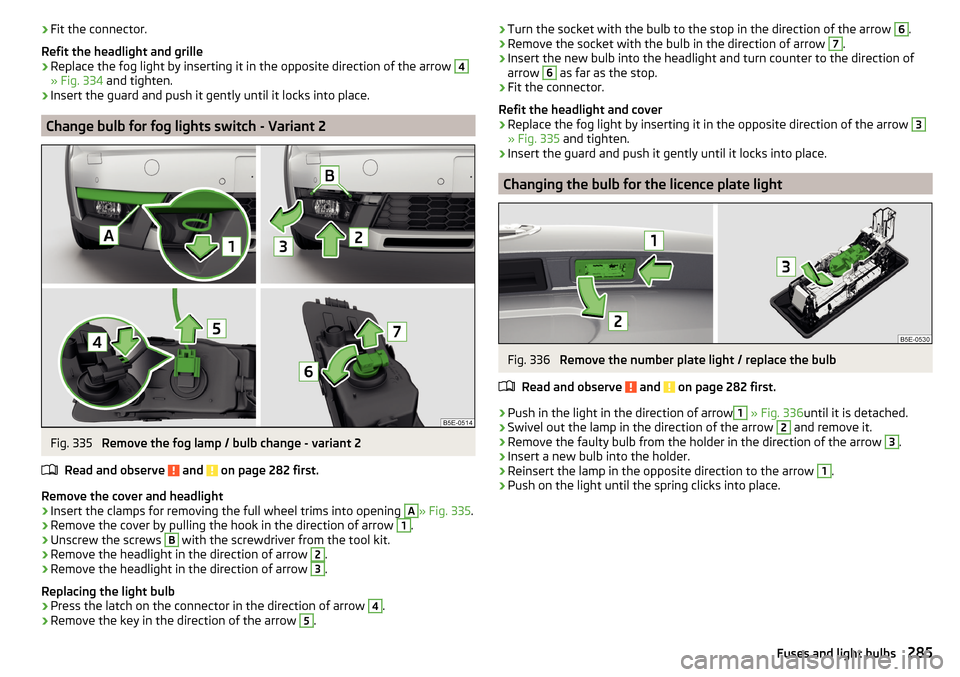
Remove the fog lamp / bulb change - variant 2
Read and observe
and on page 282 first.
Remove the cover and headlight
›
Insert the clamps for removing the full wheel trims into opening
A
» Fig. 335 .
›
Remove the cover by pulling the hook in the direction of arrow
1
.
›
Unscrew the screws
B
with the screwdriver from the tool kit.
›
Remove the headlight in the direction of arrow
2
.
›
Remove the headlight in the direction of arrow
3
.
Replacing the light bulb
›
Press the latch on the connector in the direction of arrow
4
.
›
Remove the key in the direction of the arrow
5
.
› Turn the socket with the bulb to the stop in the direction of the arrow 6.›Remove the socket with the bulb in the direction of arrow 7.›
Insert the new bulb into the headlight and turn counter to the direction of
arrow
6
as far as the stop.
›
Fit the connector.
Refit the headlight and cover
›
Replace the fog light by inserting it in the opposite direction of the arrow
3
» Fig. 335 and tighten.
›
Insert the guard and push it gently until it locks into place.
Changing the bulb for the licence plate light
Fig. 336
Remove the number plate light / replace the bulb
Read and observe
and on page 282 first.
›
Push in the light in the direction of arrow
1
» Fig. 336 until it is detached.
›
Swivel out the lamp in the direction of the arrow
2
and remove it.
›
Remove the faulty bulb from the holder in the direction of the arrow
3
.
›
Insert a new bulb into the holder.
›
Reinsert the lamp in the opposite direction to the arrow
1
.
›
Push on the light until the spring clicks into place.
285Fuses and light bulbs
Page 290 of 324
Technical data
Technical data
Basic vehicle data
Introduction
This chapter contains information on the following subjects:
Vehicle data
288
Operating weight
289
Payload
291
Measurement of fuel consumption and CO 2 emissions according to ECE
Regulations and EU Directives
291
Dimensions - Octavia
292
Dimensions - Octavia estate
293
Track gauge front/rear
294
Departure angle
295
The details given in the vehicle's technical documentation always take prece-
dence over the details in the Owner's Manual.
The performance values listed were determined without performance-reduc- ing equipment, e.g. air conditioning system.
The values given have been determined in accordance with regulations and in
conditions prescribed by legal or technical provisions for determining the oper-
ating and technical data of vehicles.
The values listed are for the basic model without optional equipment.
Vehicle dataFig. 341
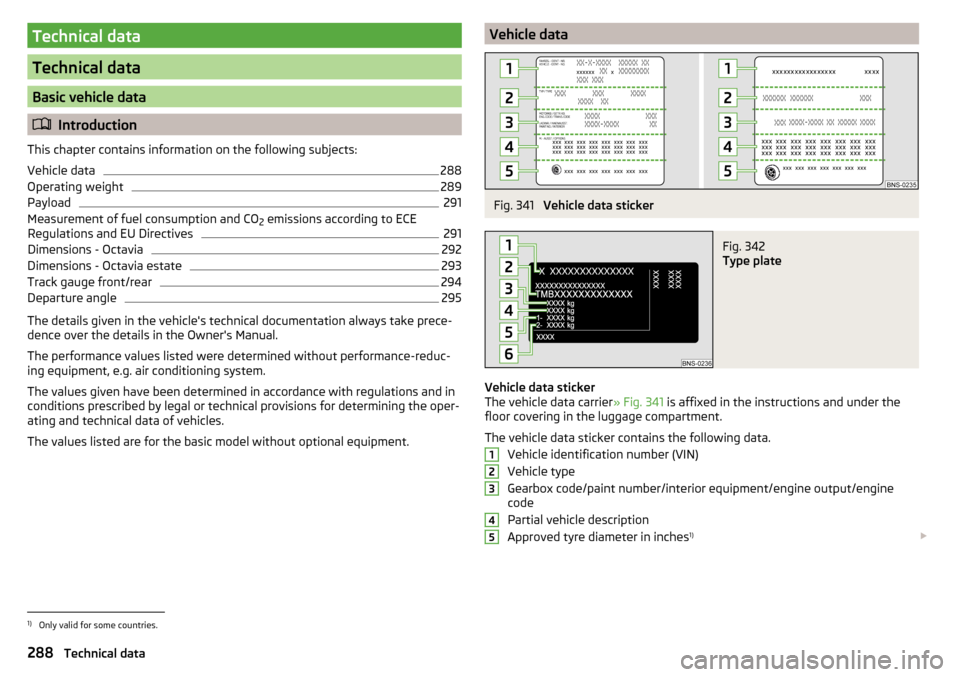
Vehicle data sticker
Fig. 342
Type plate
Vehicle data sticker
The vehicle data carrier » Fig. 341 is affixed in the instructions and under the
floor covering in the luggage compartment.
The vehicle data sticker contains the following data. Vehicle identification number (VIN)
Vehicle type
Gearbox code/paint number/interior equipment/engine output/engine
code
Partial vehicle description
Approved tyre diameter in inches 1)
123451)
Only valid for some countries.
288Technical data
Page 291 of 324
The approved tyres and rim sizes for your vehicle are listed in the vehicle's
technical documentation (the so called COC document) and this also states the
declaration of conformity.
Rating plate
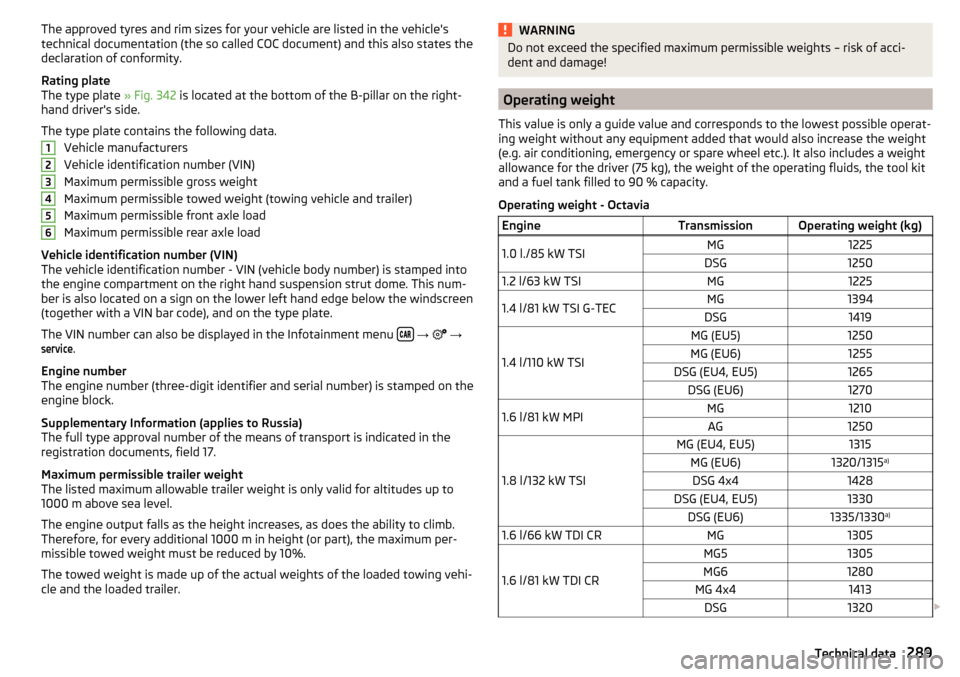
The type plate » Fig. 342 is located at the bottom of the B-pillar on the right-
hand driver's side.
The type plate contains the following data. Vehicle manufacturers
Vehicle identification number (VIN)
Maximum permissible gross weight
Maximum permissible towed weight (towing vehicle and trailer)
Maximum permissible front axle load
Maximum permissible rear axle load
Vehicle identification number (VIN)
The vehicle identification number - VIN (vehicle body number) is stamped into
the engine compartment on the right hand suspension strut dome. This num-
ber is also located on a sign on the lower left hand edge below the windscreen
(together with a VIN bar code), and on the type plate.
The VIN number can also be displayed in the Infotainment menu
→
→
service
.
Engine number
The engine number (three-digit identifier and serial number) is stamped on the
engine block.
Supplementary Information (applies to Russia)
The full type approval number of the means of transport is indicated in the
registration documents, field 17.
Maximum permissible trailer weight
The listed maximum allowable trailer weight is only valid for altitudes up to
1000 m above sea level.
The engine output falls as the height increases, as does the ability to climb.
Therefore, for every additional 1000 m in height (or part), the maximum per-
missible towed weight must be reduced by 10%.
The towed weight is made up of the actual weights of the loaded towing vehi-
cle and the loaded trailer.
123456WARNINGDo not exceed the specified maximum permissible weights – risk of acci-
dent and damage!
Operating weight
This value is only a guide value and corresponds to the lowest possible operat-
ing weight without any equipment added that would also increase the weight
(e.g. air conditioning, emergency or spare wheel etc.). It also includes a weight
allowance for the driver (75 kg), the weight of the operating fluids, the tool kit
and a fuel tank filled to 90 % capacity.
Operating weight - Octavia
EngineTransmissionOperating weight (kg)1.0 l./85 kW TSIMG1225DSG12501.2 l/63 kW TSIMG12251.4 l/81 kW TSI G-TECMG1394DSG1419
1.4 l/110 kW TSI
MG (EU5)1250MG (EU6)1255DSG (EU4, EU5)1265DSG (EU6)12701.6 l/81 kW MPIMG1210AG1250
1.8 l/132 kW TSI
MG (EU4, EU5)1315MG (EU6)1320/1315 a)DSG 4x41428DSG (EU4, EU5)1330DSG (EU6)1335/1330 a)1.6 l/66 kW TDI CRMG1305
1.6 l/81 kW TDI CR
MG51305MG61280MG 4x41413DSG1320
289Technical data
Page 310 of 324
Road sign178
Show POI176
|Alignment177
MAXI DOT See MAXI DOT display
46
MAXI DOT display Assist systems menu item
47
Audio menu item46
Lap timer47
Main menu46
Navigation menu item46
Operation43
Stop watch47
Telephone menu item47
Maximum speed296
MCB202
Mechanical window lifter open/close
59
media Compatible sources
142, 143
file formats142, 143
Requirements and Restrictions142, 143
Media Audio source
139
AUX85, 141
Bluetooth Audio141
Browser138
CD / DVD139
Foreword136
Jukebox141
List138
Main menu136
Multimedia database139
Operation136
Playback operation137
safe removal of the data source124
Safe removal of the data source130
SD card140
Select audio source137
Settings126
Set to132
USB85, 140
Voice control119
WLAN142
Media Command Control
148
Main menu147
Supported formats148
Memory45
Memory Function for the seat77
Menu Setup
122, 130
Mirror73
Vanity71
MirrorLink®167
Connection establishment168
Disconnection168
Function issues168
Main menu168
Operation168
MODE button See driving mode
221
Modes of the automatic transmission194
Modifications and technical alterations240
Most common routes181
MSR201
Multi-function pocket100
Multi-media AUX
141
Multicollision brake (MCB)202
Multifunction display Data
44
Functions44
Memory45
Multifunction pocket95
Multifunction steering wheel43
Multimedia USB
140
Multimedia database139
Multimedia holder86
Mute118
My destinations175
My POIs175
N
N1
100
Nameplate288
Natural gas operation Warning light
37
navigation Map orientation
177
Start the route guidance179
Navigation Abort route guidance
181
Advanced settings129
Alternative routes128
Contacts174
Demo mode129, 180
Destination address172
Destination details179
Destination memory174
Destination on the map173
Destination presentation in the split screen178
Destination representation176
Dynamic route128
Edit route181
Favourites174
Final destinations173
Finish route guidance181
Foreword169
Fuel options129
GPS169
Graphical driving recommendations180
Home address174
Image with GPS176
Import destination175
Imported destinations128
Intermediate target179
Main menu170
308Index
Page 317 of 324
UnlockingCentral locking button53
In case of emergency276
Remote control52
Unlocking and locking51
Unlock steering lock188
Update navigation data170
Update the navigation data129
USB85, 140
Safe removal130
Used vehicles Acceptance and recycling
242
Useful equipment 230-volt socket
90
Clothes hook88
Cup holders85
Glasses compartment87
Multimedia holder86
Removable through-loading bag89
Useful features Storage compartment
82
Useful Features 12-volt power socket in the luggage compart-ment
90
12-volt socket in the interior90
Ashtray91
Cigarette lighter91
Reflective vest265
Ticket holder83
User account Configuration wizard
118
User profile126, 132
V
Variable loading floor
100
vCard174, 175
Vehicle- settings187
Vehicle battery charging259
Safety instructions258
Warning light37
Vehicle care244
Vehicle cleaning244
Vehicle condition See auto check control
42
Vehicle data sticker288
Vehicle data sticker and nameplate Vehicle data sticker and nameplate
288
Vehicle dimensions292, 293
Vehicle height292, 293
Vehicle Identification Number (VIN)288
Vehicle length292, 293
Vehicle systems187
Vehicle tool kit266
Vehicle washing Exterior
245
Vehicle width292, 293
Vest265
Video DVD Main menu
145
Playback145
Select video source145
Set to126
Video DVD menu146
Menu146
Video player145
VIN Vehicle Identification Number
288
Visibility70
Visors71
Voice control119
Commands121
Correction of a voice command input121
Help121
Not recognising a voice command121
on / off120
Operation principle120
Settings124
Stop / restore command121
Voicemail157
Volume118
Volume setting118
W
Waiter Voice control
120
Warning at when speeding45
Warning display low temperature39
Warning lights32
Warning symbols see Warning lights
32
Warning triangle265
Waste container85
Water in the fuel filter40
Waypoint mode183
Main menu183
Record waypoints184
Set waypoint manually184
Waypoint tour memory184, 185
Waypoint tour memory184, 185
Weather conditions240
Weights288, 289, 291
Wheel bolts Anti-theft wheel bolts
268
Caps268
Loosening and tightening269
Wheels260
Full trim267
Load Index263
Snow chains263
Speed symbol263
Tyre age260
Tyre damage260
Tyre pressure261
Tyre storage260
315Index