steering SKODA RAPID 2013 1.G User Guide
[x] Cancel search | Manufacturer: SKODA, Model Year: 2013, Model line: RAPID, Model: SKODA RAPID 2013 1.GPages: 226, PDF Size: 15.16 MB
Page 89 of 226
All communication between a mobile phone and your vehicle's hands-free systemis established with the help of Bluetooth ®
technology.
Phone Phonebook
First read and observe the introductory information and safety warn-
ings
on page 85.
A phone phonebook is part of the hands-free system. This phone phonebook can
be used depending on the type of mobile phone.
After the first connection of the telephone, the system begins to load the phonebook from the phone and the SIM card into the memory of the control unit.
Each time the telephone has established a new connection with the hands-free
system, an update of the relevant phone book is performed. The updating can
take a few minutes. During this time the phone book, which was stored after the last update was completed, is available. Newly stored telephone numbers are on-ly shown after the updating has ended.
The update is interrupted if a telephone event (e.g. incoming or outgoing call,
voice control dialogue) occurs during the updating procedure. After the telephone
event has ended, the updating starts anew.
The internal phonebook provides 2 500 free memory locations. Each contact can contain up to 4 numbers.
If the number of contacts loaded exceeds 2 500, the phone book is not complete.
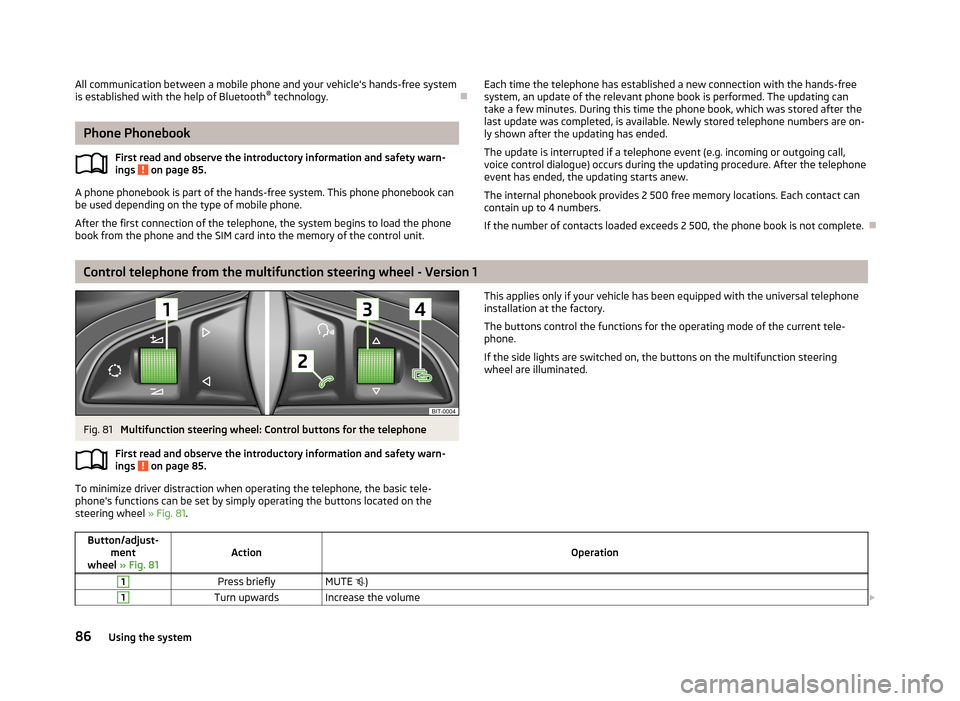
Control telephone from the multifunction steering wheel - Version 1
Fig. 81
Multifunction steering wheel: Control buttons for the telephone
First read and observe the introductory information and safety warn-
ings
on page 85.
To minimize driver distraction when operating the telephone, the basic tele- phone's functions can be set by simply operating the buttons located on the
steering wheel » Fig. 81.
This applies only if your vehicle has been equipped with the universal telephone
installation at the factory.
The buttons control the functions for the operating mode of the current tele- phone.
If the side lights are switched on, the buttons on the multifunction steering wheel are illuminated.Button/adjust- ment
wheel » Fig. 81ActionOperation
1Press brieflyMUTE )1Turn upwardsIncrease the volume 86Using the system
Page 90 of 226
Button/adjust-ment
wheel » Fig. 81ActionOperation
1Turn downwardsReduce the volume2Press brieflyAccept a call/end a call
Display of the basic Phone menu → a)
Main Phone menu → List of dialled numbers → Call selected contact2Press and hold buttonReject the incoming call3Turn up/downPrevious / next menu item3Press brieflyConfirm selected menu item3Press and hold buttonContinuously display first letter of the phone book3Quickly turn upwardsTo the previous initial letter in the telephone book3Quickly turn downwardsTo the next initial letter in the telephone book4Press brieflyReturn to a previous level in the menu4Press and hold buttonExit telephone menua)
The symbol The → symbol means briefly press button again.
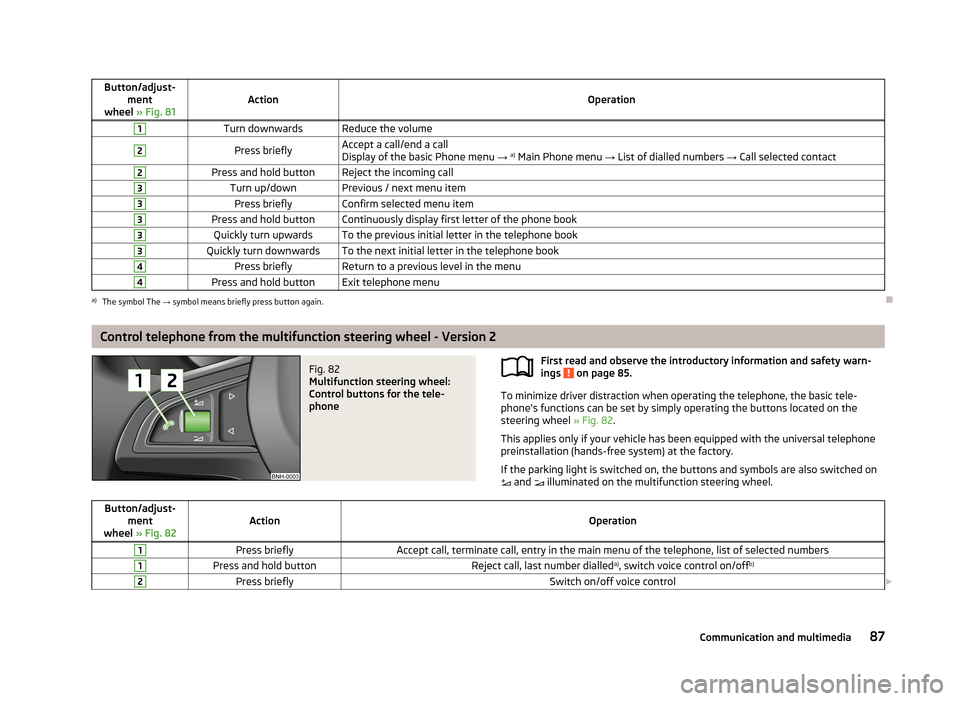
Control telephone from the multifunction steering wheel - Version 2
Fig. 82
Multifunction steering wheel:
Control buttons for the tele-
phone
First read and observe the introductory information and safety warn-
ings on page 85.
To minimize driver distraction when operating the telephone, the basic tele- phone's functions can be set by simply operating the buttons located on the
steering wheel » Fig. 82.
This applies only if your vehicle has been equipped with the universal telephone preinstallation (hands-free system) at the factory.
If the parking light is switched on, the buttons and symbols are also switched on and illuminated on the multifunction steering wheel.
Button/adjust-
ment
wheel » Fig. 82ActionOperation
1Press brieflyAccept call, terminate call, entry in the main menu of the telephone, list of selected numbers1Press and hold buttonReject call, last number dialled a)
, switch voice control on/off b)2Press brieflySwitch on/off voice control
87Communication and multimedia
Page 93 of 226
Bluetooth
The following menu items can be selected from the Bluetooth menu item.
■ User - Overview of the stored telephones
■ New user - Search for new mobile phones that are in the reception range
■ Visibility - Switches on the visibility of the hands-free system for other devices
■ Media player - Playback via Bluetooth ®
■ Active device - Connected device
■ Paired devices - List of paired devices
■ Search - Device search
■ Phone name - option to change the name of the phone (default SKODA_BT)
Settings
The following menu items can be selected from the Settings menu item.
■ Telephone book - Phonebook
■ Update - Update the phone book 1)
■ List - Arrange the entries in the phone book
■ Surname - Arrange according to surname
■ First name - Arrange according to first name
■ Ring tone - Ring tone setting
Back
Return in the Start menu of the telephone.
Voice control
Introduction
This chapter contains information on the following subjects:
Dialogue – version 1
90
Dialogue – version 2
91
Voice commands
92
Dialogue – version 1Fig. 83
Multifunction steering wheel: Voice control
First read and observe the introductory information given on page 90.
The period of time during which the system is ready to receive voice commands and to carry them out is called "dialogue". The system gives audible feedback and
guides you through the relevant functions if necessary.
Optimum understanding of the voice commands depends on several factors.
› Speak at a normal volume without intonation or excessive pauses.
› Avoid poor pronunciation.
› Close the doors, windows and sliding roof in order to reduce or eliminate dis-
turbing noise from outside.
› It is recommended to speak louder at higher speeds, so that your voice is louder
than the increased surrounding noise.
› During the dialogue, limit background noise in the vehicle, e.g. passengers talk-
ing at the same time.
› Do not speak when the system is making an announcement.
The microphone for voice control is housed in the moulded headliner and directed
towards the driver and front passenger. Therefore, the driver and the front pas-
senger can operate the equipment.
1)
On vehicles fitted with the Amundsen+ navigation system, this function can be accessed via the navi-
gation system menu; refer to the » operating instructions for the Amundsen+ navigation system .
90Using the system
Page 94 of 226
Entering a phone number
The telephone number can be entered as a continuous sequence of numbers spo-
ken one after the other (the whole number at once) or in the form of digit blocks
(separated by short pauses). After each string of digits (separated by a brief pause
in speaking), all of the digits detected up to now are repeated by the system.
The digits 0-9 and symbols +, , # are permitted. The system does not recognize
any combination of connected numbers, e.g. "twenty-three".
Switching on voice control
Briefly press the button 1
» Fig. 83 on the multifunction steering wheel.
Switching off voice control
If the system is currently playing a message, the message that is currently being
played must be terminated by briefly pressing button
1
» Fig. 83 on the multi-
function steering wheel.
If the system is expecting a voice command, you can end the dialogue yourself:
› with the
CANCEL voice command;
› by briefly pressing the button
1
» Fig. 83 on the multifunction steering wheel.
Note
■
The dialogue is immediately terminated in the event of an incoming call.■The voice control is only possible in vehicles fitted with a multifunction steering
wheel with telephone control.
Dialogue – version 2
Fig. 84
Multifunction steering wheel:
Voice control
First read and observe the introductory information given on page 90.
The period of time during which the system is ready to receive voice commands and to carry them out is called "dialogue". The system gives audible feedback and
guides you through the relevant functions if necessary.
Optimum understanding of the voice commands depends on several factors. › Speak at a normal volume without intonation or excessive pauses.
› Avoid poor pronunciation.
› Close the doors, windows and sliding roof in order to reduce or eliminate dis-
turbing noise from outside.
› It is recommended to speak louder at higher speeds, so that your voice is louder
than the increased surrounding noise.
› During the dialogue, limit background noise in the vehicle, e.g. passengers talk-
ing at the same time.
› Do not speak when the system is making an announcement.
The microphone for voice control is housed in the moulded headliner and directed towards the driver and front passenger. Therefore, the driver and the front pas-
senger can operate the equipment.
Entering a phone number
The telephone number can be entered as a continuous sequence of numbers spo-
ken one after the other (the whole number at once) or in the form of digit blocks
(separated by short pauses). After each string of digits (separated by a brief pause
in speaking), all of the digits detected up to now are repeated by the system.
The digits 0-9 and symbols +,
, # are permitted. The system does not recognize
any combination of connected numbers, e.g. "twenty-three".
Switching on voice control
Briefly press the button
1
» Fig. 84 on the multifunction steering wheel.
Switching off voice control
If the system is currently playing a message, the message that is currently being
played must be terminated by briefly pressing button
1
» Fig. 84 on the multi-
function steering wheel.
If the system is expecting a voice command, you can end the dialogue yourself:
› with the
CANCEL voice command;
› by briefly pressing the button
1
» Fig. 84 on the multifunction steering wheel.
91Communication and multimedia
Page 95 of 226
Note■The dialogue is immediately terminated in the event of an incoming call.■The voice control is only possible in vehicles fitted with a multifunction steering
wheel with telephone control.
Voice commands
First read and observe the introductory information given on page 90.
Basic voice commands
Voice commandActionHELPAfter this command the system repeats all possible
commands.CALL XYZThis command calls up the contact from the phone book.PHONE BOOKAfter this command, for example, the phone book
can be repeated back to you, a voice entry for the
contact can be updated or deleted, etc.CALL HISTORYLists of dialled numbers, missed calls, etc.DIAL NUMBERAfter this command, a telephone number can be en- tered to establish a connection with the requested
party.REDIALAfter this command the system calls the last dialled number.MUSIC a)Play music from the mobile phone or another paired
device.FURTHER OPTIONSAfter this command the system offers additional
context-dependent commands.SETTINGSSelection for setting Bluetooth ®
, dialogue etc.CANCELThe dialogue is ended.a)
On vehicles fitted with the Amundsen+ navigation system, this function can be accessed via the navi-
gation system menu; refer to the » operating instructions for the Amundsen+ navigation system .
If a voice command is not detected, the system answers with “ Sorry?” and a new
entry can be completed. After the 2nd error the system repeats the aid. After the
3rd error the answer “ Cancelled” is given and the dialogue is ended.
Store voice recording of a contact
If automatic name recognition does not work reliably for some contacts, you can choose to save your own voice tag for the contact in the Phone book - Voice tag -
Record menu item.
Your own voice entry can also be saved using the voice control in the menu FUR-
THER OPTIONS .
Multimedia
Introduction
This chapter contains information on the following subjects:
Music playback via Bluetooth ®
92
Operating the radio and navigation system on the multifunction steering
wheel - Version 1
93
Operating the radio and navigation system on the multifunction steering
wheel - Version 2
94
AUX and MDI inputs
95
Music playback via Bluetooth ®
First read and observe the introductory information given on page 92.
The universal telephone preinstallation GSM II makes it possible to play back mu-
sic via Bluetooth ®
from the devices such as MP3 player, mobile phone or note-
book.
To ensure that music can be played via Bluetooth ®
, you must first pair the device
with the hands-free system in the Phone - Bluetooth - Media player menu.
The music playback process is performed on the connected device.
The universal telephone preinstallation GSM II ensures that the music played back
via the hands-free system can be controlled with the remote control » page 92,
Voice commands .
92Using the system
Page 96 of 226
NoteThe device being connected must support the Bluetooth®
A2DP profile; refer to
the operating instructions for the relevant device being connected.
Operating the radio and navigation system on the multifunction steering wheel - Version 1
Fig. 85
Multifunction steering wheel: Navigation control buttons
First read and observe the introductory information given on page 92.
The multifunction steering wheel features buttons for operating the basic func-
tions for the factory-fitted radio and navigation system » Fig. 85.
The radio and the navigation system can of course still be operated via the devi-
ces. A description is included in the relevant operating instructions.
If the side lights are switched on, the buttons on the multifunction steering
wheel are illuminated.
The buttons apply for the respective operating mode of the current radio, audio,
video or navigation system.
The following functions can be completed by pressing or turning the buttons.Button/adjust- ment
wheel » Fig. 85ActionRadioAudio sourcesNavigation
1PressChange audio source2PressSwitch tone off/on (MUTE )Interrupt current navigation announce-
ment2Turn upwardsIncrease the volume2Turn downwardsReduce the volume3Press brieflySkip to next channelSkip to next trackNo functionInterrupt traffic report3Press and hold buttonNo functionFast-forwardNo function4Press brieflySwitch to previous channelSwitch to start of track a)No functionInterrupt traffic report
93Communication and multimedia
Page 97 of 226
Button/adjust-ment
wheel » Fig. 85ActionRadioAudio sourcesNavigation
4Press and hold buttonNo functionRewindNo function5
Turn upwardsSwitch to the previous station and at
the same time
display list of saved/available stationsSkip to next trackShow the option to stop navigation or display the list of recent destinations
5
Turn downwardsSwitch to the next station and at the same time
display list of saved/available stationsSwitch to start of track a)
6Press brieflyCall up the main menua)
To go to the previous track, press the adjustment wheel twice or rotate it by two positions.
Operating the radio and navigation system on the multifunction steering wheel - Version 2
Fig. 86
Multifunction steering wheel:
Navigation control buttons
First read and observe the introductory information given on page 92.
The multifunction steering wheel features buttons for operating the basic func-
tions for the factory-fitted radio and navigation system » Fig. 86.
The radio and navigation system can of course still be operated on the devices. A
description is included in the relevant operating instructions.
If the side lights are switched on, the buttons on the multifunction steeringwheel are illuminated.
The buttons apply for the respective operating mode of the current radio or navi-
gation system.
The following functions can be completed by pressing or turning the buttons.Button/adjust- ment
wheel » Fig. 86ActionRadio, traffic informationCD/MP3/Navigation
1Press brieflySwitch off/on tone1Press and hold
buttonSwitch the unit on/off1Turn upwardsIncrease the volume 94Using the system
Page 99 of 226
Driving
Starting-off and Driving
Steering
Introduction
Fig. 88
Correct seated position for the
driver
This chapter contains information on the following subjects:
Adjusting the steering wheel position
96
Power steering
97WARNING■ When driving, hold the steering wheel with both hands firmly on the outer
edge in the 9 o'clock and 3 o'clock position. Never hold the steering wheel in
the 12 o'clock position or in any other way (e.g. in the middle or inner edge of
the steering wheel). In such cases, you could severely injure the arms, hands
and head when the driver airbag is deployed.■
Never adjust the steering wheel when the vehicle is moving only when the
vehicle is stationary!
WARNING (Continued)■ Adjust the steering wheel so that the distance A » Fig. 88 between the
steering wheel and your chest is at least 25 cm. Not maintaining this minimum
distance will mean that the airbag system will not be able to properly protect
you - hazard!■
If the steering wheel is adjusted further towards the head, the protection
provided by the driver airbag in the event of an accident is reduced. Check
that the steering wheel is aligned to the chest.
Adjusting the steering wheel position
Fig. 89
Adjustable steering wheel: Lever
below steering wheel
First read and observe the introductory information and safety warn-
ings on page 96.
The height and forward/back position of the steering wheel can be adjusted.
›
First of all adjust the driver's seat » page 52.
›
Swivel the lever underneath the steering wheel downwards » Fig. 89.
›
Adjust the steering wheel to the desired position (with regard to the height and
forward/back position).
›
Push the lever upwards to the stop.
WARNINGThe lever for adjusting the steering wheel must be locked whilst driving so
that the steering wheel cannot accidentally change position during the jour-
ney – risk of accident!
96Driving
Page 100 of 226

Power steeringFirst read and observe the introductory information and safety warn-ings
on page 96.
The power steering enables you to steer the vehicle with less physical force.
The power steering only works when the engine is running. It is still fully possible to steer the vehicle if the power steering fails or if the en-gine is not running (e.g. when towing). However, greater physical effort is re-
quired to turn the steering wheel.
Starting and stopping the engine
Introduction
This chapter contains information on the following subjects:
Electronic immobiliser
98
Ignition switch
98
Starting the engine
98
Switching off the engine
99
The engine can only be started using a correctly coded original key. The engine running noises may louder at first be louder for a short time afterstarting the cold engine. This is quite normal and is not an operating problem.
WARNING■ When driving without the engine running, the ignition key must always be in
the position 2 » Fig. 90 on page 98 (ignition switched on). This position is
indicated by the illumination of certain indicator lights in the instrument clus-
ter. ■ If the key is not in position 2
, this could lead to unexpected the steering
locking - risk of accident!
■
Only pull the ignition key from the ignition lock when the vehicle has come
to a complete stop (by applying the handbrake). Otherwise, the steering could
be blocked – risk of accident!
WARNING (Continued)■ When leaving the vehicle, the ignition must always be removed. This is par-
ticularly important if children are left in the vehicle. Children could otherwise
start the engine for example – risk of accident or injury!■
Never leave the vehicle unattended with the engine running.
■
Never switch off the engine before the vehicle is stationary – risk of acci-
dent!
WARNING■ Never leave the engine running in unventilated or closed rooms. The ex-
haust gases from the engine contain substances such as odourless and col-
ourless carbon monoxide (a poisonous gas) – risk to life! ■ Carbon monoxide can cause unconsciousness and death.
CAUTION
■The starter must only be operated when the engine is not running and the vehi-
cle is at a standstill. The starter or engine may be damaged if the starter is activa- ted when the engine is running 3
» Fig. 90 on page 98.
■
Do not tow start the engine – there is a risk of damaging the engine and the
catalytic converter. The battery from another vehicle can be used as a jump-start
aid » page 189 , Jump-starting .
CAUTION
■
Avoid high engine revolutions, full throttle and high engine loads before the en-
gine has reached its operating temperature – risk of damaging the engine!■
Do not switch the engine off immediately at the end of your journey after the
engine has been operated over a prolonged period at high loads but leave it to
run at an idling speed for about 1 minute. This prevents any possible accumulation
of heat when the engine is switched off.
For the sake of the environment
Do not warm up the engine while the vehicle is stationary. If possible, start your
journey as soon as the engine has started. Through this the engine reaches its
operating temperature more rapidly and the pollutant emissions are lower. 97Starting-off and Driving
Page 101 of 226
NoteAfter switching off the ignition, the radiator fan may intermittently continue to
operate for approx. 10 minutes.
Electronic immobiliser
First read and observe the introductory information and safety warn-
ings
on page 97.
An electronic chip is integrated in the head of the key. The immobiliser is deacti-
vated with the aid of this chip when the key is inserted in the ignition lock.
The electronic immobiliser is automatically activated when the ignition key is
withdrawn from the lock.
The engine will not start if a non-authorized ignition key is used.
The following message is shown in the information cluster display. Immobilizer active.
IMMOBILISER
Ignition switch
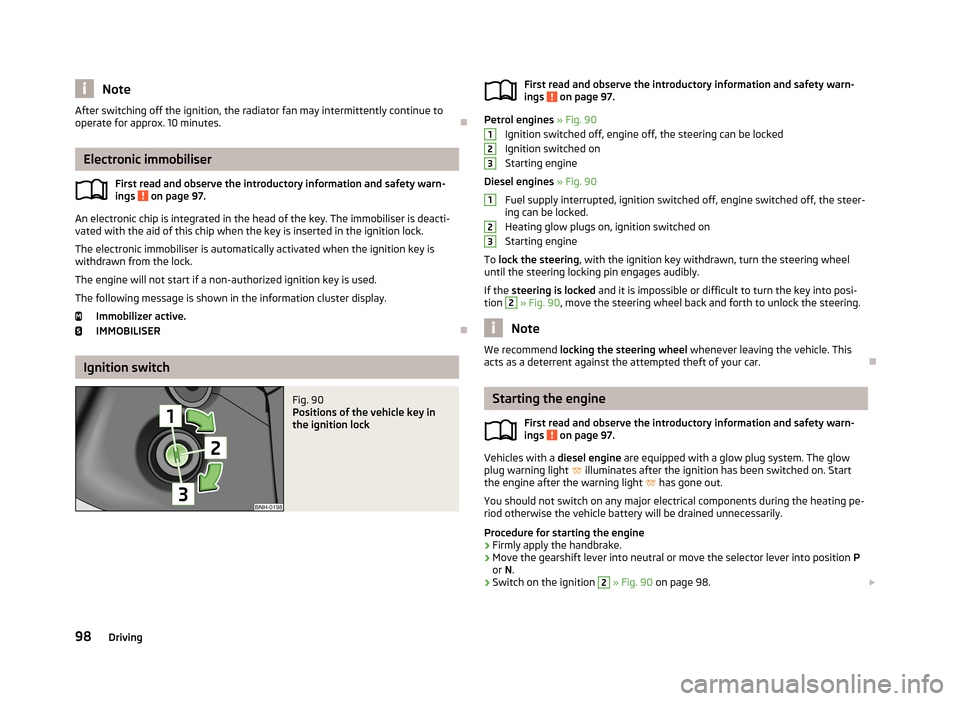
Fig. 90
Positions of the vehicle key in
the ignition lockFirst read and observe the introductory information and safety warn- ings on page 97.
Petrol engines » Fig. 90
Ignition switched off, engine off, the steering can be locked
Ignition switched on Starting engine
Diesel engines » Fig. 90
Fuel supply interrupted, ignition switched off, engine switched off, the steer-
ing can be locked.
Heating glow plugs on, ignition switched on
Starting engine
To lock the steering , with the ignition key withdrawn, turn the steering wheel
until the steering locking pin engages audibly.
If the steering is locked and it is impossible or difficult to turn the key into posi-
tion
2
» Fig. 90 , move the steering wheel back and forth to unlock the steering.
Note
We recommend locking the steering wheel whenever leaving the vehicle. This
acts as a deterrent against the attempted theft of your car.
Starting the engine
First read and observe the introductory information and safety warn-
ings
on page 97.
Vehicles with a diesel engine are equipped with a glow plug system. The glow
plug warning light
illuminates after the ignition has been switched on. Start
the engine after the warning light
has gone out.
You should not switch on any major electrical components during the heating pe- riod otherwise the vehicle battery will be drained unnecessarily.
Procedure for starting the engine
›
Firmly apply the handbrake.
›
Move the gearshift lever into neutral or move the selector lever into position P
or N.
›
Switch on the ignition
2
» Fig. 90 on page 98.
12312398Driving