ignition SKODA RAPID 2013 1.G Owner's Guide
[x] Cancel search | Manufacturer: SKODA, Model Year: 2013, Model line: RAPID, Model: SKODA RAPID 2013 1.GPages: 226, PDF Size: 15.16 MB
Page 63 of 226
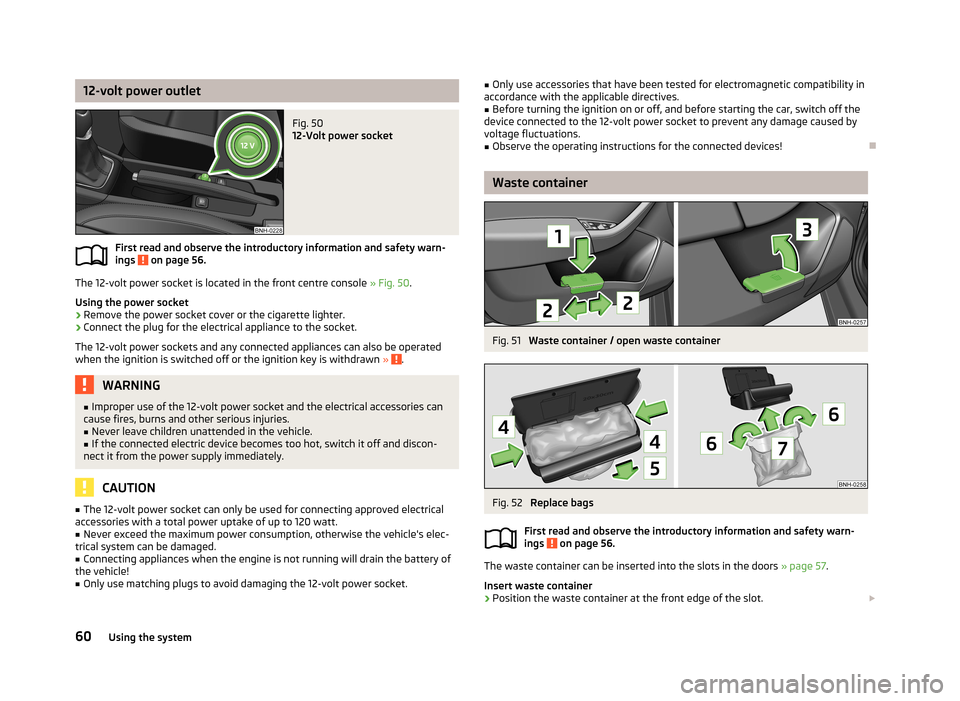
12-volt power outletFig. 50
12-Volt power socket
First read and observe the introductory information and safety warn-ings on page 56.
The 12-volt power socket is located in the front centre console » Fig. 50.
Using the power socket
›
Remove the power socket cover or the cigarette lighter.
›
Connect the plug for the electrical appliance to the socket.
The 12-volt power sockets and any connected appliances can also be operated when the ignition is switched off or the ignition key is withdrawn »
.
WARNING■
Improper use of the 12-volt power socket and the electrical accessories can
cause fires, burns and other serious injuries.■
Never leave children unattended in the vehicle.
■
If the connected electric device becomes too hot, switch it off and discon-
nect it from the power supply immediately.
CAUTION
■ The 12-volt power socket can only be used for connecting approved electrical
accessories with a total power uptake of up to 120 watt.■
Never exceed the maximum power consumption, otherwise the vehicle's elec-
trical system can be damaged.
■
Connecting appliances when the engine is not running will drain the battery of
the vehicle!
■
Only use matching plugs to avoid damaging the 12-volt power socket.
■ Only use accessories that have been tested for electromagnetic compatibility in
accordance with the applicable directives.■
Before turning the ignition on or off, and before starting the car, switch off the
device connected to the 12-volt power socket to prevent any damage caused by
voltage fluctuations.
■
Observe the operating instructions for the connected devices!
Waste container
Fig. 51
Waste container / open waste container
Fig. 52
Replace bags
First read and observe the introductory information and safety warn-
ings
on page 56.
The waste container can be inserted into the slots in the doors » page 57.
Insert waste container
›
Position the waste container at the front edge of the slot.
60Using the system
Page 83 of 226
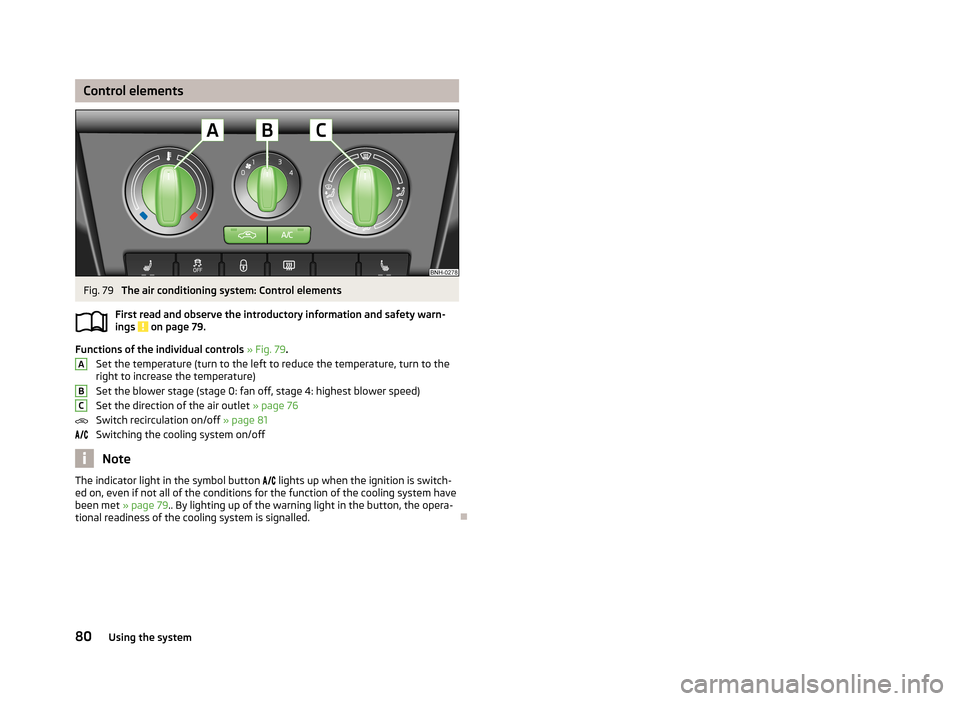
Control elementsFig. 79
The air conditioning system: Control elements
First read and observe the introductory information and safety warn- ings
on page 79.
Functions of the individual controls » Fig. 79 .
Set the temperature (turn to the left to reduce the temperature, turn to the
right to increase the temperature)
Set the blower stage (stage 0: fan off, stage 4: highest blower speed)
Set the direction of the air outlet » page 76
Switch recirculation on/off » page 81
Switching the cooling system on/off
Note
The indicator light in the symbol button lights up when the ignition is switch-
ed on, even if not all of the conditions for the function of the cooling system have
been met » page 79.. By lighting up of the warning light in the button, the opera-
tional readiness of the cooling system is signalled.
ABC80Using the system
Page 86 of 226
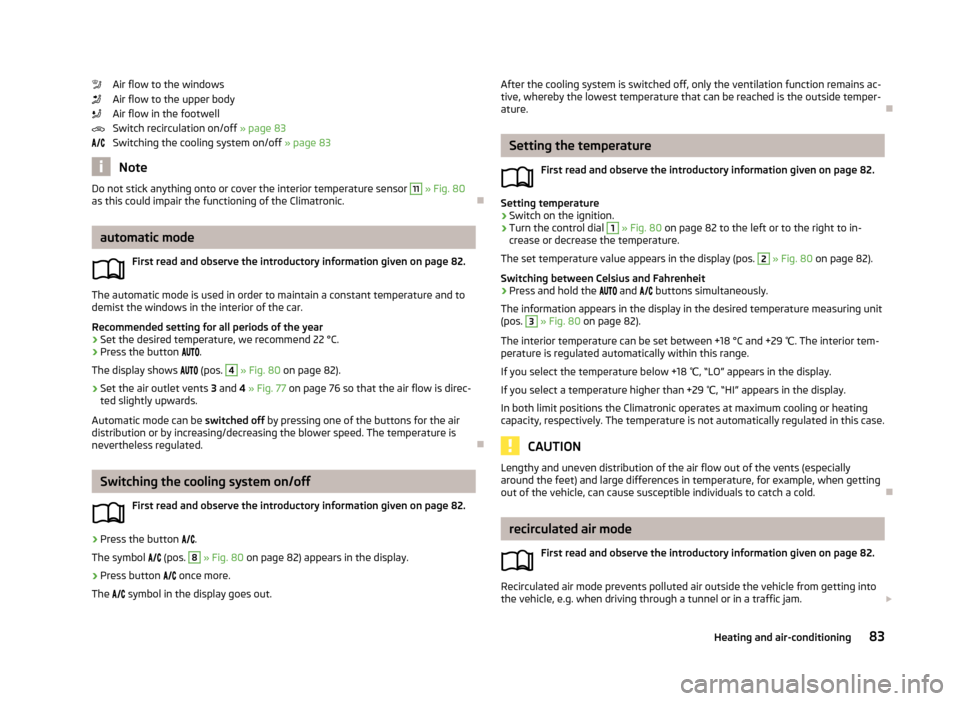
Air flow to the windows
Air flow to the upper body
Air flow in the footwell
Switch recirculation on/off » page 83
Switching the cooling system on/off » page 83
Note
Do not stick anything onto or cover the interior temperature sensor 11 » Fig. 80
as this could impair the functioning of the Climatronic.
automatic mode
First read and observe the introductory information given on page 82.
The automatic mode is used in order to maintain a constant temperature and to
demist the windows in the interior of the car.
Recommended setting for all periods of the year
›
Set the desired temperature, we recommend 22 °C.
›
Press the button
.
The display shows
(pos.
4
» Fig. 80 on page 82).
›
Set the air outlet vents 3 and 4 » Fig. 77 on page 76 so that the air flow is direc-
ted slightly upwards.
Automatic mode can be switched off by pressing one of the buttons for the air
distribution or by increasing/decreasing the blower speed. The temperature is
nevertheless regulated.
Switching the cooling system on/off
First read and observe the introductory information given on page 82.
›
Press the button
.
The symbol
(pos.
8
» Fig. 80 on page 82) appears in the display.
›
Press button
once more.
The
symbol in the display goes out.
After the cooling system is switched off, only the ventilation function remains ac-
tive, whereby the lowest temperature that can be reached is the outside temper- ature.
Setting the temperature
First read and observe the introductory information given on page 82.
Setting temperature
›
Switch on the ignition.
›
Turn the control dial
1
» Fig. 80 on page 82 to the left or to the right to in-
crease or decrease the temperature.
The set temperature value appears in the display (pos.
2
» Fig. 80 on page 82).
Switching between Celsius and Fahrenheit
›
Press and hold the
and
buttons simultaneously.
The information appears in the display in the desired temperature measuring unit
(pos.
3
» Fig. 80 on page 82).
The interior temperature can be set between +18 °C and +29 ℃. The interior tem-
perature is regulated automatically within this range.
If you select the temperature below +18 ℃, “LO” appears in the display.
If you select a temperature higher than +29 ℃, “HI” appears in the display.
In both limit positions the Climatronic operates at maximum cooling or heating
capacity, respectively. The temperature is not automatically regulated in this case.
CAUTION
Lengthy and uneven distribution of the air flow out of the vents (especially
around the feet) and large differences in temperature, for example, when getting
out of the vehicle, can cause susceptible individuals to catch a cold.
recirculated air mode
First read and observe the introductory information given on page 82.
Recirculated air mode prevents polluted air outside the vehicle from getting into
the vehicle, e.g. when driving through a tunnel or in a traffic jam.
83Heating and air-conditioning
Page 91 of 226
Button/adjust-ment
wheel » Fig. 82ActionOperation
2Turn upwardsIncrease the volume2Turn downwardsDecrease volumea)
Valid for vehicles with the Amundsen+ navigation system.
b)
Valid for vehicles without the Amundsen+ navigation system.
Symbols in the display
First read and observe the introductory information and safety warn-
ings
on page 85.
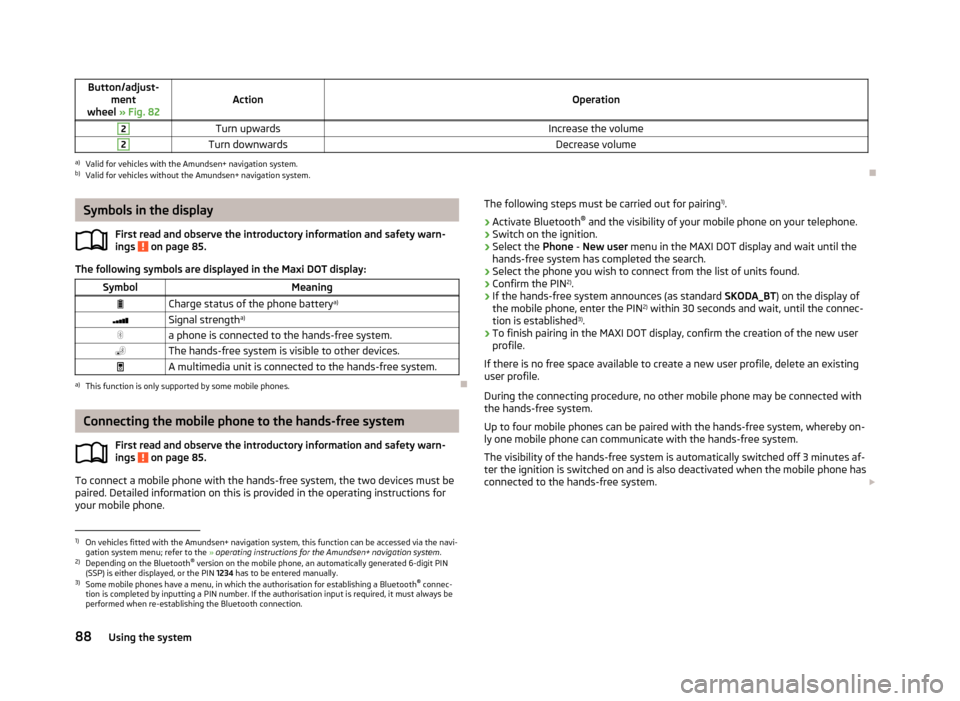
The following symbols are displayed in the Maxi DOT display:
SymbolMeaningCharge status of the phone battery a)Signal strengtha)a phone is connected to the hands-free system.The hands-free system is visible to other devices.A multimedia unit is connected to the hands-free system.a)
This function is only supported by some mobile phones.
Connecting the mobile phone to the hands-free system
First read and observe the introductory information and safety warn-
ings
on page 85.
To connect a mobile phone with the hands-free system, the two devices must be paired. Detailed information on this is provided in the operating instructions for
your mobile phone.
The following steps must be carried out for pairing 1)
.›
Activate Bluetooth ®
and the visibility of your mobile phone on your telephone.
›
Switch on the ignition.
›
Select the Phone - New user menu in the MAXI DOT display and wait until the
hands-free system has completed the search.
›
Select the phone you wish to connect from the list of units found.
›
Confirm the PIN 2)
.
›
If the hands-free system announces (as standard SKODA_BT) on the display of
the mobile phone, enter the PIN 2)
within 30 seconds and wait, until the connec-
tion is established 3)
.
›
To finish pairing in the MAXI DOT display, confirm the creation of the new user
profile.
If there is no free space available to create a new user profile, delete an existing
user profile.
During the connecting procedure, no other mobile phone may be connected with the hands-free system.
Up to four mobile phones can be paired with the hands-free system, whereby on- ly one mobile phone can communicate with the hands-free system.
The visibility of the hands-free system is automatically switched off 3 minutes af-
ter the ignition is switched on and is also deactivated when the mobile phone has connected to the hands-free system.
1)
On vehicles fitted with the Amundsen+ navigation system, this function can be accessed via the navi-
gation system menu; refer to the » operating instructions for the Amundsen+ navigation system .
2)
Depending on the Bluetooth®
version on the mobile phone, an automatically generated 6-digit PIN
(SSP) is either displayed, or the PIN 1234 has to be entered manually.
3)
Some mobile phones have a menu, in which the authorisation for establishing a Bluetooth ®
connec-
tion is completed by inputting a PIN number. If the authorisation input is required, it must always be
performed when re-establishing the Bluetooth connection.
88Using the system
Page 92 of 226
Restoring the visibility of the hands-free system
If you have not managed to connect your mobile phone with the hands-free sys-
tem within 3 minutes of switching on the ignition, the visibility of the hands-free
system can be re-established for 3 minutes in one of the following ways.
› By turning the ignition off and on.
› By turning voice control off and on.
› In the MAXI DOT display under menu item
Bluetooth - Visibility .
Creating a connection with an already paired mobile phone
After switching on the ignition, the connection is automatically established for
the already paired mobile phone 1)
. Check on your mobile phone if the automatic
connection has been established.
Disconnecting the connection
The connection to a connected mobile phone can be ended in the following ways. › By withdrawing the ignition key.
› By disconnecting the hands-free system in the mobile phone.
› By disconnecting from the user in the MAXI DOT display under the menu item
Bluetooth - User .
Solving connection problems
If the hands-free system reports No paired phone found, check the operating
status of the mobile phone.
› Is the mobile phone switched on?
› Is the PIN code entered?
› Is Bluetooth ®
active?
› Is the visibility of the mobile phone active?
› Has the mobile phone already been paired with the hands-free system?
Telephone operation in the MAXI DOT display
First read and observe the introductory information and safety warn-ings
on page 85.
The following menu items can be selected from the Phone menu.
› Telephone book
› Dial number 2)
› Call lists
› Voice mailbox
› Bluetooth 2)
› Settings 3)
› Back
Telephone book
The Phone book menu item lists the contacts downloaded from the telephone
memory and the mobile phone SIM card.
Dial number
Any telephone number can be entered in the Dial number menu item. The re-
quired numbers must be selected one after the other using adjustment wheel
and confirmed by pressing the adjustment wheel. You can select digits 0-9, sym-
bols
,
, # and the Cancel, Call and Delete functions.
Call lists
The following menu items can be selected in the Call list menu item.
■ Missed calls
■ Dialled numbers
■ Received calls
Voice mailbox
In the Voice mailbox menu item, you can set the number of the voice mailbox 2)
and then dial the number.
1)
Some mobile phones have a menu, in which the authorisation for establishing a Bluetooth®
connec-
tion is completed by inputting a PIN number. If the authorisation input is required, it must always be
performed when re-establishing the Bluetooth connection.
2)
On vehicles fitted with the Amundsen+ navigation system, this function can be accessed via the navi-
gation system menu; refer to the » operating instructions for the Amundsen+ navigation system .
3)
This function is not available in vehicles fitted with the Amundsen+ navigation system.
89Communication and multimedia
Page 98 of 226
Button/adjust-ment
wheel » Fig. 86ActionRadio, traffic informationCD/MP3/Navigation
1Turn downwardsReduce the volume2Press brieflySwitch to the next saved radio station
Interruption of the traffic reportChanging to the next title2Press and hold buttonSearch forwardsFast forward3Press brieflySwitch to the previous saved radio station Interruption of the traffic reportChanging to the previous title3Press and holdbuttonSearch backwardsFast rewindNoteThe functions of button 1 » Fig. 86 are different for vehicles fitted with a univer-
sal telephone installation GSM II » page 87.
AUX and MDI inputs
Fig. 87
AUX input/MDI input
First read and observe the introductory information given on page 92.
Depending on the equipment, your vehicle may have AUX or MDI inputs (AUX and
USB) for connecting external audio sources.
The connected external audio sources (e.g. iPod or MP3 player) can then be used
for audio playback on your factory installed radio or radio-navigation system.
Extension cables to connect external sources are available from ŠKODA original
accessories.
For a description of use, refer to the operating instructions for the relevant radio or navigation system.
AUX input
The AUX input is located in one of the following places:
› Between the front seats in the centre console
» Fig. 87 - ;
› On the front of the Amundsen+ navigation system.
Multi-Device Interface (MDI) input
If vehicles are equipped with the MDI input, this will be located above the storage compartment in the front centre console » Fig. 87 -
.
External sources such as iPod ®
, iPad ®
or iPhone ®
connected to the MDI input can
be operated via your unit.
When the ignition is on and a device is connected via a connecting cable, the de-
vice battery is charged.
95Communication and multimedia
Page 100 of 226

Power steeringFirst read and observe the introductory information and safety warn-ings
on page 96.
The power steering enables you to steer the vehicle with less physical force.
The power steering only works when the engine is running. It is still fully possible to steer the vehicle if the power steering fails or if the en-gine is not running (e.g. when towing). However, greater physical effort is re-
quired to turn the steering wheel.
Starting and stopping the engine
Introduction
This chapter contains information on the following subjects:
Electronic immobiliser
98
Ignition switch
98
Starting the engine
98
Switching off the engine
99
The engine can only be started using a correctly coded original key. The engine running noises may louder at first be louder for a short time afterstarting the cold engine. This is quite normal and is not an operating problem.
WARNING■ When driving without the engine running, the ignition key must always be in
the position 2 » Fig. 90 on page 98 (ignition switched on). This position is
indicated by the illumination of certain indicator lights in the instrument clus-
ter. ■ If the key is not in position 2
, this could lead to unexpected the steering
locking - risk of accident!
■
Only pull the ignition key from the ignition lock when the vehicle has come
to a complete stop (by applying the handbrake). Otherwise, the steering could
be blocked – risk of accident!
WARNING (Continued)■ When leaving the vehicle, the ignition must always be removed. This is par-
ticularly important if children are left in the vehicle. Children could otherwise
start the engine for example – risk of accident or injury!■
Never leave the vehicle unattended with the engine running.
■
Never switch off the engine before the vehicle is stationary – risk of acci-
dent!
WARNING■ Never leave the engine running in unventilated or closed rooms. The ex-
haust gases from the engine contain substances such as odourless and col-
ourless carbon monoxide (a poisonous gas) – risk to life! ■ Carbon monoxide can cause unconsciousness and death.
CAUTION
■The starter must only be operated when the engine is not running and the vehi-
cle is at a standstill. The starter or engine may be damaged if the starter is activa- ted when the engine is running 3
» Fig. 90 on page 98.
■
Do not tow start the engine – there is a risk of damaging the engine and the
catalytic converter. The battery from another vehicle can be used as a jump-start
aid » page 189 , Jump-starting .
CAUTION
■
Avoid high engine revolutions, full throttle and high engine loads before the en-
gine has reached its operating temperature – risk of damaging the engine!■
Do not switch the engine off immediately at the end of your journey after the
engine has been operated over a prolonged period at high loads but leave it to
run at an idling speed for about 1 minute. This prevents any possible accumulation
of heat when the engine is switched off.
For the sake of the environment
Do not warm up the engine while the vehicle is stationary. If possible, start your
journey as soon as the engine has started. Through this the engine reaches its
operating temperature more rapidly and the pollutant emissions are lower. 97Starting-off and Driving
Page 101 of 226
NoteAfter switching off the ignition, the radiator fan may intermittently continue to
operate for approx. 10 minutes.
Electronic immobiliser
First read and observe the introductory information and safety warn-
ings
on page 97.
An electronic chip is integrated in the head of the key. The immobiliser is deacti-
vated with the aid of this chip when the key is inserted in the ignition lock.
The electronic immobiliser is automatically activated when the ignition key is
withdrawn from the lock.
The engine will not start if a non-authorized ignition key is used.
The following message is shown in the information cluster display. Immobilizer active.
IMMOBILISER
Ignition switch
Fig. 90
Positions of the vehicle key in
the ignition lockFirst read and observe the introductory information and safety warn- ings on page 97.
Petrol engines » Fig. 90
Ignition switched off, engine off, the steering can be locked
Ignition switched on Starting engine
Diesel engines » Fig. 90
Fuel supply interrupted, ignition switched off, engine switched off, the steer-
ing can be locked.
Heating glow plugs on, ignition switched on
Starting engine
To lock the steering , with the ignition key withdrawn, turn the steering wheel
until the steering locking pin engages audibly.
If the steering is locked and it is impossible or difficult to turn the key into posi-
tion
2
» Fig. 90 , move the steering wheel back and forth to unlock the steering.
Note
We recommend locking the steering wheel whenever leaving the vehicle. This
acts as a deterrent against the attempted theft of your car.
Starting the engine
First read and observe the introductory information and safety warn-
ings
on page 97.
Vehicles with a diesel engine are equipped with a glow plug system. The glow
plug warning light
illuminates after the ignition has been switched on. Start
the engine after the warning light
has gone out.
You should not switch on any major electrical components during the heating pe- riod otherwise the vehicle battery will be drained unnecessarily.
Procedure for starting the engine
›
Firmly apply the handbrake.
›
Move the gearshift lever into neutral or move the selector lever into position P
or N.
›
Switch on the ignition
2
» Fig. 90 on page 98.
12312398Driving
Page 102 of 226
›Depress and hold the clutch pedal (vehicles with a manual gearbox) or brake
pedal (vehicles with an automatic gearbox) until the engine starts.›
Turn the key into position
3
to the stop and release immediately after the en-
gine has been started – do not apply the accelerator.
After letting go, the vehicle key will return to position
2
.
›
Release the handbrake.
If the engine does not start within 10 seconds, turn the key to position
1
. Repeat
the start-up process after approx. half a minute.
Vehicles with manual transmission
The engine will not start if the clutch pedal is not depressed.
The following message is shown in the information cluster display.
Depress clutch to start.
CLUTCH
Vehicles with automatic transmission
The engine will not start if the brake pedal is not depressed.
The warning light
lights up in the instrument cluster and the following mes-
sage appears in the display.
Apply the brake to start.
BRAKE
CAUTION
If the engine does not start up after a second attempt, the fuse for the fuel pump may have a fault. Check the fuse and replace if necessary » page 197, Fuses in
the dash panel , or seek assistance from a specialist garage.
Switching off the engine
First read and observe the introductory information and safety warn-ings
on page 97.
Switch off the engine by turning the ignition key into position
1
» Fig. 90 on
page 98.
For vehicles with automatic transmission, the ignition key can only be removed if
the selector lever is in position P.
Brakes
Introduction
This chapter contains information on the following subjects:
Information on braking
100
Handbrake
100WARNING■ Greater physical effort is required for braking when the engine is switched
off – risk of accident!■
The clutch pedal must be actuated when braking on a vehicle with manual
transmission, when the vehicle is in gear and at low revs. Otherwise, the func-
tion of the brake booster may be impaired – risk of accident!
■
Never leave children unattended in the vehicle. The children might, for ex-
ample, release the handbrake or take the vehicle out of gear. The vehicle
could then start to move – risk of accident!
WARNING■ In the event of damage occurring to the standard fitted front spoiler or the
retrofitting of another front spoiler, wheel hubs etc. » page 149, Service work,
adjustments and technical alterations , It must be ensured that the air supply
to the front brakes is not impaired. The front brakes may overheat, which can
have a negative impact on the functioning of the braking system – risk of acci-
dent!
CAUTION
■ Observe the recommendations on the new brake pads » page 105.■Never let the brakes slip with light pressure on the pedal if braking is not neces-
sary. This causes the brakes to overheat and can also result in a longer braking distance and excessive wear.
99Starting-off and Driving
Page 103 of 226
Information on brakingFirst read and observe the introductory information and safety warn-
ings
on page 99.
If the brakes are applied in full and the control unit for the braking system consid-
ers the situation to be dangerous for the following traffic, the brake light flashes
automatically.
After the speed was reduced below around 10 km/h or the vehicle was stopped,
the brake light stops flashing and the hazard warning light system switches on.
The hazard warning light system is switched off automatically after accelerating
or driving off again.
Before travelling a long distance at a steep gradient, reduce speed and shift into
the next lowest gear. As a result, the braking effect of the engine will be used,
reducing the load on the brakes. Any additional braking should be completed in-
termittently, not continuously.
Wear-and-tear
The wear of the brake pads is dependent on the operating conditions and driving style.
The brake pads wear more quickly if a lot of journeys are completed in towns and
over short distances or if a very sporty style of driving is adopted.
Under these severe conditions , the thickness of the brake pads must also be
checked by a specialist garage between service intervals.
Wet roads or road salt
The performance of the brakes can be delayed as the brake discs and brake pads may be moist or have a coating of ice or layer of salt on them in winter. The
brakes are cleaned and dried by applying the brakes several times.
Corrosion
Corrosion on the brake discs and dirt on the bake pads occur if the vehicle has been parked for a long period and if you do not make much use of the braking
system. The brakes are cleaned and dried by applying the brakes several times.
Faults in the brake surface
If it is found that the braking distance has suddenly become longer and that the brake pedal can be depressed further, the brake system may be faulty.
Visit a specialist garage immediately and adjust your style of driving appropriate-
ly, as you will not know the exact extent of the damage.
Low brake fluid level
An insufficient level of brake fluid may result in problems in the brake system. The level of the brake fluid is monitored electronically » page 15, Brake system .
Brake booster
The brake booster increases the pressure generated with the brake pedal. The
brake booster only operates when the engine is running.
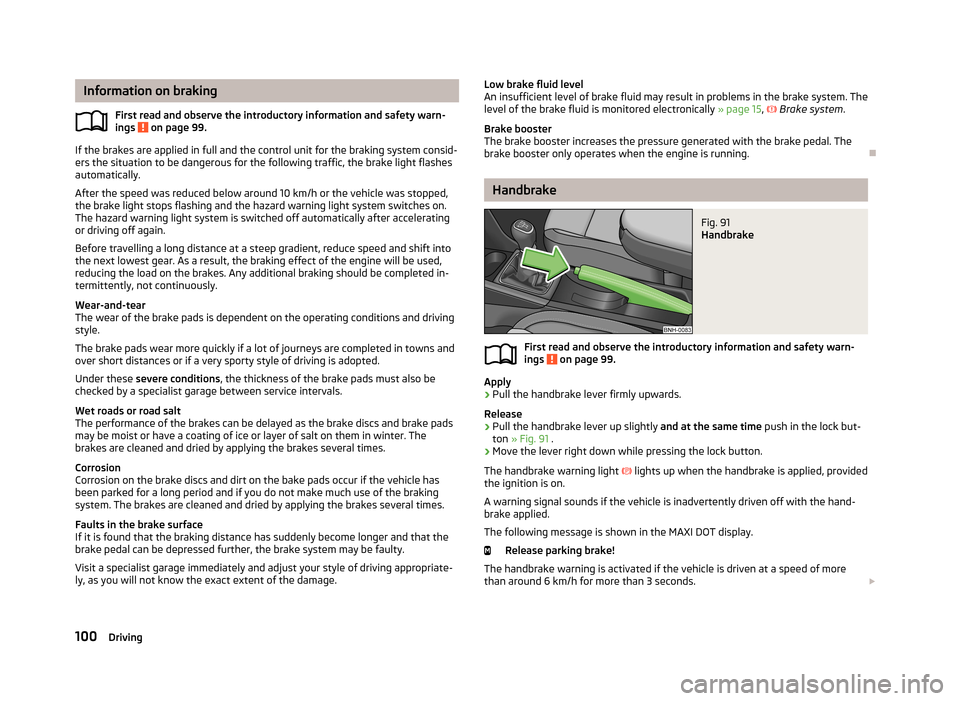
Handbrake
Fig. 91
Handbrake
First read and observe the introductory information and safety warn- ings on page 99.
Apply
›
Pull the handbrake lever firmly upwards.
Release
›
Pull the handbrake lever up slightly and at the same time push in the lock but-
ton » Fig. 91 .
›
Move the lever right down while pressing the lock button.
The handbrake warning light
lights up when the handbrake is applied, provided
the ignition is on.
A warning signal sounds if the vehicle is inadvertently driven off with the hand-
brake applied.
The following message is shown in the MAXI DOT display. Release parking brake!
The handbrake warning is activated if the vehicle is driven at a speed of more
than around 6 km/h for more than 3 seconds.
100Driving