light SKODA RAPID 2013 1.G Service Manual
[x] Cancel search | Manufacturer: SKODA, Model Year: 2013, Model line: RAPID, Model: SKODA RAPID 2013 1.GPages: 226, PDF Size: 15.16 MB
Page 67 of 226
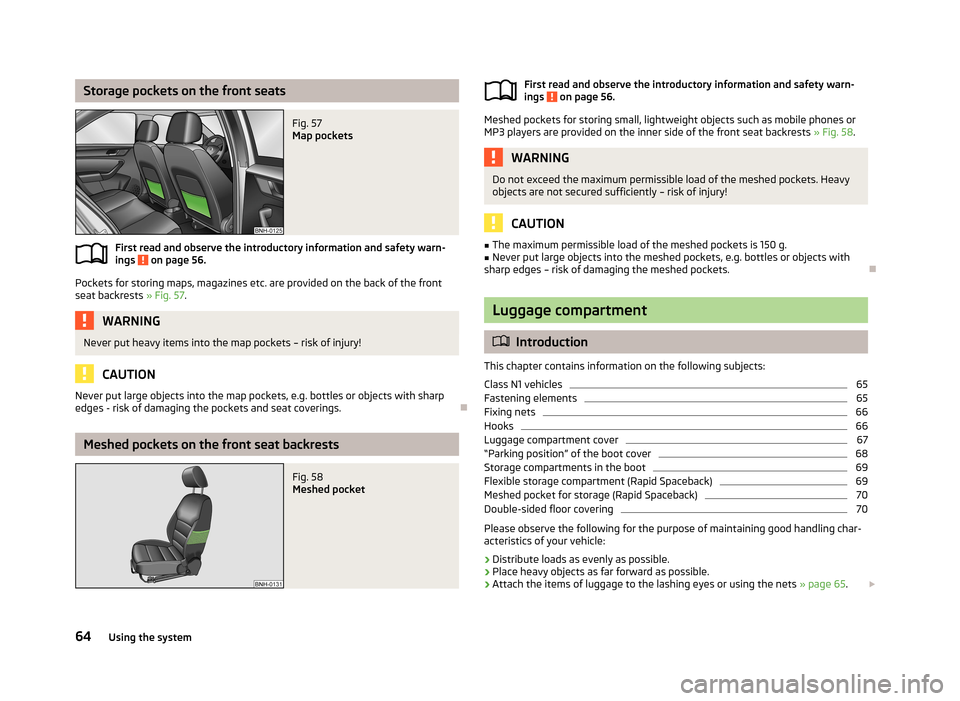
Storage pockets on the front seatsFig. 57
Map pockets
First read and observe the introductory information and safety warn-
ings on page 56.
Pockets for storing maps, magazines etc. are provided on the back of the front
seat backrests » Fig. 57.
WARNINGNever put heavy items into the map pockets – risk of injury!
CAUTION
Never put large objects into the map pockets, e.g. bottles or objects with sharp
edges - risk of damaging the pockets and seat coverings.
Meshed pockets on the front seat backrests
Fig. 58
Meshed pocketFirst read and observe the introductory information and safety warn-
ings on page 56.
Meshed pockets for storing small, lightweight objects such as mobile phones or MP3 players are provided on the inner side of the front seat backrests » Fig. 58.
WARNINGDo not exceed the maximum permissible load of the meshed pockets. Heavy
objects are not secured sufficiently – risk of injury!
CAUTION
■ The maximum permissible load of the meshed pockets is 150 g.■Never put large objects into the meshed pockets, e.g. bottles or objects with
sharp edges – risk of damaging the meshed pockets.
Luggage compartment
Introduction
This chapter contains information on the following subjects:
Class N1 vehicles
65
Fastening elements
65
Fixing nets
66
Hooks
66
Luggage compartment cover
67
“Parking position” of the boot cover
68
Storage compartments in the boot
69
Flexible storage compartment (Rapid Spaceback)
69
Meshed pocket for storage (Rapid Spaceback)
70
Double-sided floor covering
70
Please observe the following for the purpose of maintaining good handling char-
acteristics of your vehicle:
›
Distribute loads as evenly as possible.
›
Place heavy objects as far forward as possible.
›
Attach the items of luggage to the lashing eyes or using the nets » page 65.
64Using the system
Page 68 of 226
In the event of an accident, even small and light objects gain so much kinetic en-
ergy that they can cause severe injuries.
The magnitude of the kinetic energy is dependent on the speed at which the ve-
hicle is travelling and the weight of the object.
Example: In the event of a frontal collision at a speed of 50 km/h, an object with a
weight of 4.5 kg produces an energy, which corresponds to 20 times its own
weight. This means that it results in a weight of approx. 90 kg “ ”.
Luggage compartment light
The light comes on automatically when the boot lid is opened. If the lid remains open for more than 10 minutes, the boot light switches off automatically.WARNING■ Store the objects in the boot and attach them to the lashing eyes.■Loose objects can be thrown forward during a sudden manoeuvre or in case
of an accident and can injure the occupants or other road users.■
Loose objects could hit a deployed airbag and injure occupants – danger of
death!
■
Please note that transporting heavy objects alters the handling properties
of the vehicle due to the displacement of the centre of gravity – risk of acci-
dent! The speed and style of driving must be adjusted accordingly.
■
If the items of luggage or objects are attached to the lashing eyes with un-
suitable or damaged lashing straps, injuries can occur in the event of braking manoeuvres or accidents. To prevent items of luggage from moving around,
always use suitable lashing straps that are firmly attached to the lashing eyes.
■
The transported items must be stowed in such a way that no objects are
able to slip forward on sudden driving or braking manoeuvres – risk of injury!
■
When transporting objects in the luggage compartment that has been en-
larged by folding the rear seats forward, ensure the safety of the passengers
transported on the other rear seats » page 128, Correct seated position for
the passengers in the rear seats .
■
If the rear seat next to the folded forward seat is occupied, ensure maxi-
mum safety, e.g. by placing the goods to be transported in such a way that the
seat is prevented from folding back in case of a rear collision.
■
Do not drive with the luggage compartment lid open or unlatched, other-
wise exhaust gases may get into the interior of the vehicle – risk of poisoning!
■
Do not exceed the permissible axle loads and permissible gross weight of
the vehicle – risk of accident!
■
Do not transport people in the boot!
CAUTIONPlease ensure that the heating elements for the rear window heater are not dam-
aged as a result of abrasive objects.
Note
Tyre pressure must be adjusted to the load » page 176, Service life of tyres .
Class N1 vehicles
First read and observe the introductory information and safety warn-
ings
on page 64.
In class N1 vehicles that are not fitted with a protective grille, a lashing set that
complies with the EN 12195 standard (1-4) must be used for fastening the load.
Proper functioning of the electrical installation is essential for safe vehicle opera- tion. It is important to ensure that the electrical installation is not damaged dur-ing the adjustment process or when the storage area is being loaded and unloa-
ded.
Fastening elements
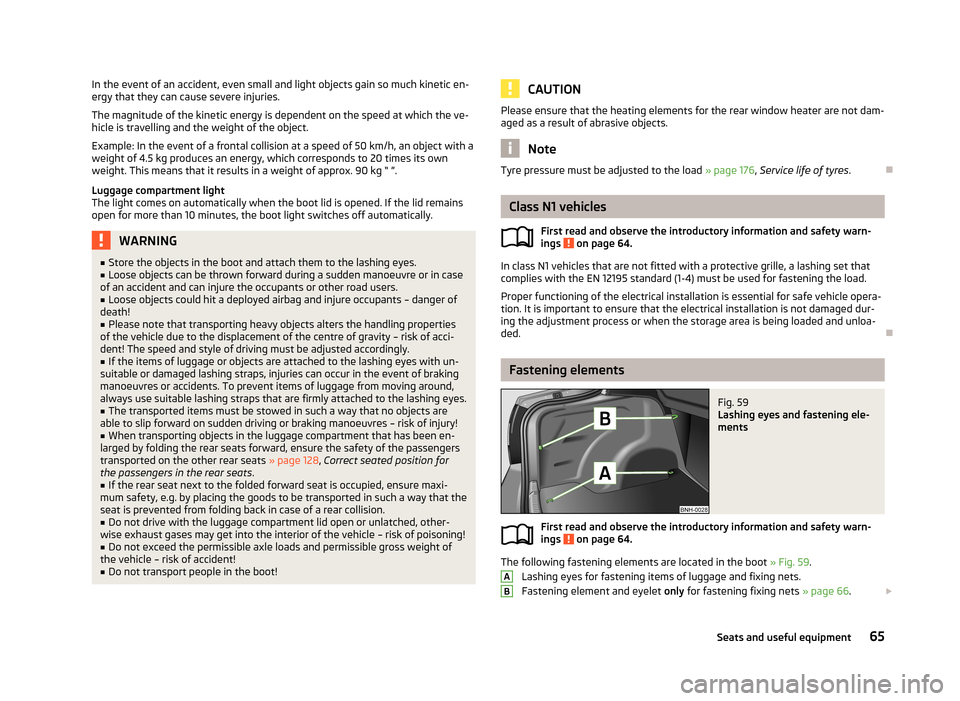
Fig. 59
Lashing eyes and fastening ele-
ments
First read and observe the introductory information and safety warn- ings on page 64.
The following fastening elements are located in the boot » Fig. 59.
Lashing eyes for fastening items of luggage and fixing nets.
Fastening element and eyelet only for fastening fixing nets » page 66.
AB65Seats and useful equipment
Page 70 of 226
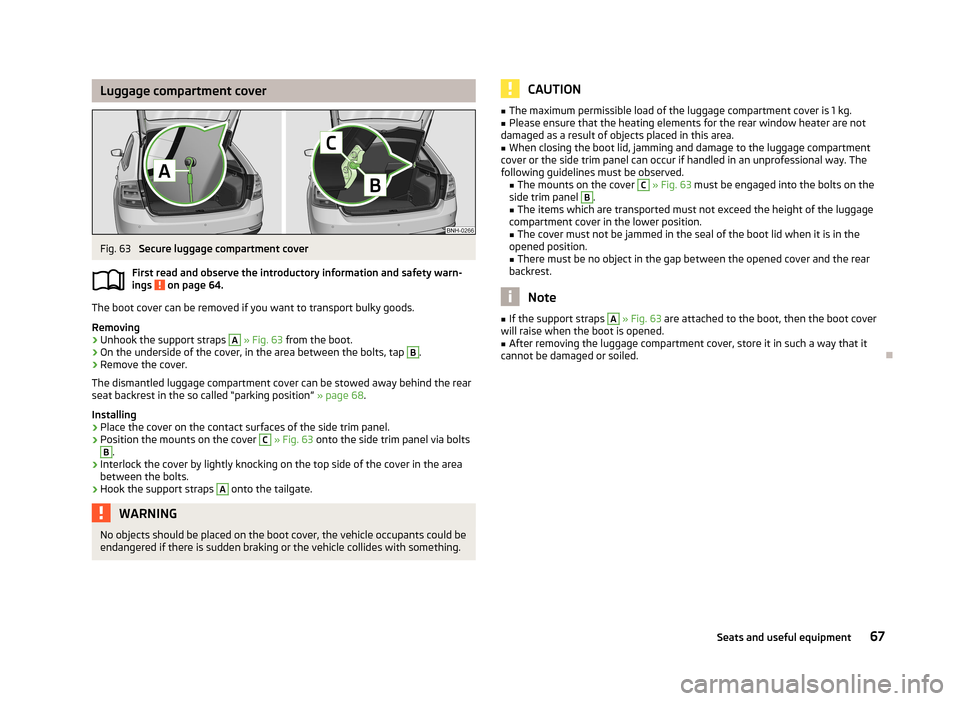
Luggage compartment coverFig. 63
Secure luggage compartment cover
First read and observe the introductory information and safety warn- ings
on page 64.
The boot cover can be removed if you want to transport bulky goods.
Removing
›
Unhook the support straps
A
» Fig. 63 from the boot.
›
On the underside of the cover, in the area between the bolts, tap
B
.
›
Remove the cover.
The dismantled luggage compartment cover can be stowed away behind the rear
seat backrest in the so called “parking position” » page 68.
Installing
›
Place the cover on the contact surfaces of the side trim panel.
›
Position the mounts on the cover
C
» Fig. 63 onto the side trim panel via bolts
B
.
›
Interlock the cover by lightly knocking on the top side of the cover in the area
between the bolts.
›
Hook the support straps
A
onto the tailgate.
WARNINGNo objects should be placed on the boot cover, the vehicle occupants could be
endangered if there is sudden braking or the vehicle collides with something.CAUTION■ The maximum permissible load of the luggage compartment cover is 1 kg.■Please ensure that the heating elements for the rear window heater are not
damaged as a result of objects placed in this area.■
When closing the boot lid, jamming and damage to the luggage compartment
cover or the side trim panel can occur if handled in an unprofessional way. The
following guidelines must be observed. ■ The mounts on the cover
C
» Fig. 63 must be engaged into the bolts on the
side trim panel
B
.
■ The items which are transported must not exceed the height of the luggage
compartment cover in the lower position.
■ The cover must not be jammed in the seal of the boot lid when it is in the
opened position. ■ There must be no object in the gap between the opened cover and the rear
backrest.
Note
■ If the support straps A » Fig. 63 are attached to the boot, then the boot cover
will raise when the boot is opened.■
After removing the luggage compartment cover, store it in such a way that it
cannot be damaged or soiled.
67Seats and useful equipment
Page 80 of 226
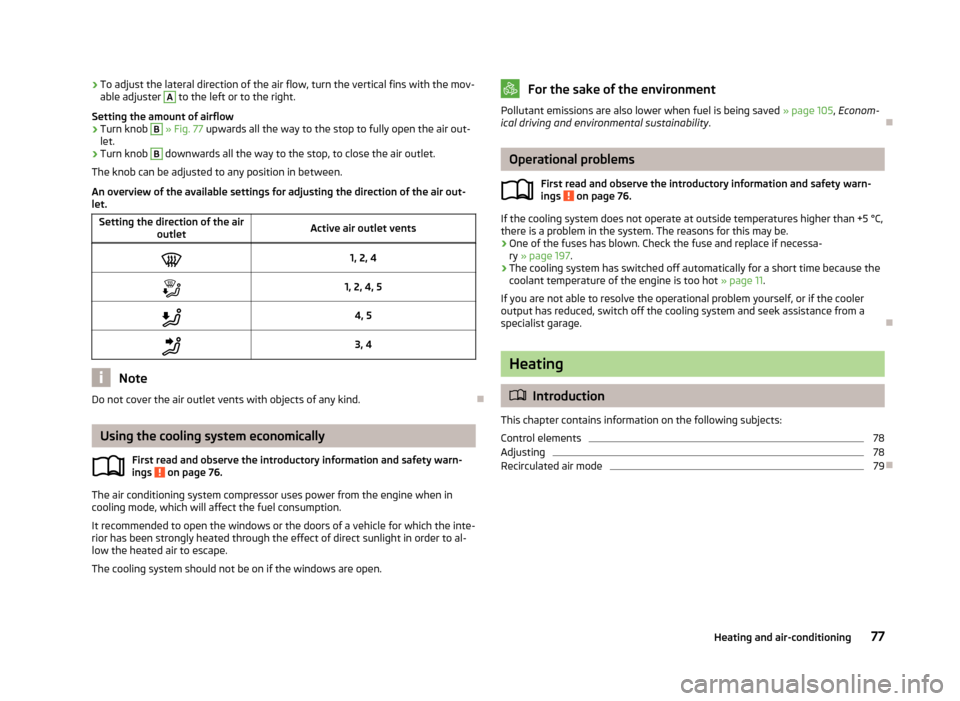
›To adjust the lateral direction of the air flow, turn the vertical fins with the mov-
able adjuster A to the left or to the right.
Setting the amount of airflow›
Turn knob
B
» Fig. 77 upwards all the way to the stop to fully open the air out-
let.
›
Turn knob
B
downwards all the way to the stop, to close the air outlet.
The knob can be adjusted to any position in between.
An overview of the available settings for adjusting the direction of the air out- let.
Setting the direction of the air outletActive air outlet vents1, 2, 41, 2, 4, 54, 53, 4
Note
Do not cover the air outlet vents with objects of any kind.
Using the cooling system economically
First read and observe the introductory information and safety warn-
ings
on page 76.
The air conditioning system compressor uses power from the engine when in cooling mode, which will affect the fuel consumption.
It recommended to open the windows or the doors of a vehicle for which the inte-rior has been strongly heated through the effect of direct sunlight in order to al- low the heated air to escape.
The cooling system should not be on if the windows are open.
For the sake of the environmentPollutant emissions are also lower when fuel is being saved » page 105, Econom-
ical driving and environmental sustainability .
Operational problems
First read and observe the introductory information and safety warn-
ings
on page 76.
If the cooling system does not operate at outside temperatures higher than +5 °C,
there is a problem in the system. The reasons for this may be.
› One of the fuses has blown. Check the fuse and replace if necessa-
ry » page 197 .
› The cooling system has switched off automatically for a short time because the
coolant temperature of the engine is too hot » page 11.
If you are not able to resolve the operational problem yourself, or if the cooler
output has reduced, switch off the cooling system and seek assistance from a
specialist garage.
Heating
Introduction
This chapter contains information on the following subjects:
Control elements
78
Adjusting
78
Recirculated air mode
79
77Heating and air-conditioning
Page 82 of 226
We recommend that you leave the air outlet vents 3 » Fig. 77 on page 76 in the
open position in all operating modes.
Note
If the air distribution is positioned only towards the windows, the total amount of
air is used to defrost the windows and thus no air will be fed to the footwell. This
can lead to restriction of the heating comfort.
Recirculated air mode
First read and observe the introductory information given on page 77.
Recirculated air mode prevents polluted air outside the vehicle from getting into
the vehicle, e.g. when driving through a tunnel or in a traffic jam.
Switching on/off
›
Press the symbol button
.
The indicator light in the button lights up.
›
Press the symbol button
again.
The indicator light in the button goes out.
Recirculated air mode is switched off automatically if the air distribution control
C
» Fig. 78 on page 78 is turned to position
. Recirculated air mode can be
switched on again from this position by repeatedly pressing the symbol button
.
WARNINGNever leave recirculated air mode switched on over a longer period of time, as
“stale air” can cause driver and passenger fatigue, reduce attention levels and also cause the windows to mist up. Increased risk of accident. Switch off recir-
culated air mode as soon as the windows start to mist up.
Air conditioning system (manual air conditioning
system)
Introduction
This chapter contains information on the following subjects: Control elements
80
Adjusting
81
Recirculated air mode
81
The cooling system only operates if the following conditions are met. The cooling system is switched on » page 80, Control elements .
The engine is running.
The outside temperature is above approx. +2 °C.
The blower switch is switched on (positions 1-4).
If the desired interior temperature can also be achieved without activating the cooling system, fresh air mode should be selected.
The cooling system is switched off at excessive coolant temperatures in order to guarantee a cooling effect when the engine is under a high load.
CAUTION
■ Under certain circumstances, air at a temperature of about 5 °C can flow out of
the vents when the cooling system is switched on.■
Lengthy and uneven distribution of the air flow out of the vents (especially
around the feet) and large differences in temperature, for example, when getting
out of the vehicle, can cause susceptible individuals to catch a cold.
Note
We recommend that you have the air conditioning system cleaned by a specialist
garage once every year.79Heating and air-conditioning
Page 83 of 226
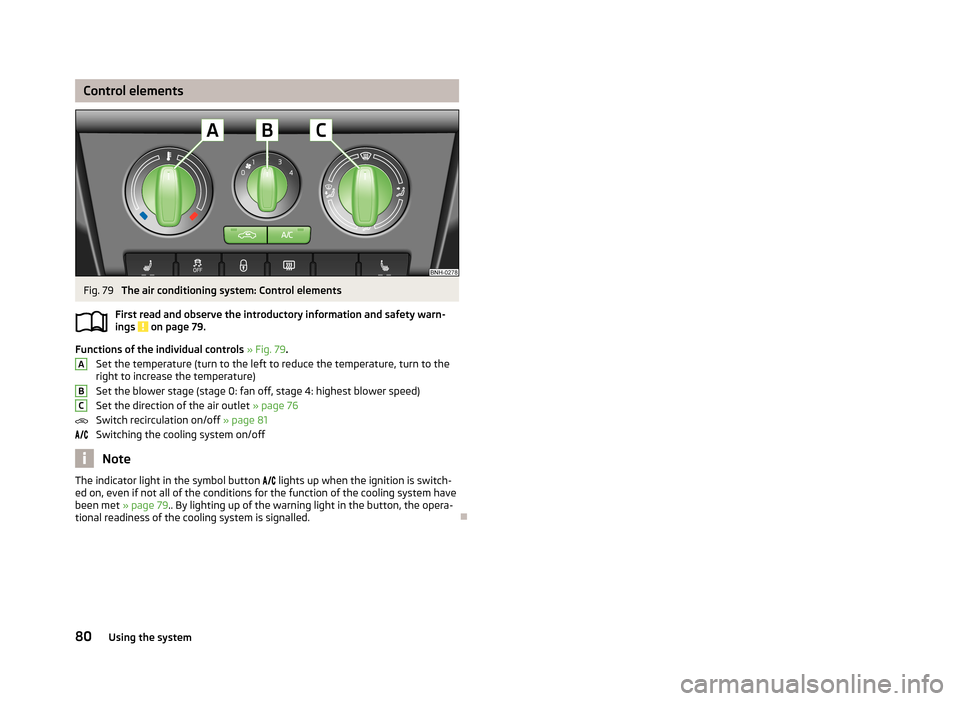
Control elementsFig. 79
The air conditioning system: Control elements
First read and observe the introductory information and safety warn- ings
on page 79.
Functions of the individual controls » Fig. 79 .
Set the temperature (turn to the left to reduce the temperature, turn to the
right to increase the temperature)
Set the blower stage (stage 0: fan off, stage 4: highest blower speed)
Set the direction of the air outlet » page 76
Switch recirculation on/off » page 81
Switching the cooling system on/off
Note
The indicator light in the symbol button lights up when the ignition is switch-
ed on, even if not all of the conditions for the function of the cooling system have
been met » page 79.. By lighting up of the warning light in the button, the opera-
tional readiness of the cooling system is signalled.
ABC80Using the system
Page 84 of 226
AdjustingFirst read and observe the introductory information and safety warnings
on page 79.
Recommended basic settings of the air conditioning controls.
AdjustmentControl dial settings » Fig. 79 on page 80Symbol button » Fig. 79 on page 80Air outlet vents 4 » Fig. 77
on page 76ABCDefrost/defog windscreen and side windows a)Desired tempera-
ture3 or 4Do not switch onAutomatically switched onb)Open and align with the side
windowFastest heatingAs far as it will goto the right3Briefly switch onSwitched offOpeningComfortable heatingDesired tempera-
ture2 or 3
Do not switch onSwitched offOpeningThe fastest coolingTo the left up to
the stopbriefly 4, then 2 or 3Briefly switch on c)ActivatedOpeningComfortable coolingDesired tempera-
ture1, 2 or 3Do not switch onActivatedOpen and align to the roofFresh air mode – ventilationTo the left up tothe stopDesired positionDo not switch onSwitched offOpeninga)
We recommend that you do not use this setting in countries with high humidity levels. This can result in heavy cooling of the window glass and the following fogging from outside.
b)
Automatic switch-on can be deactivated by pressing the symbol button .
c)
Under certain conditions, recirculated air mode
» page 81 may switch on automatically; the indicator light will then light up in the symbol button
.
We recommend that you leave the air outlet vents
3 » Fig. 77 on page 76 in the
open position in all operating modes.
Recirculated air mode
First read and observe the introductory information and safety warn-ings
on page 79.
Recirculated air mode prevents polluted air outside the vehicle from getting into
the vehicle, e.g. when driving through a tunnel or in a traffic jam.
Switching on/off
›
Press the symbol button
.
The indicator light in the button lights up.
› Press the symbol button
again.
The indicator light in the button goes out.
Recirculated air mode is switched off automatically if the air distribution controlC
» Fig. 79 on page 80 is turned to position . Recirculated air mode can be
switched on again from this position by repeatedly pressing the symbol button
.
WARNINGNever leave recirculated air mode switched on over a longer period of time, as
“stale air” can cause driver and passenger fatigue, reduce attention levels and also cause the windows to mist up. Increased risk of accident. Switch off recir-
culated air mode as soon as the windows start to mist up.
81Heating and air-conditioning
Page 85 of 226
Climatronic (automatic air conditioning system)
Introduction
This chapter contains information on the following subjects:
Control elements
82
automatic mode
83
Switching the cooling system on/off
83
Setting the temperature
83
recirculated air mode
83
Controlling blower
84
Defrosting windscreen
84
The Climatronic in automatic mode ensures the best-possible setting of the tem-
perature of the outflowing air, the blower stage and air distribution.
The system also takes sunlight into account, which eliminates the need to alterthe settings manually.
The cooling system only operates if the following conditions are met. The cooling system is switched on » page 82, Control elements .
The engine is running.
The outside temperature is above approx. +2 °C.
The cooling system is switched off at excessive coolant temperatures in order to guarantee a cooling effect when the engine is under a high load.
Note
We recommend that you have Climatronic cleaned by a specialist garage once ev-
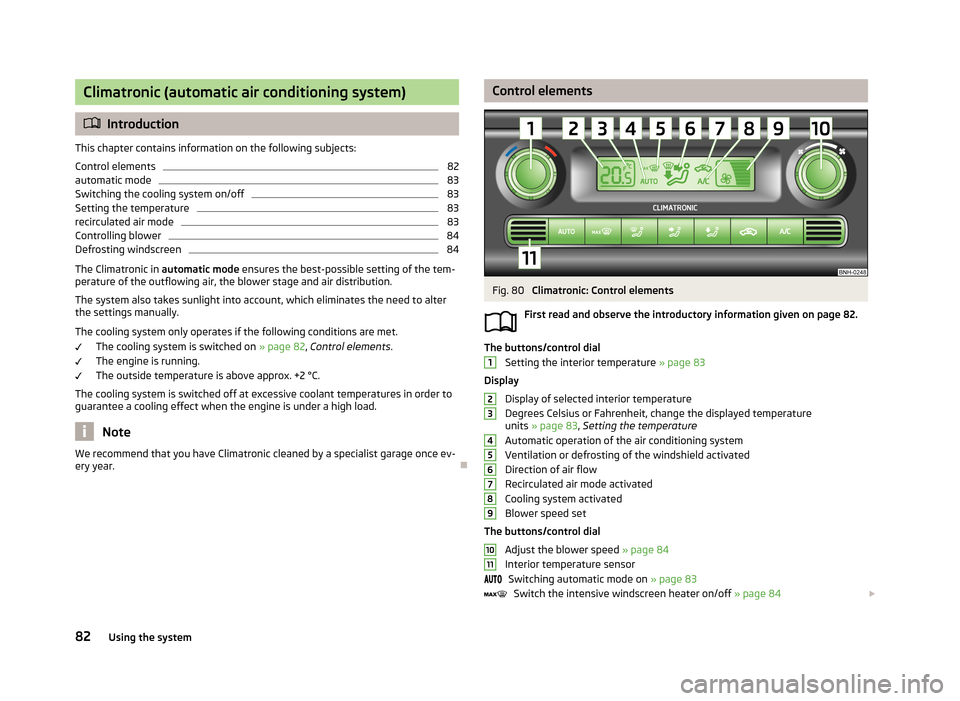
ery year.Control elementsFig. 80
Climatronic: Control elements
First read and observe the introductory information given on page 82.
The buttons/control dial Setting the interior temperature » page 83
Display
Display of selected interior temperature
Degrees Celsius or Fahrenheit, change the displayed temperature units » page 83 , Setting the temperature
Automatic operation of the air conditioning system Ventilation or defrosting of the windshield activated
Direction of air flow
Recirculated air mode activated
Cooling system activated
Blower speed set
The buttons/control dial Adjust the blower speed » page 84
Interior temperature sensor Switching automatic mode on » page 83
Switch the intensive windscreen heater on/off » page 84
123456789101182Using the system
Page 86 of 226
Air flow to the windows
Air flow to the upper body
Air flow in the footwell
Switch recirculation on/off » page 83
Switching the cooling system on/off » page 83
Note
Do not stick anything onto or cover the interior temperature sensor 11 » Fig. 80
as this could impair the functioning of the Climatronic.
automatic mode
First read and observe the introductory information given on page 82.
The automatic mode is used in order to maintain a constant temperature and to
demist the windows in the interior of the car.
Recommended setting for all periods of the year
›
Set the desired temperature, we recommend 22 °C.
›
Press the button
.
The display shows
(pos.
4
» Fig. 80 on page 82).
›
Set the air outlet vents 3 and 4 » Fig. 77 on page 76 so that the air flow is direc-
ted slightly upwards.
Automatic mode can be switched off by pressing one of the buttons for the air
distribution or by increasing/decreasing the blower speed. The temperature is
nevertheless regulated.
Switching the cooling system on/off
First read and observe the introductory information given on page 82.
›
Press the button
.
The symbol
(pos.
8
» Fig. 80 on page 82) appears in the display.
›
Press button
once more.
The
symbol in the display goes out.
After the cooling system is switched off, only the ventilation function remains ac-
tive, whereby the lowest temperature that can be reached is the outside temper- ature.
Setting the temperature
First read and observe the introductory information given on page 82.
Setting temperature
›
Switch on the ignition.
›
Turn the control dial
1
» Fig. 80 on page 82 to the left or to the right to in-
crease or decrease the temperature.
The set temperature value appears in the display (pos.
2
» Fig. 80 on page 82).
Switching between Celsius and Fahrenheit
›
Press and hold the
and
buttons simultaneously.
The information appears in the display in the desired temperature measuring unit
(pos.
3
» Fig. 80 on page 82).
The interior temperature can be set between +18 °C and +29 ℃. The interior tem-
perature is regulated automatically within this range.
If you select the temperature below +18 ℃, “LO” appears in the display.
If you select a temperature higher than +29 ℃, “HI” appears in the display.
In both limit positions the Climatronic operates at maximum cooling or heating
capacity, respectively. The temperature is not automatically regulated in this case.
CAUTION
Lengthy and uneven distribution of the air flow out of the vents (especially
around the feet) and large differences in temperature, for example, when getting
out of the vehicle, can cause susceptible individuals to catch a cold.
recirculated air mode
First read and observe the introductory information given on page 82.
Recirculated air mode prevents polluted air outside the vehicle from getting into
the vehicle, e.g. when driving through a tunnel or in a traffic jam.
83Heating and air-conditioning
Page 89 of 226
All communication between a mobile phone and your vehicle's hands-free systemis established with the help of Bluetooth ®
technology.
Phone Phonebook
First read and observe the introductory information and safety warn-
ings
on page 85.
A phone phonebook is part of the hands-free system. This phone phonebook can
be used depending on the type of mobile phone.
After the first connection of the telephone, the system begins to load the phonebook from the phone and the SIM card into the memory of the control unit.
Each time the telephone has established a new connection with the hands-free
system, an update of the relevant phone book is performed. The updating can
take a few minutes. During this time the phone book, which was stored after the last update was completed, is available. Newly stored telephone numbers are on-ly shown after the updating has ended.
The update is interrupted if a telephone event (e.g. incoming or outgoing call,
voice control dialogue) occurs during the updating procedure. After the telephone
event has ended, the updating starts anew.
The internal phonebook provides 2 500 free memory locations. Each contact can contain up to 4 numbers.
If the number of contacts loaded exceeds 2 500, the phone book is not complete.
Control telephone from the multifunction steering wheel - Version 1
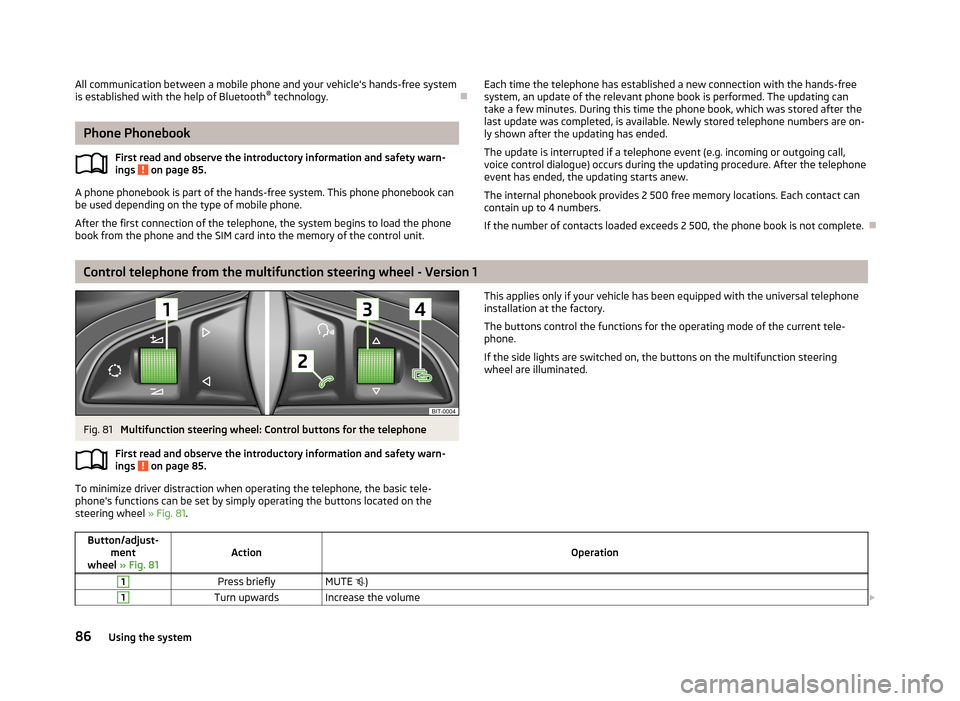
Fig. 81
Multifunction steering wheel: Control buttons for the telephone
First read and observe the introductory information and safety warn-
ings
on page 85.
To minimize driver distraction when operating the telephone, the basic tele- phone's functions can be set by simply operating the buttons located on the
steering wheel » Fig. 81.
This applies only if your vehicle has been equipped with the universal telephone
installation at the factory.
The buttons control the functions for the operating mode of the current tele- phone.
If the side lights are switched on, the buttons on the multifunction steering wheel are illuminated.Button/adjust- ment
wheel » Fig. 81ActionOperation
1Press brieflyMUTE )1Turn upwardsIncrease the volume 86Using the system