lock SKODA RAPID 2015 1.G Owner's Guide
[x] Cancel search | Manufacturer: SKODA, Model Year: 2015, Model line: RAPID, Model: SKODA RAPID 2015 1.GPages: 204, PDF Size: 27.52 MB
Page 73 of 204
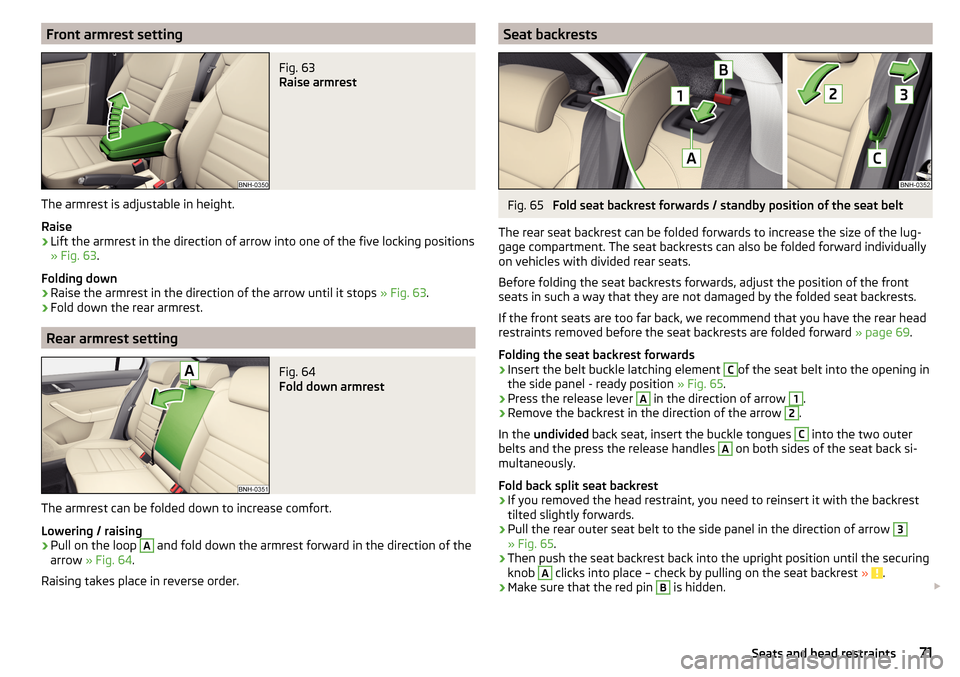
Front armrest settingFig. 63
Raise armrest
The armrest is adjustable in height.
Raise
›
Lift the armrest in the direction of arrow into one of the five locking positions
» Fig. 63 .
Folding down
›
Raise the armrest in the direction of the arrow until it stops » Fig. 63.
›
Fold down the rear armrest.
Rear armrest setting
Fig. 64
Fold down armrest
The armrest can be folded down to increase comfort.
Lowering / raising
›
Pull on the loop
A
and fold down the armrest forward in the direction of the
arrow » Fig. 64 .
Raising takes place in reverse order.
Seat backrestsFig. 65
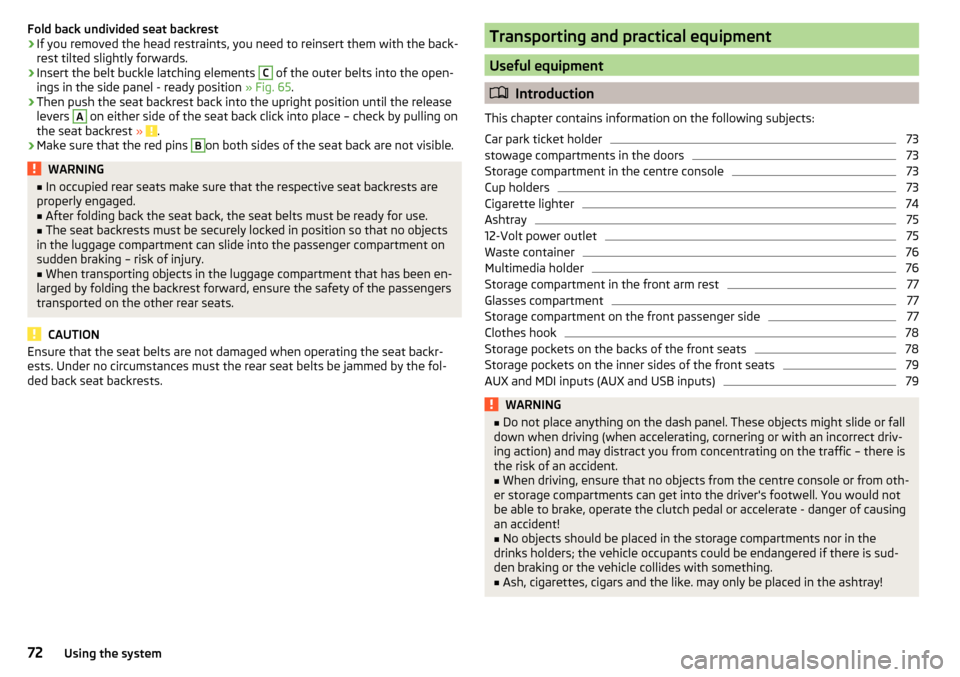
Fold seat backrest forwards / standby position of the seat belt
The rear seat backrest can be folded forwards to increase the size of the lug-
gage compartment. The seat backrests can also be folded forward individually
on vehicles with divided rear seats.
Before folding the seat backrests forwards, adjust the position of the front
seats in such a way that they are not damaged by the folded seat backrests.
If the front seats are too far back, we recommend that you have the rear head
restraints removed before the seat backrests are folded forward » page 69.
Folding the seat backrest forwards
›
Insert the belt buckle latching element
C
of the seat belt into the opening in
the side panel - ready position » Fig. 65.
›
Press the release lever
A
in the direction of arrow
1
.
›
Remove the backrest in the direction of the arrow
2
.
In the undivided back seat, insert the buckle tongues
C
into the two outer
belts and the press the release handles
A
on both sides of the seat back si-
multaneously.
Fold back split seat backrest
›
If you removed the head restraint, you need to reinsert it with the backrest
tilted slightly forwards.
›
Pull the rear outer seat belt to the side panel in the direction of arrow
3
» Fig. 65 .
›
Then push the seat backrest back into the upright position until the securing
knob
A
clicks into place – check by pulling on the seat backrest » .
›
Make sure that the red pin
B
is hidden.
71Seats and head restraints
Page 74 of 204
Fold back undivided seat backrest›If you removed the head restraints, you need to reinsert them with the back-
rest tilted slightly forwards.›
Insert the belt buckle latching elements
C
of the outer belts into the open-
ings in the side panel - ready position » Fig. 65.
›
Then push the seat backrest back into the upright position until the release
levers
A
on either side of the seat back click into place – check by pulling on
the seat backrest » .
›
Make sure that the red pins
B
on both sides of the seat back are not visible.
WARNING■
In occupied rear seats make sure that the respective seat backrests are
properly engaged.■
After folding back the seat back, the seat belts must be ready for use.
■
The seat backrests must be securely locked in position so that no objects
in the luggage compartment can slide into the passenger compartment on
sudden braking – risk of injury.
■
When transporting objects in the luggage compartment that has been en-
larged by folding the backrest forward, ensure the safety of the passengers
transported on the other rear seats.
CAUTION
Ensure that the seat belts are not damaged when operating the seat backr-
ests. Under no circumstances must the rear seat belts be jammed by the fol-
ded back seat backrests.Transporting and practical equipment
Useful equipment
Introduction
This chapter contains information on the following subjects:
Car park ticket holder
73
stowage compartments in the doors
73
Storage compartment in the centre console
73
Cup holders
73
Cigarette lighter
74
Ashtray
75
12-Volt power outlet
75
Waste container
76
Multimedia holder
76
Storage compartment in the front arm rest
77
Glasses compartment
77
Storage compartment on the front passenger side
77
Clothes hook
78
Storage pockets on the backs of the front seats
78
Storage pockets on the inner sides of the front seats
79
AUX and MDI inputs (AUX and USB inputs)
79WARNING■ Do not place anything on the dash panel. These objects might slide or fall
down when driving (when accelerating, cornering or with an incorrect driv-
ing action) and may distract you from concentrating on the traffic – there is
the risk of an accident.■
When driving, ensure that no objects from the centre console or from oth-
er storage compartments can get into the driver's footwell. You would not
be able to brake, operate the clutch pedal or accelerate - danger of causing
an accident!
■
No objects should be placed in the storage compartments nor in the
drinks holders; the vehicle occupants could be endangered if there is sud-
den braking or the vehicle collides with something.
■
Ash, cigarettes, cigars and the like. may only be placed in the ashtray!
72Using the system
Page 75 of 204

Car park ticket holderFig. 66
Parking ticket holder
Read and observe on page 72 first.
The parking ticket holder » Fig. 66 is designed for attaching car parking tickets.
WARNINGThe attached note has to always be removed before starting off in order
not to restrict the driver's vision.
stowage compartments in the doors
Fig. 67
Storage compartments: in the front door/in the rear door
Read and observe
on page 72 first.
Storage compartments » Fig. 67
Storage compartment in the front door
Bottle storage compartment with a capacity of max. 1.5 l in the front door
Storage compartment in the rear door
Bottle storage compartment with a capacity of max. 0.5 l in the rear door
ABCDWARNINGThe storage compartment A» Fig. 67 is to be used exclusively for storing
objects which do not project out because there is the danger of limiting the
operating range of the side airbags.
Storage compartment in the centre console
Fig. 68
Non-lockable compartment, front / rear
Read and observe
on page 72 first.
Non-lockable compartment » Fig. 68
In the front centre console
In the rear centre console
Cup holders
Fig. 69
Cup holder at the front/rear
AB73Transporting and practical equipment
Page 78 of 204
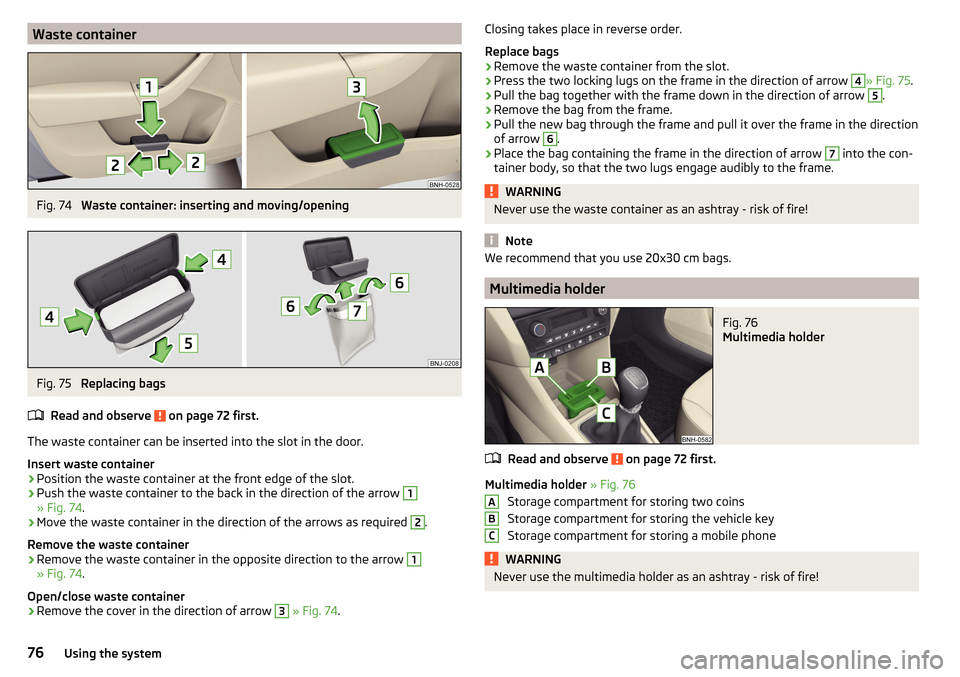
Waste containerFig. 74
Waste container: inserting and moving/opening
Fig. 75
Replacing bags
Read and observe
on page 72 first.
The waste container can be inserted into the slot in the door.
Insert waste container
›
Position the waste container at the front edge of the slot.
›
Push the waste container to the back in the direction of the arrow
1
» Fig. 74 .
›
Move the waste container in the direction of the arrows as required
2
.
Remove the waste container
›
Remove the waste container in the opposite direction to the arrow
1
» Fig. 74 .
Open/close waste container
›
Remove the cover in the direction of arrow
3
» Fig. 74 .
Closing takes place in reverse order.
Replace bags›
Remove the waste container from the slot.
›
Press the two locking lugs on the frame in the direction of arrow
4
» Fig. 75 .
›
Pull the bag together with the frame down in the direction of arrow
5
.
›
Remove the bag from the frame.
›
Pull the new bag through the frame and pull it over the frame in the direction
of arrow
6
.
›
Place the bag containing the frame in the direction of arrow
7
into the con-
tainer body, so that the two lugs engage audibly to the frame.
WARNINGNever use the waste container as an ashtray - risk of fire!
Note
We recommend that you use 20x30 cm bags.
Multimedia holder
Fig. 76
Multimedia holder
Read and observe on page 72 first.
Multimedia holder » Fig. 76
Storage compartment for storing two coins
Storage compartment for storing the vehicle key
Storage compartment for storing a mobile phone
WARNINGNever use the multimedia holder as an ashtray - risk of fire!ABC76Using the system
Page 79 of 204
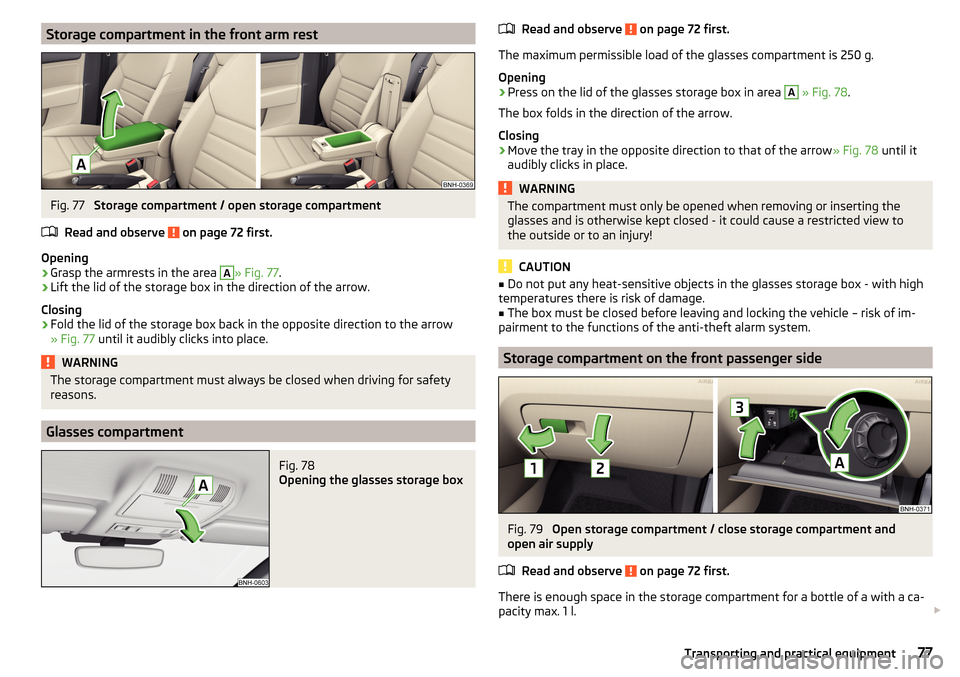
Storage compartment in the front arm restFig. 77
Storage compartment / open storage compartment
Read and observe
on page 72 first.
Opening
›
Grasp the armrests in the area
A
» Fig. 77 .
›
Lift the lid of the storage box in the direction of the arrow.
Closing
›
Fold the lid of the storage box back in the opposite direction to the arrow
» Fig. 77 until it audibly clicks into place.
WARNINGThe storage compartment must always be closed when driving for safety
reasons.
Glasses compartment
Fig. 78
Opening the glasses storage box
Read and observe on page 72 first.
The maximum permissible load of the glasses compartment is 250 g.
Opening
›
Press on the lid of the glasses storage box in area
A
» Fig. 78 .
The box folds in the direction of the arrow.
Closing
›
Move the tray in the opposite direction to that of the arrow » Fig. 78 until it
audibly clicks in place.
WARNINGThe compartment must only be opened when removing or inserting the
glasses and is otherwise kept closed - it could cause a restricted view to
the outside or to an injury!
CAUTION
■ Do not put any heat-sensitive objects in the glasses storage box - with high
temperatures there is risk of damage.■
The box must be closed before leaving and locking the vehicle – risk of im-
pairment to the functions of the anti-theft alarm system.
Storage compartment on the front passenger side
Fig. 79
Open storage compartment / close storage compartment and
open air supply
Read and observe
on page 72 first.
There is enough space in the storage compartment for a bottle of a with a ca-
pacity max. 1 l.
77Transporting and practical equipment
Page 82 of 204

Install/removeFig. 84
Position adapter/install holder
Fig. 85
Remove holder/remove adapter
Read and observe
on page 79 first.
Fitting
›
Attach the opened adapter to the guide rods of the headrest » Fig. 84.
›
Clip in the adapter in the direction of arrow
1
» .
›
Clip the holder in the direction of arrow
2
into the adapter.
Removing
›
Pull on the locking strap
A
in the direction of arrow
3
» Fig. 85 .
›
Remove the holder from the bracket in the direction of arrow
4
.
›
Press the adapter and remove in the direction of the arrow
5
from the guide
rods of the headrest.
WARNINGCarefully clip in the adapter - there is a risk of injuring your finger.Handle holderFig. 86
Tilt and rotate holder
Fig. 87
Adjust holder size
Read and observe on page 79 first.
Tilt and rotate holder
The holder may be tilted 30° in the direction of arrow
1
and rotated through
360° in the direction of arrow
2
» Fig. 86 .
Adjust holder size
›
Pull out the securing tab
A
in the direction of arrow
3
and move part
B
in
direction of arrow
4
to the desired position » Fig. 87.
Luggage compartment and transport of cargo
Introduction
This chapter contains information on the following subjects:
Fastening elements
81
Fixing nets
82
80Using the system
Page 85 of 204
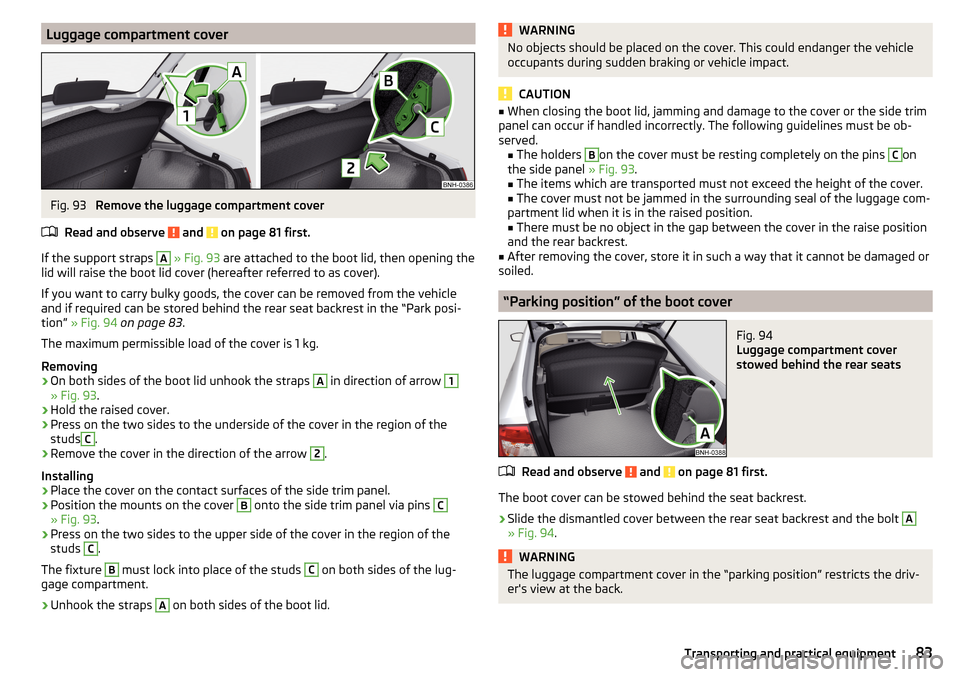
Luggage compartment coverFig. 93
Remove the luggage compartment cover
Read and observe
and on page 81 first.
If the support straps
A
» Fig. 93 are attached to the boot lid, then opening the
lid will raise the boot lid cover (hereafter referred to as cover).
If you want to carry bulky goods, the cover can be removed from the vehicle
and if required can be stored behind the rear seat backrest in the “Park posi-
tion” » Fig. 94 on page 83 .
The maximum permissible load of the cover is 1 kg.
Removing
›
On both sides of the boot lid unhook the straps
A
in direction of arrow
1
» Fig. 93 .
›
Hold the raised cover.
›
Press on the two sides to the underside of the cover in the region of the
studs
C
.
›
Remove the cover in the direction of the arrow
2
.
Installing
›
Place the cover on the contact surfaces of the side trim panel.
›
Position the mounts on the cover
B
onto the side trim panel via pins
C
» Fig. 93 .
›
Press on the two sides to the upper side of the cover in the region of the
studs
C
.
The fixture
B
must lock into place of the studs
C
on both sides of the lug-
gage compartment.
›
Unhook the straps
A
on both sides of the boot lid.
WARNINGNo objects should be placed on the cover. This could endanger the vehicle
occupants during sudden braking or vehicle impact.
CAUTION
■ When closing the boot lid, jamming and damage to the cover or the side trim
panel can occur if handled incorrectly. The following guidelines must be ob-
served. ■ The holders B
on the cover must be resting completely on the pins
C
on
the side panel » Fig. 93.
■ The items which are transported must not exceed the height of the cover.
■ The cover must not be jammed in the surrounding seal of the luggage com-
partment lid when it is in the raised position. ■ There must be no object in the gap between the cover in the raise position
and the rear backrest.
■
After removing the cover, store it in such a way that it cannot be damaged or
soiled.
“Parking position” of the boot cover
Fig. 94
Luggage compartment cover
stowed behind the rear seats
Read and observe and on page 81 first.
The boot cover can be stowed behind the seat backrest.
›
Slide the dismantled cover between the rear seat backrest and the bolt
A
» Fig. 94 .
WARNINGThe luggage compartment cover in the “parking position” restricts the driv-
er's view at the back.83Transporting and practical equipment
Page 92 of 204
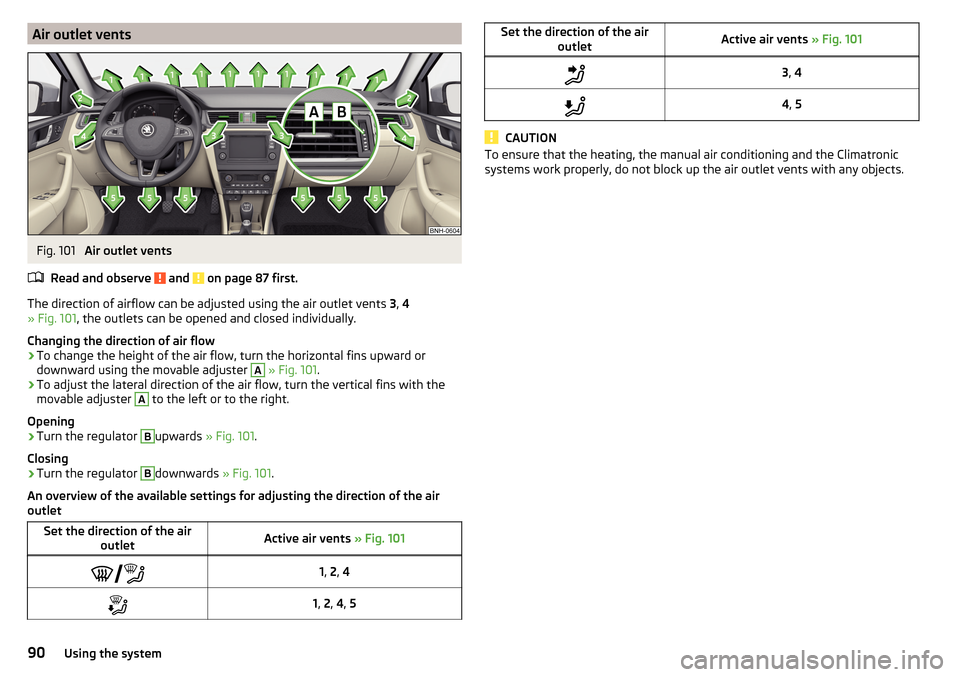
Air outlet ventsFig. 101
Air outlet vents
Read and observe
and on page 87 first.
The direction of airflow can be adjusted using the air outlet vents 3, 4
» Fig. 101 , the outlets can be opened and closed individually.
Changing the direction of air flow
›
To change the height of the air flow, turn the horizontal fins upward or
downward using the movable adjuster
A
» Fig. 101 .
›
To adjust the lateral direction of the air flow, turn the vertical fins with the
movable adjuster
A
to the left or to the right.
Opening
›
Turn the regulator
B
upwards » Fig. 101.
Closing
›
Turn the regulator
B
downwards » Fig. 101.
An overview of the available settings for adjusting the direction of the air
outlet
Set the direction of the air outletActive air vents » Fig. 1011, 2 , 41, 2 , 4 , 5Set the direction of the air
outletActive air vents » Fig. 1013, 44 , 5
CAUTION
To ensure that the heating, the manual air conditioning and the Climatronic
systems work properly, do not block up the air outlet vents with any objects.90Using the system
Page 93 of 204
Driving
Starting-off and Driving
Starting and stopping the engine using the key
Introduction
This chapter contains information on the following subjects:
Electronic immobilizer
91
Steering lock locking / unlocking
92
Turn ignition on / off and start the engine
92
Stopping the engine
92
With the key in the ignition, the ignition can be switched on and off and the
engine can be started / stopped.
WARNING■ While driving with the engine stopped, the ignition must always be
switched on » page 92, Turn ignition on / off and start the engine .
■ With the ignition off, the steering may lock » page 92 - danger of an
accident!■
Do not withdraw the ignition key from the ignition lock until the vehicle
has come to a stop » page 99, Parking . Otherwise, the steering may lock -
danger of an accident!
■
Never leave the key in the vehicle when you exit the vehicle. Unauthor-
ized persons, such as children, for example, could lock the car, turn on the
ignition or start the engine - there is a danger of injury, accidents and dam-
age!
■
Never leave the vehicle unattended with the engine running - there is
risk of accident, damage or theft!
■
Never switch off the engine before the vehicle is stationary – risk of acci-
dent!
WARNING■ Never (e.g. in garages) run the engine in a closed place - there is the dan-
ger of poisoning and death!■
Do not leave any items (e.g. cloths or tools) in the engine compartment.
This presents a fire hazard and the risk of engine damage.
■
Never cover the engine with additional insulation material (e.g. with a
cover) – risk of fire!
CAUTION
■ Only start the engine when the engine and the vehicle are stationary - there
is a danger of starter and engine damage!■
Do not push-start the engine – risk of damaging the engine and the catalytic
converter. The battery from another vehicle can be used as a jump-start aid
» page 164 .
Note
Do not warm up the engine while the vehicle is stationary. If possible, start
your journey as soon as the engine has started. Through this, the engine rea-
ches its operating temperature faster.
Electronic immobilizer
Read and observe
and on page 91 first.
The electronic immobiliser (hereinafter referred to as immobiliser) makes theattempted theft or unauthorised use of your vehicle more difficult.
An electronic chip is integrated in the head of the key. The immobiliser is deac-
tivated with the aid of this chip when the key is inserted in the ignition lock.
As soon as the ignition key is removed from the ignition lock, the immobiliser is
automatically activated.
Operational problems
If a component in the immobiliser key fails, it is not possible to start the en-
gine. A corresponding message appears in the display of the instrument clus-
ter to explain the immobiliser is active.
To start, use the other vehicle key or seek help from a specialist garage.
91Starting-off and Driving
Page 94 of 204
Steering lock locking / unlockingRead and observe
and on page 91 first.
The steering lock (steering lock) deters any attempted theft of your vehicle.
Locking
›
Withdraw the ignition key.
›
Turn the steering wheel to the left or right until the steering lock clicks into
place.
Unlocking
›
Insert the key into the ignition lock.
›
Switch on the ignition » page 92.
The steering lock is unlocked.
If the ignition switch cannot be turned on, then turn the steering wheel back
and forth slightly and thereby unlock the steering lock.
Turn ignition on / off and start the engine
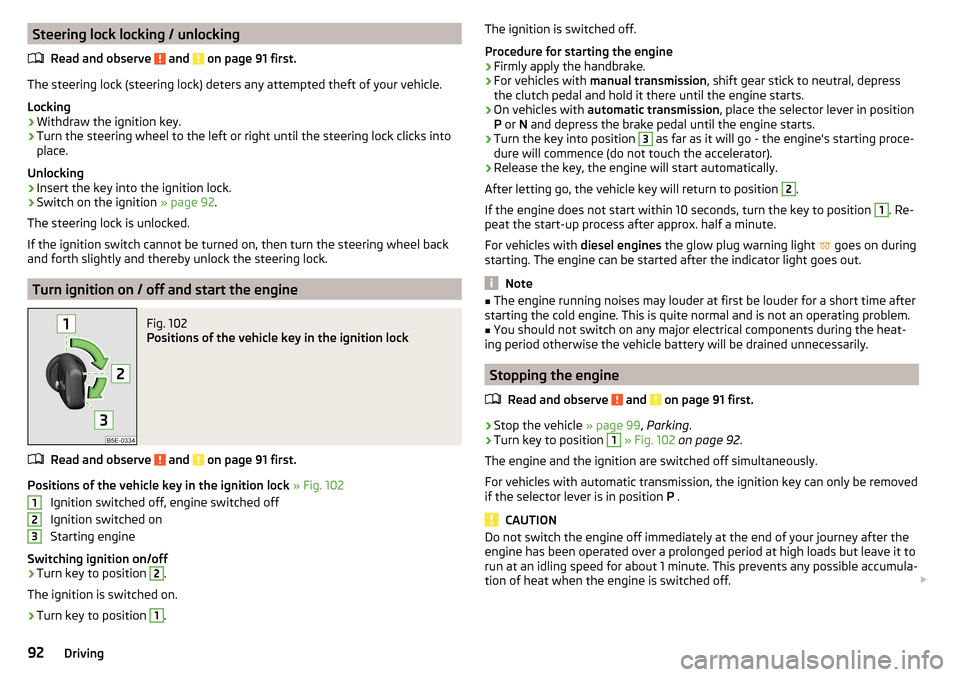
Fig. 102
Positions of the vehicle key in the ignition lock
Read and observe and on page 91 first.
Positions of the vehicle key in the ignition lock » Fig. 102
Ignition switched off, engine switched off
Ignition switched on
Starting engine
Switching ignition on/off
›
Turn key to position
2
.
The ignition is switched on.
›
Turn key to position
1
.
123The ignition is switched off.
Procedure for starting the engine›
Firmly apply the handbrake.
›
For vehicles with manual transmission , shift gear stick to neutral, depress
the clutch pedal and hold it there until the engine starts.
›
On vehicles with automatic transmission , place the selector lever in position
P or N and depress the brake pedal until the engine starts.
›
Turn the key into position
3
as far as it will go - the engine's starting proce-
dure will commence (do not touch the accelerator).
›
Release the key, the engine will start automatically.
After letting go, the vehicle key will return to position
2
.
If the engine does not start within 10 seconds, turn the key to position
1
. Re-
peat the start-up process after approx. half a minute.
For vehicles with diesel engines the glow plug warning light
goes on during
starting. The engine can be started after the indicator light goes out.
Note
■ The engine running noises may louder at first be louder for a short time after
starting the cold engine. This is quite normal and is not an operating problem.■
You should not switch on any major electrical components during the heat-
ing period otherwise the vehicle battery will be drained unnecessarily.
Stopping the engine
Read and observe
and on page 91 first.
›
Stop the vehicle » page 99, Parking .
›
Turn key to position
1
» Fig. 102 on page 92 .
The engine and the ignition are switched off simultaneously.
For vehicles with automatic transmission, the ignition key can only be removed
if the selector lever is in position P .
CAUTION
Do not switch the engine off immediately at the end of your journey after the
engine has been operated over a prolonged period at high loads but leave it to
run at an idling speed for about 1 minute. This prevents any possible accumula-
tion of heat when the engine is switched off. 92Driving