service SKODA RAPID 2016 1.G User Guide
[x] Cancel search | Manufacturer: SKODA, Model Year: 2016, Model line: RAPID, Model: SKODA RAPID 2016 1.GPages: 184, PDF Size: 27.06 MB
Page 39 of 184
WARNINGEven at temperatures of around +4 °C, black ice may still be on the road
surface! You should therefore not only rely on the outside temperature dis- play for accurate information as to whether there is ice on the road.
Distance warning (Front Assist)
Read and observe
on page 30 first.
The warning light is only shown in the MAXI DOTdisplay.
illuminates – the safe distance to the vehicle in front is below the mini-
mum.
Information on the Front Assist system » page 102.
Advance warning / emergency braking (Front Assist)
Read and observe
on page 30 first.
illuminates – the system has recognized the risk of a collision or automati-
cally triggered an emergency braking manoeuvre » page 102.
Service
Read and observe
on page 30 first.
illuminates – information regarding a service appointment that is due
» page 42 , Service interval display .
Information system
Driver information system
Introduction
This chapter contains information on the following subjects:
Display in the instrument cluster
37
Setting the clock
38
Gear recommendation
38
Auto Check Control
38
Display in the instrument cluster
Fig. 21
Display types: MAXI DOT / segment display
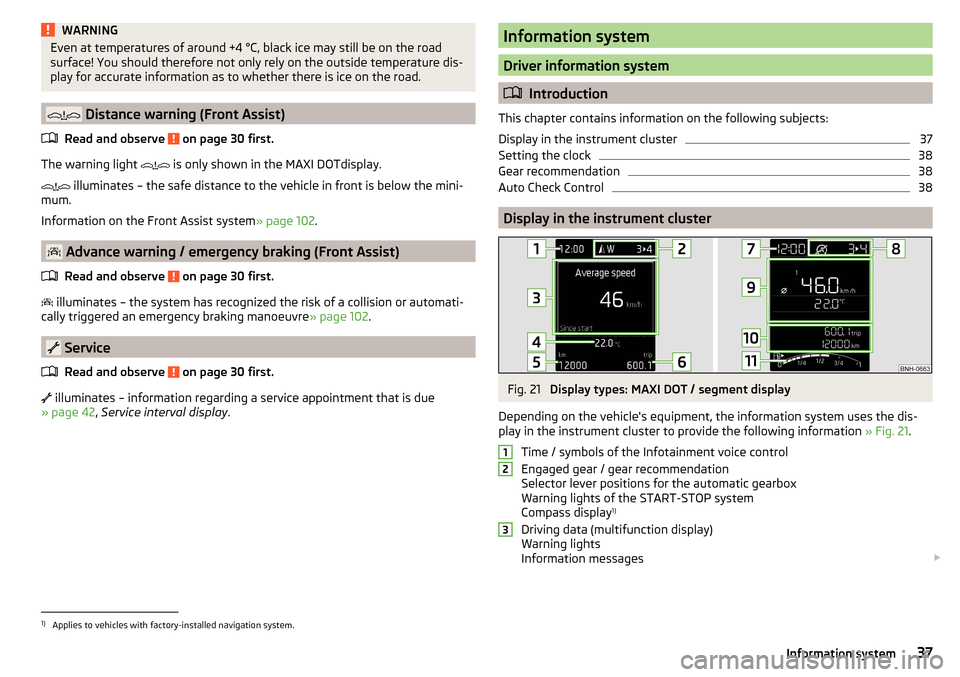
Depending on the vehicle's equipment, the information system uses the dis- play in the instrument cluster to provide the following information » Fig. 21.
Time / symbols of the Infotainment voice control
Engaged gear / gear recommendation
Selector lever positions for the automatic gearbox
Warning lights of the START-STOP system
Compass display 1)
Driving data (multifunction display)
Warning lights
Information messages
1231)
Applies to vehicles with factory-installed navigation system.
37Information system
Page 40 of 184
Door alarm
Service interval display
Outside temperature
Speed regulating system / speed limiter
Total distance travelled
Distance travelled by resetting the memory (trip)
Time
Warning lights of the START-STOP system
Engaged gear / gear recommendation
Selector lever positions for the automatic gearbox
Outside temperature
Warning lights
Driving data (multifunction display)
Total distance travelled
Distance travelled by resetting the memory (trip)
Speed regulating system / speed limiter
Service interval display
Information messages
Fuel gauge
Door, luggage compartment and bonnet alarm
When the door or luggage compartment / bonnet is open, a graphic warning
appears in the display.
An acoustic signal will also sound if you drive the vehicle above 6 km/h when a
door is open.
Reset counter for distance travelled (trip)›
Press button
A
» Fig. 22 on page 38 .
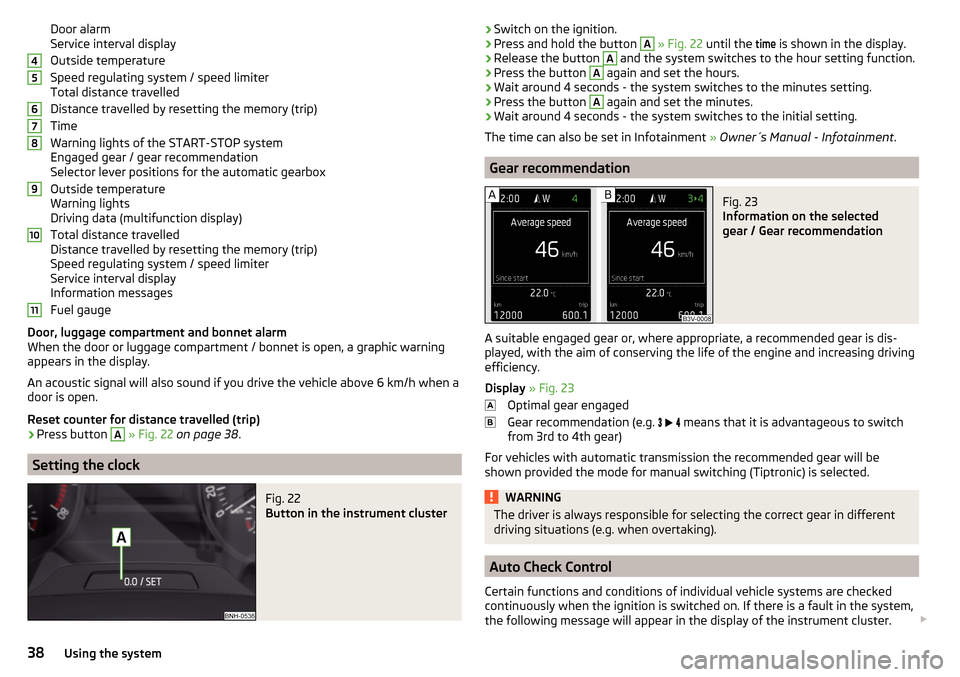
Setting the clock
Fig. 22
Button in the instrument cluster
4567891011›Switch on the ignition.›Press and hold the button A
» Fig. 22 until the
time
is shown in the display.›
Release the button
A
and the system switches to the hour setting function.
›
Press the button
A
again and set the hours.
›
Wait around 4 seconds - the system switches to the minutes setting.
›
Press the button
A
again and set the minutes.
›
Wait around 4 seconds - the system switches to the initial setting.
The time can also be set in Infotainment » Owner´s Manual - Infotainment .
Gear recommendation
Fig. 23
Information on the selected
gear / Gear recommendation
A suitable engaged gear or, where appropriate, a recommended gear is dis-
played, with the aim of conserving the life of the engine and increasing driving
efficiency.
Display » Fig. 23
Optimal gear engaged
Gear recommendation (e.g.
means that it is advantageous to switch
from 3rd to 4th gear)
For vehicles with automatic transmission the recommended gear will be
shown provided the mode for manual switching (Tiptronic) is selected.
WARNINGThe driver is always responsible for selecting the correct gear in different
driving situations (e.g. when overtaking).
Auto Check Control
Certain functions and conditions of individual vehicle systems are checked
continuously when the ignition is switched on. If there is a fault in the system,
the following message will appear in the display of the instrument cluster.
38Using the system
Page 44 of 184
Menu itemTelephone
The call list with the following symbols is displayed in the
Telephone
menu item.
Incoming call
Outgoing call
Missed call
Symbols in the display Charge status of the telephone battery 1)
Signal strength 1)
A telephone is connected to the unit
Missed calls (if there are several missed calls, the number of calls is shown
next to the symbol)
Switch-off microphone
Menu item
Assist systems
In the menu item
Assist systems
, the Front Assist system can be activated/deac-
tivated.
Service interval display
Introduction
This chapter contains information on the following subjects:
Displaying the distance and days until the next service interval
42
Service messages
42
Resetting the service interval display
43
The service interval display shows the kilometres or days until the next service
event.
Information regarding the service intervals » page 117.
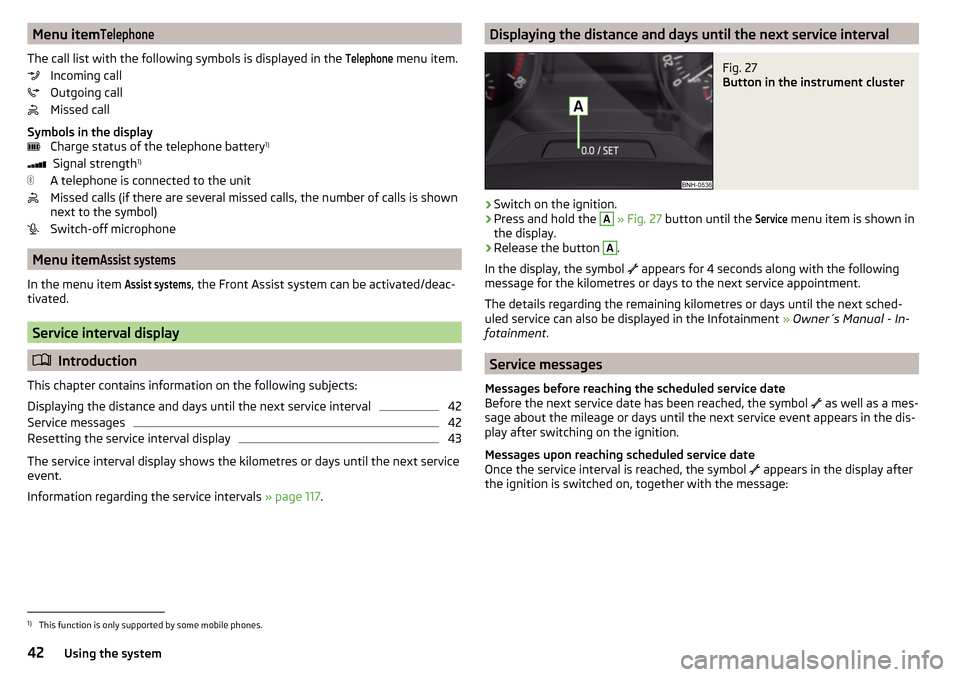
Displaying the distance and days until the next service intervalFig. 27
Button in the instrument cluster
›
Switch on the ignition.
›
Press and hold the
A
» Fig. 27 button until the
Service
menu item is shown in
the display.
›
Release the button
A
.
In the display, the symbol appears for 4 seconds along with the following
message for the kilometres or days to the next service appointment.
The details regarding the remaining kilometres or days until the next sched- uled service can also be displayed in the Infotainment » Owner´s Manual - In-
fotainment .
Service messages
Messages before reaching the scheduled service date
Before the next service date has been reached, the symbol as well as a mes-
sage about the mileage or days until the next service event appears in the dis-
play after switching on the ignition.
Messages upon reaching scheduled service date
Once the service interval is reached, the symbol appears in the display after
the ignition is switched on, together with the message:
1)
This function is only supported by some mobile phones.
42Using the system
Page 45 of 184
Resetting the service interval display
We recommend that the display reset is completed by a specialist garage.
We recommend that you do not reset the service interval display yourself. In-
correctly setting the service interval display could cause problems to the vehi-
cle.
Variable service interval
For vehicles with variable service intervals, after resetting the oil change serv-
ice display in a specialist garage, the values of the new service interval are dis-
played, which are based on the previous operating conditions of the vehicle.
These values are then continuously matched according to the actual operating
conditions of the vehicle.
SmartGate
Introduction to the subject
Fig. 28
QR code with reference to the
ŠKODA websites
SmartGate is a system that transmits certain driving data (such as fuel con-
sumption, speed or similar) via Wi-Fi and Wi-Fi Direct.
The ŠKODA applications installed in a supported external device (e.g. tele-
phone, tablet) give the option to further transmit the received data.
Some ŠKODA applications can be displayed in the Infotainment display by
means of a SmartLinkconnection » Owner´s Manual - Infotainment .
Read in the QR code » Fig. 28 using the respective application on your external
device or enter the following address in the web browser to open the website
with an overview of the available applications, compatible devices and other
information about SmartGate.
http://go.skoda.eu/connectivity-smartgate
CAUTION
■ To increase the access security to the transmitted vehicle data, once the
ŠKODA application has been started, you are requested to change the pass-
word/PIN code if the default password/PIN code has not yet been changed
» page 44 , Password/PIN code . It is not possible to start the ŠKODA applica-
tion without changing it.■
ŠKODA accepts no responsibility for any problems caused by incompatibility
or improper functioning of the external devices.
Connection to SmartGate using Wi-Fi
This type of connection is intended for external devices running Android and
iOS operating systems.
Connecting to an Android external device
›
Switch on the ignition.
›
Switch on Wi-Fi in the external device that is to be connected and search for
available Wi-Fi networks (see Owner´s Manual for the external device).
›
In the menu of the detected networks, select the “SmartGate_...” 1)
menu item.
›
Enter the password (vehicle identification number using uppercase let-
ters » page 44 ).
›
In the external device that is to be connected to, start the SmartGate appli-
cation.
›
Then follow the instructions in the manual, which is included in the
SmartGate application.
With SmartGate, a maximum of four external devices can be connected simul-
taneously using Wi-Fi, with as many launched ŠKODA applications as required.
Connecting to an external iOS device
›
Switch on the ignition.
›
Switch on Wi-Fi in the external device that is to be connected and search for
available Wi-Fi networks (see Owner´s Manual for the external device).
›
In the menu of the detected networks, select the “SmartGate_...” 1)
menu item.
1)
The last 6 characters of the VIN vehicle identification number of your vehicle are displayed at position
....
43Information system
Page 52 of 184
CAUTIONBefore leaving the vehicle, check that all doors and windows are closed in or-
der to ensure that the alarm system is fully operational.
Note
The alarm system has its own power source, whose service life is 5 years.
Alarm trigger
Read and observe
on page 50 first.
The alarm is triggered when one of the following unauthorised actions is acti-
vated on the vehicle with an activated warning system. ▶ Opening the bonnet.
▶ Opening the boot lid.
▶ Opening the doors.
▶ Manipulation of the ignition lock.
▶ Towing the vehicle.
▶ Movement in the vehicle.
▶ Sudden and significant voltage drop of the electrical system.
▶ Uncoupling the trailer.
An alarm is triggered also when the driver's door is unlocked and opened by
the lock cylinder.
The alarm is switched off by pressing the
button on the key or switching on
the ignition.
Interior monitor and towing protection
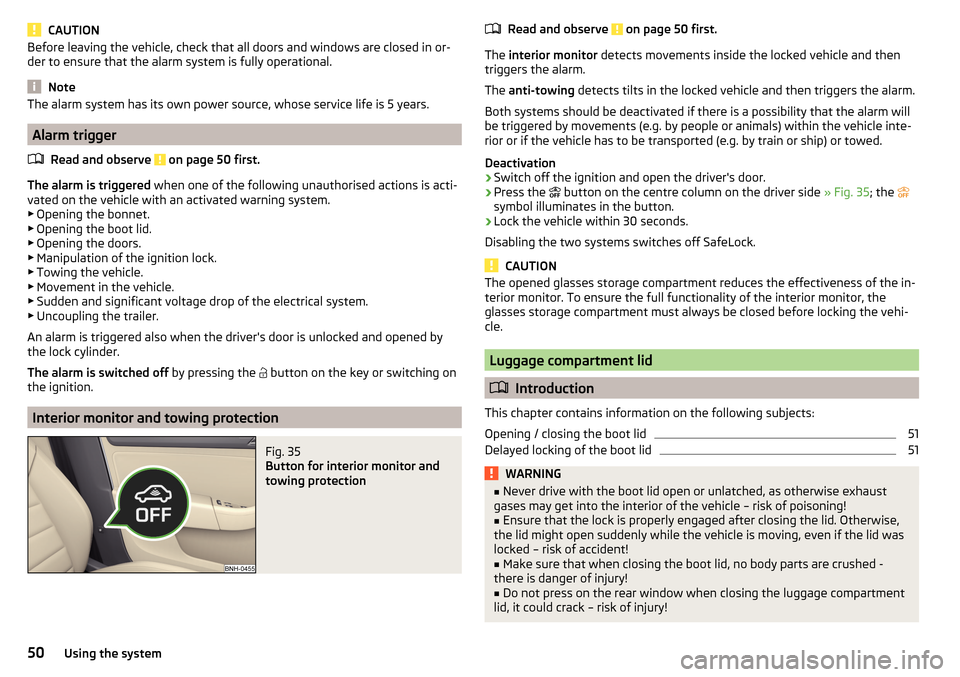
Fig. 35
Button for interior monitor and
towing protection
Read and observe on page 50 first.
The interior monitor detects movements inside the locked vehicle and then
triggers the alarm.
The anti-towing detects tilts in the locked vehicle and then triggers the alarm.
Both systems should be deactivated if there is a possibility that the alarm will
be triggered by movements (e.g. by people or animals) within the vehicle inte-
rior or if the vehicle has to be transported (e.g. by train or ship) or towed.
Deactivation
›
Switch off the ignition and open the driver's door.
›
Press the button on the centre column on the driver side
» Fig. 35; the
symbol illuminates in the button.
›
Lock the vehicle within 30 seconds.
Disabling the two systems switches off SafeLock.
CAUTION
The opened glasses storage compartment reduces the effectiveness of the in-
terior monitor. To ensure the full functionality of the interior monitor, the
glasses storage compartment must always be closed before locking the vehi-
cle.
Luggage compartment lid
Introduction
This chapter contains information on the following subjects:
Opening / closing the boot lid
51
Delayed locking of the boot lid
51WARNING■ Never drive with the boot lid open or unlatched, as otherwise exhaust
gases may get into the interior of the vehicle – risk of poisoning!■
Ensure that the lock is properly engaged after closing the lid. Otherwise,
the lid might open suddenly while the vehicle is moving, even if the lid was
locked – risk of accident!
■
Make sure that when closing the boot lid, no body parts are crushed -
there is danger of injury!
■
Do not press on the rear window when closing the luggage compartment
lid, it could crack – risk of injury!
50Using the system
Page 62 of 184
CAUTION■If the windscreen wipers are in rest position, they cannot be folded out from
the windscreen. The wipers must be set to the service position to raise them
off the windscreen » page 150.■
In cold temperatures and during the winter, check before switching on the
ignition that the wiper blades are not frozen to the windscreen. If the wind-
screen wipers are switched on when the blades are frozen to the windscreen,
this may damage both the blades and windscreen wiper motor.
■
Carefully separate frozen windscreen wiper blades from the windscreen and
free from snow and ice.
■
Handle the windscreen wipers with care - there is a risk of damage to the
windscreen by the windscreen wiper arms.
■
Do not switch on the ignition when the wiper arm is raised from the wind-
screen - there is a risk of damage to the bonnet by the wiper arms.
Note
Depending on vehicle equipment, the windscreen washer jets can be heated
automatically after starting the engine.
Front windscreen wipers and washers
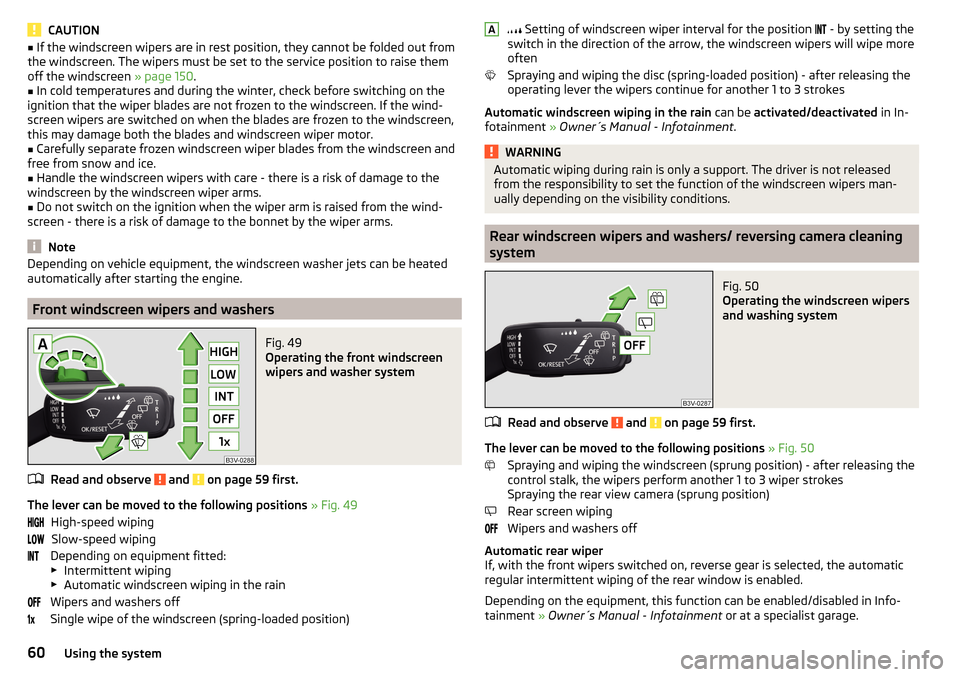
Fig. 49
Operating the front windscreen
wipers and washer system
Read and observe and on page 59 first.
The lever can be moved to the following positions » Fig. 49
High-speed wiping Slow-speed wiping
Depending on equipment fitted:
▶ Intermittent wiping
▶ Automatic windscreen wiping in the rain
Wipers and washers off
Single wipe of the windscreen (spring-loaded position)
Setting of windscreen wiper interval for the position - by setting the
switch in the direction of the arrow, the windscreen wipers will wipe more
often
Spraying and wiping the disc (spring-loaded position) - after releasing the
operating lever the wipers continue for another 1 to 3 strokes
Automatic windscreen wiping in the rain can be activated/deactivated in In-
fotainment » Owner´s Manual - Infotainment .WARNINGAutomatic wiping during rain is only a support. The driver is not released
from the responsibility to set the function of the windscreen wipers man-
ually depending on the visibility conditions.
Rear windscreen wipers and washers/ reversing camera cleaning
system
Fig. 50
Operating the windscreen wipers
and washing system
Read and observe and on page 59 first.
The lever can be moved to the following positions » Fig. 50
Spraying and wiping the windscreen (sprung position) - after releasing the
control stalk, the wipers perform another 1 to 3 wiper strokes
Spraying the rear view camera (sprung position)
Rear screen wiping
Wipers and washers off
Automatic rear wiper
If, with the front wipers switched on, reverse gear is selected, the automatic
regular intermittent wiping of the rear window is enabled.
Depending on the equipment, this function can be enabled/disabled in Info- tainment » Owner´s Manual - Infotainment or at a specialist garage.
A60Using the system
Page 89 of 184
The wear and tear on the brake pads is dependent on the operating condi-
tions and driving style. In difficult conditions (e.g. urban, sporty driving), the
condition of the brakes should be checked between services by a specialist ga-
rage.
Brake response can be slower if the brakes are covered in moisture or, in win-
ter, have a layer of ice or salt on them . The brakes should be cleaned and
dried by applying the brakes many times over »
.
Corrosion on the brake discs and dirt on the brake pads can occur if the vehicle
has been parked for a long period and if you do not make much use of the
braking system. The brakes are cleaned by applying the brakes several times
over »
.
Before negotiating a long or steep gradient , reduce speed and shift down a
gear. As a result, the braking effect of the engine will be used, reducing the
load on the brakes. If, nevertheless, there is a need for additional braking, it
should be carried out at intervals.
Emergency braking warning - if it is necessary to brake hard, the system may
cause the brake lights to automatically flash, to alert the traffic behind.
New brake pads must first be ““run in”” because these do not initially have the
best possible braking effect. Drive especially carefully for the first 200 km or
so.
If the brake fluid level is too low, it can cause faults in the braking system ;
the warning light will illuminate in the instrument cluster
» page 30,
Braking system
. If the warning light does not light up, yet the stopping dis-
tance is perceived to be longer than before, the driving style should be adap-
ted in view of the unknown cause of the problem, and braking kept to a mini-
mum - seek the help of a specialist garage without delay.
The brake booster increases the pressure generated with the brake pedal. The
brake booster only operates when the engine is running.
WARNING■ Greater physical effort is required for braking when the engine is switch-
ed off – risk of accident!■
The clutch pedal must be actuated when braking on a vehicle with man-
ual transmission, when the vehicle is in gear and at low revs. Otherwise,
the functionality of the brake system may be impaired – risk of accident!
WARNING (Continued)■ Do not depress the brake pedal, if there is no requirement to slow down.
This causes the brakes to overheat and can also result in a longer braking
distance and excessive wear - risk of accident!■
Only brake for the purpose of drying and cleaning the brake discs if the
traffic conditions permit this. Do not place any other road users in jeopardy.
■
Recommendations for new brake pads should be followed.
■
When stopping and parking, the parking brake should always be applied
firmly, otherwise the vehicle could move off - risk of accident!
■
If a front spoiler, full wheel trim, etc. is mounted retrospectively, it must
be ensured that the air supply to the front wheel brakes is not reduced.
Otherwise, the front brakes could be in danger of overheating – risk of acci-
dent!
Handbrake
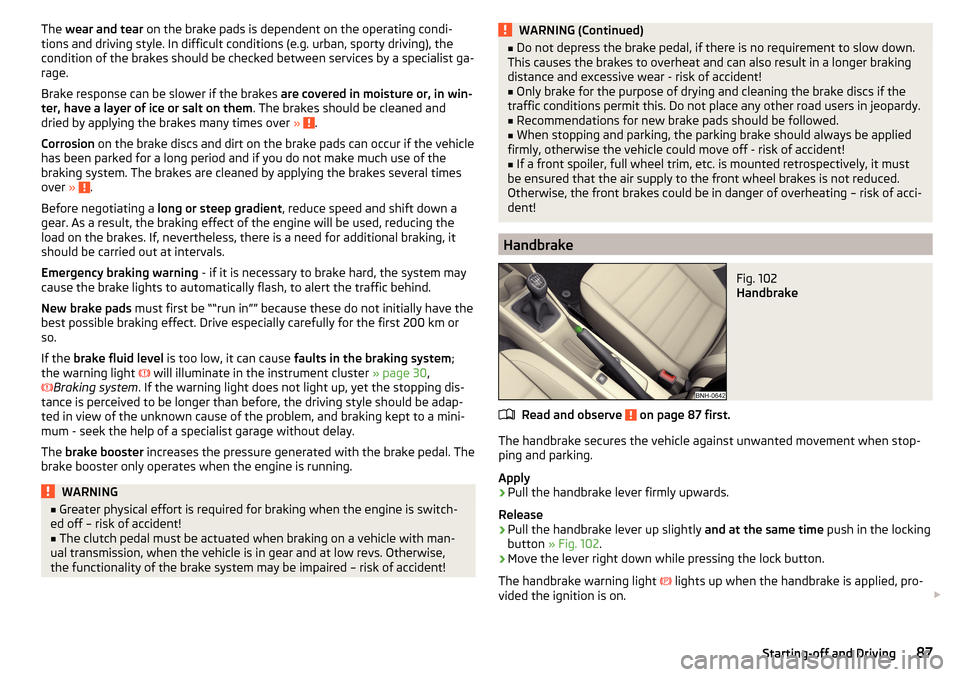
Fig. 102
Handbrake
Read and observe on page 87 first.
The handbrake secures the vehicle against unwanted movement when stop-
ping and parking.
Apply
›
Pull the handbrake lever firmly upwards.
Release
›
Pull the handbrake lever up slightly and at the same time push in the locking
button » Fig. 102 .
›
Move the lever right down while pressing the lock button.
The handbrake warning light
lights up when the handbrake is applied, pro-
vided the ignition is on.
87Starting-off and Driving
Page 107 of 184
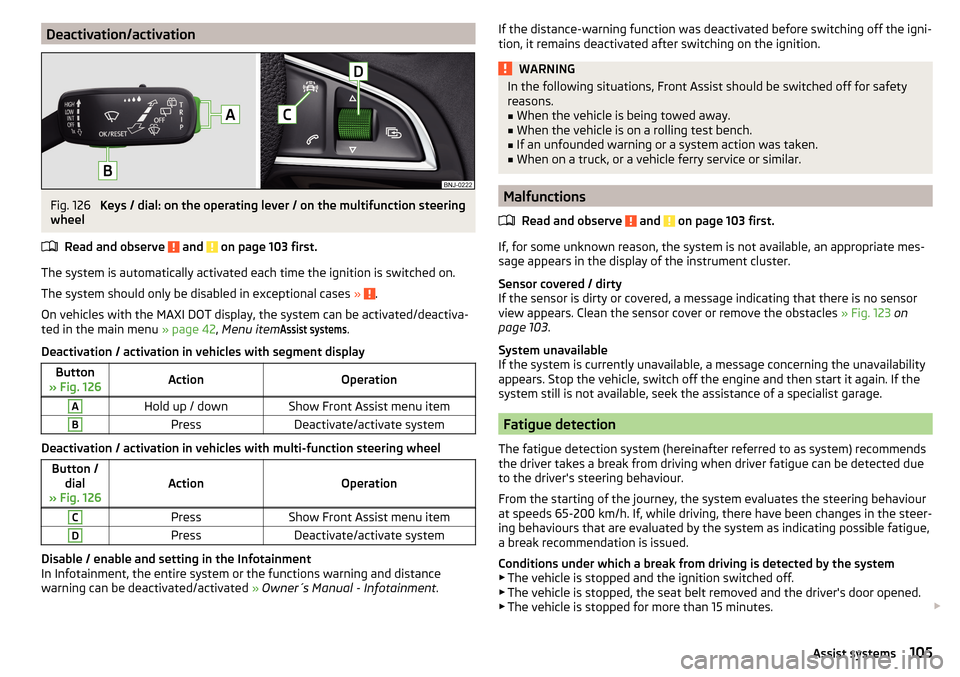
Deactivation/activationFig. 126
Keys / dial: on the operating lever / on the multifunction steering
wheel
Read and observe
and on page 103 first.
The system is automatically activated each time the ignition is switched on.The system should only be disabled in exceptional cases »
.
On vehicles with the MAXI DOT display, the system can be activated/deactiva- ted in the main menu » page 42, Menu item
Assist systems
.
Deactivation / activation in vehicles with segment display
Button
» Fig. 126ActionOperationAHold up / downShow Front Assist menu itemBPressDeactivate/activate system
Deactivation / activation in vehicles with multi-function steering wheel
Button / dial
» Fig. 126ActionOperation
CPressShow Front Assist menu itemDPressDeactivate/activate system
Disable / enable and setting in the Infotainment
In Infotainment, the entire system or the functions warning and distance
warning can be deactivated/activated » Owner´s Manual - Infotainment .
If the distance-warning function was deactivated before switching off the igni-
tion, it remains deactivated after switching on the ignition.WARNINGIn the following situations, Front Assist should be switched off for safety
reasons.■
When the vehicle is being towed away.
■
When the vehicle is on a rolling test bench.
■
If an unfounded warning or a system action was taken.
■
When on a truck, or a vehicle ferry service or similar.
Malfunctions
Read and observe
and on page 103 first.
If, for some unknown reason, the system is not available, an appropriate mes-
sage appears in the display of the instrument cluster.
Sensor covered / dirty
If the sensor is dirty or covered, a message indicating that there is no sensor
view appears. Clean the sensor cover or remove the obstacles » Fig. 123 on
page 103 .
System unavailable
If the system is currently unavailable, a message concerning the unavailability
appears. Stop the vehicle, switch off the engine and then start it again. If the
system still is not available, seek the assistance of a specialist garage.
Fatigue detection
The fatigue detection system (hereinafter referred to as system) recommends
the driver takes a break from driving when driver fatigue can be detected due
to the driver's steering behaviour.
From the starting of the journey, the system evaluates the steering behaviour
at speeds 65-200 km/h. If, while driving, there have been changes in the steer-
ing behaviours that are evaluated by the system as indicating possible fatigue,
a break recommendation is issued.
Conditions under which a break from driving is detected by the system ▶ The vehicle is stopped and the ignition switched off.
▶ The vehicle is stopped, the seat belt removed and the driver's door opened.
▶ The vehicle is stopped for more than 15 minutes.
105Assist systems
Page 116 of 184
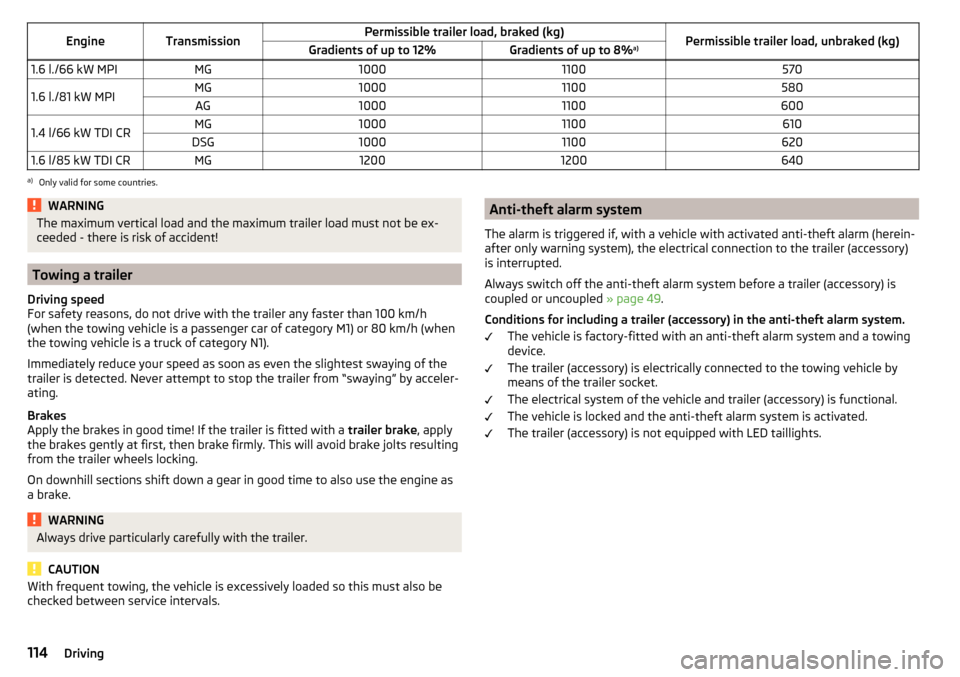
EngineTransmissionPermissible trailer load, braked (kg)Permissible trailer load, unbraked (kg)Gradients of up to 12%Gradients of up to 8%a)1.6 l./66 kW MPIMG100011005701.6 l./81 kW MPIMG10001100580AG100011006001.4 l/66 kW TDI CRMG10001100610DSG100011006201.6 l/85 kW TDI CRMG12001200640a)
Only valid for some countries.
WARNINGThe maximum vertical load and the maximum trailer load must not be ex-
ceeded - there is risk of accident!
Towing a trailer
Driving speed
For safety reasons, do not drive with the trailer any faster than 100 km/h
(when the towing vehicle is a passenger car of category M1) or 80 km/h (when
the towing vehicle is a truck of category N1).
Immediately reduce your speed as soon as even the slightest swaying of the
trailer is detected. Never attempt to stop the trailer from “swaying” by acceler-
ating.
Brakes
Apply the brakes in good time! If the trailer is fitted with a trailer brake, apply
the brakes gently at first, then brake firmly. This will avoid brake jolts resulting
from the trailer wheels locking.
On downhill sections shift down a gear in good time to also use the engine as
a brake.
WARNINGAlways drive particularly carefully with the trailer.
CAUTION
With frequent towing, the vehicle is excessively loaded so this must also be
checked between service intervals.Anti-theft alarm system
The alarm is triggered if, with a vehicle with activated anti-theft alarm (herein-
after only warning system), the electrical connection to the trailer (accessory)
is interrupted.
Always switch off the anti-theft alarm system before a trailer (accessory) is
coupled or uncoupled » page 49.
Conditions for including a trailer (accessory) in the anti-theft alarm system. The vehicle is factory-fitted with an anti-theft alarm system and a towing
device.
The trailer (accessory) is electrically connected to the towing vehicle by
means of the trailer socket.
The electrical system of the vehicle and trailer (accessory) is functional.
The vehicle is locked and the anti-theft alarm system is activated.
The trailer (accessory) is not equipped with LED taillights.114Driving
Page 117 of 184
General Maintenance
Care and maintenance
Service work, adjustments and technical alterations
Introduction
This chapter contains information on the following subjects:
Vehicle operating under different weather conditions
115
Statutory checks
115
ŠKODA Service partner
115
ŠKODA Original parts
116
ŠKODA Original accessories
116
Spoiler
116
Component protection
116
Airbags
116
Acceptance and recycling of used vehicles
117
The instructions and guidelines from ŠKODA AUTO must be observed when us-
ing accessories or carrying out any modifications, repairs or technical altera-
tions to your vehicle.
Adhering to these instructions and guidelines helps ensure road safety and
helps keep your vehicle in a good technical condition.
WARNING■ Adjustments, repairs and technical changes to the vehicle should only be
carried out by a specialist. Work carried out incorrectly (including work on
the electronic components and their software) can result in malfunctions -
there is a risk of accident and, potentially, increased wear on parts!■
We recommend that you use only ŠKODA Original Accessories and ŠKODA
Original Parts which have been expressly approved for use on your vehicle.
Reliability, safety and suitability for your vehicle are guaranteed with these.
■
Do not use any products which have not been approved by ŠKODA AUTO,
even though these may be products with a type approval or which have
been approved by a nationally recognised testing laboratory.
Vehicle operating under different weather conditions
Read and observe
on page 115 first.
If you would like to operate your vehicle in countries other than those with itsintended weather conditions, you should contact a ŠKODA Partner. He or she
will advise you if certain precautions need to be taken to ensure the full func-
tioning of the vehicle or to prevent damage (e.g. coolant, changing the battery
or similar).
Statutory checks
Read and observe
on page 115 first.
Many countries have legislation requiring the operational reliability, safety and,where applicable, roadworthiness and/or exhaust gas properties of a vehicle
to be tested at regular intervals. These tests can be carried out by workshops
or testing stations that have been legally authorized for this purpose.
The ŠKODA Service Partners can prepare your vehicle for the official inspec-
tions, so as to ensure that it passes.
Even if you want to take your vehicle to an officially approved test centre for
prior checking in preparation for a legally required test, we recommend that
you consult your ŠKODA Service Partner beforehand.
ŠKODA Service partner
Read and observe
on page 115 first.
All ŠKODA Service Partners work according to the instructions and guidelines
from ŠKODA AUTO. All service and repair work is therefore carried out on time
and at the appropriate quality. Adhering to these instructions and guidelines
helps ensure road safety and helps keep your vehicle in a good technical con-
dition.
We therefore advise you to have all modifications, repairs and technical altera-
tions to your vehicle carried out by a ŠKODA Service Partner.
115Care and maintenance