lock SKODA RAPID SPACEBACK 2013 1.G Repair Manual
[x] Cancel search | Manufacturer: SKODA, Model Year: 2013, Model line: RAPID SPACEBACK, Model: SKODA RAPID SPACEBACK 2013 1.GPages: 193, PDF Size: 14.8 MB
Page 163 of 193

Replacing the battery in the remote control keyFig. 148
Remove cover/take out battery
Read and observe
on page 160 first.
The battery change is carried out as follows.
›
Flip out the key.
›
Press off the battery cover
A
» Fig. 148 with your thumb or using a flat
screwdriver in the region of the arrows
1
.
›
Remove the discharged battery from the key by pressing the battery down in
the region of the arrow
2
.
›
Insert the new battery.
›
Place the battery cover
A
on the key and press it down until it clicks into
place.
Note
■ The key has to be synchronised if the vehicle cannot be unlocked or locked
with the remote control key after replacing the battery » page 161.■
If a key has an affixed decorative cover, this will be destroyed when the bat-
tery is replaced. A replacement cover can be purchased from a ŠKODA Partner.
Synchronising the remote control
Read and observe
on page 160 first.
If the vehicle does not unlock when pressing the remote control, the key may
not be synchronised. This can occur when the buttons on the remote control
key are actuated a number of times outside of the operative range of the
equipment or the battery in the remote control key has been replaced.
Synchronise the key as follows.
› Press any button on the remote control key.›Pressing of the button means that the door will unlock with the key within 1
minute.
Emergency unlocking/locking
Introduction
This chapter contains information on the following subjects:
Locking the door without a locking cylinder
161
Unlocking the tailgate
162
Selector lever-emergency unlocking
162
Locking the door without a locking cylinder
Fig. 149
Emergency locking: Left/right rear door
An emergency locking mechanism is located on the face side of the doors
which have no locking cylinder. It is only visible after opening the door.
Emergency locking » Fig. 149
Cover
Door locked
Door unlocked
Before using the emergency closing mechanism, remove cover
A
» Fig. 149 .
After use, reinstall the cover into the corresponding hole in the door.
After closing the locked door, it cannot be opened from the outside. The door
is unlocked by pulling on the door opening lever and is then opened from the
outside.
A161Emergency equipment and self-help
Page 164 of 193

Unlocking the tailgateFig. 150
Emergency unlocking of the boot
lid
The luggage compartment lid can be unlocked manually if there is a fault in
the central locking system.
Unlocking
›
Fold the rear seat backrest forward » page 67.
›
Insert the vehicle key into the slot in the trim panel as far as it
goes » Fig. 150 .
›
Unlock the lid by moving it in the direction of the arrow.
›
Open the boot lid.
Selector lever-emergency unlocking
Fig. 151
Selector lever-emergency un-
locking
›
Firmly apply the handbrake.
›
Carefully pull up the front left and right cover.
›
Pull up rear cover.
›
Press the yellow plastic part in the direction of the arrow » Fig. 151 using your
finger.
›
At the same time, press the locking button in the selector lever and move the selector lever to position N.
If the selector lever is moved again to position P, it is once again blocked.
Replacing windscreen wiper blades
Introduction
This chapter contains information on the following subjects:
Replacing the front windscreen wiper blades
162
Replacing the rear window glass wiper blades
163WARNINGReplace the windscreen wiper blades once or twice a year for safety rea-
sons. These can be purchased from a ŠKODA Partner.
Replacing the front windscreen wiper blades
Fig. 152
Windscreen wiper blade
Read and observe on page 162 first.
Before replacing the windscreen wiper blade, put the windscreen wiper arms
into the service position.
Service position for changing wiper blades
›
Close the bonnet.
›
Switch the ignition off and on again.
›
Place the operating lever in position
4
» Fig. 46 on page 61 .
Move the windscreen wiper arms into the service position.
Removing the wiper blade
›
Lift the wiper arm from the window in the direction of
1
» Fig. 152 .
›
Tilt the wiper blade to the stop in the same direction.
›
Hold the windscreen wiper arm at the top end.
›
Press the locking button
A
and remove the wiper blade in the direction of
arrow
2
.
162Do-it-yourself
Page 165 of 193

Attaching the windscreen wiper blade›Push the windscreen wiper blade to the stop until it locks into place.›
Check that the windscreen wiper blade is correctly attached.
›
Fold the windscreen wiper arm back to the windscreen.
›
Turn on the ignition and press the lever into position
4
» Fig. 46 on page 61 .
Move the windscreen wiper arms into the home position.
Replacing the rear window glass wiper blades
Fig. 153
Rear window wiper blade
Read and observe on page 162 first.
Removing the wiper blade
›
Lift the wiper arm from the window in the direction of
1
» Fig. 153 .
›
Tilt the wiper blade to the stop in the same direction.
›
Hold the windscreen wiper arm at the top end.
›
Press the locking button
A
and remove the wiper blade in the direction of
arrow
2
.
Attaching the windscreen wiper blade
›
Push the windscreen wiper blade to the stop until it locks into place.
›
Check that the windscreen wiper blade is correctly attached.
›
Fold the windscreen wiper arm back to the windscreen.
Fuses and light bulbs
Fuses
Introduction
This chapter contains information on the following subjects:
Fuses in the dash panel
164
Assignment of the fuses in the dash panel
164
Fuses in the engine compartment
165
Fuse assignment in the engine compartment
166
Individual electrical circuits are protected by fuses.
Switch off the ignition and the corresponding power consuming device before
replacing a fuse.
Find out which fuse belongs to the component that is not operat-
ing » page 164 , Assignment of the fuses in the dash panel or » page 166 ,
Fuse assignment in the engine compartment .
Fuse colourMaximum amperagelight brown5dark brown7.5red10blue15yellow20white25green30orange40WARNINGAlways read and observe the warning notes before completing any work in
the engine compartment » page 131, Engine compartment .163Fuses and light bulbs
Page 167 of 193
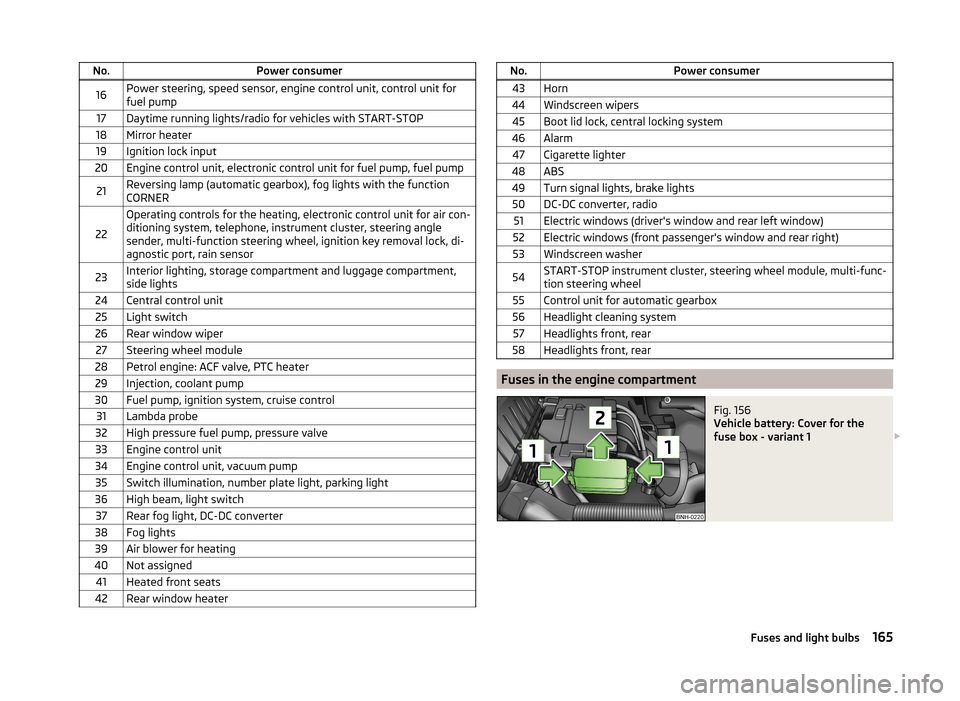
No.Power consumer16Power steering, speed sensor, engine control unit, control unit for
fuel pump17Daytime running lights/radio for vehicles with START-STOP18Mirror heater19Ignition lock input20Engine control unit, electronic control unit for fuel pump, fuel pump21Reversing lamp (automatic gearbox), fog lights with the function
CORNER
22
Operating controls for the heating, electronic control unit for air con-
ditioning system, telephone, instrument cluster, steering angle
sender, multi-function steering wheel, ignition key removal lock, di-
agnostic port, rain sensor23Interior lighting, storage compartment and luggage compartment,
side lights24Central control unit25Light switch26Rear window wiper27Steering wheel module28Petrol engine: ACF valve, PTC heater29Injection, coolant pump30Fuel pump, ignition system, cruise control31Lambda probe32High pressure fuel pump, pressure valve33Engine control unit34Engine control unit, vacuum pump35Switch illumination, number plate light, parking light36High beam, light switch37Rear fog light, DC-DC converter38Fog lights39Air blower for heating40Not assigned41Heated front seats42Rear window heaterNo.Power consumer43Horn44Windscreen wipers45Boot lid lock, central locking system46Alarm47Cigarette lighter48ABS49Turn signal lights, brake lights50DC-DC converter, radio51Electric windows (driver's window and rear left window)52Electric windows (front passenger's window and rear right)53Windscreen washer54START-STOP instrument cluster, steering wheel module, multi-func-
tion steering wheel55Control unit for automatic gearbox56Headlight cleaning system57Headlights front, rear58Headlights front, rear
Fuses in the engine compartment
Fig. 156
Vehicle battery: Cover for the
fuse box - variant 1
165Fuses and light bulbs
Page 168 of 193
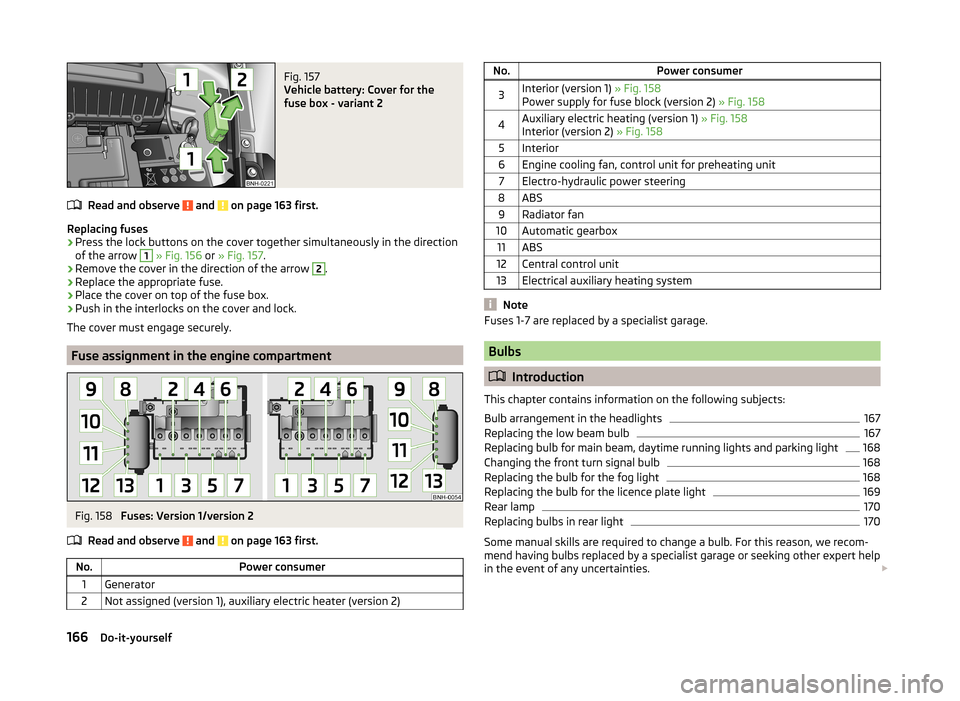
Fig. 157
Vehicle battery: Cover for the
fuse box - variant 2
Read and observe and on page 163 first.
Replacing fuses
›
Press the lock buttons on the cover together simultaneously in the direction
of the arrow
1
» Fig. 156 or » Fig. 157 .
›
Remove the cover in the direction of the arrow
2
.
›
Replace the appropriate fuse.
›
Place the cover on top of the fuse box.
›
Push in the interlocks on the cover and lock.
The cover must engage securely.
Fuse assignment in the engine compartment
Fig. 158
Fuses: Version 1/version 2
Read and observe
and on page 163 first.
No.Power consumer1Generator2Not assigned (version 1), auxiliary electric heater (version 2)No.Power consumer3Interior (version 1) » Fig. 158
Power supply for fuse block (version 2) » Fig. 1584Auxiliary electric heating (version 1) » Fig. 158
Interior (version 2) » Fig. 1585Interior6Engine cooling fan, control unit for preheating unit7Electro-hydraulic power steering8ABS9Radiator fan10Automatic gearbox11ABS12Central control unit13Electrical auxiliary heating system
Note
Fuses 1-7 are replaced by a specialist garage.
Bulbs
Introduction
This chapter contains information on the following subjects:
Bulb arrangement in the headlights
167
Replacing the low beam bulb
167
Replacing bulb for main beam, daytime running lights and parking light
168
Changing the front turn signal bulb
168
Replacing the bulb for the fog light
168
Replacing the bulb for the licence plate light
169
Rear lamp
170
Replacing bulbs in rear light
170
Some manual skills are required to change a bulb. For this reason, we recom-
mend having bulbs replaced by a specialist garage or seeking other expert help
in the event of any uncertainties.
166Do-it-yourself
Page 171 of 193

Fig. 164
Replacing the light bulb
Read and observe and on page 167 first.
Removing the protective grille
›
Undo the protective grille in the area of the arrow » Fig. 163 -
using the
clamp for removing the wheel trims » page 150, Vehicle tool kit .
›
Remove the protective grille in the direction of the arrow
1
» Fig. 163 .
Changing light bulbs for fog lights
›
Unscrew the screws » Fig. 163 -
marked with the arrows 1)
.
›
Unlock the fuse in the direction of the arrow
2
with the screwdriver.
›
Remove the headlight in the direction of arrow
3
.
›
Remove the connector » Fig. 164.
›
Turn the lamp socket in the direction of arrow
4
» Fig. 164 and pull it out.
›
Insert the bulb holder with the new bulb into the headlight and turn counter
to the direction of arrow
4
.
›
Attach the connector.
›
Replace the fog light by inserting it in the opposite direction of the arrow
3
» Fig. 163 and tighten.
›
Insert the protective grille and carefully press it in.
The protective grille must engage firmly.
Replacing the bulb for the licence plate lightFig. 165
Remove the number plate light/replace the bulb
Read and observe
and on page 167 first.
›
Open the boot lid.
›
Push in the lamp in the direction of the arrow
1
» Fig. 165 .
The lamp comes loose.
›
Swivel out the lamp in the direction of the arrow
2
and remove it.
›
Remove the faulty bulb from the holder in the direction of the arrow
3
.
›
Insert a new bulb into the holder.
›
Reinsert the lamp in the opposite direction to the arrow
1
.
›
Push on the light until the spring clicks into place.
Check that the light is securely inserted.
1)
The screwdriver is part of the tool kit.
169Fuses and light bulbs
Page 172 of 193

Rear lampFig. 166
Remove cover/light
Fig. 167
Installing the lamp connector/lamp
Read and observe
and on page 167 first.
Removing
›
Open the boot lid.
›
Insert the clamp for removing the wheel trims » page 150, Vehicle tool kit
into the hole at the position indicated by the arrow » Fig. 166 -
.
›
Remove the cover in the direction of the arrow
1
-
» Fig. 166 .
›
Use the screwdriver from the tool kit to unscrew the lamp » Fig. 166 -
.
›
Grasp the light and carefully remove with shaky movements in the direction
of arrow
2
.
›
Carefully remove the connector from the tail lamp » Fig. 167 -
.
Installing
›
Insert the connector into the lamp and lock it securely.
›
Insert the lamp into the mounts in the body » Fig. 167 -
.
›Carefully press the tail lamp into the body so that the bolts 2
» Fig. 168 on
page 170 on the lamp engage into the mounts in the body » .
Ensure that the cable bundle does not become pinched between the body and
the lamp.›
Screw the tail lamp into place and install the cover.
The cover must engage securely.
CAUTION
■ Ensure that the cable bundle does not become pinched between the body
and the lamp when it is being refitted – risk of damage to the electrical instal-
lation and risk of water ingress.■
If you are not sure whether the cable bundle has become pinched, we recom-
mend that you have the light connection checked by a specialist garage.
■
Ensure that the vehicle paintwork and the tail lamp are not damaged when
removing and installing the tail lamp.
Replacing bulbs in rear light
Fig. 168
Outer part of the lamp/inner part of the lamp
Read and observe
and on page 167 first.
Outer part of the lamp
›
Turn the bulb holder
1
» Fig. 168 in an anti-clockwise direction and remove
it from the lamp housing.
›
Replace the bulb, reinsert the holder with the bulb into the lamp housing and
turn to the stop in a clockwise direction.
Inner parts of the lamp
›
Unlock the bulb holder using the locking latches marked with ar-
rows » Fig. 168 -
and remove the bulb holder from the tail lamp.
170Do-it-yourself
Page 173 of 193
›Turn the respective bulb
» Fig. 168 until it stops counter-clockwise and re-
move it from the bulb holder.›
Insert a new bulb into the holder and turn in a clockwise direction to the
stop.
›
Insert guide mandrels
3
» Fig. 168 of the bulb holder into the lamp.
All locking mechanisms must audibly snap into place.
171Fuses and light bulbs
Page 174 of 193

Technical data
Technical data
Vehicle data
Introduction
This chapter contains information on the following subjects:
Vehicle characteristics
172
Operating weight and payload
172
Measurement of fuel consumption and CO 2 emissions according to ECE
Regulations and EU Directives
173
Dimensions
174
Angle
175
Vehicle-specific details per engine type
176
The details given in the vehicle's technical documentation always take prece-
dence over the details in the Owner's Manual.
The listed performance values were determined without performance-reduc- ing equipment, e.g. air conditioning system.
Vehicle characteristics
Fig. 169
Vehicle data sticker/type plate
Vehicle data sticker
The vehicle data sticker » Fig. 169 -
is located on the base of the luggage
compartment and is also stuck into the service schedule.
The vehicle data sticker contains the following data.
Vehicle identification number (VIN)
Vehicle type
Gearbox code/paint number/interior equipment/engine output/engine
code
Partial vehicle description
Type plate
The type plate » Fig. 169 -
is located at the bottom of the B-pillar on the
driver's side.
The type plate contains the following data. Vehicle identification number (VIN)
Maximum permissible gross weight
Maximum permissible towed weight (towing vehicle and trailer)
Maximum permissible front axle load
Maximum permissible rear axle load
Vehicle identification number (VIN)
The vehicle identification number - VIN (vehicle body number) is stamped into
the engine compartment on the right hand suspension strut dome. This num-
ber is also located on a sign on the lower left hand edge below the windscreen
(together with a VIN bar code), and on the type plate.
Engine number
The engine number (three-digit identifier and serial number) is stamped on the engine block.WARNINGDo not exceed the specified maximum permissible weights – risk of acci-
dent and damage!
Operating weight and payload
Operating weight
This value represents the minimum operating weight without additional
weight-increasing equipment such as air conditioning system, spare wheel, or
trailer hitch.
The specified operating weight is for orientation purposes only.
123456789172Technical data
Page 182 of 193
Index
A
abroad lead-free petrol
130
Abroad Headlights
58
ABS Function
106
Warning light33
Acceptance and recycling of used vehicles121
Accessories119
Adjusting Belt height
13
Exterior mirror63
head restraints65
Interior mirror62
Seat64
Steering wheel8
Adjusting the seats7
Adjustment Beam range
53
Air-conditioning system Air outlet vents
85
Airbag14
Deactivating18
Deactivating the front passenger airbag18
Deployment14
Front airbag15
Head airbag17
Indicator light35
Modifications and damage to the airbag system 121
Side airbag
16
Airbag system14
Air conditioning84
Air distribution control85
Climatronic87
manual air conditioning86
Air distribution control85
Air outlet vents85
Alarm Switching off
49
Triggering49
Alcantara cleaning
128
Anti-lock Braking System106
Anti-theft alarm system Activating/deactivating
50
Trailer117
Armrest Front
67
Rear67
artificial leather128
Ashtray71
ASR Warning light
33
Assist system ABS
106
Assist systems106
ABS33
ASR33
Cruise Control System108
EDL107
ESC32, 106
HBA107
HHC107
Parking aid107
START-STOP109
TCS106
Auto Check Control29
Automatic driving lamp control55
Automatic gearbox101
Manual shifting of gears103
Selector lever-emergency unlocking162
Selector lever lock102
Starting-off and driving103
Tiptronic103
Using the selector lever102
Automatic gearbox modes102
Automatic load deactivation141
automatic transmission selector lever lock defect
103
Automatic transmission Kickdown
103
Selector lever lock103
AUX96
B
Ball head Check fitting
114
Fitting113
Ready position113
Removing115
Battery In the remote control key
161
Belts10
Belt tensioners13
Bonnet Closing
132
Opening132
Boot Class N1 vehicles
79
Double-sided floor covering79
Hooks77
See Boot lid51
Storage compartments in the boot78
Boot cover Parking position
78
Boot lid automatic locking
51
Closing51
Opening51
Brake Warning light
31
Brake booster99
brake fluid specification
138
180Index