wheel SKODA ROOMSTER 2009 1.G User Guide
[x] Cancel search | Manufacturer: SKODA, Model Year: 2009, Model line: ROOMSTER, Model: SKODA ROOMSTER 2009 1.GPages: 263, PDF Size: 32.25 MB
Page 64 of 263
Seats and Storage63
Using the system
Safety
Driving Tips
General Maintenance
Breakdown assistance
Praktik
Technical Data
Seats and StorageFront seatsBasic informationThe front seats have a wide range of different settings and can thus be matched to
the physical characteristics of the driver and front passenger. Correct adjustment of
the seats is particularly important for:•
safely and quickly reaching the controls;
•
a relaxed, fatigue-free body position;
•
achieving the maximum protection offered by the seat belts and the airbag
system.
The chapters which follow describe the procedure which you should adopt for
adjusting the seats.
WARNING
•
Never transport more occupants than the maximum seating in the
vehicle.
•
Each occupant must correctly fasten the seat belt belonging to the seat.
Children must be fastened ⇒page 147, “Transporting children safely” with
a suitable restraint system.
•
The front seats and the head restraints must always be adjusted to match
the body size of the seat occupant as well as the seat belts must always be
correctly fastened in order to provide an optimal protection for you and your
occupants.
•
Always keep your feet in the footwell when the vehicle is being driven -
never place your feet on the instrument panel, out of the window or on the
surfaces of the seats. This is particularly important for the front seat
passenger. You will be exposed to increased risk of injury if it becomes
necessary to apply the brake or in the event of an accident. If an airbag is
deployed, you may suffer fatal injuries when adopting an incorrect seated
position!
•
It is important for the driver and front passenger to maintain a distance
of at least 25 cm from the steering wheel or dash panel. Not maintaining this
minimum distance will mean that the airbag system will not be able to prop-
erly protect you - hazard! The front seats and the head restraints must
always also be correctly adjusted to match the body size of the occupant.
•
Ensure that there are no objects in the footwell as any objects may get
behind the pedals during a driving or braking manoeuvre. You would then
no longer be able to operate the clutch, to brake or accelerate.
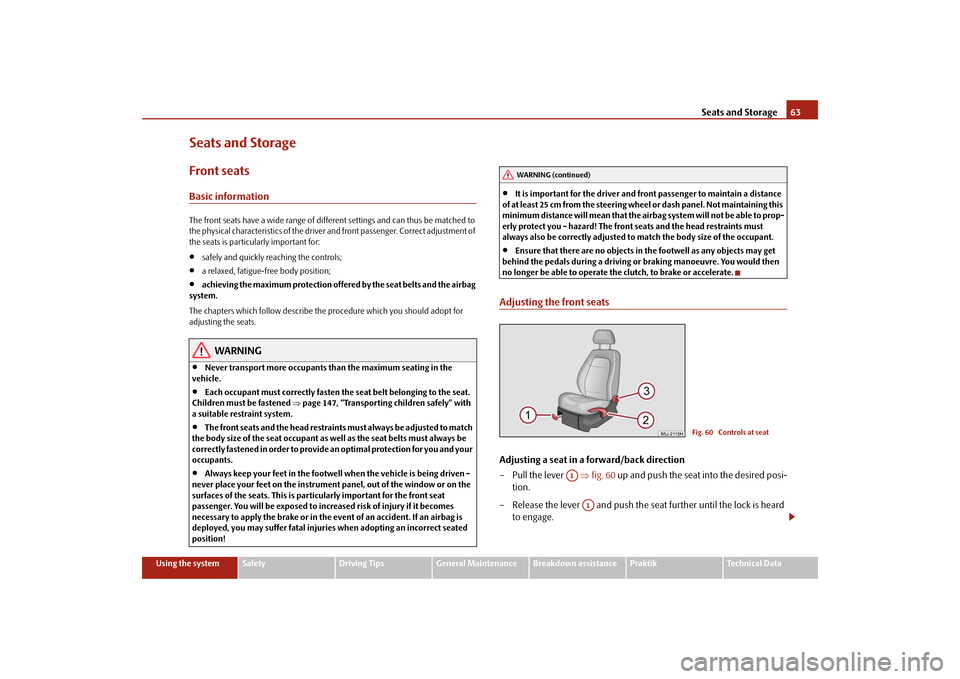
Adjusting the front seatsAdjusting a seat in a forward/back direction
–Pull the lever ⇒fig. 60 up and push the seat into the desired posi-
tion.
– Release the lever and push the seat further until the lock is heard
to engage.
WARNING (continued)
Fig. 60 Controls at seat
A1
A1
s29g.4.book Page 63 Wednesday, June 17, 2009 9:54 AM
Page 65 of 263
Seats and Storage 64
Adjusting height of seat*
– Lift the seat if required by pulling or pumping lever upwards.
– Lower the seat if required by pushing or pumping lever down-
wards.
Adjust the angle of the seat backrest
– Relieve any pressure on the seat backrest (do not lean on it) and turn
the handwheel to adjust the angle of the backrest.The driver's seat should be adjusted in such a way that the pedals can be fully
pressed to the floor with slightly bent legs.
The seat backrest on the driver's seat should be adjusted in such a way that the
upper point of the steering wheel can be easily reached with slightly bent arms.
WARNING
•
Only adjust the driver seat when the vehicle is stationary - risk of injury!
•
Take care when adjusting the seat! Adjusting the seat without care can
lead to bruises or injuries.
•
The seat backrests must not be angled too far back when driving other-
wise this will affect proper operation of the seat belts and of the airbag
system - risk of injury!
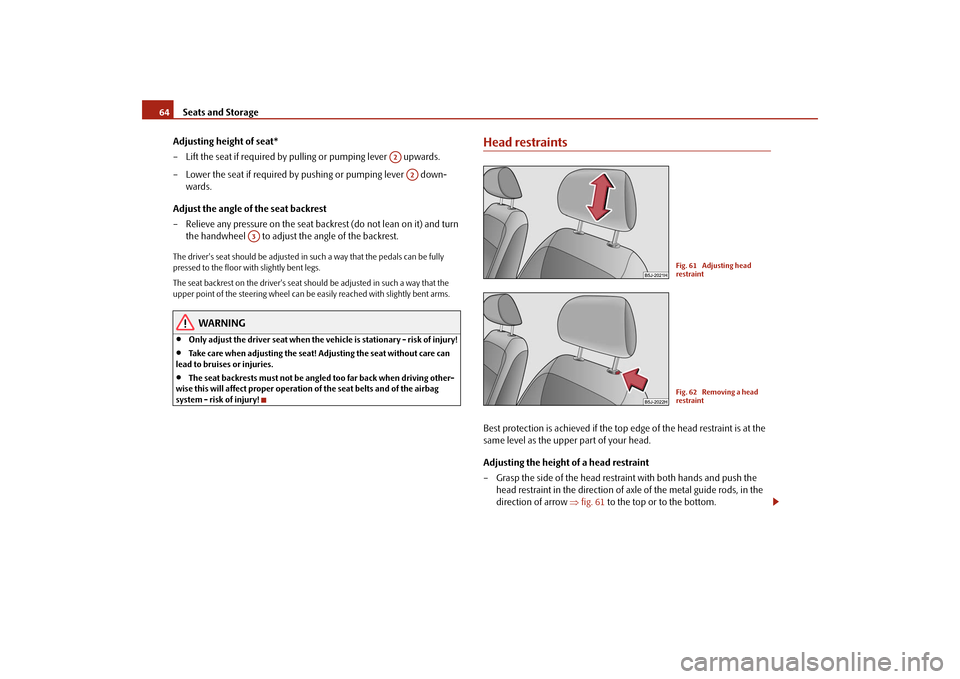
Head restraintsBest protection is achieved if the top edge of the head restraint is at the
same level as the upper part of your head.
Adjusting the height of a head restraint
– Grasp the side of the head restraint with both hands and push the
head restraint in the direction of axle of the metal guide rods, in the
direction of arrow ⇒fig. 61 to the top or to the bottom.
A2
A2
A3
Fig. 61 Adjusting head
restraintFig. 62 Removing a head
restraint
s29g.4.book Page 64 Wednesday, June 17, 2009 9:54 AM
Page 73 of 263
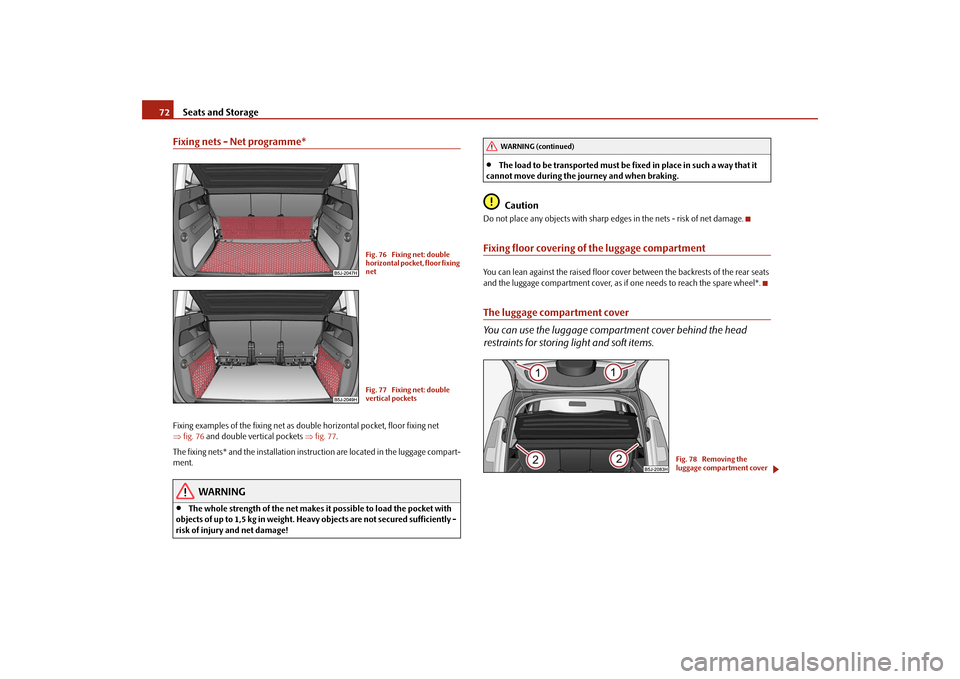
Seats and Storage 72Fixing nets - Net programme*Fixing examples of the fixing net as double horizontal pocket, floor fixing net
⇒fig. 76 and double vertical pockets ⇒fig. 77.
The fixing nets* and the installation instruction are located in the luggage compart-
ment.
WARNING
•
The whole strength of the net makes it possible to load the pocket with
objects of up to 1,5 kg in weight. Heavy objects are not secured sufficiently -
risk of injury and net damage!
•
The load to be transported must be fixed in place in such a way that it
cannot move during the journey and when braking.Caution
Do not place any objects with sharp edges in the nets - risk of net damage.Fixing floor covering of the luggage compartmentYou can lean against the raised floor cover between the backrests of the rear seats
and the luggage compartment cover, as if one needs to reach the spare wheel*.The luggage compartment cover
You can use the luggage compartment cover behind the head
restraints for storing light and soft items.
Fig. 76 Fixing net: double
horizontal pocket, floor fixing
netFig. 77 Fixing net: double
vertical pockets
WARNING (continued)
Fig. 78 Removing the
luggage compartment cover
s29g.4.book Page 72 Wednesday, June 17, 2009 9:54 AM
Page 79 of 263
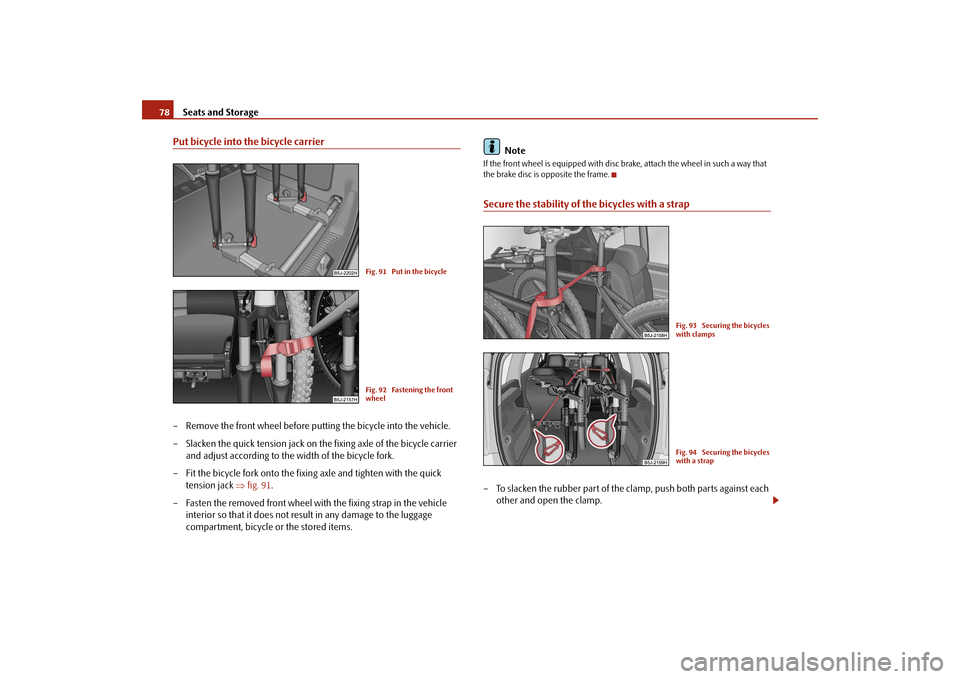
Seats and Storage 78Put bicycle into the bicycle carrier– Remove the front wheel before putting the bicycle into the vehicle.
– Slacken the quick tension jack on the fixing axle of the bicycle carrier
and adjust according to the width of the bicycle fork.
– Fit the bicycle fork onto the fixing axle and tighten with the quick
tension jack ⇒fig. 91.
– Fasten the removed front wheel with the fixing strap in the vehicle
interior so that it does not result in any damage to the luggage
compartment, bicycle or the stored items.Note
If the front wheel is equipped with disc brake, attach the wheel in such a way that
the brake disc is opposite the frame.Secure the stability of the bicycles with a strap– To slacken the rubber part of the clamp, push both parts against each
other and open the clamp.
Fig. 91 Put in the bicycleFig. 92 Fastening the front
wheel
Fig. 93 Securing the bicycles
with clampsFig. 94 Securing the bicycles
with a strap
s29g.4.book Page 78 Wednesday, June 17, 2009 9:54 AM
Page 86 of 263
Seats and Storage85
Using the system
Safety
Driving Tips
General Maintenance
Breakdown assistance
Praktik
Technical Data
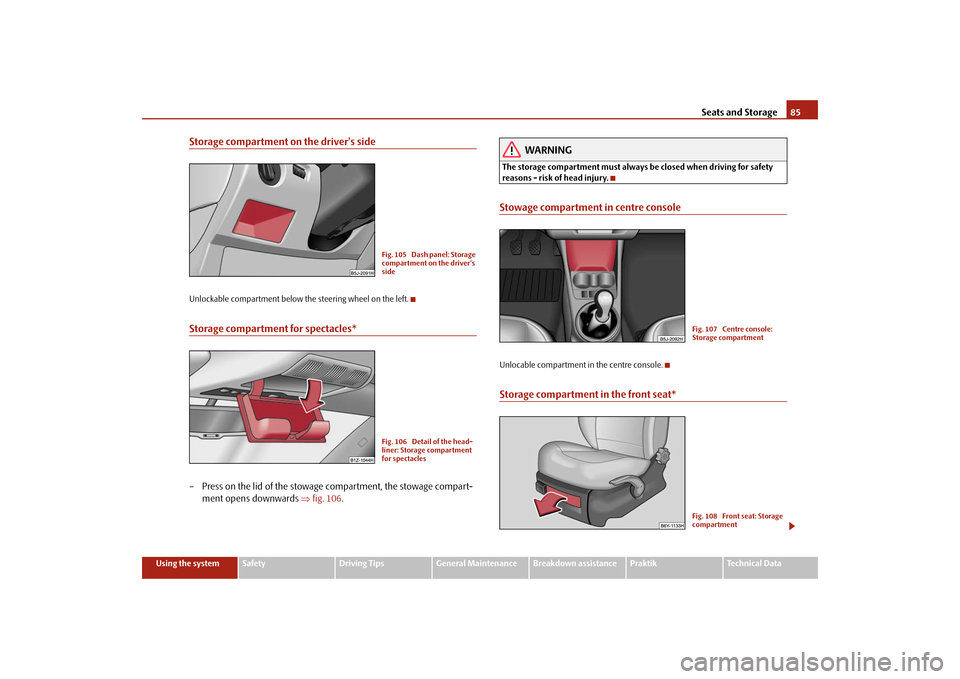
Storage compartment on the driver's sideUnlockable compartment below the steering wheel on the left.Storage compartment for spectacles*– Press on the lid of the stowage compartment, the stowage compart-
ment opens downwards ⇒fig. 106.
WARNING
The storage compartment must always be closed when driving for safety
reasons - risk of head injury.Stowage compartment in centre consoleUnlocable compartment in the centre console.Storage compartment in the front seat*
Fig. 105 Dash panel: Storage
compartment on the driver's
sideFig. 106 Detail of the head-
liner: Storage compartment
for spectacles
Fig. 107 Centre console:
Storage compartmentFig. 108 Front seat: Storage
compartment
s29g.4.book Page 85 Wednesday, June 17, 2009 9:54 AM
Page 100 of 263
Starting-off and Driving99
Using the system
Safety
Driving Tips
General Maintenance
Breakdown assistance
Praktik
Technical Data
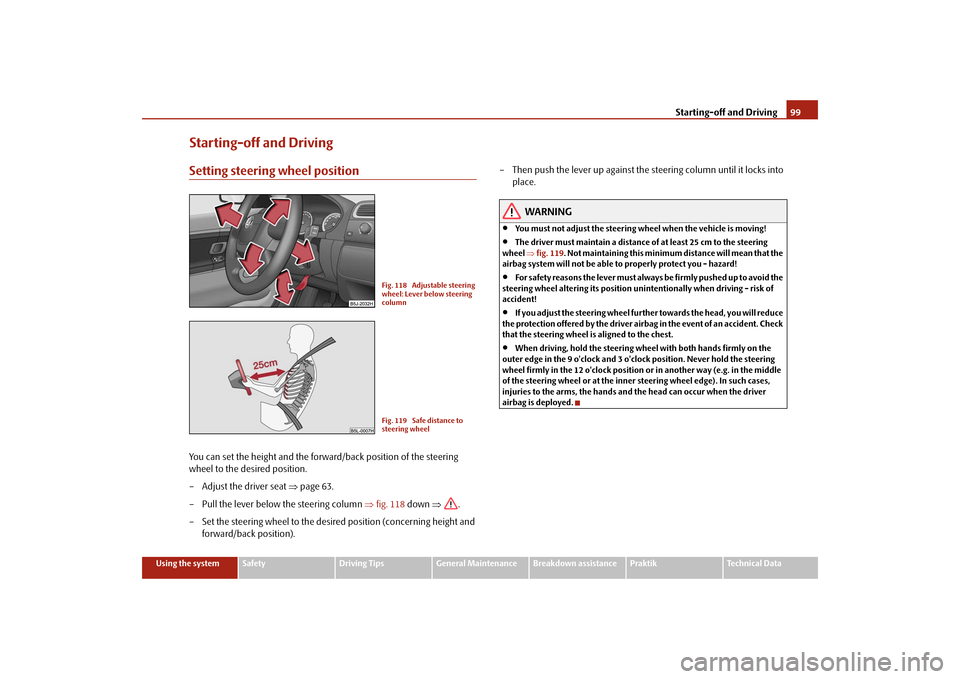
Starting-off and DrivingSetting steering wheel positionYou can set the height and the forward/back position of the steering
wheel to the desired position.
– Adjust the driver seat ⇒page 63.
– Pull the lever below the steering column ⇒fig. 118 down ⇒.
– Set the steering wheel to the desired position (concerning height and
forward/back position).– Then push the lever up against the steering column until it locks into
place.
WARNING
•
You must not adjust the steering wheel when the vehicle is moving!
•
The driver must maintain a distance of at least 25 cm to the steering
wheel ⇒fig. 119. Not maintaining this minimum distance will mean that the
airbag system will not be able to properly protect you - hazard!
•
For s a fe t y re a s ons the le v e r m ust a lwa y s b e fi rm l y pus he d up t o a vo id the
steering wheel altering its position unintentionally when driving - risk of
accident!
•
If you adjust the steering wheel further towards the head, you will reduce
the protection offered by the driver airbag in the event of an accident. Check
that the steering wheel is aligned to the chest.
•
When driving, hold the steering wheel with both hands firmly on the
outer edge in the 9 o'clock and 3 o'clock position. Never hold the steering
wheel firmly in the 12 o'clock position or in another way (e.g. in the middle
of the steering wheel or at the inner steering wheel edge). In such cases,
injuries to the arms, the hands and the head can occur when the driver
airbag is deployed.
Fig. 118 Adjustable steering
wheel: Lever below steering
columnFig. 119 Safe distance to
steering wheel
s29g.4.book Page 99 Wednesday, June 17, 2009 9:54 AM
Page 101 of 263
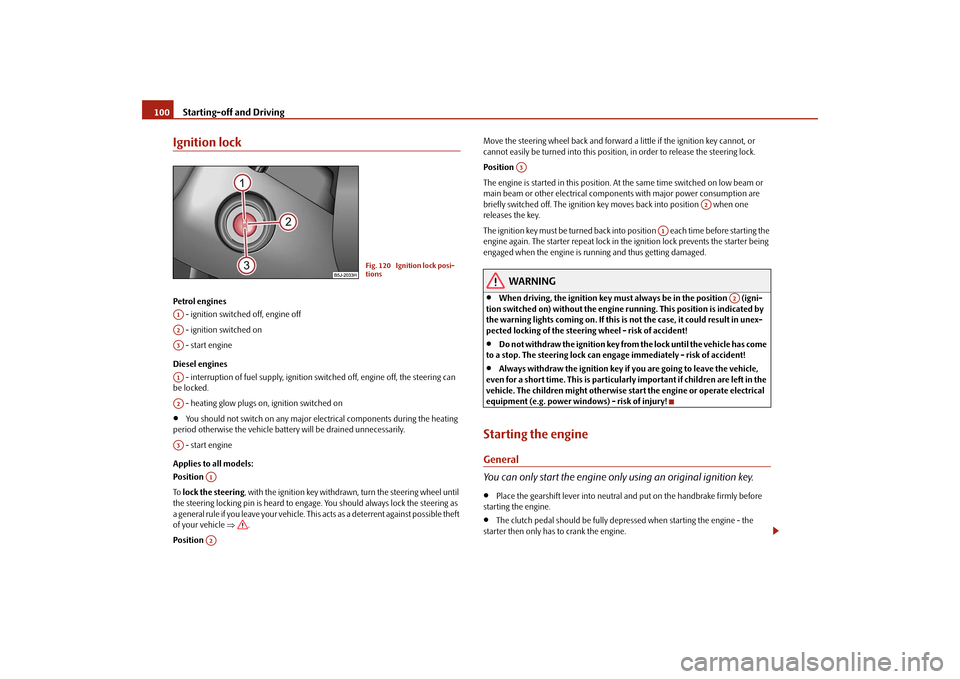
Starting-off and Driving 100Ignition lockPetrol engines
- ignition switched off, engine off
- ignition switched on
- start engine
Diesel engines
- interruption of fuel supply, ignition switched off, engine off, the steering can
be locked.
- heating glow plugs on, ignition switched on•
You should not switch on any major electrical components during the heating
period otherwise the vehicle battery will be drained unnecessarily.
- start engine
Applies to all models:
Position
To lock the steering, with the ignition key withdrawn, turn the steering wheel until
the steering locking pin is heard to engage. You should always lock the steering as
a general rule if you leave your vehicle. This acts as a deterrent against possible theft
of your vehicle ⇒.
Position Move the steering wheel back and forward a little if the ignition key cannot, or
cannot easily be turned into this position, in order to release the steering lock.
Position
The engine is started in this position. At the same time switched on low beam or
main beam or other electrical components with major power consumption are
briefly switched off. The ignition key moves back into position when one
releases the key.
The ignition key must be turned back into position each time before starting the
engine again. The starter repeat lock in the ignition lock prevents the starter being
engaged when the engine is running and thus getting damaged.
WARNING
•
When driving, the ignition key must always be in the position (igni-
tion switched on) without the engine running. This position is indicated by
the warning lights coming on. If this is not the case, it could result in unex-
pected locking of the steering wheel - risk of accident!
•
Do not withdraw the ignition key from the lock until the vehicle has come
to a stop. The steering lock can engage immediately - risk of accident!
•
Always withdraw the ignition key if you are going to leave the vehicle,
even for a short time. This is particularly important if children are left in the
vehicle. The children might otherwise start the engine or operate electrical
equipment (e.g. power windows) - risk of injury!
Starting the engineGeneral
You can only start the engine only using an original ignition key.•
Place the gearshift lever into neutral and put on the handbrake firmly before
starting the engine.
•
The clutch pedal should be fully depressed when starting the engine - the
starter then only has to crank the engine.
Fig. 120 Ignition lock posi-
tions
A1A2A3A1A2A3
A1A2
A3
A2
A1
A2
s29g.4.book Page 100 Wednesday, June 17, 2009 9:54 AM
Page 109 of 263
Automatic gearbox 108•
When the engine is running and the vehicle is stationary, it is necessary
to hold the car with the brake pedal in all the positions of the selector lever
(except P and N) since the power transmission is never completely inter-
rupted, also not when the engine is idling - the vehicle creeps.
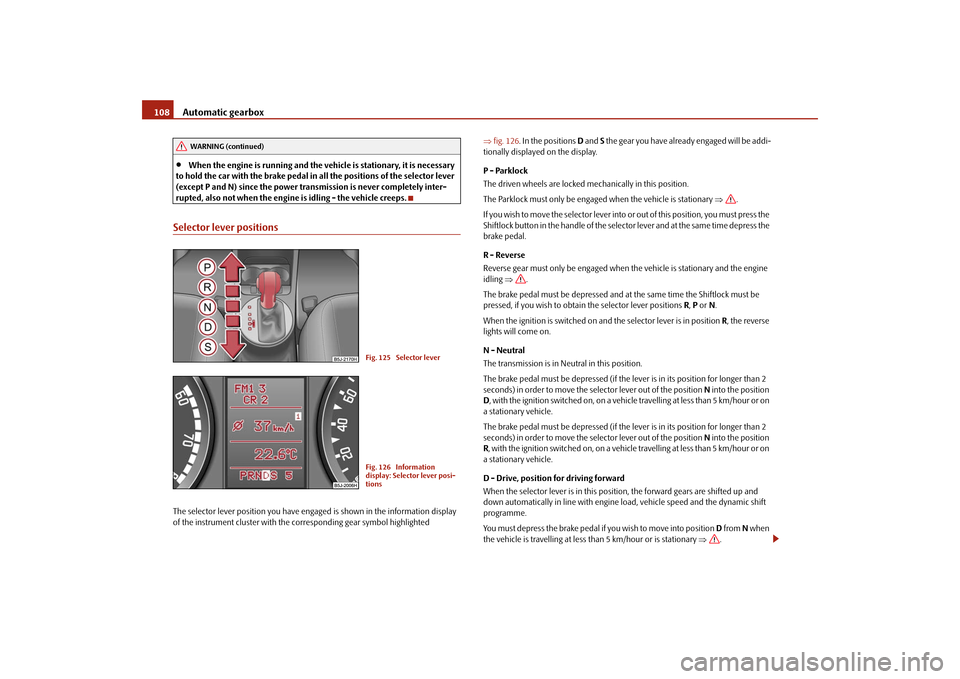
Selector lever positionsThe selector lever position you have engaged is shown in the information display
of the instrument cluster with the corresponding gear symbol highlighted ⇒fig. 126. In the positions D and S the gear you have already engaged will be addi-
tionally displayed on the display.
P - Parklock
The driven wheels are locked mechanically in this position.
The Parklock must only be engaged when the vehicle is stationary ⇒.
I f y o u w i s h t o m o v e t h e s e l e c t o r l e v e r i n to or out of this position, you must press the
Shiftlock button in the handle of the selector lever and at the same time depress the
brake pedal.
R - Reverse
Reverse gear must only be engaged when the vehicle is stationary and the engine
idling ⇒.
The brake pedal must be depressed and at the same time the Shiftlock must be
pressed, if you wish to obtain the selector lever positions R, P or N.
When the ignition is switched on and the selector lever is in position R, the reverse
lights will come on.
N - Neutral
The transmission is in Neutral in this position.
The brake pedal must be depressed (if the lever is in its position for longer than 2
seconds) in order to move the selector lever out of the position N into the position
D, with the ignition switched on, on a vehicle travelling at less than 5 km/hour or on
a stationary vehicle.
The brake pedal must be depressed (if the lever is in its position for longer than 2
seconds) in order to move the selector lever out of the position N into the position
R, with the ignition switched on, on a vehicle travelling at less than 5 km/hour or on
a stationary vehicle.
D - Drive, position for driving forward
When the selector lever is in this position, the forward gears are shifted up and
down automatically in line with engine load, vehicle speed and the dynamic shift
programme.
You must depress the brake pedal if you wish to move into position D from N when
the vehicle is travelling at less than 5 km/hour or is stationary ⇒.
WARNING (continued)
Fig. 125 Selector leverFig. 126 Information
display: Selector lever posi-
tions
s29g.4.book Page 108 Wednesday, June 17, 2009 9:54 AM
Page 111 of 263
Automatic gearbox 110Kickdown function
The kickdown function provides you with maximum acceleration
power.Fully depressing the accelerator pedal allows the kickdown function to be activated
in the desired driving program. This function has precedence over the driving
programme and serves for maximum acceleration of the vehicle when exploiting
the maximum power potential of the engine without taking into account the
current selector lever position (D, S or Tiptronic). The gearbox shifts down to one
or several gears in line with the driving state and the vehicle accelerates. The
gearbox does not shift up into the highest gear until the engine has reached its
maximum revolutions for this gear range.
WARNING
Please note that using the kickdown function can result in the driven wheels
spinning on a smooth or slippery road surface - risk of skidding!Dynamic shift programmeThe automatic gearbox of your vehicle is controlled electronically. Shifting up and
down through the gears is performed automatically on the basis of pre-defined
driving programmes.
Adopting a moderate style of driving will cause the gearbox to select the most
economical driving programme. Shifting up into a higher gear as soon as possible
and shifting down as late as possible will have a favourable effect on your fuel
consumption.
Adopting a sporty style of driving with rapid movements of the accelerator pedal
combined with sharp acceleration and frequent changes in speed, exploiting the
top speed of the car or depressing the accelerator pedal (kickdown function), will
cause the gearbox to switch over to this style of driving and shift down earlier with
frequent changes in gears in comparison to the moderate style of driving.
Selecting the most appropriate driving programme for the particular style of driving
is a continuous process. Irrespective of this it is, however, possible to switch or shift down into a dynamic shift programme by depressing the accelerator rapidly. The
gearbox shifts down into a lower gear matching the speed of the car and this allows
you to accelerate rapidly (e.g. when overtaking) without having to depress the
accelerator pedal fully into the kickdown range. The original programme will be
reactivated to match your particular style of driving once the gearbox has shifted up
again.
When driving in hilly regions, the gears are selected to match uphill and downhill
sections. This avoids the gearbox frequently shifting up and down when negotiating
an uphill stretch. When driving downhill, it is possible to shift down into the
Tiptronic position, in order to exploit the engine brake torque.
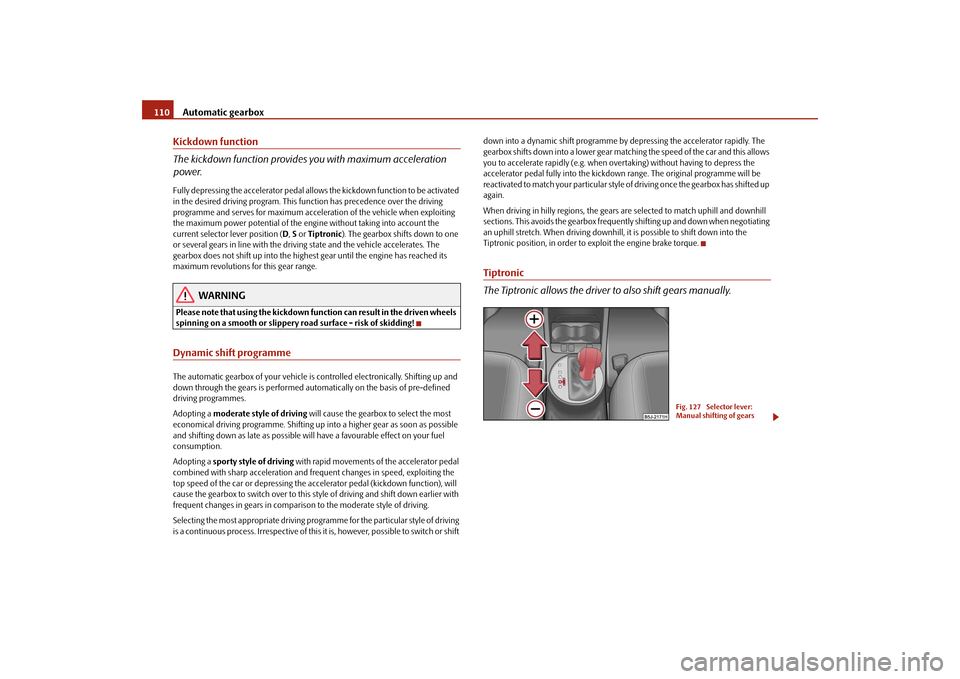
Tiptronic
The Tiptronic allows the driver to also shift gears manually.
Fig. 127 Selector lever:
Manual shifting of gears
s29g.4.book Page 110 Wednesday, June 17, 2009 9:54 AM
Page 113 of 263
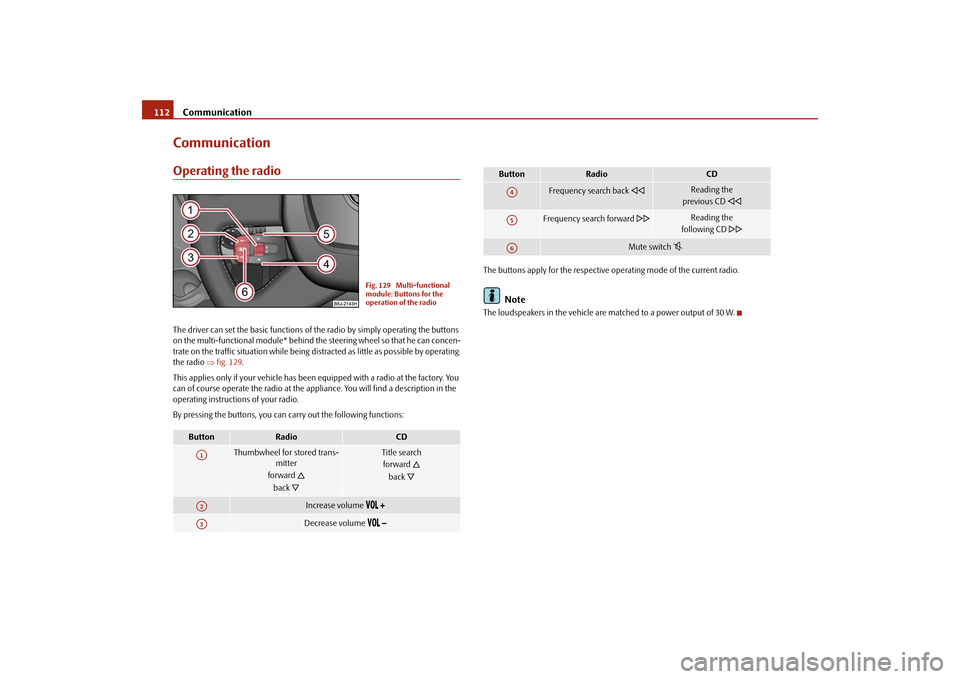
Communication 112CommunicationOperating the radioThe driver can set the basic functions of the radio by simply operating the buttons
on the multi-functional module* behind the steering wheel so that he can concen-
trate on the traffic situation while being distracted as little as possible by operating
the radio ⇒fig. 129.
This applies only if your vehicle has been equipped with a radio at the factory. You
can of course operate the radio at the appliance. You will find a description in the
operating instructions of your radio.
By pressing the buttons, you can carry out the following functions:The buttons apply for the respective operating mode of the current radio.
Note
The loudspeakers in the vehicle are matched to a power output of 30 W.
Button
Radio
CD
Thumbwheel for stored trans-
mitter
forward
back
Title search
forward
back
Increase volume
Decrease volume
Fig. 129 Multi-functional
module: Buttons for the
operation of the radio
A1A2A3
Frequency search back
Reading the
previous CD
Frequency search forward
Reading the
following CD
Mute switch
Button
Radio
CD
A4A5A6
s29g.4.book Page 112 Wednesday, June 17, 2009 9:54 AM