warning SKODA ROOMSTER 2009 1.G Manual Online
[x] Cancel search | Manufacturer: SKODA, Model Year: 2009, Model line: ROOMSTER, Model: SKODA ROOMSTER 2009 1.GPages: 263, PDF Size: 32.25 MB
Page 108 of 263
Automatic gearbox107
Using the system
Safety
Driving Tips
General Maintenance
Breakdown assistance
Praktik
Technical Data
Automatic gearbox6-speed automatic gearbox*IntroductionYour car is equipped with an electronically controlled 6-speed automatic gearbox.
Shifting up and also down through the gears is performed automatically.
At the same time this is a conventional automatic gearbox. The maximum speed is
reached in the 5th gear. The 6th gear serves as an economic driving programme,
which is intended to reduce the fuel consumption.Information for driving with an automatic gearbox
Shifting up and down through the gears is performed automatically.You can also, however, switch the gearbox over into the Tiptronic mode.
This mode makes it possible for you to also shift gears manually
⇒page 110.
Starting-off and Driving
– Depress the brake pedal and hold it depressed.
– Press the Shiftlock button (button in handle of the selector lever),
move the selector lever into the desired position, e.g. D ⇒page 108,
and then release the Shiftlock button.
– Wait a moment until the gearbox has shifted (a slight engagement
nudge can be felt).
– Release the brake pedal and depress the accelerator ⇒.Stopping for a short time
– The selector lever position N does not have to be selected when stop-
ping just for a short time, such as at a cross roads. It is sufficient to hold
the vehicle stationary using the foot brake. The engine can, however,
be allowed just to idle.
Parking
– Depress the brake pedal and hold it depressed.
– Apply the handbrake firmly.
– Press and Shiftlock button in the selector lever, move the selector
lever to P and then release the Shiftlock button.
The engine can only be started when the selector lever is in position P or N
⇒page 100.
It is sufficient to engage selector lever position P when parking on a flat surface.
When parking on a slope you should first apply the handbrake firmly and then
move the selector lever into position P. This is to ensure that there is no excessive
pressure acting on the lock mechanism and that it is easier to subsequently move
the selector lever out of position P.
If the selector lever position N is selected by accident while driving it is first neces-
sary to release pressure on the accelerator pedal and wait for idling speed of the
engine to be reached before engaging a drive position in the selector lever.
WARNING
•
Do not depress the accelerator when changing the position of the
selector lever if the car is stationary and the engine is running - risk of acci-
dent!
•
Never move the selector lever into position R or P when driving - risk of
an accident!
s29g.4.book Page 107 Wednesday, June 17, 2009 9:54 AM
Page 109 of 263
Automatic gearbox 108•
When the engine is running and the vehicle is stationary, it is necessary
to hold the car with the brake pedal in all the positions of the selector lever
(except P and N) since the power transmission is never completely inter-
rupted, also not when the engine is idling - the vehicle creeps.
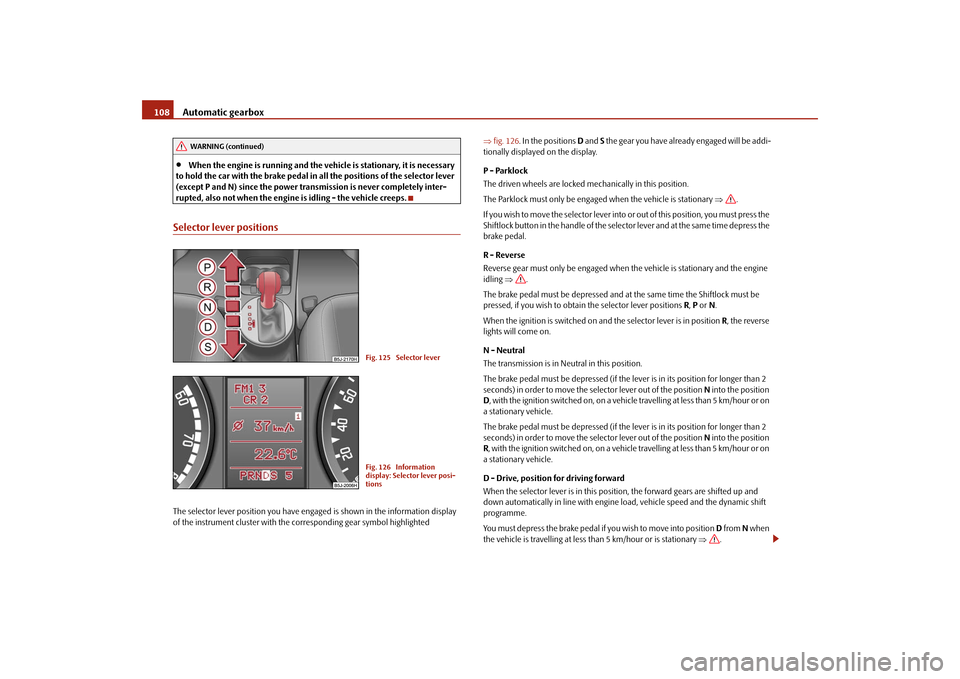
Selector lever positionsThe selector lever position you have engaged is shown in the information display
of the instrument cluster with the corresponding gear symbol highlighted ⇒fig. 126. In the positions D and S the gear you have already engaged will be addi-
tionally displayed on the display.
P - Parklock
The driven wheels are locked mechanically in this position.
The Parklock must only be engaged when the vehicle is stationary ⇒.
I f y o u w i s h t o m o v e t h e s e l e c t o r l e v e r i n to or out of this position, you must press the
Shiftlock button in the handle of the selector lever and at the same time depress the
brake pedal.
R - Reverse
Reverse gear must only be engaged when the vehicle is stationary and the engine
idling ⇒.
The brake pedal must be depressed and at the same time the Shiftlock must be
pressed, if you wish to obtain the selector lever positions R, P or N.
When the ignition is switched on and the selector lever is in position R, the reverse
lights will come on.
N - Neutral
The transmission is in Neutral in this position.
The brake pedal must be depressed (if the lever is in its position for longer than 2
seconds) in order to move the selector lever out of the position N into the position
D, with the ignition switched on, on a vehicle travelling at less than 5 km/hour or on
a stationary vehicle.
The brake pedal must be depressed (if the lever is in its position for longer than 2
seconds) in order to move the selector lever out of the position N into the position
R, with the ignition switched on, on a vehicle travelling at less than 5 km/hour or on
a stationary vehicle.
D - Drive, position for driving forward
When the selector lever is in this position, the forward gears are shifted up and
down automatically in line with engine load, vehicle speed and the dynamic shift
programme.
You must depress the brake pedal if you wish to move into position D from N when
the vehicle is travelling at less than 5 km/hour or is stationary ⇒.
WARNING (continued)
Fig. 125 Selector leverFig. 126 Information
display: Selector lever posi-
tions
s29g.4.book Page 108 Wednesday, June 17, 2009 9:54 AM
Page 110 of 263
Automatic gearbox109
Using the system
Safety
Driving Tips
General Maintenance
Breakdown assistance
Praktik
Technical Data In certain circumstances (e.g. when driving in mountainous regions or when towing
a trailer) it may be beneficial to select the manual shift programme ⇒page 110 for
a short time in order to adapt the gearbox ratios manually to the driving situations.
S - Position for sporty style of driving
Shifting up later into a higher gear makes it possible to fully exploit the power
potential of the engine. The gearbox also then shifts down at higher engine speeds
as in the position D.
The gearbox does not shift into the 6th gear in the position S, because the
maximum speed is achieved with the 5th gear.
The Shiftlock on the selector lever grip must be pressed when moving the selector
lever out of the position D into the position S.
WARNING
•
Never move the selector lever into position R or P when driving - risk of
an accident!
•
When the engine is running and the vehicle is stationary, it is necessary
to hold the car with the brake pedal in all the positions of the selector lever
(except P and N) since the power transmission is never completely inter-
rupted, also not when the engine is idling - the vehicle creeps.
•
You must on no account unintentionally operate the throttle (e.g. by
hand from the engine compartment) if a drive position is engaged when the
car is stationary. The vehicle would otherwise immediately start off - also
when the handbrake is firmly applied - risk of an accident!
•
You must move the selector lever into position P and firmly apply the
handbrake first before you or any other person opens the bonnet and starts
working on the engine when it is running - risk of accident! It is also essential
to observe all warnings ⇒page 185, “Working in the engine
compartment”.
Selector lever lockAutomatic selector lever lock
With the ignition on, the selector lever is locked when it is in the positions P and N.
You must first of all depress the brake pedal in order to move the selector lever out
of this position. The warning light
⇒page 35 lights up in the instrument cluster
as a reminder for the driver when the selector lever is in position P and N.
A time delay element ensures that the selector lever is not blocked when rapidly
switching over the position N (e.g. from R to D). This does, for example, allow one
to seesaw out a stuck vehicle. The selector lever lock will click into place if the lever
is in the N position for more than 2 seconds without the brake pedal being pressed.
The selector lever lock is only active if the vehicle is stationary or moving at speed
of less than 5 km/hour. The lock is switched off automatically into position N when
the car is travelling at a higher speed.
Shiftlock button
The Shiftlock button in the handle of selector lever prevents certain selector lever
positions being engaged inadvertently. The selector lever lock is cancelled when
you press the Shiftlock button.
Keylock
5)- Ignition key withdrawal lock
You can only withdraw the ignition key after switching off the ignition if the selector
lever is in position P. If the ignition key is withdrawn, the selector lever is blocked in
position P.
Note
On vehicles which are fitted with an automatic gearbox, you can withdraw the igni-
tion key after switching off the ignition in any position of the selector lever.5)This function is only valid for some countries.
s29g.4.book Page 109 Wednesday, June 17, 2009 9:54 AM
Page 111 of 263
Automatic gearbox 110Kickdown function
The kickdown function provides you with maximum acceleration
power.Fully depressing the accelerator pedal allows the kickdown function to be activated
in the desired driving program. This function has precedence over the driving
programme and serves for maximum acceleration of the vehicle when exploiting
the maximum power potential of the engine without taking into account the
current selector lever position (D, S or Tiptronic). The gearbox shifts down to one
or several gears in line with the driving state and the vehicle accelerates. The
gearbox does not shift up into the highest gear until the engine has reached its
maximum revolutions for this gear range.
WARNING
Please note that using the kickdown function can result in the driven wheels
spinning on a smooth or slippery road surface - risk of skidding!Dynamic shift programmeThe automatic gearbox of your vehicle is controlled electronically. Shifting up and
down through the gears is performed automatically on the basis of pre-defined
driving programmes.
Adopting a moderate style of driving will cause the gearbox to select the most
economical driving programme. Shifting up into a higher gear as soon as possible
and shifting down as late as possible will have a favourable effect on your fuel
consumption.
Adopting a sporty style of driving with rapid movements of the accelerator pedal
combined with sharp acceleration and frequent changes in speed, exploiting the
top speed of the car or depressing the accelerator pedal (kickdown function), will
cause the gearbox to switch over to this style of driving and shift down earlier with
frequent changes in gears in comparison to the moderate style of driving.
Selecting the most appropriate driving programme for the particular style of driving
is a continuous process. Irrespective of this it is, however, possible to switch or shift down into a dynamic shift programme by depressing the accelerator rapidly. The
gearbox shifts down into a lower gear matching the speed of the car and this allows
you to accelerate rapidly (e.g. when overtaking) without having to depress the
accelerator pedal fully into the kickdown range. The original programme will be
reactivated to match your particular style of driving once the gearbox has shifted up
again.
When driving in hilly regions, the gears are selected to match uphill and downhill
sections. This avoids the gearbox frequently shifting up and down when negotiating
an uphill stretch. When driving downhill, it is possible to shift down into the
Tiptronic position, in order to exploit the engine brake torque.
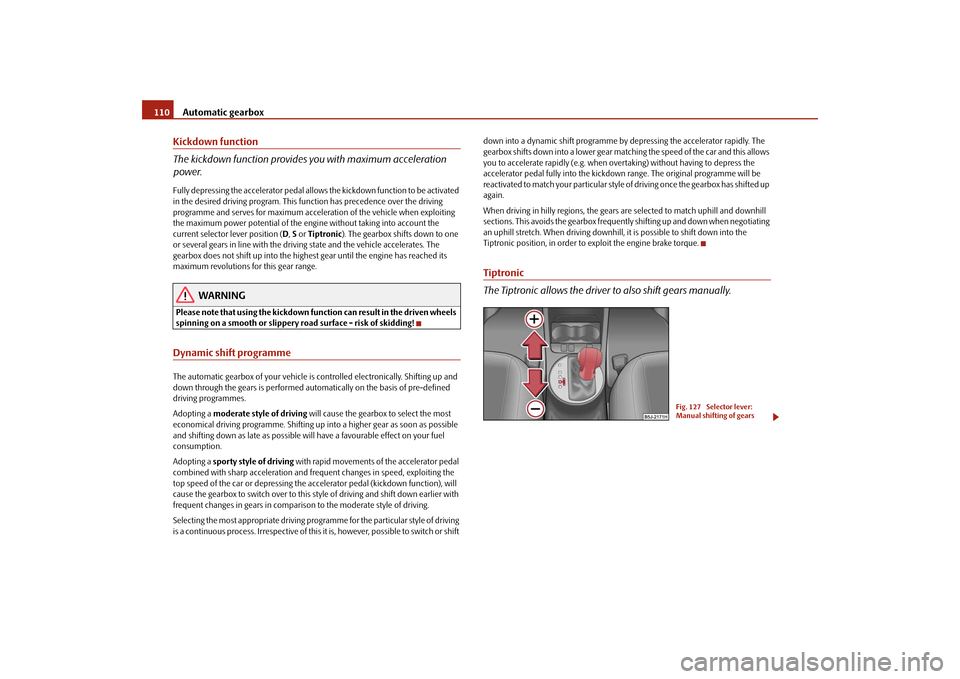
Tiptronic
The Tiptronic allows the driver to also shift gears manually.
Fig. 127 Selector lever:
Manual shifting of gears
s29g.4.book Page 110 Wednesday, June 17, 2009 9:54 AM
Page 116 of 263
Communication115
Using the system
Safety
Driving Tips
General Maintenance
Breakdown assistance
Praktik
Technical Data
•
During the dialogue avoid additional noise in the vehicle, e.g. simultaneously
talking occupants.
•
Do not speak, if the system makes an announcement.
•
The microphone for voice control is directed to the driver and front passenger.
Therefore the driver and the front passenger can operate the equipment.
WARNING
Pay attention primarily to the traffic situation! As the driver you are fully
responsible for road safety. Use the telephone system only to such an extent,
so that you are in full control of your vehicle at any time.
Caution
Taking the mobile phone out of the adapter during the call can lead to interruption
of the connection. When taking out the mobile phone, the connection to the
factory-fitted antenna is interrupted, this reduces the quality of the transmitting
and receiving signal. The charging of the mobile phone battery is also interrupted.
Note
•
Please also refer to the additional instructions ⇒page 122, “Mobile phones
and two-way radio system”.
•
Should you have any questions, please contact a specialist garage.
•
The voice control of the telephone is only possible for adapters with PTT button.
Suitable adapters are available at a specialist garage.
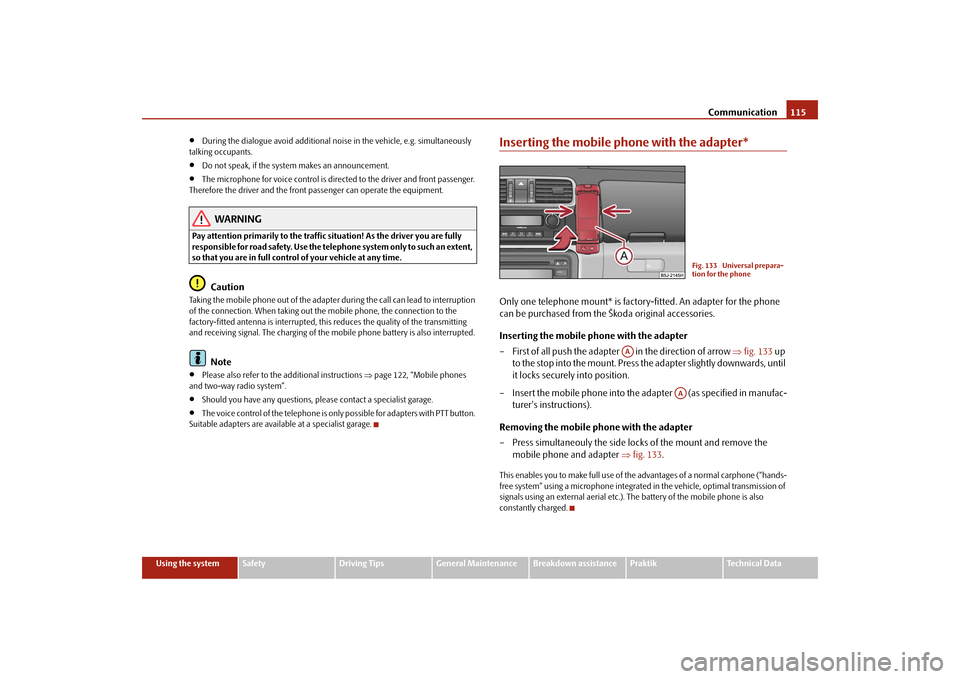
Inserting the mobile phone with the adapter*Only one telephone mount* is factory-fitted. An adapter for the phone
can be purchased from the Škoda original accessories.
Inserting the mobile phone with the adapter
– First of all push the adapter in the direction of arrow ⇒fig. 133 up
to the stop into the mount. Press the adapter slightly downwards, until
it locks securely into position.
– Insert the mobile phone into the adapter (as specified in manufac-
turer's instructions).
Removing the mobile phone with the adapter
– Press simultaneouly the side locks of the mount and remove the
mobile phone and adapter ⇒fig. 133.This enables you to make full use of the advantages of a normal carphone (“hands-
free system” using a microphone integrated in the vehicle, optimal transmission of
signals using an external aerial etc.). The battery of the mobile phone is also
constantly charged.
Fig. 133 Universal prepara-
tion for the phone
AA
AA
s29g.4.book Page 115 Wednesday, June 17, 2009 9:54 AM
Page 118 of 263
Communication117
Using the system
Safety
Driving Tips
General Maintenance
Breakdown assistance
Praktik
Technical Data
Note
It a yellow warning symbol lights up in the information display, the menu phone-
book cannot be selected.Voice commandsVoice commands for mobile phone operation
Voice commands for operating the phone phone bookOther possible commands
Enter PIN codeA PIN code must be entered before operating the system.
– Press the PTT button.
– Give the command ENTER PIN/PIN CODE after the signal tone.After this command the PIN code can be entered.
The entry of the PIN code is only possible if:•
the ignition is switched on;
•
the mobile phone is switched on.
Voice command
Activity
ENTER PIN/PIN CODE
After this command the PIN code of the mobile
phone can be entered ⇒page 117.
DIAL NUMBER
After this command a telephone number can be
entered which establishes a connection to the
requested partner ⇒page 118.
REDIAL
After this command the last selected telephone
number is selected again ⇒page 118.
Voice command
Activity
SAVE/STORE
NAMES/NAME/NUMBE
R
After this command a name with its telephone
number can be stored in the phone phone book
⇒page 119.
SELECT NAMES/NAME
After this command a telephone number which was
stored under its given name in the phone phone
book can be selected ⇒page 119.
DELETE NAMES/NAME
After this command a name in the phone phone
book can be erased ⇒page 120.
LISTEN TO/PLAY
PHONEBOOK
After this command you can listen-in to the phone
phone book ⇒page 120.
DELETE PHONEBOOK
After this command the complete phone book or a
name can be erased ⇒page 120.
Voice command
Activity
DIAL
The telephone number is selected.
STORE
The name and the telephone number are stored in
the phone phonebook or the entered PIN code is
stored.
REPEAT
The entered name or the digits are repeated. Then the
system requests with voice response “please pro-
ceed” the entry of further digits or commands.
BACK
The entered name or the last entered order of digits is
erased. Previously entered groups of digits are
repeated. Then the system requests with voice
response “please proceed” the entry of further digits
or commands.
DELETE
All entered digits are erased. Then the system
requests with voice response “The number is
deleted. The number please” the entry of further
digits or commands.
CANCEL
The dialogue is ended.
s29g.4.book Page 117 Wednesday, June 17, 2009 9:54 AM
Page 123 of 263
Communication 122Establishing the Bluetooth connection
After switching on the ignition, the Bluetooth connection is automatically estab-
lished for the already adapted mobile phone
6). You can hear an increasing tone
sequence from the loudspeakers of the vehicle.
Disconnecting the Bluetooth connection
After withdrawing the ignition key, the Bluetooth connection is disonnected. You
can hear an increasing tone sequence from the loudspeakers of the vehicle.
WARNING
•
Pay attention primarily to the traffic situation! As the driver you are fully
responsible for road safety. Use the telephone system only to such an extent,
so that you are in full control of your vehicle at any time - risk of accident!
•
In the event of air transport, the Bluetooth function of the handsfree-
system must be switched off by a specialist garage.Caution
Taking the mobile phone out of the adapter during the call can lead to interruption
of the connection. When taking out the mobile phone, the connection to the
factory-fitted antenna is interrupted, this reduces the quality of the transmitting
and receiving signal. The charging of the mobile phone battery is also interrupted.
Note
•
Not valid for all mobile phones which enable a communication via Bluetooth.
•
Please operate your mobile phone exclusively with a suitable adapter in order
to keep a low radiation in the vehicle.
•
Inserting the mobile phone into the adapter ensures an optimal sending and
receiving power and offers at the same time the advantage of the battery charging.
•
If you insert the mobile telephone into the adapter, the connection is estab-
lished via the interface in the adapter set and the Bluetooth connection is discon-
nected. You can hear an increasing tone sequence from the loudspeakers of the
vehicle.
•
Note that the range of the Bluetooth connection to the handsfree-system is
limited to the vehicle interior. The range is dependent on local factors, e.g. obstacles
between the devices and interferences with other devices. If your mobile phone is
e.g. in a jacket pocket, this can lead to difficulties when establishing the Bluetooth
connection with the handsfree-system or the data transfer.
•
If you have set the Portuguese language in the information display, it is used
automatically for the mobile phone operation, as this is the language, which was
entered during coding of the handsfree-system.
•
On certain mobile phones with operating system, it is necessary to install on the
mobile phone an application of the mobile phone manufacturer, which enables the
take-over of the phone phonebook via Bluetooth.
Mobile phones and two-way radio systemThe installation of a mobile phone and two-way radio system in a vehicle should
only be carried out by a Škoda Dealer.
Škoda Auto permits the operation of mobile phones and two-way radio systems
with a professionally installed external aerial and a maximum transmission power
of up to 10 watts.
It is essential that you inform a specialist garage about the possibilites to assemble
and operate mobile phones and two-way radio sets which have a power output of
more than 10 W. They will inform you which technical possibilities exist for retrofit-
ting mobile telephones and radio transmitters.
Operation of mobile phones or two-way radio systems may interfere with func-
tioning of the electronic systems of your vehicle. The reasons for this may be:•
no external aerial;
•
external aerial incorrectly installed;
•
transmission power greater than 10 watts.
You should therefore not operate a mobile phone or two-way radio system
inside the vehicle without the use of an external aerial, or with an external aerial
which has been incorrectly installed.
You should also be aware of the fact that only an external aerial makes it possible
to achieve the optimal range of such equipment.
s29g.4.book Page 122 Wednesday, June 17, 2009 9:54 AM
Page 124 of 263
Communication123
Using the system
Safety
Driving Tips
General Maintenance
Breakdown assistance
Praktik
Technical Data
WARNING
•
If a mobile phone or a two-way radio system is operated in the vehicle
without using a special external aerial or an external aerial which has been
incorrectly installed, this can increase the strength of the electromagnetic
field in the interior of the vehicle.
•
Please concentrate fully at all times on your driving!
•
You must not install two-way radio systems, mobile phones or mounts
on the covers of the airbags or within the immediate deployment range of
airbags. This might result in injuries to the occupants in the event of an acci-
dent.Note
Please also refer to the operating instructions of the mobile phones and two-way
radio systems.Input AUX-IN*The input for external audio sources AUX-IN is located on the right next to the hand-
brake and is marked with
.
The input AUX-IN transmits audio signals from connected external audio sources
(e. g. iPod or mp3 player) and record music from these devices via your radio*
installed in the factory. The input AUX-IN* is only available in combination with a
radio installed in the factory. The description on how to operate AUX-IN* can be
found in the relevant operating instructions of the radio*.
Note
If an external audio source is connected via AUX-IN*, which has a separate power
supply, this can lead to an interference of the audio signals.
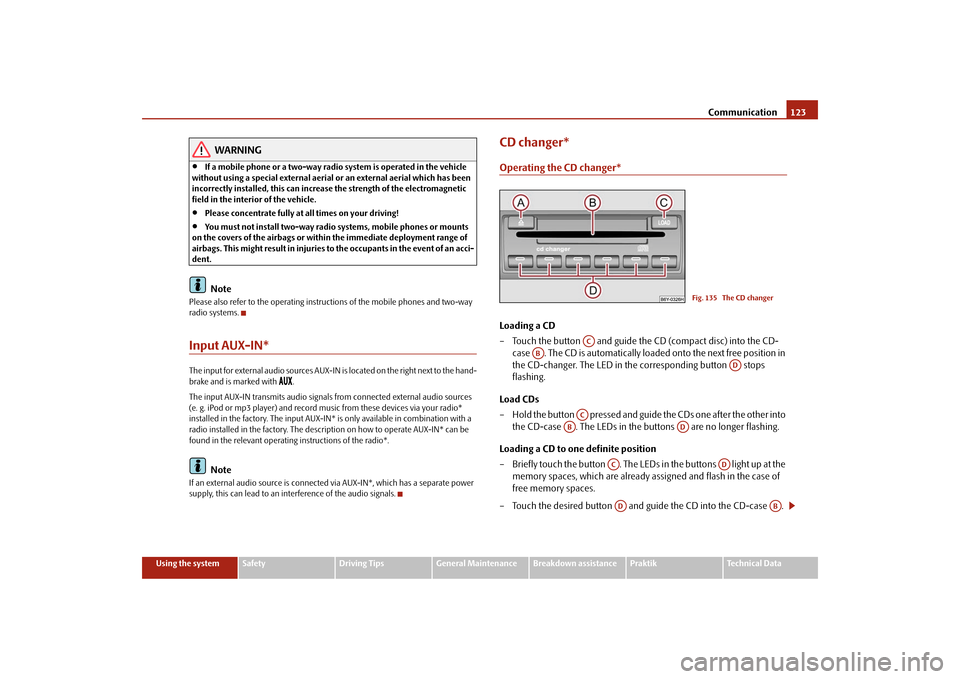
CD changer*Operating the CD changer*Loading a CD
– Touch the button and guide the CD (compact disc) into the CD-
case . The CD is automatically loaded onto the next free position in
the CD-changer. The LED in the corresponding button stops
flashing.
Load CDs
– Hold the button pressed and guide the CDs one after the other into
the CD-case . The LEDs in the buttons are no longer flashing.
Loading a CD to one definite position
– Briefly touch the button . The LEDs in the buttons light up at the
memory spaces, which are already assigned and flash in the case of
free memory spaces.
– Touch the desired button and guide the CD into the CD-case .
Fig. 135 The CD changer
AC
AB
AD
AC
AB
AD
AC
AD
AD
AB
s29g.4.book Page 123 Wednesday, June 17, 2009 9:54 AM
Page 125 of 263
Communication 124
Ejecting a CD
– Briefly touch the button , in order to eject a CD. For assigned
memory spaces, now the LEDs light up in the buttons .
– Touch the corresponding button . The CD is ejected.
Ejecting all CDs
– Hold the button pressed for more than 2 seconds, in order to eject
the CDs. All CDs in the CD-changer are ejected consecutively.
Note•
Always guide the CD into the CD-case with the printed side pointing
upwards.
•
Never push the CD with force into the CD-case as the insertion is performed
automatically.
•
After loading a CD into the CD-changer, you must wait until the LED of the
corresponding button lights up. Then the CD-case is free to load the next
CD.
•
If you have selected a position, on which a CD is already located, this CD will be
ejected. Take out the ejected CD and load the desired CD.
•
The magazine can take up to six standard CDs (diameter 12 cm). Please do not
use 8 cm “single CDs”!
•
In order to avoid malfunctions of the changer, please never use a CD protective
foil or stabilizer (obtainable on the market as CD-accessory).
•
Described in this Owner's Manual are only the steps required for the operation
of the CD-changer.
•
You will find further information for this setting menu in the Radio Owner's
Manual.
Tips for operating the CD-changerPlease pay attention to the following notes for operating the CD-changer.
•
Only clean CDs without scratches and damages should be used, in order to
guarantee a proper, high-quality CD-playback.
•
Affix no labels to the CDs.
•
Always store non-used CDs in the original folding box.
•
Never expose CDs to direct sun rays.
•
Use a soft, non-fluffy cloth to clean the CDs. Wipe the CD straight-lined from
the middle to the outside. Strong dirt must be eliminated with usual CD-cleaner.
•
Please never use liquids such as gasoline, paint thinner or disk cleaner, other-
wise the surface of the CD could get damaged.
Precaution measures for laser equipmentLaser equipment is classified according to DIN IEC 76 (CO) 6/VDE 0837 in the
safety categories 1 - 4.
The Škoda CD-changer corresponds to the safety category 1.
The laser used for equipment of category 1 is to such an extent energy-poor and/or
shielded that there is no risk of danger when used in accordance with the regula-
tion.
WARNING
Please concentrate fully at all times on your driving!
Note
Do not remove the equipment cover. The equipment does not contain any parts,
which can be serviced by the user.WarrantyThe same warranty conditions apply for our factory-fitted radio as for new vehicles.
AA
AD
AD
AA
AB
AD
AB
s29g.4.book Page 124 Wednesday, June 17, 2009 9:54 AM
Page 128 of 263
Passive Safety127
Using the system
Safety
Driving Tips
General Maintenance
Breakdown assistance
Praktik
Technical Data
SafetyPassive SafetyBasic informationDriving the safe way
Passive safety measures reduce the risk of injury in accident situa-
tions.In this section you will find important information, tips and notes on the subject of
passive safety in your vehicle. We have combined everything here which you
should be familiar with, for example, regarding seat belts, airbags, child seats and
safety of children. It is therefore important, in particular, to comply with the notes
and warnings in this section for your own interest and in the interest of those trav-
elling with you.
WARNING
•
This chapter contains important information on how to use the vehicle
for the driver and his occupants. You will find further information on safety,
which concerns you and those travelling with you, in the following chapters
of this Owner's Manual.
•
The complete on-board literature should always be in the vehicle. This
applies in particular, if you rent out or sell the vehicle.
Safety equipment
The safety equipment is part of the occupant protection and it can
reduce the risk of injuries in accident situations.“Do not put at risk” your safety and the safety of those travelling with you . In the
event of an accident, the safety equipment can reduce the risk of injuries. The
following list contains part of the safety equipment in your vehicle:
•
three-point seat belts for all the seats;
•
belt force limiters for front seats;
•
belt tensioners for front seats;
•
seat belt height adjusters for front seats;
•
front airbags for the driver and the front passenger*;
•
side airbags*;
•
head airbags*;
•
anchoring points for child seat using the “ISOFIX” system;
•
anchoring points for child seat using the “Top Tether” system;
•
head restraints adjustable for height;
•
adjustable steering column.
The specified safety equipment works together, in order to optimally protect you
and those travelling with you in accident situations. The safety equipment does not
protect you or the people travelling with you, if you or your occupants adopt an
incorrect seated position or the equipment is not correctly adjusted or used.
Fo r t h i s re a s o n y o u w i l l b e p ro v i d e d w i th i n fo rm a ti o n o n w hy t h i s e q u i p m e nt i s v e r y
important, how it protects you and the occupants, what should be observed when
using the equipment and how you and the people travelling with you can make full
use of the existing safety equipment. This Owner's Manual contains important
warning notes, which you and those travelling with you should pay attention to in
order to reduce a risk of injury.
Safety concerns everybody!
s29g.4.book Page 127 Wednesday, June 17, 2009 9:54 AM