steering wheel SKODA SUPERB 2008 2.G / (B6/3T) Owner's Guide
[x] Cancel search | Manufacturer: SKODA, Model Year: 2008, Model line: SUPERB, Model: SKODA SUPERB 2008 2.G / (B6/3T)Pages: 272, PDF Size: 18.25 MB
Page 131 of 272

Communication
130
Communication
Multifunction steering wheel*
Operate radio und navigation on the multifunction steering wheel
The driver can set the basic functions of the radio and navigation by simply oper-
ating the buttons located on the steering wheel so that he can concentrate on the
traffic situation without being distracted as little as possible by operating the radio
and navigation ⇒fig. 138 .
This applies only if your vehicle has been installed with radio and navigation at the
factory. You can of course operate the ra dio and navigation at the appliance. You
will find a description in the operating instructions of your radio system.
When the headlights are switched on, the steering wheel pushbuttons are then also
illuminated.
The buttons apply for the respective operating mode of the current radio or naviga-
tion.
By pressing the buttons, you can carry out the following functions:
Fig. 138 Multifunction
steering wheel: control
buttons
NKO B6 20.book Page 130 Wednesday, March 26, 2008 3:15 PM
Page 134 of 272

Communication133
Using the systemSafetyDriving TipsGeneral MaintenanceBreakdown assistanceTechnical Data
on the adapter with an interval of 2 seconds or pressing the button
twice on the
multifunction steering wheel* with an interval of 2 seconds.
While connecting the mobile phone with the hands-free system by means of Blue-
tooth
®, no other phone can be connected wi th the hands-free system via Blue-
tooth®.
Up to seven mobile phones and four mu ltimedia units can be connected by the
hands-free system via Bluetooth
® whereby only one mobile phone or multimedia
unit can communicate simultaniously via Bluetooth® with the hands-free system.
If an eighth mobile phone is connected to the handsfree-system, then the tele-
phone, which has not been used together with the handsfree system for the longest
period, is disconnected by means of Bluetooth
®.
Establish Bluetooth
® connection
After switching on the ignition, the Blue tooth connection is automatically estab-
lished for the already adapted mobile phone
12). Check on the mobile unit if the
automatic connection was established.
Disconnect Bluetooth
® connection
After withdrawing the ignition key, the Bluetooth® connection is disonnected.
WARNING
•Pay attention primarily to the traffic si tuation! As the driver you are fully
responsible for road safety. Use the telephone system only to such an extent,
so that you are in full control of your vehicle at any time - risk of accident!
•In the event of air transport, the Bluetooth® function of the handsfree-
system must be switched off by a specialist garage!
Caution
Taking the mobile phone out of the adapter during the call can lead to interruption
of the connection. When taking out the mobile phone, the connection to the
factory-fitted antenna is interrupted, this reduces the quality of the transmitting
and receiving signal. This might result additionally in harmful radiation from the
mobile phone in the interior of the ve hicle and the charging of the telephone
battery is interrupted.
Note
•Not valid for all mobile phones which enable a communication via Bluetooth®.
•Please operate your mobile phone exclusively with a suitable adapter, in order
to keep a low radiation in the vehicle.
•Inserting the mobile phone into the adapter ensures an optimal sending and
receiving power and offers at the same ti me the advantage of the battery charging.
•Note that the range of the Bluetooth® connection to the handsfree-system is
limited to the vehicle interior. The range is dependent on local factors, e.g. obstacles
between the devices and interferences with other devices. If your mobile phone is
e.g. in a jacket pocket, this can lead to difficulties when establishing the Bluetooth
®
connection with the handsfree-sy stem or the data transfer.
Erase the list of connected units
Erase previously connected mobile or multimedia units
– Switch on the ignition. A connectio n to a mobile or multimedia unit
must not be established.
– Press the button SOS on the adapter or the button
on the multi-
function steering wheel* for more than 10 seconds.
– Erasing is confirmed with an audible signal.
NKO B6 20.book Page 133 Wednesday, March 26, 2008 3:15 PM
Page 136 of 272
Communication135
Using the systemSafetyDriving TipsGeneral MaintenanceBreakdown assistanceTechnical Data
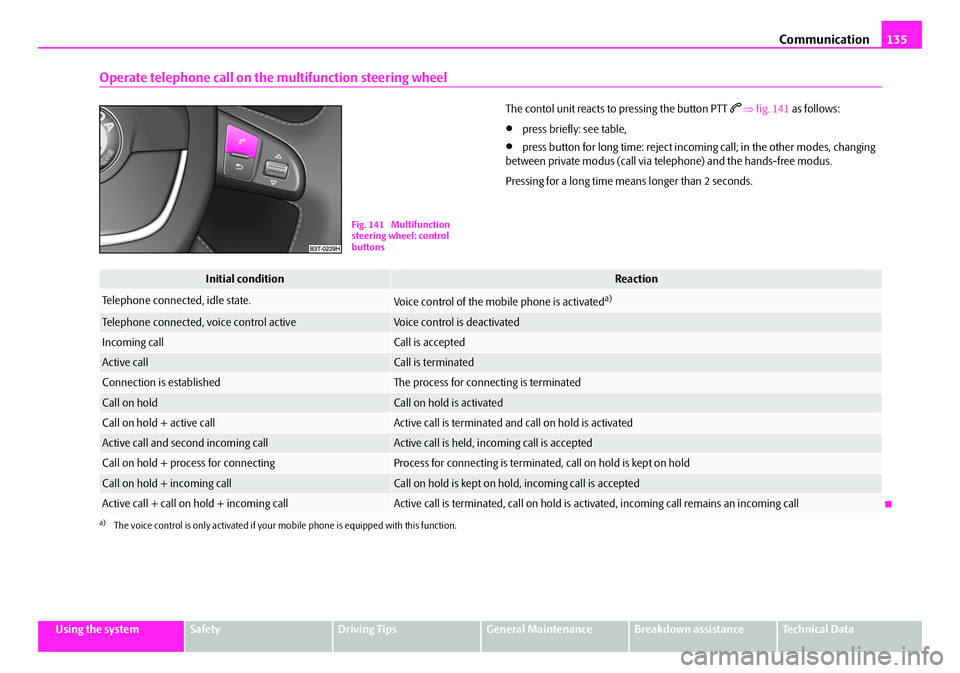
Operate telephone call on the multifunction steering wheel
The contol unit reacts to pressing the button PTT ⇒ fig. 141 as follows:
•press briefly: see table,
•press button for long time: reject incomi ng call; in the other modes, changing
between private modus (call via telephone) and the hands-free modus.
Pressing for a long time means longer than 2 seconds.
Fig. 141 Multifunction
steering wheel: control
buttons
Initial conditionReaction
Telephone connected, idle state.Voice control of the mobile phone is activateda)
a)The voice control is only activated if your mo bile phone is equipped with this function.
Telephone connected, voice control activeVoice control is deactivated
Incoming callCall is accepted
Active callCall is terminated
Connection is establishedThe process for connecting is terminated
Call on holdCall on hold is activated
Call on hold + active callActive call is terminated and call on hold is activated
Active call and second incoming callActive call is held, incoming call is accepted
Call on hold + process for connectingProcess for connecting is terminated, call on hold is kept on hold
Call on hold + incoming callCall on hold is kept on hold, incoming call is accepted
Active call + call on hold + incoming callActive call is terminated, call on hold is activated, incoming call re mains an incoming call
NKO B6 20.book Page 135 Wednesday, March 26, 2008 3:15 PM
Page 137 of 272

Communication
136
Universal telephone preinstallation GSM III*
Introduction
This enables you to make full use of the ad vantages of a normal carphone (“hands-
free system” using a microphone integrated in the vehicle, optimal transmission of
signals using an external aerial etc.). The equipment includes also the voice control.
The telephone is connected using the rSAP profile - Remote SIM access profile
(telecommunication of the SIM data) by means of Bluetooth
® technology, if your
telephone supports this profile. The equi pment includes the following functions:
•Display of the SMS text in the information display.
•Free talking in the vehicle interior.
•MUTE signal to the radio.
•Voice control (with the set-up possibility for “short and long dialogue”,
depending on the user's knowledge of the operating structure).
•Convenience mode with the multifunction steering wheel and the display in the
information display.
•Handsfree-system.
The voice control of the telephone is acti vated by pressing the button PTT on the
multifunction steering wheel ⇒page 139, fig. 142 .
A phone phonebook is part of the univers al telephone preinstallation GSM III with
voice control. In the phone phonebook there are 1 000 free memory locations
available. This phone phonebook is inde pendent of the appliance used for the
mobile phone.
Furthermore the volume can be changed indi vidually at any time with the button
for setting the radio or on vehicles fitted with multifunction steering wheel* with
function buttons on the steering wheel.
Dialogue
The period, in which the telephone system is ready to receive voice commands and
carry out the voice commands, is called DIALOGUE. The system gives audible feed-
back and guides you if nece ssary through the relevant functions. You can start or
end the dialogue at any time by pressing the PTT button. The dialogue is always automatically ended after carrying out an operation, e.g.
after erasing the name from the phonebook.
The dialogue of the incoming call is i
mmediately interrupted and you can accept
the call by pressing the button
.
If a voice command is not detected, the system answers with “ Sorry?” and a new
entry can be performed. After the 2nd error the system repeats the aid. After the 3rd
error the answer “ Cancel” is given and the dialogue is ended.
Optimum understanding of the voice commands depends on the following
factors:
•Speak with a normal tone of voice wi thout intonation and excessive voice
pauses.
•Avoid insufficient articulation.
•Close the doors, windows and sliding roof, in order to reduce or stop disturbing
exterior noise.
•It is recommended to speak louder at higher speeds, so that the tone of your
voice is louder than the increased surrounding noise.
•During the dialogue avoid additional nois e in the vehicle, e.g. simultaneously
talking occupants.
•Do not speak, if the system makes an announcement.
•The microphone for voice control is in serted in the moulded headliner and
directed to the driver and front passen ger. Therefore the driver and the front
passenger can operate the equipment.
WARNING
Pay attention primarily to the traffic si tuation! As the driver you are fully
responsible for road safety. Use the telephone system only to such an extent,
so that you are in full control of your vehicle at any time.
Note
•Please contact your Škoda Service Partne r if there are any points which are not
clear.
•Please also refer to the additional instructions ⇒page 145.
NKO B6 20.book Page 136 Wednesday, March 26, 2008 3:15 PM
Page 138 of 272

Communication137
Using the systemSafetyDriving TipsGeneral MaintenanceBreakdown assistanceTechnical Data
Bluetooth®
The equipment enables the wireless connection to the control unit of a
telephone with Bluetooth® function which supports the rSAP profile.
Process of connection
– Switch on the ignition.
– If you have not switched on Bluetooth
® on your telephone, switch it
on.
– For certain mobile phones it is necessary to switch on first the rSAP
function.
– Press the button
on the multifunction steering wheel and select
device search . The system searches mobile devices and shows these
in the information display*.
– Select your telephone in the information display by turning the hand- wheel and select it by pressing the handwheel.
– Within 30 seconds enter in your te lephone the 30 digit PIN of your
control unit, which is indicated in your information display* and
confirm it according to the instructions on the display of your tele-
phone.
– If your SIM card is blocked by a PIN code, enter the PIN of the SIM card of your telephone. The telephone connects to the control unit (during
the first connection you can only se lect in the information display*
and when the vehicle is stationary , if the PIN should be stored).
– For the first storage of a new user follow the instructions in the infor-
mation display.
– To download the telephone book and the indentification data of the SIM card into the new control unit, confirm again the command rSAP
in your mobile phone. The system reads the telephone book.
If you do not want to confirm the command rSAP during each connection of the
telephone to the control unit, then you must carry out in the menu of the mobile
phone an authorization using the control unit.
The telephone deregisters from the GSM network and only the control unit ensures
the communication with the network. In th e telephone only the interface for Blue-
tooth
® remains active. In this case, you can only select to separate from the device,
switch off the Bluetooth® connection or the number of the emergency call 112.
If the PIN was stored, an automatic selection and connection of the telephone take
place the next time the ignition is swit ched. Check on your mobile phone if the
automatic connectio n was established.
Connection terminated
The connection of the handsfree-system is terminated by means of Bluetooth
®:
•When removing the key from the igniti on lock (during a telephone call, the
connection is disconnected).
•By switching off the Bluetooth® in the mobile phone.
•By selecting “separate telephone” in the menu of the mobile phone.
On vehicles which are fitted out with radio or navigation at the factory, it is possible
to terminate the telephone call after remo ving the key from the ignition lock by
pressing the icon on the touch-screen of the radio
13) or the navigation, see oper-
ating instructions for radio or for navigation.
WARNING
•Pay attention primarily to the traffic situation! As the driver you are fully
responsible for road safety. Use the tele phone system only to such an extent,
so that you are in full control of your vehicle at any time - risk of accident!
•In the event of air transport, the Bluetooth® function of the handsfree-
system must be switched of f by a specialist garage!
13)Does not apply for Radio Swing.
NKO B6 20.book Page 137 Wednesday, March 26, 2008 3:15 PM
Page 139 of 272
Communication
138
Note
In the memory of the control unit, up to three users can be stored, whereby the
handsfree-system can only communicate actively with one user. In the case of
mutual connection with a fourth mobile phone, you must erase one user.
•If the telephone book of the mobile phone contains more than 1 000 entries,
the system announces a failure while loading the telephone book .
•When connecting to the control unit, follow the instructions on your mobile
phone.
•Note that the range of the Bluetooth® connection to the handsfree-system is
optimized in the vehicle interior. The rang e is dependent on local factors, e.g.
obstacles between the devices and interferences with other devices.
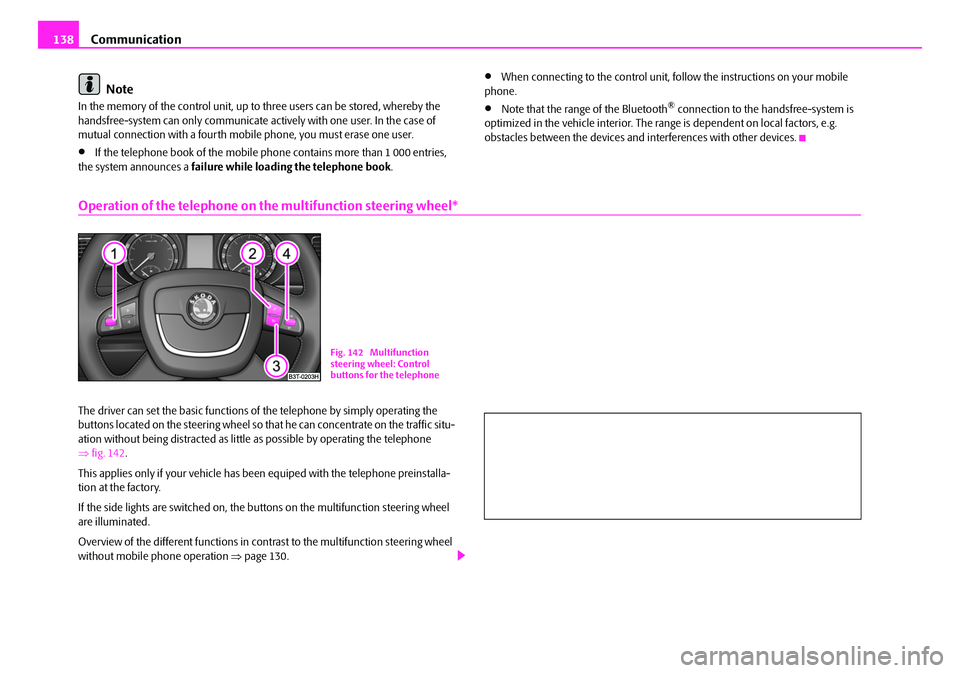
Operation of the telephone on the multifunction steering wheel*
The driver can set the basic functions of the telephone by simply operating the
buttons located on the steering wheel so th at he can concentrate on the traffic situ-
ation without being distracted as little as possible by operating the telephone
⇒ fig. 142 .
This applies only if your vehicle has been equiped with the telephone preinstalla-
tion at the factory.
If the side lights are switched on, the buttons on the multifunction steering wheel
are illuminated.
Overview of the different functions in cont rast to the multifunction steering wheel
without mobile phone operation ⇒page 130.
Fig. 142 Multifunction
steering wheel: Control
buttons for the telephone
NKO B6 20.book Page 138 Wednesday, March 26, 2008 3:15 PM
Page 149 of 272

Passive Safety
150
Before setting off
The driver is always fully respon sible for his occupants and for the
operating safety of the vehicle.
For your own safety and the safety of the people travelling with you, please pay
attention to the following points before setting off.
•Ensure that the lighting and the turn signal system are functioning properly.
•Inspect the tyre inflation pressure.
•Ensure that all the windows offer a good visibility to the outside.
•Safely attach the items of luggage ⇒page 78, “Loading the luggage compart-
ment”.
•Ensure that no objects can obstruct the pedal.
•Adjust the mirror, the front seat and the head restraint to match your body size.
•Point out to your occupants that the head restraints must be adjusted to match
their body size.
•Protect the children in suitable child se ats with correctly fastened seat belts
⇒ page 171, “Transporting children safely”.
•Adopt the correct seated position ⇒page 150, “Correct seated position”. Also
inform your occupants to adopt the correct seated position.
•Fasten the seat belt correctly. Also inform your occupants to properly fasten the
seat belts ⇒page 156, “How are seat belts correctly fastened?”.
What influences the driving safety?
The driving safety is primarily dete rmined by the style of driving and
the personal behaviour of all the occupants.
The driver is fully responsible for himself and his occupants. If your driving safety is
effected, you place yourself and the oncomi ng traffic at risk. Please refer to the
following guidelines.
•Do not get distracted from concentrating on the traffic situation, e.g. by your
occupants or mobile phone calls.
•Never drive when your driving ability is impaired, e.g. through medication,
alcohol, drugs.
•Keep to the traffic regulations and the permissible speed limit.
•Adjust the driving speed at all times to the road condition as well as to the traffic
and weather conditions.
•Take regular breaks on long journe ys - at the latest every two hours.
Correct seated position
Correct seated position for the driver
Correct seated position for the driver is important for safe and
relaxed driving.
Fig. 145 The correct distance
of the driver from the
steering wheel
NKO B6 20.book Page 150 Wednesday, March 26, 2008 3:15 PM
Page 150 of 272

Passive Safety151
Using the systemSafetyDriving TipsGeneral MaintenanceBreakdown assistanceTechnical Data
For your own safety and to reduce the risk of injury in the event of an accident, we
recommend the following setting.
•Adjust the steering wheel so that the distance between the steering wheel and
your chest is at least 25 cm ⇒page 150, fig. 145 .
•Position the driver seat in the forward/back direction so that you are able to
press the pedals with your legs at a slight angle .
•Adjust the backrest so that you are able to reach the highest point of the steering
wheel with your arms at a slight angle.
•Adjust the head restraint so that the top edge of the head restraint is at the same
level as the upper part of your head ⇒fig. 146 .
•Fasten the seat belt correctly ⇒page 156, “How are seat belts correctly
fastened?”.
Manual driver seat adjustment ⇒page 71, “Adjusting the front seats”.
Electrical driver seat adjustment ⇒page 72, “Adjusting front seats electrically*”.
WARNING
•The front seats and the head restraints must always be adjusted to match
the body size of the seat occupant as well as the seat belts must always be
correctly fastened in order to provide an optimal protection for you and your
occupants.
•The driver must maintain a distance of at least 25 cm to the steering
wheel ⇒page 150, fig. 145 . Not maintaining this minimum distance will
mean that the airbag system will not be able to properly protect you -
hazard!
•When driving, hold the steering wheel with both hands firmly on the
outer edge in the 9 o'clock and 3 o'clock position. Never hold the steering
wheel firmly in the 12 o'clock position or in another way (e.g. in the middle
of the steering wheel or at the inner steering wheel edge). In such cases,
injuries to the arms, the hands and the head can occur when the driver
airbag is deployed.
•The backrests must not be angled to o far back when driving otherwise
this will affect proper operation of the seat belts and of the airbag system -
risk of injury!
•Ensure that there are no objects in the footwell as any objects may get
behind the pedals during a driving or braking manoeuvre. You would then
no longer be able to operate the clutch, to brake or accelerate.
Correct seated position for the front passenger
The front passenger must maintain a distance of at least 25 cm from
the dash panel so that the airbag offers the greatest possible safety
when an airbag is deployed.
For the safety of the front passenger and to reduce the risk of injury in the event of
an accident, we recommend the following setting.
•Adjust the front passenger seat as far as possible to the rear.
•Adjust the head restraint so that the top edge of the head restraint is at the same
level as the upper part of your head ⇒ fig. 146.
•Fasten the seat belt correctly ⇒page 156, “How are seat belts correctly
fastened?”.
In exceptional cases the front passenger airbag can be deactivated ⇒page 168,
“Deactivating an airbag”.
Fig. 146 The correct head
restraint adjustment for the
driver
WARNING (continued)
NKO B6 20.book Page 151 Wednesday, March 26, 2008 3:15 PM
Page 154 of 272

Seat belts155
Using the systemSafetyDriving TipsGeneral MaintenanceBreakdown assistanceTechnical Data
The physical principle of a frontal collision
The physical principle of a frontal a ccident can be explained quite simply:
Motion energy, so-called kinetic energy, is produced as soon as the vehicle is
moving, both for the vehicle and its occupants. The magnitude of this kinetic energy
depends essentially on the speed at which the vehicle is travelling and on the
weight of the vehicle and the occupants. The greater the speed and weight increase, the greater the amount of energy which has to be absorbed in the event of an acci-
dent.
The speed of the vehicle is, nevertheless,
the most important factor. Doubling the
speed of the vehicle from 25 km/h up to 50 km/hour increases the kinetic energy
four times.
The common opinion that it is possible to support your body in a minor accident
with your hands, is incorrect. Even in a collision at only a low speed, the forces
acting on the body are such that it is no longer possible to support your body.
Even if you only drive at a speed within the range from 30 km/hour to 50 km/hour,
the forces which are produced on your body in the event of an accident can easily
exceed 10.000 N (Newton). This equals a weight of one tonne (1 000 kg).
In the event of a frontal collision, occupants of the car not wearing a seat belt, are
thrown forward and strike in an uncontrolle d way parts of the interior of the car,
such as steering wheel, dash panel, windscreen, ⇒fig. 148 . The occupants of a
vehicle who have not fastened their seat belts may even be thrown out of the
vehicle. This can resu lt in fatal injuries.
It is also important that rear seat occupants fasten their seat belts as they will other-
wise be thrown through the vehicle in an uncontrolled manner in the event of an
accident A rear seat passenger who has not fastened the seat belt is a danger not
only to himself but also fo r those seated at the front ⇒fig. 149 .
Important safety information regarding the use of
seat belts
The correct use of the seat belts considerably reduces the risk of
injury!
WARNING
•The belt webbing must not be jammed in-between at any point or
twisted, or chafe against any sharp edges.
•It is important that the belt webbing is properly routed if the seat belts
are to offer their maximum protection ⇒page 156, “How are seat belts
correctly fa stened?”.
Fig. 148 The driver is thrown
forward if not wearing a belt
Fig. 149 The rear seat occu-
pant is thrown forward if not
wearing a belt
NKO B6 20.book Page 155 Wednesday, March 26, 2008 3:15 PM
Page 160 of 272

Airbag system161
Using the systemSafetyDriving TipsGeneral MaintenanceBreakdown assistanceTechnical Data
•When disposing of vehicle or parts of the airbag system, it is important
to comply with the national legal requirements.
When are the airbags deployed?
The airbag system is designed in such a way that the driver and front passenger
airbag are deployed in the event of a frontal collision of major severity.
In the case of a violent side crash , the front side airbag* on the side of the car at
which the collision occurs, is deployed toge ther with the rear side airbag and the
head airbag*.
In certain accident situations, the front airbags as well as the side and head airbag
may be deployed together.
The airbags are not deployed in the case of minor frontal and side collisions, in the
case of rear-end collisi ons and vehicle rollover.
Deployment factors
It is not possible to state globally which deployment conditions apply to the airbag
system in every situation as the circumstances which exist in the case of accidents
vary greatly. An important role in this case , for example, is played by factors such as
the type of object (hard, soft) against whic h the vehicle impacts or the type of object
against which the vehicle impa cts, the angle of impact, the relative vehicle speed
during the accident etc.
A decisive factor for the deployment of the airbags is the deceleration which occurs
during a collision. The control unit analyses the nature of the collision and activates
the relevant restraint system. If the vehi cle deceleration which occurs and is meas-
ured during the collision remains below the prescribed reference values specified
in the control unit, the airbags are not deployed although the vehicle may well
suffer severe damage to the bodywork as a consequence of the accident.
The airbags are not deployed if:
•ignition off,
•a minor frontal collision,
•a minor side collision,
•a rear-end collision,
•rollover of the vehicle
Note
•a grey white, non harmful gas is released when airbag is inflated. This is perfectly
normal and is not an indication of a fire in the vehicle.
•the dash panel must be replaced afte r the front passenger airbag has been
deployed.
•in the event of an accident in which the airbags are deployed:
− the interior lighting comes on (if the swit ch for the interior light is in the door
contact position),
− the hazard warning light is switched on,
− all the doors are unlocked,
− the battery in the luggage compartment* is switched off;
− the fuel supply to the engine is interrupted.
Front airbag
Description of the front airbags
The airbag system is not a substitute for the seat belt!
WARNING (continued)
Fig. 154 Driver airbag in the
steering wheel
NKO B6 20.book Page 161 Wednesday, March 26, 2008 3:15 PM