steering SKODA SUPERB 2010 2.G / (B6/3T) Owner's Guide
[x] Cancel search | Manufacturer: SKODA, Model Year: 2010, Model line: SUPERB, Model: SKODA SUPERB 2010 2.G / (B6/3T)Pages: 287, PDF Size: 16.59 MB
Page 122 of 287
Starting-off and Driving121
Using the system
Safety
Driving Tips
General Maintenance
Breakdown assistance
Technical Data
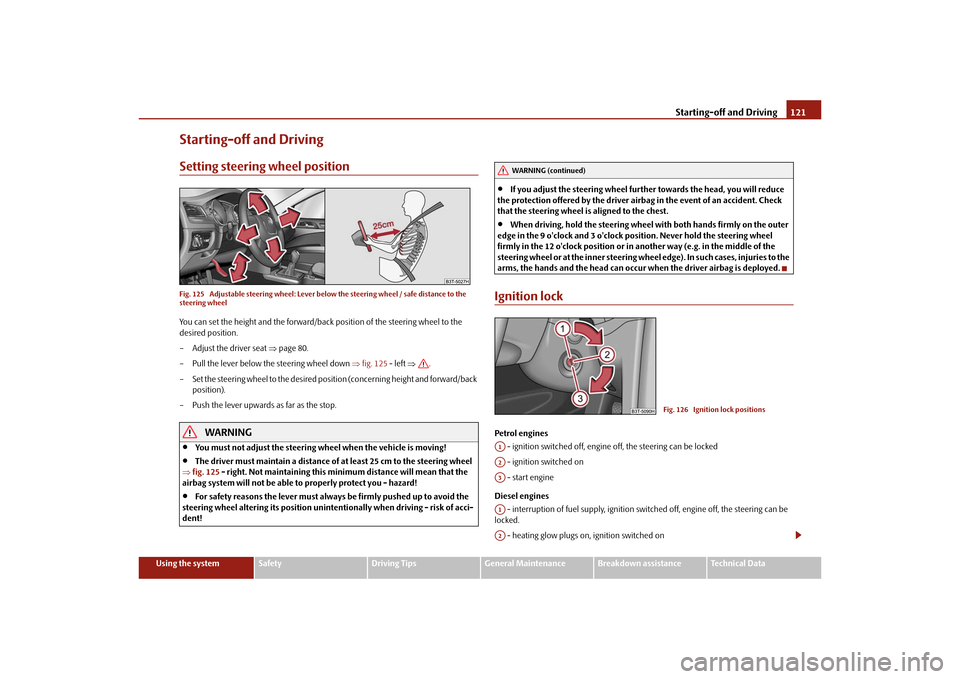
Starting-off and DrivingSetting steering wheel positionFig. 125 Adjustable steering wheel: Lever belo w the steering wheel / safe distance to the
steering wheelYou can set the height and the forward/back position of the steering wheel to the
desired position.
– Adjust the driver seat page 80.
– Pull the lever below the steering wheel down fig. 125 - left .
– Set the steering wheel to the desired position (concerning height and forward/back position).
– Push the lever upwards as far as the stop.
WARNING
You must not adjust the steering wheel when the vehicle is moving!
The driver must maintain a distance of at least 25 cm to the steering wheel
fig. 125 - right. Not maintaining this minimum distance will mean that the
airbag system will not be able to properly protect you - hazard!
For safety reasons the lever must always be firmly pushed up to avoid the
steering wheel altering its po sition unintentionally when driving - risk of acci-
dent!
If you adjust the steering wheel furthe r towards the head, you will reduce
the protection offered by the driver airbag in the event of an accident. Check
that the steering wheel is aligned to the chest.
When driving, hold the steering wheel with both hands firmly on the outer
edge in the 9 o'clock and 3 o'clock po sition. Never hold the steering wheel
firmly in the 12 o'clock position or in another way (e.g. in the middle of the
steering wheel or at the inne r steering wheel edge). In such cases, injuries to the
arms, the hands and the head can occur when the driver airbag is deployed.
Ignition lockPetrol engines
- ignition switched off, engine off, the steering can be locked
- ignition switched on
- start engine
Diesel engines - interruption of fuel supply, ignition swit ched off, engine off, the steering can be
locked.
- heating glow plugs on, ignition switched on
WARNING (continued)
Fig. 126 Ignition lock positions
A1A2A3A1A2
s3fg.2.book Page 121 Friday, April 30, 2010 12:17 PM
Page 123 of 287
Starting-off and Driving
122
You should not switch on any major elec trical components during the heating
period otherwise the vehicle battery will be drained unnecessarily.
- start engine
Applies to all models:
Position
To lock the steering , with the ignition key withdrawn, turn the steering wheel until the
steering locking pin is heard to engage. You should always lock the steering as a general
rule if you leave your vehicle. This acts as a deterrent against possible theft of your
vehicle .
Position
Move the steering wheel back and forward a little if the ignition key cannot, or cannot
easily be turned into this position, in order to release the steering lock.
Position
The engine is started in this position. At th e same time switched on low beam or main
beam or other electrical components wi th major power consumption are briefly
switched off. The ignition key moves back into position when one releases the key.
The ignition key must be turned back into position each time before starting the
engine again. The starter repeat lock in th e ignition lock prevents the starter being
engaged when the engine is r unning and thus getting damaged.
Ignition key withdrawal lock (automatic gearbox)
You can only withdraw the ignition key after switching off the ignition if the selector
lever is in position P.
WARNING
When driving, the ignition key must always be in the position (ignition
switched on) without the engine running. This position is indicated by the
warning lights coming on. If this is not the case, it could result in unexpected
locking of the steering wh eel - risk of accident!
Only remove the ignition key from the ignition lock when the vehicle has
come to a standstill (by applying the handbrake or moving the selector lever
into the position P). The steering lock can engage imme diately - risk of acci-
dent!
Always withdraw the ignition key if you are going to leave the vehicle, even
for a short time. This is particularly important if children are left in the vehicle.
The children might otherwise start the engi ne or switch on electrical equipment
(e.g. power windows) - risk of accident or injury!
Starting the engineGeneral
You can only start the engine only using an original ignition key.
Place the gearshift lever into neutral (or place the selector lever to the position P or
N in the case of an automatic gearbox) and put on the handbrake firmly before starting
the engine.
Before starting, it is necessary to depres s the clutch pedal and to hold it pressed
until the engine starts. If you start the engi ne without depressing the clutch pedal, the
engine does not start and a message is shown in the display of the instrument cluster
to remind you of th e necessity to depress the clutch pedal.
Before starting the engine, on vehicles fitted with automatic gearbox with the
KESSY system*, it is necessary to depress th e brake pedal and to hold it pressed until
the engine starts. If you start the engine without depressing the brake pedal, the engine
does not start and a message is shown in the display of the instrument cluster to
remind you of the necessity to depress the brake pedal.
Let go of the key as soon as the engine starts otherwise there may be damage to
the starter.
The engine running noises may louder at first be louder for a short time after starting
the cold engine until oil pressure can be built up in the hydraulic valve clearance
compensation. This is quite normal and is not an operating problem.
If the engine does not start ...
You can use the battery of anothe r vehicle as a jump-start aid page 241.
It is only possible to tow-start vehicles fi tted with a manual gearbox. The tow-starting
distance must not be more than 50 metres.
A3
A1A2A3
A2
A1
A2
WARNING (continued)
s3fg.2.book Page 122 Friday, April 30, 2010 12:17 PM
Page 126 of 287
Starting-off and Driving125
Using the system
Safety
Driving Tips
General Maintenance
Breakdown assistance
Technical Data
– Hold the button pressed and push the handbrake lever down fully
.
The handbrake warning light
lights up when the handbrak e is applied, provided the
ignition is on.
A warning signal sounds and the following text appears in the display* if you have inad-
vertently driven off with the handbrake applied:
Release parking brake!
The handbrake warning is acti vated if you drive at a speed of more than 6 km/h for
more than 3 seconds.
WARNING
Please note that the handbrake must be fully released. A handbrake which
is only partially released can result in the rear brakes overheating which will
have a negative effect on the operation of the brake system - risk of accident! In
addition this can result in premature wear of the rear brake pads.
Never leave children unattended in the vehicle. The children might, for
example, release the handbrake or take the vehicle out of gear. The vehicle
might then move off - risk of accident!Caution
After the car has come to a stop, always firs t of all apply the handbrake firmly before
then additionally engaging a gear (manual gearbox) or moving the selector lever into
position P (automatic gearbox).KESSY system*IntroductionThe KESSY system makes it possible to switch the ignition on/off and to start/stop the
engine without actively using the key.
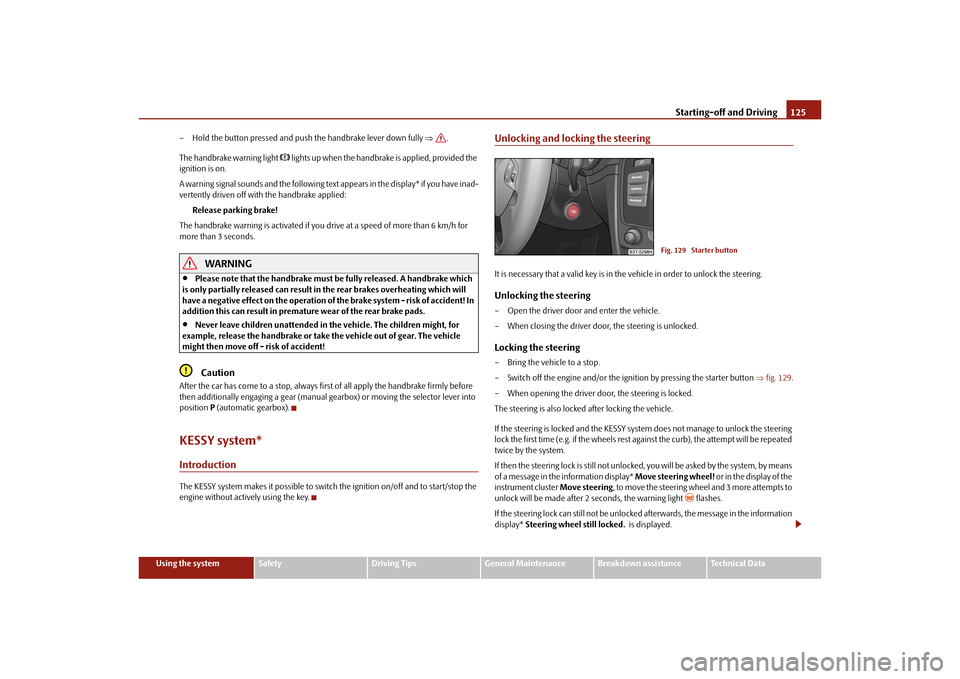
Unlocking and locking the steeringIt is necessary that a valid key is in th e vehicle in order to unlock the steering.Unlocking the steering– Open the driver door and enter the vehicle.
– When closing the driver door, the steering is unlocked.Locking the steering– Bring the vehicle to a stop.
– Switch off the engine and/or the ignition by pressing the starter button fig. 129 .
– When opening the driver door, the steering is locked.
The steering is also locked after locking the vehicle.
If the steering is locked and the KESSY syst em does not manage to unlock the steering
lock the first time (e.g. if the wheels rest against the curb), the attempt will be repeated
twice by the system.
If then the steering lock is still not unlocke d, you will be asked by the system, by means
of a message in the information display* Move steering wheel! or in the display of the
instrument cluster Move steering, to move the steering wheel and 3 more attempts to
unlock will be made after 2 seconds, the warning light
flashes.
If the steering lock can still not be unlocke d afterwards, the message in the information
display* Steering wheel still locked. is displayed.
Fig. 129 Starter button
s3fg.2.book Page 125 Friday, April 30, 2010 12:17 PM
Page 127 of 287

Starting-off and Driving
126
It is necessary to eliminate the possible ca use which prevents the unlocking and repeat
the attempt to unlock the steering.
Engine protection for electric steering lock
The electric steering lock has an engine protection which slows down the locking and
unlocking of the steering if the starter button is pressed repeatedly at short intervals.
Note
After pressing the starter button while th e steering is locked, the steering is
unlocked, the electrical components are acti vated (e.g. radio, navigation system etc.)
and the igntion is switched on.
If you do not exit or enter the vehicle again using the valid key after locking the
steering, however you wish to unlock the st eering, you must press the starter button.
At the same time, electrical components ar e activated (e.g. radio, navigation system
etc.) and the ignition is switched on.
If you switch off the ignition or the engine by pressing the starter button and if the
driver door is already opened, the steering wi ll not lock. In order to lock the steering, it
is necessary to close and open the driver door again or to lock the vehicle with the aid
of the sensor page 40, fig. 26 .
Switching on the ignitionIt is necessary that a valid key is in the vehicle and that the steering is unlocked in order
to switch on the ignition.
– The ignition is switched on by briefly pressing the starter button page 125,
fig. 129 .
Once you switch on the ignition an d open the driver door, the message Switch off
ignition! appears in the information display*.Switching off the ignition– The ignition is switched off by briefly pressing the starter button page 125,
fig. 129 .
The ignition can be switched off up to a speed of 2 km/h. On vehicles fitted with a manual gearbox,
the clutch must not be pressed after
switching off the ignition otherwise the system would try to start.
On vehicles fitted with an automatic gearbox, the selector lever must be in the position
P or N and the brake pedal must not be pressed.
Emergency ignition shutoff systemIn an emergency it is possible to switch off the ignition even at speeds greater than 2
km/h, by way of the so-called em ergency ignition shutoff system.
– Press the starter button page 125, fig. 129 for longer than 1 second or press it
twice within 1 second.
WARNING
Never switch off the ignition while dr iving, otherwise the steering and brake
assist do no longer function - risk of accident!Starting the engineIt is necessary that a valid key is in the vehi cle, the steering is unlocked and the ignition
is switched on in order to start the vehicle. On vehicles with manual gearbox, hold the
clutch pressed when starting the vehicle, on vehicles with automatic gearbox move the
selector lever into position P or N and hold the brake pedal pressed until the engine
starts.Petrol engines– Press the starter button page 125, fig. 129 until the engine has started.Diesel engines– If the starter button is pressed during the whole preglow period, the engine starts
after the warning light
has gone out.
The diesel engine can also be started by pressing the starter button, the ignition is
switched on and the preglow warning light
lights up. You must wait until the
preglow warning light
goes out and then press the starter button again until the
engine starts.
A1
s3fg.2.book Page 126 Friday, April 30, 2010 12:17 PM
Page 128 of 287

Starting-off and Driving127
Using the system
Safety
Driving Tips
General Maintenance
Breakdown assistance
Technical Data
If in an emergency, the engine must be star
ted quickly (e.g. in a critical situation), you
can start the engine by pressing the starte r button again before the preglow warning
light goes out.
WARNING
Never leave the key in the vehicle in th e area where there are children, because
they can easily start the vehicle - risk of accident!
Note
If the steering is locked while the engine is started, it is unlocked by pressing the starter
button, the electrical components (e.g. radio, navigation system etc.) are activated, the
ignition is switched on and the engine is started.Emergency start-up of engineIf the authorised key is not successfully recognised, Key not found is shown in the
information display* or No Key is shown in the display of the instrument cluster and
the emergency start-up of the engine must be carried out.
– Press the starter button fig. 130 and then hold the key at the starter button or
– press the starter button directly with the key.
Note
During an emergency start-up of the engine, the correct orientation of the key must be
kept fig. 130 .
Switching the engine off– Bring the vehicle to a stop.
– Switch off the engine by pressing the starter button page 125, fig. 129 , doing so
switches off the ignition at the same time.
Note
The KESSY system is protected against inadvertently switching off the engine while
driving, this means that the engine can only be switched off in an emergency
page 126.Messages in the instrument clusterIf a fault is present in the electric steering lock, a message regarding this fault is shown
in the information display* or in the display of the instrument cluster.
Steering column lock: Workshop!
If this message is shown in the information display*, the warning light flashes
and
an acoustic signal sounds, you can continue the trip with extra care. The vehicle must
be immediately taken to a specialist garage.
Steering column lock defective.
If this message is shown in the information display*, the warning light
flashes and a
warning signal sounds, the vehicle must no t be driven and it must be taken to a
specialist garage. After switching off the ignition, it is then no longer possible to lock the
steering, to activate the electrical components (e.g. radio, navigation system), to switch
on the ignition again and to start the engine.
Depress clutch! or CLUTCH
This message is shown if you do not depress the clutch pedal when starting the engine.
Depress brake pedal! or BRAKE
This message is shown if you do not depress the brake pedal when starting the engine,
the warning light
comes on.
Fig. 130 Emergency start-up of vehicle
s3fg.2.book Page 127 Friday, April 30, 2010 12:17 PM
Page 129 of 287

Starting-off and Driving
128
Move selector lever to position P/N! or P/N
10)
This message is shown if the selector lever is not in the position P or N, when locking
the steering, switching the ignition on/off or when starting the engine.
Move selector lever to position P! or P
10)
This message is shown if the selector lever is not in the position P when opening the
driver door and the ignition is switched off, or if it is not in the position P, when
switching off the ignition while the driver door is open. The message disappears after
a few seconds by switching on the ignition or by moving the selector lever into the
position P.Parking aid*Rear parking aid*
The parking aid provides a warning of obstacles behind the vehicle.The audible parking aid determines the distance between the rear bumper and an
obstacle located behind the ve hicle with the aid of ultrasound sensors. The tones of
the parking aid can be adapted in the menu of the information display* page 25.
The sensors are integrated in the rear bumper. Range of sensors
The clearance warning begins at a distance of about 160 cm from the obstacle (area
fig. 131 ). The interval between the warning signals becomes shorter as the clear-
ance is reduced.
A continuous tone sounds from a distance of approx. 30 cm (area ) - danger area.
You should not reverse any further after this signal sounds! If the vehicle is
equipped with a factory-fitted towing device*, the border of the danger area starts -
continuous tone - 5 cm further behind th e vehicle. The vehicle can be extended
through an installed detachable towing device.
On vehicles equipped with a factory-fitted radio* or navigation system*, the distance
to the obstruction is shown graphically in the display. On vehicles with a factory-fitted
towing device, the sensors are deactivated when towing a trailer. The driver is informed
about this by a graphic display (vehicle towing a trailer) in the radio* or the navigation*
display. The factory-fitted radio* or navigati on system* can be set so that the play func-
tion volume decreases when activating the parking aid, see Owner's Manual radio* or
navigation system*. This improves the audibility of the parking aid.
Activating
The parking aid is activated automatically when reverse gear is engaged and the igni-
tion is turned on. This is confirmed by a brief acknowledgement signal.
Deactivating
The parking aid is deactivated by removing the reverse gear.
WARNING
The parking aid is not a substitute for the driver paying proper attention and
it is always the driver's responsibility to take care when parking the vehicle or
carrying out similar manoeuvres.
You should therefore satisfy yourself, before reversing, that there is no small
obstacle, such as a rock, thin post, trai ler drawbar etc., behind your vehicle.
Such an obstacle might not be within the range detected by the sensors.
Under certain circumstances, surfaces of certain objects and types of
clothing cannot reflect the signal of the parking aid. Thus, these objects or
people who wear such clothing are not recognised by the sensors of the parking
aid.
10)Valid for vehicles with automatic gearbox.
Fig. 131 Parking aid: Detection range of
rear sensors
AA
AB
s3fg.2.book Page 128 Friday, April 30, 2010 12:17 PM
Page 131 of 287

Starting-off and Driving
130Note
Only the front parking aid operates if yo u are towing a trailer (applies only to
models which feature a factory-fitted towing device*).
If a warning signal sounds for about 3 seco nds after activating the system and there
is no obstacle close to your vehicle, this indicates a system fault. The fault is confirmed
additionally when the symbol
flashes in the button page 129, fig. 132 . Have the
fault rectified by a specialist workshop.
The sensors must be kept clean and free of ice to enable the parking aid to operate
properly.
If the parking aid is activated and the sele ctor lever of the automatic gearbox is in
the position , warning signal indicates interruption (vehicle can no longer move).
Park Assist*Description and important informationThe park assist assists you when parking in a suitable parallel parking space between
two vehicles or behind a vehicle.
The park assist automatically searches for suitable parking spaces after switching on
the ignition and when driving up to 30 km/h.
During the parking procedure the park assist only takes over the steering movements,
the pedals continue to be operated by the driver.
Function of the system is based on:
Length and depth measurement of the parking spaces when driving
Evaluation of the size of the parking space
Definition of the correct position of the vehicle for parking
Calculating the line on which the vehicle drives backwards into the parking space
Actuation of the steering force assistance, automatic spinning of the wheels of the
front axle when parking.
WARNING
The park assist does not take away th e responsability from the driver when
parking.
Pay particular attention to small children and animals as they would not be
recognised by the sensors of the parking aid.
Under certain circumstances, surfaces of certain objects and types of
clothing cannot reflect the signal of the park assist or the parking aid. Thus,
these objects or people who wear such clothing are not recognised by the
sensors of the parking aid.
The external sound source of the park assist and the parking aid can be
disruptively influenced and under unfavourable conditions, objects or people
cannot be recognised by the sensors of the parking aid.Caution
If other vehicles are parked behind or on the kurb, the park assist guides your
v ehicl e beyond the kurb or onto it. Make sure that the wheels or the wheel rims of your
vehicle are not damaged and if necessary intervene in time.
You should satisfy yourself before parking th at there is no small obstacle, such as a
rock, thin post, trailer drawbar etc., in front or behind your vehicle. Such an obstacle
might not be within the range detected by the sensors.
Under certain circumstances, surfaces or structures of certain objects such as wire
mesh fences, powder snow etc..., ca nnot be recognised by the system.
The evaluation of the parking place and the parking procedure depends on the
circumference of the wheels. The system does not function correctly if your vehicle is
mounted with wheels of no n-permissible size, snow chains or a temporary spare
wheel (in order to reach the nearest workshop). If the tyres other than those excepted
by the manufacturer are mounted, the resultin g position of the vehicle in the parking
space can differ slightly. This can be avoide d through new calibration of the system in
a specialist garage.
The accuracy of the evaluation for the parking space can be influenced by the
incorrectly determined outside temperature if the later is influenced by the thermal
radiation of the engine i.e for stop and go in a traffic jam.
AP
s3fg.2.book Page 130 Friday, April 30, 2010 12:17 PM
Page 133 of 287

Starting-off and Driving
132
Fig. 135 Information display: Information for engaging the forward gear or the reverse
gear The time limit for the parking procedure with the help of the park assist lasts 180
seconds.
– If the park assist has recognised a suitable parking space, it is shown in the infor-
mation display* page 131, fig. 134 .
– Drive on further until the display page 131, fig. 134 appears.
– Bring the vehicle to a stop for at least 1 second.
– Engage the reverse gear or move the selector lever* into the position R.
– As soon as the following message is shown in the information display*: Steering
interv. active. Monitor area around veh.! , let go of the steering wheel, the
steering will be taken over by the system.
– Pay attention to the immediate area arou nd the vehicle and drive backwards with
a speed of max. 7 km/h, at the same time operate the pedal.
– In the event that the parking procedure cannot be carried out in one go, proceed to parking in further stages. If the forward arrow fig. 135 flashes in the infor-
mation display*, engage the 1st gear or mo ve the selector lever* into the position
D .
– Please wait until the steering wheel turn s automatically into the required position
and then carefully drive a little forward at a speed of max. 7 km/h, at the same time
operate the pedal.
– If the backward arrow flashes fig. 135 in the information display*, once again
engage the reverse gear or move the selector lever* into the position R. – Please wait until the steering wheel turns automatically into the required position
and then carefully drive backwards. Yo u can repeat these steps several times.
– End the parking procedure from a distance on the basis of the information of the
system.
As soon as the parking procedure is completed, an audible signal sounds and in the
information display* the following message appears: Steering intervention finished!
Please take over steering! .
Switch off park assist
The park assist switches off during one of the following occurences:
A speed of 30 km/h exceeded
A speed of 7 km/h exceeded during the parking procedure
A time limit of 180 seconds exceeded for the parking procedure
The button pressed for the park assist
Parking aid activated
Switch off TCS system
Intervention of the driver in the automatic steering procedure (stop the steering
wheel)
disengage the reverse gear or take the selector lever* out of the position R when
driving backwards into the parking space.
Further warning and information texts of the park assist in the information
display*:
Park Assist finished.
The parking procedure has ended or after switching on the ignition, the vehicle has not
been driven above 10 km/h.
Park Assist: Speed too high!
Reduce the speed below 30 km/h.
Driver steering intervention: Please take over steering!
The parking procedure is ended through driver intervention.
AC
AD
AB
AC
AD
s3fg.2.book Page 132 Friday, April 30, 2010 12:17 PM
Page 134 of 287

Starting-off and Driving133
Using the system
Safety
Driving Tips
General Maintenance
Breakdown assistance
Technical Data
Park Assist finished. TCS deactivated.
The parking procedure cannot be carried ou
t because the TCS system is switched off.
TCS deactivated. Please take over steering!
The parking procedure was ended because the TCS system was switched off during the
parking procedure.
Trailer: Park Assist finished.
The parking procedure is not possible beca use the trailer is hitched and a plug is
inserted in the socket of the towing device.
Time limit exceeded. Plea se take over steering!
The parking procedure was ended because a ti me limit of 180 seconds for parking was
exceeded.
Fault: Park Assist stopped.
The parking procedure is not possible because a fault exists on the vehicle. Have the
fault rectified by a specialist workshop.
Park Assist defective. Workshop!
The parking procedure is not possible because a fault exists on the park assist. Have the
fault rectified by a specialist workshop.
Steering interv. active. Monitor area around veh.!
The park assist is active and takes over the steering movements. Observe the
surroundings and carefully drive backward s, at the same time operate the pedal.
Please take over steering! Finish parking proc. manually!
Take over the steering. End the parking procedure without using the park assist.
Speed too high! Please take over steering!
The parking procedure was ended while the speed was exceeded.
Park Assist: TCS Intervention!
Intervention of the ESP system while searching for a suitable parking place.
TCS intervention. Please take over steering!
Parking procedure is ended through the intervention of the ESP system. Park Assist: Stationary time not sufficient.
The stationary time of the vehicle was less than 1 second.
Park Assist: Speed too low.
After the ignition is switched on, the vehicle must exceed the speed of 10 km/h at least
once.
Cruise control system (CCS)*IntroductionThe cruise control system (CCS) maintains
a constant speed, more than 30 km/h (20
mph), once it has been set, without you havi ng to depress the accelerator pedal. This
is only possible within the range which is permitted by the power output and braking
power of the engine. The cruise control system makes it possible - particularly on long
journeys - for you to rest your “accelerator foot”.
WARNING
For safety reasons, the cruise control system must not be used in dense
traffic or on unfavourable ro ad surfaces (such as icy roads, slippery roads, loose
gravel) - risk of accident!
In order to prevent unintentional use of the cruise control system, always
switch off the system after use.Note
Models fitted with a manual gearbox: Alwa ys depress the clutch pedal if you switch
on the cruise control system when the gearbo x is in Neutral! Otherwise the engine can
rev up unintentionally.
The cruise control system is not able to maintain a constant speed when driving on
steep downhill sections. The weight of the vehicle increases the speed at which it
travels. One should shift down in good time to a lower gear or slow the vehicle down
by applying the foot brake.
It is not possible on vehicles fitted with an automatic gearbox to switch on the
cruise control system if the sele ctor lever is in the position P, N or R.
s3fg.2.book Page 133 Friday, April 30, 2010 12:17 PM
Page 140 of 287

Automatic gearbox DSG*139
Using the system
Safety
Driving Tips
General Maintenance
Breakdown assistance
Technical Data
the gearbox to switch over to this style of driving and shift down earlier with frequent
changes in gears in comparison to the moderate style of driving.
Selecting the most appropriate driving programme for the particular style of driving is
a continuous process. Irrespective of this it is, however, possible to switch or shift down
into a dynamic shift programme by depressi
ng the accelerator rapidly. The gearbox
shifts down into a lower gear matching th e speed of the car and this allows you to
accelerate rapidly (e.g. when overtaking) without having to depress the accelerator
pedal fully into the kickdown range. The original programme will be reactivated to
match your particular styl e of driving once the gearbox has shifted up again.
When driving in hilly regions, the gears are selected to match uphill and downhill
sections. This avoids the gearbox frequently shifting up an d down when negotiating an
uphill stretch. When driving downhill, it is possible to shift down into the Tiptronic
position, in order to exploit the engine brake torque.
Tiptronic
The Tiptronic allows the driver to also shift gears manually.Fig. 138 Selector lever: manual shifting / information display: manual shiftingThe selector lever position you have engaged is indicated in the information display of
the instrument cluster together with the engaged gear fig. 138 - right.Switching over to manual shifting– Push the selector lever to the right out of position D. After switching over, the
current engaged gear is indicated in the display.
Shifting up gears– One-touch forward of the selector lever (in the Tiptronic position) fig. 138 .Shifting down gears– One-touch back of the selector lever (in the Tiptronic position) .
It is possible to switch over to manual bo th when the car is stationary and also when
driving.
When you accelerate, the gearbox shifts up automatically into the higher gear just
before the maximum permissible engine speed is reached.
If you select a lower gear, the automatic gear box does not shift down until there is no
risk of the engine overrevving.
If you operate the kickdown function, the gear box shifts into a lower gear in line with
the vehicle speed and engine speed.Manual shifting on the multifunction steering wheel*Switching over to manual shifting– Push the selector lever to the right out of position D. After switching over, the
current engaged gear is indicated in the display.Shifting up gears– Press the right rocker switch fig. 139 for the multifunction steering wheel.
A+
A-
Fig. 139 Multifunction steering wheel:
manual shifting
+
s3fg.2.book Page 139 Friday, April 30, 2010 12:17 PM