wheel SKODA SUPERB 2011 Owner´s Manual
[x] Cancel search | Manufacturer: SKODA, Model Year: 2011, Model line: SUPERB, Model: SKODA SUPERB 2011Pages: 252, PDF Size: 16.33 MB
Page 45 of 252
Information system
Driver information system
Introduction
This chapter contains information on the following subjects:
Using the information system
42
Display a low temperature
43
Gear recommendation
43
Door, boot or engine compartment warning
44
The information system provides the driver with alerts and messages about in-
dividual vehicle systems.
This information and advice is shown in the instrument cluster display or indi-
cated by the illumination of the corresponding warning light in the instrument
cluster.
The information system provides the following information and instructions
(depending on vehicle equipment).
› Data relating to the multi function display (MFD)
» page 44.
› Data relating to the MAXI DOT display
» page 46.
› Service interval display
» page 48.
› Auto Check Control
» page 33.
› Selector lever positions for an automatic transmission
» page 145.
WARNINGConcentrate fully at all times on your driving! As the driver, you are fully re-
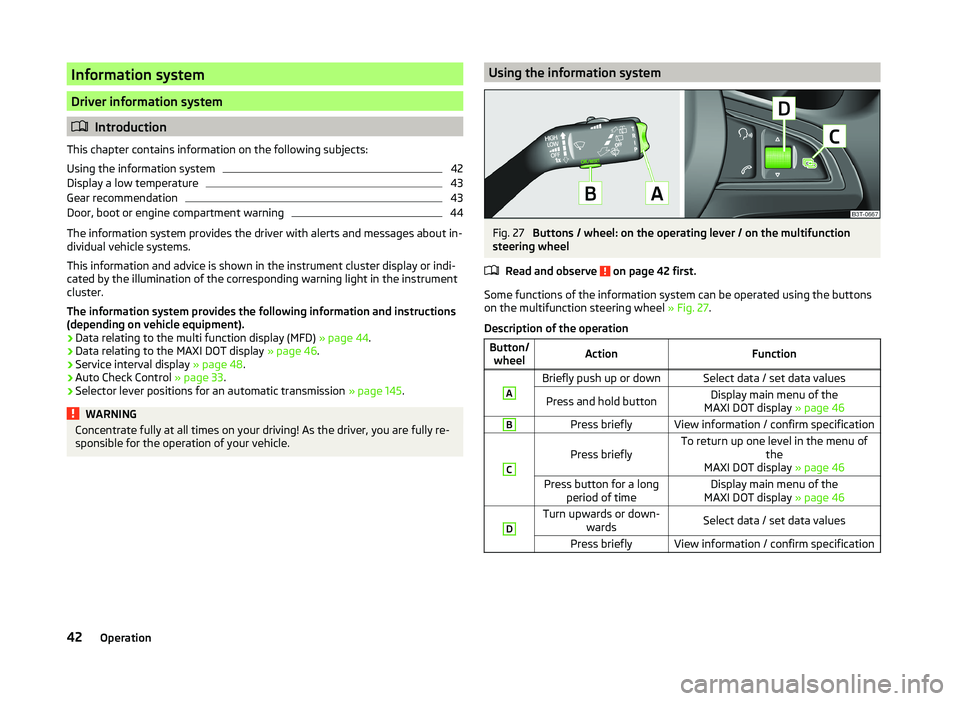
sponsible for the operation of your vehicle.Using the information systemFig. 27
Buttons / wheel: on the operating lever / on the multifunction
steering wheel
Read and observe
on page 42 first.
Some functions of the information system can be operated using the buttons
on the multifunction steering wheel » Fig. 27.
Description of the operation
Button/ wheelActionFunctionABriefly push up or downSelect data / set data valuesPress and hold buttonDisplay main menu of the
MAXI DOT display » page 46BPress brieflyView information / confirm specificationC
Press brieflyTo return up one level in the menu of
the
MAXI DOT display » page 46Press button for a long
period of timeDisplay main menu of the
MAXI DOT display » page 46DTurn upwards or down-
wardsSelect data / set data valuesPress brieflyView information / confirm specification42Operation
Page 47 of 252
Door, boot or engine compartment warningRead and observe
on page 42 first.
Vehicles with a MAXI DOT display
If at least one door, the boot or bonnet is open, the display indicates the rele-
vant open door, boot or bonnet vehicle icon.
Vehicles with a segment display
If at least one door or the boot or bonnet is open, the warning lights
or
and
come on in the instrument cluster » page 34, Warning lights .
An acoustic signal will also sound if you drive the vehicle above 6 km/h when a
door is open.
Multifunction display (MFD)
Introduction
This chapter contains information on the following subjects:
Memory
44
Information overview
45
Warning at excessive speeds
46
The driving data is displayed on the multifunction display.
The multifunction display only operates when the ignition is switched on. After the ignition is switched on, the function that was last selected before switch-
ing off the ignition is displayed.
For vehicles with a MAXI DOT display, the menu item MFD must be selected
and confirmed in the main menu » page 46, MAXI DOT display .
On vehicles with a MAXI DOT display, there is an option to fade out some of
the information » page 47, Settings .
WARNING■
Concentrate fully at all times on your driving! As the driver, you are fully
responsible for the operation of your vehicle.■
Even at temperatures of around +4 °C, there may still be black ice on the
road surface. You should therefore not rely solely on the outside tempera-
ture display for accurate information as to whether there is ice on the road.
Note■ In certain national versions the displays appear in the Imperial system of
measures.■
If the display of the second speed is activated in mph, the current speed is
not indicated in km/h on the display.
■
The amount of fuel consumed will not be indicated.
Memory
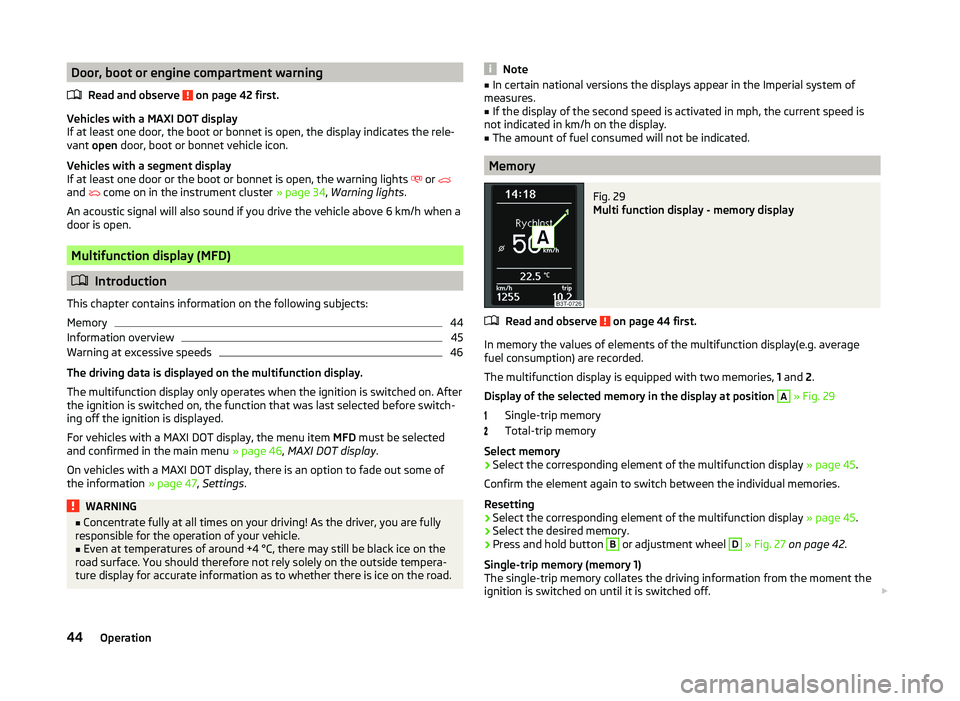
Fig. 29
Multi function display - memory display
Read and observe on page 44 first.
In memory the values of elements of the multifunction display(e.g. average
fuel consumption) are recorded.
The multifunction display is equipped with two memories, 1 and 2.
Display of the selected memory in the display at position
A
» Fig. 29
Single-trip memory
Total-trip memory
Select memory
›
Select the corresponding element of the multifunction display » page 45.
Confirm the element again to switch between the individual memories.
Resetting
›
Select the corresponding element of the multifunction display » page 45.
›
Select the desired memory.
›
Press and hold button
B
or adjustment wheel
D
» Fig. 27 on page 42 .
Single-trip memory (memory 1)
The single-trip memory collates the driving information from the moment the
ignition is switched on until it is switched off.
44Operation
Page 72 of 252
Daylight running lights (DAY LIGHT)Read and observe
on page 67 first.
The daytime running lights (hereafter only function) provide lighting for the
front of the vehicle.
The lights are switched on automatically if the following conditions are met.
The light switch is in the position
or
» Fig. 49 on page 68 .
The ignition is switched on.
The parking aid is activated.
Deactivating the function
›
Switch off the ignition.
›
Pull the turn signal- and main beam lever ( » Fig. 50 on page 69 ) towards
the steering wheel, push down and hold in this position.
›
Switch on the ignition.
›
Hold the lever in this position for at least 3 seconds after switching on the
ignition.
Activating the function
›
Switch off the ignition.
›
Pull the turning signal and main beam lever towards the steering wheel,
push it up and hold it in this position.
›
Switch on the ignition.
›
Hold the lever in this position for at least 3 seconds after switching on the
ignition.
On vehicles with MAXI DOT display, the function can be enabled or disabled in
the menu item Dayl. dri. light » page 47 .
WARNINGWhen the daytime running light is switched on, the parking lights (neither
at the front nor the rear) and the number plate lights are not lit. Therefore
always switch on the low beam when the visibility is poor.Turn signal and main beamFig. 50
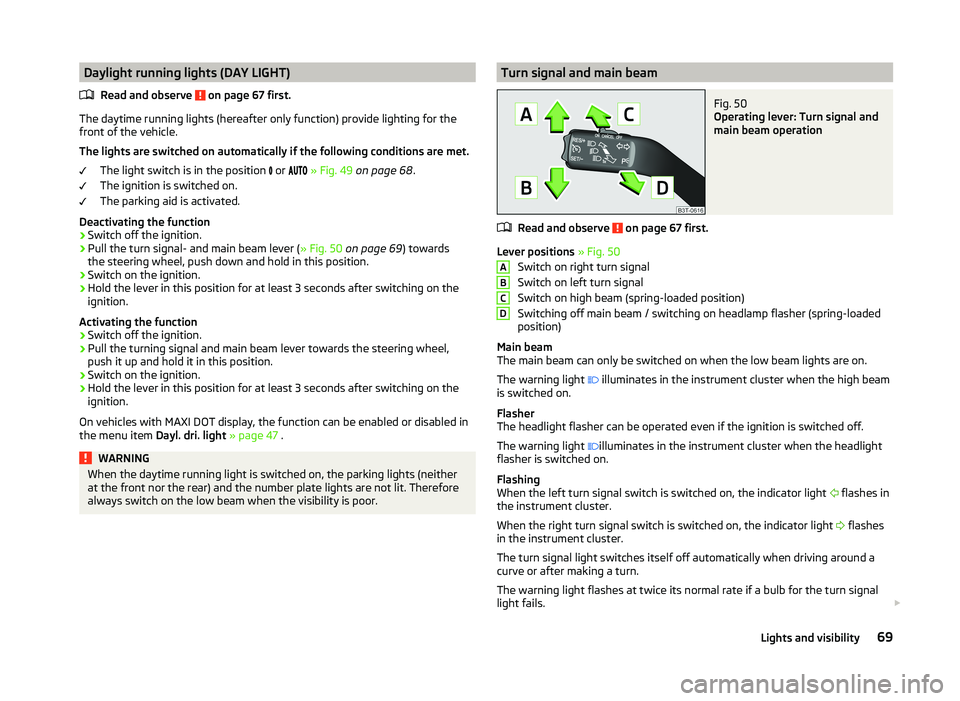
Operating lever: Turn signal and
main beam operation
Read and observe on page 67 first.
Lever positions » Fig. 50
Switch on right turn signal
Switch on left turn signal
Switch on high beam (spring-loaded position)
Switching off main beam / switching on headlamp flasher (spring-loaded
position)
Main beam
The main beam can only be switched on when the low beam lights are on.
The warning light illuminates in the instrument cluster when the high beam
is switched on.
Flasher
The headlight flasher can be operated even if the ignition is switched off.
The warning light illuminates in the instrument cluster when the headlight
flasher is switched on.
Flashing
When the left turn signal switch is switched on, the indicator light flashes in
the instrument cluster.
When the right turn signal switch is switched on, the indicator light flashes
in the instrument cluster.
The turn signal light switches itself off automatically when driving around a
curve or after making a turn.
The warning light flashes at twice its normal rate if a bulb for the turn signal
light fails.
ABCD69Lights and visibility
Page 74 of 252
Tourist lights (Travel mode)
This mode makes it possible to drive in countries with opposing traffic system
(driving on the left/right) without dazzling the oncoming vehicles.
When this mode is active, the above mentioned modes and the side swivel of the headlights are deactivated.
This mode can be enabled or disabled via the MAXI DOT display in the Travel
mode » page 48 , Lights and visibility menu option.WARNINGIf the AHL system is defective, the headlights are automatically lowered to
the emergency position, which prevents a possible dazzling of oncoming
traffic. This reduces the cone of light in front of the vehicle. Drive carefully
and visit a specialist garage as soon as possible.
Note
When the “tourist light” mode is active, the warning light flashes for 10 sec-
onds each time the ignition is switched on.
Fog lights
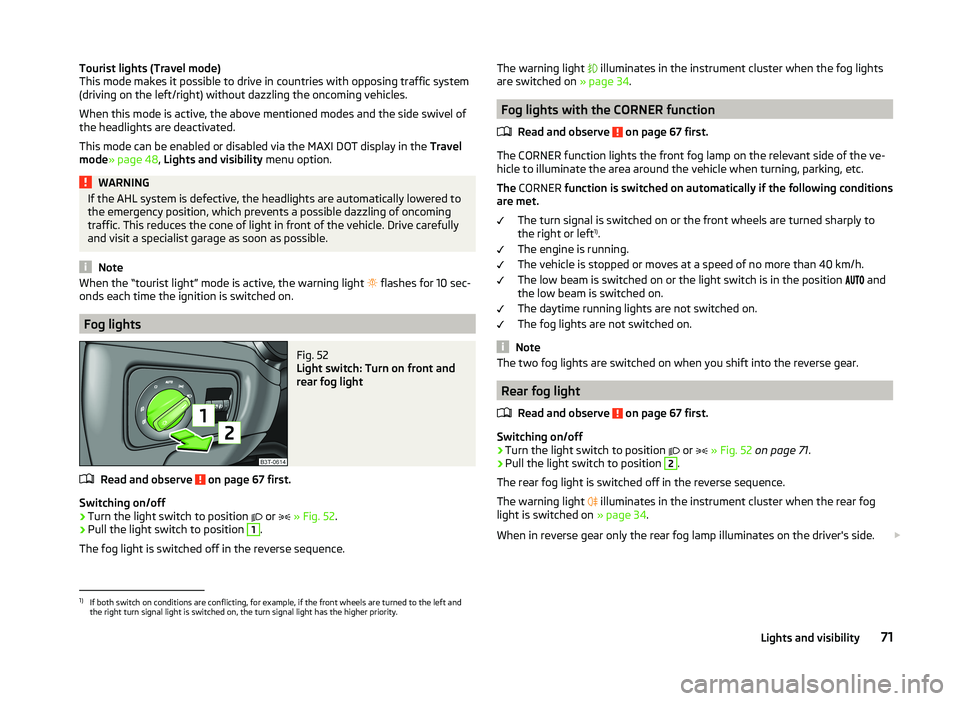
Fig. 52
Light switch: Turn on front and
rear fog light
Read and observe on page 67 first.
Switching on/off
›
Turn the light switch to position or
» Fig. 52 .
›
Pull the light switch to position
1
.
The fog light is switched off in the reverse sequence.
The warning light illuminates in the instrument cluster when the fog lights
are switched on » page 34.
Fog lights with the CORNER function
Read and observe
on page 67 first.
The CORNER function lights the front fog lamp on the relevant side of the ve-
hicle to illuminate the area around the vehicle when turning, parking, etc.
The CORNER function is switched on automatically if the following conditions
are met.
The turn signal is switched on or the front wheels are turned sharply to
the right or left 1)
.
The engine is running.
The vehicle is stopped or moves at a speed of no more than 40 km/h.
The low beam is switched on or the light switch is in the position and
the low beam is switched on.
The daytime running lights are not switched on.
The fog lights are not switched on.
Note
The two fog lights are switched on when you shift into the reverse gear.
Rear fog light
Read and observe
on page 67 first.
Switching on/off
›
Turn the light switch to position or
» Fig. 52 on page 71 .
›
Pull the light switch to position
2
.
The rear fog light is switched off in the reverse sequence.
The warning light illuminates in the instrument cluster when the rear fog
light is switched on » page 34.
When in reverse gear only the rear fog lamp illuminates on the driver's side.
1)
If both switch on conditions are conflicting, for example, if the front wheels are turned to the left and
the right turn signal light is switched on, the turn signal light has the higher priority.
71Lights and visibility
Page 84 of 252
The mirror will be folded automatically if the following conditions are met.The function is activated via the MAXI DOT display in the menu item Mirror
down » page 47 , Settings .
The knob for the mirror control is in the position for the passenger mirror
adjustment.
The reverse gear is engaged.
The mirror setting was previously stored » page 84, Memory function of
the electrically adjustable seat or » page 84 , Memory function of the re-
mote control key .WARNINGDo not touch the exterior mirror surfaces if the exterior mirror heater is
switched on - risk of burns.
CAUTION
■ The exterior mirrors with fold in function never mechanically fold by hand -
there is a risk of damaging the electric mirror actuator!■
When the mirror is swung by external influences (due to impact during ma-
noeuvring, for example), then first fold-in the mirror by turning the knob and
wait for a loud clapping noise.
Note
■ The mirror heater only operates when the engine is running and up to an
outside temperature of +35 ℃.■
If the electrical mirror setting fails at any time, the mirrors can be adjusted by
hand by pressing on the edge of the mirror surface.
Seats and practical features
Adjusting the seats
Introduction
This chapter contains information on the following subjects:
Manually adjusting the front seats
82
Electric front seat adjustment
82
Head restraints
83
Memory function of the electrically adjustable seat
84
Memory function of the remote control key
84
The driver's seat should be adjusted in such a way that the pedals can be fully
pressed to the floor with slightly bent legs.
The seat backrest on the driver's seat should be adjusted in such a way that the upper point of the steering wheel can be easily reached with slightly bent
arms.
Correct adjustment of the seats is particularly important for the following rea-
sons.
› Reaching the controls safely and quickly.
› A relaxed and fatigue-free body position.
› Achieving the maximum protection offered by the seat belts and the airbag
system.
WARNING■ Only adjust the driver's seat when the vehicle is stationary – risk of acci-
dent!■
Caution when adjusting the seat! You may suffer injuries or bruises as a
result of adjusting the seat without paying proper attention.
■
The electric front seat adjustment is also functional when the ignition is
turned off (even with the ignition key removed). Therefore, when leaving
the vehicle, never leave people who are not completely independent, such
as children, unattended in the vehicle - there is a danger of injury!
■
Never carry more people than the number of seats in the vehicle.
■
Do not carry any objects on the front passenger seat except objects de-
signed for this purpose (e.g. child seat) – risk of accident!
81Seats and practical features
Page 85 of 252
Note■After a certain time, play can develop within the adjustment mechanism of
the backrest angle.■
For safety reasons, it is not possible to store the seat position in the electric
seat memory and remote control key memory if the inclination angle of the
seat backrest is more than 102° in relation to the seat cushion.
■
Each time you store the position of the electrically adjustable driver's seat
and exterior mirrors, the existing settings are deleted.
Manually adjusting the front seats
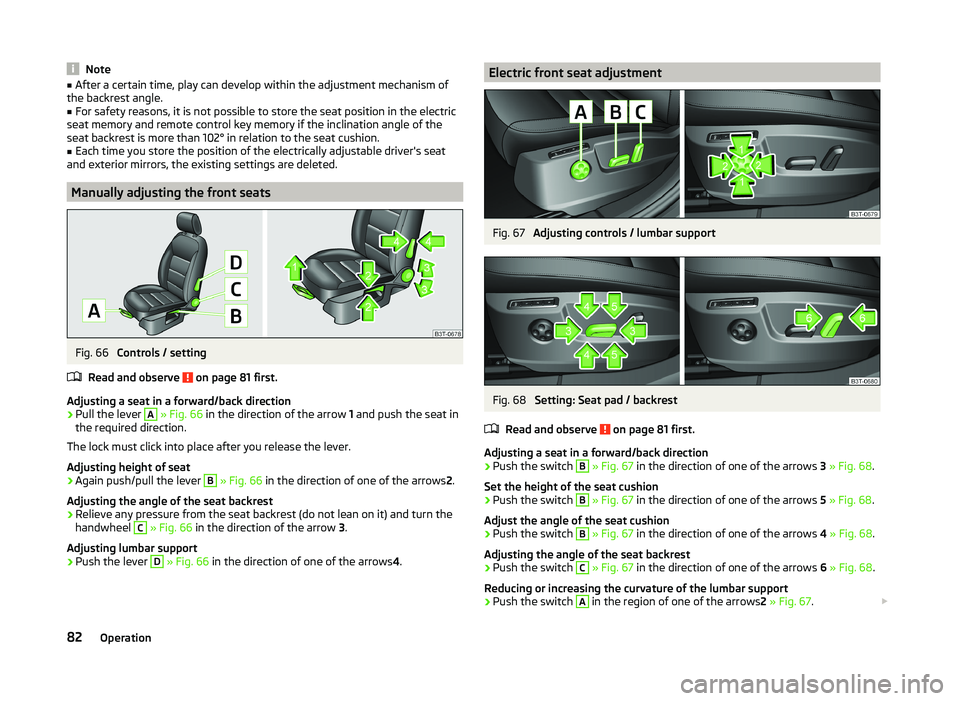
Fig. 66
Controls / setting
Read and observe
on page 81 first.
Adjusting a seat in a forward/back direction
›
Pull the lever
A
» Fig. 66 in the direction of the arrow 1 and push the seat in
the required direction.
The lock must click into place after you release the lever.
Adjusting height of seat
›
Again push/pull the lever
B
» Fig. 66 in the direction of one of the arrows 2.
Adjusting the angle of the seat backrest
›
Relieve any pressure from the seat backrest (do not lean on it) and turn the
handwheel
C
» Fig. 66 in the direction of the arrow 3.
Adjusting lumbar support
›
Push the lever
D
» Fig. 66 in the direction of one of the arrows 4.
Electric front seat adjustmentFig. 67
Adjusting controls / lumbar support
Fig. 68
Setting: Seat pad / backrest
Read and observe
on page 81 first.
Adjusting a seat in a forward/back direction
›
Push the switch
B
» Fig. 67 in the direction of one of the arrows 3 » Fig. 68 .
Set the height of the seat cushion
›
Push the switch
B
» Fig. 67 in the direction of one of the arrows 5 » Fig. 68 .
Adjust the angle of the seat cushion
›
Push the switch
B
» Fig. 67 in the direction of one of the arrows 4 » Fig. 68 .
Adjusting the angle of the seat backrest
›
Push the switch
C
» Fig. 67 in the direction of one of the arrows 6 » Fig. 68 .
Reducing or increasing the curvature of the lumbar support
›
Push the switch
A
in the region of one of the arrows 2 » Fig. 67 .
82Operation
Page 103 of 252
Floor coveringFig. 102
Fixing the floor covering: Superb / Superb Combi
Read and observe
and on page 98 first.
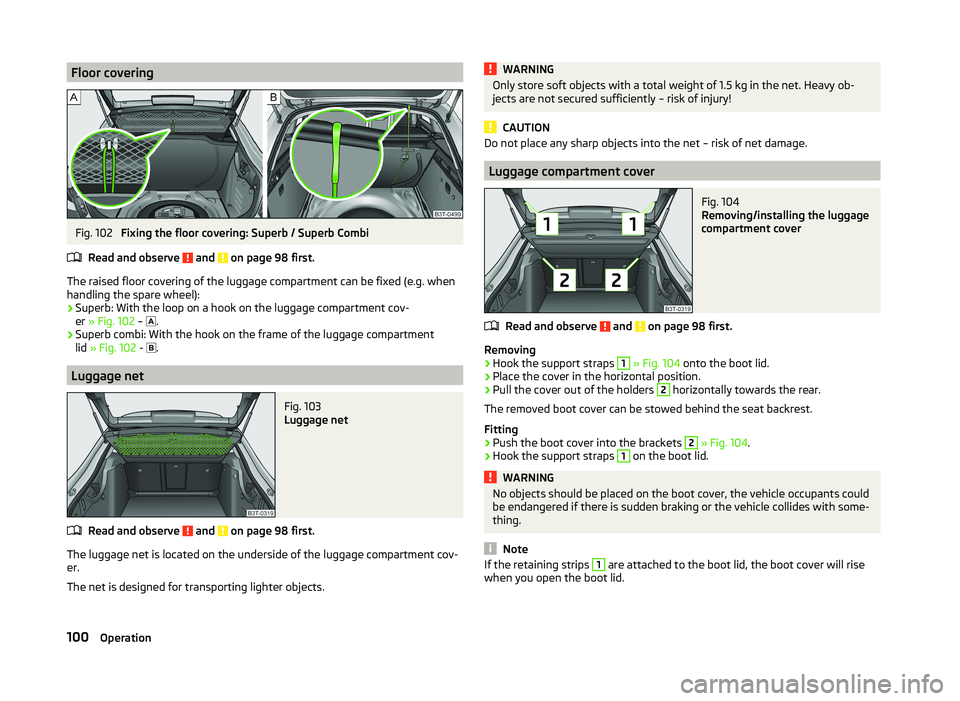
The raised floor covering of the luggage compartment can be fixed (e.g. when
handling the spare wheel):
› Superb: With the loop on a hook on the luggage compartment cov-
er » Fig. 102 –
.
› Superb combi: With the hook on the frame of the luggage compartment
lid » Fig. 102 -
.
Luggage net
Fig. 103
Luggage net
Read and observe and on page 98 first.
The luggage net is located on the underside of the luggage compartment cov-
er.
The net is designed for transporting lighter objects.
WARNINGOnly store soft objects with a total weight of 1.5 kg in the net. Heavy ob-
jects are not secured sufficiently – risk of injury!
CAUTION
Do not place any sharp objects into the net – risk of net damage.
Luggage compartment cover
Fig. 104
Removing/installing the luggage
compartment cover
Read and observe and on page 98 first.
Removing
›
Hook the support straps
1
» Fig. 104 onto the boot lid.
›
Place the cover in the horizontal position.
›
Pull the cover out of the holders
2
horizontally towards the rear.
The removed boot cover can be stowed behind the seat backrest.
Fitting
›
Push the boot cover into the brackets
2
» Fig. 104 .
›
Hook the support straps
1
on the boot lid.
WARNINGNo objects should be placed on the boot cover, the vehicle occupants could
be endangered if there is sudden braking or the vehicle collides with some-
thing.
Note
If the retaining strips 1 are attached to the boot lid, the boot cover will rise
when you open the boot lid.100Operation
Page 124 of 252
Display warning light B » Fig. 128MeaningLights up orange for around 2 sec-
onds, then flashes green or red.The battery is weak, however the
switching on or off signal was not re-
ceived.Flashes orange for around 5 seconds.The battery is discharged, however
the switching on or off signal was not
received.
Replace the battery » page 216.
CAUTION
The radio remote control comprises electronic components and must therefore
be protected against water, severe impacts and direct sunlight.Communication and multimedia
General information
Introduction
This chapter contains information on the following subjects:
Mobile phones and two-way radio systems
121
Universal telephone preinstallation (hands-free)
122
Operating the phone on the multifunction steering wheel
122
Symbols in the MAXI DOT display
123
Phone Phonebook
124
Mobile phones and two-way radio systems
ŠKODA permits the operation of mobile phones and two-way radio systems
with a professionally installed external aerial and a maximum transmission
power of up to 10 watts.
Please ask at a specialist workshop about installing and operating mobile
phones and two-way radio systems that have a transmission power of more
than 10 W.
Operating mobile phones or two-way radio systems may interfere with the
functionality of the electronic systems in your vehicle.
This could be for the following reasons.
› no external aerial.
› external aerial incorrectly installed.
› transmission power greater than 10 watts.
WARNING■
If a mobile phone or a two-way radio system is operated in a vehicle with-
out an external aerial or an external aerial which has been installed incor-
rectly, this can increase the strength of the electromagnetic field inside the
vehicle.■
Two-way radio systems, mobile phones or mounts must not be installed
on airbag covers or within the immediate deployment range of the airbags.
121Communication and multimedia
Page 125 of 252
WARNING (Continued)■Never leave a mobile phone on a seat, on the dash panel or in any area
where it can become a projectile during a sudden braking manoeuvre, an
accident or a collision — risk of injury.■
Before transport of the vehicle by air, the Bluetooth ®
function must be
switched off by a specialist company.
Universal telephone preinstallation (hands-free)
The universal telephone preinstallation (hands-free system) includes a con-
venience mode for the mobile phone via voice control, the multifunction steer-
ing wheel and the radio or navigation system.
WARNING■ Concentrate fully at all times on your driving! As the driver, you are fully
responsible for the operation of your vehicle.■
Only use the device in such a way that you are in full control of your vehi-
cle in every traffic situation – there is the risk of accidents!
■
The national regulations for using a mobile phone in a vehicle must be
observed.
Note■ We recommend that mobile phones and two-way radio systems be installed
in the vehicle by a specialist workshop.■
Not all mobile phones that enable Bluetooth ®
communication are compatible
with the universal telephone preinstallation GSM II or GSM III. Ask a ŠKODA
Partner whether your phone is compatible with the universal telephone prepa-
ration GSM II or GSM III.
■
The range of the Bluetooth ®
connection to the hands-free system is restric-
ted to the vehicle interior. The range is dependent on local factors, e.g. obsta-
cles between the devices and mutual interferences with other devices. If your
mobile phone is in a jacket pocket, for example, this can lead to difficulties
when establishing a connection with the hands-free-system or transferring
data.
Operating the phone on the multifunction steering wheel
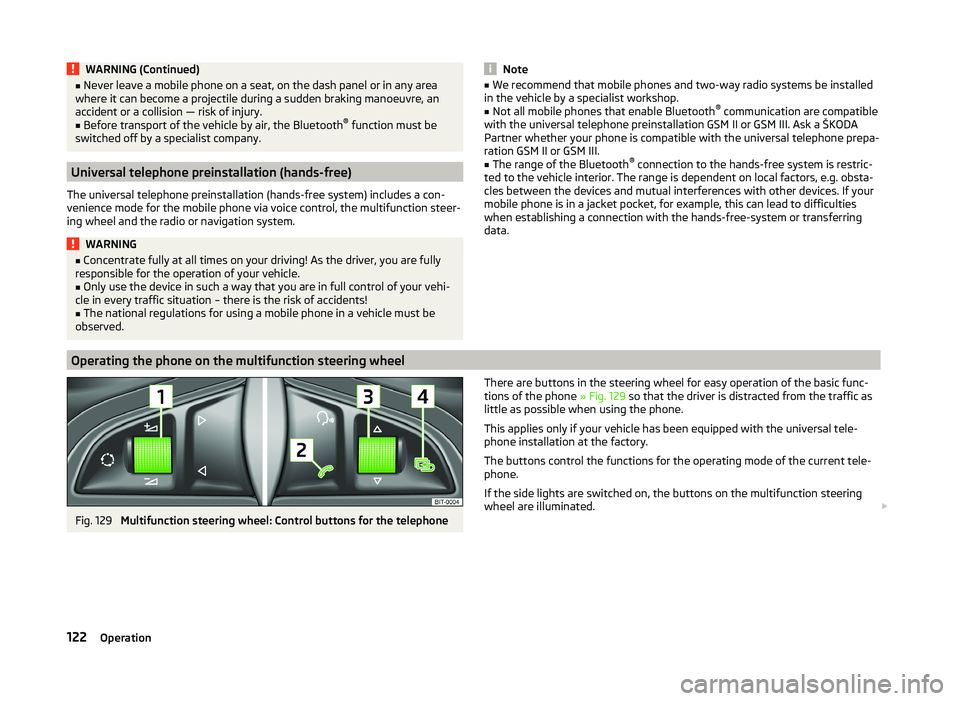
Fig. 129
Multifunction steering wheel: Control buttons for the telephone
There are buttons in the steering wheel for easy operation of the basic func-
tions of the phone » Fig. 129 so that the driver is distracted from the traffic as
little as possible when using the phone.
This applies only if your vehicle has been equipped with the universal tele-
phone installation at the factory.
The buttons control the functions for the operating mode of the current tele-
phone.
If the side lights are switched on, the buttons on the multifunction steering
wheel are illuminated. 122Operation
Page 126 of 252
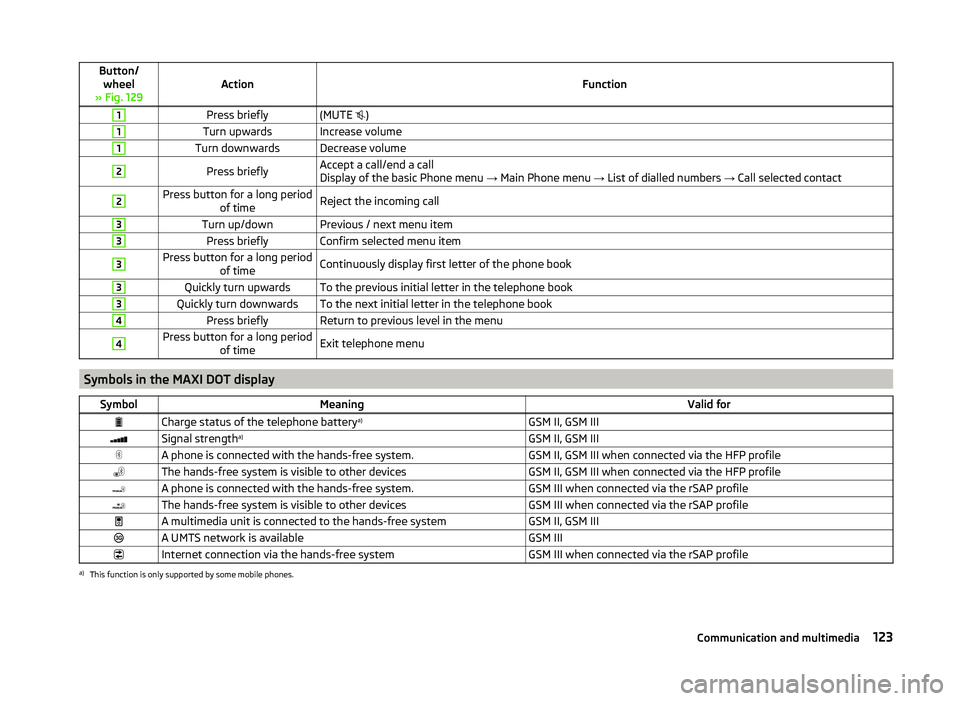
Button/wheel
» Fig. 129ActionFunction
1Press briefly(MUTE )1Turn upwardsIncrease volume1Turn downwardsDecrease volume2Press brieflyAccept a call/end a call
Display of the basic Phone menu → Main Phone menu → List of dialled numbers → Call selected contact2Press button for a long period
of timeReject the incoming call3Turn up/downPrevious / next menu item3Press brieflyConfirm selected menu item3Press button for a long periodof timeContinuously display first letter of the phone book3Quickly turn upwardsTo the previous initial letter in the telephone book3Quickly turn downwardsTo the next initial letter in the telephone book4Press brieflyReturn to previous level in the menu4Press button for a long periodof timeExit telephone menu
Symbols in the MAXI DOT display
SymbolMeaningValid forCharge status of the telephone battery a)GSM II, GSM IIISignal strengtha)GSM II, GSM IIIA phone is connected with the hands-free system.GSM II, GSM III when connected via the HFP profileThe hands-free system is visible to other devicesGSM II, GSM III when connected via the HFP profileA phone is connected with the hands-free system.GSM III when connected via the rSAP profileThe hands-free system is visible to other devicesGSM III when connected via the rSAP profileA multimedia unit is connected to the hands-free systemGSM II, GSM IIIA UMTS network is availableGSM IIIInternet connection via the hands-free systemGSM III when connected via the rSAP profilea)
This function is only supported by some mobile phones.
123Communication and multimedia