towing SKODA SUPERB 2015 3.G / (B8/3V) Owner's Manual
[x] Cancel search | Manufacturer: SKODA, Model Year: 2015, Model line: SUPERB, Model: SKODA SUPERB 2015 3.G / (B8/3V)Pages: 276, PDF Size: 42.14 MB
Page 5 of 276
Traffic jam assistant179Assistant for emergencies179
Traffic sign recognition
180
Fatigue detection
182
Tyre pressure monitoring
183
Hitch and trailer
184
Hitch
184
Trailer
185
General Maintenance
Care and maintenance
190
Service work, adjustments and technical
alterations
190
Washing vehicle
193
Cleaning vehicle exterior
194
Interior care
198
Inspecting and replenishing
201
Fuel
201
AdBlue ®
and its refilling
204
Engine compartment
206
Engine oil
209
Coolant
210
Brake fluid
212
Vehicle battery
213
Wheels
217
Tyres and wheel rims
217
Winter operation
220
Do-it-yourself
Emergency equipment and self-help
222
Emergency equipment
222
Changing a wheel
224
Puncture repair kit
228
Jump-starting
230
Towing the vehicle
231
Remote control and removable light
233Emergency unlocking/locking235Replacing windscreen wiper blades237
Fuses and light bulbs
238
Fuses
238
Bulbs
242
Technical data
Technical data
246
Basic vehicle data
246
Vehicle-specific information depending on
engine type
252
Index
3Table of Contents
Page 38 of 276
If, after a short drive, the indicator light does not go out, there is a system er-
ror.
Seek help from a specialist garage.
Other incidents
The illumination of the warning light
can have the following reasons.
▶ The vehicle is loaded on one side. Distribute loads as evenly as possible.
▶ The wheels of one axle are loaded more heavily (e.g. when towing a trailer or
when driving uphill or downhill).
▶ Snow chains are mounted.
▶ A wheel has been changed.
CAUTION
Under certain circumstances (e.g. sporty style of driving, wintry or unpaved
roads) the warning light can be delayed or does not light up at all.
Brake linings
Read and observe
on page 32 first.
illuminates - the brake pads are worn.
Check brake pad!BRAKE PADS PLEASE CHECK
Seek help from a specialist garage.
Fuel reserve
Read and observe
on page 32 first.
illuminates – the fuel level in the fuel tank is at the reserve level (approxi-
mately 6 litres).
Please refuel. Range:PLEASE REFUEL RANGE …
An audible signal sounds as a warning.
Note
The text in the display goes out after refuelling and driving a short distance. Lane departure warning (Lane Assist)
Read and observe
on page 32 first.
The warning lights
indicates the state of the Lane Assist system.
More information about the Lane Assist System » page 174.
Turn signal system
Read and observe
on page 32 first.
flashes – the left turn signal is switched on.
flashes – the right turn signal is switched on.
If there is a fault in the turn signal system, the warning light flashes at twice
its normal rate. This does not apply when towing a trailer.
When the hazard warning light system is switched on, this will cause all of the
turn signal lights as well as both warning lights to flash.
Trailer turn signal lights
Read and observe
on page 32 first.
flashes – the trailer turn signal lights are switched on.
If a trailer is hitched and the warning light is not flashing, one of the trailer
turn signal lights has failed.
An example message in the display of the instrument cluster
Trailer: check left turn signal!TRAILER TURN SIG_ CHECK LEFT
Check the trailer bulbs.
Fog lights
Read and observe
on page 32 first.
illuminates – the fog lights are switched on.
36Using the system
Page 57 of 276

If the boot lid is closed after the vehicle has been locked and the key with
which the vehicle was locked remains in the luggage compartment, the lid will
be unlocked (partially opened). The turn signal lights flash four times as an in-
dication that the boot lid has been unlocked again. The luggage compartment
lid remains released (partially open).
The following message is shown in the instrument cluster display.Key in vehicle.KEY IN VEHICLE
CAUTION
■ Some types of gloves can affect the unlocking or locking device in the door
handle.■
After leaving the car there is no automatic locking.
Locking / unlocking the vehicle with the central locking button
Fig. 40
Central locking button
Read and observe and on page 53 first.
When the vehicle has not been locked from outside and no door is open the
button
» Fig. 40 can be used to unlock or lock the vehicle.
The locking is shown by the illuminated symbol
.
The central locking system also operates if the ignition is switched off.
The following applies after locking. ▶ Opening the doors and the boot lid from the outside is not possible.
▶ The doors can be unlocked and opened from the inside by a single pull on the
opening lever of the respective door.
WARNINGDoors locked from the inside make it difficult for rescuers to get into the
vehicle in an emergency – risk to life!
Safe securing system
Read and observe
and on page 53 first.
As soon as the vehicle is locked from the outside, the safe lock prevents open-
ing the doors from the inside.
This function is pointed out by the following message on the display of the in-
strument cluster after switching out the ignition.
Check SAFELOCK! Owner's manual!CHECK SAFELOCK
After locking the vehicle, the warning light in the driver's door flashes for
around 2 seconds in quick succession, afterwards it begins to flash evenly at
longer intervals.
Switching off
The safe lock can be switched off in one of the following ways.
▶ By locking twice within 2 seconds.
▶ By disabling the button for interior monitoring and anti-towing » page 58.
The indicator light in the driver door flashes for about 2 seconds fast, goes out and starts to flash at longer intervals after about 30 seconds.
If the vehicle is locked and the safe securing system is switched off, the door
can be opened separately from the inside by a single pull on opening lever.
The safelock switches on the next time the vehicle is locked.
WARNINGIf the car is locked and the safe securing system activated, no people must
remain in the car as it will then not be possible to either unlock a door or
open a window from the inside. The locked doors make it more difficult for
rescuers to get into the vehicle in an emergency – risk to life!55Unlocking and opening
Page 59 of 276

Child safety lockFig. 42
Rear door: Child safety system switch on / off
Read and observe
and on page 53 first.
The child safety lock prevents the rear door from being opened from the in-
side. The door can only be opened from the outside.
Switching the child safety lock on/off » Fig. 42
Switching on
Switching off
You can switch the child safety lock on and off using the vehicle key.
Malfunctions
Read and observe
and on page 53 first.
Fault with the central locking
If the warning light in the driver's door initially flashes quickly for around 2 sec-
onds, and then lights up for 30 seconds without interruption before flashing
again slowly, you will need to seek the assistance of a specialist garage.
If there is a central locking fault, the key can be used to lock or unlock the driv-
er's door only. The other doors and the boot lid can be manually locked or un-
locked. ▶ Locking/unlocking of the Driver's door » page 236.
▶ Locking door » page 236.
▶ Unlocking the boot lid » page 236.
Failure of the system KESSY
If the following message is displayed in the display of the instrument cluster,
then help is required from a specialist company.Keyless access system faulty.KEYLESS ACCESS SYSTEM FAULTY
Key battery discharged
If the voltage of the key battery is too low, the following message appears in
the display of the instrument cluster.
Change the key battery!KEY BATTERY PLEASE CHANGE
Replace the battery » page 234.
Anti-theft alarm system
Introduction
This chapter contains information on the following subjects:
Interior monitor and towing protection
58
The anti-theft alarm system (hereinafter referred as alarm system) increases
protection against theft and break-in attempts into the vehicle.
The alarm system is activated automatically approximately 30 seconds after the vehicle is locked. This is automatically disabled after release.
The alarm system triggers audible and visual signals if an attempt is made to
break into the vehicle (hereafter referred to as alarm).
Triggering the alarm
The alarm is triggered when the following unauthorized actions are carried out
on the locked vehicle.
▶ Opening the bonnet.
▶ Opening the boot lid.
▶ Opening the doors.
▶ Manipulation of the ignition lock.
▶ Towing the vehicle.
▶ Movement in the vehicle.
▶ Sudden and significant voltage drop of the electrical system.
▶ Uncoupling the trailer.
If the driver's door of a vehicle is unlocked and opened by the lock cylinder,
then the alarm is triggered.
57Unlocking and opening
Page 60 of 276

Switching off the alarm
The alarm is turned off by pressing the button on the key or switching on
the ignition.
CAUTION
Before leaving the vehicle, it must be checked that all of the windows, doors
and the sliding/tilting roof are locked in order to ensure the full functionality of
the anti-theft alarm system.
Note
The alarm system has its own power source. The working life of the power
supply source is 5 years.
Interior monitor and towing protection
Fig. 43
Button for interior monitor and
towing protection
Read and observe on page 58 first.
The interior monitor detects movements inside the locked vehicle and then
triggers the alarm.
The anti-towing detects tilts in the locked vehicle and then triggers the alarm.
Deactivate the interior monitor and the towing protection if there is a possibili-
ty of the alarm being triggered by movements (e.g. by children or animals)
within the vehicle interior or if the vehicle has to be transported (e.g. by train
or ship) or towed.
Deactivate
›
Switch off the ignition.
›
Open the driver door.
›
Press the symbol key
on the B column of the driver's side » Fig. 43.
The illumination of the symbol
in the button changes from white to orange.
›
Lock the vehicle within 30 seconds.
By disabling the interior monitoring and the anti-towing the safe lock is
switched off.
CAUTION
The opened glasses storage compartment reduces the effectiveness of the in-
terior monitor. To ensure the full functionality of the interior monitor, the
glasses storage compartment must always be closed before locking the vehi-
cle.
Luggage compartment lid
Introduction
This chapter contains information on the following subjects:
Boot lid opening/closing
59
Delayed locking of the boot lid
59
When closing the boot lid does do not press on the rear window.
Ensure that the lock is properly engaged after closing the boot lid.
The function of the button in the grip above the licence plate is deactivated when starting off or at a speed of 5 km/hour or more for vehicles with central
locking. The function is restored after the vehicle stops and the door is
opened.
WARNING■ Never drive with the boot lid open or ajar, as otherwise exhaust gases
may get into the interior of the vehicle – risk of poisoning!■
Make sure that when closing the boot lid, no body parts are crushed -
there is danger of injury!
58Using the system
Page 72 of 276
Fog mode
The cone of light in front of the vehicle is adjusted so that the driver is not
dazzled by the reflection of the cone of light by fog in front of the vehicle.
The mode is active at speeds of 15 – 70 km/h and if the rear fog light is switch- ed on for a period of time longer than about 10 seconds. The deactivation of
the mode is carried out a few minutes after switching off the rear fog lights.
Dynamic cornering lights
The cone of light in front of the vehicle is adjusted to the steering angle so
that the road in the curve is illuminated. This function is active at speeds
greater than 10 km.h and in all System modes.
travel mode
If the travel mode is activated, there is no automatic cone of light adaptation
in front of the vehicle.
The travel mode can be activated/deactivated in the Infotainment » Owner´s
Manual Infotainment , chapter CAR - vehicle settings .
Economy mode
When the Eco driving mode » page 171 is activated the system is in Economy
mode and there is no direction dependent light cone adaptation in front of the
vehicle.WARNINGIf there is a system malfunction the headlights are automatically lowered
to the emergency position, which prevents a possible dazzling of oncoming
traffic. This reduces the cone of light in front of the vehicle. Drive carefully
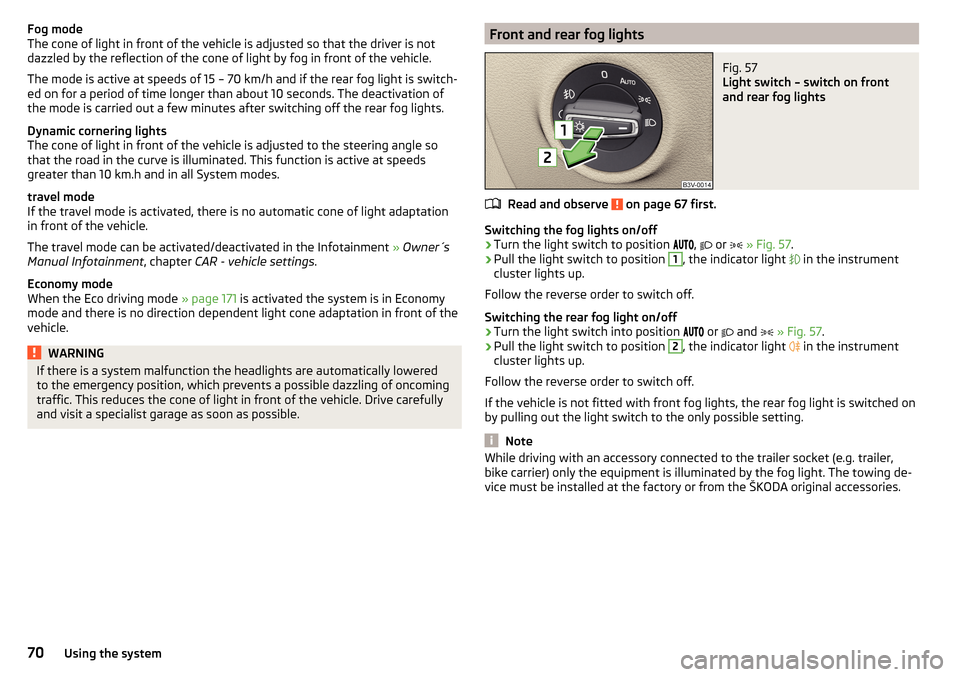
and visit a specialist garage as soon as possible.Front and rear fog lightsFig. 57
Light switch – switch on front
and rear fog lights
Read and observe on page 67 first.
Switching the fog lights on/off
›
Turn the light switch to position ,
or
» Fig. 57 .
›
Pull the light switch to position
1
, the indicator light
in the instrument
cluster lights up.
Follow the reverse order to switch off.
Switching the rear fog light on/off
›
Turn the light switch into position or
and
» Fig. 57 .
›
Pull the light switch to position
2
, the indicator light
in the instrument
cluster lights up.
Follow the reverse order to switch off.
If the vehicle is not fitted with front fog lights, the rear fog light is switched on
by pulling out the light switch to the only possible setting.
Note
While driving with an accessory connected to the trailer socket (e.g. trailer,
bike carrier) only the equipment is illuminated by the fog light. The towing de-
vice must be installed at the factory or from the ŠKODA original accessories.70Using the system
Page 100 of 276

Storage compartment in the rear centre consoleFig. 107
Open storage compartment,
open lockable storage compart-
ments
Read and observe on page 90 first.
In the rear centre console there is an equipment-dependent open storage
compartment
A
and a lockable storage compartment
B
» Fig. 107 .
The compartment
B
is equipped with an interior light which illuminates when
the parking or dipped head lights are on.
Compartment
B
open / close
›
Pull the handle on the upper section of the recess and open out the com-
partment in the direction of the arrow » Fig. 107.
Closing takes place in reverse order.
WARNINGNever use the storage compartment as an ashtray - risk of fire!
Storage compartment in the rear armrest
Fig. 108
Open storage compartment / interior of the compartment
Read and observe on page 90 first.
In the storage compartment there is a cup holder
B
, storage compartment for
the multimedia holder
C
as well as a pen holder
D
» Fig. 108 .
Open/close
›
Grasp the lid to the recess
A
» Fig. 108 .
›
Unfold the cover to the stop in the direction of arrow.
Closing takes place in reverse order.
Removable through-loading bag
Fig. 109
Tighten ribbon / secure through-loading bag
Read and observe
on page 90 first.
The removable through-loading bag (hereinafter referred to as a through-load-
ing bag) is used exclusively for transporting skis.
Stowing through-loading bag and skis
›
Open the tailgate.
›
Fold the rear armrest and the cover in the seat backrest downwards
» page 86 .
›
Place the empty through-loading bag in such a way that the end of the bag
with the zip is in the boot.
›
Push the skis into the through-loading bag from the boot » .
›
Close the through-loading bag.
Securing through-loading bag and skis
›
Tighten the strap
A
on the free end around the skis in front of the bindings
» Fig. 109 .
›
Fold the seat backrest a little forward.
98Using the system
Page 117 of 276

Variable loading floor in the luggage compartment (Estate)
Introduction
This chapter contains information on the following subjects:
Positions of the variable loading floor
115
Fold up variable loading floor
115
Dividing the luggage compartment
116
The maximum permissible load of the variable loading floor is 75 kg. For the
transport of heavy loads, adjust the variable loading floor in the lower position
» Fig. 146 on page 115 .
Positions of the variable loading floor
Fig. 145
Set variable loading floor to the upper position / variable loading
floor in the upper position
Fig. 146
Set variable loading floor to the lower position / variable loading
floor in the lower position
The variable loading floor can be set to the upper or lower position.
Set to the upper position›
Grasp the rear of the variable loading floor by the handle
A
» Fig. 145 .
›
Lift the variable loading floor about 20 cm, pull it to yourself and raise it in
the direction of the arrow
1
to the level of the roll-up luggage compartment
cover until it clicks.
After an audible click, the variable loading floor can be stowed in the upper po-
sition by pushing it forward.
The space available below the variable loading floor can be used for stowing
objects such as the removed roll-up luggage compartment cover » page 109,
the multi-function sensor » page 111 etc.
Set into the lower position
›
Check that there are no objects in the space under the variable loading floor.
›
Grasp the rear of the variable loading floor by the handle
A
» Fig. 146 .
›
Lift the variable loading floor about 10 cm in the direction of the arrow
2
and pull it back in the direction of the arrow
3
.
The variable loading floor moves automatically to the lower position where it
can be stored by pressing it forward.
Fold up variable loading floor
Fig. 147
Fold up variable loading floor / folded variable cargo floor in the
upper position
The variable loading floor can be folded up in both the lower and the upper po-
sition.
›
Grasp the rear of the variable loading floor by the handle
A
» Fig. 147 and lift
in the direction of the arrow
1
.
115Transporting and practical equipment
Page 140 of 276

Note■It may be beneficial, for example, when travelling downhill, to use manual
shifting of gears. Shifting to a lower gear reduces the load on the brakes and
hence the wear of the brakes » page 132.■
When accelerating, the gearbox automatically shifts up into the higher gear
just before the maximum permissible engine speed is reached.
■
If a lower gear is selected, the gearbox does not shift down until there is no
risk of the engine over revving.
Starting-off and driving
Read and observe
and on page 135 first.
Starting off
›
Start the engine.
›
Firmly depress and hold the brake pedal.
›
Press the lock button in the direction of
1
» Fig. 170 on page 137 and hold.
›
Move the selector lever into the desired position » page 136 and then release
the lock button.
›
Release the brake pedal and accelerate.
Stopping (while the car is moving)
›
Depress the brake pedal and bring the vehicle to a stop.
›
Keep holding the brake pedal until driving is resumed.
The selector lever position N does not have to be selected when stopping for a
short time, such as at a cross roads.
Kick down
The kick down function allows you to achieve the maximum acceleration of
your vehicle while driving.
When the accelerator pedal is fully depressed, the kick down function is activa-
ted in any forward driving mode.
The gearbox shifts down one or more gears depending on the vehicle speed
and engine speed, and the vehicle accelerates.
The gearbox does not shift up into the highest gear until the engine has
reached its maximum revolutions for this gear range.
Driving in neutral position in mode E (free-wheel)
›
Move the selector lever into the position D/S.
›Select the driving mode Eco or Individual (Drive - Eco)
» page 171, Selection
of the driving mode(Driving Mode Selection) .›
Remove your foot from the accelerator pedal (the speed is higher than 20
km/h).
The vehicle moves without the braking effect of the engine.
The gear is selected again automatically, when you briefly depress the acceler- ator brake pedal or pull the left rocker switch -
towards the steering wheel
» page 137 , Manual gear shifting (Tiptronic) .
This function is not available when towing a trailer or when another accessory
is connected to the trailer socket.
Launch control 1)
The launch control function allows the vehicle in mode S or Tiptronic to reach
its maximum acceleration when starting off.
›
Disable the TCS » page 143, Braking and stabilisation systems .
›
START STOP deactivate » page 132, Manually deactivating/activating the
system .
›
Fully depress and hold the brake pedal with your left foot.
›
Fully depress the accelerator pedal with your right foot.
›
Release the brake pedal.
The vehicle starts off with maximum acceleration.
›
Reactivate the TCS and START STOP when the desired speed has been
reached.
WARNINGRapid acceleration, particularly on slippery roads, can lead to loss of control
of the vehicle – risk of accident!
Running-in and economical driving
Introduction
This chapter contains information on the following subjects:
Running-in
139
Tips for economical driving
139
1)
This function is only valid for some engines.
138Driving
Page 148 of 276

The automatic brake interventions can take place only if the following condi-
tions are met.
There was a front, side and rear-end collision of a certain severity.
The impact speed was higher than approx. 10 km/h.
The brakes, the ESL and other required electrical systems remain function-
al after impact.
The accelerator pedal is not actuated.
Trailer stabilization system (TSA)
Read and observe
on page 144 first.
The TSA helps the combination stable in situations where the trailer sways
and then the whole trailer combination.
TSA brakes the individual wheels of the towing vehicle in order to damp the rocking motion of the entire vehicle combination.
The following conditions are required for the correct TSA function. The trailer was shipped from the factory or purchased from the ŠKODA
genuine accessories.
The trailer is electrically connected to the towing vehicle via the trailer
socket.
The parking aid is activated.
The speed is higher than approx. 60 km/h.
Further information » page 184, Hitch and trailer .
Auto Hold function
Fig. 176
The Auto-Hold function button
Read and observe on page 144 first.
The Auto Hold function (hereinafter referred to only as system) prevents the
vehicle from rolling unintentionally when stopped. It is, for example, not nec-
essary to secure the vehicle with the brake pedal or parking brake at traffic
lights.
For the activation, deactivation and correct functioning of the system, the
following basic conditions are required.
The driver's door is closed.
The engine is running (or shut-down automatically by the START-STOP
system).
On vehicles with automatic transmission the selector lever is not in mode
N (in this mode, the system is not available).
Stopping and starting
When stopping the system prevents the vehicle from rolling away. The warn- ing light illuminates in the instrument cluster. The brake pedal can be re-
leased.
The vehicle's brakes are released at the moment of stating off. The warning
light in the instrument cluster goes out.
Should the vehicle start to roll away when starting on a downhill slope then
step on the accelerator or and turn on the parking brake.
If the vehicle is secured by the system and the driver's door is opened or the ignition is turned off, the vehicle is secured by the parking brake to prevent
unwanted movement.
In this case, the indicator light turns off in the instrument cluster and the
warning light illuminates.
Activation/deactivation
The activation and deactivation of the system is done by pressing the symbol
key
» Fig. 176 .
When the system is activated, the symbol illuminates.
After switching off and switching on the ignition system several times the sys-
tem remains either activated or deactivated depending on the last setting.
146Driving