lock SKODA YETI 2010 1.G / 5L Owner's Guide
[x] Cancel search | Manufacturer: SKODA, Model Year: 2010, Model line: YETI, Model: SKODA YETI 2010 1.G / 5LPages: 271, PDF Size: 14.71 MB
Page 46 of 271
Unlocking and locking45
Using the system
Safety
Driving Tips
General Maintenance
Breakdown assistance
Technical Data
Unlocking the vehicle
– Press the button page 44, fig. 30 for about 1 second.Locking the vehicle
– Press button for about 1 second.Deactivating safe securing system– Press button twice in 2 seconds. Further information page 41.Boot lid remote release
– Press button for about 2 second. Further information page 43.Folding out of the key– Press button .Folding up of the key– Press button and collapse the key bit in the housing.
The turn signal lights flash twice as confir mation that the vehicle has been unlocked.
The vehicle will lock again automatically if you unlock the vehicle using button but
do not open a door or the boot lid within th e next 30 seconds. This function is intended
to prevent the car being unlocked unintentionally.
In addition, when the car is unlocked, the el ectrically adjustable seats and exterior
mirrors* move into the position assigned to this key. The stored setting of driver seat
and exterior mirrors is retrieved.
Display of the locking
The turn signal lights flash once to confir m that the vehicle has been correctly locked.
If the vehicle is locked by pressing the bu tton and some doors or the boot lid are
not closed, the turn signal lights flash only after closing.
WARNING
If the vehicle is locked from the outside and the safe securing system is acti-
vated, there must not be any person in the vehicle as it is then not possible to open either a door or a window from th
e inside. The locked doors make it more
difficult for rescuers to get into th e vehicle in an emergency - hazard!
Note
Operate the radio remote control only when the doors and boot lid are closed and
you have visual cont act with the vehicle.
Once in the car, you must not press the lock button
of the radio remote control
before inserting the key into the ignition lock in order to avoid the car being inadvert-
ently locked and the alarm system* being sw itched on. Should this happen, press the
unlock button
of the radio remote control.
Synchronisation of the remote controlIf the vehicle cannot be unlocked by actuating the remote control system then it is
possible that the code in the key and the control unit in the vehicle are no longer
synchronised. This can occur when the button s on the radio-operated key are actuated
a number of times outside of the operative range of the equipment or the battery on
the remote control was replaced.
This means it is necessary to synchronise the code as follows:
Press any button on the remote control.
pressing of the button means that the door will unlock with the key within 1
minute.
Anti-theft alarm system*DescriptionThe anti-theft alarm system increases the level of protection against people seeking to
break into the vehicle. The system triggers audible and visual warning signals if an
attempt is made to break into the vehicle.
A1
A3A3A2A4A4
A1
A3
WARNING (continued)
s2ug.6.book Page 45 Friday, April 9, 2010 2:24 PM
Page 47 of 271
Unlocking and locking
46
How is the alarm system activated?
The anti-theft alarm system is activated automatically when the vehi cle is locked with
the key on the driver's door or by using th e radio remote control. It is activated 30
seconds after locking the door.
How is the alarm system deactivated?
The anti-theft alarm system is deactivated if the vehicle is unlocked by only using the
radio remote control. The anti-theft alarm system is reactivated if the vehicle is not
opened within 30 seconds after transmitting the radio signal.
Once you unlock the vehicle by inserting the ke y into the driver door you then have to
insert the key into the ignition lock and switch the ignition on within 15 seconds after
opening the door in order to deactiva te the anti-theft alarm system. The alarm will be
triggered if you do not switch on the ignition within 15 seconds.
When is the alarm triggered?
The following security areas of the locked vehicle are monitored:
Bonnet,
Boot lid,
Doors,
Ignition lock,
Angle of the vehicle* page 46,
Vehicle interior* page 46,
A drop in voltage of the on-board power supply,
Socket of the factory-fitted towing device*.
An alarm is immediately triggered if either of the two battery terminals is disconnected
while the anti-theft alarm system is activated.
How is the alarm switched off?
You switch the alarm off if you unlock the vehi cle with the radio remote control or if you
switch the ignition on.Note
The working life of the alarm siren is 6 years. More detailed information is available
by a specialist garage.
Before leaving the car, check that all the doors, windows and the electric
sliding/tilting roof* are properly closed in order to ensure that the anti-theft alarm
system is fully operational.
Coding of the radio remote control and the receiver unit precludes the use of the
radio remote control from other vehicles.
Interior monitor* and Towing protection monitoring*
Switch off the interior monitor and towing protection monitoring– Switch off the ignition.
– Open the driver door.
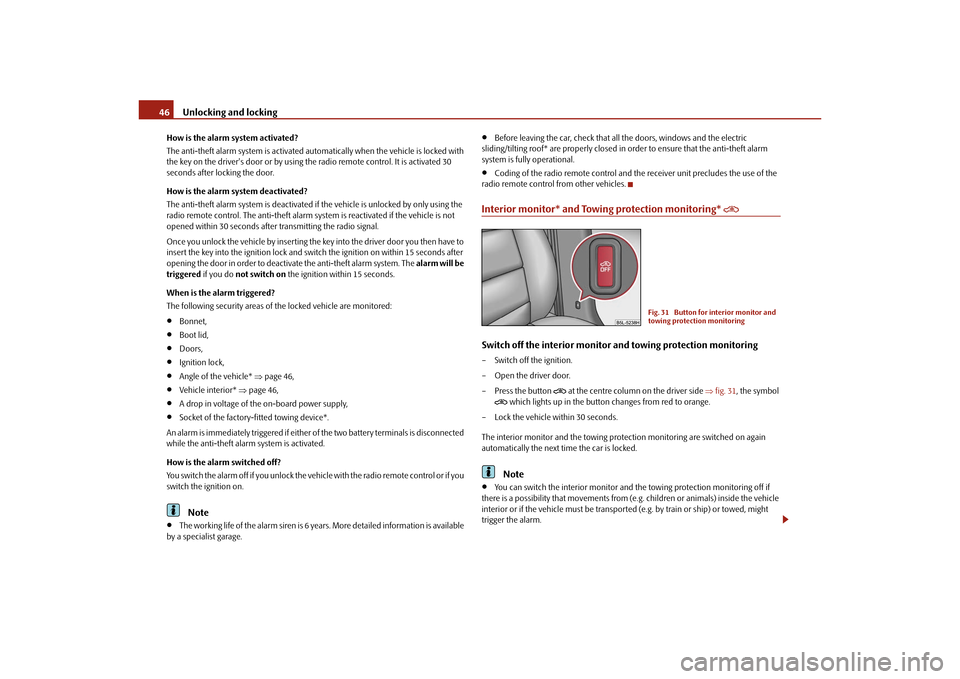
–Press the button
at the centre column on the driver side fig. 31 , the symbol
which lights up in the button changes from red to orange.
– Lock the vehicle within 30 seconds.
The interior monitor and the towing protec tion monitoring are switched on again
automatically the next ti me the car is locked.Note
You can switch the interior monitor and the towing protection monitoring off if
there is a possibility that movements from (e.g. children or animals) inside the vehicle
interior or if the vehicle must be transported (e.g. by train or ship) or towed, might
trigger the alarm.
Fig. 31 Button for interior monitor and
towing protection monitoring
s2ug.6.book Page 46 Friday, April 9, 2010 2:24 PM
Page 48 of 271
Unlocking and locking47
Using the system
Safety
Driving Tips
General Maintenance
Breakdown assistance
Technical Data
The opened storage compartment for spectacles reduces the effectiveness of the
interior monitor. In order to ensure the function of the interior monitor to be fully
operational, always close the storage comp artment for spectacles before locking the
vehicle.
Power windows*Buttons on the driver's doorThe power windows operate only when ignition is switched on.Opening a window – A window is opened by pressing lightly on the respective button in the door. The
process stops when one releases the button.
– Additionally you can open the window automatically (fully opened) by pressing the button up to the stop. Renewe d pressing of the button causes the window to stop
immediately.Closing a window– A window is closed through pulling lightly on the respective button in the door. The closing process stops when one releases the button.
– Additionally you can close the window auto matically (fully closed) by pulling the
button up to the stop. Renewed pulling of the button causes the window to stop
immediately. The buttons for the individual windows are lo
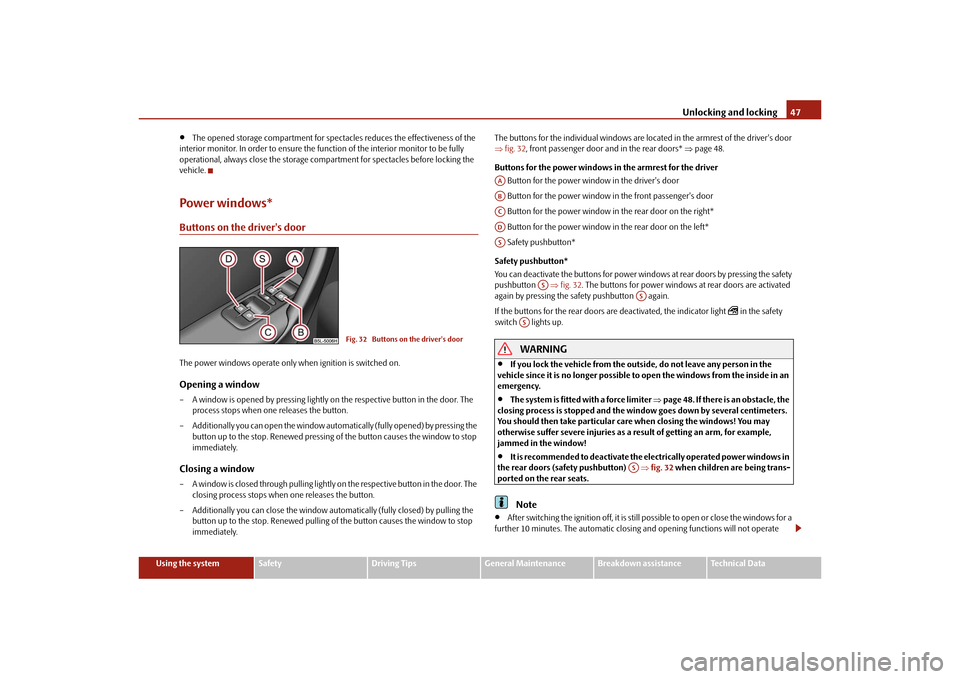
cated in the armrest of the driver's door
fig. 32 , front passenger door and in the rear doors* page 48.
Buttons for the power windows in the armrest for the driver Button for the power window in the driver's door
Button for the power window in the front passenger's door
Button for the power window in the rear door on the right*
Button for the power window in the rear door on the left*
Safety pushbutton*
Safety pushbutton*
You can deactivate the buttons for power wind ows at rear doors by pressing the safety
pushbutton fig. 32 . The buttons for power windows at rear doors are activated
again by pressing the safety pushbutton again.
If the buttons for the rear doors are deactivated, the indicator light
in the safety
switch lights up.
WARNING
If you lock the vehicle from the outside, do not leave any person in the
vehicle since it is no longer possible to open the windows from the inside in an
emergency.
The system is fitted with a force limiter page 48. If there is an obstacle, the
closing process is stopped and the window goes down by several centimeters.
You should then take particular care when closing the windows! You may
otherwise suffer severe injuries as a re sult of getting an arm, for example,
jammed in the window!
It is recommended to deactivate the el ectrically operated power windows in
the rear doors (safety pushbutton) fig. 32 when children are being trans-
ported on the rear seats.Note
After switching the ignition off, it is still possible to open or close the windows for a
further 10 minutes. The automatic closing and opening functions will not operate
Fig. 32 Buttons on the driver's door
AAABACADAS
AS
AS
AS
AS
s2ug.6.book Page 47 Friday, April 9, 2010 2:24 PM
Page 49 of 271
Unlocking and locking
48
during this time. The power windows are sw itched off completely once you open the
driver or front passenger door.
When driving always use the existing he ating, air conditioning and ventilation
system for ventilating the interior of the vehicle. If the windows are opened, dust as
well as other dirt can get into the vehicle and in addition the wind noise is more at
certain speeds.
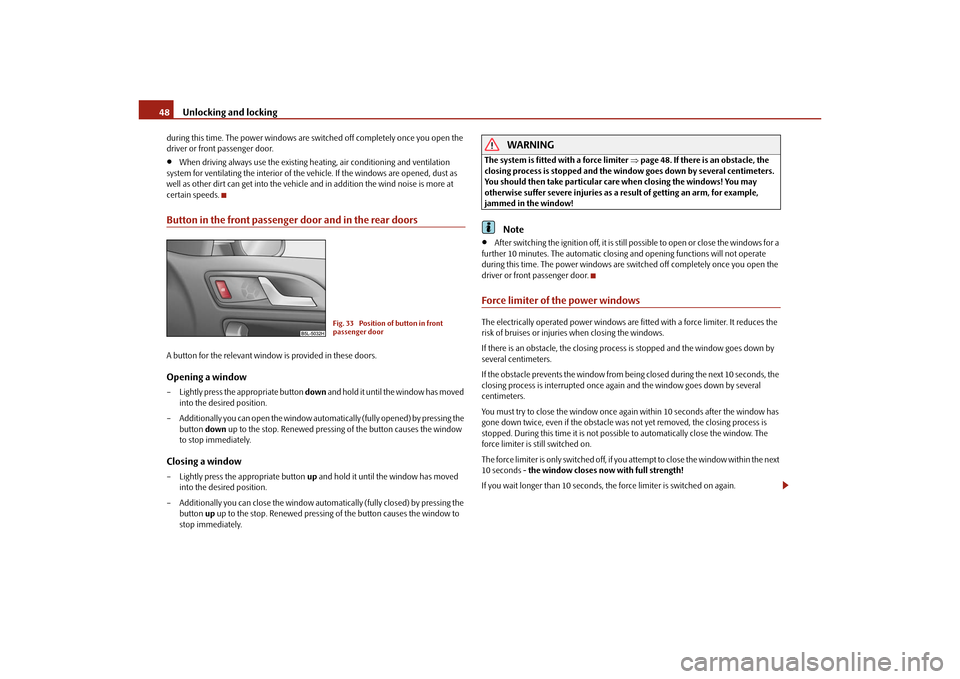
Button in the front passenger door and in the rear doorsA button for the relevant window is provided in these doors.Opening a window– Lightly press the appropriate button down and hold it until the window has moved
into the desired position.
– Additionally you can open the window auto matically (fully opened) by pressing the
button down up to the stop. Renewed pressing of the button causes the window
to stop immediately.Closing a window– Lightly press the appropriate button up and hold it until the window has moved
into the desired position.
– Additionally you can close the window auto matically (fully closed) by pressing the
button up up to the stop. Renewe d pressing of the button causes the window to
stop immediately.
WARNING
The system is fitted with a force limiter page 48. If there is an obstacle, the
closing process is stopped and the window goes down by several centimeters.
You should then take particular care when closing the windows! You may
otherwise suffer severe injuries as a re sult of getting an arm, for example,
jammed in the window!
Note
After switching the ignition off, it is still possible to open or close the windows for a
further 10 minutes. The automatic closing and opening functions will not operate
during this time. The power windows are switched off completely once you open the
driver or front passenger door.
Force limiter of the power windowsThe electrically operated power windows are fitted with a force limiter. It reduces the
risk of bruises or injuries when closing the windows.
If there is an obstacle, the closing proces s is stopped and the window goes down by
several centimeters.
If the obstacle prevents the window from being closed during the next 10 seconds, the
closing process is interrupted once again and the window goes down by several
centimeters.
You must try to close the window once ag ain within 10 seconds after the window has
gone down twice, even if the obstacle wa s not yet removed, the closing process is
stopped. During this time it is not possible to automatically close the window. The
force limiter is still switched on.
The force limiter is only switched off, if you attempt to close the window within the next
10 seconds - the window closes now with full strength!
If you wait longer than 10 seconds, th e force limiter is switched on again.
Fig. 33 Position of button in front
passenger door
s2ug.6.book Page 48 Friday, April 9, 2010 2:24 PM
Page 50 of 271
Unlocking and locking49
Using the system
Safety
Driving Tips
General Maintenance
Breakdown assistance
Technical Data
WARNING
You should take particular care when closing the windows! You may otherwise
suffer severe injuries as a result of getting an arm, for example, jammed in the
window!Window convenience operationYou can open and close the electrically po wered windows as follows when unlocking
and locking the vehicle (only cl ose the panoramic sliding roof):Opening a window– Hold the key in the locking cylinder of th e driver's door in the unlock position or
press the unlock button of the radio remote control until all the windows are
opened.Closing a window– Hold the key in the locking cylinder of the dr iver's door in the lock position or press
the lock button of the radio remote co ntrol until all the windows are closed.
You can interrupt the opening or closing operation of the windows immediately by
releasing the key or the lock button.
WARNING
The system is fitted with a force limiter page 48. If there is an obstacle, the
closing process is stopped and the window goes down by several centimeters.
You should then take particular care when closing the windows! You may
otherwise suffer severe injuries as a re sult of getting an arm, for example,
jammed in the window!
Note
On vehicles fitted with an ti-theft alarm system the convenience window opening
is possible by means of the key in the lo cking cylinder only 45 seconds after deacti-
vating the warning system or after activating the anti-theft alarm system.
Operational faultsElectrically operated powe r windows do not operate
If the battery has been disconnected and then reconnected while the window was
opened, the electrically operated power windows do not operate. The system must be
activated. Proceed as follows in order to re-establish the function:
Switch on the ignition.
Press the relevant switch top and hold it pressed as lo ng as necessary until the
window is closed.
Release the switch.
Press once again the relevant switch top and hold it pressed for approx. 3 seconds.
Operation in winter
Ice accumulating on the surface of the wi ndows during the winter may result in a
greater resistance when closing the windows and the window may stop and go down
several centimetres
It is necessary to put the force limiter out of operation in order to close the window
page 48, “Force limiter of the power windows”.
WARNING
The system is fitted with a force limiter page 48. If there is an obstacle, the
closing process is stopped and the window goes down by several centimeters.
You should then take particular care when closing the windows! You may
otherwise suffer severe injuries as a re sult of getting an arm, for example,
jammed in the window!Panoramic sliding roof*IntroductionThe panoramic sliding roof with sun screen ca n only be operated with the control dial
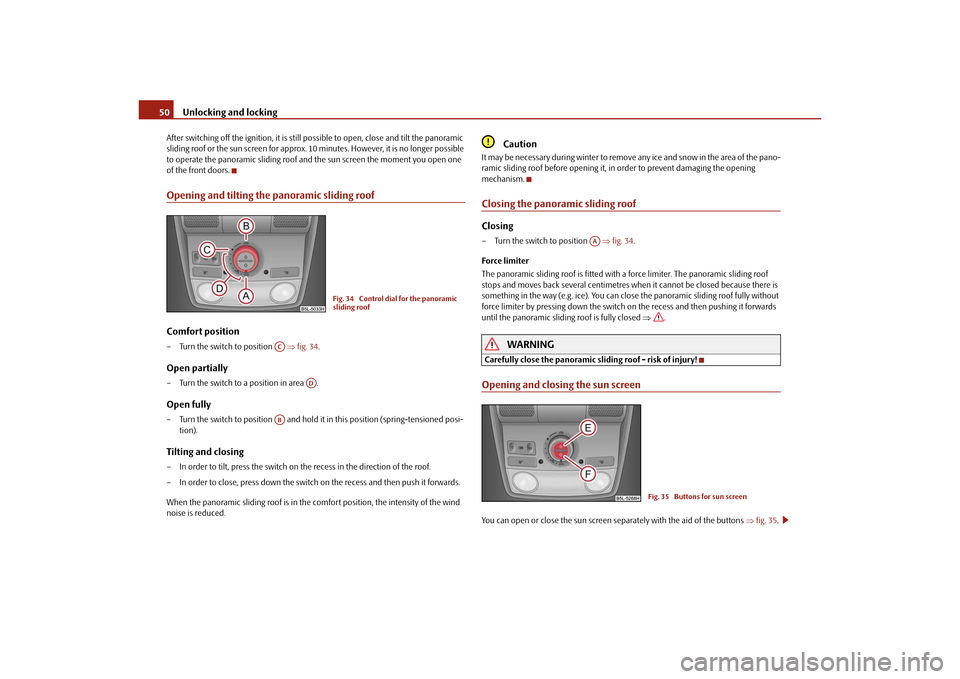
when the ignition is switched on page 50, fig. 34 . The control dial has several posi-
tions.
s2ug.6.book Page 49 Friday, April 9, 2010 2:24 PM
Page 51 of 271
Unlocking and locking
50
After switching off the ignition, it is still po ssible to open, close and tilt the panoramic
sliding roof or the sun screen for approx. 10 minutes. However, it is no longer possible
to operate the panoramic sliding roof and the sun screen the moment you open one
of the front doors.Opening and tilting the panoramic sliding roofComfort position– Turn the switch to position fig. 34 .Open partially– Turn the switch to a position in area .Open fully– Turn the switch to position and hold it in this position (spring-tensioned posi-
tion).Tilting and closing– In order to tilt, press the switch on the recess in the direction of the roof.
– In order to close, press down the switch on the recess and then push it forwards.
When the panoramic sliding roof is in the comfort position, the intensity of the wind
noise is reduced.
Caution
It may be necessary du ring winter to remove any ice and snow in the area of the pano-
ramic sliding roof before opening it, in order to prevent damaging the opening
mechanism.Closing the panoramic sliding roofClosing– Turn the switch to position fig. 34 .
Force limiter
The panoramic sliding roof is fitted with a force limiter. The panoramic sliding roof
stops and moves back several centimetres when it cannot be closed because there is
something in the way (e.g. ice). You can close the panoramic sliding roof fully without
force limiter by pressi ng down the switch on the recess and then pushing it forwards
until the panoramic sliding roof is fully closed .
WARNING
Carefully close the panoramic sliding roof - risk of injury!Opening and closing the sun screenYou can open or close the sun screen separately with the aid of the buttons fig. 35 .
Fig. 34 Control dial for the panoramic
sliding roof
AC
AD
AB
AA
Fig. 35 Buttons for sun screen
s2ug.6.book Page 50 Friday, April 9, 2010 2:24 PM
Page 52 of 271
Unlocking and locking51
Using the system
Safety
Driving Tips
General Maintenance
Breakdown assistance
Technical Data
Opening– Briefly press the button page 50, fig. 35 in order to fully open.
– Press the button and hold it pressed in order to open in the desired position.
The opening process stops when one releases the button.Closing– Briefly press the button page 50, fig. 35 in order to fully close.
– Press the button and hold it pressed in order to close in the desired position.
The closing process stops when one releases the button.Convenience operationYou can also operate the panoramic sliding roof and the sun screen from the outside
using the remote control key.Closing the panoramic sliding roof– Hold down the lock button on the remote control key until the panoramic sliding
roof is closed. The panoramic sliding roof and the sun screen are closed together.
The closing process stops when one releases the button.Tilting the panoramic sliding roof– Hold down the unlock button on the remote control key until the panoramic sliding roof is tilted. When tilting the panoramic sliding roof, the sun screen opens at the
same time.
Note
The force limiter also operates for convenience closing.
The panoramic sliding roof can only be tilted but not opened when the conven-
ience operating feature is being used.
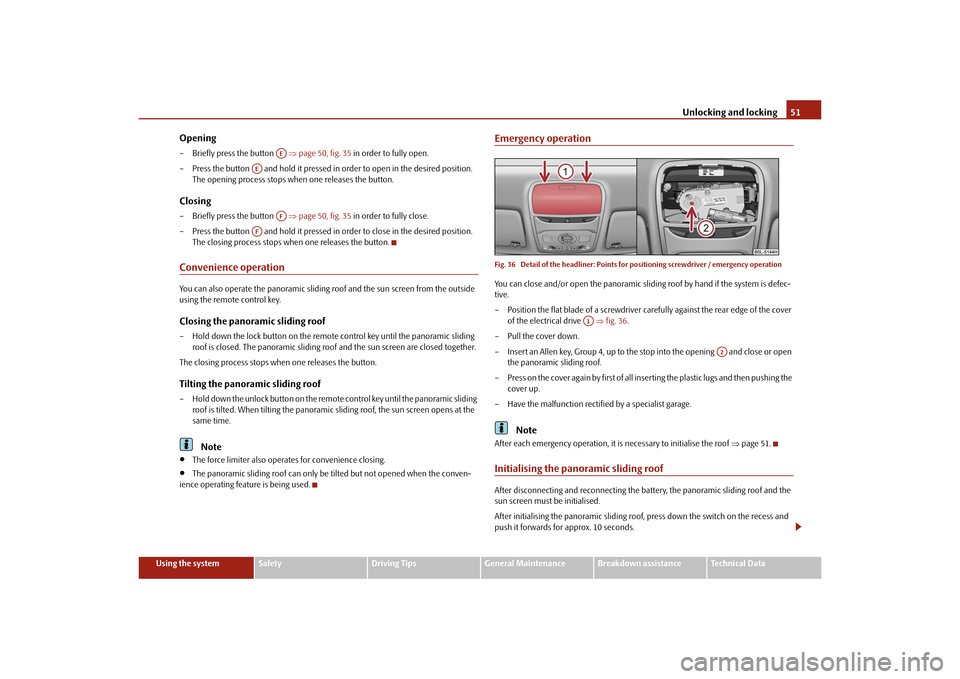
Emergency operationFig. 36 Detail of the headliner: Points fo r positioning screwdriver / emergency operationYou can close and/or open the panoramic slid ing roof by hand if the system is defec-
tive.
– Position the flat blade of a screwdriver carefully against the rear edge of the cover
of the electrical drive fig. 36.
–Pull the cover down.
– Insert an Allen key, Group 4, up to the stop into the opening and close or open the panoramic sliding roof.
– Press on the cover again by first of all in serting the plastic lugs and then pushing the
cover up.
– Have the malfunction rectified by a specialist garage.
Note
After each emergency operation, it is necessary to initialise the roof page 51.Initialising the panoramic sliding roofAfter disconnecting and reconnecting the ba ttery, the panoramic sliding roof and the
sun screen must be initialised.
After initialising the panoramic sliding roof, press down the switch on the recess and
push it forwards for approx. 10 seconds.
AE
AE
AF
AF
A1
A2
s2ug.6.book Page 51 Friday, April 9, 2010 2:24 PM
Page 53 of 271
Unlocking and locking
52
Press the switch page 50, fig. 35 for approx. 10 seconds in order to initialise the
sun screen.
If the panoramic sliding roof or the sun scre en is not fully closed while disconnecting
and reconnecting the battery, first of all the panoramic sliding roof or the sun screen
must be closed page 50 page 50. Only then the initialisation can be performed.
AF
s2ug.6.book Page 52 Friday, April 9, 2010 2:24 PM
Page 57 of 271
Lights and Visibility
56
Switching on Leaving Home Function
– After leaving the vehicle, the light switch is in the position automatic driving lamp control
.
– Unlock the vehicle with the radio remote control - the lights come on.
Depending on equipment fitted the function Leaving Home switches on the following
lights:
Parking lights,
Low beam,
Entry lighting in the exterior mirrors,
Licence plate light.
Leaving Home Function
The function Leaving Home is controlled with the light sensor in the mount of the inte-
rior rear mirror. If the light intensity is higher than the set value of the light sensor, the
Leaving Home Function is not switched on after unlocking the vehicle with the radio
remote control.
After unlocking the vehicle with the radio remote control, the lights come on for 10
seconds. The Leaving Home Function is also switched off after the ignition is switched
on and after locking the vehicle.
If no door is opened within 30 seconds, the lights go out and the vehicle is locked auto-
matically.Note
If the Leaving Home Function is switched on constantly, the battery will be heavily
discharged particularly in short-haul traffic.
The switching on of the described lights should only be undertaken in accordance
with the legal requirements.
You can change the illumination period for the Leaving Home Function by means
of the information display*.
Tourist light*Xenon headlight
This mode makes it possible to drive in countries with opposing traffic system, driving
on the left/right, without dazzling the oncoming vehicles. When the mode “tourist
light” is active, the side to side swivel of the headlights is deactivated.
The mode “tourist light” is activated / deactivated via the information display* in the
menu:
SETUP
Lights & Vision (Lights & Vision)
Tra v e l m o d e
Off
Switched on
Halogen headlight
When using Halogen headlights, it is necessary to stick a sticker over a certain part of
the headlights in order to prevent the dazzling of oncoming traffic.
You can purchase headlight stickers from the range of the Škoda original parts.
Fog lights*
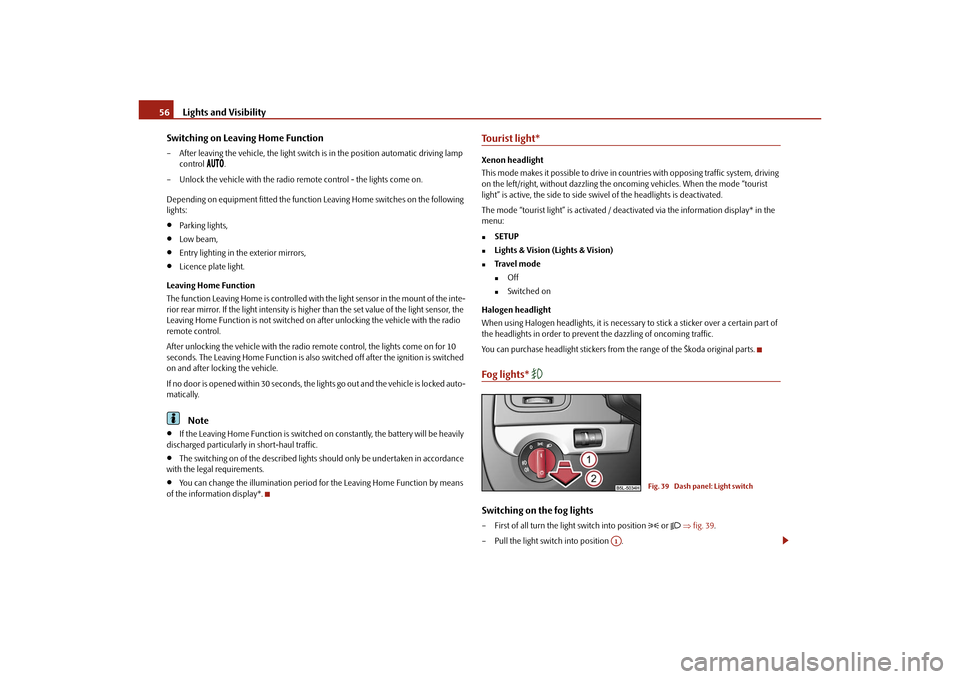
Switching on the fog lights– First of all turn the light switch into position
or fig. 39 .
– Pull the light switch into position .
Fig. 39 Dash panel: Light switch
A1
s2ug.6.book Page 56 Friday, April 9, 2010 2:24 PM
Page 61 of 271
Lights and Visibility
60
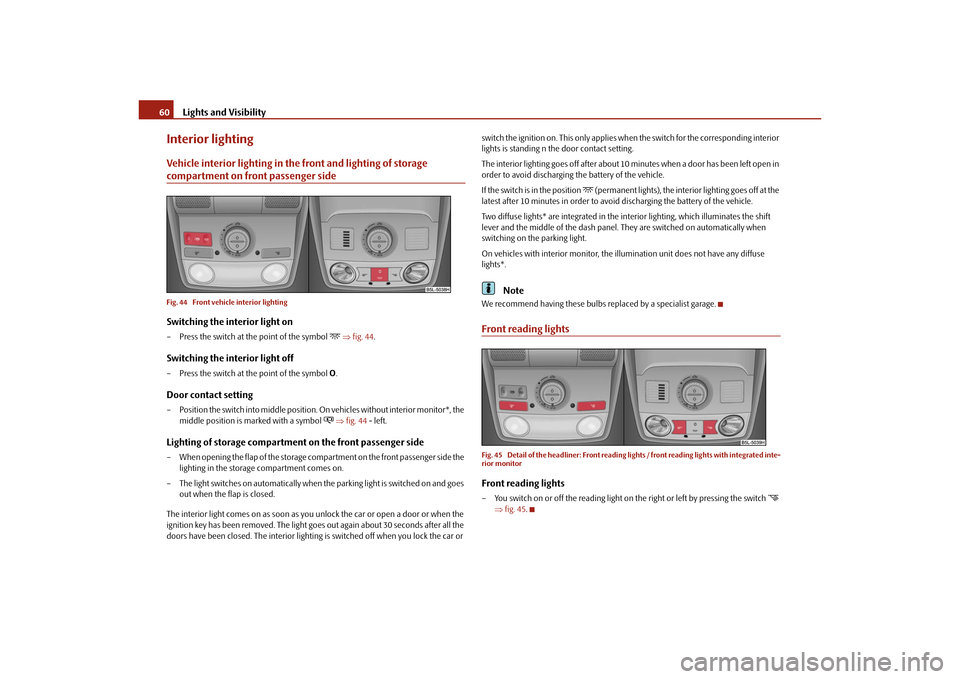
Interior lightingVehicle interior lighting in the front and lighting of storage compartment on front passenger sideFig. 44 Front vehicle interior lightingSwitching the interior light on– Press the switch at the point of the symbol
fig. 44 .
Switching the interior light off– Press the switch at the point of the symbol O.Door contact setting– Position the switch into middle position. On vehicles without interior monitor*, the
middle position is ma rked with a symbol
fig. 44 - left.
Lighting of storage compartment on the front passenger side– When opening the flap of the storage comp artment on the front passenger side the
lighting in the storage compartment comes on.
– The light switches on automatically when the parking light is switched on and goes
out when the flap is closed.
The interior light comes on as soon as you unlock the car or open a door or when the
ignition key has been removed. The light go es out again about 30 seconds after all the
doors have been closed. The interior lighting is switched off when you lock the car or switch the ignition on. This only applies wh
en the switch for the corresponding interior
lights is standing n the door contact setting.
The interior lighting goes off after about 10 minutes when a door has been left open in
order to avoid discharging the battery of the vehicle.
If the switch is in the position
(permanent lights), the interior lighting goes off at the
latest after 10 minutes in order to avoid discharging the battery of the vehicle.
Two diffuse lights* are integrated in the in terior lighting, which illuminates the shift
lever and the middle of the dash panel. They are switched on automatically when
switching on the parking light.
On vehicles with interior monitor, the il lumination unit does not have any diffuse
lights*.
Note
We recommend having these bulbs re placed by a specialist garage.Front reading lightsFig. 45 Detail of the headliner: Front reading lights / front reading lights with integrated inte-
rior monitorFront reading lights– You switch on or off the reading light on the right or left by pressing the switch
fig. 45 .
s2ug.6.book Page 60 Friday, April 9, 2010 2:24 PM