ECO mode SKODA YETI 2013 1.G / 5L Owner's Guide
[x] Cancel search | Manufacturer: SKODA, Model Year: 2013, Model line: YETI, Model: SKODA YETI 2013 1.G / 5LPages: 266, PDF Size: 26.71 MB
Page 104 of 266
Note■We recommend that the installation of mobile phones and two-way radio sys-
tems in a vehicle be carried out by a specialist garage.■
Not all mobile phones that enable Bluetooth ®
communication are compatible
with the universal telephone preinstallation GSM II or GSM III. Ask a ŠKODA Part-
ner whether your phone is compatible with the universal telephone preparation
GSM II or GSM III.
■
The range of the Bluetooth ®
connection to the hands-free system is restricted
to the vehicle interior. The range is dependent on local factors, e.g. obstacles be- tween the devices and mutual interferences with other devices. If your mobile phone is in a jacket pocket, for example, this can lead to difficulties when estab-
lishing a connection with the hands-free-system or transferring data.
Operating the phone on the multifunction steering wheel
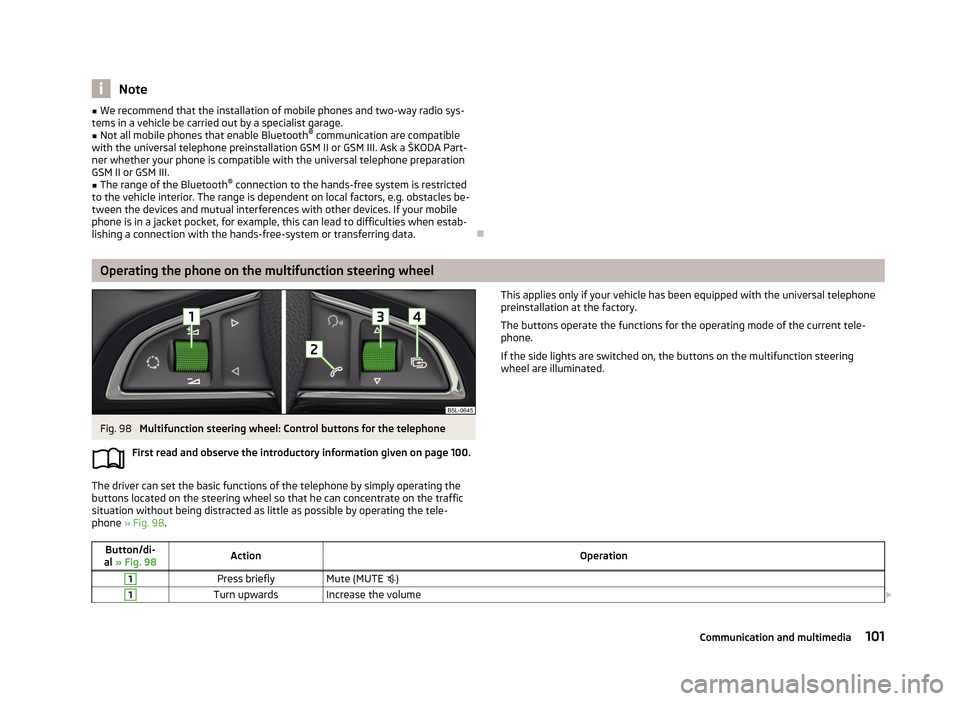
Fig. 98
Multifunction steering wheel: Control buttons for the telephone
First read and observe the introductory information given on page 100.
The driver can set the basic functions of the telephone by simply operating the
buttons located on the steering wheel so that he can concentrate on the traffic
situation without being distracted as little as possible by operating the tele-
phone » Fig. 98 .
This applies only if your vehicle has been equipped with the universal telephone
preinstallation at the factory.
The buttons operate the functions for the operating mode of the current tele-
phone.
If the side lights are switched on, the buttons on the multifunction steering
wheel are illuminated.Button/di-
al » Fig. 98ActionOperation1Press brieflyMute (MUTE )1Turn upwardsIncrease the volume 101Communication and multimedia
Page 116 of 266
If the system does not recognise the command, it repeats the first part of thehelp thus enabling a new entry to be completed. After the 2nd error the systemrepeats the second part of the aid. After the 3rd failed attempt, the answer “ Can-
celled. ” is given and the dialogue is ended.
Storing voice recording for a contact
If automatic name recognition does not work reliably for some contacts, you can
choose to save your own voice tag for the contact in the Phone book - Voice tag -
Record menu item.
Your own voice tag can also be saved using the voice control in the FURTHER OP-
TIONS menu.
Multimedia
Introduction
This chapter contains information on the following subjects:
Music playback via Bluetooth ®
113
Operating the radio and navigation system on the multifunction steering
wheel
113
AUX- and MDIinputs
115CD change115DVD-preinstallation116
Music playback via Bluetooth ®
First read and observe the introductory information given on page 113.
The universal telephone preinstallation makes it possible to play back music via
Bluetooth ®
from devices such as MP3 players, mobile phones or notebooks.
To ensure that music can be played via Bluetooth ®
, you must first pair the device
with the hands-free system in the Phone - Bluetooth - Media player menu.
The music playback process is performed on the connected device.
The universal telephone preinstallation GSM II ensures that the music played back
via the hands-free system can be controlled with the remote control » page 112,
Voice commands - GSM II .
Note
The device being connected must support the Bluetooth ®
A2DP profile; refer to
the operating instructions for the relevant device being connected.
Operating the radio and navigation system on the multifunction steering wheel
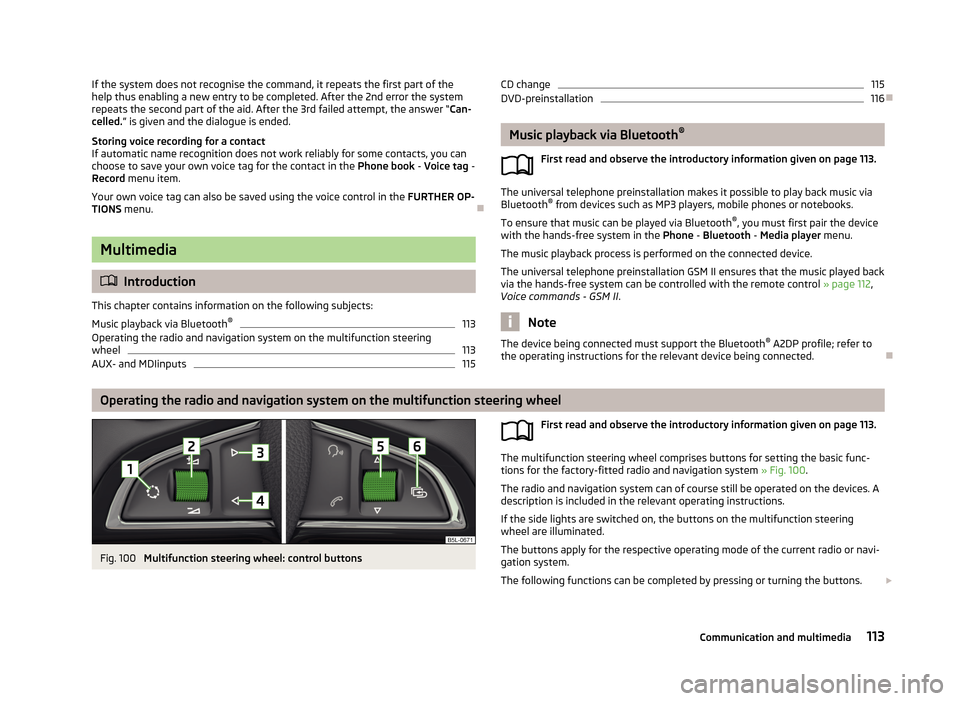
Fig. 100
Multifunction steering wheel: control buttons
First read and observe the introductory information given on page 113.
The multifunction steering wheel comprises buttons for setting the basic func-
tions for the factory-fitted radio and navigation system » Fig. 100.
The radio and navigation system can of course still be operated on the devices. A
description is included in the relevant operating instructions.
If the side lights are switched on, the buttons on the multifunction steeringwheel are illuminated.
The buttons apply for the respective operating mode of the current radio or navi- gation system.
The following functions can be completed by pressing or turning the buttons.
113Communication and multimedia
Page 130 of 266
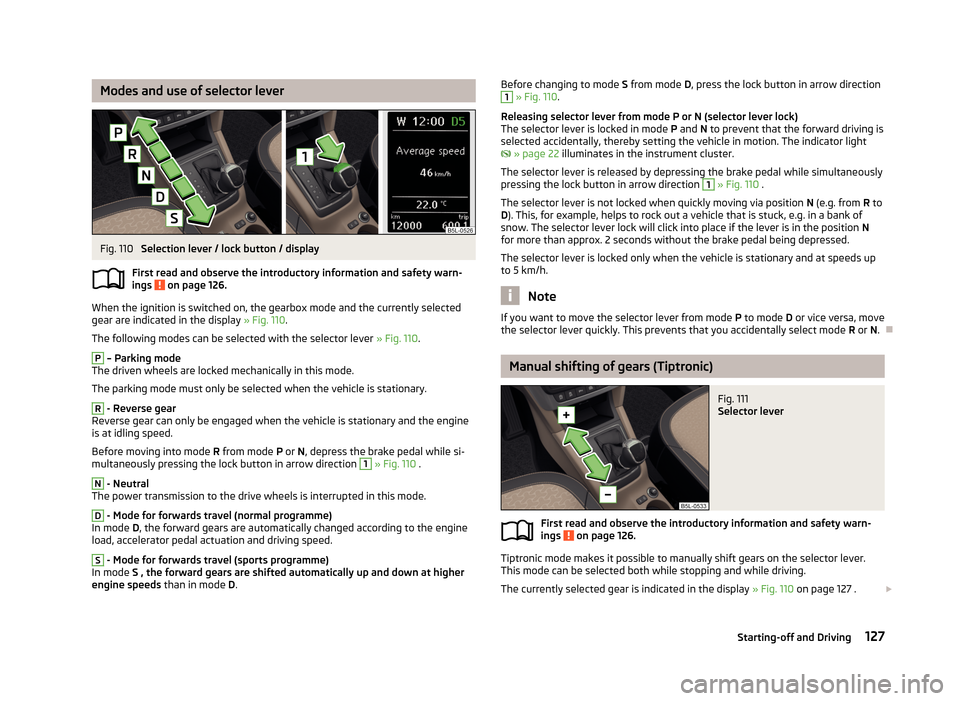
Modes and use of selector leverFig. 110
Selection lever / lock button / display
First read and observe the introductory information and safety warn- ings
on page 126.
When the ignition is switched on, the gearbox mode and the currently selected
gear are indicated in the display » Fig. 110.
The following modes can be selected with the selector lever » Fig. 110.
P
– Parking mode
The driven wheels are locked mechanically in this mode.
The parking mode must only be selected when the vehicle is stationary.
R
- Reverse gear
Reverse gear can only be engaged when the vehicle is stationary and the engine
is at idling speed.
Before moving into mode R from mode P or N, depress the brake pedal while si-
multaneously pressing the lock button in arrow direction
1
» Fig. 110 .
N
- Neutral
The power transmission to the drive wheels is interrupted in this mode.
D
- Mode for forwards travel (normal programme)
In mode D, the forward gears are automatically changed according to the engine
load, accelerator pedal actuation and driving speed.
S
- Mode for forwards travel (sports programme)
In mode S , the forward gears are shifted automatically up and down at higher
engine speeds than in mode D.
Before changing to mode S from mode D, press the lock button in arrow direction1 » Fig. 110 .
Releasing selector lever from mode P or N (selector lever lock)
The selector lever is locked in mode P and N to prevent that the forward driving is
selected accidentally, thereby setting the vehicle in motion. The indicator light
» page 22 illuminates in the instrument cluster.
The selector lever is released by depressing the brake pedal while simultaneously
pressing the lock button in arrow direction 1
» Fig. 110 .
The selector lever is not locked when quickly moving via position N (e.g. from R to
D ). This, for example, helps to rock out a vehicle that is stuck, e.g. in a bank of
snow. The selector lever lock will click into place if the lever is in the position N
for more than approx. 2 seconds without the brake pedal being depressed.
The selector lever is locked only when the vehicle is stationary and at speeds up
to 5 km/h.
Note
If you want to move the selector lever from mode P to mode D or vice versa, move
the selector lever quickly. This prevents that you accidentally select mode R or N.
Manual shifting of gears (Tiptronic)
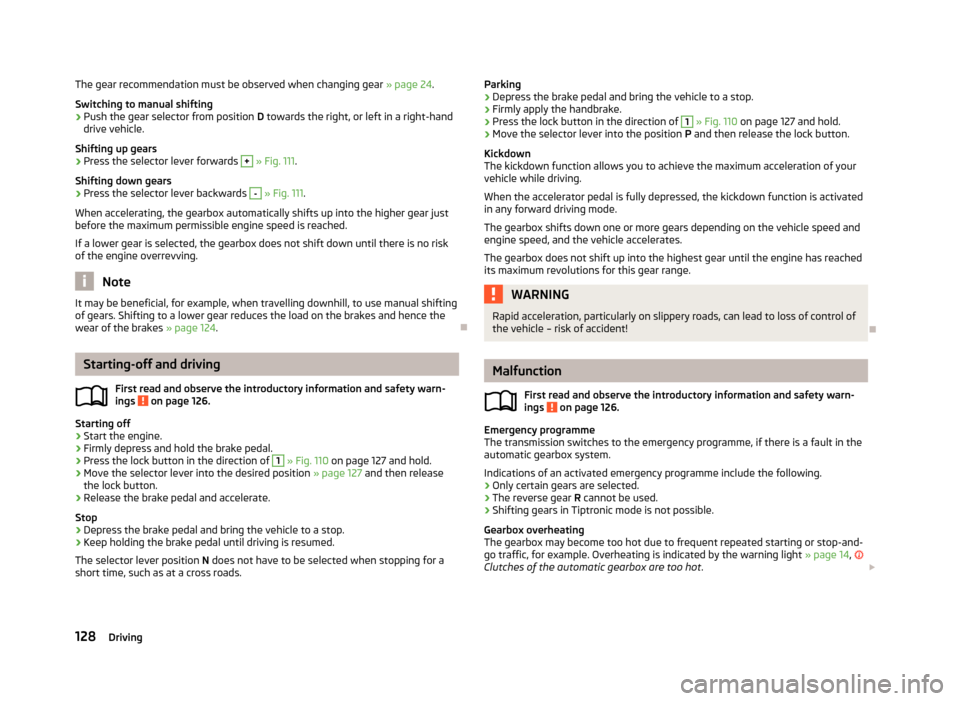
Fig. 111
Selector lever
First read and observe the introductory information and safety warn-
ings on page 126.
Tiptronic mode makes it possible to manually shift gears on the selector lever.
This mode can be selected both while stopping and while driving.
The currently selected gear is indicated in the display » Fig. 110 on page 127 .
127Starting-off and Driving
Page 131 of 266
The gear recommendation must be observed when changing gear » page 24.
Switching to manual shifting›
Push the gear selector from position D towards the right, or left in a right-hand
drive vehicle.
Shifting up gears
›
Press the selector lever forwards
+
» Fig. 111 .
Shifting down gears
›
Press the selector lever backwards
-
» Fig. 111 .
When accelerating, the gearbox automatically shifts up into the higher gear just
before the maximum permissible engine speed is reached.
If a lower gear is selected, the gearbox does not shift down until there is no riskof the engine overrevving.
Note
It may be beneficial, for example, when travelling downhill, to use manual shifting
of gears. Shifting to a lower gear reduces the load on the brakes and hence the
wear of the brakes » page 124.
Starting-off and driving
First read and observe the introductory information and safety warn-
ings
on page 126.
Starting off
›
Start the engine.
›
Firmly depress and hold the brake pedal.
›
Press the lock button in the direction of
1
» Fig. 110 on page 127 and hold.
›
Move the selector lever into the desired position » page 127
and then release
the lock button.
›
Release the brake pedal and accelerate.
Stop
›
Depress the brake pedal and bring the vehicle to a stop.
›
Keep holding the brake pedal until driving is resumed.
The selector lever position N does not have to be selected when stopping for a
short time, such as at a cross roads.
Parking›Depress the brake pedal and bring the vehicle to a stop.›
Firmly apply the handbrake.
›
Press the lock button in the direction of
1
» Fig. 110 on page 127 and hold.
›
Move the selector lever into the position P and then release the lock button.
Kickdown
The kickdown function allows you to achieve the maximum acceleration of your
vehicle while driving.
When the accelerator pedal is fully depressed, the kickdown function is activated
in any forward driving mode.
The gearbox shifts down one or more gears depending on the vehicle speed and engine speed, and the vehicle accelerates.
The gearbox does not shift up into the highest gear until the engine has reached
its maximum revolutions for this gear range.
WARNINGRapid acceleration, particularly on slippery roads, can lead to loss of control of
the vehicle – risk of accident!
Malfunction
First read and observe the introductory information and safety warn-
ings
on page 126.
Emergency programme
The transmission switches to the emergency programme, if there is a fault in the automatic gearbox system.
Indications of an activated emergency programme include the following.
› Only certain gears are selected.
› The reverse gear
R cannot be used.
› Shifting gears in Tiptronic mode is not possible.
Gearbox overheating
The gearbox may become too hot due to frequent repeated starting or stop-and-
go traffic, for example. Overheating is indicated by the warning light » page 14,
Clutches of the automatic gearbox are too hot .
128Driving
Page 138 of 266
At a higher speed, a water wave can form in front of the vehicle which can causewater to penetrate into the air induction system of the engine or into other partsof the vehicle.›
Never stop in the water, do not reverse and do not switch the engine off.
›
Deactivate the START-STOP system before driving through water » page 149.
Off-road driving
First read and observe the introductory information and safety warn-
ings
on page 134.
Only drive on such roads and in such terrain, which match the vehicle parame-
ters » page 244 , Technical data as well as your driving skills.
The driver is always responsible for deciding whether the vehicle can handle trav-
elling in the given terrain.
When travelling off paved roads, we recommend activating the OFF ROAD
mode » page 138 .
Driving abroad
Introduction
This chapter contains information on the following subjects:
Unleaded petrol
135
Headlights
135
In certain countries, it may be possible that the ŠKODA service partner network is
limited or has not been established. This is the reason why procuring certain
spare parts may be somewhat complicated and specialist garages may only be
able to make limited repairs.
Unleaded petrol
First read and observe the introductory information given on page 135.
A vehicle fitted with a petrol engine must always be refuelled with unleaded pet-rol » page 197 . Information regarding the locations of filling stations that offer
unleaded petrol is, for example, provided by the automobile associations.
Headlights
First read and observe the introductory information given on page 135.
The low beam of your headlights is set asymmetrically. It illuminates the side of
the road on which the vehicle is being driven to a greater extent.
When driving in countries in which the traffic drives on the other side of the road
than in your home country, the asymmetrical low beam may dazzle oncoming
drivers. In order to avoid this, the headlights must be adjusted at a specialist ga-
rage.
Headlights with Xenon lights can be adjusted in the menu of the MAXI DOT dis-
play » page 28 .
Note
You can find out more information on adjusting the headlights at a specialist ga-
rage.
135Starting-off and Driving
Page 141 of 266
The HBA is activated by very quick operation of the brake pedal. In order to ach-
ieve the shortest possible braking distance, the brake pedal must be applied firm-
ly until the vehicle has come to a standstill.
The HBA function is automatically deactivated when the brake pedal is released.
The ABS is activated faster and more effectively with the intervention of the HBA.
Hill Hold Control (HHC)
First read and observe the introductory information and safety warn-ings
on page 136.
When driving on slopes, HHC allows you to move your foot from the brake pedalto the accelerator pedal without having to use the handbrake.
The system holds the brake pressure produced by the activation of the brakepedal for approx. 2 seconds after the brake pedal is released.
The brake pressure drops gradually the more you operate the accelerator pedal. If the vehicle does not start off within 2 seconds, it starts to roll back.
The HHC is active from a 5% slope if the driver's door is closed. HHC is only ever
active on slopes when in forward or reverse start off. When driving downhill, it is
inactive.
OFF ROAD-mode
Introduction
This chapter contains information on the following subjects:
Operation
138
Activation / deactivation
140
The OFF ROAD mode supports the driver when driving away from paved roads.
But even with OFF ROAD mode activated, your vehicle is never a true SUV.
WARNING■ A lack of fuel can cause irregular engine running or cause the engine to shut
down. This would lead the OFF ROAD mode to lose its effectiveness - risk of accident!■
Adjust the speed and driving style to the current visibility, weather, road and
traffic conditions.
■
The increased safety offered by the OFF ROAD mode must not tempt you to
take greater risks than otherwise - risk of an accident!
CAUTION
■ The OFF ROAD mode is not designed for the use on common roads.■All four wheels must be fitted with the same tyres approved by the manufactur-
er to ensure theOFF ROAD mode operates correctly.
Operation
First read and observe the introductory information and safety warn-
ings
on page 138.
The OFF ROAD mode is ready to intervene at speeds below 30 km / hr. The readi-
ness of the system is the warning light
displayed in the instrument cluster.
The following functions are integrated in the OFF ROAD mode.
› Downhill Drive Support.
› Start-Off Assist.
› ABS OFF ROAD.
› TCS OFF ROAD.
› EDL OFF ROAD.
Downhill Drive Support
The hill descent assistant, with its automatic braking action on all wheels, en-
sures a constant speed on a steep slope when driving forwards and reversing.
The speed maintained corresponds to the speed of the vehicle at the time the As- sistant was first engaged.
During an intervention of the Assistants, the warning light
flashes in the in-
strument cluster.
By pressing the accelerator or brake pedal, the speed can be increased or re- duced. This is true even if the shift lever is in the neutral position and the selector
lever in the N position.
138Driving
Page 143 of 266
Activation / deactivationFig. 118
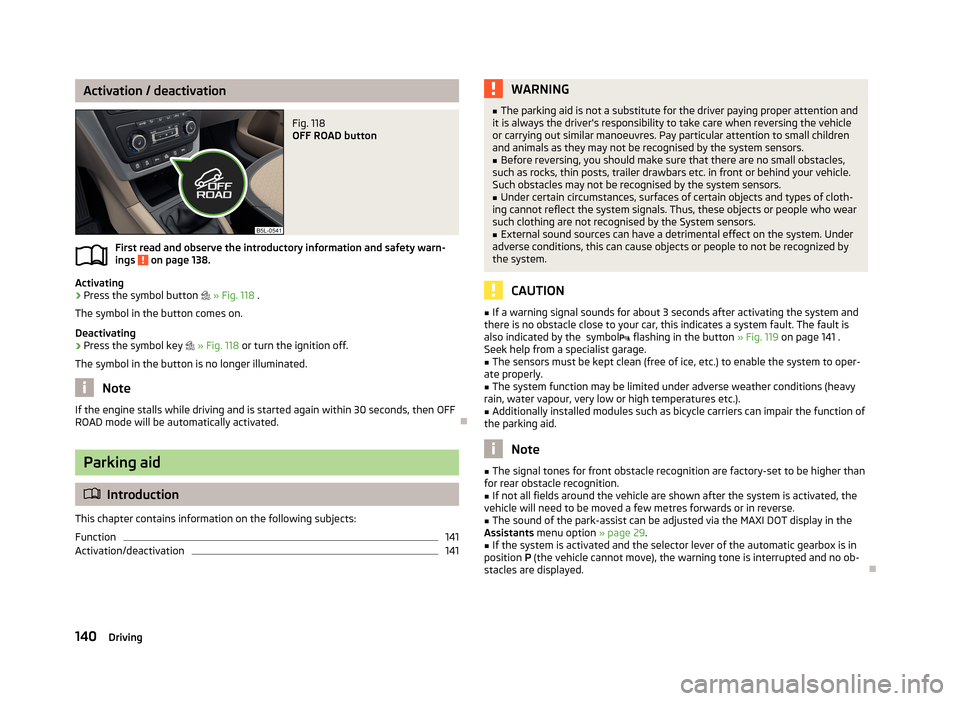
OFF ROAD button
First read and observe the introductory information and safety warn-ings on page 138.
Activating
›
Press the symbol button
» Fig. 118 .
The symbol in the button comes on.
Deactivating
›
Press the symbol key
» Fig. 118 or turn the ignition off.
The symbol in the button is no longer illuminated.
Note
If the engine stalls while driving and is started again within 30 seconds, then OFF
ROAD mode will be automatically activated.
Parking aid
Introduction
This chapter contains information on the following subjects:
Function
141
Activation/deactivation
141WARNING■ The parking aid is not a substitute for the driver paying proper attention and
it is always the driver's responsibility to take care when reversing the vehicle
or carrying out similar manoeuvres. Pay particular attention to small children
and animals as they may not be recognised by the system sensors.■
Before reversing, you should make sure that there are no small obstacles,
such as rocks, thin posts, trailer drawbars etc. in front or behind your vehicle.
Such obstacles may not be recognised by the system sensors.
■
Under certain circumstances, surfaces of certain objects and types of cloth-
ing cannot reflect the system signals. Thus, these objects or people who wear such clothing are not recognised by the System sensors.
■
External sound sources can have a detrimental effect on the system. Under
adverse conditions, this can cause objects or people to not be recognized by
the system.
CAUTION
■ If a warning signal sounds for about 3 seconds after activating the system and
there is no obstacle close to your car, this indicates a system fault. The fault is
also indicated by the symbol flashing in the button » Fig. 119 on page 141 .
Seek help from a specialist garage.■
The sensors must be kept clean (free of ice, etc.) to enable the system to oper-
ate properly.
■
The system function may be limited under adverse weather conditions (heavy
rain, water vapour, very low or high temperatures etc.).
■
Additionally installed modules such as bicycle carriers can impair the function of
the parking aid.
Note
■ The signal tones for front obstacle recognition are factory-set to be higher than
for rear obstacle recognition.■
If not all fields around the vehicle are shown after the system is activated, the
vehicle will need to be moved a few metres forwards or in reverse.
■
The sound of the park-assist can be adjusted via the MAXI DOT display in the
Assistants menu option » page 29.
■
If the system is activated and the selector lever of the automatic gearbox is in
position P (the vehicle cannot move), the warning tone is interrupted and no ob-
stacles are displayed.
140Driving
Page 148 of 266
If the driver changes the parking mode while searching for a parking space, the
symbol button must be pressed again.
Note
If the symbol (km / h) is shown in the display , the vehicle speed should be
reduced below 40 km / hr (parallel parking) or below 20 km / hr (Transverse park- ing) .
Parking
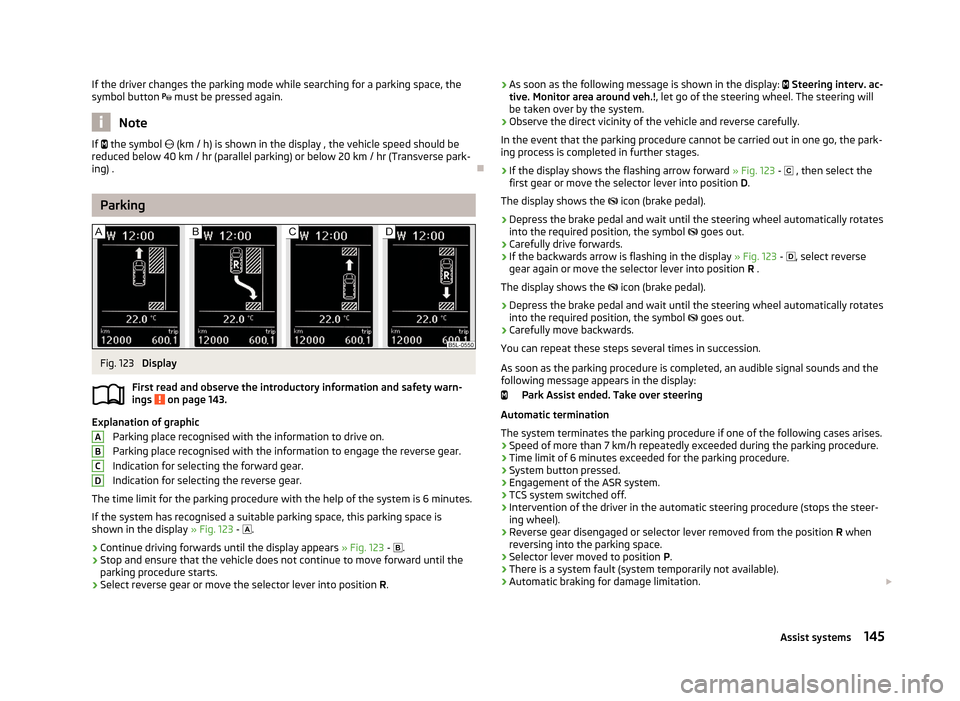
Fig. 123
Display
First read and observe the introductory information and safety warn- ings
on page 143.
Explanation of graphic
Parking place recognised with the information to drive on.
Parking place recognised with the information to engage the reverse gear.
Indication for selecting the forward gear.
Indication for selecting the reverse gear.
The time limit for the parking procedure with the help of the system is 6 minutes. If the system has recognised a suitable parking space, this parking space is
shown in the display » Fig. 123 -
.
›
Continue driving forwards until the display appears » Fig. 123 -
.
›
Stop and ensure that the vehicle does not continue to move forward until the
parking procedure starts.
›
Select reverse gear or move the selector lever into position R.
ABCD› As soon as the following message is shown in the display:
Steering interv. ac-
tive. Monitor area around veh.! , let go of the steering wheel. The steering will
be taken over by the system.›
Observe the direct vicinity of the vehicle and reverse carefully.
In the event that the parking procedure cannot be carried out in one go, the park- ing process is completed in further stages.
›
If the display shows the flashing arrow forward » Fig. 123 - , then select the
first gear or move the selector lever into position D.
The display shows the icon (brake pedal).
›
Depress the brake pedal and wait until the steering wheel automatically rotates
into the required position, the symbol goes out.
›
Carefully drive forwards.
›
If the backwards arrow is flashing in the display » Fig. 123 -
, select reverse
gear again or move the selector lever into position R .
The display shows the
icon (brake pedal).
›
Depress the brake pedal and wait until the steering wheel automatically rotates
into the required position, the symbol
goes out.
›
Carefully move backwards.
You can repeat these steps several times in succession.
As soon as the parking procedure is completed, an audible signal sounds and the
following message appears in the display:
Park Assist ended. Take over steering
Automatic termination
The system terminates the parking procedure if one of the following cases arises.
› Speed of more than 7 km/h repeatedly exceeded during the parking procedure.
› Time limit of 6 minutes exceeded for the parking procedure.
› System button pressed.
› Engagement of the ASR system.
› TCS system switched off.
› Intervention of the driver in the automatic steering procedure (stops the steer-
ing wheel).
› Reverse gear disengaged or selector lever removed from the position
R when
reversing into the parking space.
› Selector lever moved to position
P.
› There is a system fault (system temporarily not available).
› Automatic braking for damage limitation.
145Assist systems
Page 152 of 266
Briefly push the rocker button B into the RES/+ position in order to resume the
stored speed after the clutch or brake pedal is released.
START-STOP
Introduction
This chapter contains information on the following subjects:
Starting/shutting down the engine
149
Operating conditions of the system
150
Manually activating/deactivating the system
150
Information messages
151
The START-STOP system helps you to save fuel while at the same time reducing
harmful exhaust emissions and CO 2 emissions.
The function is automatically activated each time the ignition is switched on. In the start-stop mode, the engine automatically switches to the vehicle's idle phase, e.g. when stopped at traffic lights. The engine restarts automatically
where necessary.
The system can work only if the following basic conditions are met. The driver's door is closed.
The driver has fastened the seat belt.
The bonnet is closed.The driving speed was higher than 4 km.h after the last stop.
No trailer is coupled.
WARNING■ The brake servo unit and power steering only operate if the engine is run-
ning.■
Never let the vehicle roll with the engine switched off.
CAUTION
Always deactivate the START-STOP system before driving through wa-
ter » page 134 .Note■
If the driver's seat belt is removed for more than approx. 30 seconds or the driv-
er's door is opened during stop mode on vehicles with manual transmission or au- tomatic transmission (when the selector lever in position P), the engine must be
started manually » page 120.■
After manually starting the engine on vehicles with manual transmission, auto-
matic engine shut down is not possible until the vehicle has travelled the re-
quired minimum distance for START-STOPP mode.
■
If, on vehicles with automatic transmission, the selector lever positions D, S or N
are selected after driving in reverse, the vehicle will first need to achieve a speed
of over 10 km/h before automatic engine shut down can take place again.
■
Changes to the outdoor temperature can have an effect on the internal temper-
ature of the vehicle battery even after several hours. If the vehicle remains out- doors for a long time in minus temperatures or in direct sunlight, it can take sev-
eral hours until the internal temperature of the vehicle battery reaches a suitable
temperature for proper operation of the START STOP system.
■
If the Climatronic is running in automatic mode, it is possible that under certain
conditions the engine may not switch off automatically.
Starting/shutting down the engine
First read and observe the introductory information and safety warn-ings
on page 149.
Vehicles with manual transmission
›
Stop the vehicle (where necessary, apply the handbrake).
›
Put the gear stick into Neutral.
›
Release the clutch pedal.
Automatic engine shut down (STOP phase) takes place. The warning symbol
appears in the instrument cluster display.
›
Depress the clutch pedal.
The automatic start procedure takes place again (START phase). The warning
symbol
goes out.
Vehicles with automatic transmission
›
Bring the vehicle to a stop and depress the brake pedal.
Automatic engine shut down takes place. The warning symbol
appears in the
instrument cluster display.
›
Release the brake pedal.
149Assist systems
Page 187 of 266
ŠKODA Service Partners feature modern, specially developed tools and equip-
ment. Here, trained specialists have a comprehensive range of ŠKODA Genuine Parts and ŠKODA Genuine Accessories at their disposal.
All ŠKODA Service Partners operate in accordance with the latest manufacturerguidelines and instructions. All service work is therefore carried out on time and
in accordance with the quality standards. Adhering to these instructions and
guidelines helps ensure road safety and helps keep your vehicle in a good techni-
cal condition.
The ŠKODA Service Partners also offer a wide range of other services. ŠKODA Service Partners are therefore properly prepared to service your vehicleand to provide quality work. We therefore recommend that you have your vehicle
maintained by a ŠKODA Service Partner.
Service work, adjustments and technical alterations
Introduction
This chapter contains information on the following subjects:
Tests required by law
185
ŠKODA Service Partners
185
ŠKODA Genuine Parts
185
ŠKODA Genuine Accessories
186
Spoiler
186
Airbags
186
The instructions and guidelines from ŠKODA AUTO a.s. must be observed when
carrying out any modifications, repairs or technical alterations to your vehicle.
Adhering to these instructions and guidelines helps ensure road safety and helps
keep your vehicle in a good technical condition. After carrying out modifications,
repairs or technical alterations, the vehicle will comply with German road trans-
port regulations (StVZO)
Always consult a ŠKODA Partner » page 185 before buying accessories or parts,
or before carrying out any modifications, repairs or technical alterations to your
vehicle.
WARNING■ If work on your vehicle is not carried out properly, this can lead to operation-
al faults - risk of accident and serious injuries.■
We recommend only having these modifications and technical alterations
carried out by a specialist garage.
■
Interference on the electronic components and their software can lead to
operational faults. This interference can also impair not directly affected sys-
tems because of the networking of the electronic components. The operation- al safety of the vehicle may be at significant risk and can lead to increased
wear of parts.
■
The ŠKODA Partner accepts no liability for products that have not been ap-
proved by ŠKODA AUTO a.s. even though these may be products with an op-
erational approval or that have been approved by a government testing insti-
tute.
WARNING■ We advise you only to use ŠKODA Original Accessories and ŠKODA Original
Parts which have been expressly approved for use on your vehicle. Reliability,
safety and suitability for your vehicle are guaranteed with these.■
ŠKODA Original Accessories and ŠKODA Original Parts can be purchased
from ŠKODA Partners, who will also perform the professional assembly of the purchased parts.
For the sake of the environment
Technical documents regarding alterations carried out on the vehicle must be
kept by the vehicle user in order to be handed over to the recyclers at a later
date. This ensures that the vehicle is recycled in an environmentally sound man-
ner.
Note
Any damage caused by technical alterations made without the approval of the
manufacturer is excluded from the warranty.
184General Maintenance