light SKODA YETI 2014 1.G / 5L Workshop Manual
[x] Cancel search | Manufacturer: SKODA, Model Year: 2014, Model line: YETI, Model: SKODA YETI 2014 1.G / 5LPages: 248, PDF Size: 29.49 MB
Page 100 of 248
WARNING (Continued)■The transported items must be stowed in such a way that no objects are
able to slip forward on sudden driving or braking manoeuvres – risk of in-
jury!■
When transporting objects in the luggage compartment that has been en-
larged by folding the rear seats forward, ensure the safety of the passen-
gers transported on the other rear seats » page 11, Correct seated position
for the passengers in the rear seats .
■
If the rear seat next to the folded forward seat is occupied, ensure maxi-
mum safety, e.g. by placing the goods to be transported in such a way that
the seat is prevented from folding back in case of a rear collision.
■
Do not drive with the luggage compartment lid fully opened or slightly
ajar otherwise exhaust gases may get into the interior of the vehicle – risk
of poisoning!
■
Do not exceed the permissible axle loads and permissible gross weight of
the vehicle – risk of accident!
■
Do not transport people in the boot!
CAUTION
■ Please ensure that the heating elements for the rear window heater are not
damaged as a result of abrasive objects.■
Tyre pressure must be adjusted to the load » page 191.
Fastening elements
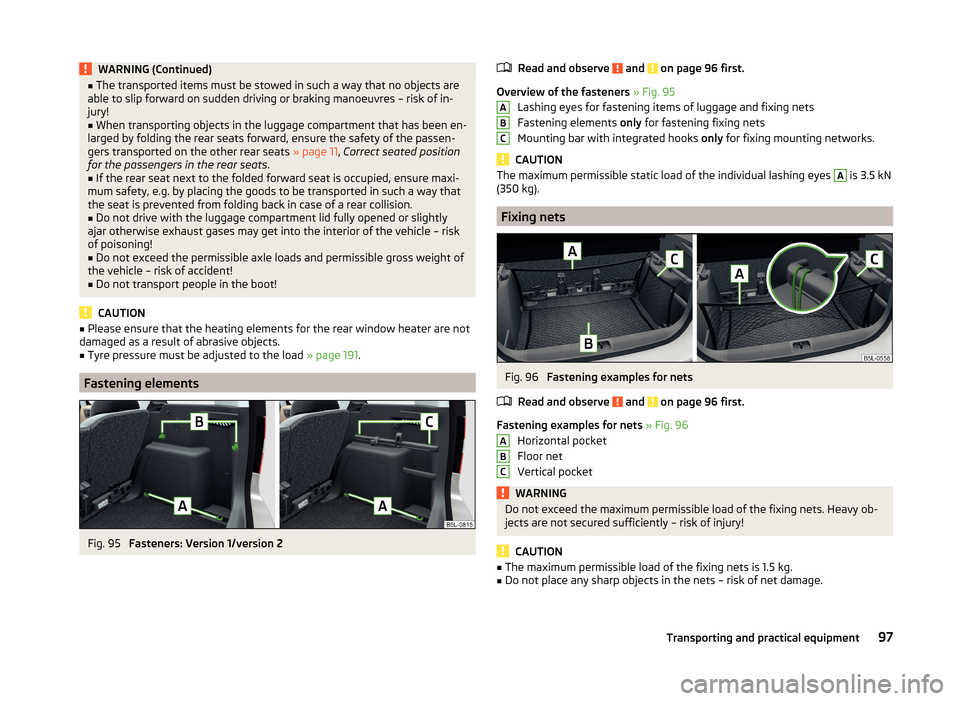
Fig. 95
Fasteners: Version 1/version 2
Read and observe and on page 96 first.
Overview of the fasteners » Fig. 95
Lashing eyes for fastening items of luggage and fixing nets
Fastening elements only for fastening fixing nets
Mounting bar with integrated hooks only for fixing mounting networks.
CAUTION
The maximum permissible static load of the individual lashing eyes A is 3.5 kN
(350 kg).
Fixing nets
Fig. 96
Fastening examples for nets
Read and observe
and on page 96 first.
Fastening examples for nets » Fig. 96
Horizontal pocket
Floor net
Vertical pocket
WARNINGDo not exceed the maximum permissible load of the fixing nets. Heavy ob-
jects are not secured sufficiently – risk of injury!
CAUTION
■ The maximum permissible load of the fixing nets is 1.5 kg.■Do not place any sharp objects in the nets – risk of net damage.ABCABC97Transporting and practical equipment
Page 101 of 248
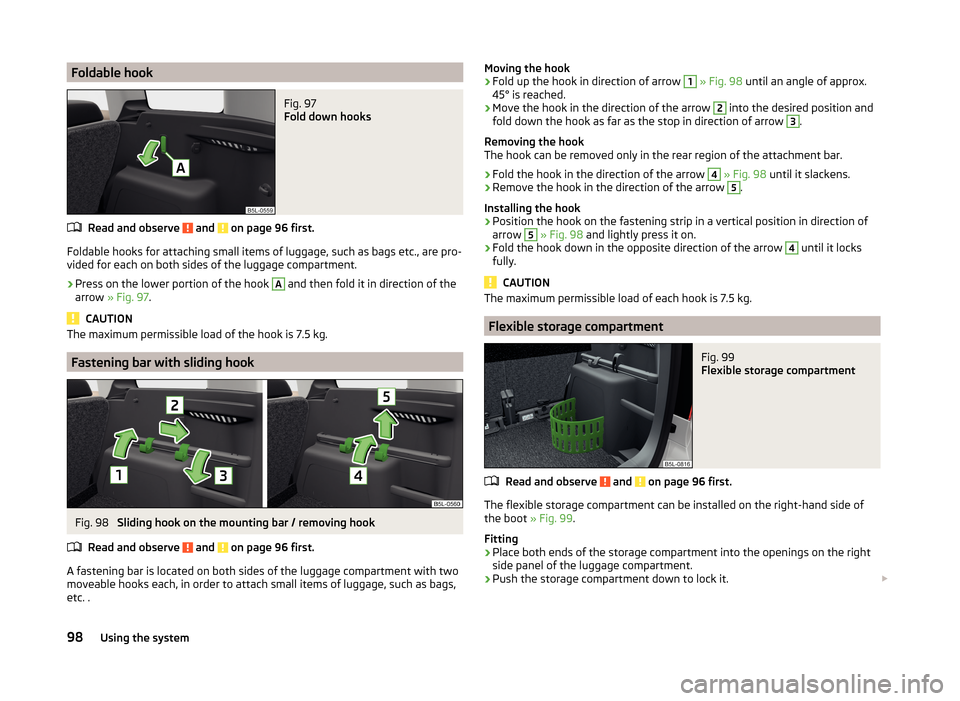
Foldable hookFig. 97
Fold down hooks
Read and observe and on page 96 first.
Foldable hooks for attaching small items of luggage, such as bags etc., are pro-
vided for each on both sides of the luggage compartment.
›
Press on the lower portion of the hook
A
and then fold it in direction of the
arrow » Fig. 97 .
CAUTION
The maximum permissible load of the hook is 7.5 kg.
Fastening bar with sliding hook
Fig. 98
Sliding hook on the mounting bar / removing hook
Read and observe
and on page 96 first.
A fastening bar is located on both sides of the luggage compartment with two moveable hooks each, in order to attach small items of luggage, such as bags,
etc. .
Moving the hook›Fold up the hook in direction of arrow 1 » Fig. 98 until an angle of approx.
45° is reached.›
Move the hook in the direction of the arrow
2
into the desired position and
fold down the hook as far as the stop in direction of arrow
3
.
Removing the hook
The hook can be removed only in the rear region of the attachment bar.
›
Fold the hook in the direction of the arrow
4
» Fig. 98 until it slackens.
›
Remove the hook in the direction of the arrow
5
.
Installing the hook
›
Position the hook on the fastening strip in a vertical position in direction of
arrow
5
» Fig. 98 and lightly press it on.
›
Fold the hook down in the opposite direction of the arrow
4
until it locks
fully.
CAUTION
The maximum permissible load of each hook is 7.5 kg.
Flexible storage compartment
Fig. 99
Flexible storage compartment
Read and observe and on page 96 first.
The flexible storage compartment can be installed on the right-hand side of the boot » Fig. 99.
Fitting
›
Place both ends of the storage compartment into the openings on the right
side panel of the luggage compartment.
›
Push the storage compartment down to lock it.
98Using the system
Page 102 of 248
Removing›Grasp the storage compartment on the two upper corners.›
Press the upper corners inwards and release the storage compartment by
pulling upwards.
›
Remove the storage compartment by pulling towards you.
CAUTION
The storage compartment is designed for storing small objects with a maxi-
mum total weight of 8 kg.
Note
The flexible storage compartment cannot be installed on vehicles with the var-
iable loading floor » page 102.
Floor covering on both sides
Read and observe
and on page 96 first.
You can fit a double-sided floor covering in the luggage compartment.
One side of the double-sided floor covering is made of fabric, the other side is
washable (easy to maintain).
The washable side is used to transport wet or dirty items.
Note
For easier turning of the covering, use the loop attached.
Luggage compartment cover
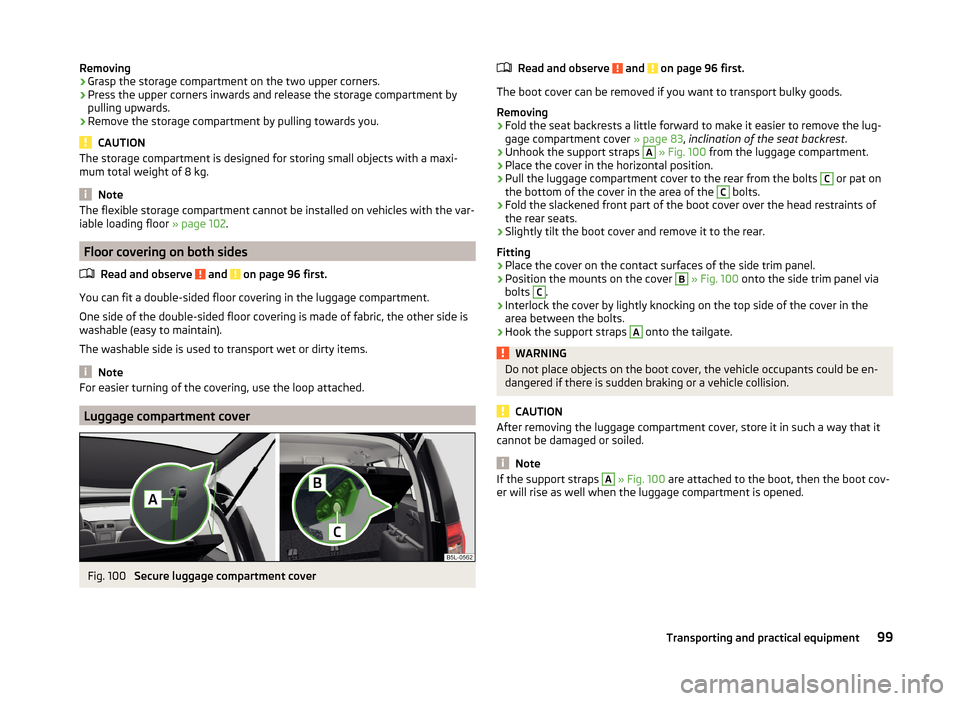
Fig. 100
Secure luggage compartment cover
Read and observe and on page 96 first.
The boot cover can be removed if you want to transport bulky goods.
Removing
›
Fold the seat backrests a little forward to make it easier to remove the lug-
gage compartment cover » page 83, inclination of the seat backrest .
›
Unhook the support straps
A
» Fig. 100 from the luggage compartment.
›
Place the cover in the horizontal position.
›
Pull the luggage compartment cover to the rear from the bolts
C
or pat on
the bottom of the cover in the area of the
C
bolts.
›
Fold the slackened front part of the boot cover over the head restraints of
the rear seats.
›
Slightly tilt the boot cover and remove it to the rear.
Fitting
›
Place the cover on the contact surfaces of the side trim panel.
›
Position the mounts on the cover
B
» Fig. 100 onto the side trim panel via
bolts
C
.
›
Interlock the cover by lightly knocking on the top side of the cover in the
area between the bolts.
›
Hook the support straps
A
onto the tailgate.
WARNINGDo not place objects on the boot cover, the vehicle occupants could be en-
dangered if there is sudden braking or a vehicle collision.
CAUTION
After removing the luggage compartment cover, store it in such a way that it
cannot be damaged or soiled.
Note
If the support straps A » Fig. 100 are attached to the boot, then the boot cov-
er will rise as well when the luggage compartment is opened.99Transporting and practical equipment
Page 104 of 248
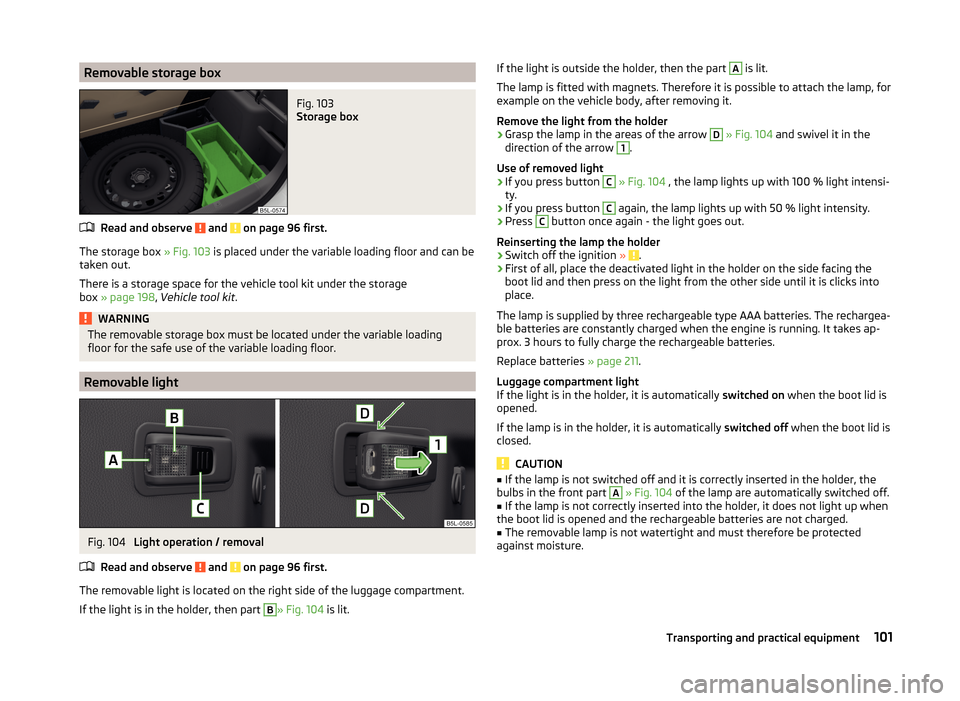
Removable storage boxFig. 103
Storage box
Read and observe and on page 96 first.
The storage box » Fig. 103 is placed under the variable loading floor and can be
taken out.
There is a storage space for the vehicle tool kit under the storage
box » page 198 , Vehicle tool kit .
WARNINGThe removable storage box must be located under the variable loading
floor for the safe use of the variable loading floor.
Removable light
Fig. 104
Light operation / removal
Read and observe
and on page 96 first.
The removable light is located on the right side of the luggage compartment. If the light is in the holder, then part
B
» Fig. 104 is lit.
If the light is outside the holder, then the part A is lit.
The lamp is fitted with magnets. Therefore it is possible to attach the lamp, for
example on the vehicle body, after removing it.
Remove the light from the holder›
Grasp the lamp in the areas of the arrow
D
» Fig. 104 and swivel it in the
direction of the arrow
1
.
Use of removed light
›
If you press button
C
» Fig. 104 , the lamp lights up with 100 % light intensi-
ty.
›
If you press button
C
again, the lamp lights up with 50 % light intensity.
›
Press
C
button once again - the light goes out.
Reinserting the lamp the holder
›
Switch off the ignition » .
›
First of all, place the deactivated light in the holder on the side facing the
boot lid and then press on the light from the other side until it is clicks into
place.
The lamp is supplied by three rechargeable type AAA batteries. The rechargea-
ble batteries are constantly charged when the engine is running. It takes ap-
prox. 3 hours to fully charge the rechargeable batteries.
Replace batteries » page 211.
Luggage compartment light
If the light is in the holder, it is automatically switched on when the boot lid is
opened.
If the lamp is in the holder, it is automatically switched off when the boot lid is
closed.
CAUTION
■ If the lamp is not switched off and it is correctly inserted in the holder, the
bulbs in the front part A » Fig. 104 of the lamp are automatically switched off.■
If the lamp is not correctly inserted into the holder, it does not light up when
the boot lid is opened and the rechargeable batteries are not charged.
■
The removable lamp is not watertight and must therefore be protected
against moisture.
101Transporting and practical equipment
Page 109 of 248
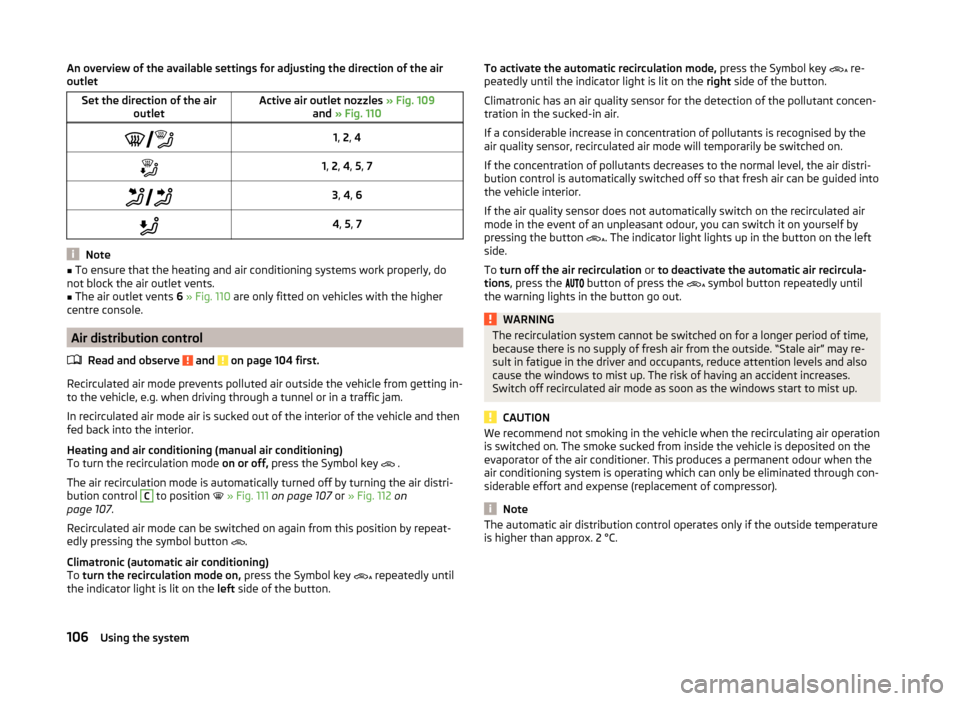
An overview of the available settings for adjusting the direction of the air
outletSet the direction of the air outletActive air outlet nozzles » Fig. 109
and » Fig. 110 1, 2 , 41, 2 , 4 , 5 , 7 3, 4 , 64 , 5 , 7
Note
■
To ensure that the heating and air conditioning systems work properly, do
not block the air outlet vents.■
The air outlet vents 6 » Fig. 110 are only fitted on vehicles with the higher
centre console.
Air distribution control
Read and observe
and on page 104 first.
Recirculated air mode prevents polluted air outside the vehicle from getting in-to the vehicle, e.g. when driving through a tunnel or in a traffic jam.
In recirculated air mode air is sucked out of the interior of the vehicle and then
fed back into the interior.
Heating and air conditioning (manual air conditioning)
To turn the recirculation mode on or off, press the Symbol key
.
The air recirculation mode is automatically turned off by turning the air distri-
bution control
C
to position
» Fig. 111 on page 107 or » Fig. 112 on
page 107 .
Recirculated air mode can be switched on again from this position by repeat-
edly pressing the symbol button .
Climatronic (automatic air conditioning)
To turn the recirculation mode on, press the Symbol key
repeatedly until
the indicator light is lit on the left side of the button.
To activate the automatic recirculation mode, press the Symbol key re-
peatedly until the indicator light is lit on the right side of the button.
Climatronic has an air quality sensor for the detection of the pollutant concen-
tration in the sucked-in air.
If a considerable increase in concentration of pollutants is recognised by the
air quality sensor, recirculated air mode will temporarily be switched on.
If the concentration of pollutants decreases to the normal level, the air distri-
bution control is automatically switched off so that fresh air can be guided into
the vehicle interior.
If the air quality sensor does not automatically switch on the recirculated air
mode in the event of an unpleasant odour, you can switch it on yourself by
pressing the button . The indicator light lights up in the button on the left
side.
To turn off the air recirculation or to deactivate the automatic air recircula-
tions , press the
button of press the
symbol button repeatedly until
the warning lights in the button go out.WARNINGThe recirculation system cannot be switched on for a longer period of time,
because there is no supply of fresh air from the outside. “Stale air” may re-
sult in fatigue in the driver and occupants, reduce attention levels and also
cause the windows to mist up. The risk of having an accident increases.
Switch off recirculated air mode as soon as the windows start to mist up.
CAUTION
We recommend not smoking in the vehicle when the recirculating air operation
is switched on. The smoke sucked from inside the vehicle is deposited on the
evaporator of the air conditioner. This produces a permanent odour when the
air conditioning system is operating which can only be eliminated through con-
siderable effort and expense (replacement of compressor).
Note
The automatic air distribution control operates only if the outside temperature
is higher than approx. 2 °C.106Using the system
Page 110 of 248
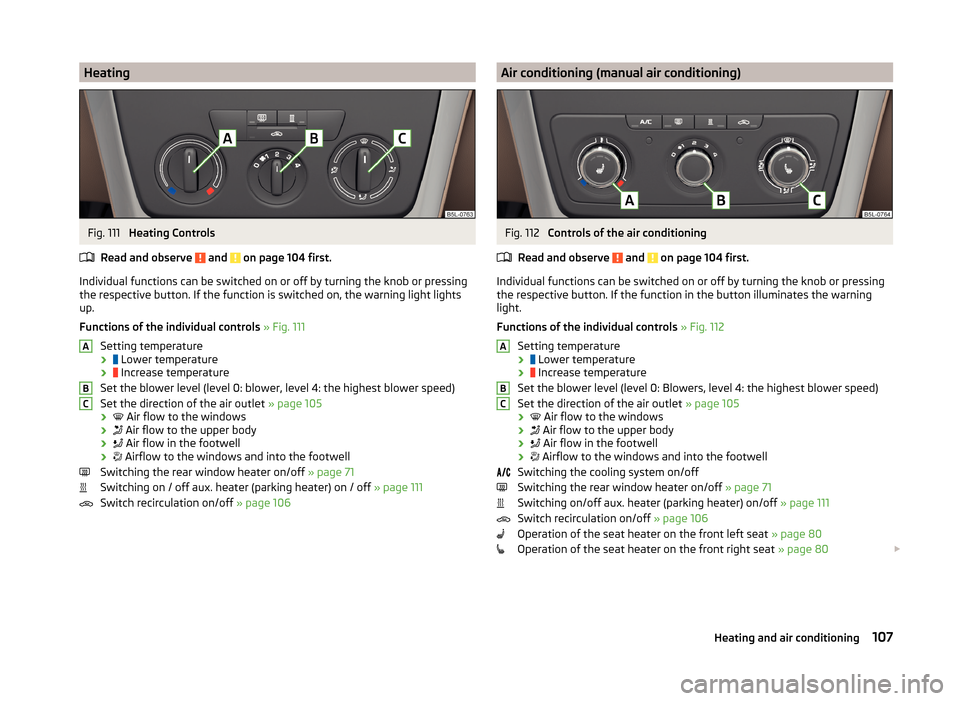
HeatingFig. 111
Heating Controls
Read and observe
and on page 104 first.
Individual functions can be switched on or off by turning the knob or pressing the respective button. If the function is switched on, the warning light lights
up.
Functions of the individual controls » Fig. 111
Setting temperature ›
Lower temperature
›
Increase temperature
Set the blower level (level 0: blower, level 4: the highest blower speed)
Set the direction of the air outlet » page 105
›
Air flow to the windows
›
Air flow to the upper body
›
Air flow in the footwell
›
Airflow to the windows and into the footwell
Switching the rear window heater on/off » page 71
Switching on / off aux. heater (parking heater) on / off » page 111
Switch recirculation on/off » page 106
ABCAir conditioning (manual air conditioning)Fig. 112
Controls of the air conditioning
Read and observe
and on page 104 first.
Individual functions can be switched on or off by turning the knob or pressing the respective button. If the function in the button illuminates the warning
light.
Functions of the individual controls » Fig. 112
Setting temperature ›
Lower temperature
›
Increase temperature
Set the blower level (level 0: Blowers, level 4: the highest blower speed)
Set the direction of the air outlet » page 105
›
Air flow to the windows
›
Air flow to the upper body
›
Air flow in the footwell
›
Airflow to the windows and into the footwell
Switching the cooling system on/off
Switching the rear window heater on/off » page 71
Switching on/off aux. heater (parking heater) on/off » page 111
Switch recirculation on/off » page 106
Operation of the seat heater on the front left seat » page 80
Operation of the seat heater on the front right seat » page 80
ABC107Heating and air conditioning
Page 111 of 248
Note■The warning light in the button lights after activation, even if not all of
the conditions for the function of the cooling system have been met. By light-
ing up of the indicator light in the button, the operational readiness of the
cooling system is signalled.■
During operation of the air conditioning, an increase in engine idle speed may
occur under certain circumstances in order to ensure sufficient heating com-
fort.
Climatronic (automatic air conditioning)
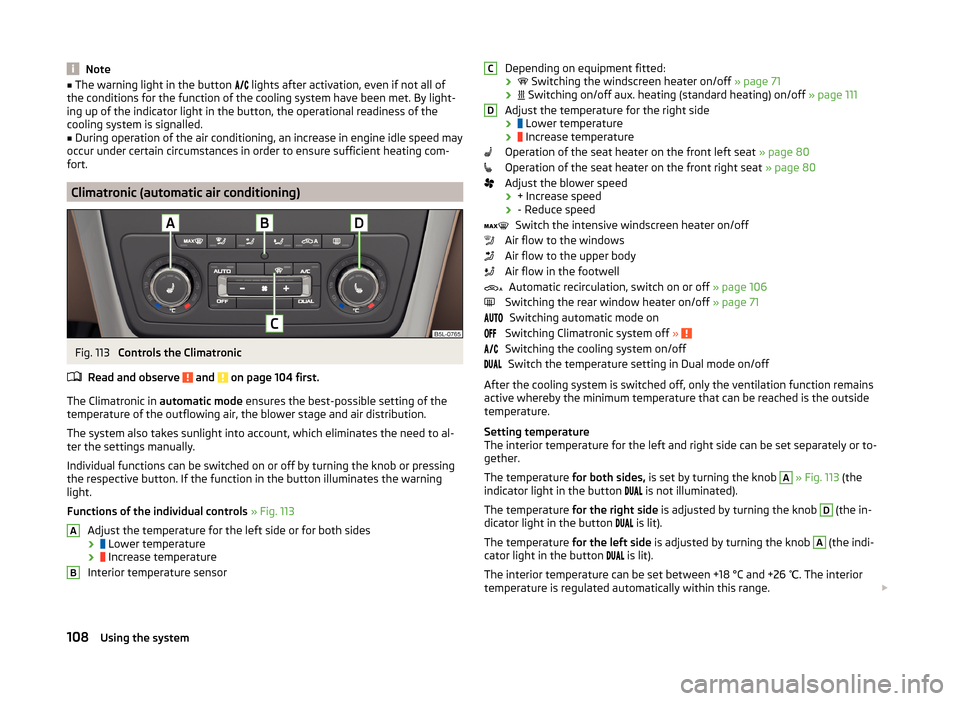
Fig. 113
Controls the Climatronic
Read and observe
and on page 104 first.
The Climatronic in automatic mode ensures the best-possible setting of the
temperature of the outflowing air, the blower stage and air distribution.
The system also takes sunlight into account, which eliminates the need to al-
ter the settings manually.
Individual functions can be switched on or off by turning the knob or pressing
the respective button. If the function in the button illuminates the warning
light.
Functions of the individual controls » Fig. 113
Adjust the temperature for the left side or for both sides
›
Lower temperature
›
Increase temperature
Interior temperature sensor
ABDepending on equipment fitted:
›
Switching the windscreen heater on/off » page 71
›
Switching on/off aux. heating (standard heating) on/off » page 111
Adjust the temperature for the right side ›
Lower temperature
›
Increase temperature
Operation of the seat heater on the front left seat » page 80
Operation of the seat heater on the front right seat » page 80
Adjust the blower speed › + Increase speed
› - Reduce speed
Switch the intensive windscreen heater on/off
Air flow to the windows
Air flow to the upper body
Air flow in the footwell Automatic recirculation, switch on or off » page 106
Switching the rear window heater on/off » page 71
Switching automatic mode on
Switching Climatronic system off »
Switching the cooling system on/off
Switch the temperature setting in Dual mode on/off
After the cooling system is switched off, only the ventilation function remains active whereby the minimum temperature that can be reached is the outside
temperature.
Setting temperature
The interior temperature for the left and right side can be set separately or to-
gether.
The temperature for both sides, is set by turning the knob
A
» Fig. 113 (the
indicator light in the button is not illuminated).
The temperature for the right side is adjusted by turning the knob
D
(the in-
dicator light in the button is lit).
The temperature for the left side is adjusted by turning the knob
A
(the indi-
cator light in the button is lit).
The interior temperature can be set between +18 °C and +26 ℃. The interior
temperature is regulated automatically within this range.
CD108Using the system
Page 112 of 248

If a temperature lower than +18 °C is selected, a blue symbol lights up at the
start of the numerical scale.
If a temperature higher than +26 °C is selected, the
symbol lights up at the
start of the numerical scale.
At both end positions, Climatronic runs at maximum cooling/heating output
and the temperature is automatically not regulated.
Controlling blower
The Climatronic system controls the blower stages automatically in line with the interior temperature. However, the blower stages can be manually adap-
ted to suit your particular needs.
If the blower speed is reduced to a minimum, Climatronic is switched off.
The set blower speed is displayed above the symbol button when the re-
spective number of indicator lights come on.
Automatic mode
The automatic mode is used in order to maintain a constant temperature and to demist the windows in the interior of the car.
If the warning light in the top right corner of the button lights up, the Cli-
matronic operates in “HIGH”-mode. The “HIGH” mode is the standard setting of
the Climatronic.
Upon pressing the button again, the Climatronic switches to “LOW”-mode
and the indicator light in the top left corner lights up. The Climatronic uses on-
ly in this mode the lower blower speed. However taking into account the noise
level, this is more comfortable, yet be aware that the effectiveness of the air
conditioning system is reduced particularly if the vehicle is fully occupied.
By pressing the button again, it is changed to “HIGH”-mode.
Automatic mode is switched off by pressing one of the buttons for the air dis- tribution or by increasing/decreasing the blower speed. The temperature is
nevertheless regulated.WARNING■ Do not switch off the Climatronic system for longer than necessary.■Switch on the Climatronic system as soon as the windows mist up.Note■ Do not stick anything onto or cover the interior temperature sensorB » Fig. 113 as this could impair the functioning of the Climatronic.■
If the windscreen mists up, press the symbol button
. Press the button
once the windscreen has demisted.
■
During operation of the Climatronic, an increase in engine idle speed can oc-
cur under certain circumstances in order to ensure adequate heating comfort.
■
For vehicles with factory-fitted radio the Climatronic information also ap-
pears on its display. This function can be switched off, see » Radio manual .
Efficient handling of the cooling system
Read and observe
and on page 104 first.
The air conditioning system compressor uses power from the engine when incooling mode, which will affect the fuel consumption.
It recommended to open the windows or the doors of a vehicle for which the
interior has been strongly heated through the effect of direct sunlight in order
to allow the heated air to escape.
The cooling system should not be on if the windows are open.
For the sake of the environment
Pollutant emissions are also lower when fuel is being saved » page 140.
malfunctions
Read and observe
and on page 104 first.
If the cooling system does not operate at outside temperatures higher than +5°C, there is a problem in the system. The reasons for this may be.
› One of the fuses has blown. Check the fuse and replace if necessa-
ry » page 214 .
› The cooling system has switched off automatically for a short time because
the coolant temperature of the engine is too hot » page 31.
If you are not able to resolve the operational problem yourself, or if the cooler
output has reduced, switch off the cooling system and seek assistance from a
specialist garage.
109Heating and air conditioning
Page 114 of 248

Switching on and off directlyFig. 114
Button for switching on/off the system directly on the operating
part of the air conditioning/Climatronic
Read and observe
and on page 110 first.
The auxiliary heating can be directly switched on or off at any time using the
button
» Fig. 114 on the operating part of the air-conditioning system , on the
operating part of the Climatronic system or via the radio remote con-
trol » page 111 .
If the auxiliary heating has not already been switched off, it switches off auto-
matically after the running time set in the Running time menu.
After switching off the auxiliary heating, the coolant pump still runs for a short
period.
System settings
Read and observe
and on page 110 first.
The following menu items can be selected from the Aux. heating menu item in
the MAXI DOT display (depending on the vehicle equipment). ■ Day of the wk. - set the current day of the week
■ Running time - Set the required running time in 5 minute increments. The
running time can be 10 to 60 minutes.
■ Mode - Set the desired heating/ventilation mode
■ Starting time 1 , Starting time 2 , Starting time 3 - for each pre-set time, the
day and the time (hour and minute) can be set for switching on the auxiliary
heating. An empty position can be found between Sunday and Monday when
selecting the day. If this empty position is selected, the activation is per-
formed without taking into account the day.
■ Activate - Activate pre-set mode
■ Deactivate - Deactivate pre-set mode
■ Factory settings - Restore factory settings
■ Back - return to main menu.
Only one programmed pre-set time can be active.
The last programmed pre-set time remains active.
After the auxiliary heating activates at the set time, it is necessary to pre-set a
time again.
If the pre-set menu is closed by selecting the Back menu item or if no changes
are made on the display for more than 10 seconds, the set values are stored,
but the pre-set time is not activated.
An indicator light on the button is illuminated when the system is running.
The running system deactivates after expiration of the operating period or can
be deactivated earlier by pressing the button to directly switch on/off the aux-
iliary heating or by using the radio remote control.
Radio remote control
Fig. 115
Radio remote control of the aux-
iliary heating
Read and observe and on page 110 first.
Radio remote control » Fig. 115
Aerial
Warning light
Switch on the auxiliary heating
Switch off the auxiliary heating
The transmitter and the battery are housed in the housing of the remote con-
trol. The receiver is located in the interior of the vehicle.
AB111Heating and air conditioning
Page 115 of 248

When the battery is fully charged, the range of the remote control is a few
hundred metres. Obstacles between the radio remote control and the vehicle,
bad weather conditions and a weaker battery can clearly reduce the range.
To switch the auxiliary heating on or off, hold the remote control vertically,
with the aerial A
» Fig. 115 pointing upwards. The antenna must not be cov-
ered with the fingers or the palm of the hand during this process.
The auxiliary heating can only be switched on/off safely using the radio re-
mote control, if the distance between the radio remote control and the vehicle
is at least 2 m.
After pressing the button, the warning light in the remote control gives the
user different kinds of feedback.
Display warning light B » Fig. 115MeaningLights up green for around 2 seconds.The auxiliary heating has been
switched on.Lights up red for around 2 seconds.The auxiliary heating has been
switched off.Slowly flashes green for around 2 sec-
onds.The ignition signal was not received.Quickly flashes green for around 2
seconds.The auxiliary heating is blocked, e. g
because the tank is nearly empty or
there is a fault in the auxiliary heat-
ing.Flashes red for around 2 seconds.The switch off signal was not re-
ceived.Lights up orange for around 2 sec-
onds, then green or red.The battery is weak, however the
switching on or off signal was re-
ceived.Lights up orange for around 2 sec-
onds, then flashes green or red.The battery is weak, however the
switching on or off signal was not re-
ceived.Flashes orange for around 5 seconds.The battery is discharged, however
the switching on or off signal was not
received.
Replace the battery » page 210.
CAUTIONThe radio remote control comprises electronic components and must therefore
be protected against water, severe impacts and direct sunlight.112Using the system