heating SKODA YETI 2014 1.G / 5L Owner's Manual
[x] Cancel search | Manufacturer: SKODA, Model Year: 2014, Model line: YETI, Model: SKODA YETI 2014 1.G / 5LPages: 248, PDF Size: 29.49 MB
Page 5 of 248
Table of Contents
On board literature4
Notes
5
Structure and more information about the
Owner's Manual
6
Abbreviations
Safety
Passive Safety
8
General information
8
Correct and safe seated position
9
Seat belts
12
Using seat belts
12
Inertia reels and belt tensioners
15
Airbag system
16
Description of the airbag system
16
Airbag overview
17
Deactivating airbags
21
Transporting children safely
23
Child seat
23
Fastening systems
26
Using the system
Cockpit
29
Overview
28
Instruments and Indicator Lights
30
Instrument cluster
30
Warning lights
34
Information system
42
Driver information system
42
Multifunction display (MFD)
44MAXI DOT display47Service interval display49
Unlocking and opening
51
Unlocking and locking
51
Anti-theft alarm system
56
Luggage compartment lid
57
Power windows
58
Mechanical windows
60
Panorama sliding/tilting roof
61
Lights and visibility
63
Lights
63
Interior lights
70
Visibility
71
Windscreen wipers and washers
72
Rear mirror
74
Seats and head restraints
77
Front seat
77
Front seat functions
80
Head restraints
82
Rear seats
83
Transporting and practical equipment
86
Useful equipment
86
Luggage compartment
96
Variable loading floor in the luggage
compartment (Estate)
102
Roof rack
103
Heating and air conditioning
104
Heating, ventilation, cooling
104
Auxiliary heating (auxiliary heating and
ventilation)
110
Communication and multimedia
113
General information
113
Universal telephone preinstallation (hands
free)
114
Universal telephone preinstallation GSM II
116Universal telephone preinstallation GSM IIl118Wi-Fi122
Voice control
123
Multimedia
125
SmartGate
129
Driving
Starting-off and Driving
131
Starting and stopping the engine using the
key
131
Start or stop the engine by pressing button
133
Brakes and parking
135
Manual gear changing and pedals
137
Automatic transmission
138
Running in and economical driving
140
Driving through water and driving off of
made-up roads
141
Assist systems
142
Braking and stabilisation systems
142
OFF ROAD-mode
144
Parking aid
146
Optical Parking Assistant (Rear view camera)
149
Park assist
150
Cruise Control System
154
START-STOP
155
Fatigue detection (break recommendation)
157
Tyre pressure monitoring
158
Hitch and trailer
159
Hitch
159
Trailer
163
General Maintenance
Care and maintenance
166
Service work, adjustments and technical alterations
166
Washing vehicle
1692Table of Contents
Page 32 of 248
Using the system
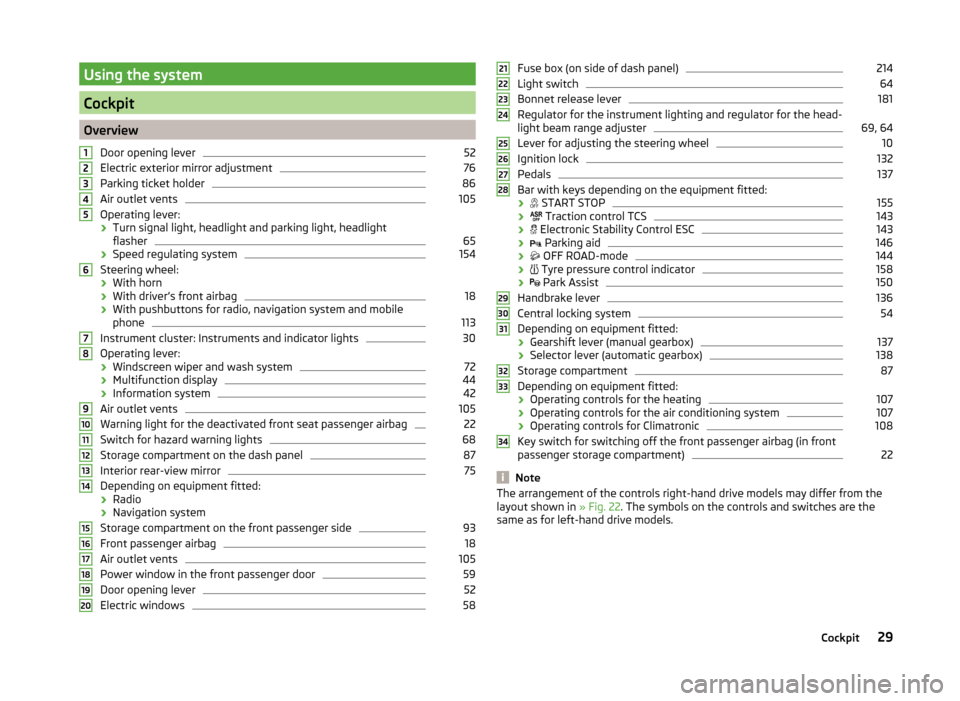
Cockpit
OverviewDoor opening lever
52
Electric exterior mirror adjustment
76
Parking ticket holder
86
Air outlet vents
105
Operating lever:
› Turn signal light, headlight and parking light, headlight
flasher
65
› Speed regulating system
154
Steering wheel:
› With horn
› With driver’s front airbag
18
›With pushbuttons for radio, navigation system and mobile
phone
113
Instrument cluster: Instruments and indicator lights
30
Operating lever:
› Windscreen wiper and wash system
72
›Multifunction display
44
›Information system
42
Air outlet vents
105
Warning light for the deactivated front seat passenger airbag
22
Switch for hazard warning lights
68
Storage compartment on the dash panel
87
Interior rear-view mirror
75
Depending on equipment fitted:
› Radio
› Navigation system
Storage compartment on the front passenger side
93
Front passenger airbag
18
Air outlet vents
105
Power window in the front passenger door
59
Door opening lever
52
Electric windows
581234567891011121314151617181920Fuse box (on side of dash panel)214
Light switch
64
Bonnet release lever
181
Regulator for the instrument lighting and regulator for the head-
light beam range adjuster
69, 64
Lever for adjusting the steering wheel
10
Ignition lock
132
Pedals
137
Bar with keys depending on the equipment fitted:
›
START STOP
155
›
Traction control TCS
143
›
Electronic Stability Control ESC
143
›
Parking aid
146
›
OFF ROAD-mode
144
›
Tyre pressure control indicator
158
›
Park Assist
150
Handbrake lever
136
Central locking system
54
Depending on equipment fitted:
› Gearshift lever (manual gearbox)
137
›Selector lever (automatic gearbox)
138
Storage compartment
87
Depending on equipment fitted:
› Operating controls for the heating
107
›Operating controls for the air conditioning system
107
›Operating controls for Climatronic
108
Key switch for switching off the front passenger airbag (in front
passenger storage compartment)
22
Note
The arrangement of the controls right-hand drive models may differ from the
layout shown in » Fig. 22. The symbols on the controls and switches are the
same as for left-hand drive models.212223242526272829303132333429Cockpit
Page 34 of 248

Revolutions counterRead and observe
on page 30 first.
The tachometer
1
» Fig. 23 on page 30 shows the actual engine speed per
minute.
The beginning of the tachometer red scale range indicates the maximum per-
mitted speed for an engine that has been driven-in and has reached operating
temperature.
You should shift into the next highest gear before the red scale of the revolu-
tion counter is reached, or select mode D on the automatic gearbox.
The gear recommendation is important to note in order to maintain the opti-
mum engine speed » page 43.
CAUTION
The pointer of the tachometer must reach the red area for only a short time -
there is a risk of engine damage!
Speedometer
Read and observe
on page 30 first.
The speedometer
2
» Fig. 23 on page 30 displays the current speed.
Warning against excessive speeds
An audible warning signal will sound when the vehicle speed exceeds 120 km/
h 1)
. The audible warning signal is switched off when the vehicle speed falls be-
low 120 km/h.
Coolant temperature gaugeFig. 24
Coolant temperature gauge
Read and observe on page 30 first.
The display » Fig. 24 provides information on the engine coolant temperature.
The display only works if the ignition is switched on.
Cold range
If the pointer is still in the left area of the scale, this indicates that the engine has not yet reached its operating temperature. Avoid high speeds, full throttle
and high engine loads. This prevents possible damage to the engine.
The operating range
The engine has reached its operating temperature as soon as the pointer
moves into the middle of the scale
A
» Fig. 24 . At very high ambient tempera-
tures or heavy engine loads, the pointer may move even further to the right.
High temperature range
If the pointer reaches the red area of the scale, the coolant temperature is too
high. Further information » page 36.
CAUTION
■
Additional headlights and other attached components in front of the air inlet
impair the cooling efficiency of the coolant.■
Never cover the radiator - there is a risk of the engine overheating.
1)
This function only applies to certain countries.
31Instruments and Indicator Lights
Page 37 of 248
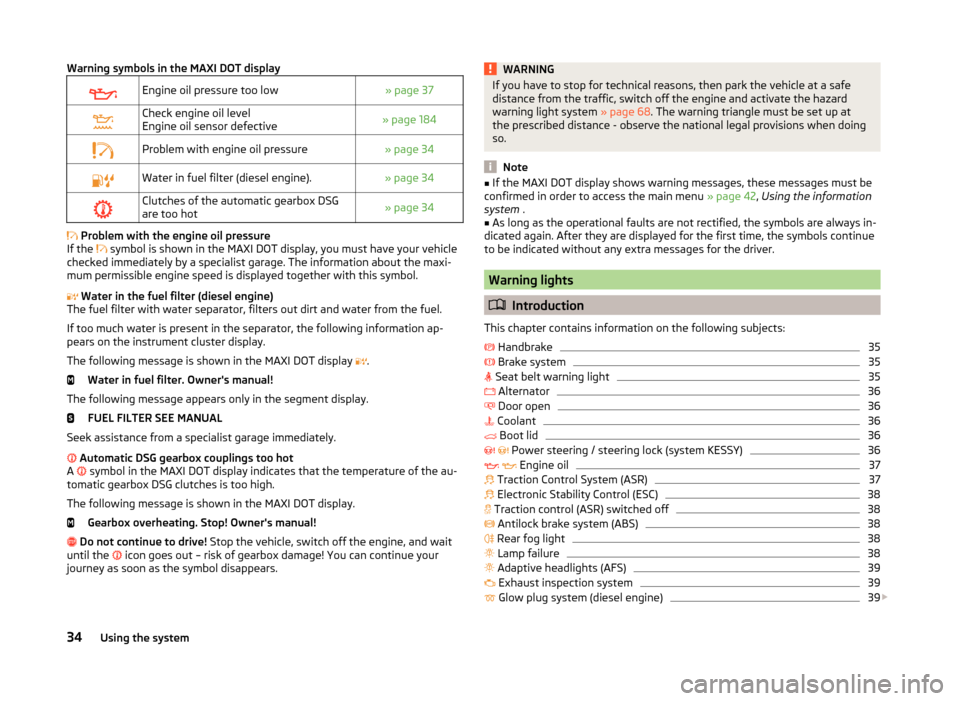
Warning symbols in the MAXI DOT displayEngine oil pressure too low» page 37Check engine oil level
Engine oil sensor defective» page 184Problem with engine oil pressure» page 34Water in fuel filter (diesel engine).» page 34Clutches of the automatic gearbox DSG
are too hot» page 34
Problem with the engine oil pressure
If the symbol is shown in the MAXI DOT display, you must have your vehicle
checked immediately by a specialist garage. The information about the maxi-
mum permissible engine speed is displayed together with this symbol.
Water in the fuel filter (diesel engine)
The fuel filter with water separator, filters out dirt and water from the fuel.
If too much water is present in the separator, the following information ap-
pears on the instrument cluster display.
The following message is shown in the MAXI DOT display .
Water in fuel filter. Owner's manual!
The following message appears only in the segment display. FUEL FILTER SEE MANUAL
Seek assistance from a specialist garage immediately.
Automatic DSG gearbox couplings too hot
A symbol in the MAXI DOT display indicates that the temperature of the au-
tomatic gearbox DSG clutches is too high.
The following message is shown in the MAXI DOT display. Gearbox overheating. Stop! Owner's manual!
Do not continue to drive! Stop the vehicle, switch off the engine, and wait
until the icon goes out – risk of gearbox damage! You can continue your
journey as soon as the symbol disappears.
WARNINGIf you have to stop for technical reasons, then park the vehicle at a safe
distance from the traffic, switch off the engine and activate the hazard
warning light system » page 68. The warning triangle must be set up at
the prescribed distance - observe the national legal provisions when doing
so.
Note
■ If the MAXI DOT display shows warning messages, these messages must be
confirmed in order to access the main menu » page 42, Using the information
system .■
As long as the operational faults are not rectified, the symbols are always in-
dicated again. After they are displayed for the first time, the symbols continue
to be indicated without any extra messages for the driver.
Warning lights
Introduction
This chapter contains information on the following subjects:
Handbrake
35
Brake system
35
Seat belt warning light
35
Alternator
36
Door open
36
Coolant
36
Boot lid
36
Power steering / steering lock (system KESSY)
36
Engine oil
37
Traction Control System (ASR)
37
Electronic Stability Control (ESC)
38
Traction control (ASR) switched off
38
Antilock brake system (ABS)
38
Rear fog light
38
Lamp failure
38
Adaptive headlights (AFS)
39
Exhaust inspection system
39
Glow plug system (diesel engine)
39
34Using the system
Page 39 of 248
AlternatorRead and observe
on page 35 first.
The warning light
lights up when the engine is running but the vehicle bat-
tery is not charging.
Seek assistance from a specialist garage immediately.
CAUTION
If in addition to the symbol the symbol » page 36 lights up while driving,
stop driving - risk of engine damage! Switch off the engine and seek assis-
tance from a specialist garage.
Door open
Read and observe
on page 35 first.
The indicator light
illuminates if one or several doors are opened.
On vehicles with MAXI DOT display, this indicator is replaced by a vehicle icon
on the display » page 44 .
Coolant
Read and observe
on page 35 first.
If the warning light
lights up or flashes , either the coolant temperature is
too high or the coolant level is too low.
The following message is shown in the MAXI DOT display. Check engine coolant! Owner's manual!
›
Stop the vehicle, switch off the engine, and check the coolant lev-
el » page 185 .
›
If the coolant level is too low, add coolant to the reservoir » page 186.
If the indicator light
does not illuminate after adding coolant and switching
on the ignition, you may continue your journey.
If the coolant is within the specified range and the warning icon is still
lit
after switching on the ignition, then there may be a malfunction of the cooling
fan.
›
Switch off the ignition.
› Check the fuse for the radiator fan, replace if necessary
» page 216, Fuses in
the engine compartment .
If the coolant level and fan fuse are OK and the warning icon
lights up again
after switching on the ignition,
stop driving!
Seek help from a specialist garage.WARNING■ Carefully open the coolant expansion bottle. If the engine is hot, the cool-
ing system is pressurized - risk of scalding! It is therefore best to allow the
engine to cool down before removing the cap.■
Do not touch the radiator fan. The radiator fan may switch itself on auto-
matically even if the ignition is off - risk of injury!
CAUTION
■ Additional headlights and other attached components in front of the air inlet
impair the cooling efficiency of the coolant.■
Never cover the radiator - there is a risk of the engine overheating.
Boot lid
Read and observe
on page 35 first.
The indicator light
illuminates if the boot lid is opened.
On vehicles with MAXI DOT display, this indicator is replaced by a vehicle icon
on the display » page 44 .
Power steering / steering lock (system KESSY)
Read and observe
on page 35 first.
Power steering
If the indicator light
illuminates , this indicates a complete failure of the
power steering and the steering assist has failed (significantly higher steering
forces).
If the indicator light
illuminates , this indicates a partial failure of the power
steering and the steering forces can be greater.
›
Stop the car, turn the ignition off and on again.
The powered steering is fully functional again if the
or
warning light does
not illuminate after you switch the engine back on.
36Using the system
Page 50 of 248

The speed limit can be adjusted from 30 km/h to 250 km/h in 5 km/h incre-
ments.
Adjusting the speed limit while the vehicle is moving›
Select the menu item Speed warning at (
) or
(
).
›
Drive at the desired speed, e.g. 50 km/h.
›
Confirm the current speed as the speed limit.
If you wish to adjust the set speed limit, you can do so in 5 km/h intervals (e.g.
the accepted speed of 47 km/h increases to 50 km/h or decreases to 45 km/h).
›
Store the speed limit, or wait several seconds; your settings will be saved au-
tomatically.
Change or disable speed limit
›
Select the menu item Speed warning at (
) or
(
).
›
By confirming the stored value, the speed limit is disabled.
›
By reconfirming, the option to change the speed limit is activated.
If the set speed limit is exceeded, an audible signal will sound as a warning.
The menu item Speed warning (MAXI DOT display) or
(Segment display) ap-
pears in the display at the same time as the set threshold.
The set speed limit value remains stored even after switching off the ignition.
MAXI DOT display
Introduction
This chapter contains information on the following subjects:
Main menu
47
Settings
47
The MAXI DOT display provides you with information about the current operat-
ing state of your vehicle. In addition, it provides information, depending on ve-
hicle equipment, about the radio, multi-function display (MFA), telephone and
infotainment navigation. Furthermore, it allows the adjustment of some other
features of your vehicle.
WARNINGConcentrate fully at all times on your driving! As the driver, you are fully re-
sponsible for the operation of your vehicle.Main menu
Read and observe
on page 47 first.
In order to activate the primary menu MAIN MENU, press and hold down But-
ton
A
or
C
» Fig. 28 on page 42 . By briefly pressing the
C
button you will
reach one level higher.
Main menu items (depending on vehicle equipment) ■ MFD (Multifunction display) » page 44
■ Audio » Radio instruction manual or » Infotainment radio instruction manual
■ Navigation » Infotainment navigation manual
■ Phone » page 113 ;
■ Aux. heating » page 110
■ Assist systems » page 157
■ Vehicle status » page 33
■ Settings » page 47
The menu items Audio and Navigation are only displayed when the factory-fit-
ted radio, Infotainment radio or Infotainment navigation systems are switched
on.
The menu item Phone appears only on vehicles with the universal phone in-
stallation kit (hands free) » page 114.
Note
■
If warning messages are displayed, these messages must be verified to ac-
cess the main menu » page 42, Using the information system .■
If the display is not activated at that moment, the menu always shifts to one
of the higher levels after approx. 10 seconds.
■
Operation of factory-fitted radio / navigation » Radio manual or » Infotain-
ment radio manual or » Infotainment navigation manual .
Settings
Read and observe
on page 47 first.
You can change certain settings by means of the MAXI DOT display. The cur-
rent menu item is shown in the top of the display under a line.
The following information can be selected (depending on the equipment in- stalled in the vehicle).
47Information system
Page 61 of 248
Delayed locking of the boot lidRead and observe
on page 57 first.
If the boot lid is unlocked with the symbol button
on the remote control
key, then the door is automatically locked after closing.
The period after which the boot lid is locked automatically can be extended by a specialist garage.
After activation of delayed locking, the boot lid can be opened again after clos-
ing within a limited period.
Delayed locking can be deactivated by a specialist garage at any time.
CAUTION
There is a risk of unwanted entry into the vehicle before the boot lid is locked
automatically. We therefore recommend locking the vehicle with the symbol
button
on the remote control key.
Power windows
Introduction
This chapter contains information on the following subjects:
Open / close windows
59
Opening the windows in the front passenger door and in the rear doors
59
Force limit
60
Window convenience operation
60
Operational faults
60WARNINGThe system is fitted with a force limiter » page 60. If there is an obstacle,
the closing process is stopped and the window goes down by several centi-
metres. However, the windows should be closed carefully – risk of injury.CAUTION■ Keep the windows clean to ensure the correct functionality of the electric
windows.■
In the event that the windows are frozen, first of all eliminate the
ice » page 172 , Windows and mirrors and only then operate the electrical
power windows. Otherwise, the window sealing and the electrical power win-
dow mechanism could be damaged.
■
In the winter, ice accumulating on the surface of the window may cause
there to be more resistance when closing the window. The window will stop
and move back several centimetres.
■
It is necessary to deactivate the force limiter to close the win-
dow » page 60 .
■
Make sure that the windows are closed whenever you leave the locked vehi-
cle.
■
Always close the sliding/tilting roof before disconnecting the battery.
For the sake of the environment
At high speeds you should keep the windows closed to prevent unnecessarily high fuel consumption.
Note
■ After switching the ignition off, it is still possible to open or close the win-
dows for approx. 10 minutes. After the driver's or front passenger's door has
been opened, the windows can only be operated by using button A
» Fig. 40
on page 59 .
■
When driving always use the existing heating, air conditioning and ventila-
tion system for ventilating the interior of the vehicle. If the windows are
opened, dust as well as other dirt can get into the vehicle and in addition the wind noise is more at certain speeds.
■
The window lift mechanism is equipped with protection against overheating.
Repeated opening and closing of the window can cause this mechanism to
overheat. If this happens, it will not be possible to operate the window for a
short time. You will be able to operate the window again as soon as the over-
heating protection has cooled down.
58Using the system
Page 64 of 248
CAUTION■If windows are frozen, always remove ice » page 172, Windows and mirrors
before operating the electrical power windows. The window seals and the
electrical power window mechanism can otherwise be damaged.■
Always make sure that the windows are closed when you leave the locked
vehicle.
For the sake of the environment
At high speeds, you should keep the windows closed to prevent unnecessarily high fuel consumption.
Note
When driving always use the existing heating, air conditioning and ventilation
system for ventilating the interior of the vehicle. If the windows are opened,
dust and other dirt can get into the vehicle and the wind noise is more at cer-
tain speeds.
Opening / closing windows
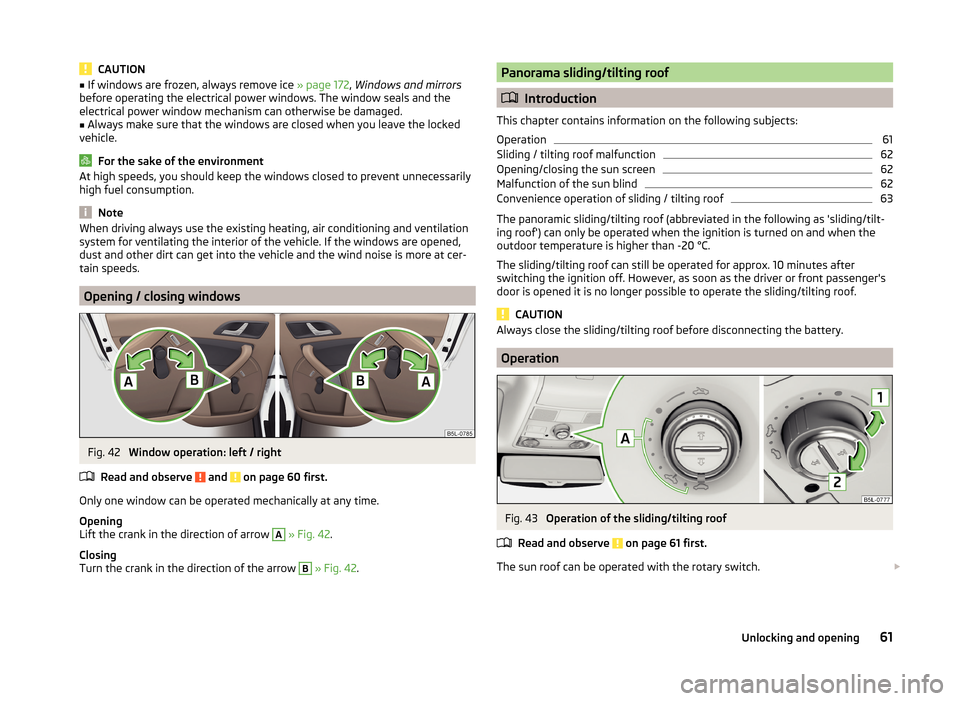
Fig. 42
Window operation: left / right
Read and observe
and on page 60 first.
Only one window can be operated mechanically at any time.
Opening
Lift the crank in the direction of arrow
A
» Fig. 42 .
Closing
Turn the crank in the direction of the arrow
B
» Fig. 42 .
Panorama sliding/tilting roof
Introduction
This chapter contains information on the following subjects:
Operation
61
Sliding / tilting roof malfunction
62
Opening/closing the sun screen
62
Malfunction of the sun blind
62
Convenience operation of sliding / tilting roof
63
The panoramic sliding/tilting roof (abbreviated in the following as 'sliding/tilt-
ing roof') can only be operated when the ignition is turned on and when the
outdoor temperature is higher than -20 °C.
The sliding/tilting roof can still be operated for approx. 10 minutes after
switching the ignition off. However, as soon as the driver or front passenger's
door is opened it is no longer possible to operate the sliding/tilting roof.
CAUTION
Always close the sliding/tilting roof before disconnecting the battery.
Operation
Fig. 43
Operation of the sliding/tilting roof
Read and observe
on page 61 first.
The sun roof can be operated with the rotary switch.
61Unlocking and opening
Page 74 of 248
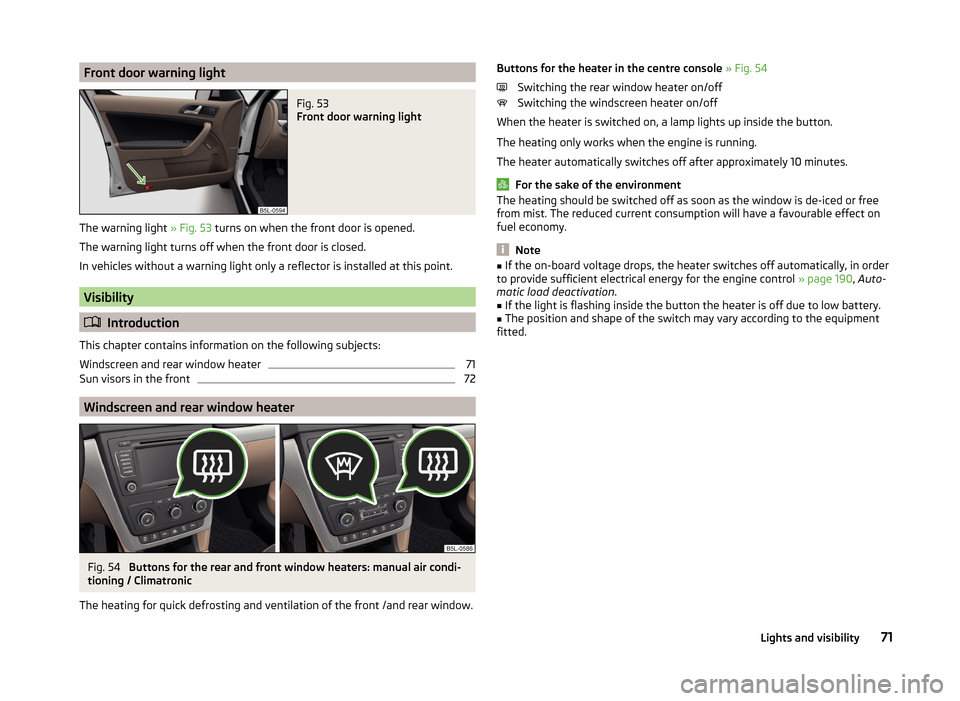
Front door warning lightFig. 53
Front door warning light
The warning light » Fig. 53 turns on when the front door is opened.
The warning light turns off when the front door is closed.
In vehicles without a warning light only a reflector is installed at this point.
Visibility
Introduction
This chapter contains information on the following subjects:
Windscreen and rear window heater
71
Sun visors in the front
72
Windscreen and rear window heater
Fig. 54
Buttons for the rear and front window heaters: manual air condi-
tioning / Climatronic
The heating for quick defrosting and ventilation of the front /and rear window.
Buttons for the heater in the centre console » Fig. 54
Switching the rear window heater on/off
Switching the windscreen heater on/off
When the heater is switched on, a lamp lights up inside the button.
The heating only works when the engine is running.
The heater automatically switches off after approximately 10 minutes.
For the sake of the environment
The heating should be switched off as soon as the window is de-iced or free
from mist. The reduced current consumption will have a favourable effect on
fuel economy.
Note
■ If the on-board voltage drops, the heater switches off automatically, in order
to provide sufficient electrical energy for the engine control » page 190, Auto-
matic load deactivation .■
If the light is flashing inside the button the heater is off due to low battery.
■
The position and shape of the switch may vary according to the equipment
fitted.
71Lights and visibility
Page 75 of 248
Sun visors in the frontFig. 55
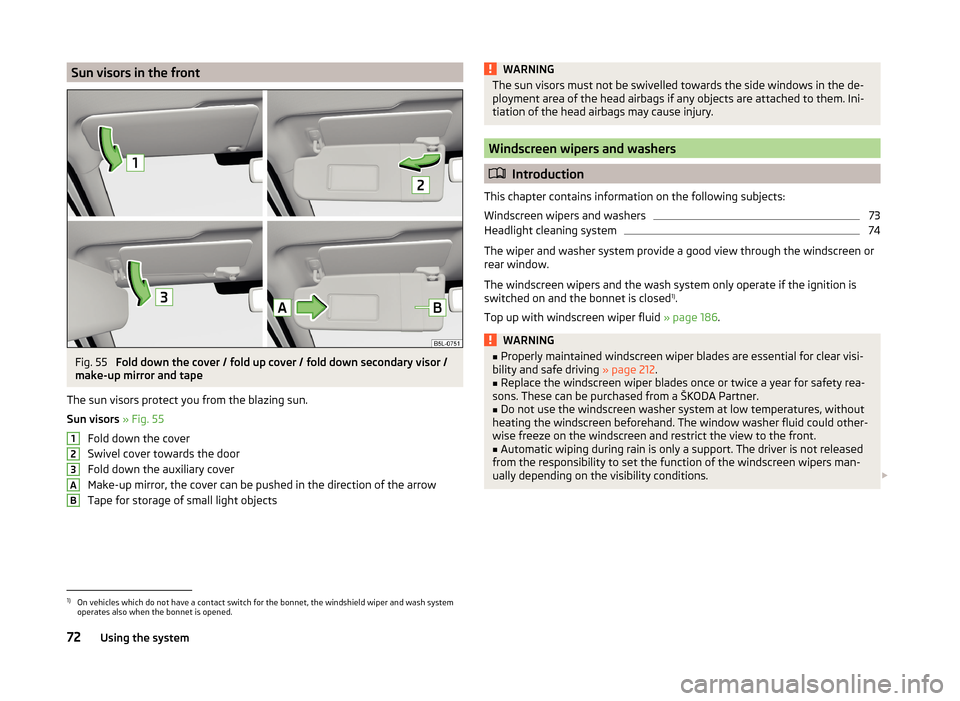
Fold down the cover / fold up cover / fold down secondary visor /
make-up mirror and tape
The sun visors protect you from the blazing sun.
Sun visors » Fig. 55
Fold down the cover
Swivel cover towards the door
Fold down the auxiliary cover
Make-up mirror, the cover can be pushed in the direction of the arrow
Tape for storage of small light objects
123ABWARNINGThe sun visors must not be swivelled towards the side windows in the de-
ployment area of the head airbags if any objects are attached to them. Ini-
tiation of the head airbags may cause injury.
Windscreen wipers and washers
Introduction
This chapter contains information on the following subjects:
Windscreen wipers and washers
73
Headlight cleaning system
74
The wiper and washer system provide a good view through the windscreen or
rear window.
The windscreen wipers and the wash system only operate if the ignition is
switched on and the bonnet is closed 1)
.
Top up with windscreen wiper fluid » page 186.
WARNING■
Properly maintained windscreen wiper blades are essential for clear visi-
bility and safe driving » page 212.■
Replace the windscreen wiper blades once or twice a year for safety rea-
sons. These can be purchased from a ŠKODA Partner.
■
Do not use the windscreen washer system at low temperatures, without
heating the windscreen beforehand. The window washer fluid could other-
wise freeze on the windscreen and restrict the view to the front.
■
Automatic wiping during rain is only a support. The driver is not released
from the responsibility to set the function of the windscreen wipers man-
ually depending on the visibility conditions.
1)
On vehicles which do not have a contact switch for the bonnet, the windshield wiper and wash system
operates also when the bonnet is opened.
72Using the system