driver SKODA YETI 2017 Owner´s Manual
[x] Cancel search | Manufacturer: SKODA, Model Year: 2017, Model line: YETI, Model: SKODA YETI 2017Pages: 200, PDF Size: 28.93 MB
Page 116 of 200

The system is only available, if the front wheels are in the straight-ahead posi-
tion.
The system operates at speeds of up to 50 km/h.
Start-Off Assistant 1)
Read and observe
and on page 112 first.
The Start-Off assistant assists the driver when setting off, such as on a steep
slope or on a slippery surface. When the driver presses the accelerator, the
maximum engine speed is electronically limited so that a gentle approach is
possible.
Parking aid (ParkPilot)
Introduction
This chapter contains information on the following subjects:
Function
114
Display in the Infotainment display
115
Activation / deactivation
116
The parking aid (hereinafter referred to as system) draws attention via acous-
tic signals or the Infotainment display when manoeuvring around obstacles in
the vicinity of the vehicle.
WARNING■ The general information relating to the use of assistance systems must
be observed » page 110, in section General information .■
Moving persons or objects may not be recognized by the system sensors.
■
Under certain circumstances, surfaces of certain objects and types of
clothing cannot reflect the system signals. There is a danger that such ob-
jects or people may not be recognised by the system sensors.
WARNING (Continued)■ External noise sources may affect the signals of the system sensors.
There is a danger that obstacles may not be recognised by the system sen-
sors.■
Before reversing, you should satisfy yourself that there are no small ob-
stacle, such as a rock, thin post etc., in front or behind your vehicle. Such
obstacles may not be recognised by the system sensors.
CAUTION
■ Keep the system sensors » Fig. 133 on page 114 clean, snow-and ice-free
and do not cover with any objects of any kind, otherwise the system function-
ing may be impaired.■
In adverse weather conditions (heavy rain, water vapour, very low or high
temperatures, etc.), the functioning of the system may be impaired - “incorrect
recognition of obstacles”.
■
Accessories additionally installed on the vehicle rear, such as bicycle carriers,
can impair the system function.
Function
Fig. 133
Installation location of the sensors on the left side of the vehicle:
front / rear
1)
Only for vehicles with a petrol engine and manual transmission.
114Driving
Page 118 of 200

Activation / deactivationFig. 136
System key (option 2, 3)
Read and observe and on page 114 first.
Activation
The activation of the system is initiated when the reverse gear is engaged, or,
with vehicles with the variant 2 and 3 , also by pressing the
» Fig. 136 but-
ton.
When activating, an alarm sounds and the symbol illuminates in the button.
Deactivation
On vehicles with Version 1, the system can be deactivated by moving out of re-
verse gear.
For vehicles with version 2 and 3, the system is automatically deactivated by
pressing the button or at a speed above 15 km/h (the
symbol in the but-
ton goes out).
Fault display
If a warning signal sounds for 3 seconds after activating the system and there
is no obstacle close to your car, this indicates a system fault. The fault is also
indicated by the symbol flashing in the button. Seek help from a specialist
garage.
Note
The system can only be activated with the button at a speed of below 15
km/h.Reversing camera
Introduction
This chapter contains information on the following subjects:
Operation
117
Guidelines and function keys
117
The rear view camera (hereinafter referred to as system) helps the driver when
parking and manoeuvring by displaying the area behind the vehicle in the Info-
tainment display (hereinafter referred to as display).
WARNING■ The general information relating to the use of assistance systems must
be observed » page 110, in section General information .■
The camera may not be soiled or obscured, otherwise the system function
will be significantly affected - there is a risk of an accident. For information
on cleaning » page 136, Exterior car care .
CAUTION
■
The camera image is distorted by contrast with eyesight. The display is
therefore only of limited use for estimating distances to following vehicles.■
Some items, such as thin columns, chain link fences or lattice, may not be
represented adequately in terms of display resolution.
■
In a crash or damage the vehicle's rear camera can possibly deviate from the
correct position. If this is the case, have the sensor checked by a specialist ga-
rage.
116Driving
Page 119 of 200
OperationFig. 137
Installation location of the camera / scanned area behind the ve-
hicle
Read and observe
and on page 116 first.
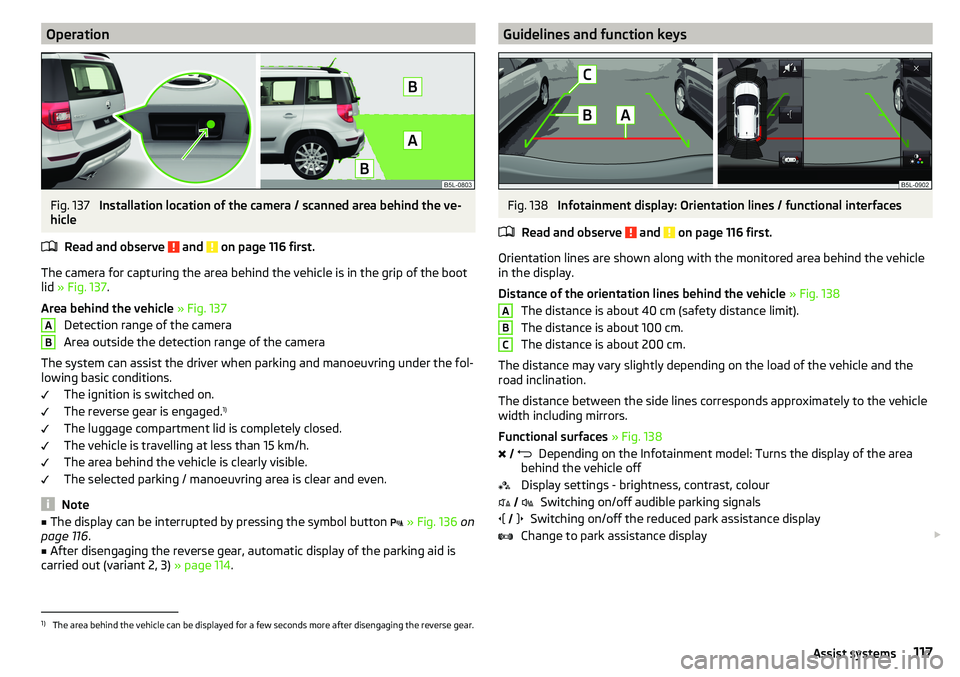
The camera for capturing the area behind the vehicle is in the grip of the boot
lid » Fig. 137 .
Area behind the vehicle » Fig. 137
Detection range of the camera
Area outside the detection range of the camera
The system can assist the driver when parking and manoeuvring under the fol- lowing basic conditions.
The ignition is switched on.
The reverse gear is engaged. 1)
The luggage compartment lid is completely closed.
The vehicle is travelling at less than 15 km/h.
The area behind the vehicle is clearly visible.
The selected parking / manoeuvring area is clear and even.
Note
■ The display can be interrupted by pressing the symbol button » Fig. 136 on
page 116 .■
After disengaging the reverse gear, automatic display of the parking aid is
carried out (variant 2, 3) » page 114.
ABGuidelines and function keysFig. 138
Infotainment display: Orientation lines / functional interfaces
Read and observe
and on page 116 first.
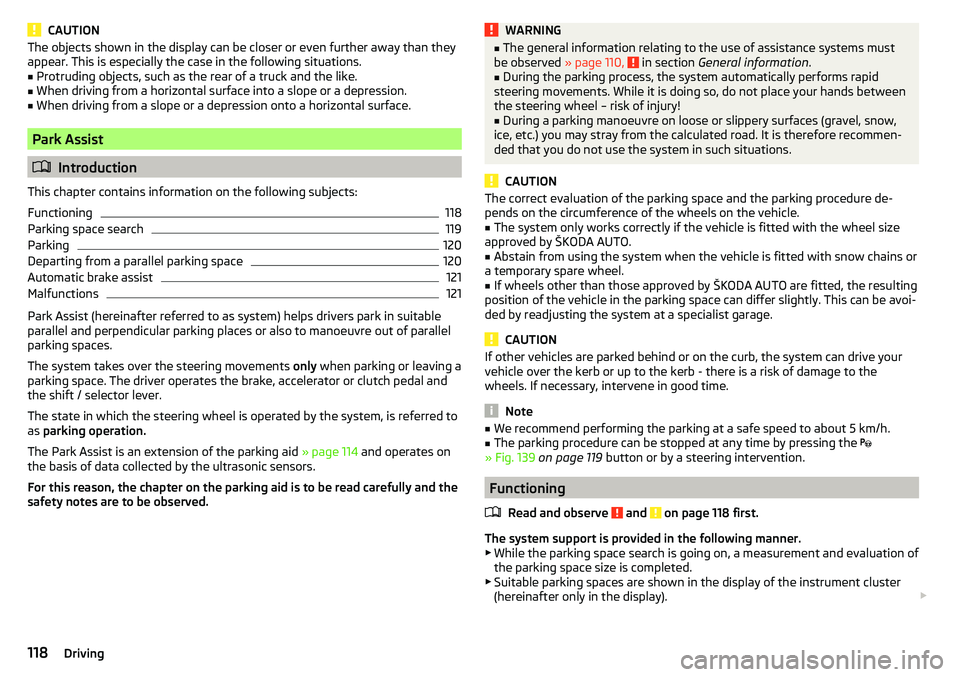
Orientation lines are shown along with the monitored area behind the vehicle
in the display.
Distance of the orientation lines behind the vehicle » Fig. 138
The distance is about 40 cm (safety distance limit).
The distance is about 100 cm.
The distance is about 200 cm.
The distance may vary slightly depending on the load of the vehicle and the
road inclination.
The distance between the side lines corresponds approximately to the vehicle
width including mirrors.
Functional surfaces » Fig. 138
Depending on the Infotainment model: Turns the display of the area
behind the vehicle off
Display settings - brightness, contrast, colour Switching on/off audible parking signals
Switching on/off the reduced park assistance display
Change to park assistance display
ABC
1)
The area behind the vehicle can be displayed for a few seconds more after disengaging the reverse gear.
117Assist systems
Page 120 of 200
CAUTIONThe objects shown in the display can be closer or even further away than they
appear. This is especially the case in the following situations.■
Protruding objects, such as the rear of a truck and the like.
■
When driving from a horizontal surface into a slope or a depression.
■
When driving from a slope or a depression onto a horizontal surface.
Park Assist
Introduction
This chapter contains information on the following subjects:
Functioning
118
Parking space search
119
Parking
120
Departing from a parallel parking space
120
Automatic brake assist
121
Malfunctions
121
Park Assist (hereinafter referred to as system) helps drivers park in suitable
parallel and perpendicular parking places or also to manoeuvre out of parallel
parking spaces.
The system takes over the steering movements only when parking or leaving a
parking space. The driver operates the brake, accelerator or clutch pedal and
the shift / selector lever.
The state in which the steering wheel is operated by the system, is referred to
as parking operation.
The Park Assist is an extension of the parking aid » page 114 and operates on
the basis of data collected by the ultrasonic sensors.
For this reason, the chapter on the parking aid is to be read carefully and the safety notes are to be observed.
WARNING■ The general information relating to the use of assistance systems must
be observed » page 110, in section General information .■
During the parking process, the system automatically performs rapid
steering movements. While it is doing so, do not place your hands between
the steering wheel – risk of injury!
■
During a parking manoeuvre on loose or slippery surfaces (gravel, snow,
ice, etc.) you may stray from the calculated road. It is therefore recommen-
ded that you do not use the system in such situations.
CAUTION
The correct evaluation of the parking space and the parking procedure de-
pends on the circumference of the wheels on the vehicle.■
The system only works correctly if the vehicle is fitted with the wheel size
approved by ŠKODA AUTO.
■
Abstain from using the system when the vehicle is fitted with snow chains or
a temporary spare wheel.
■
If wheels other than those approved by ŠKODA AUTO are fitted, the resulting
position of the vehicle in the parking space can differ slightly. This can be avoi-
ded by readjusting the system at a specialist garage.
CAUTION
If other vehicles are parked behind or on the curb, the system can drive your
vehicle over the kerb or up to the kerb - there is a risk of damage to the
wheels. If necessary, intervene in good time.
Note
■ We recommend performing the parking at a safe speed to about 5 km/h.■The parking procedure can be stopped at any time by pressing the
» Fig. 139 on page 119 button or by a steering intervention.
Functioning
Read and observe
and on page 118 first.
The system support is provided in the following manner.▶ While the parking space search is going on, a measurement and evaluation of
the parking space size is completed.
▶ Suitable parking spaces are shown in the display of the instrument cluster
(hereinafter only in the display).
118Driving
Page 121 of 200
▶The display shows instructions and information before the start and during
the parking.
▶ Based on the calculated road surface, the front wheels will be automatically
rotated during the parking.
Conditions for the system function
The system can look for a parking space only if the following basic conditions
are met.
The system is activated.
The vehicle is travelling at less than 40 km/h.
The vehicle is travelling at less than 20 km/h.
The distance to a number of parked vehicles is approximately 0.5-1.5 m.
TCS is activated » page 111.
The system can only carry out the parking procedure if the following basic con- ditions are met.
The vehicle is travelling at less than 7 km/h.
The parking procedure takes less than 6 minutes.
There is no driver intervention in the automatic steering operation.
TCS is activated » page 111.
The TCS does not engage.
No trailer or other accessory is connected to the trailer socket.
Activation/deactivation
The system can be activated/deactivated by pressing the button
» Fig. 139
on page 119 -
.
When the system is activated, the symbol illuminates.Parking space searchFig. 139
System button / display
Read and observe
and on page 118 first.
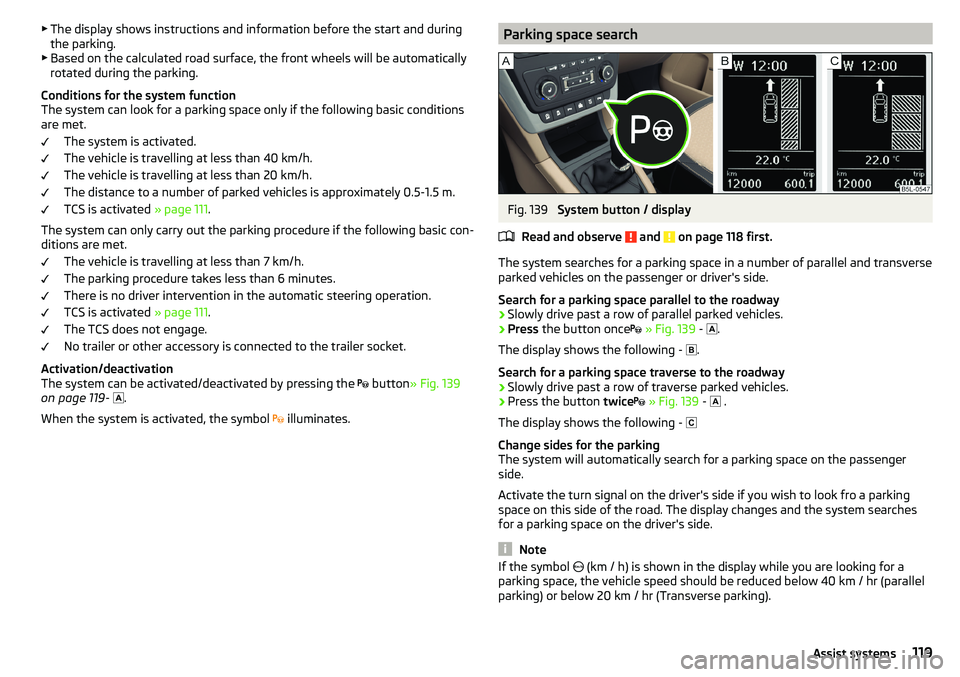
The system searches for a parking space in a number of parallel and transverse
parked vehicles on the passenger or driver's side.
Search for a parking space parallel to the roadway
›
Slowly drive past a row of parallel parked vehicles.
›
Press the button once
» Fig. 139 -
.
The display shows the following - .
Search for a parking space traverse to the roadway
›
Slowly drive past a row of traverse parked vehicles.
›
Press the button twice
» Fig. 139 -
.
The display shows the following -
Change sides for the parking
The system will automatically search for a parking space on the passenger
side.
Activate the turn signal on the driver's side if you wish to look fro a parking
space on this side of the road. The display changes and the system searches
for a parking space on the driver's side.
Note
If the symbol (km / h) is shown in the display while you are looking for a
parking space, the vehicle speed should be reduced below 40 km / hr (parallel parking) or below 20 km / hr (Transverse parking).119Assist systems
Page 122 of 200
ParkingFig. 140
Display
Read and observe
and on page 118 first.
The system supports the driver when reverse parking in the parking space
found in a number of traverse and parallel parked vehicles.
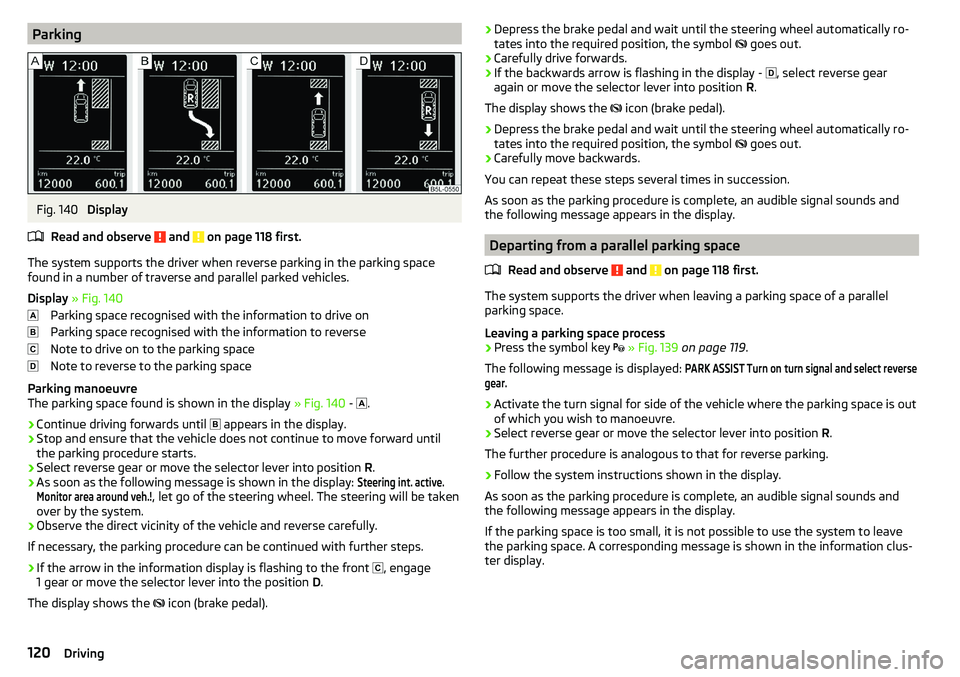
Display » Fig. 140
Parking space recognised with the information to drive on
Parking space recognised with the information to reverse
Note to drive on to the parking space
Note to reverse to the parking space
Parking manoeuvre
The parking space found is shown in the display » Fig. 140 -
.
›
Continue driving forwards until
appears in the display.
›
Stop and ensure that the vehicle does not continue to move forward until
the parking procedure starts.
›
Select reverse gear or move the selector lever into position R.
›
As soon as the following message is shown in the display:
Steering int. active.Monitor area around veh.!
, let go of the steering wheel. The steering will be taken
over by the system.
›
Observe the direct vicinity of the vehicle and reverse carefully.
If necessary, the parking procedure can be continued with further steps.
›
If the arrow in the information display is flashing to the front , engage
1 gear or move the selector lever into the position D.
The display shows the icon (brake pedal).
›Depress the brake pedal and wait until the steering wheel automatically ro-
tates into the required position, the symbol goes out.›
Carefully drive forwards.
›
If the backwards arrow is flashing in the display -
, select reverse gear
again or move the selector lever into position R.
The display shows the
icon (brake pedal).
›
Depress the brake pedal and wait until the steering wheel automatically ro-
tates into the required position, the symbol
goes out.
›
Carefully move backwards.
You can repeat these steps several times in succession.
As soon as the parking procedure is complete, an audible signal sounds and the following message appears in the display.
Departing from a parallel parking space
Read and observe
and on page 118 first.
The system supports the driver when leaving a parking space of a parallel
parking space.
Leaving a parking space process
›
Press the symbol key
» Fig. 139 on page 119 .
The following message is displayed:
PARK ASSIST Turn on turn signal and select reversegear.›
Activate the turn signal for side of the vehicle where the parking space is out
of which you wish to manoeuvre.
›
Select reverse gear or move the selector lever into position R.
The further procedure is analogous to that for reverse parking.
›
Follow the system instructions shown in the display.
As soon as the parking procedure is complete, an audible signal sounds and
the following message appears in the display.
If the parking space is too small, it is not possible to use the system to leave
the parking space. A corresponding message is shown in the information clus-
ter display.
120Driving
Page 123 of 200
Automatic brake assistRead and observe
and on page 118 first.
Automatic brake assist when speeding
If a velocity of 7 km / h is exceeded during the parking manoeuvre for the first
time, the speed will be automatically reduced by the system to less than 7 km /
h. This prevents the parking manoeuvre from aborting.
Automatic emergency braking
If the system detects a risk of collision during parking, automatic emergency
braking takes place to prevent a collision.
The parking is terminated by the emergency braking.
CAUTION
The automatic emergency braking is not triggered by the system when the
parking process stops due to the speed of 7 km / hr being exceeded!
Malfunctions
Read and observe
and on page 118 first.
If, for some unknown reason, the system is not available, an appropriate mes-
sage appears in the display of the instrument cluster.
System unavailable
If the system is not available because the vehicle has a fault, a message ap-
pears concerning the unavailability. Seek help from a specialist garage.
System fault
In the case of a system fault, an error message appears. Seek help from a spe-
cialist garage.
Cruise Control System
Introduction
This chapter contains information on the following subjects:
Operation
121
Operation description
122The Cruise Control System (CCS) maintains a set speed without you having to
actuate the accelerator pedal. The state where the CCS maintains the speed is
referred to hereinafter as the control.WARNINGThe general information relating to the use of assistance systems must be
observed » page 110, in section General information .
Operation
Read and observe
on page 121 first.
Basic requirements for start of control The CCS is activated.
On vehicles with a manual transmission , the second gear or higher is en-
gaged.
On vehicles with an automatic transmission , the selector lever is in the
D/S position or in the Tiptronic position.
The current speed is higher than 20 km/h.
This, however, is only possible to the extent permitted by the engine output
and braking power of the vehicle.
WARNINGIf the engine output or engine braking effect is insufficient to maintain the
set speed, the driver must assume control of the accelerator and brake
pedals!121Assist systems
Page 124 of 200
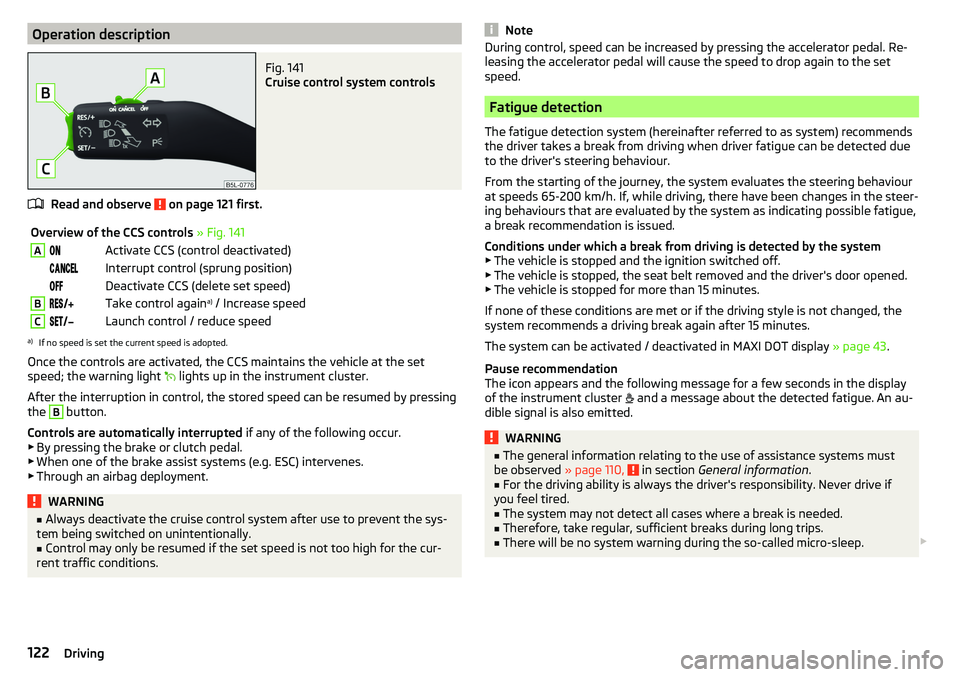
Operation descriptionFig. 141
Cruise control system controls
Read and observe on page 121 first.
Overview of the CCS controls » Fig. 141AActivate CCS (control deactivated) Interrupt control (sprung position) Deactivate CCS (delete set speed)BTake control again a)
/ Increase speedCLaunch control / reduce speeda)
If no speed is set the current speed is adopted.
Once the controls are activated, the CCS maintains the vehicle at the set
speed; the warning light lights up in the instrument cluster.
After the interruption in control, the stored speed can be resumed by pressing
the
B
button.
Controls are automatically interrupted if any of the following occur.
▶ By pressing the brake or clutch pedal.
▶ When one of the brake assist systems (e.g. ESC) intervenes.
▶ Through an airbag deployment.
WARNING■ Always deactivate the cruise control system after use to prevent the sys-
tem being switched on unintentionally.■
Control may only be resumed if the set speed is not too high for the cur-
rent traffic conditions.
NoteDuring control, speed can be increased by pressing the accelerator pedal. Re-
leasing the accelerator pedal will cause the speed to drop again to the set
speed.
Fatigue detection
The fatigue detection system (hereinafter referred to as system) recommends
the driver takes a break from driving when driver fatigue can be detected due
to the driver's steering behaviour.
From the starting of the journey, the system evaluates the steering behaviour
at speeds 65-200 km/h. If, while driving, there have been changes in the steer-
ing behaviours that are evaluated by the system as indicating possible fatigue,
a break recommendation is issued.
Conditions under which a break from driving is detected by the system ▶ The vehicle is stopped and the ignition switched off.
▶ The vehicle is stopped, the seat belt removed and the driver's door opened.
▶ The vehicle is stopped for more than 15 minutes.
If none of these conditions are met or if the driving style is not changed, the
system recommends a driving break again after 15 minutes.
The system can be activated / deactivated in MAXI DOT display » page 43.
Pause recommendation
The icon appears and the following message for a few seconds in the display
of the instrument cluster and a message about the detected fatigue. An au-
dible signal is also emitted.
WARNING■ The general information relating to the use of assistance systems must
be observed » page 110, in section General information .■
For the driving ability is always the driver's responsibility. Never drive if
you feel tired.
■
The system may not detect all cases where a break is needed.
■
Therefore, take regular, sufficient breaks during long trips.
■
There will be no system warning during the so-called micro-sleep.
122Driving
Page 125 of 200
Note■In some situations, the system may evaluate the driving incorrectly and thus
mistakenly recommend a break (e.g. sporty driving, adverse weather condi-
tions or poor road conditions).■
The system is designed primarily for use on motorways.
Tyre pressure monitoring
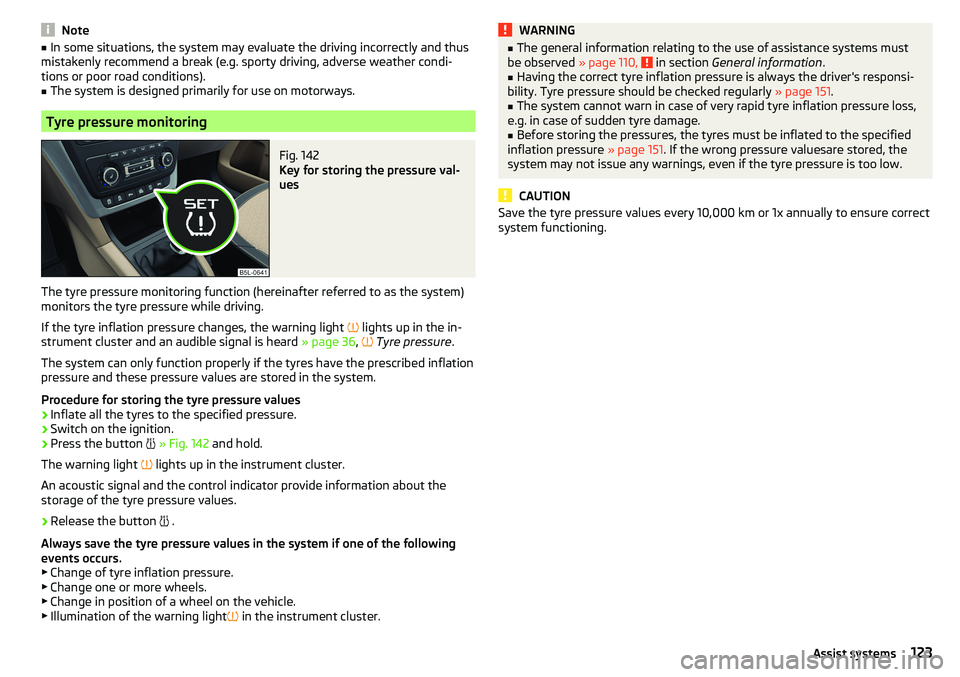
Fig. 142
Key for storing the pressure val-
ues
The tyre pressure monitoring function (hereinafter referred to as the system)
monitors the tyre pressure while driving.
If the tyre inflation pressure changes, the warning light
lights up in the in-
strument cluster and an audible signal is heard » page 36,
Tyre pressure .
The system can only function properly if the tyres have the prescribed inflation
pressure and these pressure values are stored in the system.
Procedure for storing the tyre pressure values
›
Inflate all the tyres to the specified pressure.
›
Switch on the ignition.
›
Press the button
» Fig. 142 and hold.
The warning light
lights up in the instrument cluster.
An acoustic signal and the control indicator provide information about the
storage of the tyre pressure values.
›
Release the button
.
Always save the tyre pressure values in the system if one of the following
events occurs.
▶ Change of tyre inflation pressure.
▶ Change one or more wheels.
▶ Change in position of a wheel on the vehicle.
▶ Illumination of the warning light
in the instrument cluster.
WARNING■
The general information relating to the use of assistance systems must
be observed » page 110, in section General information .■
Having the correct tyre inflation pressure is always the driver's responsi-
bility. Tyre pressure should be checked regularly » page 151.
■
The system cannot warn in case of very rapid tyre inflation pressure loss,
e.g. in case of sudden tyre damage.
■
Before storing the pressures, the tyres must be inflated to the specified
inflation pressure » page 151. If the wrong pressure valuesare stored, the
system may not issue any warnings, even if the tyre pressure is too low.
CAUTION
Save the tyre pressure values every 10,000 km or 1x annually to ensure correct
system functioning.123Assist systems
Page 144 of 200
AdBlue®
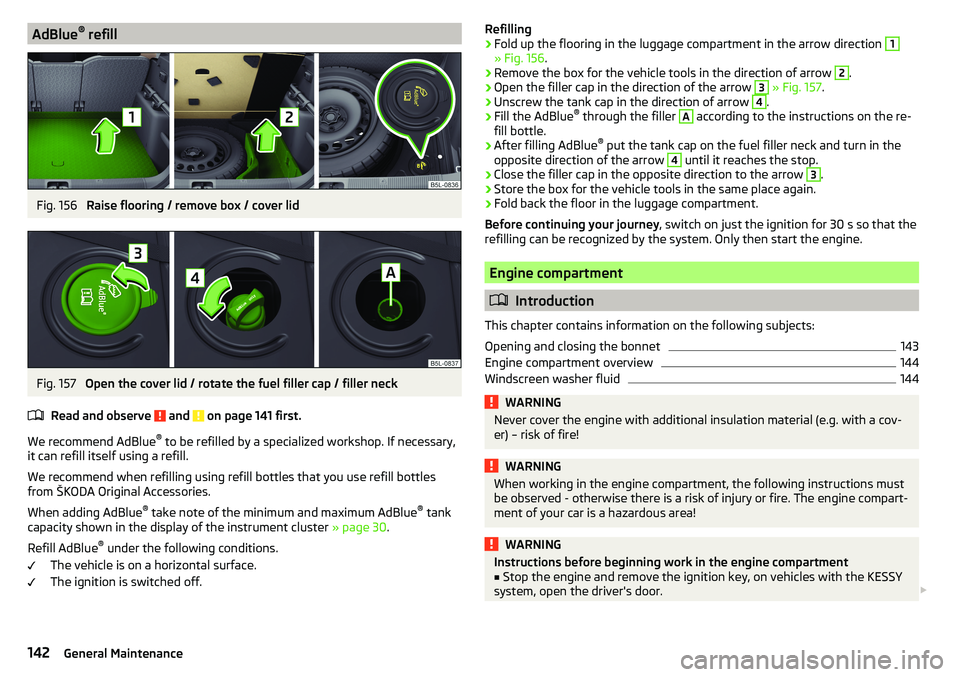
refillFig. 156
Raise flooring / remove box / cover lid
Fig. 157
Open the cover lid / rotate the fuel filler cap / filler neck
Read and observe
and on page 141 first.
We recommend AdBlue ®
to be refilled by a specialized workshop. If necessary,
it can refill itself using a refill.
We recommend when refilling using refill bottles that you use refill bottles
from ŠKODA Original Accessories.
When adding AdBlue ®
take note of the minimum and maximum AdBlue ®
tank
capacity shown in the display of the instrument cluster » page 30.
Refill AdBlue ®
under the following conditions.
The vehicle is on a horizontal surface.
The ignition is switched off.
Refilling›Fold up the flooring in the luggage compartment in the arrow direction 1
» Fig. 156 .
›
Remove the box for the vehicle tools in the direction of arrow
2
.
›
Open the filler cap in the direction of the arrow
3
» Fig. 157 .
›
Unscrew the tank cap in the direction of arrow
4
.
›
Fill the AdBlue ®
through the filler
A
according to the instructions on the re-
fill bottle.
›
After filling AdBlue ®
put the tank cap on the fuel filler neck and turn in the
opposite direction of the arrow
4
until it reaches the stop.
›
Close the filler cap in the opposite direction to the arrow
3
.
›
Store the box for the vehicle tools in the same place again.
›
Fold back the floor in the luggage compartment.
Before continuing your journey , switch on just the ignition for 30 s so that the
refilling can be recognized by the system. Only then start the engine.
Engine compartment
Introduction
This chapter contains information on the following subjects:
Opening and closing the bonnet
143
Engine compartment overview
144
Windscreen washer fluid
144WARNINGNever cover the engine with additional insulation material (e.g. with a cov-
er) – risk of fire!WARNINGWhen working in the engine compartment, the following instructions must
be observed - otherwise there is a risk of injury or fire. The engine compart-
ment of your car is a hazardous area!WARNINGInstructions before beginning work in the engine compartment■Stop the engine and remove the ignition key, on vehicles with the KESSY
system, open the driver's door. 142General Maintenance