air condition SMART FORTWO 2016 User Guide
[x] Cancel search | Manufacturer: SMART, Model Year: 2016, Model line: FORTWO, Model: SMART FORTWO 2016Pages: 214, PDF Size: 4.93 MB
Page 49 of 214
Switching off the alarm
XTo switch off the alarm:press the0036
button on the key.
The alarm is switched off.
or
XSwitch on the ignition.
The alarm is switched off.
The alarm is not switched off, even if you
close the open door that triggered it, for
example.
Driving safety systems
Overview of driving safety systems
In this section, you will find information
about the following driving safety systems:
RABS (Anti-lock BrakingSystem)
(Ypage 47)
RDistance warning function (Ypage 48)
Resp®(Electronic StabilityProgram)
(Ypage 49)
REBD (Electronic Brake forceDistribution)
(Ypage 50)
Important safety notes
If you fail to adapt your driving style or
become distracted, the driving safety sys-
tems can neither reduce the risk of accident
nor override the laws of physics. Driving
safety systems are merely aids designed to
assist driving. You are responsible for the
distance to the vehicle in front, for vehicle
speed and for braking in good time. Always
adapt your driving style to suit the prevail-
ing road, weather and traffic conditions and
maintain a safe distance from the vehicle in
front. Drive carefully.
The driving safety systems described only
work as effectively as possible when there is
adequate contact between the tires and the
road surface. Please pay special attention to
the notes on tires, recommended minimum
tire tread depths, etc. (
Ypage 177).
In wintry driving conditions, always use win-
ter tires (M+S tires) and if necessary, snow
chains. Only in this way will the driving
safety systems described in this section work
as effectively as possible. For safety reasons, smart recommends that you
only use snow chains that have been specially
approved for your vehicle by smart, or fine-
link snow chains that are of a corresponding
standard of quality. For more information,
please contact a qualified specialist work-
shop.
ABS (Anti-lock Braking System)
General information
ABS regulates brake pressure in such a way
that the wheels do not lock when you brake.
This allows you to continue steering the vehi-
cle when braking.
The 0025 (Canada only) or 00DF(USA only) abs
warning lamp in the instrument cluster lights up when the ignition is switched on. It goes
out when the engine is running.
Important safety notes
iObserve the "Important safety notes" sec-
tion for driving safety systems (Ypage 47).
When ABS is malfunctioning, other systems,
including driving safety systems, will also
become inoperative. Observe the information
on the ABS warning lamp (
Ypage 132) and
display messages which may be shown in the
instrument cluster (
Ypage 121).
GWARNING
If ABS is faulty, the wheels could lock when
braking. The steerability and braking
characteristics may be severely impaired.
Additionally, further driving safety sys-
tems are deactivated. There is an increased
danger of skidding and accidents.
Drive on carefully. Have ABS checked imme-
diately at a qualified specialist workshop.
abs works from a speed of about 4 mph (6 km/h),
regardless of road-surface conditions. ABS
works on slippery surfaces, even if you only
brake gently.
Driving safety systems47
>> Safety.
Z
Page 50 of 214
Braking
XIf ABS intervenes:continue to depress the
brake pedal vigorously until the braking
situation is over.
XTo make a full brake application: depress
the brake pedal with full force.
If abs intervenes when braking, you will feel
a pulsing in the brake pedal.
The pulsating brake pedal can be an indica-
tion of hazardous road conditions, and func-
tions as a reminder to take extra care while
driving.
Forward collision warning
General information
The distance warning function can help you to
minimize the risk of a collision with a vehi-
cle ahead or reduce the effects of such an
accident. If the distance warning function
detects that there is a risk of a collision, you
will be warned visually and acoustically.
Starting the engine also switches on the dis-
tance warning function.
Important safety notes
GWARNING
The distance warning function does not
react:
Rto people or animals
Rto oncoming vehicles
Rto crossing traffic
Rwhen cornering
Thus, the distance warning function cannot
provide a warning in all critical situa-
tions. There is a risk of an accident.
Always pay careful attention to the traffic
situation and be ready to brake.
GWARNING
The distance warning function cannot
always clearly identify objects and com-
plex traffic situations.
In such cases, the distance warning func-
tion may:
Rgive an unnecessary warning
Rnot give a warning
There is a risk of an accident.
Always pay careful attention to the traffic
situation and do not rely solely on the dis-
tance warning function.
Observe the "Important safety notes" section for driving safety systems (
Ypage 47).
In particular, the detection of obstacles can
be impaired if:
Rthere is dirt on the sensors or anything else
covering the sensors.
Rsnow or heavy rain
Rinterference by other radar sources
Rthe possibility of strong radar reflec-
tions, for example in parking garages
Ra narrow vehicle traveling in front, e.g. a
motorbike
Ra vehicle traveling in front on a different
line
Rnew vehicles or after a service on the dis-
tance warning system
Please observe the information in the sec-
tion on running-in the vehicle
(
Ypage 86).
Following damage to the front end of the vehi-
cle, have the configuration and operation of
the radar sensor checked at a qualified spe-
cialist workshop. This also applies to colli-
sions at low speeds where there is no visible
damage to the front of the vehicle.
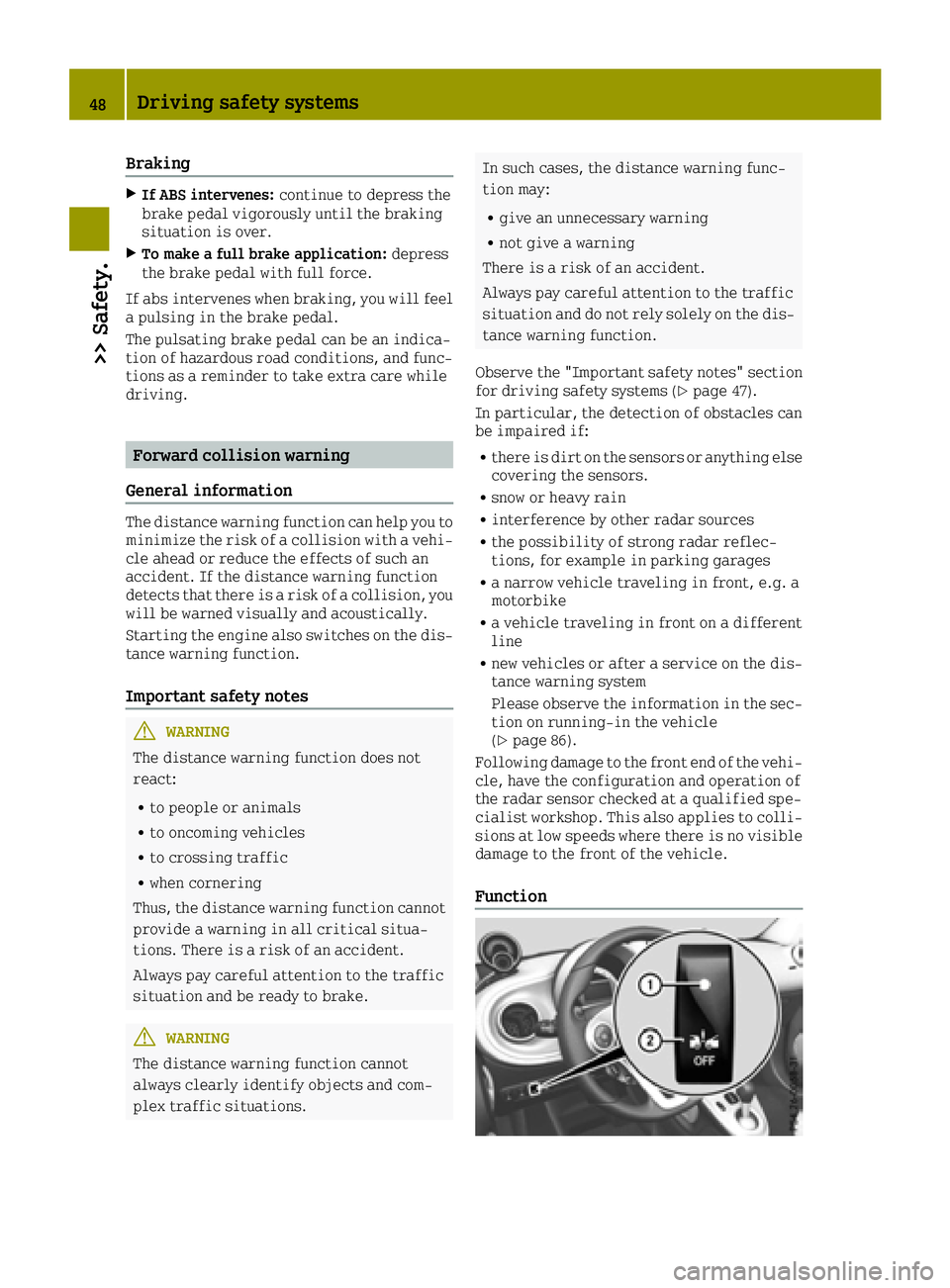
Function
48Driving safety systems
>> Safety.
Page 63 of 214
Useful information
i
This Operator's Manual describes all
models and all standard and optional
equipment of your vehicle available at the
time of publication of the Operator's Man- ual. Country-specific differences are pos-
sible. Bear in mind that your vehicle may
not feature all functions described here.
This also applies to safety-relevant sys-
tems and functions.
iRead the information on qualified spe-
cialist workshops: (Ypage 20).
Correcting the driver's seat position
GWARNING
You could lose control of your vehicle if you
do the following while driving:
Radjust the driver's seat, steering wheel
or mirrors
Rfasten the seat belt
There is a risk of an accident.
Adjust the driver's seat, steering wheel or
mirrors and fasten your seat belt before
starting the engine.
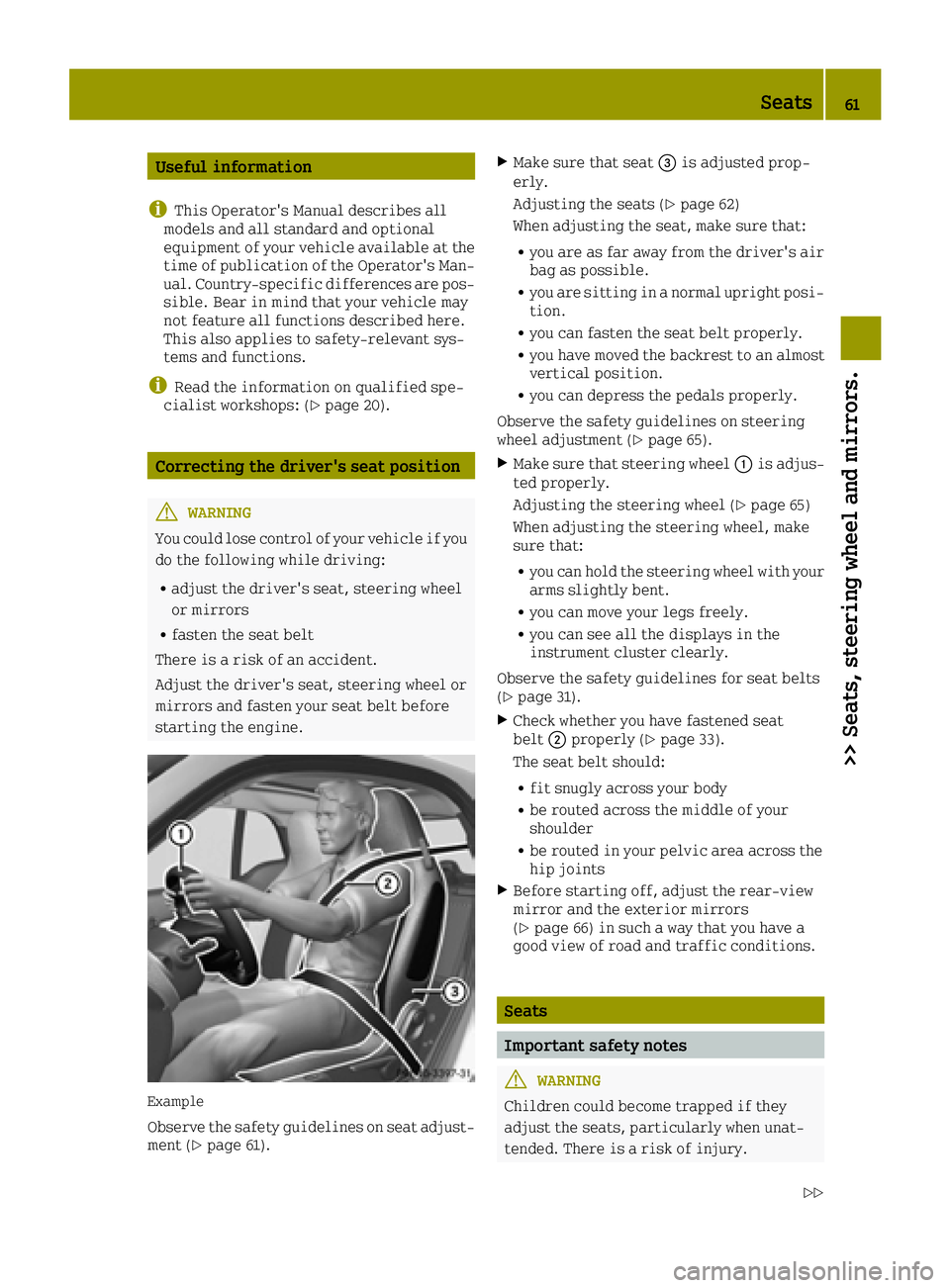
Example
Observe the safety guidelines on seat adjust-
ment (Ypage 61).
XMake sure that seat 0087is adjusted prop-
erly.
Adjusting the seats (
Ypage 62)
When adjusting the seat, make sure that:
Ryou are as far away from the driver's air
bag as possible.
Ryou are sitting in a normal upright posi-
tion.
Ryou can fasten the seat belt properly.
Ryou have moved the backrest to an almost
vertical position.
Ryou can depress the pedals properly.
Observe the safety guidelines on steering
wheel adjustment (
Ypage 65).
XMake sure that steering wheel 0043is adjus-
ted properly.
Adjusting the steering wheel (
Ypage 65)
When adjusting the steering wheel, make
sure that:
Ryou can hold the steering wheel with your
arms slightly bent.
Ryou can move your legs freely.
Ryou can see all the displays in the
instrument cluster clearly.
Observe the safety guidelines for seat belts
(
Ypage 31).
XCheck whether you have fastened seat
belt 0044properly (Ypage 33).
The seat belt should:
Rfit snugly across your body
Rbe routed across the middle of your
shoulder
Rbe routed in your pelvic area across the
hip joints
XBefore starting off, adjust the rear-view
mirror and the exterior mirrors
(
Ypage 66) in such a way that you have a
good view of road and traffic conditions.
Seats
Important safety notes
GWARNING
Children could become trapped if they
adjust the seats, particularly when unat-
tended. There is a risk of injury.
Seats61
>> Seats, steering wheel and mirrors.
Z
Page 71 of 214
Switching on the high-beam headlamps
and headlamp flasher
High-beam headlamps
XTo switch on: start the engine.
XTurn the combination switch control until
0057or0058 (if available) is at the mark-
ing.
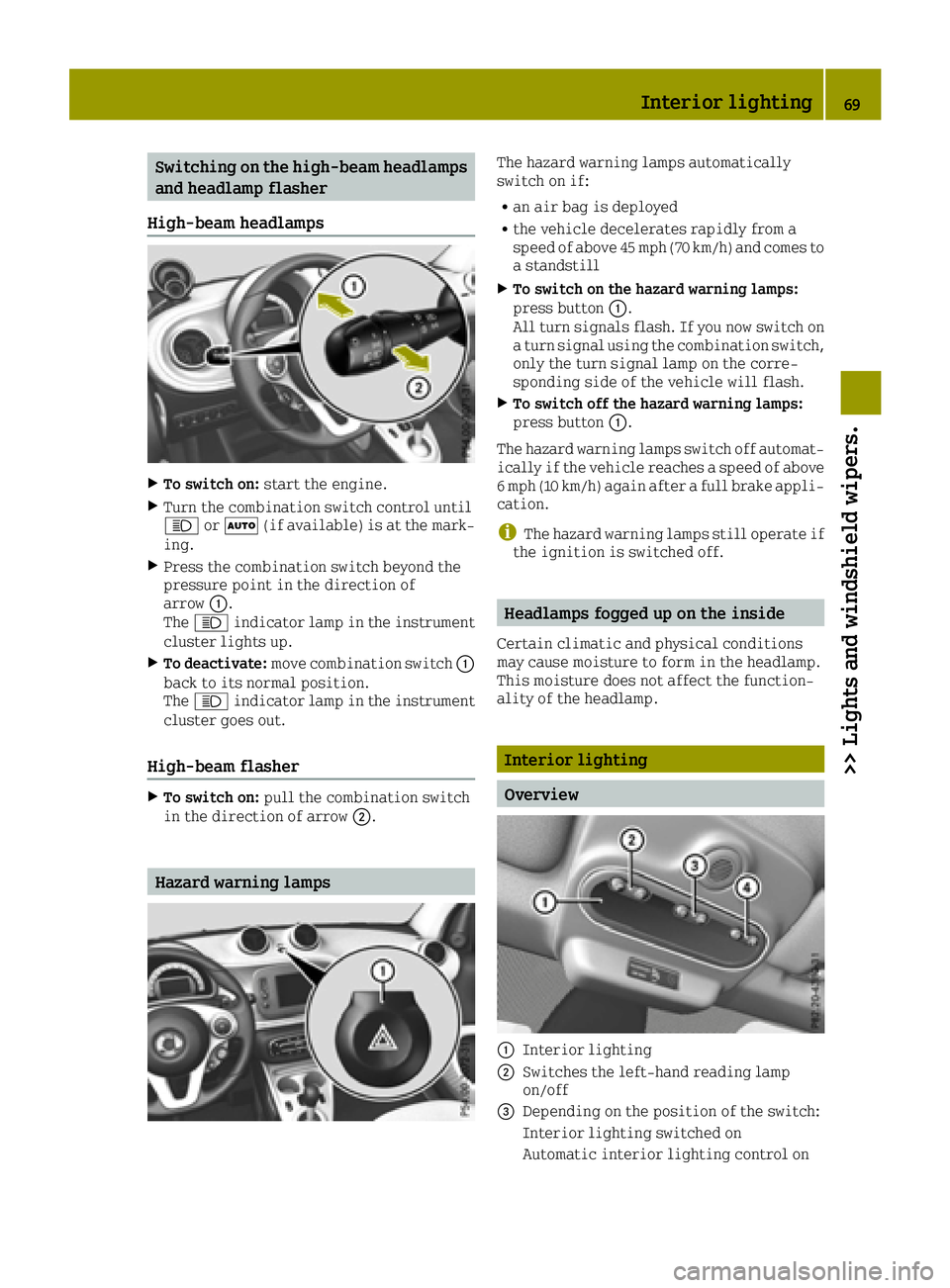
XPress the combination switch beyond the
pressure point in the direction of
arrow 0043.
The 0057 indicator lamp in the instrument
cluster lights up.
XTo deactivate: move combination switch 0043
back to its normal position.
The 0057 indicator lamp in the instrument
cluster goes out.
High-beam flasher
XTo switch on: pull the combination switch
in the direction of arrow 0044.
Hazard warning lamps
The hazard warning lamps automatically
switch on if:
Ran air bag is deployed
Rthe vehicle decelerates rapidly from a
speed of above 45 mph (70 km/h) and comes to
a standstill
XTo switch on the hazard warning lamps:
press button0043.
All turn signals flash. If you now switch on
a turn signal using the combination switch,
only the turn signal lamp on the corre-
sponding side of the vehicle will flash.
XTo switch off the hazard warning lamps:
press button 0043.
The hazard warning lamps switch off automat- ically if the vehicle reaches a speed of above
6 mph (10 km/h) again after a full brake appli-
cation.
iThe hazard warning lamps still operate if
the ignition is switched off.
Headlamps fogged up on the inside
Certain climatic and physical conditions
may cause moisture to form in the headlamp.
This moisture does not affect the function-
ality of the headlamp.
Interior lighting
Overview
0043Interior lighting
0044Switches the left-hand reading lamp
on/off
0087Depending on the position of the switch:
Interior lighting switched on
Automatic interior lighting control on
Interior lighting69
>> Lights and windshield wipers.
Z
Page 81 of 214
Useful information
i
This Operator's Manual describes all
models and all standard and optional
equipment of your vehicle available at the
time of publication of the Operator's Man- ual. Country-specific differences are pos-
sible. Bear in mind that your vehicle may
not feature all functions described here.
This also applies to safety-relevant sys-
tems and functions.
iRead the information on qualified spe-
cialist workshops: (Ypage 20).
Overview of climate control systems
General notes
Observe the settings recommended on the fol- lowing pages. The windows could otherwise
fog up.
To prevent the windows from fogging up:
Rswitch off climate control only briefly
Rswitch on air-recirculation mode only
briefly
Rswitch on the cooling with air dehumidi-
fication function
Rswitch on the defrost windshield function
briefly, if required
Automatic climate control regulates the tem-
perature and the humidity of the vehicle
interior. It also filters undesirable substan-
ces out of the air.
Automatic climate control is only available
when the engine is running. Optimum opera-
tion is only achieved with the side windows
closed.
iWhen the weather is warm, ventilate the
vehicle for a brief period. This will speed up the cooling process, and the desired
vehicle interior temperature will be
reached more quickly.
iThe integrated filter filters out most
particles of dust and pollen. It also
reduces odors. A clogged filter reduces the
amount of air supplied to the vehicle inte-
rior. For this reason, you should always
observe the interval for replacing the fil- ter, which is specified in the Maintenance
Booklet. As it depends on environmental conditions, e.g. heavy air pollution, the
interval may be shorter than stated in the
Maintenance Booklet.
Overview of climate control systems79
>> Climate control.
Page 105 of 214
tions. Even a small amount of alcohol or
drugs can affect your reflexes, perceptions
and judgment.
The possibility of a serious or even fatal
accident is greatly increased when you
drink or take drugs and drive.
Do not drink or take drugs and drive or
allow anyone to drive who has been drinkingor taking drugs.
Emission control
GWARNING
Combustion engines emit poisonous
exhaust gases such as carbon monoxide.
Inhaling these exhaust gases leads to poi-
soning. There is a risk of fatal injury.
Therefore never leave the engine running
in enclosed spaces without sufficient ven- tilation.
Certain engine systems are designed to keep
the level of poisonous components in exhaust
fumes within legal limits.
These systems only work at peak efficiency if
they are serviced exactly in accordance with
the manufacturer's specifications. There-
fore, only allow qualified and authorized
technicians to perform work on the engine.
The engine settings must not be changed
under any circumstances. Furthermore, all
specific service work must be performed at
regular intervals and in accordance with
smart service requirements. Details can be
found in the Maintenance Booklet.
Braking
Important safety notes
GWARNING
If you shift down on a slippery road surface
in an attempt to increase the engine's
braking effect, the drive wheels could lose
their grip. There is an increased danger of
skidding and accidents.
Do not shift down for additional engine
braking on a slippery road surface.
Downhill gradients
!On long and steep gradients, you must
reduce the load on the brakes by shifting to
a lower gear in good time. This allows you
to take advantage of the engine's braking
effect. This helps you to avoid overheating
the brakes and wearing them out exces-
sively.
When you take advantage of the engine's
braking effect, a drive wheel may not turn
for some time, e.g. on a slippery road sur-
face. This could cause damage to the drive
train, which is not covered by the smart
warranty.
Heavy and light loads
GWARNING
If you rest your foot on the brake pedal
while driving, the braking system can
overheat. This increases the stopping dis-
tance and can even cause the braking system
to fail. There is a risk of an accident.
Never use the brake pedal as a footrest.
Never depress the brake pedal and the
accelerator pedal at the same time.
!Depressing the brake pedal constantly
results in excessive and premature wear to
the brake pads.
If the brakes have been subjected to a heavy
load, do not stop the vehicle immediately.
Drive on for a short while. This allows the
airflow to cool the brakes more quickly.
Wet roads
If you have driven for a long time in heavy
rain without braking, there may be a delayed
reaction from the brakes when braking for the
first time. This may also occur after the vehi-
cle has been washed or driven through deep
water.
You then have to depress the brake pedal more
firmly. Maintain a greater distance from the
vehicle in front.
After driving on a wet road or having the
vehicle washed, brake firmly while paying
attention to the traffic conditions. This will warm up the brake discs, thereby drying them
Driving tips103
>> Driving and parking.
Z
Page 107 of 214
Prevent water from entering the vehicle inte-
rior or the engine compartment. If you must
drive through standing water, bear in mind
that:
Rthe water level should not exceed the lower
edge of the vehicle body in still water
Ryou should drive no faster than at walking
pace.
Winter driving
GWARNING
If you shift down on a slippery road surface
in an attempt to increase the engine's
braking effect, the drive wheels could lose
their grip. There is an increased danger of
skidding and accidents.
Do not shift down for additional engine
braking on a slippery road surface.
GDANGER
If the exhaust pipe is blocked or adequate
ventilation is not possible, poisonous
gases such as carbon monoxide (CO) may
enter the vehicle. This is the case, e.g. if
the vehicle becomes trapped in snow. There
is a risk of fatal injury.
If you have to leave the engine running,
keep the exhaust pipe and the area around
the vehicle free of snow. To ensure an ade- quate supply of fresh air, open a window on
the side of the vehicle that is not facing
into the wind.
Have your vehicle winterproofed at a quali-
fied specialist workshop at the onset of win-
ter.
Drive particularly carefully on slippery road
surfaces. Avoid sudden acceleration, steer-
ing and braking maneuvers. Do not use cruise
control.
If the vehicle threatens to skid or cannot be
stopped when moving at low speed:
XTry to bring the vehicle under control
using corrective steering.
XVehicles with automatic transmission:
shift the transmission to position N.The outside temperature indicator is not
designed to serve as an ice-warning device
and is therefore unsuitable for that purpose.
Changes in the outside temperature are dis-
played after a short delay.
Indicated temperatures just above the freez-
ing point do not guarantee that the road sur-
face is free of ice. The road may still be icy,
especially in wooded areas or on bridges.
You should pay special attention to road con-
ditions when temperatures are around freez-
ing point.
For more information on driving with snow
chains, see (
Ypage 179).
For more information on driving with summer
tires, see (
Ypage 179).
Observe the notes in the "Winter operation"
section (
Ypage 179).
Driving systems
Cruise control
General notes
Cruise control maintains a constant road
speed for you. Cruise control does not brake
the vehicle automatically. Only the engine's
braking effect is available. In order to
reduce speed and maintain distance to other
road users, you need to brake yourself. This
interrupts cruise control.
Use cruise control only if road and traffic
conditions make it appropriate to maintain a steady speed for a prolonged period. You can
use cruise control at speeds above 20 mph
(30 km/h).
Important safety notes
If you fail to adapt your driving style, cruise
control can neither reduce the risk of an
accident nor override the laws of physics.
Cruise control cannot take into account road,
weather or traffic conditions. Cruise control
is only an aid. You are responsible for the
distance to the vehicle in front, for vehicle
speed, for braking in good time and for stay-ing in lane.
Driving systems105
>> Driving and parking.
Z
Page 111 of 214
Useful information
i
This Operator's Manual describes all
models and all standard and optional
equipment of your vehicle available at the
time of publication of the Operator's Man- ual. Country-specific differences are pos-
sible. Bear in mind that your vehicle may
not feature all functions described here.
This also applies to safety-relevant sys-
tems and functions.
iRead the information on qualified spe-
cialist workshops: (Ypage 20).
Important safety notes
GWARNING
If you operate information systems and
communication equipment integrated in
the vehicle while driving, you will be dis- tracted from traffic conditions. You could
also lose control of the vehicle. There is a
risk of an accident.
Only operate the equipment when the traf-
fic situation permits. If you are not sure
that this is possible, park the vehicle pay-
ing attention to traffic conditions and
operate the equipment when the vehicle is
stationary.
You must observe the legal requirements for
the country in which you are currently driv-
ing when operating the on-board computer.
GWARNING
If the instrument cluster has failed or mal- functioned, you may not recognize function
restrictions in systems relevant to safety.
The operating safety of your vehicle may beimpaired. There is a risk of an accident.
Drive on carefully. Have the vehicle
checked at a qualified specialist workshop
immediately.
The on-board computer only shows display
messages and/or warnings from certain sys-
tems in the display. You should therefore
make sure your vehicle is operating safely at all times. Otherwise, you may cause an acci-
dent by driving a vehicle that is not operat-
ing reliably.
If the operating safety of your vehicle
impaired, park the vehicle as soon as possi-
ble paying attention to road and traffic con-
ditions. Contact a qualified specialist work-
shop.
Read and follow the notes in the overview of
warning and indicator lamps in the instru-
ment cluster (
Ypage 24).
Displays and operation
Instrument cluster lighting
Instrument cluster lighting includes illumi-
nation of the instrument cluster, the addi-
tional instruments on the dashboard, the dis-
plays and the controls.
The instrument cluster lighting is switched
automatically between day and night lighting
depending on the ambient light conditions
(
Ypage 67).
You can additionally set the brightness of the
instrument cluster lighting to different lev-
els in the on-board computer (
Ypage 115).
Speedometer
If you turn the key to position 2in the igni-
tion lock, the warning and indicator lamps in
the instrument cluster will briefly light up
for a lamp test. During the lamp test, the
illuminated speedometer needle moves in the
speedometer.
The display can show a digital speedometer.
The digital speedometer can be hidden/
displayed and its speed unit selected
(
Ypage 115).
Outside temperature display
You should pay special attention to road con-
ditions when temperatures are around freez-
ing point.
Bear in mind that the outside temperature
display indicates the temperature measured
and does not record the road temperature.
The outside temperature is displayed on the
far right in the top bar.
Displays and operation109
>> On-board computer and displays.
Z
Page 121 of 214
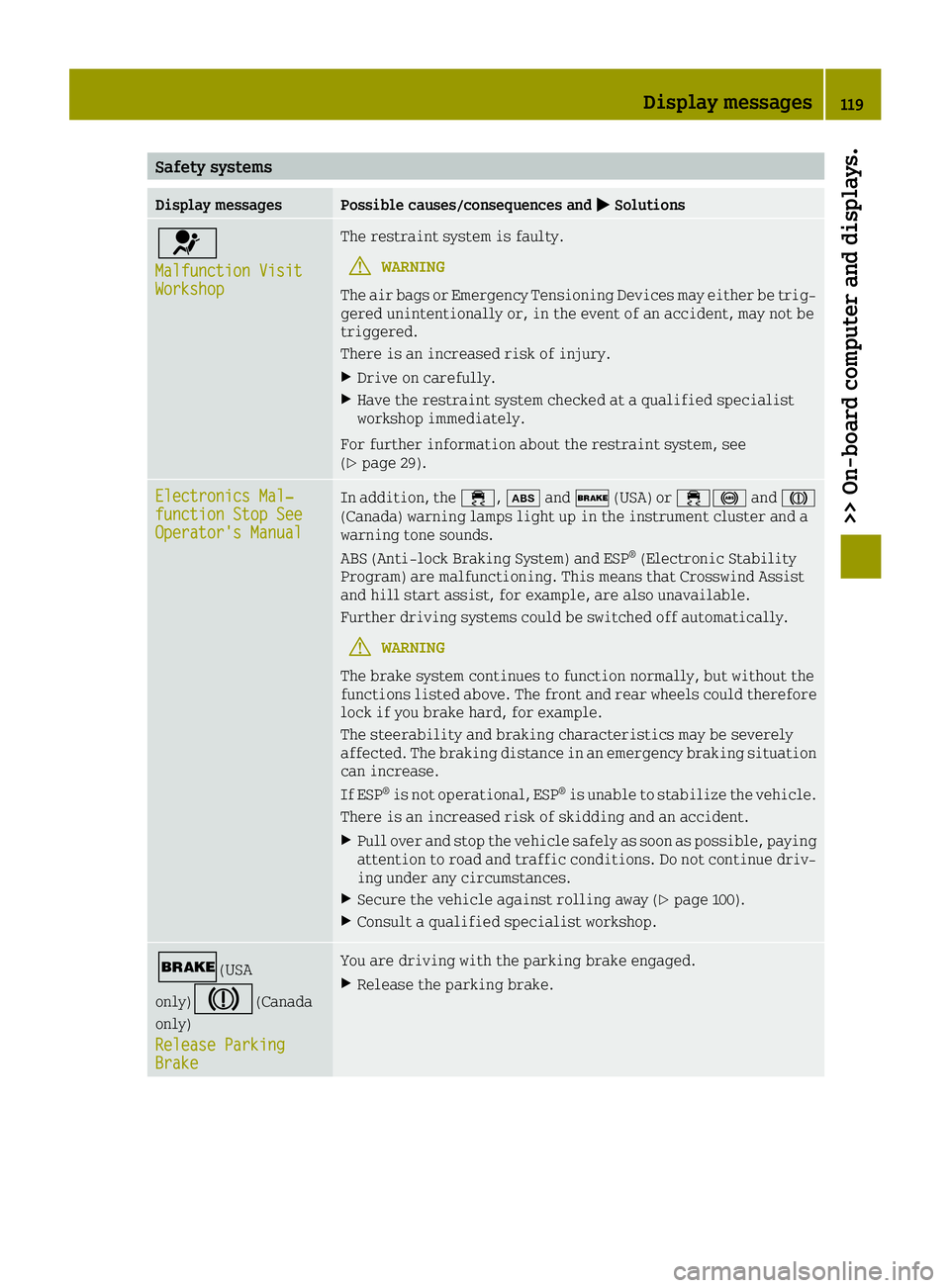
Safety systems
Display messagesPossible causes/consequences and0050Solutions
0075
Malfunction VisitWorkshop
The restraint system is faulty.
GWARNING
The air bags or Emergency Tensioning Devices may either be trig-
gered unintentionally or, in the event of an accident, may not be
triggered.
There is an increased risk of injury.
XDrive on carefully.
XHave the restraint system checked at a qualified specialist
workshop immediately.
For further information about the restraint system, see
(
Ypage 29).
Electronics Mal‐function Stop SeeOperator's Manual
In addition, the 00E5,00DFand0027 (USA) or 00E50025 and004D
(Canada) warning lamps light up in the instrument cluster and a
warning tone sounds.
ABS (Anti-lock Braking System) and ESP
®(Electronic Stability
Program) are malfunctioning. This means that Crosswind Assist
and hill start assist, for example, are also unavailable.
Further driving systems could be switched off automatically.
GWARNING
The brake system continues to function normally, but without the
functions listed above. The front and rear wheels could therefore
lock if you brake hard, for example.
The steerability and braking characteristics may be severely
affected. The braking distance in an emergency braking situation
can increase.
If ESP
®is not operational, ESP®is unable to stabilize the vehicle.
There is an increased risk of skidding and an accident.
XPull over and stop the vehicle safely as soon as possible, paying
attention to road and traffic conditions. Do not continue driv-
ing under any circumstances.
XSecure the vehicle against rolling away (Ypage 100).
XConsult a qualified specialist workshop.
0027(USA
only)
004D(Canada
only)
Release Parking
Brake
You are driving with the parking brake engaged.
XRelease the parking brake.
Display messages119
>> On-board computer and displays.
Z
Page 122 of 214
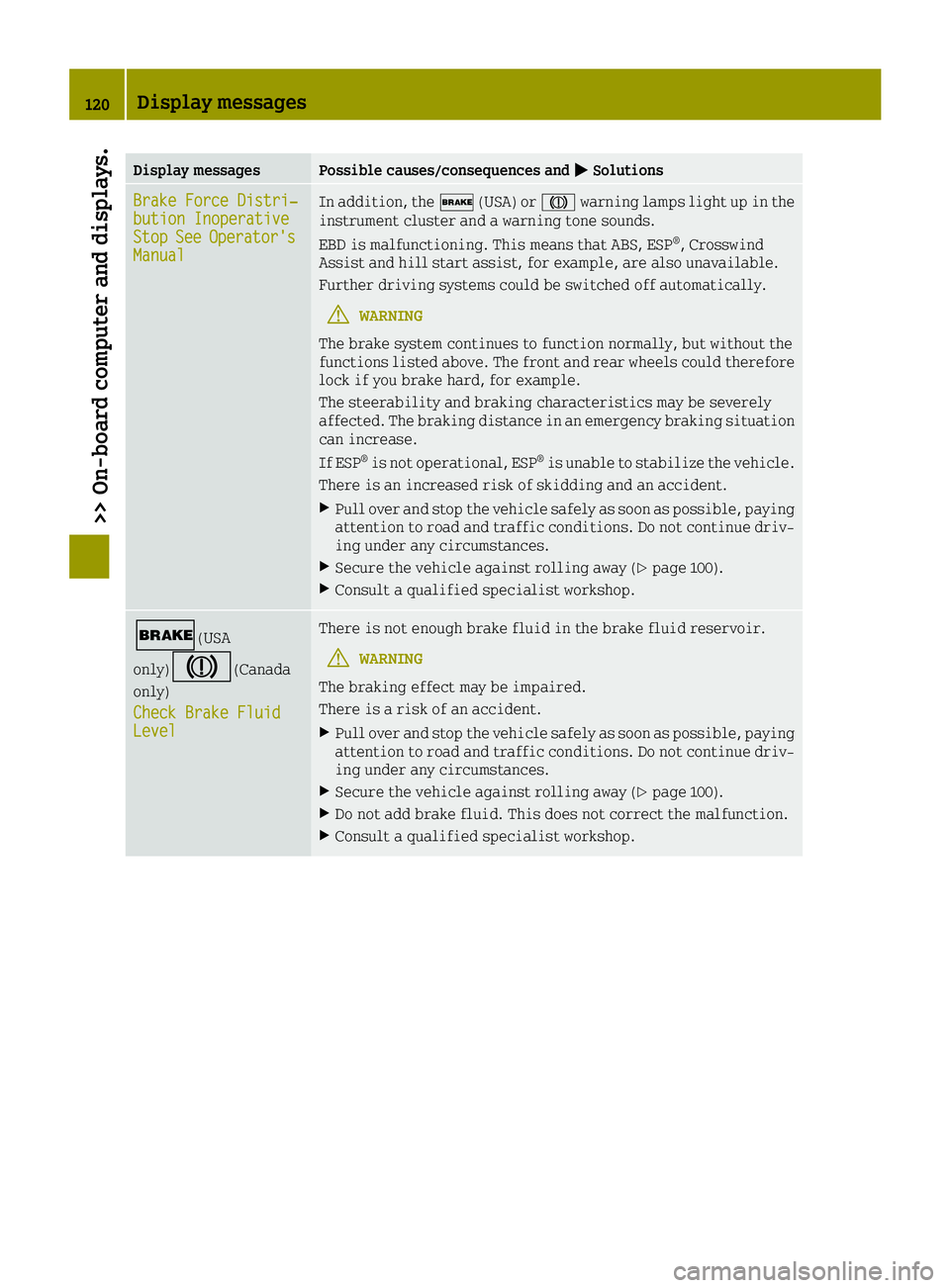
Display messagesPossible causes/consequences and0050Solutions
Brake Force Distri‐bution InoperativeStopSeeOperator'sManual
In addition, the0027(USA) or 004Dwarning lamps light up in the
instrument cluster and a warning tone sounds.
EBD is malfunctioning. This means that ABS, ESP
®, Crosswind
Assist and hill start assist, for example, are also unavailable.
Further driving systems could be switched off automatically.
GWARNING
The brake system continues to function normally, but without the
functions listed above. The front and rear wheels could therefore
lock if you brake hard, for example.
The steerability and braking characteristics may be severely
affected. The braking distance in an emergency braking situation
can increase.
If ESP
®is not operational, ESP®is unable to stabilize the vehicle.
There is an increased risk of skidding and an accident.
XPull over and stop the vehicle safely as soon as possible, paying
attention to road and traffic conditions. Do not continue driv-
ing under any circumstances.
XSecure the vehicle against rolling away (Ypage 100).
XConsult a qualified specialist workshop.
0027(USA
only)
004D(Canada
only)
Check Brake Fluid
Level
There is not enough brake fluid in the brake fluid reservoir.
GWARNING
The braking effect may be impaired.
There is a risk of an accident.
XPull over and stop the vehicle safely as soon as possible, paying
attention to road and traffic conditions. Do not continue driv-
ing under any circumstances.
XSecure the vehicle against rolling away (Ypage 100).
XDo not add brake fluid. This does not correct the malfunction.
XConsult a qualified specialist workshop.
120Display messages
>> On-board computer and displays.