service SMART FORTWO 2016 Owners Manual
[x] Cancel search | Manufacturer: SMART, Model Year: 2016, Model line: FORTWO, Model: SMART FORTWO 2016Pages: 214, PDF Size: 4.93 MB
Page 7 of 214
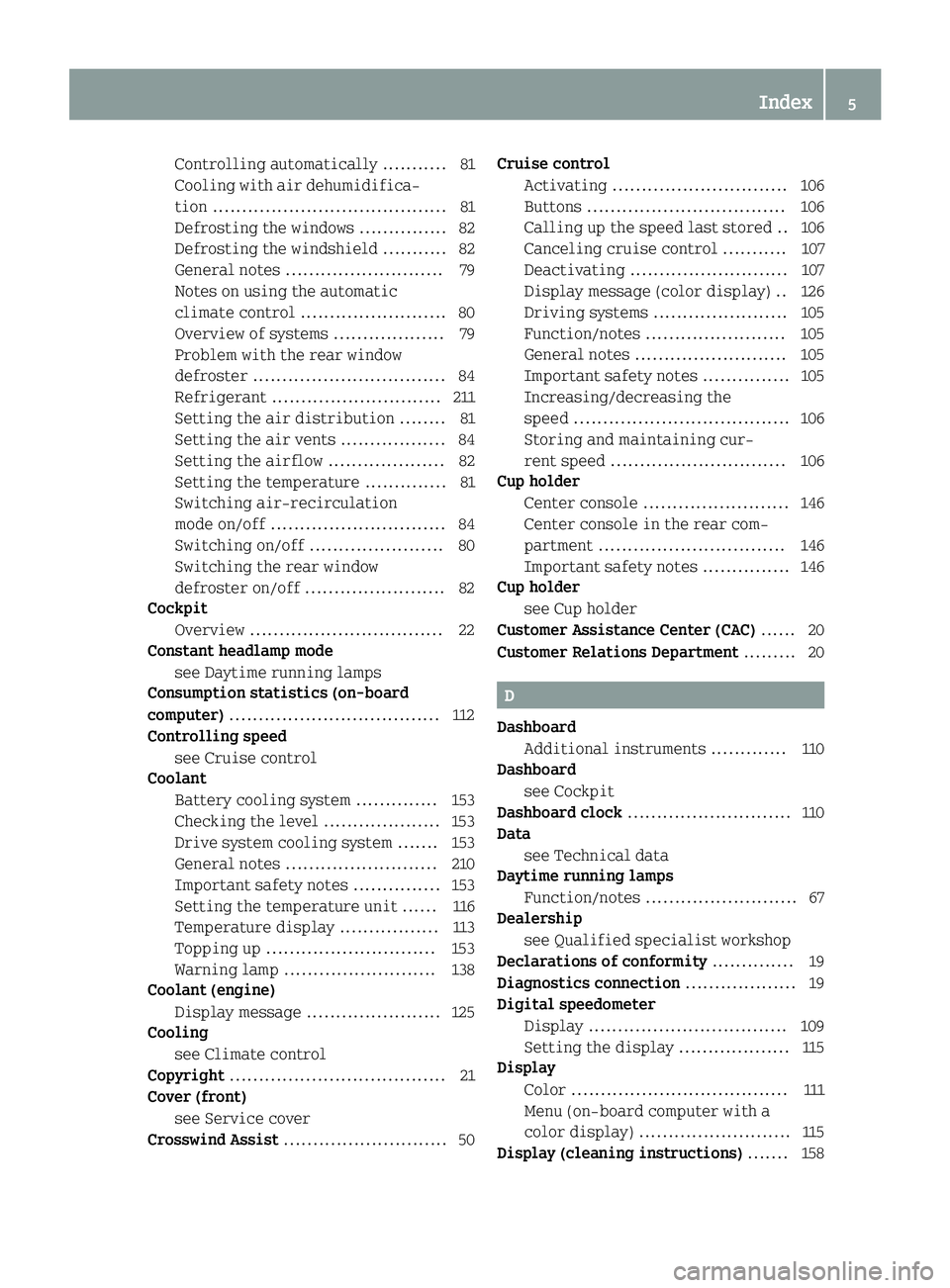
Controlling automatically ........... 81
Cooling with air dehumidifica-
tion ........................................ 81
Defrosting the windows ............... 82
Defrosting the windshield ........... 82
General notes ........................... 79
Notes on using the automatic
climate control ......................... 80
Overview of systems ................... 79
Problem with the rear window
defroster ................................. 84
Refrigerant ............................. 211
Setting the air distribution ........ 81
Setting the air vents .................. 84
Setting the airflow .................... 82
Setting the temperature .............. 81
Switching air-recirculation
mode on/off .............................. 84
Switching on/off ....................... 80
Switching the rear window
defroster on/off ........................ 82
Cockpit
Overview ................................. 22
Constant headlamp mode
see Daytime running lamps
Consumption statistics (on-board
computer) .................................... 112
Controlling speed
see Cruise control
Coolant
Battery cooling system .............. 153
Checking the level .................... 153
Drive system cooling system ....... 153
General notes .......................... 210
Important safety notes ............... 153
Setting the temperature unit ...... 116
Temperature display ................. 113
Topping up ............................. 153
Warning lamp .......................... 138
Coolant (engine)
Display message ....................... 125
Cooling
see Climate control
Copyright ..................................... 21
Cover (front)
see Service cover
Crosswind Assist ............................ 50 Cruise control
Activating .............................. 106
Buttons .................................. 106
Calling up the speed last stored .. 106
Canceling cruise control ........... 107
Deactivating ........................... 107
Display message (color display) .. 126
Driving systems ....................... 105
Function/notes ........................ 105
General notes .......................... 105
Important safety notes ............... 105
Increasing/decreasing the
speed ..................................... 106
Storing and maintaining cur-
rent speed .............................. 106
Cup holder
Center console ......................... 146
Center console in the rear com-
partment ................................ 146
Important safety notes ............... 146
Cup holder
see Cup holder
Customer Assistance Center (CAC) ...... 20
Customer Relations Department ......... 20
D
Dashboard
Additional instruments ............. 110
Dashboard
see Cockpit
Dashboard clock ............................ 110
Data
see Technical data
Daytime running lamps
Function/notes .......................... 67
Dealership
see Qualified specialist workshop
Declarations of conformity .............. 19
Diagnostics connection ................... 19
Digital speedometer
Display .................................. 109
Setting the display ................... 115
Display
Color ..................................... 111
Menu (on-board computer with a
color display) .......................... 115
Display (cleaning instructions) ....... 158
Index5
Page 8 of 214
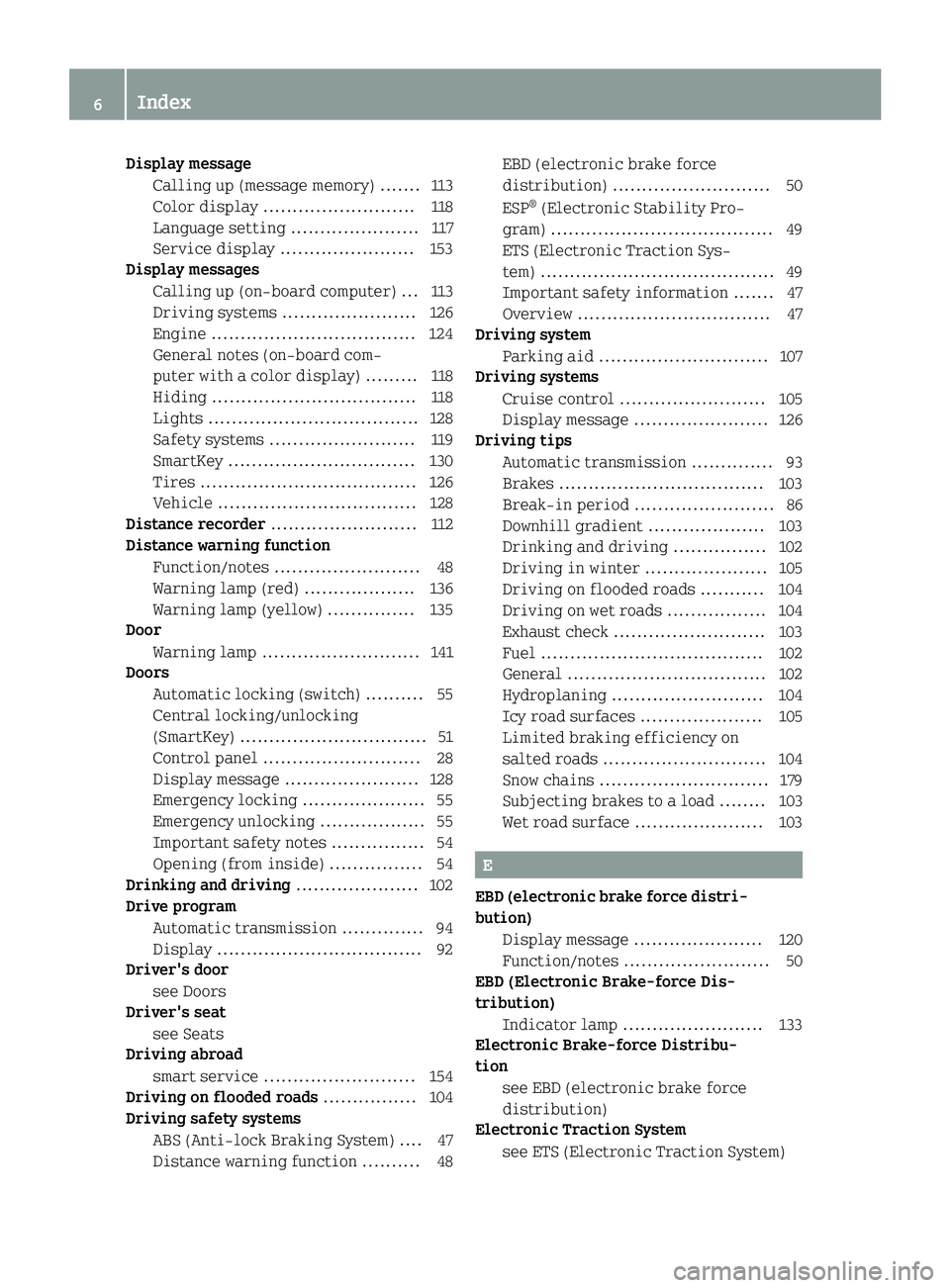
Display messageCalling up (message memory) .......1 13
Color display .......................... 118
Language setting ......................1 17
Service display ....................... 153
Display messages
Calling up (on-board computer) ... 113
Driving systems ....................... 126
Engine ................................... 124
General notes (on-board com-
puter with a color display) .........118
Hiding ................................... 118
Lights .................................... 128
Safety systems .........................1 19
SmartKey ................................ 130
Tires .....................................1 26
Vehicle ................................. .128
Distance recorder .........................112
Distance warning function
Function/notes .........................4 8
Warning lamp (red) ................... 136
Warning lamp (yellow) ............... 135
Door
Warning lamp ........................... 141
Doors
Automatic locking (switch) .......... 55
Central locking/unlocking
(SmartKey) ................................ 51
Control panel ........................... 28
Display message ....................... 128
Emergency locking ..................... 55
Emergency unlocking .................. 55
Important safety notes ................ 54
Opening (from inside) ................ 54
Drinking and driving ..................... 102
Drive program
Automatic transmission .............. 94
Display ................................... 92
Driver's door
see Doors
Driver's seat
see Seats
Driving abroad
smart service .......................... 154
Driving on flooded roads ................ 104
Driving safety systems
ABS (Anti-lock Braking System) .... 47
Distance warning function .......... 48 EBD (electronic brake force
distribution) ........................... 50
ESP
®(Electronic Stability Pro-
gram) ...................................... 49
ETS (Electronic Traction Sys-
tem) ........................................ 49
Important safety information ....... 47
Overview ................................. 47
Driving system
Parking aid ............................. 107
Driving systems
Cruise control ......................... 105
Display message ....................... 126
Driving tips
Automatic transmission .............. 93
Brakes ................................... 103
Break-in period ........................ 86
Downhill gradient .................... 103
Drinking and driving ................ 102
Driving in winter ..................... 105
Driving on flooded roads ........... 104
Driving on wet roads ................. 104
Exhaust check .......................... 103
Fuel ...................................... 102
General .................................. 102
Hydroplaning .......................... 104
Icy road surfaces ..................... 105
Limited braking efficiency on
salted roads ............................ 104
Snow chains ............................. 179
Subjecting brakes to a load ........ 103
Wet road surface ...................... 103
E
EBD (electronic brake force distri-
bution)Display message ...................... 120
Function/notes ......................... 50
EBD (Electronic Brake-force Dis-
tribution)
Indicator lamp ........................ 133
Electronic Brake-force Distribu-
tion
see EBD (electronic brake force
distribution)
Electronic Traction System
see ETS (Electronic Traction System)
6Index
Page 9 of 214
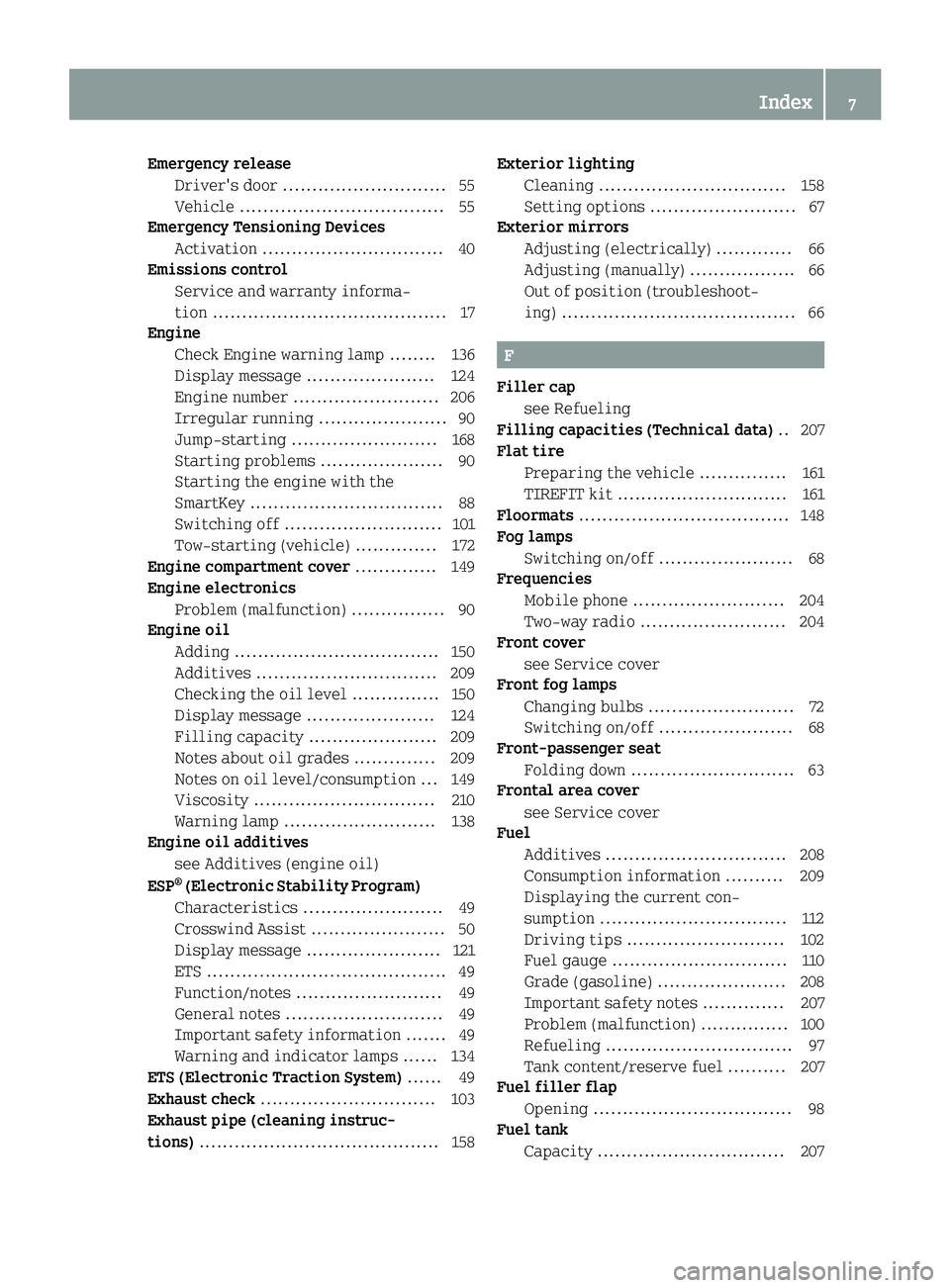
Emergency releaseDriver's door ........................... .55
Vehicle ................................... 55
Emergency Tensioning Devices
Activation ............................... 40
Emissions control
Service and warranty informa-
tion ........................................ 17
Engine
Check Engine warning lamp ........1 36
Display message ...................... 124
Engine number ......................... 206
Irregular running ...................... 90
Jump-starting ......................... 168
Starting problems ..................... 90
Starting the engine with the
SmartKey ................................. 88
Switching off ........................... 101
Tow-starting (vehicle) .............. 172
Engine compartment cover .............. 149
Engine electronics
Problem (malfunction) ................ 90
Engine oil
Adding ................................... 150
Additives ............................... 209
Checking the oil level ............... 150
Display message ...................... 124
Filling capacity ...................... 209
Notes about oil grades .............. 209
Notes on oil level/consumption ... 149
Viscosity ............................... 210
Warning lamp .......................... 138
Engine oil additives
see Additives (engine oil)
ESP
®(Electronic Stability Program)
Characteristics ........................4 9
Crosswind Assist ....................... 50
Display message ....................... 121
ETS .........................................4 9
Function/notes ......................... 49
General notes ........................... 49
Important safety information ....... 49
Warning and indicator lamps ...... 134
ETS (Electronic Traction System) ...... 49
Exhaust check .............................. 103
Exhaust pipe (cleaning instruc-
tions) ......................................... 158 Exterior lighting
Cleaning ................................ 158
Setting options ......................... 67
Exterior mirrors
Adjusting (electrically) ............. 66
Adjusting (manually) .................. 66
Out of position (troubleshoot-
ing) ........................................ 66
F
Filler capsee Refueling
Filling capacities (Technical data) .. 207
Flat tire
Preparing the vehicle ............... 161
TIREFIT kit ............................. 161
Floormats .................................... 148
Fog lamps
Switching on/off ....................... 68
Frequencies
Mobile phone .......................... 204
Two-way radio ......................... 204
Front cover
see Service cover
Front fog lamps
Changing bulbs ......................... 72
Switching on/off ....................... 68
Front-passenger seat
Folding down ............................ 63
Frontal area cover
see Service cover
Fuel
Additives ............................... 208
Consumption information .......... 209
Displaying the current con-
sumption ................................ 112
Driving tips ........................... 102
Fuel gauge .............................. 110
Grade (gasoline) ...................... 208
Important safety notes .............. 207
Problem (malfunction) ............... 100
Refueling ................................ 97
Tank content/reserve fuel .......... 207
Fuel filler flap
Opening .................................. 98
Fuel tank
Capacity ................................ 207
Index7
Page 12 of 214
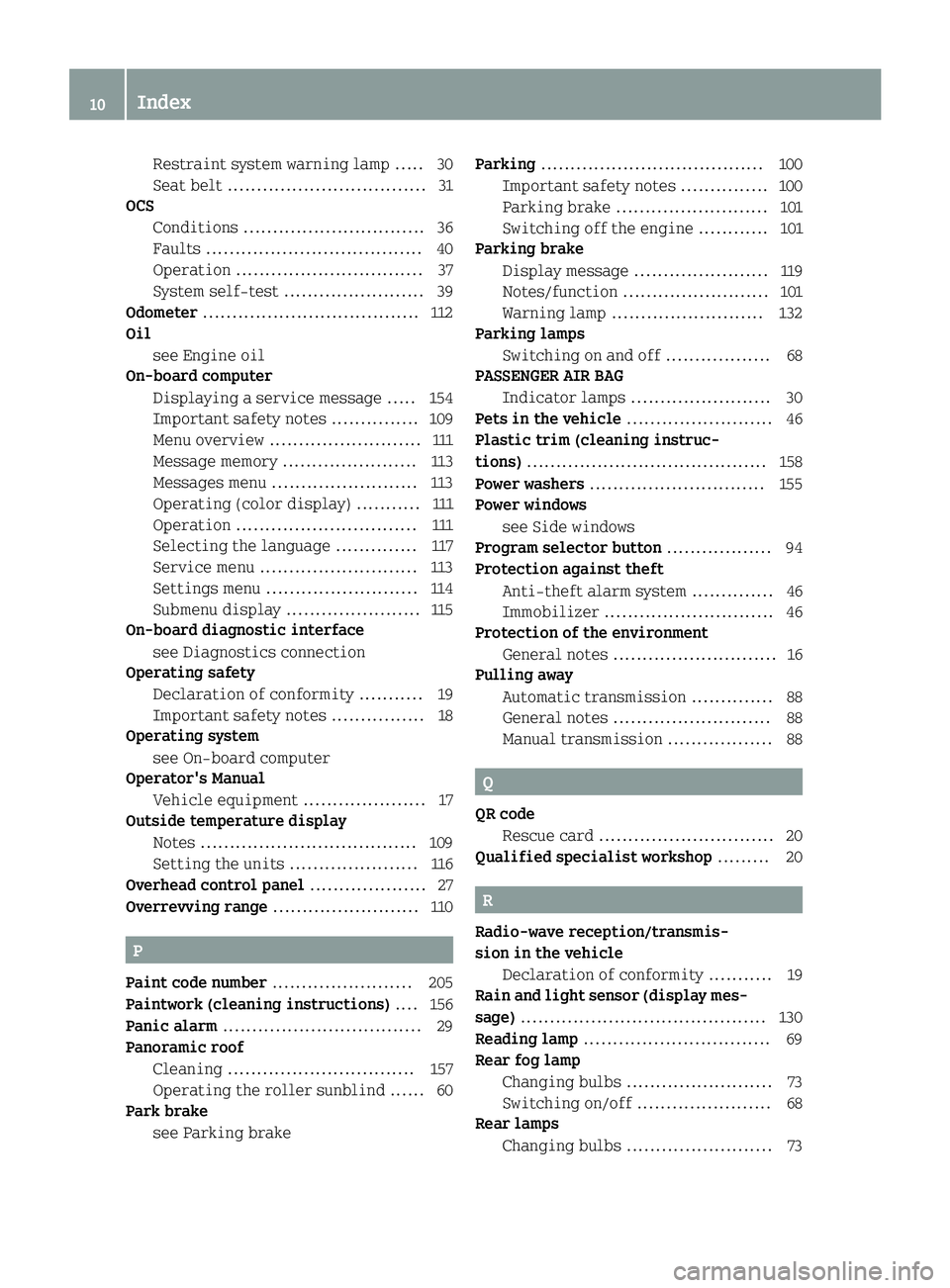
Restraint system warning lamp ..... 30
Seat belt .................................. 31
OCS
Conditions ............................... 36
Faults ..................................... 40
Operation ................................ 37
System self-test ........................ 39
Odometer ..................................... 112
Oil
see Engine oil
On-board computer
Displaying a service message ..... 154
Important safety notes ............... 109
Menu overview .......................... 111
Message memory ....................... 113
Messages menu ......................... 113
Operating (color display) ........... 111
Operation ............................... 111
Selecting the language .............. 117
Service menu ........................... 113
Settings menu .......................... 114
Submenu display ....................... 115
On-board diagnostic interface
see Diagnostics connection
Operating safety
Declaration of conformity ........... 19
Important safety notes ................ 18
Operating system
see On-board computer
Operator's Manual
Vehicle equipment ..................... 17
Outside temperature display
Notes ..................................... 109
Setting the units ...................... 116
Overhead control panel .................... 27
Overrevving range ......................... 110
P
Paint code number........................ 205
Paintwork (cleaning instructions) .... 156
Panic alarm .................................. 29
Panoramic roof
Cleaning ................................ 157
Operating the roller sunblind ...... 60
Park brake
see Parking brake Parking
...................................... 100
Important safety notes ............... 100
Parking brake .......................... 101
Switching off the engine ............ 101
Parking brake
Display message ....................... 119
Notes/function ......................... 101
Warning lamp .......................... 132
Parking lamps
Switching on and off .................. 68
PASSENGER AIR BAG
Indicator lamps ........................ 30
Pets in the vehicle ......................... 46
Plastic trim (cleaning instruc-
tions) ......................................... 158
Power washers .............................. 155
Power windows
see Side windows
Program selector button .................. 94
Protection against theft
Anti-theft alarm system .............. 46
Immobilizer ............................. 46
Protection of the environment
General notes ............................ 16
Pulling away
Automatic transmission .............. 88
General notes ........................... 88
Manual transmission .................. 88
Q
QR codeRescue card .............................. 20
Qualified specialist workshop ......... 20
R
Radio-wave reception/transmis-
sion in the vehicle
Declaration of conformity ........... 19
Rain and light sensor (display mes-
sage) .......................................... 130
Reading lamp ................................ 69
Rear fog lamp
Changing bulbs ......................... 73
Switching on/off ....................... 68
Rear lamps
Changing bulbs ......................... 73
10Index
Page 13 of 214
Rear parking aidActivating/deactivating ............ 108
Function/notes ........................ 107
Rear window defroster
Problem (malfunction) ................ 84
Switching on/off ....................... 82
Rear window wiper
Replacing the wiper blade ........... 76
Switching on/off ....................... 75
Rear-view mirror
Anti-glare (manual) ................... 66
Recycling
see Protection of the environment
Refrigerant (air-conditioning sys-
tem)
Important safety notes ............... 211
Refueling
Fuel gauge .............................. 110
Important safety notes ................ 97
Refueling process ..................... 98
see Fuel
Replacing bulbs
Important safety notes ................ 70
Interior lighting ...................... 74
Overview of bulb types ................ 70
Removing/replacing the cover
(front wheel arch) ...................... 72
Side turn signal lamps ............... 73
Rescue card .................................. 20
Reserve (fuel tank)
see Fuel
Reserve fuel
Display message ....................... 125
see Fuel
Restraint system
Display message ....................... 119
Introduction ............................ 29
Warning lamp .......................... 132
Warning lamp (function) .............. 30
Reverse gear
Engaging (manual transmission) ... 91
Reversing feature
Side windows ............................ 58
Roadside Assistance (breakdown) ....... 17
Roller sunblind for the panorama
roof
Operating ................................ 60 Roof
see Panoramic roof
Roof lining and carpets (cleaning
guidelines) ................................. 160
S
Safety
Child restraint systems .............. 43
Children in the vehicle .............. 42
see Operating safety
Safety system
see Driving safety systems
Seat
Folding the front-passenger
seat down ................................. 63
Seat belts
Cleaning ................................ 159
Correct usage ........................... 32
Fastening ................................ 33
Important safety guidelines ........ 31
Introduction ............................. 31
Releasing ................................ 33
Warning lamp ........................... 131
Warning lamp (function) .............. 33
Seats
Adjusting (manually) .................. 62
Cleaning the cover ................... 159
Correct driver's seat position ...... 61
Important safety notes ................ 61
Seat heating problem ................. 65
Switching seat heating on/off ...... 64
Sensors (cleaning instructions) ....... 158
Service Center
see Qualified specialist workshop
Service cover ............................... 151
Service display
Calling up (on-board computer
with a color display) ................. 113
Displaying a service message ..... 154
Hiding a service message .......... 154
Notes ..................................... 153
Resetting ............................... 154
Service message ....................... 153
Special service requirements ..... 154
Service products
Brake fluid ............................. 210
Coolant (engine) ...................... 210
Index11
Page 15 of 214
Information ............................ 204
Tires/wheels ........................... 200
Vehicle data ........................... 212
Temperature
Coolant .................................. 113
Outside temperature ................. 109
Setting (climate control) ............ 81
Setting the display units ...........1 16
Thorax/pelvisbag ........................... 35
Time
Setting ................................... 114
Setting (dashboard clock) ........... 110
Setting the time format (on-
board computer with a color
display) ................................. 114
Tire pressure
Checking manually .................... 183
Display message ....................... 126
Important safety notes ............... 183
Maximum ................................ 182
Not reached (TIREFIT) ................1 63
Notes .....................................1 81
Reached (TIREFIT) .................... 163
Recommended .......................... 180
Tire pressure monitor
Function/notes ........................ 183
General notes .......................... 183
Important safety notes ............... 183
Restarting (on-board computer
with color display) ...................1 85
Warning lamp .......................... 139
Warning message ......................1 84
TIREFIT kit ..................................1 61
Tires
Aspect ratio (definition) ...........1 95
Average weight of the vehicle
occupants (definition) .............. 194
Bar (definition) ....................... 194
Changing a wheel ..................... 196
Characteristics ....................... 194
Checking ................................ 178
Curb weight (definition) ........... 195
Definition of terms .................. 194
Direction of rotation ................ 197
Display message ....................... 126
Distribution of the vehicle
occupants (definition) .............. 196 DOT (Department of Transporta-
tion) (definition) ..................... 194
DOT, Tire
Identification Num-
ber (TIN) ................................ 193
GAWR (Gross Axle Weight Rating)
(definition) ............................ 195
General notes .......................... 200
GVW (Gross Vehicle Weight)
(definition) ............................ 195
GVWR (Gross Vehicle Weight Rat- ing) (definition) ...................... 195
Important safety notes ............... 177
Increased vehicle weight due to
optional equipment (defini-
tion) ...................................... 194
Kilopascal (kPa) (definition) ...... 195
Labeling (overview) .................. 191
Load bearing index (definition) .. 196
Load index .............................. 193
Load index (definition) .............1 95
M+S tires (winter tires) ............. 179
Maximum load on a tire (defini- tion) ...................................... 195
Maximum loaded vehicle weight
(definition) ............................ 195
Maximum permissible tire
pressure (definition) ................ 195
Maximum tire load .................... 193
Maximum tire load (definition) ... 195
Optional equipment weight
(definition) ............................ 196
PSI (pounds per square inch)
(definition) ............................ 195
Replacing ............................... 196
Service life ............................ 178
Sidewall (definition) ................ 196
Snow chains ............................. 179
Speed rating (definition) .......... 195
Storing .................................. 197
Structure and characteristics
(definition) ............................ 194
Summer tires in winter .............. 179
Temperature ............................ 190
TIN (Tire Identification Num-
ber) (definition) ...................... 196
Tire bead (definition) .............. 196
Tire pressure (definition) ......... 195
Tire pressures (recommended) .... 194
Index13
Page 16 of 214
Tire size (data) ....................... 200
Tire size designation, load-
bearing capacity, speed rating ... 191
Tire tread ...............................178
Tire tread (definition) .............. 196
Total load limit (definition) ...... 196
Traction .................................1 90
Traction (definition) ................ 196
Tread wear .............................. 190
Uniform Tire Quality Grading
Standards ............................... 189
Uniform Tire Quality Grading
Standards (definition) .............. 194
Wear indicator (definition) ....... 196
Wheel and tire combination ....... 202
Wheel rim (definition) .............. 195
see Flat tire
Tool
see Vehicle tool kit
Top Tether .................................... 44
Total distance recorder
Setting the display unit .............1 16
Tow-starting
Emergency engine starting ......... 172
Important safety notes ............... 170
Towing away
Important safety guidelines .......1 70
Installing the towing eye ........... 171
Removing the towing eye ............ 171
With both axles on the ground ...... 171
With the rear axle raised ........... 171
Transmission
see Automatic transmission
see Manual transmission
Transmission position display .........92
Transporting the vehicle ................ 172
Trip computer (on-board computer) ... 112
Trip meter
Setting the display unit .............1 16
Setting the display units ........... 116
Trip odometer
Calling up .............................. 112
Trunk
Fitting the cover ..................... 144
Installing/removing the cover ....1 45
see Tailgate
Trunk (front)
see Service cover Turn signals
Changing bulbs (front) ................ 72
Changing bulbs (rear) ................. 73
Switching on/off ....................... 68
Turn signals
see Turn signals
Two-way radio
Frequencies ............................ 204
Installation ............................ 204
Transmission output (maximum) .. 204
Type identification plate
see Vehicle identification plate
U
UnlockingEmergency unlocking .................. 55
From inside the vehicle (central
unlocking button) ...................... 54
V
VehicleCorrect use .............................. 20
Data acquisition ....................... 20
Electronics malfunction (dis-
play message) .......................... 130
Electronics malfunction (warn-
ing lamp) ................................ 141
Equipment ................................ 17
Loading .................................. 185
Locking (in an emergency) ........... 55
Locking (SmartKey) .................... 51
Lowering ................................ 200
Maintenance ............................. 17
Parking for a long period .......... 102
Pulling away ............................. 88
Raising .................................. 197
Reporting problems ................... 20
Securing from rolling away ........ 197
Tow-starting ........................... 170
Towing away ............................ 170
Transporting ........................... 172
Unlocking (in an emergency) ........ 55
Unlocking (SmartKey) ................. 51
Vehicle data ........................... 212
Vehicle battery
see Battery (vehicle)
Vehicle data ................................ 212
14Index
Page 18 of 214
Protection of the environment
General notes
HEnvironmental note
Daimler's declared policy is one of com-
prehensive environmental protection.
The objectives are for the natural resour-
ces that form the basis of our existence on
this planet to be used sparingly and in a
manner that takes the requirements of both
nature and humanity into account.
You too can help to protect the environment
by operating your vehicle in an environ-
mentally responsible manner.
Fuel consumption and the rate of engine,
transmission, brake and tire wear are
affected by these factors:
Roperating conditions of your vehicle
Ryour personal driving style
You can influence both factors. You should
bear the following in mind:
Operating conditions:
Ravoid short trips as these increase fuel
consumption.
Ralways make sure that the tire pressures
are correct.
Rdo not carry any unnecessary weight.
Ra regularly serviced vehicle will con-
tribute to environmental protection. You
should therefore adhere to the service
intervals.
RAlways have service work carried out at a
qualified specialist workshop.
Personal driving style:
Rdo not depress the accelerator pedal
when starting the engine.
Rdo not warm up the engine when the vehi-
cle is stationary.
Rdrive carefully and maintain a safe dis- tance from the vehicle in front.
Ravoid frequent, sudden acceleration and
braking.
Rchange gear in good time and use each
gear only up to 00C3of its maximum engine
speed.
Rswitch off the engine in stationary traf-
fic.
Rkeep an eye on the vehicle's fuel con-
sumption.
Environmental concerns and recom-
mendations
Wherever the operating instructions require you to dispose of materials, first try to
regenerate or re-use them. Observe the rel-
evant environmental rules and regulations
when disposing of materials. In this way you
will help to protect the environment.
Genuine smart parts
HEnvironmental note
Daimler AG also supplies reconditioned
major assemblies and parts which are of the
same quality as new parts. They are covered
by the same Limited Warranty entitlements
as new parts.
!Air bags and Emergency Tensioning Devi-
ces, as well as control units and sensors for
these restraint systems, may be installed
in the following areas of your vehicle:
Rdoors
Rdoor pillars
Rdoor sills
Rseats
Rcockpit
Rinstrument cluster
Rcenter console
Do not install accessories such as audio
systems in these areas. Do not carry out
repairs or welding. You could impair the
operating efficiency of the restraint sys-
tems.
Have aftermarket accessories installed at
a qualified specialist workshop.
You could jeopardize the operating safety of
your vehicle if you use parts, tires and wheels
16>> Introduction.
Page 19 of 214
as well as accessories relevant to safety
which have not been approved by smart. This
could lead to malfunctions in safety-relevant
systems, e.g. the brake system. Use only gen-
uine smart parts or parts of equal quality.
Only use tires, wheels and accessories that
have been specifically approved for your
vehicle.
Genuine smart parts are subject to strict
quality control. Each part has been specially
developed, manufactured or selected for
smart vehicles and fine-tuned for them.
Therefore, only genuine smart parts should be
used.
More than 300,000 different genuine smart
parts are available for smart models.
All smart centers maintain a supply of genu-
ine smart parts for necessary service and
repair work. In addition, strategically loca-
ted parts delivery centers provide quick and
reliable parts service.
Always specify the vehicle identification
number (VIN) (
Ypage 205) when ordering gen-
uine smart parts.
Operator's Manual
Vehicle equipment
This Operator's Manual describes all models
and all standard and optional equipment of
your vehicle available at the time of going to
print. Country-specific differences are pos-
sible. Bear in mind that your vehicle may not
feature all functions described here. This
also applies to safety-relevant systems and
functions. The equipment in your vehicle may
therefore differ from that shown in the
descriptions and illustrations.
The original purchase agreement lists all
systems installed in your vehicle.
Should you have any questions concerning
equipment and operation, please consult a
smart center.
The Operator's Manual and Maintenance Book- let are important documents and should be
kept in the vehicle.
Service and vehicle operation
Warranty
The smart USA Warranty booklet (USA only) or
the Warranty booklet (Canada only) contains
detailed information about the warranties
covering your smart, including:
Rsmart USA Limited Warranty (USA only
RNew Vehicle Limited Warranty (Canada
only)
REmission System Warranty
REmission Performance Warranty
Rwarranty against perforation through cor-
rosion
RCalifornia, Connecticut, Maine, Massachu-
setts, New York, Pennsylvania, Rhode Island
and Vermont Emission Control System War-
ranty
Rsmartmove Assistance (Canada only)
RState warranty enforcement laws (Lemon
Laws)
Maintenance
The Service and Warranty Booklet describes
all the necessary maintenance work which
should be done at regular intervals.
Always bring the Service and Warranty Infor-
mation Booklet with you when bringing the
vehicle to an authorized smart center. The
service advisor will record every service for
you in the Service and Warranty Booklet.
Roadside Assistance
The smartmove Assistance (Canada) and smart
1 service (USA) Program provides factory
trained technical help in the event of a
breakdown. Calls to the toll-free Roadside
Assistance number
1-800-762-7887 (in USA)
1-877-627-8004 (in Canada)
will be answered by smart Customer Assis-
tance Representatives 24 hours a day, 365 days
a year. In accordance with standard program
guidelines, Roadside Assistance provides
vehicle service up to a reasonable distance
from the next paved road. We will make every
effort to assist in a breakdown situation;
however, the accessibility of your vehicle
>> Introduction.17
Z
Page 20 of 214
will be determined by our authorized smart
center technical help or the tow service pro-
vider on a case-by-case basis. Additional
charges may be applicable for a breakdown
location determined not to be a reasonably
accessible roadside location as determined
by our authorized technician and tow service
provider.
For additional information refer to the smart
Roadside Assistance Program brochure (USA)
or the Warranty Booklet (Canada) in your vehi-
cle literature portfolio.
Change of address or change of owner-
ship
In the USA: If you change your address, be sure
to send in the “Information Change Card”
found in the Warranty Information Booklet.
In Canada: If you change your address, be sure
to send in the “Change of Address Notice”
found in the Warranty Booklet, or simply call
the Customer Service at 1-800-387-0100.
Maintaining your current address informa-
tion with smart will enable us to contact you
should important new information about the
vehicle, such as recalls, become available.
If you sell your smart, please leave all liter- ature with the vehicle to make it available to
the next operator.
In the USA: If you bought this vehicle used, be
sure to send in the “Information Change Card”
found in the Warranty Information Booklet.
In Canada: If you bought this vehicle used, be
sure to send in the “Notice of Pre‑Owned
Vehicle Purchase” found in the Warranty
Booklet, or call the Customer Service at
1-800-387-0100.
Operating your vehicle outside the USA
or Canada
When you are abroad with your vehicle,
observe the following points:
RService facilities or replacement parts
may not be readily available.
RUnleaded gasoline for vehicles with cata-
lytic converters may not be available; the use of leaded fuels will damage the cata-
lysts.
RGasoline may have a considerably lower
octane rating, and improper fuel can cause
engine damage.
Operating safety
Important safety notes
GWARNING
If you do not have the prescribed service/
maintenance work or any required repairs
carried out, this can result in malfunctions or system failures. There is a risk of an
accident.
Always have the prescribed service/main-
tenance work as well as any required
repairs carried out at a qualified special-
ist workshop.
GWARNING
Flammable material such as leaves, grass or
twigs may ignite if they come into contact
with hot parts of the exhaust system. There
is a risk of fire.
When driving off road or on unpaved roads,
check the vehicle's underside regularly. In
particular, remove parts of plants or other
flammable materials which have become
trapped. In the case of damage, contact a
qualified specialist workshop.
GWARNING
Modifications to electronic components,
their software as well as wiring can impair
their function and/or the function of other
networked components. In particular, sys-
tems relevant to safety could also be affec-
ted. As a result, these may no longer func-
tion as intended and/or jeopardize the
operating safety of the vehicle. There is an increased risk of an accident and injury.
Never tamper with the wiring as well as
electronic components or their software.
You should have all work to electrical and
18>> Introduction.