tires SMART FORTWO 2016 User Guide
[x] Cancel search | Manufacturer: SMART, Model Year: 2016, Model line: FORTWO, Model: SMART FORTWO 2016Pages: 214, PDF Size: 4.93 MB
Page 51 of 214
XTo switch off:press button0044.
Indicator lamp 0043lights up.
XTo switch on: press button0044.
Indicator lamp 0043goes out.
Starting at a speed of around 4 mph (7 km/h),
the distance warning function warns you if
you rapidly approach a vehicle in front. An
intermittent warning tone will then sound
and the 00BAdistance warning lamp will
light up in the instrument cluster.
XBrake immediately in order to increase the distance from the vehicle in front.
or
XTake evasive action, provided it is safe to
do so.
Due to the nature of the system, particularly
complicated but non-critical driving condi-
tions may also cause the system to display a
warning.
With the help of the radar sensor system, the
distance warning function can detect obsta-
cles that are in the path of your vehicle for an
extended period of time.
Up to a speed of around 45 mph (70 km/h), the
distance warning function can also react to
stationary obstacles, such as stopped or
parked vehicles.
ESP®(Electronic Stability Program)
General notes
iObserve the "Important safety notes" sec-
tion (Ypage 47).
esp
®monitors driving stability and traction,
i.e. power transmission between the tires and the road surface.
If esp
®detects that the vehicle is deviating
from the direction desired by the driver, one
or more wheels are braked to stabilize the
vehicle. The engine output is also modified
to keep the vehicle on the desired course
within physical limits. esp
®assists the
driver when pulling away on wet or slippery
roads. esp
®can also stabilize the vehicle
during braking.
ETS (Electronic Traction System)
iObserve the "Important safety notes" sec-
tion (Ypage 47).
ETS traction control is part of esp
®.
ETS brakes the drive wheels individually if
they spin. This enables you to pull away and
accelerate on slippery surfaces, for example if the road surface is slippery on one side. In
addition, more drive torque is transferred to
the wheel with traction.
Important safety notes
GWARNING
If ESP
®is malfunctioning, ESP®is unable to
stabilize the vehicle. Additionally, fur-
ther driving safety systems are deactiva-
ted. This increases the risk of skidding and
an accident.
Drive on carefully. Have ESP
®checked at a
qualified specialist workshop.
!If you test the parking brake using a brake
dynamometer, switch the ignition off.
Application of the brakes by ESP
®may oth-
erwise destroy the brake system.
When towing the vehicle with the rear axle
raised, observe the notes on esp
®
(Ypage 171).
If the 00E5esp®warning lamp lights up per-
manently, esp®or hill start assist are
unavailable due to a malfunction.
Observe the information on warning lamps
(
Ypage 134) and display messages which may
be shown in the instrument cluster
(
Ypage 121).
iOnly use wheels with the recommended
tire sizes. Only then will esp®function
properly.
Characteristics of ESP®
General information
If the 00E5esp®warning lamp goes out before
the journey begins, esp®is automatically
active.
If esp
®intervenes, the 00E5esp®warning
lamp flashes in the instrument cluster.
Driving safety systems49
>> Safety.
Z
Page 104 of 214
XTo apply:firmly pull parking brake 0044
upwards.
When the engine is running, the 0027(USA
only) or 004D(Canada only) indicator lamp
lights up in the instrument cluster.
XTo release: depress the brake pedal and
keep it depressed.
XPress release button 0043on parking
brake 0044and guide the parking brake down
to the stop.
The 0027 (USA only) or 004D(Canada only)
indicator lamp in the instrument cluster
goes out.
The parking brake is not yet engaged if:
Ra warning tone sounds
RThe Release Parking Brakemessage
appears in the multifunction display and
Rthe 004D indicator lamp in the instrument
cluster lights up
Parking the vehicle for a long period
If you leave the vehicle parked for longer than
four weeks, the battery may be damaged by
exhaustive discharging.
If you leave the vehicle parked for longer than
six weeks, the vehicle may suffer damage as a
result of lack of use.
XVisit a qualified specialist workshop and
seek advice.
iYou can obtain information about trickle
chargers from a qualified specialist work-
shop.
Driving tips
General notes
Important safety notes
GWARNING
If you switch off the ignition while driv-
ing, safety-relevant functions are only
available with limitations, or not at all.
This could affect, for example, the power
steering and the brake boosting effect. You will require considerably more effort to
steer and brake. There is a risk of an acci-dent.
Do not switch off the ignition while driv-
ing.
GWARNING
If you operate mobile communication
equipment while driving, you will be dis-
tracted from traffic conditions. You could
also lose control of the vehicle. There is a
risk of an accident.
Only operate this equipment when the vehi- cle is stationary.
Observe the legal requirements for the coun-
try in which you are driving. Some jurisdic-
tions prohibit the driver from using a mobile
phone while driving a vehicle.
If you make a call while driving, always use
hands-free mode. Only use the telephone when
the traffic situation permits. If you are
unsure, pull over to a safe location and stop
before using the telephone.
Bear in mind that at a speed of only 30 mph
(approximately 50 km/h), the vehicle covers a
distance of 44 ft (approximately 14 m) per
second.
Drive sensibly – save fuel
Observe the following tips to save fuel:
RThe tires should always be inflated to the
recommended tire pressure.
RRemove unnecessary loads.
RWarm up the engine at low engine speeds.
RAvoid frequent acceleration or braking.
RHave all maintenance work carried out as
indicated by the service intervals in the
Maintenance Booklet or by the service
interval display.
Fuel consumption also increases when driv-
ing in cold weather, in stop-start traffic and
in hilly terrain.
Drinking and driving
GWARNING
Drinking and driving and/or taking drugs
and driving are very dangerous combina-
102Driving tips
>> Driving and parking.
Page 106 of 214
more quickly and protecting them against
corrosion.
Limited braking performance on salt-
treated roads
If you drive on salted roads, a layer of salt
residue may form on the brake discs and brake
pads. This can result in a significantly lon-
ger braking distance.
RBrake occasionally to remove any possible
salt residue. Make sure that you do not
endanger other road users when doing so.
RCarefully depress the brake pedal and the
beginning and end of a journey.
RMaintain a greater distance to the vehicle
ahead.
Servicing the brakes
!The brake fluid level may be too low, if:
Rif the red brake warning lamp lights up
in the instrument cluster and
Ryou hear a warning tone while the engine
is running
Observe additional warning messages in
the multifunction display.
The brake fluid level may be too low due to
brake pad wear or leaking brake lines.
Have the brake system checked immedi-
ately. Consult a qualified specialist work-
shop to arrange this.
!A function or performance test should
only be carried out on a 2-axle dynamome-
ter. If you wish to operate the vehicle on
such a dynamometer, please consult a
qualified specialist workshop in advance.
You could otherwise damage the drive train
or the brake system.
!As the ESP®system operates automati-
cally, the engine and the ignition must be
switched off (the SmartKey must be in posi-
tion 0or 1in the ignition lock) if:
Rthe parking brake is tested using a brake
dynamometer (maximum 10 seconds).
Rthe vehicle is towed with the front axle
raised.
Braking triggered automatically by ESP
®
may seriously damage the brake system. All checks and maintenance work on the brake
system must be carried out at a qualified
specialist workshop.
Have brake pads installed and brake fluid
replaced at a qualified specialist workshop.
If the brake system has only been subject to
moderate loads, you should test the function-
ality of your brakes at regular intervals.
When having brake pads/linings fitted, smart
recommends that you only use those which are
approved for smart vehicles or are of an
equivalent quality standard. Brake pads/
linings which have not been approved for
smart vehicles or which are not of an equiv-
alent quality could affect your vehicle's
operating safety.
smart recommends that you only use brake
fluid which is approved for smart vehicles or
is of an equivalent quality standard. Brake
fluid which has not been approved for smart
vehicles or which
is not of an equivalent
quality could affect your vehicle's operating
safety.
Driving on wet roads
Hydroplaning
If water has accumulated to a certain depth on the road surface, there is a danger of hydro-
planing occurring, even if:
Ryou drive at low speeds.
Rthe tires have adequate tread depth.
For this reason, in the event of heavy rain or in conditions in which hydroplaning may
occur, you must drive in the following man-
ner:
Rlower your speed.
Ravoid ruts.
Ravoid sudden steering movements
Rbrake carefully.
Driving on flooded roads
!Bear in mind that vehicles traveling in
front or in the opposite direction create
waves. This may cause the maximum per-
missible water depth to be exceeded.
Failure to observe these notes may result in damage to the engine, electrical systems
and transmission.
104Driving tips
>> Driving and parking.
Page 107 of 214
Prevent water from entering the vehicle inte-
rior or the engine compartment. If you must
drive through standing water, bear in mind
that:
Rthe water level should not exceed the lower
edge of the vehicle body in still water
Ryou should drive no faster than at walking
pace.
Winter driving
GWARNING
If you shift down on a slippery road surface
in an attempt to increase the engine's
braking effect, the drive wheels could lose
their grip. There is an increased danger of
skidding and accidents.
Do not shift down for additional engine
braking on a slippery road surface.
GDANGER
If the exhaust pipe is blocked or adequate
ventilation is not possible, poisonous
gases such as carbon monoxide (CO) may
enter the vehicle. This is the case, e.g. if
the vehicle becomes trapped in snow. There
is a risk of fatal injury.
If you have to leave the engine running,
keep the exhaust pipe and the area around
the vehicle free of snow. To ensure an ade- quate supply of fresh air, open a window on
the side of the vehicle that is not facing
into the wind.
Have your vehicle winterproofed at a quali-
fied specialist workshop at the onset of win-
ter.
Drive particularly carefully on slippery road
surfaces. Avoid sudden acceleration, steer-
ing and braking maneuvers. Do not use cruise
control.
If the vehicle threatens to skid or cannot be
stopped when moving at low speed:
XTry to bring the vehicle under control
using corrective steering.
XVehicles with automatic transmission:
shift the transmission to position N.The outside temperature indicator is not
designed to serve as an ice-warning device
and is therefore unsuitable for that purpose.
Changes in the outside temperature are dis-
played after a short delay.
Indicated temperatures just above the freez-
ing point do not guarantee that the road sur-
face is free of ice. The road may still be icy,
especially in wooded areas or on bridges.
You should pay special attention to road con-
ditions when temperatures are around freez-
ing point.
For more information on driving with snow
chains, see (
Ypage 179).
For more information on driving with summer
tires, see (
Ypage 179).
Observe the notes in the "Winter operation"
section (
Ypage 179).
Driving systems
Cruise control
General notes
Cruise control maintains a constant road
speed for you. Cruise control does not brake
the vehicle automatically. Only the engine's
braking effect is available. In order to
reduce speed and maintain distance to other
road users, you need to brake yourself. This
interrupts cruise control.
Use cruise control only if road and traffic
conditions make it appropriate to maintain a steady speed for a prolonged period. You can
use cruise control at speeds above 20 mph
(30 km/h).
Important safety notes
If you fail to adapt your driving style, cruise
control can neither reduce the risk of an
accident nor override the laws of physics.
Cruise control cannot take into account road,
weather or traffic conditions. Cruise control
is only an aid. You are responsible for the
distance to the vehicle in front, for vehicle
speed, for braking in good time and for stay-ing in lane.
Driving systems105
>> Driving and parking.
Z
Page 128 of 214
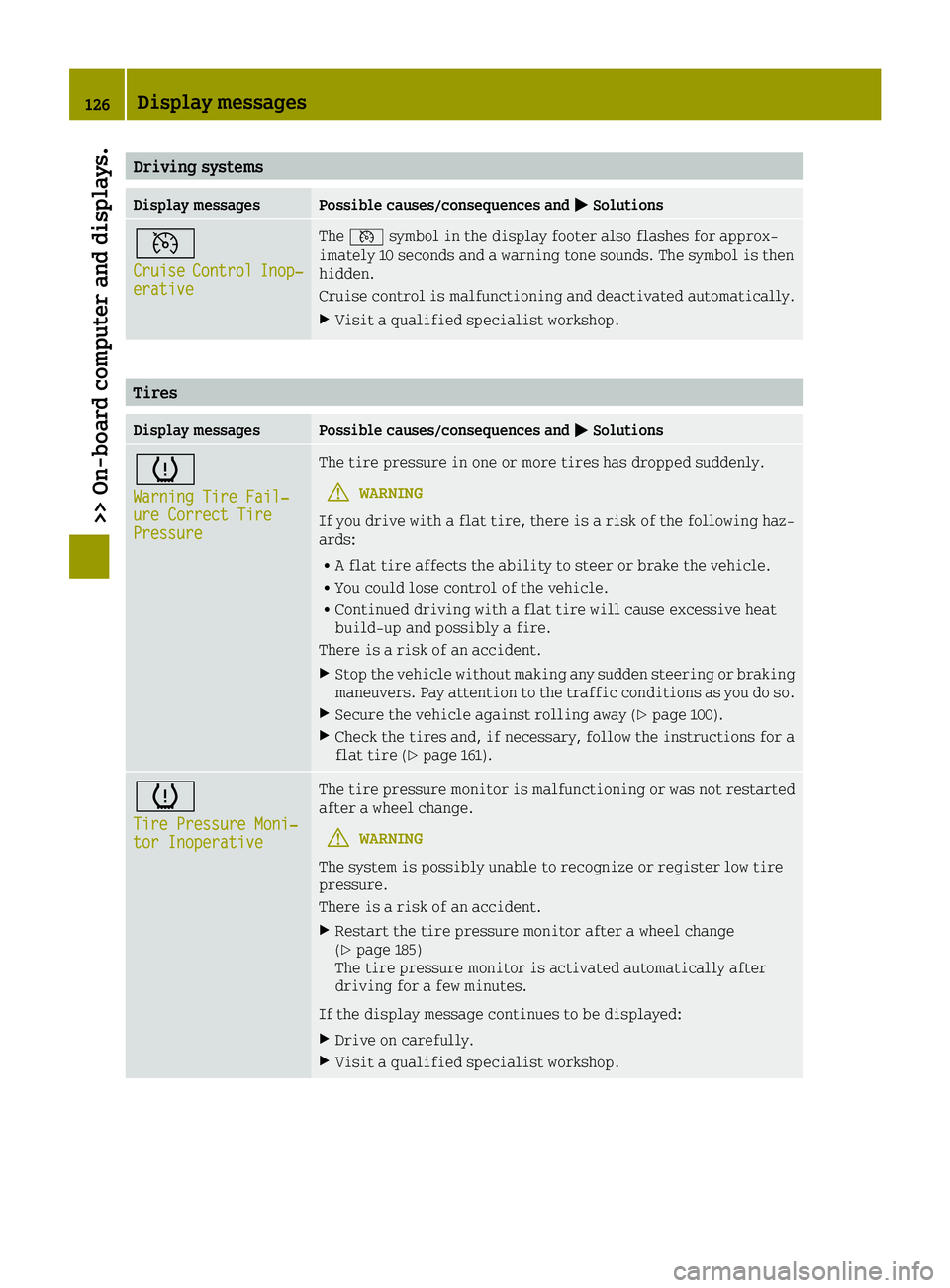
Driving systems
Display messagesPossible causes/consequences and0050Solutions
0085
CruiseControlInop‐erative
The0085 symbol in the display footer also flashes for approx-
imately 10 seconds and a warning tone sounds. The symbol is then
hidden.
Cruise control is malfunctioning and deactivated automatically.
XVisit a qualified specialist workshop.
Tires
Display messagesPossible causes/consequences and 0050Solutions
0077
Warning Tire Fail‐ure Correct TirePressure
The tire pressure in one or more tires has dropped suddenly.
GWARNING
If you drive with a flat tire, there is a risk of the following haz-
ards:
RA flat tire affects the ability to steer or brake the vehicle.
RYou could lose control of the vehicle.
RContinued driving with a flat tire will cause excessive heat
build-up and possibly a fire.
There is a risk of an accident.
XStop the vehicle without making any sudden steering or braking
maneuvers. Pay attention to the traffic conditions as you do so.
XSecure the vehicle against rolling away (Ypage 100).
XCheck the tires and, if necessary, follow the instructions for a
flat tire (Ypage 161).
0077
Tire Pressure Moni‐tor Inoperative
The tire pressure monitor is malfunctioning or was not restarted
after a wheel change.
GWARNING
The system is possibly unable to recognize or register low tire
pressure.
There is a risk of an accident.
XRestart the tire pressure monitor after a wheel change
(Ypage 185)
The tire pressure monitor is activated automatically after
driving for a few minutes.
If the display message continues to be displayed:
XDrive on carefully.
XVisit a qualified specialist workshop.
126Display messages
>> On-board computer and displays.
Page 129 of 214
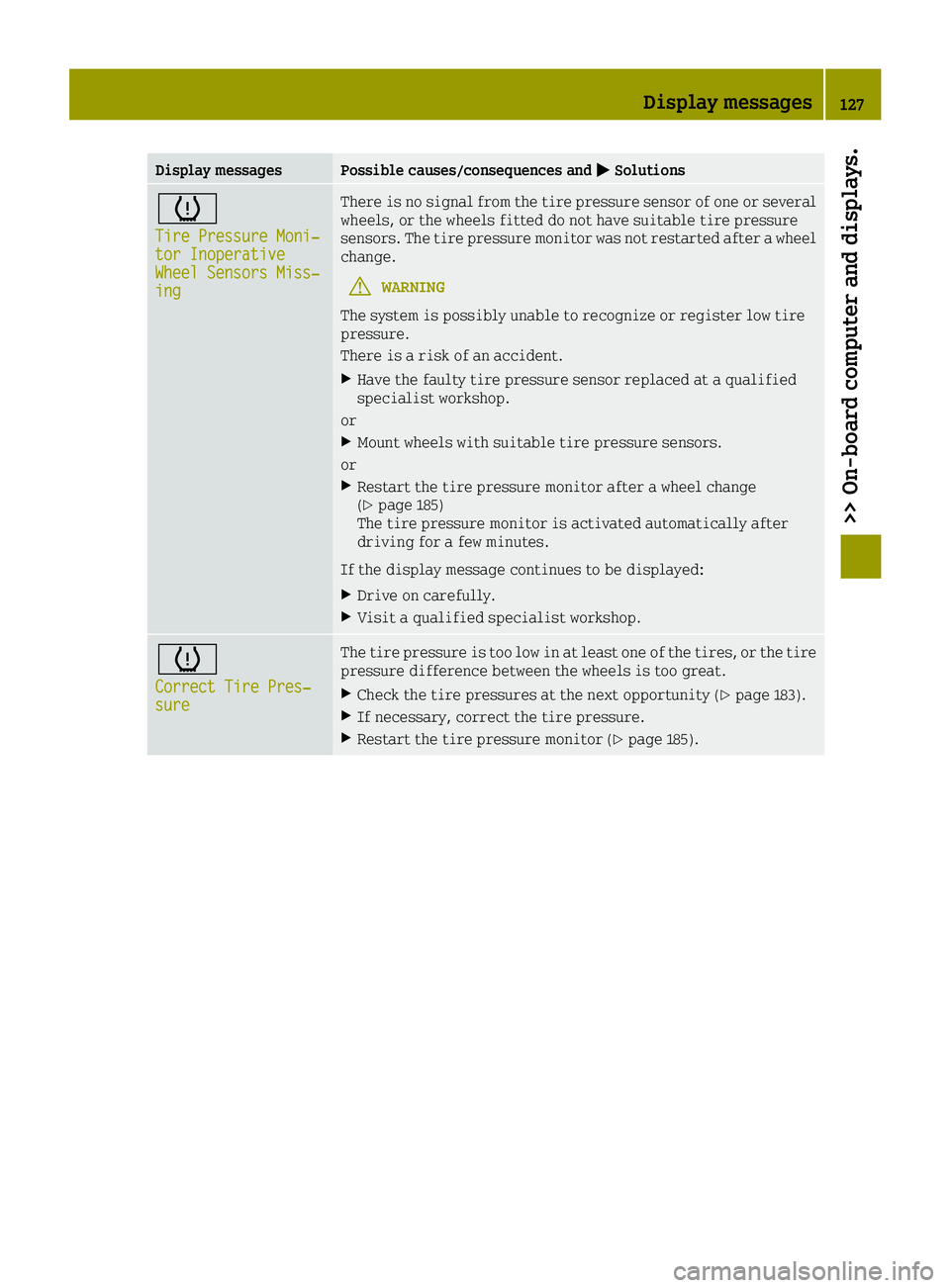
Display messagesPossible causes/consequences and0050Solutions
0077
Tire Pressure Moni‐tor InoperativeWheel Sensors Miss‐ing
There is no signal from the tire pressure sensor of one or several
wheels, or the wheels fitted do not have suitable tire pressure
sensors. The tire pressure monitor was not restarted after a wheel
change.
GWARNING
The system is possibly unable to recognize or register low tire
pressure.
There is a risk of an accident.
XHave the faulty tire pressure sensor replaced at a qualified
specialist workshop.
or
XMount wheels with suitable tire pressure sensors.
or
XRestart the tire pressure monitor after a wheel change
(Ypage 185)
The tire pressure monitor is activated automatically after
driving for a few minutes.
If the display message continues to be displayed:
XDrive on carefully.
XVisit a qualified specialist workshop.
0077
Correct Tire Pres‐sure
The tire pressure is too low in at least one of the tires, or the tire
pressure difference between the wheels is too great.
XCheck the tire pressures at the next opportunity (Ypage 183).
XIf necessary, correct the tire pressure.
XRestart the tire pressure monitor (Ypage 185).
Display messages127
>> On-board computer and displays.
Z
Page 141 of 214
 is lit.
In addition the\
door warning lam")
Tires
ProblemPossible causes/consequences and0050Solutions
0077
You are driving and the
yellow tire pressure
monitor warning lamp
(pressure loss/
malfunction) is lit.
In addition the\
door warning lamp and
other warning lamps,
e.g. 00E5, light up.The central vehicle electronics system is malfunctioning.
After the engine is switched off:
Rdo not lock/unlock the doors using the remote control function of
the key
Ryou can no longer start the engine.
XObserve the additional display messages in the display.
XPull over and stop the vehicle safely as soon as possible, paying
attention to road and traffic conditions. Do not continue driv-
ing under any circumstances.
XSecure the vehicle against rolling away (Ypage 100).
XConsult a qualified specialist workshop.
0077
You are driving and the
yellow tire pressure
monitor warning lamp
(pressure loss/
malfunction) is lit. A
warning tone also
sounds.The tire pressure in one or more tires has dropped suddenly.
GWARNING
If you drive with a flat tire, there is a risk of the following haz-
ards:
RA flat tire affects the ability to steer or brake the vehicle.
Ryou could lose control of the vehicle.
RContinued driving with a flat tire will cause excessive heat
build-up and possibly a fire.
There is a risk of an accident.
XStop the vehicle without making any sudden steering or braking
maneuvers. Pay attention to the traffic conditions as you do so.
XSecure the vehicle against rolling away (Ypage 100).
XCheck the tires and, if necessary, follow the instructions for a
flat tire (Ypage 161).
Warning and indicator lamps in the instrument cluster139
>> On-board computer and displays.
Z
Page 142 of 214
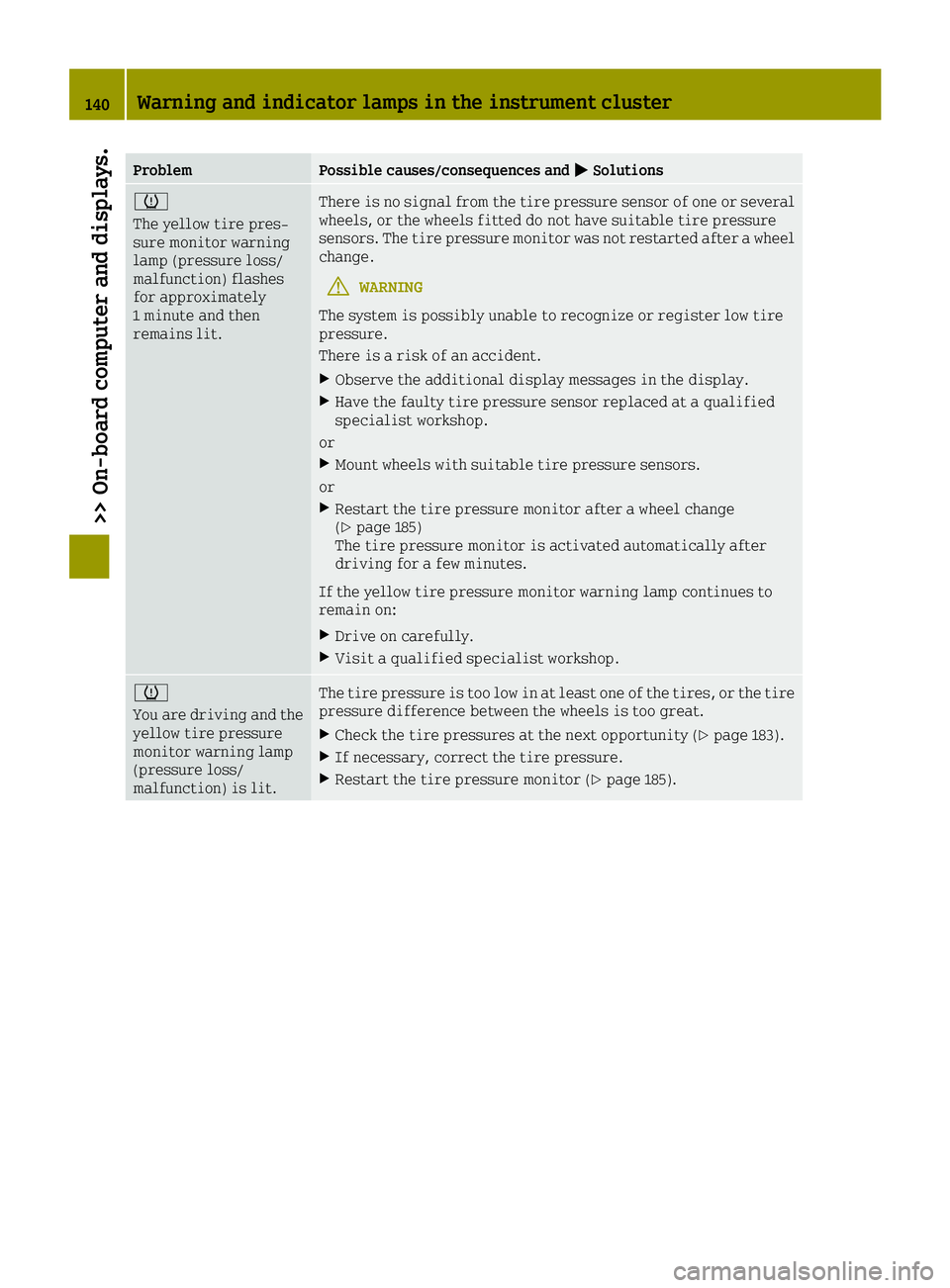
ProblemPossible causes/consequences and0050Solutions
0077
The yellow tire pres-
sure monitor warning
lamp (pressure loss/
malfunction) flashes
for approximately
1 minute and then
remains lit.There is no signal from the tire pressure sensor of one or several
wheels, or the wheels fitted do not have suitable tire pressure
sensors. The tire pressure monitor was not restarted after a wheel
change.
GWARNING
The system is possibly unable to recognize or register low tire
pressure.
There is a risk of an accident.
XObserve the additional display messages in the display.
XHave the faulty tire pressure sensor replaced at a qualified
specialist workshop.
or
XMount wheels with suitable tire pressure sensors.
or
XRestart the tire pressure monitor after a wheel change
(Ypage 185)
The tire pressure monitor is activated automatically after
driving for a few minutes.
If the yellow tire pressure monitor warning lamp continues to
remain on:
XDrive on carefully.
XVisit a qualified specialist workshop.
0077
You are driving and the
yellow tire pressure
monitor warning lamp
(pressure loss/
malfunction) is lit.The tire pressure is too low in at least one of the tires, or the tire
pressure difference between the wheels is too great.
XCheck the tire pressures at the next opportunity (Ypage 183).
XIf necessary, correct the tire pressure.
XRestart the tire pressure monitor (Ypage 185).
140Warning and indicator lamps in the instrument cluster
>> On-board computer and displays.
Page 156 of 214
Information on the type of service and ser-
vice intervals (see the separate Maintenance
Booklet).
For further information inquire at any smart
center or look under
http://www.smartUSA.com (only USA).
iThe service display does not show any
information on the engine oil level.
Observe the notes on the engine oil level
(
Ypage 150).
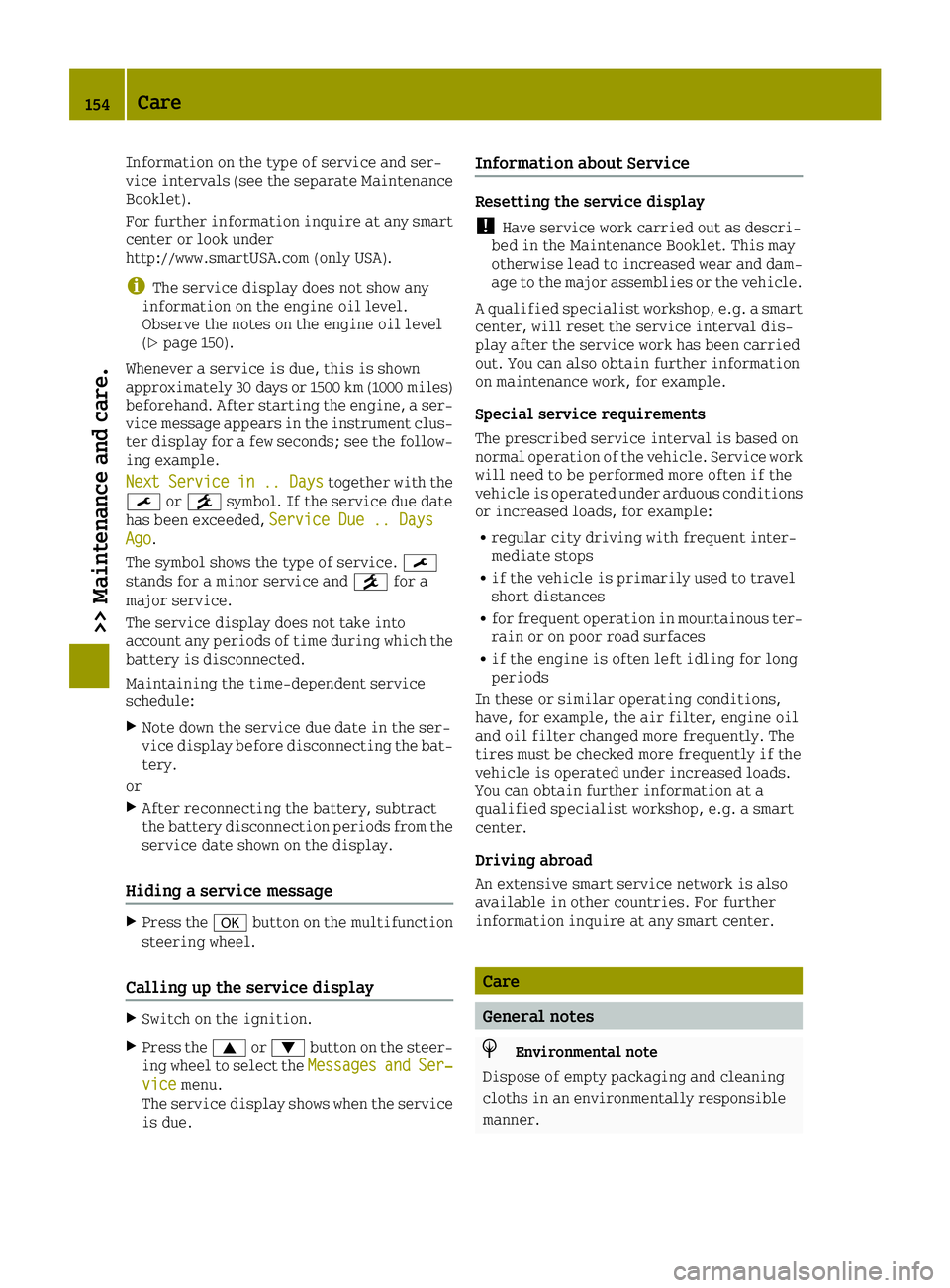
Whenever a service is due, this is shown
approximately 30 days or 1500 km (1000 miles)
beforehand. After starting the engine, a ser-
vice message appears in the instrument clus-
ter display for a few seconds; see the follow-
ing example.
Next
Servicein.. Daystogether with the
0099 or009A symbol. If the service due date
has been exceeded, Service Due .. Days
Ago.
The symbol shows the type of service. 0099
stands for a minor service and 009Afor a
major service.
The service display does not take into
account any periods of time during which the
battery is disconnected.
Maintaining the time-dependent service
schedule:
XNote down the service due date in the ser-
vice display before disconnecting the bat-
tery.
or
XAfter reconnecting the battery, subtract
the battery disconnection periods from the
service date shown on the display.
Hiding a service message
XPress the 0076button on the multifunction
steering wheel.
Calling up the service display
XSwitch on the ignition.
XPress the 0063or0064 button on the steer-
ing wheel to select the MessagesandSer‐vicemenu.
The service display shows when the service
is due.
Information about Service
Resetting the service display
!Have service work carried out as descri-
bed in the Maintenance Booklet. This may
otherwise lead to increased wear and dam-
age to the major assemblies or the vehicle.
A qualified specialist workshop, e.g. a smart center, will reset the service interval dis-
play after the service work has been carried
out. You can also obtain further information
on maintenance work, for example.
Special service requirements
The prescribed service interval is based on
normal operation of the vehicle. Service work
will need to be performed more often if the
vehicle is operated under arduous conditions
or increased loads, for example:
Rregular city driving with frequent inter-
mediate stops
Rif the vehicle is primarily used to travel
short distances
Rfor frequent operation in mountainous ter-
rain or on poor road surfaces
Rif the engine is often left idling for long
periods
In these or similar operating conditions,
have, for example, the air filter, engine oil
and oil filter changed more frequently. The
tires must be checked more frequently if the
vehicle is operated under increased loads.
You can obtain further information at a
qualified specialist workshop, e.g. a smart
center.
Driving abroad
An extensive smart service network is also
available in other countries. For further
information inquire at any smart center.
Care
General notes
HEnvironmental note
Dispose of empty packaging and cleaning
cloths in an environmentally responsible
manner.
154Care
>> Maintenance and care.
Page 157 of 214
!For cleaning your vehicle, do not use any
of the following:
Rdry, rough or hard cloths
Rabrasive cleaning agents
Rsolvents
Rcleaning agents containing solvents
Do not scrub.
Do not touch the surfaces or protective
films with hard objects, e.g. a ring or ice
scraper. You could otherwise scratch or
damage the surfaces and protective film.
!Do not park the vehicle for an extended
period straight after cleaning it, partic-
ularly after having cleaned the wheels with
wheel cleaner. Wheel cleaners could cause
increased corrosion of the brake discs and
brake pads/linings. For this reason, you
should drive for a few minutes after clean-
ing. Braking heats the brake discs and the
brake pads/linings, thus drying them. The
vehicle can then be parked.
Regular care of your vehicle is a condition
for retaining the quality in the long term.
Use care products and cleaning agents rec-
ommended and approved by smart.
Exterior care
Automatic car wash
GWARNING
Braking efficiency is reduced after wash-
ing the vehicle. There is a risk of an acci-
dent.
After the vehicle has been washed, brake
carefully while paying attention to the
traffic conditions until full braking power
is restored.
!Never clean your vehicle in a Touchless
Automatic Car Wash as these use special
cleaning agents. These cleaning agents can
damage the paintwork or plastic parts.
!Make sure that:
Rthe side windows are fully closed
Rthe climate control blower is switched
off
Rthe windshield wiper switch is at posi-
tion 0
The vehicle may otherwise be damaged.
You can wash the vehicle in an automatic car
wash from the very start.
If the vehicle is very dirty, pre-wash it
before cleaning it in an automatic car wash.
After using an automatic car wash, wipe off
wax from the windshield and the wiper blades.
This will prevent smears and reduce wiping
noises caused by residue on the windshield.
Washing by hand
In some countries, washing by hand is only
allowed at specially equipped washing bays.
Observe the legal requirements in each coun-
try.
XDo not use hot water and do not wash the
vehicle in direct sunlight.
XUse a soft sponge to clean.
XUse a mild cleaning agent, such as a car
shampoo approved by smart.
XThoroughly hose down the vehicle with a
gentle jet of water.
XDo not point the water jet directly towards
the air inlet.
XUse plenty of water and rinse out the sponge frequently.
XRinse the vehicle with clean water and dry
thoroughly with a chamois.
XDo not let the cleaning agent dry on the
paintwork.
Carefully remove all deposits of road salt as
soon as possible when driving in winter.
Power washers
GWARNING
The water jet from a circular jet nozzle
(dirt blasters) can cause invisible exte-
rior damage to the tires or chassis compo- nents. Components damaged in this way may
fail unexpectedly. There is a risk of an
accident.
Care155
>> Maintenance and care.
Z