door lock SMART FORTWO 2016 Owner's Manual
[x] Cancel search | Manufacturer: SMART, Model Year: 2016, Model line: FORTWO, Model: SMART FORTWO 2016Pages: 214, PDF Size: 4.93 MB
Page 113 of 214
Operating the on-board computer
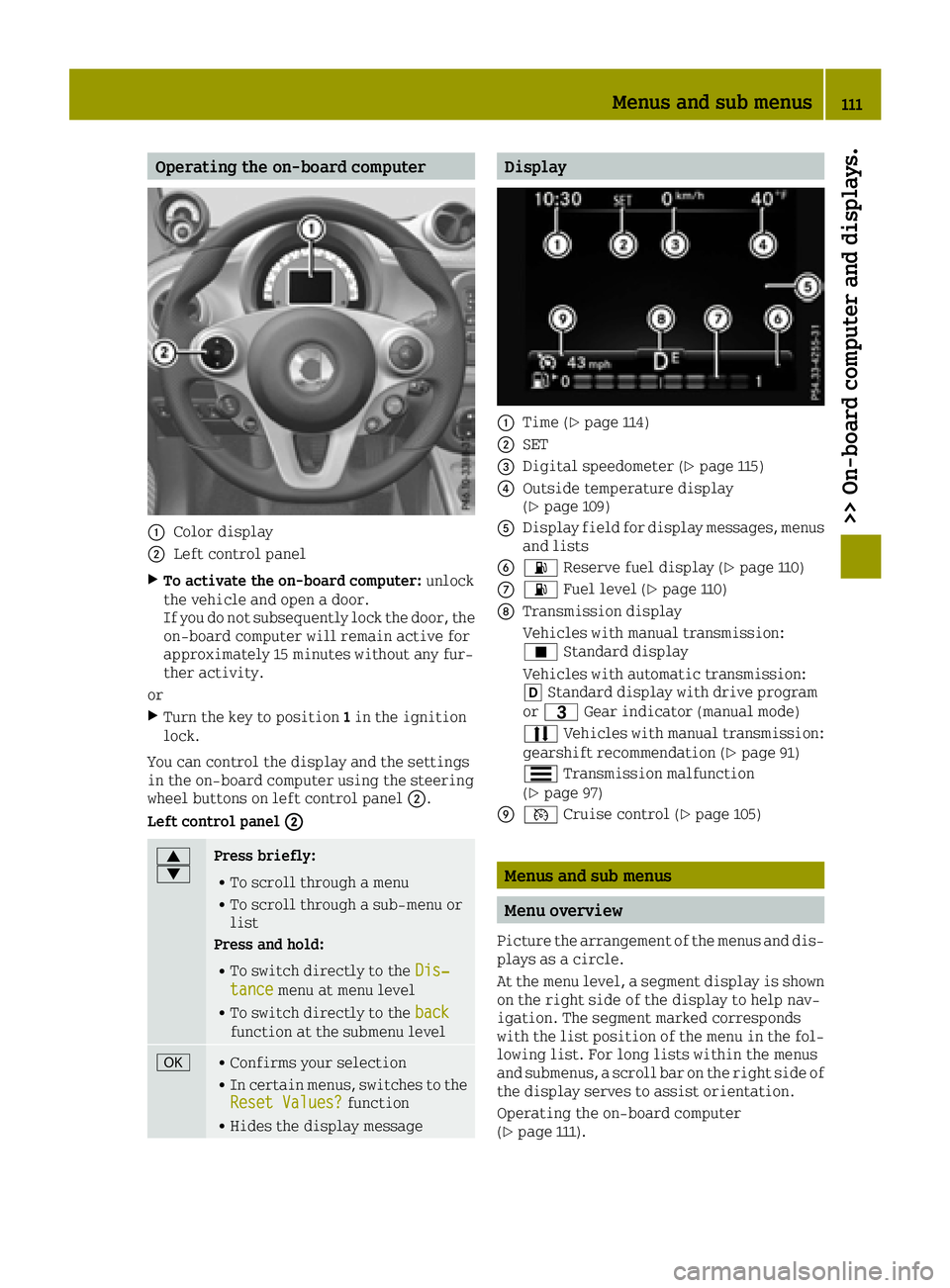
0043Color display
0044Left control panel
XTo activate the on-board computer:unlock
the vehicle and open a door.
If you do not subsequently lock the door, the
on-board computer will remain active for
approximately 15 minutes without any fur-
ther activity.
or
XTurn the key to position 1in the ignition
lock.
You can control the display and the settings
in the on-board computer using the steering
wheel buttons on left control panel 0044.
Left control panel 0044
0063
0064Press briefly:
RTo scroll through a menu
RTo scroll through a sub-menu or
list
Press and hold:
RTo switch directly to the Dis‐tancemenu at menu level
RTo switch directly to the backfunction at the submenu level
0076RConfirms your selection
RIn certain menus, switches to the
Reset Values?function
RHides the display message
Display
0043Time (Ypage 114)
0044SET
0087Digital speedometer (Ypage 115)
0085Outside temperature display
(Ypage 109)
0083Display field for display messages, menus
and lists
008400B4 Reserve fuel display (Ypage 110)
006B00B4Fuel level (Ypage 110)
006CTransmission display
Vehicles with manual transmission:
¿Standard display
Vehicles with automatic transmission:
005B Standard display with drive program
or 0040 Gear indicator (manual mode)
0078 Vehicles with manual transmission:
gearshift recommendation (
Ypage 91)
0079 Transmission malfunction
(
Ypage 97)
006D0085 Cruise control (Ypage 105)
Menus and sub menus
Menu overview
Picture the arrangement of the menus and dis-
plays as a circle.
At the menu level, a segment display is shown
on the right side of the display to help nav-
igation. The segment marked corresponds
with the list position of the menu in the fol-
lowing list. For long lists within the menus
and submenus, a scroll bar on the right side of
the display serves to assist orientation.
Operating the on-board computer
(
Ypage 111).
Menus and sub menus111
>> On-board computer and displays.
Z
Page 130 of 214
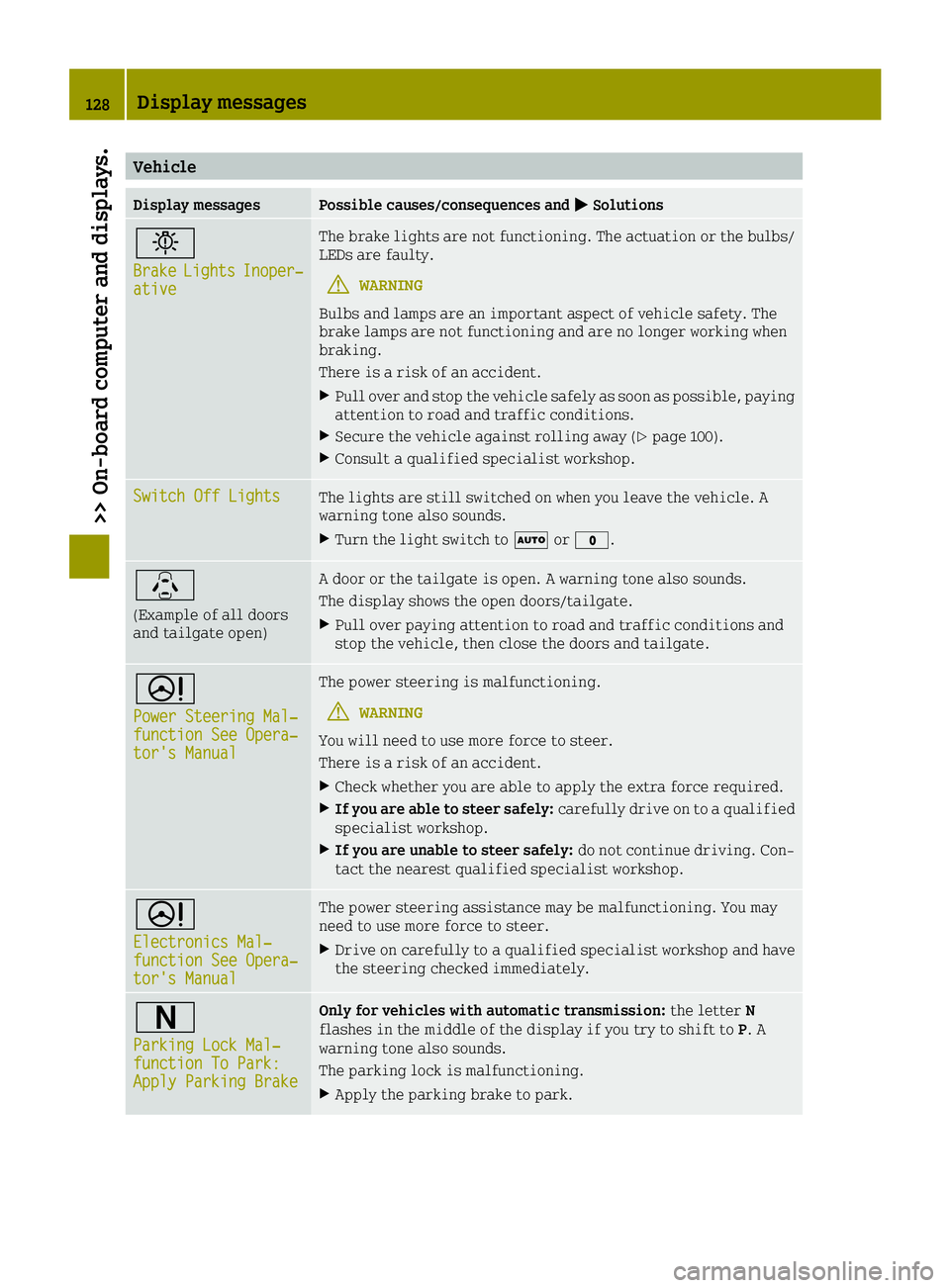
Vehicle
Display messagesPossible causes/consequences and0050Solutions
0049
BrakeLightsInoper‐ative
The brake lights are not functioning. The actuation or the bulbs/
LEDs are faulty.
GWARNING
Bulbs and lamps are an important aspect of vehicle safety. The
brake lamps are not functioning and are no longer working when
braking.
There is a risk of an accident.
XPull over and stop the vehicle safely as soon as possible, paying
attention to road and traffic conditions.
XSecure the vehicle against rolling away (Ypage 100).
XConsult a qualified specialist workshop.
Switch Off LightsThe lights are still switched on when you leave the vehicle. A
warning tone also sounds.
XTurn the light switch to 0058or003F.
\
(Example of all doors
and tailgate open)
A door or the tailgate is open. A warning tone also sounds.
The display shows the open doors/tailgate.
XPull over paying attention to road and traffic conditions and
stop the vehicle, then close the doors and tailgate.
0052
Power Steering Mal‐function See Opera‐tor's Manual
The power steering is malfunctioning.
GWARNING
You will need to use more force to steer.
There is a risk of an accident.
XCheck whether you are able to apply the extra force required.
XIf you are able to steer safely: carefully drive on to a qualified
specialist workshop.
XIf you are unable to steer safely: do not continue driving. Con-
tact the nearest qualified specialist workshop.
0052
Electronics Mal‐function See Opera‐tor's Manual
The power steering assistance may be malfunctioning. You may
need to use more force to steer.
XDrive on carefully to a qualified specialist workshop and have
the steering checked immediately.
0044
Parking Lock Mal‐function To Park:Apply Parking Brake
Only for vehicles with automatic transmission: the letterN
flashes in the middle of the display if you try to shift to P. A
warning tone also sounds.
The parking lock is malfunctioning.
XApply the parking brake to park.
128Display messages
>> On-board computer and displays.
Page 132 of 214
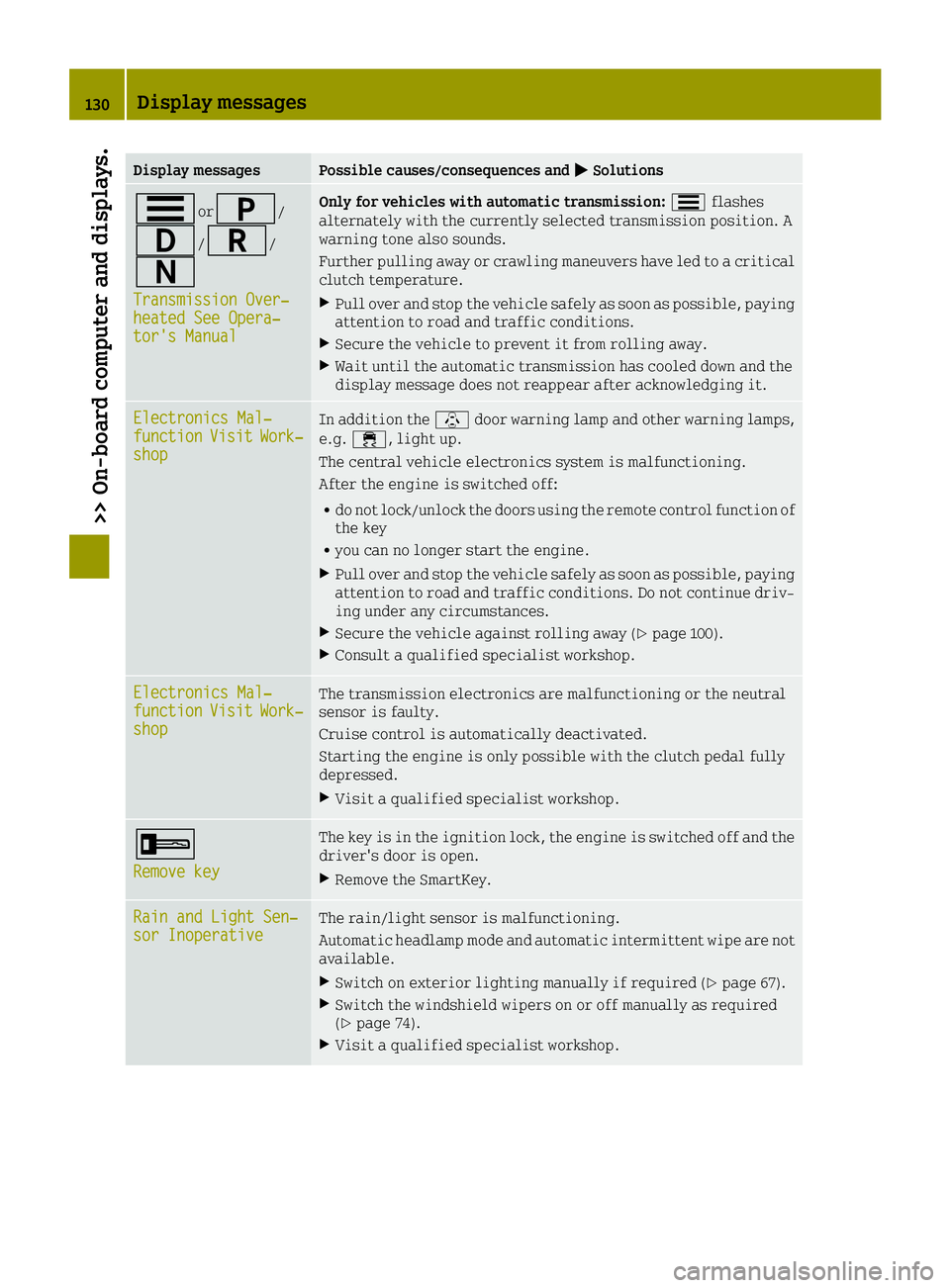
Display messagesPossible causes/consequences and0050Solutions
0079or0045/
003A/0046/
0044
Transmission Over‐heated See Opera‐tor's Manual
Only for vehicles with automatic transmission: 0079flashes
alternately with the currently selected transmission position. A
warning tone also sounds.
Further pulling away or crawling maneuvers have led to a critical
clutch temperature.
XPull over and stop the vehicle safely as soon as possible, paying
attention to road and traffic conditions.
XSecure the vehicle to prevent it from rolling away.
XWait until the automatic transmission has cooled down and the
display message does not reappear after acknowledging it.
Electronics Mal‐functionVisitWork‐shop
In addition the \door warning lamp and other warning lamps,
e.g. 00E5, light up.
The central vehicle electronics system is malfunctioning.
After the engine is switched off:
Rdo not lock/unlock the doors using the remote control function of
the key
Ryou can no longer start the engine.
XPull over and stop the vehicle safely as soon as possible, paying
attention to road and traffic conditions. Do not continue driv-
ing under any circumstances.
XSecure the vehicle against rolling away (Ypage 100).
XConsult a qualified specialist workshop.
Electronics Mal‐functionVisitWork‐shop
The transmission electronics are malfunctioning or the neutral
sensor is faulty.
Cruise control is automatically deactivated.
Starting the engine is only possible with the clutch pedal fully
depressed.
XVisit a qualified specialist workshop.
0039
Remove key
The key is in the ignition lock, the engine is switched off and the
driver's door is open.
XRemove the SmartKey.
Rain and Light Sen‐sor InoperativeThe rain/light sensor is malfunctioning.
Automatic headlamp mode and automatic intermittent wipe are not
available.
XSwitch on exterior lighting manually if required (Ypage 67).
XSwitch the windshield wipers on or off manually as required
(Ypage 74).
XVisit a qualified specialist workshop.
130Display messages
>> On-board computer and displays.
Page 136 of 214

ProblemPossible causes/consequences and0050Solutions
0025
The yellow ABS warning
lamp is lit while the
engine is running.ABS is malfunctioning. This means that ESP®, Crosswind Assist and
hill start assist, for example, are also unavailable.
Other driving systems could be switched off automatically.
GWARNING
The brake system continues to function normally, but without the
functions listed above. The wheels could therefore lock if you
brake hard, for example.
The steerability and braking characteristics may be severely
affected. The braking distance in an emergency braking situation
can increase.
If ESP
®is not operational, ESP®is unable to stabilize the vehicle.
There is an increased risk of skidding and an accident.
XDrive on carefully.
XVisit a qualified specialist workshop.
If the ABS control unit is faulty, there is also a possibility that
other systems may be unavailable.
00E5
The yellow ESP®warn-
ing lamp is on when you
are driving.
In addition, the \
door warning lamp and
other warning lamps,
e.g. 0077, light up.
The central vehicle electronics system is malfunctioning.
After the engine is switched off:
Rdo not lock/unlock the doors using the remote control function of
the key
Ryou can no longer start the engine.
XObserve the additional display messages in the display.
XPull over and stop the vehicle safely as soon as possible, paying
attention to road and traffic conditions. Do not continue driv-
ing under any circumstances.
XSecure the vehicle against rolling away (Ypage 100).
XConsult a qualified specialist workshop.
00E5
The yellow ESP®warn-
ing lamp flashes while
the vehicle is in
motion.
ESP®or traction control has intervened because there is a risk of
skidding or at least one wheel has started to spin.
Cruise control is automatically deactivated.
XWhen pulling away, only depress the accelerator pedal as far as
necessary.
XEase off the accelerator pedal while the vehicle is in motion.
XAdapt your driving style to suit the road and weather condi-
tions.
134Warning and indicator lamps in the instrument cluster
>> On-board computer and displays.
Page 137 of 214

ProblemPossible causes/consequences and0050Solutions
00E5
The yellow ESP®warn-
ing lamp is lit while
the engine is running.
ESP®is not available due to a malfunction.
Other driving systems could be switched off automatically.
GWARNING
The brake system continues to function normally, but without the
functions listed above.
The braking distance in an emergency braking situation can thus
increase.
The brake lamps may not be functioning and thus no longer working
when braking.
If ESP
®is not operational, ESP®is unable to stabilize the vehicle.
There is an increased risk of skidding and an accident.
XPull over and stop the vehicle safely as soon as possible, paying
attention to road and traffic conditions. Do not continue driv-
ing under any circumstances.
XSecure the vehicle against rolling away (Ypage 100).
XObserve the additional display messages in the display.
XCheck that the brake lamps are working.
If the brake lamps are not working:
XConsult a qualified specialist workshop.
If the brake lamps are working:
XDrive on carefully.
XVisit a qualified specialist workshop.
^
The yellow distance
warning function warn-
ing lamp comes on
while the vehicle is
moving.
In addition the \
door warning lamp and
other warning lamps,
e.g. 00E5, light up.The central vehicle electronics system is malfunctioning.
After the engine is switched off:
Rdo not lock/unlock the doors using the remote control function of
the key
Ryou can no longer start the engine.
XPull over and stop the vehicle safely as soon as possible, paying
attention to road and traffic conditions. Do not continue driv-
ing under any circumstances.
XSecure the vehicle against rolling away (Ypage 100).
XConsult a qualified specialist workshop.
Warning and indicator lamps in the instrument cluster135
>> On-board computer and displays.
Z
Page 141 of 214
 is lit.
In addition the\
door warning lam")
Tires
ProblemPossible causes/consequences and0050Solutions
0077
You are driving and the
yellow tire pressure
monitor warning lamp
(pressure loss/
malfunction) is lit.
In addition the\
door warning lamp and
other warning lamps,
e.g. 00E5, light up.The central vehicle electronics system is malfunctioning.
After the engine is switched off:
Rdo not lock/unlock the doors using the remote control function of
the key
Ryou can no longer start the engine.
XObserve the additional display messages in the display.
XPull over and stop the vehicle safely as soon as possible, paying
attention to road and traffic conditions. Do not continue driv-
ing under any circumstances.
XSecure the vehicle against rolling away (Ypage 100).
XConsult a qualified specialist workshop.
0077
You are driving and the
yellow tire pressure
monitor warning lamp
(pressure loss/
malfunction) is lit. A
warning tone also
sounds.The tire pressure in one or more tires has dropped suddenly.
GWARNING
If you drive with a flat tire, there is a risk of the following haz-
ards:
RA flat tire affects the ability to steer or brake the vehicle.
Ryou could lose control of the vehicle.
RContinued driving with a flat tire will cause excessive heat
build-up and possibly a fire.
There is a risk of an accident.
XStop the vehicle without making any sudden steering or braking
maneuvers. Pay attention to the traffic conditions as you do so.
XSecure the vehicle against rolling away (Ypage 100).
XCheck the tires and, if necessary, follow the instructions for a
flat tire (Ypage 161).
Warning and indicator lamps in the instrument cluster139
>> On-board computer and displays.
Z
Page 143 of 214

Vehicle
ProblemPossible causes/consequences and0050Solutions
\
The red door warning
lamp comes on while the
vehicle is moving.
In addition, further
warning lamps light up,
such as 00E5.The central vehicle electronics system is malfunctioning.
After the engine is switched off:
Rdo not lock/unlock the doors using the remote control function of
the key
Ryou can no longer start the engine.
XObserve the additional display messages in the display.
XPull over and stop the vehicle safely as soon as possible, paying
attention to road and traffic conditions. Do not continue driv-
ing under any circumstances.
XSecure the vehicle against rolling away (Ypage 100).
XConsult a qualified specialist workshop.
\
The red door warning
lamp is on.A door or the tailgate is open. If you are driving at speeds above
13 mph (20 km/h), an additional warning tone will sound.
XObserve the additional display messages in the display.
XPull over at a suitable place and stop the vehicle safely, paying
attention to road and traffic conditions.
XSecure the vehicle against rolling away (Ypage 100).
XClose all doors and the tailgate.
0052
The yellow power steer-
ing warning lamp is lit
while the engine is
running.The power steering is malfunctioning.
GWARNING
You may need to use more force to steer.
There is a risk of an accident.
XObserve the additional display messages in the display.
XCheck whether you are able to apply the extra force required.
XIf you are able to steer safely: carefully drive on to a qualified
specialist workshop.
XIf you are unable to steer safely: do not drive on. Contact the
nearest qualified specialist workshop.
Warning and indicator lamps in the instrument cluster141
>> On-board computer and displays.
Z
Page 145 of 214
RAll closable stowage compartments
should be closed before beginning your
journey.
RAlways stow and secure heavy, hard, poin-
ted, sharp-edged, fragile objects or
objects which are too large behind the
last bench seat or under the passenger
seats.
Observe the loading guidelines (
Ypage 142).
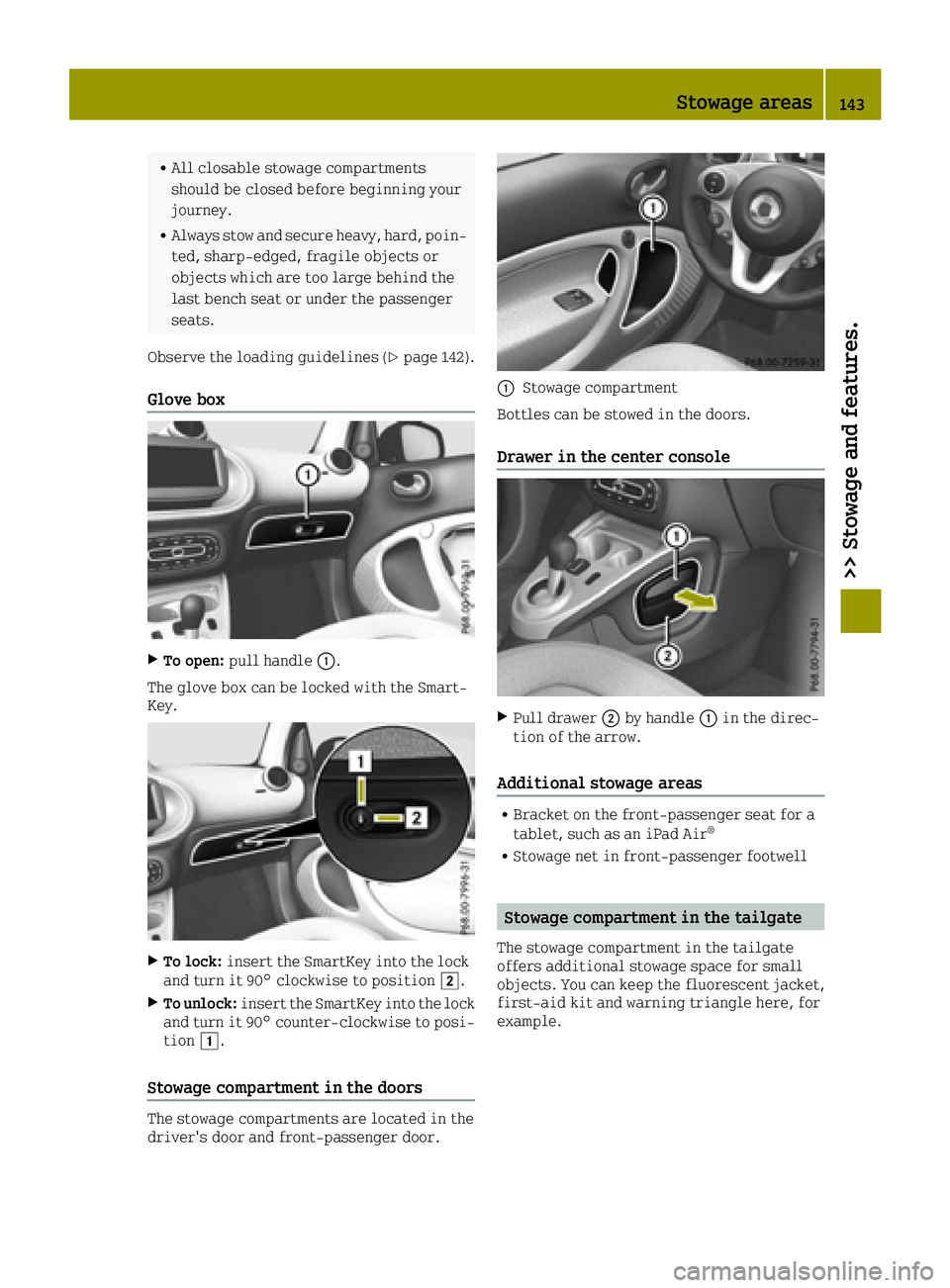
Glove box
XTo open: pull handle 0043.
The glove box can be locked with the Smart-
Key.
XTo lock: insert the SmartKey into the lock
and turn it 90° clockwise to position 0048.
XTo unlock:insert the SmartKey into the lock
and turn it 90° counter-clockwise to posi-
tion 0047.
Stowage compartment in the doors
The stowage compartments are located in the
driver's door and front-passenger door.
0043Stowage compartment
Bottles can be stowed in the doors.
Drawer in the center console
XPull drawer 0044by handle 0043in the direc-
tion of the arrow.
Additional stowage areas
RBracket on the front-passenger seat for a
tablet, such as an iPad Air®
RStowage net in front-passenger footwell
Stowage compartment in the tailgate
The stowage compartment in the tailgate
offers additional stowage space for small
objects. You can keep the fluorescent jacket,
first-aid kit and warning triangle here, for
example.
Stowage areas143
>> Stowage and features.
Z
Page 163 of 214
Useful information
i
This Operator's Manual describes all
models and all standard and optional
equipment of your vehicle available at the
time of publication of the Operator's Man- ual. Country-specific differences are pos-
sible. Bear in mind that your vehicle may
not feature all functions described here.
This also applies to safety-relevant sys-
tems and functions.
iRead the information on qualified spe-
cialist workshops: (Ypage 20).
Where will I find...?
Vehicle tool kit
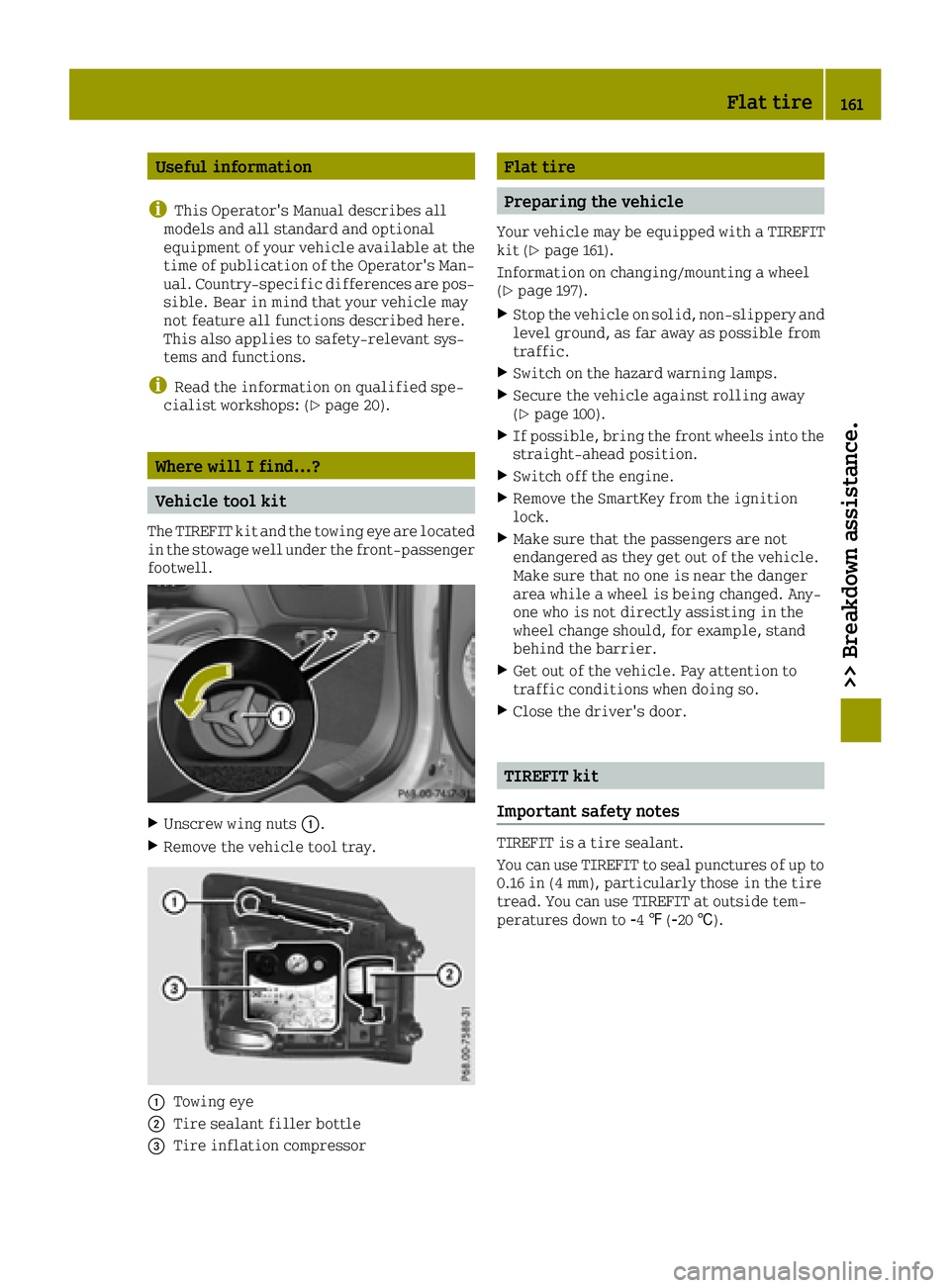
The TIREFIT kit and the towing eye are located
in the stowage well under the front-passenger
footwell.
XUnscrew wing nuts 0043.
XRemove the vehicle tool tray.
0043Towing eye
0044Tire sealant filler bottle
0087Tire inflation compressor
Flat tire
Preparing the vehicle
Your vehicle may be equipped with a TIREFIT
kit (Ypage 161).
Information on changing/mounting a wheel
(
Ypage 197).
XStop the vehicle on solid, non-slippery and
level ground, as far away as possible from
traffic.
XSwitch on the hazard warning lamps.
XSecure the vehicle against rolling away
(Ypage 100).
XIf possible, bring the front wheels into the
straight-ahead position.
XSwitch off the engine.
XRemove the SmartKey from the ignition
lock.
XMake sure that the passengers are not
endangered as they get out of the vehicle.
Make sure that no one is near the danger
area while a wheel is being changed. Any-
one who is not directly assisting in the
wheel change should, for example, stand
behind the barrier.
XGet out of the vehicle. Pay attention to
traffic conditions when doing so.
XClose the driver's door.
TIREFIT kit
Important safety notes
TIREFIT is a tire sealant.
You can use TIREFIT to seal punctures of up to
0.16 in (4 mm), particularly those in the tire
tread. You can use TIREFIT at outside tem-
peratures down to 00F84‡(00F820 †).
Flat tire161
>> Breakdown assistance.
Page 174 of 214
switched on, use the combination switch as
usual. In this case, only the indicator
lamps for the direction of travel flash.
After resetting the combination switch, the
hazard warning lamp starts flashing again.
Vehicles with automatic transmission: the
automatic transmission automatically shifts
to position Pwhen you open the driver's or
front-passenger door or when you remove the
key from the ignition lock. In order to ensure
that the automatic transmission stays in
position Nwhen towing the vehicle, you must
observe the following points:
XMake sure that the vehicle is stationary.
XTurn the SmartKey to position 2in the igni-
tion lock.
XDepress and hold the brake pedal.
XShift the automatic transmission to posi-
tion N.
Vehicles with manual transmission:
XLeave the SmartKey in position 2in the
ignition lock.
XRelease the brake pedal.
XRelease the parking brake.
XSwitch on the hazard warning lamps
(Ypage 69).
It is important that you observe the safety
instructions when towing away your vehicle
(
Ypage 170).
Transporting the vehicle
!
You may only secure the vehicle by the
wheels, not by parts of the vehicle such as
axle or steering components. Otherwise,
the vehicle could be damaged.
XVehicles with automatic transmission:
turn the SmartKey to position 2in the igni-
tion lock (
Ypage 87).
XVehicles with manual transmission:
depress the clutch pedal fully and select
neutral.
XShift the transmission to position N.
As soon as the vehicle has been loaded:
XPrevent the vehicle from rolling away by
applying the parking brake.
XVehicles with automatic transmission:
shift the transmission to position P.
XVehicles with manual transmission:
depress the clutch pedal fully and engage
first or reverse gear.
XTurn the SmartKey to position0in the igni-
tion lock and remove it.
XSecure the vehicle.
The towing eye can be used to pull the vehicle
onto a trailer or transporter for transporting
purposes.
Tow-starting (emergency engine start-
ing)
!
Vehicles with automatic transmission
must not be started by tow-starting. This
could otherwise damage the transmission.
iYou can find information on "Jump-start-
ing" at (Ypage 168).
Before tow-starting:
Rthe battery must be connected
Rthe engine must be cold
Rthe exhaust system has cooled down.
XSwitch on the hazard warning lamps
(Ypage 69).
XInstall the towing eye (Ypage 171).
XSecure the rigid towing bar or the towing
rope.
XDepress and hold the brake pedal.
XTurn the SmartKey to position 2in the igni-
tion lock.
XDepress the clutch pedal fully, engage sec-
ond gear and keep the clutch pedal fully
depressed.
XRelease the brake pedal.
XTow-start the vehicle.
XRelease the clutch pedal slowly; do not
depress the accelerator pedal while doing
so.
XWhen the engine is started, immediately
depress the clutch pedal fully and select
neutral.
XPull over at a suitable place and stop the
vehicle safely, paying attention to road
and traffic conditions.
XSecure the vehicle against rolling away
with the parking brake.
XRemove the rigid towing bar or towing
rope.
172Towing and tow-starting
>> Breakdown assistance.