door lock SMART FORTWO 2016 User Guide
[x] Cancel search | Manufacturer: SMART, Model Year: 2016, Model line: FORTWO, Model: SMART FORTWO 2016Pages: 214, PDF Size: 4.93 MB
Page 58 of 214
XRemove the SmartKey from the ignition
lock.
XOpen the driver's door.
XClose the front-passenger door and the
tailgate.
XPress the locking button (Ypage 54).
XClose the driver's door within 5 seconds.
Do not leave the key in the vehicle. You
could otherwise lock yourself out.
The doors, tailgate and fuel filler flap are
locked. The anti-theft alarm system is
primed.
XMake sure that the doors and the tailgate
are locked.
If this does not work, use the emergency lock-
ing.
XOpen the driver's door.
XClose the front-passenger door and the
tailgate.
XPress the locking button (Ypage 54).
XCheck whether the front-passenger door is
locked. If necessary, carry out the follow-
ing steps on both doors.
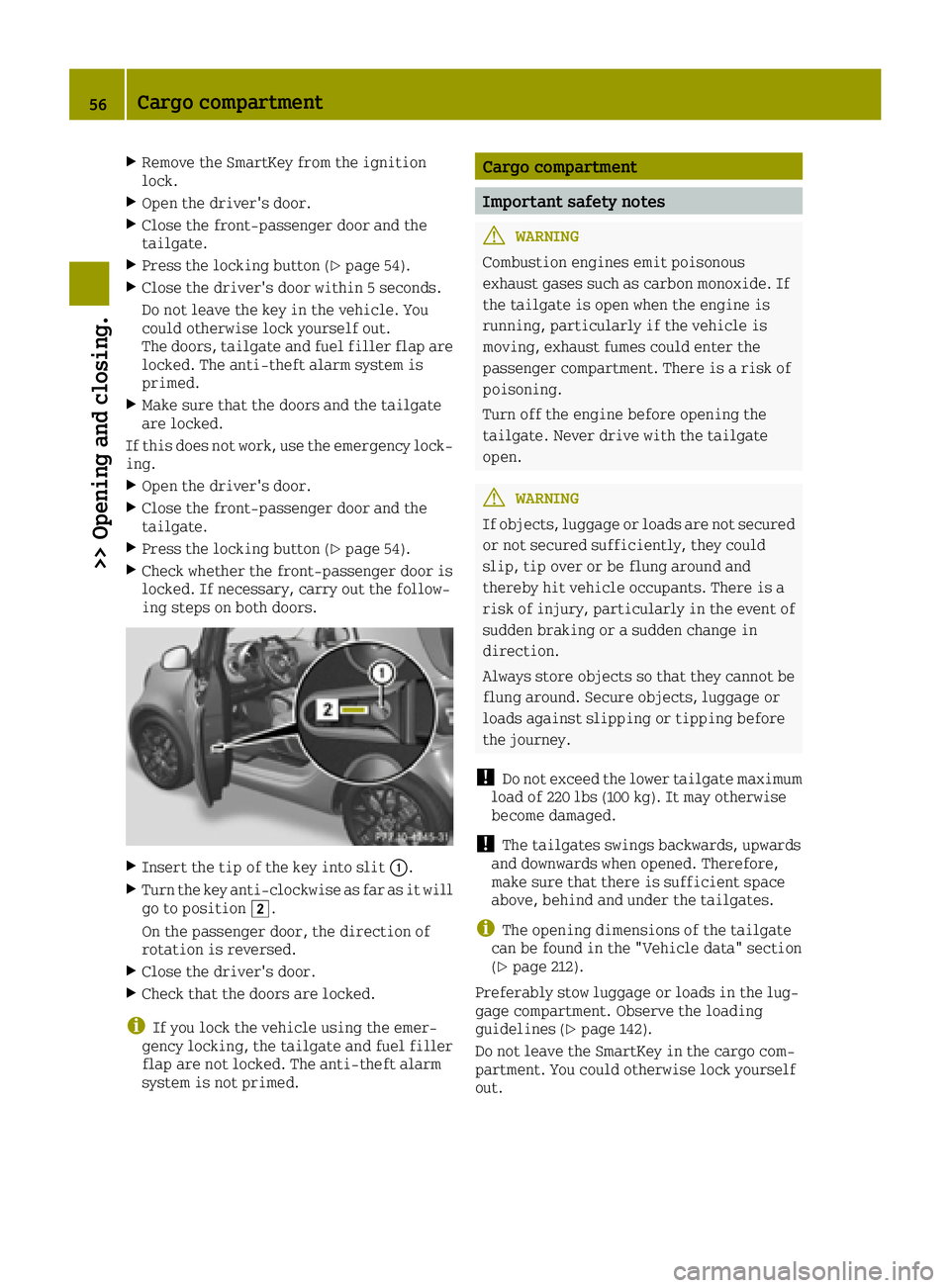
XInsert the tip of the key into slit 0043.
XTurn the key anti-clockwise as far as it will
go to position0048.
On the passenger door, the direction of
rotation is reversed.
XClose the driver's door.
XCheck that the doors are locked.
iIf you lock the vehicle using the emer-
gency locking, the tailgate and fuel filler
flap are not locked. The anti-theft alarm
system is not primed.
Cargo compartment
Important safety notes
GWARNING
Combustion engines emit poisonous
exhaust gases such as carbon monoxide. If
the tailgate is open when the engine is
running, particularly if the vehicle is
moving, exhaust fumes could enter the
passenger compartment. There is a risk of
poisoning.
Turn off the engine before opening the
tailgate. Never drive with the tailgate
open.
GWARNING
If objects, luggage or loads are not secured or not secured sufficiently, they could
slip, tip over or be flung around and
thereby hit vehicle occupants. There is a
risk of injury, particularly in the event of
sudden braking or a sudden change in
direction.
Always store objects so that they cannot be
flung around. Secure objects, luggage or
loads against slipping or tipping before
the journey.
!Do not exceed the lower tailgate maximum
load of 220 lbs (100 kg). It may otherwise
become damaged.
!The tailgates swings backwards, upwards
and downwards when opened. Therefore,
make sure that there is sufficient space
above, behind and under the tailgates.
iThe opening dimensions of the tailgate
can be found in the "Vehicle data" section
(
Ypage 212).
Preferably stow luggage or loads in the lug-
gage compartment. Observe the loading
guidelines (
Ypage 142).
Do not leave the SmartKey in the cargo com-
partment. You could otherwise lock yourself
out.
56Cargo compartment
>> Opening and closing.
Page 60 of 214
Side window reversing feature
In vehicles with the convenience feature, theside windows are equipped with an automatic
reversing feature. If a solid object blocks or
restricts a side window from traveling
upwards during the automatic closing proc-
ess, the side window opens again automati-
cally. During the manual closing process, the side window only opens again automatically
after the corresponding switch is released.
The automatic reversing feature is only an
aid and is no substitute for your attention
when closing a side window.
GWARNING
The reversing feature does not react:
Rto soft, light and thin objects, e.g. small
fingers
Rwhile resetting
This means that the reversing feature can-
not prevent someone being trapped in these
situations. There is a risk of injury.
Make sure that no body parts are in close
proximity during the closing procedure. If
someone becomes trapped, press the switch
to open the side window again.
GWARNING
If you close a side window again immedi-
ately after it has been blocked or reset, the
side window closes with increased or max-
imum force. The reversing feature is then
not active. Parts of the body could be trap-
ped in the closing area in the process. This
poses an increased risk of injury or even
fatal injury.
Make sure that no parts of the body are in
the closing area. To stop the closing proc- ess, release the switch or push the switch
again to reopen the side window.
Opening or closing the side windows
The switches for both side windows are loca-
ted on the driver's door. There is also a
switch for the front-passenger side window
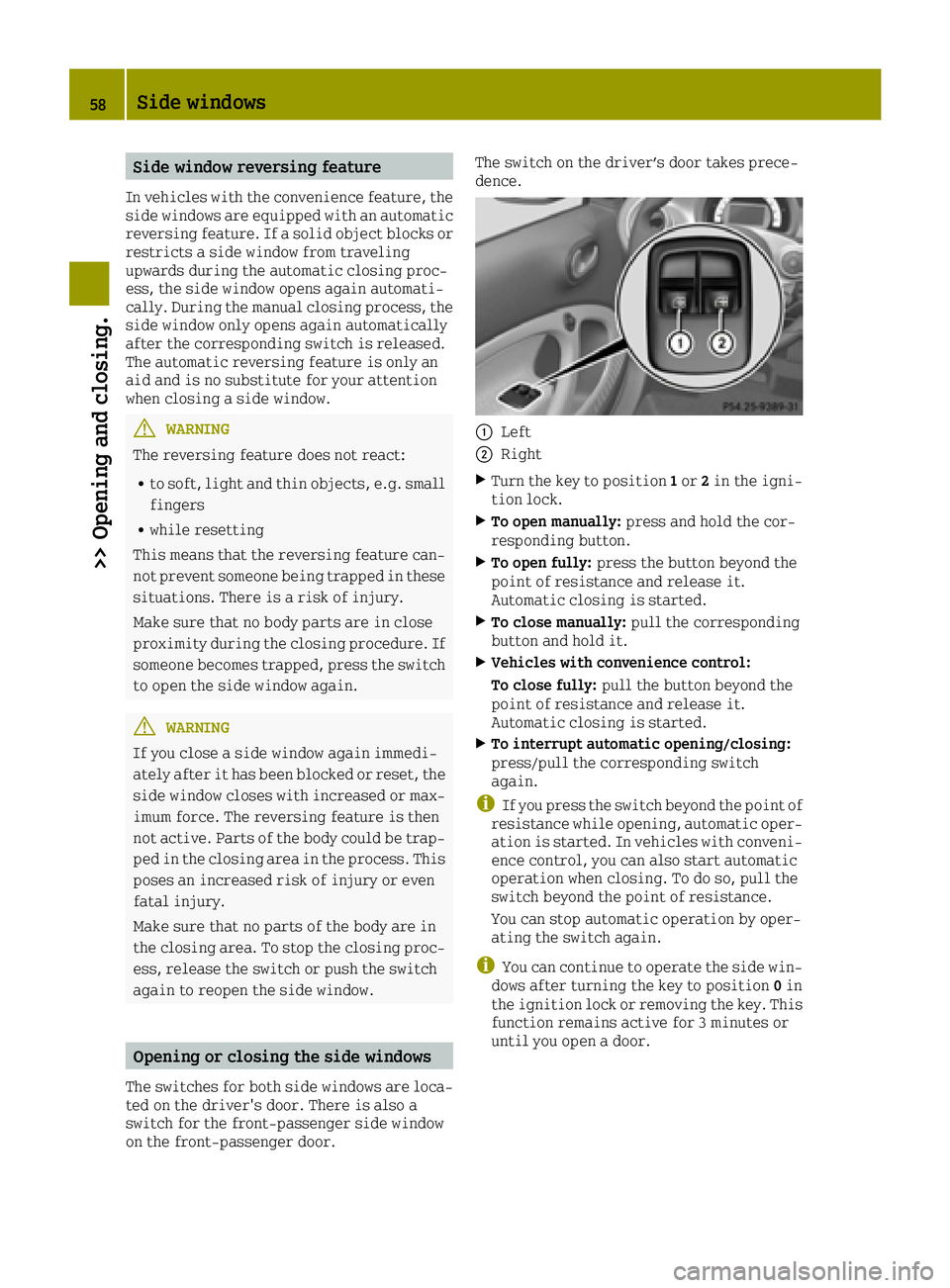
on the front-passenger door. The switch on the driver’s door takes prece-
dence.
0043Left
0044Right
XTurn the key to position
1or 2in the igni-
tion lock.
XTo open manually: press and hold the cor-
responding button.
XTo open fully: press the button beyond the
point of resistance and release it.
Automatic closing is started.
XTo close manually: pull the corresponding
button and hold it.
XVehicles with convenience control:
To close fully: pull the button beyond the
point of resistance and release it.
Automatic closing is started.
XTo interrupt automatic opening/closing:
press/pull the corresponding switch
again.
iIf you press the switch beyond the point of
resistance while opening, automatic oper-
ation is started. In vehicles with conveni-
ence control, you can also start automatic
operation when closing. To do so, pull the
switch beyond the point of resistance.
You can stop automatic operation by oper-
ating the switch again.
iYou can continue to operate the side win-
dows after turning the key to position 0in
the ignition lock or removing the key. This
function remains active for 3 minutes or
until you open a door.
58Side windows
>> Opening and closing.
Page 61 of 214
Resetting the side windows
You must reset each side window if:
Rthe side window opens again slightly after
being closed fully.
Rthe side window can no longer be fully
opened or closed.
XClose all the doors.
XTurn the SmartKey to position2in the igni-
tion lock.
XPull the corresponding switch on the door
control panel until the side window is com- pletely closed (
Ypage 58).
XHold the switch for an additional second.
If the side window opens again slightly:
XImmediately pull the corresponding switch
on the door control panel until the side
window is completely closed (
Ypage 58).
XHold the switch for an additional second.
XIf the respective side window remains
closed after the button is released, then it
has been set correctly. If this is not the
case, repeat the steps above again.
Side windows59
>> Opening and closing.
Z
Page 69 of 214
Useful information
i
This Operator's Manual describes all
models and all standard and optional
equipment of your vehicle available at the
time of publication of the Operator's Man- ual. Country-specific differences are pos-
sible. Bear in mind that your vehicle may
not feature all functions described here.
This also applies to safety-relevant sys-
tems and functions.
iRead the information on qualified spe-
cialist workshops: (Ypage 20).
Exterior lighting
General notes
For reasons of safety, smart recommends that
you drive with the lights switched on even
during the daytime. In some countries, oper-
ation of the headlamps varies due to legal
requirements and self-imposed obligations.
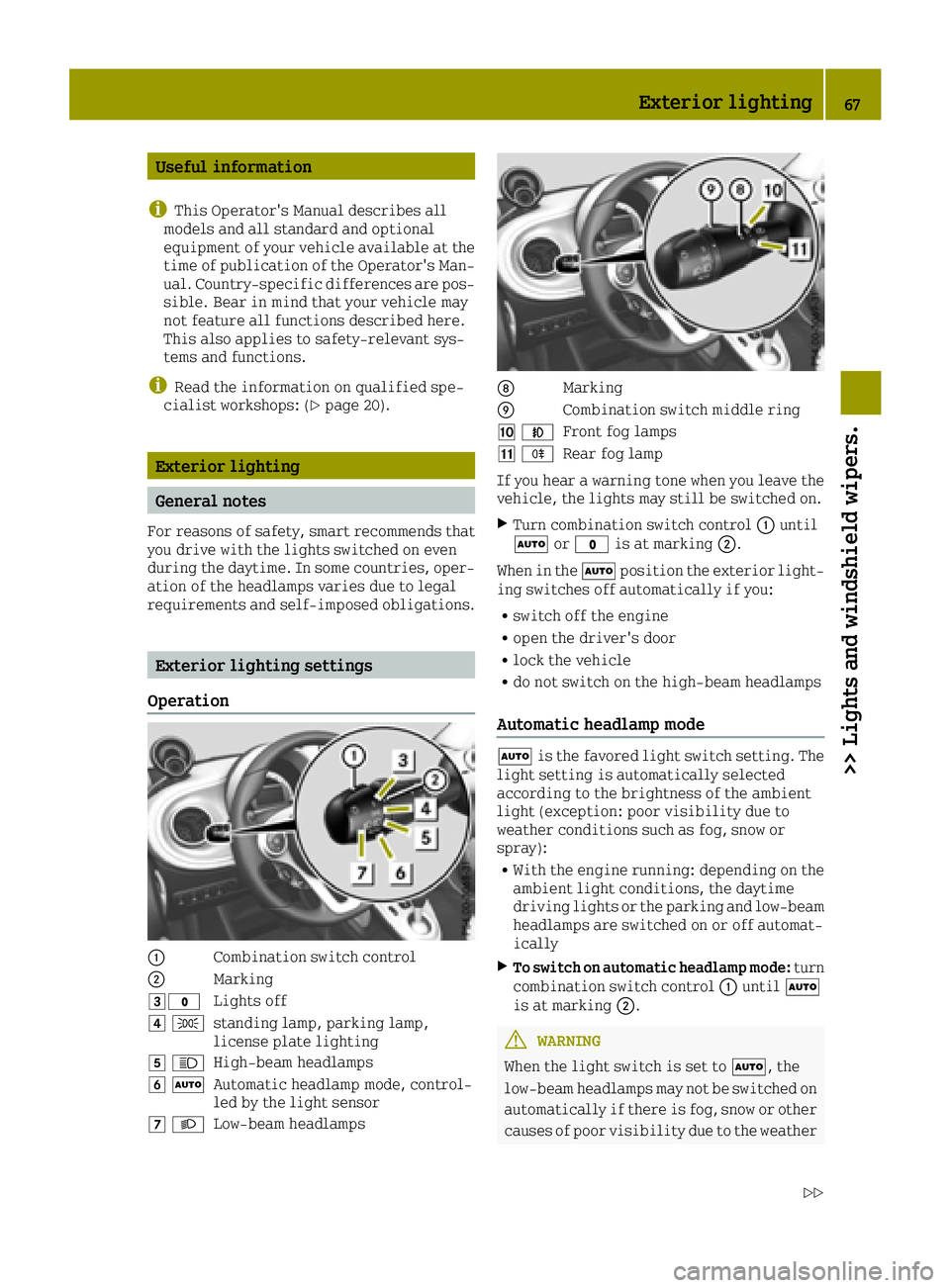
Exterior lighting settings
Operation
0043Combination switch control
0044Marking
0049003FLights off
004A 0060standing lamp, parking lamp,
license plate lighting
004B0057High-beam headlamps
004C0058Automatic headlamp mode, control-
led by the light sensor
004D0058Low-beam headlamps
006CMarking
006DCombination switch middle ring
00BE005AFront fog lamps
00BF005ERear fog lamp
If you hear a warning tone when you leave the
vehicle, the lights may still be switched on.
XTurn combination switch control 0043until
0058 or003F is at marking 0044.
When in the 0058position the exterior light-
ing switches off automatically if you:
Rswitch off the engine
Ropen the driver's door
Rlock the vehicle
Rdo not switch on the high-beam headlamps
Automatic headlamp mode
0058 is the favored light switch setting. The
light setting is automatically selected
according to the brightness of the ambient
light (exception: poor visibility due to
weather conditions such as fog, snow or
spray):
RWith the engine running: depending on the ambient light conditions, the daytime
driving lights or the parking and low-beam
headlamps are switched on or off automat-
ically
XTo switch on automatic headlamp mode: turn
combination switch control 0043until 0058
is at marking 0044.
GWARNING
When the light switch is set to 0058, the
low-beam headlamps may not be switched on
automatically if there is fog, snow or other causes of poor visibility due to the weather
Exterior lighting67
>> Lights and windshield wipers.
Z
Page 72 of 214
Interior lighting switched off
0085Switches the right-hand reading lamp on/
off
The interior lighting is switched on when a
door is open: if the corresponding door is
closed correctly the interior lighting goes
out.
Interior lighting control
If the doors are unlocked with the remote con-
trol, the interval timer for the interior
lighting is triggered. The interval timer
restarts when a door is opened.
The front interior lighting and the luggage
compartment light go out gradually.
The interior lighting interval timer is
switched off:
Rif a door remains open, the interior light-
ing switches off after 15 minutes without
dimming
Rif all doors (with additional locking mech-
anism) are closed, the interior lighting
switches off after 15 seconds
Rif all doors (without locking mechanism)
are closed, the interior lighting switches
off after 3 to 4 minutes
Ras soon as the engine is started and for as
long as the engine is running
Replacing bulbs
Important safety notes
GWARNING
Bulbs, lamps and connectors can get very
hot when operating. If you change a bulb,
you could burn yourself on these compo-
nents. There is a risk of injury.
Allow these components to cool down before changing a bulb.
Do not use a bulb that has been dropped or if
its glass tube has been scratched.
The bulb may explode if:
Ryou touch it
Rit is hot
Ryou drop it
Ryou scratch it
Only operate bulbs in enclosed lamps
designed for that purpose. Only fit spare
bulbs of the same type and the specified volt-
age.
Marks on the glass tube reduce the service
life of the bulbs. Do not touch the glass tube
with your bare hands. If necessary, clean the
glass tube when cold with alcohol or spirit
and rub it off with a lint-free cloth.
Protect bulbs from moisture during opera-
tion. Do not allow bulbs to come into contact
with liquids.
Replace only the bulbs listed (
Ypage 70).
If you require assistance replacing bulbs,
consult a qualified specialist workshop.
If the new bulb still does not light up, consult
a qualified specialist workshop.
The daytime driving lights and part of the
rear light clusters of your vehicle are equip-
ped with LED light bulbs. Do not replace these
bulbs yourself. Contact a qualified special-
ist workshop which has the necessary spe-
cialist knowledge and tools to carry out the
work required.
Headlamps and lamps are an important aspect
of vehicle safety. You must therefore make
sure that these function correctly at all
times. Have the headlamp setting checked
regularly.
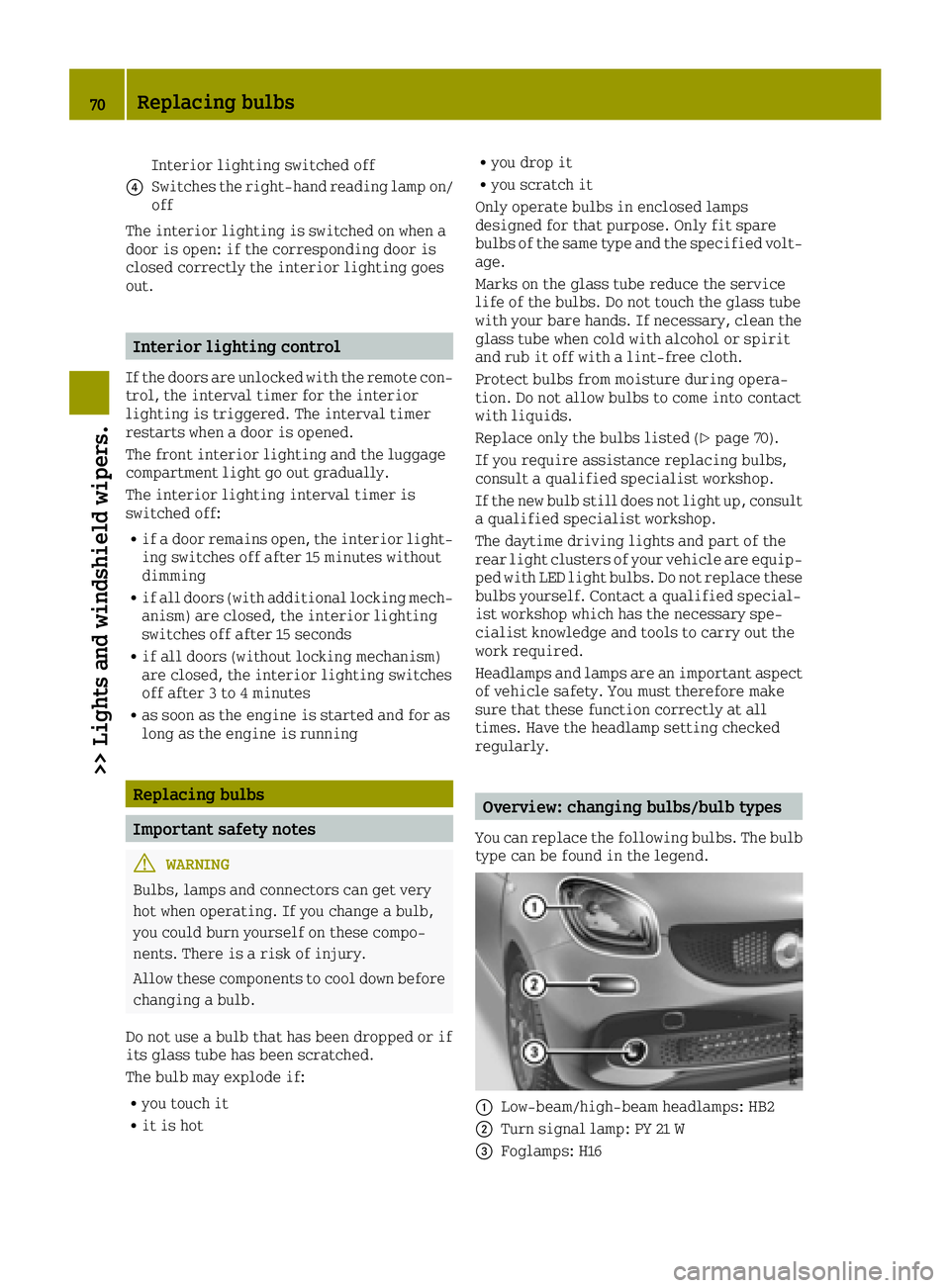
Overview: changing bulbs/bulb types
You can replace the following bulbs. The bulb
type can be found in the legend.
0043Low-beam/high-beam headlamps: HB2
0044Turn signal lamp: PY 21 W
0087Foglamps: H16
70Replacing bulbs
>> Lights and windshield wipers.
Page 77 of 214
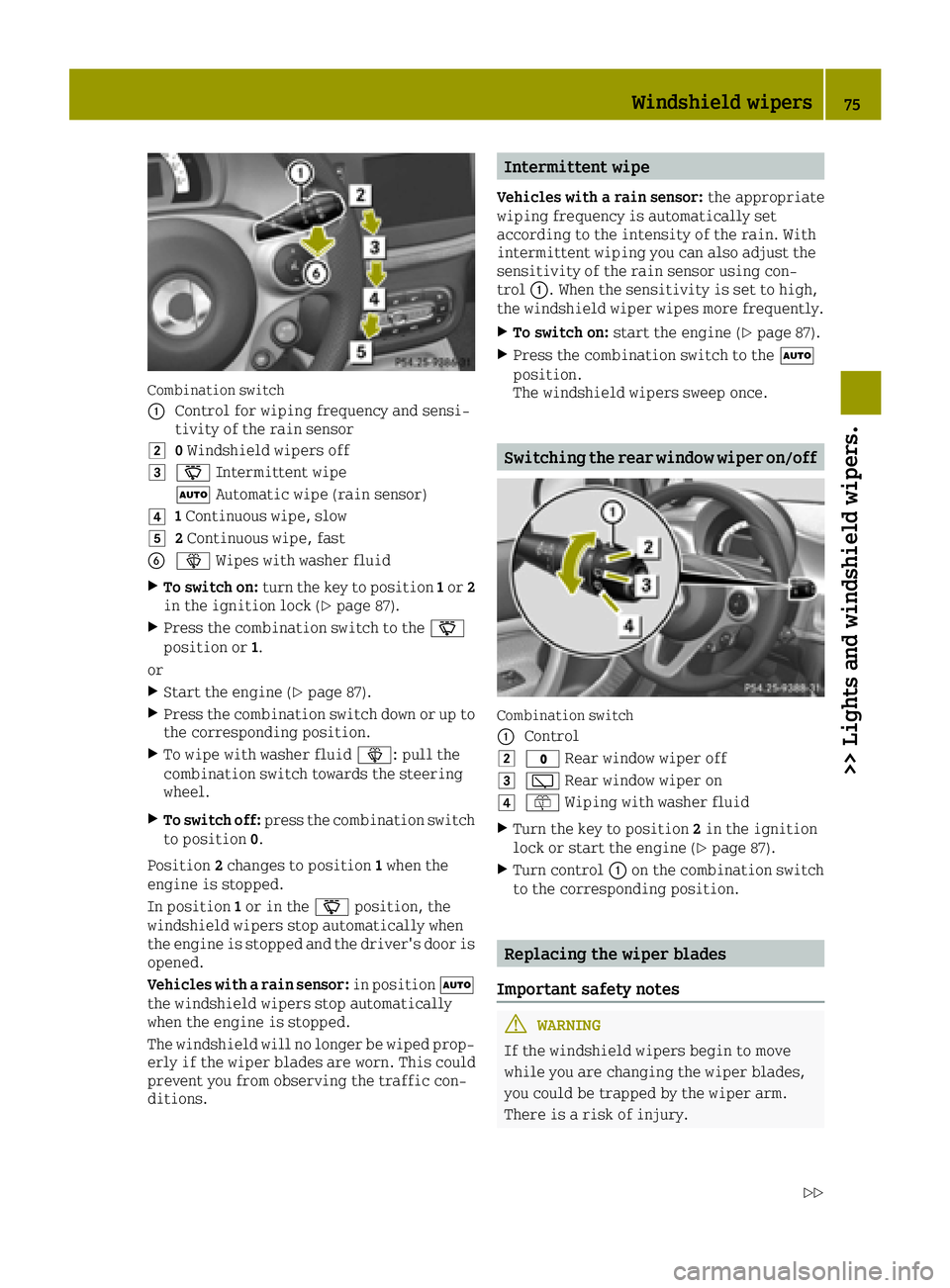
Combination switch
0043
Control for wiping frequency and sensi-
tivity of the rain sensor
00480Windshield wipers off
004900AE Intermittent wipe
0058 Automatic wipe (rain sensor)
004A1Continuous wipe, slow
004B2 Continuous wipe, fast
008400D4 Wipes with washer fluid
XTo switch on: turn the key to position 1or 2
in the ignition lock (Ypage 87).
XPress the combination switch to the 00AE
position or 1.
or
XStart the engine (Ypage 87).
XPress the combination switch down or up to
the corresponding position.
XTo wipe with washer fluid 00D4: pull the
combination switch towards the steering
wheel.
XTo switch off: press the combination switch
to position 0.
Position 2changes to position 1when the
engine is stopped.
In position 1or in the 00AEposition, the
windshield wipers stop automatically when
the engine is stopped and the driver's door is
opened.
Vehicles with a rain sensor: in position0058
the windshield wipers stop automatically
when the engine is stopped.
The windshield will no longer be wiped prop- erly if the wiper blades are worn. This could
prevent you from observing the traffic con-
ditions.
Intermittent wipe
Vehicles with a rain sensor: the appropriate
wiping frequency is automatically set
according to the intensity of the rain. With
intermittent wiping you can also adjust the
sensitivity of the rain sensor using con-
trol 0043. When the sensitivity is set to high,
the windshield wiper wipes more frequently.
XTo switch on: start the engine (Ypage 87).
XPress the combination switch to the 0058
position.
The windshield wipers sweep once.
Switching the rear window wiper on/off
Combination switch
0043
Control
0048003F Rear window wiper off
004900C5Rear window wiper on
004A00E2Wiping with washer fluid
XTurn the key to position 2in the ignition
lock or start the engine (Ypage 87).
XTurn control 0043on the combination switch
to the corresponding position.
Replacing the wiper blades
Important safety notes
GWARNING
If the windshield wipers begin to move
while you are changing the wiper blades,
you could be trapped by the wiper arm.
There is a risk of injury.
Windshield wipers75
>> Lights and windshield wipers.
Z
Page 80 of 214
Problems with the windshield wipers
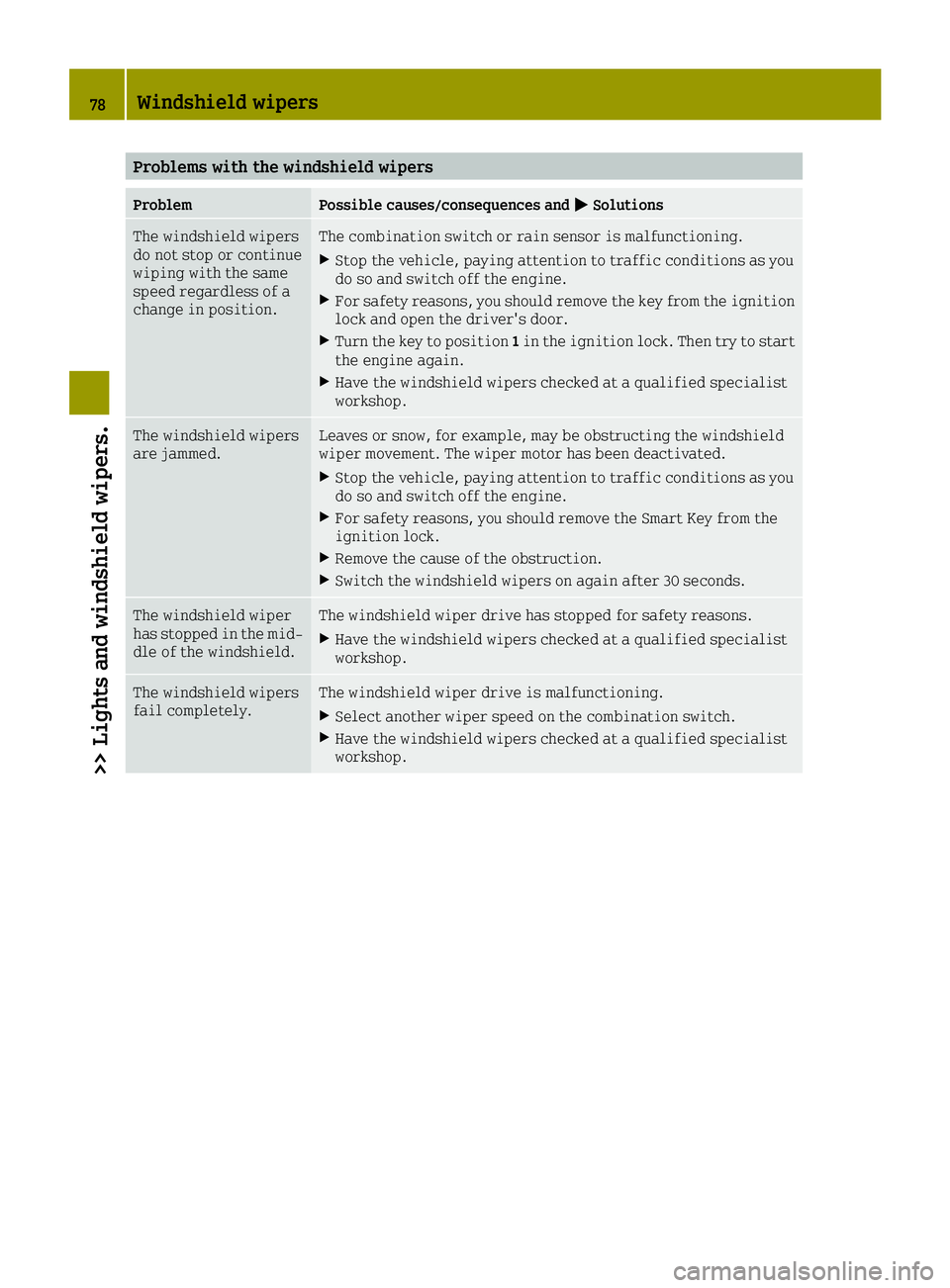
ProblemPossible causes/consequences and0050Solutions
The windshield wipers
do not stop or continue
wiping with the same
speed regardless of a
change in position.The combination switch or rain sensor is malfunctioning.
XStop the vehicle, paying attention to traffic conditions as you
do so and switch off the engine.
XFor safety reasons, you should remove the key from the ignition
lock and open the driver's door.
XTurn the key to position1in the ignition lock. Then try to start
the engine again.
XHave the windshield wipers checked at a qualified specialist
workshop.
The windshield wipers
are jammed.Leaves or snow, for example, may be obstructing the windshield
wiper movement. The wiper motor has been deactivated.
XStop the vehicle, paying attention to traffic conditions as you
do so and switch off the engine.
XFor safety reasons, you should remove the Smart Key from the
ignition lock.
XRemove the cause of the obstruction.
XSwitch the windshield wipers on again after 30 seconds.
The windshield wiper
has stopped in the mid-
dle of the windshield.The windshield wiper drive has stopped for safety reasons.
XHave the windshield wipers checked at a qualified specialist
workshop.
The windshield wipers
fail completely.The windshield wiper drive is malfunctioning.
XSelect another wiper speed on the combination switch.
XHave the windshield wipers checked at a qualified specialist
workshop.
78Windshield wipers
>> Lights and windshield wipers.
Page 89 of 214
steering and the brake boosting effect. Youwill require considerably more effort to
steer and brake. There is a risk of an acci-
dent.
Do not switch off the ignition while driv-
ing.
GWARNING
If the parking brake has not been fully
released when driving, the parking brake
can:
Roverheat and cause a fire
Rlose its hold function.
There is a risk of fire and an accident.
Release the parking brake fully before
driving off.
!Do not warm up the engine with the vehicle
stationary. Drive off immediately. Avoid
high engine speeds and driving at full
throttle until the engine has reached its
operating temperature.
Only shift the automatic transmission to
the desired drive position when the vehi-
cle is stationary.
Where possible, avoid spinning the drive
wheels when pulling away on slippery
roads. You could otherwise damage the
drive train.
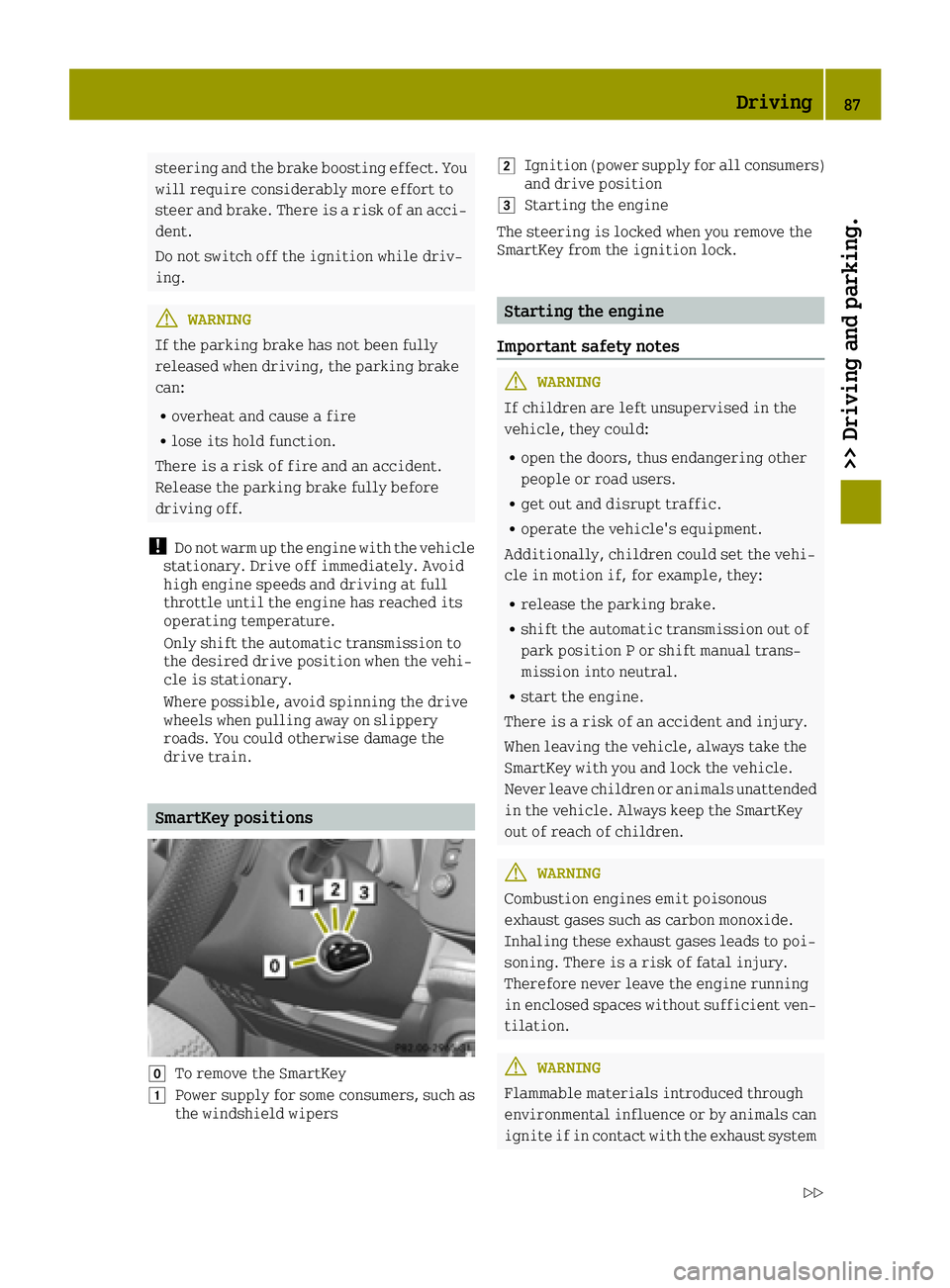
SmartKey positions
005ATo remove the SmartKey
0047Power supply for some consumers, such as
the windshield wipers
0048Ignition (power supply for all consumers)
and drive position
0049Starting the engine
The steering is locked when you remove the
SmartKey from the ignition lock.
Starting the engine
Important safety notes
GWARNING
If children are left unsupervised in the
vehicle, they could:
Ropen the doors, thus endangering other
people or road users.
Rget out and disrupt traffic.
Roperate the vehicle's equipment.
Additionally, children could set the vehi-
cle in motion if, for example, they:
Rrelease the parking brake.
Rshift the automatic transmission out of
park position P or shift manual trans-
mission into neutral.
Rstart the engine.
There is a risk of an accident and injury.
When leaving the vehicle, always take the
SmartKey with you and lock the vehicle.
Never leave children or animals unattended
in the vehicle. Always keep the SmartKey
out of reach of children.
GWARNING
Combustion engines emit poisonous
exhaust gases such as carbon monoxide.
Inhaling these exhaust gases leads to poi-
soning. There is a risk of fatal injury.
Therefore never leave the engine running
in enclosed spaces without sufficient ven- tilation.
GWARNING
Flammable materials introduced through
environmental influence or by animals can
ignite if in contact with the exhaust system
Driving87
>> Driving and parking.
Z
Page 90 of 214
or parts of the engine that heat up. There is
a risk of fire.
Carry out regular checks to make sure that
there are no flammable foreign materials
in the engine compartment or in the exhaust
system.
!Do not depress the accelerator when
starting the engine.
iDuring a cold start, the engine runs at
higher speeds to enable the catalytic con-
verter to reach its operating temperature.
The sound of the engine may change during
this time.
Manual transmission
XDepress the brake pedal and keep it
depressed.
XDepress the clutch pedal fully.
XShift to neutral.
Automatic transmission
XShift the transmission to position P
(Ypage 92).
The transmission position display in the
multifunction display shows P
(
Ypage 92).
iYou can start the engine in transmission
positions Pand N.
In order to start the engine in transmission
position Nyou must depress the brake pedal
and keep it depressed.
Starting procedure
XTurn the key to position 3in the ignition
lock (Ypage 87) and release it as soon as the
engine is running.
Pulling away
General notes
GWARNING
Vehicles with automatic transmission:
If the engine speed is above the idling
speed and you engage transmission posi-
tion Dor R, the vehicle could pull away
suddenly. There is a risk of an accident.
When engaging transmission position Dor
R, always firmly depress the brake pedal
and do not simultaneously accelerate.
!Vehicles with manual transmission:
change gear in good time and avoid spin-
ning the wheels. You could otherwise dam-
age the vehicle.
!Release the parking brake before driving
off. The parking brake can otherwise over-
heat, malfunction and wear out quickly.
Accelerate gently when pulling away.
The vehicle locks centrally once you have
pulled away.
You can open the doors from the inside at any
time.
You can also deactivate the automatic locking
feature (
Ypage 55).
Vehicles with automatic transmission: you
can only shift the transmission from position
P to the desired transmission position if:
Rthe ignition is switched on
Ryou depress the brake pedal and keep it
depressed and
Ryou press release button on the selector
lever (Ypage 92).
Only then is the shift lock released.
iVehicles with automatic transmission:
transmission shifts take place at higher
engine speeds after a cold start. This helps
the catalytic converter to reach its oper-
ating temperature more quickly.
Hill start assist
Hill start assist helps you when pulling away forwards or in reverse on an uphill gradient.
It holds the vehicle for a short time after you have removed your foot from the brake pedal.
This gives you enough time to move your foot
from the brake pedal to the accelerator pedal
and to depress it before the vehicle begins to
roll.
GWARNING
After a short time, hill start assist will no
longer brake your vehicle and it could roll
88Driving
>> Driving and parking.
Page 112 of 214
Changes in the outside temperature are dis-
played after a short delay.
You can set the temperature unit of the out-
door temperature display (
Ypage 116).
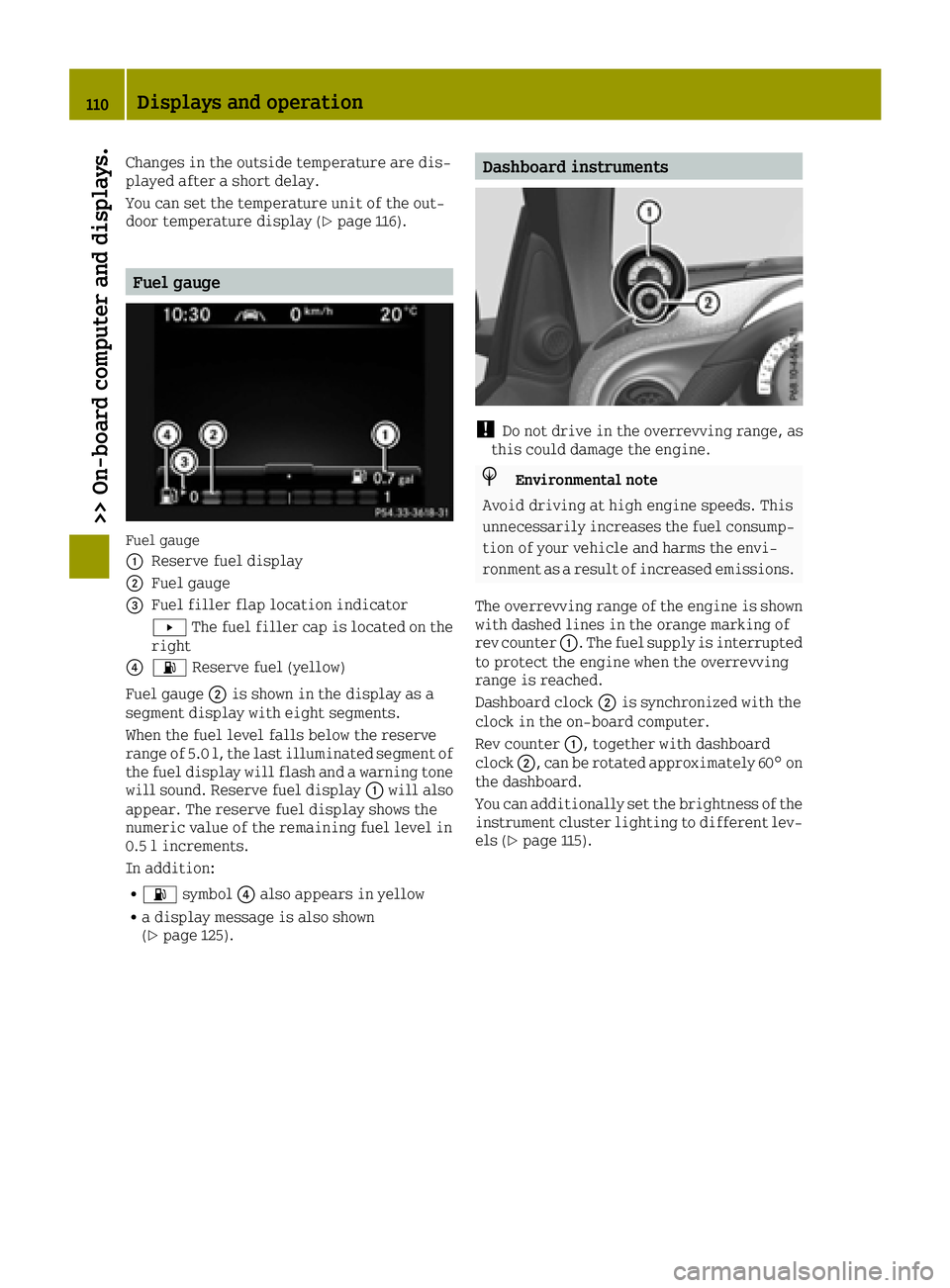
Fuel gauge
Fuel gauge
0043
Reserve fuel display
0044Fuel gauge
0087Fuel filler flap location indicator
0080The fuel filler cap is located on the
right
008500B4 Reserve fuel (yellow)
Fuel gauge 0044is shown in the display as a
segment display with eight segments.
When the fuel level falls below the reserve
range of 5.0 l, the last illuminated segment of
the fuel display will flash and a warning tone
will sound. Reserve fuel display 0043will also
appear. The reserve fuel display shows the
numeric value of the remaining fuel level in
0.5 l increments.
In addition:
R00B4 symbol 0085also appears in yellow
Ra display message is also shown
(Ypage 125).
Dashboard instruments
!Do not drive in the overrevving range, as
this could damage the engine.
HEnvironmental note
Avoid driving at high engine speeds. This
unnecessarily increases the fuel consump-
tion of your vehicle and harms the envi-
ronment as a result of increased emissions.
The overrevving range of the engine is shown with dashed lines in the orange marking of
rev counter 0043. The fuel supply is interrupted
to protect the engine when the overrevving
range is reached.
Dashboard clock 0044is synchronized with the
clock in the on-board computer.
Rev counter 0043, together with dashboard
clock 0044, can be rotated approximately 60° on
the dashboard.
You can additionally set the brightness of the
instrument cluster lighting to different lev-
els (
Ypage 115).
110Displays and operation
>> On-board computer and displays.