lock SMART FORTWO 2016 Owner's Guide
[x] Cancel search | Manufacturer: SMART, Model Year: 2016, Model line: FORTWO, Model: SMART FORTWO 2016Pages: 214, PDF Size: 4.93 MB
Page 69 of 214
Useful information
i
This Operator's Manual describes all
models and all standard and optional
equipment of your vehicle available at the
time of publication of the Operator's Man- ual. Country-specific differences are pos-
sible. Bear in mind that your vehicle may
not feature all functions described here.
This also applies to safety-relevant sys-
tems and functions.
iRead the information on qualified spe-
cialist workshops: (Ypage 20).
Exterior lighting
General notes
For reasons of safety, smart recommends that
you drive with the lights switched on even
during the daytime. In some countries, oper-
ation of the headlamps varies due to legal
requirements and self-imposed obligations.
Exterior lighting settings
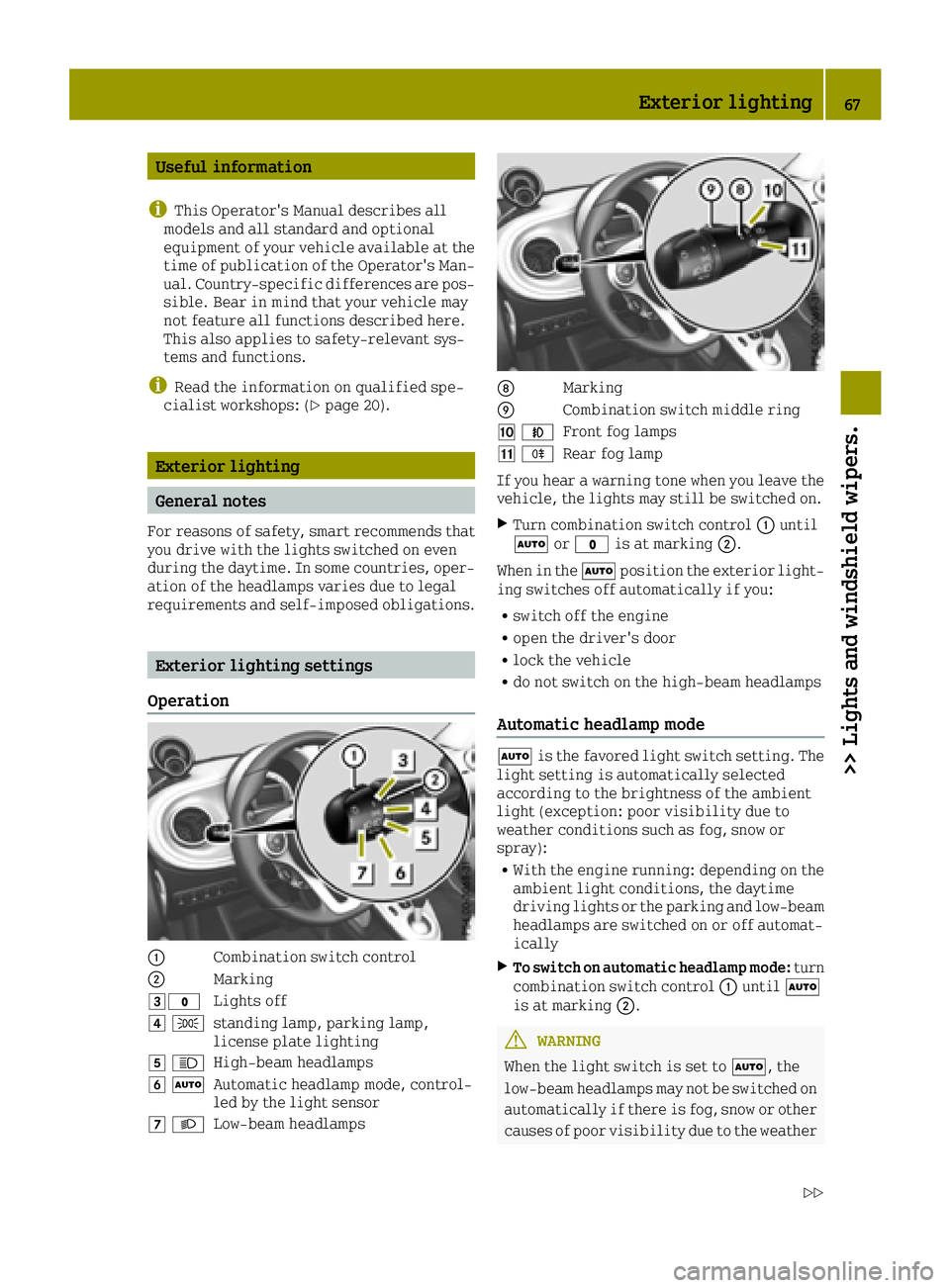
Operation
0043Combination switch control
0044Marking
0049003FLights off
004A 0060standing lamp, parking lamp,
license plate lighting
004B0057High-beam headlamps
004C0058Automatic headlamp mode, control-
led by the light sensor
004D0058Low-beam headlamps
006CMarking
006DCombination switch middle ring
00BE005AFront fog lamps
00BF005ERear fog lamp
If you hear a warning tone when you leave the
vehicle, the lights may still be switched on.
XTurn combination switch control 0043until
0058 or003F is at marking 0044.
When in the 0058position the exterior light-
ing switches off automatically if you:
Rswitch off the engine
Ropen the driver's door
Rlock the vehicle
Rdo not switch on the high-beam headlamps
Automatic headlamp mode
0058 is the favored light switch setting. The
light setting is automatically selected
according to the brightness of the ambient
light (exception: poor visibility due to
weather conditions such as fog, snow or
spray):
RWith the engine running: depending on the ambient light conditions, the daytime
driving lights or the parking and low-beam
headlamps are switched on or off automat-
ically
XTo switch on automatic headlamp mode: turn
combination switch control 0043until 0058
is at marking 0044.
GWARNING
When the light switch is set to 0058, the
low-beam headlamps may not be switched on
automatically if there is fog, snow or other causes of poor visibility due to the weather
Exterior lighting67
>> Lights and windshield wipers.
Z
Page 72 of 214
Interior lighting switched off
0085Switches the right-hand reading lamp on/
off
The interior lighting is switched on when a
door is open: if the corresponding door is
closed correctly the interior lighting goes
out.
Interior lighting control
If the doors are unlocked with the remote con-
trol, the interval timer for the interior
lighting is triggered. The interval timer
restarts when a door is opened.
The front interior lighting and the luggage
compartment light go out gradually.
The interior lighting interval timer is
switched off:
Rif a door remains open, the interior light-
ing switches off after 15 minutes without
dimming
Rif all doors (with additional locking mech-
anism) are closed, the interior lighting
switches off after 15 seconds
Rif all doors (without locking mechanism)
are closed, the interior lighting switches
off after 3 to 4 minutes
Ras soon as the engine is started and for as
long as the engine is running
Replacing bulbs
Important safety notes
GWARNING
Bulbs, lamps and connectors can get very
hot when operating. If you change a bulb,
you could burn yourself on these compo-
nents. There is a risk of injury.
Allow these components to cool down before changing a bulb.
Do not use a bulb that has been dropped or if
its glass tube has been scratched.
The bulb may explode if:
Ryou touch it
Rit is hot
Ryou drop it
Ryou scratch it
Only operate bulbs in enclosed lamps
designed for that purpose. Only fit spare
bulbs of the same type and the specified volt-
age.
Marks on the glass tube reduce the service
life of the bulbs. Do not touch the glass tube
with your bare hands. If necessary, clean the
glass tube when cold with alcohol or spirit
and rub it off with a lint-free cloth.
Protect bulbs from moisture during opera-
tion. Do not allow bulbs to come into contact
with liquids.
Replace only the bulbs listed (
Ypage 70).
If you require assistance replacing bulbs,
consult a qualified specialist workshop.
If the new bulb still does not light up, consult
a qualified specialist workshop.
The daytime driving lights and part of the
rear light clusters of your vehicle are equip-
ped with LED light bulbs. Do not replace these
bulbs yourself. Contact a qualified special-
ist workshop which has the necessary spe-
cialist knowledge and tools to carry out the
work required.
Headlamps and lamps are an important aspect
of vehicle safety. You must therefore make
sure that these function correctly at all
times. Have the headlamp setting checked
regularly.
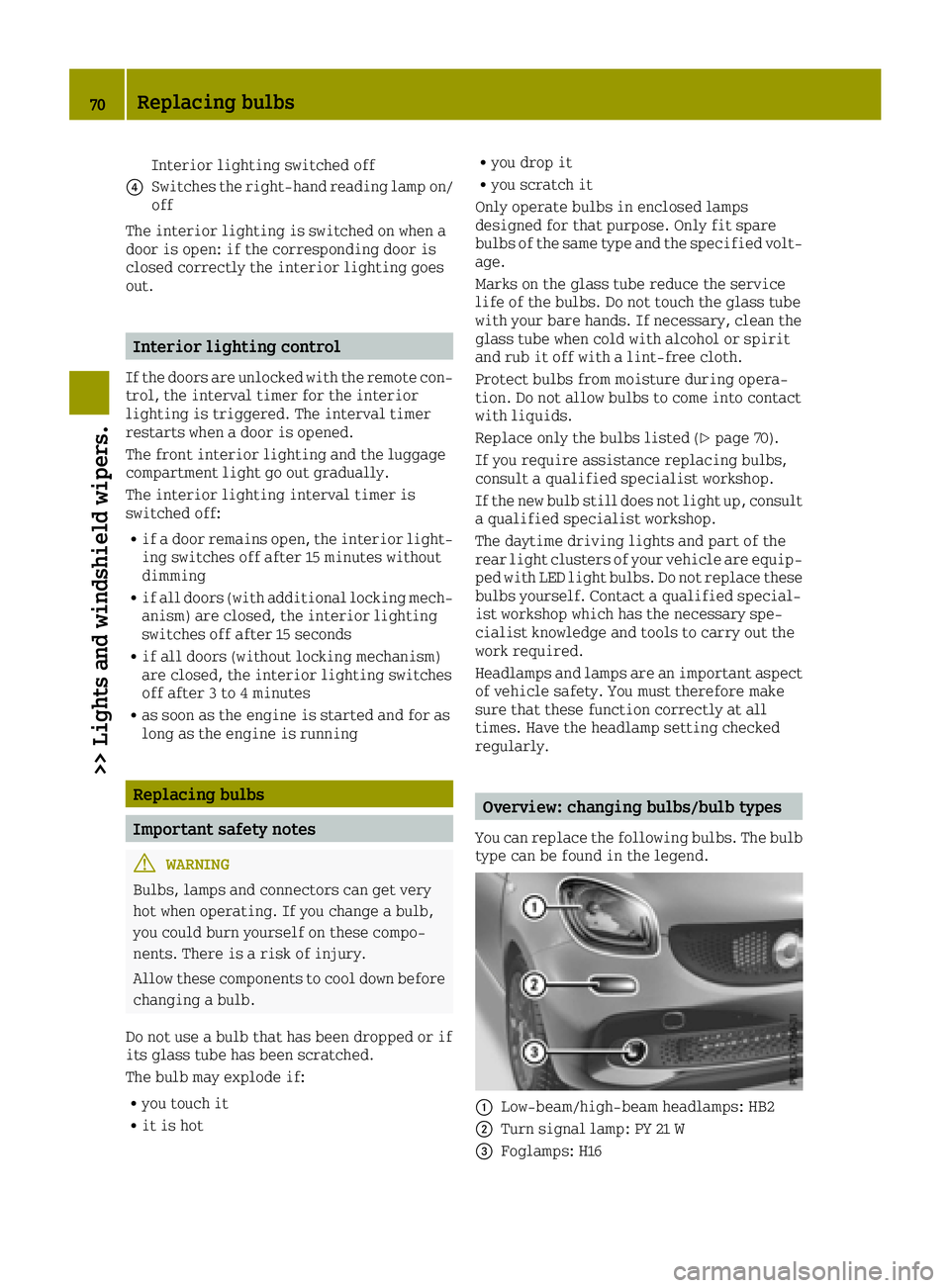
Overview: changing bulbs/bulb types
You can replace the following bulbs. The bulb
type can be found in the legend.
0043Low-beam/high-beam headlamps: HB2
0044Turn signal lamp: PY 21 W
0087Foglamps: H16
70Replacing bulbs
>> Lights and windshield wipers.
Page 74 of 214
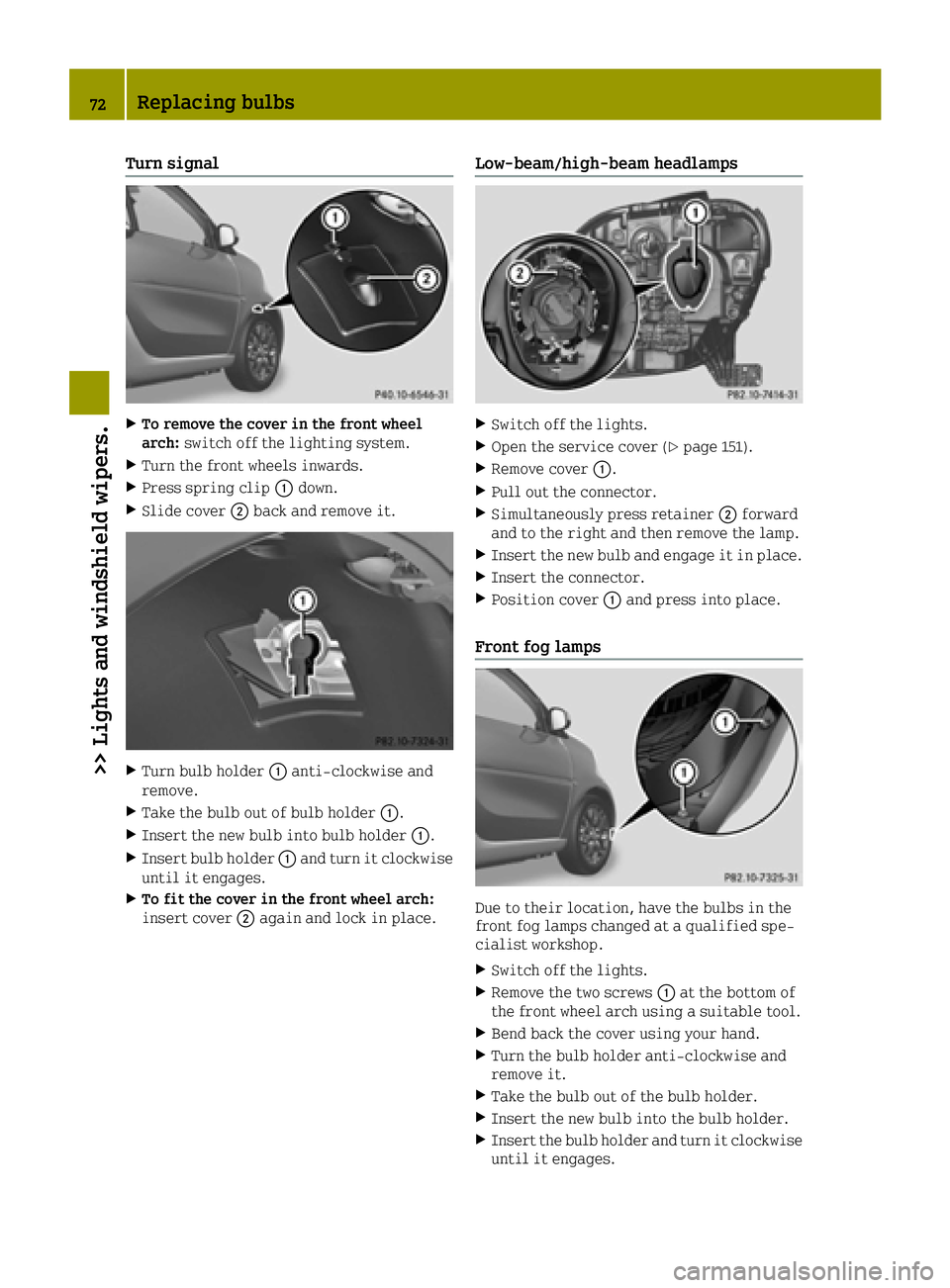
Turn signal
XTo remove the cover in the front wheel
arch:switch off the lighting system.
XTurn the front wheels inwards.
XPress spring clip 0043down.
XSlide cover 0044back and remove it.
XTurn bulb holder 0043anti-clockwise and
remove.
XTake the bulb out of bulb holder 0043.
XInsert the new bulb into bulb holder 0043.
XInsert bulb holder0043and turn it clockwise
until it engages.
XTo fit the cover in the front wheel arch:
insert cover 0044again and lock in place.
Low-beam/high-beam headlamps
XSwitch off the lights.
XOpen the service cover (Ypage 151).
XRemove cover 0043.
XPull out the connector.
XSimultaneously press retainer 0044forward
and to the right and then remove the lamp.
XInsert the new bulb and engage it in place.
XInsert the connector.
XPosition cover 0043and press into place.
Front fog lamps
Due to their location, have the bulbs in the
front fog lamps changed at a qualified spe-
cialist workshop.
XSwitch off the lights.
XRemove the two screws 0043at the bottom of
the front wheel arch using a suitable tool.
XBend back the cover using your hand.
XTurn the bulb holder anti-clockwise and
remove it.
XTake the bulb out of the bulb holder.
XInsert the new bulb into the bulb holder.
XInsert the bulb holder and turn it clockwise until it engages.
72Replacing bulbs
>> Lights and windshield wipers.
Page 75 of 214
XBend the cover back into position.
XTighten the two screws0043again.
Side turn signal lamps
XInsert a flat tool into recess 0043and lever
side turn signal lamp 0044forwards and out.
XRemove the bulb holder from side turn sig-
nal lamp 0044by turning it a quarter turn
anti-clockwise.
XPull the bulb out of the bulb holder.
XInsert the new bulb into the bulb holder.
XInsert the bulb holder into side turn signal
lamp 0044and turn it a quarter turn clock-
wise.
XInsert side turn signal lamp 0044.
Changing the rear bulbs
Tail lamp
XSwitch off the lights.
XTo remove: open the upper and lower tail-
gate (Ypage 57).
XRemove two screws 0043on the tail lamp using
a suitable slotted screwdriver.
XCarefully take out the lamp.
XTo release the connector: insert a suitable
slotted screwdriver under the plastic
hanger, lift a small plastic piece upwards
and remove the connector.
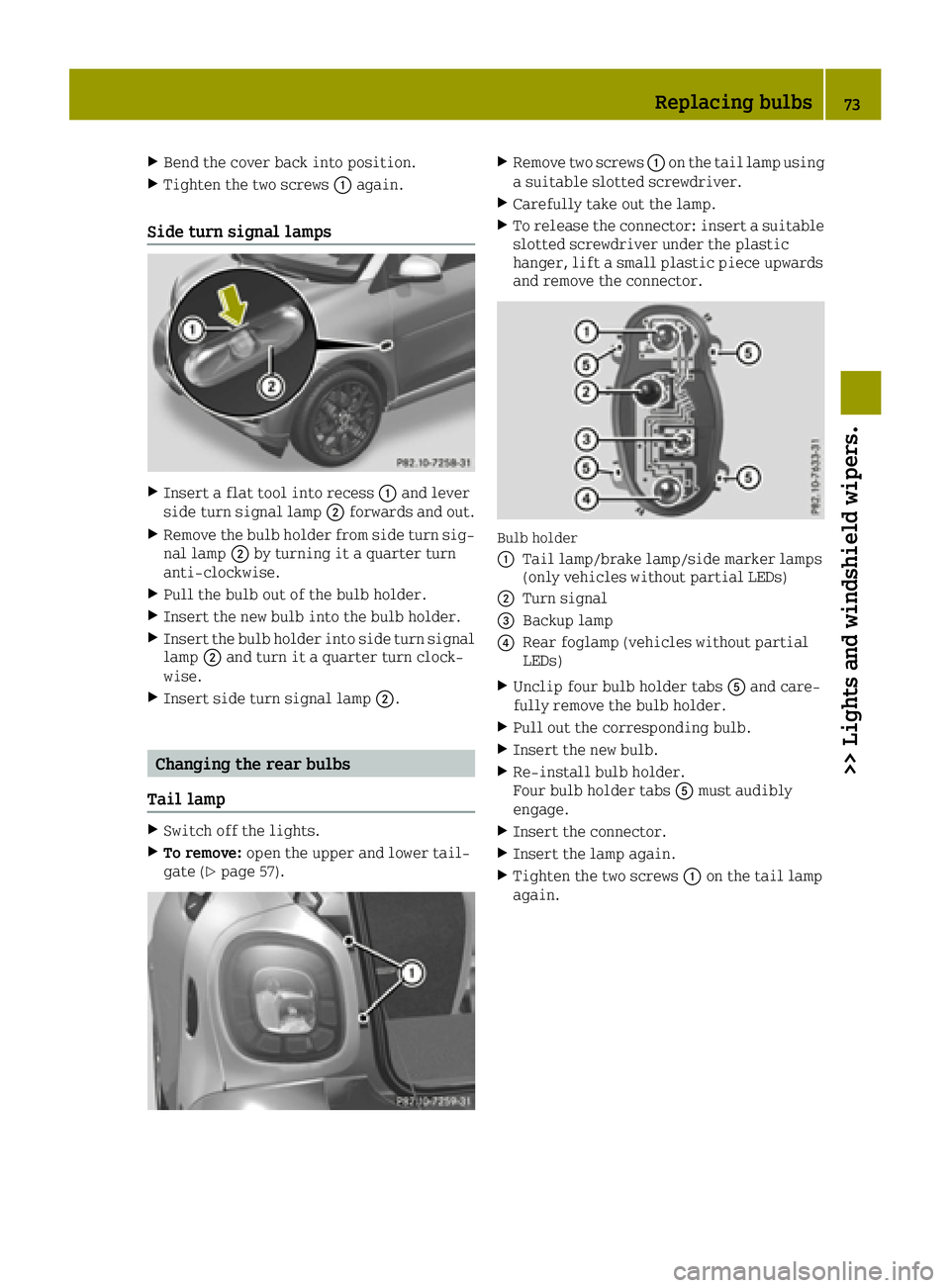
Bulb holder
0043
Tail lamp/brake lamp/side marker lamps
(only vehicles without partial LEDs)
0044Turn signal
0087Backup lamp
0085Rear foglamp (vehicles without partial
LEDs)
XUnclip four bulb holder tabs 0083and care-
fully remove the bulb holder.
XPull out the corresponding bulb.
XInsert the new bulb.
XRe-install bulb holder.
Four bulb holder tabs 0083must audibly
engage.
XInsert the connector.
XInsert the lamp again.
XTighten the two screws 0043on the tail lamp
again.
Replacing bulbs73
>> Lights and windshield wipers.
Z
Page 77 of 214
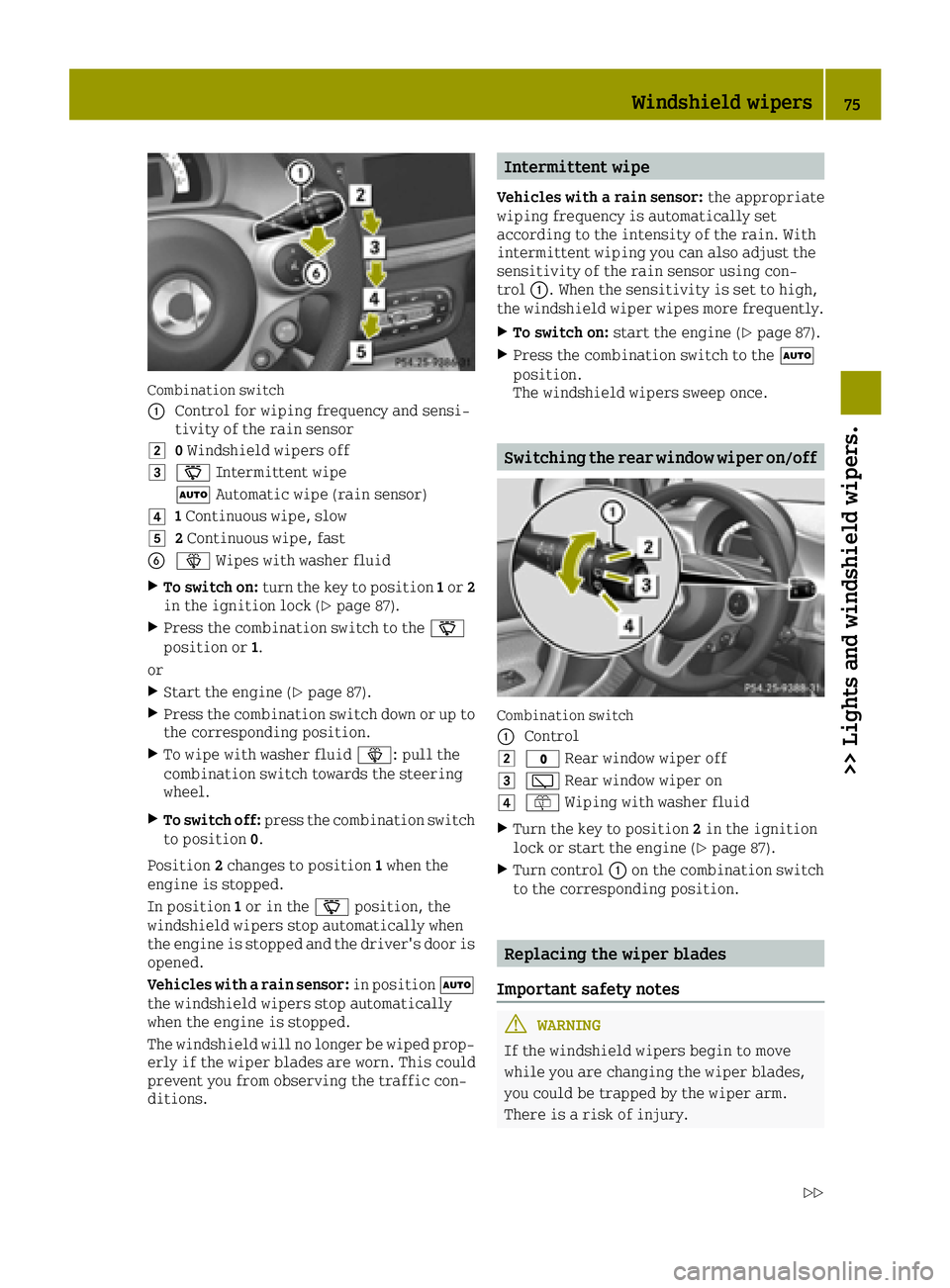
Combination switch
0043
Control for wiping frequency and sensi-
tivity of the rain sensor
00480Windshield wipers off
004900AE Intermittent wipe
0058 Automatic wipe (rain sensor)
004A1Continuous wipe, slow
004B2 Continuous wipe, fast
008400D4 Wipes with washer fluid
XTo switch on: turn the key to position 1or 2
in the ignition lock (Ypage 87).
XPress the combination switch to the 00AE
position or 1.
or
XStart the engine (Ypage 87).
XPress the combination switch down or up to
the corresponding position.
XTo wipe with washer fluid 00D4: pull the
combination switch towards the steering
wheel.
XTo switch off: press the combination switch
to position 0.
Position 2changes to position 1when the
engine is stopped.
In position 1or in the 00AEposition, the
windshield wipers stop automatically when
the engine is stopped and the driver's door is
opened.
Vehicles with a rain sensor: in position0058
the windshield wipers stop automatically
when the engine is stopped.
The windshield will no longer be wiped prop- erly if the wiper blades are worn. This could
prevent you from observing the traffic con-
ditions.
Intermittent wipe
Vehicles with a rain sensor: the appropriate
wiping frequency is automatically set
according to the intensity of the rain. With
intermittent wiping you can also adjust the
sensitivity of the rain sensor using con-
trol 0043. When the sensitivity is set to high,
the windshield wiper wipes more frequently.
XTo switch on: start the engine (Ypage 87).
XPress the combination switch to the 0058
position.
The windshield wipers sweep once.
Switching the rear window wiper on/off
Combination switch
0043
Control
0048003F Rear window wiper off
004900C5Rear window wiper on
004A00E2Wiping with washer fluid
XTurn the key to position 2in the ignition
lock or start the engine (Ypage 87).
XTurn control 0043on the combination switch
to the corresponding position.
Replacing the wiper blades
Important safety notes
GWARNING
If the windshield wipers begin to move
while you are changing the wiper blades,
you could be trapped by the wiper arm.
There is a risk of injury.
Windshield wipers75
>> Lights and windshield wipers.
Z
Page 78 of 214
Always switch off the windshield wipers
and ignition before changing the wiper
blades.
!To avoid damaging the wiper blades, make
sure that you touch only the wiper arm of the
wiper.
!Never open the service cover/tailgate if a
windshield wiper arm has been folded away
from the windshield/rear window.
Never fold a windshield wiper arm without
a wiper blade back onto the windshield/
rear window.
Hold the windshield wiper arm firmly when
you change the wiper blade. If you release
the wiper arm without a wiper blade and it
falls onto the windshield/rear window, the
windshield/rear window may be damaged by
the force of the impact.
smart recommends that you have the wiper
blades changed at a qualified specialist
workshop.
Changing the windshield wiper blades
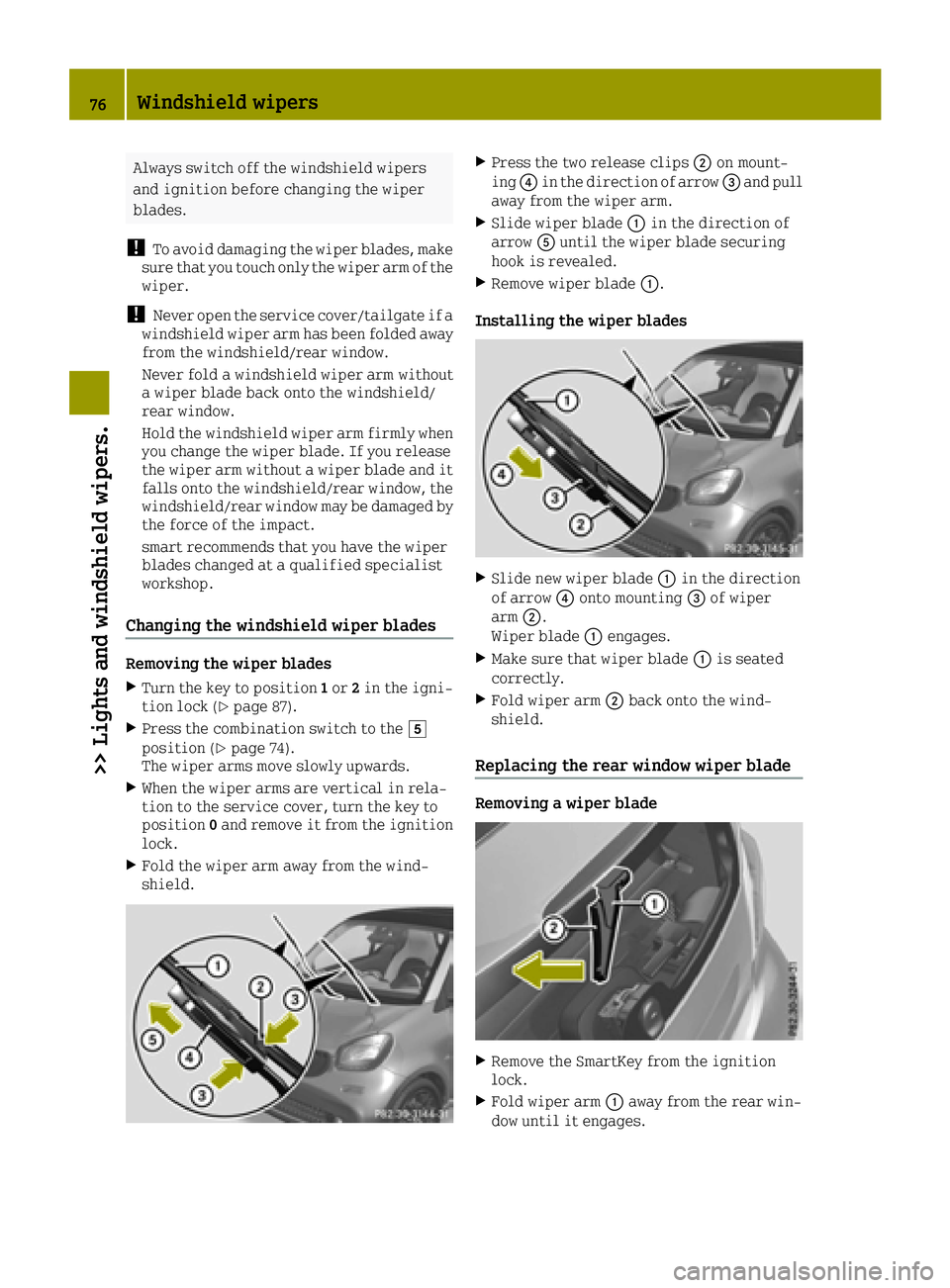
Removing the wiper blades
XTurn the key to position 1or 2in the igni-
tion lock (Ypage 87).
XPress the combination switch to the 004B
position (Ypage 74).
The wiper arms move slowly upwards.
XWhen the wiper arms are vertical in rela-
tion to the service cover, turn the key to
position 0and remove it from the ignition
lock.
XFold the wiper arm away from the wind-
shield.
XPress the two release clips 0044on mount-
ing 0085in the direction of arrow 0087and pull
away from the wiper arm.
XSlide wiper blade 0043in the direction of
arrow 0083until the wiper blade securing
hook is revealed.
XRemove wiper blade 0043.
Installing the wiper blades
XSlide new wiper blade 0043in the direction
of arrow 0085onto mounting 0087of wiper
arm 0044.
Wiper blade 0043engages.
XMake sure that wiper blade 0043is seated
correctly.
XFold wiper arm 0044back onto the wind-
shield.
Replacing the rear window wiper blade
Removing a wiper blade
XRemove the SmartKey from the ignition
lock.
XFold wiper arm 0043away from the rear win-
dow until it engages.
76Windshield wipers
>> Lights and windshield wipers.
Page 80 of 214
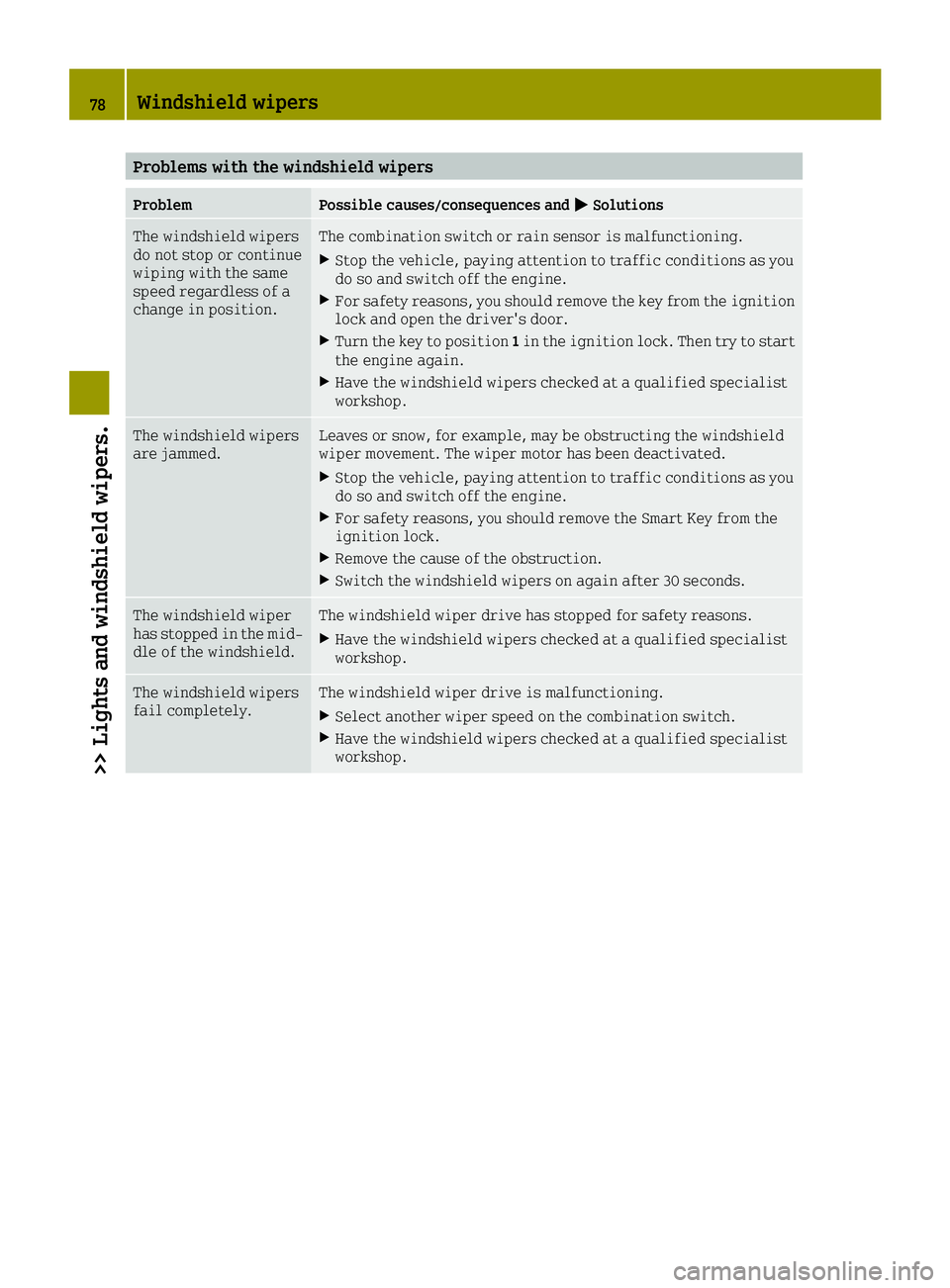
Problems with the windshield wipers
ProblemPossible causes/consequences and0050Solutions
The windshield wipers
do not stop or continue
wiping with the same
speed regardless of a
change in position.The combination switch or rain sensor is malfunctioning.
XStop the vehicle, paying attention to traffic conditions as you
do so and switch off the engine.
XFor safety reasons, you should remove the key from the ignition
lock and open the driver's door.
XTurn the key to position1in the ignition lock. Then try to start
the engine again.
XHave the windshield wipers checked at a qualified specialist
workshop.
The windshield wipers
are jammed.Leaves or snow, for example, may be obstructing the windshield
wiper movement. The wiper motor has been deactivated.
XStop the vehicle, paying attention to traffic conditions as you
do so and switch off the engine.
XFor safety reasons, you should remove the Smart Key from the
ignition lock.
XRemove the cause of the obstruction.
XSwitch the windshield wipers on again after 30 seconds.
The windshield wiper
has stopped in the mid-
dle of the windshield.The windshield wiper drive has stopped for safety reasons.
XHave the windshield wipers checked at a qualified specialist
workshop.
The windshield wipers
fail completely.The windshield wiper drive is malfunctioning.
XSelect another wiper speed on the combination switch.
XHave the windshield wipers checked at a qualified specialist
workshop.
78Windshield wipers
>> Lights and windshield wipers.
Page 82 of 214
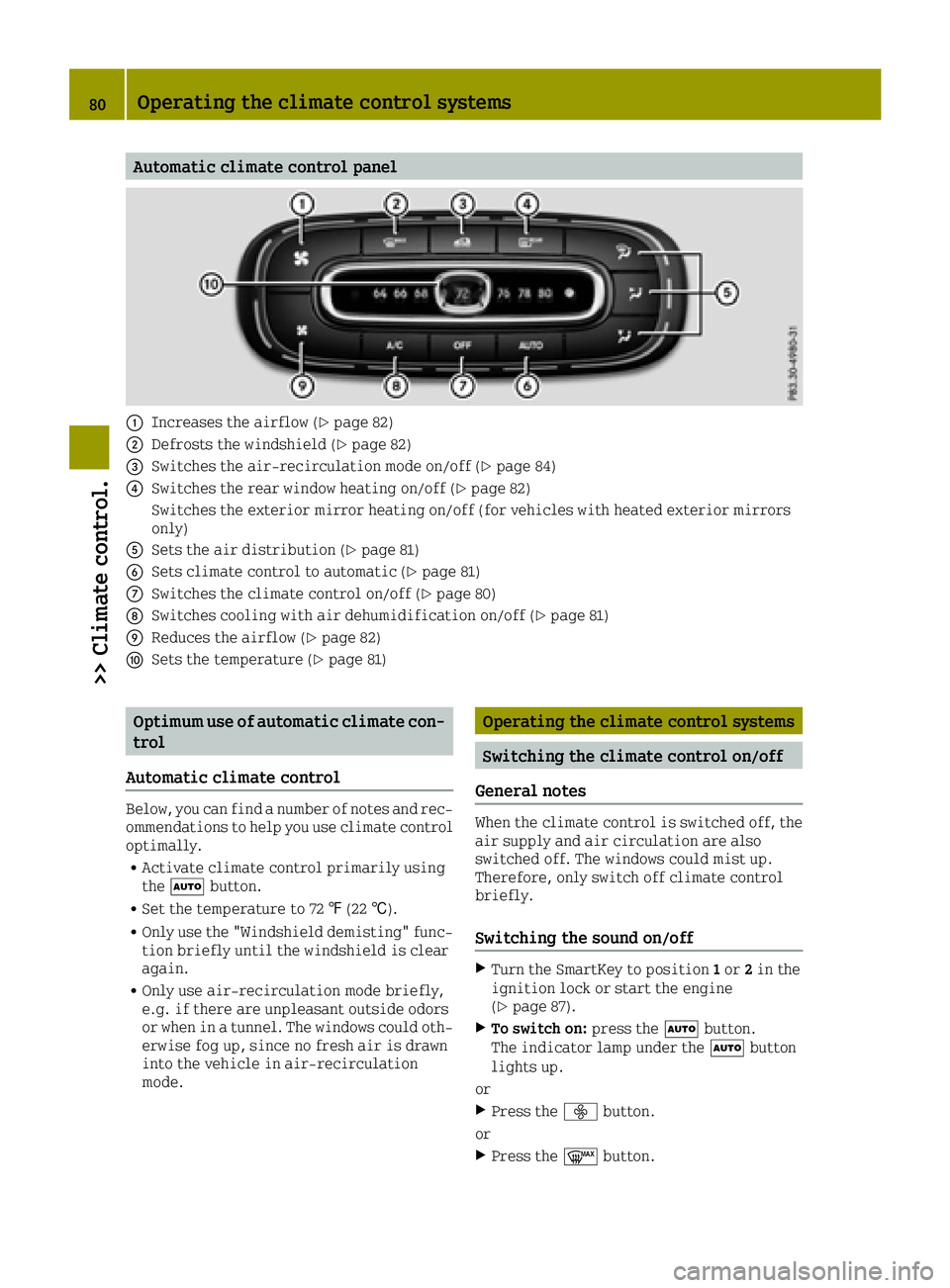
Automatic climate control panel
0043Increases the airflow (Ypage 82)
0044Defrosts the windshield (Ypage 82)
0087Switches the air-recirculation mode on/off (Ypage 84)
0085Switches the rear window heating on/off (Ypage 82)
Switches the exterior mirror heating on/off (for vehicles with heated exterior mirrors
only)
0083Sets the air distribution (Ypage 81)
0084Sets climate control to automatic (Ypage 81)
006BSwitches the climate control on/off (Ypage 80)
006CSwitches cooling with air dehumidification on/off (Ypage 81)
006DReduces the airflow (Ypage 82)
006ESets the temperature (Ypage 81)
Optimum use of automatic climate con-
trol
Automatic climate control
Below, you can find a number of notes and rec-
ommendations to help you use climate control optimally.
RActivate climate control primarily using
the 0058 button.
RSet the temperature to 72 ‡(22 †).
ROnly use the "Windshield demisting" func-
tion briefly until the windshield is clear
again.
ROnly use air-recirculation mode briefly,
e.g. if there are unpleasant outside odors
or when in a tunnel. The windows could oth-
erwise fog up, since no fresh air is drawn
into the vehicle in air-recirculation
mode.
Operating the climate control systems
Switching the climate control on/off
General notes
When the climate control is switched off, the air supply and air circulation are also
switched off. The windows could mist up.
Therefore, only switch off climate control
briefly.
Switching the sound on/off
XTurn the SmartKey to position 1or 2in the
ignition lock or start the engine
(
Ypage 87).
XTo switch on: press the0058button.
The indicator lamp under the 0058button
lights up.
or
XPress the 00F2button.
or
XPress the 0064button.
80Operating the climate control systems
>> Climate control.
Page 86 of 214

Problems with the rear window defroster
ProblemPossible causes/consequences and0050Solutions
The rear window
defroster has deacti-
vated prematurely or
cannot be activated.The battery has not been sufficiently charged.
XSwitch off any consumers that are not required, e.g. reading
lamps, interior lighting or the seat heating.
When the battery is sufficiently charged, the rear window
defroster can be activated again.
Switching the air-recirculation mode
on/off
General notes
You can deactivate the flow of fresh air tem-
porarily if unpleasant odors are entering the
vehicle from outside or if you are driving
through a tunnel. The air already inside the
vehicle will then be recirculated.
If you switch on air-recirculation mode, the
windows can fog up more quickly, in partic-
ular at low temperatures. Only use air-recir-
culation mode briefly to prevent the windows
from fogging up.
Switching on/off
XStart the engine (Ypage 87).
XTo activate: press theÀbutton.
The indicator lamp above the Àbutton
lights up.
XTo deactivate: press theÀbutton.
or
XPress the 0064button.
or
XPress the 0058button.
The indicator lamp above the Àbutton
goes out.
Setting the air vents
Important safety notes
GWARNING
Very hot or very cold air can flow from the
air vents. This could result in burns or
frostbite in the immediate vicinity of the
air vents. There is a risk of injury.
Make sure that all vehicle occupants always
maintain a sufficient distance to the air
outlets. If necessary, redirect the airflow
to another area of the vehicle interior.
GWARNING
If you spray cleaning products or disin-
fectant into the ventilation system of the
vehicle, this could ignite. There is a risk
of fire.
Never spray these or any other substances
into the ventilation system. Always have
work on the ventilation system carried out
at a qualified specialist workshop.
In order to ensure the direct flow of fresh air
through the air vents into the vehicle inte-
rior, please observe the following notes:
Rkeep the air inlet between the service
cover and the windshield free of blockages,
such as ice, snow or leaves.
Rnever cover the air vents or air intake
grilles in the vehicle interior.
iFor optimum climate control in the vehi-
cle, open the air vents fully.
84Setting the air vents
>> Climate control.
Page 89 of 214
steering and the brake boosting effect. Youwill require considerably more effort to
steer and brake. There is a risk of an acci-
dent.
Do not switch off the ignition while driv-
ing.
GWARNING
If the parking brake has not been fully
released when driving, the parking brake
can:
Roverheat and cause a fire
Rlose its hold function.
There is a risk of fire and an accident.
Release the parking brake fully before
driving off.
!Do not warm up the engine with the vehicle
stationary. Drive off immediately. Avoid
high engine speeds and driving at full
throttle until the engine has reached its
operating temperature.
Only shift the automatic transmission to
the desired drive position when the vehi-
cle is stationary.
Where possible, avoid spinning the drive
wheels when pulling away on slippery
roads. You could otherwise damage the
drive train.
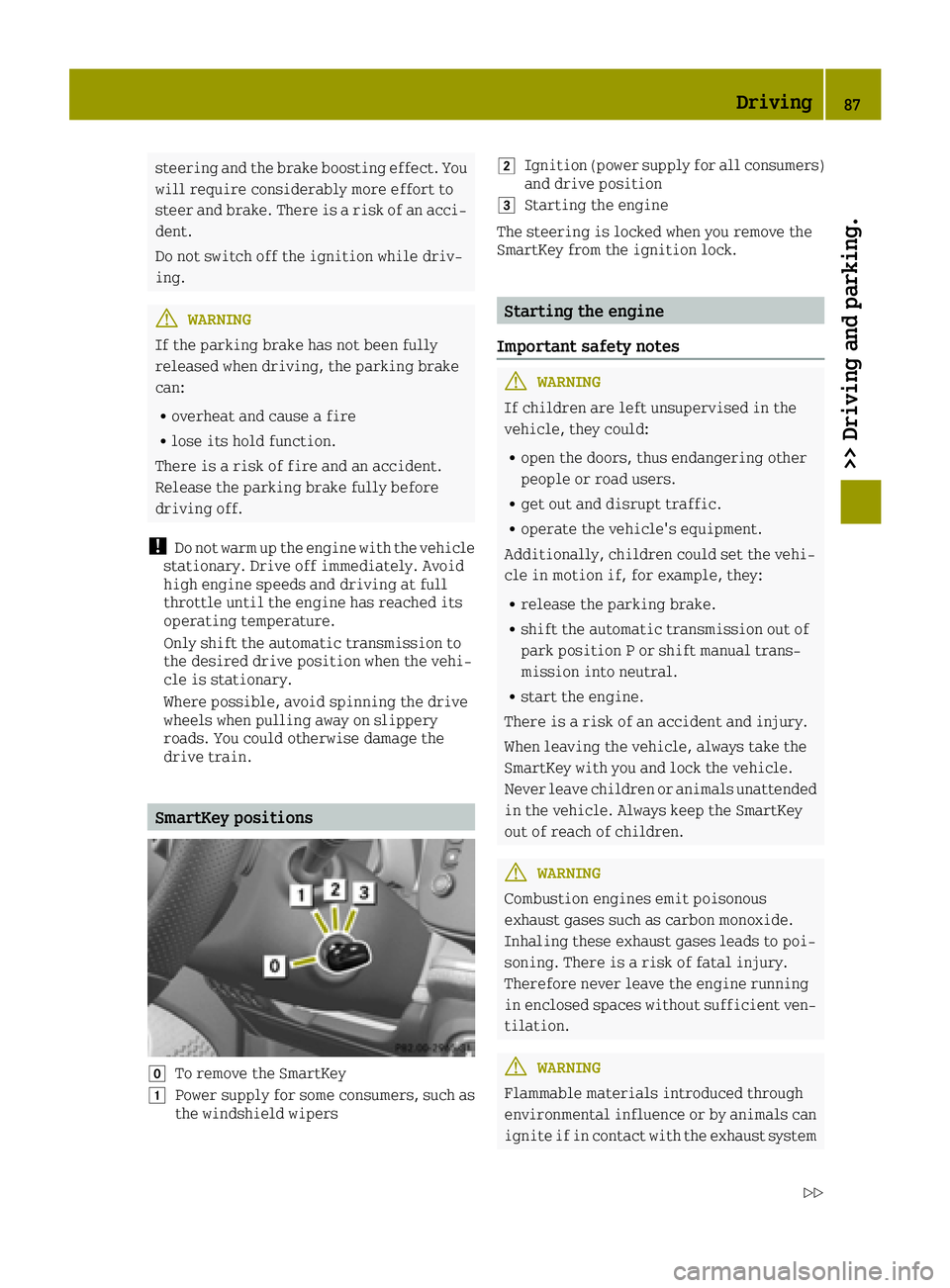
SmartKey positions
005ATo remove the SmartKey
0047Power supply for some consumers, such as
the windshield wipers
0048Ignition (power supply for all consumers)
and drive position
0049Starting the engine
The steering is locked when you remove the
SmartKey from the ignition lock.
Starting the engine
Important safety notes
GWARNING
If children are left unsupervised in the
vehicle, they could:
Ropen the doors, thus endangering other
people or road users.
Rget out and disrupt traffic.
Roperate the vehicle's equipment.
Additionally, children could set the vehi-
cle in motion if, for example, they:
Rrelease the parking brake.
Rshift the automatic transmission out of
park position P or shift manual trans-
mission into neutral.
Rstart the engine.
There is a risk of an accident and injury.
When leaving the vehicle, always take the
SmartKey with you and lock the vehicle.
Never leave children or animals unattended
in the vehicle. Always keep the SmartKey
out of reach of children.
GWARNING
Combustion engines emit poisonous
exhaust gases such as carbon monoxide.
Inhaling these exhaust gases leads to poi-
soning. There is a risk of fatal injury.
Therefore never leave the engine running
in enclosed spaces without sufficient ven- tilation.
GWARNING
Flammable materials introduced through
environmental influence or by animals can
ignite if in contact with the exhaust system
Driving87
>> Driving and parking.
Z