ESP SMART FORTWO 2016 Workshop Manual
[x] Cancel search | Manufacturer: SMART, Model Year: 2016, Model line: FORTWO, Model: SMART FORTWO 2016Pages: 214, PDF Size: 4.93 MB
Page 135 of 214
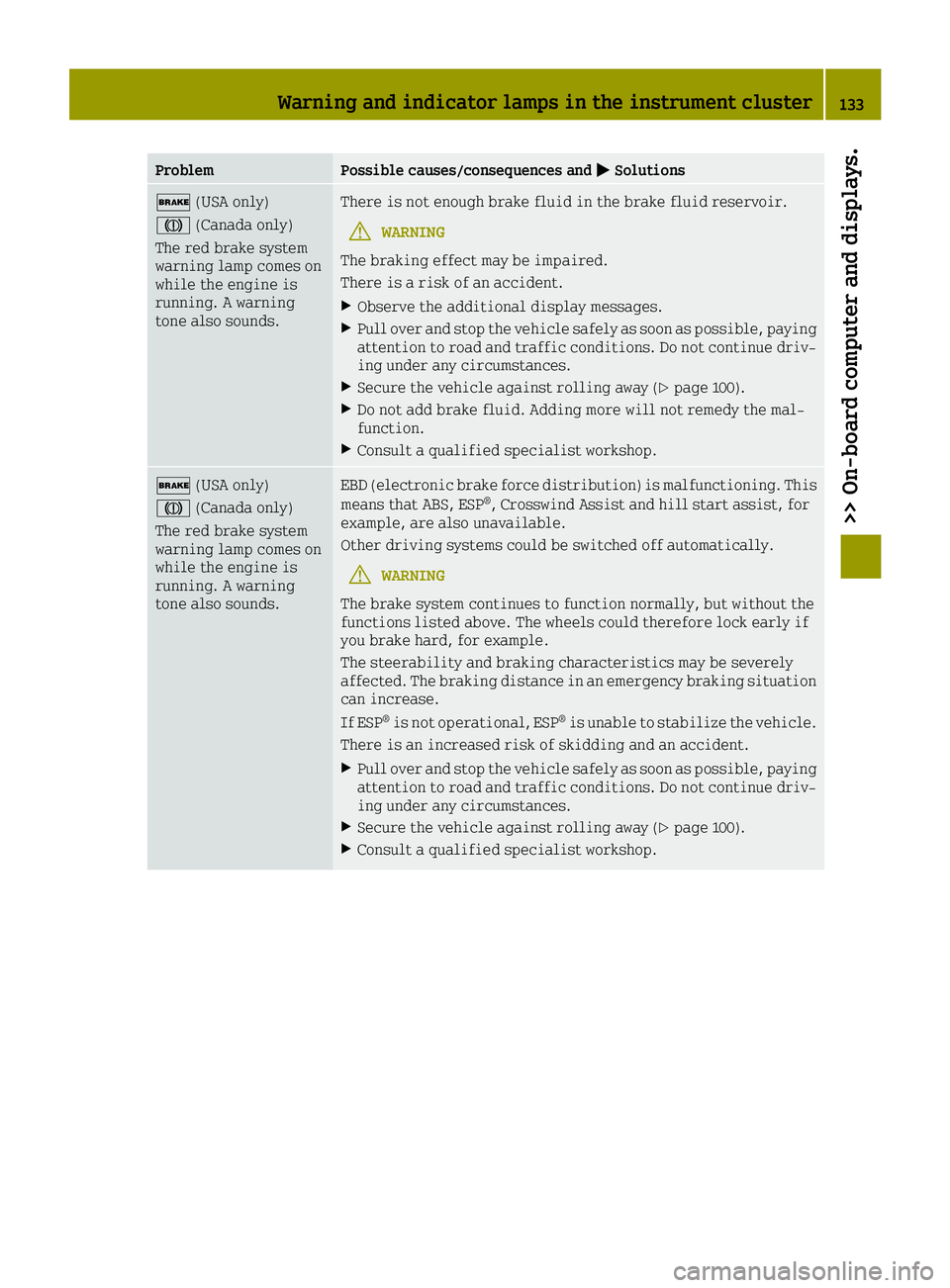
ProblemPossible causes/consequences and0050Solutions
0027(USA only)
004D (Canada only)
The red brake system
warning lamp comes on
while the engine is
running. A warning
tone also sounds.There is not enough brake fluid in the brake fluid reservoir.
GWARNING
The braking effect may be impaired.
There is a risk of an accident.
XObserve the additional display messages.
XPull over and stop the vehicle safely as soon as possible, paying
attention to road and traffic conditions. Do not continue driv-
ing under any circumstances.
XSecure the vehicle against rolling away (Ypage 100).
XDo not add brake fluid. Adding more will not remedy the mal-
function.
XConsult a qualified specialist workshop.
0027 (USA only)
004D (Canada only)
The red brake system
warning lamp comes on
while the engine is
running. A warning
tone also sounds.EBD (electronic brake force distribution) is malfunctioning. This
means that ABS, ESP®, Crosswind Assist and hill start assist, for
example, are also unavailable.
Other driving systems could be switched off automatically.
GWARNING
The brake system continues to function normally, but without the
functions listed above. The wheels could therefore lock early if
you brake hard, for example.
The steerability and braking characteristics may be severely
affected. The braking distance in an emergency braking situation
can increase.
If ESP
®is not operational, ESP®is unable to stabilize the vehicle.
There is an increased risk of skidding and an accident.
XPull over and stop the vehicle safely as soon as possible, paying
attention to road and traffic conditions. Do not continue driv-
ing under any circumstances.
XSecure the vehicle against rolling away (Ypage 100).
XConsult a qualified specialist workshop.
Warning and indicator lamps in the instrument cluster133
>> On-board computer and displays.
Z
Page 136 of 214

ProblemPossible causes/consequences and0050Solutions
0025
The yellow ABS warning
lamp is lit while the
engine is running.ABS is malfunctioning. This means that ESP®, Crosswind Assist and
hill start assist, for example, are also unavailable.
Other driving systems could be switched off automatically.
GWARNING
The brake system continues to function normally, but without the
functions listed above. The wheels could therefore lock if you
brake hard, for example.
The steerability and braking characteristics may be severely
affected. The braking distance in an emergency braking situation
can increase.
If ESP
®is not operational, ESP®is unable to stabilize the vehicle.
There is an increased risk of skidding and an accident.
XDrive on carefully.
XVisit a qualified specialist workshop.
If the ABS control unit is faulty, there is also a possibility that
other systems may be unavailable.
00E5
The yellow ESP®warn-
ing lamp is on when you
are driving.
In addition, the \
door warning lamp and
other warning lamps,
e.g. 0077, light up.
The central vehicle electronics system is malfunctioning.
After the engine is switched off:
Rdo not lock/unlock the doors using the remote control function of
the key
Ryou can no longer start the engine.
XObserve the additional display messages in the display.
XPull over and stop the vehicle safely as soon as possible, paying
attention to road and traffic conditions. Do not continue driv-
ing under any circumstances.
XSecure the vehicle against rolling away (Ypage 100).
XConsult a qualified specialist workshop.
00E5
The yellow ESP®warn-
ing lamp flashes while
the vehicle is in
motion.
ESP®or traction control has intervened because there is a risk of
skidding or at least one wheel has started to spin.
Cruise control is automatically deactivated.
XWhen pulling away, only depress the accelerator pedal as far as
necessary.
XEase off the accelerator pedal while the vehicle is in motion.
XAdapt your driving style to suit the road and weather condi-
tions.
134Warning and indicator lamps in the instrument cluster
>> On-board computer and displays.
Page 137 of 214

ProblemPossible causes/consequences and0050Solutions
00E5
The yellow ESP®warn-
ing lamp is lit while
the engine is running.
ESP®is not available due to a malfunction.
Other driving systems could be switched off automatically.
GWARNING
The brake system continues to function normally, but without the
functions listed above.
The braking distance in an emergency braking situation can thus
increase.
The brake lamps may not be functioning and thus no longer working
when braking.
If ESP
®is not operational, ESP®is unable to stabilize the vehicle.
There is an increased risk of skidding and an accident.
XPull over and stop the vehicle safely as soon as possible, paying
attention to road and traffic conditions. Do not continue driv-
ing under any circumstances.
XSecure the vehicle against rolling away (Ypage 100).
XObserve the additional display messages in the display.
XCheck that the brake lamps are working.
If the brake lamps are not working:
XConsult a qualified specialist workshop.
If the brake lamps are working:
XDrive on carefully.
XVisit a qualified specialist workshop.
^
The yellow distance
warning function warn-
ing lamp comes on
while the vehicle is
moving.
In addition the \
door warning lamp and
other warning lamps,
e.g. 00E5, light up.The central vehicle electronics system is malfunctioning.
After the engine is switched off:
Rdo not lock/unlock the doors using the remote control function of
the key
Ryou can no longer start the engine.
XPull over and stop the vehicle safely as soon as possible, paying
attention to road and traffic conditions. Do not continue driv-
ing under any circumstances.
XSecure the vehicle against rolling away (Ypage 100).
XConsult a qualified specialist workshop.
Warning and indicator lamps in the instrument cluster135
>> On-board computer and displays.
Z
Page 144 of 214
Useful information
i
This Operator's Manual describes all
models and all standard and optional
equipment of your vehicle available at the
time of publication of the Operator's Man- ual. Country-specific differences are pos-
sible. Bear in mind that your vehicle may
not feature all functions described here.
This also applies to safety-relevant sys-
tems and functions.
iRead the information on qualified spe-
cialist workshops: (Ypage 20).
Stowage areas
Loading guidelines
GWARNING
If objects, luggage or loads are not secured or not secured sufficiently, they could
slip, tip over or be flung around and
thereby hit vehicle occupants. There is a
risk of injury, particularly in the event of
sudden braking or a sudden change in
direction.
Always store objects so that they cannot be
flung around. Secure objects, luggage or
loads against slipping or tipping before
the journey.
GWARNING
Combustion engines emit poisonous
exhaust gases such as carbon monoxide. If
the tailgate is open when the engine is
running, particularly if the vehicle is
moving, exhaust fumes could enter the
passenger compartment. There is a risk of
poisoning.
Turn off the engine before opening the
tailgate. Never drive with the tailgate
open.
Your vehicle has not been approved by the
manufacturer for towing a trailer. A trailer
could seriously impair driving safety.
Mounting a basic rack, a cycle rack or a ski/
snowboard rack on the rear of the vehicle will change the axle load distribution as speci-
fied by the vehicle manufacturer. Read the
operating instructions for the individual
accessories.
The handling characteristics of a laden vehi-
cle are dependent on the distribution of the
load within the vehicle. For this reason, you
should observe the following notes when
transporting a load:
Rnever exceed the maximum permissible
gross vehicle weight or the permissible
axle loads for the vehicle (including occu-
pants). The values are specified on the
vehicle identification plate on the B-pil-
lar of the driver's door
Rthe load must not protrude above the upper
edge of the head restraints
Rensure that no items of luggage can enter
the vehicle interior above or between the
front seats
Rensure that loaded objects are stowed
safely and are secured
Rload heavy objects at the bottom and light
objects at the top
Stowage space
Important safety notes
GWARNING
If you stow objects in the vehicle interior
in an unsuitable way, they could slip or be
thrown around and thus hit vehicle occu-
pants. Additionally, the cup holders, open
stowage spaces and mobile phone brackets
cannot restrain the objects placed in them
in the event of an accident. There is a risk
of injury, especially in the event of brak-
ing or sudden changes in direction.
RAlways stow objects so they cannot be
thrown around in these or similar situa-
tions.
RAlways ensure that objects do not pro-
trude from the stowage compartments or
stowage nets.
142Stowage areas
>> Stowage and features.
Page 156 of 214
Information on the type of service and ser-
vice intervals (see the separate Maintenance
Booklet).
For further information inquire at any smart
center or look under
http://www.smartUSA.com (only USA).
iThe service display does not show any
information on the engine oil level.
Observe the notes on the engine oil level
(
Ypage 150).
Whenever a service is due, this is shown
approximately 30 days or 1500 km (1000 miles)
beforehand. After starting the engine, a ser-
vice message appears in the instrument clus-
ter display for a few seconds; see the follow-
ing example.
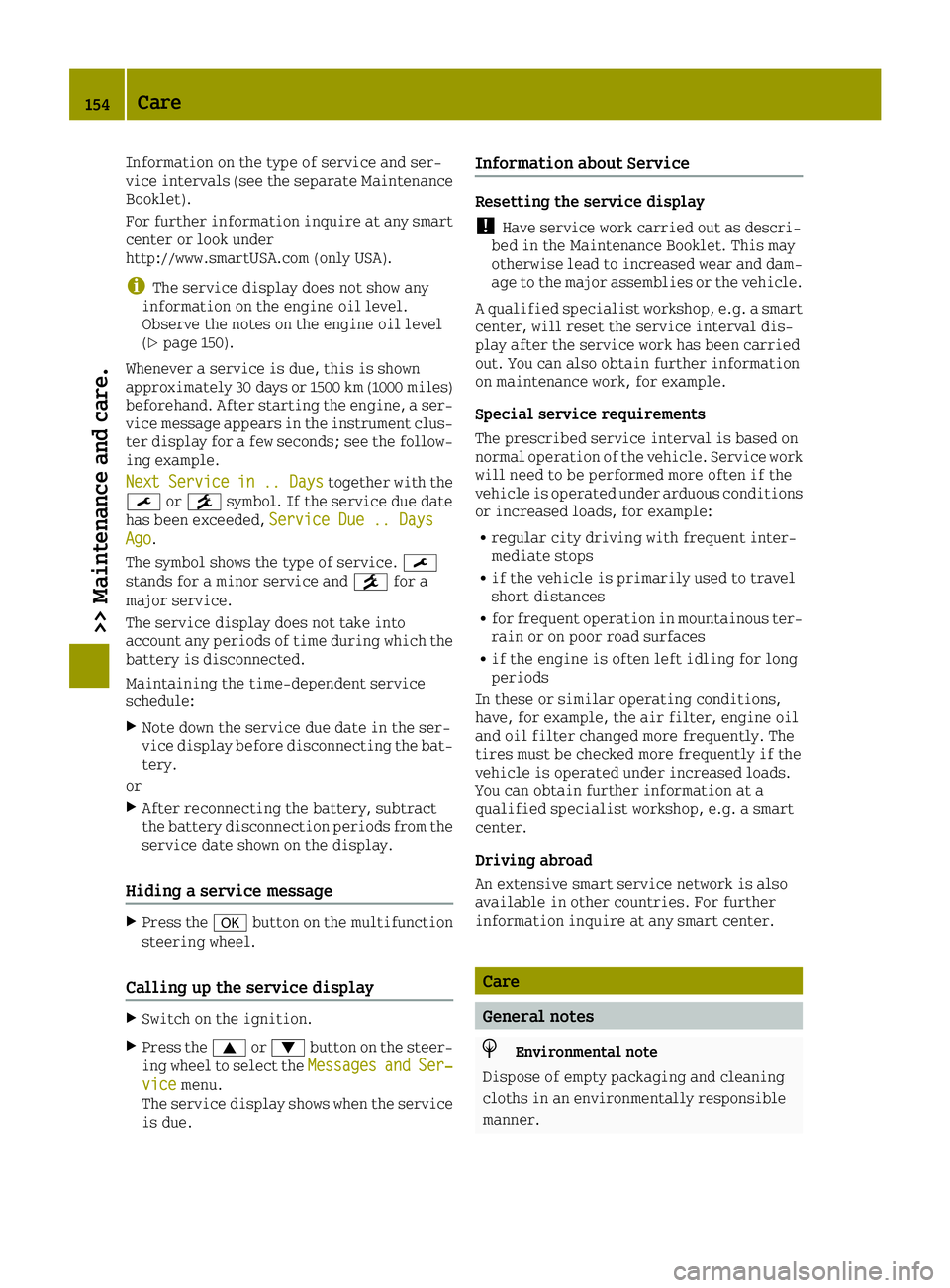
Next
Servicein.. Daystogether with the
0099 or009A symbol. If the service due date
has been exceeded, Service Due .. Days
Ago.
The symbol shows the type of service. 0099
stands for a minor service and 009Afor a
major service.
The service display does not take into
account any periods of time during which the
battery is disconnected.
Maintaining the time-dependent service
schedule:
XNote down the service due date in the ser-
vice display before disconnecting the bat-
tery.
or
XAfter reconnecting the battery, subtract
the battery disconnection periods from the
service date shown on the display.
Hiding a service message
XPress the 0076button on the multifunction
steering wheel.
Calling up the service display
XSwitch on the ignition.
XPress the 0063or0064 button on the steer-
ing wheel to select the MessagesandSer‐vicemenu.
The service display shows when the service
is due.
Information about Service
Resetting the service display
!Have service work carried out as descri-
bed in the Maintenance Booklet. This may
otherwise lead to increased wear and dam-
age to the major assemblies or the vehicle.
A qualified specialist workshop, e.g. a smart center, will reset the service interval dis-
play after the service work has been carried
out. You can also obtain further information
on maintenance work, for example.
Special service requirements
The prescribed service interval is based on
normal operation of the vehicle. Service work
will need to be performed more often if the
vehicle is operated under arduous conditions
or increased loads, for example:
Rregular city driving with frequent inter-
mediate stops
Rif the vehicle is primarily used to travel
short distances
Rfor frequent operation in mountainous ter-
rain or on poor road surfaces
Rif the engine is often left idling for long
periods
In these or similar operating conditions,
have, for example, the air filter, engine oil
and oil filter changed more frequently. The
tires must be checked more frequently if the
vehicle is operated under increased loads.
You can obtain further information at a
qualified specialist workshop, e.g. a smart
center.
Driving abroad
An extensive smart service network is also
available in other countries. For further
information inquire at any smart center.
Care
General notes
HEnvironmental note
Dispose of empty packaging and cleaning
cloths in an environmentally responsible
manner.
154Care
>> Maintenance and care.
Page 160 of 214
XFold the windshield wiper arms away from
the windshield.
XCarefully clean the wiper blades with a
damp cloth.
XFold the windshield wiper arms back againbefore switching on the ignition.
!Hold the wiper arm securely when folding
back. The windshield could be damaged if
the wiper arm smacks against it suddenly.
Cleaning the exterior lighting
!Only use cleaning agents or cleaning
cloths which are suitable for plastic light
lenses. Unsuitable cleaning agents or
cleaning cloths could scratch or damage
the plastic light lenses.
XClean the plastic lenses of the exterior
lighting using a wet sponge and a mild
cleaning agent, e.g. smart car shampoo or
cleaning cloths.
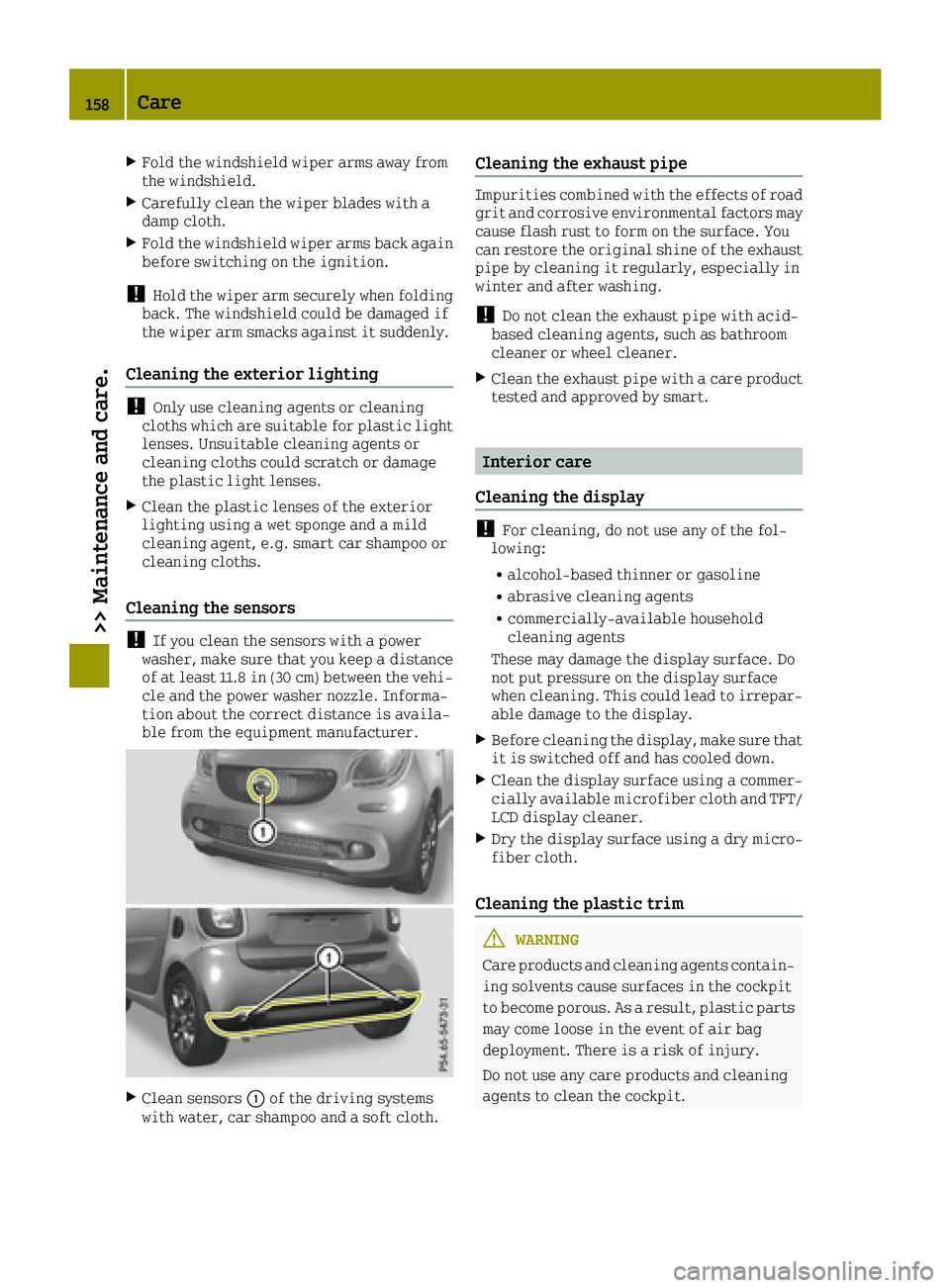
Cleaning the sensors
!If you clean the sensors with a power
washer, make sure that you keep a distance
of at least 11.8 in (30 cm) between the vehi-
cle and the power washer nozzle. Informa-
tion about the correct distance is availa-
ble from the equipment manufacturer.
XClean sensors 0043of the driving systems
with water, car shampoo and a soft cloth.
Cleaning the exhaust pipe
Impurities combined with the effects of road
grit and corrosive environmental factors may
cause flash rust to form on the surface. You
can restore the original shine of the exhaust
pipe by cleaning it regularly, especially in
winter and after washing.
!Do not clean the exhaust pipe with acid-
based cleaning agents, such as bathroom
cleaner or wheel cleaner.
XClean the exhaust pipe with a care product tested and approved by smart.
Interior care
Cleaning the display
!For cleaning, do not use any of the fol-
lowing:
Ralcohol-based thinner or gasoline
Rabrasive cleaning agents
Rcommercially-available household
cleaning agents
These may damage the display surface. Do
not put pressure on the display surface
when cleaning. This could lead to irrepar-
able damage to the display.
XBefore cleaning the display, make sure that
it is switched off and has cooled down.
XClean the display surface using a commer-
cially available microfiber cloth and TFT/
LCD display cleaner.
XDry the display surface using a dry micro-
fiber cloth.
Cleaning the plastic trim
GWARNING
Care products and cleaning agents contain-
ing solvents cause surfaces in the cockpit
to become porous. As a result, plastic parts may come loose in the event of air bag
deployment. There is a risk of injury.
Do not use any care products and cleaning
agents to clean the cockpit.
158Care
>> Maintenance and care.
Page 166 of 214
GWARNING
If the required tire pressure is not reached after driving for a short period, the tire is
too badly damaged. The tire sealant cannot repair the tire in this instance. Damaged
tires and a tire pressure that is too low can
significantly impair the vehicle's brakingand driving characteristics. There is a
risk of accident.
Do not continue driving. Contact a quali-
fied specialist workshop.
XCorrect the tire pressure if it is still at
least 130 kPa (1.3 bar/19 psi). For values, see
the tire and loading information table on
the driver's side B-pillar.
XTo increase the tire pressure: switch on the
tire inflation compressor.
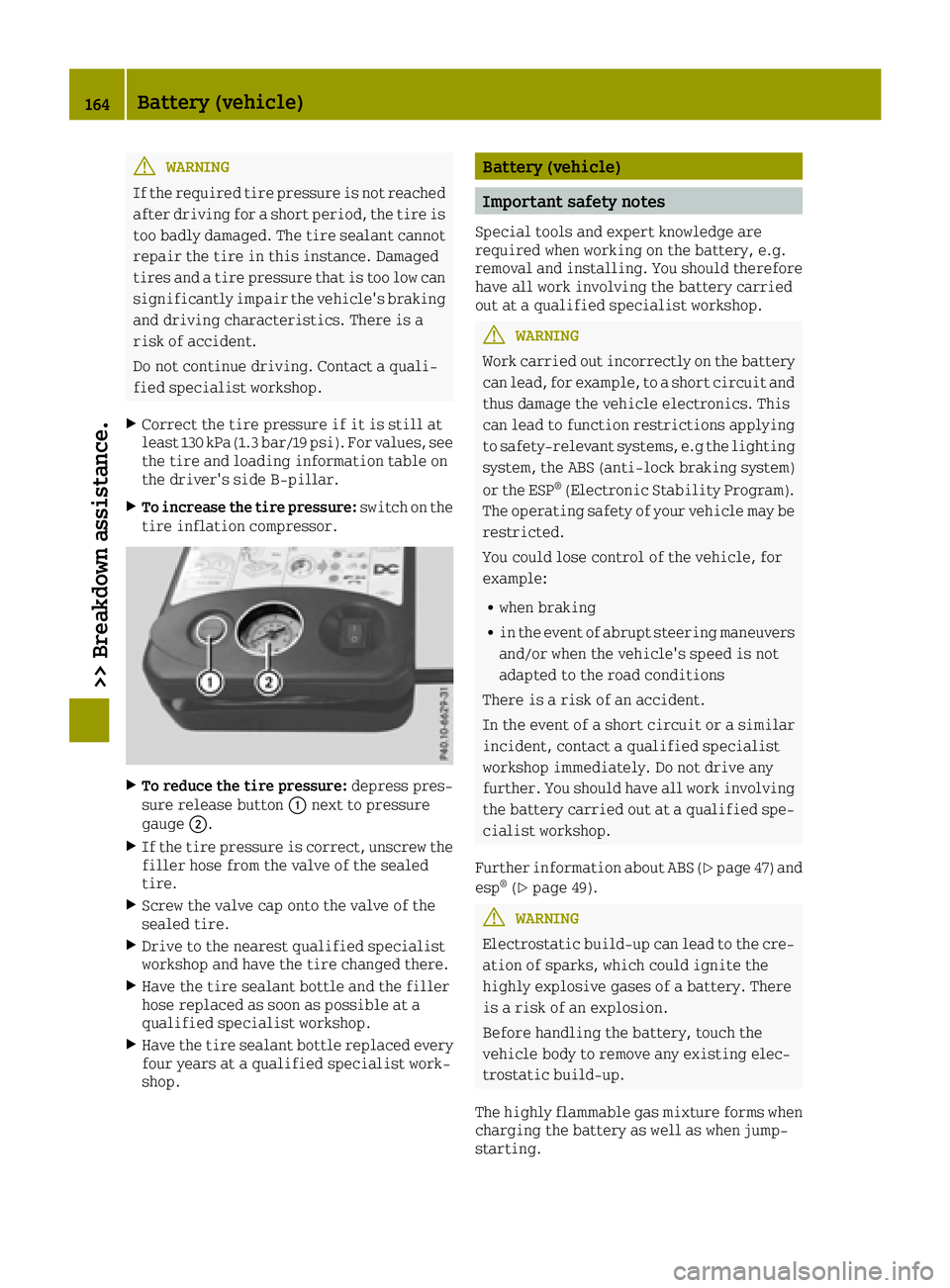
XTo reduce the tire pressure: depress pres-
sure release button 0043next to pressure
gauge 0044.
XIf the tire pressure is correct, unscrew the
filler hose from the valve of the sealed
tire.
XScrew the valve cap onto the valve of the
sealed tire.
XDrive to the nearest qualified specialist
workshop and have the tire changed there.
XHave the tire sealant bottle and the filler
hose replaced as soon as possible at a
qualified specialist workshop.
XHave the tire sealant bottle replaced every
four years at a qualified specialist work-
shop.
Battery (vehicle)
Important safety notes
Special tools and expert knowledge are
required when working on the battery, e.g.
removal and installing. You should therefore
have all work involving the battery carried
out at a qualified specialist workshop.
GWARNING
Work carried out incorrectly on the battery
can lead, for example, to a short circuit and
thus damage the vehicle electronics. This
can lead to function restrictions applying
to safety-relevant systems, e.g the lighting system, the ABS (anti-lock braking system)
or the ESP
®(Electronic Stability Program).
The operating safety of your vehicle may be restricted.
You could lose control of the vehicle, for
example:
Rwhen braking
Rin the event of abrupt steering maneuvers
and/or when the vehicle's speed is not
adapted to the road conditions
There is a risk of an accident.
In the event of a short circuit or a similar
incident, contact a qualified specialist
workshop immediately. Do not drive any
further. You should have all work involving
the battery carried out at a qualified spe-
cialist workshop.
Further information about ABS (
Ypage 47) and
esp®(Ypage 49).
GWARNING
Electrostatic build-up can lead to the cre- ation of sparks, which could ignite the
highly explosive gases of a battery. There
is a risk of an explosion.
Before handling the battery, touch the
vehicle body to remove any existing elec-
trostatic build-up.
The highly flammable gas mixture forms when charging the battery as well as when jump-
starting.
164Battery (vehicle)
>> Breakdown assistance.
Page 168 of 214
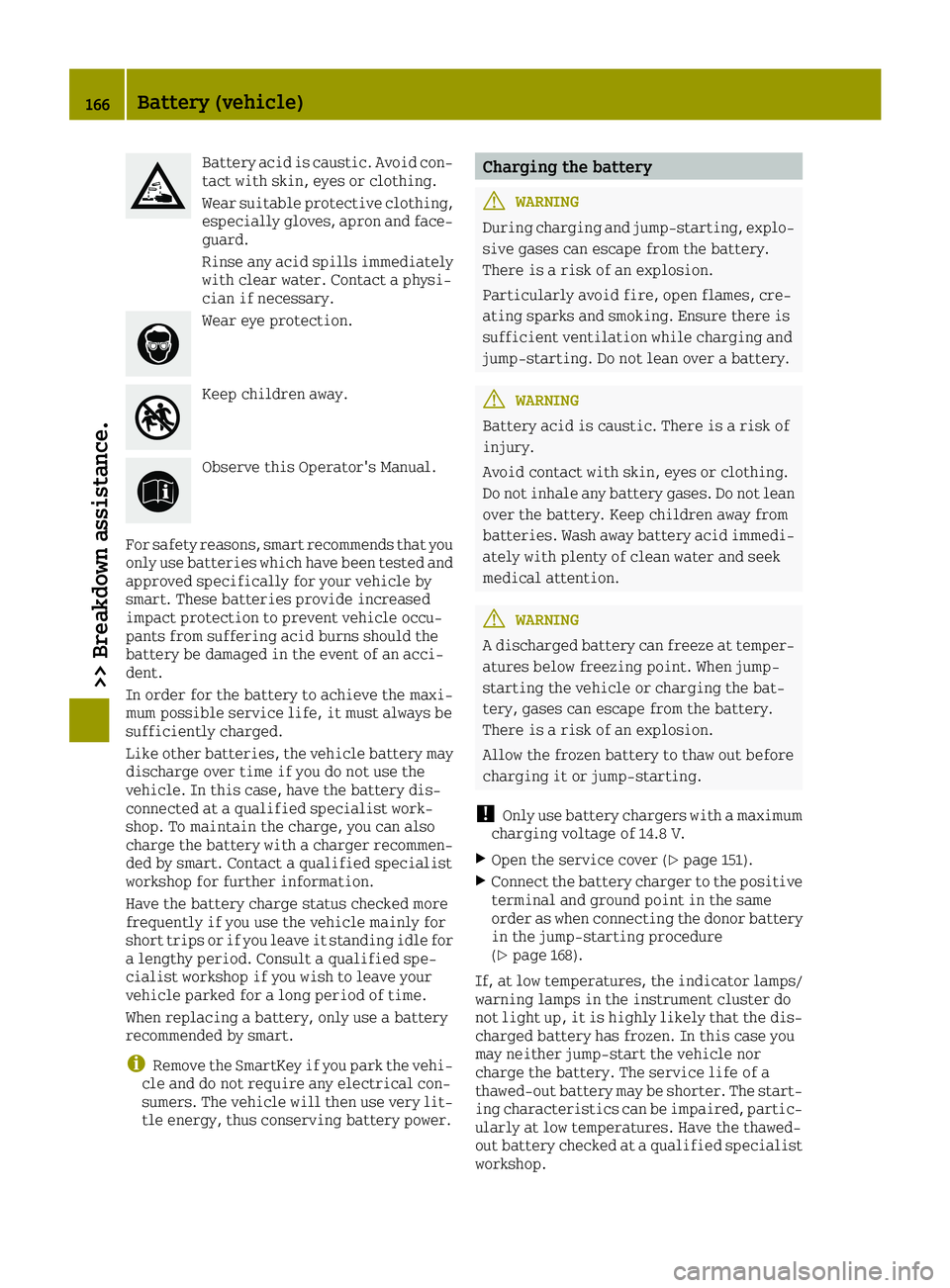
Battery acid is caustic. Avoid con-
tact with skin, eyes or clothing.
Wear suitable protective clothing,especially gloves, apron and face-
guard.
Rinse any acid spills immediately
with clear water. Contact a physi-
cian if necessary.
Wear eye protection.
Keep children away.
Observe this Operator's Manual.
For safety reasons, smart recommends that you
only use batteries which have been tested and
approved specifically for your vehicle by
smart. These batteries provide increased
impact protection to prevent vehicle occu-
pants from suffering acid burns should the
battery be damaged in the event of an acci-
dent.
In order for the battery to achieve the maxi-
mum possible service life, it must always be
sufficiently charged.
Like other batteries, the vehicle battery may discharge over time if you do not use the
vehicle. In this case, have the battery dis-
connected at a qualified specialist work-
shop. To maintain the charge, you can also
charge the battery with a charger recommen-
ded by smart. Contact a qualified specialist
workshop for further information.
Have the battery charge status checked more
frequently if you use the vehicle mainly for
short trips or if you leave it standing idle for
a lengthy period. Consult a qualified spe-
cialist workshop if you wish to leave your
vehicle parked for a long period of time.
When replacing a battery, only use a battery
recommended by smart.
iRemove the SmartKey if you park the vehi-
cle and do not require any electrical con-
sumers. The vehicle will then use very lit-
tle energy, thus conserving battery power.
Charging the battery
GWARNING
During charging and jump-starting, explo- sive gases can escape from the battery.
There is a risk of an explosion.
Particularly avoid fire, open flames, cre-
ating sparks and smoking. Ensure there is
sufficient ventilation while charging and
jump-starting. Do not lean over a battery.
GWARNING
Battery acid is caustic. There is a risk of
injury.
Avoid contact with skin, eyes or clothing.
Do not inhale any battery gases. Do not lean
over the battery. Keep children away from
batteries. Wash away battery acid immedi-
ately with plenty of clean water and seek
medical attention.
GWARNING
A discharged battery can freeze at temper-
atures below freezing point. When jump-
starting the vehicle or charging the bat-
tery, gases can escape from the battery.
There is a risk of an explosion.
Allow the frozen battery to thaw out before
charging it or jump-starting.
!Only use battery chargers with a maximum
charging voltage of 14.8 V.
XOpen the service cover (Ypage 151).
XConnect the battery charger to the positive
terminal and ground point in the same
order as when connecting the donor battery
in the jump-starting procedure
(
Ypage 168).
If, at low temperatures, the indicator lamps/
warning lamps in the instrument cluster do
not light up, it is highly likely that the dis-
charged battery has frozen. In this case you
may neither jump-start the vehicle nor
charge the battery. The service life of a
thawed-out battery may be shorter. The start-
ing characteristics can be impaired, partic-
ularly at low temperatures. Have the thawed-
out battery checked at a qualified specialist
workshop.
166Battery (vehicle)
>> Breakdown assistance.
Page 173 of 214
It is better to have the vehicle transported
than to have it towed.
Vehicles with automatic transmission:when
towing a vehicle, the transmission must be in
position N.
The battery must be connected and charged.
Otherwise, you:
Rcannot turn the SmartKey to position 2in
the ignition lock
Rcannot shift the transmission to position N
on vehicles with automatic transmission
iDeactivate the automatic locking feature
(Ypage 55). You could otherwise be locked
out when pushing or towing the vehicle.
iVehicles with the basic carrier fitted:
Do not tow away the vehicle with the basic
carrier fitted.
Do not secure the tow cable or tow bar to the
basic carrier.
Installing/removing the towing eye
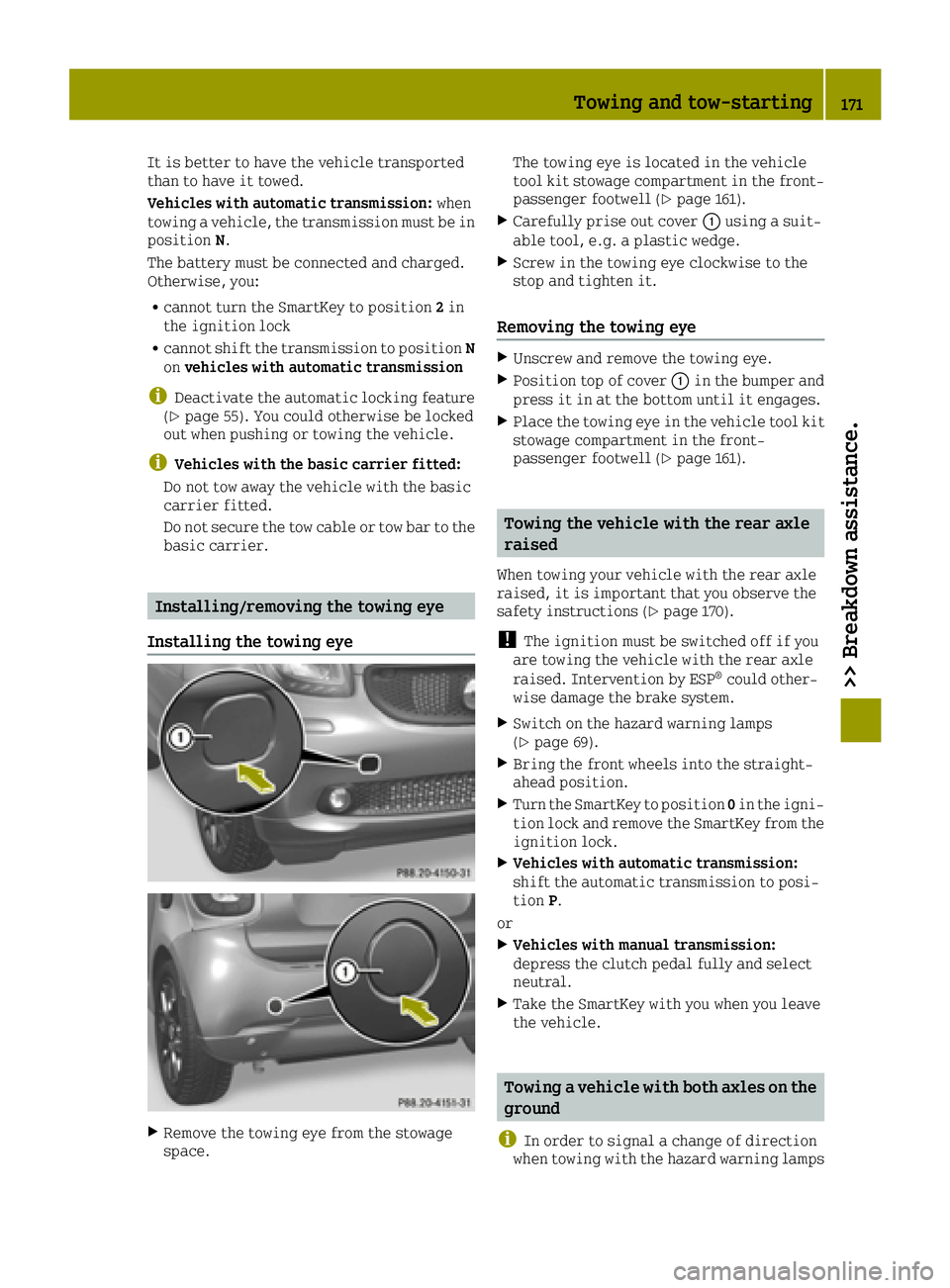
Installing the towing eye
XRemove the towing eye from the stowage
space. The towing eye is located in the vehicle
tool kit stowage compartment in the front-
passenger footwell (
Ypage 161).
XCarefully prise out cover 0043using a suit-
able tool, e.g. a plastic wedge.
XScrew in the towing eye clockwise to the
stop and tighten it.
Removing the towing eye
XUnscrew and remove the towing eye.
XPosition top of cover 0043in the bumper and
press it in at the bottom until it engages.
XPlace the towing eye in the vehicle tool kit
stowage compartment in the front-
passenger footwell (
Ypage 161).
Towing the vehicle with the rear axle
raised
When towing your vehicle with the rear axle
raised, it is important that you observe the
safety instructions (
Ypage 170).
!The ignition must be switched off if you
are towing the vehicle with the rear axle
raised. Intervention by ESP
®could other-
wise damage the brake system.
XSwitch on the hazard warning lamps
(Ypage 69).
XBring the front wheels into the straight-
ahead position.
XTurn the SmartKey to position 0in the igni-
tion lock and remove the SmartKey from the
ignition lock.
XVehicles with automatic transmission:
shift the automatic transmission to posi-
tion P.
or
XVehicles with manual transmission:
depress the clutch pedal fully and select
neutral.
XTake the SmartKey with you when you leave
the vehicle.
Towing a vehicle with both axles on the
ground
i
In order to signal a change of direction
when towing with the hazard warning lamps
Towing and tow-starting171
>> Breakdown assistance.
Z
Page 177 of 214
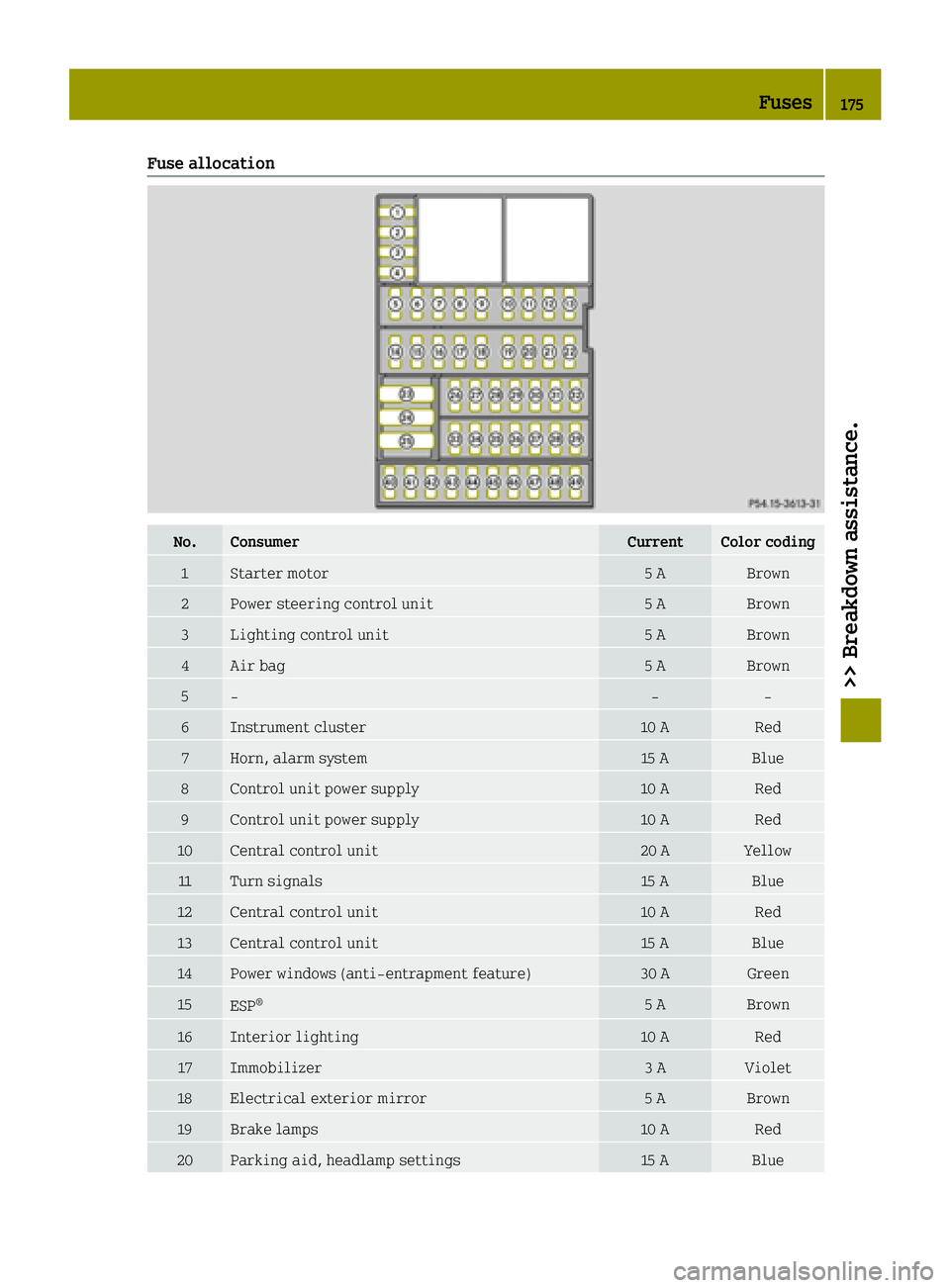
Fuse allocation
No.ConsumerCurrentColor coding
1Starter motor5 ABrown
2Power steering control unit5 ABrown
3Lighting control unit5 ABrown
4Air bag5 ABrown
5‑‑‑
6Instrument cluster10 ARed
7Horn, alarm system15 ABlue
8Control unit power supply10 ARed
9Control unit power supply10 ARed
10Central control unit20 AYellow
11Turn signals15 ABlue
12Central control unit10 ARed
13Central control unit15 ABlue
14Power windows (anti-entrapment feature)30 AGreen
15ESP®5 ABrown
16Interior lighting10 ARed
17Immobilizer3 AViolet
18Electrical exterior mirror5 ABrown
19Brake lamps10 ARed
20Parking aid, headlamp settings15 ABlue
Fuses175
>> Breakdown assistance.
Z