automatic transmission SMART FORTWO COUPE 2012 User Guide
[x] Cancel search | Manufacturer: SMART, Model Year: 2012, Model line: FORTWO COUPE, Model: SMART FORTWO COUPE 2012Pages: 228, PDF Size: 12.76 MB
Page 88 of 228
Deactivating manual gearshifting
X
With drive position D selected: Pull and
hold right shift paddle ; (Y page 85)
towards you for longer than two seconds.
or
X With manual gearshifting M selected:
Move the gear selector lever to drive
position D (Y page 82).
System-controlled automatic
gearshifting is switched on again. Emergency operation (limp-home
mode)
In this mode only a certain gear or a
certain
gear combination can be selected.
This mode is triggered in case of
transmission malfunctions and enables you
driving to the nearest workshop such as a
smart center.
If vehicle acceleration becomes less
responsive or sluggish or the transmission
no longer shifts, the transmission is most
likely operating in limp-home (emergency
operation) mode. The transmission
position indicator flashes and the ¬
symbol appears in the multifunction
display.
Driving in limp-home mode:
X Move the gear selector lever to drive
position D (Y page 82).
X Continue to drive.
X Have the transmission checked at an
authorized smart center as soon as
possible.
i It is possible that a gear combination
including the reverse gear can not be
selected. Keep in mind when parking,
that reversing the vehicle might be
impossible.
In case of a minor transmission
malfunction,
it might be possible to teach-
in the transmission in order to restore the
normal transmission mode. i
If the attempt to teach-in the
transmission fails, you cannot continue
to drive. Therefore we strongly
recommend that you have the
transmission taught-in at a qualified
workshop or at an authorized smart
center.
Teaching-in the transmission system:
X Stop the vehicle in a safe location.
X Move the gear selector lever to park
position P.
X Turn off the engine.
X Wait at least 30 seconds before
restarting.
X Press the brake pedal.
X Restart the engine
Three bars instead of P appear in the
multifunction display.
X Wait at least 30 seconds.
The transmission is taught in.
When teaching-in was successful: P
appears
in the multifunction display again
and normal transmission operating is
restored.
X Continue to drive.
After an unsuccessful teaching-in: Three
bars instead of P appear in the
multifunction display.
X Do not continue to drive.
X Turn off the engine.
X Engage the parking brake when leaving
the vehicle.
X Contact Roadside Assistance or an
authorized smart center. Instrument cluster
Multifunction display
The following displays and indicators
appear in the multifunction display: 86
Instrument cluster
>> Controls.
Page 141 of 228
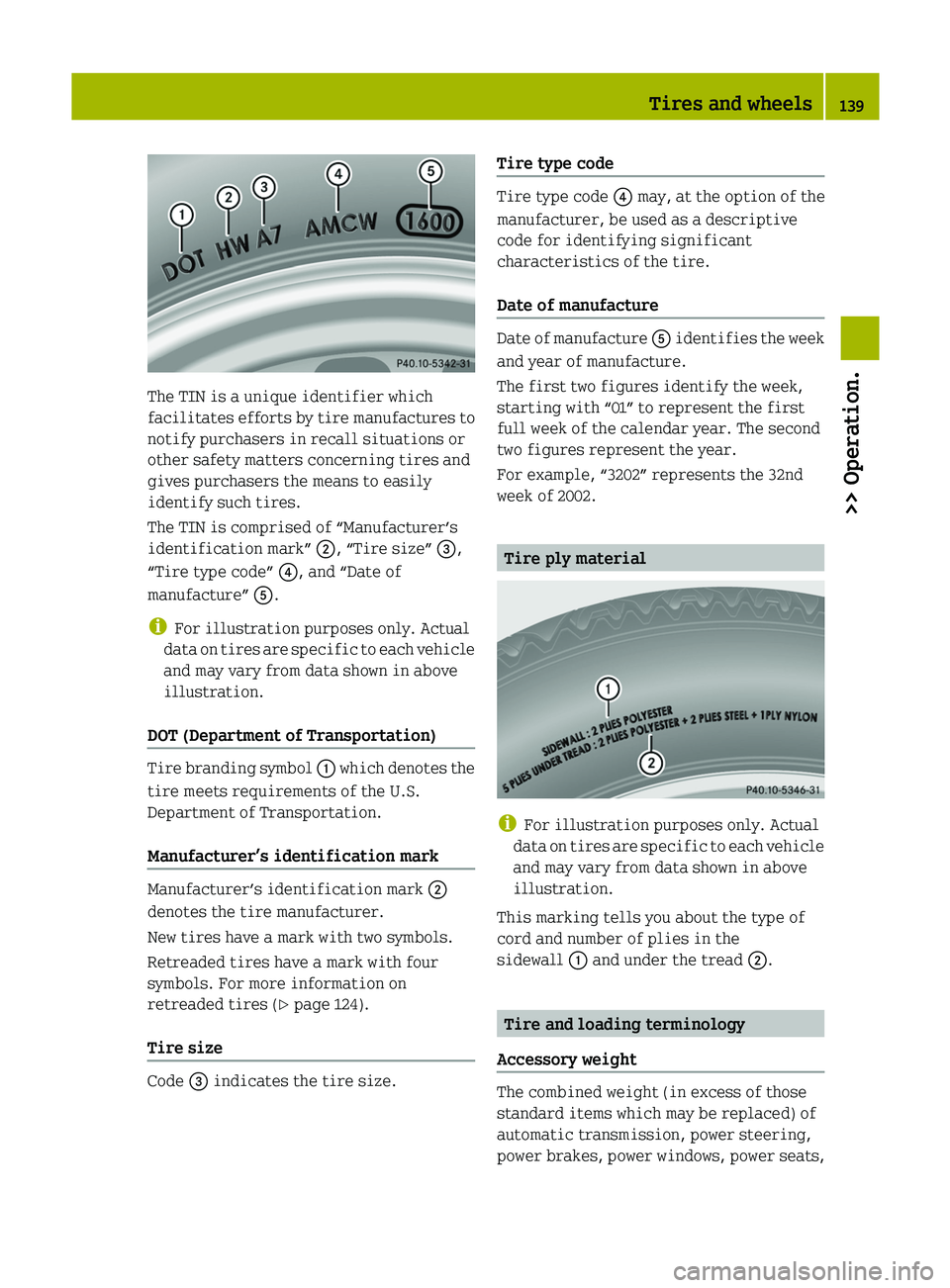
The TIN is a unique identifier which
facilitates
efforts by tire manufactures to
notify purchasers in recall situations or
other safety matters concerning tires and
gives purchasers the means to easily
identify such tires.
The TIN is comprised of “Manufacturer’s
identification mark” ;, “Tire size” =,
“Tire type code” ?, and “Date of
manufacture” A.
i For illustration purposes only. Actual
data on tires are specific to each vehicle
and may vary from data shown in above
illustration.
DOT (Department of Transportation) Tire branding symbol
:
which denotes the
tire meets requirements of the U.S.
Department of Transportation.
Manufacturer’s identification mark Manufacturer’s identification mark
;
denotes the tire manufacturer.
New tires have a mark with two symbols.
Retreaded tires have a mark with four
symbols. For more information on
retreaded tires ( Y page 124).
Tire size Code = indicates the tire size. Tire type code Tire type code
? may, at the option of the
manufacturer, be used as a descriptive
code for identifying significant
characteristics of the tire.
Date of manufacture Date of manufacture
A
identifies the week
and year of manufacture.
The first two figures identify the week,
starting with “01” to represent the first
full week of the calendar year. The second
two figures represent the year.
For example, “3202” represents the 32nd
week of 2002. Tire ply material
i
For illustration purposes only. Actual
data
on tires are specific to each vehicle
and may vary from data shown in above
illustration.
This marking tells you about the type of
cord and number of plies in the
sidewall : and under the tread ;. Tire and loading terminology
Accessory weight The combined weight (in excess of those
standard items which may be replaced) of
automatic transmission, power steering,
power brakes, power windows, power seats, Tires and wheels
139
>> Operation. Z
Page 162 of 228
Display messages Possible causes/consequences and
M Solutions4
Switch Engine Off The engine oil level is too low. The engine could be damaged.
X
Stop the vehicle as soon as it is safe to do so.
X Turn off the engine.
X Engage the parking brake.
X Check the engine oil level (Y page 118) and add engine oil as
required (Y page 119). J
Release Parking
Brake You are driving with the parking brake engaged.
X
Release the parking brake. 5
Shift
to N or P to
Start You have attempted to start the engine while the automatic
transmission was in reverse gear
R or drive position D.
Shift the automatic transmission into park position P or
neutral position N.5
Apply Brakes to
Start You have attempted to start the engine without depressing the
brake pedal.
Depress the brake pedal to start the engine.
Display messages Possible causes/consequences and
M Solutions#
Charge Battery The battery is not being charged.
Possible causes:
R
alternator malfunctioning
R broken poly-V-belt
X Stop the vehicle immediately as soon as it is safe to do so.
X Turn off the engine immediately.
X Engage the parking brake.
X Check the poly-V-belt.
X If poly-V-belt is broken: Do not continue to drive. Contact
an authorized smart center.
X If poly-V-belt is intact: Have the vehicle checked at an
authorized smart center immediately. !
Among other possible causes, the poly-V-belt could be broken. Do not continue to
drive.
Otherwise, the engine will overheat due to an inoperative water pump which may
result in damage to the engine. 160
Display messages
>> Practical hints.
Page 200 of 228
key is in the starter switch. Otherwise
the alternator and other electronic
components could be severely damaged.
Have the battery checked regularly at an
authorized smart center.
Refer to Maintenance Booklet for
maintenance intervals or contact an
authorized smart center for further
information.
! Never invert the terminal connections! Disconnecting, removing, charging,
reinstalling and reconnecting the
battery
Disconnecting the battery i
If the battery is disconnected or
discharged
R the key will not turn in the starter
switch
R the automatic transmission will
remain in park position P
For more information see “Jump
starting” ( Y page 199).
X Engage the parking brake.
X Move the gear selector lever to park
position P.
X Turn off all electrical accessories.
X Turn off the engine.
X Open the passenger door.
X Move the passenger seat to the rear as far
as possible.
X Unscrew the carpet holder in the
passenger footwell (Y page 158).
X Lift the carpet. X
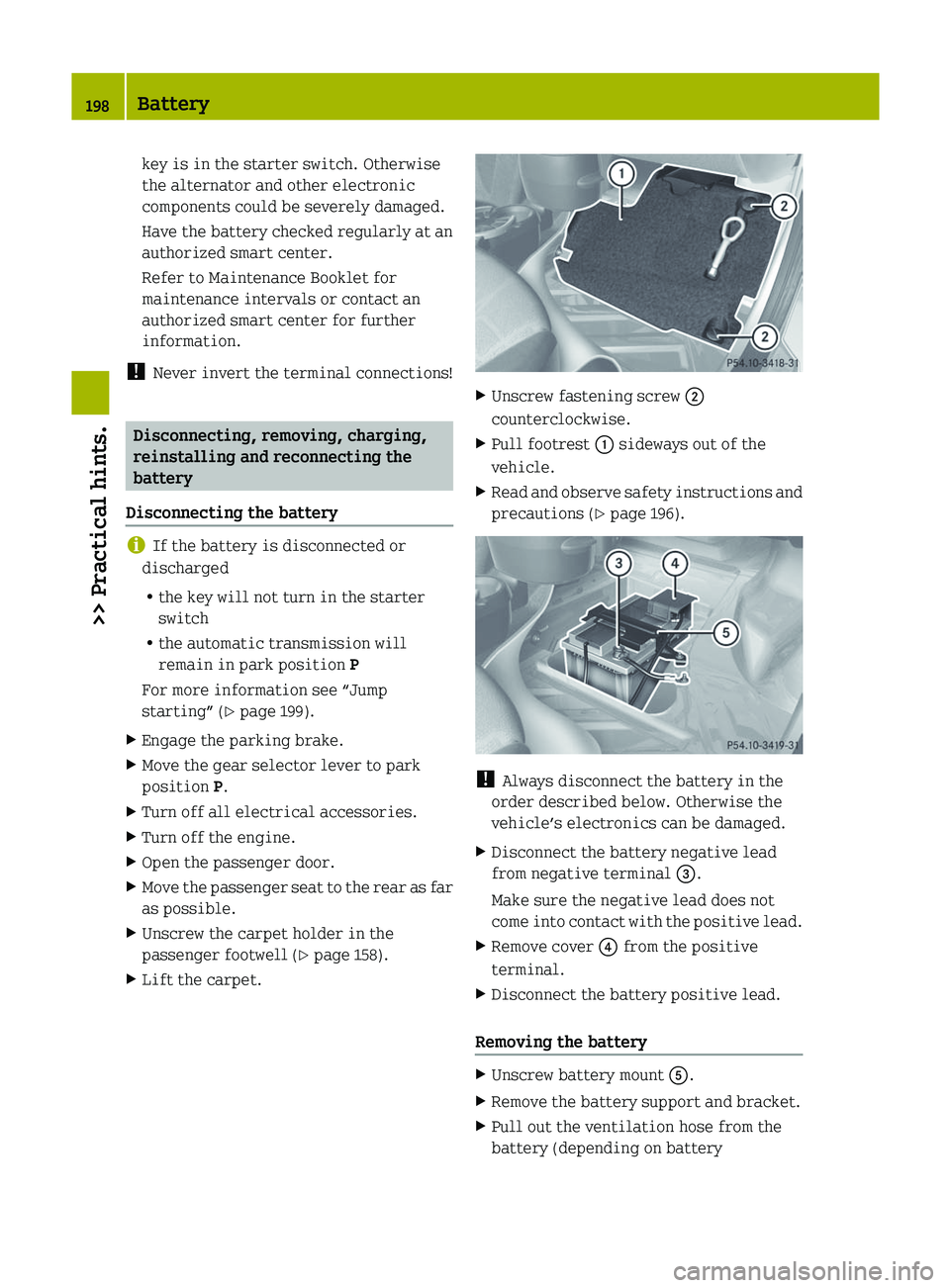
Unscrew fastening screw ;
counterclockwise.
X Pull footrest : sideways out of the
vehicle.
X Read and observe safety instructions and
precautions (Y page 196). !
Always disconnect the battery in the
order described below. Otherwise the
vehicle’s electronics can be damaged.
X Disconnect the battery negative lead
from negative terminal =.
Make sure the negative lead does not
come
into contact with the positive lead.
X Remove cover ? from the positive
terminal.
X Disconnect the battery positive lead.
Removing the battery X
Unscrew battery mount A.
X Remove the battery support and bracket.
X Pull out the ventilation hose from the
battery (depending on battery198
Battery
>> Practical hints.