ESP SMART FORTWO COUPE 2012 Owner's Manual
[x] Cancel search | Manufacturer: SMART, Model Year: 2012, Model line: FORTWO COUPE, Model: SMART FORTWO COUPE 2012Pages: 228, PDF Size: 12.76 MB
Page 69 of 228
X
Deactivating: Switch off the ignition
and remove the key from the starter
switch.
X Switch on the high-beam flasher and
press button # on the key
simultaneously.
An acoustic signal sounds.
The daytime running lamp mode is
deactivated.
LED daytime running lamps* (USA only) Vehicles without rain-light sensor:
X
Switching on: Switch on the ignition.
The LED daytime running lamps are
switched on.
X Switching off: Switch on the parking
lamps or the low‑beam headlamps.
The LED daytime running lamps are
switched off.
Vehicles with rain-light sensor*:
X Turn the exterior lamp switch to position
Ã.
With the key in starter switch position
1, the LED daytime running lamps are
switched on. In low ambient light
conditions, low-beam headlamps, the
tail
and parking lamps, the license plate
lamps and the side marker lamps will
come on. The LED daytime running lamps
will then be switched off.
With the engine running, the low‑beam
headlamps, the tail and parking lamps,
the license plate lamps and the side
marker lamps will come on and go out
automatically depending on the
brightness of the ambient light.
When the engine is running, and you turn
the exterior lamp switch to position T
or L, the manual headlamp mode has
priority
over the LED daytime running lamp
mode.
The corresponding exterior lamps come on
(Y page 64). LED daytime running lamps*
(Canada only) X
Switching on: Switch on the ignition.
The LED daytime running lamps are
switched on.
X Switching off: Switch on the low‑beam
headlamps.
The LED daytime running lamps are
switched off. Combination switch (high beam, high
beam flasher and turn signals)
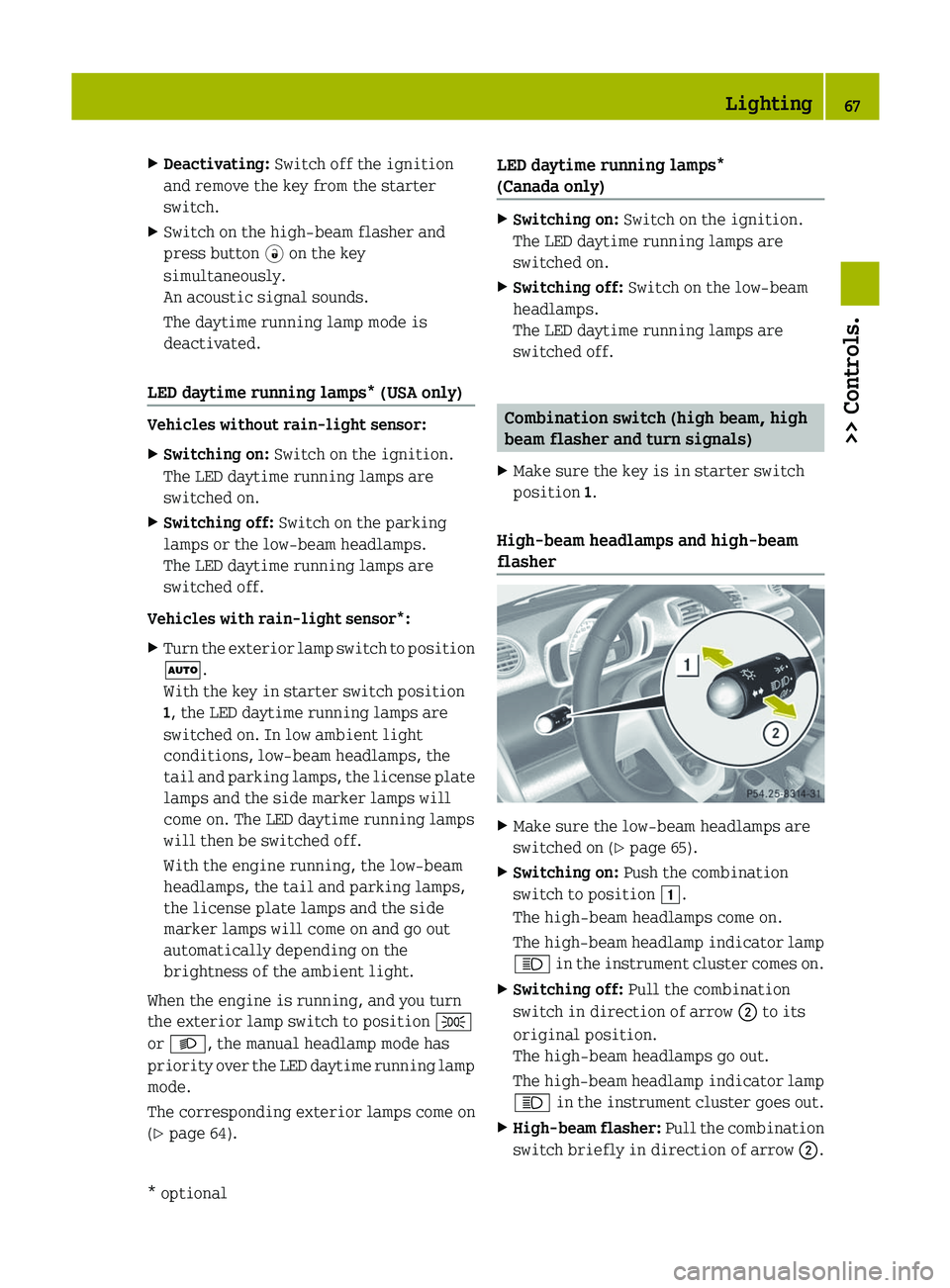
X Make sure the key is in starter switch
position 1.
High‑beam headlamps and high-beam
flasher X
Make sure the low‑beam headlamps are
switched on (Y page 65).
X Switching on: Push the combination
switch to position 1.
The high‑beam headlamps come on.
The
high‑beam headlamp indicator lamp
K in the instrument cluster comes on.
X Switching off: Pull the combination
switch in direction of arrow ; to its
original position.
The high‑beam headlamps go out.
The
high‑beam headlamp indicator lamp
K in the instrument cluster goes out.
X High-beam flasher:
Pull the combination
switch briefly in direction of arrow ;. Lighting
67
>> Controls.
* optional Z
Page 70 of 228
Turn signals
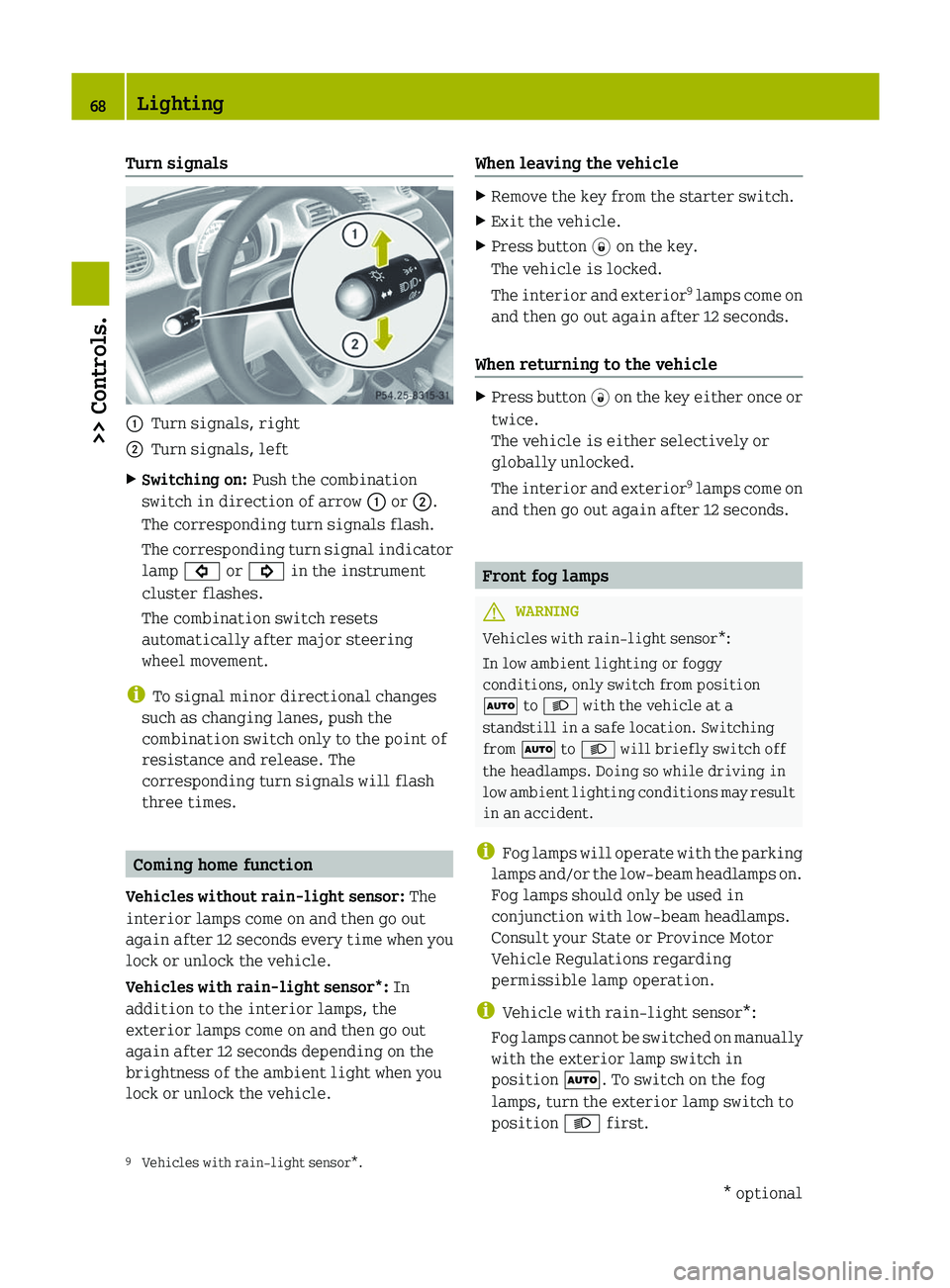
:
Turn signals, right
; Turn signals, left
X Switching on: Push the combination
switch in direction of arrow : or ;.
The corresponding turn signals flash.
The
corresponding turn signal indicator
lamp # or ! in the instrument
cluster flashes.
The combination switch resets
automatically after major steering
wheel movement.
i To signal minor directional changes
such as changing lanes, push the
combination switch only to the point of
resistance and release. The
corresponding turn signals will flash
three times. Coming home function
Vehicles without rain-light sensor: The
interior lamps come on and then go out
again
after 12 seconds every time when you
lock or unlock the vehicle.
Vehicles with rain-light sensor*: In
addition to the interior lamps, the
exterior lamps come on and then go out
again after 12 seconds depending on the
brightness of the ambient light when you
lock or unlock the vehicle. When leaving the vehicle X
Remove the key from the starter switch.
X Exit the vehicle.
X Press button * on the key.
The vehicle is locked.
The
interior and exterior 9
lamps come on
and then go out again after 12 seconds.
When returning to the vehicle X
Press button #
on the key either once or
twice.
The vehicle is either selectively or
globally unlocked.
The interior and exterior 9
lamps come on
and then go out again after 12 seconds. Front fog lamps
G
WARNING
Vehicles with rain-light sensor*:
In low ambient lighting or foggy
conditions, only switch from position
à to L with the vehicle at a
standstill in a safe location. Switching
from à to L will briefly switch off
the headlamps. Doing so while driving in
low
ambient lighting conditions may result
in an accident.
i Fog lamps will operate with the parking
lamps and/or the low‑beam headlamps on.
Fog lamps should only be used in
conjunction with low‑beam headlamps.
Consult your State or Province Motor
Vehicle Regulations regarding
permissible lamp operation.
i Vehicle with rain-light sensor*:
Fog lamps cannot be switched on manually
with the exterior lamp switch in
position Ã. To switch on the fog
lamps, turn the exterior lamp switch to
position L first.
9 Vehicles with rain-light sensor*. 68
Lighting
>> Controls.
* optional
Page 78 of 228
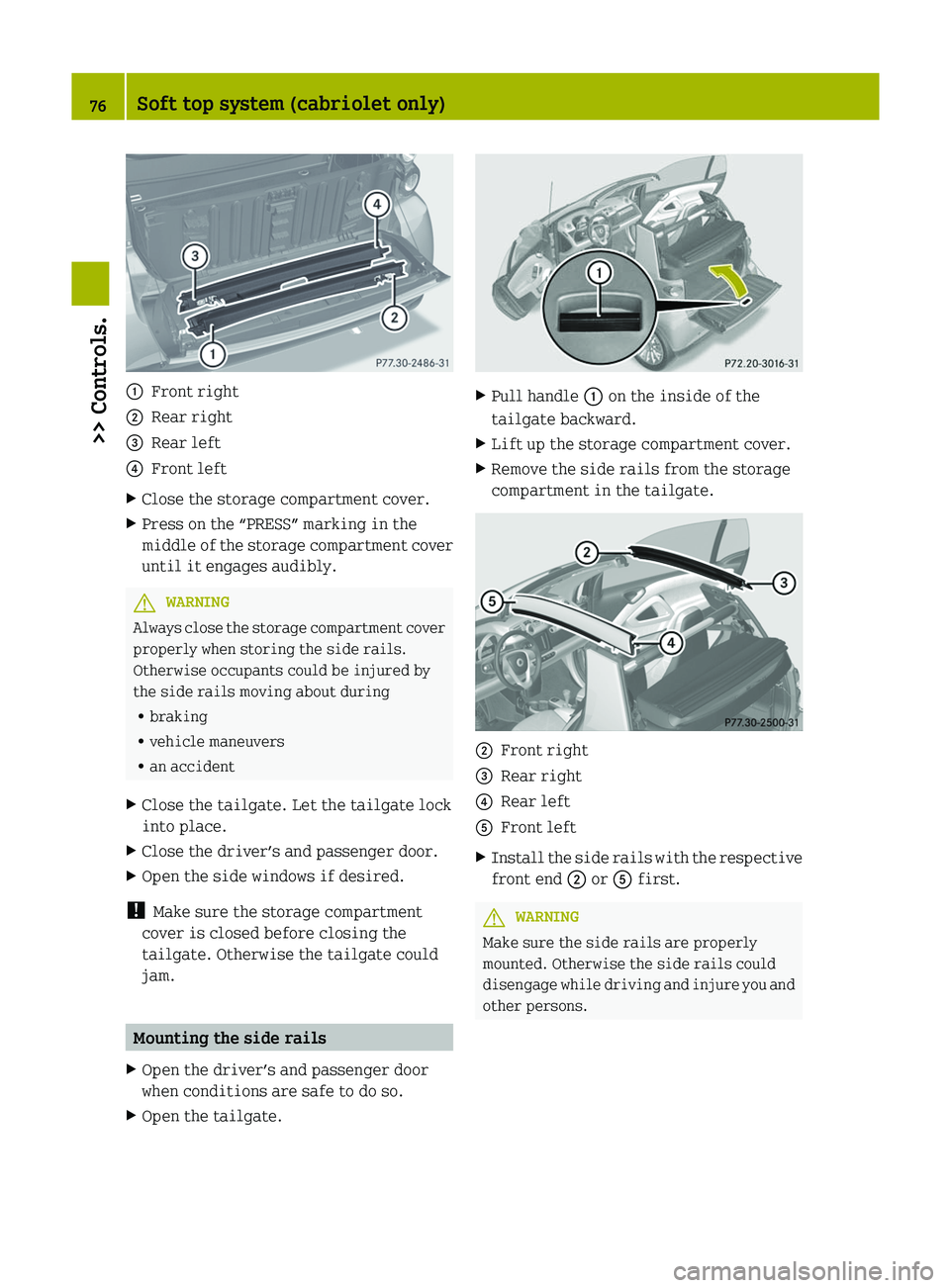
:
Front right
; Rear right
= Rear left
? Front left
X Close the storage compartment cover.
X Press on the “PRESS” marking in the
middle
of the storage compartment cover
until it engages audibly. G
WARNING
Always close the storage compartment cover
properly when storing the side rails.
Otherwise occupants could be injured by
the side rails moving about during
R braking
R vehicle maneuvers
R an accident
X Close the tailgate. Let the tailgate lock
into place.
X Close the driver’s and passenger door.
X Open the side windows if desired.
! Make sure the storage compartment
cover is closed before closing the
tailgate. Otherwise the tailgate could
jam. Mounting the side rails
X Open the driver’s and passenger door
when conditions are safe to do so.
X Open the tailgate. X
Pull handle : on the inside of the
tailgate backward.
X Lift up the storage compartment cover.
X Remove the side rails from the storage
compartment in the tailgate. ;
Front right
= Rear right
? Rear left
A Front left
X Install the side rails with the respective
front end ; or A first. G
WARNING
Make sure the side rails are properly
mounted. Otherwise the side rails could
disengage
while driving and injure you and
other persons. 76
Soft top system (cabriolet only)
>> Controls.
Page 80 of 228
G
WARNING
When closing the windows, make sure there
is no danger of anyone being harmed by the
closing procedure.
The closing of the side windows can be
immediately stopped by releasing the
switch.
When leaving the vehicle, always remove the
key from the starter switch, take it with
you, and lock the vehicle. Do not leave
children unattended in the vehicle, or with
access to an unlocked vehicle. A child’s
unsupervised access to a vehicle could
result in an accident and/or serious
personal injury.
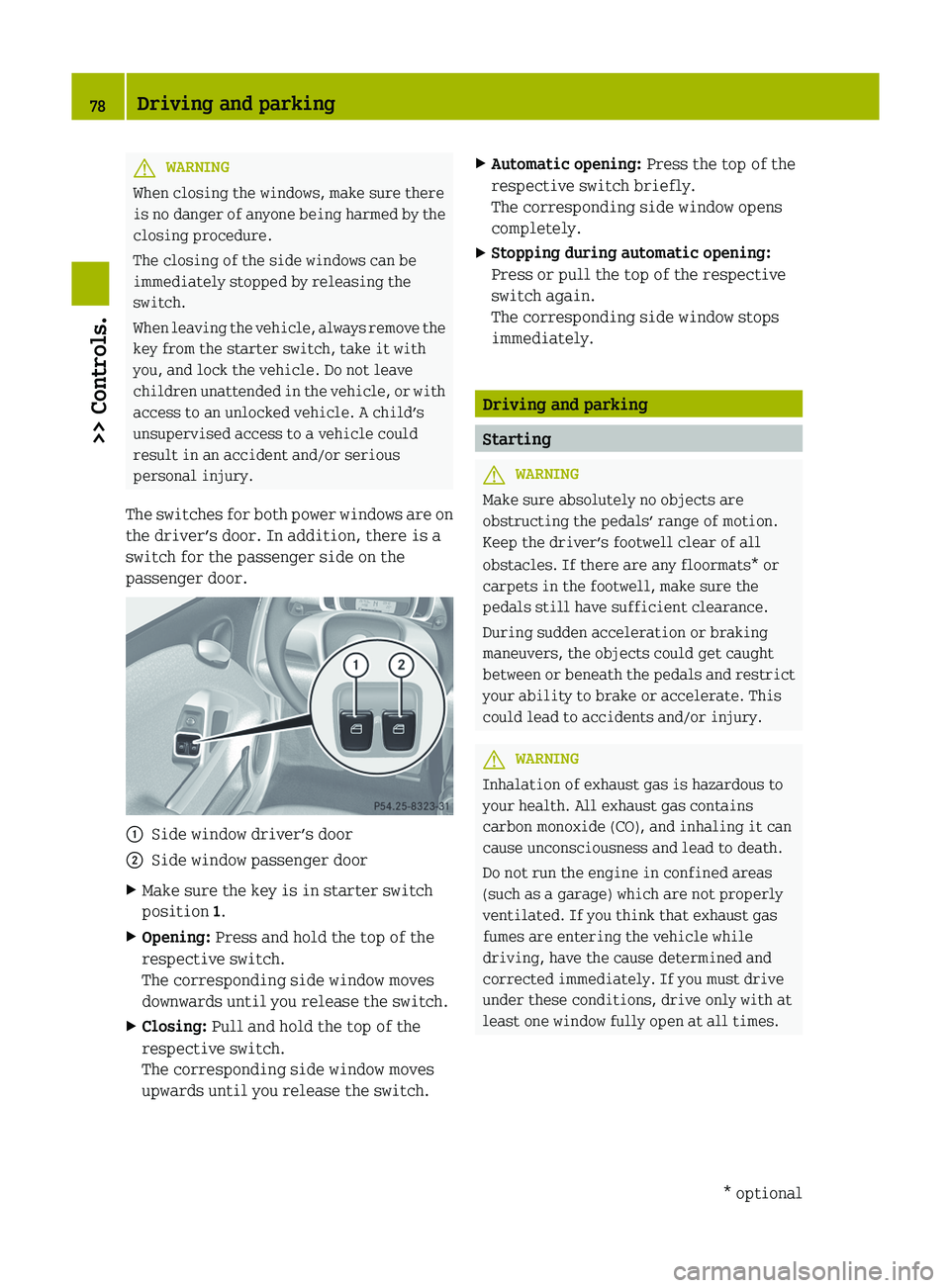
The switches for both power windows are on
the driver’s door. In addition, there is a
switch for the passenger side on the
passenger door. :
Side window driver’s door
; Side window passenger door
X Make sure the key is in starter switch
position 1.
X Opening: Press and hold the top of the
respective switch.
The corresponding side window moves
downwards until you release the switch.
X Closing: Pull and hold the top of the
respective switch.
The corresponding side window moves
upwards until you release the switch. X
Automatic opening: Press the top of the
respective switch briefly.
The corresponding side window opens
completely.
X Stopping during automatic opening:
Press or pull the top of the respective
switch again.
The corresponding side window stops
immediately. Driving and parking
Starting
G
WARNING
Make sure absolutely no objects are
obstructing the pedals’ range of motion.
Keep the driver’s footwell clear of all
obstacles. If there are any floormats*
or
carpets in the footwell, make sure the
pedals still have sufficient clearance.
During sudden acceleration or braking
maneuvers, the objects could get caught
between or beneath the pedals and restrict
your ability to brake or accelerate. This
could lead to accidents and/or injury. G
WARNING
Inhalation of exhaust gas is hazardous to
your health. All exhaust gas contains
carbon monoxide (CO), and inhaling it can
cause unconsciousness and lead to death.
Do not run the engine in confined areas
(such as a garage) which are not properly
ventilated. If you think that exhaust gas
fumes are entering the vehicle while
driving, have the cause determined and
corrected immediately. If you must drive
under these conditions, drive only with at
least one window fully open at all times. 78
Driving and parking
>> Controls.
* optional
Page 88 of 228
Deactivating manual gearshifting
X
With drive position D selected: Pull and
hold right shift paddle ; (Y page 85)
towards you for longer than two seconds.
or
X With manual gearshifting M selected:
Move the gear selector lever to drive
position D (Y page 82).
System-controlled automatic
gearshifting is switched on again. Emergency operation (limp-home
mode)
In this mode only a certain gear or a
certain
gear combination can be selected.
This mode is triggered in case of
transmission malfunctions and enables you
driving to the nearest workshop such as a
smart center.
If vehicle acceleration becomes less
responsive or sluggish or the transmission
no longer shifts, the transmission is most
likely operating in limp-home (emergency
operation) mode. The transmission
position indicator flashes and the ¬
symbol appears in the multifunction
display.
Driving in limp-home mode:
X Move the gear selector lever to drive
position D (Y page 82).
X Continue to drive.
X Have the transmission checked at an
authorized smart center as soon as
possible.
i It is possible that a gear combination
including the reverse gear can not be
selected. Keep in mind when parking,
that reversing the vehicle might be
impossible.
In case of a minor transmission
malfunction,
it might be possible to teach-
in the transmission in order to restore the
normal transmission mode. i
If the attempt to teach-in the
transmission fails, you cannot continue
to drive. Therefore we strongly
recommend that you have the
transmission taught-in at a qualified
workshop or at an authorized smart
center.
Teaching-in the transmission system:
X Stop the vehicle in a safe location.
X Move the gear selector lever to park
position P.
X Turn off the engine.
X Wait at least 30 seconds before
restarting.
X Press the brake pedal.
X Restart the engine
Three bars instead of P appear in the
multifunction display.
X Wait at least 30 seconds.
The transmission is taught in.
When teaching-in was successful: P
appears
in the multifunction display again
and normal transmission operating is
restored.
X Continue to drive.
After an unsuccessful teaching-in: Three
bars instead of P appear in the
multifunction display.
X Do not continue to drive.
X Turn off the engine.
X Engage the parking brake when leaving
the vehicle.
X Contact Roadside Assistance or an
authorized smart center. Instrument cluster
Multifunction display
The following displays and indicators
appear in the multifunction display: 86
Instrument cluster
>> Controls.
Page 91 of 228
button ; repeatedly until the desired
time is set.
X Setting the time quickly: Press left
button : or right button ; for longer
than one second.
The setting speed increases.
X Setting the time in 10 minute
increments:
Press left button : or right
button ; for longer than five seconds.
The time is set in 10 minute increments.
X Confirm time setting: Refrain from
pressing either left button : or right
button ; until the colon in the digital
clock stops flashing.
The time is set.
i The digital clock in the multifunction
display is not synchronized with the
cockpit clock* (Y page 92).
Outside temperature display G
WARNING
The outside temperature display is not
designed as an ice-warning device and is
therefore unsuitable for that purpose.
Indicated temperatures just above the
freezing point do not guarantee that the
road surface is free of ice. The road may
still
be icy, especially in wooded areas or
on bridges. Your vehicle could start to skid
if you do not adjust your driving style
accordingly.
Therefore, always adjust your driving style
to the prevailing road and weather
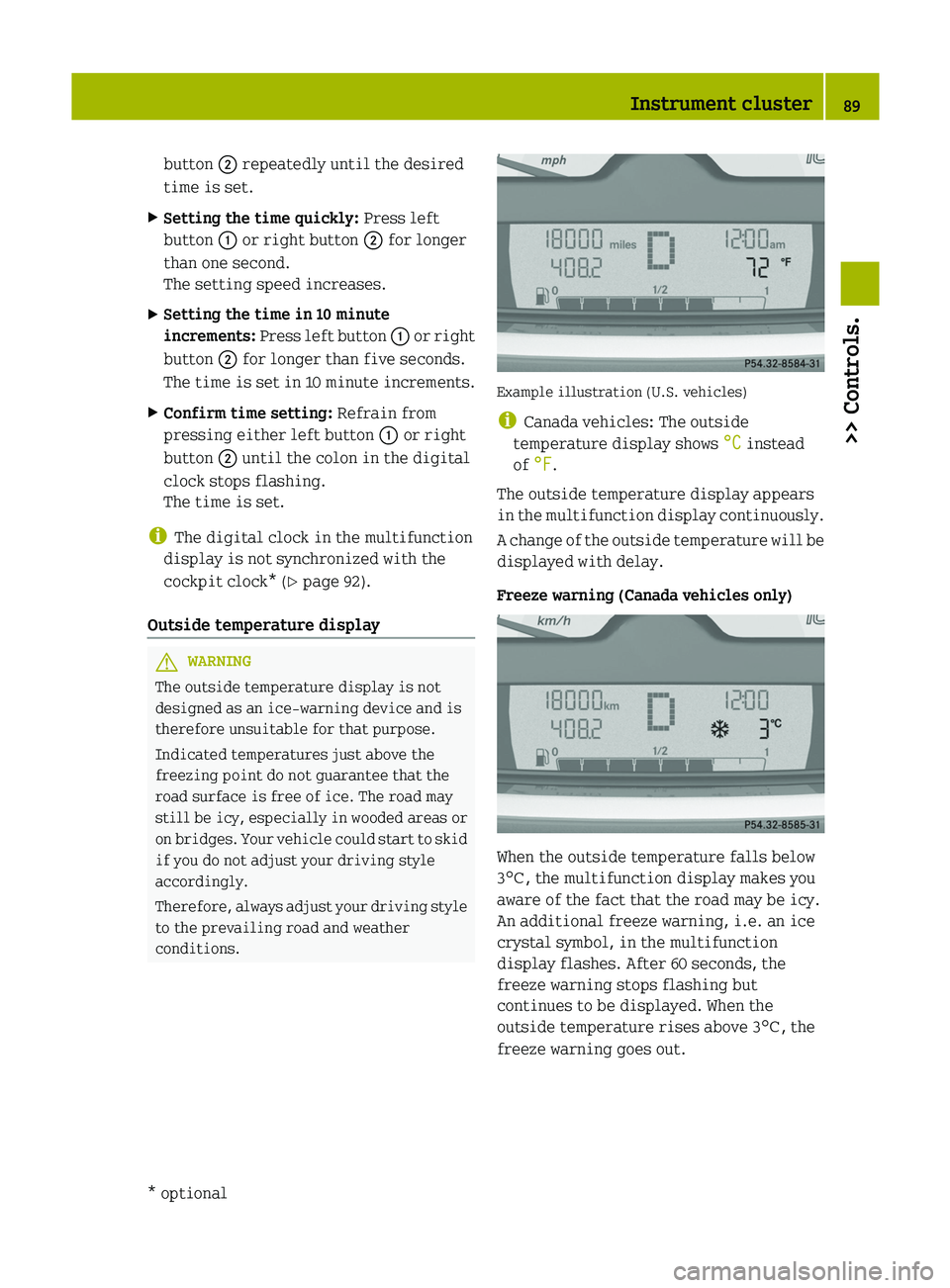
conditions. Example illustration (U.S. vehicles)
i
Canada vehicles: The outside
temperature display shows °C instead
of °F.
The outside temperature display appears
in
the multifunction display continuously.
A change of the outside temperature will be
displayed with delay.
Freeze warning (Canada vehicles only) When the outside temperature falls below
3¥, the multifunction display makes you
aware of the fact that the road may be icy.
An additional freeze warning, i.e. an ice
crystal symbol, in the multifunction
display flashes. After 60 seconds, the
freeze warning stops flashing but
continues to be displayed. When the
outside temperature rises above 3
¥, the
freeze warning goes out. Instrument cluster
89
>> Controls.
* optional Z
Page 102 of 228
:
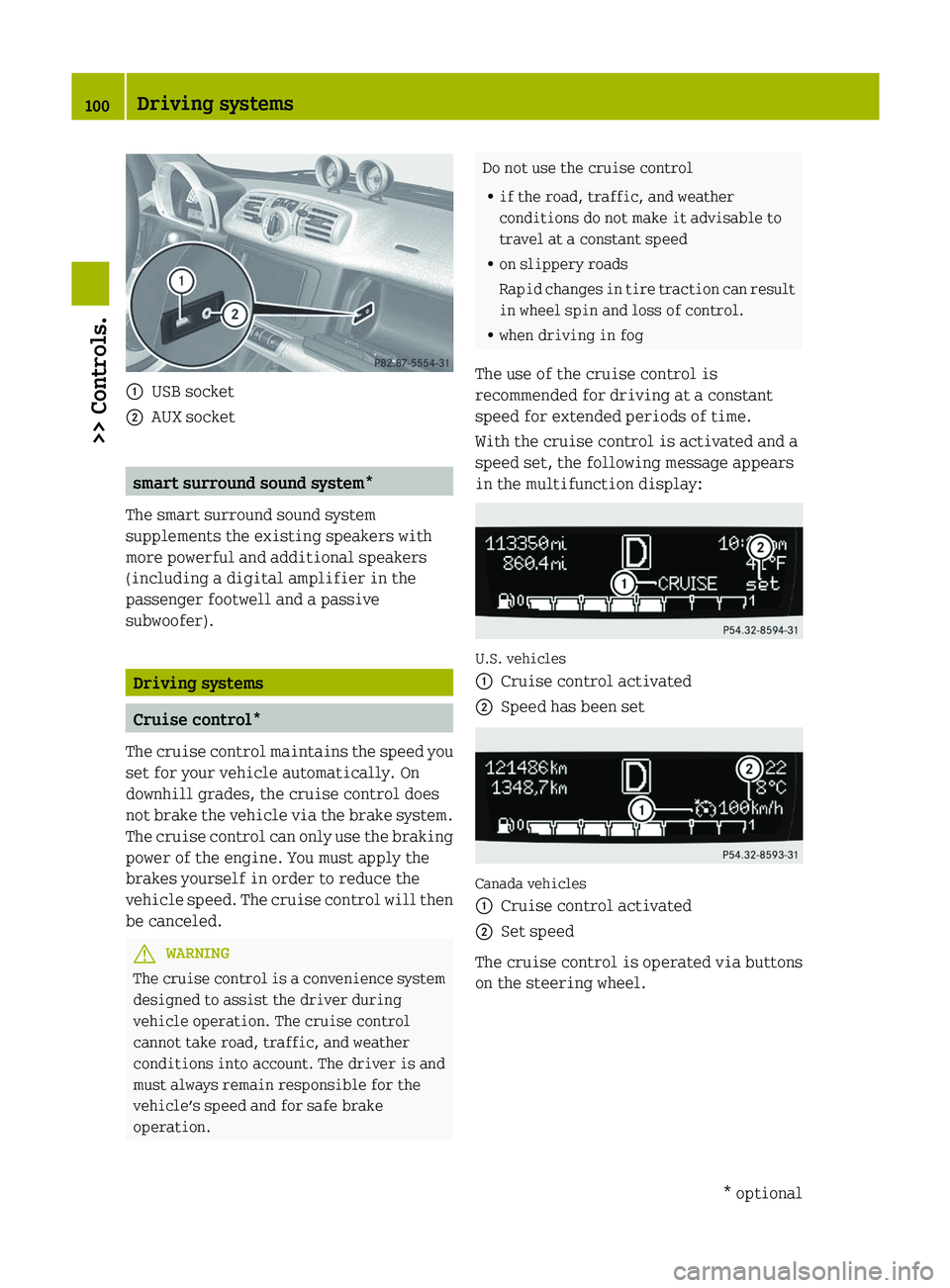
USB socket
; AUX socket smart surround sound system*
The smart surround sound system
supplements the existing speakers with
more powerful and additional speakers
(including a digital amplifier in the
passenger footwell and a passive
subwoofer). Driving systems
Cruise control*
The cruise control maintains the speed you
set for your vehicle automatically. On
downhill grades, the cruise control does
not brake the vehicle via the brake system.
The cruise control can only use the braking
power of the engine. You must apply the
brakes yourself in order to reduce the
vehicle speed. The cruise control will then
be canceled. G
WARNING
The cruise control is a convenience system
designed to assist the driver during
vehicle operation. The cruise control
cannot take road, traffic, and weather
conditions into account. The driver is and
must always remain responsible for the
vehicle’s speed and for safe brake
operation. Do not use the cruise control
R
if the road, traffic, and weather
conditions do not make it advisable to
travel at a constant speed
R on slippery roads
Rapid
changes in tire traction can result
in wheel spin and loss of control.
R when driving in fog
The use of the cruise control is
recommended for driving at a constant
speed for extended periods of time.
With the cruise control is activated and a
speed set, the following message appears
in the multifunction display: U.S. vehicles
:
Cruise control activated
; Speed has been set Canada vehicles
:
Cruise control activated
; Set speed
The cruise control is operated via buttons
on the steering wheel. 100
Driving systems
>> Controls.
* optional
Page 103 of 228
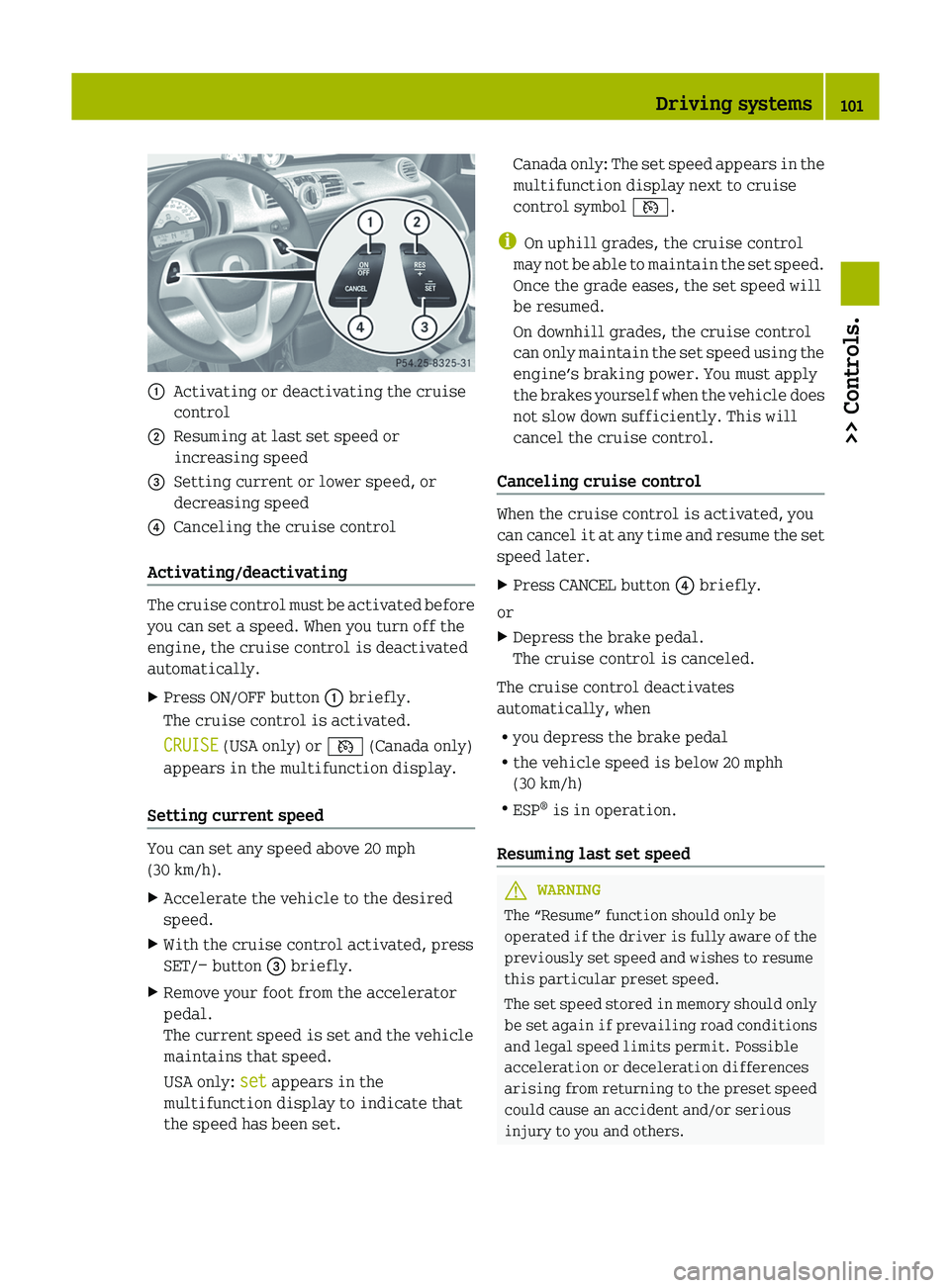
:
Activating or deactivating the cruise
control
; Resuming at last set speed or
increasing speed
= Setting current or lower speed, or
decreasing speed
? Canceling the cruise control
Activating/deactivating The cruise control must be activated before
you can set a speed. When you turn off the
engine, the cruise control is deactivated
automatically.
X
Press ON/OFF button : briefly.
The cruise control is activated.
CRUISE (USA only) or V (Canada only)
appears in the multifunction display.
Setting current speed You can set any speed above 20 mph
(30 km/h).
X
Accelerate the vehicle to the desired
speed.
X With the cruise control activated, press
SET/− button = briefly.
X Remove your foot from the accelerator
pedal.
The current speed is set and the vehicle
maintains that speed.
USA only: set appears in the
multifunction display to indicate that
the speed has been set. Canada only: The set speed appears in the
multifunction display next to cruise
control symbol V.
i On uphill grades, the cruise control
may
not be able to maintain the set speed.
Once the grade eases, the set speed will
be resumed.
On downhill grades, the cruise control
can only maintain the set speed using the
engine’s braking power. You must apply
the brakes yourself when the vehicle does
not slow down sufficiently. This will
cancel the cruise control.
Canceling cruise control When the cruise control is activated, you
can
cancel it at any time and resume the set
speed later.
X Press CANCEL button ? briefly.
or
X Depress the brake pedal.
The cruise control is canceled.
The cruise control deactivates
automatically, when
R you depress the brake pedal
R the vehicle speed is below 20 mphh
(30 km/h)
R ESP ®
is in operation.
Resuming last set speed G
WARNING
The “Resume” function should only be
operated
if the driver is fully aware of the
previously set speed and wishes to resume
this particular preset speed.
The set speed stored in memory should only
be set again if prevailing road conditions
and legal speed limits permit. Possible
acceleration or deceleration differences
arising from returning to the preset speed
could cause an accident and/or serious
injury to you and others. Driving systems
101
>> Controls. Z
Page 104 of 228
X
Press RES/+ button ; briefly.
The cruise control resumes the
previously set speed.
i The last set speed stored in memory is
deleted when the engine is turned off.
Changing the set speed You must have set a speed prior to
increasing or decreasing the current
speed.
i
Depressing the accelerator pedal does
not deactivate the cruise control. After
a brief acceleration (e.g. for passing),
the cruise control will resume the last
set speed.
Continuous adjustment
X Press and hold RES/+ button ; to
increase the speed.
or
X Press and hold SET/− = to decrease the
speed.
X Press and hold the respective button
until the desired speed is reached.
X Release the respective button.
The new speed is stored.
Adjustment in 1 mph (Canada 1 km/h)
increments
X Press RES/+ button ; briefly to increase
the speed.
or
X Press SET/− = briefly to decrease the
speed.
The new speed is stored after releasing the
respective button. HVAC (Heating, Ventilation, Air
Conditioning)
Notes on HVAC
G
WARNING
Follow the recommended settings for
heating
and cooling given on the following
pages. Otherwise the windows could fog up,
impairing visibility and endangering you
and others.
Air conditioning with climate control* The air conditioning improves the level of
comfort when driving at high outside
temperatures by cooling and
dehumidifying the air.
Nearly all dust particles, pollutants, are
filtered out by an integrated particle
filter before outside air enters the
passenger compartment through the air
distribution
system. It also operates when
the air conditioning is switched off and
you have switched on the blower.
The air conditioning only works when the
engine is running and the blower is
switched on. Maximum effectiveness is
achieved if you drive with the windows
closed.
i In warmer weather, ventilate the
passenger compartment for a short
period of time before utilizing the air
conditioning. 102
HVAC (Heating, Ventilation, Air Conditioning)>> Controls.
* optional
Page 109 of 228
Air recirculation mode*
Switch to air recirculation mode 12
to
prevent
unpleasant odors from entering the
vehicle from the outside (e.g. before
driving through a tunnel). This setting cuts
off the intake of outside air and
recirculates the air in the passenger
compartment. G
WARNING
When the air recirculation mode is
switched
on, windows can fog on the inside
immediately. Fogged windows impair
visibility, endangering you and others. If
the windows begin to fog on the inside,
switching off the air recirculation mode
immediately should clear interior window
fogging. If interior window fogging
persists, make sure the air conditioning is
switched on, turn air distribution control
B to position z and increase the air
volume using air volume control :.
Control panel (Y page 103).
X Switching on: Press air recirculation
switch ?.
The indicator lamp in air recirculation
switch ? comes on.
X Switching off: Press air recirculation
switch ? once more.
The indicator lamp in air recirculation
switch ? goes out. Loading and storing
Cup holder
G
WARNING
In order to help prevent spilling liquids
on vehicle occupants and/or vehicle
equipment, only use containers that fit
into the cup holder. Use lids on open
containers and do not fill containers to a
height where the contents, especially hot liquids, could spill during braking,
vehicle
maneuvers, or an accident. Liquids
spilled on vehicle occupants may cause
serious personal injury. Liquids spilled
on vehicle equipment may cause damage not
covered by the smart Limited Warranty.
Keep in mind that objects placed in a cup
holder may come loose during braking,
vehicle maneuvers, or an accident and be
thrown around in the vehicle interior.
Objects thrown around in the vehicle
interior may cause an accident and/or
serious personal injury.
The cup holder can be used to safely store
sealed drink bottles, containers with a lid,
or beverage cans.
! Do not use the cup holder as an ashtray.
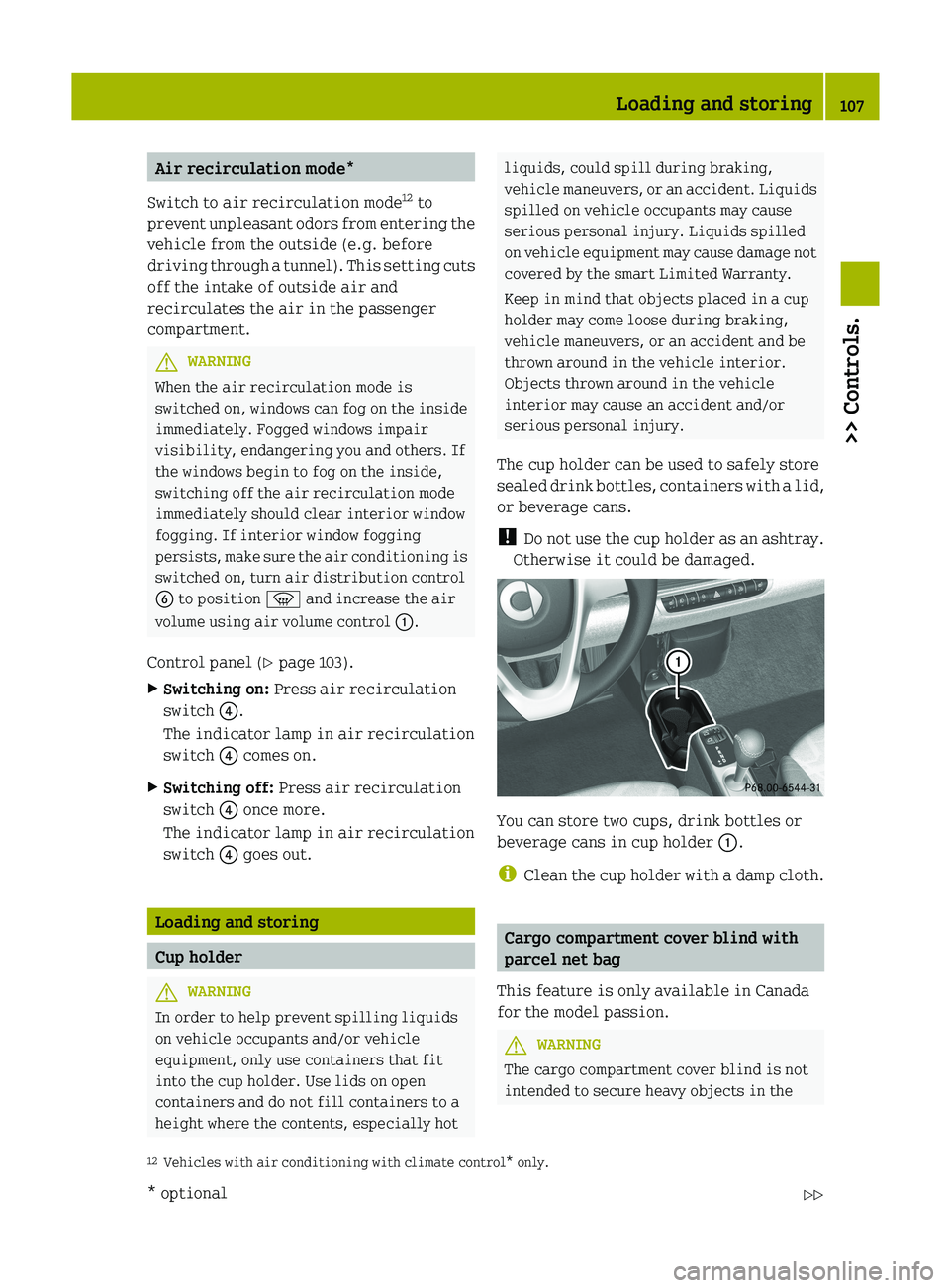
Otherwise it could be damaged. You can store two cups, drink bottles or
beverage cans in cup holder :.
i
Clean
the cup holder with a damp cloth. Cargo compartment cover blind with
parcel net bag
This feature is only available in Canada
for the model passion. G
WARNING
The cargo compartment cover blind is not
intended to secure heavy objects in the
12 Vehicles with air conditioning with climate control* only. Loading and storing
107
>> Controls.
* optional Z