change time SUBARU BRZ 2016 1.G Navigation Manual
[x] Cancel search | Manufacturer: SUBARU, Model Year: 2016, Model line: BRZ, Model: SUBARU BRZ 2016 1.GPages: 336, PDF Size: 10.83 MB
Page 207 of 336
Audio and Visual 205
Audio Operations
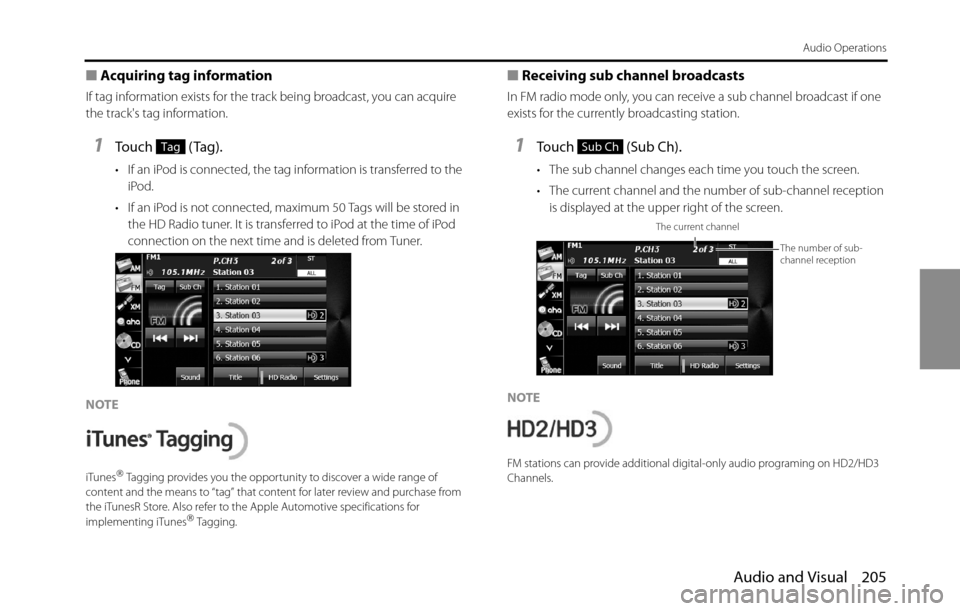
■Acquiring tag information
If tag information exists for the track being broadcast, you can acquire
the track's tag information.
1Touch (Tag).
• If an iPod is connected, the tag information is transferred to the
iPod.
• If an iPod is not connected, maximum 50 Tags will be stored in
the HD Radio tuner. It is transferred to iPod at the time of iPod
connection on the next time and is deleted from Tuner.
NOTE
iTunes“ Tagging provides you the opportunity to discover a wide range of
content and the means to “tag” that content for later review and purchase from
the iTunesR Store. Also refer to the Apple Automotive specifications for
implementing iTunes
“ Tagging.
■Receiving sub channel broadcasts
In FM radio mode only, you can receive a sub channel broadcast if one
exists for the currently broadcasting station.
1Touch (Sub Ch).
• The sub channel changes each time you touch the screen.
• The current channel and the number of sub-channel reception
is displayed at the upper right of the screen.
NOTE
FM stations can provide additional digital-only audio programing on HD2/HD3
Channels.
TagSub Ch
The current channel
The number of sub-
channel reception
Page 217 of 336
Audio and Visual 215
Audio Operations
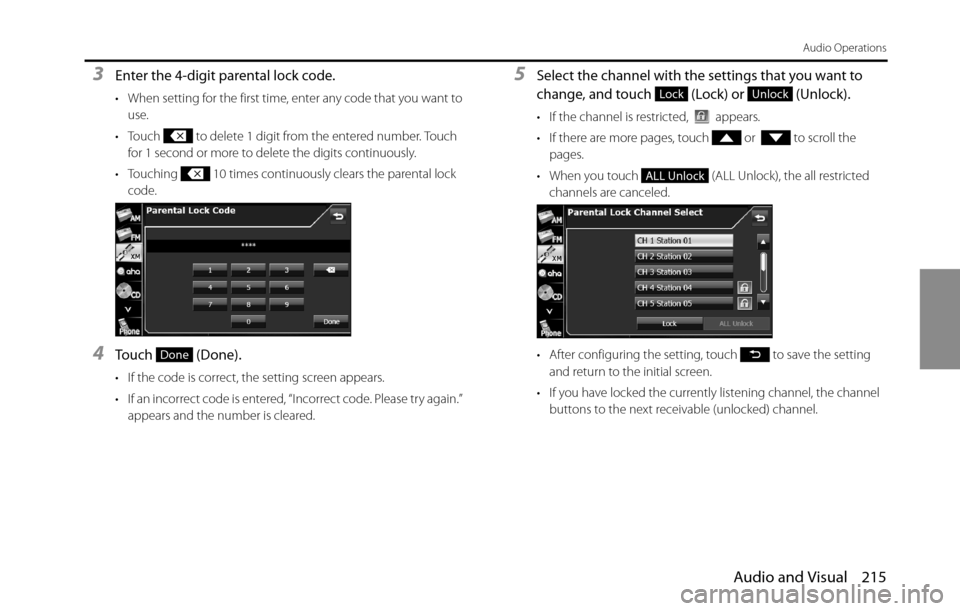
3Enter the 4-digit parental lock code.
• When setting for the first time, enter any code that you want to
use.
• Touch to delete 1 digit from the entered number. Touch
for 1 second or more to delete the digits continuously.
• Touching 10 times continuously clears the parental lock
code.
4Touch (Done).
• If the code is correct, the setting screen appears.
• If an incorrect code is entered, “Incorrect code. Please try again.”
appears and the number is cleared.
5Select the channel with the settings that you want to
change, and touch (Lock) or (Unlock).
• If the channel is restricted, appears.
• If there are more pages, touch or to scroll the
pages.
• When you touch (ALL Unlock), the all restricted
channels are canceled.
• After configuring the setting, touch to save the setting
and return to the initial screen.
• If you have locked the currently listening channel, the channel
buttons to the next receivable (unlocked) channel.
Done
LockUnlock
ALL Unlock
Page 244 of 336
242 Audio and Visual
Visual Operations
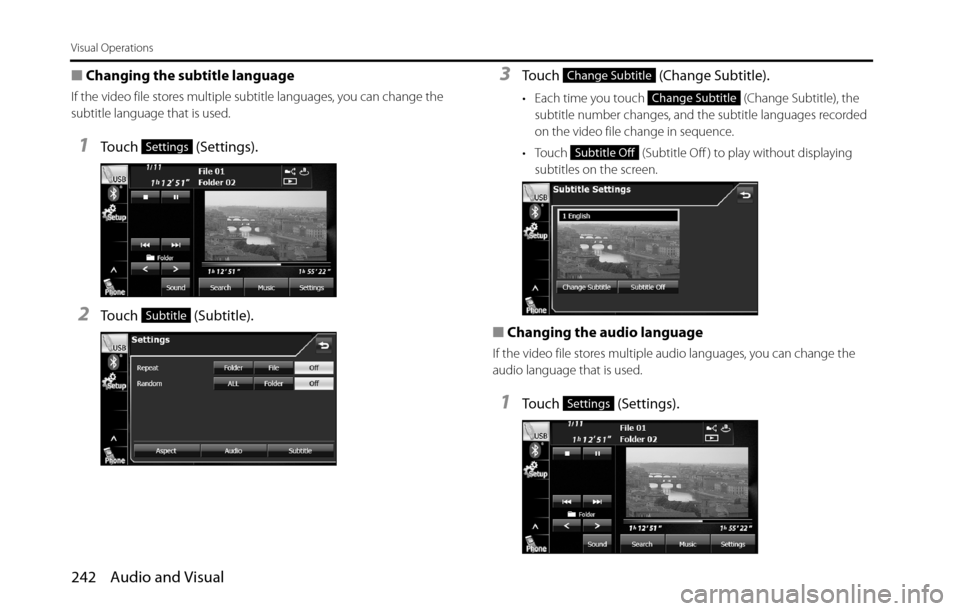
■Changing the subtitle language
If the video file stores multiple subtitle languages, you can change the
subtitle language that is used.
1Touch (Settings).
2Touch (Subtitle).
3Touch (Change Subtitle).
• Each time you touch (Change Subtitle), the
subtitle number changes, and the subtitle languages recorded
on the video file change in sequence.
• Touch (Subtitle Off ) to play without displaying
subtitles on the screen.
■Changing the audio language
If the video file stores multiple audio languages, you can change the
audio language that is used.
1Touch (Settings).
Settings
Subtitle
Change Subtitle
Change Subtitle
Subtitle Off
Settings
Page 245 of 336
Audio and Visual 243
Visual Operations
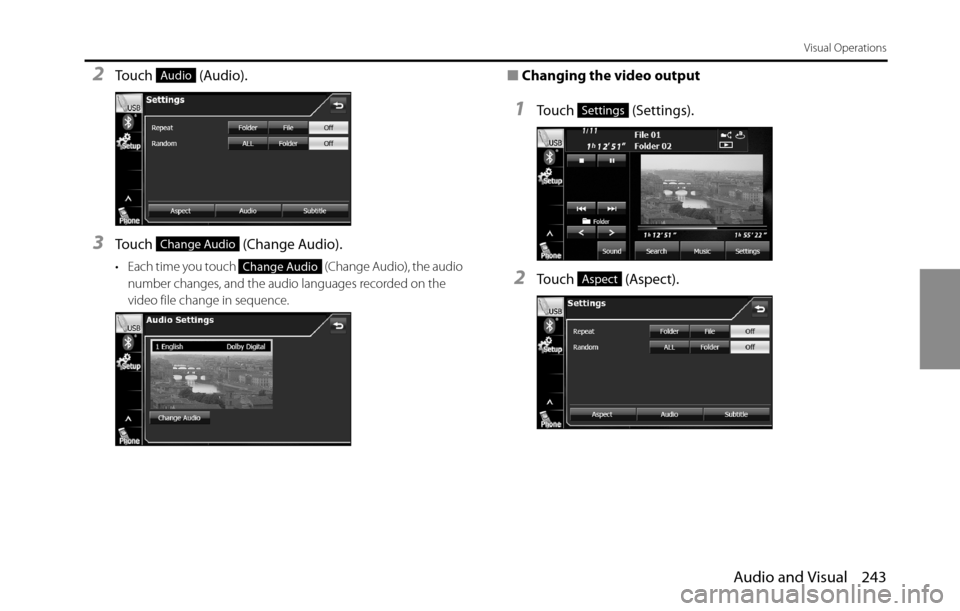
2Touch (Audio).
3Touch (Change Audio).
• Each time you touch (Change Audio), the audio
number changes, and the audio languages recorded on the
video file change in sequence.
■Changing the video output
1Touch (Settings).
2Touch (Aspect).
Audio
Change Audio
Change Audio
Settings
Aspect
Page 269 of 336
Audio and Visual 267
How to Operate Portable Audio Devices
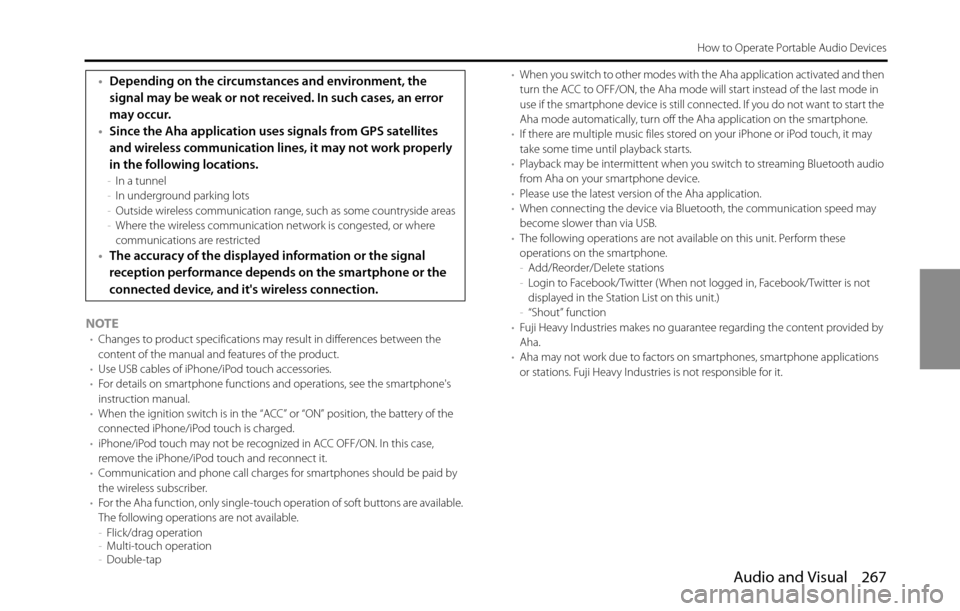
NOTE•Changes to product specifications may result in differences between the
content of the manual and features of the product.
•Use USB cables of iPhone/iPod touch accessories.
•For details on smartphone functions and operations, see the smartphone's
instruction manual.
•When the ignition switch is in the “ACC” or “ON” position, the battery of the
connected iPhone/iPod touch is charged.
•iPhone/iPod touch may not be recognized in ACC OFF/ON. In this case,
remove the iPhone/iPod touch and reconnect it.
•Communication and phone call charges for smartphones should be paid by
the wireless subscriber.
•For the Aha function, only single-touch operation of soft buttons are available.
The following operations are not available.
-Flick/drag operation
-Multi-touch operation
-Double-tap•When you switch to other modes with the Aha application activated and then
turn the ACC to OFF/ON, the Aha mode will start instead of the last mode in
use if the smartphone device is still connected. If you do not want to start the
Aha mode automatically, turn off the Aha application on the smartphone.
•If there are multiple music files stored on your iPhone or iPod touch, it may
take some time until playback starts.
•Playback may be intermittent when you switch to streaming Bluetooth audio
from Aha on your smartphone device.
•Please use the latest version of the Aha application.
•When connecting the device via Bluetooth, the communication speed may
become slower than via USB.
•The following operations are not available on this unit. Perform these
operations on the smartphone.
-Add/Reorder/Delete stations
-Login to Facebook/Twitter ( When not logged in, Facebook/Twitter is not
displayed in the Station List on this unit.)
-“Shout” function
•Fuji Heavy Industries makes no guarantee regarding the content provided by
Aha.
•Aha may not work due to factors on smartphones, smartphone applications
or stations. Fuji Heavy Industries is not responsible for it.
•Depending on the circumstances and environment, the
signal may be weak or not received. In such cases, an error
may occur.
•Since the Aha application uses signals from GPS satellites
and wireless communication lines, it may not work properly
in the following locations.
-In a tunnel
-In underground parking lots
-Outside wireless communication range, such as some countryside areas
-Where the wireless communication network is congested, or where
communications are restricted
•The accuracy of the displayed information or the signal
reception performance depends on the smartphone or the
connected device, and it's wireless connection.
Page 291 of 336
Other 289
Other Operations
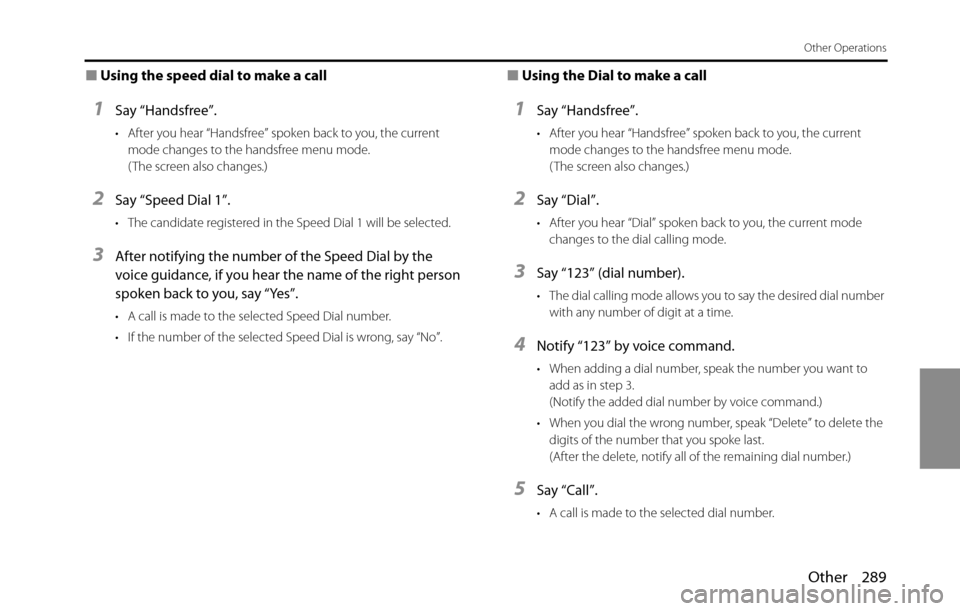
■Using the speed dial to make a call
1Say “Handsfree”.
• After you hear “Handsfree” spoken back to you, the current
mode changes to the handsfree menu mode.
( The screen also changes.)
2Say “Speed Dial 1”.
• The candidate registered in the Speed Dial 1 will be selected.
3After notifying the number of the Speed Dial by the
voice guidance, if you hear the name of the right person
spoken back to you, say “Yes”.
• A call is made to the selected Speed Dial number.
• If the number of the selected Speed Dial is wrong, say “No”.
■Using the Dial to make a call
1Say “Handsfree”.
• After you hear “Handsfree” spoken back to you, the current
mode changes to the handsfree menu mode.
( The screen also changes.)
2Say “Dial”.
• After you hear “Dial” spoken back to you, the current mode
changes to the dial calling mode.
3Say “123” (dial number).
• The dial calling mode allows you to say the desired dial number
with any number of digit at a time.
4Notify “123” by voice command.
• When adding a dial number, speak the number you want to
add as in step 3.
(Notify the added dial number by voice command.)
• When you dial the wrong number, speak “Delete” to delete the
digits of the number that you spoke last.
(After the delete, notify all of the remaining dial number.)
5Say “Call”.
• A call is made to the selected dial number.
Page 309 of 336
![SUBARU BRZ 2016 1.G Navigation Manual Other 307
Other Operations
■Other Commands
Enabled in the Main Menu.
Voice command PhraseFunction
Time [ ] Time, What time is it nowReads out the current time
CancelCancelCloses the voice recognitio](/img/17/7182/w960_7182-308.png "SUBARU BRZ 2016 1.G Navigation Manual Other 307
Other Operations
■Other Commands
Enabled in the Main Menu.
Voice command PhraseFunction
Time [ ] Time, What time is it nowReads out the current time
CancelCancelCloses the voice recognitio")
Other 307
Other Operations
■Other Commands
Enabled in the Main Menu.
Voice command PhraseFunction
Time [ ] Time, What time is it nowReads out the current time
CancelCancelCloses the voice recognition screen
HelpHelpDisplays the help screen
Back [ ] BackReturns to the previous screen
RepeatRepeatRepeats the guidance voice
NextChange, NextChanges the display screen
What's the
Go
Page 326 of 336
324 Other
Reference
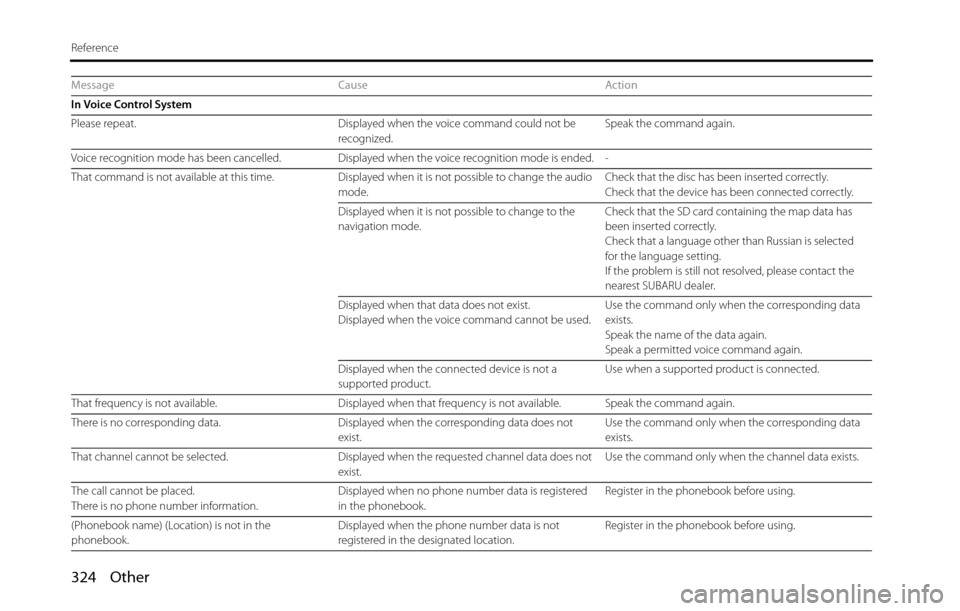
Message Cause Action
In Voice Control System
Please repeat. Displayed when the voice command could not be
recognized.Speak the command again.
Voice recognition mode has been cancelled. Displayed when the voice recognition mode is ended. -
That command is not available at this time. Displayed when it is not possible to change the audio
mode.Check that the disc has been inserted correctly.
Check that the device has been connected correctly.
Displayed when it is not possible to change to the
navigation mode.Check that the SD card containing the map data has
been inserted correctly.
Check that a language other than Russian is selected
for the language setting.
If the problem is still not resolved, please contact the
nearest SUBARU dealer.
Displayed when that data does not exist.
Displayed when the voice command cannot be used.Use the command only when the corresponding data
exists.
Speak the name of the data again.
Speak a permitted voice command again.
Displayed when the connected device is not a
supported product.Use when a supported product is connected.
That frequency is not available. Displayed when that frequency is not available. Speak the command again.
There is no corresponding data. Displayed when the corresponding data does not
exist.Use the command only when the corresponding data
exists.
That channel cannot be selected. Displayed when the requested channel data does not
exist.Use the command only when the channel data exists.
The call cannot be placed.
There is no phone number information.Displayed when no phone number data is registered
in the phonebook.Register in the phonebook before using.
(Phonebook name) (Location) is not in the
phonebook.Displayed when the phone number data is not
registered in the designated location.Register in the phonebook before using.
Page 328 of 336
326 Other
Reference
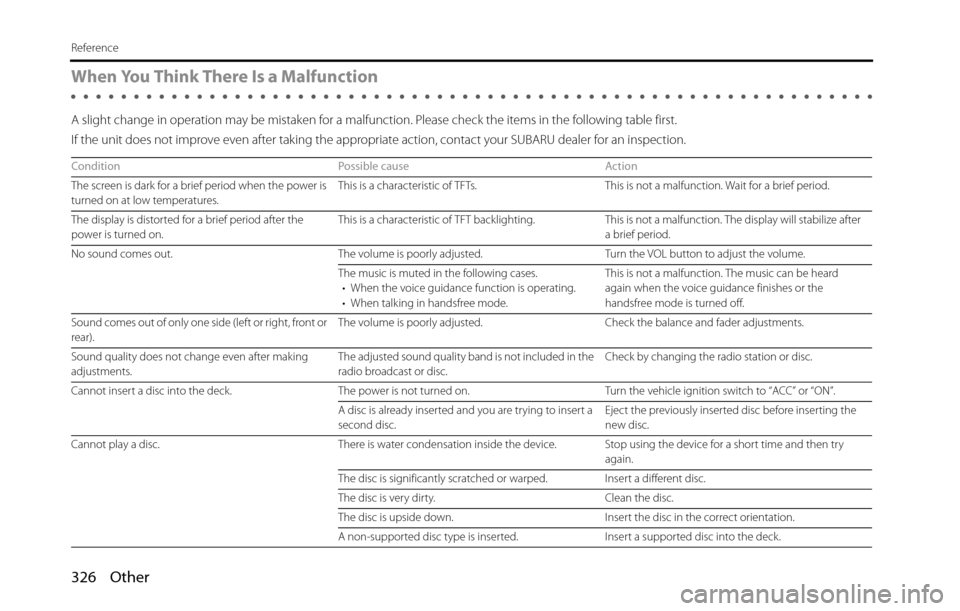
When You Think There Is a Malfunction
A slight change in operation may be mistaken for a malfunction. Please check the items in the following table first.
If the unit does not improve even after taking the appropriate action, contact your SUBARU dealer for an inspection.
Condition Possible cause Action
The screen is dark for a brief period when the power is
turned on at low temperatures.This is a characteristic of TFTs. This is not a malfunction. Wait for a brief period.
The display is distorted for a brief period after the
power is turned on.This is a characteristic of TFT backlighting. This is not a malfunction. The display will stabilize after
a brief period.
No sound comes out. The volume is poorly adjusted. Turn the VOL button to adjust the volume.
The music is muted in the following cases.
• When the voice guidance function is operating.
• When talking in handsfree mode.This is not a malfunction. The music can be heard
again when the voice guidance finishes or the
handsfree mode is turned off.
Sound comes out of only one side (left or right, front or
rear).The volume is poorly adjusted. Check the balance and fader adjustments.
Sound quality does not change even after making
adjustments.The adjusted sound quality band is not included in the
radio broadcast or disc.Check by changing the radio station or disc.
Cannot insert a disc into the deck. The power is not turned on. Turn the vehicle ignition switch to “ACC” or “ON”.
A disc is already inserted and you are trying to insert a
second disc.Eject the previously inserted disc before inserting the
new disc.
Cannot play a disc. There is water condensation inside the device. Stop using the device for a short time and then try
again.
The disc is significantly scratched or warped. Insert a different disc.
The disc is very dirty. Clean the disc.
The disc is upside down. Insert the disc in the correct orientation.
A non-supported disc type is inserted. Insert a supported disc into the deck.