display SUBARU BRZ 2022 Getting Started Guide
[x] Cancel search | Manufacturer: SUBARU, Model Year: 2022, Model line: BRZ, Model: SUBARU BRZ 2022Pages: 108, PDF Size: 29.44 MB
Page 47 of 108
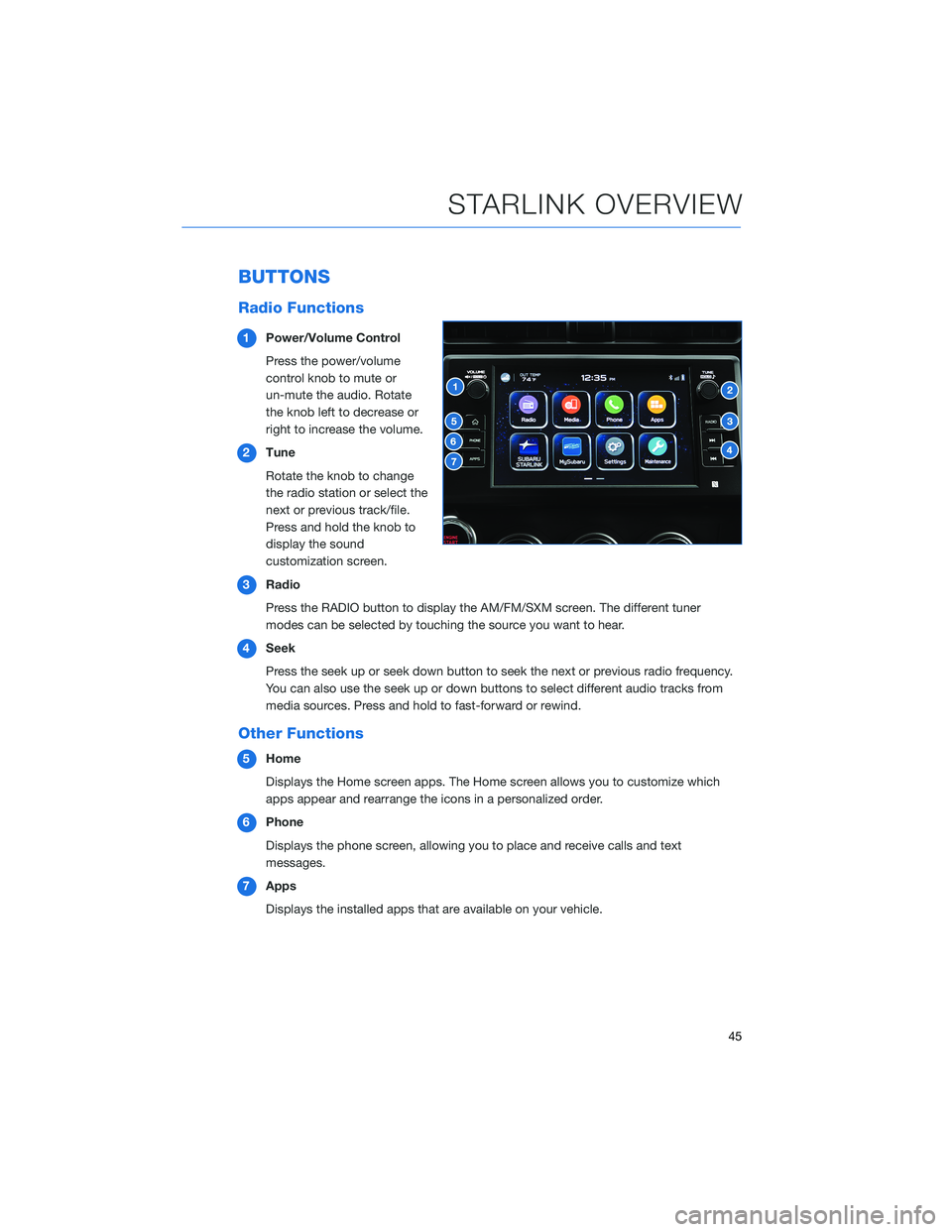
BUTTONS
Radio Functions
1Power/Volume Control
Press the power/volume
control knob to mute or
un-mute the audio. Rotate
the knob left to decrease or
right to increase the volume.
2Tune
Rotate the knob to change
the radio station or select the
next or previous track/file.
Press and hold the knob to
display the sound
customization screen.
3Radio
Press the RADIO button to display the AM/FM/SXM screen. The different tuner
modes can be selected by touching the source you want to hear.
4Seek
Press the seek up or seek down button to seek the next or previous radio frequency.
You can also use the seek up or down buttons to select different audio tracks from
media sources. Press and hold to fast-forward or rewind.
Other Functions
5Home
Displays the Home screen apps. The Home screen allows you to customize which
apps appear and rearrange the icons in a personalized order.
6Phone
Displays the phone screen, allowing you to place and receive calls and text
messages.
7Apps
Displays the installed apps that are available on your vehicle.
STARLINK OVERVIEW
45
Page 49 of 108
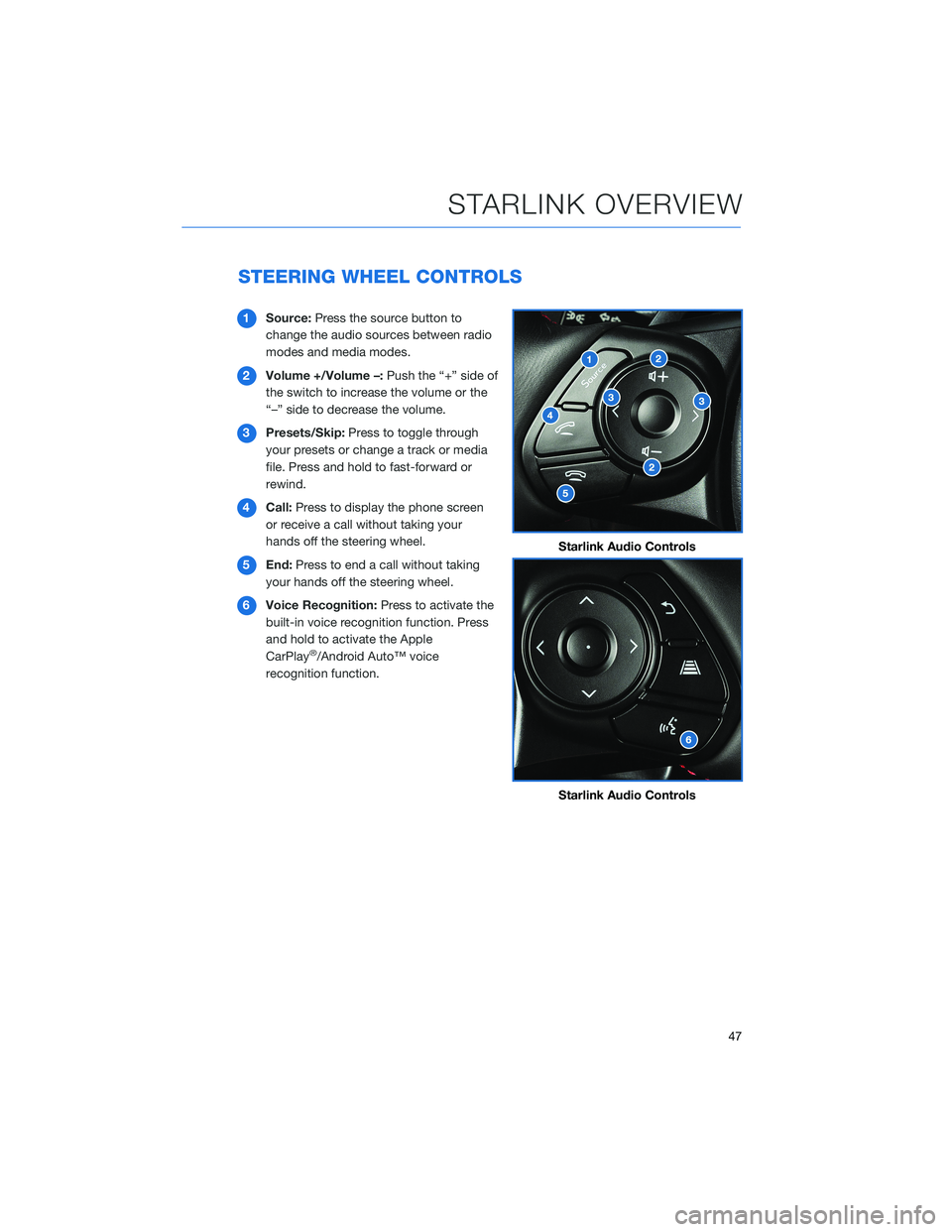
STEERING WHEEL CONTROLS
1Source:Press the source button to
change the audio sources between radio
modes and media modes.
2Volume +/Volume –:Push the “+” side of
the switch to increase the volume or the
“–” side to decrease the volume.
3Presets/Skip:Press to toggle through
your presets or change a track or media
file. Press and hold to fast-forward or
rewind.
4Call:Press to display the phone screen
or receive a call without taking your
hands off the steering wheel.
5End:Press to end a call without taking
your hands off the steering wheel.
6Voice Recognition:Press to activate the
built-in voice recognition function. Press
and hold to activate the Apple
CarPlay
®/Android Auto™ voice
recognition function.
Starlink Audio Controls
Starlink Audio Controls
STARLINK OVERVIEW
47
Page 51 of 108
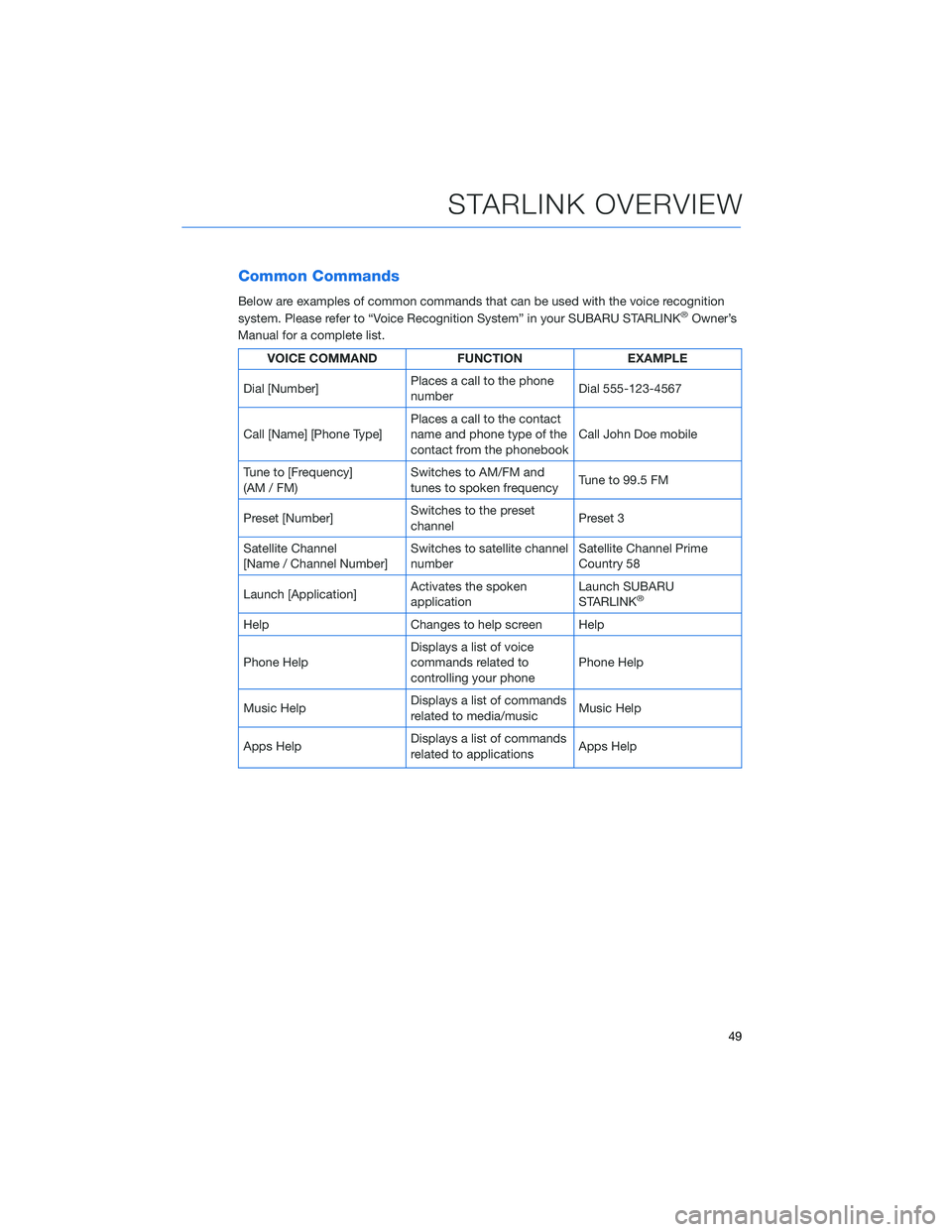
Common Commands
Below are examples of common commands that can be used with the voice recognition
system. Please refer to “Voice Recognition System” in your SUBARU STARLINK®Owner’s
Manual for a complete list.
VOICE COMMAND FUNCTION EXAMPLE
Dial [Number]Places a call to the phone
numberDial 555-123-4567
Call [Name] [Phone Type]Places a call to the contact
name and phone type of the
contact from the phonebookCall John Doe mobile
Tune to [Frequency]
(AM / FM)Switches to AM/FM and
tunes to spoken frequencyTune to 99.5 FM
Preset [Number]Switches to the preset
channelPreset 3
Satellite Channel
[Name / Channel Number]Switches to satellite channel
numberSatellite Channel Prime
Country 58
Launch [Application]Activates the spoken
applicationLaunch SUBARU
STARLINK
®
Help Changes to help screen Help
Phone HelpDisplays a list of voice
commands related to
controlling your phonePhone Help
Music HelpDisplays a list of commands
related to media/musicMusic Help
Apps HelpDisplays a list of commands
related to applicationsApps Help
STARLINK OVERVIEW
49
Page 53 of 108
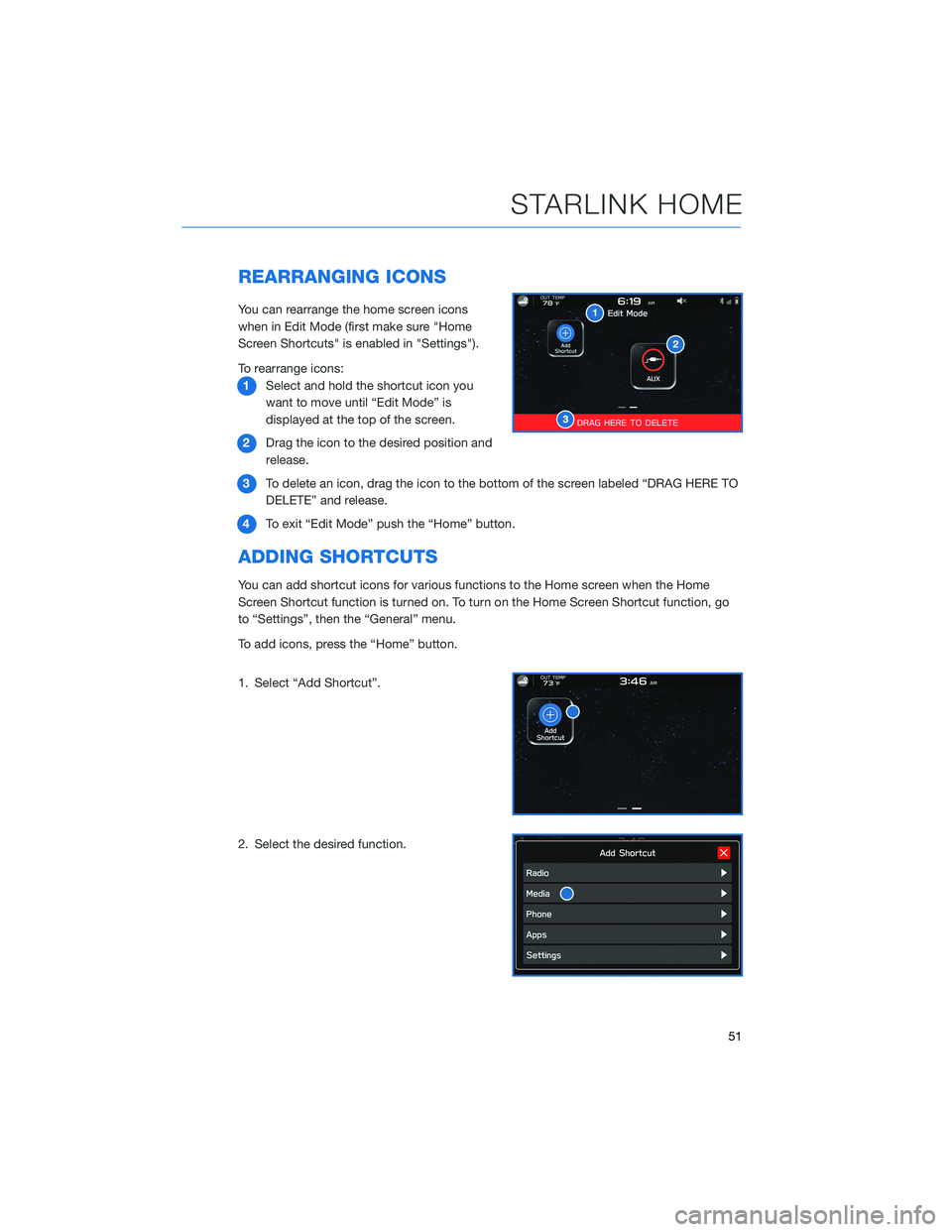
REARRANGING ICONS
You can rearrange the home screen icons
when in Edit Mode (first make sure "Home
Screen Shortcuts" is enabled in "Settings").
To rearrange icons:
1Select and hold the shortcut icon you
want to move until “Edit Mode” is
displayed at the top of the screen.
2Drag the icon to the desired position and
release.
3To delete an icon, drag the icon to the bottom of the screen labeled “DRAG HERE TO
DELETE” and release.
4To exit “Edit Mode” push the “Home” button.
ADDING SHORTCUTS
You can add shortcut icons for various functions to the Home screen when the Home
Screen Shortcut function is turned on. To turn on the Home Screen Shortcut function, go
to “Settings”, then the “General” menu.
To add icons, press the “Home” button.
1. Select “Add Shortcut”.
2. Select the desired function.
STARLINK HOME
51
Page 54 of 108
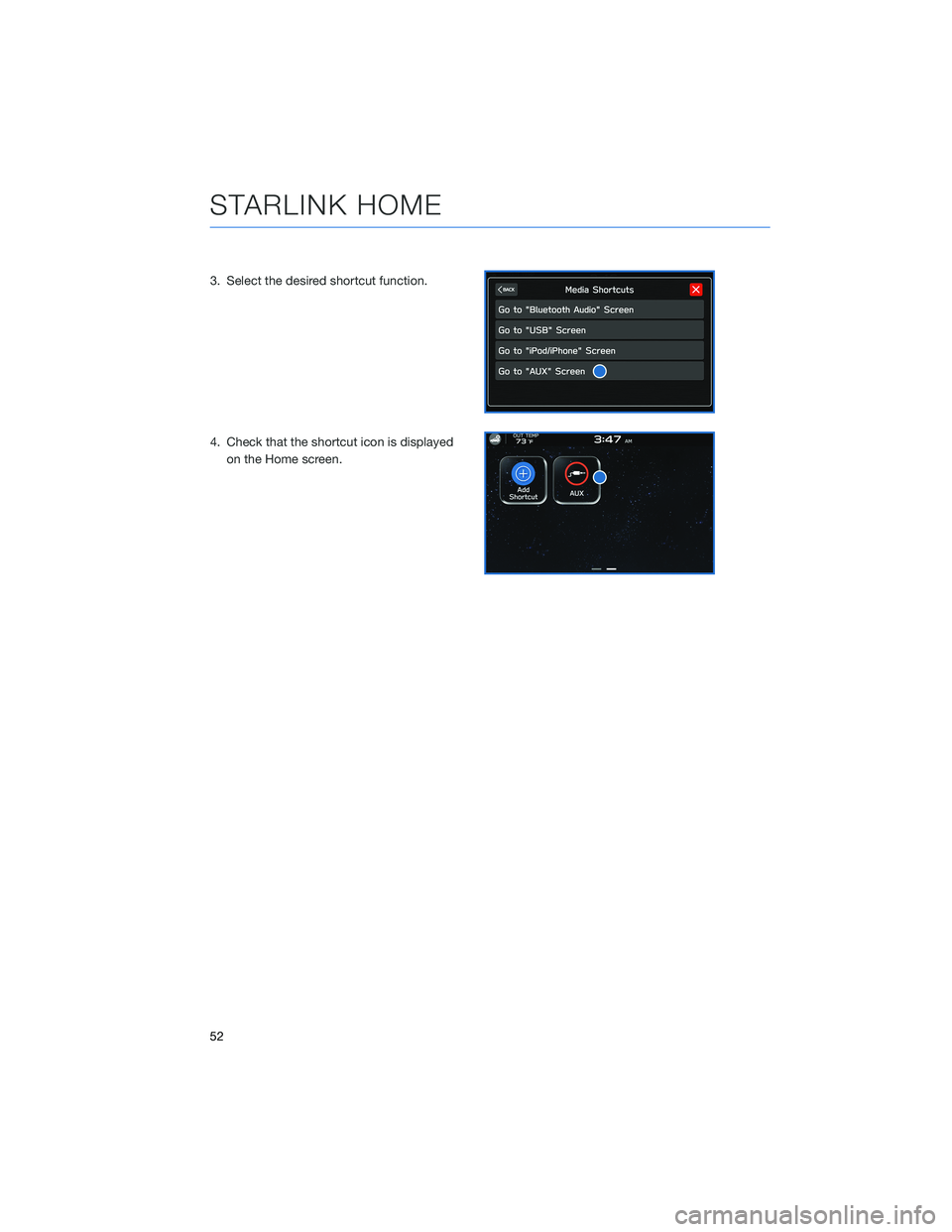
3. Select the desired shortcut function.
4. Check that the shortcut icon is displayed
on the Home screen.
STARLINK HOME
52
Page 60 of 108
PAIRING A PHONE
To begin using your Bluetooth®Hands-free device you must first
pair your phone with the system. Phone pairing provides access to
the contact list on your phone and allows you to use the voice
recognition system to make and receive calls. The system can also
read incoming text messages, as well as allowing you to reply to
texts or send short messages. The system automatically reconnects
to your Bluetooth
®device and will remember your driver profile.
Visithttps://www.subaru.com/owners/index.htmlfor complete
details on what is available by connecting a phone to the
Touchscreen.
For instructions on how to pair your phone to the Touchscreen, see page 87 for
Android devices or page 90 for Apple devices.
MAKING A CALL
With a paired phone, you can make a call
through voice recognition by touching the
“Voice Recognition Switch” on the steering
wheel to start the voice recognition system.
After pressing the “Voice Recognition Switch”,
wait for the “Voice Guidance” screen to appear
on the Touchscreen and say “Call [name and
phone type]” or “Dial [number]”.
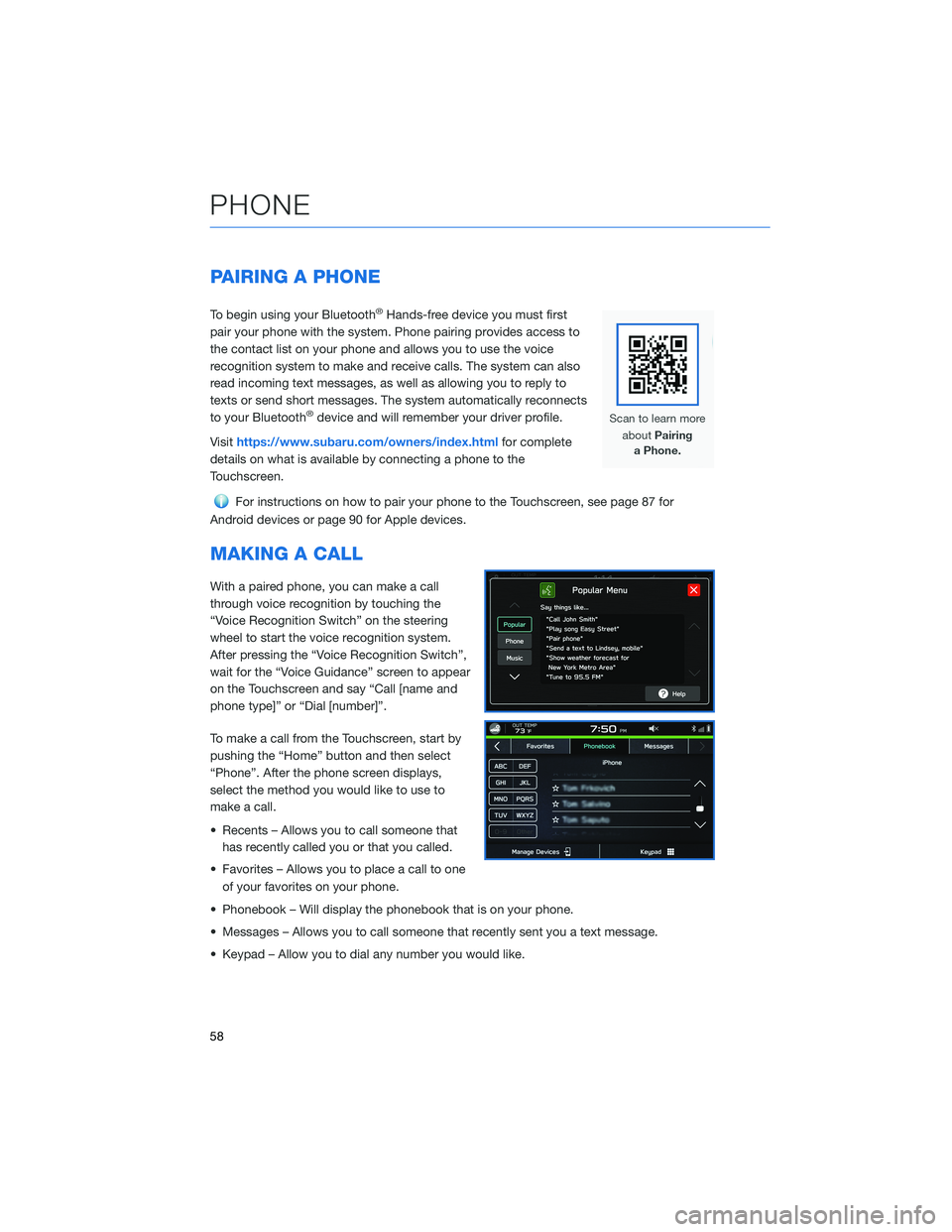
To make a call from the Touchscreen, start by
pushing the “Home” button and then select
“Phone”. After the phone screen displays,
select the method you would like to use to
make a call.
• Recents – Allows you to call someone that
has recently called you or that you called.
• Favorites – Allows you to place a call to one
of your favorites on your phone.
• Phonebook – Will display the phonebook that is on your phone.
• Messages – Allows you to call someone that recently sent you a text message.
• Keypad – Allow you to dial any number you would like.
PHONE
58
Page 62 of 108
TEXT MESSAGES
Received messages can be forwarded from
the connected Bluetooth®phone, enabling
checking and replying using the system. To
use this function, it is necessary to set the
phonebook download function to ON.
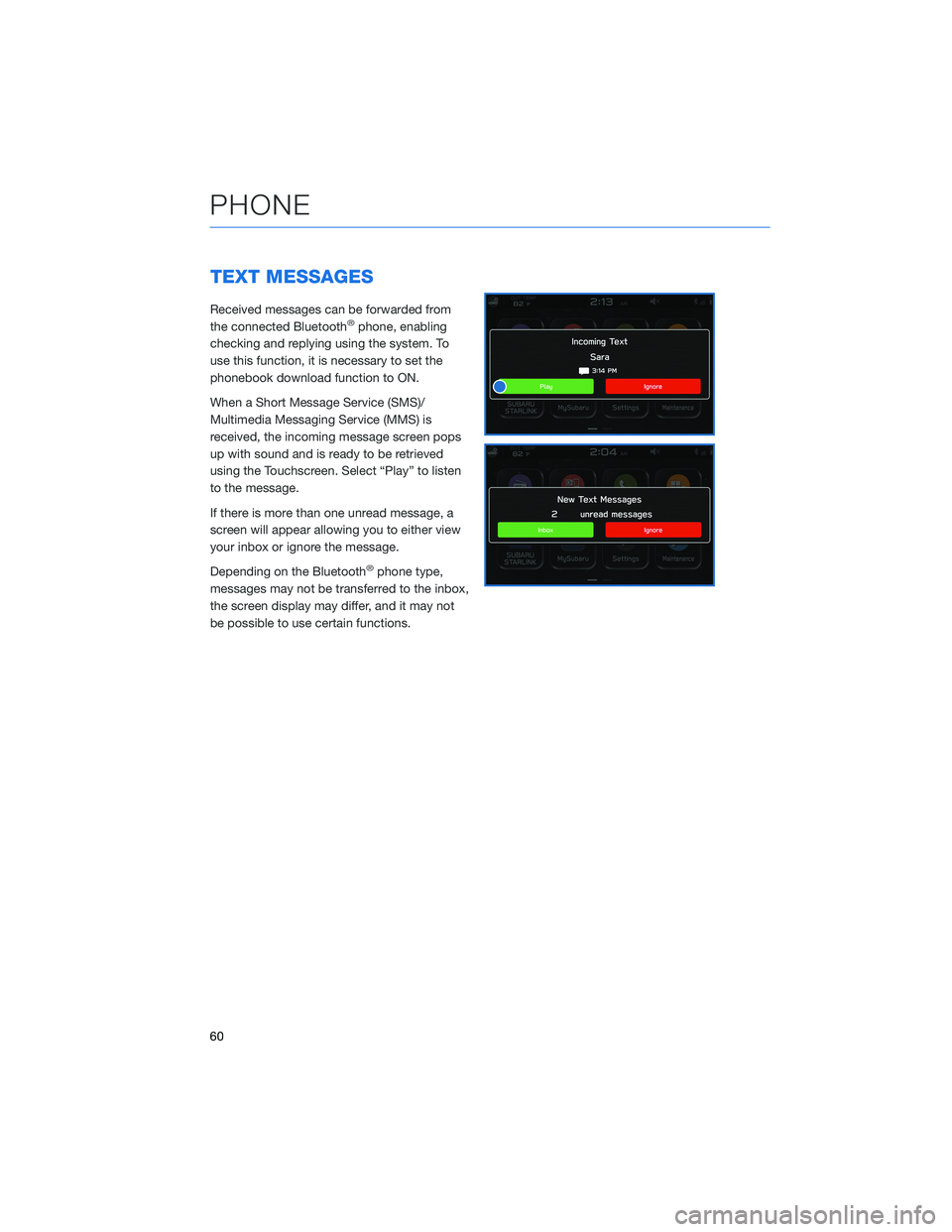
When a Short Message Service (SMS)/
Multimedia Messaging Service (MMS) is
received, the incoming message screen pops
up with sound and is ready to be retrieved
using the Touchscreen. Select “Play” to listen
to the message.
If there is more than one unread message, a
screen will appear allowing you to either view
your inbox or ignore the message.
Depending on the Bluetooth
®phone type,
messages may not be transferred to the inbox,
the screen display may differ, and it may not
be possible to use certain functions.
PHONE
60
Page 66 of 108
SAFETY AND SECURITY OVERVIEW
STARLINK®Safety and Security services* are designed to help in your time of need. These
include Advanced Automatic Collision Notification, SOS Emergency Assistance, Enhanced
Roadside Assistance, Stolen Vehicle Recovery, the added convenience of Remote Engine
Start with Climate Control, and so much more.
With the SUBARU STARLINK
®system integrated into your vehicle, advanced safety and
security technology is just a button press away. The SUBARU STARLINK®experience
includes in-vehicle call center support, maintenance and diagnostic alerts as well as
remote services that keep you connected to your Subaru vehicle.
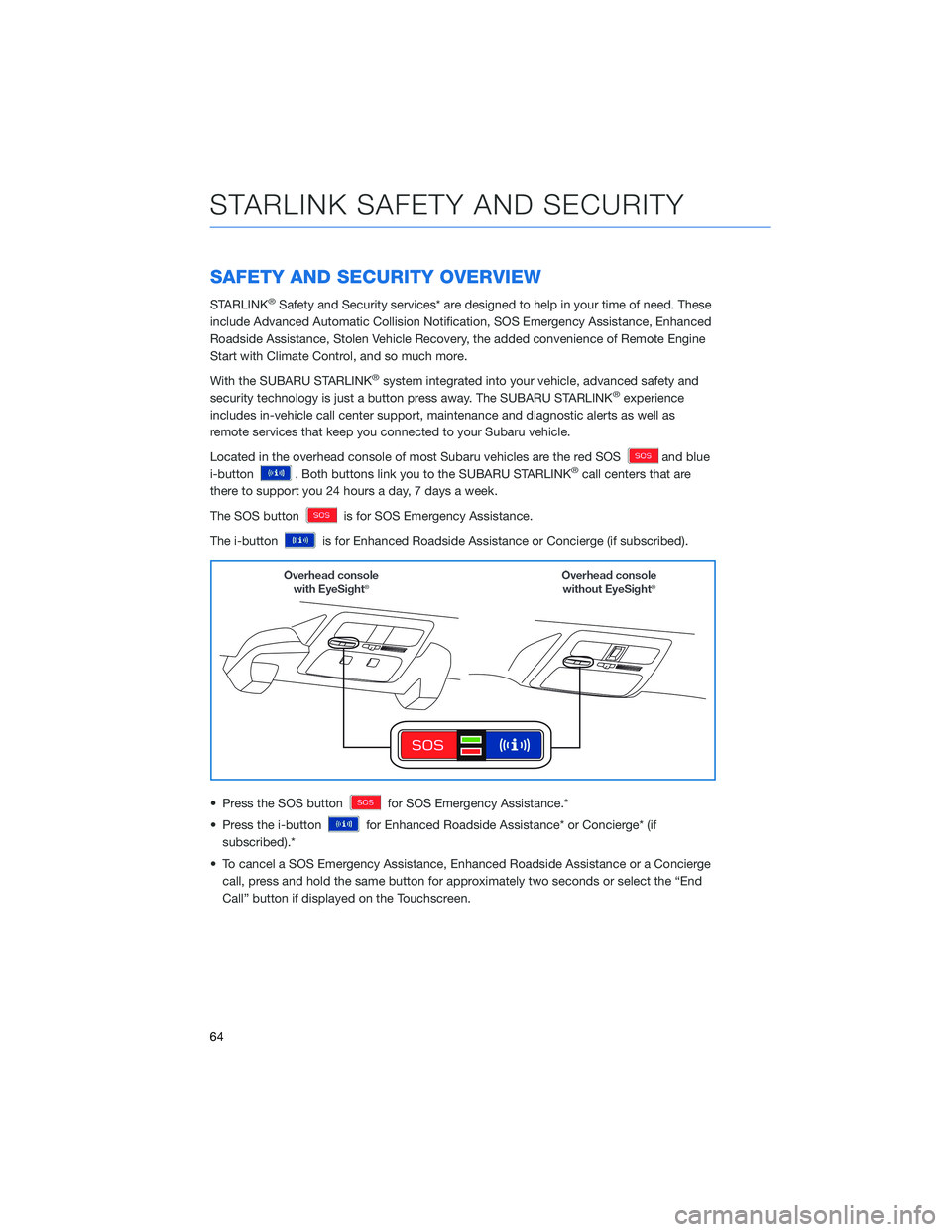
Located in the overhead console of most Subaru vehicles are the red SOS
and blue
i-button
. Both buttons link you to the SUBARU STARLINK®call centers that are
there to support you 24 hours a day, 7 days a week.
The SOS button
is for SOS Emergency Assistance.
The i-button
is for Enhanced Roadside Assistance or Concierge (if subscribed).
• Press the SOS button
for SOS Emergency Assistance.*
• Press the i-button
for Enhanced Roadside Assistance* or Concierge* (if
subscribed).*
• To cancel a SOS Emergency Assistance, Enhanced Roadside Assistance or a Concierge
call, press and hold the same button for approximately two seconds or select the “End
Call” button if displayed on the Touchscreen.
STARLINK SAFETY AND SECURITY
64
Page 71 of 108
SETTING FUNCTION
Call
VolumeSets the call volume.
SMS/
MMS
Ringtone
VolumeSets the SMS/MMS ringtone volume.
SMS/
MMS
Read Out
VolumeSets the SMS/MMS read out volume.
Voice
VolumeSets the voice recognition prompts volume.
PHONE
This system supports Bluetooth®, a wireless data system, allowing you to make and
receive calls without taking your hands off the steering wheel.
In the settings menu, you will be able to manage devices, adjust phone book and message
settings, and adjust other phone/Bluetooth
®settings.
To access the phone settings screen, press the “Home” button, select “Settings”, then
select the “Phone” menu.
CLOCK
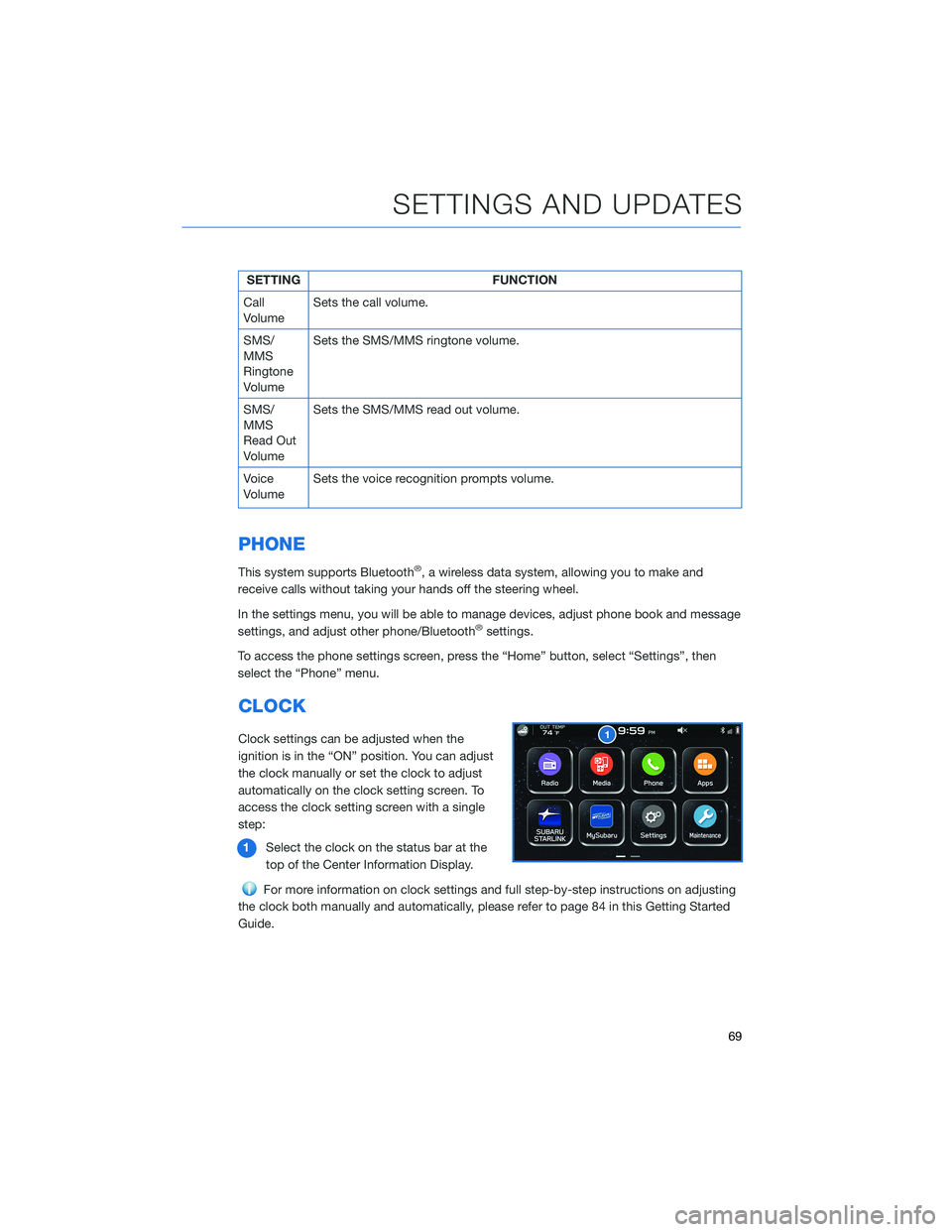
Clock settings can be adjusted when the
ignition is in the “ON” position. You can adjust
the clock manually or set the clock to adjust
automatically on the clock setting screen. To
access the clock setting screen with a single
step:
1Select the clock on the status bar at the
top of the Center Information Display.
For more information on clock settings and full step-by-step instructions on adjusting
the clock both manually and automatically, please refer to page 84 in this Getting Started
Guide.
SETTINGS AND UPDATES
69
Page 73 of 108
FUNCTIONS
The EyeSight®system features several distinct functions designed to provide extra
awareness, improve safety, reduce fatigue, and add peace of mind every time you drive
your Subaru. EyeSight
®functions include:
• Pre-Collision Braking
• Pre-Collision Brake Assist
• Pre-Collision Throttle Management
• Lane Departure Warning
• Lane Sway Warning
• Adaptive Cruise Control
• Conventional Cruise Control
• Lead Vehicle Start Alert
Pre-Collision Braking
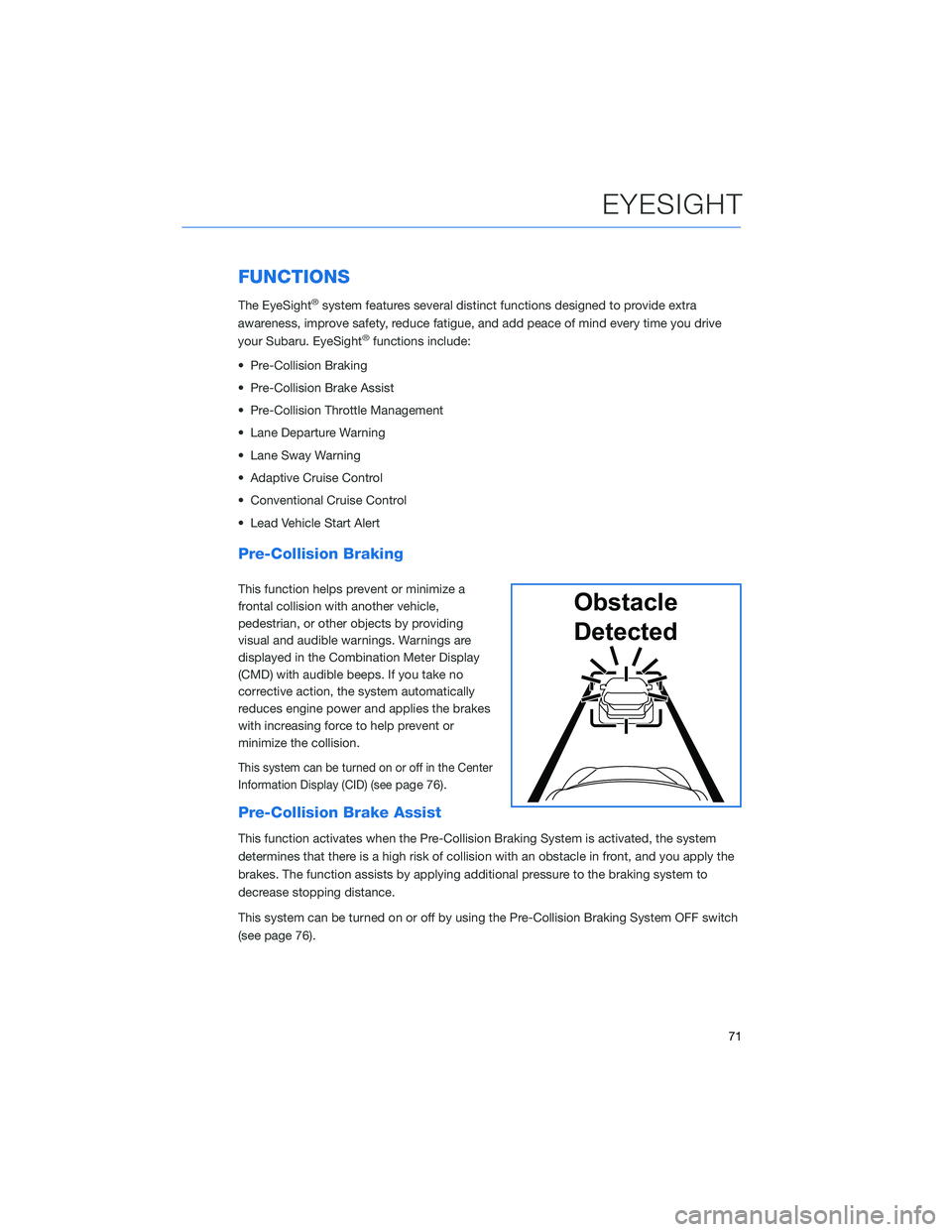
This function helps prevent or minimize a
frontal collision with another vehicle,
pedestrian, or other objects by providing
visual and audible warnings. Warnings are
displayed in the Combination Meter Display
(CMD) with audible beeps. If you take no
corrective action, the system automatically
reduces engine power and applies the brakes
with increasing force to help prevent or
minimize the collision.
This system can be turned on or off in the Center
Information Display (CID) (see
page 76).
Pre-Collision Brake Assist
This function activates when the Pre-Collision Braking System is activated, the system
determines that there is a high risk of collision with an obstacle in front, and you apply the
brakes. The function assists by applying additional pressure to the braking system to
decrease stopping distance.
This system can be turned on or off by using the Pre-Collision Braking System OFF switch
(see page 76).
Obstacle
Detected
EYESIGHT
71