display SUBARU BRZ 2022 Getting Started Guide
[x] Cancel search | Manufacturer: SUBARU, Model Year: 2022, Model line: BRZ, Model: SUBARU BRZ 2022Pages: 108, PDF Size: 29.44 MB
Page 88 of 108
Automatically
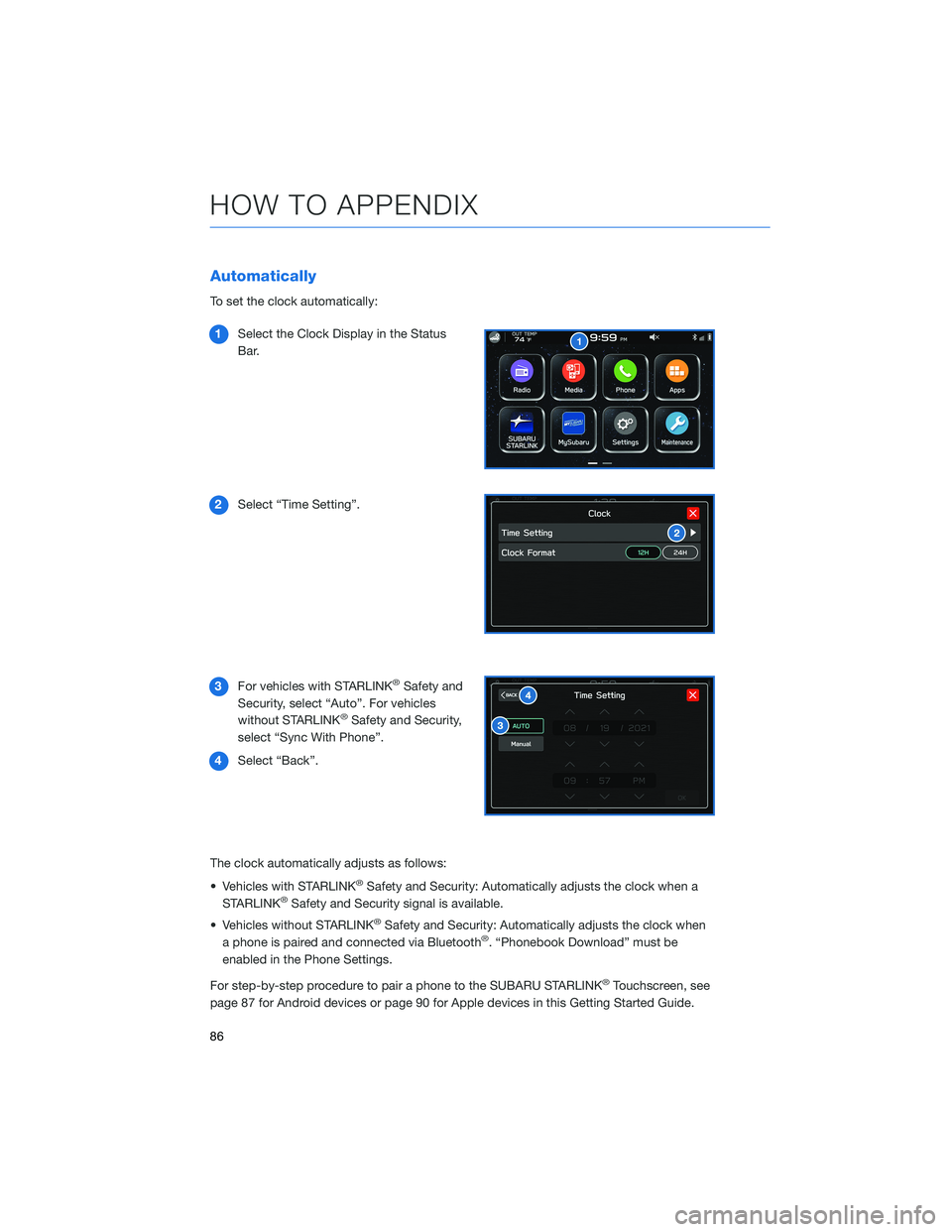
To set the clock automatically:
1Select the Clock Display in the Status
Bar.
2Select “Time Setting”.
3For vehicles with STARLINK
®Safety and
Security, select “Auto”. For vehicles
without STARLINK
®Safety and Security,
select “Sync With Phone”.
4Select “Back”.
The clock automatically adjusts as follows:
• Vehicles with STARLINK
®Safety and Security: Automatically adjusts the clock when a
STARLINK®Safety and Security signal is available.
• Vehicles without STARLINK
®Safety and Security: Automatically adjusts the clock when
a phone is paired and connected via Bluetooth®. “Phonebook Download” must be
enabled in the Phone Settings.
For step-by-step procedure to pair a phone to the SUBARU STARLINK
®Touchscreen, see
page 87 for Android devices or page 90 for Apple devices in this Getting Started Guide.
HOW TO APPENDIX
86
Page 89 of 108
BLUETOOTH®PAIRING
Pairing an Android Device
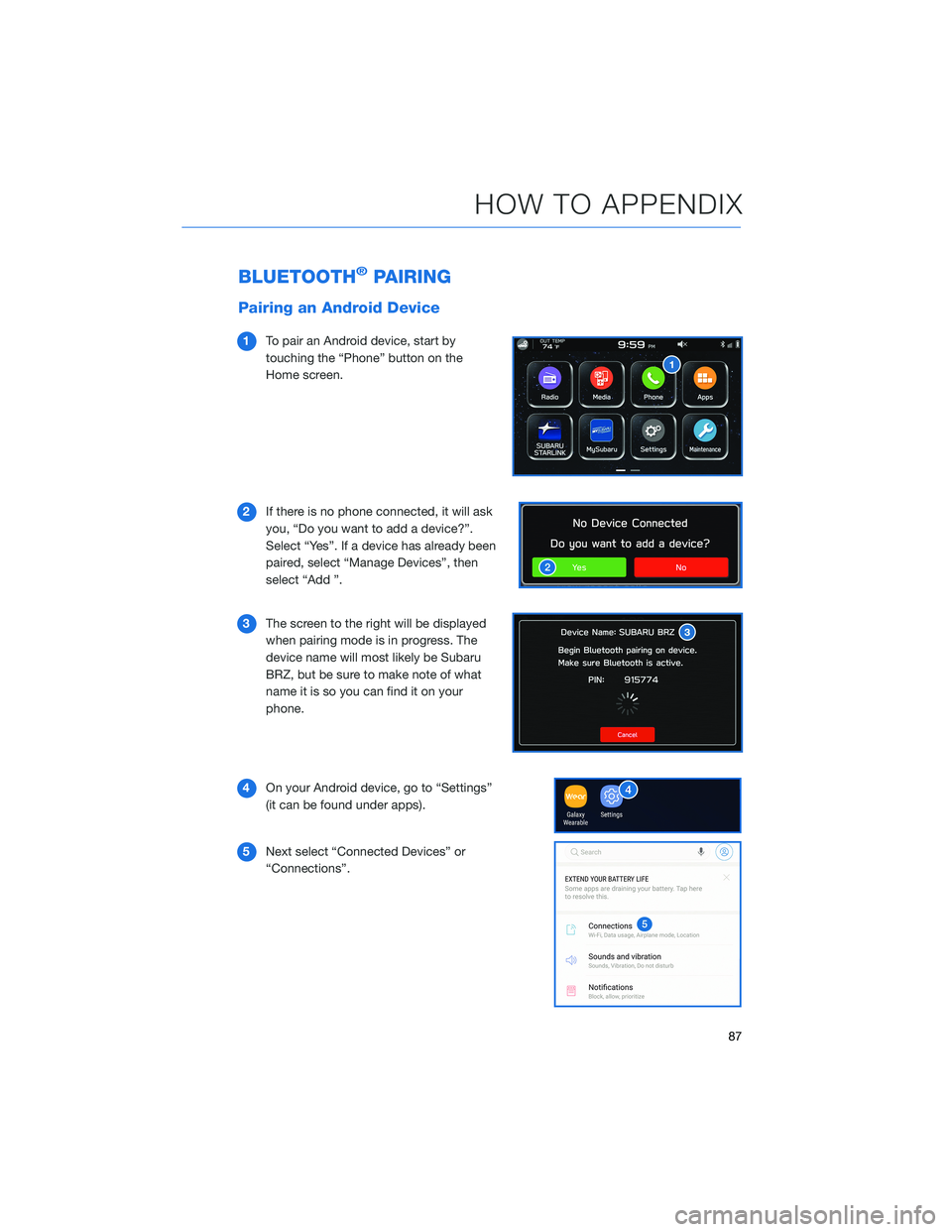
1To pair an Android device, start by
touching the “Phone” button on the
Home screen.
2If there is no phone connected, it will ask
you, “Do you want to add a device?”.
Select “Yes”. If a device has already been
paired, select “Manage Devices”, then
select “Add ”.
3The screen to the right will be displayed
when pairing mode is in progress. The
device name will most likely be Subaru
BRZ, but be sure to make note of what
name it is so you can find it on your
phone.
4On your Android device, go to “Settings”
(it can be found under apps).
5Next select “Connected Devices” or
“Connections”.
HOW TO APPENDIX
87
Page 92 of 108
Pairing an iOS/Apple Device
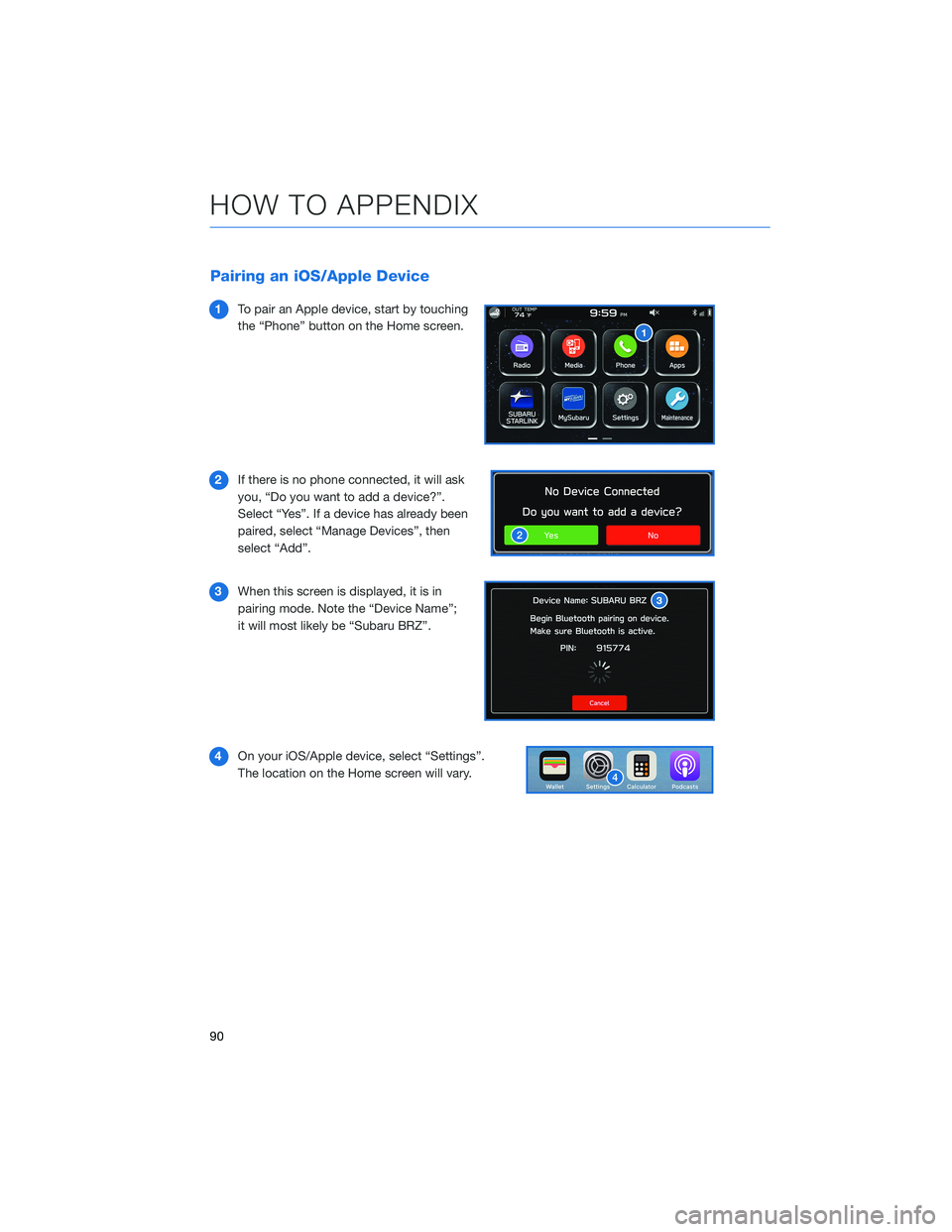
1To pair an Apple device, start by touching
the “Phone” button on the Home screen.
2If there is no phone connected, it will ask
you, “Do you want to add a device?”.
Select “Yes”. If a device has already been
paired, select “Manage Devices”, then
select “Add”.
3When this screen is displayed, it is in
pairing mode. Note the “Device Name”;
it will most likely be “Subaru BRZ”.
4On your iOS/Apple device, select “Settings”.
The location on the Home screen will vary.
HOW TO APPENDIX
90
Page 96 of 108
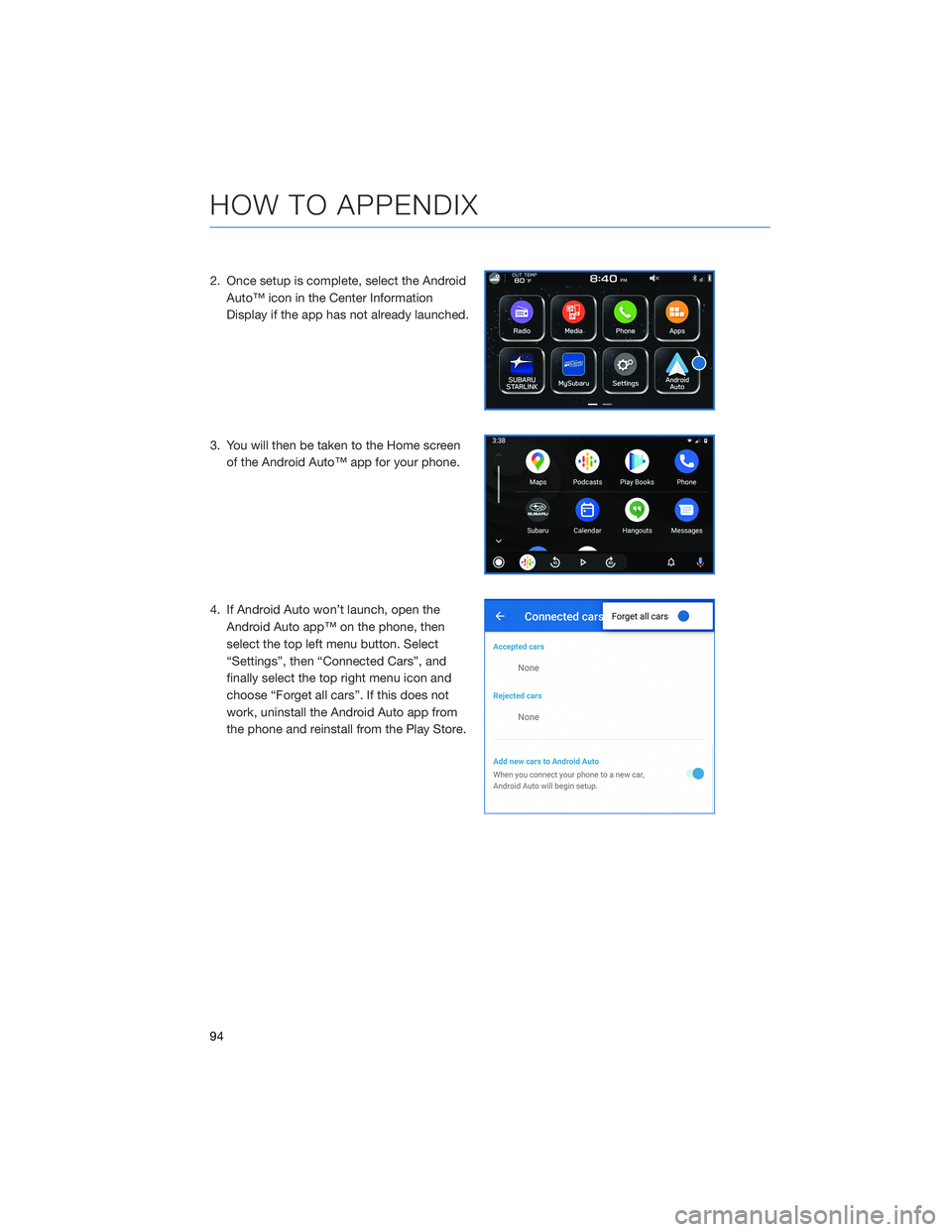
2. Once setup is complete, select the Android
Auto™ icon in the Center Information
Display if the app has not already launched.
3. You will then be taken to the Home screen
of the Android Auto™ app for your phone.
4. If Android Auto won’t launch, open the
Android Auto app™ on the phone, then
select the top left menu button. Select
“Settings”, then “Connected Cars”, and
finally select the top right menu icon and
choose “Forget all cars”. If this does not
work, uninstall the Android Auto app from
the phone and reinstall from the Play Store.
HOW TO APPENDIX
94
Page 102 of 108
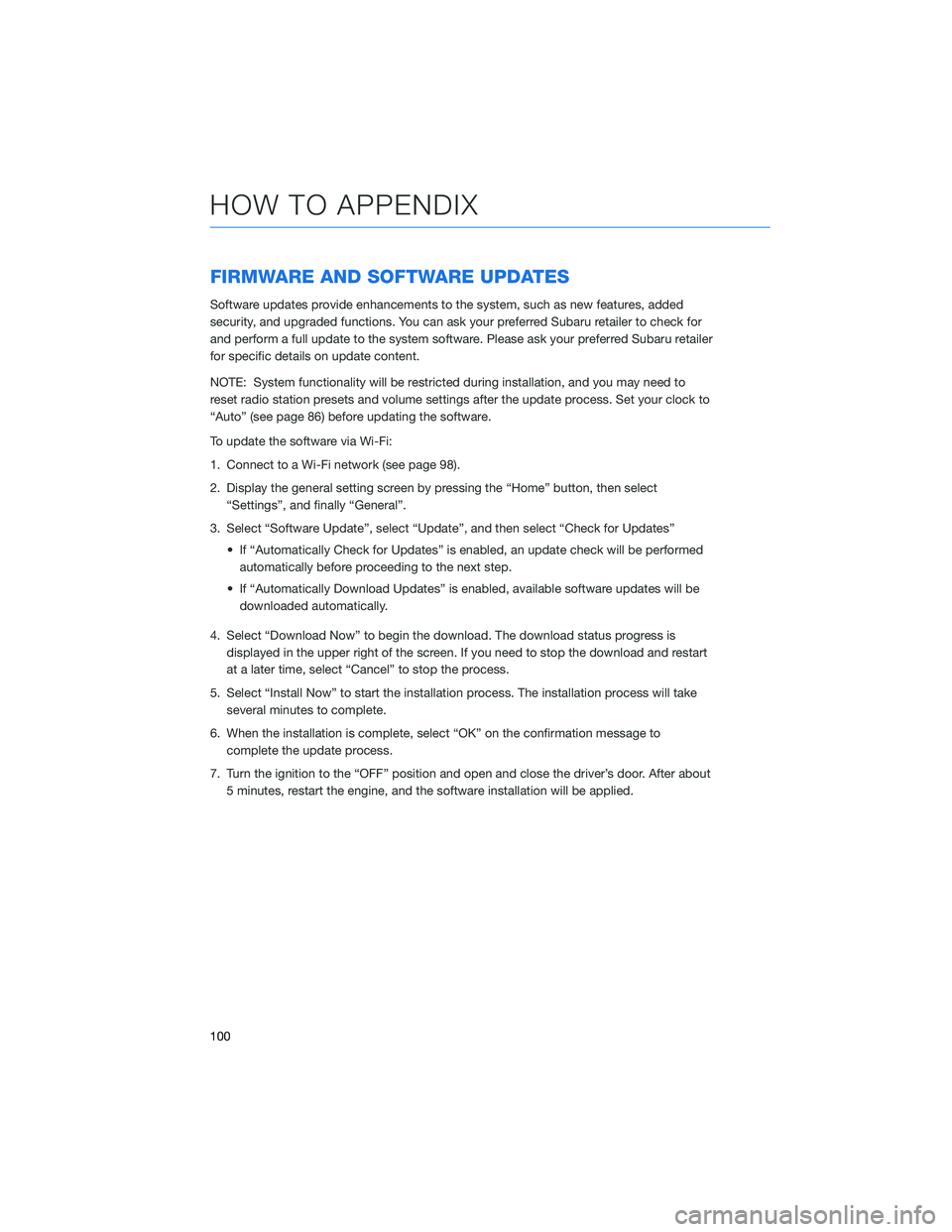
FIRMWARE AND SOFTWARE UPDATES
Software updates provide enhancements to the system, such as new features, added
security, and upgraded functions. You can ask your preferred Subaru retailer to check for
and perform a full update to the system software. Please ask your preferred Subaru retailer
for specific details on update content.
NOTE: System functionality will be restricted during installation, and you may need to
reset radio station presets and volume settings after the update process. Set your clock to
“Auto” (see page 86) before updating the software.
To update the software via Wi-Fi:
1. Connect to a Wi-Fi network (see page 98).
2. Display the general setting screen by pressing the “Home” button, then select
“Settings”, and finally “General”.
3. Select “Software Update”, select “Update”, and then select “Check for Updates”
• If “Automatically Check for Updates” is enabled, an update check will be performed
automatically before proceeding to the next step.
• If “Automatically Download Updates” is enabled, available software updates will be
downloaded automatically.
4. Select “Download Now” to begin the download. The download status progress is
displayed in the upper right of the screen. If you need to stop the download and restart
at a later time, select “Cancel” to stop the process.
5. Select “Install Now” to start the installation process. The installation process will take
several minutes to complete.
6. When the installation is complete, select “OK” on the confirmation message to
complete the update process.
7. Turn the ignition to the “OFF” position and open and close the driver’s door. After about
5 minutes, restart the engine, and the software installation will be applied.
HOW TO APPENDIX
100
Page 103 of 108
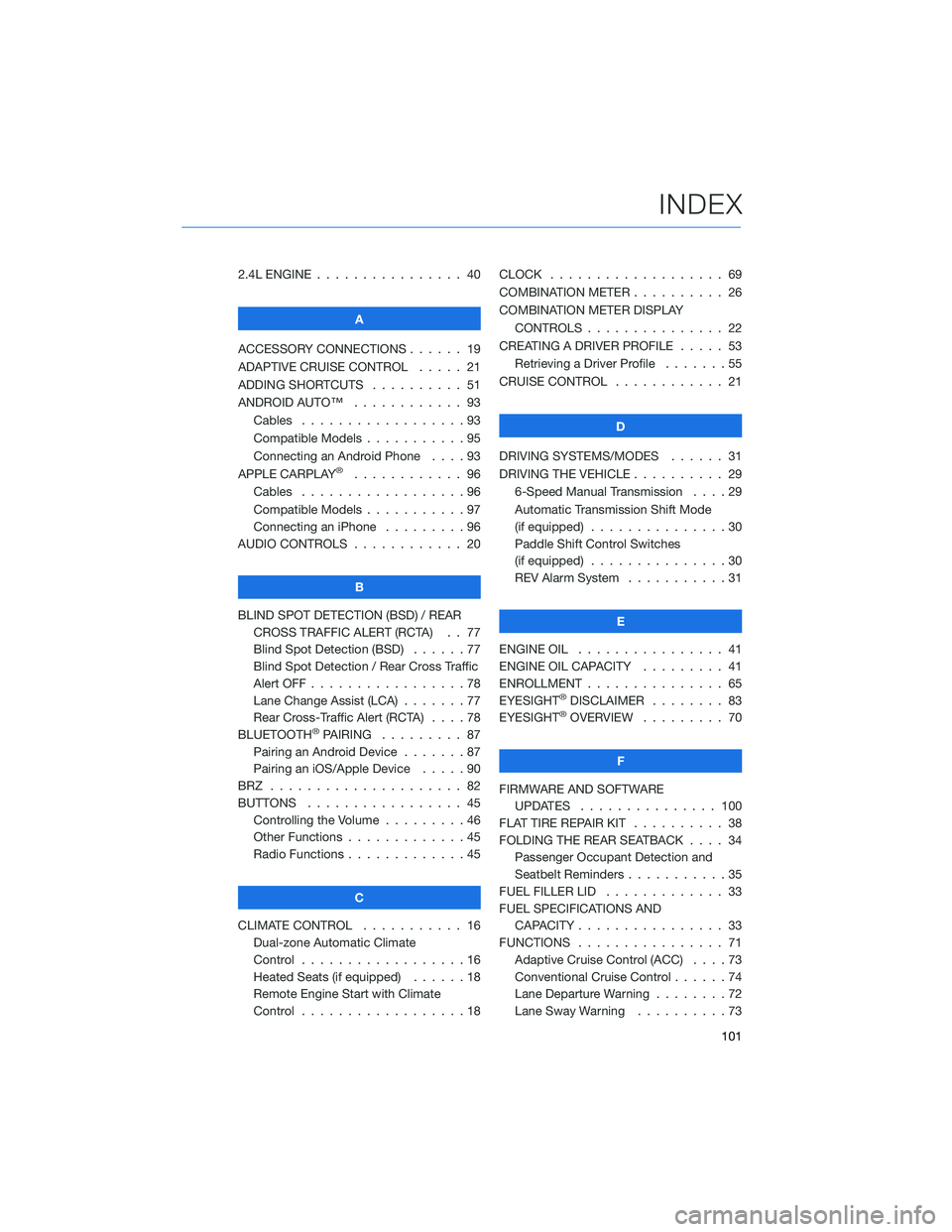
2.4L ENGINE . . . . . . .......... 40
A
ACCESSORY CONNECTIONS . . . . . . 19
ADAPTIVE CRUISE CONTROL..... 21
ADDING SHORTCUTS . . . . ...... 51
ANDROID AUTO™ . ........... 93
Cables . . . . . . . . . . . . . . . . . . 93
Compatible Models . . . . . . .....95
Connecting an Android Phone....93
APPLE CARPLAY
®............ 96
Cables . . . . . . . . . . . . . . . . . . 96
Compatible Models . . . . . . .....97
Connecting an iPhone .........96
AUDIO CONTROLS ............ 20
B
BLIND SPOT DETECTION (BSD) / REAR
CROSS TRAFFIC ALERT (RCTA) . . 77
Blind Spot Detection (BSD)......77
Blind Spot Detection / Rear Cross Traffic
Alert OFF . . . . . . . . . ........78
Lane Change Assist (LCA) . ......77
Rear Cross-Traffic Alert (RCTA) . . . . 78
BLUETOOTH
®PAIRING ......... 87
Pairing an Android Device.......87
Pairing an iOS/Apple Device . . . . . 90
BRZ ..................... 82
BUTTONS . . . . ............. 45
Controlling the Volume . . . . . . . . . 46
Other Functions . . . . . ........45
Radio Functions . . . . . ........45
C
CLIMATE CONTROL........... 16
Dual-zone Automatic Climate
Control . . . . . . . . . . . . . . . . . . 16
Heated Seats (if equipped) . .....18
Remote Engine Start with Climate
Control . . . . . . . . . . . . . . . . . . 18CLOCK . . ................. 69
COMBINATION METER .......... 26
COMBINATION METER DISPLAY
CONTROLS . .............. 22
CREATING A DRIVER PROFILE ..... 53
Retrieving a Driver Profile.......55
CRUISE CONTROL............ 21
D
DRIVING SYSTEMS/MODES...... 31
DRIVING THE VEHICLE . . . ....... 29
6-Speed Manual Transmission....29
Automatic Transmission Shift Mode
(if equipped)...............30
Paddle Shift Control Switches
(if equipped)...............30
REV Alarm System . . . . . ......31
E
ENGINE OIL . . .............. 41
ENGINE OIL CAPACITY......... 41
ENROLLMENT . . . . . . ......... 65
EYESIGHT
®DISCLAIMER ........ 83
EYESIGHT®OVERVIEW ......... 70
F
FIRMWARE AND SOFTWARE
UPDATES . . . . ........... 100
FLAT TIRE REPAIR KIT . . ........ 38
FOLDING THE REAR SEATBACK.... 34
Passenger Occupant Detection and
Seatbelt Reminders . . . ........35
FUEL FILLER LID . . . . . . . . . . . . . 33
FUEL SPECIFICATIONS AND
CAPACITY . . . . ............ 33
FUNCTIONS . . . . ............ 71
Adaptive Cruise Control (ACC)....73
Conventional Cruise Control......74
Lane Departure Warning........72
Lane Sway Warning . . . .......73
INDEX
101