display SUBARU BRZ 2023 Workshop Manual
[x] Cancel search | Manufacturer: SUBARU, Model Year: 2023, Model line: BRZ, Model: SUBARU BRZ 2023Pages: 432, PDF Size: 16.56 MB
Page 193 of 432
Mirrors
187
Instruments and Controls3
– CONTINUED –
dimming feature will default to on with
each ignition cycle.▼ To Operate the Compass Feature
1. To turn the compass feature on/off,
press and hold the “ ” switch for more
than 3 seconds or until the display turns
on/off. The compass feature will default to
on with each ignition cycle.
2. If the display reads “C”, slowly drive
the vehicle in circles until compass is cali-
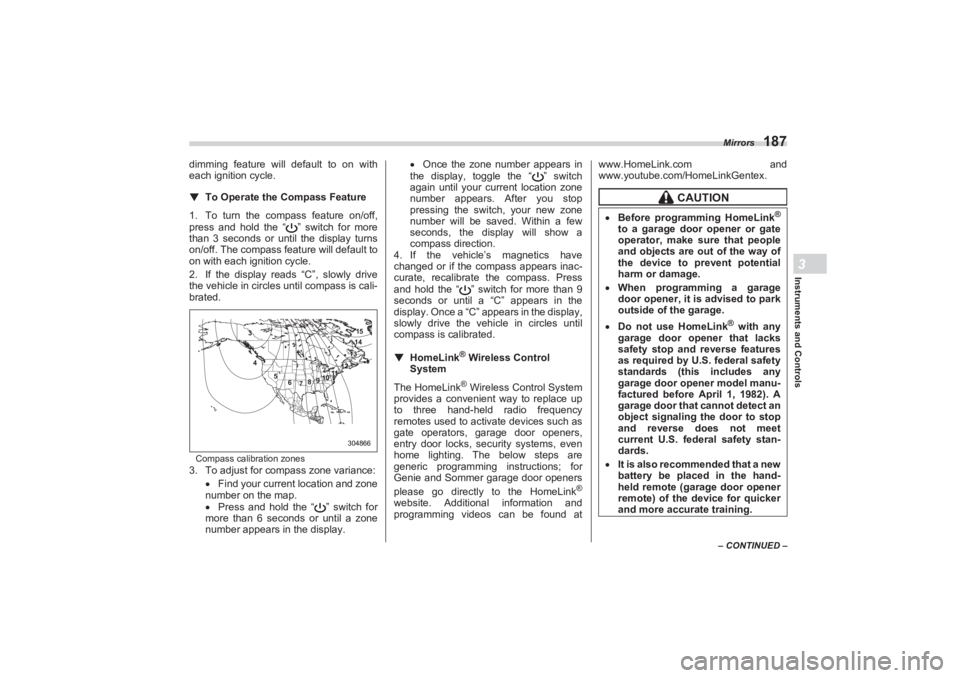
brated.Compass calibration zones3. To adjust for compass zone variance:
Find your current location and zone
number on the map.
Press and hold the “ ” switch for
more than 6 seconds or until a zone
number appears in the display.
Once the zone number appears in
the display, toggle the “ ” switch
again until your current location zone
number appears. After you stop
pressing the switch, your new zone
number will be saved. Within a few
seconds, the disp lay will show a
compass direction.
4. If the vehicle’s magnetics have
changed or if the compass appears inac-
curate, recalibrate the compass. Press
and hold the “ ” switch for more than 9
seconds or until a “C” appears in the
display. Once a “C” a ppears in the display,
slowly drive the vehicle in circles until
compass is calibrated.
▼ HomeLink
® Wireless Control
System
The HomeLink
® Wireless Control System
provides a convenient way to replace up
to three hand-held radio frequency
remotes used to acti vate devices such as
gate operators, garage door openers,
entry door locks, se curity systems, even
home lighting. The below steps are
generic programming instructions; for
Genie and Sommer garage door openers
please go directly to the HomeLink
®
website. Additional information and
programming videos can be found at www.HomeLink.com and
www.youtube.com/HomeLinkGentex.
304866 15
14
13
12
11
10
9
8
7
6
5
4
3
CAUTION
Before programming HomeLink
®
to a garage door opener or gate
operator, make sure that people
and objects are out of the way of
the device to prevent potential
harm or damage.
When programming a garage
door opener, it is advised to park
outside of the garage. Do not use HomeLink
® with any
garage door opener that lacks
safety stop and reverse features
as required by U.S. federal safety
standards (this includes any
garage door opener model manu-
factured before April 1, 1982). A
garage door that cannot detect an
object signaling the door to stop
and reverse does not meet
current U.S. federal safety stan-
dards.
It is also recommended that a new
battery be placed in the hand-
held remote (garage door opener
remote) of the device for quicker
and more accurate training.
BRZ_U.book 187 ページ 2022年3月29日 火曜日 午後3時59分
Page 197 of 432
Mirrors
191
Instruments and Controls3
– CONTINUED –
Proceed with “Programming a New
HomeLink
® button” step 4 to complete.
▽ Using HomeLink
®
To operate, simply press and release the
programmed HomeLink
® button. Activa-
tion will now occur for the trained device
(i.e. garage door opener, gate operator,
security system, entry door lock, home/
office lighting, etc.). For convenience, the
hand-held remote of the device may also
be used at any time.
▽Erasing HomeLink® buttons
To erase programming from the three
buttons (individual buttons cannot be
erased but can be “reprogrammed” as
outlined below), follow the step noted:
Press and hold the two outer HomeLink
®
buttons for at least 10 seconds. The LED
indicator will change from continuously lit
to rapidly flashing. Release both buttons.
Do not hold for longer than 20 seconds.
HomeLink
® is now ready to be
programmed at any time beginning with
“Programming a New HomeLink
® button”-
step 1. ▽
Reprogramming a Single
HomeLink
® button
To program a previously trained button,
follow these steps:
1. Press and hold the desired
HomeLink
® button. DO NOT release the
button.
2. The indicator light will begin to slowly
flash orange after 20 seconds. The
HomeLink® button can be released at this
point. Proceed with “Programming a New
HomeLink® button”- step 3.
3. If you do not complete the program-
ming of a new device to the button, it will
revert to the previously stored program-
ming.
▽Garage Door Two-Way Commu -
nication
HomeLink® has the capability of commu-
nicating with your garage door opener.
HomeLink® can receive and display
“closing” or “opening” status messages
from compatible garage door opener
systems. At any time, HomeLink
® can
also recall and display the last recorded
status communicated by the garage door
opener to indicate your garage door being
“closed” or “opened”. HomeLink
® has the capability of receiving
this communication from the garage door
opener at a range up to 820 feet (250 m).
Range may be reduced by obstacles such
as houses or trees. You may have to slow
your vehicle speed to successfully receive
the garage door opener communication.
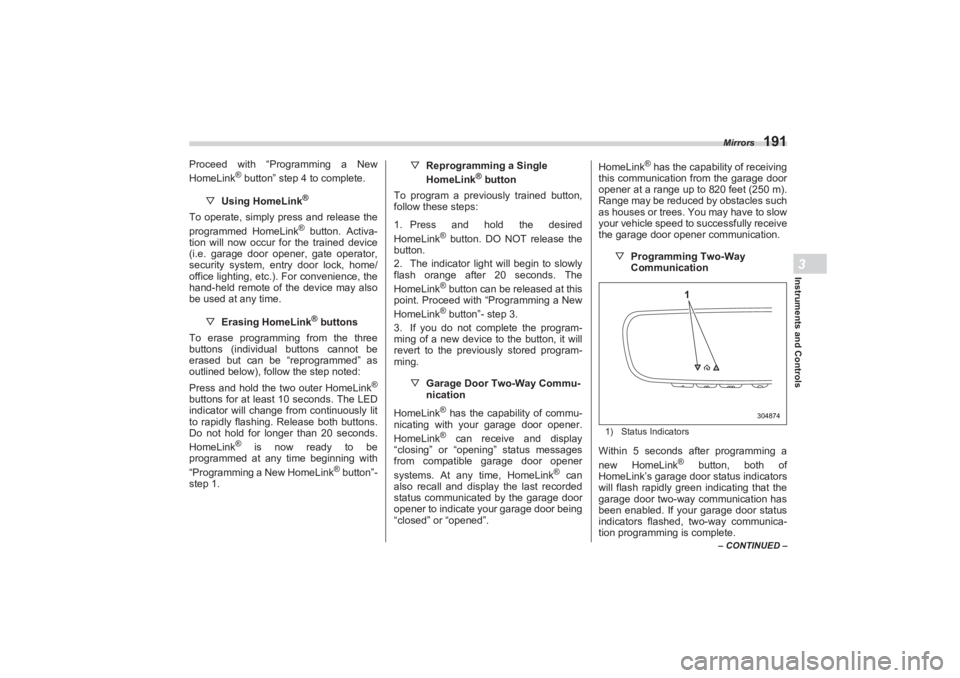
▽Programming Two-Way
Communication
1) Status IndicatorsWithin 5 seconds after programming a
new HomeLink
® button, both of
HomeLink’s garage door status indicators
will flash rapidly green indicating that the
garage door two-way communication has
been enabled. If your garage door status
indicators flashed, two-way communica-
tion programming is complete.
304874
1
BRZ_U.book 191 ページ 2022年3月29日 火曜日 午後3時59分
Page 198 of 432
Mirrors
192If the garage door status indicators do not
flash, additional HomeLink
® information
and programming videos can be found
online at www.HomeLink.com and
www.youtube.com/HomeLinkGentex.
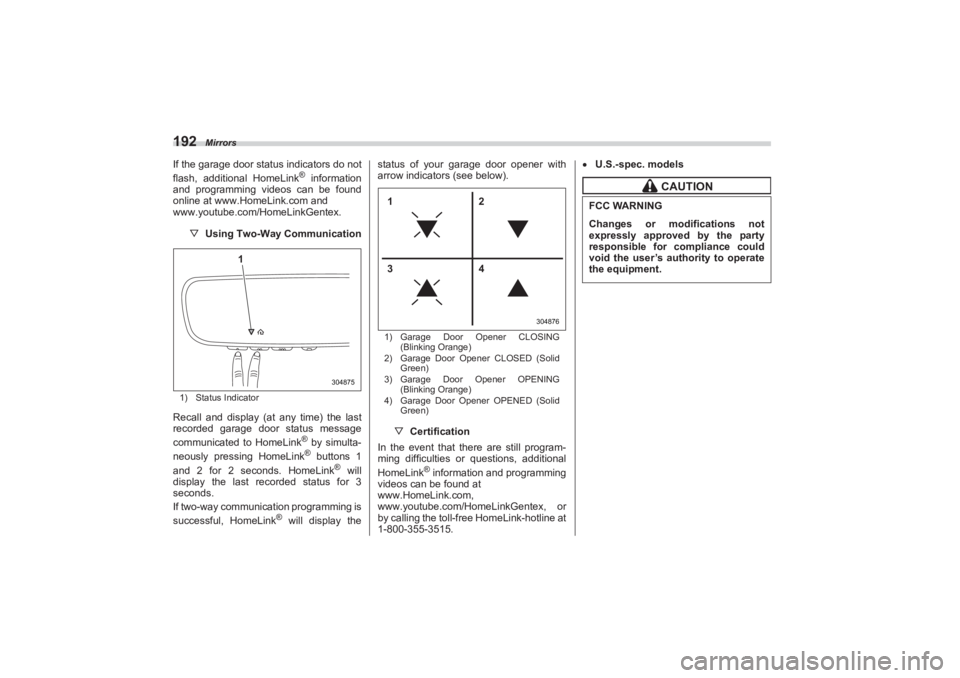
▽ Using Two-Way Communication1) Status IndicatorRecall and display (at any time) the last
recorded garage door status message
communicated to HomeLink
® by simulta-
neously pressing HomeLink® buttons 1
and 2 for 2 seconds. HomeLink
® will
display the last recorded status for 3
seconds.
If two-way communication programming is
successful, HomeLink
® will display the status of your garage door opener with
arrow indicators (see below).
1) Garage Door Opener CLOSING
(Blinking Orange)
2) Garage Door Opener CLOSED (Solid
Green)
3) Garage Door Opener OPENING
(Blinking Orange)
4) Garage Door Opener OPENED (Solid
Green)▽ Certification
In the event that there are still program-
ming difficulties or questions, additional
HomeLink
® information and programming
videos can be found at
www.HomeLink.com,
www.youtube.com/HomeLinkGentex, or
by calling the toll-free HomeLink-hotline at
1-800-355-3515.
U.S.-spec. models
304875
1
304876
12
34
CAUTION
FCC WARNINGChanges or modifications not
expressly approved by the party
responsible for compliance could
void the user’s authority to operate
the equipment.
BRZ_U.book 192 ページ 2022年3月29日 火曜日 午後3時59分
Page 206 of 432
Automatic Climate Control Operation
2004-3. Automatic Climate Control OperationWhen this mode is selected, the fan
speed, airflow mode, air-inlet control, and
air conditioner operation are automatically
controlled. To activate this mode, perform
the following.
1. Press the AUTO button. The FULL
AUTO mode is selected and the “FULL
AUTO” indicator light on the display illumi-
nates.
2. Set the preferred temperature using
the temperature control dial.NOTE Operate the automatic climate
control system when the engine is
running.
Even when cooling is not necessary,
the air conditioner will automatically
turn on if the temperature is set much
lower than the cu rrent outlet air
temperature. Even in this case, the “A/
C” indicator light on the control panel
illuminates
The air conditioner may not operate
in the following cases: - When the cabin temperature is
low
- When the ambient temperature
decreases close to 32°F (0°C)
The controllable temperature range
may vary depending on the regional
specifications of the vehicle.
If you operate any of the buttons on
the control panel other than the ON/
OFF button, rear window defogger
button, SYNC button and temperature
control dial(s) during FULL AUTO
mode operation, the “FULL” indicator
light on the control panel will turn off
and the “AUTO” indicator light will
remain illuminated. You can then
manually control the system as desired
using the button you operated. To
change the system back to the FULL
AUTO mode, press the AUTO button.
To turn off the climate control system,
press the ON/OFF button. Then the air
inlet selection will be set to the following.
When the air inlet selection is set to
auto mode: Outside air circulation
When the air inlet selection is set to
manual mode: No change
When the ignition switch is changed to the
“OFF” or “ACC” position from “ON”, the air
inlet mode will automatically change to the
outside air mode regardless of whether it
is the auto mode or manual mode.
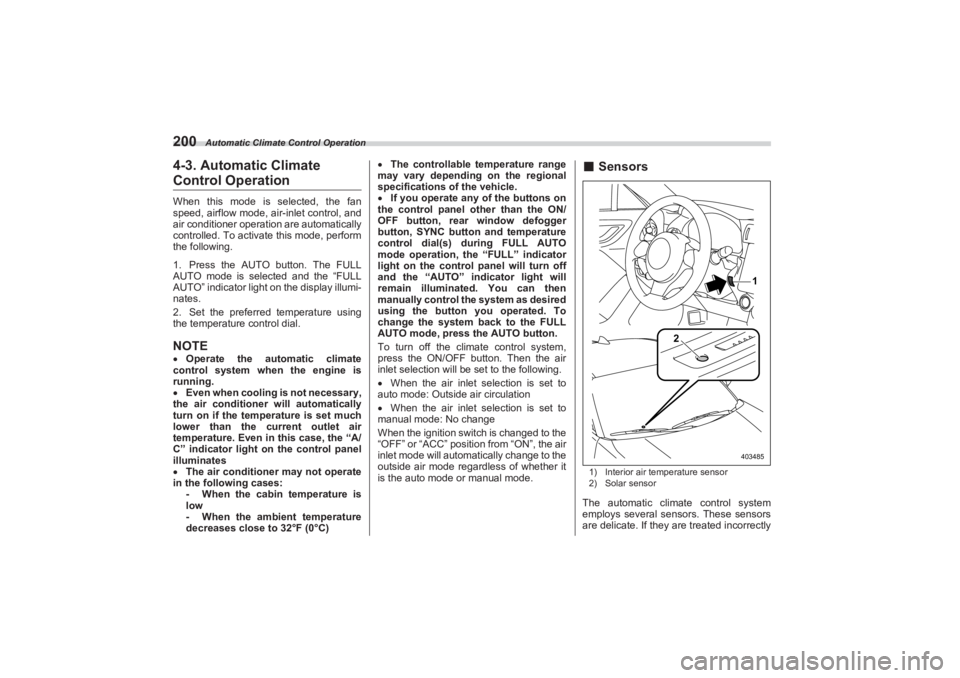
■ Sensors1) Interior air temperature sensor
2) Solar sensorThe automatic climate control system
employs several sensors. These sensors
are delicate. If they are treated incorrectly
1
2
403485
BRZ_U.book 200 ページ 2022年3月29日 火曜日 午後3時59分
Page 218 of 432
Interior Light
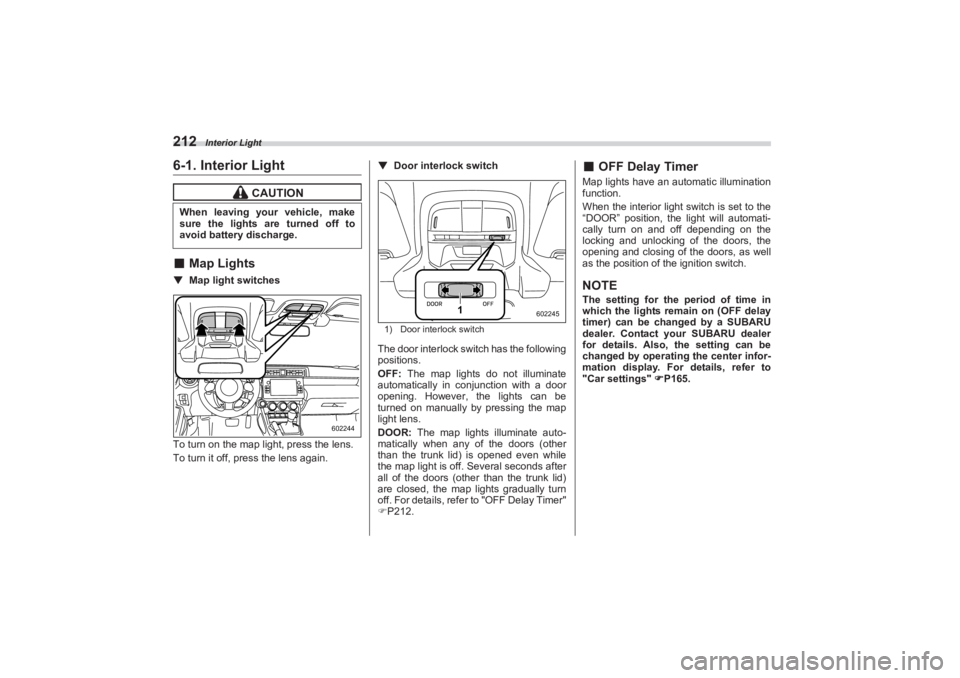
2126-1. Interior Light■Map Lights▼ Map light switches
To turn on the map light, press the lens.
To turn it off, press the lens again. ▼
Door interlock switch
1) Door interlock switchThe door interlock switch has the following
positions.
OFF: The map lights do not illuminate
automatically in conjunction with a door
opening. However, the lights can be
turned on manually by pressing the map
light lens.
DOOR: The map lights illuminate auto-
matically when any of the doors (other
than the trunk lid) is opened even while
the map light is off. Several seconds after
all of the doors (other than the trunk lid)
are closed, the map lights gradually turn
off. For details, refer to "OFF Delay Timer"
P212.
■ OFF Delay TimerMap lights have an automatic illumination
function.
When the interior light switch is set to the
“DOOR” position, the light will automati-
cally turn on and off depending on the
locking and unlocking of the doors, the
opening and closing of the doors, as well
as the position of the ignition switch.NOTEThe setting for the period of time in
which the lights remain on (OFF delay
timer) can be changed by a SUBARU
dealer. Contact your SUBARU dealer
for details. Also, the setting can be
changed by operating the center infor-
mation display. For details, refer to
"Car settings" P165.
CAUTION
When leaving your vehicle, make
sure the lights are turned off to
avoid battery discharge.
602244
1
602245
BRZ_U.book 212 ページ 2022年3月29日 火曜日 午後3時59分
Page 236 of 432
Starting and Stopping Engine
230On rare occasions, it may be difficult
to start the engine depending on the
fuel and the usage condition (repeated
driving of a distance in which the
engine has not warmed up suffi-
ciently). In such a case, it is recom-
mended that you change to a different
brand of fuel.
On rare occasions, transient
knocking may be heard from the
engine when the accelerator is oper-
ated rapidly such as a rapid start-up
and a rapid acceleration. This is not a
malfunction.
The engine starts more easily when
the headlights, air conditioner and rear
window defogger are turned off.■ Starting Engine
NOTEWhen pressing the push-button
ignition switch while depressing the
clutch pedal (MT models) or the brake
pedal (AT models): - The engine starter operates for a
maximum of 10 seconds and after
starting the engine, the starter stops
automatically.
- The engine can be started
regardless of the power status.
If the engine does not start, check
the security indicator light. Then press
the push-button ignition switch
without depressing the clutch pedal
(MT models) or the brake pedal (AT
models) to switch the power to “OFF”. - If the light had illuminated, try to
start the engine again.
- If the light had been off, press the
push-button ignition switch while
depressing the clutch pedal (MT
models) or the brake pedal (AT
models) more forcefully.
The engine start procedures may
not function depending on the radio
wave conditions around the vehicle. In
such a case, refer to "Starting Engine"
P326.
If the vehicle battery is discharged,
the steering cannot be unlocked.
Charge the battery.
WARNING
There are some general precau-
tions when starting the engine.
Carefully read the precautions
described in "General Precau-
tions When Starting Engine"
P229. If the steering lock cannot be
released after the engine has
started, never drive the vehicle.
The steering is still locked, and it
may result in an accident.
CAUTION
If a system malfunction warning
message is displayed on the
combination meter, there may be
a malfunction with the vehicle.
Contact a SUBARU dealer imme-
diately. If a steering lock warning
message is displayed on the
combination me ter after the
engine has started, it means that
the steering is still locked. While
moving the steering wheel right
and left, depress the brake pedal,
and press the push-button igni-
tion switch. Do not continue pressing the
push-button ignition switch for
more than 10 seconds. Doing so
could cause a malfunction. If the
engine does not start, stop
pressing the push -button ignition
switch. Instead, press the push-
button ignition switch without
depressing the clutch pedal (MT
models) or the brake pedal (AT
models) to switch the power
status to “OFF”. Wait 10 seconds,
and then press the push-button
ignition switch to start the
engine.
BRZ_U.book 230 ページ 2022年3月29日 火曜日 午後3時59分
Page 239 of 432
Manual Transmission
233
Starting and Operating7
– CONTINUED –
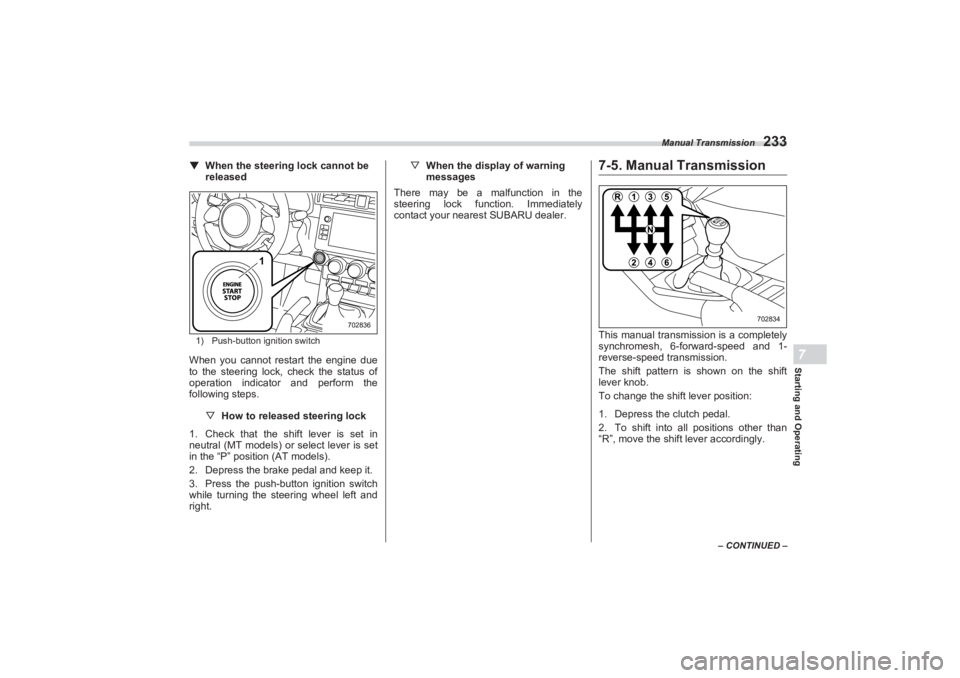
▼When the steering lock cannot be
released1) Push-button ignition switchWhen you cannot restart the engine due
to the steering lock, check the status of
operation indicator and perform the
following steps.
▽How to released steering lock
1. Check that the shift lever is set in
neutral (MT models) or select lever is set
in the “P” position (AT models).
2. Depress the brake pedal and keep it.
3. Press the push-button ignition switch
while turning the steering wheel left and
right. ▽
When the display of warning
messages
There may be a malfunction in the
steering lock function. Immediately
contact your nearest SUBARU dealer.
7-5. Manual TransmissionThis manual transmission is a completely
synchromesh, 6-forward-speed and 1-
reverse-speed transmission.
The shift pattern is shown on the shift
lever knob.
To change the shift lever position:
1. Depress the clutch pedal.
2. To shift into all positions other than
“R”, move the shi ft lever accordingly.
1
702836
702834
BRZ_U.book 233 ページ 2022年3月29日 火曜日 午後3時59分
Page 240 of 432
Manual Transmission
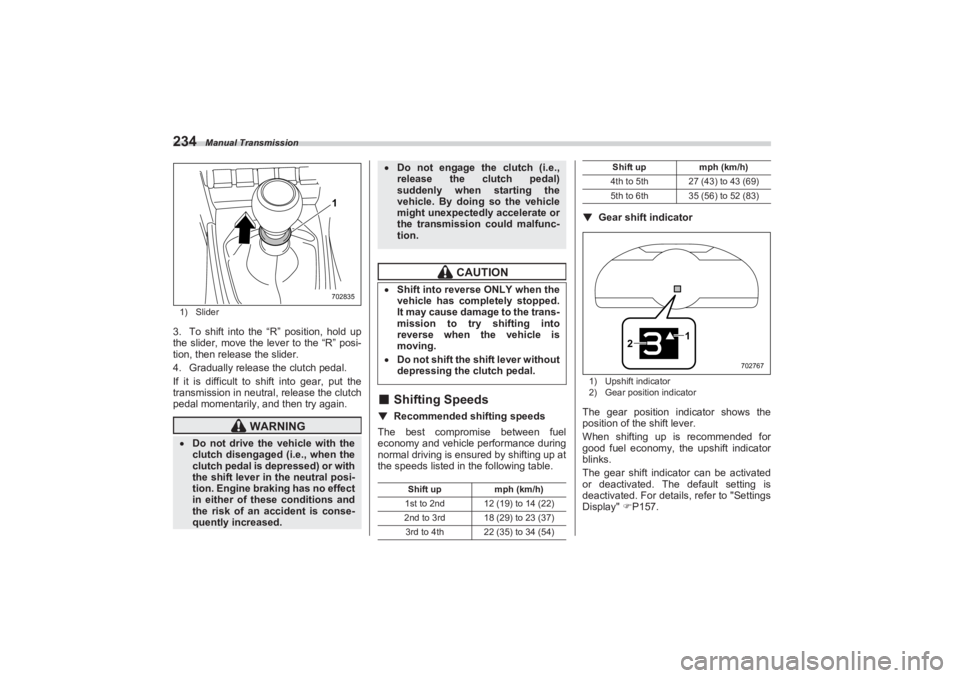
2341) Slider3. To shift into the “R” position, hold up
the slider, move the lever to the “R” posi-
tion, then release the slider.
4. Gradually release the clutch pedal.
If it is difficult to shift into gear, put the
transmission in neutral, release the clutch
pedal momentarily, and then try again.
■ Shifting Speeds▼ Recommended shifting speeds
The best compromise between fuel
economy and vehicle performance during
normal driving is ensured by shifting up at
the speeds listed in the following table. ▼
Gear shift indicator
1) Upshift indicator
2) Gear position indicatorThe gear position indicator shows the
position of the shift lever.
When shifting up is recommended for
good fuel economy, the upshift indicator
blinks.
The gear shift indicator can be activated
or deactivated. The default setting is
deactivated. For details, refer to "Settings
Display" P157.
WARNING
Do not drive the vehicle with the
clutch disengaged (i.e., when the
clutch pedal is depressed) or with
the shift lever in the neutral posi-
tion. Engine braking has no effect
in either of these conditions and
the risk of an accident is conse-
quently increased.
1702835
Do not engage the clutch (i.e.,
release the clutch pedal)
suddenly when starting the
vehicle. By doin g so the vehicle
might unexpectedly accelerate or
the transmission could malfunc-
tion.
CAUTION
Shift into reverse ONLY when the
vehicle has completely stopped.
It may cause damage to the trans-
mission to try shifting into
reverse when the vehicle is
moving. Do not shift the shift lever without
depressing the clutch pedal.
Shift up mph (km/h)
1st to 2nd 12 (19) to 14 (22)
2nd to 3rd 18 (29) to 23 (37) 3rd to 4th 22 (35) to 34 (54)
4th to 5th 27 (43) to 43 (69)
5th to 6th 35 (56) to 52 (83) Shift up
mph (km/h)
1
2
702767
BRZ_U.book 234 ページ 2022年3月29日 火曜日 午後3時59分
Page 245 of 432
Automatic Transmission
239
Starting and Operating7
– CONTINUED –
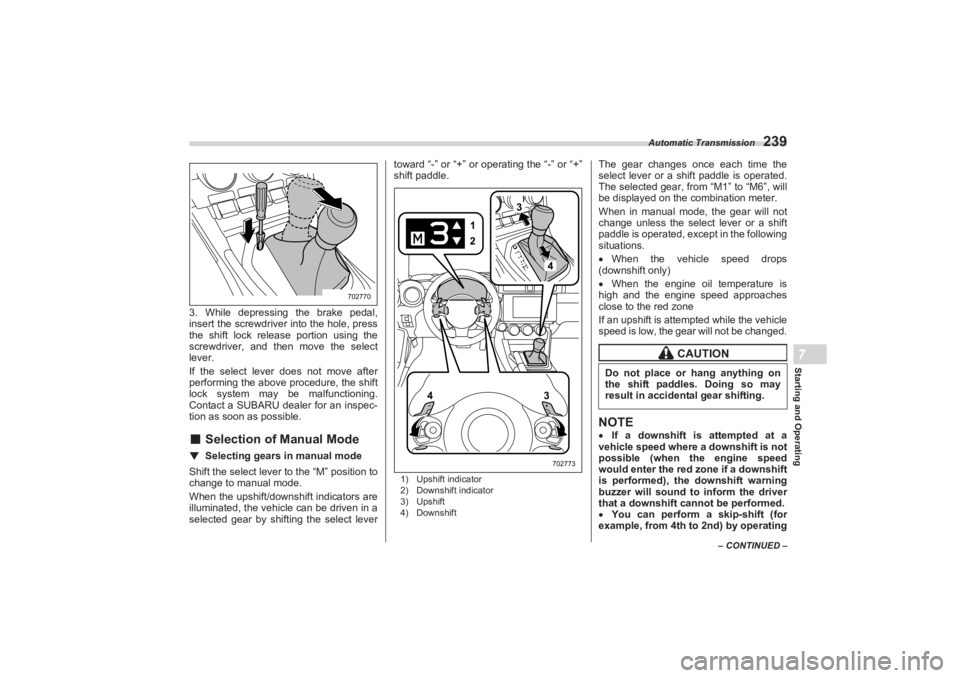
3. While depressing the brake pedal,
insert the screwdriver into the hole, press
the shift lock release portion using the
screwdriver, and then move the select
lever.
If the select lever does not move after
performing the above procedure, the shift
lock system may be malfunctioning.
Contact a SUBARU dealer for an inspec-
tion as soon as possible.■ Selection of Manual Mode▼ Selecting gears in manual modeShift the select lever to the “M” position to
change to manual mode.
When the upshift/downshift indicators are
illuminated, the vehicle can be driven in a
selected gear by shifti ng the select lever toward “-” or “+” or operating the “-” or “+”
shift paddle.
1) Upshift indicator
2) Downshift indicator
3) Upshift
4) Downshift
The gear changes once each time the
select lever or a shift paddle is operated.
The selected gear, from “M1” to “M6”, will
be displayed on the combination meter.
When in manual mode, the gear will not
change unless the select lever or a shift
paddle is operated, except in the following
situations.
When the vehicle speed drops
(downshift only)
When the engine oil temperature is
high and the engine speed approaches
close to the red zone
If an upshift is atte mpted while the vehicle
speed is low, the gear will not be changed.NOTE If a downshift is attempted at a
vehicle speed where a downshift is not
possible (when the engine speed
would enter the red zone if a downshift
is performed), the downshift warning
buzzer will sound to inform the driver
that a downshift cannot be performed.
You can perform a skip-shift (for
example, from 4th to 2nd) by operating
702770
13
4
2
3
4702773
CAUTION
Do not place or hang anything on
the shift paddles. Doing so may
result in accidental gear shifting.
BRZ_U.book 239 ページ 2022年3月29日 火曜日 午後3時59分
Page 246 of 432
Automatic Transmission
240the shift paddle twice in rapid succes-
sion.
If the temperature of the transmis-
sion fluid becomes too high, the “AT
OIL TEMP” warning light will illumi-
nate. Immediately stop the vehicle in a
safe place and let the engine idle until
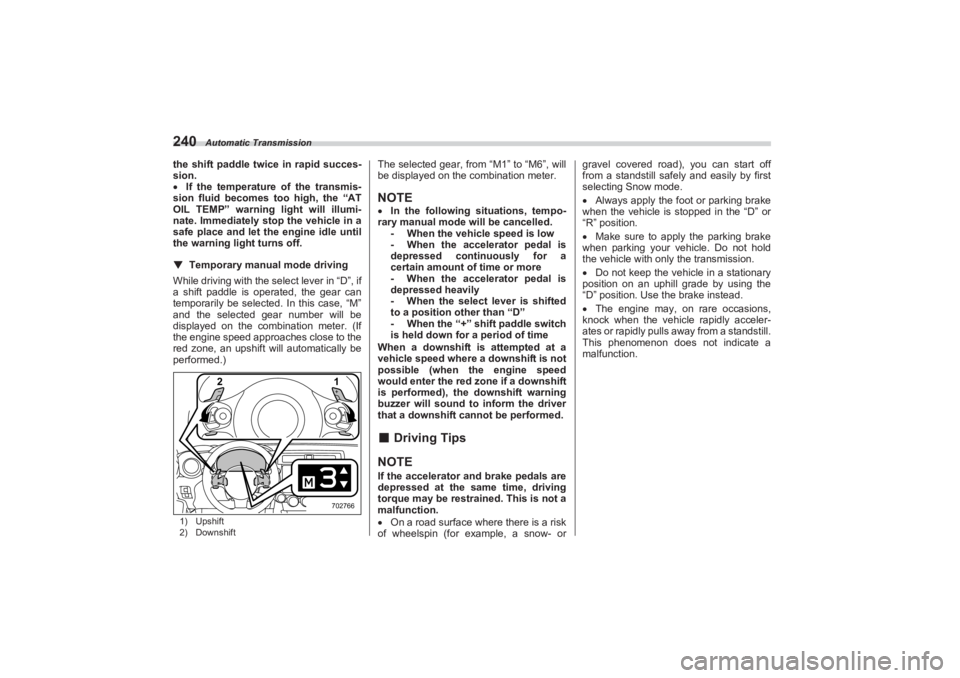
the warning light turns off.▼ Temporary manual mode driving
While driving with the select lever in “D”, if
a shift paddle is operated, the gear can
temporarily be selected. In this case, “M”
and the selected gear number will be
displayed on the combination meter. (If
the engine speed approaches close to the
red zone, an upshift will automatically be
performed.)1) Upshift
2) Downshift
The selected gear, from “M1” to “M6”, will
be displayed on the combination meter.NOTE In the following situations, tempo-
rary manual mode will be cancelled. - When the vehicle speed is low
- When the accelerator pedal is
depressed continuously for a
certain amount of time or more
- When the accelerator pedal is
depressed heavily
- When the select lever is shifted
to a position other than “D”
- When the “+” shift paddle switch
is held down for a period of time
When a downshift is attempted at a
vehicle speed where a downshift is not
possible (when the engine speed
would enter the red zone if a downshift
is performed), the downshift warning
buzzer will sound to inform the driver
that a downshift cannot be performed.■ Driving TipsNOTEIf the accelerator and brake pedals are
depressed at the same time, driving
torque may be restrained. This is not a
malfunction.
On a road surface where there is a risk
of wheelspin (for example, a snow- or gravel covered road), you can start off
from a standstill safely and easily by first
selecting Snow mode.
Always apply the foot or parking brake
when the vehicle is stopped in the “D” or
“R” position.
Make sure to apply the parking brake
when parking your vehicle. Do not hold
the vehicle with only the transmission.
Do not keep the vehicle in a stationary
position on an uphill grade by using the
“D” position. Use the brake instead.
The engine may, on rare occasions,
knock when the vehicle rapidly acceler-
ates or rapidly pulls away from a standstill.
This phenomenon does not indicate a
malfunction.
1
2702766
BRZ_U.book 240 ページ 2022年3月29日 火曜日 午後3時59分