display SUBARU BRZ 2023 Repair Manual
[x] Cancel search | Manufacturer: SUBARU, Model Year: 2023, Model line: BRZ, Model: SUBARU BRZ 2023Pages: 432, PDF Size: 16.56 MB
Page 247 of 432
Driving Mode Select Switch (If Equipped)
241
Starting and Operating7
– CONTINUED –
7-7. Driving Mode Select Switch (If Equipped)By pressing the driving mode select
switch the following modes can be
selected to suit driving and usage condi-
tions:■ Normal ModeProvides an optimal balance of fuel
economy, quietness, and dynamic perfor-
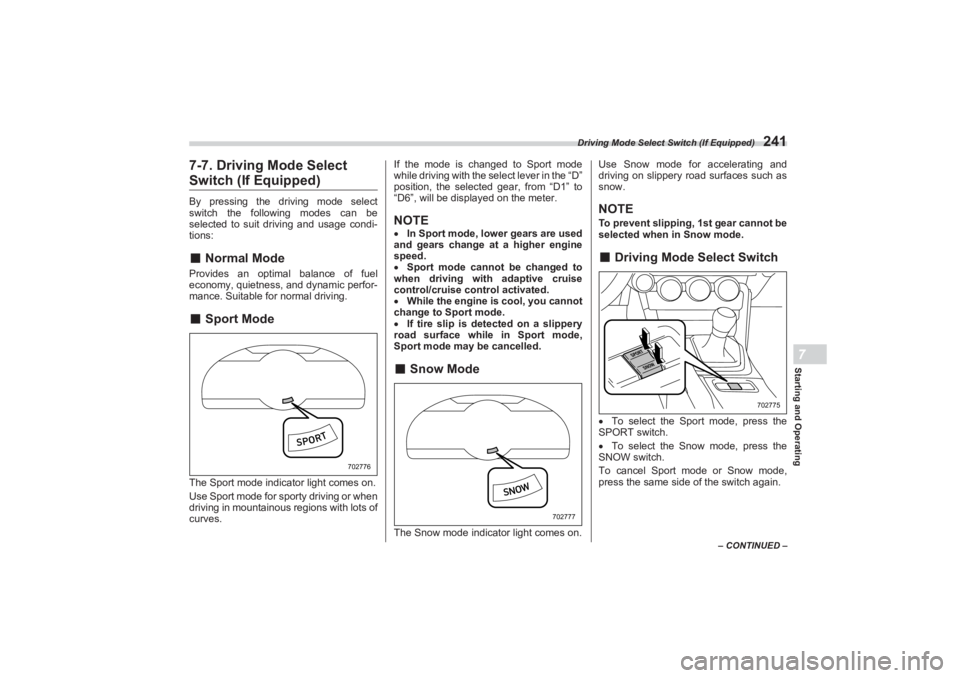
mance. Suitable for normal driving.■Sport ModeThe Sport mode indicator light comes on.
Use Sport mode for sporty driving or when
driving in mountainous regions with lots of
curves. If the mode is changed to Sport mode
while driving with the select lever in the “D”
position, the selected gear, from “D1” to
“D6”, will be displayed on the meter.
NOTE In Sport mode, lower gears are used
and gears change at a higher engine
speed.
Sport mode cannot be changed to
when driving with adaptive cruise
control/cruise control activated.
While the engine is cool, you cannot
change to Sport mode.
If tire slip is detected on a slippery
road surface while in Sport mode,
Sport mode may be cancelled.■ Snow ModeThe Snow mode indicator light comes on. Use Snow mode for accelerating and
driving on slippery road surfaces such as
snow.
NOTETo prevent slipping, 1st gear cannot be
selected when in Snow mode.■ Driving Mode Select SwitchTo select the Sport mode, press the
SPORT switch.
To select the Snow mode, press the
SNOW switch.
To cancel Sport mode or Snow mode,
press the same side of the switch again.
702776
702777
702775
BRZ_U.book 241 ページ 2022年3月29日 火曜日 午後3時59分
Page 260 of 432
Tire Pressure Monitoring System (TPMS) (If Equipped)
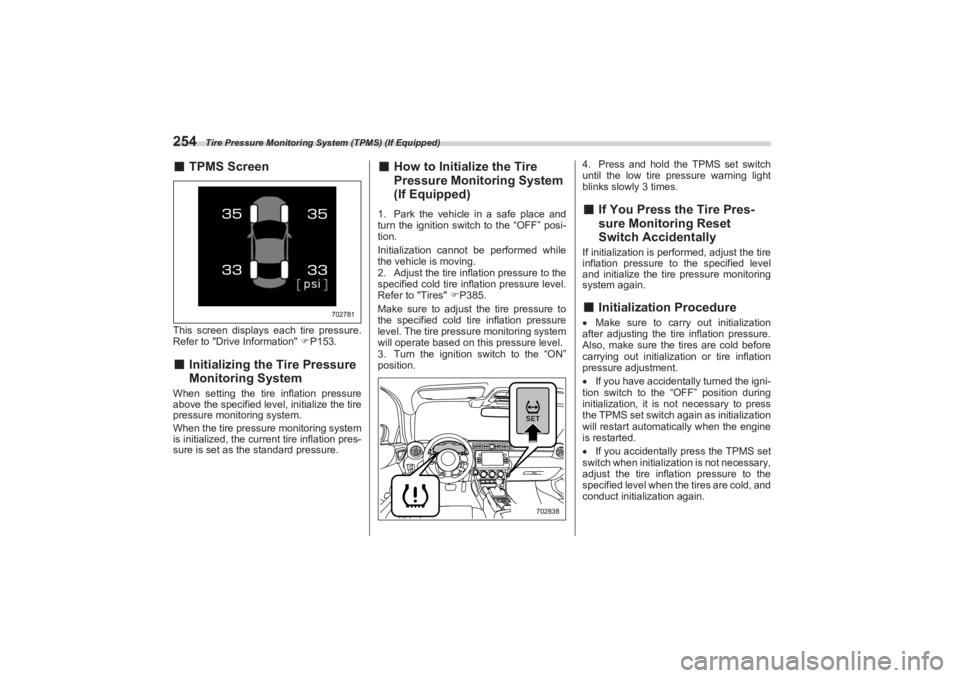
254■TPMS ScreenThis screen displays ea ch tire pressure.
Refer to "Drive Information" P153.■ Initializing the Tire Pressure
Monitoring SystemWhen setting the tire inflation pressure
above the specified level, initialize the tire
pressure monitoring system.
When the tire pressure monitoring system
is initialized, the current tire inflation pres-
sure is set as the standard pressure.
■ How to Initialize the Tire
Pressure Monitoring System
(If Equipped)1. Park the vehicle in a safe place and
turn the ignition switch to the “OFF” posi-
tion.
Initialization cannot be performed while
the vehicle is moving.
2. Adjust the tire infl ation pressure to the
specified cold tire inflation pressure level.
Refer to "Tires" P385.
Make sure to adjust the tire pressure to
the specified cold tire inflation pressure
level. The tire pre ssure monitoring system
will operate based on this pressure level.
3. Turn the ignition switch to the “ON”
position. 4. Press and hold the TPMS set switch
until the low tire pressure warning light
blinks slowly 3 times.
■ If You Press the Tire Pres -
sure Monitoring Reset
Switch AccidentallyIf initialization is perf ormed, adjust the tire
inflation pressure to the specified level
and initialize the tire pressure monitoring
system again.■ Initialization ProcedureMake sure to carry out initialization
after adjusting the tire inflation pressure.
Also, make sure the tires are cold before
carrying out initialization or tire inflation
pressure adjustment.
If you have accidentally turned the igni-
tion switch to the “OFF” position during
initialization, it is not necessary to press
the TPMS set switch again as initialization
will restart automatically when the engine
is restarted.
If you accidentally press the TPMS set
switch when initialization is not necessary,
adjust the tire inflation pressure to the
specified level when the tires are cold, and
conduct initialization again.
702781
702838
BRZ_U.book 254 ページ 2022年3月29日 火曜日 午後3時59分
Page 261 of 432
Parking Your Vehicle
255
Starting and Operating7
– CONTINUED –
■When Initialization of the Tire
Pressure Monitoring System
has FailedInitialization can be completed in a few
minutes. However, in the following case,
the settings have not been recorded and
the system will not o perate properly. If
repeated attempts to record tire inflation
pressure settings ar e unsuccessful, have
the vehicle checked at your SUBARU
dealer.
When operating the TPMS set switch,
low tire pressure warning light does not
blink 3 times.
After carrying out the initialization
procedure, the low tire pressure warning
light blinks for 1 minute then stays on after
driving for 20 minutes.
■ Registering ID CodesEvery tire pressure warning valve and
transmitter has a unique ID code. In addi-
tion to the set of tire pressure monitoring
system sensor ID code s initially registered
to the vehicle, a second set of ID codes
can be registered.
A second set of tire pressure monitoring
system sensor ID codes can be registered
at your SUBARU dealer. When 2 sets of
ID codes have been registered, either ID
code set can be selected.■ Changing the ID code set1. Park the vehicle in a safe place and
turn the ignition swit ch to the “ON” posi-
tion.
2. Press the TPMS set switch 3 times
within 3 seconds.
3. The low tire pressure warning light will
illuminate for 3 seconds and then blink 3
times.
4. The low tire pressure warning light will
blink for 1 minute and then illuminate.
5. When the ID code change has
completed, the tire pressure monitoring
light will turn off.
Check that tire pressures are displayed on
the TPMS screen.
7-16. Parking Your Vehicle■ Parking BrakeTo set the parking brake, depress the
brake pedal firmly and hold it down until
the parking brake lever is fully pulled up.
WARNING
Do not operate the TPMS set switch
without first adjust ing the tire infla-
tion pressure to the specified level.
Otherwise, the low tire pressure
warning light may not come on even
if the tire inflation pressure is low,
or it may come on when the tire
inflation pressure is actually nor-
mal.
WARNING
Never leave unattended children
or pets in the vehicle. They could
accidentally injure themselves or
others through inadvertent oper-
ation of the vehicle. Also, on hot
or sunny days, the temperature in
a closed vehicle could quickly
become high enough to cause
severe or possibly fatal injuries to
people. Do not park the vehicle over flam-
mable materials such as dry
grass, waste paper or rags, as
they may burn easily if they come
near hot engine or exhaust
system parts. Be sure to stop the engine if you
take a nap in the vehicle. If engine
exhaust gas enters the passenger
compartment, occupants in the
vehicle could die from carbon
monoxide (CO) contained in the
exhaust gas.
BRZ_U.book 255 ページ 2022年3月29日 火曜日 午後3時59分
Page 267 of 432
Cruise Control (Models without the EyeSight system)
261
Starting and Operating7
– CONTINUED –
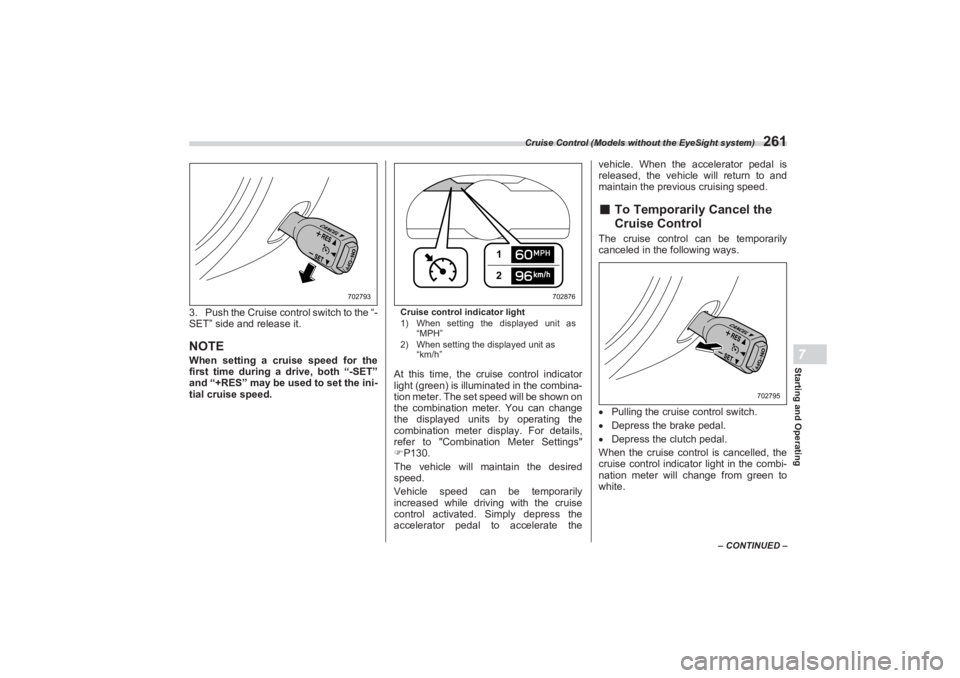
3. Push the Cruise control switch to the “-
SET” side and release it.NOTEWhen setting a cruise speed for the
first time during a drive, both “-SET”
and “+RES” may be u sed to set the ini-
tial cruise speed.
Cruise control indicator light
1) When setting the displayed unit as
“MPH”
2) When setting the displayed unit as
“km/h”At this time, the cruise control indicator
light (green) is illuminated in the combina-
tion meter. The set speed will be shown on
the combination meter. You can change
the displayed units by operating the
combination meter display. For details,
refer to "Combination Meter Settings"
P130.
The vehicle will maintain the desired
speed.
Vehicle speed can be temporarily
increased while driving with the cruise
control activated. Simply depress the
accelerator pedal to accelerate the vehicle. When the accelerator pedal is
released, the vehicle will return to and
maintain the previous cruising speed.
■ To Temporarily Cancel the
Cruise ControlThe cruise control can be temporarily
canceled in the following ways.
Pulling the cruise control switch.
Depress the brake pedal.
Depress the clutch pedal.
When the cruise control is cancelled, the
cruise control indicator light in the combi-
nation meter will change from green to
white.
702793
12
702876
702795
BRZ_U.book 261 ページ 2022年3月29日 火曜日 午後3時59分
Page 268 of 432
Cruise Control (Models without the EyeSight system)
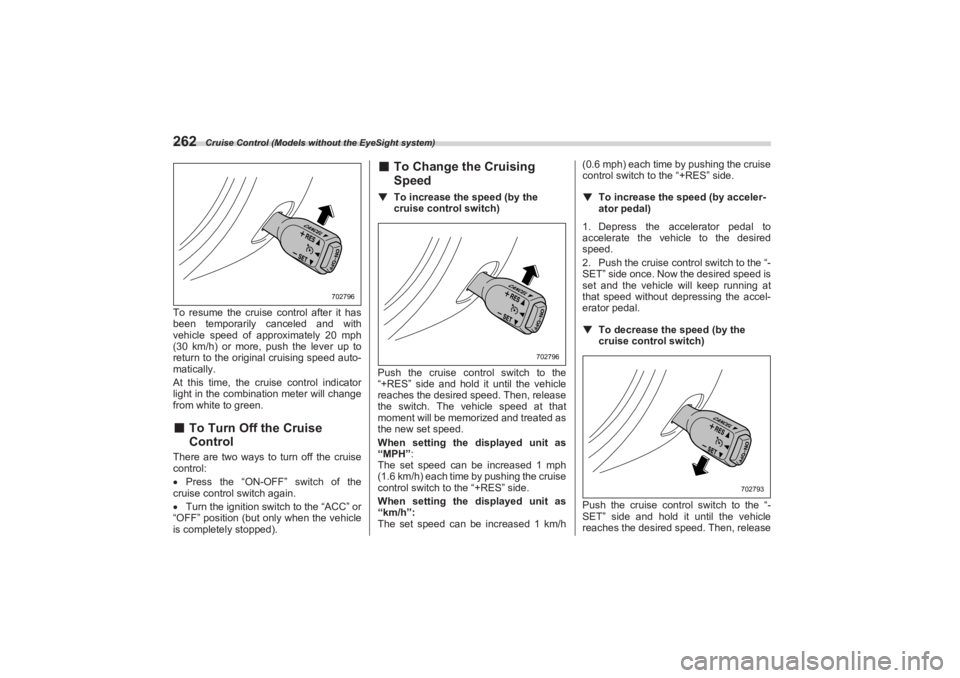
262To resume the cruise control after it has
been temporarily canceled and with
vehicle speed of approximately 20 mph
(30 km/h) or more, pu sh the lever up to
return to the original cruising speed auto-
matically.
At this time, the cruise control indicator
light in the combination meter will change
from white to green.■ To Turn Off the Cruise
ControlThere are two ways to turn off the cruise
control:
Press the “ON-OFF” switch of the
cruise control switch again.
Turn the ignition switch to the “ACC” or
“OFF” position (but only when the vehicle
is completely stopped).
■ To Change the Cruising
Speed▼ To increase the speed (by the
cruise control switch)
Push the cruise cont rol switch to the
“+RES” side and hold it until the vehicle
reaches the desired speed. Then, release
the switch. The vehicle speed at that
moment will be memorized and treated as
the new set speed.
When setting the displayed unit as
“MPH”:
The set speed can be increased 1 mph
(1.6 km/h) each time by pushing the cruise
control switch to the “+RES” side.
When setting the displayed unit as
“km/h”:
The set speed can be increased 1 km/h (0.6 mph) each time by pushing the cruise
control switch to the “+RES” side.
▼ To increase the speed (by acceler -
ator pedal)
1. Depress the accelerator pedal to
accelerate the vehicle to the desired
speed.
2. Push the cruise control switch to the “-
SET” side once. Now the desired speed is
set and the vehicle will keep running at
that speed without depressing the accel-
erator pedal.
▼ To decrease the speed (by the
cruise control switch)
Push the cruise cont rol switch to the “-
SET” side and hold it until the vehicle
reaches the desired speed. Then, release
702796
702796
702793
BRZ_U.book 262 ページ 2022年3月29日 火曜日 午後3時59分
Page 269 of 432
Rear View Camera
263
Starting and Operating7
– CONTINUED –
the switch. The vehicle speed at that
moment will be memorized and treated as
the new set speed.
When setting the displayed unit as
“MPH”:
The set speed can be decreased 1 mph
(1.6 km/h) each time by pushing the cruise
control switch to the “-SET” side.
When setting the displayed unit as
“km/h”:
The set speed can be decreased 1 km/h
(0.6 mph) each time by pushing the cruise
control switch to the “-SET” side.▼ To decrease the speed (by brake
pedal)
1. Depress the brake pedal to release
cruise control temporarily.
2. When the speed decreases to the
desired speed, push the cruise control
switch to the “-SET” side once. Now the
desired speed is set and the vehicle will
keep running at that speed without
depressing the accelerator pedal.■ Cruise Control Indicator
LightRefer to "Combination Meter Settings"
P130.
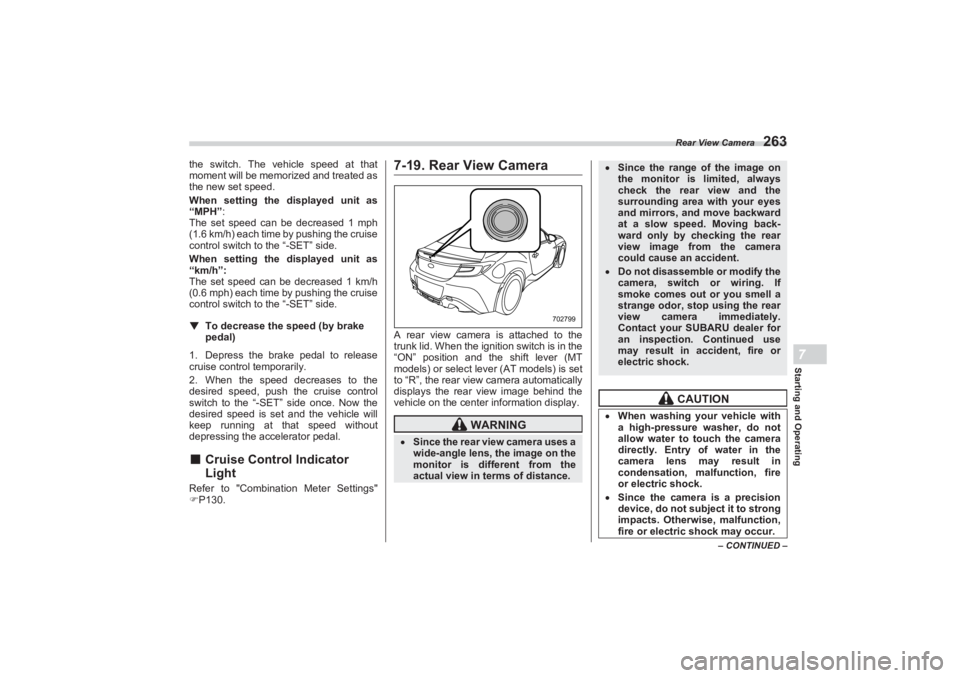
7-19. Rear View CameraA rear view camera is attached to the
trunk lid. When the ignition switch is in the
“ON” position and the shift lever (MT
models) or select lever (AT models) is set
to “R”, the rear view camera automatically
displays the rear view image behind the
vehicle on the center information display.
WARNING
Since the rear view camera uses a
wide-angle lens, the image on the
monitor is diffe rent from the
actual view in terms of distance.
702799
Since the range of the image on
the monitor is limited, always
check the rear view and the
surrounding area with your eyes
and mirrors, and move backward
at a slow speed. Moving back-
ward only by checking the rear
view image from the camera
could cause an accident. Do not disassemble or modify the
camera, switch or wiring. If
smoke comes out or you smell a
strange odor, stop using the rear
view camera immediately.
Contact your SUBARU dealer for
an inspection. Continued use
may result in accident, fire or
electric shock.
CAUTION
When washing your vehicle with
a high-pressure washer, do not
allow water to touch the camera
directly. Entry of water in the
camera lens may result in
condensation, malfunction, fire
or electric shock. Since the camera is a precision
device, do not subject it to strong
impacts. Otherwise, malfunction,
fire or electric shock may occur.
BRZ_U.book 263 ページ 2022年3月29日 火曜日 午後3時59分
Page 270 of 432
Rear View Camera
264NOTEDo not wipe the camera with
alcohol, benzine or paint thinner.
Otherwise, discoloration may occur.
To remove contamination, wipe the
camera with a cloth moistened with a
diluted neutral detergent. Then wipe it
with a soft, dry cloth.
When waxing the vehicle, be careful
not to apply the wax to the camera. If it
comes in contact with the camera,
moisten a clean cloth with a diluted
neutral detergent to remove the wax.
The camera lens has a hard coating
to help prevent scratches. However,
when washing the vehicle or cleaning
the camera lens, be careful not to
scratch the camera lens. Do not use a
washing brush directly on the camera
lens. The image quality of the rear view
camera may deteriorate.
Strong light shined on the camera
lens may develop vertical lines around
the light source. This is not a malfunc-
tion.
Under the fluorescent light, the
display may flicker. However, this is
not a malfunction.
The image of the rear view camera
may be slightly different from the
actual color of the objects.
If there is a malfunction on the
center information display, refer to
"Malfunctions of the Center Informa-
tion Display" P327.
■ How to Use the Rear View
CameraWhen the shift lever/se lect lever is set to
“R”, the rear view camera automatically
displays the rear view image from the vehicle. When the lever is set to other
positions, the image before setting to “R”
is displayed.
1. Set the ignition switch to “ON”.
2. Set the shift lever/ select lever to “R”.
NOTEThe image of the rear view camera is
horizontally reversed as is the case
with the vehicle inside mirror or the
outside mirror.
When “Rear Camera Delay Control”
is on, the rear view image from the rear
view camera will be displayed on the
center information display for a certain
amount of time after the shift lever (MT
models) or select lever (AT models) is
shifted from “R” to another position.
When any of the following conditions
are met, the rear view image will be
canceled: - The select lever is shifted to “P”
(AT models)
- The vehicle speed becomes
approximately 5 mph (8 km/h) or
more
- The parking brake is engaged
- 9 seconds have elapsed since
the shift lever (MT models) or select
lever (AT models) was shifted from
“R” to another position
If mud or snow sticks to or is
frozen on the camera, you must
be very careful when removing it.
Otherwise, damage to the camera
may cause a fire or electric shock.
Pour water or lukewarm water
over the camera to remove mud
and ice, and wipe it with a soft,
dry cloth. Do not put a flame close to the
camera or wiring. Otherwise,
damage or fire may occur. When replacing the fuse, be sure
to use a fuse with the specified
rating. Use of a fuse with a
different rating may result in a
malfunction. If you use the rear view camera
for a long time wh ile the engine is
not operated, the battery may
become completely discharged.
BRZ_U.book 264 ページ 2022年3月29日 火曜日 午後3時59分
Page 272 of 432
Rear View Camera
266Range of view
Image from cameraThe area above the camera cannot be
viewed. If there is an object that has a
wide projection on its upper part such as a
sign pole behind the vehicle, the projec-
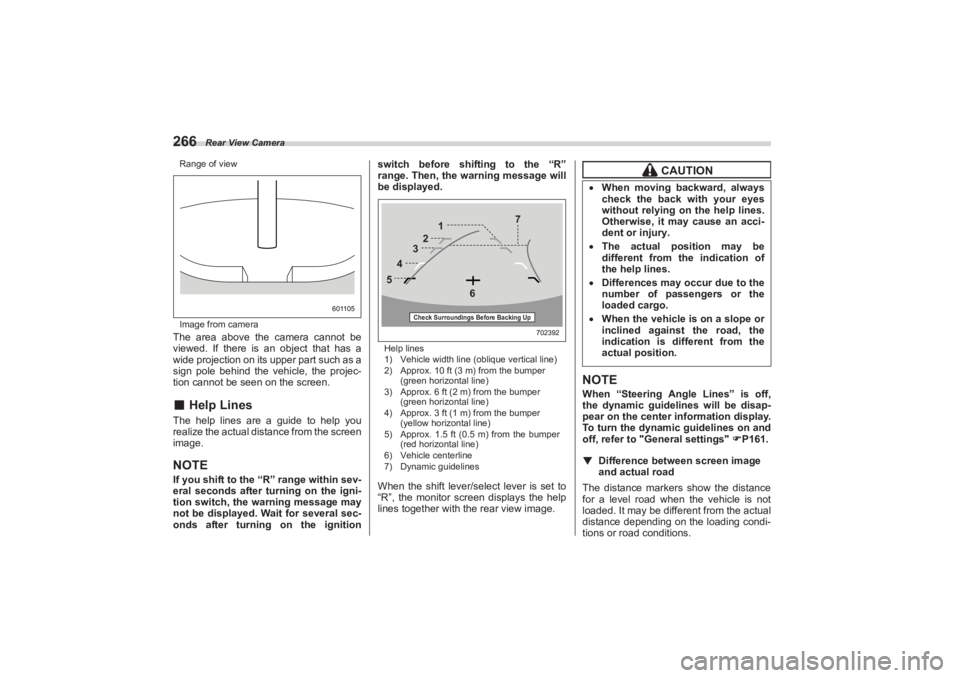
tion cannot be seen on the screen.■ Help LinesThe help lines are a guide to help you
realize the actual distance from the screen
image.NOTEIf you shift to the “R” range within sev-
eral seconds after turning on the igni-
tion switch, the warning message may
not be displayed. Wait for several sec-
onds after turning on the ignition switch before shif
ting to the “R”
range. Then, the warning message will
be displayed.
Help lines
1) Vehicle width line (oblique vertical line)
2) Approx. 10 ft (3 m) from the bumper
(green horizontal line)
3) Approx. 6 ft (2 m) from the bumper
(green horizontal line)
4) Approx. 3 ft (1 m) from the bumper
(yellow horizontal line)
5) Approx. 1.5 ft (0.5 m) from the bumper
(red horizontal line)
6) Vehicle centerline
7) Dynamic guidelinesWhen the shift lever/se lect lever is set to
“R”, the monitor screen displays the help
lines together with the rear view image.
NOTEWhen “Steering Angle Lines” is off,
the dynamic guidelines will be disap-
pear on the center information display.
To turn the dynamic guidelines on and
off, refer to "G eneral settings" P161.
▼ Difference between screen image
and actual roadThe distance markers show the distance
for a level road when the vehicle is not
loaded. It may be different from the actual
distance depending on the loading condi-
tions or road conditions.
601105
702392
5 4
3
2 1
6 7
Check Surroundings Before Backing Up
CAUTION
When moving backward, always
check the back with your eyes
without relying on the help lines.
Otherwise, it may cause an acci-
dent or injury. The actual position may be
different from the indication of
the help lines. Differences may oc cur due to the
number of passengers or the
loaded cargo. When the vehicle is on a slope or
inclined against the road, the
indication is diffe rent from the
actual position.
BRZ_U.book 266 ページ 2022年3月29日 火曜日 午後3時59分
Page 273 of 432
Rear View Camera
267
Starting and Operating7
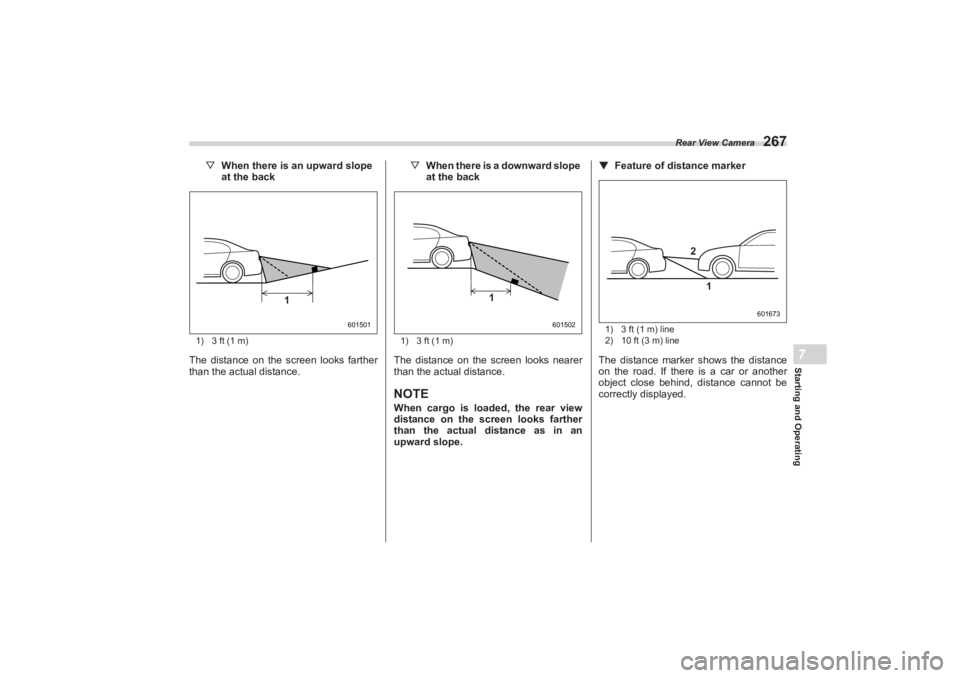
▽When there is an upward slope
at the back1) 3 ft (1 m)The distance on the screen looks farther
than the actual distance. ▽
When there is a downward slope
at the back
1) 3 ft (1 m)The distance on the screen looks nearer
than the actual distance.NOTEWhen cargo is loaded, the rear view
distance on the screen looks farther
than the actual distance as in an
upward slope. ▼
Feature of distance marker
1) 3 ft (1 m) line
2) 10 ft (3 m) lineThe distance marker shows the distance
on the road. If there is a car or another
object close behind, distance cannot be
correctly displayed.
601501
1
601502
1
601673
2
1
BRZ_U.book 267 ページ 2022年3月29日 火曜日 午後3時59分
Page 275 of 432
BSD/RCTA (If Equipped)
269
Starting and Operating7
– CONTINUED –
The system notifies the driver of the pres-
ence of vehicles in its blind spot.
If the system detects a vehicle in its
blind spot, it warns the driver by illumi-
nating the BSD/RCTA approach indicator
light(s) on the outside mirror(s).
If the driver operates the turn signal
lever in the direction where the BSD/
RCTA approach indicator light is illumi-
nating, the system warns the driver of
dangers by flashing the BSD/RCTA
approach indicator light.
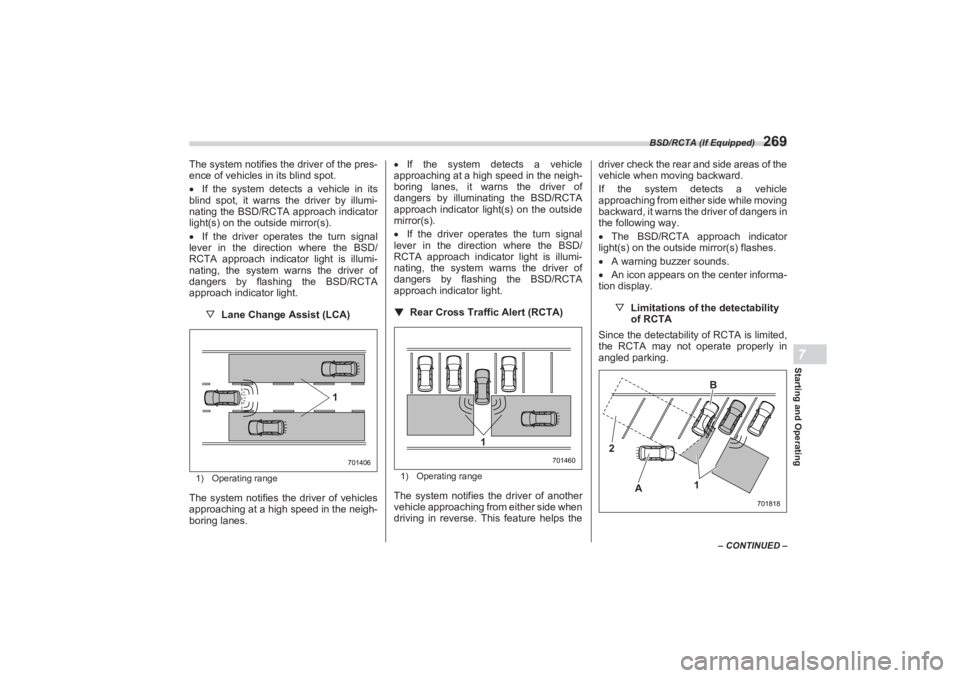
▽ Lane Change Assist (LCA)1) Operating rangeThe system notifies the driver of vehicles
approaching at a high speed in the neigh-
boring lanes.
If the system detects a vehicle
approaching at a high speed in the neigh-
boring lanes, it warns the driver of
dangers by illuminating the BSD/RCTA
approach indicator light(s) on the outside
mirror(s).
If the driver operates the turn signal
lever in the direction where the BSD/
RCTA approach indicator light is illumi-
nating, the system warns the driver of
dangers by flashing the BSD/RCTA
approach indicator light.
▼ Rear Cross Traffic Alert (RCTA)
1) Operating rangeThe system notifies the driver of another
vehicle approaching from either side when
driving in reverse. This feature helps the driver check the rear and side areas of the
vehicle when moving backward.
If the system detects a vehicle
approaching from either side while moving
backward, it warns the driver of dangers in
the following way.
The BSD/RCTA approach indicator
light(s) on the outside mirror(s) flashes.
A warning buzzer sounds.
An icon appears on the center informa-
tion display.
▽Limitations of the detectability
of RCTA
Since the detectabilit y of RCTA is limited,
the RCTA may not operate properly in
angled parking.
701406
1
701460
1
701818
2
A B
1
BRZ_U.book 269 ページ 2022年3月29日 火曜日 午後3時59分