light SUBARU CROSSTREK 2017 1.G Owners Manual
[x] Cancel search | Manufacturer: SUBARU, Model Year: 2017, Model line: CROSSTREK, Model: SUBARU CROSSTREK 2017 1.GPages: 572, PDF Size: 41.52 MB
Page 270 of 572
Audio/Audio set
!Touch screen operation
This system is operated mainly by the
keys on the screen.
When a screen key is touched, a beep
sounds. You can set the beep sound.
Refer to“Unit settings”F5-19.
NOTE
.If the system does not respond to
touching a screen key, move your
finger away from the screen and touch
it again.
.Grayed-out screen keys cannot be
operated.
.The displayed image may become
darkerandmovingimagesmaybe
slightly distorted when the screen is
cold.
.In extremely cold conditions, the
screen may not be displayed correctly.
Also, the screen keys may be less
responsive than usual when pressed.
.When you look at the screen
through polarized material such as
polarized sunglasses, the screen may
be dark and difficult to see. If so, look at
the screen from different angles, adjust
the screen settings or take off your
sunglasses. Refer to“Unit settings”
F5-19.!Entering letters and numbers/list
screen operation
!Entering letters and numbers
When entering the Bluetooth device name
or PIN-code, or the phone number, letters
and numbers can be entered via the
screen.
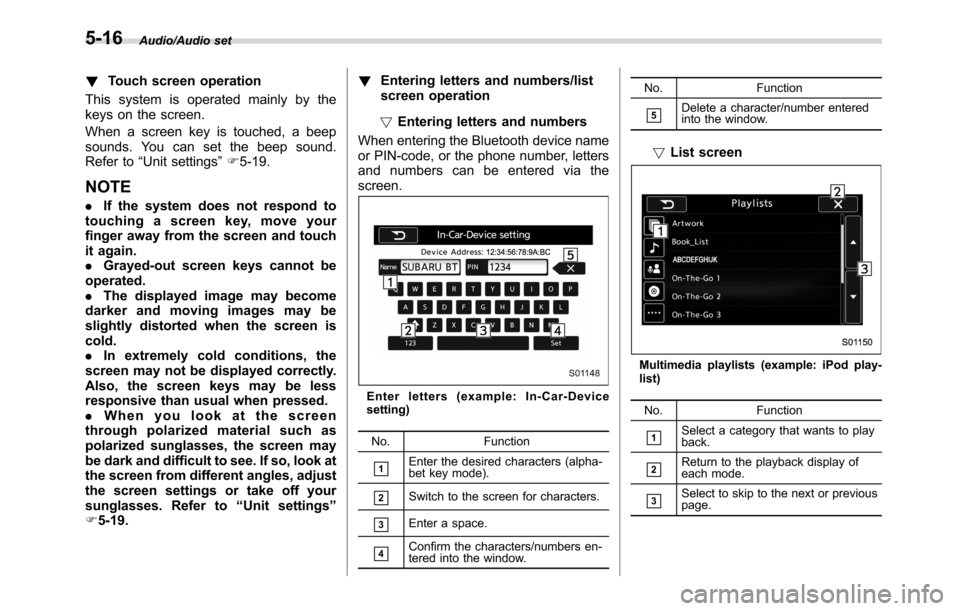
Enter letters (example: In-Car-Device
setting)
No. Function
&1Enter the desired characters (alpha-
bet key mode).
&2Switch to the screen for characters.
&3Enter a space.
&4Confirm the characters/numbers en-
tered into the window.No. Function
&5Delete a character/number entered
into the window.
!List screen
Multimedia playlists (example: iPod play-
list)
No. Function
&1Select a category that wants to play
back.
&2Return to the playback display of
each mode.
&3Select to skip to the next or previous
page.
5-16
Page 279 of 572
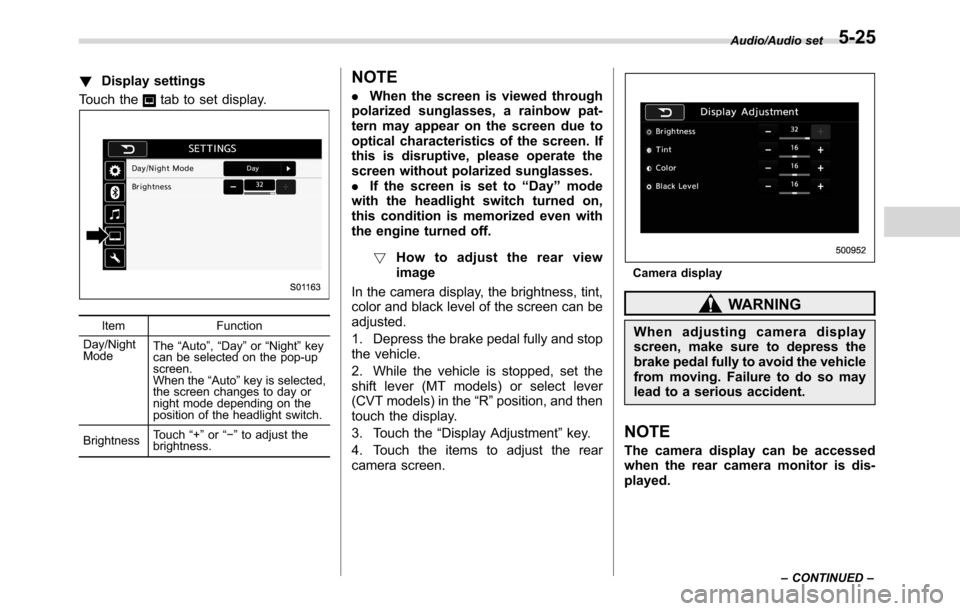
!Display settings
Touch the
tab to set display.
Item Function
Day/Night
ModeThe“Auto”,“Day”or“Night”key
can be selected on the pop-up
screen.
When the“Auto”key is selected,
the screen changes to day or
night mode depending on the
position of the headlight switch.
BrightnessTouch“+”or“−”to adjust the
brightness.
NOTE
.When the screen is viewed through
polarized sunglasses, a rainbow pat-
tern may appear on the screen due to
optical characteristics of the screen. If
this is disruptive, please operate the
screen without polarized sunglasses.
.If the screen is set to“Day”mode
with the headlight switch turned on,
this condition is memorized even with
the engine turned off.
!How to adjust the rear view
image
In the camera display, the brightness, tint,
color and black level of the screen can be
adjusted.
1. Depress the brake pedal fully and stop
the vehicle.
2. While the vehicle is stopped, set the
shift lever (MT models) or select lever
(CVT models) in the“R”position, and then
touch the display.
3. Touch the“Display Adjustment”key.
4. Touch the items to adjust the rear
camera screen.
Camera display
WARNING
When adjusting camera display
screen, make sure to depress the
brake pedal fully to avoid the vehicle
from moving. Failure to do so may
lead to a serious accident.
NOTE
The camera display can be accessed
when the rear camera monitor is dis-
played.
Audio/Audio set
–CONTINUED–5-25
Page 349 of 572
Interior lights....................................................... 6-2
Dome light.......................................................... 6-2
Cargo area light.................................................. 6-2
Map lights........................................................... 6-3
OFF delay timer.................................................. 6-3
Sun visors........................................................... 6-4Sun visor extension plate (models with the
EyeSight system).............................................. 6-4
Vanity mirror....................................................... 6-5
Storage compartment......................................... 6-5Glove box........................................................... 6-6
Center console.................................................... 6-6
Cup holders......................................................... 6-7
Bottle holders...................................................... 6-7
Accessory power outlets.................................... 6-8
Use with a cigarette lighter (dealer option)........... 6-9
Ashtray (dealer option)...................................... 6-10
Floor mat (if equipped)...................................... 6-11
Coat hook........................................................... 6-11
Shopping bag hook........................................... 6-12
Cargo area cover (if equipped)......................... 6-12
Using the cover................................................. 6-12
To remove the cover housing ............................. 6-13
Stowage of the cargo area cover........................ 6-13
To install the cover housing............................... 6-14
Cargo tie-down hooks (if equipped)................. 6-14
Rear view camera.............................................. 6-15
How to use the rear view camera....................... 6-16
Viewing range on the screen.............................. 6-17
Help line............................................................ 6-18
Interior equipment
6
Page 350 of 572
Interior equipment/Interior lights
Interior lights
CAUTION
When leaving your vehicle, make
sure the lights are turned off to
avoid battery discharge.
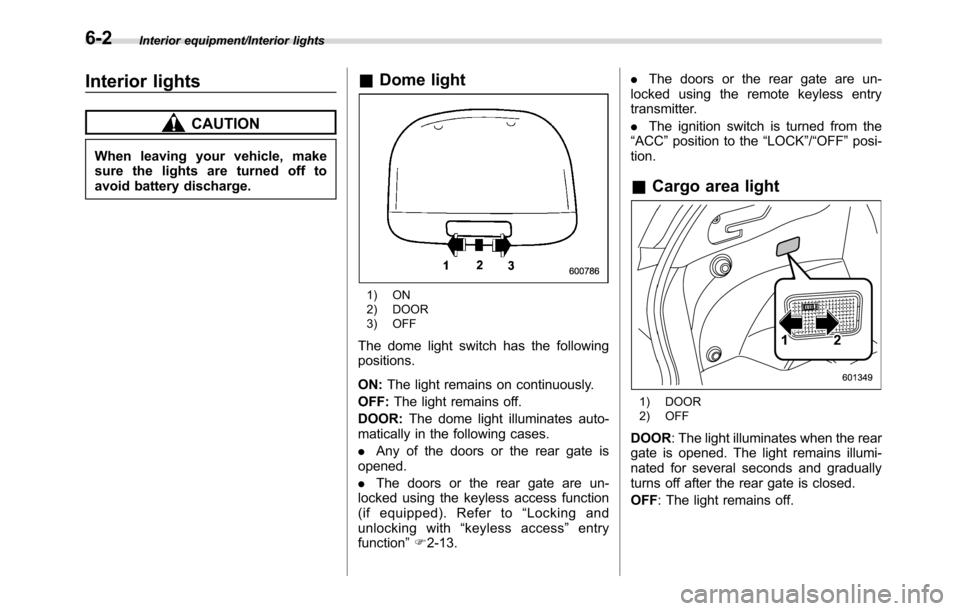
&Dome light
1) ON
2) DOOR
3) OFF
The dome light switch has the following
positions.
ON:The light remains on continuously.
OFF:The light remains off.
DOOR:The dome light illuminates auto-
matically in the following cases.
.Any of the doors or the rear gate is
opened.
.The doors or the rear gate are un-
locked using the keyless access function
(if equipped). Refer to“Locking and
unlocking with“keyless access”entry
function”F2-13..The doors or the rear gate are un-
locked using the remote keyless entry
transmitter.
.The ignition switch is turned from the
“ACC”position to the“LOCK”/“OFF”posi-
tion.
&Cargo area light
1) DOOR
2) OFF
DOOR: The light illuminates when the rear
gate is opened. The light remains illumi-
nated for several seconds and gradually
turns off after the rear gate is closed.
OFF: The light remains off.
6-2
Page 351 of 572
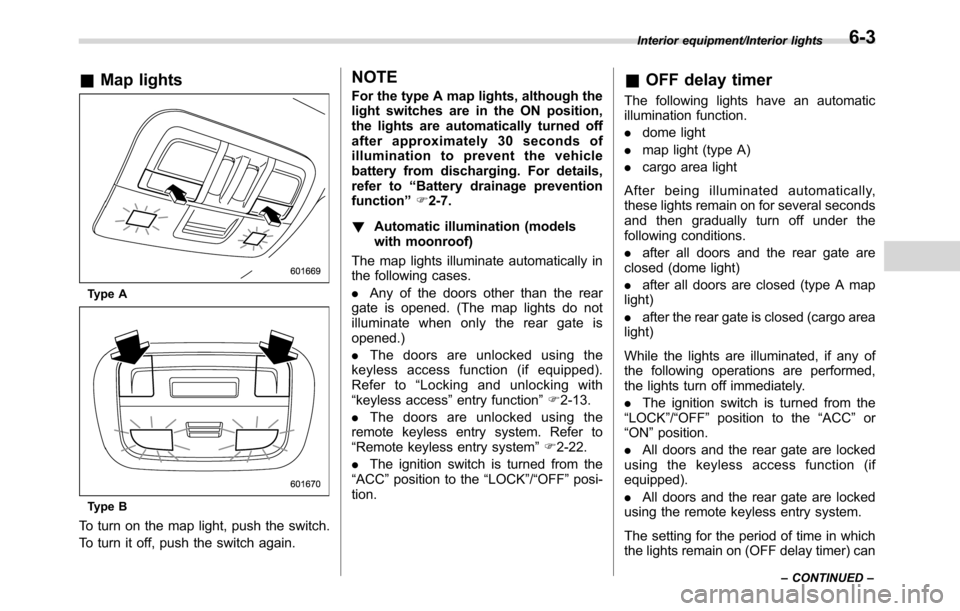
&Map lights
Type A
Type B
To turn on the map light, push the switch.
To turn it off, push the switch again.
NOTE
For the type A map lights, although the
light switches are in the ON position,
the lights are automatically turned off
after approximately 30 seconds of
illumination to prevent the vehicle
battery from discharging. For details,
refer to“Battery drainage prevention
function”F2-7.
!Automatic illumination (models
with moonroof)
The map lights illuminate automatically in
the following cases.
.Any of the doors other than the rear
gate is opened. (The map lights do not
illuminate when only the rear gate is
opened.)
.The doors are unlocked using the
keyless access function (if equipped).
Refer to“Locking and unlocking with
“keyless access”entry function”F2-13.
.The doors are unlocked using the
remote keyless entry system. Refer to
“Remote keyless entry system”F2-22.
.The ignition switch is turned from the
“ACC”position to the“LOCK”/“OFF”posi-
tion.&OFF delay timer
The following lights have an automatic
illumination function.
.dome light
.map light (type A)
.cargo area light
After being illuminated automatically,
these lights remain on for several seconds
and then gradually turn off under the
following conditions.
.after all doors and the rear gate are
closed (dome light)
.after all doors are closed (type A map
light)
.after the rear gate is closed (cargo area
light)
While the lights are illuminated, if any of
the following operations are performed,
the lights turn off immediately.
.The ignition switch is turned from the
“LOCK”/“OFF”position to the“ACC”or
“ON”position.
.All doors and the rear gate are locked
using the keyless access function (if
equipped).
.All doors and the rear gate are locked
using the remote keyless entry system.
The setting for the period of time in which
the lights remain on (OFF delay timer) can
Interior equipment/Interior lights
–CONTINUED–6-3
Page 352 of 572
Interior equipment/Sun visors
be changed by a SUBARU dealer. Con-
tact your SUBARU dealer for details. For
models with multi function display, the
setting can be changed by operating the
multi function display. For details, refer to
“Interior light off delay timer setting”F3-
81.Sun visors
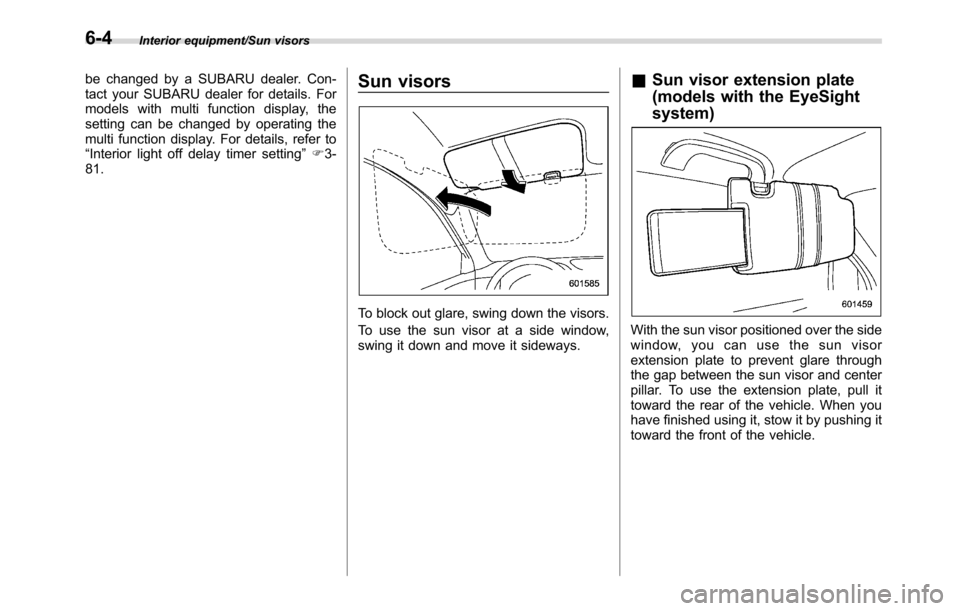
To block out glare, swing down the visors.
To use the sun visor at a side window,
swing it down and move it sideways.
&Sun visor extension plate
(models with the EyeSight
system)
With the sun visor positioned over the side
window, you can use the sun visor
extension plate to prevent glare through
the gap between the sun visor and center
pillar. To use the extension plate, pull it
toward the rear of the vehicle. When you
have finished using it, stow it by pushing it
toward the front of the vehicle.
6-4
Page 353 of 572
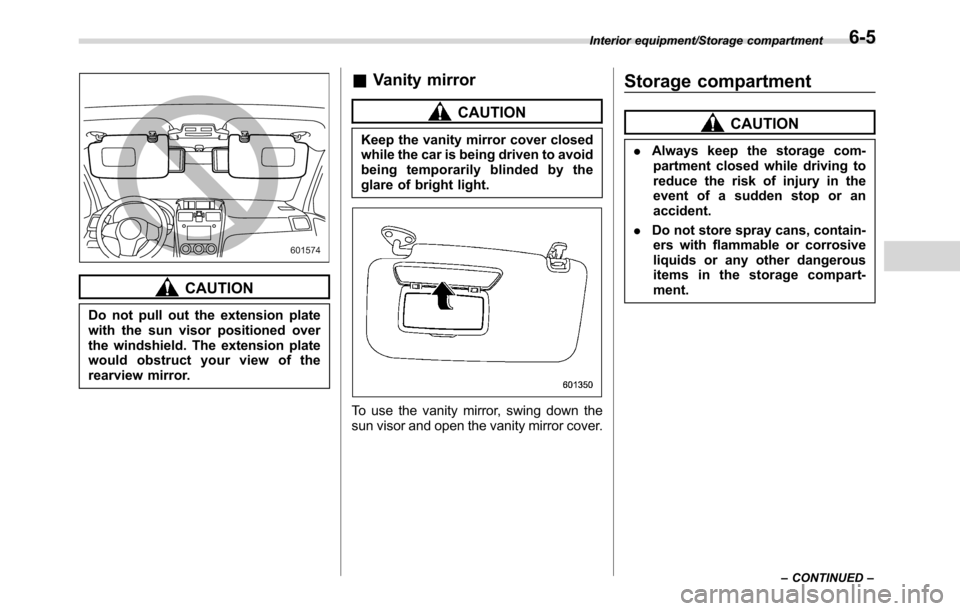
CAUTION
Do not pull out the extension plate
with the sun visor positioned over
the windshield. The extension plate
would obstruct your view of the
rearview mirror.
&Vanity mirror
CAUTION
Keep the vanity mirror cover closed
while the car is being driven to avoid
being temporarily blinded by the
glare of bright light.
To use the vanity mirror, swing down the
sun visor and open the vanity mirror cover.
Storage compartment
CAUTION
.Always keep the storage com-
partment closed while driving to
reduce the risk of injury in the
event of a sudden stop or an
accident.
.Do not store spray cans, contain-
ers with flammable or corrosive
liquids or any other dangerous
items in the storage compart-
ment.
Interior equipment/Storage compartment
–CONTINUED–6-5
Page 356 of 572
Interior equipment/Accessory power outlets
trim can be used to hold beverage bottles
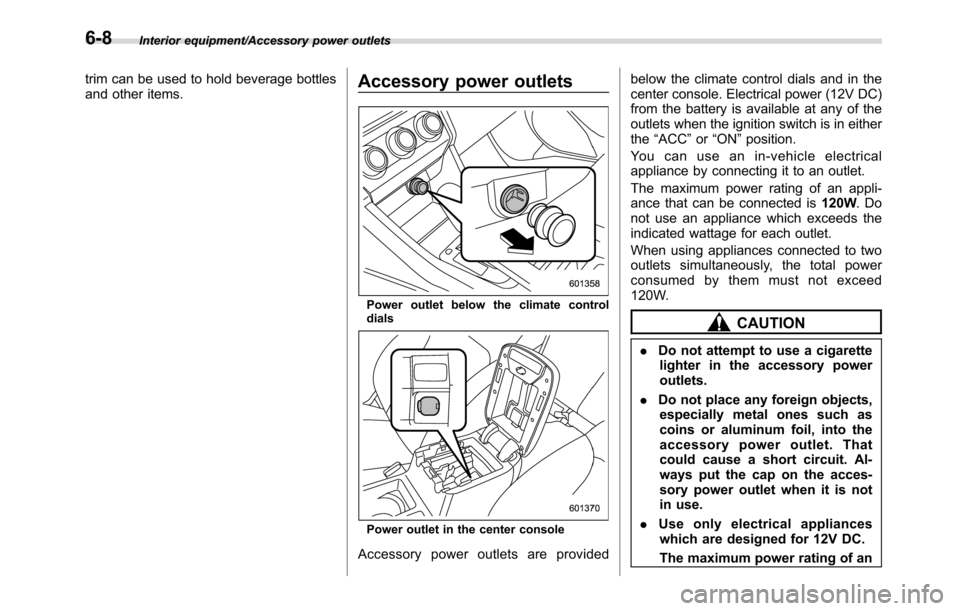
and other items.Accessory power outlets
Power outlet below the climate control
dials
Power outlet in the center console
Accessory power outlets are providedbelow the climate control dials and in the
center console. Electrical power (12V DC)
from the battery is available at any of the
outlets when the ignition switch is in either
the“ACC”or“ON”position.
You can use an in-vehicle electrical
appliance by connecting it to an outlet.
The maximum power rating of an appli-
ance that can be connected is120W.Do
not use an appliance which exceeds the
indicated wattage for each outlet.
When using appliances connected to two
outlets simultaneously, the total power
consumed by them must not exceed
120W.
CAUTION
.Do not attempt to use a cigarette
lighter in the accessory power
outlets.
.Do not place any foreign objects,
especially metal ones such as
coins or aluminum foil, into the
accessory power outlet. That
could cause a short circuit. Al-
ways put the cap on the acces-
sory power outlet when it is not
in use.
.Use only electrical appliances
which are designed for 12V DC.
The maximum power rating of an
6-8
Page 357 of 572
appliance that can be connected
is 120W. Do not use an appliance
which exceeds the indicated wat-
tage for each outlet.
When using appliances con-
nected to two outlets simulta-
neously, the total power con-
sumed by them must not exceed
120W. Overloading the accessory
power outlet can cause a short
circuit. Do not use double adap-
ters or more than one electrical
appliance.
.If the plug on your electric appli-
ance is either too loose or too
tight for the accessory power
outlet, this can result in a poor
contact or cause the plug to get
stuck. Only use plugs that fit
properly.
.Use of an electric appliance in the
accessory power outlet for a long
period of time while the engine is
not running can cause battery
discharge.
.Before driving your vehicle, make
sure that the plug and the cord
on your electrical appliance will
not interfere with your shifting
gears and operating the accel-
erator and brake pedals. If theydo, do not use the electrical
appliance while driving.
NOTE
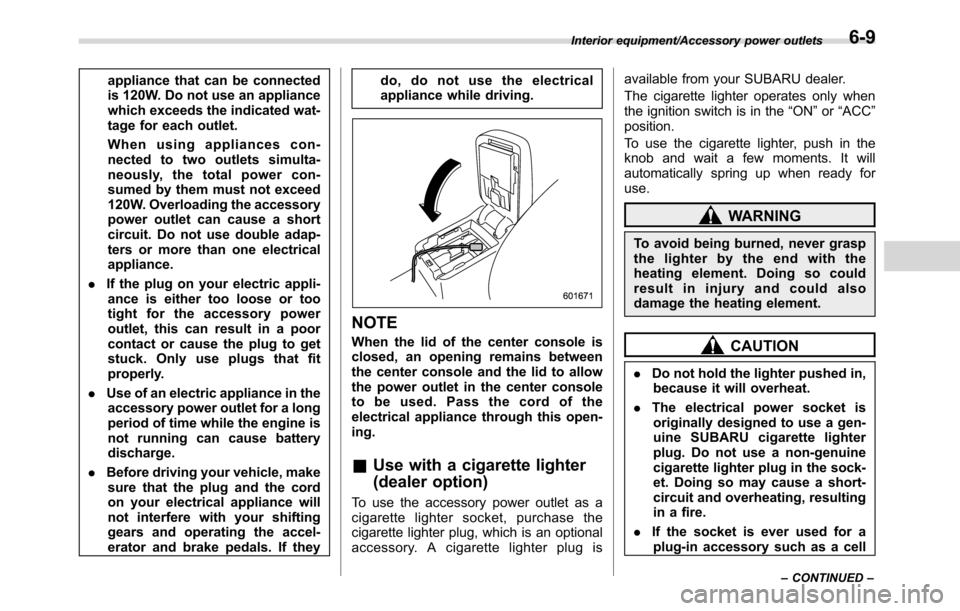
When the lid of the center console is
closed, an opening remains between
the center console and the lid to allow
the power outlet in the center console
to be used. Pass the cord of the
electrical appliance through this open-
ing.
&Use with a cigarette lighter
(dealer option)
To use the accessory power outlet as a
cigarette lighter socket, purchase the
cigarette lighter plug, which is an optional
accessory. A cigarette lighter plug isavailable from your SUBARU dealer.
The cigarette lighter operates only when
the ignition switch is in the“ON”or“ACC”
position.
To use the cigarette lighter, push in the
knob and wait a few moments. It will
automatically spring up when ready for
use.
WARNING
To avoid being burned, never grasp
the lighter by the end with the
heating element. Doing so could
result in injury and could also
damage the heating element.
CAUTION
.Do not hold the lighter pushed in,
because it will overheat.
.The electrical power socket is
originally designed to use a gen-
uine SUBARU cigarette lighter
plug. Do not use a non-genuine
cigarette lighter plug in the sock-
et. Doing so may cause a short-
circuit and overheating, resulting
in a fire.
.If the socket is ever used for a
plug-in accessory such as a cell
Interior equipment/Accessory power outlets
–CONTINUED–6-9
Page 358 of 572
Interior equipment/Ashtray (dealer option)
phone, that may damage the
portion of the socket’s internal
mechanism that causes a cigar-
ette lighter plug to“pop out”
after its lighter element is heated.
Therefore, do not place a cigar-
ette lighter plug in a socket that
has been used, even once, to
power a plug-in accessory. Doing
so may cause the plug to stick
and overheat, creating a potential
fire hazard.Ashtray (dealer option)
CAUTION
Observe the following precautions.
Not doing so could result in a fire.
.Always extinguish matches and
cigarettes before putting them
into the ashtray, and then close
the ashtray securely.
.Do not put flammable material in
the ashtray.
.Do not leave a lighted cigarette in
the ashtray.
.Do not leave a lot of cigarette
butts in the ashtray.
NOTE
Particles of ash and tobacco will accu-
mulate around the hinges of the ash-
tray’s inner lid. Clean them off using a
toothbrush or a similar narrow-ended
implement.
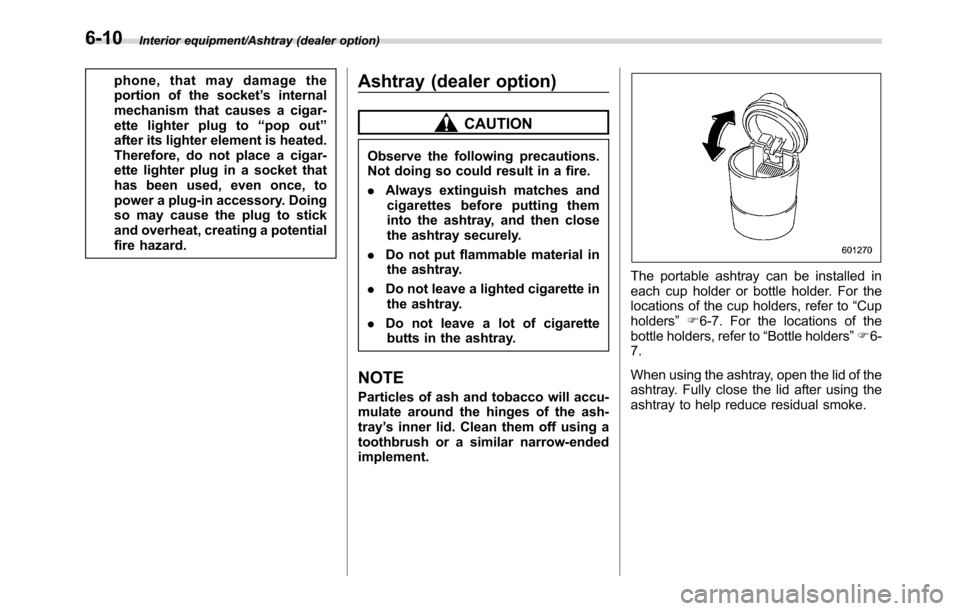
The portable ashtray can be installed in
each cup holder or bottle holder. For the
locations of the cup holders, refer to“Cup
holders”F6-7. For the locations of the
bottle holders, refer to“Bottle holders”F6-
7.
When using the ashtray, open the lid of the
ashtray. Fully close the lid after using the
ashtray to help reduce residual smoke.
6-10