display SUBARU CROSSTREK 2017 1.G Owners Manual
[x] Cancel search | Manufacturer: SUBARU, Model Year: 2017, Model line: CROSSTREK, Model: SUBARU CROSSTREK 2017 1.GPages: 572, PDF Size: 41.52 MB
Page 416 of 572
Starting and operating/BSD/RCTA
time by pressing the“RES/SET”switch to
the“SET”side quickly.
NOTE
If the“RES/SET”switch is repeatedly
operated quickly to the“SET”side, the
set vehicle speed displayed in the
combination meter becomes the low
speed setting. However, when the set
vehicle speed is set to a speed much
lower than the actual vehicle speed, the
set speed may be reset to the actual
vehicle speed.
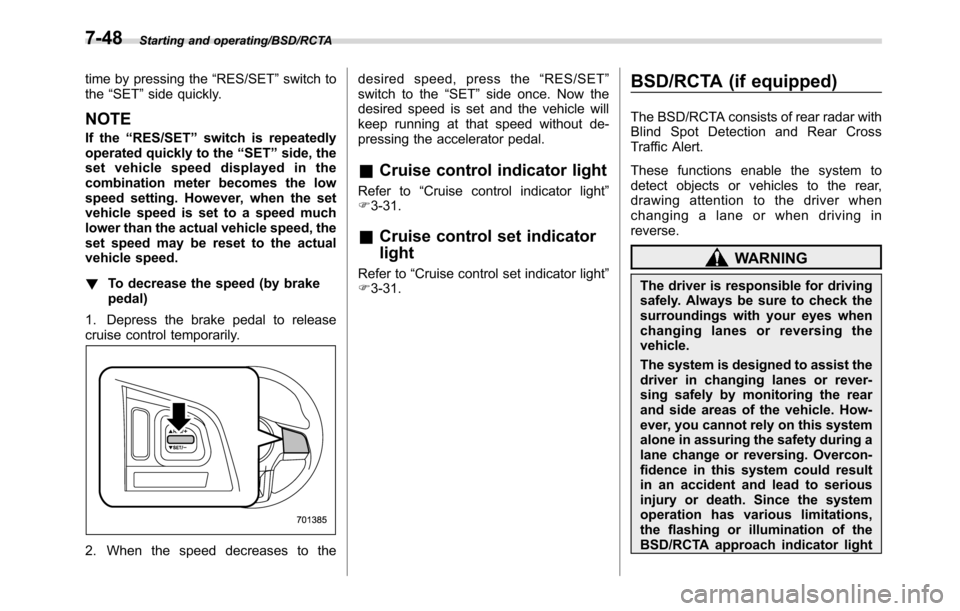
!To decrease the speed (by brake
pedal)
1. Depress the brake pedal to release
cruise control temporarily.
2. When the speed decreases to thedesired speed, press the“RES/SET”
switch to the“SET”side once. Now the
desired speed is set and the vehicle will
keep running at that speed without de-
pressing the accelerator pedal.
&Cruise control indicator light
Refer to“Cruise control indicator light”
F3-31.
&Cruise control set indicator
light
Refer to“Cruise control set indicator light”
F3-31.
BSD/RCTA (if equipped)
The BSD/RCTA consists of rear radar with
Blind Spot Detection and Rear Cross
Traffic Alert.
These functions enable the system to
detect objects or vehicles to the rear,
drawing attention to the driver when
changing a lane or when driving in
reverse.
WARNING
The driver is responsible for driving
safely. Always be sure to check the
surroundings with your eyes when
changing lanes or reversing the
vehicle.
The system is designed to assist the
driver in changing lanes or rever-
sing safely by monitoring the rear
and side areas of the vehicle. How-
ever, you cannot rely on this system
alone in assuring the safety during a
lane change or reversing. Overcon-
fidence in this system could result
in an accident and lead to serious
injury or death. Since the system
operation has various limitations,
the flashing or illumination of the
BSD/RCTA approach indicator light
7-48
Page 421 of 572
illumination brightness control dial,
refer to“Illumination brightness con-
trol”F3-92.
!BSD/RCTA approach warning buz-
zer (only when reversing)
A warning buzzer sounds along with
flashing of the BSD/RCTA approach in-
dicator light to warn the driver of dangers.
The setting of the warning buzzer volume
can be changed by operating the multi
information display of the combination
meter. For details, refer to“BSD/RCTA”
F3-42.
!Safety tips regarding the BSD/RCTA
approach indicator light/warning
buzzer
.In the following cases, operation of the
BSD/RCTA approach indicator light and
the warning buzzer may be delayed or the
system may fail to issue these warnings.
–When a vehicle moves to the
neighboring lane from a lane next to
the neighboring lane
–When driving on a steep incline or
on repeated sharp uphill and downhill
grades
–When going beyond a pass
–When both your vehicle and a
vehicle driving on a neighboring lane
are driving on the far side of each lane.–When several narrowly-spaced ve-
hicles are approaching in a row
–In low radius bends (tight bends or
when making turns at an intersection)
–When there is a difference in height
between your lane and the neighbor-
ing lane
–Immediately after the BSD/RCTA is
activated by pressing the BSD/RCTA
OFF switch
–Immediately after the shift lever/
select lever is shifted to the“R”
position
–When extremely heavy cargo is
loaded in the cargo area
.During reversing, operation of the BSD/
RCTA approach indicator light and the
warning buzzer may be delayed or the
system may fail to issue these warnings
under the following conditions.
–When backing out of an angled
parking space
–When a large-sized vehicle is
parked next to your vehicle (That
vehicle prevents the propagation of
radar waves.)
–When reversing on sloped roads
–When reversing at a high speed
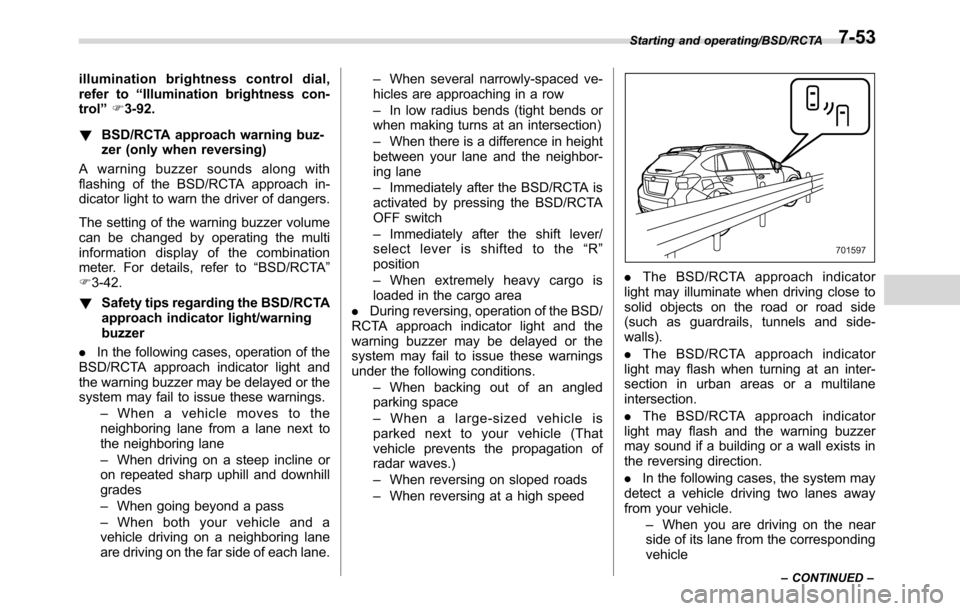
.The BSD/RCTA approach indicator
light may illuminate when driving close to
solid objects on the road or road side
(such as guardrails, tunnels and side-
walls).
.The BSD/RCTA approach indicator
light may flash when turning at an inter-
section in urban areas or a multilane
intersection.
.The BSD/RCTA approach indicator
light may flash and the warning buzzer
may sound if a building or a wall exists in
the reversing direction.
.In the following cases, the system may
detect a vehicle driving two lanes away
from your vehicle.
–When you are driving on the near
side of its lane from the corresponding
vehicle
Starting and operating/BSD/RCTA
–CONTINUED–7-53
Page 422 of 572
Starting and operating/BSD/RCTA
–When the vehicle driving two lanes
away is driving on the near side of its
lane from your vehicle
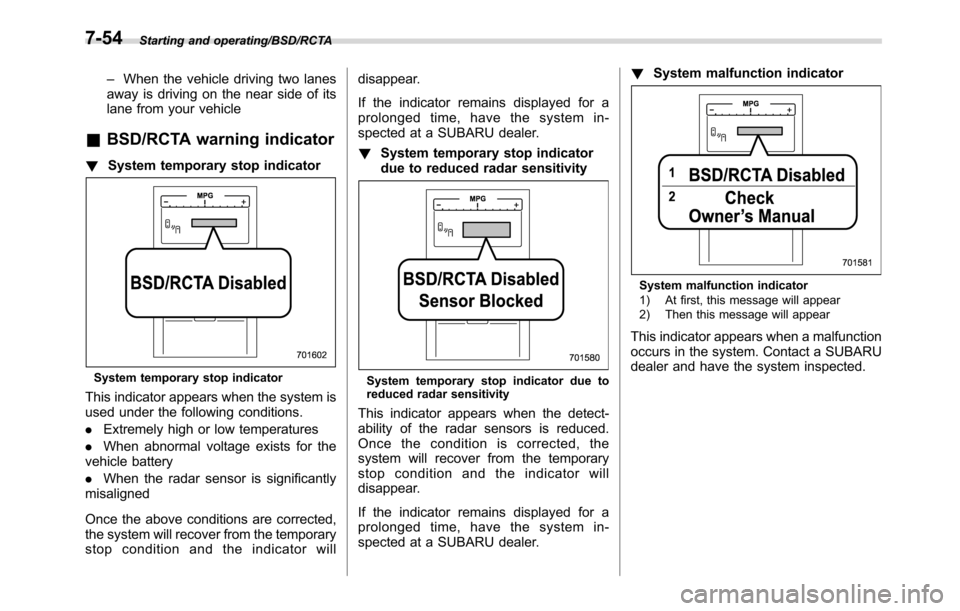
&BSD/RCTA warning indicator
!System temporary stop indicator
System temporary stop indicator
This indicator appears when the system is
used under the following conditions.
.Extremely high or low temperatures
.When abnormal voltage exists for the
vehicle battery
.When the radar sensor is significantly
misaligned
Once the above conditions are corrected,
the system will recover from the temporary
stop condition and the indicator willdisappear.
If the indicator remains displayed for a
prolonged time, have the system in-
spected at a SUBARU dealer.
!System temporary stop indicator
due to reduced radar sensitivity
System temporary stop indicator due to
reduced radar sensitivity
This indicator appears when the detect-
ability of the radar sensors is reduced.
Once the condition is corrected, the
system will recover from the temporary
stop condition and the indicator will
disappear.
If the indicator remains displayed for a
prolonged time, have the system in-
spected at a SUBARU dealer.!System malfunction indicator
System malfunction indicator
1) At first, this message will appear
2) Then this message will appear
This indicator appears when a malfunction
occurs in the system. Contact a SUBARU
dealer and have the system inspected.
7-54
Page 423 of 572
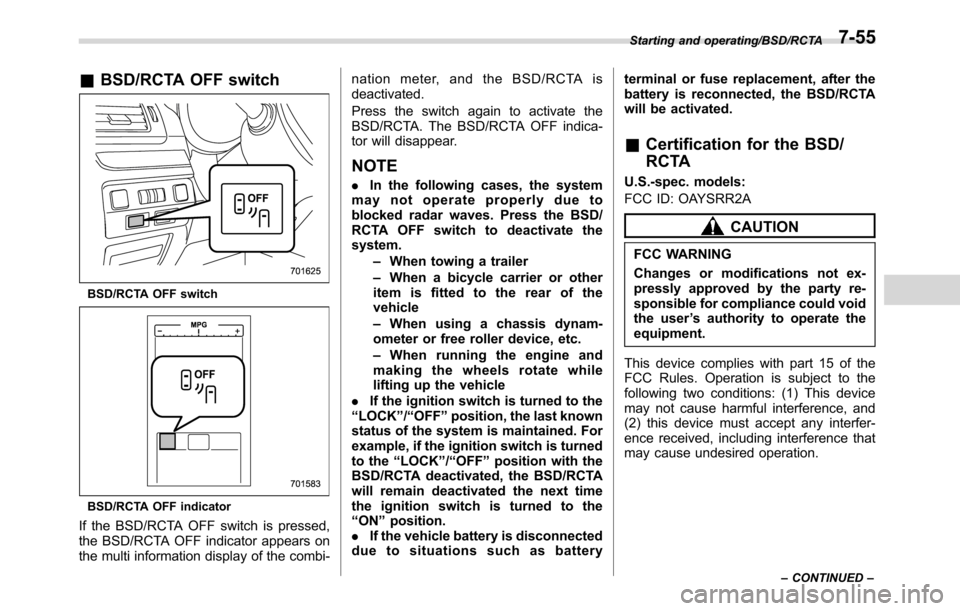
&BSD/RCTA OFF switch
BSD/RCTA OFF switch
BSD/RCTA OFF indicator
If the BSD/RCTA OFF switch is pressed,
the BSD/RCTA OFF indicator appears on
the multi information display of the combi-nation meter, and the BSD/RCTA is
deactivated.
Press the switch again to activate the
BSD/RCTA. The BSD/RCTA OFF indica-
tor will disappear.
NOTE
.In the following cases, the system
may not operate properly due to
blocked radar waves. Press the BSD/
RCTA OFF switch to deactivate the
system.
–When towing a trailer
–When a bicycle carrier or other
item is fitted to the rear of the
vehicle
–When using a chassis dynam-
ometer or free roller device, etc.
–When running the engine and
making the wheels rotate while
lifting up the vehicle
.If the ignition switch is turned to the
“LOCK”/“OFF”position, the last known
status of the system is maintained. For
example, if the ignition switch is turned
to the“LOCK”/“OFF”position with the
BSD/RCTA deactivated, the BSD/RCTA
will remain deactivated the next time
the ignition switch is turned to the
“ON”position.
.If the vehicle battery is disconnected
duetosituationssuchasbatteryterminal or fuse replacement, after the
battery is reconnected, the BSD/RCTA
will be activated.
&Certification for the BSD/
RCTA
U.S.-spec. models:
FCC ID: OAYSRR2A
CAUTION
FCC WARNING
Changes or modifications not ex-
pressly approved by the party re-
sponsible for compliance could void
the user’s authority to operate the
equipment.
This device complies with part 15 of the
FCC Rules. Operation is subject to the
following two conditions: (1) This device
may not cause harmful interference, and
(2) this device must accept any interfer-
ence received, including interference that
may cause undesired operation.
Starting and operating/BSD/RCTA
–CONTINUED–7-55
Page 454 of 572
In case of emergency/If you park your vehicle in case of an emergency
If you park your vehicle in
case of an emergency
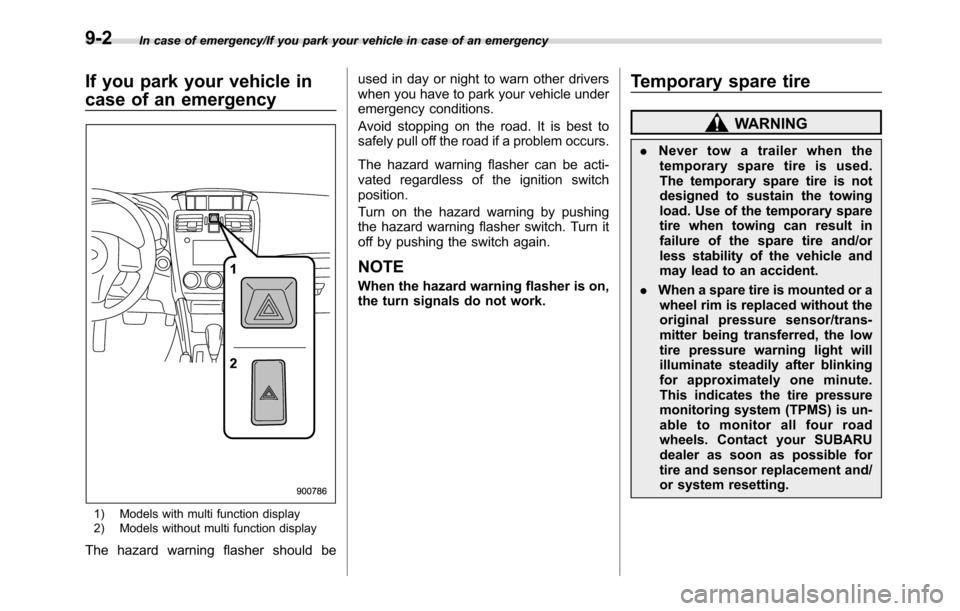
1) Models with multi function display
2) Models without multi function display
The hazard warning flasher should beused in day or night to warn other drivers
when you have to park your vehicle under
emergency conditions.
Avoid stopping on the road. It is best to
safely pull off the road if a problem occurs.
The hazard warning flasher can be acti-
vated regardless of the ignition switch
position.
Turn on the hazard warning by pushing
the hazard warning flasher switch. Turn it
off by pushing the switch again.
NOTE
When the hazard warning flasher is on,
the turn signals do not work.
Temporary spare tire
WARNING
.Never tow a trailer when the
temporary spare tire is used.
The temporary spare tire is not
designed to sustain the towing
load. Use of the temporary spare
tire when towing can result in
failure of the spare tire and/or
less stability of the vehicle and
may lead to an accident.
.When a spare tire is mounted or a
wheel rim is replaced without the
original pressure sensor/trans-
mitter being transferred, the low
tire pressure warning light will
illuminate steadily after blinking
for approximately one minute.
This indicates the tire pressure
monitoring system (TPMS) is un-
able to monitor all four road
wheels. Contact your SUBARU
dealer as soon as possible for
tire and sensor replacement and/
or system resetting.
9-2
Page 478 of 572
Appearance care/Cleaning the interior
genuine leather.
&Synthetic leather upholstery
The synthetic leather material used on the
SUBARU may be cleaned using mild soap
or detergent and water, after first vacuum-
ing or brushing away loose dirt. Allow the
soap to soak in for a few minutes and wipe
off with a clean, damp cloth. Commercial
foam-type cleaners suitable for synthetic
leather materials may be used when
necessary.
CAUTION
Strong cleaning agents such as
solvents, paint thinners, window
cleaner or fuel must never be used
on leather or synthetic interior ma-
terials. Doing so could damage the
surface and cause the color to
deteriorate.
&Climate control panel, audio
panel, instrument panel,
console panel, and switches
Use a soft, damp cloth to clean the climate
control panel, audio equipment, instru-
ment panel, center console, combination
meter panel, and switches.
CAUTION
.Do not use organic solvents such
as paint thinners or fuel, or
strong cleaning agents that con-
tain those solvents. Doing so
could damage the surface and
cause the color to deteriorate.
.Do not use chemical solvents
that contain silicone on the vehi-
cle audio system, electrical com-
ponents of the air-conditioner or
any switches. If silicone adheres
to these parts, it may cause
damage to electrical compo-
nents.
&Monitor (if equipped)
To clean the audio/navigation/multi func-
tion display monitor, wipe it with a silicone
cloth or with a soft cloth. If the monitor is
extremely dirty, clean it with a soft cloth
moistened with neutral detergent then
carefully wipe off any remaining detergent.
CAUTION
.Do not spray neutral detergent
directly onto the monitor. Doing
so could damage the monitor’s
components.
.Do not wipe the monitor with a
hard cloth. Doing so could
scratch the monitor.
.Do not use cleaning fluid that
contains thinner, fuel, or any
other volatile substance. Such
cleaning fluid could erase the
lettering on the switches at the
bottom of the monitor.
10-6
Page 481 of 572
Maintenance schedule
U.S. models
The scheduled maintenance items re-
quired to be serviced at regular intervals
are shown in the“Warranty and Main-
tenance Booklet”. For details, read the
separate“Warranty and Maintenance
Booklet”.
Canada models
The scheduled maintenance items re-
quired to be serviced at regular intervals
are shown in the“Warranty and Service
Booklet”. For details, read the separate
“Warranty and Service Booklet”.
Except for U.S. and Canada models
Some items of your vehicle are required to
be serviced at scheduled intervals. For
details about your maintenance schedule,
read the separate“Warranty and Main-
tenance Booklet”.
NOTE
For models with a multi function dis-
play, you can set a reminder to be
displayed when a scheduled mainte-
nance item is almost due. For details,
refer to“Maintenance settings”F3-73.
Maintenance precautions
When maintenance and service are re-
quired, it is recommended that all work be
done by an authorized SUBARU dealer.
If you perform maintenance and service
by yourself, you should familiarize yourself
with the information provided in this
section on general maintenance and
service for your SUBARU.
Incorrect or incomplete service could
cause improper or unsafe vehicle opera-
tion. Any problems caused by improper
maintenance and service performed by
you are not eligible for warranty coverage.
WARNING
.Always select a safe area when
performing maintenance on your
vehicle.
.Always be very careful to avoid
injury when working on the vehi-
cle. Remember that some of the
materials in the vehicle may be
hazardous if improperly used or
handled, for example, battery
acid.
.Your vehicle should only be ser-
viced by persons fully competent
to do so. Serious personal injurymay result to persons not experi-
enced in servicing vehicles.
.Always use the proper tools and
make certain that they are well
maintained.
.Never get under the vehicle sup-
ported only by a jack. Always use
safety stands to support the
vehicle.
.Never keep the engine running in
a poorly ventilated area, such as
a garage or other closed areas.
.Do not smoke or allow open
flames around the fuel or battery.
This will cause a fire.
.Because the fuel system is under
pressure, replacement of the fuel
filter should be performed only
by your SUBARU dealer.
.Wear adequate eye protection to
guard against getting oil or fluids
in your eyes. If something does
get in your eyes, thoroughly
wash them out with clean water.
.Do not tamper with the wiring of
the SRS airbag system or seat-
belt pretensioner system, or at-
tempt to take its connectors
apart, as that may activate the
system or it can render it inop-
Maintenance and service/Maintenance schedule
–CONTINUED–11-3
Page 558 of 572

14-2Index
A
Abbreviation................................................................... 3
ABS (Anti-lock Brake System)..................................... 7-32
Warning light......................................................... 3-21
Access key................................................................. 2-9
Warning indicator................................................... 3-25
Accessories.............................................................. 11-36
Accessory power outlet................................................. 6-8
Air cleaner element................................................... 11-12
Air conditioner
Automatic climate control.......................................... 4-7
Manual climate control.............................................. 4-8
Air filtration system..................................................... 4-12
Air flow mode.............................................................. 4-8
Alarm system............................................................ 2-26
All-Wheel Drive warning light....................................... 3-23
Aluminum wheel....................................................... 11-28
Cleaning............................................................... 10-3
Antenna...................................................................... 5-2
Anti-lock Brake System (ABS)..................................... 7-32
Arming the system..................................................... 2-27
Armrest....................................................................... 1-8
Ashtray..................................................................... 6-10
AT OIL TEMP warning light......................................... 3-19
Audio
aha
TMby HARMAN................................................ 5-43
AM/FM radio......................................................... 5-28
AUX ..................................................................... 5-60
Base display audio set.............................................. 5-4
Basic operation...................................................... 5-18
Bluetooth audio...................................................... 5-57CD ....................................................................... 5-52
iPod...................................................................... 5-55
Pandora
®.............................................................. 5-49
SiriusXM Satellite Radio.......................................... 5-37
STARLINK
TM7.0 Multimedia Plus audio set................ 5-6
Steering switches for audio...................................... 5-62
SUBARU STARLINK............................................... 5-26
Unit setting............................................................ 5-19
USB memory......................................................... 5-54
Auto on/off headlights................................................. 3-89
Automatic headlight beam leveler................................. 3-93
Warning light.......................................................... 3-31
Automatic Locking Retractor/Emergency Locking
Retractor (ALR/ELR)................................................ 1-12
B
Battery
Drainage prevention function..................................... 2-7
Jump starting......................................................... 9-10
Replacement (access key)..................................... 11-42
Replacement (transmitter)...................................... 11-43
Vehicle battery..................................................... 11-33
Bluetooth
®
Audio.................................................................... 5-57
Hands-free phone system........................................ 5-70
Settings................................................................. 5-65
Troubleshooting...................................................... 5-88
Bluetooth
®settings..................................................... 5-65
Booster seat.............................................................. 1-31
Bottle holder............................................................... 6-7
Page 562 of 572
14-6Index
Warning light......................................................... 3-22
Hook
Cargo tie-down...................................................... 6-14
Coat..................................................................... 6-11
Shopping bag........................................................ 6-12
Towing and tie-down............................................... 9-13
Horn....................................................................... 3-102
Hose and connections............................................... 11-11
I
Ignition switch.............................................................. 3-4
Light....................................................................... 3-6
Illumination brightness control...................................... 3-92
Immobilizer.................................................................. 2-3
Indicator light (security indicator light)....................... 3-30
Indicator light
BSD/RCTA OFF..................................................... 3-32
BSD/RCTA warning................................................ 3-32
Coolant temperature low......................................... 3-17
Cruise control........................................................ 3-31
Cruise control set................................................... 3-31
Front fog light........................................................ 3-31
Headlight.............................................................. 3-32
High beam............................................................ 3-31
Hill start assist OFF................................................ 3-23
Immobilizer............................................................ 3-30
Security................................................................ 3-30
Select lever/Gear position....................................... 3-30
Steering responsive fog lights OFF........................... 3-32
Turn signal............................................................ 3-31
Vehicle Dynamics Control OFF................................ 3-25Vehicle Dynamics Control operation .......................... 3-24
Information display...................................................... 3-32
Inside mirror.............................................................. 3-99
Interior lights............................................................... 6-2
J
Jack-up point.............................................................. 9-5
Jump starting............................................................. 9-10
K
Key............................................................................ 2-3
Number plate.......................................................... 2-3
Reminder chime...................................................... 3-5
Replacement........................................................... 2-4
Keyless access entry function...................................... 2-13
Keyless access with push-button start system................. 2-9
Disabling keyless access functions........................... 2-17
Locking and unlocking doors.................................... 2-13
Opening rear gate.................................................. 2-15
Warning chimes and warning indicator...................... 3-25
When access key does not operate properly.............. 9-17
Keyless entry system.................................................. 2-22
L
Leather seat materials................................................. 10-5
License plate light..................................................... 11-40
Light
Backup
............................................................... 11-38
Cargo area.................................................... 6-2, 11-41
Control switch........................................................ 3-88
Daytime running..................................................... 3-91
Page 563 of 572
Dome........................................................... 6-2, 11-41
Front fog...................................................... 3-93, 11-38
Front side marker......................................... 3-89, 12-13
Ignition switch.......................................................... 3-6
License plate........................................................ 11-40
Map ............................................................. 6-3, 11-40
Parking................................................................ 11-38
Rear combination.................................................. 11-38
Rear side marker light........................................... 11-38
Stop.................................................................... 11-38
Tail...................................................................... 11-38
Turn signal................................................... 3-92, 11-38
Loading your vehicle.................................................. 8-12
Low fuel warning light................................................. 3-22
Low tire pressure warning light.................................... 3-19
Lower and tether anchorage........................................ 1-33
M
Maintenance
Precautions........................................................... 11-3
Schedule.............................................................. 11-3
Seatbelt................................................................ 1-20
Tools...................................................................... 9-3
Malfunction indicator light (check engine warning light) ... 3-16
Manual
Transmission......................................................... 7-22
Transmission oil.................................................... 11-14
Manual mode............................................................ 7-26
Map light........................................................... 6-3, 11-40
Maximum load limits................................................... 8-18
Meters and gauges...................................................... 3-9Mirror defogger........................................................ 3-100
Mirrors...................................................................... 3-99
Moonroof................................................................... 2-39
Multi function display................................................... 3-42
Multi information display.............................................. 3-38
N
New vehicle break-in driving......................................... 8-2
O
Odometer.................................................................. 3-10
Off road driving........................................................... 8-6
Oil filter..................................................................... 11-9
Oil level
Engine.................................................................. 11-8
Front differential gear............................................ 11-15
Rear differential gear............................................ 11-15
Warning light.......................................................... 3-18
Oil pressure warning light............................................ 3-18
Outside
Mirror defogger.................................................... 3-100
Mirrors.................................................................. 3-99
Temperature indicator...................................... 3-33, 3-47
Overheating engine.................................................... 9-12
P
Parking
Brake.................................................................... 7-39
Brake stroke........................................................ 11-20
Light................................................................... 11-38
Tips ...................................................................... 7-39
Index14-7