change time SUBARU CROSSTREK 2018 User Guide
[x] Cancel search | Manufacturer: SUBARU, Model Year: 2018, Model line: CROSSTREK, Model: SUBARU CROSSTREK 2018Pages: 474, PDF Size: 20.76 MB
Page 144 of 474
(149,1)
北米Model "A1320BE-C" EDITED: 2017/ 10/ 10
If the ECO gauge moves towards the +
side, this indicates better fuel efficiency.NOTE.The ECO gauge shows only an
approximate indication of fuel effi-
ciency.
.After resetting the trip meter, the
average rate of fuel consumption is not
shown until you have driven for 1 mile
(or 1 km). Before that time, the ECO
gauge does not operate.&Combination meter settingsMeter and vehicle settings can be set on
the combination meter.
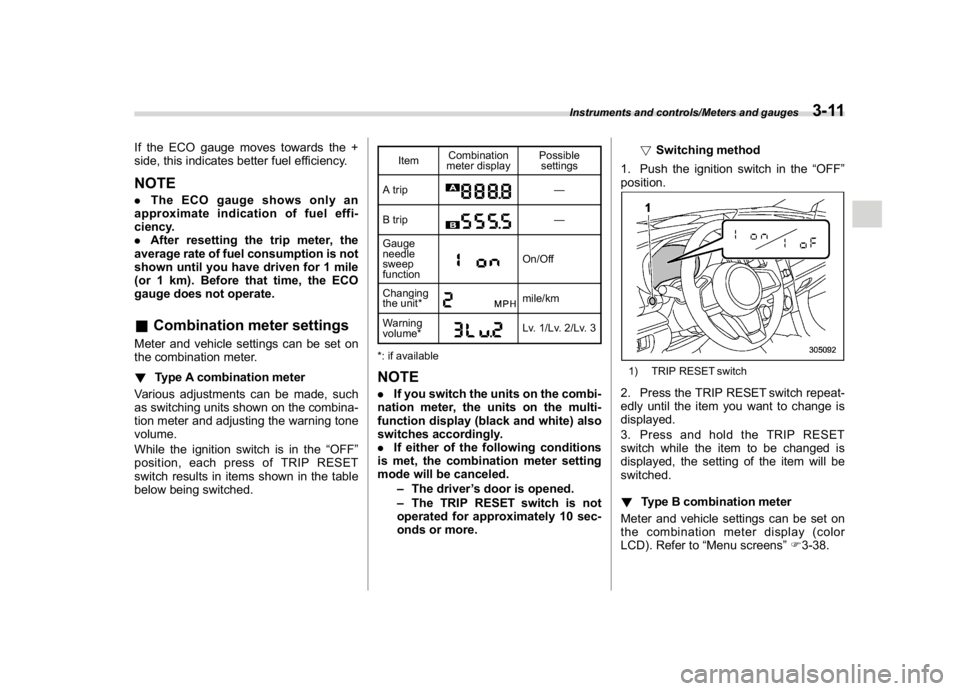
!Type A combination meter
Various adjustments can be made, such
as switching units shown on the combina-
tion meter and adjusting the warning tone
volume.
While the ignition switch is in the“OFF”
position, each press of TRIP RESET
switch results in items shown in the table
below being switched.
ItemCombination
meter displayPossible
settings
A trip
—
B trip—
Gauge
needle
sweep
function
On/Off
Changing
the unit*mile/km
Warning
volume*Lv. 1/Lv. 2/Lv. 3
*: if available
NOTE.If you switch the units on the combi-
nation meter, the units on the multi-
function display (black and white) also
switches accordingly.
.If either of the following conditions
is met, the combination meter setting
mode will be canceled.
–The driver’s door is opened.
–The TRIP RESET switch is not
operated for approximately 10 sec-
onds or more.!Switching method
1. Push the ignition switch in the“OFF”
position.
1) TRIP RESET switch2. Press the TRIP RESET switch repeat-
edly until the item you want to change is
displayed.
3. Press and hold the TRIP RESET
switch while the item to be changed is
displayed, the setting of the item will be
switched.
!Type B combination meter
Meter and vehicle settings can be set on
the combination meter display (color
LCD). Refer to“Menu screens”F3-38.
Instruments and controls/Meters and gauges
3-11
3
Page 150 of 474
(155,1)
北米Model "A1320BE-C" EDITED: 2017/ 10/ 10
ing. After that, have the sys-
tem checked by your nearest
SUBARU dealer. Refer to“En-
gine overheating”F9-12.
–Blinking in RED and BLUE
alternately:
The electrical system may be
malfunctioning. Contact your
SUBARU dealer for an inspec-
tion.
This coolant temperature low indicator
light/coolant temperature high warning
light has the following three functions.
.Illumination inBLUEindicates insuffi-
cient warming up of the engine
.Blinking inREDindicates that the
engine is close to overheating
.Illumination inREDindicates overheat-
ing condition of the engine
For a system check, this indicator light/
warning light illuminates inREDfor ap-
proximately 2 seconds when the ignition
switch is turned to the“ON”position. After
that, this indicator light/warning light
changes toBLUEand maintains illumina-
tion inBLUE. ThisBLUEilluminated light
turns off when the engine is warmed up
sufficiently.
If the engine coolant temperature in-creases over the specified range, the
indicator light/warning light blinks inRED.
At this time, the engine is close to over-
heating.
If the engine coolant temperature in-
creases further, the indicator light/warning
light illuminates inREDcontinuously. At
this time, the engine may be overheating.
When the indicator light/warning light
blinks inREDor illuminates inRED, safely
stop the vehicle as soon as possible, and
refer to the emergency steps to take in the
case of engine overheating. Refer to
“Engine overheating”F9-12. After that,
have the system checked by your nearest
SUBARU dealer.
Also, if the indicator light/warning light
often blinks inRED, the electrical system
may be malfunctioning. Contact your
SUBARU dealer for an inspection.
NOTEIf the engine is restarted after a certain
driving condition, this indicator light/
warning light may illuminate in RED.
However, this is not a malfunction if the
indicator light/warning light turns off
after a short time.
&Charge warning lightIf this light illuminates when the engine is
running, it may indicate that the charging
system is not working properly.
If the light illuminates while driving or does
not turn off after the engine starts, stop the
engine at the first safe opportunity and
check the alternator belt. If the belt is
loose, broken or if the belt is in good
condition but the light remains illuminated,
contact your nearest SUBARU dealer
immediately.&Oil pressure warning
lightIf this light illuminates when the engine is
running, it may indicate that the engine oil
pressure is low and the lubricating system
is not working properly.
If the light illuminates while driving or does
not turn off after the engine starts, stop the
engine at the first safe opportunity and
check the engine oil level. If the oil level is
low, add oil immediately. If the engine oil is
at the proper level but the light remains
illuminated, contact your nearest
SUBARU dealer immediately.
For details about checking the engine oil
level or adding the engine oil, refer to
“Engine oil”F11-8.
–CONTINUED–
Instruments and controls/Warning and indicator
3-17
3
Page 173 of 474
(178,1)
北米Model "A1320BE-C" EDITED: 2017/ 10/ 10
1st menu2nd menu 3rd menu
Vehicle Setting Keyless Entry System Audible Signal (if equipped)
Hazard Warning Flasher
Security Relocking (if equipped)
Driver Door Unlock (if equipped)
Rear Gate/Trunk Unlock (if equipped)
Defogger―
Interior Light―
Auto Light Sensor (if equipped)―
Welcome Lighting (if equipped) Approaching Time Set
Leaving Time Set
One-touch lane changer―
Default Settings――
Instruments and controls/Combination meter display (color LCD)
3-40
Page 175 of 474
(180,1)
北米Model "A1320BE-C" EDITED: 2017/ 10/ 10
doors to unlock simultaneously when
accessing from the cargo area.
!Defogger
Sets and customizes the operation of the
defogger.
!Interior Light
Sets and customizes the interior light off
delay timer.
!Auto Light Sensor (if equipped)
Sets and customizes the sensitivity of the
auto light sensor.
!Welcome Lighting (if equipped)
Sets the leaving time and approaching
time.
.Approaching time set
Sets the illumination time of the headlights
that illuminate when you approach the
vehicle.
.Leaving time set
Sets the time until the headlights turn off
when you have moved away from the
vehicle.
!One-touch lane changer
Sets the one-touch lane changer on/off.!Default Settings
Select“Ye s”to use the menu screen to
restore customized settings to the factory
default settings. Select“No”to return to the
previous screen without restoring to the
factory default settings.
Multi-function display (black
and white)NOTEFor models with multi-function display
(color LCD), refer to“Multi-function
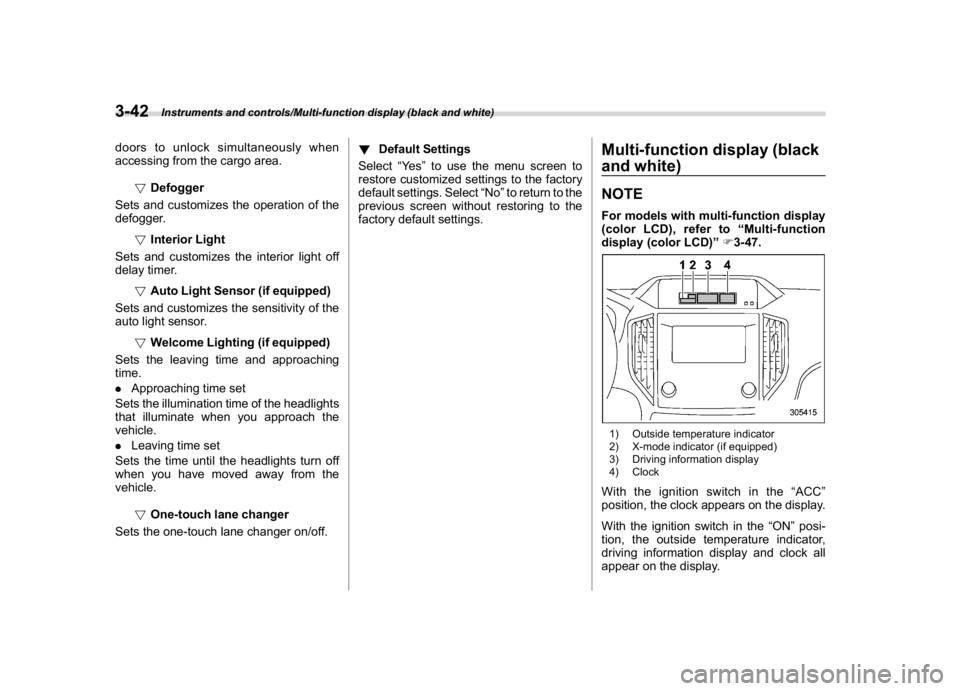
display (color LCD)”F3-47.1) Outside temperature indicator
2) X-mode indicator (if equipped)
3) Driving information display
4) ClockWith the ignition switch in the“ACC”
position, the clock appears on the display.
With the ignition switch in the“ON”posi-
tion, the outside temperature indicator,
driving information display and clock all
appear on the display.
Instruments and controls/Multi-function display (black and white)
3-42
Page 176 of 474
(181,1)
北米Model "A1320BE-C" EDITED: 2017/ 10/ 10
NOTEThe indicated values vary in accor-
dance with changes in the vehicle’s
running conditions. Also, the indicated
values may differ slightly from the
actual values and should thus be
treated only as a guide.&Driving information display
NOTEYou can set the units for both the multi-
function display (black and white) and
the combination meter at the same
time. For details about setting the
language and units, refer to“Type A
combination meter”F3-11 or“Menu
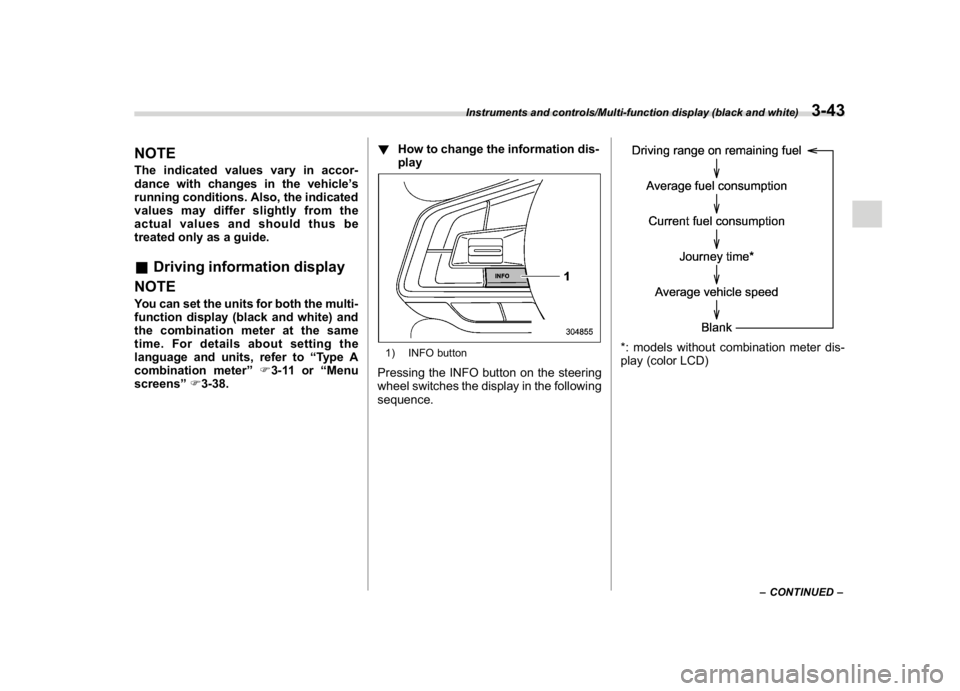
screens”F3-38.!How to change the information dis-
play
1) INFO buttonPressing the INFO button on the steering
wheel switches the display in the following
sequence.
*: models without combination meter dis-
play (color LCD)
–CONTINUED–
Instruments and controls/Multi-function display (black and white)
3-43
3
Page 178 of 474
(183,1)
北米Model "A1320BE-C" EDITED: 2017/ 10/ 10
1) TRIP RESET switchPress the TRIP RESET switch to switch
between the displays for the average fuel
consumption that corresponds to the A trip
meter mileage and the average fuel con-
sumption that corresponds to the B trip
meter mileage.
When the trip meter displays is reset, the
corresponding average fuel consumption
value is also reset.NOTE.When the trip meter display is reset,
the average fuel consumption corre-
sponding to that trip meter display is
not shown until the vehicle has subse-
quently covered a distance of 1 mile (or
1 km).
.The units for measuring average fuelconsumption cannot be changed.
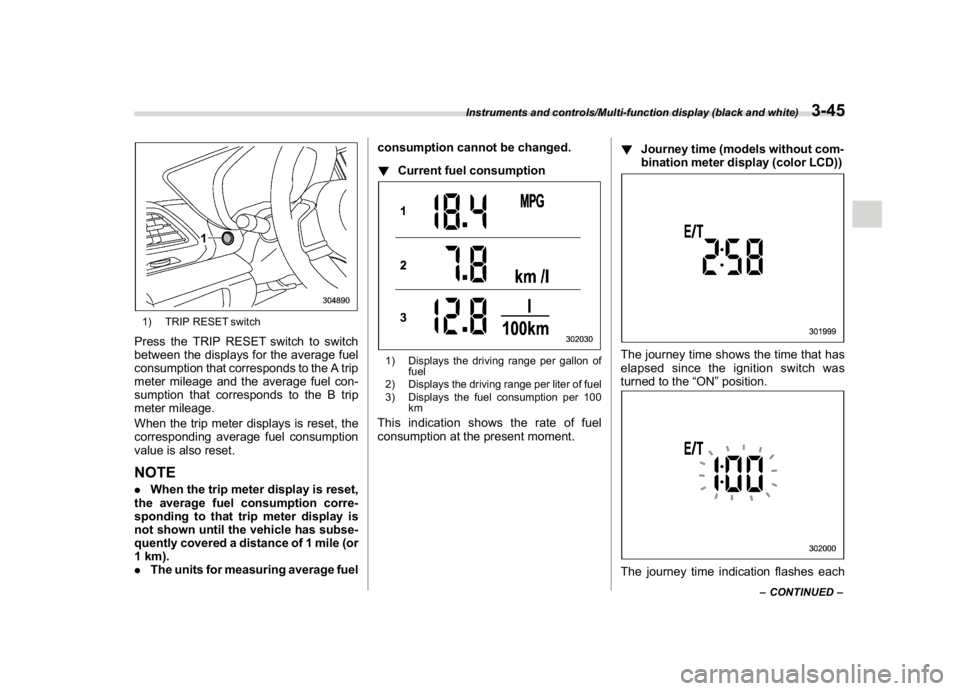
!Current fuel consumption
1) Displays the driving range per gallon of
fuel
2) Displays the driving range per liter of fuel
3) Displays the fuel consumption per 100
kmThis indication shows the rate of fuel
consumption at the present moment.!Journey time (models without com-
bination meter display (color LCD))
The journey time shows the time that has
elapsed since the ignition switch was
turned to the“ON”position.The journey time indication flashes each
–CONTINUED–
Instruments and controls/Multi-function display (black and white)
3-45
3
Page 179 of 474
(184,1)
北米Model "A1320BE-C" EDITED: 2017/ 10/ 10
time a complete hour has elapsed. If the
display is giving a reading other than the
journey time, the display switches to the
journey time, flashes for 5 seconds, and
returns to its original reading each time a
complete hour has elapsed.NOTEThe journey time is reset when the
ignition switch is turned to the“ACC”
or“LOCK”/“OFF”position.
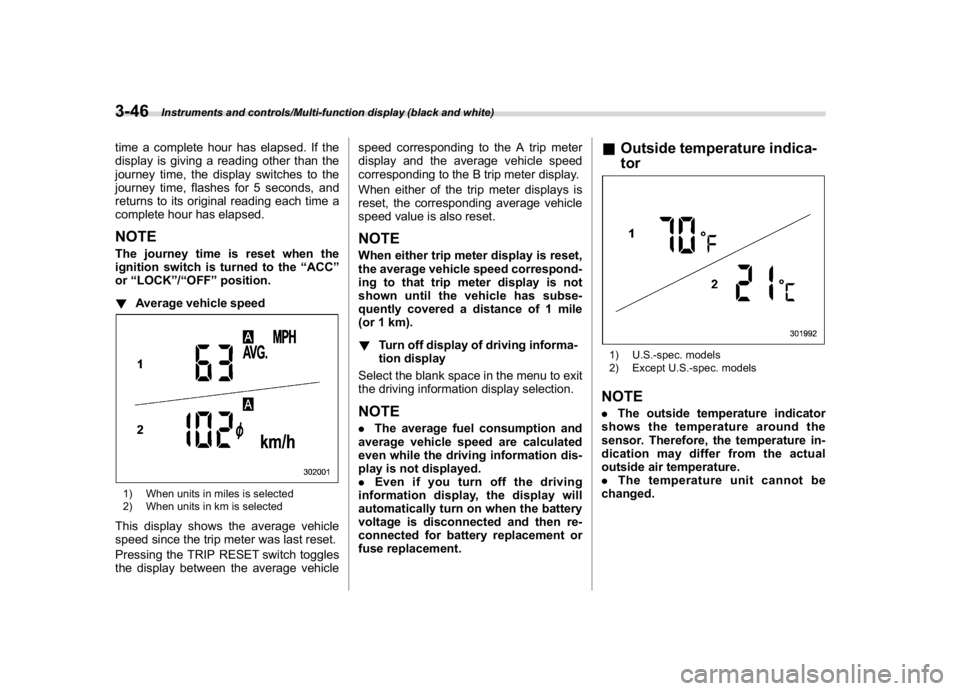
!Average vehicle speed1) When units in miles is selected
2) When units in km is selectedThis display shows the average vehicle
speed since the trip meter was last reset.
Pressing the TRIP RESET switch toggles
the display between the average vehiclespeed corresponding to the A trip meter
display and the average vehicle speed
corresponding to the B trip meter display.
When either of the trip meter displays is
reset, the corresponding average vehicle
speed value is also reset.
NOTEWhen either trip meter display is reset,
the average vehicle speed correspond-
ing to that trip meter display is not
shown until the vehicle has subse-
quently covered a distance of 1 mile
(or 1 km).
!Turn off display of driving informa-
tion display
Select the blank space in the menu to exit
the driving information display selection.NOTE.The average fuel consumption and
average vehicle speed are calculated
even while the driving information dis-
play is not displayed.
.Even if you turn off the driving
information display, the display will
automatically turn on when the battery
voltage is disconnected and then re-
connected for battery replacement or
fuse replacement.
&Outside temperature indica-
tor1) U.S.-spec. models
2) Except U.S.-spec. modelsNOTE.The outside temperature indicator
shows the temperature around the
sensor. Therefore, the temperature in-
dication may differ from the actual
outside air temperature.
.The temperature unit cannot be
changed.
Instruments and controls/Multi-function display (black and white)
3-46
Page 182 of 474
(187,1)
北米Model "A1320BE-C" EDITED: 2017/ 10/ 10
item will change.
If there is a notification, the message will
be displayed. Take the appropriate actions
based on the message indicated.
After the self-check is completed, today’s
date, the stored birthday or the stored
anniversary is displayed.NOTE.After performing the maintenance,
change the setting of the correspond-
ing maintenance item. For details, refer
to“Maintenance settings”F3-61.
.The maintenance notification screen
will be displayed under either of the
following conditions.
–The period of time remaining until
the registered notification date is 15
days or less.
–The total driving distance remain-
ing until the registered notification
distance is approximately 311 miles
(500 km) or less.
.The maintenance notification screen
will be displayed until either of the
following conditions is satisfied.
–The period of time passed after
the registered notification date is 15
days or more.
–The total distance driven after the
registered notification distance is
approximately 311 miles (500 km) ormore.
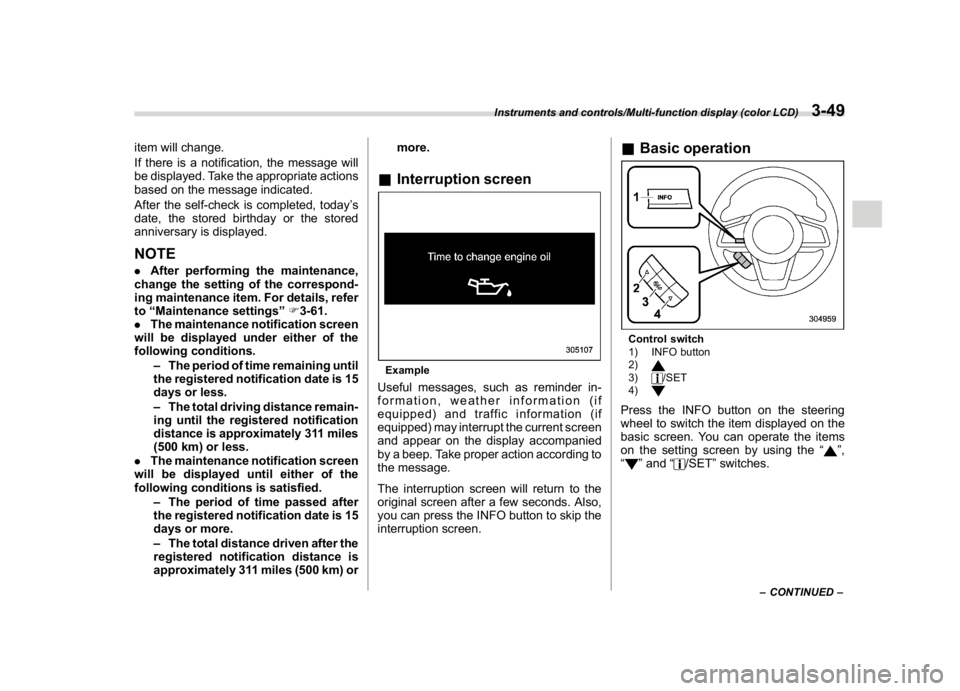
&Interruption screenExampleUseful messages, such as reminder in-
formation, weather information (if
equipped) and traffic information (if
equipped) may interrupt the current screen
and appear on the display accompanied
by a beep. Take proper action according to
the message.
The interruption screen will return to the
original screen after a few seconds. Also,
you can press the INFO button to skip the
interruption screen.
&Basic operationControl switch
1) INFO button
2)3)
/SET
4)
Press the INFO button on the steering
wheel to switch the item displayed on the
basic screen. You can operate the items
on the setting screen by using the“
”,
“
”and“
/SET”switches.
–CONTINUED–
Instruments and controls/Multi-function display (color LCD)
3-49
3
Page 192 of 474

(197,1)
北米Model "A1320BE-C" EDITED: 2017/ 10/ 10
!Date and time settings
You can set the date, time and 12h or 24h
format settings.
!Current date and time setting
For details about clock setting, refer to
“Clock”F3-63.
!Birthday setting
If a birthday or anniversary is approaching,
a message will be displayed when the
ignition switch is turned to the“ON”
position. This function can be set to on or
off. For details, refer to“Bypass screen
setting”F3-60.
1. Select“Birthday”from the 2nd menu in
the setting screen. Refer to“Setting
screen”F3-57.2. Select from the list the number that youwant to register.
3. Enter the date and the text by using the
control switches.
4. Select“Set”to exit settings. Select“Go
Back”to return to the previous screen
without applying the setting changes.NOTEYou can store a maximum of 5 birth-
days.
!Anniversary setting
1. The procedure for setting an anniver-
sary is the same as“Birthday setting”F3-
59, except that in step 1“Anniversary”is
selected.
NOTEYou can store a maximum of 5 anniver-
saries.
!Display/Beep settings
You can set the display settings and
volume settings.
!Screen OFF setting
1. Select“Screen Off”from the 2nd menu
in setting screen. Refer to“Setting screen”
F3-57.2. Select“Ye s”to turn off the screen.
Select“No”to return to the previous
screen.
Restoring the screen
When the INFO button is operated after
–CONTINUED–
Instruments and controls/Multi-function display (color LCD)
3-59
3
Page 194 of 474

(199,1)
北米Model "A1320BE-C" EDITED: 2017/ 10/ 10
without applying the setting changes.
!Maintenance settings
You can set maintenance reminders.
!Engine oil setting
1. Select“Engine Oil”from the 2nd menu
in the setting screen. Refer to“Setting
screen”F3-57.2. Set the date and distance of the
reminder by using the control switches.
3. Select“Set”to exit settings. Select
“Update”to change the notification dis-
tance to the default value. Select“Go
Back”to return to the previous screen
without applying the setting changes.
NOTE.The reminder will be displayed by
either date or distance in accordance
with the setting.
.Even when either“Day”or“Dis-
tance”are displayed as“__”a pop-up
screen will appear.
.The reminder will be displayed until
either of the following conditions is
satisfied.
–The period of time passed after
the registered notification date is 15
days or more.
–The total distance driven after the
registered notification distance is
approximately 311 miles (500 km) or
more.
!Oil filter setting
The setting procedure is the same as
“Engine oil setting”F3-61, but select the
“Oil Filter”item in step 1.
!Tires setting
The setting procedure is the same as
“Engine oil setting”F3-61, but select the
“Tires”item in step 1.
!Maintenance schedule setting
The setting procedure is the same as
“Engine oil setting”F3-61, but select the
“Maintenance Schedule”item in step 1.!On/Off setting
1. Select“On/Off”from the 2nd menu on
the setting screen. Refer to“Setting
screen”F3-57.
2. Select“On”or“Off”to turn the opening
screen on or off by using the control
switches.
3. Select“Set”to exit settings. Select“Go
Back”to return to the previous screen
without applying the setting changes.
!Clear setting
1. Select“Clear All Settings”from the 2nd
menu on the setting screen. Refer to
“Setting screen”F3-57.
–CONTINUED–
Instruments and controls/Multi-function display (color LCD)
3-61
3