change time SUBARU CROSSTREK 2018 Owners Manual
[x] Cancel search | Manufacturer: SUBARU, Model Year: 2018, Model line: CROSSTREK, Model: SUBARU CROSSTREK 2018Pages: 474, PDF Size: 20.76 MB
Page 21 of 474
(20,1)
北米Model "A1320BE-C" EDITED: 2017/ 10/ 10
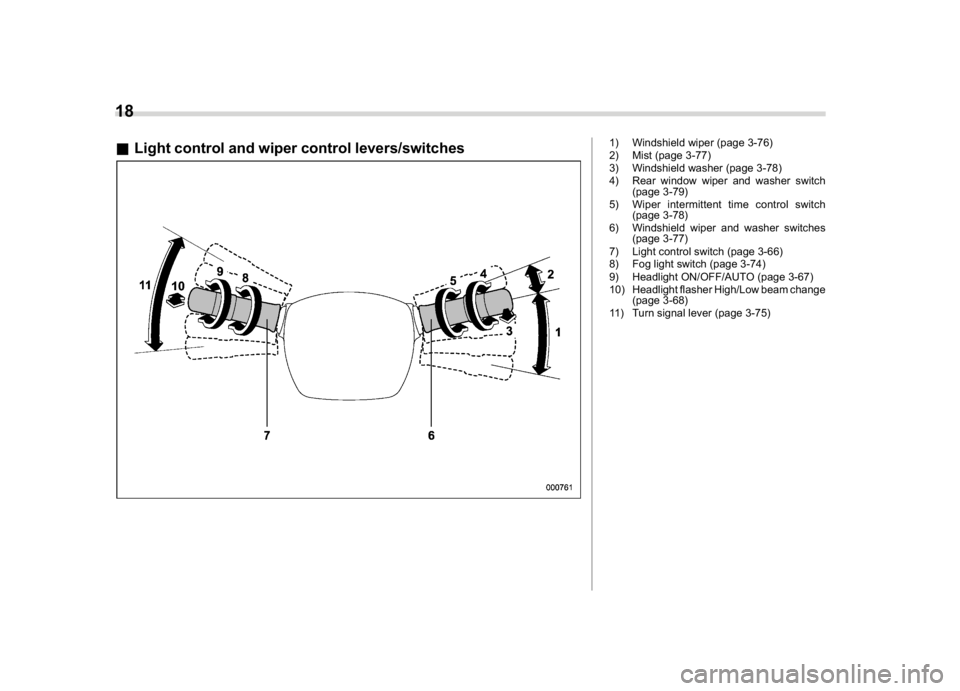
&Light control and wiper control levers/switches
1) Windshield wiper (page 3-76)
2) Mist (page 3-77)
3) Windshield washer (page 3-78)
4) Rear window wiper and washer switch
(page 3-79)
5) Wiper intermittent time control switch
(page 3-78)
6) Windshield wiper and washer switches
(page 3-77)
7) Light control switch (page 3-66)
8) Fog light switch (page 3-74)
9) Headlight ON/OFF/AUTO (page 3-67)
10) Headlight flasher High/Low beam change
(page 3-68)
11) Turn signal lever (page 3-75)
18
Page 28 of 474

(27,1)
北米Model "A1320BE-C" EDITED: 2017/ 10/ 10
Function settingsA SUBARU dealer can change the settings of the functions shown in the following table to meet your personal requirements. Contact the
nearest SUBARU dealer for details. If your vehicle is equipped with a combination meter display (color LCD)*, audio unit or navigation
unit*, the settings for some of these functions can be changed using the display. For details, refer to“Combination meter display (color
LCD)”F3-33.
*: if equippedItem Function Possible settings Default setting
Alarm system Alarm system Operation/Non-operation Operation
Monitoring start delay time (after
closure of doors)0 seconds/30 seconds 30 seconds
Dome light, cargo area light, and
map lights illuminationON/OFF OFF
Keyless Access (if equipped) Hazard warning flasher Operation/Non-operation Operation
Audible signal Operation/Non-operation Operation
Audible signal volume Level 1 to 7 Level 5
Door unlock selection function (dri-
ver’s door unlock)Driver’s door only/All doors Driver’s door only
Door unlock selection function (rear
gate unlock)Rear gate only/All doors Rear gate only
Remote keyless entry system Hazard warning flasher Operation/Non-operation Operation
Audible signal Operation/Non-operation Operation
Audible signal volume Level 1 to 7 Level 5
Key lock-in prevention Key lock-in prevention Operation/Non-operation Operation
Defogger and deicer system for
models with the automatic climate
control systemRear window defogger, outside mir-
ror defogger and windshield wiper
deicerOperation for 15 minutes/
Continuous operationOperation for 15 minutes
–CONTINUED–
25
0
Page 29 of 474

(28,1)
北米Model "A1320BE-C" EDITED: 2017/ 10/ 10
Item Function Possible settings Default setting
Dome light/Map lights/Cargo area
lightOperation of dome light/map light/
cargo area light OFF delay timerOFF/10 seconds/20 seconds/30
seconds30 seconds
Battery drainage prevention func-
tionBattery drainage prevention func-
tionOperation/Non-operation Operation
Seatbelt warning Sounds a chime while driving Operation/Non-operation Operation
Auto on/off headlights (if equipped) Sensitivity of the operation of the
auto on/off headlightsLow/Normal/High/Very high High
Auto-on/off wiper-linked headlights Operation/Non-operation Operation
Welcome lighting function (if
equipped)Welcome lighting function (when
approaching)OFF/30 seconds/60 seconds/90
seconds30 seconds
Welcome lighting function (when
exiting)OFF/30 seconds/60 seconds/90
seconds30 seconds
Reverse gear interlocked rear wiper Reverse gear interlocked rear wiper
operationOperation/Non-operation U.S.-spec. models: Non-operation
Other models: Operation
One-touch lane changer Operation of the one-touch lane
changerOperation/Non-operation Operation
Auto dimmer cancel (if equipped) Sensitivity of the operation of the
auto dimmer cancelOFF/Min/Low/Mid/Hi/Max Mid
High beam assist function (if
equipped)High beam assist function Operation/Non-operation Operation26
Page 58 of 474
(59,1)
北米Model "A1320BE-C" EDITED: 2017/ 10/ 10
seatback”F1-6.
2. Place the child restraint system in the
rear seating position.
3. Run the lap and shoulder belt through
or around the child restraint system follow-
ing the instructions provided by its manu-
facturer.
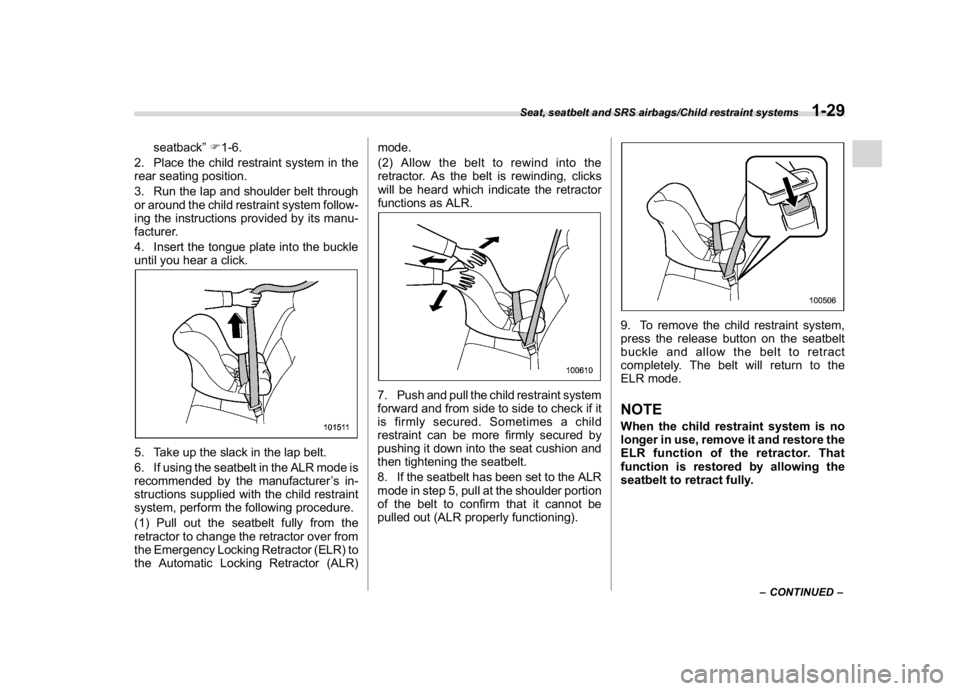
4. Insert the tongue plate into the buckle
until you hear a click.
5. Take up the slack in the lap belt.
6. If using the seatbelt in the ALR mode is
recommended by the manufacturer’s in-
structions supplied with the child restraint
system, perform the following procedure.
(1) Pull out the seatbelt fully from the
retractor to change the retractor over from
the Emergency Locking Retractor (ELR) to
the Automatic Locking Retractor (ALR)mode.
(2) Allow the belt to rewind into the
retractor. As the belt is rewinding, clicks
will be heard which indicate the retractor
functions as ALR.
7. Push and pull the child restraint system
forward and from side to side to check if it
is firmly secured. Sometimes a child
restraint can be more firmly secured by
pushing it down into the seat cushion and
then tightening the seatbelt.
8. If the seatbelt has been set to the ALR
mode in step 5, pull at the shoulder portion
of the belt to confirm that it cannot be
pulled out (ALR properly functioning).
9. To remove the child restraint system,
press the release button on the seatbelt
buckle and allow the belt to retract
completely. The belt will return to the
ELR mode.NOTEWhen the child restraint system is no
longer in use, remove it and restore the
ELR function of the retractor. That
function is restored by allowing the
seatbelt to retract fully.
–CONTINUED–
Seat, seatbelt and SRS airbags/Child restraint systems
1-29
1
Page 60 of 474
(61,1)
北米Model "A1320BE-C" EDITED: 2017/ 10/ 10
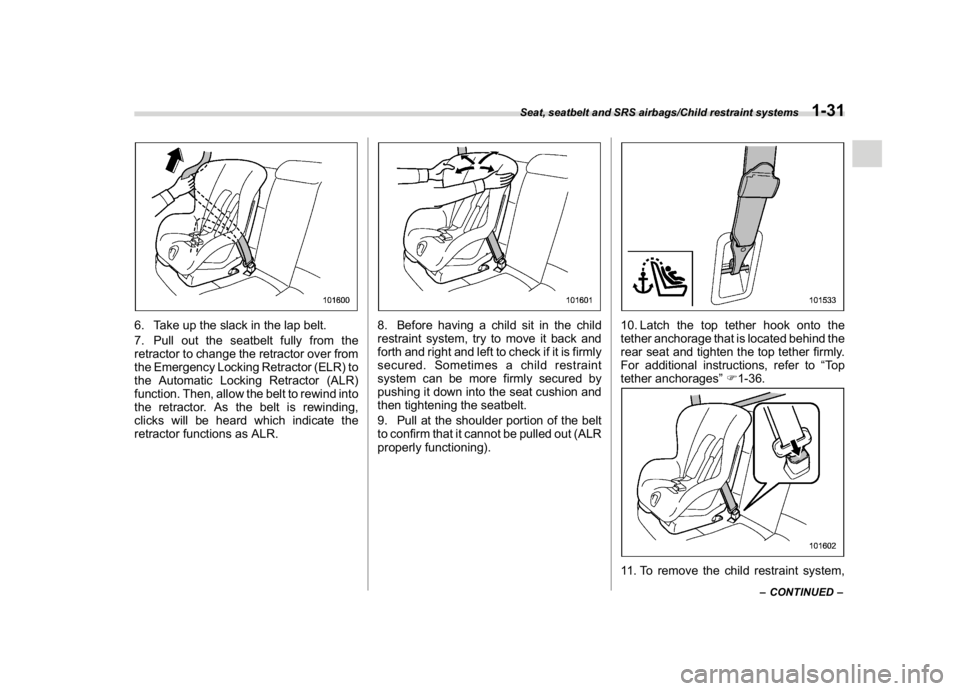
6. Take up the slack in the lap belt.
7. Pull out the seatbelt fully from the
retractor to change the retractor over from
the Emergency Locking Retractor (ELR) to
the Automatic Locking Retractor (ALR)
function. Then, allow the belt to rewind into
the retractor. As the belt is rewinding,
clicks will be heard which indicate the
retractor functions as ALR.
8. Before having a child sit in the child
restraint system, try to move it back and
forth and right and left to check if it is firmly
secured. Sometimes a child restraint
system can be more firmly secured by
pushing it down into the seat cushion and
then tightening the seatbelt.
9. Pull at the shoulder portion of the belt
to confirm that it cannot be pulled out (ALR
properly functioning).
10. Latch the top tether hook onto the
tether anchorage that is located behind the
rear seat and tighten the top tether firmly.
For additional instructions, refer to“To p
tether anchorages”F1-36.11. To remove the child restraint system,
–CONTINUED–
Seat, seatbelt and SRS airbags/Child restraint systems
1-31
1
Page 110 of 474

(113,1)
北米Model "A1320BE-C" EDITED: 2017/ 10/ 10
NOTE.Press the rear lock button ten times
to enter“0”.
.Change the PIN code frequently to
protect your vehicle from theft.
.If you have lent your vehicle to
another person, confirm that the PIN
code has not been changed or deleted.
If the PIN code has been changed or
deleted, reregister a new PIN code.
.If you make an error during the
registration procedure, press the“
”
or“
”button on the access key fob.
Then, start over from the procedure
described in“Preparation for register-
ing a PIN code”.
.To protect your vehicle from theft,
you cannot register a string of the same
five numbers together, such as
“00000”, nor“12345”as a PIN code.
.Do not register your vehicle license
plate number or simple numbers such
as“11122”or“12121”as a PIN code.
Doing so will increase the risk of
vehicle theft.
.When you try to register“22222”, the
registered PIN code will be deleted. You
cannot unlock the doors by PIN Code
Access until a new code is registered.
.After registering a new PIN code,
make sure that you can unlock the
doors using the PIN code..The PIN code cannot be deleted
while the keyless access function is
disabled by operating the access key
fob.
.Reregister the PIN code in the fol-
lowing case.
–when you forget the PIN code
–when you want to change the PIN
code
!Unlocking
Perform steps 1 to 5 described in“Regis-
tration for a PIN code”.
NOTE.You cannot unlock by PIN Code
Access in the following cases.
–when the access key fob is within
the operating ranges
–when the ignition switch is in the
“ACC”or“ON”position
.If you make an operation error dur-
ing the unlocking procedure, start over
with the unlocking procedure after
waiting for 5 seconds or longer.
.To protect your vehicle from theft, a
buzzer will sound if incorrect PIN codes
are entered five times continuously. If
this occurs, you cannot unlock the
doors by PIN Code Access for 5
minutes.
&Power saving functionThe keyless access function will be dis-
abled in the following cases to protect the
access key fob battery and the vehicle
battery.
.Case 1: When the keyless access
function and the remote keyless entry
system have not been used for 2 weeks
or longer while all doors are locked
Operate one of the following items to
recover the keyless access function:
–Unlock the doors by operating any
procedure other than gripping the front
passenger’s door handle
–Lock the doors
–Open a door and then close it
.Case 2: When the access key fob has
been left in the operating range for 10
minutes or longer while all doors are
locked
Operate one of the following items to
recover the keyless access function:
–Unlock the doors by gripping the
door handle
–Unlock the doors by pressing the
rear gate opener button
–Lock the doors by touching the door
lock sensor
–Lock or unlock the doors by using
–CONTINUED–
Keys and doors/Keyless access with push-button start system
2-11
2
Page 118 of 474
(121,1)
北米Model "A1320BE-C" EDITED: 2017/ 10/ 10
and the rear gate) is extremely short,
the system may not respond.&Unlocking the rear gatePress the rear gate unlock button to unlock
the rear gate.
An electronic chirp will sound twice and the
hazard warning flashers will flash twice.&Vehicle finder functionUse this function to find your vehicle
parked among many vehicles in a large
parking lot. Provided you are within 30 feet
(10 meters) of the vehicle, pressing the
lock/arm button three times in a 5-second
period will cause your vehicle’s horn to
sound once and its hazard warning
flashers to flash three times.NOTEIf the interval between presses is too
short when you press the lock/arm
button three times, the system may
not respond to the signals from the
remote transmitter.
&Sounding a panic alarmTo activate the alarm, press the“PANIC”
button once.
The horn will sound and the hazard
warning flashers will flash.
To deactivate the panic alarm, press any
button on the remote transmitter. Unless a
button on the remote transmitter is
pressed, the alarm will be deactivated
after approximately 30 seconds.&Setting audible signal opera-
tion (models without“keyless
access with push-button start
system”)Using an electronic chirp, the system will
give you an audible signal when the doors
lock and unlock. If desired, you may turn
the audible signal off.
Perform the following steps to deactivate
the audible signal. You can also use the
same steps to restore the function.
1. Sit in the driver’s seat and shut all
doors and the rear gate.
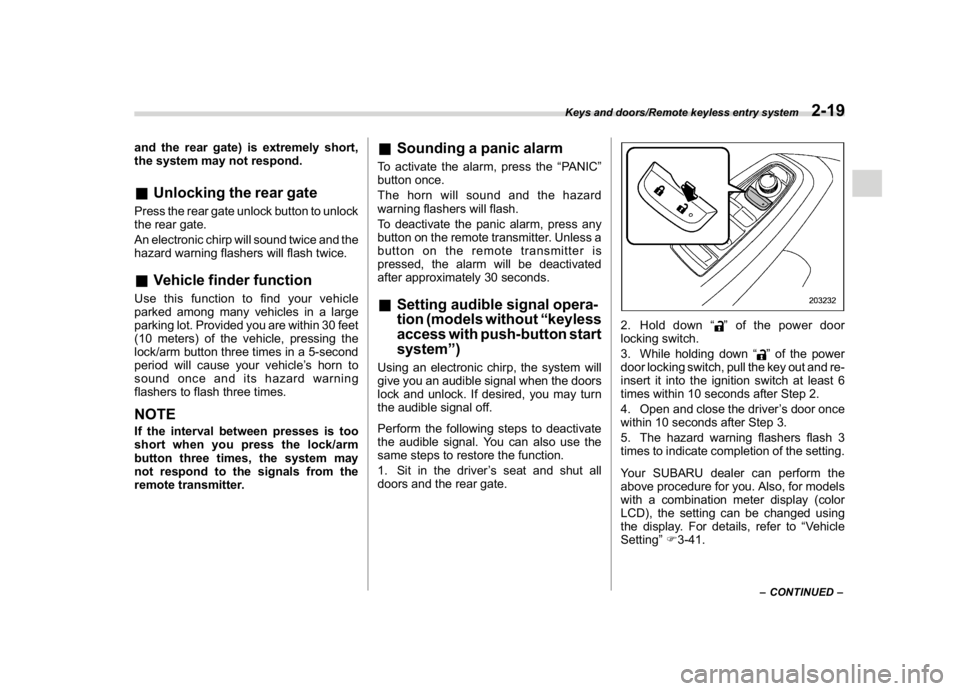
2. Hold down“
”of the power door
locking switch.
3. While holding down“
”of the power
door locking switch, pull the key out and re-
insert it into the ignition switch at least 6
times within 10 seconds after Step 2.
4. Open and close the driver’s door once
within 10 seconds after Step 3.
5. The hazard warning flashers flash 3
times to indicate completion of the setting.
Your SUBARU dealer can perform the
above procedure for you. Also, for models
with a combination meter display (color
LCD), the setting can be changed using
the display. For details, refer to“Vehicle
Setting”F3-41.–CONTINUED–
Keys and doors/Remote keyless entry system
2-19
2
Page 123 of 474

(126,1)
北米Model "A1320BE-C" EDITED: 2017/ 10/ 10
&Battery drainage prevention
functionIf a door or the rear gate is not completely
closed, the interior lights will remain
illuminated as a result. However, several
lights are automatically turned off by the
battery drainage prevention function to
prevent the battery from discharging. The
following interior lights are affected by this
function.
ItemSwitch
positionAutomatically turning
off
Map lights DOORApproximately 20
minutes later
Dome light DOORApproximately 20
minutes later
Ignition
switch light—Approximately 20
minutes later
Cargo area
lightDOORApproximately 20
minutes later
NOTE.The default setting for this function
is set as“operational”. The operational/
non-operational setting of this function
can be changed by a SUBARU dealer.
Contact your SUBARU dealer to
change the setting.
.When leaving the vehicle, please
make sure that all doors and the rear
gate are completely closed.
.The battery drainage prevention
function does not operate while the
key is in the ignition switch.
Alarm systemThe alarm system helps to protect your
vehicle and valuables from theft. The horn
sounds and the hazard warning flashers
flash if someone attempts to break into
your vehicle.
For models with“keyless access with
push-button start system”:
The system can be armed or disarmed
with the keyless access function or access
key fob.
The system will not be activated when the
push-button ignition switch is in the“ACC”
or“ON”position.
For models without“keyless access
with push-button start system”:
The system can be armed or disarmed
with the remote transmitter.
The system will not be activated when the
key is inserted into the ignition switch.
Your vehicle’s alarm system has been set
for activation at the time of shipment from
the factory. You can set the system for
deactivation yourself or have it done by
your SUBARU dealer.
Keys and doors/Alarm system
2-24
Page 125 of 474

(128,1)
北米Model "A1320BE-C" EDITED: 2017/ 10/ 10
NOTE.The system can be armed even if the
engine hood, windows and/or moon-
roof are open. Always make sure that
they are fully closed before arming the
system.
.When arming the system, if any of
the doors or the rear gate is not fully
closed, an electronic chirp sounds five
times, the hazard warning flashers
flash five times to alert you that the
doors (or the rear gate) are not properly
closed. When you close the door, doors
will automatically lock and the system
will automatically arm in 30 seconds.
.The 30-second standby time can be
eliminated if you prefer. Have it per-
formed by your SUBARU dealer.
.If any of the following actions is
done during the standby period, the
system will not switch to the surveil-
lance state.
–Doors (including the rear gate)
are unlocked using the access key
fob/remote transmitter.
–Doors (including the rear gate)
are unlocked using the keyless
access function (models with“key-
less access with push-button start
system”).
–Any door (including the rear gate)
is opened.–The ignition switch is turned to
the“ON”position (models without
“keyless access with push-button
start system”).
–Push-button ignition switch is
turned to the“ACC”position (mod-
els with“keyless access with push-
button start system”).
&Disarming the systemPerform either of the following procedures.
.Briefly press a button (for less than 2
seconds) on the access key fob/remote
transmitter.
.Carry the access key fob and perform
either of the following procedures (models
with“keyless access with push-button
start system”).
–Grip the front door handle.
–Press the rear gate opener button.
–Unlock using the PIN code access.
The flashing of the security indicator light
will then change slowly (once approxi-
mately every 3 seconds from twice ap-
proximately every 2 seconds), indicating
that the alarm system has been disarmed.
!Emergency disarming
If you cannot disarm the system using the
access key fob/transmitter (i.e. the trans-
mitter is lost, broken or the transmitterbattery is too weak), you can disarm the
system without using the access key fob/
remote transmitter.
The system can be disarmed if you turn the
ignition switch from the“LOCK”/“OFF”to
the“ON”position with a registered key/
access key fob.
NOTEFor models with“keyless access with
push-button start system”, if the ac-
cess key fob battery is discharged,
perform the procedure described in
“Switching power status”F9-17. In
such a case, replace the battery im-
mediately. Refer to“Replacing battery
of access key fob”F11-43.&Alarm system settingTo change the setting of your vehicle’s
alarm system for activation or deactiva-
tion, do the following.
1. Disarm the alarm system. Refer to
“Disarming the system”F2-26.
2. Sit in the driver’s seat and shut all
doors and the rear gate.
3. Turn the ignition switch to the“ON”
position.
4. Hold down“
”of the driver’s power
door locking switch, open the driver’s door
within the following 1 second, and wait 10
Keys and doors/Alarm system
2-26
Page 135 of 474

(140,1)
北米Model "A1320BE-C" EDITED: 2017/ 10/ 10
Cruise control indicator light (if equipped).............3-31
Cruise control set indicator light (if equipped).......3-31
Automatic headlight beam leveler warning light
(models with LED headlights)..............................3-31
LED headlight warning light (models with LED
headlights)..........................................................3-31
Steering Responsive Headlight warning light/
Steering Responsive Headlight OFF indicator
light (if equipped)................................................3-31
Front fog light indicator light (if equipped) ............3-31
Headlight indicator light (if equipped)....................3-31
Steering responsive fog lights warning indicator/
Steering responsive fog lights OFF indicator
(if equipped).......................................................3-31
X-mode indicator (if equipped)..............................3-32
Hill descent control indicator (if equipped) ............3-32
BSD/RCTA warning indicator (if equipped).............3-32
BSD/RCTA OFF indicator (if equipped)..................3-32
RAB warning indicator (if equipped)......................3-32
RAB OFF indicator light (if equipped)....................3-32
Icy road surface warning indicator (if equipped)....3-32
Combination meter display (color LCD)
(if equipped).......................................................3-33
Basic operation.....................................................3-34
Welcome screen and Good-bye screen..................3-34
Warning screen.....................................................3-35
Telltale screen.......................................................3-35
Basic screens.......................................................3-36
Menu screens.......................................................3-38
Multi-function display (black andwhite).............3-42
Driving information display...................................3-43
Outside temperature indicator...............................3-46X-mode indicator (if equipped)..............................3-47
Clock....................................................................3-47
Multi-function display (color LCD)
(if equipped).......................................................3-47
Features...............................................................3-48
Welcome screen...................................................3-48
Self-check screen.................................................3-48
Interruption screen...............................................3-49
Basic operation....................................................3-49
Basic screens.......................................................3-50
Setting screen......................................................3-57
How to get the source code using the open
source...............................................................3-62
Clock......................................................................3-63
Setting the clock manually....................................3-63
Setting the clock automatically.............................3-66
Regulatory information.........................................3-66
Light control switch.............................................3-66
Precautions and tips.............................................3-66
Headlights............................................................3-67
High/low beam change (dimmer) ...........................3-68
Headlight flasher..................................................3-69
High beam assist function (if equipped)................3-69
Daytime running light system...............................3-72
Steering Responsive Headlight (SRH)
(if equipped).......................................................3-72
Headlight beam leveler
(models with LEDheadlights)..........................3-73
Fog light switch (ifequipped)..............................3-74
Steering responsive fog lights system
(if equipped)......................................................3-74
Instruments and controls