warning light SUBARU CROSSTREK 2018 Owner's Manual
[x] Cancel search | Manufacturer: SUBARU, Model Year: 2018, Model line: CROSSTREK, Model: SUBARU CROSSTREK 2018Pages: 474, PDF Size: 20.76 MB
Page 79 of 474
(80,1)
北米Model "A1320BE-C" EDITED: 2017/ 10/ 10
case, contact your SUBARU dealer
immediately.
CAUTION
Electrical devices, such as cell
phones, laptops, portable music
players, or electronic games, espe-
cially when connected to the acces-
sory power outlet and placed on the
front passenger’s seat or used by
the person sitting in the front pas-
senger’s seat, may affect the opera-
tion of the occupant detection sys-
tem. If either of the following situa-
tions occurs when using an electro-
nic device in the vehicle, at first try
to relocate that device to avoid it
creating any interference.
.The SRS airbag system warning
light illuminates.
.The front passenger’s frontal air-
bag ON and OFF indicators oper-
ate erratically.
If the device continues to cause
interference, the use of that device
in the vehicle should be discontin-
ued.
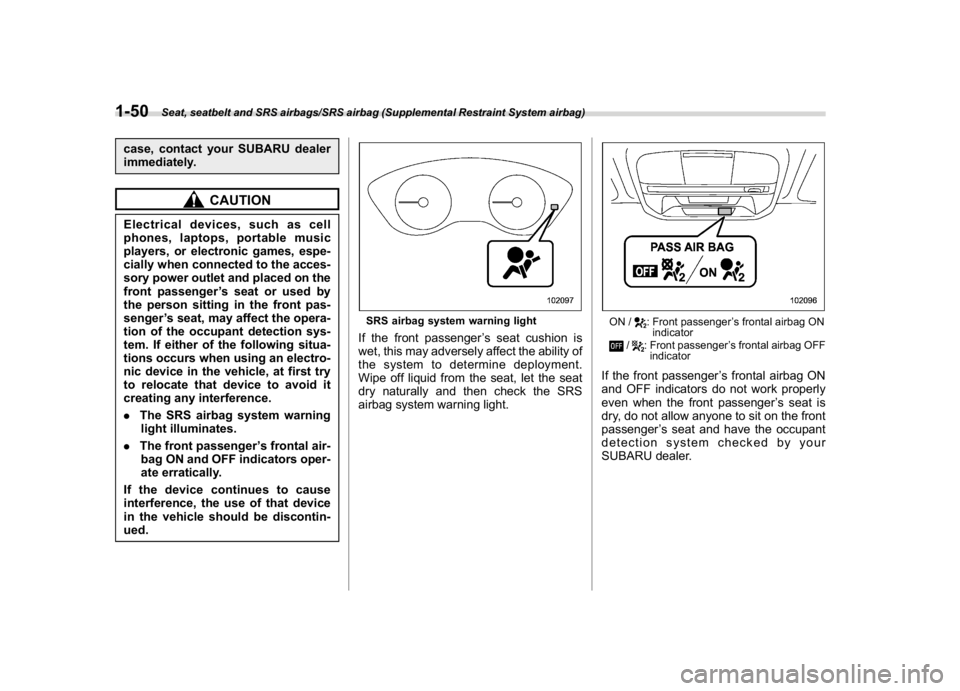
SRS airbag system warning lightIf the front passenger’s seat cushion is
wet, this may adversely affect the ability of
the system to determine deployment.
Wipe off liquid from the seat, let the seat
dry naturally and then check the SRS
airbag system warning light.
ON /
: Front passenger’s frontal airbag ON
indicator
/
: Front passenger’s frontal airbag OFF
indicator
If the front passenger’s frontal airbag ON
and OFF indicators do not work properly
even when the front passenger’s seat is
dry, do not allow anyone to sit on the front
passenger’s seat and have the occupant
detection system checked by your
SUBARU dealer.
Seat, seatbelt and SRS airbags/SRS airbag (Supplemental Restraint System airbag)
1-50
Page 95 of 474
(96,1)
北米Model "A1320BE-C" EDITED: 2017/ 10/ 10
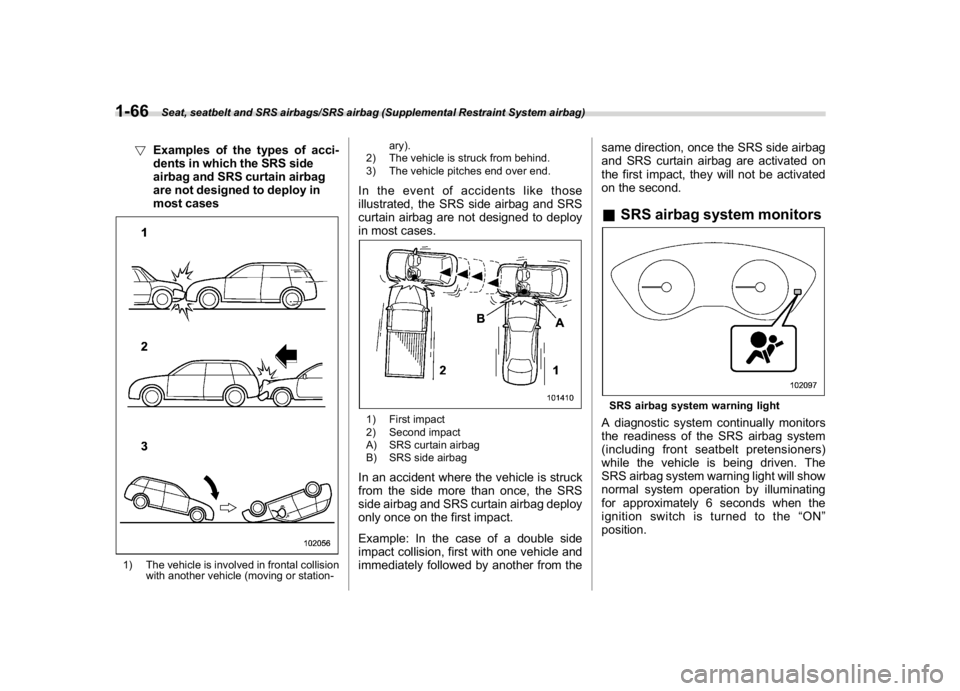
!Examples of the types of acci-
dents in which the SRS side
airbag and SRS curtain airbag
are not designed to deploy in
most cases1) The vehicle is involved in frontal collision
with another vehicle (moving or station-ary).
2) The vehicle is struck from behind.
3) The vehicle pitches end over end.
In the event of accidents like those
illustrated, the SRS side airbag and SRS
curtain airbag are not designed to deploy
in most cases.1) First impact
2) Second impact
A) SRS curtain airbag
B) SRS side airbagIn an accident where the vehicle is struck
from the side more than once, the SRS
side airbag and SRS curtain airbag deploy
only once on the first impact.
Example: In the case of a double side
impact collision, first with one vehicle and
immediately followed by another from thesame direction, once the SRS side airbag
and SRS curtain airbag are activated on
the first impact, they will not be activated
on the second.
&SRS airbag system monitorsSRS airbag system warning lightA diagnostic system continually monitors
the readiness of the SRS airbag system
(including front seatbelt pretensioners)
while the vehicle is being driven. The
SRS airbag system warning light will show
normal system operation by illuminating
for approximately 6 seconds when the
ignition switch is turned to the“ON”
position.
Seat, seatbelt and SRS airbags/SRS airbag (Supplemental Restraint System airbag)
1-66
Page 96 of 474
(97,1)
北米Model "A1320BE-C" EDITED: 2017/ 10/ 10
The following components are monitored
by the indicator:
.Front sub sensor
.Airbag control module (including im-
pact sensor and rollover sensor)
.Frontal airbag module
–Driver’s side
–Front passenger’s side
.Knee airbag module (driver’s side)
.Side airbag sensor
.Front door impact sensor
.Side airbag module
.Curtain airbag sensor
.Curtain airbag module
.Satellite safing sensor (under the rear
center seat)
.Seatbelt pretensioner (driver’s side)
.Seatbelt pretensioner and adaptive
force limiter (front passenger’s side)
.Lap belt pretensioner (front passen-
ger’s side)
.Seatbelt buckle switch (front passen-
ger’s side)
.Front passenger’s occupant detection
system sensor
.Front passenger’s occupant detection
control module
.Front passenger’s frontal airbag ON
and OFF indicator
.All related wiring
WARNING
If the warning light exhibits any of
the following conditions, there may
be a malfunction in the seatbelt
pretensioners and/or SRS airbag
system.
.Flashing or flickering of the warn-
ing light
.No illumination of the warning
light when the ignition switch is
first turned to the“ON”position
.Continuous illumination of the
warning light
.Illumination of the warning light
while driving
Immediately take your vehicle to
your nearest SUBARU dealer to
have the system checked. Unless
checked and properly repaired, the
seatbelt pretensioners and/or SRS
airbag will not operate properly in
the event of a collision, which may
increase the risk of injury.
&SRS airbag system servicing
WARNING
.When discarding an airbag mod-
ule or scrapping the entire vehi-
cle damaged by a collision, con-
sult your SUBARU dealer.
.The SRS airbag has no user-
serviceable parts. Do not use
electrical test equipment on any
circuit related to the SRS airbag
system. For required servicing of
the SRS airbag, consult your
nearest SUBARU dealer. Tamper-
ingwithordisconnectingthe
system’s wiring could result in
accidental inflation of the SRS
airbag or could make the system
inoperative, which may result in
serious injury.
CAUTION
If you need service or repair in areas
indicated in the following list, have
the work performed by an author-
ized SUBARU dealer. The SRS air-
bag control module, impact sensors
and airbag modules are stored in
these areas.
–CONTINUED–
Seat, seatbelt and SRS airbags/SRS airbag (Supplemental Restraint System airbag)
1-67
1
Page 100 of 474

(103,1)
北米Model "A1320BE-C" EDITED: 2017/ 10/ 10
Keys.........................................................................2-2
Key number plate................................................... 2-2
Keyless access with push-button start system
(if equipped).........................................................2-2
Safety precautions................................................. 2-3
Locking and unlocking by holding the access
key fob ................................................................ 2-6
Unlock using PIN Code Access.............................2-10
Power saving function.......................................... 2-11
Power saving function of access key fob..............2-12
Disabling keyless access function.........................2-12
Selecting audible signal operation.........................2-13
Warning chimes and warning indicator..................2-13
When access key fob does not operate properly ... 2-14
Replacing battery of access key fob......................2-14
Replacing access key fob.....................................2-14
Certification for keyless access with push-
button start system.............................................2-14
Immobilizer............................................................2-15
Security indicator light..........................................2-15
Key replacement...................................................2-15
Certification for immobilizer system......................2-16
Remote keyless entrysystem..............................2-17
Locking the doors.................................................2-18
Unlocking the doors..............................................2-18
Unlocking the rear gate.........................................2-19
Vehicle finder function..........................................2-19
Sounding a panic alarm........................................2-19
Setting audible signal operation
(models without“keyless access with push-
button start system”) ..........................................2-19Replacing the battery............................................2-20
Replacing lost transmitters...................................2-20
Certification for remote keyless entry system........2-20
Door locks.............................................................2-21
Locking and unlocking from the outside...............2-21
Locking and unlocking from the inside.................2-22
Key lock-in prevention function............................2-23
Battery drainage prevention function....................2-24
Alarm system........................................................2-24
Alarm system operation........................................2-25
Arming the system...............................................2-25
Disarming the system...........................................2-26
Alarm system setting............................................2-26
If you have accidentally triggered the alarm
system..............................................................2-27
Valet mode...........................................................2-27
Child safety locks.................................................2-28
Windows................................................................2-28
Power window operation.......................................2-28
Initialization of power window with one-touch
auto up/down function.......................................2-30
Rear gate...............................................................2-31
Lock/unlock..........................................................2-31
Open/close...........................................................2-31
Moonroof (if equipped).........................................2-32
Moonroof switches...............................................2-33
Sunshade.............................................................2-34
Keys and doors
2
Page 123 of 474

(126,1)
北米Model "A1320BE-C" EDITED: 2017/ 10/ 10
&Battery drainage prevention
functionIf a door or the rear gate is not completely
closed, the interior lights will remain
illuminated as a result. However, several
lights are automatically turned off by the
battery drainage prevention function to
prevent the battery from discharging. The
following interior lights are affected by this
function.
ItemSwitch
positionAutomatically turning
off
Map lights DOORApproximately 20
minutes later
Dome light DOORApproximately 20
minutes later
Ignition
switch light—Approximately 20
minutes later
Cargo area
lightDOORApproximately 20
minutes later
NOTE.The default setting for this function
is set as“operational”. The operational/
non-operational setting of this function
can be changed by a SUBARU dealer.
Contact your SUBARU dealer to
change the setting.
.When leaving the vehicle, please
make sure that all doors and the rear
gate are completely closed.
.The battery drainage prevention
function does not operate while the
key is in the ignition switch.
Alarm systemThe alarm system helps to protect your
vehicle and valuables from theft. The horn
sounds and the hazard warning flashers
flash if someone attempts to break into
your vehicle.
For models with“keyless access with
push-button start system”:
The system can be armed or disarmed
with the keyless access function or access
key fob.
The system will not be activated when the
push-button ignition switch is in the“ACC”
or“ON”position.
For models without“keyless access
with push-button start system”:
The system can be armed or disarmed
with the remote transmitter.
The system will not be activated when the
key is inserted into the ignition switch.
Your vehicle’s alarm system has been set
for activation at the time of shipment from
the factory. You can set the system for
deactivation yourself or have it done by
your SUBARU dealer.
Keys and doors/Alarm system
2-24
Page 124 of 474
(127,1)
北米Model "A1320BE-C" EDITED: 2017/ 10/ 10
&Alarm system operationWhen the alarm system is armed, it is
triggered by the opening any of the doors
or the rear gate.
The alarm system will activate the follow-
ing alarms when triggered.
.The vehicle’s horn will sound for 30
seconds.
.The hazard warning flashers will flash
for 30 seconds.
If any of the doors or the rear gate remains
open after the 30-second period, the horn
will continue to sound for a maximum of 3
minutes. If the door or the rear gate is
closed while the horn is sounding, the horn
will stop sounding with a delay of up to 30
seconds.NOTEThe alarm system can be set to trigger
the illumination of the following interior
lights.
.Map lights (illuminates only when
the door interlock switch is in the
“DOOR”position)
.Dome light (illuminates only when
the dome light switch is in the“DOOR”
position)
.Cargo area light (illuminates only
when the cargo area light switch is in
the“DOOR”position)The notifications regarding the map
lights, dome light and cargo area light
are deactivated as the factory setting. A
SUBARU dealer can activate the sys-
tem. Contact your SUBARU dealer for
details.
&Arming the systemThe alarm system becomes armed when
the following operation is performed.
1. Close all windows and the moonroof (if
equipped) and turn the ignition switch to
the“OFF”position.
2. Carry the key and get out of the
vehicle.
3. Lock the doors using any of the
following methods.
.Locking using the remote keyless
entry system. For details, refer to
“Remote keyless entry system”F2-17.
.Locking using the keyless access
function (if equipped). For details, refer
to“Locking with the door lock sensor”
F2-8.
.Locking using the power door lock-
ing switch. For details, refer to“Locking
using power door locking switch”F2-
22.
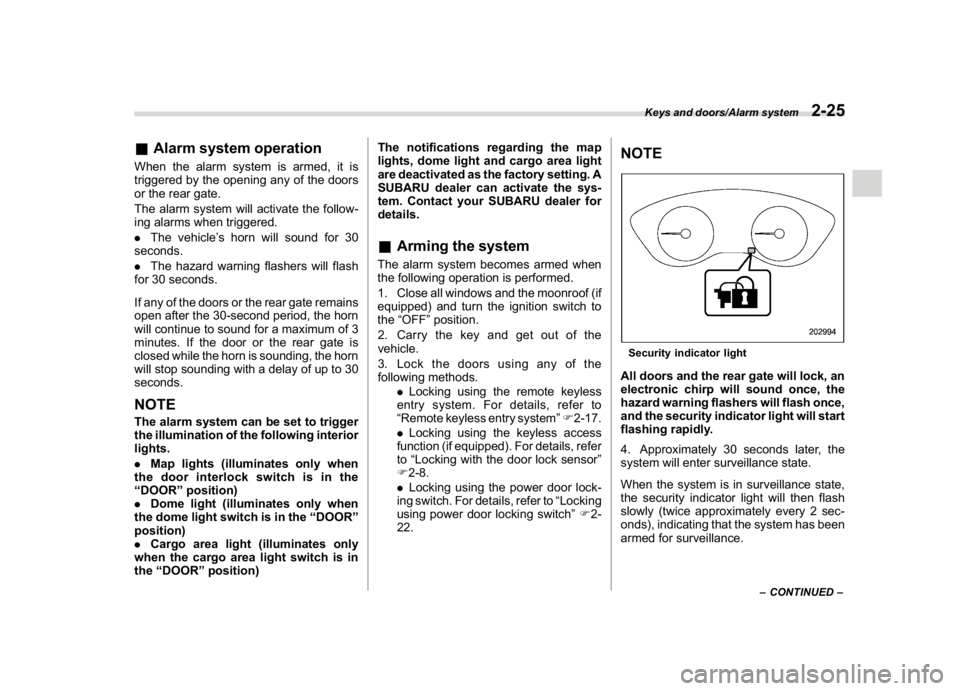
NOTESecurity indicator lightAll doors and the rear gate will lock, an
electronic chirp will sound once, the
hazard warning flashers will flash once,
and the security indicator light will start
flashing rapidly.
4. Approximately 30 seconds later, the
system will enter surveillance state.
When the system is in surveillance state,
the security indicator light will then flash
slowly (twice approximately every 2 sec-
onds), indicating that the system has been
armed for surveillance.
–CONTINUED–
Keys and doors/Alarm system
2-25
2
Page 125 of 474

(128,1)
北米Model "A1320BE-C" EDITED: 2017/ 10/ 10
NOTE.The system can be armed even if the
engine hood, windows and/or moon-
roof are open. Always make sure that
they are fully closed before arming the
system.
.When arming the system, if any of
the doors or the rear gate is not fully
closed, an electronic chirp sounds five
times, the hazard warning flashers
flash five times to alert you that the
doors (or the rear gate) are not properly
closed. When you close the door, doors
will automatically lock and the system
will automatically arm in 30 seconds.
.The 30-second standby time can be
eliminated if you prefer. Have it per-
formed by your SUBARU dealer.
.If any of the following actions is
done during the standby period, the
system will not switch to the surveil-
lance state.
–Doors (including the rear gate)
are unlocked using the access key
fob/remote transmitter.
–Doors (including the rear gate)
are unlocked using the keyless
access function (models with“key-
less access with push-button start
system”).
–Any door (including the rear gate)
is opened.–The ignition switch is turned to
the“ON”position (models without
“keyless access with push-button
start system”).
–Push-button ignition switch is
turned to the“ACC”position (mod-
els with“keyless access with push-
button start system”).
&Disarming the systemPerform either of the following procedures.
.Briefly press a button (for less than 2
seconds) on the access key fob/remote
transmitter.
.Carry the access key fob and perform
either of the following procedures (models
with“keyless access with push-button
start system”).
–Grip the front door handle.
–Press the rear gate opener button.
–Unlock using the PIN code access.
The flashing of the security indicator light
will then change slowly (once approxi-
mately every 3 seconds from twice ap-
proximately every 2 seconds), indicating
that the alarm system has been disarmed.
!Emergency disarming
If you cannot disarm the system using the
access key fob/transmitter (i.e. the trans-
mitter is lost, broken or the transmitterbattery is too weak), you can disarm the
system without using the access key fob/
remote transmitter.
The system can be disarmed if you turn the
ignition switch from the“LOCK”/“OFF”to
the“ON”position with a registered key/
access key fob.
NOTEFor models with“keyless access with
push-button start system”, if the ac-
cess key fob battery is discharged,
perform the procedure described in
“Switching power status”F9-17. In
such a case, replace the battery im-
mediately. Refer to“Replacing battery
of access key fob”F11-43.&Alarm system settingTo change the setting of your vehicle’s
alarm system for activation or deactiva-
tion, do the following.
1. Disarm the alarm system. Refer to
“Disarming the system”F2-26.
2. Sit in the driver’s seat and shut all
doors and the rear gate.
3. Turn the ignition switch to the“ON”
position.
4. Hold down“
”of the driver’s power
door locking switch, open the driver’s door
within the following 1 second, and wait 10
Keys and doors/Alarm system
2-26
Page 134 of 474

(139,1)
北米Model "A1320BE-C" EDITED: 2017/ 10/ 10
Ignition switch (models without“keyless
access with push-button start system”) ............ 3-4
Key positions......................................................... 3-4
Key reminder chime............................................... 3-5
Ignition switch light (if equipped)........................... 3-5
Push-button ignition switch (models with
“keyless access with push-button start
system”) ............................................................... 3-6
Safety precautions................................................. 3-6
Operating range for push-button start system........ 3-6
Switching power status.......................................... 3-7
When access key fob does not operate properly.... 3-8
Hazard warning flasher..........................................3-8
Meters and gauges.................................................3-8
Speedometer......................................................... 3-8
Tachometer............................................................ 3-8
Odometer............................................................... 3-9
Double trip meter................................................... 3-9
Fuel gauge............................................................3-10
ECO gauge (if equipped).......................................3-10
Combination meter settings.................................. 3-11
Illumination brightness control............................3-12
Auto dimmer cancel function (if equipped)............3-12
Warning andindicator..........................................3-12
Initial illumination for system check......................3-12
Seatbelt warning light and chime..........................3-13
SRS airbag system warning light...........................3-15
Front passenger’s frontal airbag ON and OFF
indicators...........................................................3-15
CHECK ENGINE warning light/Malfunction
indicator light.....................................................3-15Coolant temperature low indicator light/Coolant
temperature high warning light..........................3-16
Charge warning light............................................3-17
Oil pressure warning light.....................................3-17
Engine low oil level warning light..........................3-18
Windshield washer fluid warning light...................3-18
AT OIL TEMP warning light (CVT models)..............3-18
Low tire pressure warning light
(U.S.-spec. models)............................................3-18
ABS warning light.................................................3-20
Brake system warning light (red)..........................3-21
Low fuel warning light..........................................3-22
Hill start assist warning light/Hill start assist
OFF indicator light.............................................3-22
Door open warning light.......................................3-22
All-Wheel Drive warning light (CVT models)..........3-22
Power steering warning light ................................3-23
Vehicle Dynamics Control warning light/Vehicle
Dynamics Control operation indicator light........3-23
Vehicle Dynamics Control OFF indicator light.......3-24
Warning chimes and warning indicator of the
keyless access with push-button start system
(if equipped)......................................................3-25
Security indicator light..........................................3-29
Select lever/gear position indicator
(CVT models).....................................................3-30
Turn signal indicator lights...................................3-30
High beam indicator light......................................3-30
High beam assist indicator light (green)
(if equipped)......................................................3-30
High beam assist warning indicator (yellow)
(if equipped)......................................................3-30
Instruments and controls
3
Page 135 of 474

(140,1)
北米Model "A1320BE-C" EDITED: 2017/ 10/ 10
Cruise control indicator light (if equipped).............3-31
Cruise control set indicator light (if equipped).......3-31
Automatic headlight beam leveler warning light
(models with LED headlights)..............................3-31
LED headlight warning light (models with LED
headlights)..........................................................3-31
Steering Responsive Headlight warning light/
Steering Responsive Headlight OFF indicator
light (if equipped)................................................3-31
Front fog light indicator light (if equipped) ............3-31
Headlight indicator light (if equipped)....................3-31
Steering responsive fog lights warning indicator/
Steering responsive fog lights OFF indicator
(if equipped).......................................................3-31
X-mode indicator (if equipped)..............................3-32
Hill descent control indicator (if equipped) ............3-32
BSD/RCTA warning indicator (if equipped).............3-32
BSD/RCTA OFF indicator (if equipped)..................3-32
RAB warning indicator (if equipped)......................3-32
RAB OFF indicator light (if equipped)....................3-32
Icy road surface warning indicator (if equipped)....3-32
Combination meter display (color LCD)
(if equipped).......................................................3-33
Basic operation.....................................................3-34
Welcome screen and Good-bye screen..................3-34
Warning screen.....................................................3-35
Telltale screen.......................................................3-35
Basic screens.......................................................3-36
Menu screens.......................................................3-38
Multi-function display (black andwhite).............3-42
Driving information display...................................3-43
Outside temperature indicator...............................3-46X-mode indicator (if equipped)..............................3-47
Clock....................................................................3-47
Multi-function display (color LCD)
(if equipped).......................................................3-47
Features...............................................................3-48
Welcome screen...................................................3-48
Self-check screen.................................................3-48
Interruption screen...............................................3-49
Basic operation....................................................3-49
Basic screens.......................................................3-50
Setting screen......................................................3-57
How to get the source code using the open
source...............................................................3-62
Clock......................................................................3-63
Setting the clock manually....................................3-63
Setting the clock automatically.............................3-66
Regulatory information.........................................3-66
Light control switch.............................................3-66
Precautions and tips.............................................3-66
Headlights............................................................3-67
High/low beam change (dimmer) ...........................3-68
Headlight flasher..................................................3-69
High beam assist function (if equipped)................3-69
Daytime running light system...............................3-72
Steering Responsive Headlight (SRH)
(if equipped).......................................................3-72
Headlight beam leveler
(models with LEDheadlights)..........................3-73
Fog light switch (ifequipped)..............................3-74
Steering responsive fog lights system
(if equipped)......................................................3-74
Instruments and controls
Page 137 of 474
(142,1)
北米Model "A1320BE-C" EDITED: 2017/ 10/ 10
Ignition switch (models with-
out“keyless access with
push-button start system”)
WARNING
.Never turn the ignition switch to
the“LOCK”position while the
vehicle is being driven or towed
because that will lock the steer-
ing wheel, preventing steering
control. And when the engine is
turned off, it takes a much greater
effort than usual to steer.
.Before leaving the vehicle, al-
ways remove the key from the
ignition switch for safety and
never allow an unattended child
to remain in the vehicle. Failure to
follow this procedure could re-
sult in injury to a child or others.
Children could operate the power
windows, the moonroof or other
controls or even make the vehicle
move.
CAUTION
Do not attach a large key holder or
key case to either key. If it banged
against your knees or hands while
you are driving, it could turn the
ignition switch from the“ON”posi-
tion to the“ACC”or“LOCK”posi-
tion, thereby stopping the engine.
Also, if the key is attached to a key
holder or to a large bunch of other
keys, centrifugal force may act on it
as the vehicle moves, resulting in
unwanted turning of the ignition
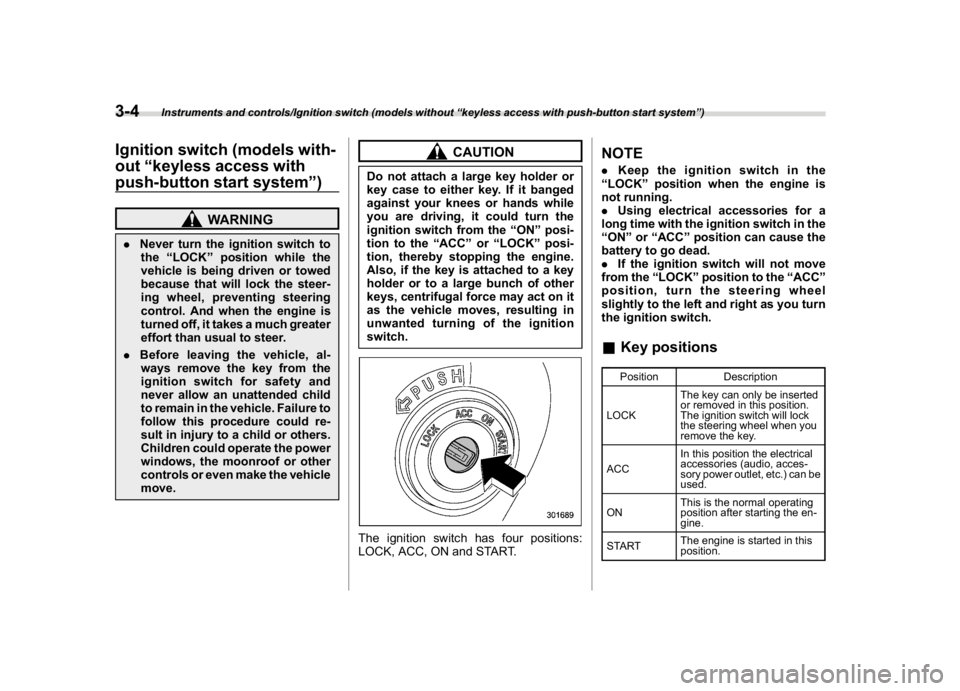
switch.The ignition switch has four positions:
LOCK, ACC, ON and START.
NOTE.Keep the ignition switch in the
“LOCK”position when the engine is
not running.
.Using electrical accessories for a
long time with the ignition switch in the
“ON”or“ACC”position can cause the
battery to go dead.
.If the ignition switch will not move
from the“LOCK”position to the“ACC”
position, turn the steering wheel
slightly to the left and right as you turn
the ignition switch.&Key positions
Position Description
LOCKThe key can only be inserted
or removed in this position.
The ignition switch will lock
the steering wheel when you
remove the key.
ACCIn this position the electrical
accessories (audio, acces-
sory power outlet, etc.) can be
used.
ONThis is the normal operating
position after starting the en-
gine.
STARTThe engine is started in this
position.
Instruments and controls/Ignition switch (models without“keyless access with push-button start system”)
3-4